steering wheel MERCEDES-BENZ A CLASS 2012 Service Manual
[x] Cancel search | Manufacturer: MERCEDES-BENZ, Model Year: 2012, Model line: A CLASS, Model: MERCEDES-BENZ A CLASS 2012Pages: 356, PDF Size: 4.96 MB
Page 194 of 356
function; see the separate COMAND Online
operating instructions.
or
X Select symbol ; for the coupling up a
trailer
function (see the separate COMAND
Online operating instructions).
The symbol of the selected function is high-
lighted.
To deactivate:
the reversing camera is deac-
tivated if you:
R select transmission position P (vehicles
with automatic transmission)
R drive forward ten metres
R for vehicles with an automatic transmis-
sion, shift the transmission from R to
another position after 15 seconds
R shift out of reverse gear (vehicles with man-
ual transmission) after 15 seconds
R drive forwards at a speed of over
10 km/h
Displays in the Audio/COMAND display The reversing camera may show a distorted
view of obstacles, show them incorrectly or
not at all. Obstacles are not shown by the
reversing camera in the following locations:
R
very close to the rear bumper
R under the rear bumper
R in the area immediately above the tailgate
handle
! Objects
not at ground level may appear to
be further away than they actually are, e.g.:
R the bumper of a parked vehicle
R the drawbar of a trailer
R the ball coupling of a trailer tow hitch
R the rear section of an HGV
R a slanted post
Use the guidelines only for orientation.
Approach objects no further than the bot-
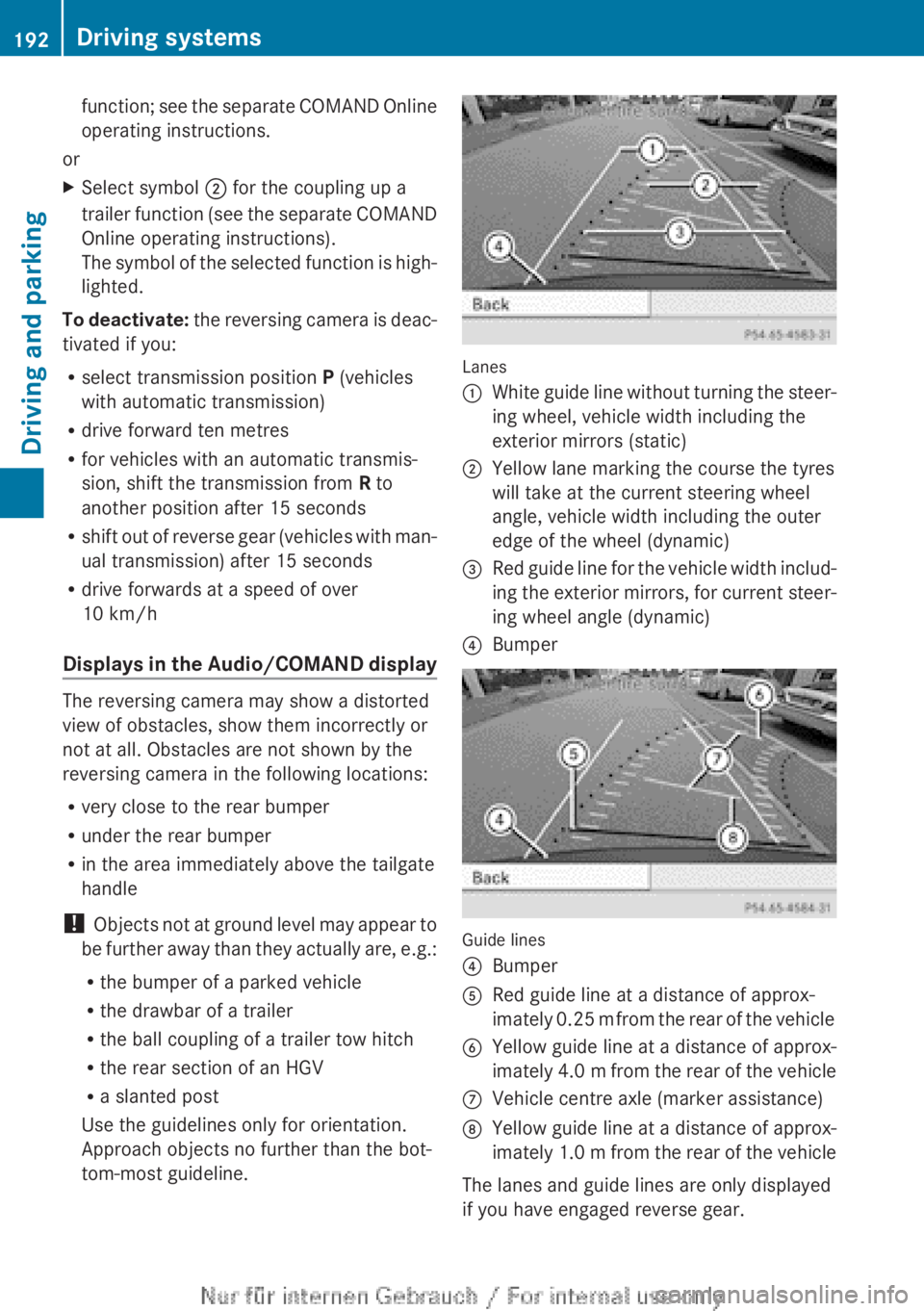
tom-most guideline. Lanes
:
White guide line without turning the steer-
ing wheel, vehicle width including the
exterior mirrors (static)
; Yellow lane marking the course the tyres
will take at the current steering wheel
angle, vehicle width including the outer
edge of the wheel (dynamic)
= Red guide line for the vehicle width includ-
ing
the exterior mirrors, for current steer-
ing wheel angle (dynamic)
? Bumper Guide lines
?
Bumper
A Red guide line at a distance of approx-
imately
0.25 m from the rear of the vehicle
B Yellow guide line at a distance of approx-
imately
4.0 m from the rear of the vehicle
C Vehicle centre axle (marker assistance)
D Yellow guide line at a distance of approx-
imately
1.0 m from the rear of the vehicle
The lanes and guide lines are only displayed
if you have engaged reverse gear. 192
Driving systems
Driving and parking
Page 195 of 356
The distance specifications only apply to
objects that are at ground level.
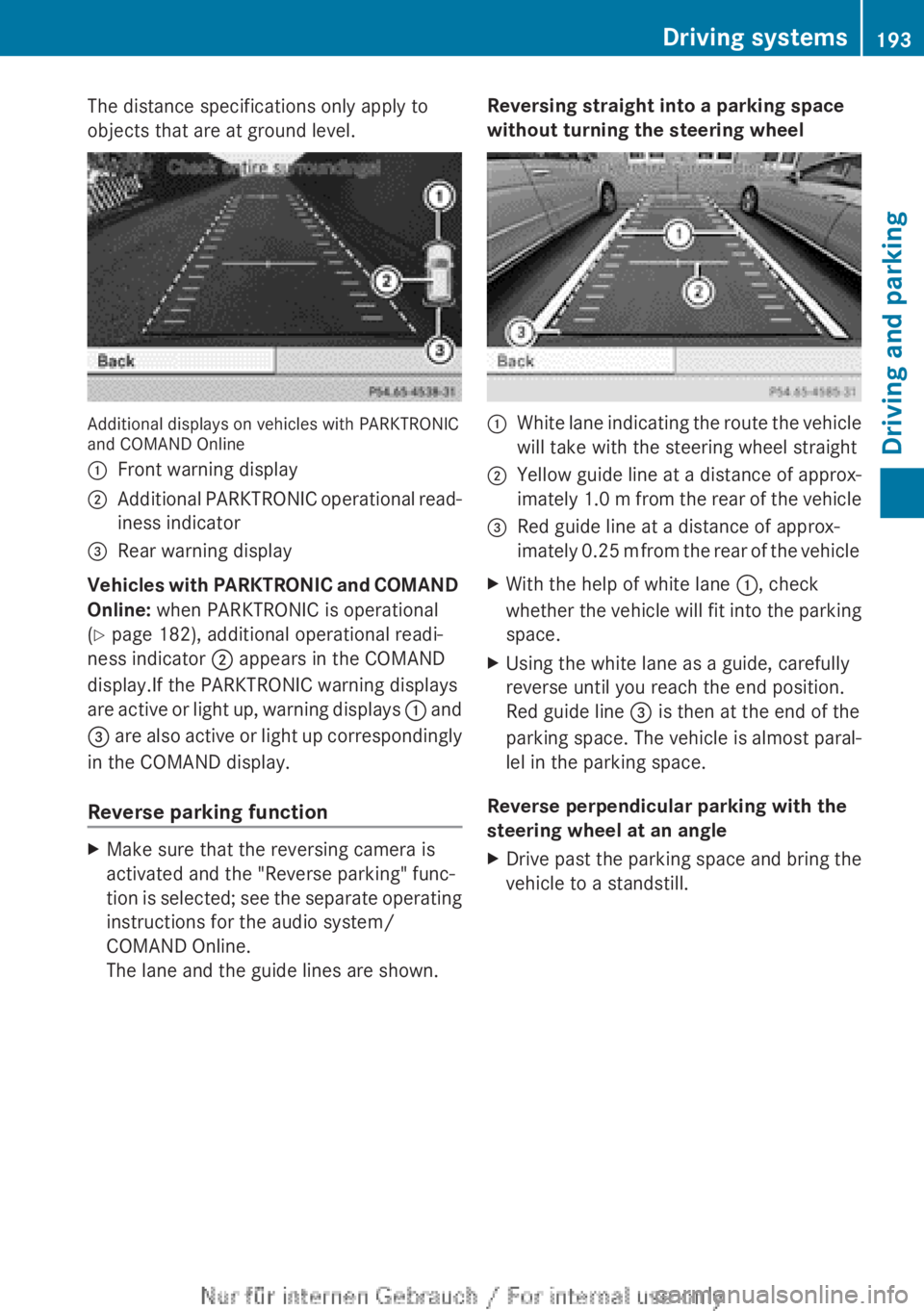
Additional displays on vehicles with PARKTRONIC
and COMAND Online
:
Front warning display
; Additional PARKTRONIC operational read-
iness indicator
= Rear warning display
Vehicles with PARKTRONIC and COMAND
Online: when PARKTRONIC is operational
(Y page 182), additional operational readi-
ness indicator ; appears in the COMAND
display.If the PARKTRONIC warning displays
are
active or light up, warning displays : and
= are also active or light up correspondingly
in the COMAND display.
Reverse parking function X
Make sure that the reversing camera is
activated and the "Reverse parking" func-
tion
is selected; see the separate operating
instructions for the audio system/
COMAND Online.
The lane and the guide lines are shown. Reversing straight into a parking space
without turning the steering wheel :
White lane indicating the route the vehicle
will take with the steering wheel straight
; Yellow guide line at a distance of approx-
imately
1.0 m from the rear of the vehicle
= Red guide line at a distance of approx-
imately
0.25 m from the rear of the vehicle
X With the help of white lane :, check
whether
the vehicle will fit into the parking
space.
X Using the white lane as a guide, carefully
reverse until you reach the end position.
Red guide line = is then at the end of the
parking
space. The vehicle is almost paral-
lel in the parking space.
Reverse perpendicular parking with the
steering wheel at an angle
X Drive past the parking space and bring the
vehicle to a standstill. Driving systems
193
Driving and parking Z
Page 196 of 356
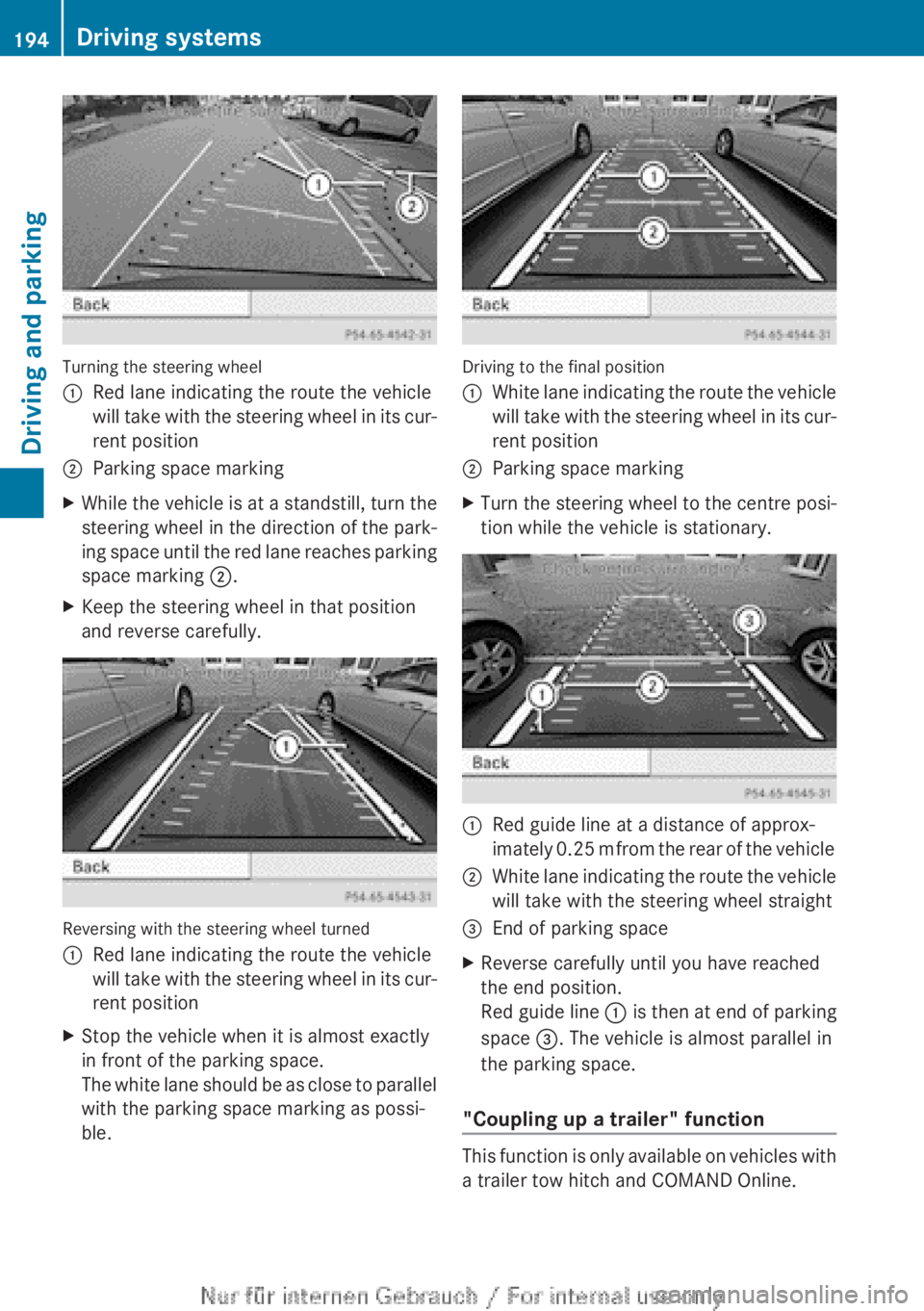
Turning the steering wheel
:
Red lane indicating the route the vehicle
will
take with the steering wheel in its cur-
rent position
; Parking space marking
X While the vehicle is at a standstill, turn the
steering
wheel in the direction of the park-
ing space until the red lane reaches parking
space marking ;.
X Keep the steering wheel in that position
and reverse carefully. Reversing with the steering wheel turned
:
Red lane indicating the route the vehicle
will
take with the steering wheel in its cur-
rent position
X Stop the vehicle when it is almost exactly
in front of the parking space.
The
white lane should be as close to parallel
with the parking space marking as possi-
ble. Driving to the final position
:
White lane indicating the route the vehicle
will
take with the steering wheel in its cur-
rent position
; Parking space marking
X Turn the steering wheel to the centre posi-
tion while the vehicle is stationary. :
Red guide line at a distance of approx-
imately
0.25 m from the rear of the vehicle
; White lane indicating the route the vehicle
will take with the steering wheel straight
= End of parking space
X Reverse carefully until you have reached
the end position.
Red guide line :
is then at end of parking
space =. The vehicle is almost parallel in
the parking space.
"Coupling up a trailer" function This function is only available on vehicles with
a trailer tow hitch and COMAND Online.194
Driving systems
Driving and parking
Page 202 of 356
:
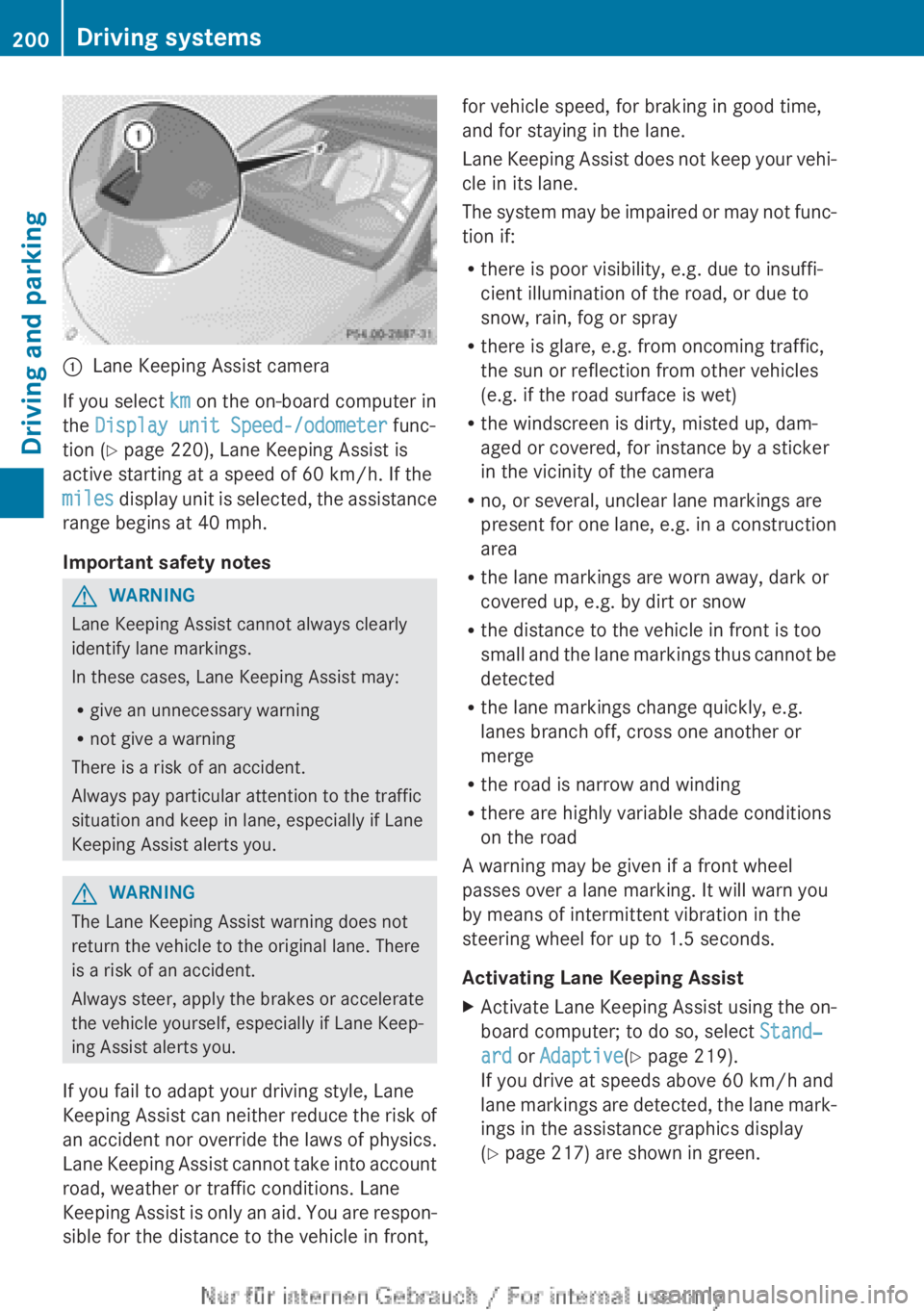
Lane Keeping Assist camera
If you select km on the on-board computer in
the Display unit Speed-/odometer func-
tion (Y page 220), Lane Keeping Assist is
active starting at a speed of 60 km/h
. If the
miles display unit is selected, the assistance
range begins at 40 mph.
Important safety notes G
WARNING
Lane Keeping Assist cannot always clearly
identify lane markings.
In these cases, Lane Keeping Assist may:
R give an unnecessary warning
R not give a warning
There is a risk of an accident.
Always pay particular attention to the traffic
situation and keep in lane, especially if Lane
Keeping Assist alerts you. G
WARNING
The Lane Keeping Assist warning does not
return the vehicle to the original lane. There
is a risk of an accident.
Always steer, apply the brakes or accelerate
the vehicle yourself, especially if Lane Keep-
ing Assist alerts you.
If you fail to adapt your driving style, Lane
Keeping
Assist can neither reduce the risk of
an accident nor override the laws of physics.
Lane Keeping Assist cannot take into account
road, weather or traffic conditions. Lane
Keeping Assist is only an aid. You are respon-
sible for the distance to the vehicle in front, for vehicle speed, for braking in good time,
and for staying in the lane.
Lane
Keeping Assist does not keep your vehi-
cle in its lane.
The system may be impaired or may not func-
tion if:
R there is poor visibility, e.g. due to insuffi-
cient illumination of the road, or due to
snow, rain, fog or spray
R there is glare, e.g. from oncoming traffic,
the sun or reflection from other vehicles
(e.g. if the road surface is wet)
R the windscreen is dirty, misted up, dam-
aged or covered, for instance by a sticker
in the vicinity of the camera
R no, or several, unclear lane markings are
present for one lane, e.g. in a construction
area
R the lane markings are worn away, dark or
covered up, e.g. by dirt or snow
R the distance to the vehicle in front is too
small and the lane markings thus cannot be
detected
R the lane markings change quickly, e.g.
lanes branch off, cross one another or
merge
R the road is narrow and winding
R there are highly variable shade conditions
on the road
A warning may be given if a front wheel
passes over a lane marking. It will warn you
by means of intermittent vibration in the
steering wheel for up to 1.5 seconds.
Activating Lane Keeping Assist
X Activate Lane Keeping Assist using the on-
board computer; to do so, select Stand‐
ard or Adaptive(Y page 219).
If you drive at speeds above
60 km/h and
lane markings are detected, the lane mark-
ings in the assistance graphics display
(Y page 217) are shown in green. 200
Driving systems
Driving and parking
Page 211 of 356
The fuel supply is interrupted to protect the
engine when the red band is reached.
Outside temperature display
You should pay special attention to road con-
ditions when temperatures are around the
freezing point.
The outside temperature display is in the mul-
tifunction display.
Changes in the outside temperature are dis-
played after a short delay. Speedometer with segments
The segments in the speedometer indicate
which speed range is available.
R Cruise control activated ( Y page 168):
The segments light up from the stored
speed to the maximum speed.
R Variable SPEEDTRONIC activated
(Y page 171):
The
segments light up from the start of the
scale to the selected limit speed.
R DISTRONIC PLUS activated (Y page 173):
One or two segments in the set speed
range light up.
R DISTRONIC PLUS detects a vehicle in front:
The segments between the speed of the
vehicle in front and the stored speed light
up. Operating the on-board computer
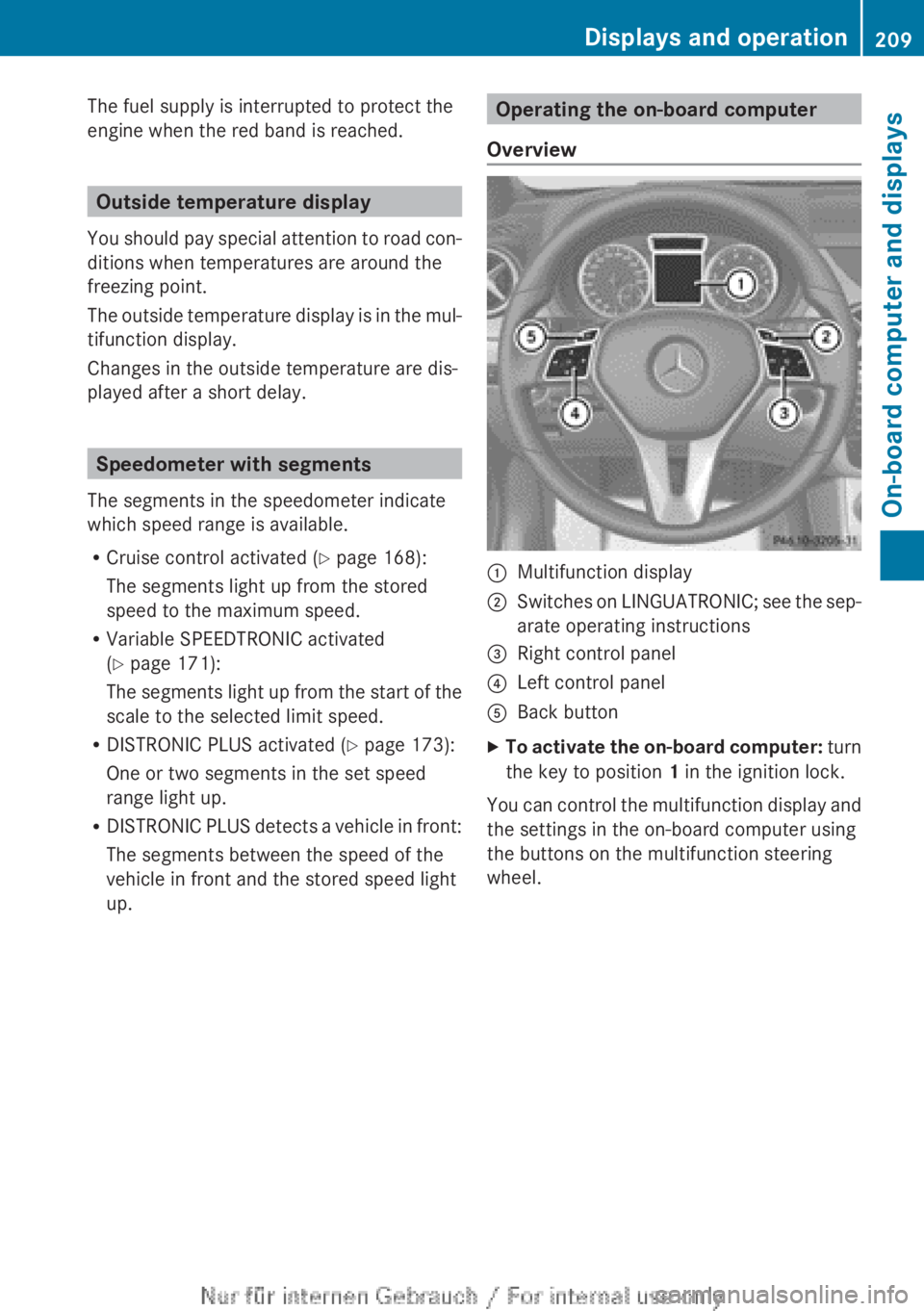
Overview :
Multifunction display
; Switches on LINGUATRONIC; see the sep-
arate operating instructions
= Right control panel
? Left control panel
A Back button
X To activate the on-board computer:
turn
the key to position 1 in the ignition lock.
You can control the multifunction display and
the settings in the on-board computer using
the buttons on the multifunction steering
wheel. Displays and operation
209
On-board computer and displays Z
Page 213 of 356
?
Menu bar
A Drive program (Y page 152)
B Transmission position ( Y page 152)
X To show the menu bar ?: press the
= or ; button on the steering wheel.
Menu bar ?
disappears after a few seconds.
Text field = shows the selected menu or
submenu as well as display messages.
i You can set the time using the audio sys-
tem or COMAND Online; see the separate
operating instructions.
The following messages may appear in the
multifunction display:
Z Gearshift recommendation, for
manual transmission
(Y
page 151) or automatic trans-
mission ( Y page 156)
XjY Active Parking Assist
(Y page 186)
¯ Cruise control ( Y page 168)
È SPEEDTRONIC ( Y page 171)
_ Adaptive Highbeam Assist
(Y page 110)
¤ ECO start/stop function
(Y page 146)
ë HOLD function ( Y page 179)
120 km/h! Maximum permissible speed
exceeded
(only for certain coun-
tries) Menus and submenus
Menu overview
Operating the on-board computer
(Y page 209).
Depending on the equipment fitted in the
vehicle, you can call up the following menus:
R Trip menu (Y page 211)
R Navi menu (navigation instructions)
(Y page 213)
R Audio menu (Y page 214) R
Tel (telephone) menu ( Y page 215)
R Assist (Assistance) menu (Y page 217)
R Serv. menu (Y page 219)
R Settings menu (Y page 220)
R AMG menu in AMG vehicles ( Y page 226)
The Audio, Navi
and Tel menus differ slightly
in vehicles with Audio 5, Audio 20 and in vehi-
cles with COMAND Online. The examples
given in this Owner's Manual apply to vehicles
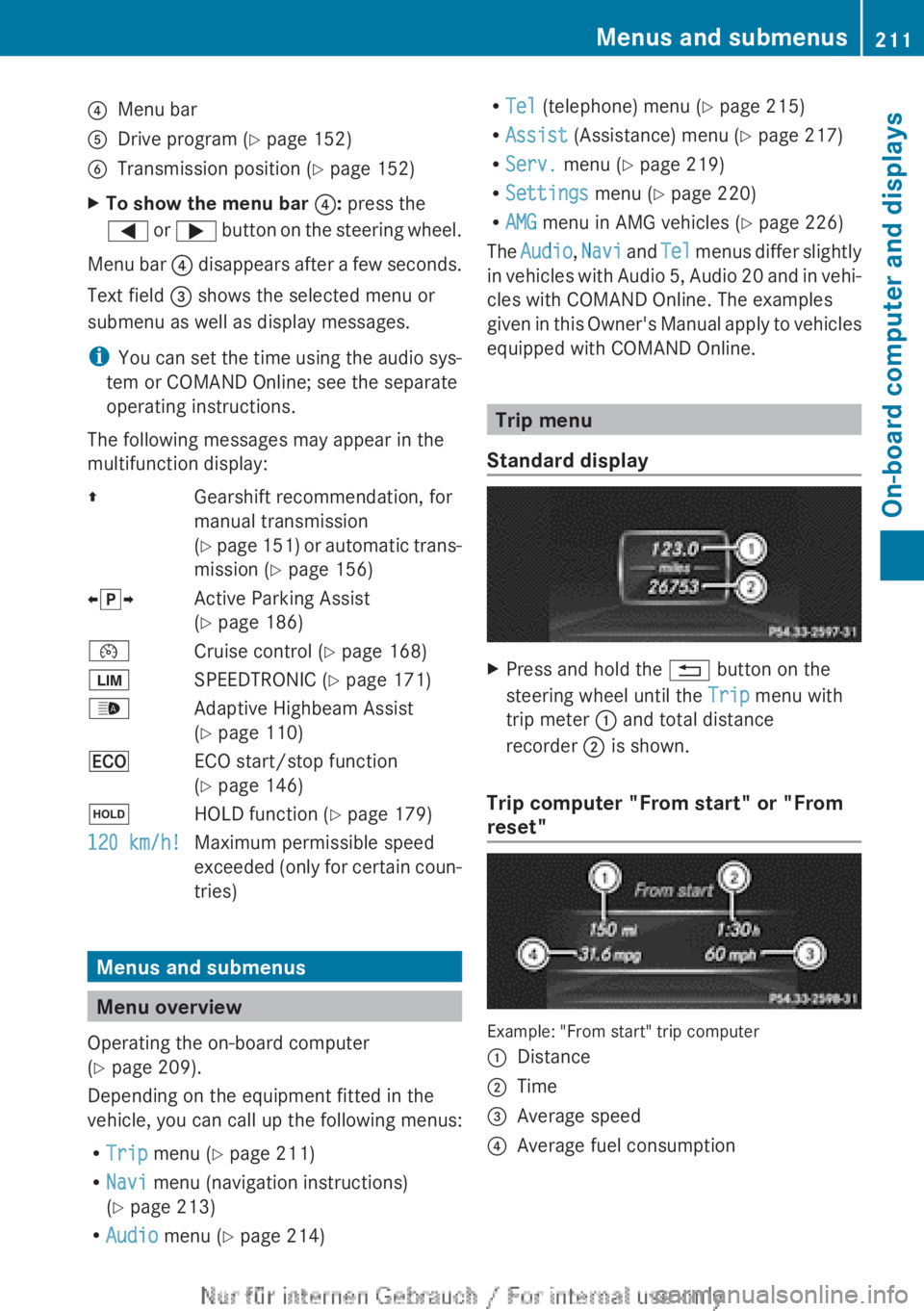
equipped with COMAND Online. Trip menu
Standard display X
Press and hold the % button on the
steering wheel until the Trip menu with
trip meter : and total distance
recorder ; is shown.
Trip computer "From start" or "From
reset" Example: "From start" trip computer
:
Distance
; Time
= Average speed
? Average fuel consumption Menus and submenus
211
On-board computer and displays Z
Page 218 of 356
while driving will distract you from traffic con-
ditions. You could then lose control of the
vehicle. There is a risk of an accident.
Only
operate these devices if road traffic con-
ditions permit. If you are unsure about the
surrounding conditions, pull over to a safe
location and make entries only while the vehi-
cle is stationary.
When telephoning, you must observe the
legal requirements for the country in which
you are currently driving.
X Switch on your mobile phone and audio
system or COMAND Online, see the sepa-
rate operating instructions.
X Place a mobile phone in the mobile phone
bracket ( Y page 279), or establish a Blue-
tooth ®
connection with the audio system
or
COMAND Online (see the separate oper-
ating instructions).
X Press the =
or ; button on the steer-
ing wheel to select the Tel menu.
You will see one of the following display mes-
sages in the multifunction display:
R Please
enter PIN: the mobile phone has
been placed in the mobile phone bracket
and the PIN has not been entered.
When you enter your PIN via the mobile
phone, LINGUATRONIC, the audio system
or COMAND Online, the mobile phone
searches for a network.
R Telephone ready or the name of the net-
work provider: the mobile phone has found
a network and is ready to receive.
R Telephone No service: there is no net-
work available or the mobile phone is
searching for a network.
i You can obtain further information about
suitable mobile phones and connecting
mobile phones via Bluetooth ®
:
R from any Mercedes Benz Service Centre
R on the Internet at: http://
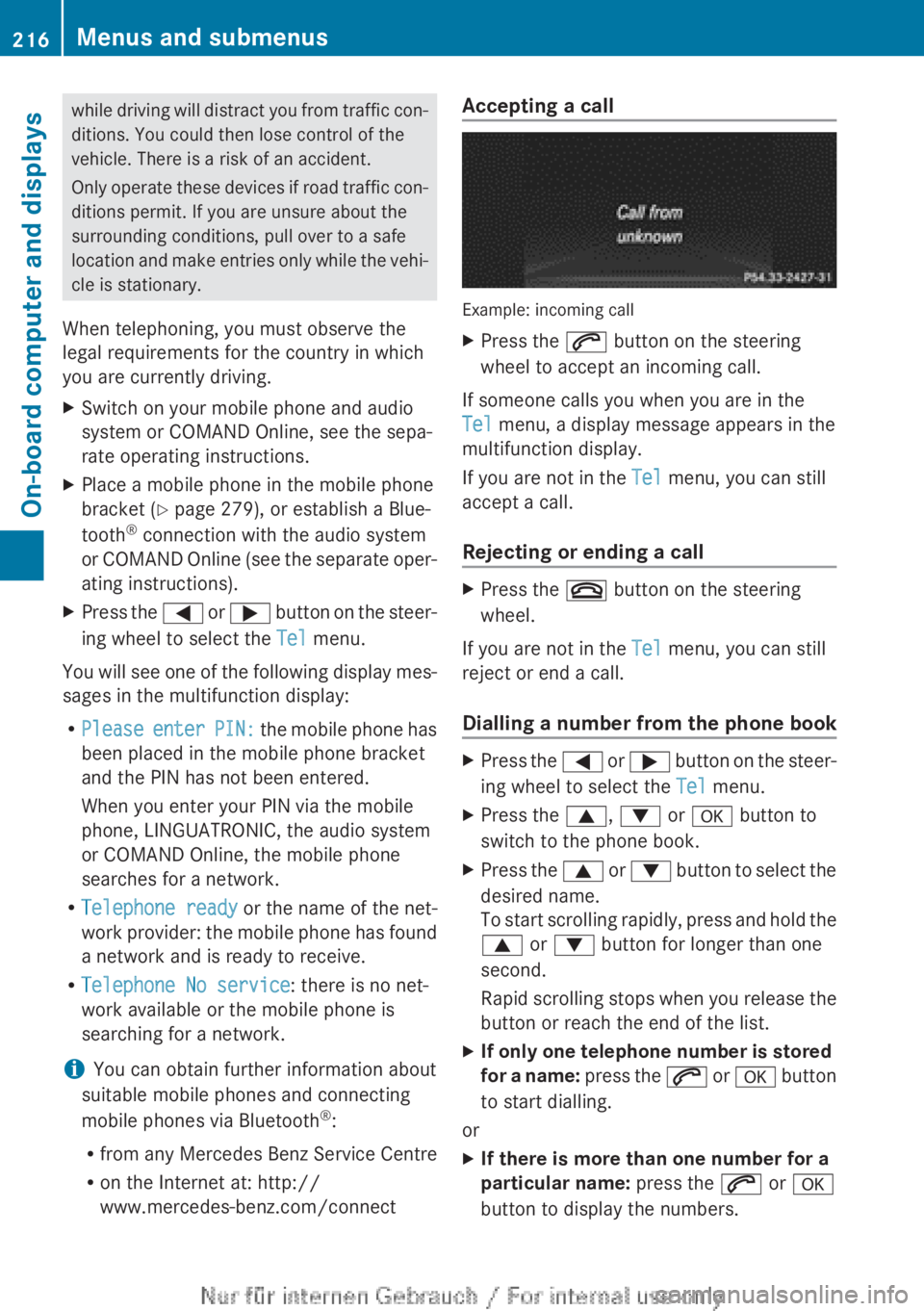
www.mercedes-benz.com/connect Accepting a call
Example: incoming call
X
Press the 6 button on the steering
wheel to accept an incoming call.
If someone calls you when you are in the
Tel menu, a display message appears in the
multifunction display.
If you are not in the Tel menu, you can still
accept a call.
Rejecting or ending a call X
Press the ~ button on the steering
wheel.
If you are not in the Tel menu, you can still
reject or end a call.
Dialling a number from the phone book X
Press the =
or ; button on the steer-
ing wheel to select the Tel menu.
X Press the 9, : or a button to
switch to the phone book.
X Press the 9
or : button to select the
desired name.
To start scrolling rapidly, press and hold the
9 or : button for longer than one
second.
Rapid scrolling stops when you release the
button or reach the end of the list.
X If only one telephone number is stored
for
a name: press the 6 or a button
to start dialling.
or
X If there is more than one number for a
particular name: press the 6 or a
button to display the numbers. 216
Menus and submenus
On-board computer and displays
Page 229 of 356
X
Press the = or ; button to select
Interm. Time.
X Press a to confirm.
The intermediate time is displayed for five
seconds.
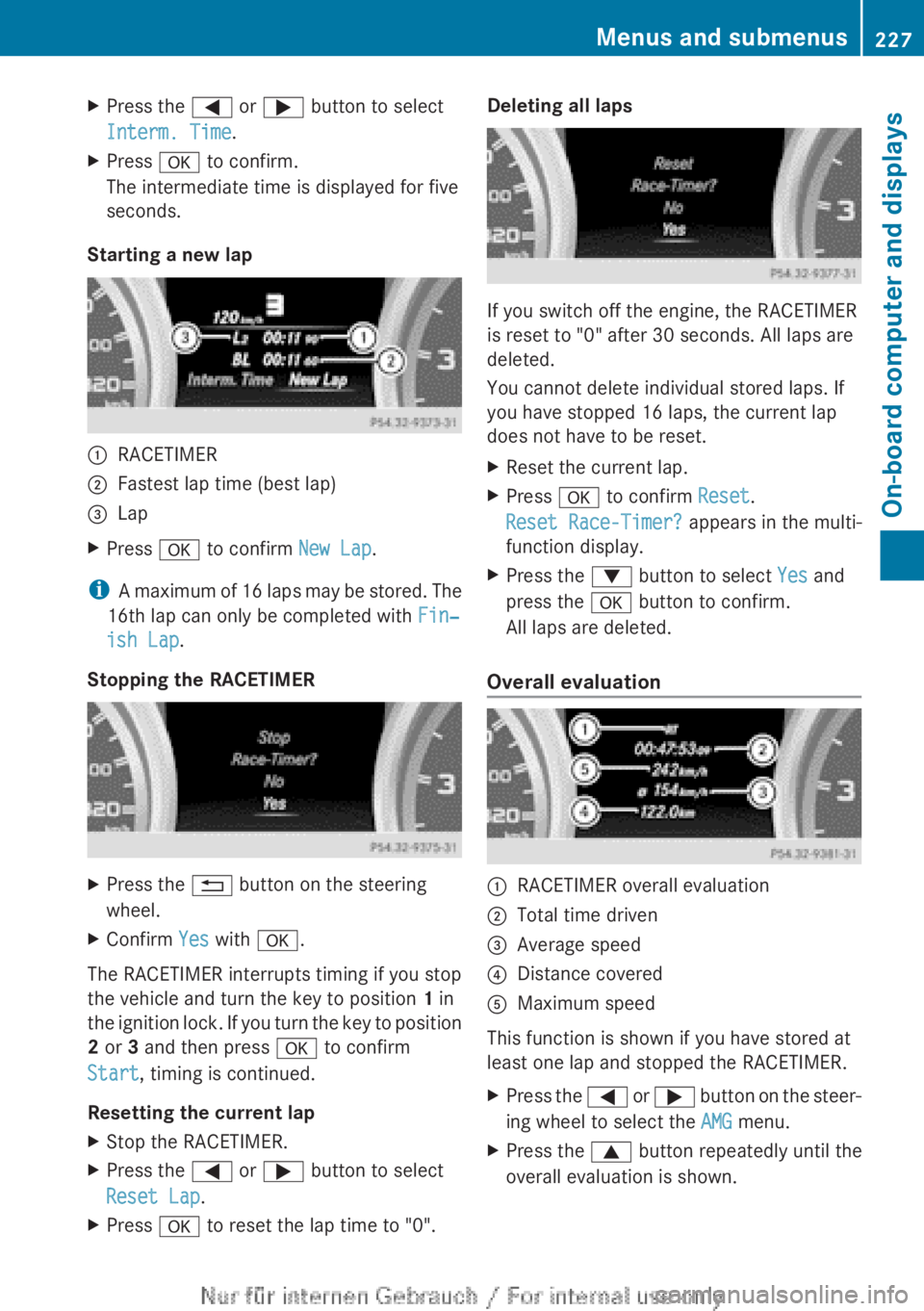
Starting a new lap :
RACETIMER
; Fastest lap time (best lap)
= Lap
X Press a to confirm New Lap.
i A maximum of 16 laps may be stored. The
16th lap can only be completed with Fin‐
ish Lap.
Stopping the RACETIMER X
Press the % button on the steering
wheel.
X Confirm Yes with a.
The RACETIMER interrupts timing if you stop
the vehicle and turn the key to position 1 in
the
ignition lock. If you turn the key to position
2 or 3 and then press a to confirm
Start, timing is continued.
Resetting the current lap
X Stop the RACETIMER.
X Press the = or ; button to select
Reset Lap.
X Press a to reset the lap time to "0". Deleting all laps
If you switch off the engine, the RACETIMER
is reset to "0" after 30 seconds. All laps are
deleted.
You cannot delete individual stored laps. If
you have stopped 16 laps, the current lap
does not have to be reset.
X
Reset the current lap.
X Press a to confirm Reset.
Reset Race-Timer? appears in the multi-
function display.
X Press the : button to select Yes and
press the a button to confirm.
All laps are deleted.
Overall evaluation :
RACETIMER overall evaluation
; Total time driven
= Average speed
? Distance covered
A Maximum speed
This function is shown if you have stored at
least one lap and stopped the RACETIMER.
X Press the =
or ; button on the steer-
ing wheel to select the AMG menu.
X Press the 9 button repeatedly until the
overall evaluation is shown. Menus and submenus
227
On-board computer and displays Z
Page 231 of 356
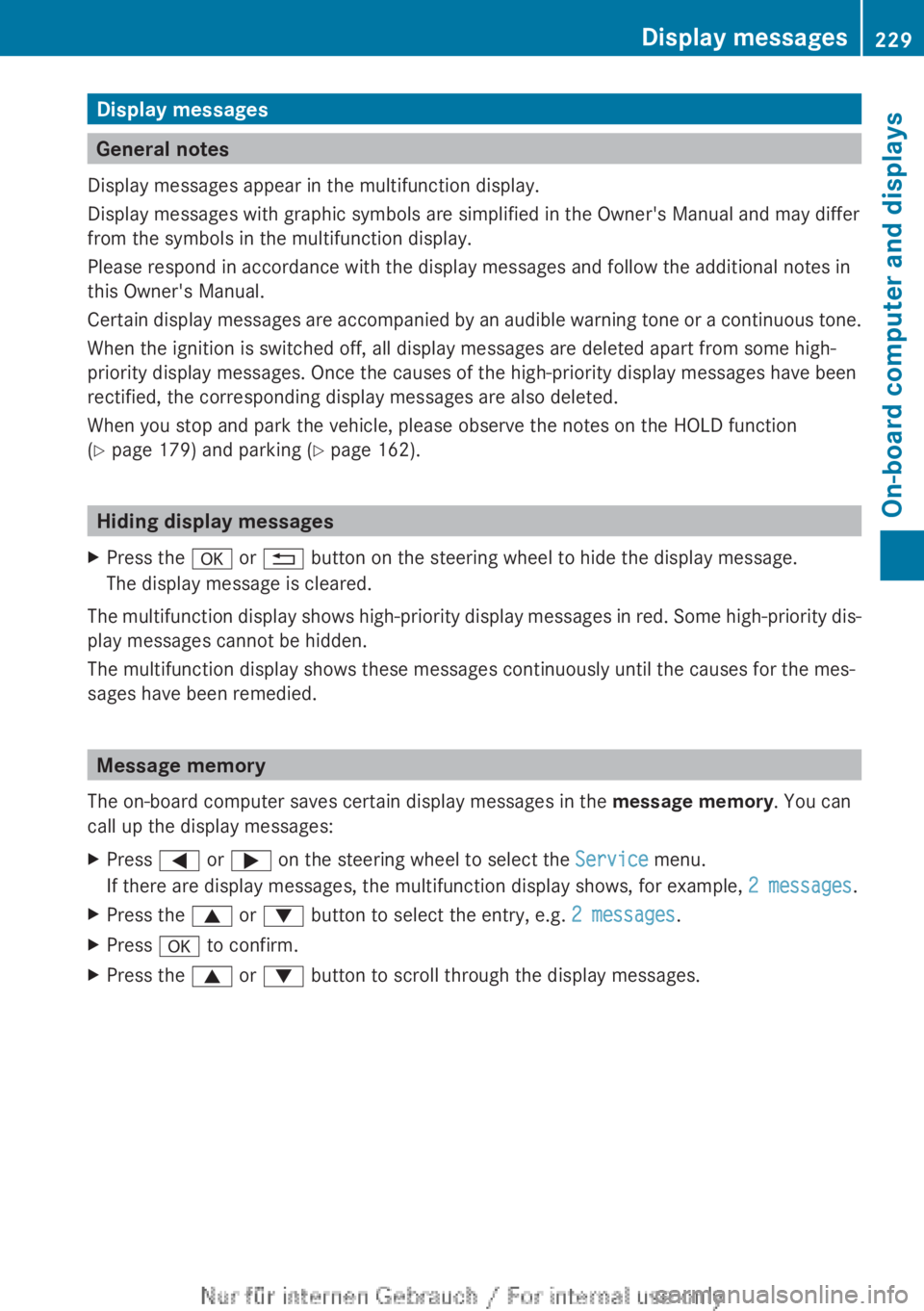
Display messages
General notes
Display messages appear in the multifunction display.
Display messages with graphic symbols are simplified in the Owner's Manual and may differ
from the symbols in the multifunction display.
Please respond in accordance with the display messages and follow the additional notes in
this Owner's Manual.
Certain
display messages are accompanied by an audible warning tone or a continuous tone.
When the ignition is switched off, all display messages are deleted apart from some high-
priority display messages. Once the causes of the high-priority display messages have been
rectified, the corresponding display messages are also deleted.
When you stop and park the vehicle, please observe the notes on the HOLD function
(Y page 179) and parking ( Y page 162).Hiding display messages
X Press the a or % button on the steering wheel to hide the display message.
The display message is cleared.
The multifunction display shows high-priority display messages in red. Some high-priority dis-
play messages cannot be hidden.
The multifunction display shows these messages continuously until the causes for the mes-
sages have been remedied. Message memory
The on-board computer saves certain display messages in the message memory. You can
call up the display messages:
X Press = or ; on the steering wheel to select the Service menu.
If there are display messages, the multifunction display shows, for example, 2 messages.
X Press the 9 or : button to select the entry, e.g. 2 messages.
X Press a to confirm.
X Press the 9 or : button to scroll through the display messages. Display messages
229
On-board computer and displays Z
Page 249 of 356
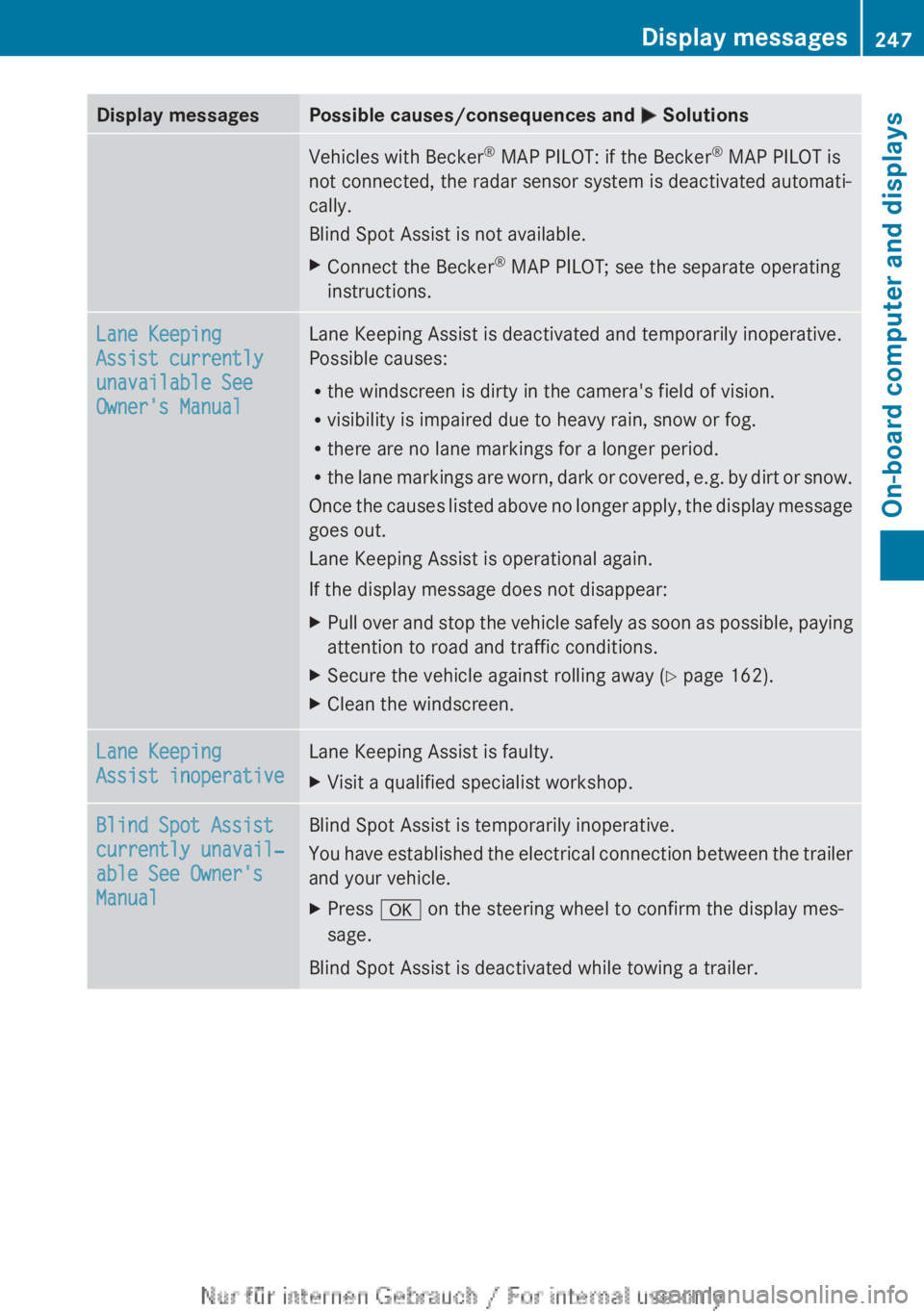
Display messages Possible causes/consequences and
M SolutionsVehicles with Becker
®
MAP PILOT: if the Becker ®
MAP PILOT is
not connected, the radar sensor system is deactivated automati-
cally.
Blind Spot Assist is not available.
X Connect the Becker ®
MAP PILOT; see the separate operating
instructions. Lane Keeping
Assist currently
unavailable See
Owner's Manual Lane Keeping Assist is deactivated and temporarily inoperative.
Possible causes:
R
the windscreen is dirty in the camera's field of vision.
R visibility is impaired due to heavy rain, snow or fog.
R there are no lane markings for a longer period.
R the
lane markings are worn, dark or covered, e.g. by dirt or snow.
Once the causes listed above no longer apply, the display message
goes out.
Lane Keeping Assist is operational again.
If the display message does not disappear:
X Pull over and stop the vehicle safely as soon as possible, paying
attention to road and traffic conditions.
X Secure the vehicle against rolling away ( Y page 162).
X Clean the windscreen. Lane Keeping
Assist inoperative Lane Keeping Assist is faulty.
X
Visit a qualified specialist workshop. Blind Spot Assist
currently unavail‐
able See Owner's
Manual Blind Spot Assist is temporarily inoperative.
You
have established the electrical connection between the trailer
and your vehicle.
X Press a on the steering wheel to confirm the display mes-
sage.
Blind Spot Assist is deactivated while towing a trailer. Display messages
247
On-board computer and displays Z