brakes MERCEDES-BENZ A CLASS 2012 Owners Manual
[x] Cancel search | Manufacturer: MERCEDES-BENZ, Model Year: 2012, Model line: A CLASS, Model: MERCEDES-BENZ A CLASS 2012Pages: 356, PDF Size: 4.96 MB
Page 8 of 356
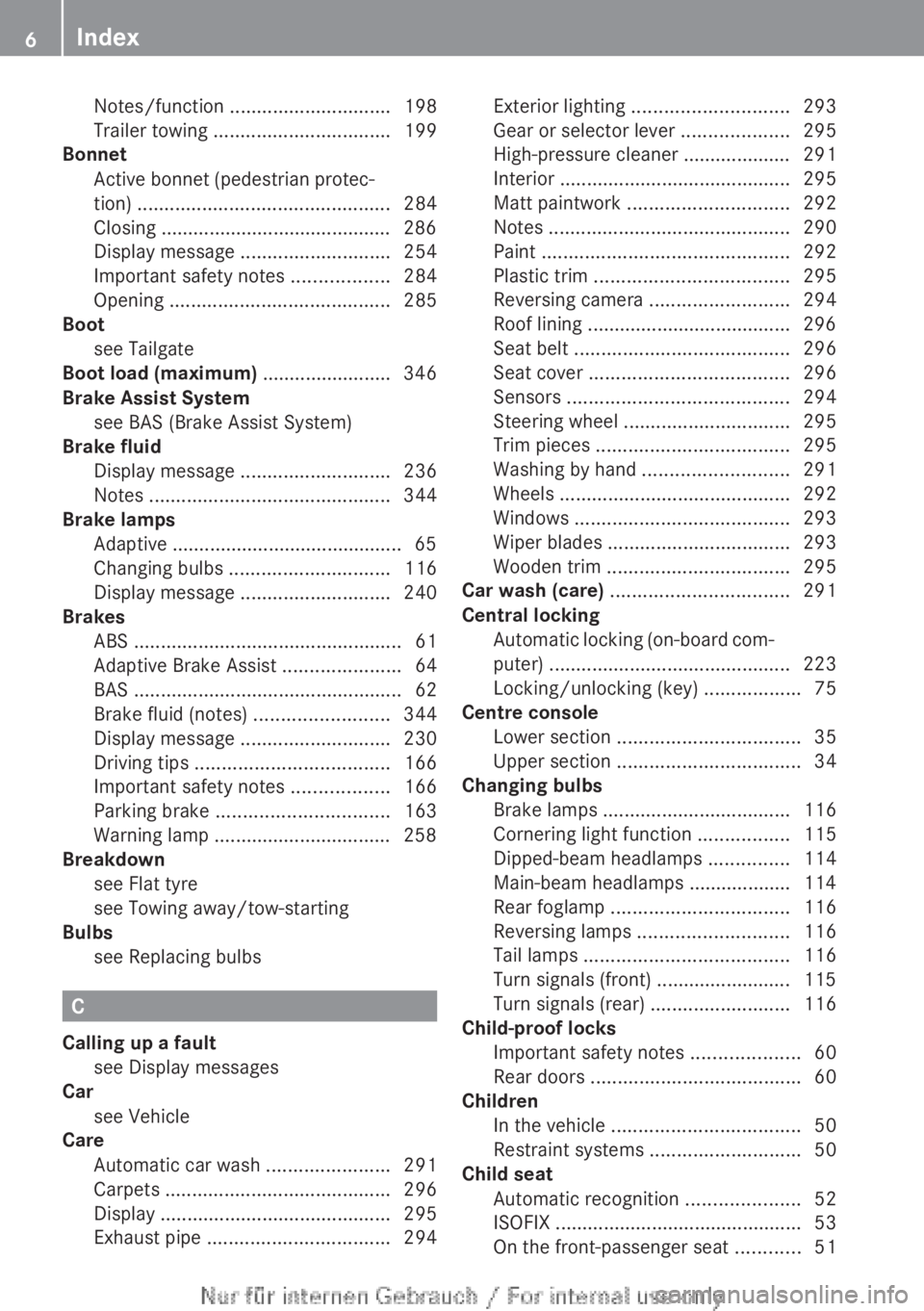
Notes/function
.............................. 198
Trailer towing ................................. 199
Bonnet
Active
bonnet (pedestrian protec-
tion) ............................................... 284
Closing ........................................... 286
Display message ............................ 254
Important safety notes .................. 284
Opening ......................................... 285
Boot
see Tailgate
Boot load (maximum) ........................ 346
Brake Assist System see BAS (Brake Assist System)
Brake fluid
Display message ............................ 236
Notes ............................................. 344
Brake lamps
Adaptive ........................................... 65
Changing bulbs .............................. 116
Display message ............................ 240
Brakes
ABS .................................................. 61
Adaptive Brake Assist ......................64
BAS .................................................. 62
Brake fluid (notes) .........................344
Display message ............................ 230
Driving tips .................................... 166
Important safety notes .................. 166
Parking brake ................................ 163
Warning lamp ................................. 258
Breakdown
see Flat tyre
see Towing away/tow-starting
Bulbs
see Replacing bulbs C
Calling up a fault see Display messages
Car
see Vehicle
Care
Automatic car wash ....................... 291
Carpets .......................................... 296
Display ........................................... 295
Exhaust pipe .................................. 294Exterior lighting
............................. 293
Gear or selector lever ....................295
High-pressure cleaner ....................
291
Interior ........................................... 295
Matt paintwork .............................. 292
Notes ............................................. 290
Paint .............................................. 292
Plastic trim .................................... 295
Reversing camera ..........................294
Roof lining ...................................... 296
Seat belt ........................................ 296
Seat cover ..................................... 296
Sensors ......................................... 294
Steering wheel ............................... 295
Trim pieces .................................... 295
Washing by hand ........................... 291
Wheels ........................................... 292
Windows ........................................ 293
Wiper blades .................................. 293
Wooden trim .................................. 295
Car wash (care) ................................. 291
Central locking Automatic locking (on-board com-
puter) ............................................. 223
Locking/unlocking (key) ..................75
Centre console
Lower section .................................. 35
Upper section .................................. 34
Changing bulbs
Brake lamps ................................... 116
Cornering light function .................115
Dipped-beam headlamps ............... 114
Main-beam headlamps ................... 114
Rear foglamp ................................. 116
Reversing lamps ............................ 116
Tail lamps ...................................... 116
Turn signals (front) ......................... 115
Turn signals (rear) .......................... 116
Child-proof locks
Important safety notes .................... 60
Rear doors ....................................... 60
Children
In the vehicle ................................... 50
Restraint systems ............................ 50
Child seat
Automatic recognition ..................... 52
ISOFIX .............................................. 53
On the front-passenger seat ............516
Index
Page 11 of 356
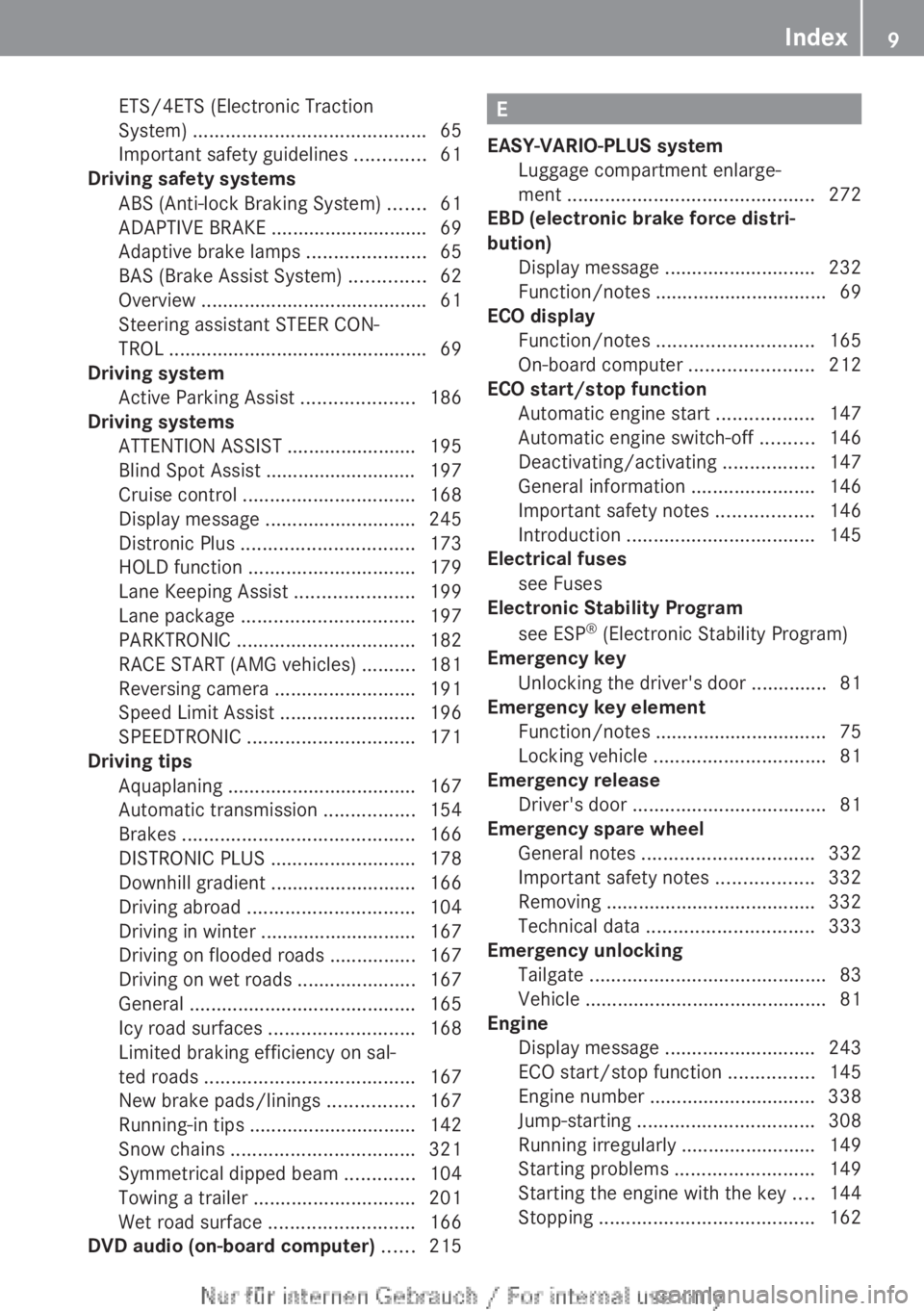
ETS/4ETS (Electronic Traction
System) ...........................................
65
Important safety guidelines .............61
Driving safety systems
ABS (Anti-lock Braking System)
.......61
ADAPTIVE BRAKE ............................. 69
Adaptive brake lamps ...................... 65
BAS (Brake Assist System) ..............62
Overview .......................................... 61
Steering assistant STEER CON-
TROL ................................................ 69
Driving system
Active Parking Assist .....................186
Driving systems
ATTENTION ASSIST ........................ 195
Blind Spot Assist ............................ 197
Cruise control ................................ 168
Display message ............................ 245
Distronic Plus ................................ 173
HOLD function ............................... 179
Lane Keeping Assist ...................... 199
Lane package ................................ 197
PARKTRONIC ................................. 182
RACE START (AMG vehicles) ..........181
Reversing camera ..........................191
Speed Limit Assist ......................... 196
SPEEDTRONIC ............................... 171
Driving tips
Aquaplaning ................................... 167
Automatic transmission ................. 154
Brakes ........................................... 166
DISTRONIC PLUS ........................... 178
Downhill gradient ........................... 166
Driving abroad ............................... 104
Driving in winter ............................. 167
Driving on flooded roads ................167
Driving on wet roads ...................... 167
General .......................................... 165
Icy road surfaces ........................... 168
Limited braking efficiency on sal-
ted roads ....................................... 167
New brake pads/linings ................ 167
Running-in tips ............................... 142
Snow chains .................................. 321
Symmetrical dipped beam .............104
Towing a trailer .............................. 201
Wet road surface ........................... 166
DVD audio (on-board computer) ...... 215 E
EASY-VARIO-PLUS system Luggage compartment enlarge-
ment .............................................. 272
EBD (electronic brake force distri-
bution)
Display message
............................ 232
Function/notes ................................ 69
ECO display
Function/notes ............................. 165
On-board computer ....................... 212
ECO start/stop function
Automatic engine start .................. 147
Automatic engine switch-off ..........146
Deactivating/activating ................. 147
General information ....................... 146
Important safety notes .................. 146
Introduction ................................... 145
Electrical fuses
see Fuses
Electronic Stability Program
see ESP ®
(Electronic Stability Program)
Emergency key
Unlocking the driver's door ..............81
Emergency key element
Function/notes ................................ 75
Locking vehicle ................................ 81
Emergency release
Driver's door .................................... 81
Emergency spare wheel
General notes ................................ 332
Important safety notes .................. 332
Removing ....................................... 332
Technical data ............................... 333
Emergency unlocking
Tailgate ............................................ 83
Vehicle ............................................. 81
Engine
Display message ............................ 243
ECO start/stop function ................ 145
Engine number ............................... 338
Jump-starting ................................. 308
Running irregularly ......................... 149
Starting problems .......................... 149
Starting the engine with the key .... 144
Stopping ........................................ 162 Index
9
Page 21 of 356
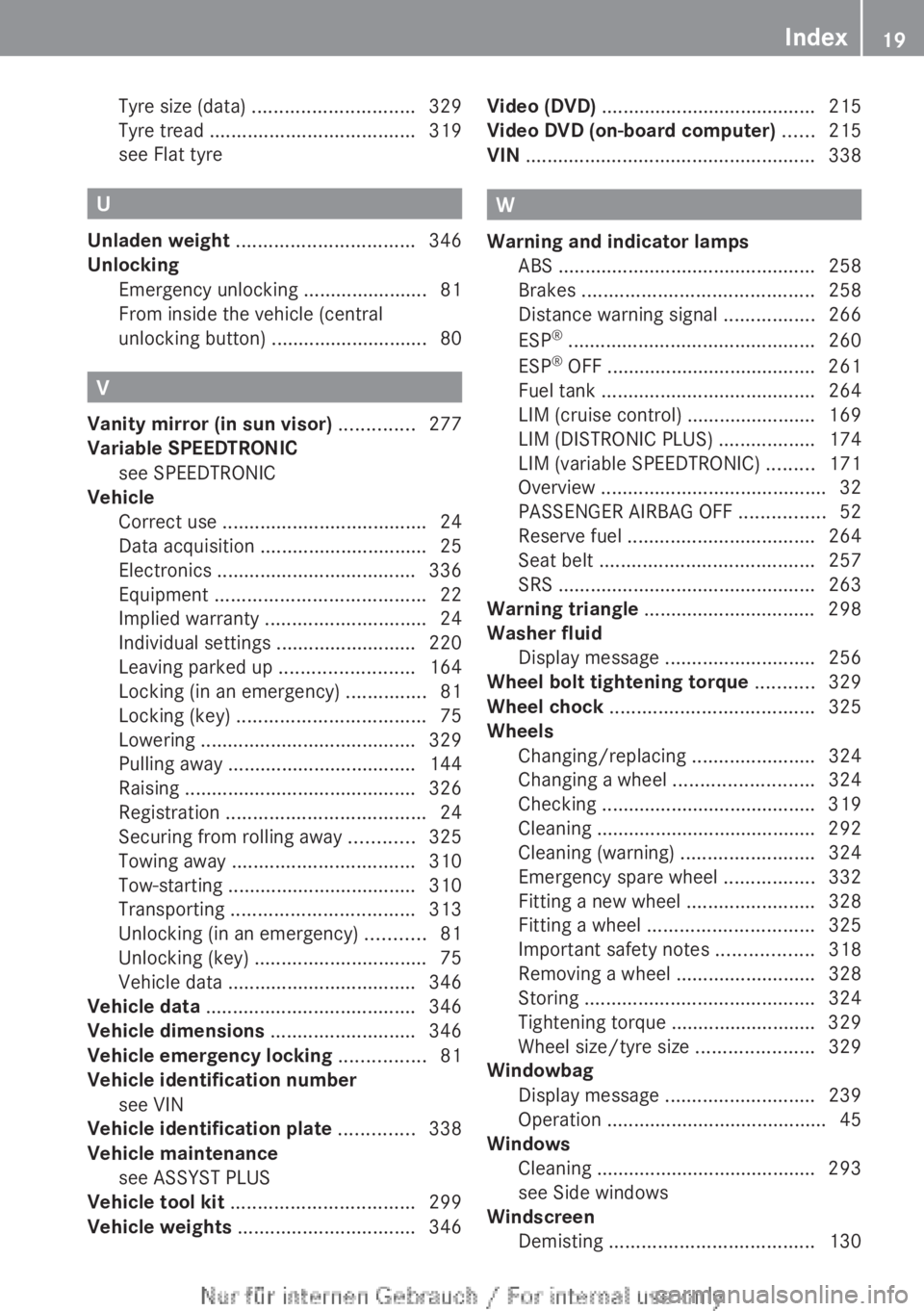
Tyre size (data)
.............................. 329
Tyre tread ...................................... 319
see Flat tyre
U
Unladen weight ................................. 346
Unlocking Emergency unlocking .......................81
From inside the vehicle (central
unlocking button) ............................. 80V
Vanity mirror (in sun visor) .............. 277
Variable SPEEDTRONIC see SPEEDTRONIC
Vehicle
Correct use ...................................... 24
Data acquisition ............................... 25
Electronics ..................................... 336
Equipment ....................................... 22
Implied warranty .............................. 24
Individual settings ..........................220
Leaving parked up ......................... 164
Locking (in an emergency) ............... 81
Locking (key) ................................... 75
Lowering ........................................ 329
Pulling away ................................... 144
Raising ........................................... 326
Registration ..................................... 24
Securing from rolling away ............325
Towing away .................................. 310
Tow-starting ................................... 310
Transporting .................................. 313
Unlocking (in an emergency) ........... 81
Unlocking (key) ................................ 75
Vehicle data ................................... 346
Vehicle data ....................................... 346
Vehicle dimensions ...........................346
Vehicle emergency locking ................81
Vehicle identification number see VIN
Vehicle identification plate ..............338
Vehicle maintenance see ASSYST PLUS
Vehicle tool kit .................................. 299
Vehicle weights ................................. 346Video (DVD)
........................................
215
Video DVD (on-board computer) ......215
VIN ...................................................... 338 W
Warning and indicator lamps ABS
................................................ 258
Brakes ........................................... 258
Distance warning signal ................. 266
ESP ®
.............................................. 260
ESP ®
OFF ....................................... 261
Fuel tank ........................................ 264
LIM (cruise control) ........................ 169
LIM (DISTRONIC PLUS) .................. 174
LIM (variable SPEEDTRONIC) ......... 171
Overview .......................................... 32
PASSENGER AIRBAG OFF ................ 52
Reserve fuel ................................... 264
Seat belt ........................................ 257
SRS ................................................ 263
Warning triangle ................................ 298
Washer fluid
Display message ............................ 256
Wheel bolt tightening torque ...........329
Wheel chock ...................................... 325
Wheels Changing/replacing .......................324
Changing a wheel .......................... 324
Checking ........................................ 319
Cleaning ......................................... 292
Cleaning (warning) .........................324
Emergency spare wheel ................. 332
Fitting a new wheel ........................328
Fitting a wheel ............................... 325
Important safety notes .................. 318
Removing a wheel ..........................328
Storing ........................................... 324
Tightening torque ........................... 329
Wheel size/tyre size ......................329
Windowbag
Display message ............................ 239
Operation ......................................... 45
Windows
Cleaning ......................................... 293
see Side windows
Windscreen
Demisting ...................................... 130 Index
19
Page 27 of 356
Data stored in the vehicle
A number of electronic components in your
vehicle contain data memories.
These data memories temporarily or perma-
nently store technical information about:
R the vehicle's operating state
R events
R faults
This technical information generally docu-
ments the condition of a component, a mod-
ule, a system or an environment.
These are, for example:
R operating conditions of system compo-
nents. This includes, e.g. fluid levels.
R status
messages from the vehicle and from
individual vehicle components. This
includes, e.g. number of wheel revolu-
tions/speed, deceleration, lateral acceler-
ation.
R malfunctions and faults in important sys-
tem components. This includes, e.g. lights,
brakes.
R reactions of the vehicle in special driving
situations. This includes, e.g. deployment
of an airbag, intervention of stability control
systems.
R environmental conditions. This includes,
e.g. the outside temperature.
This data is exclusively technical in nature
and is used to:
R assist in the detection and rectification of
faults and defects
R optimise vehicle functions
The data cannot be used to trace the vehicle's
movements over distances travelled.
When your vehicle is serviced, this technical
information can be read out from the event
and fault memory.
Services include:
R repairs
R service processes R
warranty claims
R quality assurance
The information is read out by authorised
employees of the service network (including
manufacturers)
using special diagnostic devi-
ces. You can find more information there if
necessary.
After a fault has been rectified, the informa-
tion in the fault memory is deleted or consec-
utively overwritten.
In normal vehicle operation, situations may
arise in which this technical data could
become personal in nature in conjunction
with other information and, if necessary, on
consultation of an approval official.
Examples include:
R accident reports
R vehicle damage
R witness testimonies
Further additional features which are con-
tractually agreed with the customer likewise
allow specific vehicle data to be obtained
from the vehicle. Such additional features
include vehicle locating in an emergency, for
example. Copyright information
General notes
You can find information on licences for free
and open-source software used in your vehi-
cle
and its electronic components on the fol-
lowing website:
http://www.mercedes-benz.com/
opensource Introduction
25 Z
Page 34 of 356
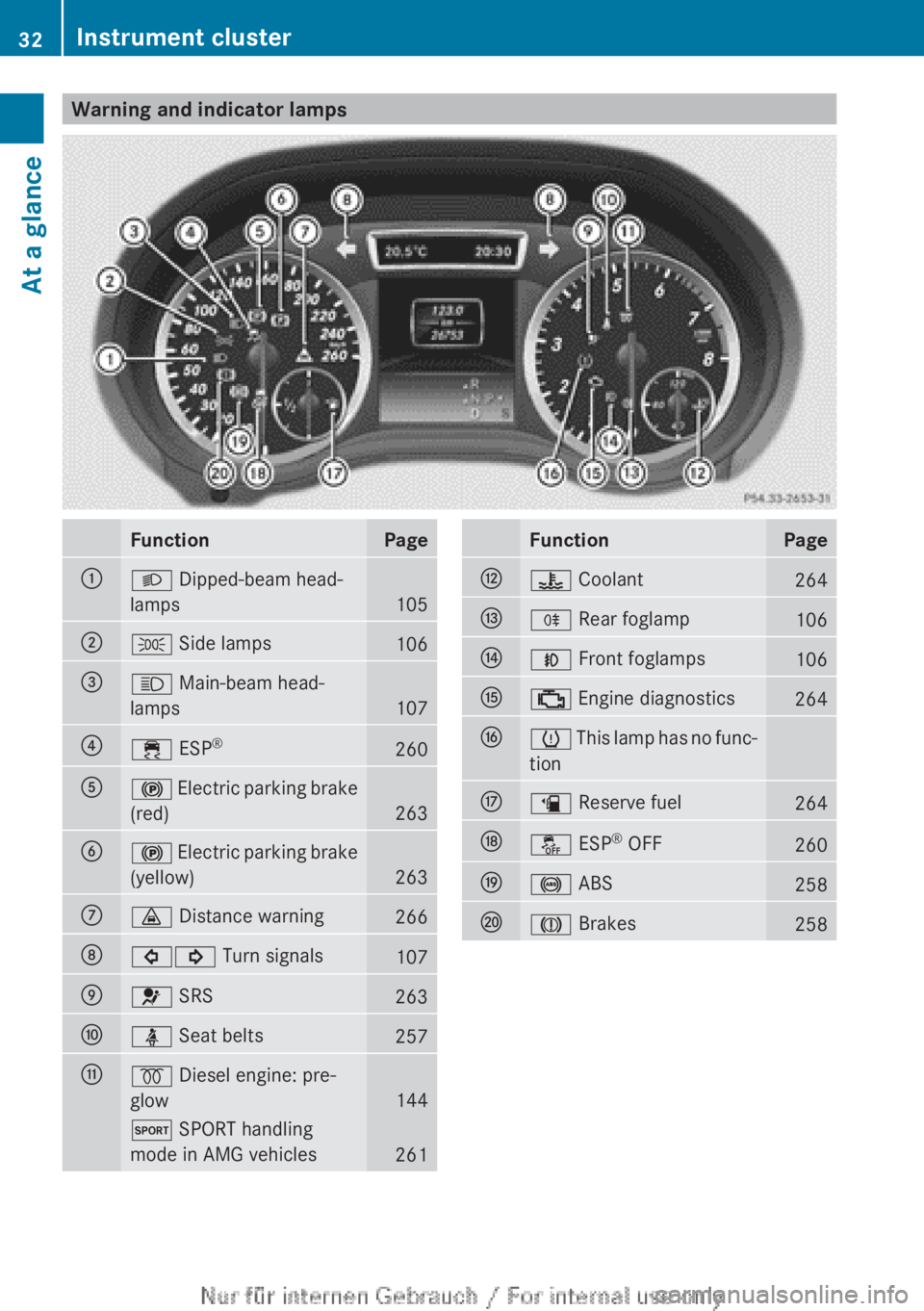
Warning and indicator lamps
Function Page
:
L Dipped-beam head-
lamps
105
;
T Side lamps
106
=
K Main-beam head-
lamps
107
?
÷ ESP
® 260
A
! Electric parking brake
(red)
263
B
!
Electric parking brake
(yellow)
263
C
· Distance warning
266
D
#! Turn signals
107
E
6 SRS
263
F
ü Seat belts
257
G
% Diesel engine: pre-
glow
144
M SPORT handling
mode in AMG vehicles
261 Function Page
H
? Coolant
264
I
R Rear foglamp
106
J
N Front foglamps
106
K
; Engine diagnostics
264
L
h
This lamp has no func-
tion
M
æ Reserve fuel
264
N
å ESP
®
OFF 260
O
! ABS
258
P
J Brakes
25832
Instrument cluster
At a glance
Page 64 of 356
teristics may be severely impaired. Addition-
ally, further driving safety systems are deac-
tivated.
There is an increased danger of skid-
ding and accidents.
Drive on carefully. Have ABS checked imme-
diately at a qualified specialist workshop.
If ABS is malfunctioning, other systems,
including driving safety systems, will also
become inoperative. Observe the information
on the ABS warning lamp ( Y page 258) and
display messages which may be shown in the
instrument cluster (Y page 230).
ABS regulates brake pressure in such a way
that the wheels do not lock when you brake.
This allows you to continue steering the vehi-
cle when braking.
ABS works from a speed of about 8 km/h
upwards, regardless of road-surface condi-
tions. ABS works on slippery surfaces, even
when you only brake gently.
The ! ABS warning lamp in the instrument
cluster lights up when the ignition is switched
on. It goes out when the engine is running.
Braking X
If ABS intervenes:
continue to depress the
brake pedal with force until the braking sit-
uation is over.
X To make a full brake application:
depress the brake pedal with full force.
If ABS intervenes when braking, you will feel
a pulsing in the brake pedal.
The pulsating brake pedal can be an indica-
tion of hazardous road conditions, and func-
tions as a reminder to take extra care while
driving. BAS (Brake Assist)
i Observe
the "Important safety notes" sec-
tion (Y page 61). G
WARNING
If BAS is malfunctioning, the braking distance
in an emergency braking situation is
increased. There is a risk of accident.
In an emergency braking situation, depress
the brake pedal with full force. ABS prevents
the wheels from locking.
BAS operates in emergency braking situa-
tions.
If you depress the brake pedal quickly,
BAS automatically boosts the braking force,
thus shortening the stopping distance.
The brakes will function as usual once you
release the brake pedal. BAS is deactivated. COLLISION PREVENTION ASSIST
General notes COLLISION PREVENTION ASSIST consists of
the adaptive Brake Assist and the distance
warning signal, which are described in the
following.
Distance warning function
Important safety notes
i
Observe
the "Important safety notes" sec-
tion for driving safety systems
(Y page 61). G
WARNING
The distance warning function does not react:
R to people or animals
R to oncoming vehicles
R to crossing traffic
R when cornering
Thus, the distance warning function cannot
provide a warning in all critical situations.
There is a risk of an accident.
Always
pay careful attention to the traffic sit-
uation and be ready to brake. 62
Driving safety systems
Safety
Page 66 of 356
Adaptive Brake Assist
i
Observe the "Important safety notes" sec-
tion for driving safety systems
(Y page 61). G
WARNING
Adaptive Brake Assist cannot always clearly
identify objects and complex traffic situa-
tions. In these cases, Adaptive Brake Assist
may not intervene. There is a risk of an acci-
dent.
Always
pay careful attention to the traffic sit-
uation and be ready to brake. G
WARNING
Adaptive Brake Assist does not react:
R to people or animals
R to oncoming vehicles
R to crossing traffic
R to stationary obstacles
R when cornering
As a result, Adaptive Brake Assist may not
intervene in all critical conditions. There is a
risk of an accident.
Always
pay careful attention to the traffic sit-
uation and be ready to brake.
Adaptive Brake Assist aids you in braking dur-
ing hazardous situations at speeds above
30 km/h and uses the radar sensor system
to evaluate the traffic situation.
With the help of a sensor system, adaptive
Brake Assist can detect obstacles that are in
the path of your vehicle for an extended
period of time.
Should you approach an obstacle and adap-
tive Brake Assist has detected a risk of colli-
sion, adaptive Brake Assist calculates the
braking force necessary to avoid a collision.
Should you apply the brakes forcefully, adap-
tive Brake Assist will automatically increase
the braking force to a level suitable for the
traffic conditions. X
Keep the brake pedal depressed until the
emergency braking situation is over.
ABS prevents the wheels from locking.
The brakes will work normally again if:
R you release the brake pedal
R there
is no longer any danger of a collision
R no obstacle is detected in front of your
vehicle
Adaptive Brake Assist is then deactivated.
Vehicles with PRE-SAFE ®
: if adaptive Brake
Assist requires particularly high brake pres-
sure, preventative passenger protection
measures (PRE-SAFE ®
) are deployed simul-
taneously.
Up to vehicle speeds of around 250 km/h,
adaptive Brake Assist is capable of reacting
to moving objects that have already been rec-
ognised as such at least once over the period
of observation. Adaptive Brake Assist does
not react to stationary obstacles.
If adaptive Brake Assist is not available due
to a malfunction in the radar sensor system,
the brake system remains available with full
brake boosting effect and BAS.
In particular, the detection of obstacles can
be impaired if there is:
R dirt on the sensors or anything else cover-
ing the sensors
R snow or heavy rain
R interference by other radar sources
R the possibility of strong radar reflections,
for example, in multi-storey car parks
R a narrow vehicle travelling in front, e.g. a
motorcycle
R a vehicle travelling in front on a different
line
Following damage to the front end of the vehi-
cle, have the configuration and operation of
the radar sensor checked at a qualified spe-
cialist workshop. This also applies to colli-
sions at slow speeds where there is no visible
damage to the front of the vehicle. 64
Driving safety systems
Safety
Page 67 of 356
Adaptive brake lamps
If you brake sharply from a speed of more
than
50 km/h or if braking is assisted by BAS
or adaptive Brake Assist, the brake lamps
flash rapidly. In this way, traffic travelling
behind you is warned in an even more notice-
able manner.
If you brake sharply from a speed of more
than 70 km/h to a standstill, the hazard warn-
ing lamps are activated automatically. If the
brakes are applied again, the brake lamps
light up continuously. The hazard warning
lamps switch off automatically if you travel
faster than 10 km/h. You can also switch off
the hazard warning lamps using the hazard
warning switch button (Y page 108).
i Adaptive brake lamps are only available in
certain countries. ESP
®
(Electronic Stability Program)
General notes i
Observe
the "Important safety notes" sec-
tion (Y page 61).
ESP ®
monitors driving stability and traction,
i.e. power transmission between the tyres
and the road surface.
If ESP ®
detects that the vehicle is deviating
from the direction desired by the driver, one
or more wheels are braked to stabilise the
vehicle. The engine output is also modified to
keep the vehicle on the desired course within
physical limits. ESP ®
assists the driver when
pulling away on wet or slippery roads. ESP ®
can also stabilise the vehicle during braking.
ETS/4ETS (Electronic Traction System) i
Observe
the "Important safety notes" sec-
tion (Y page 61).
ETS/4ETS traction control is part of ESP ®
.
ETS brakes the drive wheels individually if
they spin. This enables you to pull away and
accelerate on slippery surfaces, for example if the road surface is slippery on one side. In
addition, more drive torque is transferred to
the wheel or wheels with traction.
ETS remains active when you deactivate
ESP
®
.
Important safety notes G
WARNING
If ESP ®
is malfunctioning, ESP ®
is unable to
stabilise
the vehicle. In addition, other driving
safety systems are switched off. This increa-
ses the risk of skidding and an accident.
Drive on carefully. Have ESP ®
checked at a
qualified specialist workshop.
! When testing the electric parking brake
on a braking dynamometer, switch off the
ignition. Application of the brakes by
ESP ®
may otherwise destroy the brake sys-
tem.
! Vehicles with 4MATIC: switch off the igni-
tion when the electric parking brake is
being tested using a dynamometer.
Application of the brakes by ESP ®
may oth-
erwise destroy the brake system.
! Vehicles with 4MATIC: function or per-
formance tests may only be carried out on
a 2-axle dynamometer. Before operating
the vehicle on such a dynamometer, please
consult a qualified specialist workshop.
You could otherwise damage the drive train
or the brake system.
! Do not tow vehicles with 4MATIC with the
front or rear axle raised.
Vehicles without 4MATIC: when towing your
vehicle with the front axle raised, it is impor-
tant that you observe the notes on
ESP ®
(Y page 312).
Vehicles with 4MATIC: when towing your
vehicle with both axles on the ground, it is
important that you observe the notes on
ESP ®
(Y page 312). Driving safety systems
65
Safety Z
Page 149 of 356
Vehicles with automatic transmission
If the vehicle is braked to a standstill in
D or
N, the ECO start/stop function switches off
the engine automatically.
i The
HOLD function can be activated if the
engine has been switched off automati-
cally. It is then not necessary to continue
applying the brakes during the automatic
stop phase. When you depress the accel-
erator pedal, the engine starts automati-
cally and the braking effect of the HOLD
function is deactivated.
Automatic engine start General notes
The engine is started automatically if:
R
you
switch off the ECO start/stop function
by pressing the ECO button
R you engage reverse gear R
R the vehicle starts to roll
R the brake system requires this
R the temperature in the vehicle interior devi-
ates from the set range
R the system detects moisture on the wind-
screen when the air-conditioning system is
switched on
R the battery's charge status is too low
R the driver's seat belt is released or the driv-
er's door is opened
Vehicles with manual transmission
! Only engage gear when the clutch pedal
is depressed.
The engine is started automatically if you:
R depress the clutch pedal fully
R depress the accelerator pedal Vehicles with automatic transmission
The engine is started automatically if you:
R
release the brake pedal when HOLD is not
activated and the transmission is in posi-
tion D or N
R depress the accelerator pedal
R move the transmission out of position P
i Shifting the transmission to position P
does not start the engine.
i If you shift the transmission from R to D,
the ECO start/stop function is available
again once the ¤ symbol reappears in
green in the multifunction display.
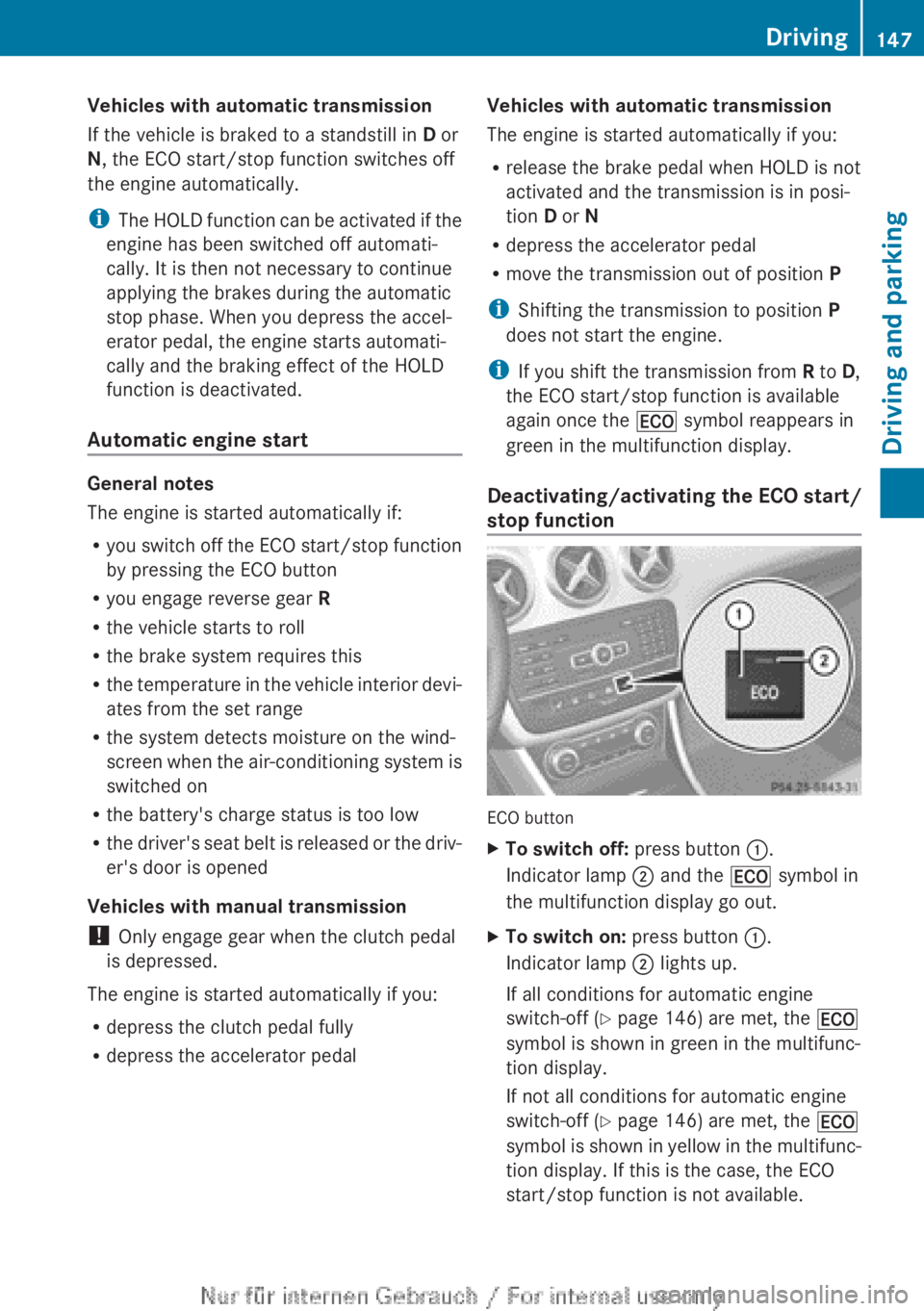
Deactivating/activating the ECO start/
stop function ECO button
X
To switch off: press button :.
Indicator lamp ; and the ¤ symbol in
the multifunction display go out.
X To switch on: press button :.
Indicator lamp ; lights up.
If all conditions for automatic engine
switch-off ( Y page 146) are met, the ¤
symbol is shown in green in the multifunc-
tion display.
If not all conditions for automatic engine
switch-off ( Y page 146) are met, the ¤
symbol
is shown in yellow in the multifunc-
tion display. If this is the case, the ECO
start/stop function is not available. Driving
147
Driving and parking Z
Page 152 of 356
Problem Possible causes/consequences and
M SolutionsVehicles with a petrol
engine:
The engine is not run-
ning smoothly and is
misfiring. There is a malfunction in the engine electronics or in a mechanical
component of the engine management system.
X
Only depress the accelerator pedal slightly.
Otherwise, non-combusted fuel may get into the catalytic con-
verter and damage it.
X Have the cause rectified immediately at a qualified specialist
workshop. The coolant tempera-
ture display is showing
more than 120
†. The
coolant warning lamp
may also be on and a
warning tone may
sound. The coolant level is too low. The coolant is too hot and the engine
is no longer being cooled sufficiently.
X
Stop as soon as possible and allow the engine and the coolant
to cool down.
X Check the coolant level (Y page 288). Observe the warning
notes as you do so and top up the coolant if necessary. If the coolant level is correct, the engine radiator fan may be faulty.
The coolant is too hot and the engine is no longer being cooled
sufficiently.
X
If the coolant temperature is below 120 †, you can continue
driving to the nearest qualified specialist workshop.
X Avoid heavy loads on the engine as you do so, e.g. driving in
mountainous terrain and stop-start traffic. Manual transmission
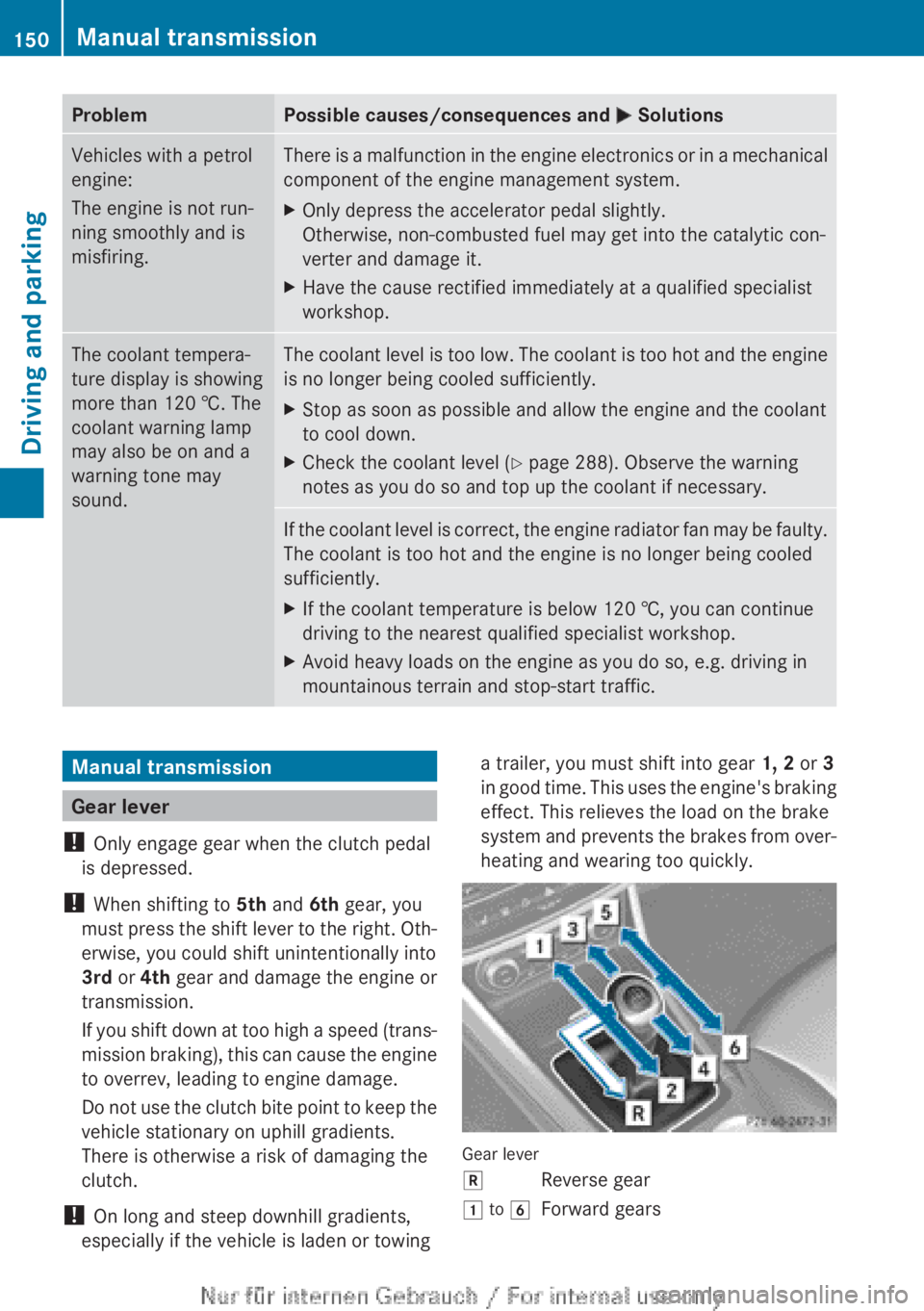
Gear lever
! Only engage gear when the clutch pedal
is depressed.
! When shifting to 5th and 6th gear, you
must
press the shift lever to the right. Oth-
erwise, you could shift unintentionally into
3rd or 4th gear and damage the engine or
transmission.
If you shift down at too high a speed (trans-
mission braking), this can cause the engine
to overrev, leading to engine damage.
Do not use the clutch bite point to keep the
vehicle stationary on uphill gradients.
There is otherwise a risk of damaging the
clutch.
! On long and steep downhill gradients,
especially if the vehicle is laden or towing a trailer, you must shift into gear
1, 2 or 3
in
good time. This uses the engine's braking
effect. This relieves the load on the brake
system and prevents the brakes from over-
heating and wearing too quickly. Gear lever
k
Reverse gear
1 to 6 Forward gears150
Manual transmission
Driving and parking