warning MERCEDES-BENZ A CLASS 2022 Owner's Manual
[x] Cancel search | Manufacturer: MERCEDES-BENZ, Model Year: 2022, Model line: A CLASS, Model: MERCEDES-BENZ A CLASS 2022Pages: 426, PDF Size: 5.82 MB
Page 175 of 426
Ac
tiv eBr ak eAs sist Fu
nction ofActiv eBr ak eAs sist
Ac tiveBr ak eAssi stconsi stsof thefo llo wing
func tions:
R Distance warning func tion
R Autonomo usbraki ng func tion
R Situ ation-d epend ent braki ng assist anc e
R Vehicl eswith Drivin gAss istanc ePa ck‐
ag e:Evasi ve Steer ing Assis tand corner ing
func tion
Ac tiveBr ak eAssi stcan helpyo uto minimize the
ri sk ofacollision withve hicles, cyclis tsor
pedes trians ortoreduce theef fects ofsuch a
coll ision.
If Ac tiveBr ak eAssi sthas detected arisk ofcolli‐
sion, awa rning tone sou nds and theL dis‐
ta nce warning lam plight sup intheins trument
clus ter.
Ve hicl eswith PRE-S AFE®
:depe nding onthe
cou ntry,an addit ionalhap ticwarning occursin
th efo rm ofslight, repeat edtensi oni ng ofthe
seat belt. If
yo udo notre act tothewa rning, autono mous
br akin gcan beinit iated incritic alsituat ions.
In espec iallycritic alsituat ions,Ac tiveBr ak e
Assi stcan initia te aut onomo usbrakin gdir ect ly.
In this case, thewa rning lam pand warning tone
occu rsi mu ltane ously with thebr aking applica‐
tion .
If yo uappl yth ebr ak eyo urself inacr itical situa‐
tio nor appl yth ebr ak edur ing autonomous brak‐
ing, situation -dependen tbr aking assistance
occu rs.The brak epr ess ureincr eases uptomax‐
imum full-sto pbr aking ifnec essar y.
Obser vetheno teson driving systems andyour
re sponsibili ty;yo uma yot her wise failto recog‐
nize dangers(/ page 151). If
aut onom ous brak ing or situa tion-de pende nt
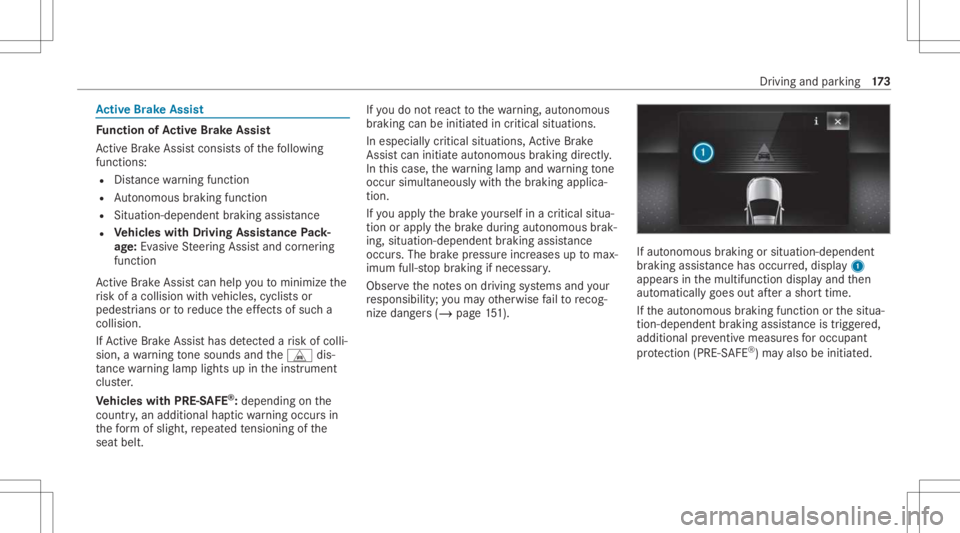
br aki ng assist anc ehas occurred, displa y1
appear sin themultifunc tiondispla yand then
aut omaticall ygoes outafte ra shor ttime.
If th eaut onomous braking function orthesitua‐
tion -dependen tbr aking assistance istrig ge red,
additional preve ntiv emea suresfo roccupa nt
pr otect ion (PRE-S AFE®
)ma yalso beinitiat ed. Dr
iving andparking 17
3
Page 176 of 426
&
WARNIN GRisk ofan acci dent caused by
limit eddetection perform anc eof Active
Br ak eAssi st
Ac tiveBr ak eAssi stcanno tal wa ys cle arly
ident ifyobje ctsand complextraf fic situ a‐
tions . #
Alw ayspa ycar eful attention tothetra f‐
fi c situ ation; donotre ly on ActiveBr ak e
Assi stalon e.Ac tiveBr ak eAssi stisonl y
an aid. Thedriver isresponsible for
maint ainingasuf ficie ntly safedist anc e
to theve hicle infront, vehicle speed
and forbr aking ingood time. #
Beprepa redto brak eor sw erve ifnec ‐
essar y. Als
oob ser vethesy stem limits ofActiveBr ak e
Assi st. The
indiv idua lsub func tions areav ailab lein
va rious speed rang es:
The distance warning func tion canissue awa rn‐
ing inthefo llo wing situat ions:
R From appr oximat ely4 mp h(7 km/h), ifyo ur
ve hicle iscritically closetoave hicle, cyclis t
or pedes trian, youwill hear anintermit tent
wa rning tone and theL distance warning
lam plight sup intheins trument cluster.
Ve hicl eswith PRE-S AFE®
:depe nding on
th ecount ry,an addition alhap ticwarning
occ ursin thefo rm ofslight, repeat edten‐
si oni ng oftheseat belt.
Br ak eimmediat elyortake evasiv eact ion,pr ov i‐
ded itis saf eto do soand thetraf fic situ ation
al lo ws this. Dis
tance warning funct ion(vehicles without
Dr iving Assistance Packag e)
The distance warning func tion canaidyouin the
fo llo wing situat ionswithan intermit tent wa rning
to ne and awa rning lam p:
R atspeeds uptoappr oximat ely15 5mp h
(250 km/h)when approaching vehicles
ahead
R atspeeds uptoappr oximat ely50 mph
(80 km/ h)when approaching statio naryve hi‐
cles, moving pedes trians andcyclis tsahead
R atspeeds uptoappr oximat ely37 mph
(60 km/ h)when approaching crossin g
cy clis ts
Dis tance warning funct ion(vehicles with
Dr iving Assistance Packag e)
The distance warning func tion canaidyouin the
fo llo wing situat ionswithan intermit tent wa rning
to ne and awa rning lam p:
R atspeeds uptoappr oximat ely15 5mp h
(250 km/h)when approaching vehicles
ahead 17
4
Driving and parking
Page 179 of 426

#
Alw ayspa ycar eful attention tothetra f‐
fi c situ ation; donotre ly on Evasiv e
St eer ing Assis talone. #
Beprepar edtobrak eor sw erve ifnec ‐
essar y. #
End thesuppor tby act ivel yst eer ing in
non -critical situation s. #
Drive at an appr opriatespeed ifth er e
ar epedes trians close tothepat hof
yo ur vehicle. Sy
stem limit s
Fu llsy stem perform anc eis no tav ailable fora
fe w sec ond saf te rswitc hingontheignition or
af te rdr iving off.
If Ac tiveBr ak eAssi stisim pair edorinope rativ e
du eto amalf unction,the00C7 warning lam p
appear sin themultifunc tiondispla y.
The system maybe impair edorma yno tfunc ‐
tion ,par ticular lyin thefo llo wing situat ions:
R Insno w,rain, fog, hea vyspr ay,if th er eis
gl ar e, indir ect sunlight oringrea tly varying
ambien tlight . R
Ifth esensor sar edir ty,fo gg ed up, damag ed
or covered.
R Ifth esensor sar eim pair eddue tointerfer‐
ence from other radar sour ces, e.g.stro ng
ra dar reflect ions inpar king garage s.
R Ifaloss oftirepr essur eor afa ulty tirehas
been detected and displ ayed.
R Incom plextraf fic situ ations whereobject s
cann otalw aysbe clear lyidentif ied.
R Ifpedes trians orvehicles movequickl yint o
th esensor detection rang e.
R Ifpe destrians arehidde nby other object s.
R Ifth etypical outline ofapedes trian cann ot
be distinguished from thebac kground.
R Ifapedes trian isno tde tected assuch ,e.g.
due tospecial clothing orother object s.
R Ifth edr iver's seat beltisno tfa stened.
R Oncurveswit hatight radius.
% The ActiveBr ak eAssi stsensor sadjus taut o‐
matically whileacer tain dis tance isbe ing
dr iven afte rth eve hicle hasbeen delivered.
Ac tiveBr ak eAssi stisuna vailable oronl y par
tiall yav ailable during thete ac h-in proc‐
ess.
Se tting Activ eBr ak eAs sist
Re quirement s:
R The ignit ionisswitc hedon.
Multime diasystem:
4 © 5
Set ting s5
Assist ance
5 Act ive Brak eAssist #
Select thedesir edsetting.
The setting isretained when thedr ive sy stem
is ne xt star ted.
Deactiv atingActiv eBr ak eAs sist
% Itis recomme ndedthat youalw ayslea ve
Ac tiveBr ak eAssi stact ivat ed. #
Select Off.
The distance warning func tion,th eaut ono‐
mous braking function andtheEv asiv eSt eer‐
ing Assis tar edeactiv ated.
When theve hicle isne xt star ted, themiddle
se tting isaut omatic allyselect ed. Dr
iving andparking 17
7
Page 180 of 426
%
IfAc tiveBr ak eAssi stisdeact ivat ed, the
00D4 symbol appearsinthest atus barofthe
multifu nctiondisplay. Tr
af fic Sign Assis t Fu
nction ofTraf fic Sign Assis t
Tr af fic Sign Assistdetects traf fic sig ns with the
multifu nctioncamera(/ page15 2). Itassi sts
yo uby displa yingdetected spe edlimits and
ove rtakin gre strictions intheins trument cluster.
Obser vetheno teson driving systems andyour
re sponsibili ty;yo uma yot her wise failto recog‐
nize dangers(/ page 151).
Since Traf fic Sign Assistalso uses thedat a
st or ed inthena vig ation system, itcan updat e
th edispla yin thefo llo wing situat ionswithout
de tecting traf fic sig ns.
The came raalso detects traf fic sig ns with a
re striction indicated byan addit ionalsign (e.g.
when wet).The seareonly disp laye difare stric‐
tion appliesor ifth esy stem cann otcle arly de ter‐
mine whether there striction applies. Wa
rning when thema xim um permis sible
speed isexceeded
The system can warnyouif yo uunin tentio nally
ex ceed themaximum permissible speed.Todo
th is, youcan spec ifyinthemultimedia system
by howmuc hth emaximum permissible speed
can beexceed edbef oreawa rning isissued. You
can specify whether thewa rning isto be justa
visual warning oran acous ticone aswell. Displa
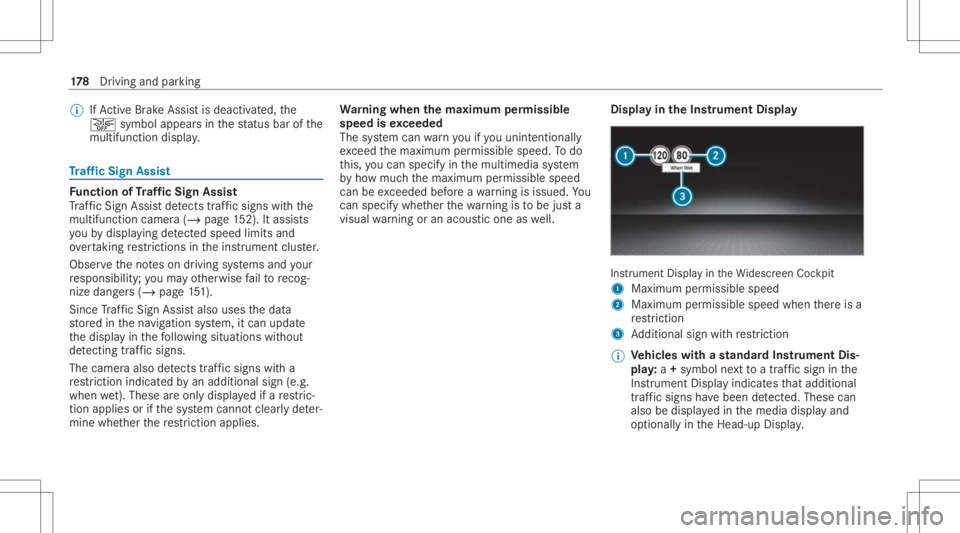
yin theIns trum ent Displa y In
stru ment Displa yin theWi descr eenCockpit
1 Maximum permissible speed
2 Maximum permissible speedwhenther eis a
re striction
3 Addition alsign withre striction
% Ve
hicl eswith ast andar dIns trument Dis‐
pla y:a+ symbo lne xt to atraf fic sig nin the
Ins trument Displayindicat esthat addit ional
traf fic sig ns have been detected. Thesecan
al so be displ ayed inthemedia displayand
op tion ally intheHead-up Display. 17
8
Driving and parking
Page 182 of 426

#
Activateor deacti vate thefunc tion.
Se tting thety pe ofwa rning #
Selec tVisual &Audible ,Visual orOff .
Se tting thewa rning threshold
This value determ ines thespeed atwhic ha
wa rning isissued whenexceeded. #
Select Warning Threshold. #
Setth edesir edspeed. Blind
SpotAssis tand Activ eBli nd Spo t
As sist wit hex itwa rning Fu
nction ofBlind SpotAssis tand Activ e
Bli nd Spo tAs sist wit hex itwa rning
Blin dSpo tAss istand ActiveBli nd Spo tAssi st
use twolat eral, rear-facin gra dar sensor sto
monit orthear ea up to130ft (40 m)behind and
10 ft(3 m) next to your vehicle.
If ave hicle isde tected atspe eds aboveappr ox‐
imat ely8 mp h(12 km/h) andthis vehicle subse‐
qu ent lyent ersth emonit oring rang edire ctly next
to your vehicle, thewa rning lam pin theoutside
mir rorlig hts upred. Pe
rm anen tst atus displa yin theins trument clus‐
te r:
R ¸ (gra y): system isactiv ated but inoper a‐
tiv e
R ¸ (green): system isactiv ated and oper a‐
tion al
If ave hicle isde tected clos eto your vehicle and
yo uswit chon thetur nsignal indicat orinthecor‐
re sponding direction, adoubl ewa rning tone
sou nds and there dwa rning lam pin theoutside
mir rorflashes .If th etur nsignal indicat or
re mains switchedon,allother detected vehicles
ar eindicat edonlyby theflashin gof there d
wa rning lam p.
If yo uove rtak eave hicle quickl y, no warning is
giv en. &
WARNIN GRisk ofacci dent despite Blind
Spo tAssi st
Bli nd Spo tAssi stdoes notre act tovehicles
appr oaching andovertakin gyo uat agr ea tly
di ffer ent speed. Blind
SpotAssis tcann otwa rndriver sin this
situat ion. #
Alw ayspa ycar eful attention tothetra f‐
fi c situ ation and maintain asaf edis‐
ta nce attheside oftheve hicle. Obser
vetheno teson driving systems andyour
re sponsibili ty;yo uma yot her wise failto recog‐
nize dangers(/ page 151).
Ex itwa rning
The exitwa rning isan addition alfunc tion of
Blin dSpo tAss istand canwarnvehicle occu‐
pants about approaching vehicles whenleaving
th eve hicle when statio nary. &
WARNIN GRisk ofacci dent despite exit
wa rning
The exitwa rning neit her react sto statio nary
obj ect sno rto vehicles approaching youat a
gr eat lydif fering spe ed.
The exitwa rning cannotwa rndriver sin these
situation s. 18
0
Driving and parking
Page 186 of 426

R
Youha ve adop tedaspor tydriving style wit h
high corner ing speeds orhigh ratesof accel‐
er ation.
R When ESP®
is deactiv ated.
R Ifaloss oftirepr essur eor afa ulty tirehas
been detected and displ ayed.
If yo udeac tivateth eAc tiveLa ne Keeping Assist
wa rning and thelane marking scann otbe clear ly
de tected, itis pos siblethat no lane correcting
br ak eap plica tion take splace (/page18 4).
Th esy stem maybe impair edorma yno tfunc tion
par ticular lyin thefo llo wing situat ions:
R Ifth er eis poor visibility ,e.g. due toinsuf fi‐
cie ntillu mina tionofthero ad, ifth er ear e
highl yva riable shade condition sor inrain,
sno w,fogor hea vyspr ay.
R Ifth er eis glar e, e.g .fr om oncom ingtraffic,
th esun orreflect ions.
R Ifth ewindshield inthear ea ofthemultifunc ‐
tion camer ais dir ty,or ifth ecamer ais fog‐
ge dup, damag edorcovered. R
Ifth er ear eno lane marking s,or several
unc lear lane markingsarepr esen tfo rone
lane, e.g.around roadw orks .
R Ifth elane marking sar ewo rn,dar kor cov‐
er ed.
R Ifth edis tance from theve hicle infront istoo
shor tand thus thelane marking scann otbe
de tected.
R Ifth elane marking sch ang equ ickl y, e.g.
lanes branc hof f,cr oss one another or
mer ge.
R Ifth ero ad isvery nar row and windin g.
R Vehicl eswith Drivin gAss istanc ePa ck‐
ag e:ifth era dar sensor sin there ar bum per
ar edir tyor coveredin sno wand anobs tacle
is de tected inyour lane ,no lane -cor recting
br ak eap plica tion take splace.
Ac tiv atin g/deac tivatin gAc tiv eLan eKe eping
Assis t
Multi media system:
4 © 5
Set ting s5
Quick Access
5 Act ive Lane Keeping Assist #
Activateor deacti vate thefunc tion. Se
tting Activ eLan eKe eping Assist
Multi media system:
4 © 5
Set ting s5
Assist ance
5 Act ive Lane Keeping Assist
Ac tiv atin gor deac tivatin gthe hapticwarning #
Selec tWarnin g.
Ac tivateor deacti vate thefunc tion. Fu
nction ofada ptive dam ping adjustm ent Suspen
sionwithadap tivedam ping adjus tment
con tinuously adjuststhech aract eristic sof the
suspension dampersto thecur rent operati ng
and drivi ng cond itions.
The damp ing issetindiv iduall yfo reac hwhee l
and isaffect ed bythefo llo wing fact or s:
R thero ad sur face condi tions
R vehicle load
R thedr ive pr og ram sele cted
R thedr iving style
The drive pr ogr am can beadjus tedusing the
DY NA MIC SELE CTswitc h. 18
4
Driving and parking
Page 189 of 426
%
Have thedispla yre pair edorreplaced if,for
ex am ple, pixelerro rs consi derablyrestrict its
us e. 360
°came ra Fu
nction ofthesur round viewcamer a
The surround viewcam erais asy stem that con ‐
sis tsof four cam eras. The cam eras coverth e
immed iateve hicle surround ings.The system
assis tsyouwhen youar epar kingor atexits with
re duced visibility ,fo rex am ple.
The views ofthesur round viewcam eraar e
alw aysav ailable whendrivin gfo rw ards up toa
speed ofappr ox.10 mph(1 6 km/h) andwhen
bac king up.
The surround viewcam erais on lyan aid and
ma ysho wadis torted viewof obs tacle s,sho w
th em incor rectly ornotsho wthem atall. Itis no t
a subs titutefo ryo ur att entio nto thesur round‐
ing s.The responsibili tyforsaf emaneu vering and
pa rking remains withyo u. Mak esur eth at ther e
ar eno per sons, animals orobjec tsetc., inthe
maneu vering area while ma neu vering and park‐
ing. The
system evaluat esimag esfrom thefo llo wing
cameras:
R Rear vie wcam era
R Front camer a
R Twoside camer asintheoutside mirrors
% Youcan open theco verof there ar vie wcam ‐
er aman ually(/ page18 9).
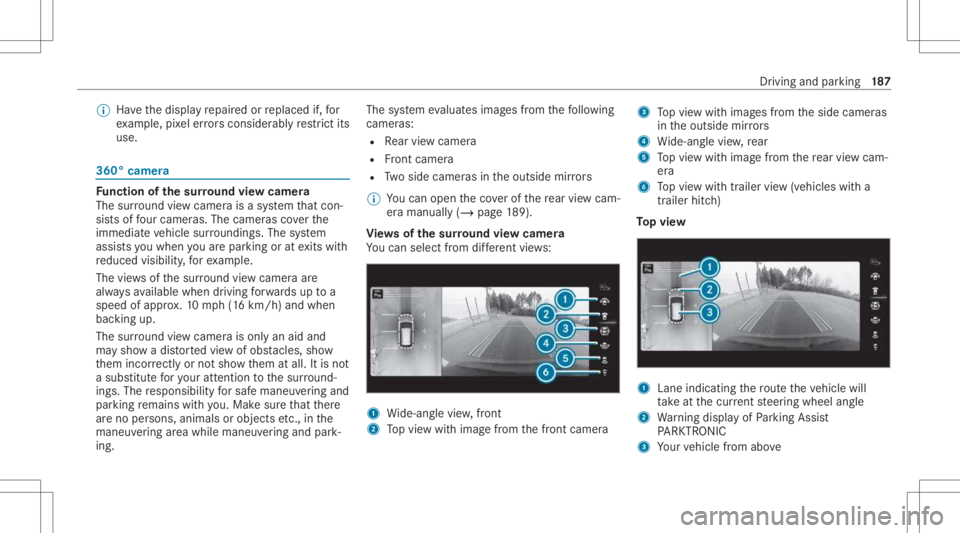
Vi ew sof thesur round viewcamer a
Yo ucan selectfrom differe nt vie ws: 1
Wide-ang levie w, front
2 Topvie wwit himag efrom thefront camer a 3
Topvie wwit himag esfrom theside camer as
in theoutside mirrors
4 Wide-ang levie w, rear
5 Topvie wwit himag efrom there ar vie wcam ‐
er a
6 Topvie wwit htrailer view(vehicles witha
tra iler hitch)
To pvie w 1
Lane indicati ngthero uteth eve hicle will
ta ke atthecur rent steer ing wheel angle
2 Warning displa yof Parking Assist
PA RK TRONI C
3 Your vehicle from above Dr
iving and parking 18
7
Page 196 of 426
Se
tting thewa rning tones ofParking Assis t
PA RK TRONI C
Mu ltimed iasystem:
4 © 5
Set ting s5
Assist ance
5 Camera &Parkin g
Ad jus tingthe volum eof thewa rning tones #
Select Warning ToneVolume. #
Seta va lue.
Ad jus tingthe pitchof the warning tones #
Select Warning TonePitch. #
Seta va lue.
Specif yingthest ar ting pointfo rthe warning
to nes
Yo ucan spec ifywhe ther thePa rking Assist
PA RK TRONI Cwa rning tones should comm ence
wh en theve hicle isfur ther aw ay from anobs ta‐
cle . #
Sele ctWa rnEarl yAll Arou nd. #
Activateor deacti vate thefunc tion. Ac
tiv atin g/deac tivatin gaudi ofa deo ut
Yo ucan spec ifywhe ther thevo lume ofamedia
sour ceinthemultimedia system isto be
re duced whenParking AssistPA RK TRONI C
soun dsawa rning tone. #
Select Aud ioFad eou tDuri ngWa rning Tones. #
Activateor deacti vate thefunc tion. Ac
tiv ePa rking Assis t Fu
nction ofActiv ePa rking Assis t
Ac tivePa rking Assistis an elect ronic parking
assis tance system, whic huses ultrasound with
th eassis tance ofthere ar vie wcam eraand sur‐
ro und viewcam era. When youar edr ivin gfo r‐
wa rdsup toappr oximat ely22 mph(35 km/h),
th esy stem automaticall ymeasur espar king
spaces onboth sides oftheve hicle.
Ac tivePa rking Assistof fers thefo llo wing func‐
tion s:
R Parking inpar kingspaces parallel tothero ad
R Parking inpar kingspaces perpendic ularto
th ero ad (op tionall yeit her forw ards or
re ve rse) R
Exiting parking spaces ifyo uha ve par ked
usin gAc tivePa rking Assist
As soon asall requ iremen tsareme tfo rsearc h‐
ing forpar king space s,theÇ displa yappear s
in themultifunc tiondispla y.
When ActivePa rking Assisthas detected parking
spaces ,th eÈ displa yappear sin themulti‐
func tion displa y.The arrow ssho won whic hside
of thero ad detected parking spaces arelocat ed.
The yar eth en sho wninthemedia display.
The parking space canbeselect edasdesir ed.
Dependin gon thelocation ofthepar king space,
th epar king direct ion (rear wardsor forw ards)
can also beselec tedas desir ed.
When ActivePa rking Assistis act ivat ed, thetur n
signal indicat orsar eactiv ated based onthecal‐
culat edpat hof your vehicle.
When youar een tering orexitin gapar king
space, thepr ocedur eis assis tedby acc eler ation,
br akin g,steer ing and gear chang es.
Ac tivePa rking Assistis onl yan aid. Itis no ta
subs titutefo ryo ur att entio nto thesur round ings.
The responsibili tyforsaf emaneu vering and
pa rking remains withyo u. Mak esur eth at no 19
4
Driving and parking
Page 203 of 426
No
teson theIns trum ent Displa yand on-
boar dcom puter &
WARNIN GRisk ofacci dent dueto an
In stru ment Displa ymalfu nction
If th eIns trument Displayhas failed ormal‐
func tioned,thefunc tion restrictions applying
to saf etyre leva nt systems areno tvisible.
The oper ating safetyof your vehicle maybe
im pair ed. #
Drive on car efull y. #
Have theve hicle checkedimmediat ely
at aqu alif ied spec ialistwo rkshop. &
WARNIN GRisk ofdist ra ction from infor‐
mati onsystems andcomm unication s
eq uipment
If yo uoper ateinf ormat ionand comm unic a‐
tio neq uipme ntintegratedin theve hicle
when driving, youwill bedistract ed from the
tr af fic situ ation. Thiscou ldalso cau seyouto
lose control of theve hicle. #
Onlyoper ateth is eq uipmen twhen the
tr af fic situ ation per mits. #
Ifyo ucan notbe sur eof this, stop the
ve hicle whilstpa ying attention toroad
and traffic condi tions andoperate the
eq uipment withth eve hicle statio nary. *
NO
TEMercede s-AMG vehicles #
Obser vetheno tesin theSupplement .
Yo uco uld other wise failto recogni ze
da ngers. Yo
umus tobse rveth eleg alrequ iremen tsforth e
cou ntryin whi chyouar ecur rentl ydr ivi ng when
op erati ng theon- boar dcom puter.
The on-boar dcom putersho wsonlydispla ymes‐
sag esand warnings from spec ific systems on
th emultifunc tiondispla y.Yo umus tth er efor e
ensur eth at your vehicle isalw aysre liable.
If th eoper ating safetyof your vehicle is
im pair ed,parkth eve hicle immediat elyand
saf ely. Con tact aqu alif ied spec ialistwo rkshop. Ins
trument Displayand on-boar dcom puter 20
1
Page 207 of 426
#
Onthecor responding menu,usethelef t-
hand Touc hCon trol to scr olltotheend ofthe
lis t. #
Press thelef t-hand Touc hCon trol.
The selected men uwill bedispl ayedfull-
scr een. Ov
ervie wof what issho wnonthemu lti‐
fun ction display
Dis playson themultifunc tiondispla y
u ActivePa rking Assist(/ page19 6)
é Parking AssistPA RK TRONI Cdeac tiva ted
( / pag e19 3)
h Cruis econtr ol(/ page 160)
ç ActiveDis tance AssistDIS TRONI C
(/ page 162)
ê ActiveBr ak eAssi st(/ pag e17 3)
à ActiveSt eer ing Assis t(/ page16 8)
00B0 Ac
tiveLa ne Keeping Assist(/ page18 2)
± ActiveLa ne Chang eAssi st(/ pag e17 1)
00D6 ECO
star t/ stop funct ion(/ page13 2) 00D9
HO
LD functio n(/ page 156)
00CE Ad
aptiveHig hbeam Assis t(/ page11 2)
Ve hicl eswith Traf fic Sign Assis t:De tected
ins tructi ons and traf fic sig ns (/ page 178). He
ad-upDi spla y Fu
nction oftheHead -upDispla y *
NO
TEMer cedes-AMG vehicles #
Obser vetheno tesin theSupplement .
Yo uco uld other wise failto recogni ze
da ngers. The
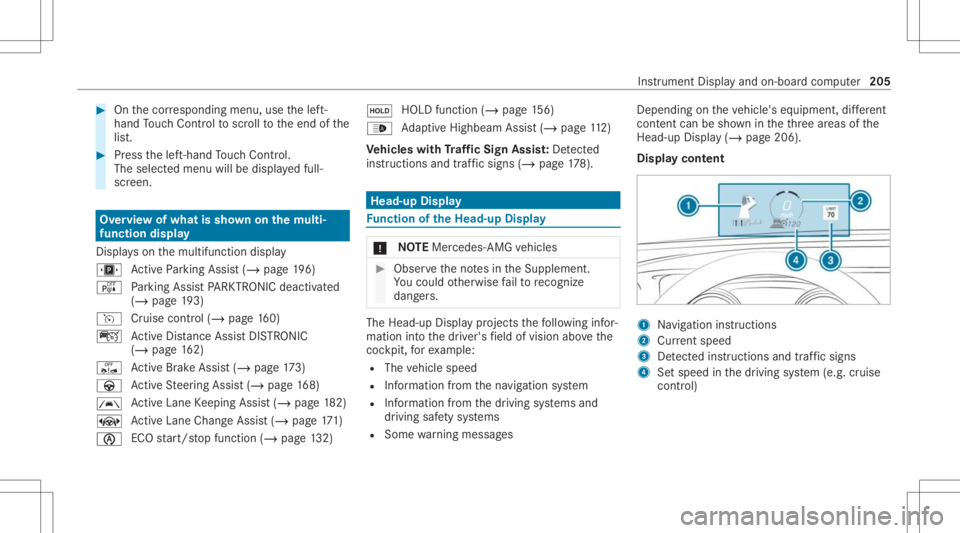
Head-upDisp lay pr ojects thefo llo wing infor‐
matio nint oth edr iver's field ofvision abovethe
coc kpit, forex am ple:
R The vehicle speed
R Information from thena vig ation system
R Information from thedr iving systems and
dr iving safetysy stems
R Some warning mess ages Depe
ndingon theve hicle's equipment, differe nt
cont entcan besho wnintheth re ear eas ofthe
Hea d-up Display (/ page 206).
Di spla yco ntent 1
Navig ation instructions
2 Current speed
3 Detected instructi ons and traf fic sig ns
4 Setspe edinthedr iving system (e.g. cruise
con trol) Ins
trument Displayand on-boar dcom puter 205