ECU MERCEDES-BENZ A CLASS 2022 Workshop Manual
[x] Cancel search | Manufacturer: MERCEDES-BENZ, Model Year: 2022, Model line: A CLASS, Model: MERCEDES-BENZ A CLASS 2022Pages: 426, PDF Size: 5.82 MB
Page 190 of 426
The
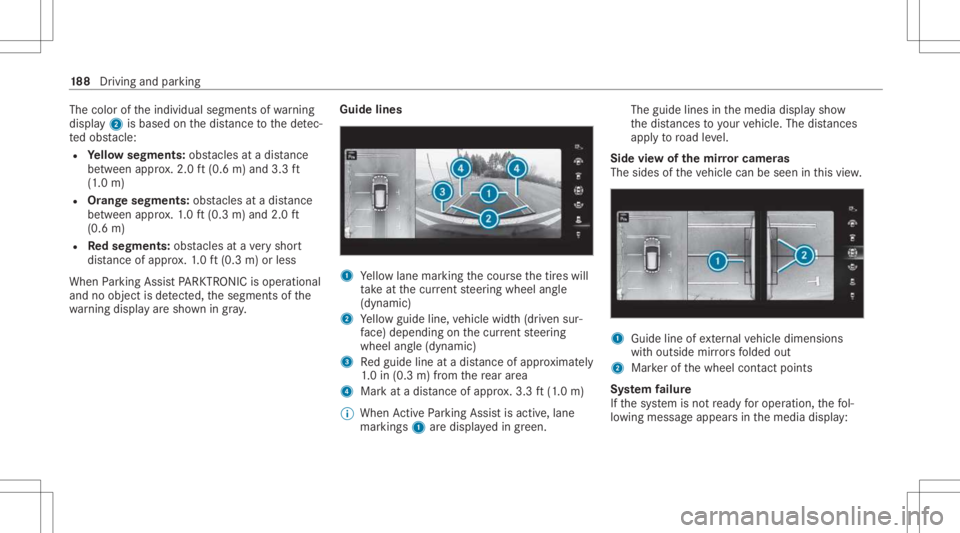
color oftheindividual segmentsof wa rning
displa y2 isbased onthedis tance tothede tec‐
te dobs tacle :
R Yello wsegment s:obs tacle sat adi st anc e
be tween appr ox.2.0 ft(0.6 m)and 3.3ft
(1 .0 m)
R Orang esegment s:obs tacle sat adi st anc e
be tween appr ox.1. 0 ft (0.3 m)and 2.0ft
(0.6 m)
R Redse gme nts: obstacle sat ave ry shor t
dis tance ofapprox .1. 0 ft (0.3 m)orless
When Parking AssistPA RK TRONI Cis operatio nal
and noobj ectis de tected, thesegment sof the
wa rning displa yar esho wningray . Guide
lines 1
Yello wlane markingth ecour sethetir es will
ta ke atthecur rent steer ing wheel angle
(dynamic)
2 Yello wguide line,vehicle width(dr iven sur‐
fa ce) dep endi ngon thecur rent steer ing
wheel angle(dynamic)
3 Redguide lineatadis tance ofapprox imat ely
1. 0 in (0.3 m)from there ar area
4 Markat adis tance ofapprox .3.3 ft(1.0 m)
% When ActivePa rking Assistis act ive, lane
mar kings1 aredispla yedin green. The
guide linesinthemedia displaysho w
th edis tances toyour vehicle. Thedistances
ap ply toroad leve l.
Side viewof themir rorca mer as
The side sof theve hicle canbeseen inthis vie w. 1
Guide lineofextern al vehicle dimensions
wit houtside mirrors folded out
2 Markerof thewheel contact poi nts
Sy stem failur e
If th esy stem isno tre ady foroper ation, thefo l‐
lo wing mess ageappear sin themedia display: 18
8
Driving and parking
Page 199 of 426
select
thecor responding transmission posi‐
tion.
Ve hicl eswith automatic transmiss ion:
The vehicle drives intoth eselect edpar king
space.
% During thepar king procedur ewit hAc tive
Pa rking Assist, th elane marking sar edis‐
pla yedin green inthecamer aimag e.
On com pletion ofthepar king procedur e,the
Ø Parking AssistFinished, TakeContro lof
Vehicle displaymessag eappear s.Fu rther
maneuv ering mayst ill be nec essar y. #
Aftercom pletion ofthepar king procedur e,
saf eguar dth eve hicle agains tro lling away.
When requ ired bylegalrequ iremen tsor local
con dition s:tur nth ewheels towa rdsth ecurb.
% Youcan stop theve hicle andchang eth e
tr ans missi on positio ndu ring thepar king pro‐
cedur e.The system then calculat esane w
ve hicle path.Ifno newvehicle pathis availa‐
ble, thesy stem can chang eth etransmission
position again orcanc elthepar king proce‐
dur e. Exiting
apar king space withAc tiv ePa rking
Assis t
Re quirement s:
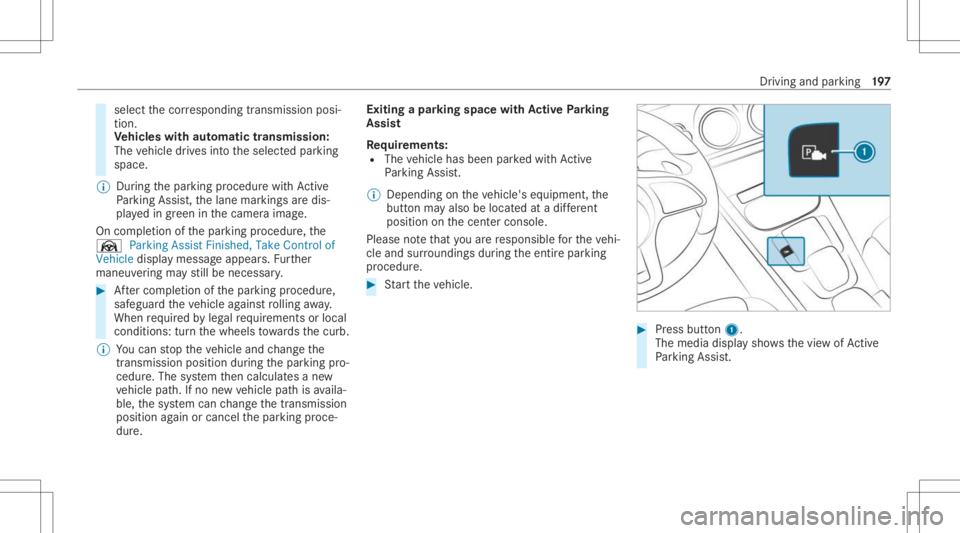
R The vehicle hasbeen parkedwit hAc tive
Pa rking Assist.
% Depe ndingon theve hicle's equipment, the
butt onmayalso belocat edatadif fere nt
po sitio non thecent ercon sole.
Please note that youar ere sponsible forth eve hi‐
cle and surround ingsdur ing theent ire par king
pr ocedur e. #
Startth eve hicle. #
Press butt on1.
The media displaysho wsthevie wof Active
Pa rking Assist. Dr
ivin gand parking 19
7
Page 203 of 426
No
teson theIns trum ent Displa yand on-
boar dcom puter &
WARNIN GRisk ofacci dent dueto an
In stru ment Displa ymalfu nction
If th eIns trument Displayhas failed ormal‐
func tioned,thefunc tion restrictions applying
to saf etyre leva nt systems areno tvisible.
The oper ating safetyof your vehicle maybe
im pair ed. #
Drive on car efull y. #
Have theve hicle checkedimmediat ely
at aqu alif ied spec ialistwo rkshop. &
WARNIN GRisk ofdist ra ction from infor‐
mati onsystems andcomm unication s
eq uipment
If yo uoper ateinf ormat ionand comm unic a‐
tio neq uipme ntintegratedin theve hicle
when driving, youwill bedistract ed from the
tr af fic situ ation. Thiscou ldalso cau seyouto
lose control of theve hicle. #
Onlyoper ateth is eq uipmen twhen the
tr af fic situ ation per mits. #
Ifyo ucan notbe sur eof this, stop the
ve hicle whilstpa ying attention toroad
and traffic condi tions andoperate the
eq uipment withth eve hicle statio nary. *
NO
TEMercede s-AMG vehicles #
Obser vetheno tesin theSupplement .
Yo uco uld other wise failto recogni ze
da ngers. Yo
umus tobse rveth eleg alrequ iremen tsforth e
cou ntryin whi chyouar ecur rentl ydr ivi ng when
op erati ng theon- boar dcom puter.
The on-boar dcom putersho wsonlydispla ymes‐
sag esand warnings from spec ific systems on
th emultifunc tiondispla y.Yo umus tth er efor e
ensur eth at your vehicle isalw aysre liable.
If th eoper ating safetyof your vehicle is
im pair ed,parkth eve hicle immediat elyand
saf ely. Con tact aqu alif ied spec ialistwo rkshop. Ins
trument Displayand on-boar dcom puter 20
1
Page 205 of 426
Dur
ing normalop erati on, thecoolant tem‐
per atur edisp lay is per mitt edtorise to
24 8°F (120°C).
Ve hicles with48 Von-boar delectr icalsys‐
te m: POWER andCHARGE displ ay(elect rical
dr ive su ppo rtand recup erati on powe rof the
electr icmo tor)
8 Select eddrive pr ogr am
9 Select edtransmiss ionposi tion
A Multifunction display (e xa mp le:standar ddis‐
pla yfo rtr ip) :Assis tance/T elep hone /Naviga‐
tion /Trip/Media/R adio/Stylesanddis‐
pla ys/Ser vice
B Fuelleve l,fuel filler flap locatio nind icat or,
ra ng e Ov
erview ofthebut tons on thest eer ing
wheel 1
P Back/Hom ebutt on(press and hold),
on- boar dcom puter
2 Touc hCon trol, on-bo ardco mp uter
3 Con trol pan elforcr uis econtr olor Active
Dis tance AssistDIS TRONI C 4
Contr olpa nel forth eMBUX multimedia sys‐
te m (/ page208)
£ Voice Cont rolSy stem
5 00E2 Tocal lup thehome screen ofthemul‐
timedia system
6 Touc hCon trol mult imed iasystem
7 0038 Backbutt on(multimedia system)
8 Brightn esscontrol to adjus tth elighting in
th eIns trument Displayand inthecon trol
element sof theve hicle interior Oper
ating theon-boa rdcom puter
Obser vetheleg alrequ iremen tsforth ecount ry
in whic hyo uar ecur rently drivi ng when operat‐
ing theon- boar dcom puter. Ins
trument Displayand on-boar dcom puter 203
Page 210 of 426
Ov
ervie wand oper ation No
teson theMB UX multim edia system &
WARNIN GRisk ofdist ra ction from infor‐
mati onsystems andcomm unication s
eq uipment
If yo uoper ateinf ormat ionand comm unic a‐
tio neq uipme ntintegratedin theve hicle
when driving, youwill bedistract ed from the
tr af fic situ ation. Thiscou ldalso cau seyouto
lose control of theve hicle. #
Onlyoper ateth is eq uipmen twhen the
tr af fic situ ation per mits. #
Ifyo ucan notbe sur eof this, stop the
ve hicle whilstpa ying attention toroad
and traffic condi tions andoperate the
eq uipment withth eve hicle statio nary. Yo
umus tobse rveth eleg alrequ iremen tsforth e
cou ntryin whi chyouar ecur rentl ydr ivi ng when
op erati ng themultimedia system. Ov
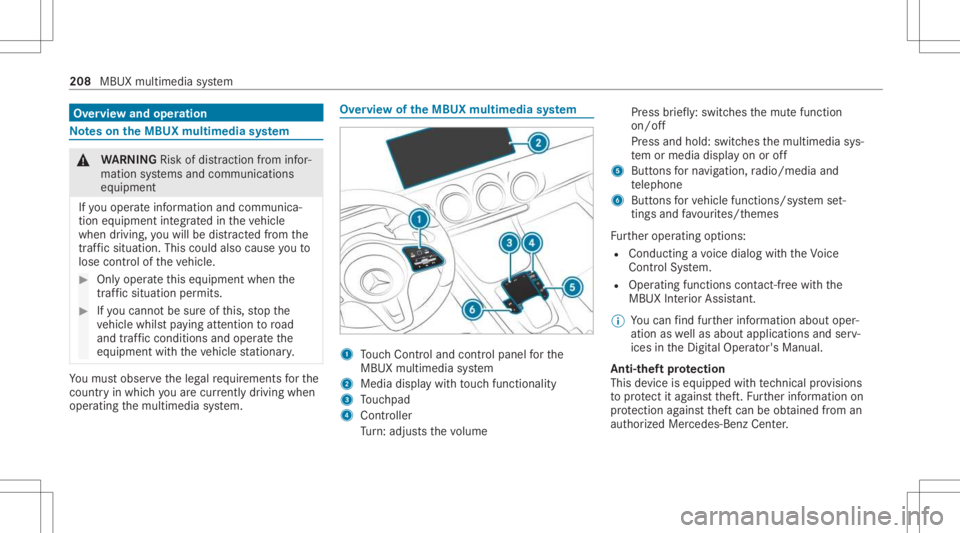
ervie wof theMB UX multim edia system 1
Touc hCon trol and contro lpanel forth e
MBUX multimedia system
2 Media displaywit hto uc hfun ction alit y
3 Touc hpad
4 Con troller
Tu rn:ad jus tsthevo lume Pr
ess brief ly:swi tches themut efunc tion
on/ off
Pr ess and hold: switchesthemultimedia sys‐
te m or media display on oroff
5 Butt ons forna vig ation, radio/media and
te lephon e
6 Buttons forve hicle functions/sy stem set‐
ting sand favo urites/ themes
Fu rther oper ating options:
R Conducting avo ice dialog withth eVo ice
Cont rolSy stem.
R Oper ating functionscon tact-free with the
MBUX Interior Assis tant.
% Youcan find further information aboutoper‐
ation aswellas about applicat ionsandserv‐
ices intheDigit alOper ator's Manual.
Anti-t heftpr otection
This devic eis eq uipped withte ch nica lpr ov ision s
to protect itag ains tth eft. Fu rther information on
pr otect ion agains tth eftcan beobt ained from an
aut hor ized Mercedes- BenzCenter. 208
MBUX multimedia system
Page 220 of 426
-
Edg elighti ng
- Day/nig htdesign
R Contr oleleme nts
- Keyboar dlan guag eand handwr itin g re c‐
ogni tion
- Sensi tivityof theto uc hpad
- Sen sitivit yof theTo uc hCon trols
R Voice Cont rolSy stem
R Sound
- Entertainm ent
- Navig ation andtraf fic annou ncements
- Telephon e
- Voice amplif icat ion tothere ar com part‐
men t
R Con nectivity
- Wi-Fi, Bluetoo th®
,NFC
R MBUX Remo teCon trol
- Author izing anddeaut horizing devices
R Time &dat e
R Langu age R
Units fordis tance
R Softwareup dates
R Dat aimpor t/expo rt
R PIN protect ion
R System Reset Inf
ormat iononimpor tant system updates Im
por tant system updat esma ybe neces saryfo r
th esecur ityofyour mult imed iasystem's data.
Ins tallth ese updat es,orelse thesecur ityofyour
mult imed iasystem cann otbe ensur ed.
A sy stem updat econ sistsof thre esteps:
R Downloading orcop ying ofthedat are qu ired
fo rins tallation
R Installation ofthedo wnloaded system updat e
R Activati on ofthedo wnloaded system updat e
by restar tin gth esy stem
% Ifaut omatic softwareupdat esareactiv ated,
th esy stem updat eswill bedownloaded auto‐
maticall y. The
multimedia system prov ides amess age
when asy stem updat eis available.
Yo uha ve thefo llo wing selectionoption s:
R Accept andInstall
The system updat ewill bedownloaded inthe
bac kground .
R Infor mat ion
In fo rm atio nabout thepending system
updat eis displa yed.
R Later
The system updat ecan bedownloaded man‐
uall yat alat er time.
Deep system updates
Dee psy stem updat esaccess vehicle orsystem
se ttings andcanther efor eonl ybe car ried out
when theve hicle isstatio naryand theignition is
switc hedoff.
If th edo wnload ofadeep system updat eis com‐
ple tedand thedo wnloaded system updat eis
re ady forins tallation ,yo uwill beinformed ofthis
af te rth ene xt ignition cycle, forex am ple. 21
8
MBUX multimedia system
Page 221 of 426
%
Park theve hicle safely inasuit able location
bef orest ar tin gth eins tallation .
Re quiremen tsforth eins tallation :
R The ignit ionisswitc hedoff.
R Notesand warnings have been read and
acc epted.
R The elect ric pa rking brak eis applied.
If all requ iremen tshave been fulfilled, thedo wn‐
loaded system updat eis ins talled. Themultim e‐
dia system cann otbe oper ated while thedo wn‐
loaded system updat eis being installed and
ve hicle functionsarere strict ed.
If er ro rs should occurduring theins tallation ,th e
multime diasystem automaticall yatt em ptsto
re stor eth epr ev ious version. Ifre stor ation ofthe
pr ev ious version isno tpossible ,a symbol
appear son themedia display.Con sult aqu ali‐
fi ed specialis two rkshop toresolv eth epr oblem. Se
tting upaWi -Fiho tspo t Re
quirement s:
R Tosetup theWi -Fico nne ctio nof themu l‐
tim edia system withex tern al ho tspo ts:
th er eis no comm unication moduleinstalled.
R The device tobe con nectedsuppor tsat leas t
one ofthetypes ofcon nect iondescr ibed.
Multimedia system:
4 © 5
Set ting s5
System
5 Wi-Fi &Bluetoot h
Ac tiv atin g/deac tivatin gWi -Fi #
Sele ctWi-Fi .
Co nne ctin gth emu ltim edia system withan
ex tern al ho tspo tusin gWi -Fi
The type ofconnection established mustbe
select edon themultimedia system and onthe
de vice tobe con nected.
% The connection procedur ema ydif fer
dependin gon thede vice. Followtheins truc‐
tion sth at aresho wninthedispla y.Fu rther
inf ormation canbefound inthemanuf actur‐
er's oper ating instruction s. #
Select Internet Setting s. #
Select Connec tvia Wi-Fi. #
Select AddHotspot.
Connecting usingasecur itykey #
Select theop tion s0048 ofthedesir edWi-Fi
ne twork. #
Select Connect UsingSecu rityKey. #
Have thesecur itykeydisp laye don thede vice
to be con nected(see themanuf acturer's
oper ating instruction s). #
Enterth is secur itykeyon themultimedia sys‐
te m. #
Conf irm theent rywit h¡.
Connecti ngusing aWPS PIN #
Sele cttheop tion s0048 ofthedesir edWi-Fi
ne twork. #
Select Connect viaWPS PINInpu t.
The multime diasy stem gener ates an eight-
di gitPIN . #
Enterthis PIN onthede vice tobe con nected. #
Conf irm theent ry. MBUX
multimedia system 21
9
Page 222 of 426
Connect
ingusin gabut ton #
Select theop tion s0048 ofthedesir edWi-Fi
ne twork. #
Select Connect viaWPS PBC. #
Select "Connect viaWPS PBC"in theop tion s
on thede vice tobe con nected(see theman‐
uf actur er'soper ating instruction s). #
Press theWPS buttonon thede vice tobe
con nected. #
Select Continue inthemultimedia system.
Ac tiv atin gaut omati cco nn ectio n #
Select Connect viaWi-Fi. #
Select theop tion s0048 ofthedesir edWi-Fi
ne twork. #
ActivatePe rma nent InternetConnecti on.
Co nnectin gwi th akno wnWi-Fi #
Sele ctConnect viaWi-Fi . #
Sele ctaWi -Fi network.
The conn ection ises tablished again. Conf
iguringthemu ltim edia system asaWi -
Fi ho tspo tfo rex tern al de vic es
The type ofconnection established depends on
th ede vice tobe con nected. The func tion must
be suppor tedby themultimedia system and by
th ede vice tobe con nected. The type ofcon nec‐
tion established mustbe select edon themulti‐
media system and onthede vice tobe con nec‐
te d. #
Select Vehicle Hotspot. #
Select Connec tDevic eto Vehicle Hotspot.
Connecting usingWPSPINgener ation #
Select Connec tvia WPS PINGeneration. #
Enterth ePIN showninthemedia displayon
th ede vice tobe con nectedand confirm .
Connect ingusin gWPS PINentr y #
Sele ctConn ectviaWPS PINInput. #
Enterth ePIN that issho wnontheex tern al
de vic e's displa yon themultimedia system.
Connecting usingabutt on #
Select Connec tvia WPS PBC. #
Press thepush buttononthede vice tobe
con nected(see themanuf acturer'soper ating
ins truction s). #
Select Continue.
Connecting usingasecur itykey #
Select Connect DevicetoVeh icleHotsp ot.
A secu rity keyis disp laye d. #
Select theve hicle from thede vice tobe con ‐
nec ted. The vehicle isdispla yedwit hth e
DIR ECT -MBU XXXX XXnetworknam e. #
Enterthesecur itykeywhic his sho wninthe
media display on thede vice tobe con nected. #
Conf irm theent ry.
Connect ingusin gNFC #
Sele ctConn ectviaNFC. #
ActivateNFC onthemobile device (see the
manuf acturer'soper ating instructions). #
Hold thede vice tobe con nectedat theve hi‐
cle's NFCinterface. #
Sele ctFini shed.
The mob ile de vice isno wconnect edtothe
multime diasystem hotspo tvia NFC. 220
MBUX multimedia system
Page 223 of 426
Gene
ratin gane wse cur itykey #
Select Veh icleHotsp ot. #
Select Genera teSecu rityKey.
A connecti onwillbe established withth e
ne wly crea tedsecur itykey. #
Tosave asec urity key:select Save.
When ane wsecur itykeyis save d, all existin g
Wi -Fi conne ctionsareth en discon nected.If
th eWi -Fi conne ctionsarebe ing re-es tab‐
lished, thene wsecur itykeymus tbe entere d. Na
vig ation Switc
hingnavig ation on Multimedia
system:
4 © 5
Navigation (Navigation ) #
Alternat ivel y: press thez button.
The map showstheve hicle's current posi‐
tio n.The navig ation menu issho wn.
The navig ation menu ishidd en ifro uteguid‐
anc eis act ive. #
Tosho w:tapon theto uc hsc reen.
The menu ishidden automaticall y. MBUX
multimedia system 22
1
Page 228 of 426
R
The service hasbeen activated atan aut hor‐
ized Mercedes-B enzCent er.
Multimedia system:
4 © 5
Navigation
Displa yingthetraf fic sit uation withLiv eTr af‐
fi c Inf orma tion #
Select Z. #
ActivateTra ffic. #
Select Adva nced. #
Select View . #
Select MapEle ments . #
Swi tchon Tra fficInci dents ,Fre eFlo wing
Tra fficand Delay.
If traf fic inf ormati onhasbee nre cei ved, then
tra ffic inc ident ssuc has roadw orks ,ro ad
bloc ks,local area repor ts(e.g. fog) and warn‐
ing mess ages aredispla yed.
The traffic dela yis displa yedfo rth ecur rent
ro ute. Traf fic del ayslas ting oneminut eor
long erareta ke nint oconsi deratio n. Di
spl aying hazardwa rnings withCar -to-X -
Comm unication
If hazar dwa rnings areav ailable these can be
sho wnassymbols onthemap. Thedispla y
depends onthese ttings forth eTraffic andTraf-
fic Incidents option s. #
Setth eop tion s.
If Traffic isswitc hedoffand Traffic Incidents
is switc hedon,thesymbols aresho wnon
th epr ospect ive ro ute.
Disp laying weather information andother
map contents #
Select Z. #
Select Advanced . #
Select View. #
Select MapElements . #
Scrollup and showtheONLIN EMAP CON-
TENT categor y. #
Swi tchon aser vice ,e.g. Wea ther.
Cu rrent weather informat ionisdispla yedon
th ena vig ation map,e.g.temp eratur eor
cloud cover. Te
lephone Te
lephon y No
teson telephon y &
WARNIN GRisk ofdist ra ction from oper‐
ati ng integr ated commu nication equip‐
ment whiletheve hicle isin mo tion
If yo uoper ateco mm unic ationeq uipme nt
int egrat edintheve hicle when driving, you
cou ldbe dist ra cted from thetra ffic situat ion.
This could alsocause youto lose control of
th eve hicle. #
Onlyoper ateth is eq uipmen twhen the
tr af fic situ ation per mits. #
Ifyo ucan notbe sur eof this, stop the
ve hicle whilstpa ying attention toroad
and traffic condi tions andoperate the
eq uipment withth eve hicle statio nary. 226
MBUX multimedia system