light MERCEDES-BENZ A CLASS 2022 Repair Manual
[x] Cancel search | Manufacturer: MERCEDES-BENZ, Model Year: 2022, Model line: A CLASS, Model: MERCEDES-BENZ A CLASS 2022Pages: 426, PDF Size: 5.82 MB
Page 181 of 426
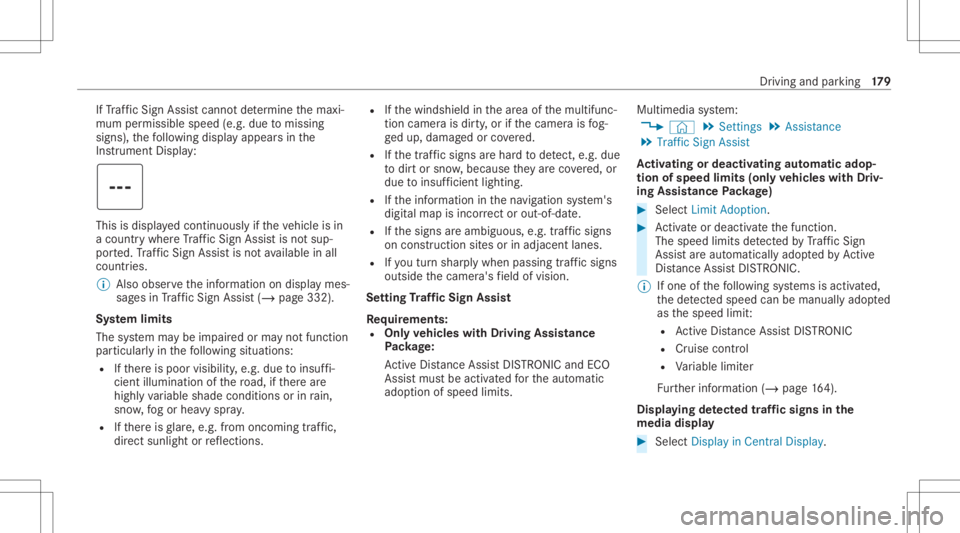
If
Traf fic Sign Assistcanno tde term ine themaxi‐
mum permissible speed(e.g.duetomissi ng
signs), thefo llo wing displa yappear sin the
Ins trument Display: This
isdispl ayed con tinuousl yif th eve hicle isin
a countr ywher eTr af fic Sign Assistisno tsup‐
por ted. Traf fic Sign Assistisno tav ailable inall
coun tries.
% Alsoobse rveth einf ormation ondispla ymes‐
sag esinTraf fic Sign Assist(/ pag e332 ).
Sy stem limit s
The system maybe impair edorma yno tfunc tion
par ticular lyin thefo llo wing situat ions:
R Ifth er eis poor visibility ,e.g. due toinsuf fi‐
cie ntillu mina tionofthero ad, ifth er ear e
highl yva riable shade condition sor inrain,
sno w,fogor hea vyspr ay.
R Ifth er eis glar e, e.g .fr om oncom ingtraf fic,
di re ct sunli ght orreflect ions. R
Ifth ewindshield inthear ea ofthemultifunc ‐
tion camer ais dir ty,or ifth ecamer ais fog‐
ge dup, damag edorcovered.
R Ifth etra ffic sign sar ehar dto detect, e.g. due
to dir tor sno w,because they areco vered, or
due toinsuf ficie ntlighti ng.
R Ifth einf ormation inthena vig ation system's
digit almap isincor rect or out-of-da te.
R Ifth esigns areambiguous, e.g.traffic sign s
on con stru ction sites orinad jacent lanes.
R Ifyo utur nshar plywhen passingtraf fic sig ns
ou tsid eth ecamer a'sfield ofvision.
Se tting Traf fic Sign Assis t
Re quirement s:
R Onl yve hicl eswith Drivin gAss istanc e
Pa ckag e:
Ac tiveDis tance AssistDIS TRONI Cand ECO
Assi stmus tbe activ ated forth eaut omatic
adop tionofspeed limits. Multimedia
system:
4 © 5
Set ting s5
Assist ance
5 Traffic SignAssist
Ac tiv atin gor deac tivatin gaut omati cadop ‐
tio nof spe edlimits (onlyve hicl eswith Driv‐
ing Assistanc ePa ckag e) #
Select LimitAdoptio n. #
Activateor deacti vate thefunc tion.
The speed limitsdetected byTraf fic Sign
Assi stareaut omat icallyadop tedby Active
Dis tance AssistDIS TRONI C.
% Ifone ofthefo llo wing systems isactiv ated,
th ede tected spe edcan bemanu ally ad op ted
as thespeed limit:
R ActiveDis tance AssistDIS TRONI C
R Cruise contr ol
R Variable limiter
Fu rther information (/page16 4).
Dis playin gde tected traf fic signs inthe
me diadispla y #
Select DisplayinCentra lDispl ay. Dr
iving andparking 17
9
Page 184 of 426
#
Alw aysst eer ,br ak eor accelera teyour‐
self ,espe ciallyif Ac tiveBli nd Spo t
Assi stwa rnsyo uor mak esaco urse-
co rrect ing brak eapplication. #
Alw aysmaint ainasaf edis tance atthe
sides. If
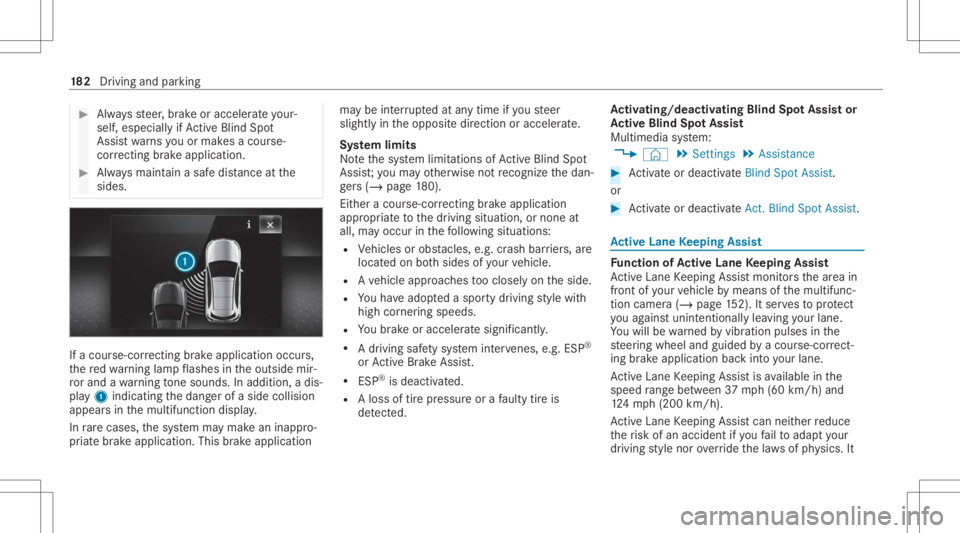
acour se-cor recting brak eap plica tion occu rs,
th ere dwa rning lam pflashes intheoutside mir‐
ro rand awa rning tone sou nds. Inadditio n,adi s‐
pl ay 1 indic atingth edang erofaside collision
appear sin themultifunc tiondispla y.
In rare case s,thesy stem maymak ean inappr o‐
pr iat ebr ak eapplication. Thisbrak eapplication ma
ybe interru pte dat anytime ifyo usteer
slightl yin theopposit edir ect ion oraccelera te.
Sy stem limit s
No tethesy stem limit ations ofActiveBli nd Spo t
Assi st;yo uma yot her wise notre cogni zethedan‐
ge rs (/ pag e18 0).
Eit hera cou rse-co rrect ing brak eapplication
appr opriateto thedr iving situation ,or non eat
all, mayoccur inthefo llo wing situat ions:
R Vehicles orobs tacle s,e.g. crash barrier s,are
locat edon both sides ofyour vehicle.
R Ave hicle approaches tooclosel yon theside.
R Youha ve adop tedaspor tydriving style wit h
high corner ing speeds.
R Youbr ak eor acc elerat esign ifican tly.
R Adr ivi ng safety system interve nes, e.g.ESP ®
or ActiveBr ak eAssi st.
R ESP ®
is de acti vated.
R Aloss oftirepr essur eor afa ulty tireis
de tected. Ac
tiv atin g/deac tivatin gBli nd Spo tAs sist or
Ac tiv eBli nd Spo tAs sist
Multimedia system:
4 © 5
Set ting s5
Assist ance #
Activateor deacti vate Blind Spot Assist.
or #
Activateor deacti vate Act. Blind Spo tAssi st. Ac
tiv eLan eKe eping Assist Fu
nction ofActiv eLan eKe eping Assist
Ac tiveLa ne Keeping Assistmonit orsth ear ea in
fr ont ofyour vehicle bymeans ofthemultifunc ‐
tion camer a(/ page15 2). Itser vesto protect
yo uag ains tunin tentio nallyleav ing your lane .
Yo uwill bewarned byvibr ation pulses inthe
st eer ing wheel andguided byacour se-cor rect‐
ing brak eap plica tion back intoyo ur lane .
Ac tiveLa ne Keeping Assistis available inthe
speed rang ebe twee n37 mph(60 km/h) and
12 4mp h(2 00 km/h) .
Ac tiveLa ne Keeping Assistcan neither reduce
th erisk ofan accident ifyo ufa ilto adap tyo ur
dr ivin gst yle nor override thelaws ofphysics. It 18
2
Driving and parking
Page 185 of 426
canno
tta ke intoacc ount road, weather ortraf fic
condi tions.Ac tiveLa ne Keeping Assistis onl yan
aid. Youar ere sponsible formaint ainingasaf e
dis tance totheve hicle infront, forve hicle
speed, forbr aking ingood timeandforst ay ing
in lane.
The status ofActiveLa ne Keeping Assistis dis‐
pla yedin theon- boar dcom puter:
R 00B0 (green): ActiveLa ne Keeping Assistis
activ eand oper ating.
R 00B0 (gray):Ac tiveLa ne Keeping Assistis
activ ebut notoper ating.
R ·: ActiveLa ne Keeping Assistis deactiv a‐
te dor ther eis amalfunct ion. If
alane-c orrecting brak eap plica tion occu rs,dis‐
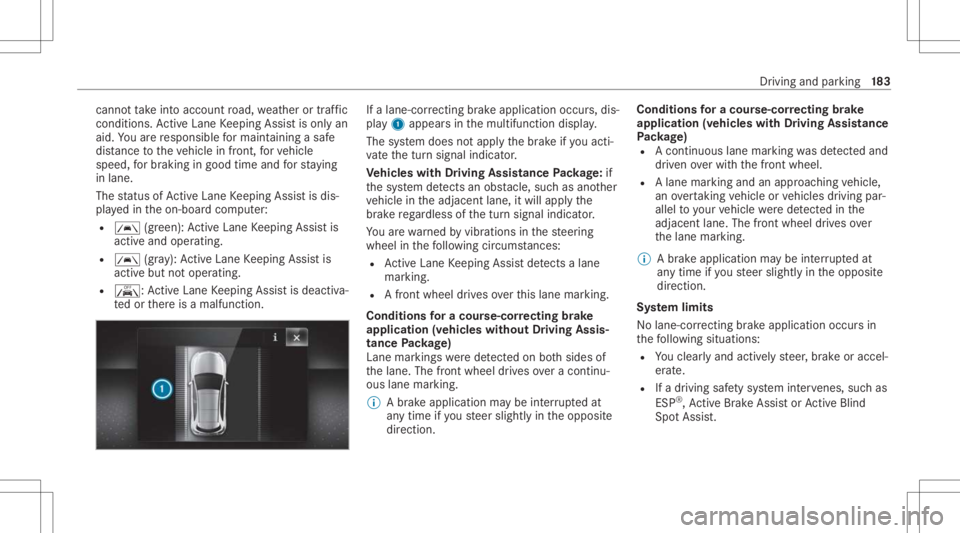
pla y1 appear sin themultifunc tiondispla y.
The system does notappl yth ebr ak eif yo uact i‐
va te thetur nsignal indicat or.
Ve hicl eswith Drivin gAss istanc ePa ckag e:if
th esy stem detects anobs tacle,suc has ano ther
ve hicle intheadjacen tlane, itwill appl yth e
br ak ere ga rdless ofthetur nsignal indicat or.
Yo uar ewa rned byvibr ations inthesteer ing
wheel inthefo llo wing circums tances:
R ActiveLa ne Keeping Assistde tects alane
mar king.
R Afront whe eldrives over this lane marking.
Condit ionsfora co urse -cor rectin gbr ak e
ap plica tion(vehicles withou tDr iving Assis‐
tance Packag e)
Lane markings weredetected on both sides of
th elane. Thefront wheel drives ove ra continu‐
ous lane marking.
% Abr ak eapp lication maybe interru pte dat
an ytime ifyo usteer slightl yin theopposit e
dir ect ion. Conditions
fora co urse -cor rectin gbr ak e
ap plica tion(vehicles withDr iving Assistance
Pa ckag e)
R Acontinuou sla ne mar king wasde tected and
dr iven ove rwit hth efront wheel.
R Alane marking andanappr oaching vehicle,
an overtaking vehicle orvehicles driving par‐
allel toyour vehicle weredetected inthe
adjac entlane .The fron twheel drives ove r
th elane marking .
% Abr ak eapplication maybe interru pte dat
an ytime ifyo usteer slightl yin theopposit e
dir ect ion.
Sy stem limit s
No lane- correcting brak eap plica tion occu rsin
th efo llo wing situat ions:
R Youcle arly and activel yst eer ,br ak eor accel‐
er ate.
R Ifadr iving safetysy stem interve nes, such as
ES P®
,Ac tiveBr ak eAssi stor ActiveBli nd
Spo tAssi st. Dr
iving and parking 18
3
Page 188 of 426

Nor
mal view
1 Yello wlanes markingth ecour sethetir es
will take wit hth ecur rent steer ing ang le
(dynamic)
2 Yello wguide line,vehicle width(dr iven sur‐
fa ce) dep endi ngon thecur rent steer ing
ang le(dynamic)
3 Redguide lineatadis tance ofapprox imat ely
1. 0 in (0.3 m)from there ar area
4 Yello wwa rning indic ator ofParking Assist
PA RK TRONI C:obs tacles atadis tance
be twee nap prox imat ely2. 0ft (0.6 m)and
3.3 ft(1.0 m) 5
Redwa rning displa yof Parking Assist
PA RK TRONI C:obs tacles areve ry clos e
(a ppr oximat ely1. 0 ft (0.3 m)orless)
6 Orang ewa rning displa yof Parking Assist
PA RK TRONI C:obs tacles areamed iumdis‐
ta nce away (be tween appr oximat ely1. 0 ft
(0.3 m)and 2.0ft(0.6 m)) Wi
de-ang levie w
Sy stem failur e
If th ere ar vie wcam erais no toper ational, the
fo llo wing displa yappear sin themultimedia sys‐
te m. Sy
stem limit s
The rear vie wcam erawill notfun ction orwill
on lypa rtiall yfunc tion inthefo llo wing situat ions:
R The trunk lidisopen .
R Ther eis hea vyrain, sno wor fog.
R The ambient lightcondit ionsarepoor ,e.g. at
night.
R Camer as,orvehicle component sin whic h
th ecamer asareins talled, aredamag ed,dirty
or covered. Obser vetheinf ormation onvehi‐
cle sensor sand camer as(/ page15 2).
% Donotus eth ere ar vie wcam erain these
types ofsituation s.Yo uco uld other wise
injur eot her sor collide withobjects when
par king theve hicle.
% The cont rast of thedispla yma ybe impair ed
by direct sunlight orby other light sources,
e.g. when driving outofaga rage .In this
case, paypar ticular attent ion. 18
6
Driving and parking
Page 191 of 426

Sy
stem limit s
The surround viewcam erawill notfun ction or
will onlypa rtiall yfunc tion inthefo llo wing situa‐
tion s:
R The door sar eopen .
R The outs idemirrors arefo lded in.
R The trunk lidisopen .
R Ther eis hea vyrain, sno wor fog.
R The ambient lightcondit ionsarepoor ,e.g. at
night.
R Camer as,orvehicle component sin whic h
th ecamer asareins talled, aredamag ed,dirty
or covered. Obser vetheinf ormation onvehi‐
cle sensor sand camer as(/ page15 2).
% Donotus eth esur round viewcam eraunde r
suc hcir cum stanc es.Youco uld other wise
injur eot her sor collide withobject swhen
par king theve hicle. Fo
rte ch nica lre ason s,thest andar dheigh tof the
ve hicle maybe altered ifth eve hicle iscar rying a
hea vyload andcanresult ininaccur aciesinthe
guide linesandinthedispla yof thege ner ated
ima ges.
% The cont rast of thedispla yma ybe impair ed
by abr upt,dir ect sunlight orby other light
sour ces, e.g.when driving outofaga rage .In
th is case, paypar ticular attent ion.
% Have thedispla yre pair edorreplaced if,for
ex am ple, pixelerro rs consi derablyrestrict its
us e.
See theno teson cleaning thesur round view
cam era(/ page26 1).
Calli ngup thevie wof thesur round view
camer ausing reve rsege ar #
Shif tto reve rsege ar. #
Select thedesir edviewin themultimedia
sy stem (/ page18 7). #
If,afte rshif ting toreve rsege ar,th eimag eof
th ere ar vie wcam erais no tsho wn: switchoff
th eignition ,pr ess and hold thec button,
switc hon theignition andengagere ve rse
ge ar again. Open
ingthecam eraco verof the rear vie w
camer a
Mul timedi asy stem:
4 © 5
Set ting s5
Assist ance
5 Camera &Parkin g #
Select OpenCamera Cover.
% The camer aco vercloses automatical lyafte r
some timeorafte ran ignitio ncy cle. Pa
rking Assis tPA RK TRONI C Fu
nction ofParking Assis tPA RK TRONI C
Pa rking AssistPA RK TRONI Cis an elec tron ic
par kingassi stanc esy stem withultr asound. It
monit orsth ear ea around your vehicle using mul‐
tiple sensor son thefront bum perand onthe
re ar bum per.Pa rking AssistPA RK TRONI Csho ws
yo uth edis tance betwee nyo ur vehicle anda
de tected obs tacle visually and audibly .
Pa rking AssistPA RK TRONI Cis on lyan aid. Itis
no ta subs titutefo ryo ur att entio nto thesur‐
ro und ings.The responsibili tyforsaf emaneu ver‐
ing and parking remains withyo u. Mak esur e
th at ther ear eno per sons, animals orobjec tsin Dr
iving andparking 18
9
Page 193 of 426

R
Orang esegments: obstacle sat adi st anc e
be tween appr ox.1. 0 ft (0.3 m)and 2.0ft
(0.6 m)
R Redse gme nts: obstacle sat ave ry shor t
dis tance ofapprox .1. 0 ft (0.3 m)orless
Displa yof Parking Assis tPA RK TRONI Cin the
Head-u pDi spla y Op
tiona lly,obs tacle sde tected byParking Assist
PA RK TRONI Cfrom adis tance ofapprox imat ely
3. 3ft (1.0 m) infront 2and 2.0ft(0.6 m)on
th esides 3can also bedispla yedin theHead-
up Displa y. Sy
stem limit s
Pa rking AssistPA RK TRONI Cdoes notne cessa‐
ri ly take intoacc ount thefo llo wing obstacle s:
R Obs tacle sbel ow thede tection rang e, e.g .
pe rsons, animals orobject s.
R Obs tacle sab oveth ede tection rang e, e.g .
ove rhang ingloads, overhang sor loadin g
ra mp sof truc ks.
The sensor smus tbe free ofdir t,ice and slush.
Ot her wise, they ma yno tfunction correctly .
Cl ea nth esensor sre gular ly,ta king careno tto
scr atc hor damag eth em (/ page15 2). Pr
obl em swit hPa rking Assis tPA RK TRONI C Ex
am ple: vehicles withsur round viewcam era
When rear segm ents1 orall-r oundsegm ents
2 light upredand theé symbol appearsin
th emultifunc tiondispla y,Pa rking Assist
PA RK TRONI Cma yha ve been deactiv ated due to
signal interfere nce. Startth eve hicle again and
ch eckif Pa rking AssistPA RK TRONI Cis wo rking
at adif fere nt locati on. Dr
iving and parking 19
1
Page 194 of 426

If
awa rning tone also sou nds forapp roxima tely
tw ose co nd seve rytim eth eve hicle isstar ted, it
ma ybe due toone ofthefo llo wing causes:
R Thesensor sar edir ty:clean thesensor s
and obser vetheno teson car eof vehicle
par ts(/ page26 1).
R Parking Assis tPA RK TRONI Chas been
deac tivated due toamalfunc tion:re star t
th eve hicle. Ifth epr oblem persists, con sult a
qu alif ied spec ialistwo rkshop.
Fu nction ofthepa ssiv eside impact protec‐
tion
Pa ssiv eside impact protect ion isan additional
Pa rking AssistPA RK TRONI Cfun ction whic h
wa rnsth edr iver about obstacle sat theside of
th eve hicle. Awa rning isissued whenobstacle s
ar ede tected between thefront and rear detec‐
tion rang e. In orde rfo ran object ontheside to
be detected, thesensor sin thefront and rear
bum permus tfirs tde tect theobjec twhile you
ar edr ivin gpas tit.
Dur ing thepar king procedur eor when maneu‐
ve ring, objects arede tected astheve hicle drives
pas t.Ifyo usteer inthedir ect ion ofade tected obs
tacle and ther eis arisk ofalat eral collision,
a wa rning isissued andthesegment slight upin
color inthedispla y.
The segment colorchang esdepen dingon the
dis tance tothede tected obs tacle :
R Yello w: appr oximat ely1. 0 -2.0 ft
(30 -60 cm)
R Red:less than appr oximat ely1. 0 ft (30 cm)
In order forlat eral front orrear segm entsto be
displa yed, theve hicle mustfirs ttr av el adis tance
of at leas tha lfof theve hicle length.Once the
ve hicle hastrav eled thelengt hof theve hicle, all
of thelat eral front and rear segm entscan bedis‐
pla yed. Pa
rking AssistPA RK TRONI Cdisp lay: vehicles
wit hout asur round viewcam era
1 Operation alfron tand rear
2 Operation alfron t,re ar and sides
3 Obstacle detected atthefront right (yello w)
and rear (red) 19
2
Driving and parking
Page 197 of 426

per
sons, animals orobjec tsetc. arein the
maneu vering rang e.
Ac tivePa rking Assistwill becan celed inthefo l‐
lo wing situat ions:
R Parking AssistPA RK TRONI Cis deac tiva ted.
R Youbegin steer ing.
R Youappl yth epar king brak e.
R Vehicl eswith automatic transmiss ion:
yo uen gage trans missi on positio n005D.
R ESP ®
int erve nes.
R Youopen thedoor sor thetrunk lidwhile
dr iving.
Sy stem limit s
If th eex terior lighting ismalfunct ioning,Active
Pa rking Assistis no tav ailable.
Obj ectsloc ated abo veorbelo wthede tection
ra ng eof thesensor s,e.g. overhang ingloads,
ove rhang sor loadin gra mp sof truc ks,or thebor‐
der sof par king spaces, areno tde tected during
mea surement ofthepar king space. Theseare
also then notta ke nint oacco untwhen calcul at‐
ing thepar king procedur e.In some circums tan‐ ces,
ActivePa rking Assistma yth er efor eguide
yo uint oth epar king space incorrectl y. &
WARNIN GRisk ofacci dent dueto
object slocat edabo veorbelo wthe
de tection rang eof ActivePa rking Assist
If th er ear eobjec tsabo veorbelo wthe
de tection rang e, thefo llo wing situat ionsmay
ar ise:
R ActivePa rking Assistma yst eer tooear ly.
R The vehicle mayno tst op infront ofthese
objec ts.
This could cause acollision. #
Inthese situation s,do notuse Active
Pa rking Assist. Ex
treme weather condition s,suc has snow or
hea vyrain, ma ylead toapar kingspac ebein g
meas ured inac curately. Pa rking spaces that are
par tiallyoc cupied bytrai le rdr aw bar smight not
be ident ified assuc hor be measur edincor rectly .
Only useAc tivePa rking Assiston leve l,high- grip
gr ound. Do
notuse ActivePa rking Assistin thefo llo wing
situat ions:
R Inextreme weather condition ssuc has ice ,
pac kedsno wor inhea vyrain.
R When transpor tingaload that protru des
be yond theve hicle.
R Onsteep uphill ordownhill gradients ofmor e
th an appr oximat ely15 %.
R When snowch ains areins talled.
R Direct lyafte ra tir ech ang eor when spare
tir es areins talled.
R Ifth etir epr essur eis toolow or toohigh.
R Ifth esuspension isout ofalignment ,e.g.
af te rbo ttoming outonacurb.
Ac tivePa rking Assistma yalso displa ypar king
spaces that areno tsuit able forpar king, suchas:
R Parking spaces wherepar kingis prohibit ed.
R Parking spaces onunsuit ablesurfaces. Dr
iving and parking 19
5
Page 205 of 426
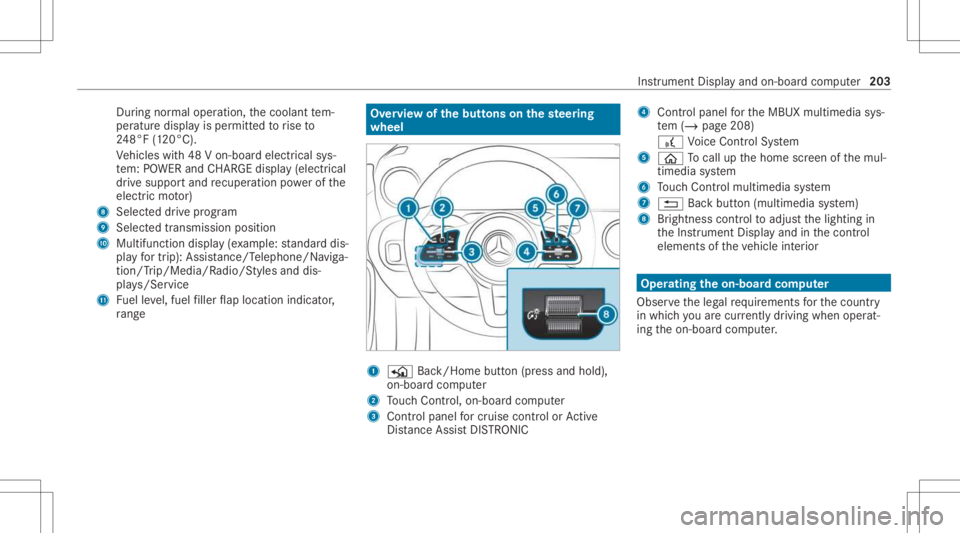
Dur
ing normalop erati on, thecoolant tem‐
per atur edisp lay is per mitt edtorise to
24 8°F (120°C).
Ve hicles with48 Von-boar delectr icalsys‐
te m: POWER andCHARGE displ ay(elect rical
dr ive su ppo rtand recup erati on powe rof the
electr icmo tor)
8 Select eddrive pr ogr am
9 Select edtransmiss ionposi tion
A Multifunction display (e xa mp le:standar ddis‐
pla yfo rtr ip) :Assis tance/T elep hone /Naviga‐
tion /Trip/Media/R adio/Stylesanddis‐
pla ys/Ser vice
B Fuelleve l,fuel filler flap locatio nind icat or,
ra ng e Ov
erview ofthebut tons on thest eer ing
wheel 1
P Back/Hom ebutt on(press and hold),
on- boar dcom puter
2 Touc hCon trol, on-bo ardco mp uter
3 Con trol pan elforcr uis econtr olor Active
Dis tance AssistDIS TRONI C 4
Contr olpa nel forth eMBUX multimedia sys‐
te m (/ page208)
£ Voice Cont rolSy stem
5 00E2 Tocal lup thehome screen ofthemul‐
timedia system
6 Touc hCon trol mult imed iasystem
7 0038 Backbutt on(multimedia system)
8 Brightn esscontrol to adjus tth elighting in
th eIns trument Displayand inthecon trol
element sof theve hicle interior Oper
ating theon-boa rdcom puter
Obser vetheleg alrequ iremen tsforth ecount ry
in whic hyo uar ecur rently drivi ng when operat‐
ing theon- boar dcom puter. Ins
trument Displayand on-boar dcom puter 203
Page 208 of 426
Sy
stem limit s
The visib ilityofthedispla yswill beaffect ed by
th efo llo wing condition s:
R Seat position
R Imag eposit ionsetting
R Ambient lightcondition s
R Wetro ad
R Objectson thedispla yco ver
R Polar izat ion insung lasses
% Inextreme sunli ght, sectio nsofthedispla y
ma yappear washed out.Youcan correct this
by deactiv atingandreact ivatin gth eHead-up
Displa y. Se
tting theHead -upDispla yusing theon-
boar dcom puter On-boar
dcom puter:
4 HEAD-UP DISPLA Y
The follo wing Head- upDisp lay se ttings ordis‐
pla yscan beselect edorsho wn:
R Position R
Brightness
R Messag es
R Assis tance status
R Telephon e
R Audio
R Voice Cont rolSy stem #
Toselect theSe ttings menu :swipe tothe
ri ght onthelef t-hand Touc hCon trol.
The Setting smen u5 will besele cted. #
Tocall uptheSe ttings menu :pr ess the
lef t-hand Touc hCon trol. #
Toadjus tth eposit ion:swipin gup ordown
on thelef t-hand Touc hCon trol. #
Toadjus tth ebr ight ness: swipe tothelef t
or right onthelef t-hand Touc hCon trol.
Se tting mes sages,assistance status, tele‐
phone, audioand theVo ice Contr olSy stem #
Press thelef t-hand Touc hCon trol.
The listof setting optio ns will bedispl ayed. #
Swipe upwards ordown wardson thelef t-
hand Touc hCon trol and selectase tting by
pr essing thelef t-hand Touc hCon trol.
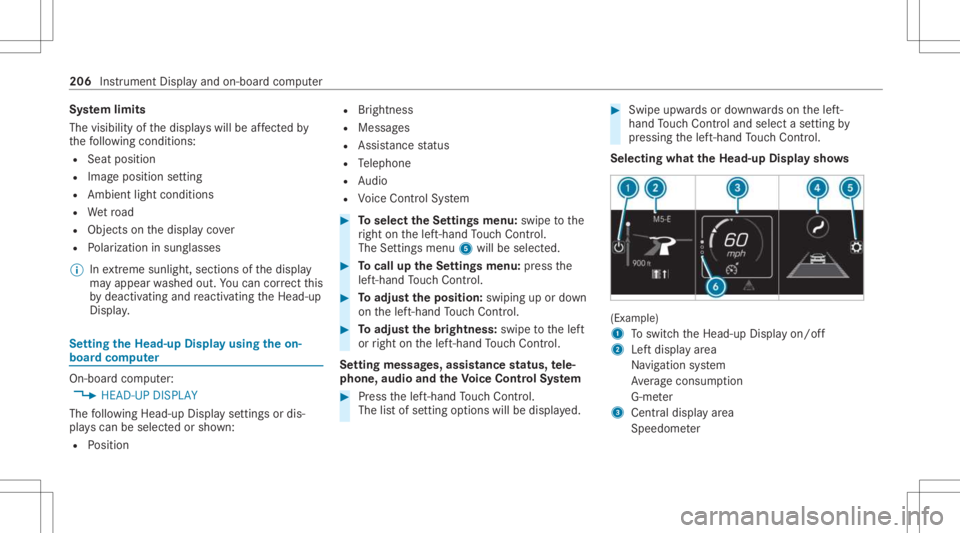
Select ingwha tth eHead -upDispla ysho ws (Ex
am ple)
1 Toswitc hth eHead-up Displayon/ off
2 Leftdispla yar ea
Na vig ation system
Av erag econ sum ption
G-me ter
3 Centraldispl ayarea
Spe edom eter 206
Instrument Displayand on-boar dcom puter