lock MERCEDES-BENZ A-CLASS HATCHBACK 2008 Owners Manual
[x] Cancel search | Manufacturer: MERCEDES-BENZ, Model Year: 2008, Model line: A-CLASS HATCHBACK, Model: MERCEDES-BENZ A-CLASS HATCHBACK 2008Pages: 305, PDF Size: 5.43 MB
Page 104 of 305
On-board computer
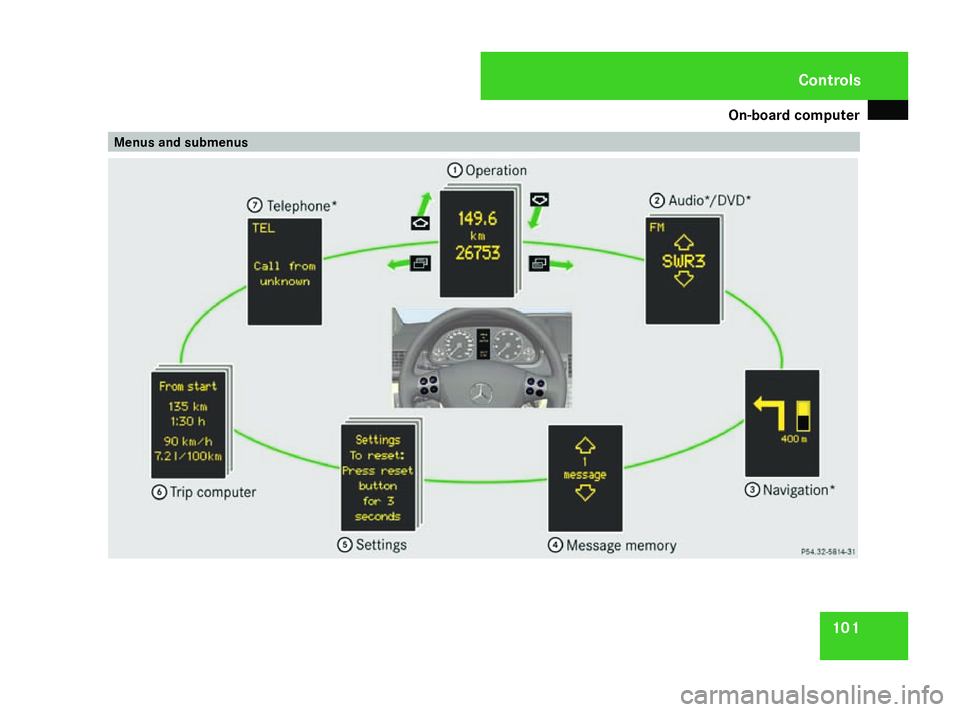
101Menus and submenusControls
169_AKB; 2; 4, en-GB
wdomann, Version: 2.10.6 2008-07-16T08:52:06+02:00 - Seite 101
ZDateiname: 6515_0315_02_buchblock.pdf; preflight
Page 105 of 305
On-board computer
102 Function
1
Operation
menu (Ypage 102)
R trip meter and total distance
recorder (standard display)
(Y page 103)
R tyre pressure loss warning
(Y page 179)
R digital speedometer or outside tem-
perature (Y page 103)
R ASSYST PLUS service interval dis-
play (Y page 191)
R Engine oil level* (Y page 173)2
Audio*/DVD*menu (Y
page 103)
R radio station (Y page 103)
R CD player* (Y page 104)
R audio drive or
media* ( Ypage 104)
R DVD video* (Y page 105) 3
Navigation* menu (NAV)
(Y
page 105) Function
4
Message memory
10
menu (Display
messages) ( Ypage 106) 5
Settings
menu (Ypage 106)
R resetting to factory settings
(Y page 106)
R selecting submenus (Y page 107) 6
Trip computer
menu (Ypage 112)
R consumption statistics
(Y page 112)
R range (Y page 113) 7
Telephone* menu (Y
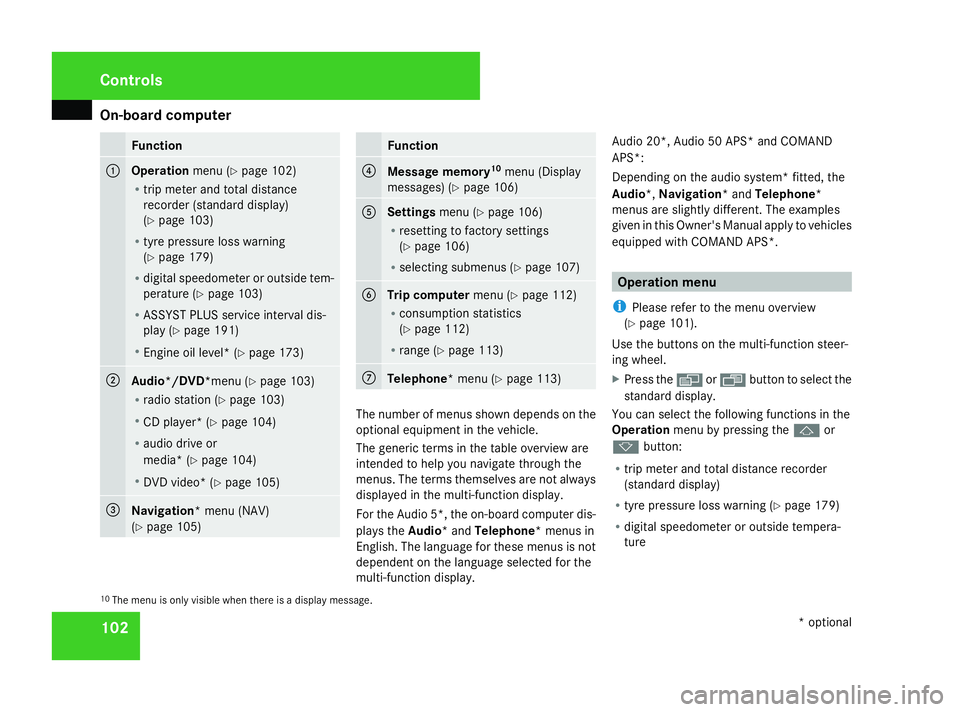
page 113) The number of menus shown depends on the
optional equipment in the vehicle.
The generic terms in the table overview are
intended to help you navigate through the
menus. The terms themselves are not always
displayed in the multi-function display.
For the Audio 5*, the on-board computer dis-
plays the
Audio* and Telephone* menus in
English. The language for these menus is not
dependent on the language selected for the
multi-function display. Audio 20*, Audio 50 APS* and COMAND
APS*:
Depending on the audio system* fitted, the
Audio*, Navigation* and Telephone*
menus are slightly different. The examples
given in this Owner's Manual apply to vehicles
equipped with COMAND APS*. Operation menu
i Please refer to the menu overview
(Y page 101).
Use the buttons on the multi-function steer-
ing wheel.
X Press the èor· button to select the
standard display.
You can select the following functions in the
Operation menu by pressing the jor
k button:
R trip meter and total distance recorder
(standard display)
R tyre pressure loss warning (Y page 179)
R digital speedometer or outside tempera-
ture
10 The menu is only visible when there is a display message. Controls
* optional
169_AKB; 2; 4, en-GB
wdomann,
Version: 2.10.6
2008-07-16T08:52:06+02:00 - Seite 102 Dateiname: 6515_0315_02_buchblock.pdf; preflight
Page 106 of 305
On-board computer
103
R
ASSYST PLUS service interval display
(Y page 191)
R engine oil level* (Y page 173)
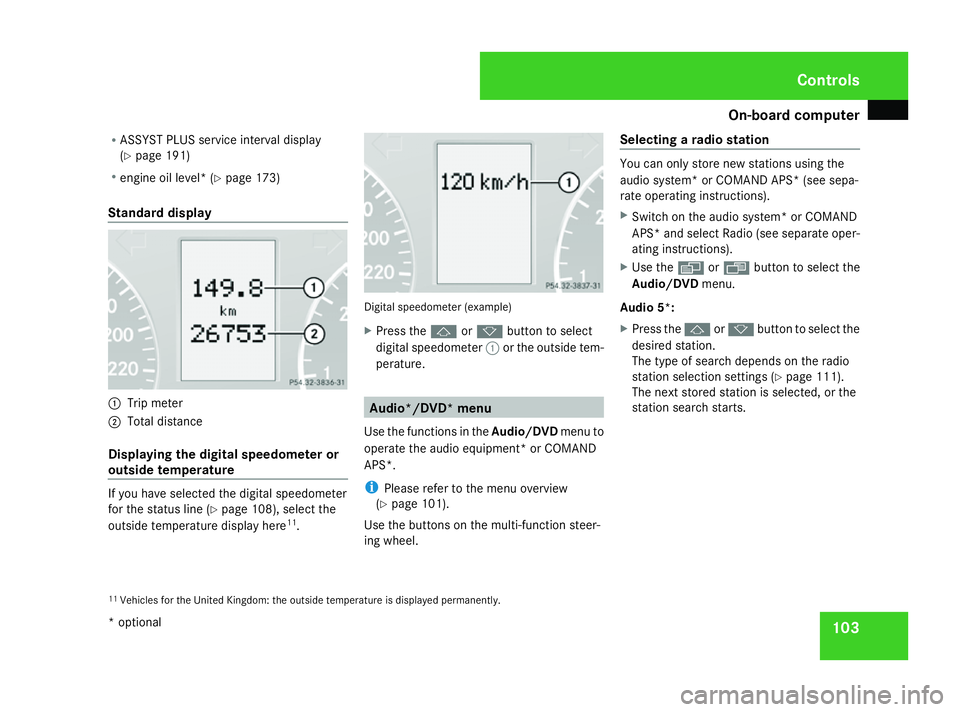
Standard display 1
Trip meter
2 Total distance
Displaying the digital speedometer or
outside temperature If you have selected the digital speedometer
for the status line (Y
page 108), select the
outside temperature display here 11
. Digital speedometer (example)
X
Press the jork button to select
digital speedometer 1or the outside tem-
perature. Audio*/DVD* menu
Use the functions in the Audio/DVDmenu to
operate the audio equipment* or COMAND
APS*.
i Please refer to the menu overview
(Y page 101).
Use the buttons on the multi-function steer-
ing wheel. Selecting a radio station You can only store new stations using the
audio system
*or COMAND APS* (see sepa-
rate operating instructions).
X Switch on the audio system* or COMAND
APS* and select Radio (see separate oper-
ating instructions).
X Use the èor· button to select the
Audio/DVD menu.
Audio 5*:
X Press the jork button to select the
desired station.
The type of search depends on the radio
station selection settings (Y page 111).
The next stored station is selected, or the
station search starts.
11 Vehicles for the United Kingdom: the outside temperature is displayed permanently. Controls
* optional
169_AKB; 2; 4, en-GB
wdomann,
Version: 2.10.6 2008-07-16T08:52:06+02:00 - Seite 103 ZDateiname: 6515_0315_02_buchblock.pdf; preflight
Page 107 of 305
On-board computer
104
Audio 20*, Audio 50 APS*or COMAND
APS*:
X
To select a stored station: briefly press
the j ork button.
X To select a channel from the channel
list: press and hold the jork but-
ton.
X To select a station using the station
search (only if no station list is received):
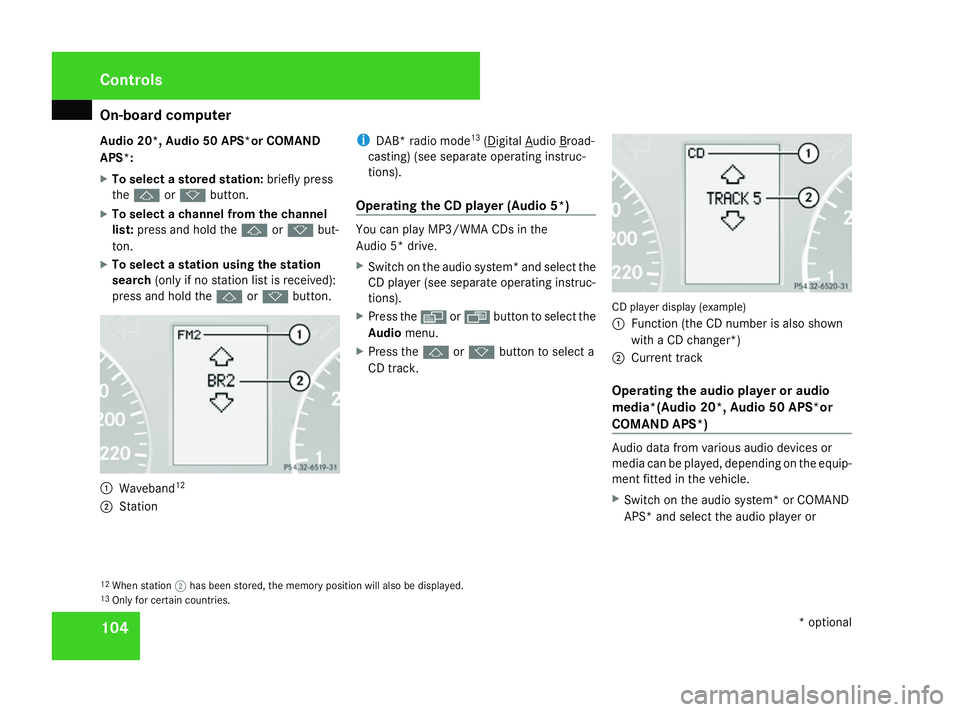
press and hold the jork button. 1
Waveband 12
2 Station i
DAB* radio mode 13
( Digital Audio Broad-
casting) (see separate operating instruc-
tions).
Operating the CD player (Audio 5*) You can play MP3/WMA CDs in the
Audio 5* drive.
X
Switch on the audio system* and select the
CD player (see separate operating instruc-
tions).
X Press the èor· button to select the
Audio menu.
X Press the jork button to select a
CD track. CD player display (example)
1
Function (the CD number is also shown
with a CD changer*)
2 Current track
Operating the audio player or audio
media*(Audio 20*, Audio 50 APS*or
COMAND APS*) Audio data from various audio devices or
media can be played, depending on the equip-
ment fitted in the vehicle.
X
Switch on the audio system* or COMAND
APS* and select the audio player or
12 When station ;has been stored, the memory position will also be displayed.
13 Only for certain countries. Controls
* optional
169_AKB; 2; 4, en-GB
wdomann
, Version: 2.10.6
2008-07-16T08:52:06+02:00 - Seite 104 Dateiname: 6515_0315_02_buchblock.pdf; preflight
Page 108 of 305
On-board computer
105
medium (see separate operating instruc-
tions).
X Use the èor· button to select the
Audio/DVD menu.
X To select next/previous track: briefly
press the jork button.
X To select a track from the track list
(rapid scrolling): press and hold the
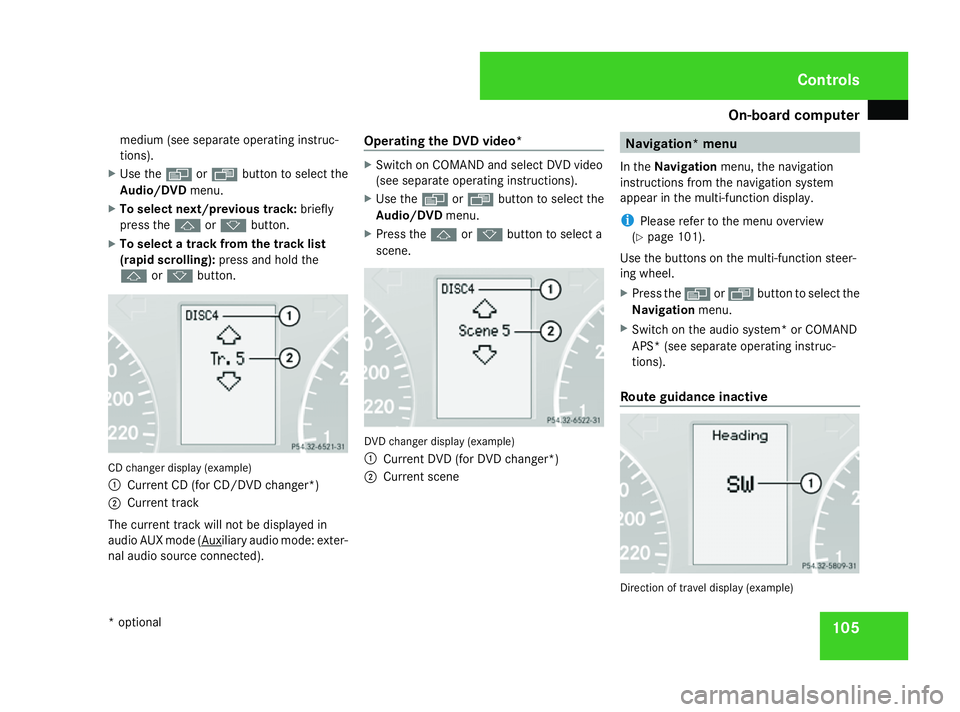
j ork button. CD changer display (example)
1
Current CD (for CD/DVD changer*)
2 Current track
The current track will not be displayed in
audio AUX mode ( Auxiliary audio mode: exter-
nal audio source connected). Operating the DVD video* X
Switch on COMAND and select DVD video
(see separate operating instructions).
X Use the èor· button to select the
Audio/DVD menu.
X Press the jork button to select a
scene. DVD changer display (example)
1
Current DVD (for DVD changer*)
2 Current scene Navigation* menu
In the Navigation menu, the navigation
instructions from the navigation system
appear in the multi-function display.
i Please refer to the menu overview
(Y page 101).
Use the buttons on the multi-function steer-
ing wheel.
X Press the èorÿ button to select the
Navigation menu.
X Switch on the audio system* or COMAND
APS* (see separate operating instruc-
tions).
Route guidance inactive Direction of travel display (example) Controls
* optional
169_AKB; 2; 4, en-GB
wdomann
, Version: 2.10.6 2008-07-16T08:52:06+02:00 - Seite 105 ZDateiname: 6515_0315_02_buchblock.pdf; preflight
Page 109 of 305

On-board computer
106
The direction of travel
1appears in the multi-
function display.
Route guidance active The multi-function display shows navigation
instructions, for example: Message memory menu
Previous display messages can be called up
in the Message memory menu. TheMes-
sage memory menu is visible only when
there is a display message.
i Please refer to the menu overview
(Y page 101). G
Risk of accident
The on-board computer only records and
displays messages and warnings from cer-
tain systems. For this reason, you should
always make sure that your vehicle is safe
to drive. You could otherwise cause an acci-
dent by driving an unsafe vehicle.
i All possible display messages are
explained in the "Practical advice" section
(Y page 202).
Switching off the ignition clears all display
messages except for the highest priority dis-
play messages. When the causes of the high-
priority display messages are rectified, these
display messages will be erased.
Displaying messages Use the buttons on the multi-function steer-
ing wheel.X
Press the èor· button repeatedly
until either the original menu or the Mes-
sage memory menu appears.
When there are display messages, 2 mes-
sages appears in the multi-function dis-
play, for example.
X Use the jork button to scroll
through the display messages. Settings menu
In the Settings menu, you will find the Set-
tings To reset Press reset button for
3 seconds function, with which you can
restore most settings to the factory settings.
You will also find submenus with which you
can make individual settings for your vehicle.
i Please refer to the menu overview
(Y page 101).
Use the buttons on the multi-function steer-
ing wheel.
Resetting to factory settings For safety reasons, not all functions will be
reset: permanent Speedtronic* can only be
set in the
Vehiclesubmenu. The Settings
Headlamps function in the Lightingsub- Controls
* optional
169_AKB; 2; 4, en-GB
wdomann,
Version: 2.10.6
2008-07-16T08:52:06+02:00 - Seite 106 Dateiname: 6515_0315_02_buchblock.pdf; preflight
Page 110 of 305
On-board computer
107
menu will only be reset if the vehicle is sta-
tionary.
X Press the èor· button to select the
Settings menu.
X Press and hold the reset button on the left
of the instrument cluster for approximately
three seconds.
A prompt appears in the multi-function dis-
play asking you to confirm by pressing the
reset button again.
X Press the reset button again.
The functions of most submenus are
restored to factory settings.
or
X If you want to retain the settings, do not
press the reset button a second time.
The Settings menu appears again after
approximately 5 seconds.
X Press the èor· button to select a
different menu. Submenus in the Settings menu X
Press the èor· button to select the
Settings menu.
X Press the jbutton to select submenus.
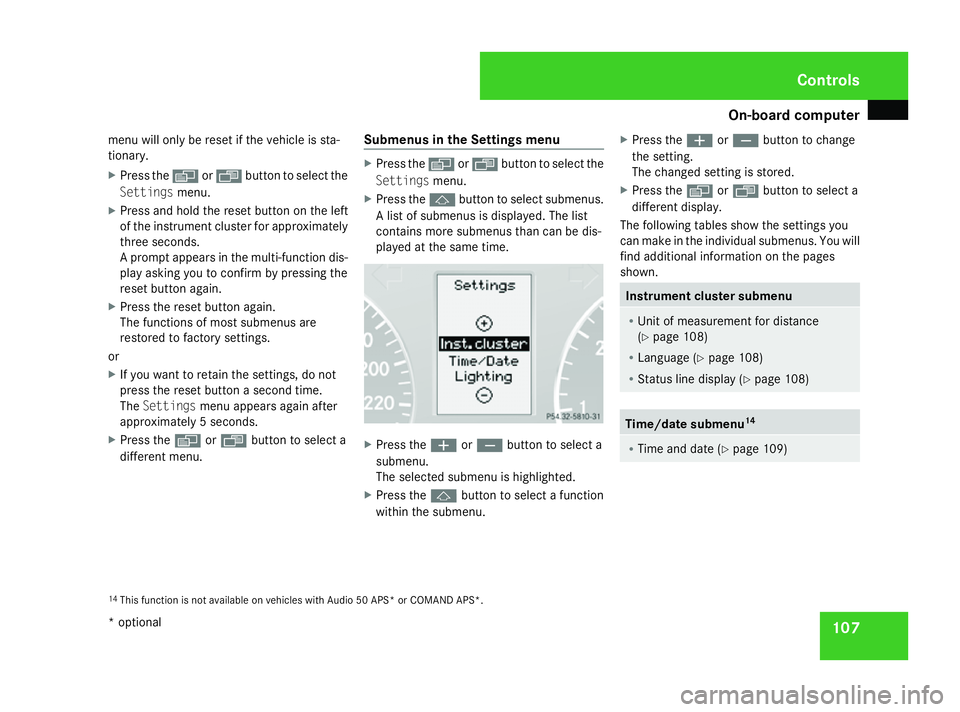
A list of submenus is displayed. The list
contains more submenus than can be dis-
played at the same time. X
Press the æorç button to select a
submenu.
The selected submenu is highlighted.
X Press the jbutton to select a function
within the submenu. X
Press the æorç button to change
the setting.
The changed setting is stored.
X Press the èorÿ button to select a
different display.
The following tables show the settings you
can make in the individual submenus. You will
find additional information on the pages
shown. Instrument cluster submenu
R
Unit of measurement for distance
(Y page 108)
R Language (Y page 108)
R Status line display (Y page 108) Time/date submenu
14 R
Time and date ( Ypage 109) 14
This function is not available on vehicles with Audio 50 APS* or COMAND APS*. Controls
* optional
169_AKB; 2; 4, en-GB
wdomann,
Version: 2.10.6 2008-07-16T08:52:06+02:00 - Seite 107 ZDateiname: 6515_0315_02_buchblock.pdf; preflight
Page 111 of 305

On-board computer
108 Lighting submenu
R
Constant headlamp mode (daytime driv-
ing lights) (Y page 109)
R Surround lighting* (Y page 110)
R Exterior lighting delayed switch-off*
(Y page 110)
R Interior lighting delayed switch-off
(Y page 110) Vehicle submenu
R
Permanent Speedtronic* (Y page 120)
R Radio station selection *( Ypage 111)
R Automatic locking feature (Y page 111)Convenience submenu*
R
Fold the exterior mirrors in when locking
the vehicle* (Y page 111) Selecting the unit of measurement for
distance
The selected unit of measurement for dis-
tance applies to:
R
the total distance recorder and the trip
meter
R the trip computer
R the digital speedometer 15
R the navigation instruction in the Naviga-
tion* menu
R Speedtronic*
X Press the èor· button to select the
Settings menu.
X Press the jbutton to select submenus.
X Press the æorç button to select the
Inst. cluster submenu.
X Press the jbutton to select Display
unit Speed/odom.
X Press æorç to select km(kilome-
tres) or milesas the unit of measurement
for distance.
X Press the j,èorÿ button to
select a different display. Selecting the language X
Press the èor· button to select the
Settings menu.
X Press the jbutton to select submenus.
X Press the æorç button to select the
Inst. cluster submenu.
X Press the jbutton to select Lan-
guage .
X Press the æorç button to select the
desired language.
X Press the j,èorÿ button to
select a different display.
Selecting the status line display Vehicles for the United Kingdom: this func-
tion is not available.
X
Press the èor· button to select the
Settings menu.
X Press the jbutton to select submenus.
X Press the æorç button to select the
Instr. cluster submenu.
X Press the jbutton to select Status
line display.
15 Vehicles for the United Kingdom: the digital speedometer always displays km/h. Controls
* optional
169_AKB; 2; 4, en-GB
wdomann,
Version: 2.10.6
2008-07-16T08:52:06+02:00 - Seite 108 Dateiname: 6515_0315_02_buchblock.pdf; preflight
Page 112 of 305

On-board computer
109
X
Press the æorç button to select the
status line display: outside temperature
(Outside temp. ) or speed (Speed).
The selected display now appears con-
stantly in the lower multi-function display.
When you scroll through the Operation
menu (Y page 102), you will see the display
you have not selected.
X Press the j,èorÿ button to
select a different display.
Setting the date and time Your vehicle may be equipped with one of the
following audio systems*:
A:
Audio 5* or Audio 20*
B: Audio 50 APS*
C: COMAND APS*
X You can see which audio system *is fitted
in your vehicle by referring to the separate
operating instructions.
Depending on the audio system*, the time
and date are received from GPS satellites and
cannot be set using the on-board computer
(see the following table). A B C
Set using the on-board com-
puter X
Automatic GPS satellite recep-
tion X X
X
Press the èor· button to select the
Settings menu.
X Press the jbutton to select submenus.
X Press the æorç button to select the
Time/Date submenu.
Setting the time
X Press the jbutton to select Time
Hours (orTime Minutes).
X Press the æorç button to set a
value. Setting the date
X
Press the jbutton to select Date Set
day (orDate Set month orDate Set
year ).
X Press the æorç button to set the
date.
X Press the j,èorÿ button to
select a different display.
Setting constant headlamp mode (day-
time driving lights) When you activate constant headlamp mode
and the light switch is set to
MorU,
the parking lamps, dipped-beam headlamps
and licence plate lighting are switched on
automatically when the engine is running.
Turning the light switch to a different position
switches on the corresponding lights. Turn
the light switch to BorU first if you
wish to switch off constant headlamp mode
while driving in the dark.
In countries in which constant headlamp
mode is a legal requirement, Constantis the
factory setting.
X Press the èor· button to select the
Settings menu.
X Press the jbutton to select submenus. Controls
* optional
169_AKB; 2; 4, en-GB
wdomann,
Version: 2.10.6 2008-07-16T08:52:06+02:00 - Seite 109 ZDateiname: 6515_0315_02_buchblock.pdf; preflight
Page 113 of 305

On-board computer
110
X
Press the æorç button to select the
Lighting submenu.
X Press the jbutton to select Headlamp
mode.
X Press the æorç button to set the
switch-on mode for the headlamps to Man-
ual orConstant (constant headlamp
mode).
X Press the j,èorÿ button to
select a different display.
Switching the surround lighting*on/off If the surround lighting is switched on, the
following lights will be switched on automat-
ically in the dark after you have unlocked the
vehicle using the key:
R the side lamps
R the licence plate lighting
R the front foglamps*
The surround lighting switches off automati-
cally after 40 seconds or when the driver's
door is opened.
X Press the èor· button to select the
Settings menu.
X Press the jbutton to select submenus. X
Press the æorç button to select the
Lighting submenu.
X Press the jbutton to select Surround
lighting.
X Press the æorç button to switch
the Surround lighting on or off.
X Press the j,èorÿ button to
select a different display.
Activating or deactivating the exterior
lighting delayed switch-off* When you activate the
Headl. delayed
switch-off function, the exterior lighting
remains on for another 15 seconds after clos-
ing the doors when it is dark. If the engine is
switched off and then none of the doors are
opened, or if an open door is not closed, the
exterior lighting goes out after 60 seconds.
If you have activated the delayed switch-off
function and switched off the engine, the fol-
lowing remain lit:
R the side lamps
R the licence plate lighting
R the front foglamps* X
Press the èor· button to select the
Settings menu.
X Press the jbutton to select submenus.
X Press the æorç button to select the
Lighting submenu.
X Press the jbutton to select Headl.
delayed switch-off .
X Press the æorç button to activate
or deactivate the Headl. delayed
switch-off function.
X Press the j,èorÿ button to
select a different display.
To temporarily deactivate the switch-off
delay:
X Before leaving the vehicle, turn the key to
position 0in the ignition lock.
X Turn the key to position 2in the ignition
lock and back to position 0.
Delayed switch-off is deactivated.
When you start the engine again, the switch-
off delay is reactivated.
Activating/deactivating the interior
lighting delayed switch-off If you remove the key from the ignition lock
while the
Interior lighting delayed Controls
* optional
169_AKB; 2; 4, en-GB
wdomann,
Version: 2.10.6
2008-07-16T08:52:06+02:00 - Seite 110 Dateiname: 6515_0315_02_buchblock.pdf; preflight