Phone MERCEDES-BENZ A-CLASS HATCHBACK 2008 User Guide
[x] Cancel search | Manufacturer: MERCEDES-BENZ, Model Year: 2008, Model line: A-CLASS HATCHBACK, Model: MERCEDES-BENZ A-CLASS HATCHBACK 2008Pages: 305, PDF Size: 5.43 MB
Page 163 of 305
Loading and stowing
160 R
brake sharply
R change direction suddenly
R are involved in an accident
Sharp-edged and fragile objects must not
be placed in the luggage net.
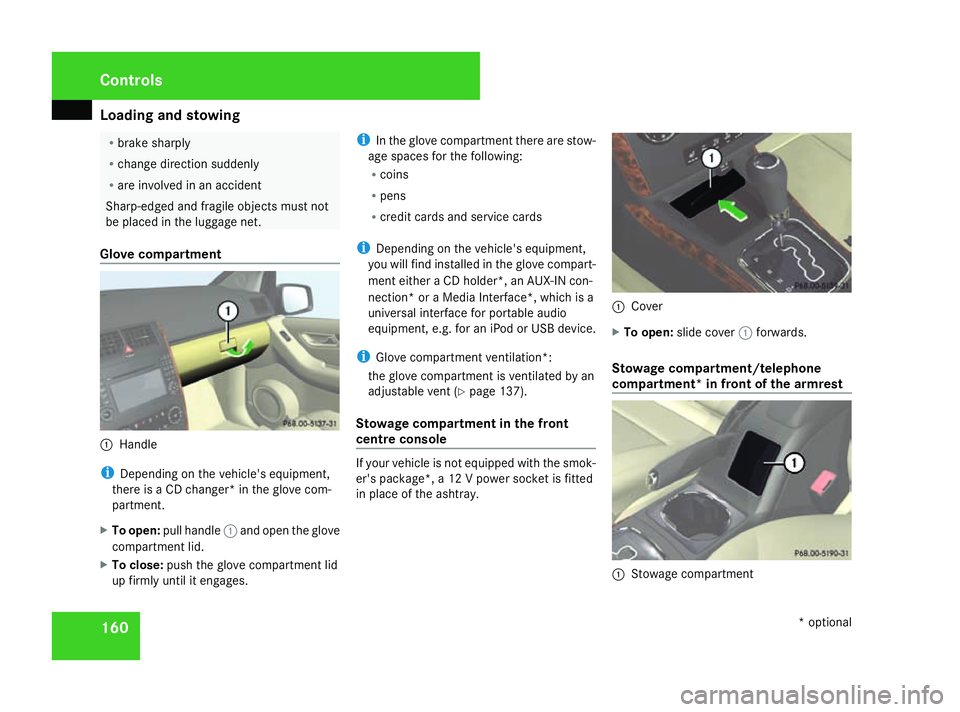
Glove compartment 1
Handle
i Depending on the vehicle's equipment,
there is a CD changer* in the glove com-
partment.
X To open: pull handle 1and open the glove
compartment lid.
X To close: push the glove compartment lid
up firmly until it engages. i
In the glove compartment there are stow-
age spaces for the following:
R coins
R pens
R credit cards and service cards
i Depending on the vehicle's equipment,
you will find installed in the glove compart-
ment either a CD holder*, an AUX-IN con-
nection* or a Media Interface*, which is a
universal interface for portable audio
equipment, e.g. for an iPod or USB device.
i Glove compartment ventilation*:
the glove compartment is ventilated by an
adjustable vent (Y page 137).
Stowage compartment in the front
centre console If your vehicle is not equipped with the smok-
er's package*, a 12 V power socket is fitted
in place of the ashtray. 1
Cover
X To open: slide cover 1forwards.
Stowage compartment/telephone
compartment* in front of the armrest 1
Stowage compartment Controls
* optional
169_AKB; 2; 4, en-GB
wdomann,
Version: 2.10.6 2008-07-16T08:52:06+02:00 - Seite 160Dateiname: 6515_0315_02_buchblock.pdf; preflight
Page 167 of 305
Features
164
X
Lift up the cover of socket 1.
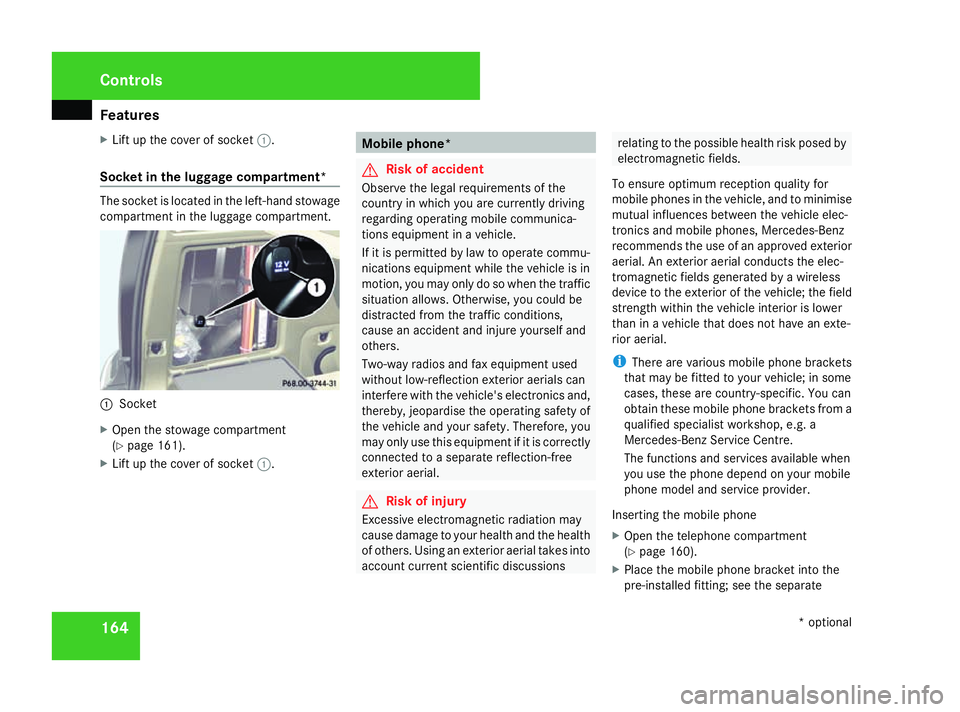
Socket in the luggage compartment* The socket is located in the left-hand stowage
compartment in the luggage compartment. 1
Socket
X Open the stowage compartment
(Y page 161).
X Lift up the cover of socket 1. Mobile phone*
G
Risk of accident
Observe the legal requirements of the
country in which you are currently driving
regarding operating mobile communica-
tions equipment in a vehicle.
If it is permitted by law to operate commu-
nications equipment while the vehicle is in
motion, you may only do so when the traffic
situation allows. Otherwise, you could be
distracted from the traffic conditions,
cause an accident and injure yourself and
others.
Two-way radios and fax equipment used
without low-reflection exterior aerials can
interfere with the vehicle's electronics and,
thereby, jeopardise the operating safety of
the vehicle and your safety. Therefore, you
may only use this equipment if it is correctly
connected to a separate reflection-free
exterior aerial. G
Risk of injury
Excessive electromagnetic radiation may
cause damage to your health and the health
of others. Using an exterior aerial takes into
account current scientific discussions relating to the possible health risk posed by
electromagnetic fields.
To ensure optimum reception quality for
mobile phones in the vehicle, and to minimise
mutual influences between the vehicle elec-
tronics and mobile phones, Mercedes-Benz
recommends the use of an approved exterior
aerial. An exterior aerial conducts the elec-
tromagnetic fields generated by a wireless
device to the exterior of the vehicle; the field
strength within the vehicle interior is lower
than in a vehicle that does not have an exte-
rior aerial.
i There are various mobile phone brackets
that may be fitted to your vehicle; in some
cases, these are country-specific. You can
obtain these mobile phone brackets from a
qualified specialist workshop, e.g. a
Mercedes-Benz Service Centre.
The functions and services available when
you use the phone depend on your mobile
phone model and service provider.
Inserting the mobile phone
X Open the telephone compartment
(Y page 160).
X Place the mobile phone bracket into the
pre-installed fitting; see the separate Cont
rols
* optional
169_AKB; 2; 4, en-GB
wdomann
,V ersion: 2.10.6
2008-07-16T08:52:06+02:00 - Seite 164 Dateiname: 6515_0315_02_buchblock.pdf; preflight
Page 168 of 305
Features
165
mobile phone bracket installation instruc-
tions.
X Insert the mobile phone into the mobile
phone bracket; see the separate mobile
phone bracket installation instructions.
If the mobile phone is inserted in the mobile
phone bracket, you can speak to the person
you are calling using the hands-free system.
You can operate the telephone using the
s andt buttons on the multi-function
steering wheel. You can operate other mobile
phone functions via the on-board computer
(Y page 113).
When you take the key out of the ignition lock,
the mobile phone stays on but you can no
longer use the hands-free system.
If you are making a call and you would like to
take the key out of the ignition lock, first
remove the mobile phone from the bracket.
Otherwise, the call will be terminated. Floormat on the driver's side
G
Risk of accident
Make sure that there is sufficient clearance
around the pedals when floormats are
used, and that the floormats are properly
secured.
The floormats must be secured at all times
using retainers and studs.
Before you drive off, make sure that the
floormats are secure and rectify if neces-
sary. A floormat which is not properly
secured can slip and thereby interfere with
the movement of the pedals.
Do not place floormats on top of one
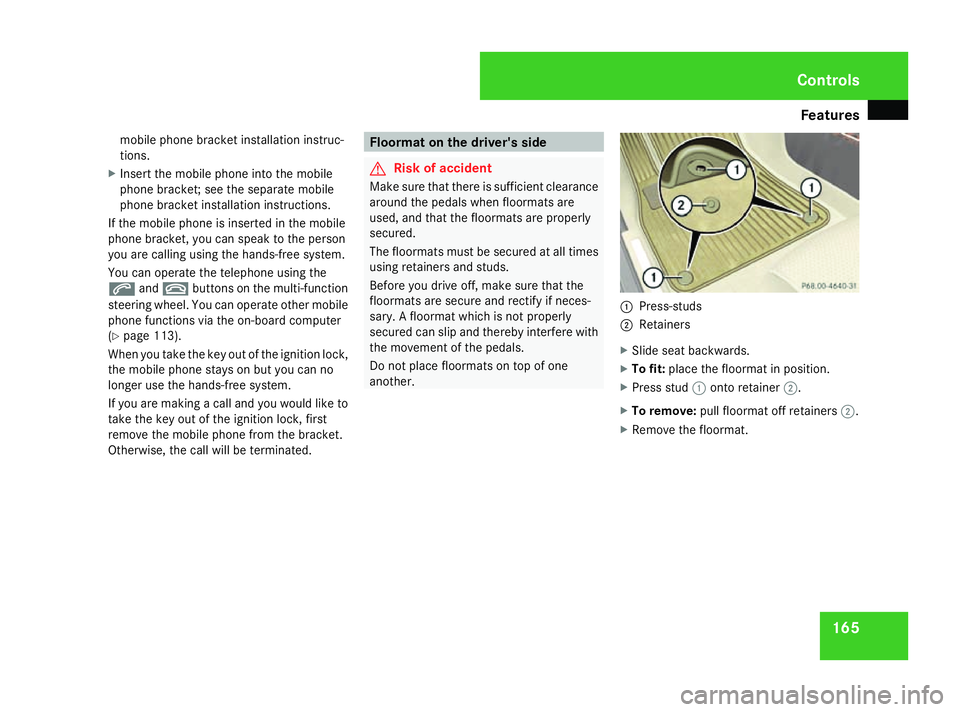
another. 1
Press-studs
2 Retainers
X Slide seat backwards.
X To fit: place the floormat in position.
X Press stud 1onto retainer 2.
X To remove: pull floormat off retainers 2.
X Remove the floormat. Cont
rols
169_AKB; 2; 4, en-GB
wdomann,
Version: 2.10.6 2008-07-16T08:52:06+02:00 - Seite 165 ZDateiname: 6515_0315_02_buchblock.pdf; preflight
Page 176 of 305
Engine compartment
173
Checking
the engine oil level To do so:
R
the vehicle should be parked on level
ground
R the engine should be switched off for at
least five minutes if the engine was at nor-
mal operating temperature.
R the engine should be switched off for at
least 30 minutes if the engine was not at
operating temperature (i.e. if you only star-
ted the engine briefly)
Using the on-board computer*
i Only possible on vehicles with a diesel
engine. A dipstick is used to check petrol
engines (Y page 174).
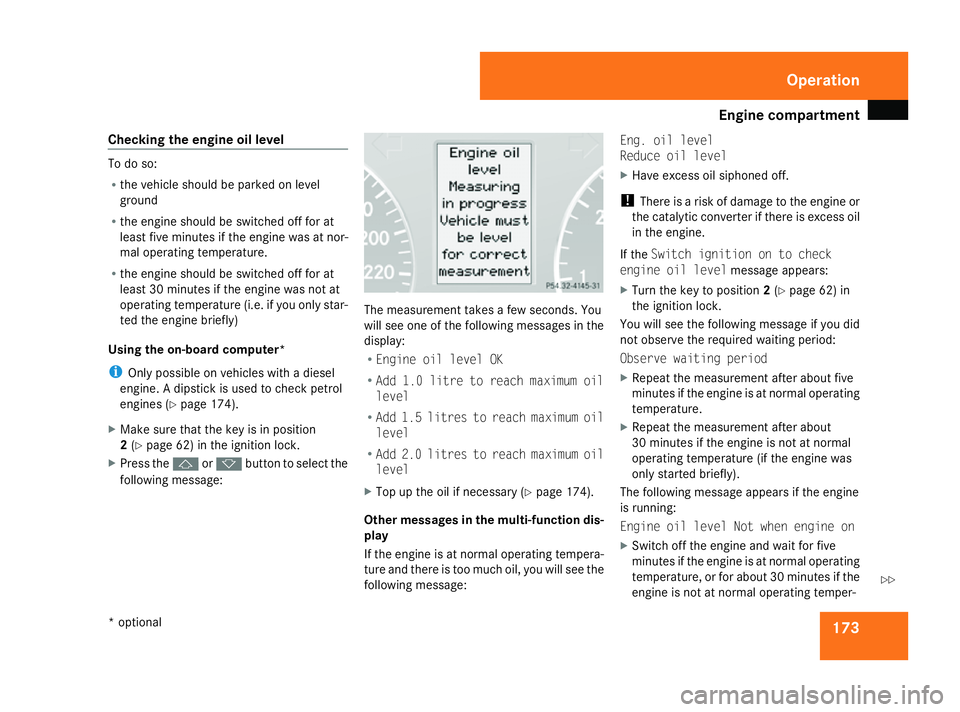
X Make sure that the key is in position
2(Y page 62) in the ignition lock.
X Press the jork button to select the
following message: The measurement takes a few seconds. You
will see one of the following messages in the
display:
R Engine oil level OK
R Add 1.0 litre to reach maximum oil
level
R Add 1.5 litres to reach maximum oil
level
R Add 2.0 litres to reach maximum oil
level
X Top up the oil if necessary ( Ypage 174).
Other messages in the multi-function dis-
play
If the engine is at normal operating tempera-
ture and there is too much oil, you will see the
following message: Eng. oil level
Reduce oil level
X
Have excess oil siphoned off.
! There is a risk of damage to the engine or
the catalytic converter if there is excess oil
in the engine.
If the Switch ignition on to check
engine oil level message appears:
X Turn the key to position 2(Y page 62) in
the ignition lock.
You will see the following message if you did
not observe the required waiting period:
Observe waiting period
X Repeat the measurement after about five
minutes if the engine is at normal operating
temperature.
X Repeat the measurement after about
30 minutes if the engine is not at normal
operating temperature (if the engine was
only started briefly).
The following message appears if the engine
is running:
Engine oil level Not when engine on
X Switch off the engine and wait for five
minutes if the engine is at normal operating
temperature, or for about 30 minutes if the
engine is not at normal operating temper- Operation
* optional
169_AKB; 2; 4, en-GB
wdomann
,V ersion: 2.10.6
2008-07-16T08:52:06+02:00 - Seite 173 ZDateiname: 6515_0315_02_buchblock.pdf; preflight
Page 177 of 305
Engine compartment
174ature (if the engine was only started
briefly), before measuring.
i If you wish to cancel the measurement,
press the korj button on the multi-
function steering wheel.
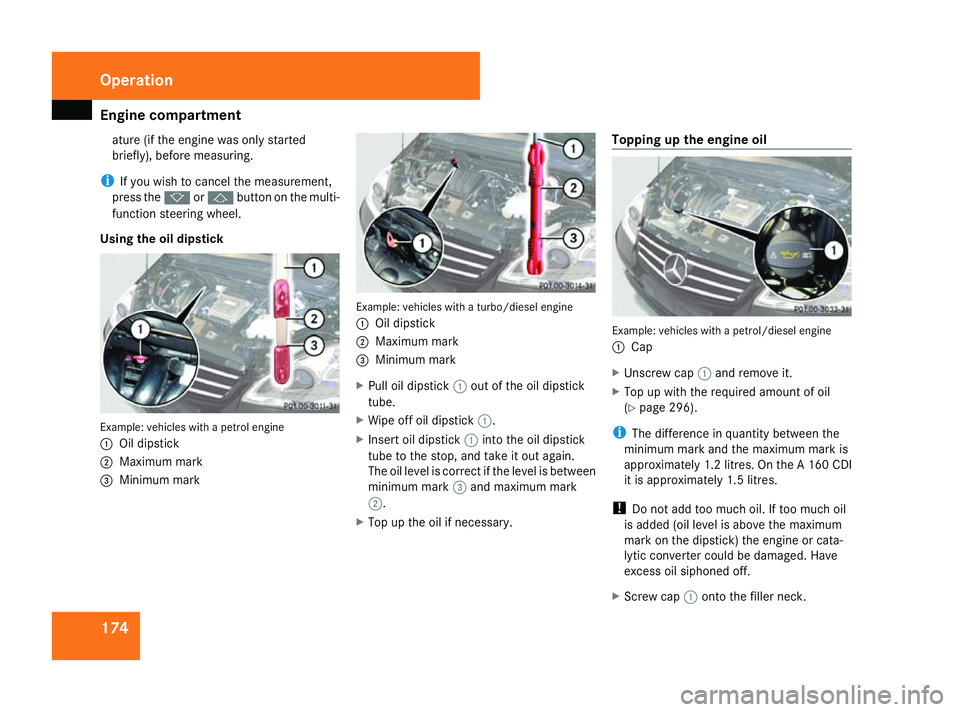
Using the oil dipstick Example: vehicles with a petrol engine
1
Oil dipstick
2 Maximum mark
3 Minimum mark Example: vehicles with a turbo/diesel engine
1
Oil dipstick
2 Maximum mark
3 Minimum mark
X Pull oil dipstick 1out of the oil dipstick
tube.
X Wipe off oil dipstick 1.
X Insert oil dipstick 1into the oil dipstick
tube to the stop, and take it out again.
The oil level is correct if the level is between
minimum mark 3and maximum mark
2.
X Top up the oil if necessary. Topping up the engine oil
Example: vehicles with a petrol/diesel engine
1
Cap
X Unscrew cap 1and remove it.
X Top up with the required amount of oil
(Y page 296).
i The difference in quantity between the
minimum mark and the maximum mark is
approximately 1.2 litres. On the A 160 CDI
it is approximately 1.5 litres.
! Do not add too much oil. If too much oil
is added (oil level is above the maximum
mark on the dipstick) the engine or cata-
lytic converter could be damaged. Have
excess oil siphoned off.
X Screw cap 1onto the filler neck. Operation
169_AKB; 2; 4, en-GB
wdomann,
Version: 2.10.6
2008-07-16T08:52:06+02:00 - Seite 174 Dateiname: 6515_0315_02_buchblock.pdf; preflight
Page 188 of 305

Driving ab
road 185Driving on wet roads
If water has accumulated to a certain depth
on the road surface, there is a danger of aqua-
planing occurring, even if:
R you drive at low speeds
R the tyres have adequate tread depth
For this reason, do not drive in tyre ruts, and
brake carefully. Driving on flooded roads
If you have to drive on stretches of road on
which water has collected, please bear in
mind that:
R the maximum permitted still water depth is
25 cm.
R you should drive no faster than at walking
pace.
! Bear in mind that vehicles travelling in
front or in the opposite direction create
waves. This may cause the maximum per-
missible water depth to be exceeded.
You must observe these notes. Otherwise,
damage may occur to the engine, electrics
and transmission. Driving abroad
Points to remember
An extensive Mercedes-Benz Service network
is also available in other countries. The
Service Hotline's current telephone numbers
for use when you are abroad are to be found
in the "Service24h" chapter of the Service
Booklet.
Only low-octane fuel is available in certain
countries.
You can find further information about fuel
grades on (Y page 168). Symmetrical dipped beam
If your journey takes you to countries where
vehicles are driven on sides of the road oppo-
site to the country in which the vehicle is reg-
istered, your headlamps must be switched to
symmetrical dipped beam or be partially
masked. Oncoming traffic will be dazzled
less.
X Vehicles with halogen headlamps: mask
the headlamps with special masking tape.
i You can obtain this masking tape from a
qualified specialist workshop, e.g. a
Mercedes-Benz Service Centre. !
Mercedes-Benz recommends that you
only use genuine Mercedes-Benz masking
tape. Your headlamps could otherwise be
damaged.
Remove the masking tape when you are
once again driving on the same side of the
road as in the country in which your vehicle
is registered.
X Vehicles with projection and bi-xenon
headlamps*: have the headlamps
switched over at a qualified specialist work-
shop, e.g. a Mercedes-Benz Service
Centre. G
Risk of accident
Have your headlamps switched back to
asymmetrical dipped beam if you are driv-
ing in a country in which traffic drives on
the same side of the road as in the country
in which your vehicle was registered. Oth-
erwise, you may dazzle the oncoming traffic
and could cause an accident. Operation
* optional
169_AKB; 2; 4, en-GB
wdomann
,V ersion: 2.10.6
2008-07-16T08:52:06+02:00 - Seite 185 ZDateiname: 6515_0315_02_buchblock.pdf; preflight
Page 197 of 305

Care
194Do not aim directly at any of the following:
R
tyres
R door joint
R electrical components
R Battery
R connectors
R lights
R seals
R trim elements
Damaged seals or electrical components
can lead to failures or leaks.
Cleaning the wiper blades and the out-
side of the windscreen G
Risk of injury
Before cleaning the windscreen or wiper
blades, turn the key in the ignition to 0.
Otherwise, the windscreen wipers may
move and injure you. X
Turn the key to position 1(Y page 62) in
the ignition lock.
X Set the windscreen wipers to position
I(Y page 83) on the combination switch.
X Turn the key to position 0(Y page 62) or
remove it when the wiper arms are vertical.
! Only fold the windscreen wipers away
from the windscreen when vertical, other-
wise you will damage the bonnet.
X Fold the wiper arms away from the wind-
screen.
X Wipe the windscreen and wiper blades with
a damp, lint-free cloth (e.g. a microfibre
cloth) and cleaning agent.
X Fold the wiper arms back on to the wind-
screen before the ignition is switched on.
! Do not clean the wiper blades too often
as this will result in damage to the surface
coating, leading to wiper noise.
Cleaning the windows !
Do not use dry cloths, abrasive products,
solvents or cleaning agents containing sol-
vents to clean the inside of the windows.
Clean the insides of the windows with a
damp cloth or commercially-available glass cleaner. Avoid touching the inside of the
rear windscreen and the side windows with
hard objects, e.g. ice scrapers or rings. You
could otherwise cause damage to the win-
dows, rear window heating or aerial on the
rear window.
i Anti-glare film retrofitted to the insides of
the windows could interfere with radio or
mobile phone reception, especially if it is
conductive or metal-coated film. Informa-
tion about anti-glare film can be obtained
from any Mercedes-Benz Service Centre.
Cleaning the headlamps X
Clean the plastic lenses of the headlamps
with a damp sponge.
! Only use washer fluid which is suitable for
plastic lamp lenses. Unsuitable washer
fluid could damage the plastic lamp lenses
of the headlamps.
Therefore, do not use:
R dry cloths
R abrasive products
R solvents
R cleaning products containing solvents Operation
169_AKB; 2; 4, en-GB
wdomann
,V ersion: 2.10.6
2008-07-16T08:52:06+02:00 - Seite 194 Dateiname: 6515_0315_02_buchblock.pdf; preflight
Page 223 of 305
Display
messages 220 Display messages Possible cause/consequence Possible solution
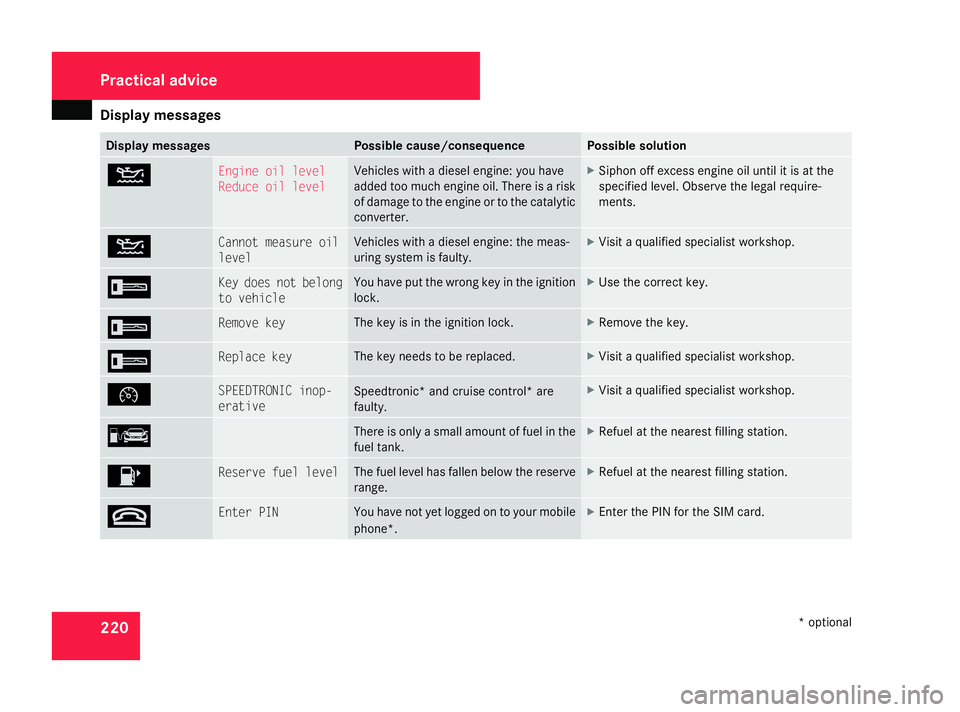
N Engine oil level
Reduce oil level Vehicles with a diesel engine:
you have
added too much engine oil. There is a risk
of damage to the engine or to the catalytic
converter. X
Siphon off excess engine oil until it is at the
specified level. Observe the legal require-
ments. N Cannot measure oil
level Vehicles with a diesel engine: the meas-
uring system is faulty. X
Visit a qualified specialist workshop. I Key does not belong
to vehicle You have put the wrong key in the ignition
lock. X
Use the correct key. I Remove key The key is in the ignition lock. X
Remove the key. I Replace key The key needs to be replaced. X
Visit a qualified specialist workshop. Ñ SPEEDTRONIC inop-
erative
Speedtronic* and cruise control* are
faulty. X
Visit a qualified specialist workshop. ¿ There is only a small amount of fuel in the
fuel tank. X
Refuel at the nearest filling station. 4 Reserve fuel level The fuel level has fallen below the reserve
range. X
Refuel at the nearest filling station. t Enter PIN You have not yet logged on to your mobile
phone*. X
Enter the PIN for the SIM card. Practical advice
* optional
169_AKB; 2; 4, en-GB
wdomann
,V ersion: 2.10.6
2008-07-16T08:52:06+02:00 - Seite 220 Dateiname: 6515_0315_02_buchblock.pdf; preflight
Page 224 of 305
Display
messages 221Display messages Possible cause/consequence Possible solution
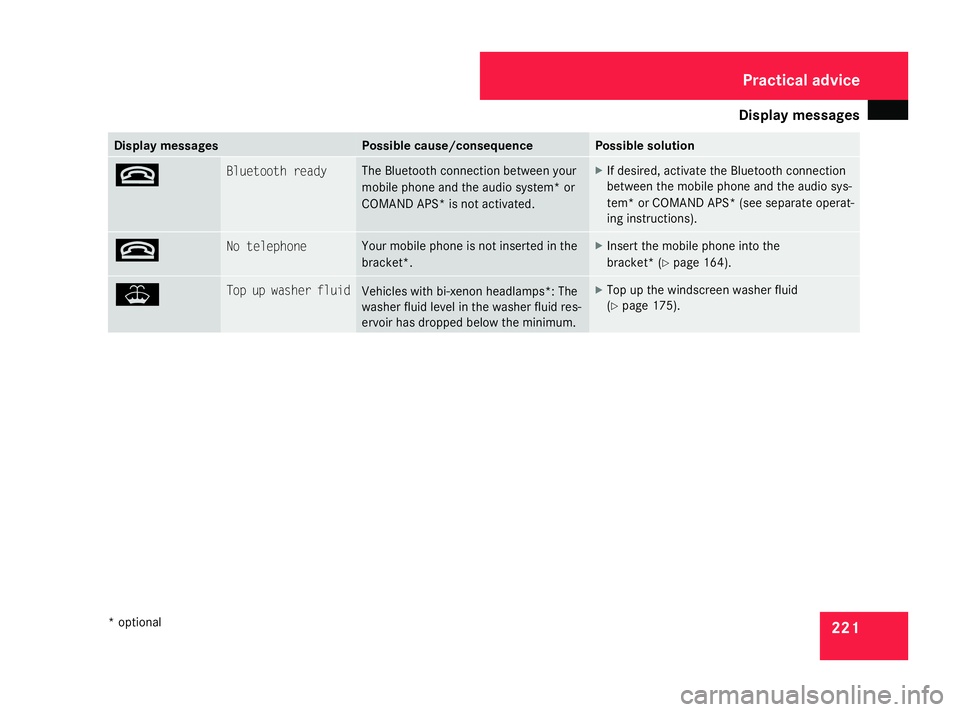
t Bluetooth ready The Bl
uetooth connection between your
mobile phone and the audio system* or
COMAND APS* is not activated. X
If desired, activate the Bluetooth connection
between the mobile phone and the audio sys-
tem* or COMAND APS* (see separate operat-
ing instructions). t No telephone Your mobile phone is not inserted in the
bracket*. X
Insert the mobile phone into the
bracket* (Y page 164). W Top up washer fluid
Vehicles with bi-xenon headlamps
*:The
washer fluid level in the washer fluid res-
ervoir has dropped below the minimum. X
Top up the windscreen washer fluid
(Y page 175). Practical advice
* optional
169_AKB; 2; 4, en-GB
wdomann,
Version: 2.10.6
2008-07-16T08:52:06+02:00 - Seite 221 ZDateiname: 6515_0315_02_buchblock.pdf; preflight
Page 226 of 305
Troubleshooting
223Problem Possible cause/consequence Suggested solutions
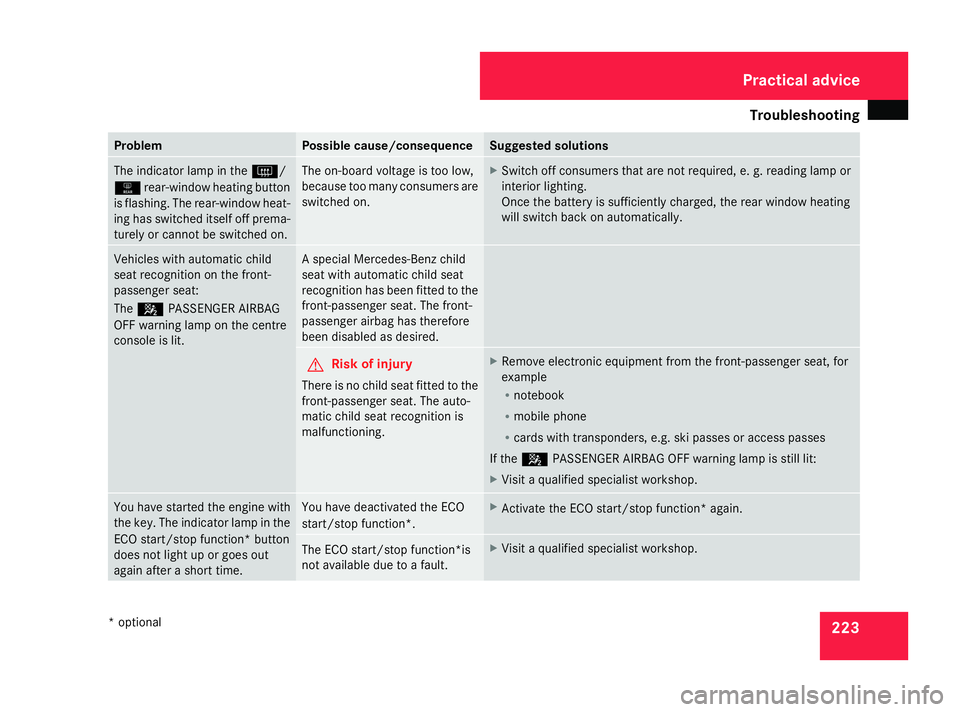
The indicator lamp in the
F/
1 rear-window heating button
is flashing. The rear-window heat-
ing has switched itself off prema-
turely or cannot be switched on. The on-board voltage is too low,
because too many consumers are
switched on. X
Switch off consumers that are not required, e. g. reading lamp or
interior lighting.
Once the batter y is sufficiently charged, the rear window heating
will switch back on automatically. Vehicles with automatic child
seat recognition on the front-
passenger seat:
The
5 PASSENGER AIRBAG
OFF warning lamp on the centre
console is lit. A special Mercedes-Benz child
seat with automatic child seat
recognition has been fitted to the
front-passenger seat. The front-
passenger airbag has therefore
been disabled as desired.
G
Risk of injury
There is no child seat fitted to the
front-passenger seat. The auto-
matic child seat recognition is
malfunctioning. X
Remove electronic equipment from the front-passenger seat, for
example
R
notebook
R mobile phone
R cards with transponders, e.g. ski passes or access passes
If the 5 PASSENGER AIRBAG OFF warning lamp is still lit:
X Visit a qualified specialist workshop. You have started the engine with
the key. The indicator lamp in the
ECO start/stop function *button
does not light up or goes out
again after a short time. You have deactivated the ECO
start/stop function
*. X
Activate the ECO start/stop function* again. The ECO start/stop function*is
not available due to a fault. X
Visit a qualified specialist workshop. Practical advice
* optional
169_AKB; 2; 4, en-GB
wdomann,
Version: 2.10.6 2008-07-16T08:52:06+02:00 - Seite 223 ZDateiname: 6515_0315_02_buchblock.pdf; preflight