buttons MERCEDES-BENZ A-CLASS HATCHBACK 2008 User Guide
[x] Cancel search | Manufacturer: MERCEDES-BENZ, Model Year: 2008, Model line: A-CLASS HATCHBACK, Model: MERCEDES-BENZ A-CLASS HATCHBACK 2008Pages: 305, PDF Size: 5.43 MB
Page 138 of 305
Air conditioning
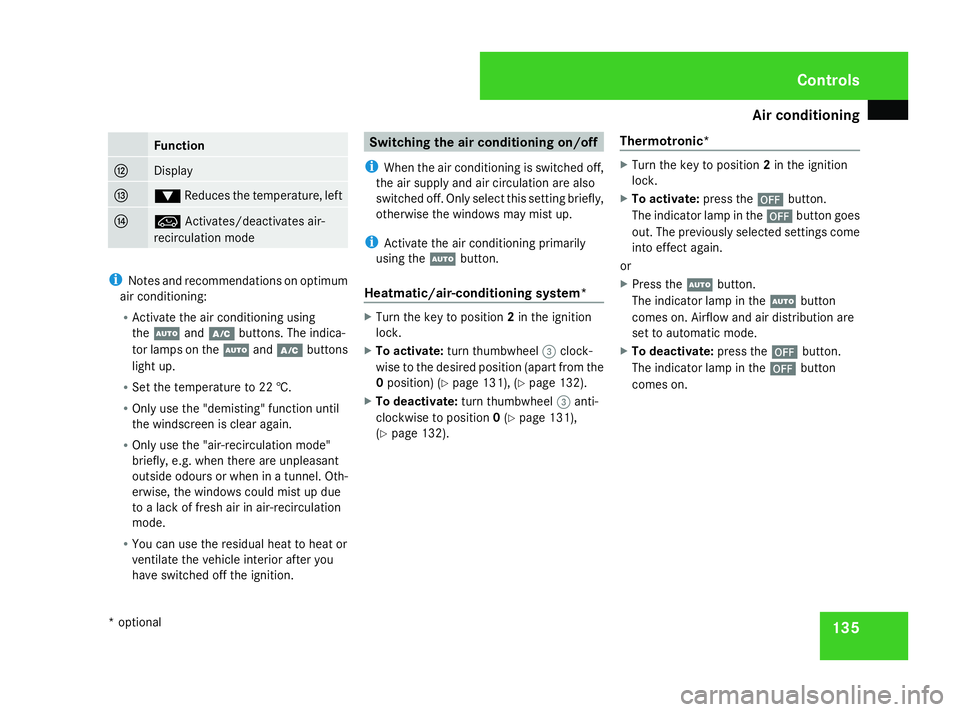
135Function
c
Display
d
%
Reduces the temperature, left e
Ä
Activates/deactivates air-
recirculation mode i
Notes and recommendations on optimum
air conditioning:
R Activate the air conditioning using
the U andœ buttons. The indica-
tor lamps on the Uandœ buttons
light up.
R Set the temperature to 22 †.
R Only use the "demisting" function until
the windscreen is clear again.
R Only use the "air-recirculation mode"
briefly, e.g. when there are unpleasant
outside odours or when in a tunnel. Oth-
erwise, the windows could mist up due
to a lack of fresh air in air-recirculation
mode.
R You can use the residual heat to heat or
ventilate the vehicle interior after you
have switched off the ignition. Switching the air conditioning on/off
i When the air conditioning is switched off,
the air supply and air circulation are also
switched off. Only select this setting briefly,
otherwise the windows may mist up.
i Activate the air conditioning primarily
using the Ubutton.
Heatmatic/air-conditioning system* X
Turn the key to position 2in the ignition
lock.
X To activate: turn thumbwheel 3clock-
wise to the desired position (apart from the
0 position) (Y page 131), (Ypage 132).
X To deactivate: turn thumbwheel 3anti-
clockwise to position 0(Y page 131),
(Y page 132). Thermotronic* X
Turn the key to position 2in the ignition
lock.
X To activate: press the´button.
The indicator lamp in the ´button goes
out. The previously selected settings come
into effect again.
or
X Press the Ubutton.
The indicator lamp in the Ubutton
comes on. Airflow and air distribution are
set to automatic mode.
X To deactivate: press the´button.
The indicator lamp in the ´button
comes on. Cont
rols
* option al
169_AKB; 2; 4, en-GB
wdomann
,V ersion: 2.10.6
2008-07-16T08:52:06+02:00 - Seite 135 ZDateiname: 6515_0315_02_buchblock.pdf; preflight
Page 143 of 305
Air conditioning
140
or
X
Press one of the $or% temperature
buttons.
The indicator lamp in the |button goes
out. The air distribution is directed towards
the windscreen. The air conditioning
switches to manual mode.
or
X Turn thumbwheel 1clockwise or anti-
clockwise (Y page 134).
The indicator lamp in the |button goes
out. The air distribution is directed towards
the windscreen. The air conditioning
switches to manual mode. Demisting the windows
Windows misted up on the inside X
Activate the "cooling with air dehumidifica-
tion" function 19
.
X Activate the automatic air conditioning. 20
X If the windows continue to mist up, activate
the "demisting" function.
Windows misted up on the outside X
Activate the windscreen wipers.
X Turn the air distribution thumbwheel to the
Y ora symbol.
i You should only select this setting until
the windscreen is clear again. Switching the rear window heating
on/off
G
Risk of accident
Clear all windows of ice or snow before set-
ting off. Impaired visibility could otherwise
endanger you and others.
i The rear window heating has a high cur-
rent draw. You should therefore switch it
off as soon as the window is clear, as it only
switches off automatically after several
minutes.
i If the battery voltage is too low, the rear
window heating may switch off.
X Turn the key to position 2in the ignition
lock.
X To activate, press the 121
/F 22
but-
ton.
The indicator lamp in the 1/Fbut-
ton lights up or goes out.
19 Vehicles with air conditioning*/Thermotronic*.
20 Vehicles with Thermotronic*.
21 Vehicles with an air-conditioning system*/Thermotronic*.
22 Vehicles with Heatmatic. Cont
rols
* optional
169_AKB; 2; 4, en-GB
wdomann
,V ersion: 2.10.6
2008-07-16T08:52:06+02:00 - Seite 140 Dateiname: 6515_0315_02_buchblock.pdf; preflight
Page 168 of 305
Features
165
mobile phone bracket installation instruc-
tions.
X Insert the mobile phone into the mobile
phone bracket; see the separate mobile
phone bracket installation instructions.
If the mobile phone is inserted in the mobile
phone bracket, you can speak to the person
you are calling using the hands-free system.
You can operate the telephone using the
s andt buttons on the multi-function
steering wheel. You can operate other mobile
phone functions via the on-board computer
(Y page 113).
When you take the key out of the ignition lock,
the mobile phone stays on but you can no
longer use the hands-free system.
If you are making a call and you would like to
take the key out of the ignition lock, first
remove the mobile phone from the bracket.
Otherwise, the call will be terminated. Floormat on the driver's side
G
Risk of accident
Make sure that there is sufficient clearance
around the pedals when floormats are
used, and that the floormats are properly
secured.
The floormats must be secured at all times
using retainers and studs.
Before you drive off, make sure that the
floormats are secure and rectify if neces-
sary. A floormat which is not properly
secured can slip and thereby interfere with
the movement of the pedals.
Do not place floormats on top of one
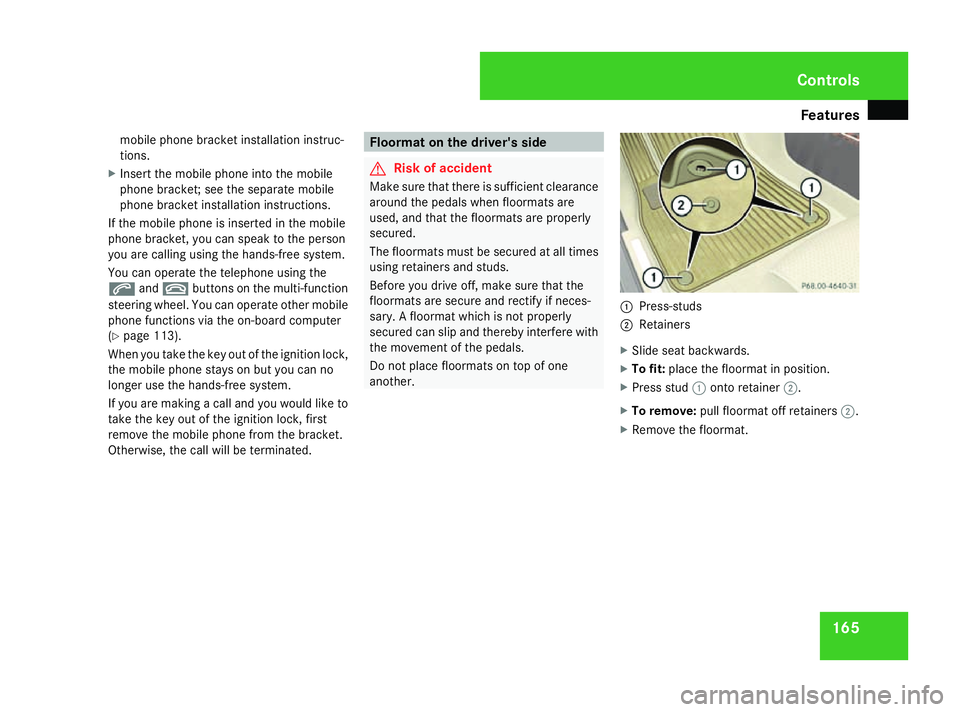
another. 1
Press-studs
2 Retainers
X Slide seat backwards.
X To fit: place the floormat in position.
X Press stud 1onto retainer 2.
X To remove: pull floormat off retainers 2.
X Remove the floormat. Cont
rols
169_AKB; 2; 4, en-GB
wdomann,
Version: 2.10.6 2008-07-16T08:52:06+02:00 - Seite 165 ZDateiname: 6515_0315_02_buchblock.pdf; preflight
Page 195 of 305
Care
192
time during which the battery is disconnec-
ted.
Maintaining the time-dependent service
schedule:
X Note down the service due date displayed
before disconnecting the battery.
or
X Subtract the battery disconnection periods
from the service date shown on the display
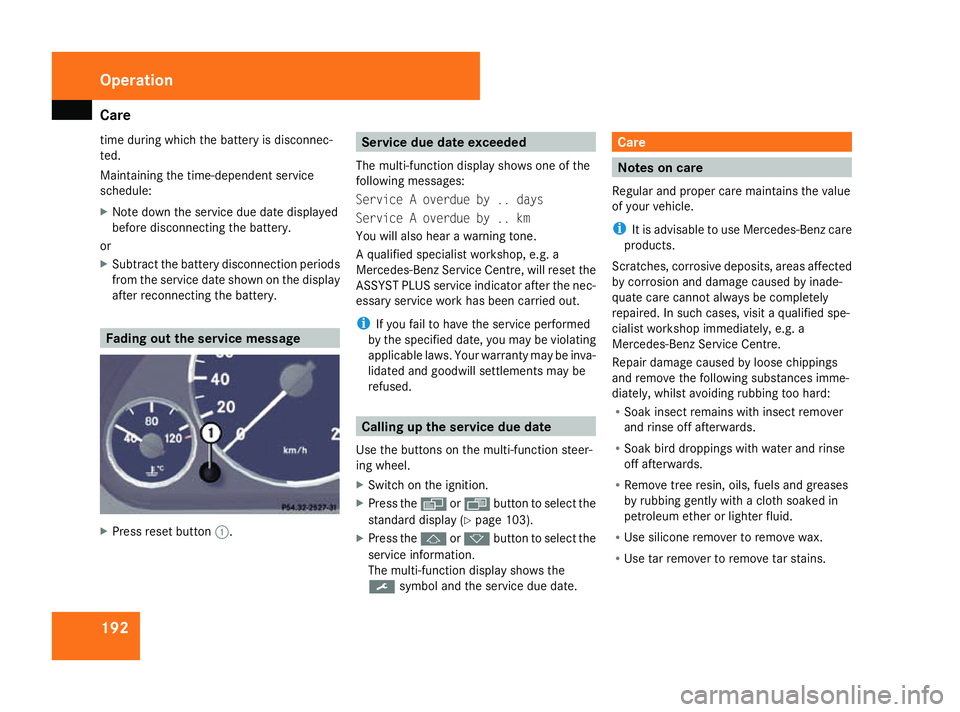
after reconnecting the battery. Fading out the service message
X
Press reset button 1. Service due date exceeded
The multi-function display shows one of the
following messages:
Service A overdue by .. days
Service A overdue by .. km
You will also hear a warning tone.
A qualified specialist workshop, e.g. a
Mercedes-Benz Service Centre, will reset the
ASSYST PLUS service indicator after the nec-
essary service work has been carried out.
i If you fail to have the service performed
by the specified date, you may be violating
applicable laws. Your warranty may be inva-
lidated and goodwill settlements may be
refused. Calling up the service due date
Use the buttons on the multi-function steer-
ing wheel.
X Switch on the ignition.
X Press the èorÿ button to select the
standard display (Y page 103).
X Press the jork button to select the
service information.
The multi-function display shows the
9 symbol and the service due date. Care
Notes on care
Regular and proper care maintains the value
of your vehicle.
i It is advisable to use Mercedes-Benz care
products.
Scratches, corrosive deposits, areas affected
by corrosion and damage caused by inade-
quate care cannot always be completely
repaired. In such cases, visit a qualified spe-
cialist workshop immediately, e.g. a
Mercedes-Benz Service Centre.
Repair damage caused by loose chippings
and remove the following substances imme-
diately, whilst avoiding rubbing too hard:
R Soak insect remains with insect remover
and rinse off afterwards.
R Soak bird droppings with water and rinse
off afterwards.
R Remove tree resin, oils, fuels and greases
by rubbing gently with a cloth soaked in
petroleum ether or lighter fluid.
R Use silicone remover to remove wax.
R Use tar remover to remove tar stains. Operation
169_AKB; 2; 4, en-GB
wdomann,
Version: 2.10.6
2008-07-16T08:52:06+02:00 - Seite 192 Dateiname: 6515_0315_02_buchblock.pdf; preflight
Page 205 of 305
Display
messages 202
Vehi
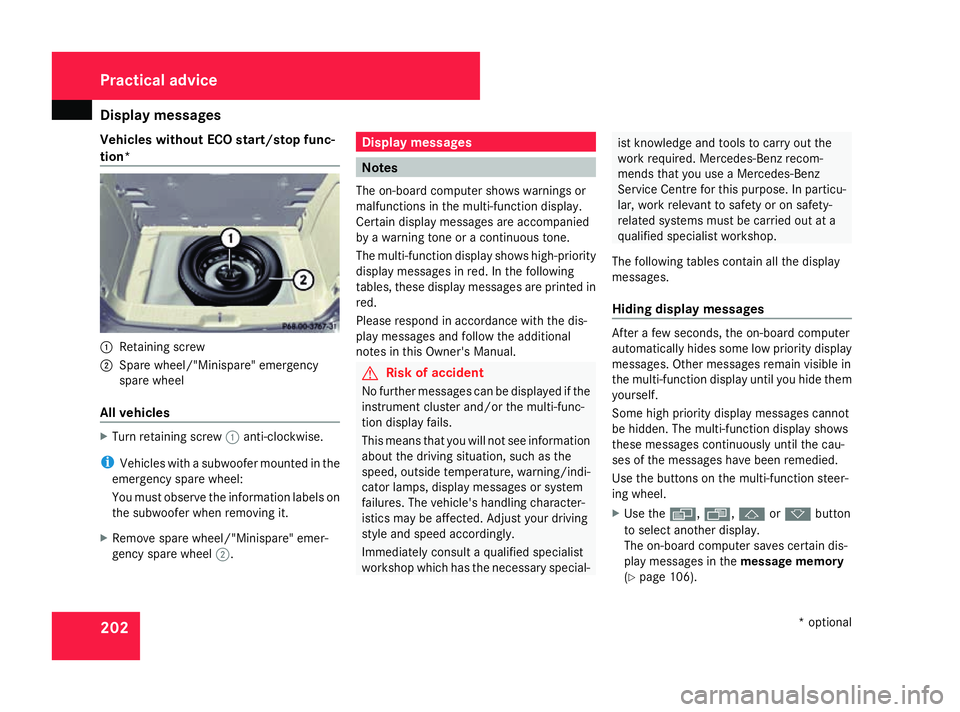
cles without ECO start/stop func-
tion* 1
Retaining screw
2 Spare wheel/"Minispare" emergency
spare wheel
All vehicles X
Turn retaining screw 1anti-clockwise.
i Vehicles with a subwoofer mounted in the
emergency spare wheel:
You must observe the information labels on
the subwoofer when removing it.
X Remove spare wheel/"Minispare" emer-
gency spare wheel 2. Display messages
Notes
The on-board computer shows warnings or
malfunctions in the multi-function display.
Certain display messages are accompanied
by a warning tone or a continuous tone.
The multi-function display shows high-priority
display messages in red. In the following
tables, these display messages are printed in
red.
Please respond in accordance with the dis-
play messages and follow the additional
notes in this Owner's Manual. G
Risk of accident
No further messages can be displayed if the
instrument cluster and/or the multi-func-
tion display fails.
This means that you will not see information
about the driving situation, such as the
speed, outside temperature, warning/indi-
cator lamps, display messages or system
failures. The vehicle's handling character-
istics may be affected. Adjust your driving
style and speed accordingly.
Immediately consult a qualified specialist
workshop which has the necessary special- ist knowledge and tools to carry out the
work required. Mercedes-Benz recom-
mends that you use a Mercedes-Benz
Service Centre for this purpose. In particu-
lar, work relevant to safety or on safety-
related systems must be carried out at a
qualified specialist workshop.
The following tables contain all the display
messages.
Hiding display messages After a few seconds, the on-board computer
automatically hides some low priority display
messages. Other messages remain visible in
the multi-function display until you hide them
yourself.
Some high priority display messages cannot
be hidden. The multi-function display shows
these messages continuously until the cau-
ses of the messages have been remedied.
Use the buttons on the multi-function steer-
ing wheel.
X
Use the è,·,jork button
to select another display.
The on-board computer saves certain dis-
play messages in the message memory
(Y page 106). Practical advice
* optional
169_AKB; 2; 4, en-GB
wdomann
,V ersion: 2.10.6
2008-07-16T08:52:06+02:00 - Seite 202 Dateiname: 6515_0315_02_buchblock.pdf; preflight
Page 225 of 305
Troubleshooting
222 Troubleshooting
Points to remember
G
Risk of accident and injury
If maintenance work is carried out incorrectl y this can jeopardise the operating safety of your vehicle. You risk losing control of your vehicle
and thereby causing an accident. The safety systems may also no longer be able to protect you or others as they are designed to do.
Always have maintenance work carried out at a qualified specialist workshop which has the necessary specialist knowledge and tools to
carry out the work required.
Mercedes-Benz recommends that you use a Mercedes-Benz Service Centre for this purpose.
In particular, all work relevant to safety or on safety-related systems must be carried out at a qualified specialist workshop. Warning and indicator lamps in switches and buttons
Problem Possible cause/consequence Suggested solutions
One or all of the indicator lamps
in the seat heating* button are
flashing. The seat heating* has
switched itself off automatically. The on-board voltage is too low,
because too many consumers are
switched on. X
Switch off consumers that are not required, e. g. reading lamp or
interior lighting.
Once the battery is sufficiently charged, the seat ventilation* will
switch back on automatically. The indicator lamp in the
2
button on the air-conditioning*/
Thermotronic* control panel
lights up. The cooling system can-
not be switched on. Cooling has been deactivated
due to a malfunction. X
Visit a qualified specialist workshop. Practical advice
* optional
169_AKB; 2; 4, en-GB
wdomann
,V ersion: 2.10.6
2008-07-16T08:52:06+02:00 - Seite 222 Dateiname: 6515_0315_02_buchblock.pdf; preflight
Page 247 of 305
Changing the batteries
244 Changing the batteries
Notes
It is advisable to have the batteries replaced
at a qualified specialist workshop, e.g. at a
Mercedes-Benz Service Centre. G
Risk of poisoning
Batteries contain toxic and caustic sub-
stances. For this reason, keep batteries
away from children.
If a battery is swallowed, consult a doctor
immediately. H
Environmental note
Do not dispose of batteries with the house-
hold rubbish, as they contain highly toxic
substances.
Take discharged batteries to a qualified
specialist workshop, e.g. a Mercedes-Benz
Service Centre, or to a special collection
point for old batteries. Key
Checking the batteries X
Press the jork button.
The batteries are in order if the battery
charge indicator lamp lights up briefly.
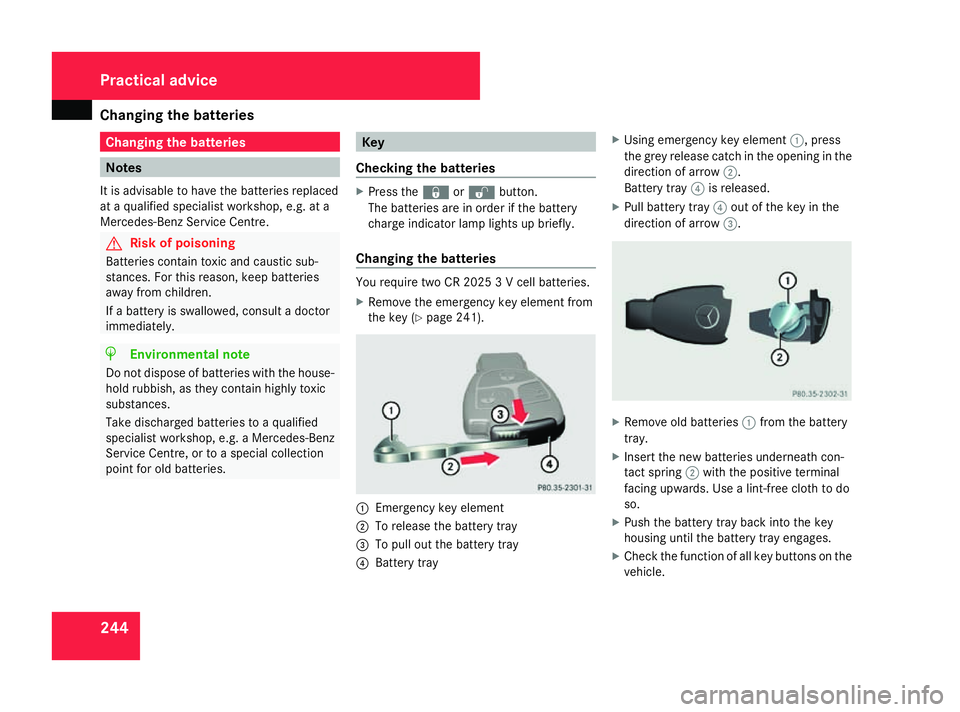
Changing the batteries You require two CR 2025 3 V cell batteries.
X
Remove the emergency key element from
the key (Y page 241). 1
Emergency key element
2 To release the battery tray
3 To pull out the battery tray
4 Battery tray X
Using emergency key element 1, press
the grey release catch in the opening in the
direction of arrow 2.
Battery tray 4is released.
X Pull battery tray 4out of the key in the
direction of arrow 3. X
Remove old batteries 1from the battery
tray.
X Insert the new batteries underneath con-
tact spring 2with the positive terminal
facing upwards. Use a lint-free cloth to do
so.
X Push the battery tray back into the key
housing until the battery tray engages.
X Check the function of all key buttons on the
vehicle. Practical advice
169_AKB; 2; 4, en-GB
wdomann
,V ersion: 2.10.6
2008-07-16T08:52:06+02:00 - Seite 244 Dateiname: 6515_0315_02_buchblock.pdf; preflight