warning MERCEDES-BENZ A-CLASS HATCHBACK 2008 Owner's Manual
[x] Cancel search | Manufacturer: MERCEDES-BENZ, Model Year: 2008, Model line: A-CLASS HATCHBACK, Model: MERCEDES-BENZ A-CLASS HATCHBACK 2008Pages: 305, PDF Size: 5.43 MB
Page 48 of 305
Occupant safety
45
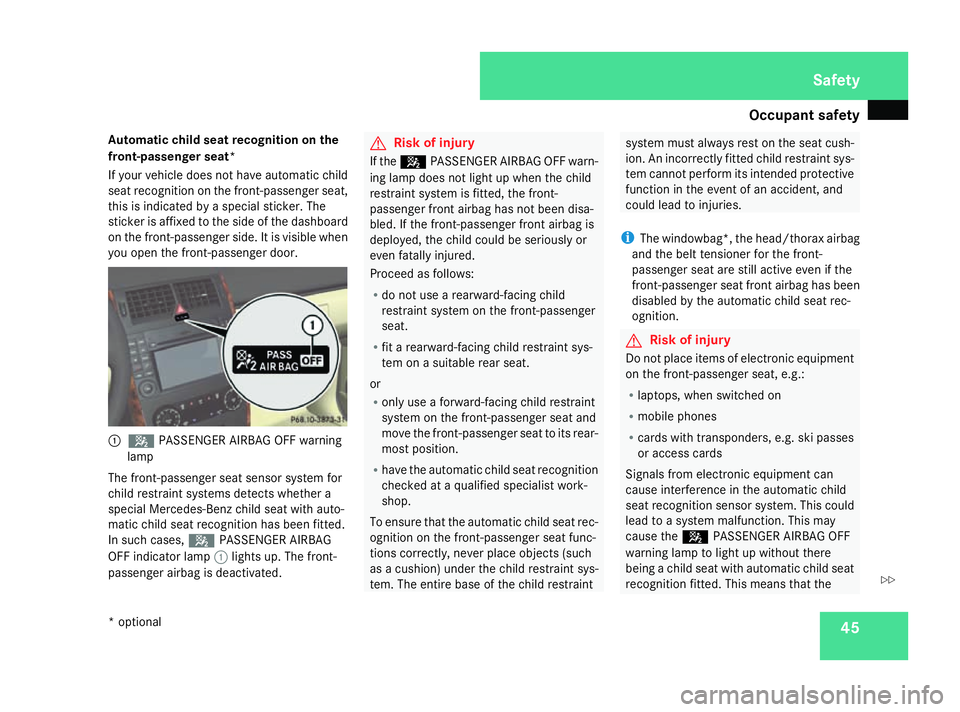
Automatic child seat recognition on the
front-passenger seat*
If your vehicle does not have automatic child
seat recognition on the front-passenger seat,
this is indicated by a special sticker. The
sticker is affixed to the side of the dashboard
on the front-passenger side. It is visible when
you open the front-passenger door. 1
5 PASSENGER AIRBAG OFF warning
lamp
The front-passenger seat sensor system for
child restraint systems detects whether a
special Mercedes-Benz child seat with auto-
matic child seat recognition has been fitted.
In such cases, 5PASSENGER AIRBAG
OFF indicator lamp 1lights up. The front-
passenger airbag is deactivated. G
Risk of injury
If the 5 PASSENGER AIRBAG OFF warn-
ing lamp does not light up when the child
restraint system is fitted, the front-
passenger front airbag has not been disa-
bled. If the front-passenger front airbag is
deployed, the child could be seriously or
even fatally injured.
Proceed as follows:
R do not use a rearward-facing child
restraint system on the front-passenger
seat.
R fit a rearward-facing child restraint sys-
tem on a suitable rear seat.
or
R only use a forward-facing child restraint
system on the front-passenger seat and
move the front-passenger seat to its rear-
most position.
R have the automatic child seat recognition
checked at a qualified specialist work-
shop.
To ensure that the automatic child seat rec-
ognition on the front-passenger seat func-
tions correctly, never place objects (such
as a cushion) under the child restraint sys-
tem. The entire base of the child restraint system must always rest on the seat cush-
ion. An incorrectly fitted child restraint sys-
tem cannot perform its intended protective
function in the event of an accident, and
could lead to injuries.
i The windowbag*, th e head/thorax airbag
and the belt tensioner for the front-
passenger seat are still active even if the
front-passenger seat front airbag has been
disabled by the automatic child seat rec-
ognition. G
Risk of injury
Do not place items of electronic equipment
on the front-passenger seat, e.g.:
R laptops, when switched on
R mobile phones
R cards with transponders, e.g. ski passes
or access cards
Signals from electronic equipment can
cause interference in the automatic child
seat recognition sensor system. This could
lead to a system malfunction. This may
cause the 5PASSENGER AIRBAG OFF
warning lamp to light up without there
being a child seat with automatic child seat
recognition fitted. This means that the Safety
* optional
169_AKB; 2; 4, en-GB
wdomann,
Version: 2.10.6 2008-07-16T08:52:06+02:00 - Seite 45 ZDateiname: 6515_0315_02_buchblock.pdf; preflight
Page 49 of 305
Occupant safety
46 front-passenger airbag does not deploy
during an accident. It is also possible that the
5 PASSENGER AIRBAG OFF warning
lamp will not light up briefly if you turn the
key in the ignition lock to position 2.
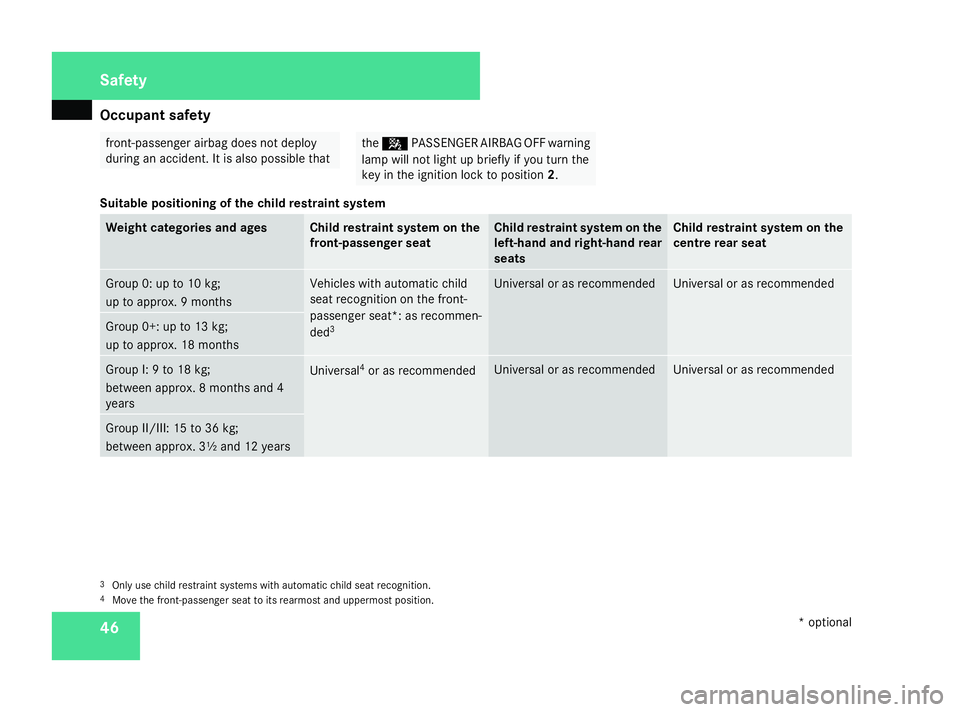
Suitable positioning of the child restraint system Weight categories and ages Child restraint system on the
front-passenger seat Child restraint system on the
left-hand and right-hand rear
seats Child restraint system on the
centre rear seat
Group 0: up to 10 kg;
up to approx. 9 months Vehicles with automatic child
seat recognition on the front-
passenger seat*: as recommen-
ded
3 Universal or as recommended Universal or as recommended
Group 0+: up to 13 kg;
up to approx. 18 months
Group I: 9 to 18 kg;
between approx. 8 months and 4
years Universal
4
or as recommended Universal or as recommended Universal or as recommended
Group II/III: 15 to 36 kg;
between approx. 3½ and 12 years
3
Only use child restraint systems with automatic child seat recognition.
4 Move the front-passenger seat to its rearmost and uppermost position. Safety
* optional
169_AKB; 2; 4, en-GB
wdomann
,V ersion: 2.10.6
2008-07-16T08:52:06+02:00 - Seite 46 Dateiname: 6515_0315_02_buchblock.pdf; preflight
Page 59 of 305

Driving safety sys
tems56 G
Risk of accident
If BAS has malfunctioned, the braking sys-
tem remains available with full brake boost-
ing effect. However, braking force is not
automatically increased in emergency
braking situations and the stopping dis-
tance may increase. Adaptive brake lamps
i Adaptive brake lamps are only available in
certain countries.
If you brake sharply from a speed of more
than 50 km/h or if braking is assisted by BAS,
the brake lamps flash rapidly. In this way,
traffic travelling behind you is warned in an
even more noticeable manner.
If you brake sharply from a speed of more
than 70 km/h to a standstill, the hazard warn-
ing lamps are activated automatically. If the
brakes are applied again, the brake lamps
light up continuously. The hazard warning
lamps switch off automatically if you travel
faster than 10 km/h. You can also switch off
the hazard warning lamps using the hazard
warning switch button ( Ypage 80). ESP
®
(Electronic Stability Program)
ESP ®
monitors driving stability and traction,
i.e. power transmission between tyres and
the road surface.
ESP ®
detects when a wheel spins or the vehi-
cle starts to skid. ESP ®
stabilises the vehicle
by targeted braking of individual wheels and
by limiting engine power. It assists you when
pulling away on wet or slippery roads. ESP ®
also stabilises the vehicle during braking.
When ESP ®
intervenes, the vwarning
lamp flashes in the instrument cluster. G
Risk of accident
If the v warning lamp in the instrument
cluster flashes, proceed as follows:
R only depress the accelerator pedal as far
as necessary when pulling away.
R adapt your driving style to suit the pre-
vailing road and weather conditions.
The vehicle could otherwise go into a skid.
ESP ®
cannot reduce the risk of an accident
if you drive too fast. ESP ®
cannot override
the laws of physics.
! The ignition must be switched off (key in
position 0or 1in the ignition lock), if: R
the parking brake is being tested using a
dynamometer
R the vehicle is being towed with the front
axle raised
Application of the brakes by ESP ®
could
otherwise destroy the brake system on the
front axle.
i Only use wheels with the recommended
tyre sizes. Only then will ESP ®
function
properly. Steering assistant STEER CONTROL
The steering assistant STEER CONTROL helps
you by transmitting a noticeable steering
force to the steering wheel in the direction
required for vehicle stabilisation. This steer-
ing assistance is provided in particular if:
R both right wheels or both left wheels are on
a wet or slippery road surface when you
brake
R the vehicle starts to skid
You have control over the steering at all
times. G
Risk of accident
If there is an ESP ®
malfunction, you will not
receive any steering assistance from the Safety
169_AKB; 2; 4, en-GB
wdomann,
Version: 2.10.6
2008-07-16T08:52:06+02:00 - Seite 56 Dateiname: 6515_0315_02_buchblock.pdf; preflight
Page 78 of 305

Seat belts
75
X
Route the belt over the centre of the shoul-
der without twisting it.
X Engage belt tongue 2into buckle 3.
X 5-door vehicle: if necessary, adjust the
belt to the appropriate height
(Y page 75).
X 3-door vehicles: make sure that swivelling
belt guide 5is in the correct position.
X All: if necessary, pull upwards on the shoul-
der section of the belt to tighten the belt
across your body.
Routing the belt X
Press release button 4and guide belt
tongue 2back towards belt sash guide
1. Belt warning for driver and front
passenger
The < seat belt warning lamp in the instru-
ment cluster reminds you that all passengers
should fasten their seat belts. It may light up
continuously or flash. Additionally, there may
be a warning tone.
The < seat belt warning lamp goes out and
the acoustic signal ceases as soon as the
driver and passenger have fastened their seat
belts.
For certain countries only: regardless of
whether the driver or the front passenger
already have their seat belt fastened, the
< seat belt warning lamp lights up for six
seconds after the engine has been started. It
then goes out when the driver and front
passenger have already fastened their seat
belts.
i Further information about the
5-door vehicles only: you can adjust the
seat belt height on the driver's seat and front-
passenger seat.
Adjust the belt to a height that allows it to be
routed across the middle of your shoulder. 1
Release catch
X To raise: slide the belt sash guide upwards.
The belt sash guide engages in various posi-
tions.
X To lower: press and hold release button
1.
X Slide the belt sash guide downwards.
X Let go of release button 1and make sure
that the belt sash guide has engaged. Controls
169_AKB; 2; 4, en-GB
wdomann,
Version: 2.10.6
2008-07-16T08:52:06+02:00 - Seite 75 ZDateiname: 6515_0315_02_buchblock.pdf; preflight
Page 83 of 305

Lights
80
Main-beam headlamps X
Turn the ignition key to position 2in the
ignition lock or start the engine.
X Turn the light switch to BorU 9
.
X To switch on: press the combination
switch in the direction of arrow 1.
The A main-beam indicator lamp in the
instrument cluster lights up.
X To switch off: move the combination
switch back to its normal position.
The A main-beam indicator lamp in the
instrument cluster goes out.
Headlamp flasher X
To switch on: briefly pull the combination
switch in the direction of arrow =. Hazard warning lamps
The hazard warning lamps still operate if the
ignition is switched off. They switch on auto-
matically if an airbag is deployed or if you
brake sharply and bring the vehicle to a halt
from a speed of more than 70 km/h.
X
To switch on: press button1.
All turn signals flash. If you now switch on
a turn signal using the combination switch
(Y page 79), only the turn signal lamp on
the corresponding side of the vehicle will
flash.
X To switch off: press button1. Adjusting the headlamp range (halo-
gen headlamps)
The headlamp range control allows you to
adjust the cone of light from the headlamps
to suit the vehicle load.
You can only adjust the headlamp range while
the engine is running. Position Load
0
Driver's seat and front-
passenger seat occupied
1
Driver's seat, front-
passenger seat and rear
seats occupied
9
In the Uposition, the main-beam headlamps are only switched on when it is dark. Controls
169_AKB; 2; 4, en-GB
wdomann,
Version: 2.10.6
2008-07-16T08:52:06+02:00 - Seite 80 Dateiname: 6515_0315_02_buchblock.pdf; preflight
Page 86 of 305

Windscreen wipers
83
cle, open a door or remove the key from the
ignition lock.
The interior lighting switches off after a delay.
You can set the delayed switch-off using the
on-board computer (Y page 110). If the door
is left open, the interior lighting goes out after
approximately five minutes.
Emergency accident lighting If the interior lighting is set to automatic, the
interior lighting is activated automatically if
the vehicle is involved in an accident.
X To deactivate: press the hazard warning
lamp button (Y page 80).
or
X Lock and then unlock the vehicle using the
key. Windscreen wipers
Switching the windscreen wipers on/
off
Combination switch
1 To switch on the windscreen wipers
2 Single wipe/to wipe the windscreen using
washer fluid
Settings: 0
Windscreen wipers off
I
Intermittent wipe
II
Continuous wipe, slow
III
Continuous wipe, fast
!
Vehicles with a rain sensor*: If the windscreen becomes dirty in dry
weather conditions, the windscreen wipers
may be activated inadvertently. This could
then damage the windscreen wiper blades
or scratch the windscreen.
For this reason, you should always switch
off the windscreen wipers in dry weather.
X Turn the key to position 1or 2in the ignition
lock.
X Turn the combination switch to the corre-
sponding position. Rear window wiper
Combination switch
1
Switch
% To wipe with washer fluid Controls
* optional
169_AKB; 2; 4, en-GB
wdomann,
Version: 2.10.6 2008-07-16T08:52:06+02:00 - Seite 83 ZDateiname: 6515_0315_02_buchblock.pdf; preflight
Page 93 of 305
Driving and pa
rking 90
Hill start assist Hill start assist helps you when pulling away
on uphill gradients. It holds the vehicle for a
short time after you have removed your foot
from the brake pedal. This gives you enough
time to move your foot from the brake pedal
to the accelerator pedal and depress it before
the vehicle begins to roll. G
Risk of accident
Never leave the vehicle when it is held by
hill start assist. After approximately one
second, hill start assist will no longer brake
your vehicle and it could roll away.
X Remove your foot from the brake pedal.
i Once you have taken your foot off the
brake pedal, the vehicle is held for around
one second.
X Pull away.
Hill start assist does not function if:
R you are pulling away on a level road or a
downhill gradient.
R on vehicles with AUTOTRONIC *,the selec-
tor lever is in the Nposition. R
the vehicle is secured with the parking
brake.
R ESP ®
is malfunctioning. Parking
G
Risk of accident
Only remove the key from the ignition lock
when the vehicle is stationary as you can-
not steer the vehicle with the key removed.
Never leave children unsupervised in the
vehicle. They could release the parking
brake. This could lead to a serious or fatal
accident. G
Risk of fire
Make sure that the exhaust system does
not under any circumstances come into
contact with easily ignitable material such
as dry grass or petrol. The material could
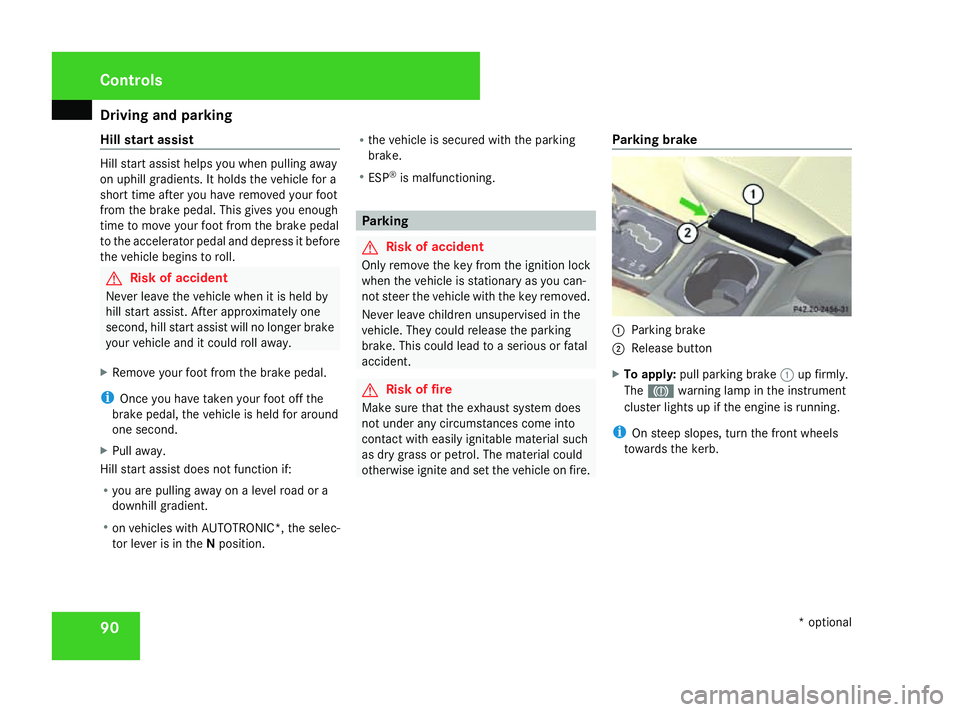
otherwise ignite and set the vehicle on fire. Parking brake 1
Parking brake
2 Release button
X To apply: pull parking brake 1up firmly.
The 3 warning lamp in the instrument
cluster lights up if the engine is running.
i On steep slopes, turn the front wheels
towards the kerb. Controls
* optional
169_AKB; 2; 4, en-GB
wdomann,
Version: 2.10.6
2008-07-16T08:52:06+02:00 - Seite 90 Dateiname: 6515_0315_02_buchblock.pdf; preflight
Page 94 of 305
Driving and pa
rking 91
X
To release: depress the brake pedal and
keep it depressed.
On vehicles with AUTOTRONIC*, the selec-
tor lever lock is released.
X Press release button 2on parking brake
1 and move the parking brake down to the
stop.
The 3 warning lamp in the instrument
cluster goes out. Switching off the engine
G
Risk of accident
If the engine is not running, there is no
power assistance for the steering and
brakes. Steering and braking then takes
much more effort.
As a result, you might lose control of the
vehicle, cause an accident and injure your-
self and others.
Do not switch off the engine while driving.
Vehicles with manual transmission X
Shift to either first or reverse gear.
X Turn the key to position 0(Y page 62) in
the ignition lock and remove it.
The immobiliser is activated. Vehicles with AUTOTRONIC* X
Move the selector lever to P.
X Turn the key to position 0(Y page 62) in
the ignition lock and remove it.
The immobiliser is activated. Automatic engine switch-off (ECO
start/stop function*)
The ECO start/stop function automatically
switches off the engine as soon as you stop
the vehicle, e.g. at traffic lights.
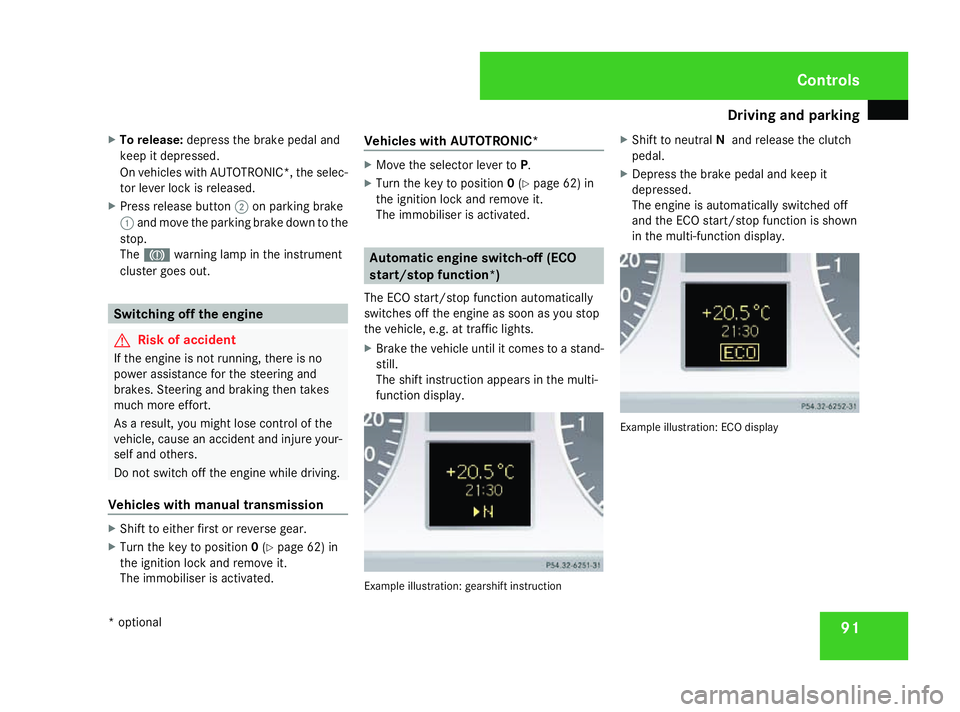
X Brake the vehicle until it comes to a stand-
still.
The shift instruction appears in the multi-
function display. Example illustration: gearshift instructionX
Shift to neutral Nand release the clutch
pedal.
X Depress the brake pedal and keep it
depressed.
The engine is automatically switched off
and the ECO start/stop function is shown
in the multi-function display. Example illustration: ECO display Controls
* optional
169_AKB; 2; 4, en-GB
wdomann,
Version: 2.10.6 2008-07-16T08:52:06+02:00 - Seite 91 ZDateiname: 6515_0315_02_buchblock.pdf; preflight
Page 100 of 305

Instrument cluster
97Instrument cluster
Points to remember
You will find an illustration of the instrument
cluster in the "At a glance" section
(Y page 26). G
Risk of accident
No further messages can be displayed if the
instrument cluster and/or the multi-func-
tion display fails.
This means that you will not see information
about the driving situation, such as the
speed, outside temperature, warning/indi-
cator lamps, display messages or system
failures. The vehicle's handling character-
istics may be affected. Adjust your driving
style and speed accordingly.
Immediately consult a qualified specialist
workshop which has the necessary special-
ist knowledge and tools to carry out the
work required. Mercedes-Benz recom-
mends that you use a Mercedes-Benz
Service Centre for this purpose. In particu-
lar, work relevant to safety or on safety-
related systems must be carried out at a
qualified specialist workshop. Activating the multi-function display
X Switch on the ignition. The multi-function display is also activated
when you:
R
switch on the lights
R press reset button 1
R open the driver's door Adjusting the instrument cluster
ligh
ting
X Brighter or dimmer: briefly turn reset but-
ton 1clockwise or anti-clockwise to the
stop and release.
The brightness of the instrument cluster
lighting changes by one level. There are
several possible levels. Coolant temperature gauge
The coolant temperature gauge is in the
instrument cluster on the left-hand side.
Under normal operating conditions and with
the specified coolant level, the coolant tem-
perature may rise to 120 †. The coolant tem-
perature may rise to the top end of the scale
at high outside temperatures and on long
uphill stretches. Controls
169_AKB; 2; 4, en-GB
wdomann, Version: 2.10.6 2008-07-16T08:52:06+02:00 - Seite 97 ZDateiname: 6515_0315_02_buchblock.pdf; preflight
Page 105 of 305
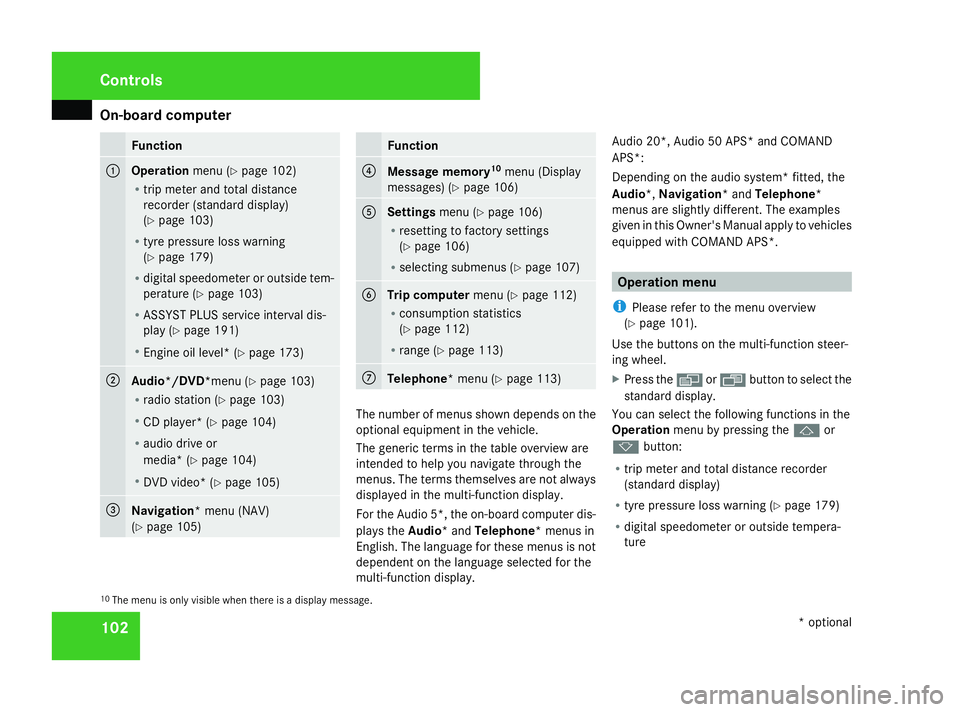
On-board computer
102 Function
1
Operation
menu (Ypage 102)
R trip meter and total distance
recorder (standard display)
(Y page 103)
R tyre pressure loss warning
(Y page 179)
R digital speedometer or outside tem-
perature (Y page 103)
R ASSYST PLUS service interval dis-
play (Y page 191)
R Engine oil level* (Y page 173)2
Audio*/DVD*menu (Y
page 103)
R radio station (Y page 103)
R CD player* (Y page 104)
R audio drive or
media* ( Ypage 104)
R DVD video* (Y page 105) 3
Navigation* menu (NAV)
(Y
page 105) Function
4
Message memory
10
menu (Display
messages) ( Ypage 106) 5
Settings
menu (Ypage 106)
R resetting to factory settings
(Y page 106)
R selecting submenus (Y page 107) 6
Trip computer
menu (Ypage 112)
R consumption statistics
(Y page 112)
R range (Y page 113) 7
Telephone* menu (Y
page 113) The number of menus shown depends on the
optional equipment in the vehicle.
The generic terms in the table overview are
intended to help you navigate through the
menus. The terms themselves are not always
displayed in the multi-function display.
For the Audio 5*, the on-board computer dis-
plays the
Audio* and Telephone* menus in
English. The language for these menus is not
dependent on the language selected for the
multi-function display. Audio 20*, Audio 50 APS* and COMAND
APS*:
Depending on the audio system* fitted, the
Audio*, Navigation* and Telephone*
menus are slightly different. The examples
given in this Owner's Manual apply to vehicles
equipped with COMAND APS*. Operation menu
i Please refer to the menu overview
(Y page 101).
Use the buttons on the multi-function steer-
ing wheel.
X Press the èor· button to select the
standard display.
You can select the following functions in the
Operation menu by pressing the jor
k button:
R trip meter and total distance recorder
(standard display)
R tyre pressure loss warning (Y page 179)
R digital speedometer or outside tempera-
ture
10 The menu is only visible when there is a display message. Controls
* optional
169_AKB; 2; 4, en-GB
wdomann,
Version: 2.10.6
2008-07-16T08:52:06+02:00 - Seite 102 Dateiname: 6515_0315_02_buchblock.pdf; preflight