wheel MERCEDES-BENZ A-CLASS HATCHBACK 2008 Owner's Manual
[x] Cancel search | Manufacturer: MERCEDES-BENZ, Model Year: 2008, Model line: A-CLASS HATCHBACK, Model: MERCEDES-BENZ A-CLASS HATCHBACK 2008Pages: 305, PDF Size: 5.43 MB
Page 73 of 305

Mirrors
70 Steering wheel
G
Risk of accident
Only adjust the steering wheel when the
vehicle is stationary and do not pull away
until the steering wheel adjustment mech-
anism is locked in position. You might oth-
erwise drive without the steering wheel
adjustment mechanism being locked in
position. As a result you could be distracted
from road and traffic conditions by an unex-
pected movement of the steering wheel
and thereby cause an accident.
However, the steerability of the vehicle is
not affected.
When you adjust the steering wheel, make
sure that:
R the steering wheel can be reached with
your arms slightly bent
R you can move your legs freely
R you can see all the displays in the instru-
ment cluster clearly 1
Release lever
2 Height adjustment
3 Fore-and-aft adjustment
X Pull handle 1out completely.
The steering column is unlocked.
X Adjust the steering wheel to the desired
position.
X Push handle 1in completely until you hear
it engage.
The steering wheel is locked in position. Mirrors
Rear-view mirror
X Adjust the rear-view mirror by hand so you
have a good overview of the traffic condi-
tions.
Rear-view mirror (manual anti-dazzle) 1
Anti-dazzle switch
X Anti-dazzle mode: flick anti-dazzle switch
1 forwards or back.
Rear-view mirror (automatic anti-daz-
zle*) The rear-view mirror automatically goes into
anti-dazzle mode if the ignition is switched onControls
169_AKB; 2; 4, en-GB
wdomann,
Version: 2.10.6 2008-07-16T08:52:06+02:00 - Seite 70Dateiname: 6515_0315_02_buchblock.pdf; preflight
Page 79 of 305
Seat belts
76 Rear seat belt status indicator
The rear-compartment seat belt status indi-
cator tells you if the rear passengers have
fastened their seat belts. The status indicator
for the rear rear-compartment also tells you
how many of the belt tongues are inserted
into the seat belt buckles.
The rear-compartment seat belt status indi-
cator appears in the multi-function display for
around 30 seconds if:
R you set off and have reached a speed of
approx. 10 km/h
R the rear passengers fasten or unfasten
their seat belts while driving
R someone gets in or out of the vehicle
You can also cancel the messages immedi-
ately (Y page 202).
The following messages appear in the multi-
function display:
R < No rear seat belt engaged
R < 1 rear seat belt engaged
R < 2 rear seat belts engaged
R < 3 rear seat belts engaged i
The status indicator for the rear-compart-
ment seat belts is only available for certain
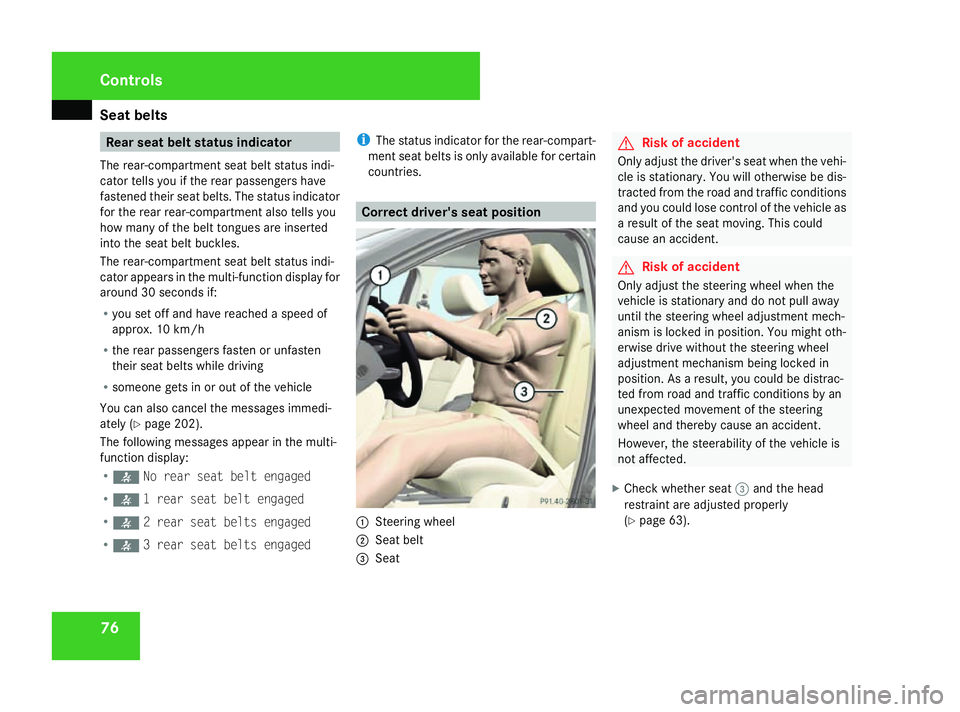
countries. Correct driver's seat position
1
Steering wheel
2 Seat belt
3 Seat G
Risk of accident
Only adjust the driver's seat when the vehi-
cle is stationary. You will otherwise be dis-
tracted from the road and traffic conditions
and you could lose control of the vehicle as
a result of the seat moving. This could
cause an accident. G
Risk of accident
Only adjust the steering wheel when the
vehicle is stationary and do not pull away
until the steering wheel adjustment mech-
anism is locked in position. You might oth-
erwise drive without the steering wheel
adjustment mechanism being locked in
position. As a result, you could be distrac-
ted from road and traffic conditions by an
unexpected movement of the steering
wheel and thereby cause an accident.
However, the steerability of the vehicle is
not affected.
X Check whether seat 3and the head
restraint are adjusted properly
(Y page 63). Controls
169_AKB; 2; 4, en-GB
wdomann,
Version: 2.10.6
2008-07-16T08:52:06+02:00 - Seite 76 Dateiname: 6515_0315_02_buchblock.pdf; preflight
Page 80 of 305
Lights
77
Make sure that:
R
you are as far away from the driver's front
airbag as possible
R you are sitting in a normal upright posi-
tion
R you can fasten the seat belt properly
R you have moved the backrest to an
almost vertical position
R you have set the seat angle so that your
thighs are gently supported
R you can depress the pedals properly
R you have adjusted the head restraint so
that the back of your head is supported
at eye level by the central area of the
head restraint
X Check whether steering wheel 1is adjus-
ted properly (Y page 70).
Make sure that:
R you can hold the steering wheel with your
arms slightly bent
R you can move your legs freely
R you can see all the displays in the instru-
ment cluster clearly
X Check whether you have fastened seat belt
2 properly (Y page 73). It should:
R
fit snugly across your body
R be routed across the middle of your
shoulder
R routed in your pelvic area across the hip
joints Lights
Light switch
For safety reasons, Mercedes-Benz recom-
mends that you drive with the lights switched
on even during the daytime. In some coun-
tries, daytime operation of headlamps varies
due to legal and voluntary requirements. In
these countries, the constant headlamp
mode is automatically switched on when the
engine is started.
i If you drive in countries in which traffic
drives on the opposite side of the road to
the country where the vehicle is registered,
oncoming traffic may be dazzled by the
asymmetrical dipped-beam headlamps.
Have the headlamps changed to symmet-
rical dipped beam when driving in these
countries. You can obtain information
about this from any Mercedes-Benz Service
Centre. Controls
169_AKB; 2; 4, en-GB
wdomann,
Version: 2.10.6 2008-07-16T08:52:06+02:00 - Seite 77 ZDateiname: 6515_0315_02_buchblock.pdf; preflight
Page 84 of 305

Lights
81Position Load
2
Driver's seat, front passenger
seat and rear seats occupied,
luggage compartment laden
3
Not required
X
Turn headlamp range control 1to the
position which corresponds to the load in
your vehicle. Headlamp cleaning system*
The headlamps are cleaned automatically if
the "Wipe with windscreen washer fluid" func-
tion is operated five times while the lights are
on and the engine is running. When you
switch off the ignition, the automatic head-
lamp cleaning system is reset and counting is
resumed from 0. Cornering light function* (bi-xenon
headlamps*)
Specially designed headlamps light up the
area into which you are driving when turning
corners.
If you are driving at speeds below 40 km/h,
the cornering light function is activated either
by the turn signals or when the steering wheel
is turned. If you are driving at speeds above
40 km/h the cornering light function is deac-
tivated.
Activating X
Start the engine.
X Switch on the dipped-beam headlamps.
X Switch off the foglamps*.
X Switch on the turn signal.
The cornering lamp on the same side as the
turn signal comes on, even if you turn the
steering wheel in the opposite direction
after indicating.
or
X Turn the steering wheel in the desired
direction.
When in a forwards gear: the cornering
lamp on the inside of the bend comes on. When in reverse gear: the cornering lamp
on the outside of the bend comes on.
Deactivating X
Turn the steering wheel back to the straight
ahead position.
The turn signal goes off. The cornering lamp
may remain lit for a short time.
or
X Switch off the turn signal.
The cornering lamp may remain lit for a
short time.
The cornering light will go out after a maxi-
mum of three minutes. Controls
* optional
169_AKB; 2; 4, en-GB
wdomann,
Version: 2.10.6 2008-07-16T08:52:06+02:00 - Seite 81 ZDateiname: 6515_0315_02_buchblock.pdf; preflight
Page 92 of 305
Driving and pa
rking 89Automatic engine start (ECO start/
stop function)
The ECO start/stop function automatically
switches on the engine as soon as you pre-
pare to pull away, e.g. by engaging a gear.
X Depress the clutch pedal.
The engine starts automatically.
X Shift to either first or reverse gear and pull
away.
! Do not engage a gear without depressing
the clutch as this disables the automatic
engine start function. As a result, the bat-
tery cannot be recharged and the demister
function of Thermotronic* is not available.
i When manoeuvring in and out of parking
spaces, the ECO start/stop function will
not automatically switch off the vehicle's
engine. The engine will only be switched off
automatically if the vehicle has reached a
speed of at least 15 km/h before coming
to a standstill again.
i The system can differentiate between
starting the engine with the key and the
automatic engine start via the ECO start/
stop function. Pulling away
! Warm up the engine quickly. Do not use
the engine's full performance until it has
reached operating temperature.
Only shift into reverse gear when the vehi-
cle is stationary.
Where possible, avoid spinning the drive
wheels when pulling away on slippery
roads. You could otherwise damage the
drive train.
i The vehicle locks centrally once you have
pulled away. The locking knobs in the doors
drop down.
You can open the doors from the inside at
any time.
You can also deactivate the automatic lock-
ing feature (Y page 111).
Manual transmission X
Depress the brake pedal.
X Depress the clutch pedal.
X Shift to either first or reverse gear.
X Release the parking brake (Y page 90).
X Slowly release the clutch pedal and
depress the accelerator pedal. !
Change gear in good time and avoid spin-
ning the wheels. You could otherwise dam-
age the vehicle.
AUTOTRONIC* i
It is only possible to move the selector
lever to the desired position if you depress
the brake pedal. Only then is the selector
lever lock released.
X Depress the brake pedal and keep it
depressed.
The selector lever lock is released.
X Release the parking brake.
X Move the selector lever to position Dor R.
i Wait until the shift process is completed
before pulling away.
X Release the brake pedal.
X Carefully depress the accelerator pedal.
i Upshifts take place at higher engine
speeds after a cold start. This helps the
catalytic converter to reach its operating
temperature more quickly. Controls
* optional
169_AKB; 2; 4, en-GB
wdomann,
Version: 2.10.6 2008-07-16T08:52:06+02:00 - Seite 89 ZDateiname: 6515_0315_02_buchblock.pdf; preflight
Page 93 of 305
Driving and pa
rking 90
Hill start assist Hill start assist helps you when pulling away
on uphill gradients. It holds the vehicle for a
short time after you have removed your foot
from the brake pedal. This gives you enough
time to move your foot from the brake pedal
to the accelerator pedal and depress it before
the vehicle begins to roll. G
Risk of accident
Never leave the vehicle when it is held by
hill start assist. After approximately one
second, hill start assist will no longer brake
your vehicle and it could roll away.
X Remove your foot from the brake pedal.
i Once you have taken your foot off the
brake pedal, the vehicle is held for around
one second.
X Pull away.
Hill start assist does not function if:
R you are pulling away on a level road or a
downhill gradient.
R on vehicles with AUTOTRONIC *,the selec-
tor lever is in the Nposition. R
the vehicle is secured with the parking
brake.
R ESP ®
is malfunctioning. Parking
G
Risk of accident
Only remove the key from the ignition lock
when the vehicle is stationary as you can-
not steer the vehicle with the key removed.
Never leave children unsupervised in the
vehicle. They could release the parking
brake. This could lead to a serious or fatal
accident. G
Risk of fire
Make sure that the exhaust system does
not under any circumstances come into
contact with easily ignitable material such
as dry grass or petrol. The material could
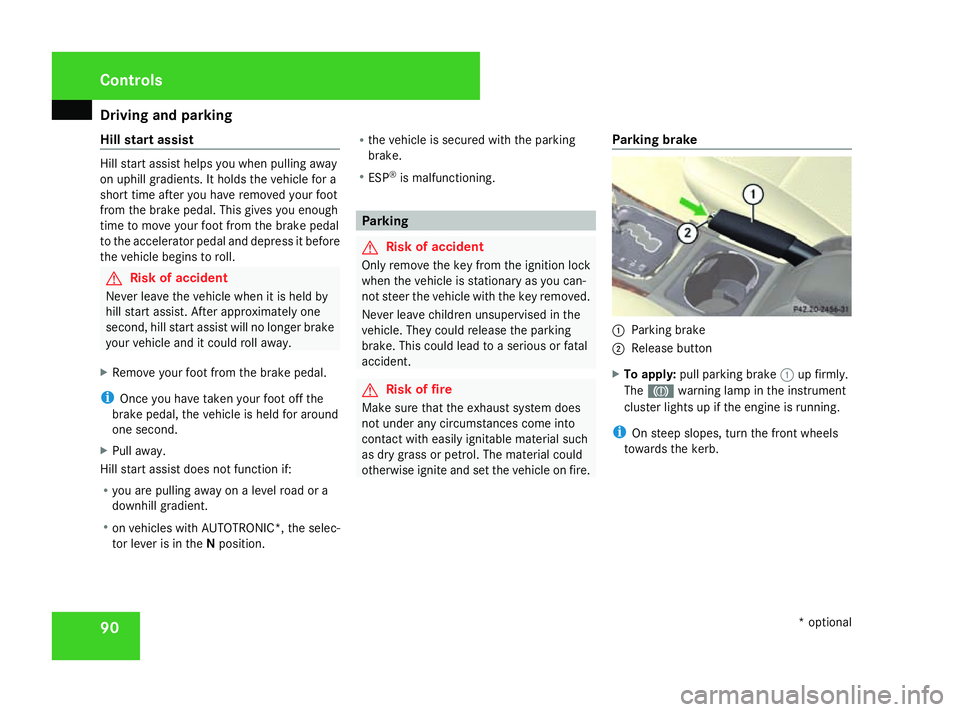
otherwise ignite and set the vehicle on fire. Parking brake 1
Parking brake
2 Release button
X To apply: pull parking brake 1up firmly.
The 3 warning lamp in the instrument
cluster lights up if the engine is running.
i On steep slopes, turn the front wheels
towards the kerb. Controls
* optional
169_AKB; 2; 4, en-GB
wdomann,
Version: 2.10.6
2008-07-16T08:52:06+02:00 - Seite 90 Dateiname: 6515_0315_02_buchblock.pdf; preflight
Page 95 of 305
Transmission
92 Transmission
Notes on the transmission
G
Risk of accident
The movement of the pedals must not be
impaired in any way. Do not keep any
objects in the driver's footwell. Make sure
that floormats or carpets are correctly
secured and that there is sufficient clear-
ance for the pedals. G
Risk of accident
Do not change down for additional engine
braking on a slippery road surface. This
could cause the drive wheels to lose their
grip and the vehicle could skid. This could
cause you to lose control of your vehicle
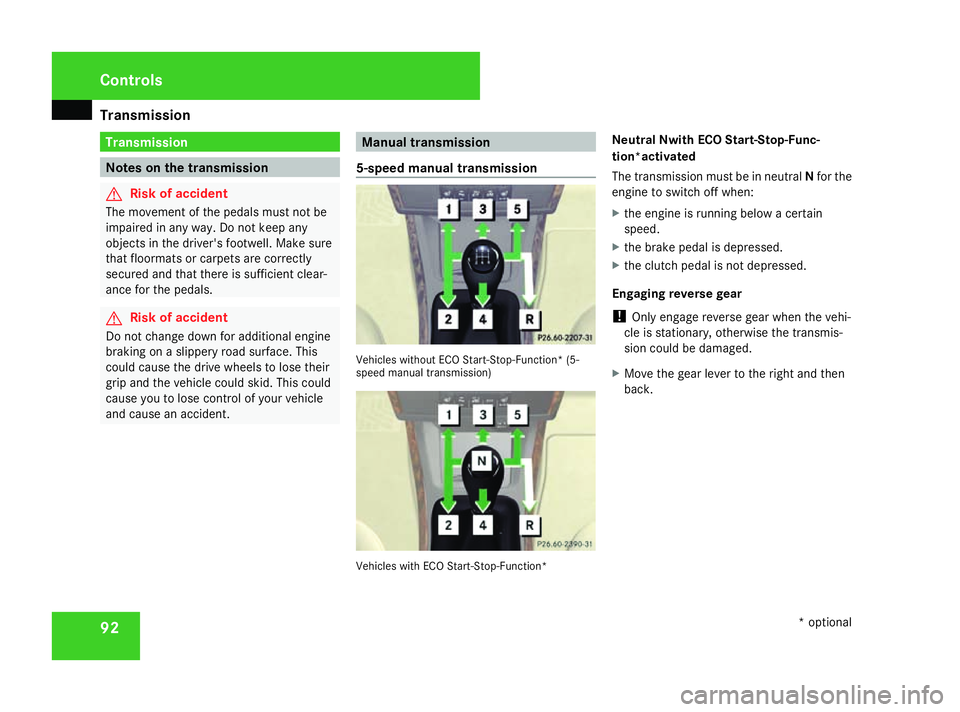
and cause an accident. Manual transmission
5-speed manual transmission Vehicles without ECO Start-Stop-Function* (5-
speed manual transmission)
Vehicles with ECO Start-Stop-Function*Neutral Nwith ECO Start-Stop-Func-
tion*activated
The transmission must be in neutral
Nfor the
engine to switch off when:
X the engine is running below a certain
speed.
X the brake pedal is depressed.
X the clutch pedal is not depressed.
Engaging reverse gear
! Only engage reverse gear when the vehi-
cle is stationary, otherwise the transmis-
sion could be damaged.
X Move the gear lever to the right and then
back. Controls
* optional
169_AKB; 2; 4, en-GB
wdomann,
Version: 2.10.6
2008-07-16T08:52:06+02:00 - Seite 92 Dateiname: 6515_0315_02_buchblock.pdf; preflight
Page 98 of 305
Transmission
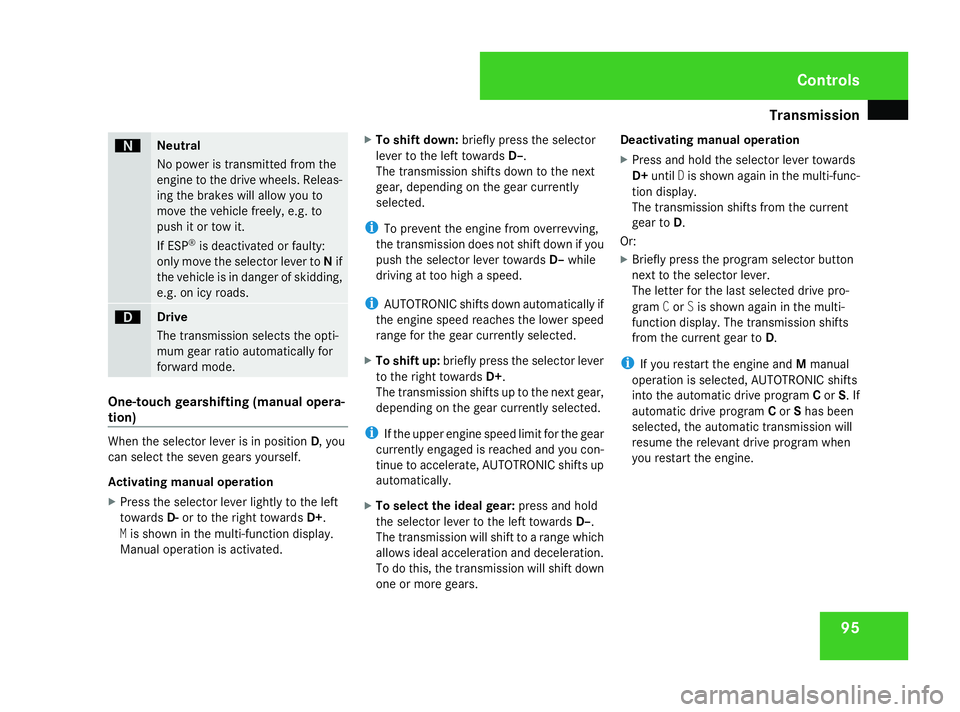
95ë
Neutral
No power is transmitted from the
engine to the drive wheels. Releas-
ing the brakes will allow you to
move the vehicle freely, e.g. to
push it or tow it.
If ESP
®
is deactivated or faulty:
only move the selector lever to Nif
the vehicle is in danger of skidding,
e.g. on icy roads. ê
Drive
The transmission selects the opti-
mum gear ratio automatically for
forward mode.
One-touch gearshifting (manual opera-
tion) When the selector lever is in position
D, you
can select the seven gears yourself.
Activating manual operation
X Press the selector lever lightly to the left
towards D-or to the right towards D+.
M is shown in the multi-function display.
Manual operation is activated. X
To shift down: briefly press the selector
lever to the left towards D–.
The transmission shifts down to the next
gear, depending on the gear currently
selected.
i To prevent the engine from overrevving,
the transmission does not shift down if you
push the selector lever towards D–while
driving at too high a speed.
i AUTOTRONIC shifts down automatically if
the engine speed reaches the lower speed
range for the gear currently selected.
X To shift up: briefly press the selector lever
to the right towards D+.
The transmission shifts up to the next gear,
depending on the gear currently selected.
i If the upper engine speed limit for the gear
currently engaged is reached and you con-
tinue to accelerate, AUTOTRONIC shifts up
automatically.
X To select the ideal gear: press and hold
the selector lever to the left towards D–.
The transmission will shift to a range which
allows ideal acceleration and deceleration.
To do this, the transmission will shift down
one or more gears. Deactivating manual operation
X Press and hold the selector lever towards
D+ until Dis shown again in the multi-func-
tion display.
The transmission shifts from the current
gear to D.
Or:
X Briefly press the program selector button
next to the selector lever.
The letter for the last selected drive pro-
gram Cor Sis shown again in the multi-
function display. The transmission shifts
from the current gear to D.
i If you restart the engine and Mmanual
operation is selected, AUTOTRONIC shifts
into the automatic drive program Cor S. If
automatic drive program Cor Shas been
selected, the automatic transmission will
resume the relevant drive program when
you restart the engine. Controls
169_AKB; 2; 4, en-GB
wdomann,
Version: 2.10.6 2008-07-16T08:52:06+02:00 - Seite 95 ZDateiname: 6515_0315_02_buchblock.pdf; preflight
Page 99 of 305
Transmission
96
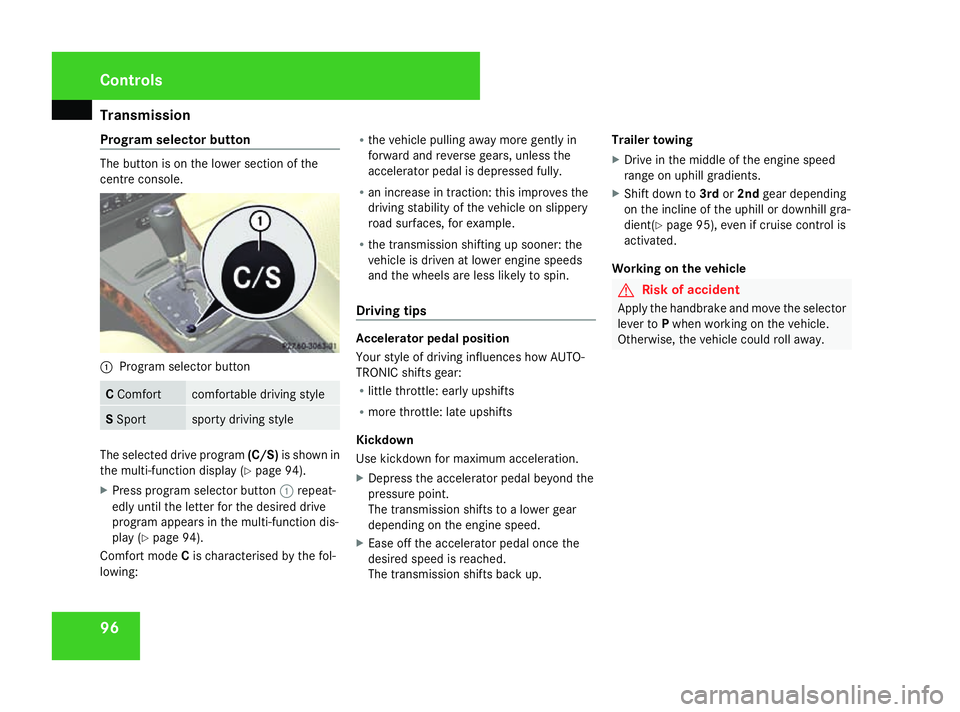
Program selector button The button is on the lower section of the
centre console. 1
Program selector button C
Comfort comfortable driving style
S
Sport sporty driving style
The selected drive program
(C/S)is shown in
the multi-function display (Y page 94).
X Press program selector button 1repeat-
edly until the letter for the desired drive
program appears in the multi-function dis-
play (Y page 94).
Comfort mode Cis characterised by the fol-
lowing: R
the vehicle pulling away more gently in
forward and reverse gears, unless the
accelerator pedal is depressed fully.
R an increase in traction: this improves the
driving stability of the vehicle on slippery
road surfaces, for example.
R the transmission shifting up sooner: the
vehicle is driven at lower engine speeds
and the wheels are less likely to spin.
Driving tips Accelerator pedal position
Your style of driving influences how AUTO-
TRONIC shifts gear:
R
little throttle: early upshifts
R more throttle: late upshifts
Kickdown
Use kickdown for maximum acceleration.
X Depress the accelerator pedal beyond the
pressure point.
The transmission shifts to a lower gear
depending on the engine speed.
X Ease off the accelerator pedal once the
desired speed is reached.
The transmission shifts back up. Trailer towing
X
Drive in the middle of the engine speed
range on uphill gradients.
X Shift down to 3rdor2nd gear depending
on the incline of the uphill or downhill gra-
dient( Ypage 95), even if cruise control is
activated.
Working on the vehicle G
Risk of accident
Apply the handbrake and move the selector
lever to Pwhen working on the vehicle.
Otherwise, the vehicle could roll away. Controls
169_AKB; 2; 4, en-GB
wdomann,
Version: 2.10.6
2008-07-16T08:52:06+02:00 - Seite 96 Dateiname: 6515_0315_02_buchblock.pdf; preflight
Page 101 of 305
On-board computer
98 Resetting the trip meter
X Select the Standard display menu
(Y page 103).
X Press and hold the reset button on the left-
hand side of the instrument cluster until the
trip meter is reset. Rev counter
The red band in the rev counter indicates the
engine's overrevving range. The fuel supply is
interrupted to protect the engine when the
red band is reached.
! Do not drive in the overrevving range.
Doing so will damage the engine. H
Environmental note
Avoid driving at high engine speeds, as this
increases your vehicle's consumption
unnecessarily and pollutes the environ-
ment through increased emissions. Clock
On vehicles without an audio system or with
Audio 5*/Audio 20*, you can set the time
using the on-board computer (Y page 109). Outside temperature display
G
Risk of accident
The road surface may be icy, especially in
wooded areas or on bridges, even if tem-
peratures are just above freezing point. The
vehicle could skid if you fail to adapt your
driving style. You should therefore always
adapt your driving style and speed to suit
the weather conditions.
Changes in the outside temperature are dis-
played after a short delay. On-board computer
Points to remember
The on-board computer is activated as soon
as you turn the key to position 1in the ignition
lock. You can use the on-board computer to
call up information relating to your vehicle
and to make and adjust settings. G
Risk of accident
Only use the on-board computer when road
and traffic conditions permit. You would
otherwise be distracted and unable to con-
centrate properly on driving, and could
cause an accident. Multi-function steering wheel
You can control the multi-function display and
the settings in the on-board computer using
the buttons on the multi-function steering
wheel. Controls
* optional
169_AKB; 2; 4, en-GB
wdomann,
Version: 2.10.6
2008-07-16T08:52:06+02:00 - Seite 98 Dateiname: 6515_0315_02_buchblock.pdf; preflight