steering MERCEDES-BENZ A-CLASS HATCHBACK 2008 Owner's Guide
[x] Cancel search | Manufacturer: MERCEDES-BENZ, Model Year: 2008, Model line: A-CLASS HATCHBACK, Model: MERCEDES-BENZ A-CLASS HATCHBACK 2008Pages: 305, PDF Size: 5.43 MB
Page 186 of 305
Driving
tips 183
X
Vehicles with manual transmission: engage
neutral.
X Vehicles with AUTOTRONIC*: shift the
selector lever to N.
X Try to bring the vehicle under control using
corrective steering. Driving tips
Rolling with the engine switched off
G
Risk of accident
Never switch the engine off while the vehi-
cle is in motion.
There is no power assistance for the steer-
ing and the service brake when the engine
is not running.
You will require considerably more effort to
steer and brake and, therefore, you could
lose control of the vehicle and cause an
accident. Braking
G
Risk of accident
Do not change down for additional engine
braking on a slippery road surface. This
could cause the drive wheels to lose their
grip and the vehicle could skid. G
Risk of accident
Make sure that other road users are not
endangered by your braking. Downhill gradients On long and steep downhill stretches, espe-
cially if the vehicle is laden or towing a trailer,
you must shift to a lower gear in good time or,
on vehicles with AUTOTRONIC*, select shift
range
1,2or 3.
i This also applies if you have activated
cruise control* or Speedtronic *.
This will use the braking effect of the engine,
so less braking will be required to maintain
the speed. This relieves the load on the brake
system and prevents the brakes from over-
heating and wearing too quickly. If you need
additional braking, depress the brake pedal
repeatedly rather than continuously.
Heavy and light loads If the brakes have been subjected to a heavy
load, do not stop the vehicle immediately, but
drive on for a short while. This allows the air-
flow to cool the brakes more quickly.
G
Risk of accident
Never depress the brake pedal continu-
ously while the vehicle is in motion, e.g.
never cause the brakes to rub by applying
constant slight pedal pressure. This causes
the brake system to overheat, increases Operation
* optional
169_AKB; 2; 4, en-GB
wdomann,
Version: 2.10.6 2008-07-16T08:52:06+02:00 - Seite 183 ZDateiname: 6515_0315_02_buchblock.pdf; preflight
Page 192 of 305
Trailer towing*
189
not use a noseweight of less than 50 kg,
otherwise the trailer may come loose.
Bear in mind that the payload and the rear
axle load are reduced by the actual nose-
weight.
i The height of the ball coupling changes
with the load of the vehicle. If necessary,
use a trailer with a height-adjustable draw-
bar.
Coupling up a trailer G
Risk of injury
Do not connect a trailer with an engaged
overrun brake. Otherwise, your hand could
become trapped between the bumper and
drawbar.
! Do not disconnect a trailer with an
engaged overrun brake. Otherwise your
vehicle could be damaged by the spring
action of the overrun brake.
X Position the trailer level behind the vehicle.
X Couple up the trailer.
X Establish the electrical connection
between the vehicle and the trailer. Driving tips In Germany, the maximum permitted speed
for vehicle/trailer combinations is 80 km/h.
G
Risk of accident
A maximum speed of 80 km/h should not
be exceeded, even in countries where
higher speeds are permitted for vehicle/
trailer combinations. This lowers the risk of
an accident.
When towing a trailer, your vehicle's handling
characteristics will be different in comparison
to when driving without a trailer.
The vehicle/trailer combination:
R is heavier
R is restricted in its acceleration and gradi-
ent-climbing capability
R has an increased braking distance
R is affected more by strong crosswinds
R demands more sensitive steering
R consumes more fuel
On long and steep downhill gradients, you
must select a lower gear in good time, or in
vehicles with AUTOTRONIC*, select shift
range 1,2or 3. i
This also applies if you have activated
cruise control* or Speedtronic*.
This will use the braking effect of the engine,
so less braking will be required to maintain
the speed. This relieves the load on the brake
system and prevents the brakes from over-
heating and wearing too quickly. If you need
additional braking, depress the brake pedal
repeatedly rather than continuously. G
Risk of accident
Never depress the brake pedal continu-
ously while the vehicle is in motion, e.g.
never cause the brakes to rub by applying
constant slight pedal pressure. This causes
the brake system to overheat, increases
the braking distance and can lead to the
brakes failing completely.
Driving tips
R Maintain a greater distance from the vehi-
cle in front than when driving without a
trailer.
R Avoid braking abruptly. If possible, brake
gently at first to allow the trailer to run on.
Then increase the braking force rapidly.
R The values given for gradient-climbing
capabilities from a standstill refer to sea
level. When driving in mountainous areas, Operation
* optional
169_AKB; 2; 4, en-GB
wdomann,
Version: 2.10.6 2008-07-16T08:52:06+02:00 - Seite 189 ZDateiname: 6515_0315_02_buchblock.pdf; preflight
Page 198 of 305
Care
195
You could otherwise scratch or damage the
surface of the lenses.
Cleaning the plastic trim !
Do not use dry, coarse or hard cloths and
do not scrub. Doing so will scratch or dam-
age the surfaces.
! In order to protect the vehicle's high-qual-
ity surfaces and to retain the overall
appearance, avoid contact with cosmetics
and suntan lotion.
X Wipe plastic parts with a damp, lint-free
cloth (e.g. a microfibre cloth).
X Light soiling: use a low-foaming soap (e.g.
a light liquid hand soap) diluted in water.
X Heavy soiling: use a cleaning agent that is
solvent-free and non-corrosive. Mercedes-
Benz recommends that you use a
Mercedes-Benz cleaning product for this
purpose.
Cleaning the steering wheel boss and
dashboard X
Moisten a clean lint-free cloth with water.
X Clean the plastic parts and the dashboard.
X If particularly dirty, use a mild detergent. G
Risk of injury
Do not use cleaners and cockpit care
sprays containing solvents to clean the
cockpit and steering wheel boss. Cleaners
containing solvents cause the surface to
become porous and in the event of an air-
bag being triggered, plastic parts that have
become loose could cause considerable
injuries.
Cleaning the leather upholstery* !
Cleaning
R Clean genuine leather covers using a
damp cloth, then wipe the covers down
using a dry cloth. Make sure that the
leather does not become soaked. For
leather care, use leather care foam A 001
986 59 71 10. You can purchase this
from any Mercedes-Benz Service Centre.
R Clean artificial leather covers with a cloth
moistened with a solution containing 1%
detergent (e. g. washing-up liquid).
R Clean fabric covers with a microfibre
cloth moistened with a solution contain-
ing 1% detergent (e. g. washing-up liquid).
When cleaning, take care not to rub too
vigorously and always wipe entire seat
sections to avoid leaving visible lines. Leave the seat to dry afterwards. Clean-
ing results depend on the type of dirt and
how long it has been there.
R Clean Alcantara covers with a damp
cloth. Make sure you wipe entire seat
sections to avoid leaving visible lines.
i Note that leather covers are a natural
product and as such are subject to a natural
ageing process and may react differently
(e.g. increased wrinkling) to certain envi-
ronmental influences (such as high humid-
ity, intense heat).
Note that regular care is essential to ensure
that the quality (both appearance and com-
fort) of the covers is retained over time.
Cleaning the trim strips (three-door
vehicles) !
Do not use dry cloths, abrasive products,
solvents or cleaning agents containing sol-
vents to clean the trim strips below the side
windows. You may otherwise damage the
surface of the trim strips.
Cleaning the padded table* The plastic parts of the padded table can be
cleaned using a detergent solution. Operation
* optional
169_AKB; 2; 4, en-GB
wdomann
,V ersion: 2.10.6
2008-07-16T08:52:06+02:00 - Seite 195 ZDateiname: 6515_0315_02_buchblock.pdf; preflight
Page 207 of 305
Display
messages 204 Display messages Possible cause/consequence Possible solution
120 km/h Maximum speed
exceeded The maximum speed has been excee-
ded
26
. X
Drive slower. ABS ABS, ESP unavaila-
ble See Owner's
Manual
G
Risk of accident
ABS (Anti-lock Brake System) and ESP ®
(Electronic Stability Program) are tempo-
rarily unavailable. The self-diagnosis is, for
example, not yet complete.
The following systems are also unavaila-
ble:
R BAS (Brake Assist)
R the steering assistant STEER CONTROL
R hill start assist
R the tyre pressure loss warning system
The brake system continues to function
normally, but without the functions listed
above. X
Carefully drive a short, lightly curving stretch
of road at a speed above 20 km/h.
If the display message disappears, ABS and
ESP ®
are available again. 26
Only for certain countries. Practical advice
169_AKB; 2; 4, en-GB
wdomann
,V ersion: 2.10.6
2008-07-16T08:52:06+02:00 - Seite 204 Dateiname: 6515_0315_02_buchblock.pdf; preflight
Page 208 of 305
Display
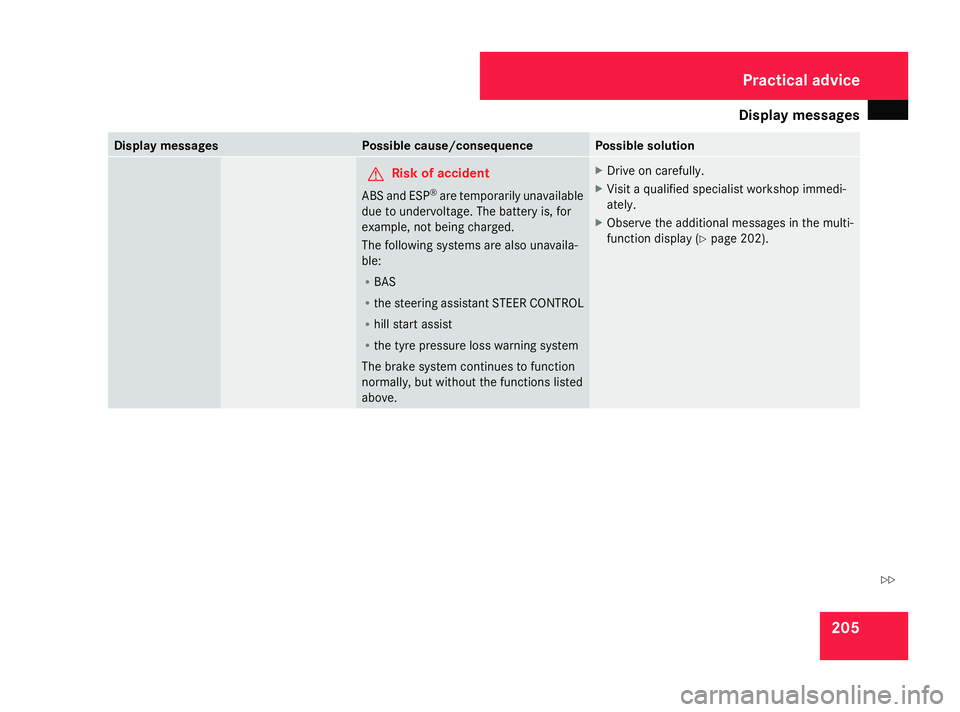
messages 205Display messages Possible cause/consequence Possible solution
G
Risk of accident
ABS and ESP ®
are temporarily unavailable
due to undervoltage. The battery is, for
example, not being charged.
The following systems are also unavaila-
ble:
R BAS
R the steering assistant STEER CONTROL
R hill start assist
R the tyre pressure loss warning system
The brake system continues to function
normally, but without the functions listed
above. X
Drive on carefully.
X Visit a qualified specialist workshop immedi-
ately.
X Observe the additional messages in the multi-
function display ( Ypage 202). Practical advice
169_AKB; 2; 4, en-GB
wdomann
,V ersion: 2.10.6
2008-07-16T08:52:06+02:00 - Seite 205 ZDateiname: 6515_0315_02_buchblock.pdf; preflight
Page 209 of 305
Display
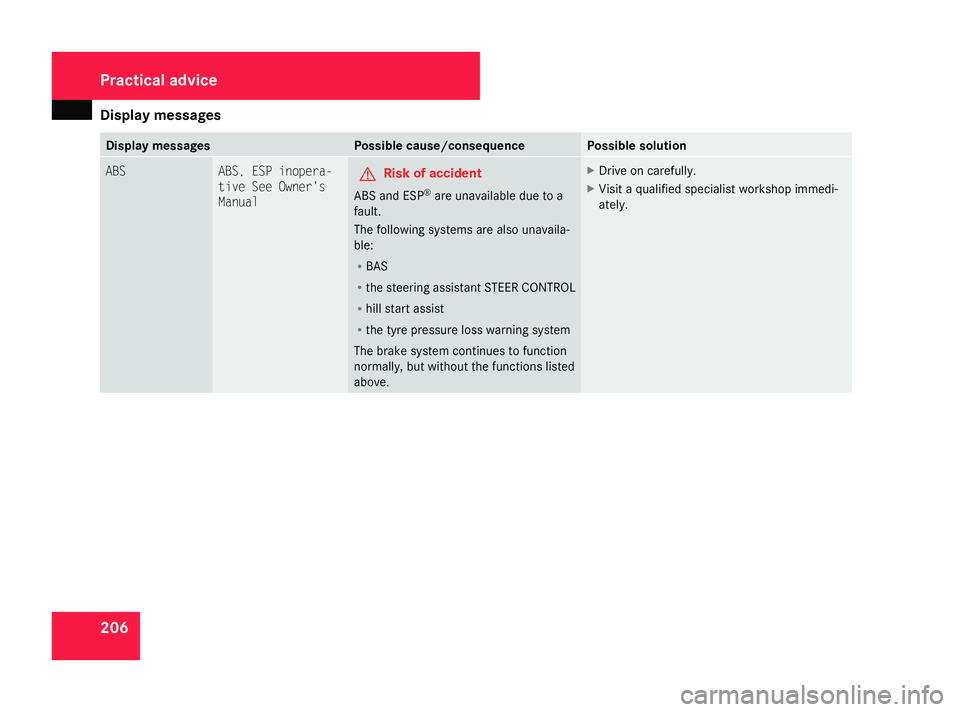
messages 206 Display messages Possible cause/consequence Possible solution
ABS ABS, ESP inopera-
tive See Owner's
Manual
G
Risk of accident
ABS and ESP ®
are unavailable due to a
fault.
The following systems are also unavaila-
ble:
R BAS
R the steering assistant STEER CONTROL
R hill start assist
R the tyre pressure loss warning system
The brake system continues to function
normally, but without the functions listed
above. X
Drive on carefully.
X Visit a qualified specialist workshop immedi-
ately. Practical advice
169_AKB; 2; 4, en-GB
wdomann
,V ersion: 2.10.6
2008-07-16T08:52:06+02:00 - Seite 206 Dateiname: 6515_0315_02_buchblock.pdf; preflight
Page 210 of 305
Display
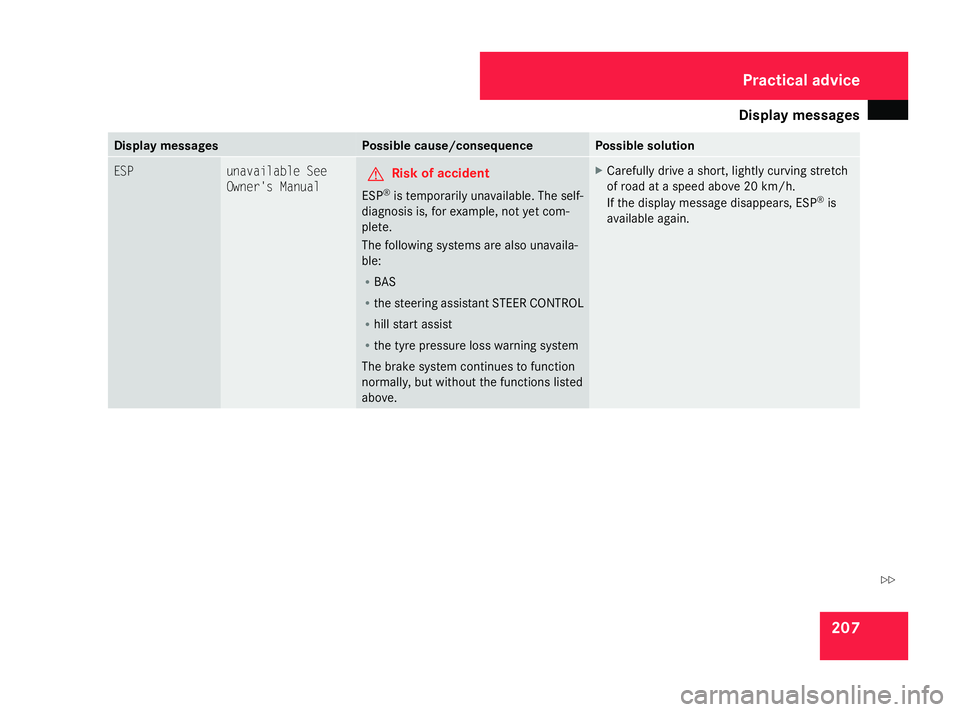
messages 207Display messages Possible cause/consequence Possible solution
ESP unavailable See
Owner's Manual G
Risk of accident
ESP ®
is temporarily unavailable. The self-
diagnosis is, for example, not yet com-
plete.
The following systems are also unavaila-
ble:
R BAS
R the steering assistant STEER CONTROL
R hill start assist
R the tyre pressure loss warning system
The brake system continues to function
normally, but without the functions listed
above. X
Carefully drive a short, lightly curving stretch
of road at a speed above 20 km/h.
If the display message disappears, ESP ®
is
available again. Practical advice
169_AKB; 2; 4, en-GB
wdomann
,V ersion: 2.10.6
2008-07-16T08:52:06+02:00 - Seite 207 ZDateiname: 6515_0315_02_buchblock.pdf; preflight
Page 211 of 305
Display
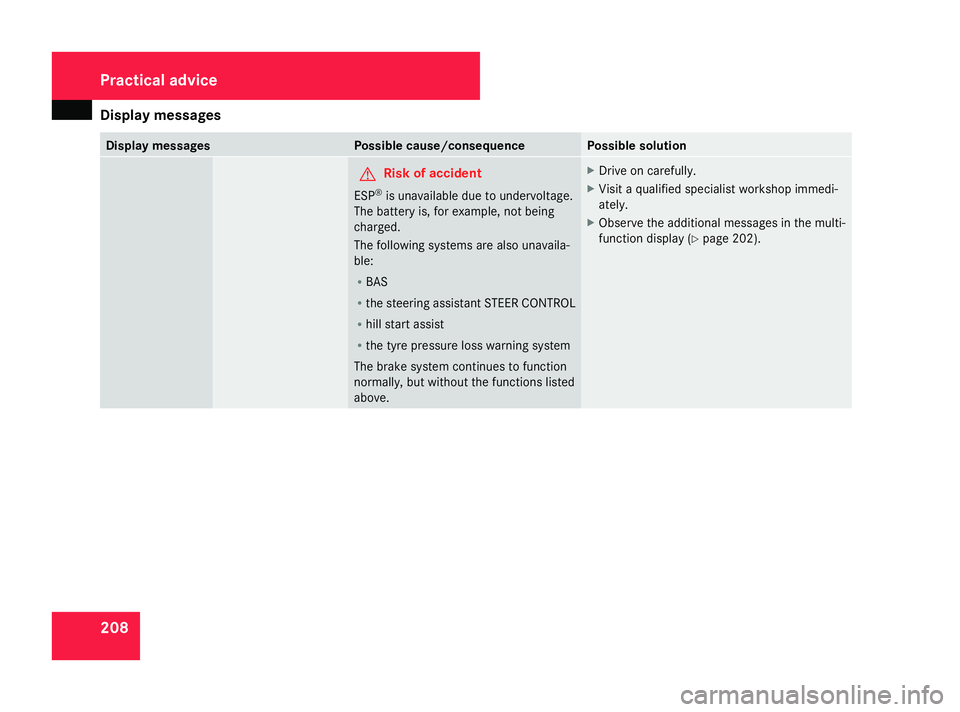
messages 208 Display messages Possible cause/consequence Possible solution
G
Risk of accident
ESP ®
is unavailable due to undervoltage.
The battery is, for example, not being
charged.
The following systems are also unavaila-
ble:
R BAS
R the steering assistant STEER CONTROL
R hill start assist
R the tyre pressure loss warning system
The brake system continues to function
normally, but without the functions listed
above. X
Drive on carefully.
X Visit a qualified specialist workshop immedi-
ately.
X Observe the additional messages in the multi-
function display ( Ypage 202). Practical advice
169_AKB; 2; 4, en-GB
wdomann
,V ersion: 2.10.6
2008-07-16T08:52:06+02:00 - Seite 208 Dateiname: 6515_0315_02_buchblock.pdf; preflight
Page 212 of 305
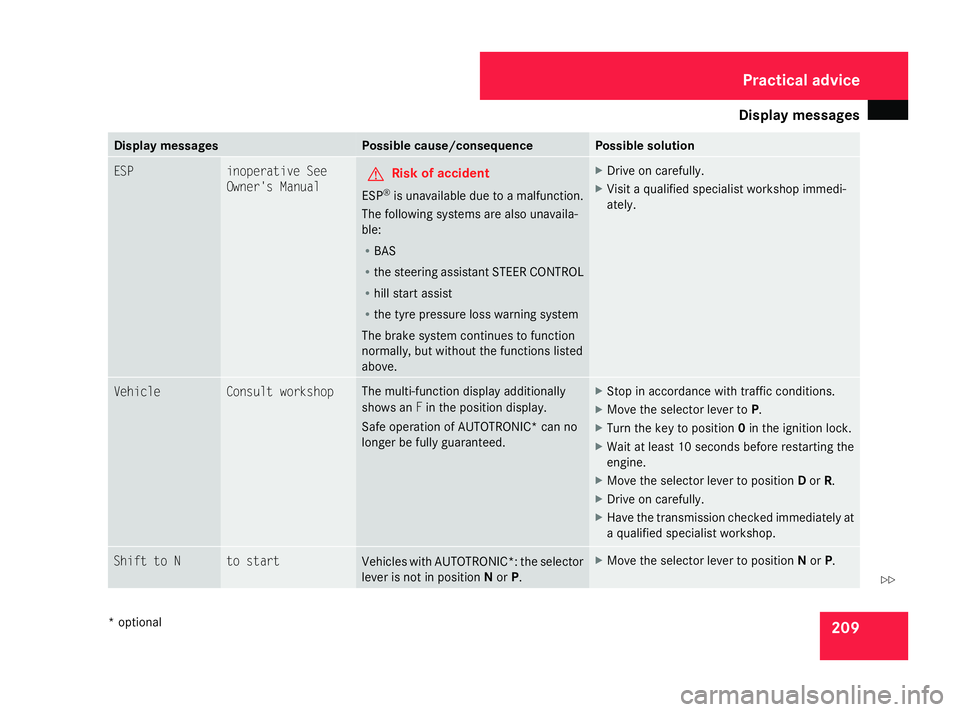
Display
messages 209Display messages Possible cause/consequence Possible solution
ESP inoperative See
Owner's Manual G
Risk of accident
ESP ®
is unavailable due to a malfunction.
The following systems are also unavaila-
ble:
R BAS
R the steering assistant STEER CONTROL
R hill start assist
R the tyre pressure loss warning system
The brake system continues to function
normally, but without the functions listed
above. X
Drive on carefully.
X Visit a qualified specialist workshop immedi-
ately. Vehicle Consult workshop The multi-function display additionally
shows an
Fin the position display.
Safe operation of AUTOTRONIC* can no
longer be fully guaranteed. X
Stop in accordance with traffic conditions.
X Move the selector lever to P.
X Turn the key to position 0in the ignition lock.
X Wait at least 10 seconds before restarting the
engine.
X Move the selector lever to position Dor R.
X Drive on carefully.
X Have the transmission checked immediately at
a qualified specialist workshop. Shift to N to start
Vehicles with AUTOTRONIC*: the selector
lever is not in position
Nor P. X
Move the selector lever to position Nor P. Practical advice
* optional
169_AKB; 2; 4, en-GB
wdomann
,V ersion: 2.10.6
2008-07-16T08:52:06+02:00 - Seite 209 ZDateiname: 6515_0315_02_buchblock.pdf; preflight
Page 213 of 305
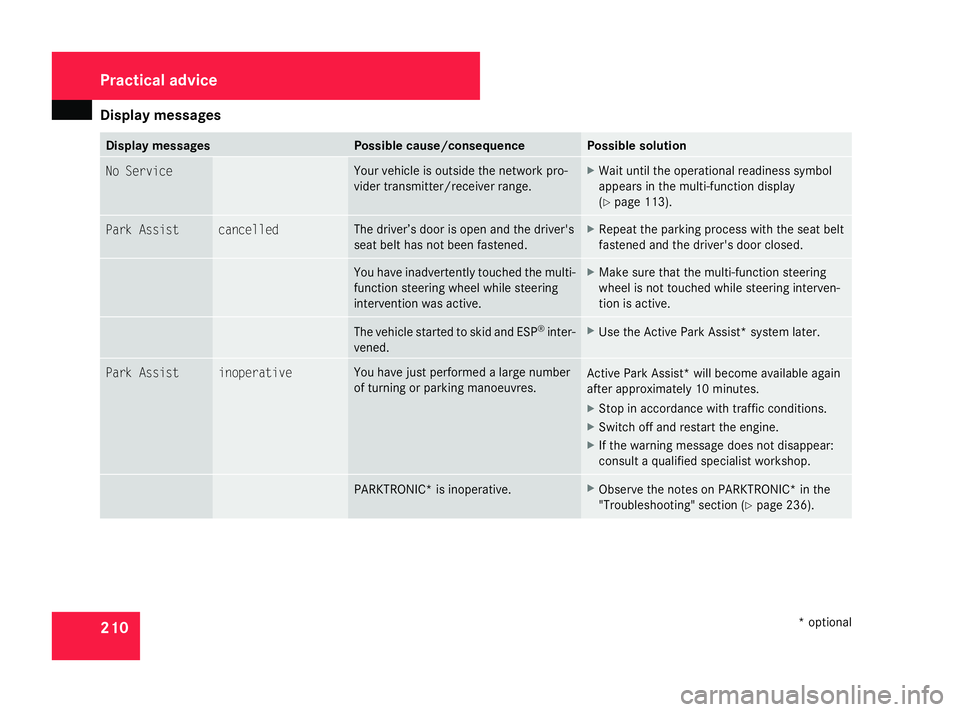
Display
messages 210 Display messages Possible cause/consequence Possible solution
No Service Yo
ur vehicle is outside the network pro-
vider transmitter/receiver range. X
Wait until the operational readiness symbol
appears in the multi-function display
(Y page 113). Park Assist cancelled The driver’s door is open and the driver's
seat belt has not been fastened. X
Repeat the parking process with the seat belt
fastened and the driver's door closed. You have inadvertently touched the multi-
function steering wheel while steering
intervention was active. X
Make sure that the multi-function steering
wheel is not touched while steering interven-
tion is active. The vehicle started to skid and ESP
®
inter-
vened. X
Use the Active Park Assist* system later. Park Assist inoperative You have just performed a large number
of turning or parking manoeuvres.
Active Park Assist* will become available again
after approximately 10 minutes.
X
Stop in accordance with traffic conditions.
X Switch off and restart the engine.
X If the warning message does not disappear:
consult a qualified specialist workshop. PARKTRONIC* is inoperative. X
Observe the notes on PARKTRONIC* in the
"Troubleshooting" section (Y page 236).Practical advice
* optional
169_AKB; 2; 4, en-GB
wdomann
,V ersion: 2.10.6
2008-07-16T08:52:06+02:00 - Seite 210 Dateiname: 6515_0315_02_buchblock.pdf; preflight