radio MERCEDES-BENZ A-CLASS HATCHBACK 2012 User Guide
[x] Cancel search | Manufacturer: MERCEDES-BENZ, Model Year: 2012, Model line: A-CLASS HATCHBACK, Model: MERCEDES-BENZ A-CLASS HATCHBACK 2012Pages: 357, PDF Size: 11.61 MB
Page 240 of 357
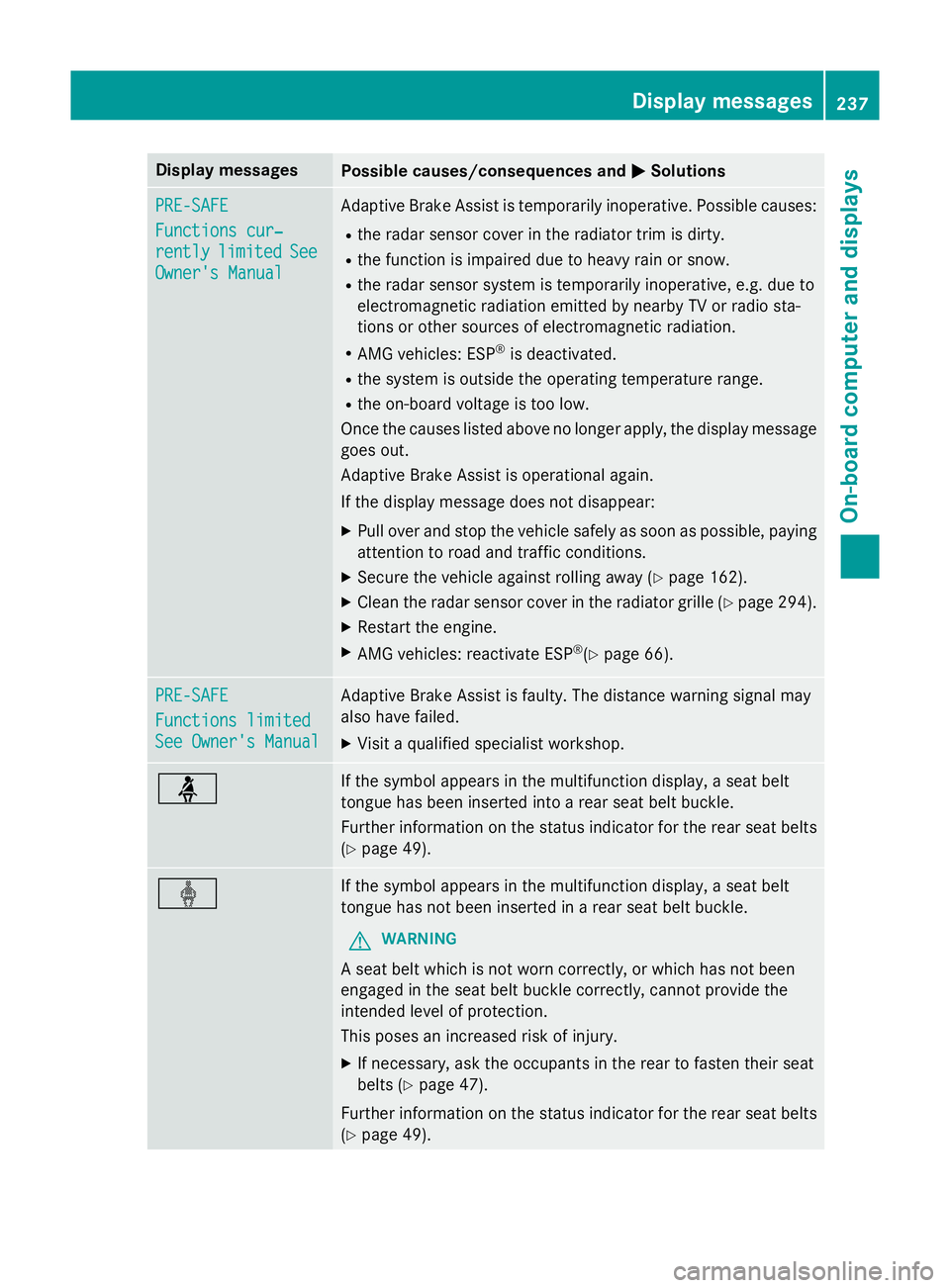
Display messages
Possible causes/consequences and
M
MSolutions PRE-SAFE
PRE-SAFE
Functions cur‐ Functions cur‐
rently rently
limited
limited See
See
Owner's Manual
Owner's Manual Adaptive Brake Assist is temporarily inoperative. Possible causes:
R the radar sensor cover in the radiator trim is dirty.
R the function is impaired due to heavy rain or snow.
R the radar sensor system is temporarily inoperative, e.g. due to
electromagnetic radiation emitted by nearby TV or radio sta-
tions or other sources of electromagnetic radiation.
R AMG vehicles: ESP ®
is deactivated.
R the system is outside the operating temperature range.
R the on-board voltage is too low.
Once the causes listed above no longer apply, the display message
goes out.
Adaptive Brake Assist is operational again.
If the display message does not disappear:
X Pull over and stop the vehicle safely as soon as possible, paying
attention to road and traffic conditions.
X Secure the vehicle against rolling away (Y page 162).
X Clean the radar sensor cover in the radiator grille (Y page 294).
X Restart the engine.
X AMG vehicles: reactivate ESP ®
(Y page 66). PRE-SAFE PRE-SAFE
Functions limited Functions limited
See Owner's Manual See Owner's Manual Adaptive Brake Assist is faulty. The distance warning signal may
also have failed.
X Visit a qualified specialist workshop. ü If the symbol appears in the multifunction display, a seat belt
tongue has been inserted into a rear seat belt buckle.
Further information on the status indicator for the rear seat belts
(Y page 49). ý If the symbol appears in the multifunction display, a seat belt
tongue has not been inserted in a rear seat belt buckle.
G WARNING
A seat belt which is not worn correctly, or which has not been
engaged in the seat belt buckle correctly, cannot provide the
intended level of protection.
This poses an increased risk of injury.
X If necessary, ask the occupants in the rear to fasten their seat
belts (Y page 47).
Further information on the status indicator for the rear seat belts
(Y page 49). Display
messages
237On-board computer and displays Z
Page 249 of 357

Display messages
Possible causes/consequences and
M
MSolutions Speed Limit Assist
Speed Limit Assist
Currently unavail‐ Currently unavail‐
able See Owner's able See Owner's
Manual Manual Speed Limit Assist is deactivated and temporarily inoperative.
Possible causes:
R the windscreen is dirty in the camera's field of vision.
R visibility is impaired due to heavy rain, snow or fog.
X Clean the windscreen.
If the system detects that the camera is fully operational, the dis-
play message disappears.
Speed Limit Assist is operational again. Speed Speed
Limit
LimitAssist:
Assist:
Unavailable in
Unavailable in
this country this country Speed Limit Assist is only available in certain countries.
X Drive on.
Speed Limit Assist is available again as soon as you drive into a
country in which its use is approved. Speed Speed
Limit
LimitAssist
Assist
inoperative
inoperative Speed Limit Assist is faulty.
X Visit a qualified specialist workshop. ë
Off Off The HOLD function is deactivated. the vehicle is skidding.
A warning tone also sounds.
X Reactivate the HOLD function later (Y page 179). The HOLD function is deactivated. When the brake pedal is firmly
depressed, an activation condition is not fulfilled.
A warning tone also sounds.
X Check the activation conditions for the HOLD function
(Y page 179). Radar sensor deac‐ Radar sensor deac‐
tivated See Own‐ tivated See Own‐
er's Manual er's Manual The radar sensor system is deactivated.
X Check whether or not the radar sensor system may be activated
(Y page 350).
X Switch on the radar sensor system (Y page 223).Radar sensor deac‐
Radar sensor deac‐
tivated tivated
autom.
autom.See
See
Owner's Manual
Owner's Manual Vehicles with a navigation system: the vehicle is close to a radio
telescope facility and is therefore prohibited from transmitting any
radar signals. The radar sensor system is deactivated automati-
cally.
If Blind Spot Assist was activated, it is no longer available. The
yellow 9indicator lamps also light up in the exterior mirrors.
X Drive on.
Blind Spot Assist is available again as soon as the vehicle is far
enough away from the radio telescope facility (Y page 350).246
Display
messagesOn-board computer and displays
Page 251 of 357

Display messages
Possible causes/consequences and
M
MSolutions Blind Spot Assist is temporarily inoperative. Possible causes:
R the sensors are dirty.
R the function is impaired due to heavy rain or snow.
R the radar sensor system is outside the operating temperature
range.
R the radar sensor system is temporarily inoperative, e.g. due to
electromagnetic radiation emitted by nearby TV or radio sta-
tions or other sources of electromagnetic radiation.
The yellow 9indicator lamps also light up in the exterior mir-
rors.
Once the causes listed above no longer apply, the display message goes out.
Blind Spot Assist is operational again.
If the display message does not disappear:
X Pull over and stop the vehicle safely as soon as possible, paying
attention to road and traffic conditions.
X Secure the vehicle against rolling away (Y page 162).
X Clean the sensors (Y page 294).
X Restart the engine. Blind Spot Assist Blind Spot Assist
inoperative inoperative Blind Spot Assist is faulty.
The yellow
9indicator lamps also light up in the exterior mir-
rors.
X Visit a qualified specialist workshop. Park Park
Assist
Assist cancel‐
cancel‐
led
led The driver's door is open and the driver's seat belt has not been
fastened.
X Repeat the parking process with the seat belt fastened and the
driver's door closed. You inadvertently touched the multifunction steering wheel while
steering intervention was active.
X While steering intervention is active, make sure not to touch the
multifunction steering wheel. The vehicle has started to skid and ESP
®
has intervened.
X Use Active Parking Assist again later (Y page 186).248
Display
messagesOn-board computer and displays
Page 252 of 357
Display messages
Possible causes/consequences and
M
MSolutions Park
Park
Assist
Assist inoper‐
inoper‐
ative
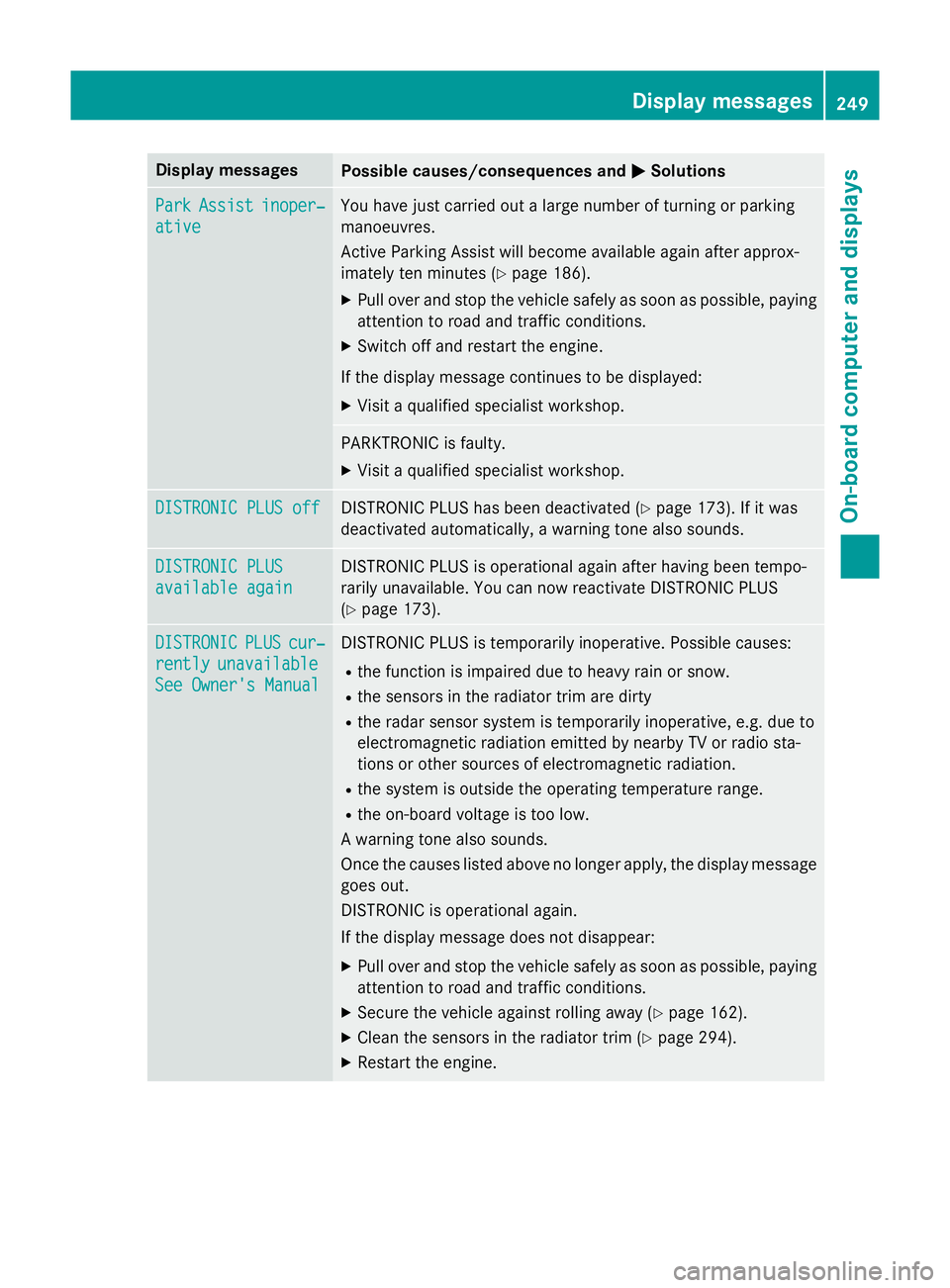
ative You have just carried out a large number of turning or parking
manoeuvres.
Active Parking Assist will become available again after approx-
imately ten minutes (Y
page 186).
X Pull over and stop the vehicle safely as soon as possible, paying
attention to road and traffic conditions.
X Switch off and restart the engine.
If the display message continues to be displayed: X Visit a qualified specialist workshop. PARKTRONIC is faulty.
X Visit a qualified specialist workshop. DISTRONIC PLUS off DISTRONIC PLUS off DISTRONIC PLUS has been deactivated (Y
page 173). If it was
deactivated automatically, a warning tone also sounds. DISTRONIC PLUS
DISTRONIC PLUS
available again available again DISTRONIC PLUS is operational again after having been tempo-
rarily unavailable. You can now reactivate DISTRONIC PLUS
(Y
page 173). DISTRONIC DISTRONIC
PLUS
PLUScur‐
cur‐
rently
rently unavailable
unavailable
See Owner's Manual
See Owner's Manual DISTRONIC PLUS is temporarily inoperative. Possible causes:
R the function is impaired due to heavy rain or snow.
R the sensors in the radiator trim are dirty
R the radar sensor system is temporarily inoperative, e.g. due to
electromagnetic radiation emitted by nearby TV or radio sta-
tions or other sources of electromagnetic radiation.
R the system is outside the operating temperature range.
R the on-board voltage is too low.
A warning tone also sounds.
Once the causes listed above no longer apply, the display message goes out.
DISTRONIC is operational again.
If the display message does not disappear:
X Pull over and stop the vehicle safely as soon as possible, paying
attention to road and traffic conditions.
X Secure the vehicle against rolling away (Y page 162).
X Clean the sensors in the radiator trim (Y page 294).
X Restart the engine. Display
messages
249On-board computer and displays Z
Page 283 of 357
sion surrounding the possible health risk
posed by electromagnetic fields.
Mercedes-Benz recommends the use of an
approved exterior aerial. This ensures:
R optimal mobile phone reception quality in
the vehicle
R mutual influences between the vehicle
electronics and mobile phones are mini-
mised
An exterior aerial has the following advan-
tages:
R it conducts the electromagnetic fields gen-
erated by a wireless device to the exterior.
R the field strength in the vehicle interior is
lower than in a vehicle that does not have
an exterior aerial.
Information on retrofitting two-way radios
and mobile phones (RF transmitters)
(Y page 336).
General notes There are various mobile phone brackets that
may be fitted in your vehicle; in some cases,
these are country-specific.
You can connect a Bluetooth ®
-capable
mobile phone with Audio 20 or COMAND
Online via the Bluetooth ®
interface. This also
applies if your vehicle is equipped with con-
venience telephony.
More information on suitable mobile phones,
mobile phone brackets and on connecting
Bluetooth ®
-capable mobile phones with
Audio 20 or COMAND Online can be obtained:
R at your Mercedes-Benz Service Centre
R on the Internet at http://www.mercedes-
benz.com/connect
i The functions and services available when
you use the phone depend on your mobile
phone model and service provider. Using a mobile phone If the mobile phone is inserted in the mobile
phone bracket, you can speak to the person
you are calling using the hands-free system.
X Open the telephone compartment
(Y page 270).
X Place the mobile phone bracket into the
pre-installed fitting (see the separate
installation instructions for the mobile
phone fitting).
X Insert the mobile phone into the mobile
phone bracket (see the separate installa-
tion instructions for the mobile phone fit-
ting).
i On some mobile phone brackets, first you
have to connect the phone to the mobile
phone bracket via Bluetooth ®
(see the sep-
arate operating instructions for the mobile
phone bracket).
If this is the case, the mobile phone does
not have to be inserted into the bracket for you to be able to use the telephone func-
tions. However, the charging function and
aerial function are not available.
Operating the mobile phone You can operate the telephone using the
6
and~ buttons on the multifunction
steering wheel. You can operate other mobile
phone functions via the on-board computer
(Y page 215).
When you remove the key from the ignition
lock, the mobile phone stays switched on.
However, you can no longer use the hands-
free system.
If you have an active call and would like to
take the key out of the ignition lock, first
remove the mobile phone from the bracket.
i If you use a mobile phone bracket which is
connected to your mobile via Bluetooth ®
and you wish to continue a call on your
mobile phone:
You should switch the call to "Private
mode" before you remove the key from the 280
FeaturesStowing and features
Page 284 of 357
ignition lock. Otherwise, it will take up to
20 seconds for the mobile phone to dis-
connect from the system. Only then can
you continue the call on your mobile phone.
Notes on the necessary steps for setting
"Private mode" can be found in the sepa-
rate operating instructions of the mobile
phone.
i Not all mobile phones support "Private
mode".
Mobile phone bracket in the stowage
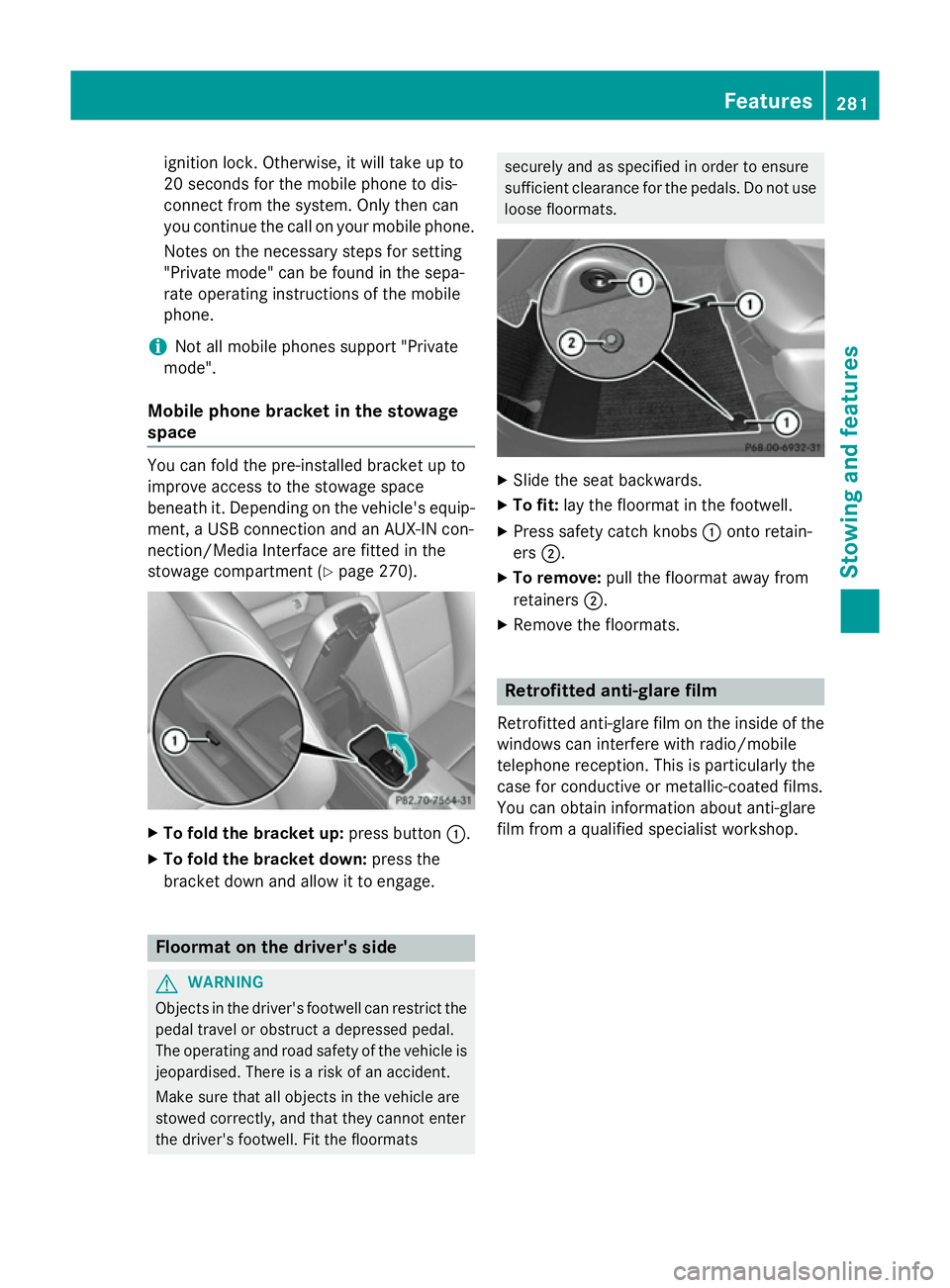
space You can fold the pre-installed bracket up to
improve access to the stowage space
beneath it. Depending on the vehicle's equip- ment, a USB connection and an AUX-IN con-
nection/Media Interface are fitted in the
stowage compartment (Y page 270).X
To fold the bracket up: press button:.
X To fold the bracket down: press the
bracket down and allow it to engage. Floormat on the driver's side
G
WARNING
Objects in the driver's footwell can restrict the pedal travel or obstruct a depressed pedal.
The operating and road safety of the vehicle is
jeopardised. There is a risk of an accident.
Make sure that all objects in the vehicle are
stowed correctly, and that they cannot enter
the driver's footwell. Fit the floormats securely and as specified in order to ensure
sufficient clearance for the pedals. Do not use
loose floormats. X
Slide the seat backwards.
X To fit: lay the floormat in the footwell.
X Press safety catch knobs :onto retain-
ers ;.
X To remove: pull the floormat away from
retainers ;.
X Remove the floormats. Retrofitted anti-glare film
Retrofitted anti-glare film on the inside of the
windows can interfere with radio/mobile
telephone reception. This is particularly the
case for conductive or metallic-coated films.
You can obtain information about anti-glare
film from a qualified specialist workshop. Features
281Stowing and features Z
Page 312 of 357
characteristics may be impaired, especially at low temperatures. Have the thawed battery
checked at a qualified specialist workshop.
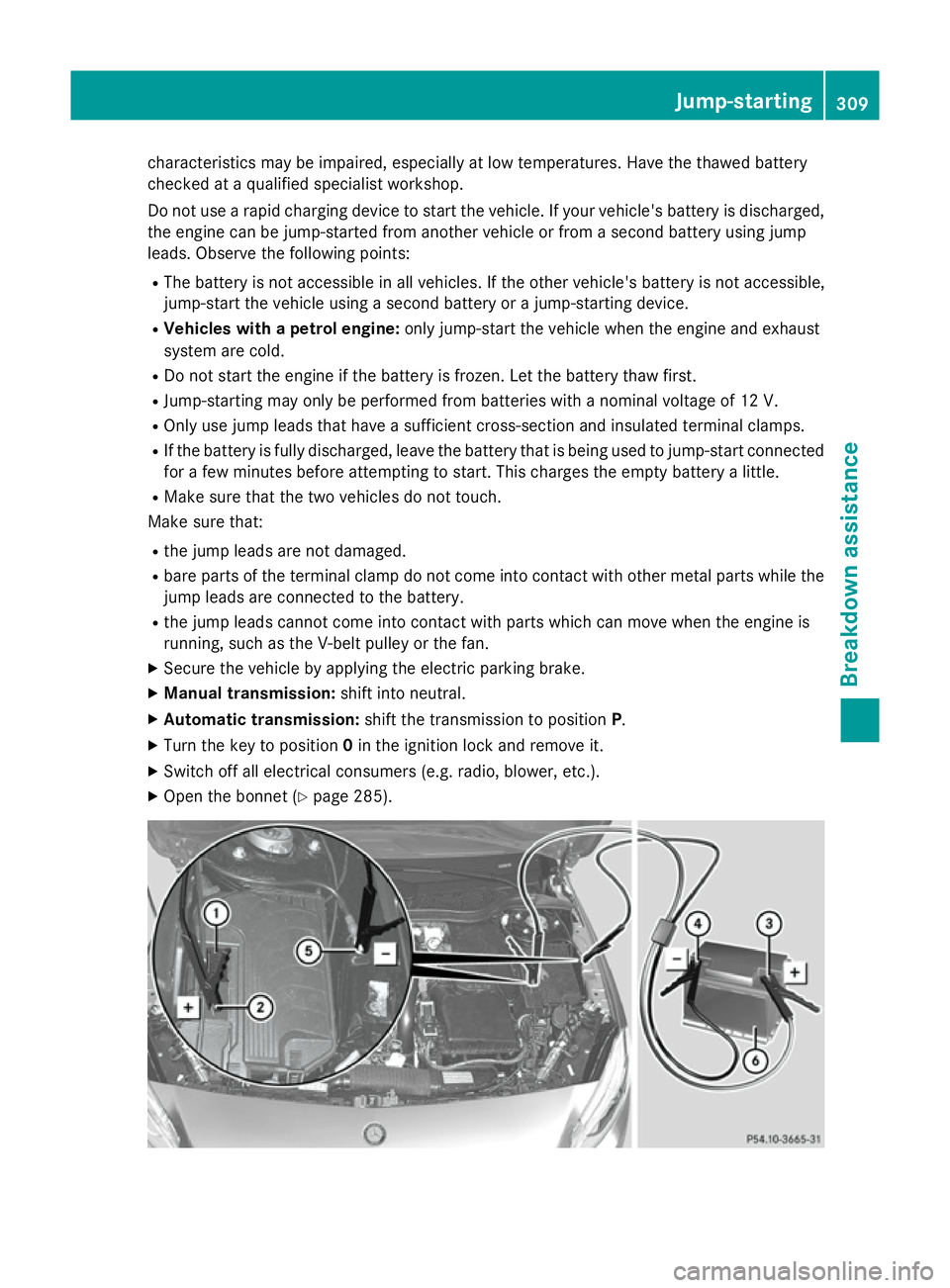
Do not use a rapid charging device to start the vehicle. If your vehicle's battery is discharged, the engine can be jump-started from another vehicle or from a second battery using jump
leads. Observe the following points:
R The battery is not accessible in all vehicles. If the other vehicle's battery is not accessible,
jump-start the vehicle using a second battery or a jump-starting device.
R Vehicles with a petrol engine: only jump-start the vehicle when the engine and exhaust
system are cold.
R Do not start the engine if the battery is frozen. Let the battery thaw first.
R Jump-starting may only be performed from batteries with a nominal voltage of 12 V.
R Only use jump leads that have a sufficient cross-section and insulated terminal clamps.
R If the battery is fully discharged, leave the battery that is being used to jump-start connected
for a few minutes before attempting to start. This charges the empty battery a little.
R Make sure that the two vehicles do not touch.
Make sure that:
R the jump leads are not damaged.
R bare parts of the terminal clamp do not come into contact with other metal parts while the
jump leads are connected to the battery.
R the jump leads cannot come into contact with parts which can move when the engine is
running, such as the V-belt pulley or the fan.
X Secure the vehicle by applying the electric parking brake.
X Manual transmission: shift into neutral.
X Automatic transmission: shift the transmission to position P.
X Turn the key to position 0in the ignition lock and remove it.
X Switch off all electrical consumers (e.g. radio, blower, etc.).
X Open the bonnet (Y page 285). Jump-starting
309Breakdown assistance Z
Page 339 of 357
Useful information
i This Owner's Manual describes all mod-
els, series and optional equipment for your
vehicle that were available at the time of
going to press. National variations are pos- sible. Note that your vehicle may not be
equipped with all of the functions descri-
bed. This is also the case for systems and
functions relevant to safety.
i Read the information on qualified special-
ist workshops: (Y page 24). Information on technical data
You can find technical data on the Internet at: http://www.mercedes-benz.com
i The technical data was determined in
accordance with EC Directives. All data
applies to the vehicle's standard equip-
ment. It may therefore differ for vehicles
with optional equipment. You can obtain
further information from a Mercedes-Benz
Service Centre. Vehicle electronics
Tampering with the engine electron-
ics
! Only have work carried out on the engine
electronics and its associated parts, such
as control units, sensors and connector
leads, at a qualified specialist workshop.
Vehicle components may otherwise wear
more quickly and the vehicle's operating
permit may be invalidated. Retrofitting two-way radios and
mobile phones (RF transmitters)
G
WARNING
If RF transmitters are tampered with or not
properly retrofitted, the electromagnetic radi- ation they emit can interfere with the vehicle
electronics. This may jeopardise the opera-
tional safety of the vehicle. There is a risk of an accident.
You should have all work on electrical and
electronic components carried out at a quali-
fied specialist workshop. G
WARNING
If you use the RF transmitter in the vehicle in
an improper way, its electromagnetic radia-
tion can disrupt vehicle electronics, e.g. if:
R the RF transmitter is not connected to an
exterior aerial
R the exterior aerial is fitted incorrectly or is
not a low-reflection aerial
This can jeopardise the operating safety of the vehicle. There is a risk of an accident.
Have the low-reflection exterior aerial fitted at
a qualified specialist workshop. When oper-
ating in the vehicle, always connect the RF
transmitter to the low-reflection exterior aer-
ial.
! The operating permit may be invalidated if
the instructions for installation and use of
RF transmitters are not observed.
In particular, the following conditions must be complied with:
R only approved wavebands may be used.
R observe the maximum permissible out-
put in these wavebands.
R only approved aerial positions may be
used.
Observe the notes on operating mobile
phones (Y page 279).
The following aerial positions may be used for
the correct installation of RF transmitters: 336
Vehicle electronicsTechnical data
Page 340 of 357

Approved aerial positions
:
Front roof area
; Rear roof area
= Rear wing
i On vehicles with panorama sliding sun-
roof, fitting an aerial to the front roof area is not permitted.
On the rear wing, it is recommended that
you position the aerial on the side of the
vehicle closest to the centre of the road.
Use Technical Specification ISO/TS 21609
(Road Vehicles – "EMC guidelines for fitting
aftermarket radio frequency transmitting
equipment") when retrofitting RF (radio fre-
quency) transmitters. Comply with the legal
requirements for add-on parts.
If your vehicle has fittings for two-way radio
equipment, use the power supply or aerial
connections intended for use with the basic
wiring. Be sure to observe the manufacturer's additional instructions when installing.
Deviations with respect to wavebands, maxi-
mum transmission outputs or aerial positions must be approved by Mercedes-Benz. The maximum transmission output (PEAK) at
the base of the aerial must not exceed the
following values: Waveband Maximum
transmission output Short wave
3 - 54 MHz 100 W
4 m waveband
68 - 87.5 MHz 30 W
2 m waveband
144 - 174 MHz 50 W
Trunked radio/Tetra
380 - 460 MHz 35 W
70 cm waveband
400 - 460 MHz 35 W
GSM/DCS/PCS
850/900/1800/1900 10 W
UMTS/LTE 10 W
The following can be used in the vehicle with-
out restrictions:
R RF transmitters with a maximum transmis-
sion output of up to 100 mW
R mobile phones (GSM/DCS/PCS/UMTS/
LTE)
There are no restrictions when positioning the aerial on the outside of the vehicle for the fol-
lowing wavebands:
R Trunked radio/Tetra
R 70 cm waveband
R GSM/DCS/PCS
R UMTS/LTE Vehicle electronics
337Technical data Z
Page 353 of 357
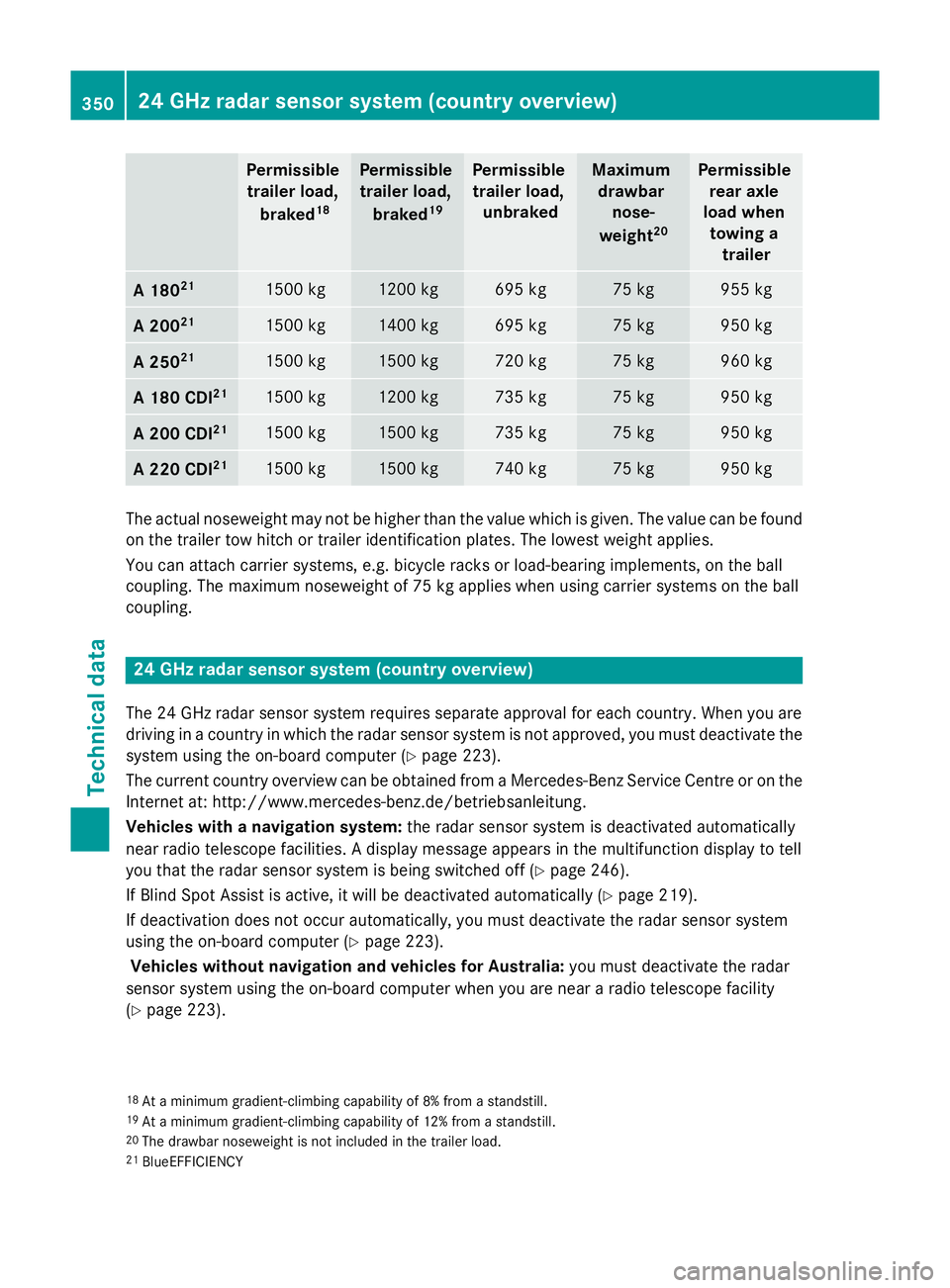
Permissible
trailer load,
braked 18 Permissible
trailer load,
braked 19 Permissible
trailer load, unbraked Maximum
drawbar nose-
weight 20 Permissible
rear axle
load when towing a trailer A 180
21 1500 kg 1200 kg 695 kg 75 kg 955 kg
A 200
21 1500 kg 1400 kg 695 kg 75 kg 950 kg
A 250
21 1500 kg 1500 kg 720 kg 75 kg 960 kg
A 180 CDI
21 1500 kg 1200 kg 735 kg 75 kg 950 kg
A 200 CDI
21 1500 kg 1500 kg 735 kg 75 kg 950 kg
A 220 CDI
21 1500 kg 1500 kg 740 kg 75 kg 950 kg
The actual noseweight may not be higher than the value which is given. The value can be found
on the trailer tow hitch or trailer identification plates. The lowest weight applies.
You can attach carrier systems, e.g. bicycle racks or load-bearing implements, on the ball
coupling. The maximum noseweight of 75 kg applies when using carrier systems on the ball
coupling. 24 GHz radar sensor system (country overview)
The 24 GHz radar sensor system requires separate approval for each country. When you are
driving in a country in which the radar sensor system is not approved, you must deactivate the
system using the on-board computer (Y page 223).
The current country overview can be obtained from a Mercedes-Benz Service Centre or on the
Internet at: http://www.mercedes-benz.de/betriebsanleitung.
Vehicles with a navigation system: the radar sensor system is deactivated automatically
near radio telescope facilities. A display message appears in the multifunction display to tell
you that the radar sensor system is being switched off (Y page 246).
If Blind Spot Assist is active, it will be deactivated automatically (Y page 219).
If deactivation does not occur automatically, you must deactivate the radar sensor system
using the on-board computer (Y page 223).
Vehicles without navigation and vehicles for Australia: you must deactivate the radar
sensor system using the on-board computer when you are near a radio telescope facility
(Y page 223).
18 At a minimum gradient-climbing capability of 8% from a standstill.
19 At a minimum gradient-climbing capability of 12% from a standstill.
20 The drawbar noseweight is not included in the trailer load.
21 BlueEFFICIENCY 350
24 GHz radar sensor system (country overview)Technical data