interior lights MERCEDES-BENZ A-CLASS HATCHBACK 2012 Owners Manual
[x] Cancel search | Manufacturer: MERCEDES-BENZ, Model Year: 2012, Model line: A-CLASS HATCHBACK, Model: MERCEDES-BENZ A-CLASS HATCHBACK 2012Pages: 357, PDF Size: 11.61 MB
Page 8 of 357
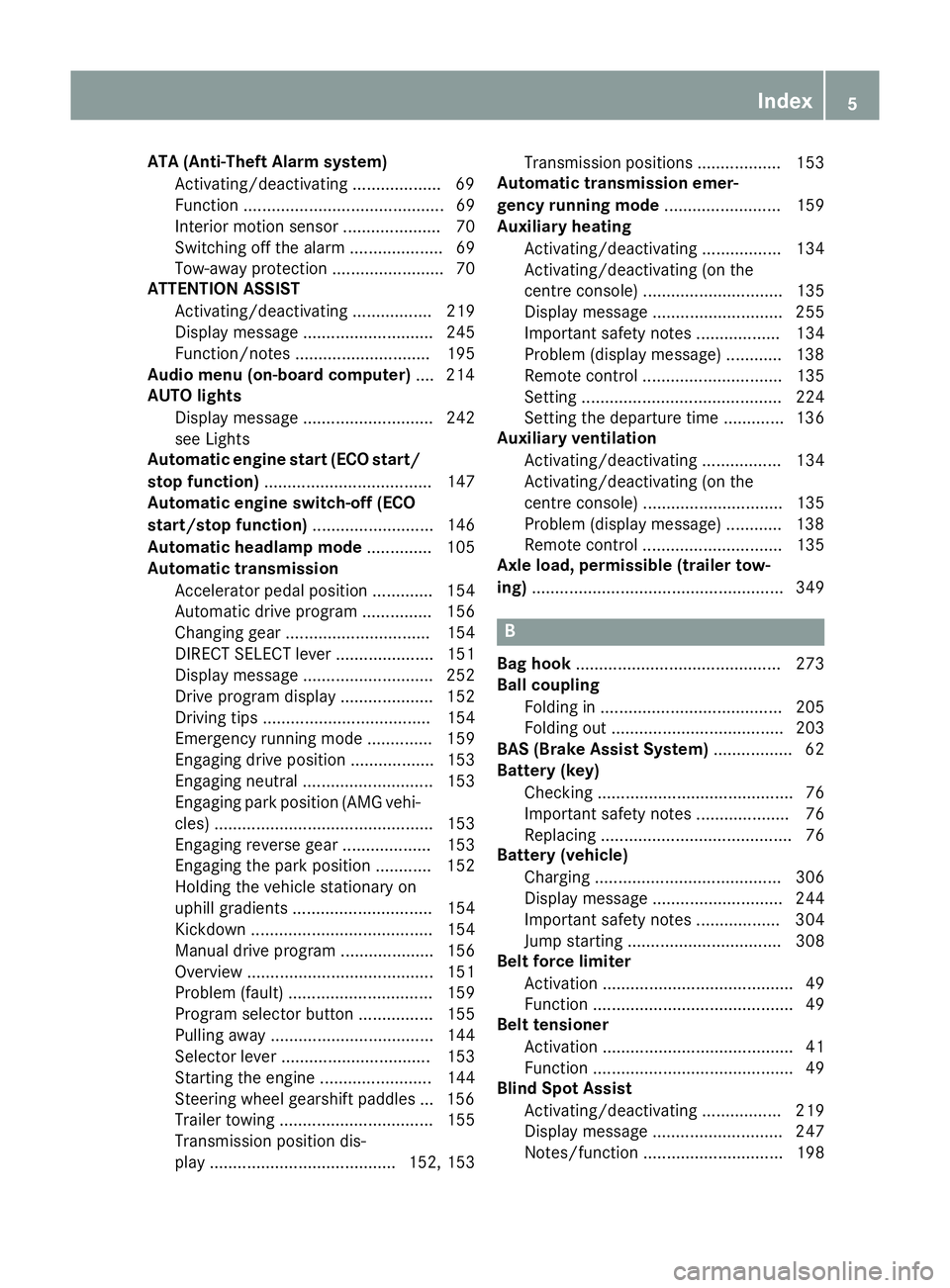
ATA (Anti-Theft Alarm system)
Activating/deactivating .................. .69
Function ........................................... 69
Interior motion senso r..................... 70
Switching off the alarm .................... 69
Tow-away protection ........................ 70
ATTENTION ASSIST
Activating/deactivating ................. 219
Display message ............................ 245
Function/note s............................. 195
Audio menu (on-board computer) .... 214
AUTO lights
Display message ............................ 242
see Lights
Automatic engine start (ECO start/
stop function) .................................... 147
Automatic engine switch-off (ECO
start/stop function) .......................... 146
Automatic headlamp mode .............. 105
Automatic transmission
Accelerator pedal position ............. 154
Automatic drive program ............... 156
Changing gear ............................... 154
DIRECT SELECT lever ..................... 151
Display message ............................ 252
Drive program display .................... 152
Driving tips .................................... 154
Emergency running mode .............. 159
Engaging drive position .................. 153
Engaging neutral ............................ 153
Engaging park position (AMG vehi-
cles) ............................................... 153
Engaging reverse gear ................... 153
Engaging the park position ............ 152
Holding the vehicle stationary on
uphill gradients .............................. 154
Kickdown ....................................... 154
Manual drive progra m.................... 156
Overview ........................................ 151
Problem (fault) ............................... 159
Program selector button ................ 155
Pulling away ................................... 144
Selector lever ................................ 153
Starting the engine ........................ 144
Steering wheel gearshift paddle s... 156
Trailer towing ................................. 155
Transmission position dis-
play ........................................ 152, 153 Transmission positions .................. 153
Automatic transmission emer-
gency running mode ......................... 159
Auxiliary heating
Activating/deactivating ................. 134
Activating/deactivating (on the
centre console ).............................. 135
Display message ............................ 255
Important safety notes .................. 134
Problem (display message) ............ 138
Remote control .............................. 135
Setting ........................................... 224
Setting the departure time ............. 136
Auxiliary ventilation
Activating/deactivating ................. 134
Activating/deactivating (on the
centre console ).............................. 135
Problem (display message) ............ 138
Remote control .............................. 135
Axle load, permissible (trailer tow-
ing) ...................................................... 349 B
Bag hook ............................................ 273
Ball coupling
Folding in ....................................... 205
Folding out ..................................... 203
BAS (Brake Assist System) ................. 62
Battery (key)
Checking .......................................... 76
Important safety notes .................... 76
Replacing ......................................... 76
Battery (vehicle)
Charging ........................................ 306
Display message ............................ 244
Important safety notes .................. 304
Jump starting ................................. 308
Belt force limiter
Activation ......................................... 49
Function ........................................... 49
Belt tensioner
Activation ......................................... 41
Function ........................................... 49
Blind Spot Assist
Activating/deactivating ................. 219
Display message ............................ 247
Notes/function .............................. 198 Index
5
Page 11 of 357

Dashboard lighting
see Instrument cluster lighting
Data
see Technical data
Daytime driving lights
Display message ............................ 242
Switching on/off (on-board com-
puter) ............................................ .221
Switching on/off (switch) .............. 105
Dealership
see Qualified specialist workshop
Declarations of conformity ................. 23
Delayed switch-off
Exterior lighting (on-board com-
puter) ............................................. 222
Interior lighting .............................. 223
Diagnostics connection ......................23
Diesel .................................................. 341
Digital speedometer .........................212
Dipped-beam headlamps
Changing bulbs .............................. 113
Display message ............................ 239
Setting for driving abroad (sym-
metrical) ........................................ 104
Setting for driving on the right/
left ................................................. 221
Switching on/off ........................... 105
DIRECT SELECT lever
see Automatic transmission
Display (cleaning instructions) ........295
Display message
Driving systems ............................ .245
Display messages
ASSYST PLUS ................................ 289
Calling up (on-board computer) ..... 229
Engine ............................................ 243
General information ....................... 229
Hiding (on-board computer) ........... 229
Key ................................................ 256
Lights ............................................. 239
Safety systems .............................. 230
Tyres .............................................. 251
Vehicle .......................................... .252
Distance recorder
see Trip meter
Distance warning function
Activating/deactivating ................. 218 Function/notes ................................ 62
Warning lamp ................................. 266
DISTRONIC PLUS
Activation conditions ..................... 175
Cruise control lever ....................... 174
Deactivating ................................... 177
Display message ............................ 249
Displays in the multifunction dis-
pla y................................................ 175
Driving tips .................................... 178
Function/note s............................. 174
Important safety notes .................. 173
Selecting ........................................ 175
Setting the specified minimum
distance ......................................... 177
Warning lamp ................................. 266
Door
Automatic locking (on-board com-
puter) ............................................. 223
Automatic locking (switch) ............... 81
Central locking/unlocking (key) ...... 75
Control panel ................................... 37
Display message ............................ 254
Emergency locking ........................... 81
Emergency unlocking ....................... 81
Important safety notes .................... 79
Opening (from the inside) ................ 80
Drive program
Automatic ...................................... 156
Display ........................................... 153
Display (DIRECT SELECT lever) ...... 152
Manual ........................................... 156
Driver's door
see Door
Driving abroad
Service24h .................................... 290
Symmetrical dipped beam ............. 104
Driving on flooded roads .................. 167
Driving safety systems
ABS (Anti-lock Braking System) ....... 61
ADAPTIVE BRAK E............................. 69
Adaptive Brake Assist ...................... 63
Adaptive brake lights ....................... 64
BAS (Brake Assist System) .............. 62
COLLISION PREVENTION ASSIST .... 62
Distance warning function ............... 62
Electronic Brake-force Distribu-
tion .................................................. 68 8
Index
Page 15 of 357

Overview ........................................1
11
Reading lamp ................................. 111
Setting the ambient lighting
brightness (on-board computer) .... 222
Interior motion sensor ........................ 70
ISOFIX child seat securing system .... 53J
Jack Storage location ............................ 299
Using ............................................. 326
Jump starting (engine) ......................308 K
Key Changing the battery ....................... 76
Checking the battery ....................... 76
Convenience closing feature ............ 85
Convenience opening feature .......... 84
Display message ............................ 256
Door central locking/unlocking ....... 75
Emergency key element ................... 75
Important safety notes .................... 74
Loss ................................................. 78
Modifying the programming ............. 75
Positions (ignition lock) ................. 143
Problem (malfunction) ..................... 78
Starting the engine ........................ 144
Key positions (ignition lock) ............ 143
Kickdown
Driving tips ................................... .154
Manual drive program .................... 158
Kneebag ............................................... 44 L
Lamps see Warning and indicator lamps
Lane Keeping Assist
Activating/deactivating ................. 219
Display message ............................ 247
Function/informatio n.................... 199
Lane package ..................................... 197
Lap time (RACETIMER) ...................... 226
Lashing eyelets ................................. 273
Licence plate lamp (display mes-
sage) ................................................... 241 Light sensor (display message)
....... 242
Lighting
see Lights
Lights
Activating/deactivating the Intel-
ligent Light System ........................ 221
Activating/deactivating the inte-
rior lighting delayed switch-off ....... 223
Active light function ....................... 108
Automatic headlamp mod e............ 105
Cornering light function ................. 109
Dipped-beam headlamp s............... 105
Display message ............................ 239
Driving abroad ............................... 104
Foglamps ....................................... 106
Foglamps (extended range) ........... 109
Hazard warning lamps ................... 108
Headlamp flashe r........................... 108
Headlamp rang e............................ 107
Light switch ................................... 105
Main-beam headlamp s................... 107
Motorway mod e............................. 109
Parking lamps ................................ 106
Rear foglamp ................................. 106
Setting the ambient lighting
brightness (on-board computer) .... 222
Side lamps ..................................... 106
Switching Adaptive Highbeam
Assist on/of f................................. 222
Switching the daytime driving
lights on/off (on-board com-
puter) ............................................. 221
Switching the daytime driving
lights on/off (switch) ..................... 105
Switching the exterior lighting
delayed switch-off on/off (on-
board computer) ............................ 222
Switching the surround lighting
on/off (on-board computer) .......... 222
Turn signals ................................... 107
see Interior lighting
see Replacing bulbs
LIM indicator lamp
Cruise control ................................ 169
DISTRONIC PLUS ........................... 174
Variable SPEEDTRONIC ................. 171
Limiting the speed
see SPEEDTRONIC 12
Index
Page 44 of 357

SRS (Supplemental Restraint System)
Introduction Supplemental Restraint System (SRS) with:
R The 6 SRS warning lamp
R Airbags
R Airbag control unit (with crash sensors)
R Belt tensioners for the front seat belts and
the outer seat belts in the rear
R Seat belt force limiters for the front seat
belts and the outer seat belts in the rear
SRS reduces the risk of occupants coming
into contact with parts of the vehicle's interior
in the event of an accident. It can also reduce
the forces to which occupants are subjected
during an accident.
SRS warning lamp G
WARNING
If SRS is malfunctioning, individual systems
may be triggered unintentionally or might not be triggered in the event of an accident with ahigh rate of vehicle deceleration.
A malfunction has occurred if:
R the 6 SRS warning lamp does not light
up when the ignition is switched on.
R the engine is running and the 6SRS
warning lamp does not go out after a few
seconds.
R the engine is running and the 6SRS
warning lamp lights up again.
In this case, have SRS checked immediately at
a qualified specialist workshop.
The 6 SRS warning lamp in the instrument
cluster lights up when the ignition is switched on. It goes out no later than a few seconds
after the engine is started.
SRS functions are checked regularly when the
ignition is switched on or the engine is run-
ning. Therefore, malfunctions can be detec-
ted in good time. Triggering of belt tensioners and air-
bags During the first stage of a collision, the airbag
control unit evaluates important physical
data relating to vehicle deceleration or accel-
eration, such as:
R duration
R direction
R magnitude
Based on the evaluation of this data, the air-
bag control unit pre-emptively triggers the
belt tensioners in the first stage.
If there is an even higher rate of vehicle decel- eration or acceleration in a longitudinal direc-tion, the front airbags are also deployed.
Your vehicle has adaptive, two-stage front air-
bags. The airbag control unit evaluates vehi-
cle deceleration or acceleration in the event
of a collision. In the first deployment stage,
the front airbag is filled with enough propel-
lant gas to reduce the risk of injuries. The
front airbag is fully deployed if a second
deployment threshold is reached within a few milliseconds.
The belt tensioner and airbag triggering
thresholds are variable and are adapted to the
detected rate of deceleration or acceleration
of the vehicle. This process is pre-emptive in
nature. The triggering process must take
place in good time at the start of the collision.
The rate of vehicle deceleration or accelera-
tion and the direction of the force are essen-
tially determined by:
R the distribution of forces during the colli-
sion
R the collision angle
R the deformation characteristics of the vehi-
cle
R the characteristics of the object with which
the vehicle has collided
Factors which can only be seen and measured
after a collision has occurred do not play a
decisive role in the deployment of an airbag, Occupant safety
41Safety Z
Page 46 of 357

R
do not lean forwards, e.g. over the cover of
the driver's/front-passenger front airbag,
particularly when the vehicle is in motion.
R do not put your feet on the dashboard.
R only hold the steering wheel on the outside.
This allows the airbag to be fully deployed.
You could be injured if the airbag is
deployed and you are holding the inside of
the steering wheel.
R do not lean on the doors from inside the
vehicle.
R make sure that there are no people, ani-
mals or objects between the vehicle occu-
pants and the area where the airbags are
deployed.
R do not place any objects between the seat
backrest and the door.
R do not hang any hard objects, e.g. coat
hangers, on the grab handles or coat hooks.
R do not attach accessories, e.g. cup holders,
to the doors.
It is not possible to rule out a risk of injury
being caused by an airbag, due to the high
speed at which the airbag must be deployed. G
WARNING
Airbag functionality can only be assured if the following parts are not covered and no badgesor stickers are attached to them:
R padded steering wheel boss
R kneebag cover below the steering column
R front-passenger airbag cover
R outer side of front seat bolsters
R side trim next to the rear seat backrest
R roof frame cover between the front A-pillar
and the C-pillar in the rear compartment G
WARNING
When an airbag deploys, a small amount of
powder is released. The powder may cause
short-term breathing difficulties to persons
suffering from asthma or other pulmonary
conditions. In order to prevent potential breathing diffi-
culties, you should leave the vehicle as soon
as it is safe to do so. You can also open the
window to allow fresh air to enter the vehicle
interior. The powder does not constitute a
health hazard and does not indicate that there
is a fire in the vehicle. G
WARNING
The airbag parts are hot after the airbag has
been deployed. Do not touch them as you
could burn yourself.
Have the airbags replaced at a qualified spe-
cialist workshop. Otherwise, occupants are
not protected by the airbags in the event of
another accident.
Airbag deployment slows down and restricts
the movement of the vehicle occupant.
If the airbags are deployed, you will hear a
bang and a small amount of powder may also
be released. Only in rare cases will the bang
affect your hearing. The powder that is
released generally does not constitute a
health hazard. The 6SRS warning lamp
lights up.
The airbag installation locations are identified
by the AIRBAG symbol.
Front airbags !
Do not place heavy objects on the front-
passenger seat. The system may then
detect that the seat is occupied and if there
is an accident, the restraint systems on the front-passenger side could be deployed.
Have restraint systems that have been trig-
gered replaced. Occupant safety
43Safety Z
Page 53 of 357
ates or accelerates rapidly in a lateral direc-
tion
R in certain situations where the vehicle over-
turns and the system determines that it can
provide additional protection
If the airbags are deployed, you will hear a
bang, and a small amount of powder may also be released. Only in rare cases will the bang
affect your hearing. The powder that is
released generally does not constitute a
health hazard. The 6SRS warning lamp
lights up.
If the seat belt is also fitted with a belt force
limiter and this is triggered, the force exerted by the seat belt on the vehicle occupant is
reduced.
The belt force limiters on the front seats are
synchronised with the front airbags, which
take on a part of the deceleration force. This
results in the load being distributed over a
greater area. Children in the vehicle
Child restraint systems
Important safety notes G
WARNING
To reduce the risk of serious or even fatal
injury to the child in the event of a sudden
change in direction, braking or an accident:
R children less than 1.50 m tall and under
twelve years of age must always be secured
in special child restraint systems on a suit- able vehicle seat. This is necessary
because the seat belts are not designed for
children.
R Do not drive with a child secured in a rear-
ward-facing child restraint system on the
front-passenger seat. Exception: if the vehi-
cle is equipped with automatic child seat
recognition on the front-passenger seat
and the child is secured in a child restraint
system with transponders for automatic
child seat recognition R
if you secure a forward-facing child
restraint system to the front-passenger
seat, you must move the front-passenger
seat as far back as possible.
R children must never travel sitting on the lap
of another occupant. Due to the forces
which occur in the event of a sudden
change of direction, heavy braking or an
accident, it would not be possible to
restrain the child. The child could be thrown against parts of the vehicle interior and be
seriously or even fatally injured. G
WARNING
The child restraint system cannot perform its protective function if it is not correctly fitted
to a suitable vehicle seat. The child cannot berestrained in the event of an accident, heavy
braking or sudden changes of direction. The
child could be seriously or even fatally injured.
For this reason, when fitting a child restraint
system, observe the manufacturer's installa-
tion instructions and the correct use of the
child restraint system.
Child restraint systems should be fitted to the rear seats. Children are generally better pro-
tected there.
The entire base of the child restraint system
must always rest on the seat cushion. There-
fore, never place objects, e.g. a cushion,
under the child restraint system.
Only use child restraint systems with the orig-
inal cover designed for them. Only replace
damaged covers with genuine Mercedes-Benz
covers.
We recommend the use of child restraint sys- tems which have been approved for
Mercedes-Benz vehicles. G
WARNING
Do not leave children unsupervised in the
vehicle, even if they are secured in a child
restraint system. They could injure them-
selves on parts of the vehicle. They could also
be seriously or even fatally injured by pro-
longed exposure to extreme heat or cold. 50
Children in the vehicleSafety
Page 73 of 357
Tow-away protection
Function An audible and visual alarm is triggered if your
vehicle's angle of inclination is altered while
tow-away protection is primed. This can occur
if the vehicle is jacked up on one side, for
example.
Activating X
Make sure that:
R the doors are closed.
R the tailgate is closed.
Only then is the tow-away protection
primed.
X Lock the vehicle with the key.
Tow-away protection is primed after
approximately 60 seconds.
Deactivating X
Unlock the vehicle with the key.
or X Insert the key into the ignition lock.
Tow-away protection is switched off auto-
matically.
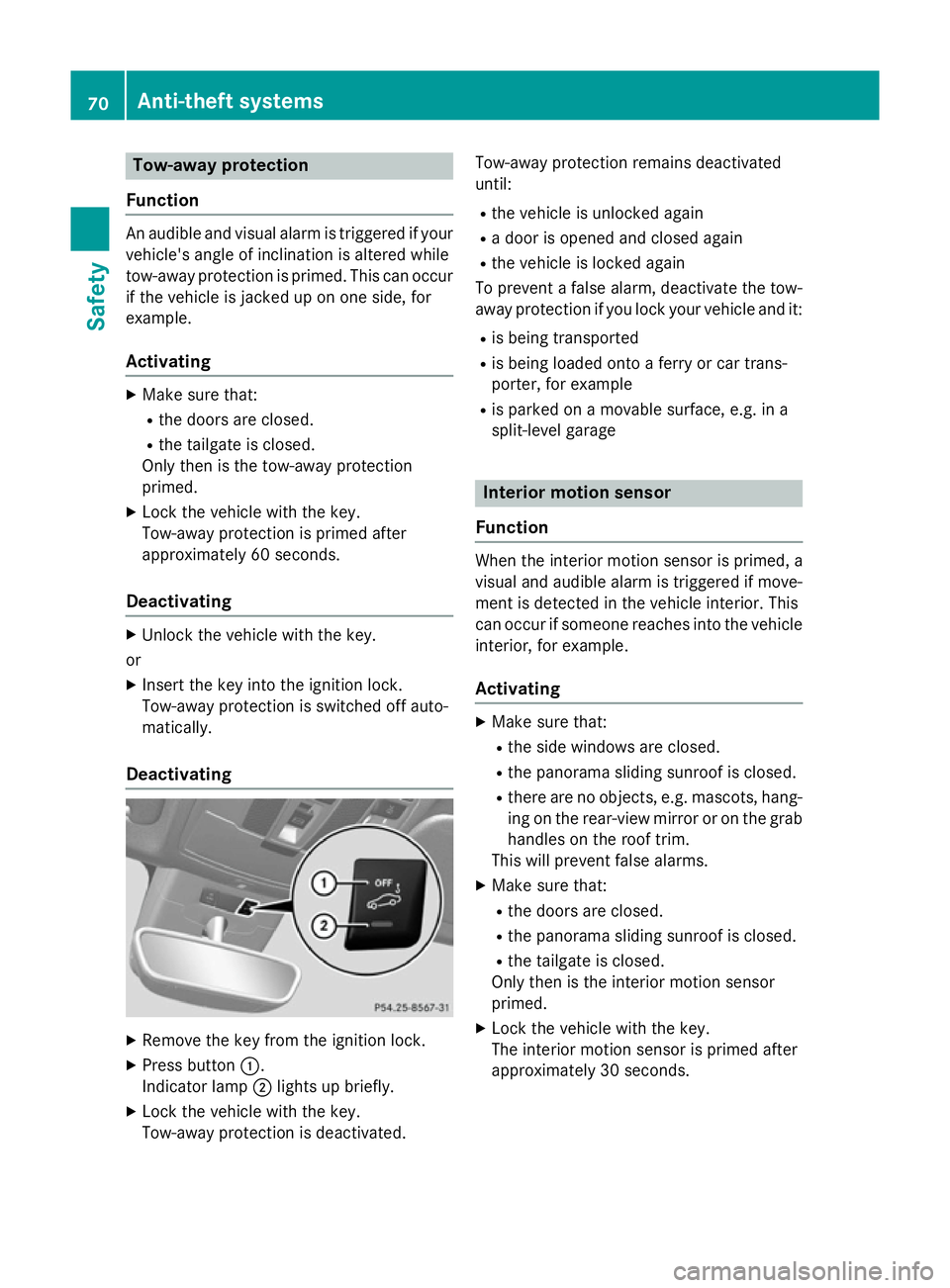
Deactivating X
Remove the key from the ignition lock.
X Press button :.
Indicator lamp ;lights up briefly.
X Lock the vehicle with the key.
Tow-away protection is deactivated. Tow-away protection remains deactivated
until:
R the vehicle is unlocked again
R a door is opened and closed again
R the vehicle is locked again
To prevent a false alarm, deactivate the tow-
away protection if you lock your vehicle and it:
R is being transported
R is being loaded onto a ferry or car trans-
porter, for example
R is parked on a movable surface, e.g. in a
split-level garage Interior motion sensor
Function When the interior motion sensor is primed, a
visual and audible alarm is triggered if move-
ment is detected in the vehicle interior. This
can occur if someone reaches into the vehicle interior, for example.
Activating X
Make sure that:
R the side windows are closed.
R the panorama sliding sunroof is closed.
R there are no objects, e.g. mascots, hang-
ing on the rear-view mirror or on the grab
handles on the roof trim.
This will prevent false alarms.
X Make sure that:
R the doors are closed.
R the panorama sliding sunroof is closed.
R the tailgate is closed.
Only then is the interior motion sensor
primed.
X Lock the vehicle with the key.
The interior motion sensor is primed after
approximately 30 seconds. 70
Anti-theft systemsSafety
Page 106 of 357
Useful information
............................104
Exterior lighting ................................ 104
Interior lighting ................................. 111
Replacing bulbs ................................. 112
Windscreen wipers ...........................116 103Lights and windscreen wipers
Page 114 of 357
Interior lighting
Overview of interior lighting
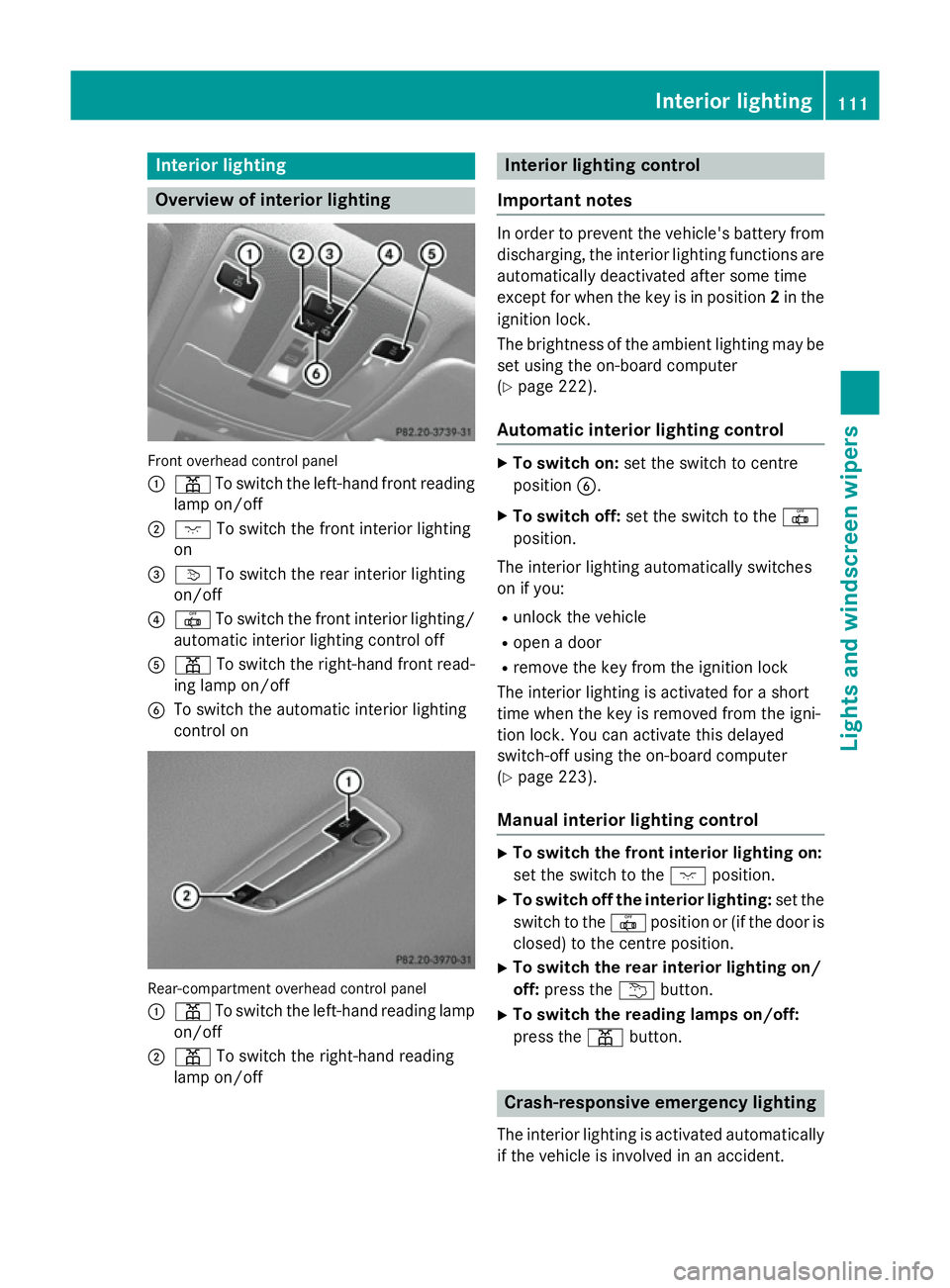
Front overhead control panel
:
p To switch the left-hand front reading
lamp on/off
; c To switch the front interior lighting
on
= v To switch the rear interior lighting
on/off
? | To switch the front interior lighting/
automatic interior lighting control off
A p To switch the right-hand front read-
ing lamp on/off
B To switch the automatic interior lighting
control on Rear-compartment overhead control panel
: p To switch the left-hand reading lamp
on/off
; p To switch the right-hand reading
lamp on/off Interior lighting control
Important notes In order to prevent the vehicle's battery from
discharging, the interior lighting functions are automatically deactivated after some time
except for when the key is in position 2in the
ignition lock.
The brightness of the ambient lighting may be set using the on-board computer
(Y page 222).
Automatic interior lighting control X
To switch on: set the switch to centre
position B.
X To switch off: set the switch to the |
position.
The interior lighting automatically switches
on if you:
R unlock the vehicle
R open a door
R remove the key from the ignition lock
The interior lighting is activated for a short
time when the key is removed from the igni-
tion lock. You can activate this delayed
switch-off using the on-board computer
(Y page 223).
Manual interior lighting control X
To switch the front interior lighting on:
set the switch to the cposition.
X To switch off the interior lighting: set the
switch to the |position or (if the door is
closed) to the centre position.
X To switch the rear interior lighting on/
off: press the ubutton.
X To switch the reading lamps on/off:
press the pbutton. Crash-responsive emergency lighting
The interior lighting is activated automatically
if the vehicle is involved in an accident. Interior lighting
111Lights and windscreen wipers Z
Page 129 of 357
the front-passenger side as well. The indi-
cator lamp in the ábutton goes out.
R Use the residual heat function if you want to
heat or ventilate the vehicle interior when
the ignition is switched off. The residual
heat function can only be activated or deac-
tivated with the ignition switched off.
ECO start/stop function During automatic engine switch-off, the cli-
mate control only operates at a reduced capa- city. If you require the full climate control out-
put, you can switch off the ECO start/stop
function by pressing the ECO button
(Y page 147). Operating the climate control system
Switching climate control on/off
Points to observe before use When the climate control is switched off, the
air supply and air circulation are also
switched off. The windows could then mist
up. Therefore, switch off climate control onlybriefly.
THERMATIC automatic climate control X
Turn the key to position 2in the ignition
lock (Y page 143).
X To switch on: turn controlAclockwise to
the desired position (except position 0)
(Y page 123).
X To switch off: turn controlAanti-clock-
wise to position 0(Ypage 123). THERMOTRONIC automatic climate
control X
Turn the key to position 2in the ignition
lock (Y page 143).
X To activate: press theÃbutton.
The indicator lamp in the Ãbutton lights
up. Airflow and air distribution are set to
automatic mode.
or X Press the ^button.
The indicator lamp in the ^button goes
out. The previous settings are reactivated.
X To deactivate: press the^button.
The indicator lamp in the ^button lights
up.
i THERMOTRONIC automatic climate con-
trol: switch on climate control primarily
using the Ãbutton. Activating/deactivating the cooling
with air dehumidification function
Points to observe before use If you deactivate the "Cooling with air dehu-
midification function", the air inside the vehi-
cle will not be cooled in warmer weather. The
air inside the vehicle will not be dehumidified either. The windows can mist up more
quickly. Therefore, only switch off the "Cool-
ing with air dehumidification function" briefly.
The "Cooling with air dehumidification" func-
tion is only available when the engine is run-
ning. The air inside the vehicle is cooled and
dehumidified according to the temperature
selected.
Condensation may drip from the underside of the vehicle when cooling mode is active. This
is normal and not a sign that there is a mal-
function. 126
Operating the climate control systemClimate control