brake light MERCEDES-BENZ A-CLASS HATCHBACK 2015 User Guide
[x] Cancel search | Manufacturer: MERCEDES-BENZ, Model Year: 2015, Model line: A-CLASS HATCHBACK, Model: MERCEDES-BENZ A-CLASS HATCHBACK 2015Pages: 417, PDF Size: 11.91 MB
Page 72 of 417
Pets in the vehicle
G
WARNING
If you leave animals unsupervised or unse-
cured in the vehicle, they may push a button
or a switch, for example.
They could:
R activate vehicle equipment and become
trapped, for example
R switch vehicle systems on or off, thus
endangering other road users
In the event of an accident, sudden braking or
abrupt changes of direction, unsecured ani-
mals could be flung around the vehicle, injur-
ing the vehicle occupants. There is a risk of an accident and injury.
Never leave animals unattended in the vehi-
cle. Always secure animals correctly during a
journey, e.g. in an animal transport box. Driving safety systems
Driving safety systems overview
In this section, you will find information about the following driving safety systems:
R ABS ( Anti-lock BrakingSystem)
(Y page 69)
R BAS ( Brake Assist System) (Y page 70)
R COLLISION PREVENTION ASSIST PLUS
(Y page 70)
R Adaptive brake lights (Y page 73)
R ESP ®
(Electronic StabilityProgram)
(Y page 73)
R EBD ( electronic brake force distribution)
(Y page 77)
R ADAPTIVE BRAKE (Y page 77)
R STEER CONTROL (Y page 77) Important safety notes
If you fail to adapt your driving style or if you
are inattentive, the driving safety systems can neither reduce the risk of an accident nor
override the laws of physics. Driving safety
systems are merely aids designed to assist
driving. You are responsible for maintaining
the distance to the vehicle in front, for vehicle speed, for braking in good time, and for stay-ing in lane. Always adapt your driving style to
suit the prevailing road and weather condi-
tions and maintain a safe distance from the
vehicle in front. Drive carefully.
The driving safety systems described only
work as effectively as possible when there is
adequate contact between the tyres and the
road surface. Please pay special attention to
the notes on tyres, recommended minimum
tyre tread depths etc. (Y page 358).
In wintry driving conditions, always use winter
tyres (M+S tyres) and, if necessary, snow
chains. Only in this way will the driving safety systems described in this section work as
effectively as possible. ABS (Anti-lock Braking System)
General notes ABS regulates brake pressure in such a way
that the wheels do not lock when you brake.
This allows you to continue steering the vehi-
cle when braking.
The ! ABS warning lamp in the instrument
cluster lights up when the ignition is switched on. It goes out when the engine is running.
ABS works from a speed of about 8 km/h,
regardless of road-surface conditions. ABS
works on slippery surfaces, even when you
only brake gently.
Important safety notes i
Observe the "Important safety notes" sec-
tion (Y page 69). G
WARNING
If ABS is faulty, the wheels could lock when
braking. The steerability and braking charac-
teristics may be severely impaired. Addition- Driving safety systems
69Safety
Z
Page 74 of 417
R
a vehicle travelling in front on a different
line
R new vehicles or after a service on the COL-
LISION PREVENTION ASSIST PLUS system
Observe the important safety notes in the
"Running-in notes" section (Y page 156).
Following damage to the front end of the vehi-
cle, have the configuration and operation of
the radar sensor checked at a qualified spe-
cialist workshop. This also applies to colli-
sions at slow speeds where there is no visible
damage to the front of the vehicle.
Activating/deactivating The COLLISION PREVENTION ASSIST PLUS is
automatically active after switching on the
ignition.
You can activate or deactivate COLLISION
PREVENTION ASSIST PLUS in the on-board
computer (Y page 249). When deactivated,
the distance warning function and the auton- omous braking function are also deactivated.
Vehicles with black and white multifunc-
tion display: when COLLISION PREVENTION
ASSIST PLUS is activated, the multifunction
display in the status overview shows the Ä
symbol.
Vehicles with colour multifunction dis-
play: when COLLISION PREVENTION ASSIST
PLUS is deactivated, the multifunction dis-
play in the assistance graphic shows the æ
symbol.
Distance warning function General notes
The distance warning function can help you to
minimise the risk of a collision with the vehi-
cle in front or reduce the effects of such a
collision. If the distance warning function
detects that there is a risk of a collision, you
will be warned visually and acoustically. Important safety notes
i Observe the "Important safety notes" sec-
tion for driving safety systems (Y page 69). G
WARNING
The distance warning function does not react:
R to people or animals
R to oncoming vehicles
R to crossing traffic
R when cornering
Thus, the distance warning function cannot
provide a warning in all critical situations.
There is a risk of an accident.
Always pay careful attention to the traffic sit-
uation and be ready to brake. G
WARNING
The distance warning function cannot always
clearly identify objects and complex traffic
situations.
In such cases, the distance warning function
may:
R give an unnecessary warning
R not give a warning
There is a risk of an accident.
Always pay careful attention to the traffic sit-
uation; do not rely on the distance warning
function alone.
Function
The distance warning function issues a warn- ing at speeds:
R of approximately 30 km/h or more, if, over
several seconds, the distance maintained
to the vehicle travelling in front is insuffi-
cient. The ·distance warning lamp
then lights up in the instrument cluster.
R of approximately 7 km/h or more, if you
rapidly approach a vehicle in front. An inter-
mittent warning tone will then sound, and
the · distance warning lamp will light
up in the instrument cluster. Driving safety systems
71Safety Z
Page 76 of 417
In such cases, Adaptive Brake Assist can:
R intervene unnecessarily
R not intervene
There is a risk of an accident.
Always pay careful attention to the traffic sit- uation and be ready to brake. Terminate the
intervention in a non-critical driving situation. G
WARNING
Adaptive Brake Assist does not react:
R to people or animals
R to oncoming vehicles
R to crossing traffic
R when cornering
As a result, the Adaptive Brake Assist may not intervene in all critical conditions. There is a
risk of an accident.
Always pay careful attention to the traffic sit- uation and be ready to brake.
Due to the nature of the system, particularly
complicated but non-critical driving condi-
tions may also cause Brake Assist to inter-
vene.
If Adaptive Brake Assist is not available due to a malfunction in the radar sensor system, thebrake system remains available with full
brake boosting effect and BAS. Adaptive brake lights
The adaptive brake lights warn following traf- fic in an emergency braking situation:
R by flashing brake lamps
R the hazard warning lamps are activated
If you brake sharply from a speed of more
than 50 km/h or if braking is assisted by BAS
or BAS PLUS, the brake lamps flash rapidly. In
this way, traffic travelling behind you is
warned in an even more noticeable manner.
If you brake sharply from a speed of more
than 70 km/h to a standstill, the hazard warn- ing lamps are activated automatically. If the
brakes are applied again, the brake lamps light up continuously. The hazard warning
lamps switch off automatically if you travel
faster than 10 km/h. You can also switch off
the hazard warning lamps using the hazard
warning button (Y page 123). ESP
®
(Electronic Stability Program)
General notes i
Observe the "Important safety notes" sec-
tion (Y page 69).
ESP ®
monitors driving stability and traction,
i.e. power transmission between the tyres
and the road surface.
If ESP ®
detects that the vehicle is deviating
from the direction desired by the driver, one
or more wheels are braked to stabilise the
vehicle. The engine output is also modified to keep the vehicle on the desired course within
physical limits. ESP ®
assists the driver when
pulling away on wet or slippery roads. ESP ®
can also stabilise the vehicle during braking.
ETS/4ETS (Electronic Traction System) i
Observe the "Important safety notes" sec-
tion (Y page 69).
ETS traction control is part of ESP ®
. On vehi-
cles with 4MATIC, 4ETS is a component of
ESP ®
.
Traction control brakes the drive wheels indi-
vidually if they spin. This enables you to pull
away and accelerate on slippery surfaces, for
example if the road surface is slippery on one side. In addition, more drive torque is trans-
ferred to the wheel or wheels with traction.
Traction control remains active if you deacti-
vate ESP ®
.
Important safety notes i
Observe the "Important safety notes" sec-
tion (Y page 69). Driving safety systems
73Safety Z
Page 78 of 417
Characteristics when ESP
®
is deactivated
If ESP ®
is deactivated and one or more wheels
start to spin, the ÷ESP®
warning lamp in
the instrument cluster flashes. In such situa-
tions, ESP ®
will not stabilise the vehicle.
If you deactivate ESP ®
:
R ESP ®
no longer improves driving stability
R Engine torque is no longer limited and the
drive wheels are able to spin
The spinning of the wheels results in a cut- ting action for better traction on loose sur-faces.
R Traction control is still activated
R COLLISION PREVENTION ASSIST is no lon-
ger available; nor is it activated if you brake
firmly with assistance from ESP ®
R PRE-SAFE ®
is no longer available; it is also
not activated if you brake firmly with assis-
tance from ESP ®
R ESP ®
still provides support when you brake
firmly
Deactivating/activating ESP ®
(Mercedes ‑AMG vehicles) Important safety notes
i Observe the "Important safety notes" sec-
tion (Y page 69).
You can select between the following sta-
tuses of ESP ®
:
R ESP ®
is activated
R SPORT handling mode is activated
R ESP ®
is deactivated
ESP ®
is activated every time the engine is
switched on, regardless of whether ESP ®
was
deactivated before the engine was switched
off. G
WARNING
When SPORT handling mode is activated,
there is a greater risk of skidding and acci-
dents. Only activate SPORT handling mode in the sit-
uations described in the following. G
WARNING
If you deactivate ESP ®
, ESP ®
no longer sta-
bilises the vehicle. There is an increased risk
of skidding and an accident.
Only deactivate ESP ®
in the situations descri-
bed in the following.
In the following situations, it may be better to activate SPORT handling mode or deactivate
ESP ®
:
R when using snow chains
R in deep snow
R on sand or gravel
R on specially designated roads when the
vehicle's own oversteering and understeer-
ing characteristics are desired
Driving in SPORT handling mode or without
ESP ®
requires an extremely qualified and
experienced driver.
i Activate ESP ®
as soon as the situations
described above no longer apply. ESP ®
will
otherwise not be able to stabilise the vehi-
cle if the vehicle starts to skid or a wheel
starts to spin.
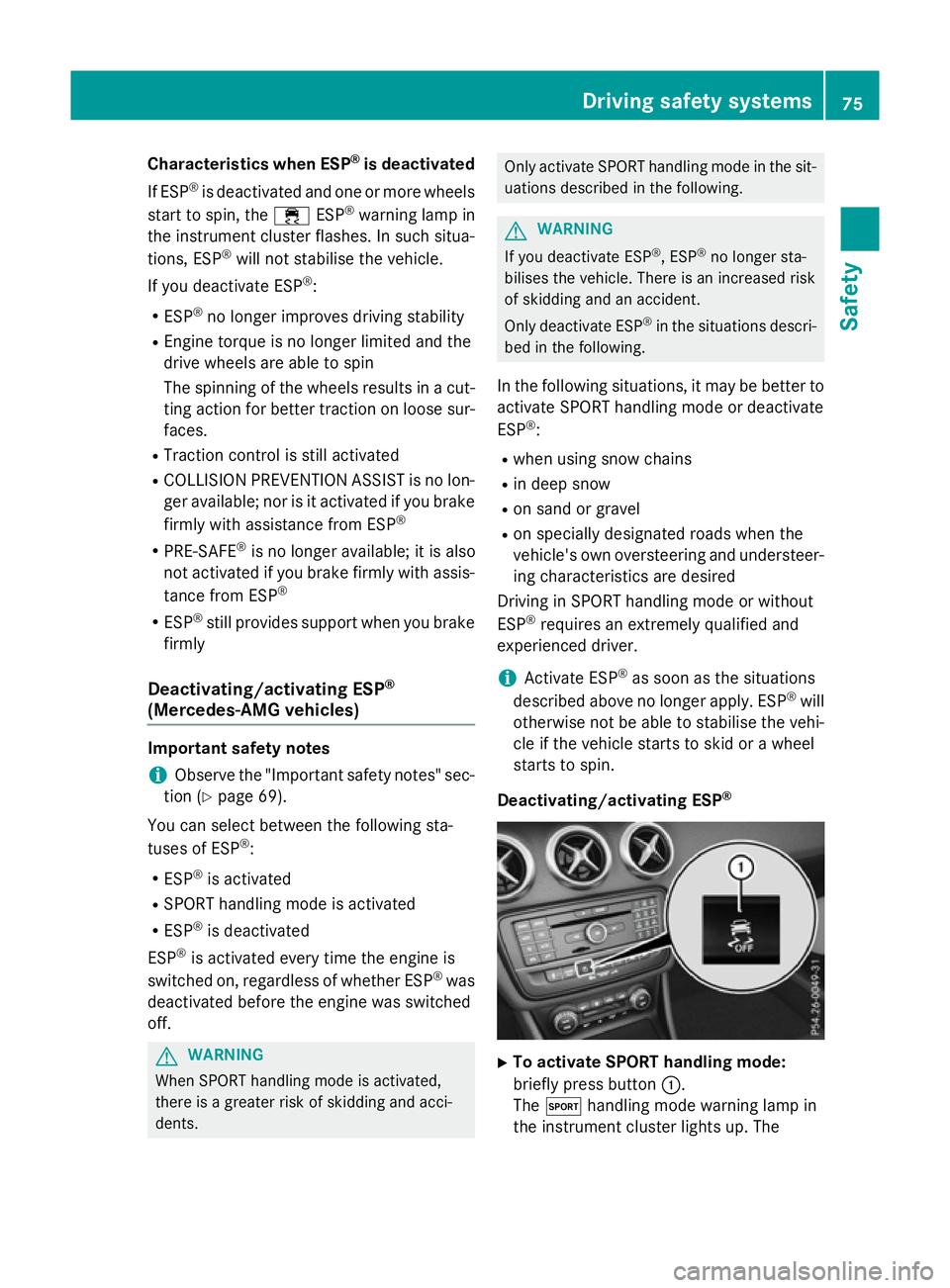
Deactivating/activating ESP ® X
To activate SPORT handling mode:
briefly press button :.
The M handling mode warning lamp in
the instrument cluster lights up. The Driving safety systems
75Safety Z
Page 79 of 417
SPORT handling mode
SPORT handling mode
message appears
in the multifunction display.
X To deactivate SPORT handling mode:
briefly press button :.
The M handling mode warning lamp in
the instrument cluster goes out.
X To deactivate ESP ®
:press button :until
the å ESP®
OFF warning lamp lights up
in the instrument cluster.
The ÷ OFF OFFmessage appears in the mul-
tifunction display.
X To activate ESP ®
:briefly press button :.
The å ESP®
OFF warning lamp in the
instrument cluster goes out. The ÷
ESP ®
ON
ON message appears in the multifunc-
tion display.
Characteristics of activated SPORT han-
dling mode
If SPORT handling mode is activated and one or more wheels start to spin, the ÷ESP®
warning lamp in the instrument cluster
flashes. ESP ®
only stabilises the vehicle to a
limited degree.
When SPORT handling mode is activated:
R ESP ®
only improves driving stability to a
limited degree
R Traction control is still activated
R Engine torque is no longer limited and the
drive wheels are able to spin
The spinning of the wheels results in a cut-
ting action for better traction on loose sur-faces.
R ESP ®
still provides support when you brake
firmly
Characteristics when ESP ®
is deactivated
If ESP ®
is deactivated and one or more wheels
start to spin, the ÷ESP®
warning lamp in
the instrument cluster does not flash. In such
situations, ESP ®
will not stabilise the vehicle. If you deactivate ESP
®
:
R ESP ®
no longer improves driving stability
R Engine torque is no longer limited and the
drive wheels are able to spin
The spinning of the wheels results in a cut-
ting action for better traction on loose sur- faces.
R Traction control is still activated
R COLLISION PREVENTION ASSIST is no lon-
ger available; nor is it activated if you brake
firmly with assistance from ESP ®
R PRE-SAFE ®
is no longer available; it is also
not activated if you brake firmly with assis-
tance from ESP ®
R ESP ®
still provides support when you brake
firmly
ESP ®
trailer stabilisation General notes
If your vehicle/trailer combination begins to
lurch, ESP
®
assists you in this situation. ESP ®
slows the vehicle down by braking and limit-
ing the engine output until the vehicle/trailer combination has stabilised.
Important safety notes G
WARNING
If road and weather conditions are poor,
trailer stabilisation will not be able to prevent the vehicle/trailer combination from swerv-
ing. Trailers with a high centre of gravity can
tip over before ESP ®
can detect this. There is
a risk of an accident.
Always adapt your driving style to the prevail-
ing road and weather conditions.
If your vehicle/trailer combination begins to
lurch, you can only stabilise the vehicle/
trailer combination by depressing the brake
firmly.
ESP ®
trailer stabilisation is active above
speeds of approximately 65 km/h. 76
Driving safety systemsSafety
Page 126 of 417
Vehicles with Adaptive Highbeam Assist:
when Adaptive Highbeam Assist is active, it
controls activation and deactivation of the
main-beam headlamps (Y page 123).
Headlamp flasher X
To switch on: turn the key in the ignition
lock to position 1or 2, or start the engine.
X Pull the combination switch in the direction
of arrow =. Hazard warning lamps
X
To switch on the hazard warning lamps:
press button :.
All turn signals flash. If you now switch on a turn signal using the combination switch,
only the turn signal lamp on the corre-
sponding side of the vehicle will flash.
X To switch off the hazard warning lamps:
press button :.
The hazard warning lamps switch on auto-
matically if:
R an airbag is deployed or
R the vehicle decelerates rapidly from a
speed of above 70 km/h and comes to a
standstill
The hazard warning lamps switch off auto-
matically if the vehicle reaches a speed of
above 10 km/h again after a full brake appli- cation.
The hazard warning lamps continue to oper-
ate even if the ignition is switched off. Adaptive Highbeam Assist
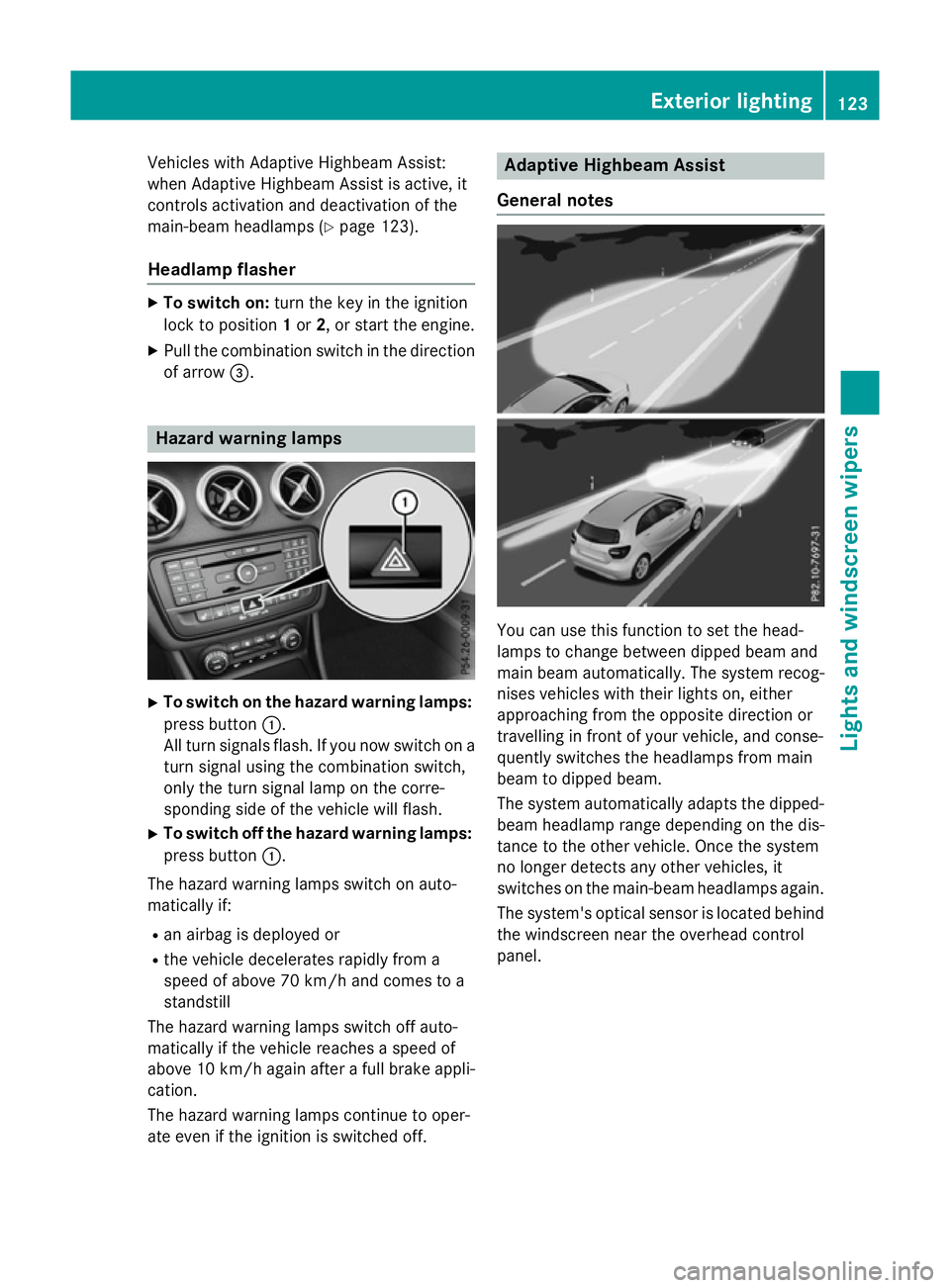
General notes You can use this function to set the head-
lamps to change between dipped beam and
main beam automatically. The system recog-
nises vehicles with their lights on, either
approaching from the opposite direction or
travelling in front of your vehicle, and conse-
quently switches the headlamps from main
beam to dipped beam.
The system automatically adapts the dipped- beam headlamp range depending on the dis-
tance to the other vehicle. Once the system
no longer detects any other vehicles, it
switches on the main-beam headlamps again.
The system's optical sensor is located behind
the windscreen near the overhead control
panel. Exterior lighting
123Lights and windscreen wipers Z
Page 132 of 417
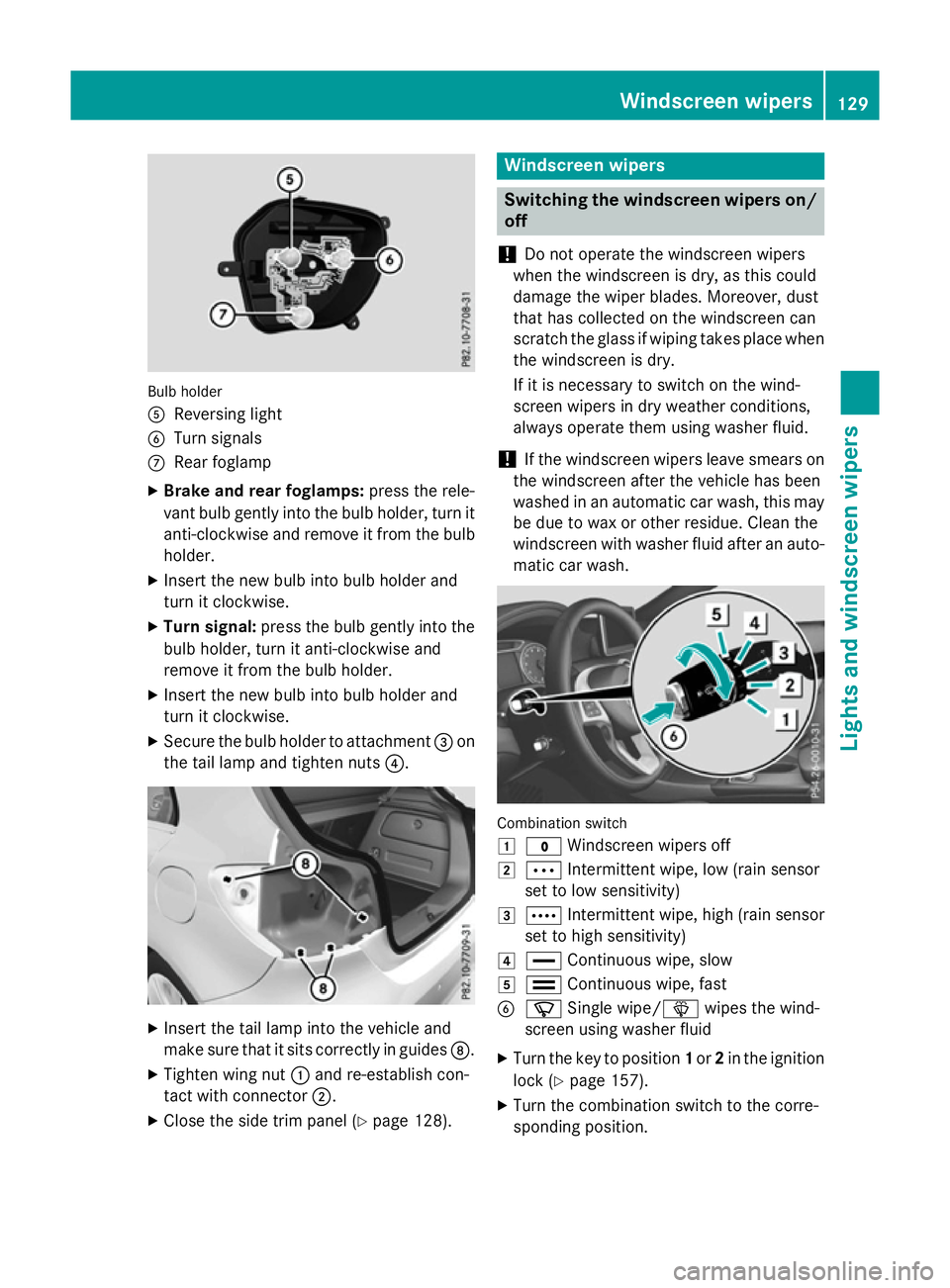
Bulb holder
A
Reversing light
B Turn signals
C Rear foglamp
X Brake and rear foglamps: press the rele-
vant bulb gently into the bulb holder, turn it
anti-clockwise and remove it from the bulb holder.
X Insert the new bulb into bulb holder and
turn it clockwise.
X Turn signal: press the bulb gently into the
bulb holder, turn it anti-clockwise and
remove it from the bulb holder.
X Insert the new bulb into bulb holder and
turn it clockwise.
X Secure the bulb holder to attachment =on
the tail lamp and tighten nuts ?.X
Insert the tail lamp into the vehicle and
make sure that it sits correctly in guides D.
X Tighten wing nut :and re-establish con-
tact with connector ;.
X Close the side trim panel (Y page 128). Windscreen wipers
Switching the windscreen wipers on/
off
! Do not operate the windscreen wipers
when the windscreen is dry, as this could
damage the wiper blades. Moreover, dust
that has collected on the windscreen can
scratch the glass if wiping takes place when the windscreen is dry.
If it is necessary to switch on the wind-
screen wipers in dry weather conditions,
always operate them using washer fluid.
! If the windscreen wipers leave smears on
the windscreen after the vehicle has been
washed in an automatic car wash, this may
be due to wax or other residue. Clean the
windscreen with washer fluid after an auto- matic car wash. Combination switch
1
$ Windscreen wipers off
2 Ä Intermittent wipe, low (rain sensor
set to low sensitivity)
3 Å Intermittent wipe, high (rain sensor
set to high sensitivity)
4 ° Continuous wipe, slow
5 ¯ Continuous wipe, fast
B í Single wipe/î wipes the wind-
screen using washer fluid
X Turn the key to position 1or 2in the ignition
lock (Y page 157).
X Turn the combination switch to the corre-
sponding position. Windscreen wipers
129Lights and windscreen wipers Z
Page 161 of 417
Pressing the Start/Stop button several times
in succession corresponds to the different
key positions in the ignition lock. Pre-requi-
site for this is that:
R you do not depress the brake pedal (vehi-
cles with automatic transmission)
R you do not depress the clutch pedal (vehi-
cles with manual transmission)
If you depress the brake pedal and press the
Start/Stop button, the engine starts immedi- ately (vehicles with automatic transmission).
If you depress the clutch pedal and press the
Start/Stop button, the engine starts immedi- ately (vehicles with manual transmission).
To start the vehicle without actively using the
key:
R the Start/Stop button must be inserted in
the ignition lock
R the key must be in the vehicle
R the vehicle must not be locked with the key
or KEYLESS-GO (Y page 83)
Do not keep the KEYLESS-GO key:
R with electronic devices, e.g. a mobile
phone or another key
R with metallic objects, e.g. coins or metal
film
R inside metallic objects, e.g. a metal case
This can affect the functionality of KEYLESS-
GO.
If you lock the vehicle with the key's remote
control or with KEYLESS-GO, after a short
time:
R you will not be able to switch on the ignition
with the Start/Stop button
R you will not be able to start the engine with
the Start/Stop button until the vehicle is
unlocked again
If you lock the vehicle centrally using the but- ton on the front door (Y page 90), you can
continue to start the engine with the Start/
Stop button.
The engine can be switched off while the vehi-
cle is in motion by pressing and holding the
Start/Stop button for three seconds. This function operates independently of the ECO
start/stop automatic engine switch-off func-
tion.
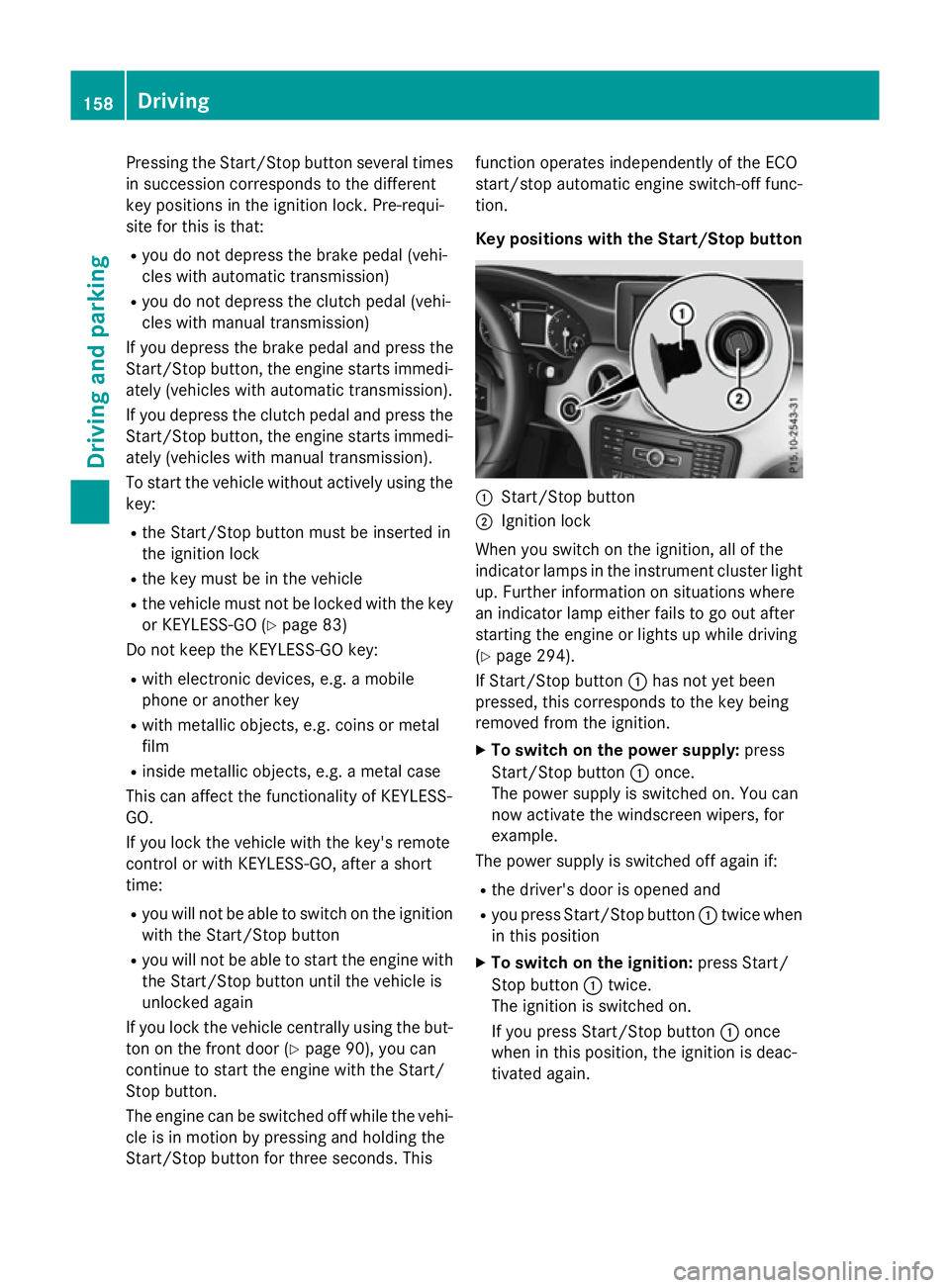
Key positions with the Start/Stop button
:
Start/Stop button
; Ignition lock
When you switch on the ignition, all of the
indicator lamps in the instrument cluster light up. Further information on situations where
an indicator lamp either fails to go out after
starting the engine or lights up while driving
(Y page 294).
If Start/Stop button :has not yet been
pressed, this corresponds to the key being
removed from the ignition.
X To switch on the power supply: press
Start/Stop button :once.
The power supply is switched on. You can
now activate the windscreen wipers, for
example.
The power supply is switched off again if:
R the driver's door is opened and
R you press Start/Stop button :twice when
in this position
X To switch on the ignition: press Start/
Stop button :twice.
The ignition is switched on.
If you press Start/Stop button :once
when in this position, the ignition is deac-
tivated again. 158
DrivingDriving and parking
Page 163 of 417
Automatic transmission
X
Shift the transmission to position P
(Y page 170).
The transmission position indicator in the
multifunction display shows P
(Y page 170).
i You can start the engine in transmission
position Pand N.
Starting procedure with the key To start the engine using the key instead of
the Start/Stop button, pull the Start/Stop
button out of the ignition lock.
X To start a diesel engine : turn the key to
position 2in the ignition lock (Y page 157).
The % preglow indicator lamp in the
instrument cluster lights up.
X Turn the key to position 3in the ignition
lock (Y page 157) and release it as soon as
the engine is running.
Starting procedure using the Start/
Stop button The Start/Stop button can be used to start
the vehicle manually without inserting the key
into the ignition lock. The key must be in the
vehicle and the Start/Stop button must be
inserted in the ignition lock. This mode for
starting the engine operates independently of the ECO start/stop automatic engine start
function.
You can start the engine if a valid key is in thevehicle. Switch off the engine and always take
the key with you when leaving the vehicle,
even if you only leave it for a short time. Pay
attention to the important safety notes. X
Vehicles with automatic transmission:
depress the brake pedal and keep it
depressed.
X Vehicles with manual transmission:
depress the clutch pedal and keep it
depressed.
X Press the Start/Stop button once
(Y page 157).
Vehicles with a petrol engine: the engine
starts.
Vehicles with a diesel engine: preglow is
activated and the engine starts. Pulling away
General notes G
WARNING
Vehicles with automatic transmission:
If the engine speed is above the engine idling speed and you then engage transmission
position Dor R, the vehicle may accelerate
suddenly. There is a risk of an accident.
When engaging transmission position Dor R,
always keep the brake pedal firmly depressed
and do not depress the accelerator pedal at
the same time.
! Vehicles with manual transmission:
change gear in good time and avoid spin-
ning the wheels. You could otherwise dam-
age the vehicle.
Depress the accelerator carefully when pull-
ing away.
The vehicle locks centrally once you have
pulled away. The locking knobs in the doors
drop down.
You can open the doors from the inside at any
time.
You can also deactivate the automatic locking feature (Y page 251).
Vehicles with automatic transmission: it
is only possible to shift the transmission from position Pto the desired position if you 160
DrivingDriving and pa
rking
Page 166 of 417
The ECO start/stop function switches off the
engine automatically at low speeds.
X Brake the vehicle.
X Shift to neutral N(Y page 168) (follow
gearshift instruction :to shift into neutral
N, if necessary).
X Release the clutch pedal.
The engine is switched off automatically.
Vehicles with automatic transmission
If the vehicle is braked to a standstill with the transmission in Dor N, the ECO start/stop
function switches off the engine automati-
cally.
The HOLD function can be activated if the
engine has been switched off automatically. It
is then not necessary to continue applying the brakes during the automatic stop phase.
When you depress the accelerator pedal, the
engine starts automatically and the braking
effect of the HOLD function is deactivated.
Automatic engine start General notes
The engine is started automatically if:
R
you switch off the ECO start/stop function
by pressing the ECO button
R you engage reverse gear R
R you unfasten your seat belt or open the
driver's door
R the vehicle starts to roll
R the brake system requires this
R the temperature in the vehicle interior devi-
ates from the set range
R the system detects moisture on the wind-
screen when the air-conditioning system is
switched on
R the battery's charge status is too low
Vehicles with manual transmission
! Only engage gear when the clutch pedal is
depressed. The engine is started automatically if you:
R depress the clutch pedal fully
R depress the accelerator pedal
Vehicles with automatic transmission
The engine is started automatically if you: R release the brake pedal in transmission
position Dor Nwhen the HOLD function is
not active
R depress the accelerator pedal
R move the transmission out of position P
Shifting the transmission to position Pdoes
not start the engine.
If you shift the transmission from Rto D, the
ECO start/stop function is available again
once the èECO symbol reappears in
green in the multifunction display.
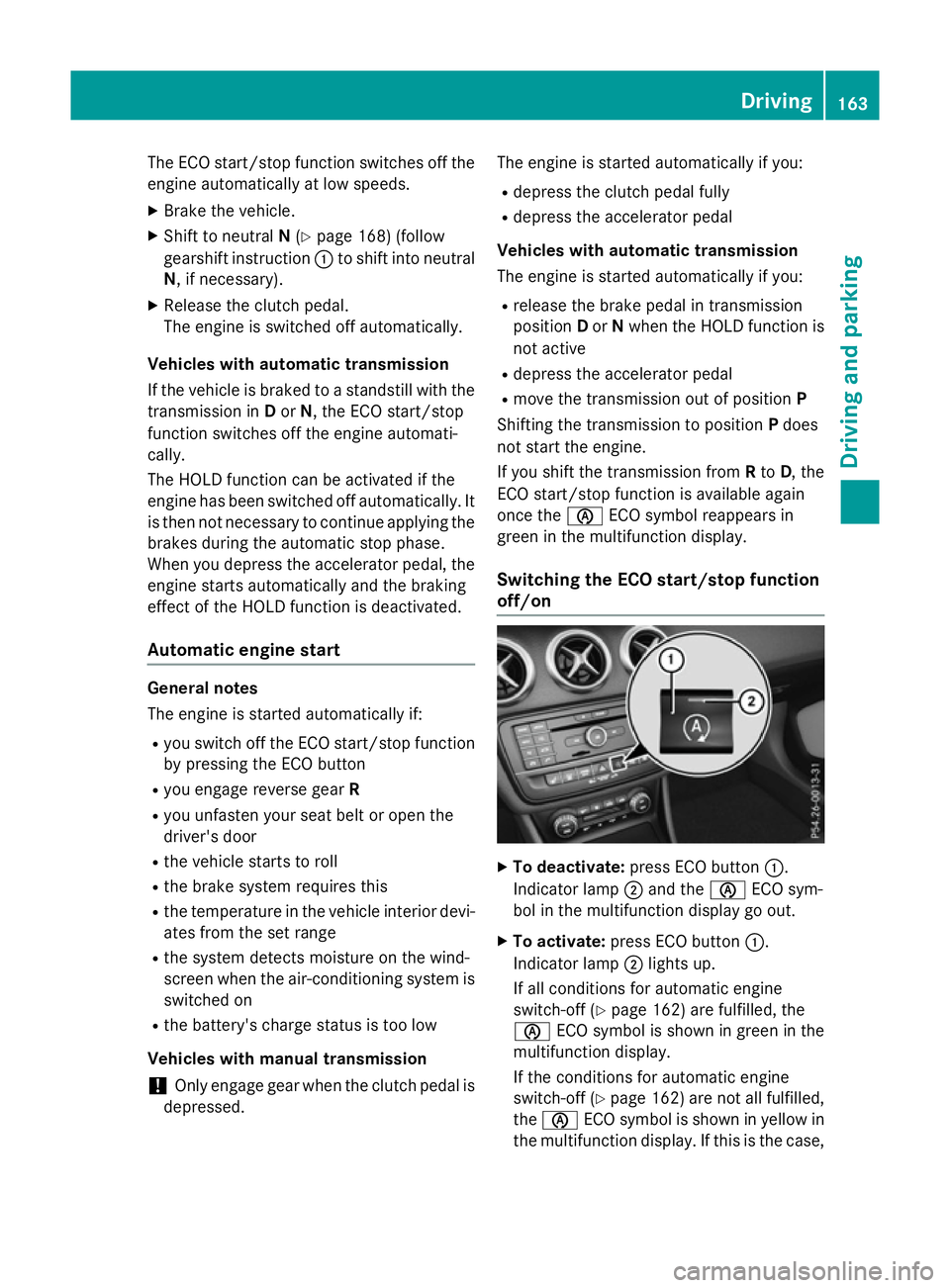
Switching the ECO start/stop function
off/on X
To deactivate: press ECO button :.
Indicator lamp ;and the èECO sym-
bol in the multifunction display go out.
X To activate: press ECO button :.
Indicator lamp ;lights up.
If all conditions for automatic engine
switch-off (Y page 162) are fulfilled, the
è ECO symbol is shown in green in the
multifunction display.
If the conditions for automatic engine
switch-off (Y page 162) are not all fulfilled,
the è ECO symbol is shown in yellow in
the multifunction display. If this is the case, Driving
163Driving and parking Z