steering wheel MERCEDES-BENZ A-CLASS HATCHBACK 2015 Owner's Guide
[x] Cancel search | Manufacturer: MERCEDES-BENZ, Model Year: 2015, Model line: A-CLASS HATCHBACK, Model: MERCEDES-BENZ A-CLASS HATCHBACK 2015Pages: 417, PDF Size: 11.91 MB
Page 170 of 417
In addition, the current drive program set-
tings are displayed briefly in the Audio 20 or
COMAND Online display.
i In a few countries, the ECO start/stop
function is deactivated at the factory due to the quality of the available fuel. In this case,
the ECO start/stop function is not available in any drive program, regardless of the dis-
play in the Audio 20 or COMAND Online
display.
Available drive programs: C
Comfort Comfortable and econom-
ical driving characteristics S
Sport Sporty driving character-
istics
I
Individual Individual settings
E
Economy Particularly economical
driving characteristics
Additional information for drive programs
(Y page 175).
You can also change gear yourself using the
steering wheel gearshift paddles. Further
information on the manual drive program
(Y page 177). DYNAMIC SELECT controller
(Mercedes-AMG vehicles)
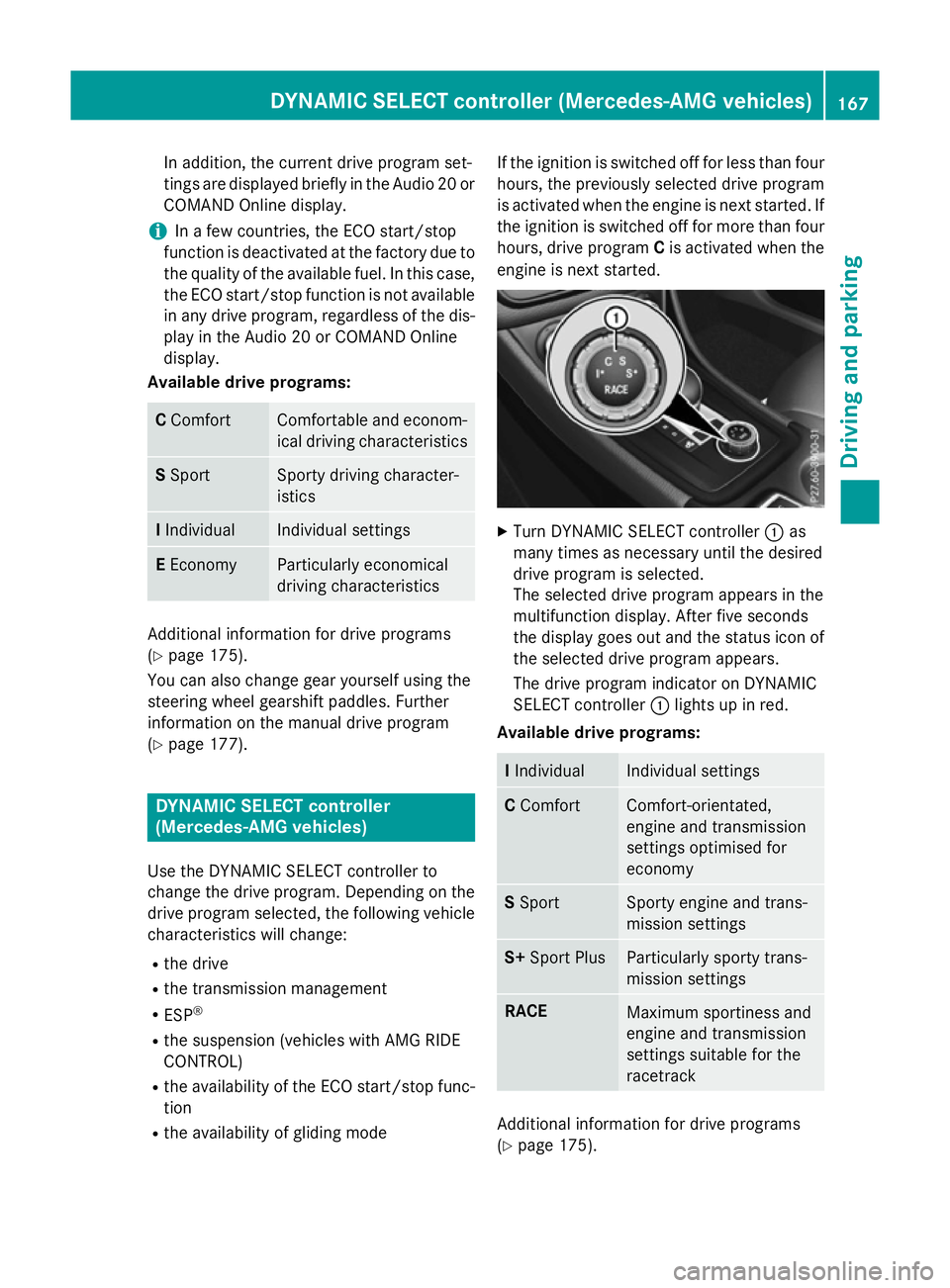
Use the DYNAMIC SELECT controller to
change the drive program. Depending on the drive program selected, the following vehiclecharacteristics will change:
R the drive
R the transmission management
R ESP ®
R the suspension (vehicles with AMG RIDE
CONTROL)
R the availability of the ECO start/stop func-
tion
R the availability of gliding mode If the ignition is switched off for less than four
hours, the previously selected drive program
is activated when the engine is next started. Ifthe ignition is switched off for more than four
hours, drive program Cis activated when the
engine is next started. X
Turn DYNAMIC SELECT controller :as
many times as necessary until the desired
drive program is selected.
The selected drive program appears in the
multifunction display. After five seconds
the display goes out and the status icon of the selected drive program appears.
The drive program indicator on DYNAMIC
SELECT controller :lights up in red.
Available drive programs: I
Individual Individual settings
C
Comfort Comfort-orientated,
engine and transmission
settings optimised for
economy
S
Sport Sporty engine and trans-
mission settings
S+
Sport Plus Particularly sporty trans-
mission settings
RACE
Maximum sportiness and
engine and transmission
settings suitable for the
racetrack
Additional information for drive programs
(Y page 175). DYNAMIC SELECT controller (Mercedes-AMG vehicles)
167Driving and parking Z
Page 171 of 417
You can also change gear yourself using the
steering wheel gearshift paddles. Further
information on the manual drive program
(Y page 177). Manual transmission
Gear lever
! Only engage gear when the clutch pedal is
depressed.
! When shifting to
5thand 6thgear, you
must press the shift lever to the right. Oth-
erwise, you could shift unintentionally into
3rd or4th gear and damage the engine or
transmission.
If you shift down at too high a speed (trans-
mission braking), this can cause the engine to overrev, leading to engine damage.
Do not use the clutch bite point to keep the
vehicle stationary on uphill gradients.
There is otherwise a risk of damaging the
clutch.
! On long and steep downhill gradients,
especially if the vehicle is laden or towing a
trailer, you must shift into gear 1, 2or3in
good time. This uses the engine's braking
effect. This relieves the load on the brake
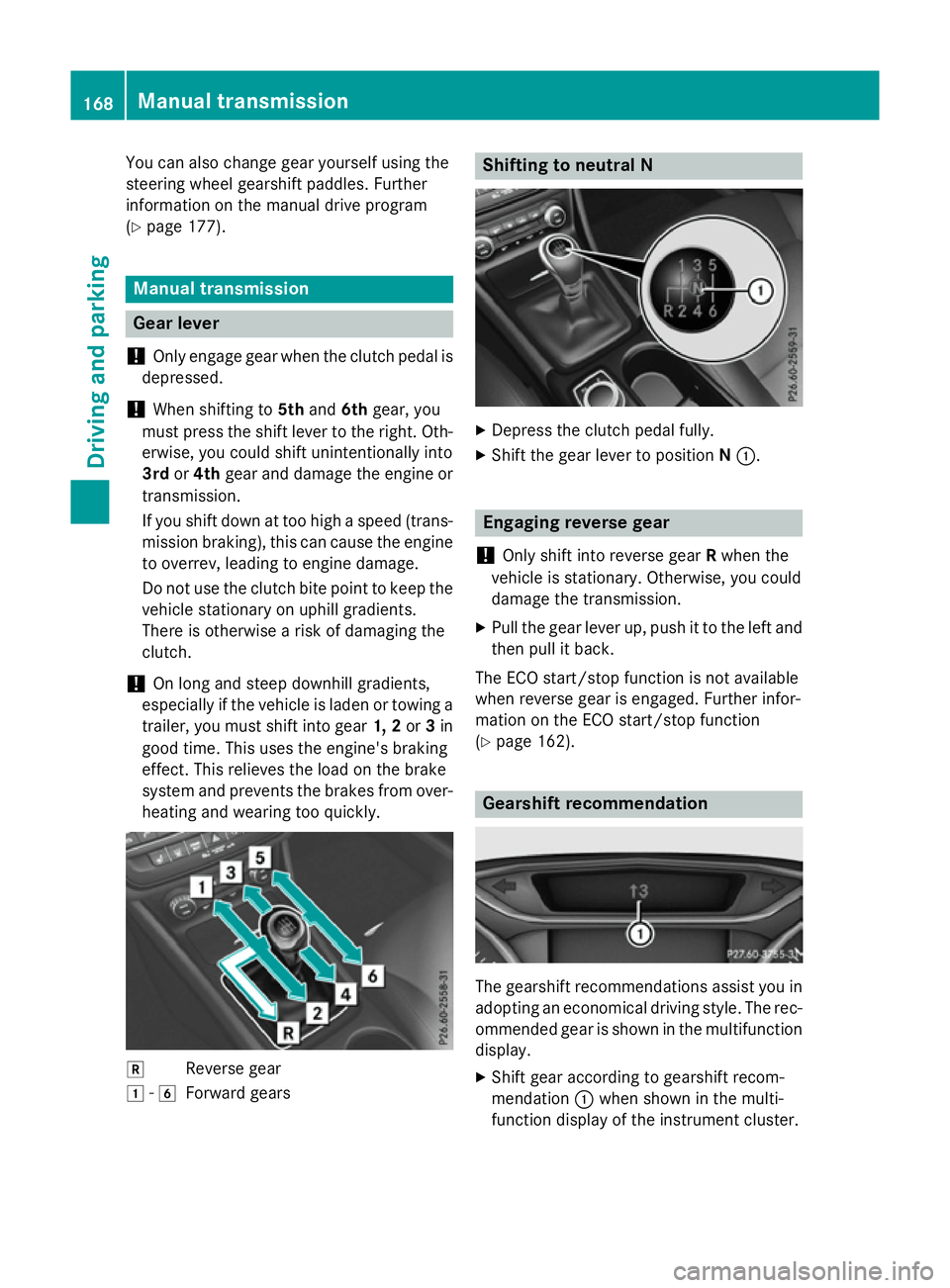
system and prevents the brakes from over- heating and wearing too quickly. k
Reverse gear
1 -6
Forward gears Shifting to neutral N
X
Depress the clutch pedal fully.
X Shift the gear lever to position N:. Engaging reverse gear
! Only shift into reverse gear
Rwhen the
vehicle is stationary. Otherwise, you could
damage the transmission.
X Pull the gear lever up, push it to the left and
then pull it back.
The ECO start/stop function is not available
when reverse gear is engaged. Further infor-
mation on the ECO start/stop function
(Y page 162). Gearshift recommendation
The gearshift recommendations assist you in
adopting an economical driving style. The rec- ommended gear is shown in the multifunction
display.
X Shift gear according to gearshift recom-
mendation :when shown in the multi-
function display of the instrument cluster. 168
Manual transmissionDriving and parking
Page 178 of 417
Mercedes-AMG vehicles:
it is only possible
to use kickdown in the automatic drive pro-
grams and in temporary manual drive pro-
gram M. When manual drive program Mis
selected permanently, kickdown is not pos-
sible.
For further information on kickdown in man-
ual drive program M(Y page 179).
Towing a trailer Towing a trailer is not possible with all mod-
els. For further information, see
(Y page 231).
X Drive in the middle of the engine speed
range on uphill gradients.
X Depending on the uphill or downhill gradi-
ent, select a lower gear (Y page 189), even
if cruise control, DISTRONIC PLUS, or
SPEEDTRONIC are activated. Drive programs
All vehicles (except Mercedes-AMG
vehicles) Drive program C (Comfort)
Drive program
Cis characterised by the fol-
lowing:
R the vehicle delivers comfortable, economi-
cal driving characteristics.
R the vehicle pulling away more gently in
forward and reverse gears unless the accel-
erator pedal is depressed fully.
R the vehicle having improved driving stabil-
ity, for example on slippery road surfaces.
R optimal fuel consumption resulting from
the automatic transmission shifting up
sooner. The vehicle is driven in the low
engine speed range and the wheels are less
likely to spin. Drive program S (Sport)
Drive program
Sis characterised by the fol-
lowing:
R sporty engine settings.
R the automatic transmission shifting up
later. as a result of the later automatic
transmission shift points, the fuel con-
sumption possibly being higher.
Drive program I (Individual)
In drive program Ithe following properties of
the drive program can be selected:
R the drive (engine and transmission man-
agement)
R the suspension (vehicles with damping sys-
tem or AMG RIDE CONTROL)
R the steering
R the availability of the ECO start/stop func-
tion
R the climate control
Information about configuring drive program I
with COMAND Online or Audio 20 can be
found in the Digital Owner's Manual.
i To permanently select the gears in drive
program Iusing the steering wheel pad-
dles, select the M(manual) setting for the
drive.
Drive program E (Economy)
Drive program Eis characterised by the fol-
lowing:
R comfort-oriented engine settings.
R optimal fuel consumption resulting from
the automatic transmission shifting up
sooner.
R the vehicle pulling away more gently in
forward and reverse gears unless the accel-
erator pedal is depressed fully.
R the vehicle having improved driving stabil-
ity, for example on slippery road surfaces.
R the automatic transmission shifting up
sooner. This results in the vehicle being Automatic transmission
175Driving and parking Z
Page 180 of 417
R
as a result of the later automatic transmis-
sion shift points, the fuel consumption pos-sibly being higher.
R the suspension exhibits particularly stiff
springing and damping settings (vehicles
with AIR RIDE CONTROL).
R gliding mode is not available.
R the ECO start/stop function is not availa-
ble. Manual gearshifting
General notes You can change gear yourself using the steer-
ing wheel gearshift paddles. The transmission
must be in position D.
Depending on which gearshift paddle is
pulled, the automatic transmission immedi-
ately shifts into the next gear up or down, if
permitted.
Mercedes-AMG vehicles: to use manual
shifting, you have two options:
R temporary setting
R permanent setting
If you activate manual gearshifting, the mul-
tifunction display will show the current gear
instead of transmission position D.
If manual gearshifting is deactivated, the
gears will be selected automatically.
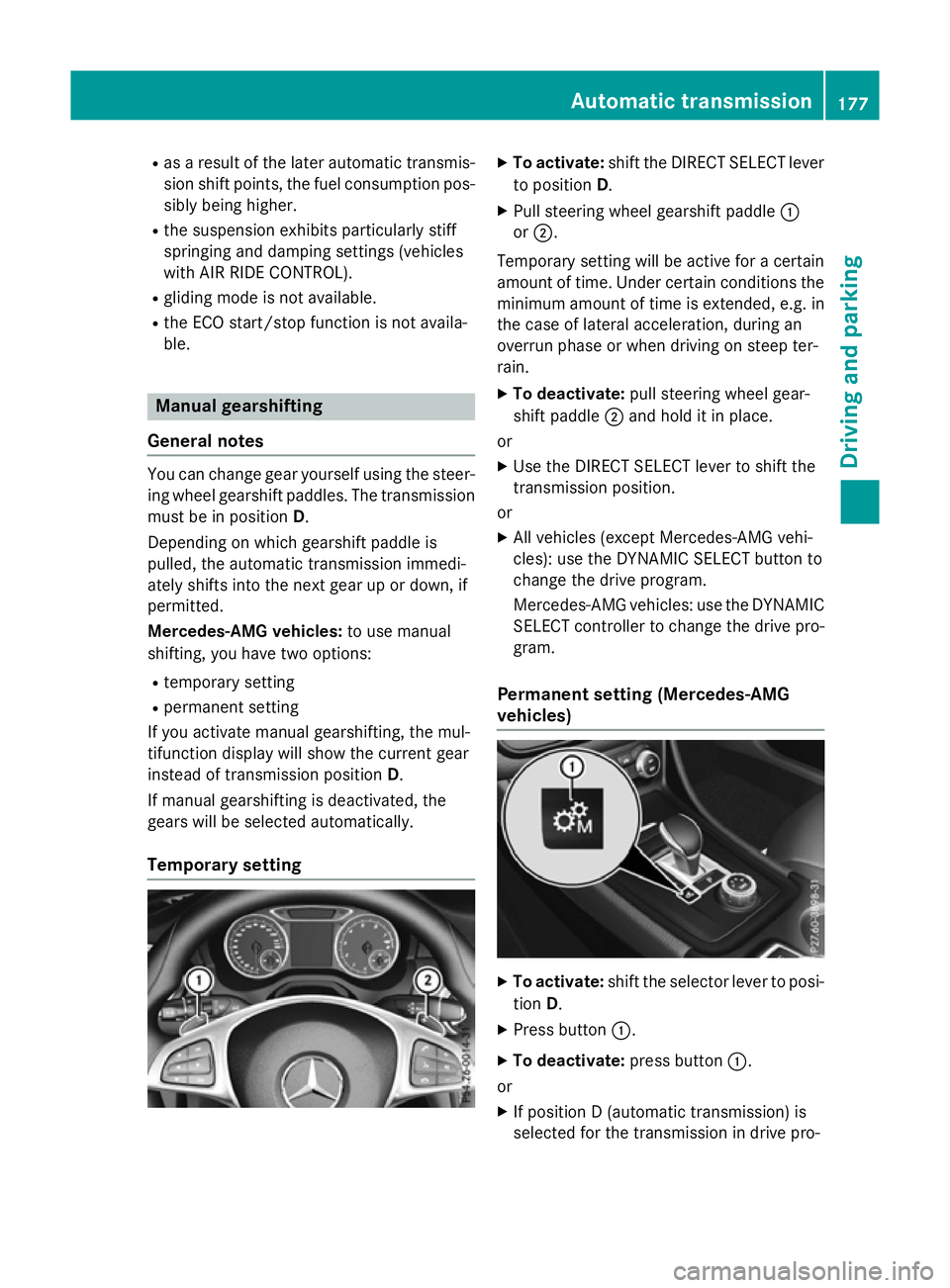
Temporary setting X
To activate: shift the DIRECT SELECT lever
to position D.
X Pull steering wheel gearshift paddle :
or ;.
Temporary setting will be active for a certain
amount of time. Under certain conditions the
minimum amount of time is extended, e.g. in the case of lateral acceleration, during an
overrun phase or when driving on steep ter-
rain.
X To deactivate: pull steering wheel gear-
shift paddle ;and hold it in place.
or X Use the DIRECT SELECT lever to shift the
transmission position.
or X All vehicles (except Mercedes-AMG vehi-
cles): use the DYNAMIC SELECT button to
change the drive program.
Mercedes-AMG vehicles: use the DYNAMIC
SELECT controller to change the drive pro-
gram.
Permanent setting (Mercedes-AMG
vehicles) X
To activate: shift the selector lever to posi-
tion D.
X Press button :.
X To deactivate: press button:.
or X If position D (automatic transmission) is
selected for the transmission in drive pro- Automatic transmission
177Driving and parking Z
Page 181 of 417
gram
I: shift to drive program Iwith the
DYNAMIC SELECT controller.
Shifting gears !
Mercedes-AMG vehicles:
the automatic
transmission does not shift up automati-
cally even when the engine limiting speed
for the current gear is reached. When the
engine limiting speed is reached, the fuel
supply is cut to prevent the engine from
overrevving. Always make sure that the
engine speed does not reach the red area of
the rev counter. There is otherwise a risk of engine damage. X
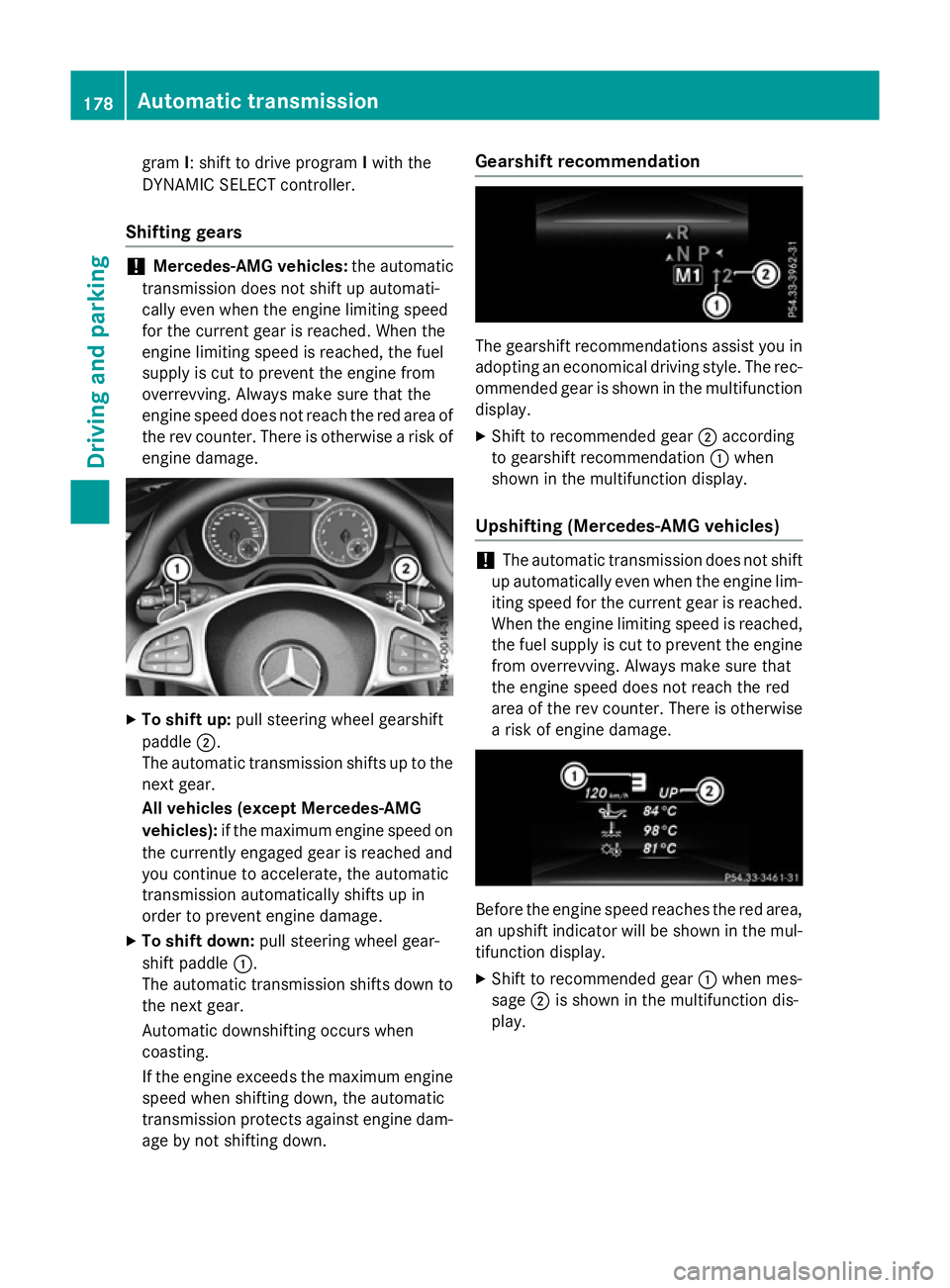
To shift up: pull steering wheel gearshift
paddle ;.
The automatic transmission shifts up to the next gear.
All vehicles (except Mercedes-AMG
vehicles): if the maximum engine speed on
the currently engaged gear is reached and
you continue to accelerate, the automatic
transmission automatically shifts up in
order to prevent engine damage.
X To shift down: pull steering wheel gear-
shift paddle :.
The automatic transmission shifts down to
the next gear.
Automatic downshifting occurs when
coasting.
If the engine exceeds the maximum engine speed when shifting down, the automatic
transmission protects against engine dam-
age by not shifting down. Gearshift recommendation
The gearshift recommendations assist you in
adopting an economical driving style. The rec- ommended gear is shown in the multifunction
display.
X Shift to recommended gear ;according
to gearshift recommendation :when
shown in the multifunction display.
Upshifting (Mercedes-AMG vehicles) !
The automatic transmission does not shift
up automatically even when the engine lim-
iting speed for the current gear is reached.
When the engine limiting speed is reached,
the fuel supply is cut to prevent the engine from overrevving. Always make sure that
the engine speed does not reach the red
area of the rev counter. There is otherwisea risk of engine damage. Before the engine speed reaches the red area,
an upshift indicator will be shown in the mul-
tifunction display.
X Shift to recommended gear :when mes-
sage ;is shown in the multifunction dis-
play. 178
Automatic transmissionDriving and parking
Page 182 of 417
Kickdown
X
For maximum acceleration, depress the
accelerator pedal beyond the pressure
point.
The transmission shifts to a lower gear
depending on the engine speed.
X Shift back up once the desired speed is
reached.
During kickdown, you cannot shift gears
using the steering wheel gearshift paddles.
If you apply full throttle, the automatic trans-
mission shifts up to the next gear when the
maximum engine speed is reached. This pre-
vents the engine from overrevving.
Mercedes-AMG vehicles: it is only possible
to use kickdown in temporary manual drive
program M. When manual drive program Mis
selected permanently, kickdown is not pos-
sible. Automatic trans
mission
179Driving an d parking Z
Page 194 of 417
Driving on flooded roads
!
Bear in mind that vehicles travelling in
front or in the opposite direction create
waves. This may cause the maximum per-
missible water depth to be exceeded.
These notes must be observed under all
circumstances. You could otherwise dam-
age the engine, the electronics or the trans- mission.
If you must drive on stretches of road on
which water has collected, please bear in
mind that:
R in the case of standing water, the water
level must be no higher than the lower edge
of the vehicle body
R you should drive no faster than walking
pace Winter driving
G
WARNING
If you shift down on a slippery road surface in an attempt to increase the engine's braking
effect, the drive wheels could lose their grip.
This increases the risk of skidding and having
an accident.
Do not shift down for additional engine brak-
ing on a slippery road surface. G
DANGER
If the exhaust pipe is blocked or adequate
ventilation is not possible, poisonous gases
such as carbon monoxide (CO) may enter the vehicle. This is the case, e.g. if the vehicle
becomes trapped in snow. There is a risk of
fatal injury.
If you leave the engine or the auxiliary heating
running, make sure the exhaust pipe and area
around the vehicle are clear of snow. To
ensure an adequate supply of fresh air, open a window on the side of the vehicle that is not
facing into the wind.
Have your vehicle winterproofed at a qualified specialist workshop at the onset of winter. You should drive particularly carefully on slip-
pery road surfaces. Avoid sudden accelera-
tion, steering and braking manoeuvres. Do
not use cruise control or DISTRONIC PLUS.
If the vehicle threatens to skid or cannot be
stopped when moving at low speed:
X Vehicles with manual transmission:
shift to neutral.
X Vehicles with automatic transmission:
shift the transmission to position N.
X Try to bring the vehicle under control by
using corrective steering.
The outside temperature indicator is not
designed to serve as an ice-warning device
and is therefore unsuitable for that purpose.
Changes in the outside temperature are dis-
played after a short delay.
Indicated temperatures just above the freez-
ing point do not guarantee that the road sur-
face is free of ice. The road may still be icy,
especially in wooded areas or on bridges.
You should pay special attention to road con-
ditions when temperatures are around freez-
ing point.
Further information on driving with snow
chains (Y page 361).
Further information on driving with summer
tyres (Y page 360).
Observe the notes in the "Winter operation"
section (Y page 360). Driving systems
Cruise control
General notes Cruise control maintains a constant road
speed for you. It brakes automatically in order to avoid exceeding the set speed. You must
select a lower gear in good time on long and
steep downhill gradients, especially if the
vehicle is laden or towing a trailer. For vehi-
cles with automatic transmission, you need tohave selected manual shift drive program M
(Y page 177). By doing so, you will make use Driving syste
ms
191Driving an d parking Z
Page 209 of 417
Start-off assist (except Mercedes-
AMG vehicles)
Important safety notes G
WARNING
If you use start-off assist, individual wheels
may start to spin and the vehicle may skid. If
ESP ®
is deactivated, there is a greater danger
of skidding and having an accident. Make sure that no persons or obstacles are in the area
around the vehicle.
Start-off assist enables optimum acceleration
from a standstill. For this, a suitably high-grip road surface is required, along with the tyresand vehicle being in good condition.
Do not activate start-off assist on public
roads.
Observe the safety notes on driving safety
systems (Y page 69).
Be sure to read the safety notes and informa-
tion on ESP ®
(Y page 73).
Activating start-off assist X
Deactivate ESP ®
(Y page 248).
X Turn the steering wheel to the straight-
ahead position.
X Depress the brake pedal firmly with your
left foot and keep the brake pedal
depressed.
X Shift the transmission to position D.
X Use the DYNAMIC SELECT button to select
the Sdrive program (Y page 166).
X Quickly depress the accelerator pedal fully.
X Take your foot off the brake, but keep the
accelerator pedal depressed.
The vehicle pulls away at maximum accel-
eration.
i Activate ESP ®
as soon as the acceleration
process has ended. ESP ®
will otherwise not
be able to stabilise the vehicle if the vehicle
starts to skid or a wheel starts to spin. Cancelling start-off assist
X Remove your foot from the accelerator
pedal.
X Reactivate ESP. RACE START (AMG vehicles)
Important safety notes i
RACE START must not be used on normal
roads. RACE START must only be activated and used on dedicated road circuits, out-
side of public road use.
i RACE START is only available in
Mercedes‑AMG vehicles. G
WARNING
If you use RACE START, individual tyres may
get into a spin and the vehicle could skid.
Depending on the selected ESP ®
mode, there
is an increased risk of skidding and having an accident. Make sure that no persons, animals
or obstacles are within range of the vehicle.
RACE START enables optimum acceleration
from a standing start. For this, a suitably high-
grip road surface is required, along with the
tyres and vehicle being in good condition.
i Observe the safety notes on driving safety
systems (Y page 69).
Be sure to read the safety notes and infor-
mation on ESP ®
(Y page 73).
Activation conditions You can activate RACE START if:
R the doors, the bonnet and the boot lid are
closed
R the engine is running and the transmission,
traction control and engine are at operating temperature
R the steering wheel is in the straight-ahead
position
R the vehicle is stationary and the brake
pedal is depressed (left foot) 206
Driving systemsDriving and parking
Page 210 of 417
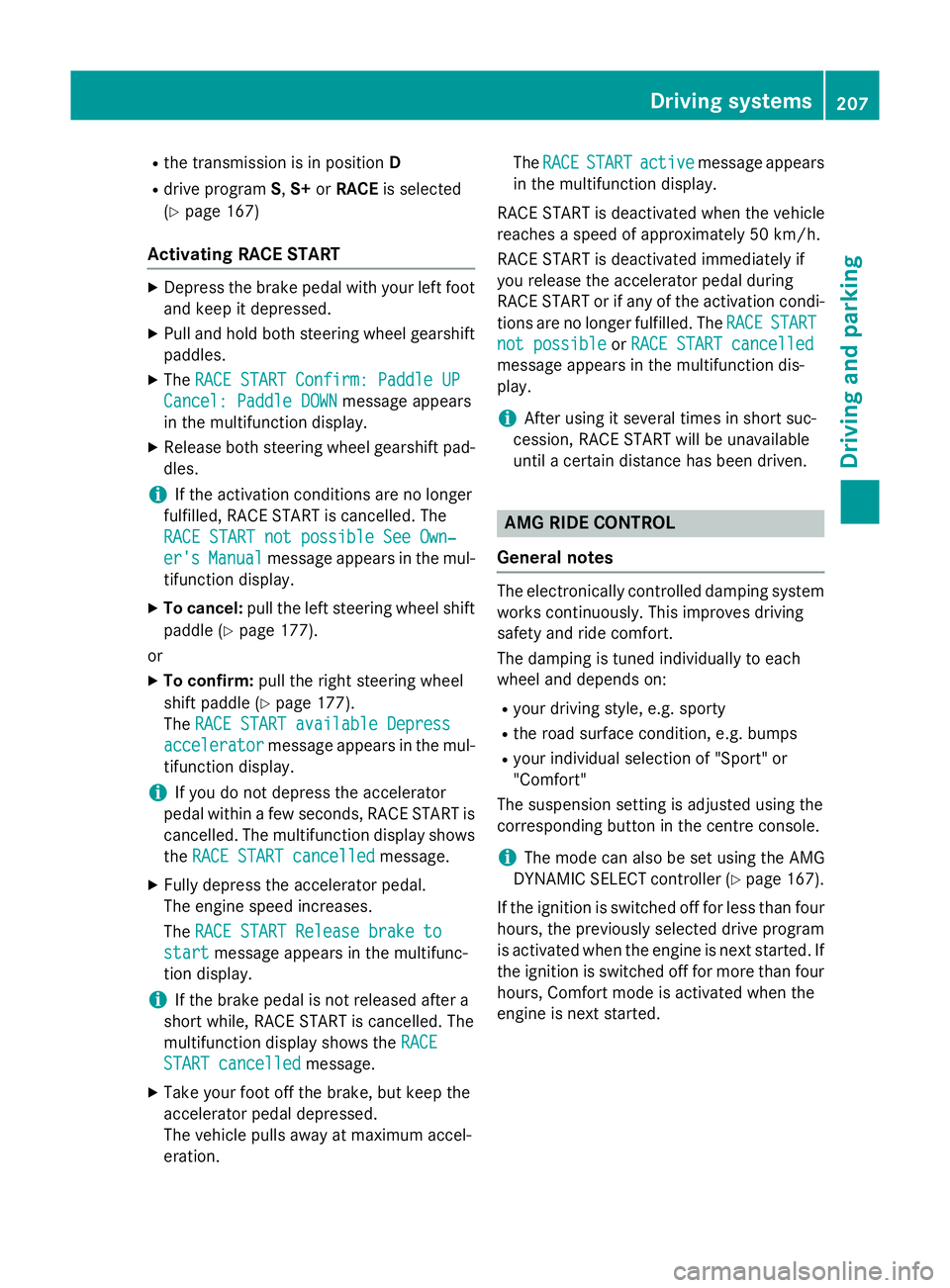
R
the transmission is in position D
R drive program S,S+ orRACE is selected
(Y page 167)
Activating RACE START X
Depress the brake pedal with your left foot
and keep it depressed.
X Pull and hold both steering wheel gearshift
paddles.
X The RACE START Confirm: Paddle UP
RACE START Confirm: Paddle UP
Cancel: Paddle DOWN
Cancel: Paddle DOWN message appears
in the multifunction display.
X Release both steering wheel gearshift pad-
dles.
i If the activation conditions are no longer
fulfilled, RACE START is cancelled. The
RACE START not possible See Own‐
RACE START not possible See Own‐
er's
er's Manual
Manual message appears in the mul-
tifunction display.
X To cancel: pull the left steering wheel shift
paddle (Y page 177).
or
X To confirm: pull the right steering wheel
shift paddle (Y page 177).
The RACE START available Depress
RACE START available Depress
accelerator
accelerator message appears in the mul-
tifunction display.
i If you do not depress the accelerator
pedal within a few seconds, RACE START is cancelled. The multifunction display shows
the RACE START cancelled
RACE START cancelled message.
X Fully depress the accelerator pedal.
The engine speed increases.
The RACE START Release brake to RACE START Release brake to
start
start message appears in the multifunc-
tion display.
i If the brake pedal is not released after a
short while, RACE START is cancelled. The
multifunction display shows the RACE
RACE
START cancelled
START cancelled message.
X Take your foot off the brake, but keep the
accelerator pedal depressed.
The vehicle pulls away at maximum accel-
eration. The
RACE RACE START
START active
active message appears
in the multifunction display.
RACE START is deactivated when the vehicle
reaches a speed of approximately 50 km/h.
RACE START is deactivated immediately if
you release the accelerator pedal during
RACE START or if any of the activation condi-
tions are no longer fulfilled. The RACE
RACE START START
not possible
not possible orRACE START cancelled
RACE START cancelled
message appears in the multifunction dis-
play.
i After using it several times in short suc-
cession, RACE START will be unavailable
until a certain distance has been driven. AMG RIDE CONTROL
General notes The electronically controlled damping system
works continuously. This improves driving
safety and ride comfort.
The damping is tuned individually to each
wheel and depends on:
R your driving style, e.g. sporty
R the road surface condition, e.g. bumps
R your individual selection of "Sport" or
"Comfort"
The suspension setting is adjusted using the
corresponding button in the centre console.
i The mode can also be set using the AMG
DYNAMIC SELECT controller (Y page 167).
If the ignition is switched off for less than four hours, the previously selected drive program
is activated when the engine is next started. If
the ignition is switched off for more than four hours, Comfort mode is activated when the
engine is next started. Driving systems
207Driving and parking Z
Page 215 of 417
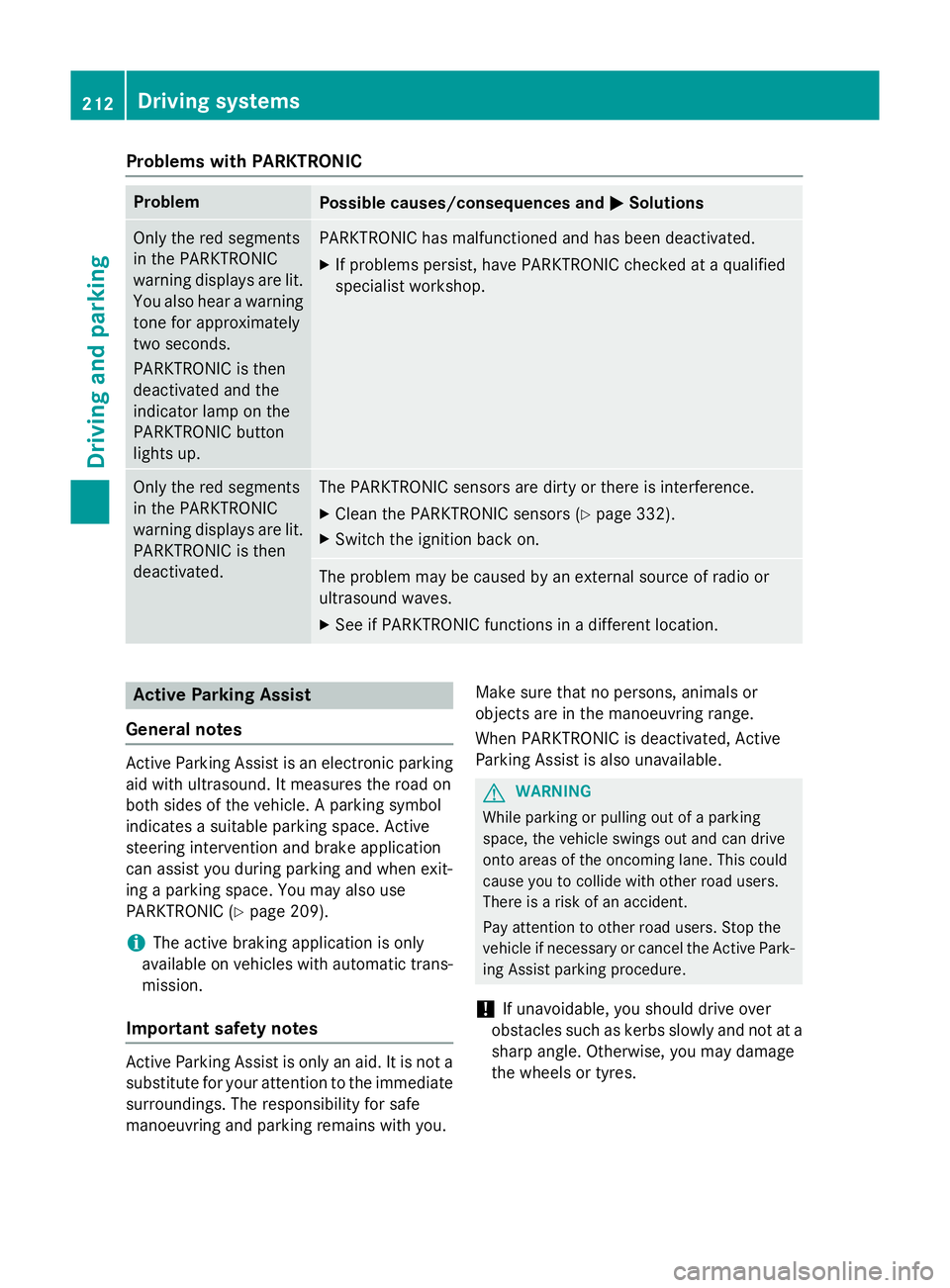
Problems with PARKTRONIC
Problem
Possible causes/consequences and
M
MSolutions Only the red segments
in the PARKTRONIC
warning displays are lit.
You also hear a warning
tone for approximately
two seconds.
PARKTRONIC is then
deactivated and the
indicator lamp on the
PARKTRONIC button
lights up. PARKTRONIC has malfunctioned and has been deactivated.
X If problems persist, have PARKTRONIC checked at a qualified
specialist workshop. Only the red segments
in the PARKTRONIC
warning displays are lit.
PARKTRONIC is then
deactivated. The PARKTRONIC sensors are dirty or there is interference.
X Clean the PARKTRONIC sensors (Y page 332).
X Switch the ignition back on. The problem may be caused by an external source of radio or
ultrasound waves.
X See if PARKTRONIC functions in a different location. Active Parking Assist
General notes Active Parking Assist is an electronic parking
aid with ultrasound. It measures the road on
both sides of the vehicle. A parking symbol
indicates a suitable parking space. Active
steering intervention and brake application
can assist you during parking and when exit-
ing a parking space. You may also use
PARKTRONIC (Y page 209).
i The active braking application is only
available on vehicles with automatic trans-
mission.
Important safety notes Active Parking Assist is only an aid. It is not a
substitute for your attention to the immediate
surroundings. The responsibility for safe
manoeuvring and parking remains with you. Make sure that no persons, animals or
objects are in the manoeuvring range.
When PARKTRONIC is deactivated, Active
Parking Assist is also unavailable. G
WARNING
While parking or pulling out of a parking
space, the vehicle swings out and can drive
onto areas of the oncoming lane. This could
cause you to collide with other road users.
There is a risk of an accident.
Pay attention to other road users. Stop the
vehicle if necessary or cancel the Active Park- ing Assist parking procedure.
! If unavoidable, you should drive over
obstacles such as kerbs slowly and not at a
sharp angle. Otherwise, you may damage
the wheels or tyres. 212
Driving systemsDriving and parking