ESP MERCEDES-BENZ A-CLASS HATCHBACK 2015 Repair Manual
[x] Cancel search | Manufacturer: MERCEDES-BENZ, Model Year: 2015, Model line: A-CLASS HATCHBACK, Model: MERCEDES-BENZ A-CLASS HATCHBACK 2015Pages: 417, PDF Size: 11.91 MB
Page 200 of 417
Important safety notes
G
WARNING
DISTRONIC PLUS does not react to:
R people or animals
R stationary obstacles on the road, e.g. stop-
ped or parked vehicles
R oncoming and crossing traffic
As a result, DISTRONIC PLUS may neither give
warnings nor intervene in such situations.
There is a risk of an accident.
Always pay careful attention to the traffic sit- uation and be ready to brake. G
WARNING
DISTRONIC PLUS cannot always clearly rec-
ognise other road users and complex traffic
conditions.
In such cases, DISTRONIC PLUS may:
R give an unnecessary warning and then
brake the vehicle
R neither give a warning nor intervene
R accelerate or brake unexpectedly
There is a risk of an accident.
Continue to drive carefully and be prepared to
brake, particularly if DISTRONIC PLUS warns
you. G
WARNING
DISTRONIC PLUS brakes your vehicle with up to 50 %of the maximum possible deceleration.
If this deceleration is not sufficient,
DISTRONIC PLUS alerts you with a visual and
acoustic warning. There is a risk of an acci-
dent.
Apply the brakes yourself in these situations
and try to take evasive action.
! When DISTRONIC PLUS or the HOLD
function is activated, the vehicle brakes
automatically in certain situations. To avoid damage to the vehicle, deactivate
DISTRONIC PLUS and the HOLD function in
the following or similar situations:
R when towing away
R in a car wash
If you fail to adapt your driving style,
DISTRONIC PLUS can neither reduce the risk
of an accident nor override the laws of phys-
ics. DISTRONIC PLUS cannot take road and
weather conditions or traffic conditions into
account. DISTRONIC PLUS is only an aid. You are responsible for the distance to the vehicle
in front, for vehicle speed, for braking in good time and for staying in lane.
Do not use DISTRONIC PLUS:
R in road and traffic conditions which do not
allow you to maintain a constant speed, e.g.
in heavy traffic or on winding roads
R on smooth or slippery roads. Braking or
accelerating can cause the drive wheels to lose traction and the vehicle could then
skid.
R when there is poor visibility, e.g. due to fog,
heavy rain or snow
DISTRONIC PLUS may not detect narrow
vehicles driving in front, e.g. motorcycles, or
vehicles driving on a different line.
In particular, the detection of obstacles can
be impaired in the case of:
R dirt on the sensors or obscured sensors
R snow or heavy rain
R interference by other radar sources
R the possibility of strong radar reflections,
for example, in multi-storey car parks
If DISTRONIC PLUS no longer detects a vehi- cle in front, it may unexpectedly accelerate tothe speed stored.
This speed can:
R be too high for a filter lane or a slip road
R be so high in the right lane that you pass
vehicles driving on the left
R be so high in the left lane that you pass
vehicles driving on the right Driving systems
197Driving and parking Z
Page 201 of 417
If there is a change of drivers, advise the new
driver of the speed stored.
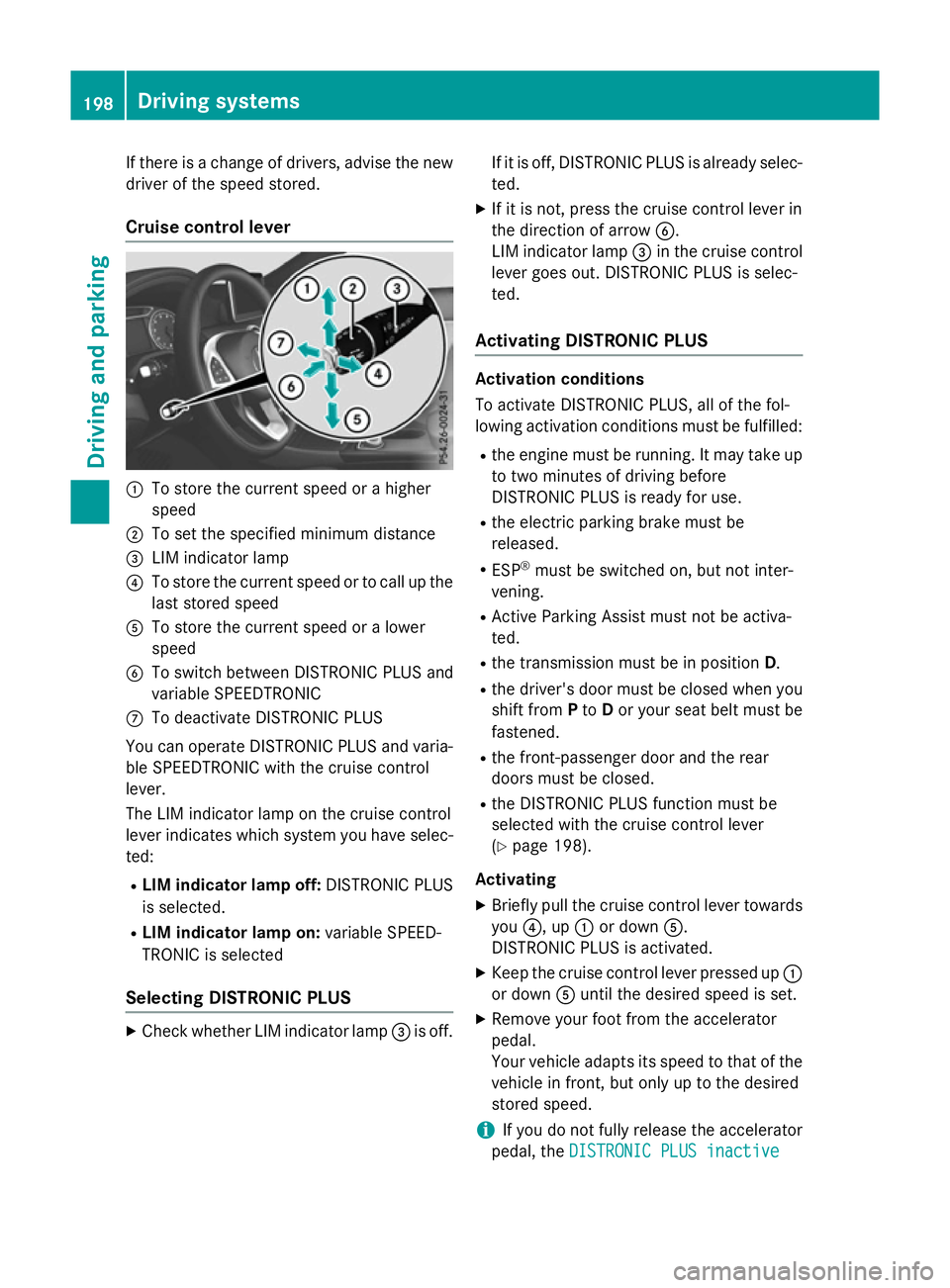
Cruise control lever :
To store the current speed or a higher
speed
; To set the specified minimum distance
= LIM indicator lamp
? To store the current speed or to call up the
last stored speed
A To store the current speed or a lower
speed
B To switch between DISTRONIC PLUS and
variable SPEEDTRONIC
C To deactivate DISTRONIC PLUS
You can operate DISTRONIC PLUS and varia-
ble SPEEDTRONIC with the cruise control
lever.
The LIM indicator lamp on the cruise control
lever indicates which system you have selec- ted:
R LIM indicator lamp off: DISTRONIC PLUS
is selected.
R LIM indicator lamp on: variable SPEED-
TRONIC is selected
Selecting DISTRONIC PLUS X
Check whether LIM indicator lamp =is off. If it is off, DISTRONIC PLUS is already selec-
ted.
X If it is not, press the cruise control lever in
the direction of arrow B.
LIM indicator lamp =in the cruise control
lever goes out. DISTRONIC PLUS is selec-
ted.
Activating DISTRONIC PLUS Activation conditions
To activate DISTRONIC PLUS, all of the fol-
lowing activation conditions must be fulfilled:
R the engine must be running. It may take up
to two minutes of driving before
DISTRONIC PLUS is ready for use.
R the electric parking brake must be
released.
R ESP ®
must be switched on, but not inter-
vening.
R Active Parking Assist must not be activa-
ted.
R the transmission must be in position D.
R the driver's door must be closed when you
shift from Pto Dor your seat belt must be
fastened.
R the front-passenger door and the rear
doors must be closed.
R the DISTRONIC PLUS function must be
selected with the cruise control lever
(Y page 198).
Activating
X Briefly pull the cruise control lever towards
you ?, up :or down A.
DISTRONIC PLUS is activated.
X Keep the cruise control lever pressed up :
or down Auntil the desired speed is set.
X Remove your foot from the accelerator
pedal.
Your vehicle adapts its speed to that of the
vehicle in front, but only up to the desired
stored speed.
i If you do not fully release the accelerator
pedal, the DISTRONIC PLUS inactive
DISTRONIC PLUS inactive 198
Driving systemsDriving and parking
Page 202 of 417
message appears in the multifunction dis-
play. The set distance to a slower-moving
vehicle in front will then not be maintained. The position of the accelerator pedal will
determine the speed.
You can also activate DISTRONIC PLUS when
stationary. The lowest speed that can be set is
30 km/h.
Driving with DISTRONIC PLUS Pulling away and driving
The vehicle can also pull away when it is
facing an unidentified obstacle or is driving on
a different line from another vehicle. The vehi-
cle then brakes automatically. Be ready to
brake at all times.
DISTRONIC PLUS is deactivated when you
depress the brake, except when the vehicle is
stationary.
X If you want to pull away with
DISTRONIC PLUS: remove your foot from
the brake pedal.
X Briefly pull the cruise control lever towards
you ?.
or
X Accelerate briefly.
Your vehicle pulls away and adapts its
speed to that of the vehicle in front.
If no vehicle is detected in front, your vehi-
cle accelerates to the set speed.
If there is no vehicle in front, DISTRONIC
PLUS operates in the same way as cruise
control.
If DISTRONIC PLUS detects that the vehicle in front has slowed down, it brakes your vehicle.
In this way, the distance you have selected is maintained.
If DISTRONIC PLUS detects a faster-moving
vehicle in front, it increases the driving speed.
The vehicle is only accelerated up to the
speed you have stored. Selecting the drive program
DISTRONIC PLUS supports a sporty driving
style when you select the S+drive program
(Mercedes-AMG vehicles only), S
(Y page 175) or the manual drive program
(Y page 177). Acceleration behind the vehicle
in front or to the set speed is then noticeably
more dynamic. If you have selected the E(C in
Mercedes-AMG vehicles:) drive program, the
vehicle accelerates more gently. This setting
is recommended in stop-start traffic.
Changing lanes
If you change to the overtaking lane,
DISTRONIC PLUS supports you if:
R you are driving faster than 70 km/h
R DISTRONIC PLUS is maintaining the dis-
tance to a vehicle in front
R you switch on the respective turn signal
R DISTRONIC PLUS does not detect a danger
of collision
If these conditions are met, your vehicle is
accelerated. Acceleration will be interrupted
if changing lanes takes too long or if the dis-
tance between your vehicle and the vehicle in front becomes too small.
Stopping G
WARNING
When leaving the vehicle, even if it is braked
only by DISTRONIC PLUS, it could roll away if:
R there is a malfunction in the system or in
the voltage supply.
R DISTRONIC PLUS has been deactivated
with the cruise control lever, e.g. by a vehi-
cle occupant or from outside the vehicle.
R the electrical system in the engine com-
partment, the battery or the fuses have
been tampered with.
R the battery is disconnected.
R the accelerator pedal has been depressed,
e.g. by a vehicle occupant.
There is a risk of an accident. Driving systems
199Driving and parking
Z
Page 204 of 417
Setting the specified minimum distance
You can set the specified minimum distance
for DISTRONIC PLUS by varying the time span
between one and two seconds. With this func- tion, you can set the minimum distance that
DISTRONIC PLUS maintains to the vehicle in
front, dependent on vehicle speed. You can
see this distance in the multifunction display
(Y page 202).
i Make sure that you maintain the mini-
mum distance to the vehicle in front as
required by law. Adjust the distance to the vehicle in front if necessary. X
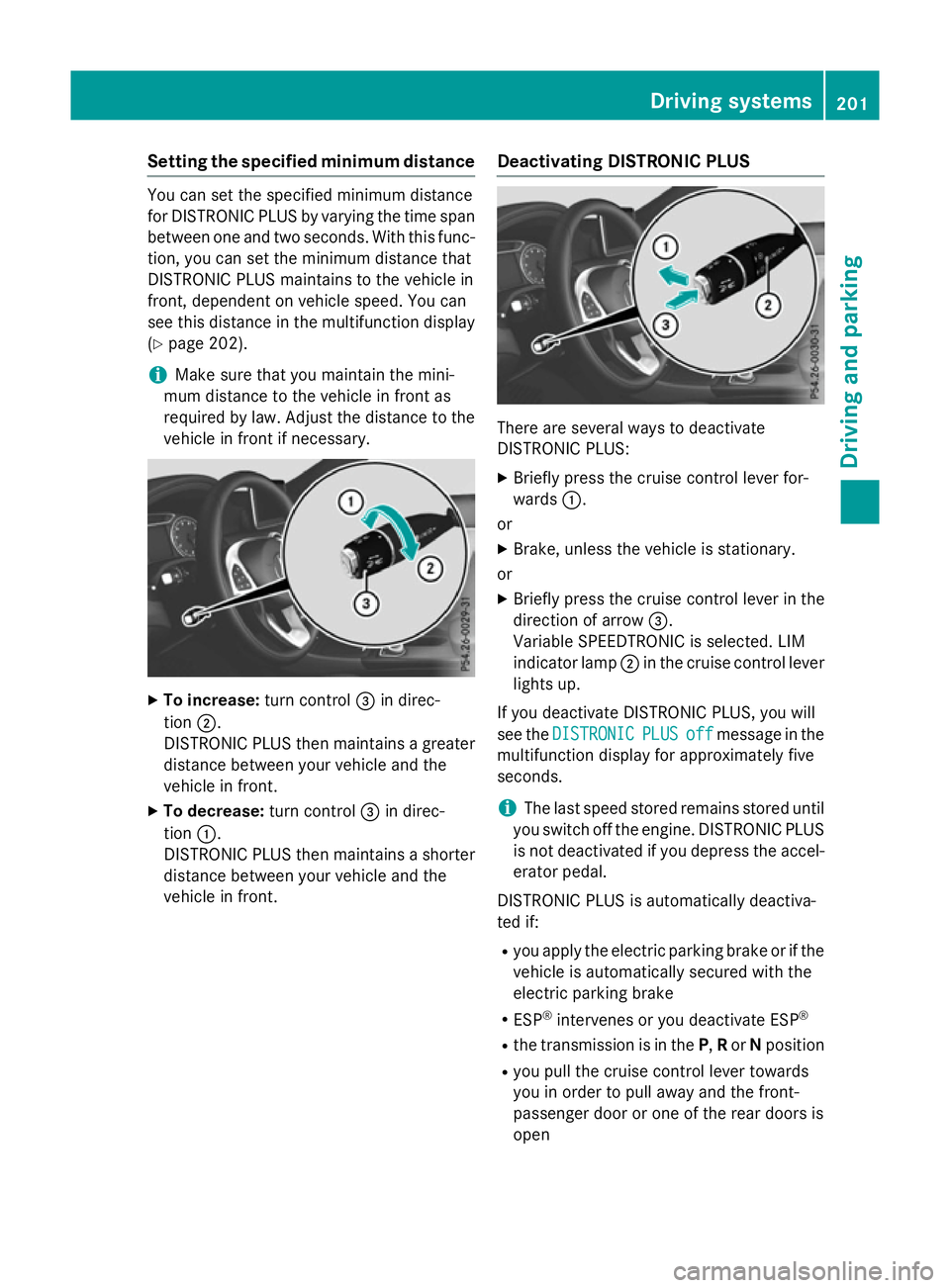
To increase: turn control=in direc-
tion ;.
DISTRONIC PLUS then maintains a greater distance between your vehicle and the
vehicle in front.
X To decrease: turn control=in direc-
tion :.
DISTRONIC PLUS then maintains a shorter
distance between your vehicle and the
vehicle in front. Deactivating DISTRONIC PLUS There are several ways to deactivate
DISTRONIC PLUS:
X Briefly press the cruise control lever for-
wards :.
or
X Brake, unless the vehicle is stationary.
or X Briefly press the cruise control lever in the
direction of arrow =.
Variable SPEEDTRONIC is selected. LIM
indicator lamp ;in the cruise control lever
lights up.
If you deactivate DISTRONIC PLUS, you will
see the DISTRONIC DISTRONIC PLUS
PLUSoff
offmessage in the
multifunction display for approximately five
seconds.
i The last speed stored remains stored until
you switch off the engine. DISTRONIC PLUS
is not deactivated if you depress the accel-
erator pedal.
DISTRONIC PLUS is automatically deactiva-
ted if: R you apply the electric parking brake or if the
vehicle is automatically secured with the
electric parking brake
R ESP ®
intervenes or you deactivate ESP ®
R the transmission is in the P,Ror Nposition
R you pull the cruise control lever towards
you in order to pull away and the front-
passenger door or one of the rear doors is
open Driving systems
201Driving and parking Z
Page 207 of 417
detected vehicle turns a corner and reveals
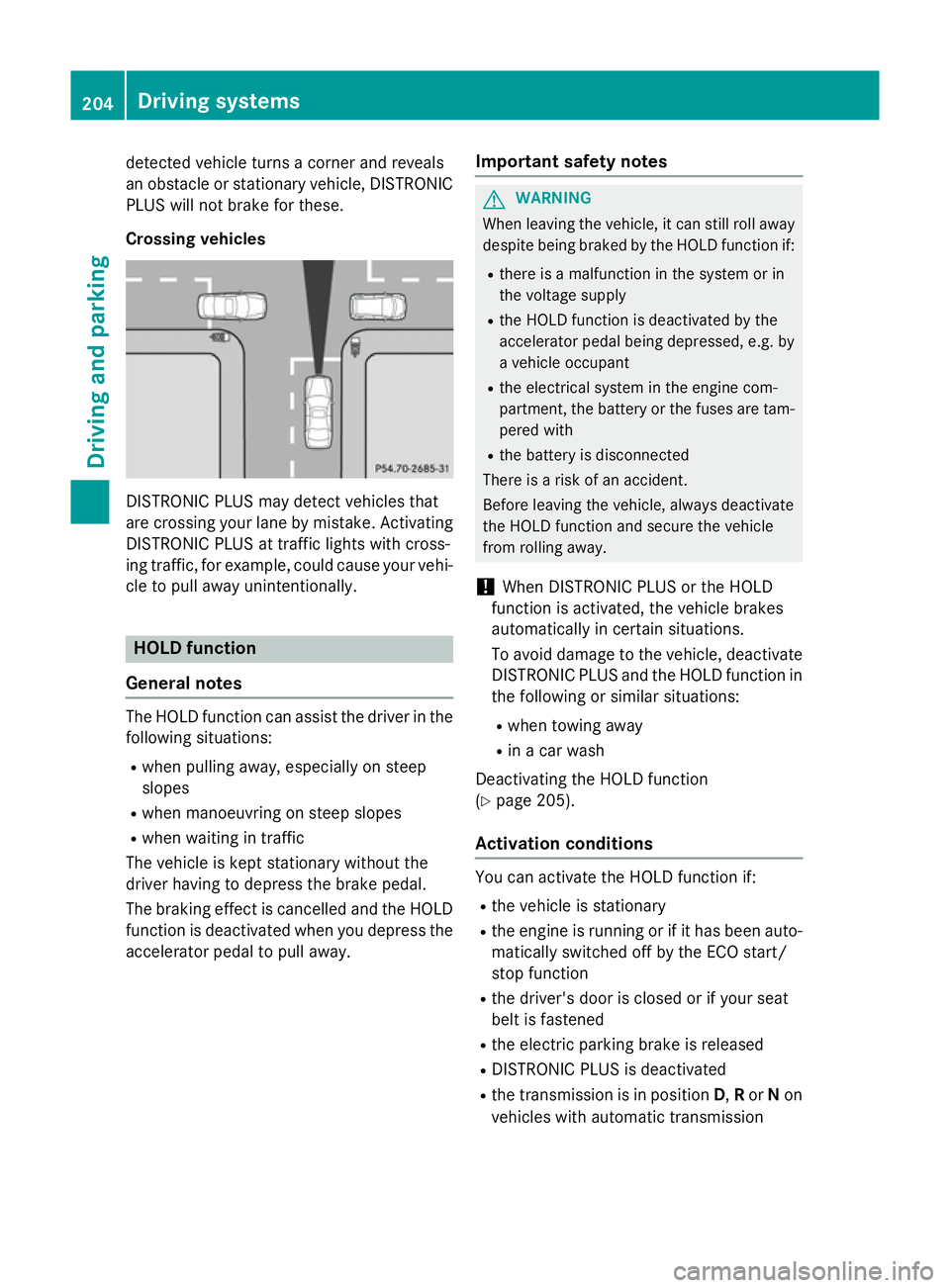
an obstacle or stationary vehicle, DISTRONIC PLUS will not brake for these.
Crossing vehicles DISTRONIC PLUS may detect vehicles that
are crossing your lane by mistake. Activating DISTRONIC PLUS at traffic lights with cross-
ing traffic, for example, could cause your vehi-
cle to pull away unintentionally. HOLD function
General notes The HOLD function can assist the driver in the
following situations:
R when pulling away, especially on steep
slopes
R when manoeuvring on steep slopes
R when waiting in traffic
The vehicle is kept stationary without the
driver having to depress the brake pedal.
The braking effect is cancelled and the HOLD function is deactivated when you depress theaccelerator pedal to pull away. Important safety notes G
WARNING
When leaving the vehicle, it can still roll away despite being braked by the HOLD function if:
R there is a malfunction in the system or in
the voltage supply
R the HOLD function is deactivated by the
accelerator pedal being depressed, e.g. by
a vehicle occupant
R the electrical system in the engine com-
partment, the battery or the fuses are tam-
pered with
R the battery is disconnected
There is a risk of an accident.
Before leaving the vehicle, always deactivate
the HOLD function and secure the vehicle
from rolling away.
! When DISTRONIC PLUS or the HOLD
function is activated, the vehicle brakes
automatically in certain situations.
To avoid damage to the vehicle, deactivate DISTRONIC PLUS and the HOLD function in
the following or similar situations:
R when towing away
R in a car wash
Deactivating the HOLD function
(Y page 205).
Activation conditions You can activate the HOLD function if:
R the vehicle is stationary
R the engine is running or if it has been auto-
matically switched off by the ECO start/
stop function
R the driver's door is closed or if your seat
belt is fastened
R the electric parking brake is released
R DISTRONIC PLUS is deactivated
R the transmission is in position D,Ror Non
vehicles with automatic transmission 204
Driving systemsDriving and parking
Page 209 of 417
Start-off assist (except Mercedes-
AMG vehicles)
Important safety notes G
WARNING
If you use start-off assist, individual wheels
may start to spin and the vehicle may skid. If
ESP ®
is deactivated, there is a greater danger
of skidding and having an accident. Make sure that no persons or obstacles are in the area
around the vehicle.
Start-off assist enables optimum acceleration
from a standstill. For this, a suitably high-grip road surface is required, along with the tyresand vehicle being in good condition.
Do not activate start-off assist on public
roads.
Observe the safety notes on driving safety
systems (Y page 69).
Be sure to read the safety notes and informa-
tion on ESP ®
(Y page 73).
Activating start-off assist X
Deactivate ESP ®
(Y page 248).
X Turn the steering wheel to the straight-
ahead position.
X Depress the brake pedal firmly with your
left foot and keep the brake pedal
depressed.
X Shift the transmission to position D.
X Use the DYNAMIC SELECT button to select
the Sdrive program (Y page 166).
X Quickly depress the accelerator pedal fully.
X Take your foot off the brake, but keep the
accelerator pedal depressed.
The vehicle pulls away at maximum accel-
eration.
i Activate ESP ®
as soon as the acceleration
process has ended. ESP ®
will otherwise not
be able to stabilise the vehicle if the vehicle
starts to skid or a wheel starts to spin. Cancelling start-off assist
X Remove your foot from the accelerator
pedal.
X Reactivate ESP. RACE START (AMG vehicles)
Important safety notes i
RACE START must not be used on normal
roads. RACE START must only be activated and used on dedicated road circuits, out-
side of public road use.
i RACE START is only available in
Mercedes‑AMG vehicles. G
WARNING
If you use RACE START, individual tyres may
get into a spin and the vehicle could skid.
Depending on the selected ESP ®
mode, there
is an increased risk of skidding and having an accident. Make sure that no persons, animals
or obstacles are within range of the vehicle.
RACE START enables optimum acceleration
from a standing start. For this, a suitably high-
grip road surface is required, along with the
tyres and vehicle being in good condition.
i Observe the safety notes on driving safety
systems (Y page 69).
Be sure to read the safety notes and infor-
mation on ESP ®
(Y page 73).
Activation conditions You can activate RACE START if:
R the doors, the bonnet and the boot lid are
closed
R the engine is running and the transmission,
traction control and engine are at operating temperature
R the steering wheel is in the straight-ahead
position
R the vehicle is stationary and the brake
pedal is depressed (left foot) 206
Driving systemsDriving and parking
Page 210 of 417
R
the transmission is in position D
R drive program S,S+ orRACE is selected
(Y page 167)
Activating RACE START X
Depress the brake pedal with your left foot
and keep it depressed.
X Pull and hold both steering wheel gearshift
paddles.
X The RACE START Confirm: Paddle UP
RACE START Confirm: Paddle UP
Cancel: Paddle DOWN
Cancel: Paddle DOWN message appears
in the multifunction display.
X Release both steering wheel gearshift pad-
dles.
i If the activation conditions are no longer
fulfilled, RACE START is cancelled. The
RACE START not possible See Own‐
RACE START not possible See Own‐
er's
er's Manual
Manual message appears in the mul-
tifunction display.
X To cancel: pull the left steering wheel shift
paddle (Y page 177).
or
X To confirm: pull the right steering wheel
shift paddle (Y page 177).
The RACE START available Depress
RACE START available Depress
accelerator
accelerator message appears in the mul-
tifunction display.
i If you do not depress the accelerator
pedal within a few seconds, RACE START is cancelled. The multifunction display shows
the RACE START cancelled
RACE START cancelled message.
X Fully depress the accelerator pedal.
The engine speed increases.
The RACE START Release brake to RACE START Release brake to
start
start message appears in the multifunc-
tion display.
i If the brake pedal is not released after a
short while, RACE START is cancelled. The
multifunction display shows the RACE
RACE
START cancelled
START cancelled message.
X Take your foot off the brake, but keep the
accelerator pedal depressed.
The vehicle pulls away at maximum accel-
eration. The
RACE RACE START
START active
active message appears
in the multifunction display.
RACE START is deactivated when the vehicle
reaches a speed of approximately 50 km/h.
RACE START is deactivated immediately if
you release the accelerator pedal during
RACE START or if any of the activation condi-
tions are no longer fulfilled. The RACE
RACE START START
not possible
not possible orRACE START cancelled
RACE START cancelled
message appears in the multifunction dis-
play.
i After using it several times in short suc-
cession, RACE START will be unavailable
until a certain distance has been driven. AMG RIDE CONTROL
General notes The electronically controlled damping system
works continuously. This improves driving
safety and ride comfort.
The damping is tuned individually to each
wheel and depends on:
R your driving style, e.g. sporty
R the road surface condition, e.g. bumps
R your individual selection of "Sport" or
"Comfort"
The suspension setting is adjusted using the
corresponding button in the centre console.
i The mode can also be set using the AMG
DYNAMIC SELECT controller (Y page 167).
If the ignition is switched off for less than four hours, the previously selected drive program
is activated when the engine is next started. If
the ignition is switched off for more than four hours, Comfort mode is activated when the
engine is next started. Driving systems
207Driving and parking Z
Page 211 of 417
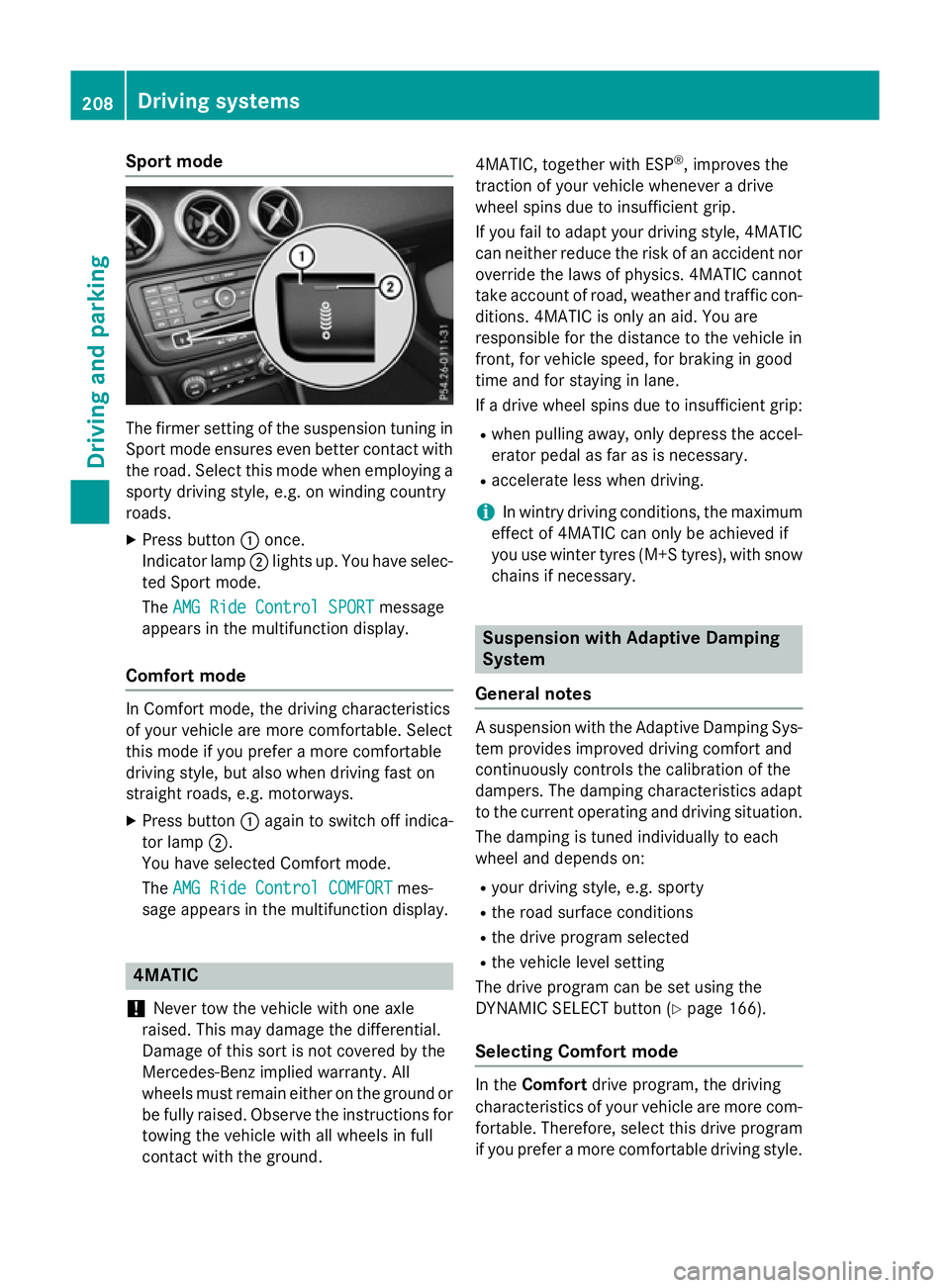
Sport mode
The firmer setting of the suspension tuning in
Sport mode ensures even better contact with
the road. Select this mode when employing a sporty driving style, e.g. on winding country
roads.
X Press button :once.
Indicator lamp ;lights up. You have selec-
ted Sport mode.
The AMG Ride Control SPORT
AMG Ride Control SPORT message
appears in the multifunction display.
Comfort mode In Comfort mode, the driving characteristics
of your vehicle are more comfortable. Select
this mode if you prefer a more comfortable
driving style, but also when driving fast on
straight roads, e.g. motorways.
X Press button :again to switch off indica-
tor lamp ;.
You have selected Comfort mode.
The AMG Ride Control COMFORT
AMG Ride Control COMFORT mes-
sage appears in the multifunction display. 4MATIC
! Never tow the vehicle with one axle
raised. This may damage the differential.
Damage of this sort is not covered by the
Mercedes-Benz implied warranty. All
wheels must remain either on the ground or be fully raised. Observe the instructions for
towing the vehicle with all wheels in full
contact with the ground. 4MATIC, together with ESP
®
, improves the
traction of your vehicle whenever a drive
wheel spins due to insufficient grip.
If you fail to adapt your driving style, 4MATIC
can neither reduce the risk of an accident nor override the laws of physics. 4MATIC cannot
take account of road, weather and traffic con-
ditions. 4MATIC is only an aid. You are
responsible for the distance to the vehicle in
front, for vehicle speed, for braking in good
time and for staying in lane.
If a drive wheel spins due to insufficient grip:
R when pulling away, only depress the accel-
erator pedal as far as is necessary.
R accelerate less when driving.
i In wintry driving conditions, the maximum
effect of 4MATIC can only be achieved if
you use winter tyres (M+S tyres), with snow chains if necessary. Suspension with Adaptive Damping
System
General notes A suspension with the Adaptive Damping Sys-
tem provides improved driving comfort and
continuously controls the calibration of the
dampers. The damping characteristics adapt
to the current operating and driving situation.
The damping is tuned individually to each
wheel and depends on:
R your driving style, e.g. sporty
R the road surface conditions
R the drive program selected
R the vehicle level setting
The drive program can be set using the
DYNAMIC SELECT button (Y page 166).
Selecting Comfort mode In the
Comfort drive program, the driving
characteristics of your vehicle are more com- fortable. Therefore, select this drive program
if you prefer a more comfortable driving style. 208
Driving systemsDriving and parking
Page 212 of 417
Also select the
Comfortdrive program when
driving fast on straight roads, e.g. on straight stretches of motorway.
X Press DYNAMIC SELECT button :
(Y page 166) repeatedly until the Comfort
drive program is selected.
Selecting Sport mode The firmer setting of the suspension tuning in
the Sport drive program ensures even better
contact with the road. Select this drive pro-
gram when employing a sporty driving style,
e.g. on winding country roads.
X Press DYNAMIC SELECT button :
(Y page 166) repeatedly until the Sport
drive program is selected. PARKTRONIC
Important safety notes PARKTRONIC is an electronic parking aid with
ultrasonic sensors. It monitors the area
around your vehicle using six sensors in the
front bumper and six sensors in the rear
bumper. PARKTRONIC indicates visually and
audibly the distance between your vehicle
and an object.
PARKTRONIC is only an aid. It is not a substi- tute for your attention to the immediate sur-
roundings. The responsibility for safe
manoeuvring and parking remains with you.
Make sure that there are no persons, animals
or objects in range while manoeuvring and
parking.
! When parking, pay particular attention to
objects above or below the sensors, such
as flower pots or trailer drawbars.
PARKTRONIC does not detect such objects
when they are in the immediate vicinity of
the vehicle. You could damage the vehicle
or the objects.
The sensors may not detect snow and
objects which absorb ultrasonic sources. Ultrasonic sources, such as an automatic
car wash, a lorry's compressed-air brakes
or a pneumatic drill, could cause
PARKTRONIC to malfunction.
PARKTRONIC may not function correctly on
uneven terrain.
! Fold in the ball coupling if the trailer tow
hitch is not required. PARKTRONIC meas-
ures the minimum detection range to an
obstacle from the bumper, not the ball cou-
pling.
PARKTRONIC is activated automatically when you:
R switch on the ignition
R shift to position D,Ror Non vehicles with
automatic transmission
R release the electric parking brake
PARKTRONIC is deactivated at speeds above
18 km/h. It is reactivated at lower speeds.
PARKTRONIC is deactivated for the rear area
when you establish an electrical connection
between your vehicle and a trailer.
Range of the sensors General notes
PARKTRONIC does not take into account
obstacles located:
R below the detection range, e.g. persons,
animals or objects
R above the detection range, e.g. overhang-
ing loads, tail sections or loading ramps of
goods vehicles Driving systems
209Driving and parking Z
Page 215 of 417
Problems with PARKTRONIC
Problem
Possible causes/consequences and
M
MSolutions Only the red segments
in the PARKTRONIC
warning displays are lit.
You also hear a warning
tone for approximately
two seconds.
PARKTRONIC is then
deactivated and the
indicator lamp on the
PARKTRONIC button
lights up. PARKTRONIC has malfunctioned and has been deactivated.
X If problems persist, have PARKTRONIC checked at a qualified
specialist workshop. Only the red segments
in the PARKTRONIC
warning displays are lit.
PARKTRONIC is then
deactivated. The PARKTRONIC sensors are dirty or there is interference.
X Clean the PARKTRONIC sensors (Y page 332).
X Switch the ignition back on. The problem may be caused by an external source of radio or
ultrasound waves.
X See if PARKTRONIC functions in a different location. Active Parking Assist
General notes Active Parking Assist is an electronic parking
aid with ultrasound. It measures the road on
both sides of the vehicle. A parking symbol
indicates a suitable parking space. Active
steering intervention and brake application
can assist you during parking and when exit-
ing a parking space. You may also use
PARKTRONIC (Y page 209).
i The active braking application is only
available on vehicles with automatic trans-
mission.
Important safety notes Active Parking Assist is only an aid. It is not a
substitute for your attention to the immediate
surroundings. The responsibility for safe
manoeuvring and parking remains with you. Make sure that no persons, animals or
objects are in the manoeuvring range.
When PARKTRONIC is deactivated, Active
Parking Assist is also unavailable. G
WARNING
While parking or pulling out of a parking
space, the vehicle swings out and can drive
onto areas of the oncoming lane. This could
cause you to collide with other road users.
There is a risk of an accident.
Pay attention to other road users. Stop the
vehicle if necessary or cancel the Active Park- ing Assist parking procedure.
! If unavoidable, you should drive over
obstacles such as kerbs slowly and not at a
sharp angle. Otherwise, you may damage
the wheels or tyres. 212
Driving systemsDriving and parking