warning MERCEDES-BENZ A-CLASS HATCHBACK 2018 Owners Manual
[x] Cancel search | Manufacturer: MERCEDES-BENZ, Model Year: 2018, Model line: A-CLASS HATCHBACK, Model: MERCEDES-BENZ A-CLASS HATCHBACK 2018Pages: 609, PDF Size: 10.73 MB
Page 558 of 609
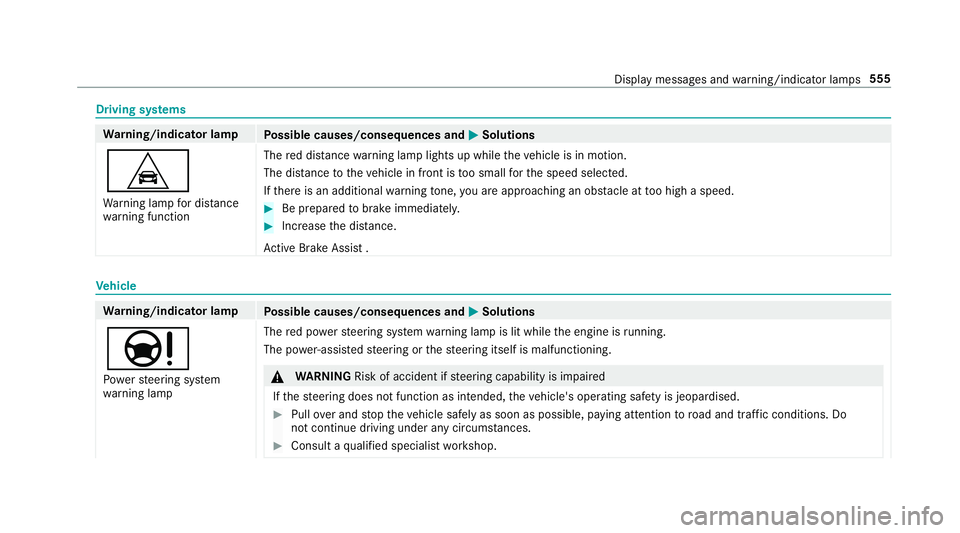
Driving sy
stems Wa
rning/indicator lamp
Possible causes/consequences and M
MSolutions
L Wa rning lamp for dis tance
wa rning function The
red dis tancewarning lamp lights up while theve hicle is in motion.
The dis tance totheve hicle in front is too small forth e speed selected.
If th ere is an additional warning tone, you are approaching an obs tacle at too high a speed. #
Be prepared tobrake immediatel y. #
Increase the dis tance.
Ac tive Brake Assi st . Ve
hicle Wa
rning/indicator lamp
Possible causes/consequences and M
MSolutions
Ð Po we rst eering sy stem
wa rning lamp The
red po werst eering sy stem warning lamp is lit while the engine is running.
The po wer-assis tedsteering or thesteering itself is malfunctioning. &
WARNING Risk of accident if steering capability is impaired
If th esteering does not function as intended, theve hicle's operating saf ety is jeopardised. #
Pull over and stop theve hicle safely as soon as possible, paying attention toroad and traf fic conditions. Do
not continue driving under any circums tances. #
Consult a qualified specialist workshop. Display messages and
warning/indicator lamps 555
Page 559 of 609
Wa
rning/indicator lamp
Possible causes/consequences and M
MSolutions #
Obser vethe messages on the multifunction displa y.
ï
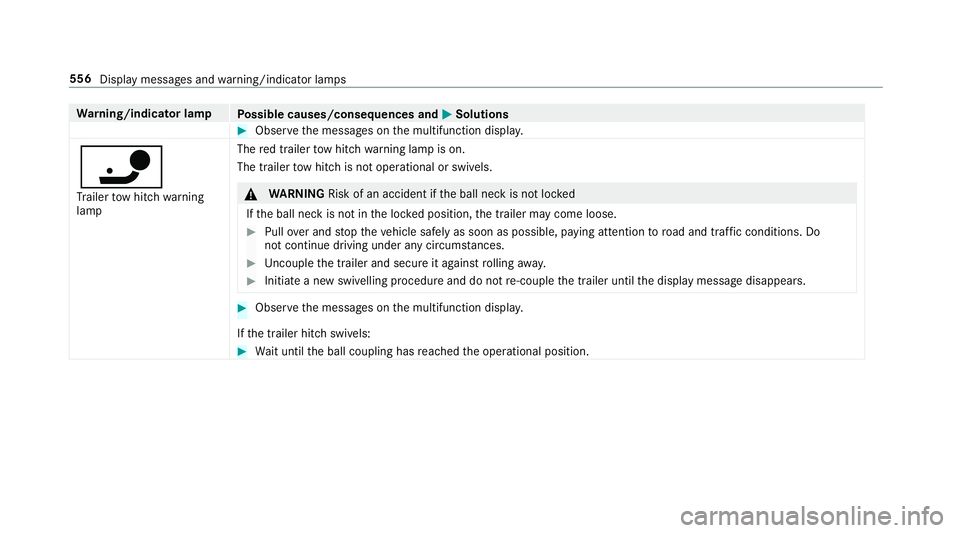
Tr ailer tow hit chwarning
lamp The
red trailer tow hit chwarning lamp is on.
The trailer tow hit chis not operational or swivels. &
WARNING Risk of an accident if the ball neck is not loc ked
If th e ball neck is not in the loc ked position, the trailer may come loose. #
Pull over and stop theve hicle safely as soon as possible, paying attention toroad and traf fic conditions. Do
not continue driving under any circums tances. #
Uncouple the trailer and secure it against rolling away. #
Initiate a new swivelling procedure and do not re-couple the trailer until the display message disappears. #
Obser vethe messages on the multifunction displa y.
If th e trailer hitch swivels: #
Wait until the ball coupling has reached the operational position. 556
Display messages and warning/indicator lamps
Page 560 of 609
Engine
Wa
rning/indicator lamp
Possible causes/consequences and M
MSolutions
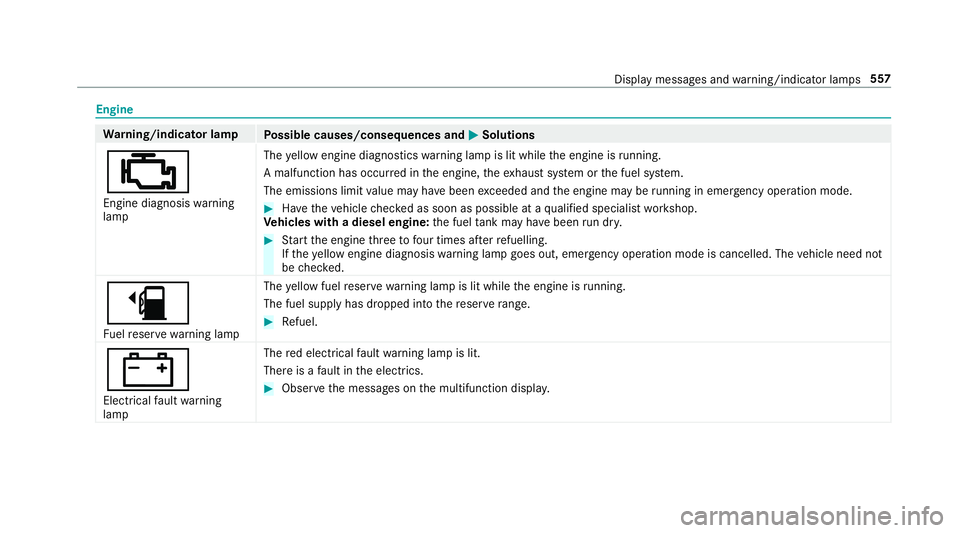
; Engine diagnosis warning
lamp The
yellow engine diagno stics warning lamp is lit while the engine is running.
A malfunction has occu rred in the engine, theex haust sy stem or the fuel sy stem.
The emissions limit value may ha vebeen exceeded and the engine may be running in eme rgency operation mode. #
Have theve hicle checked as soon as possible at a qualified specialist workshop.
Ve hicles with a diesel engine: the fuel tank may ha vebeen run dr y. #
Start the engine thre eto four times af terre fuelling.
If th eye llow engine diagnosis warning lamp goes out, emer gency operation mode is cancelled. The vehicle need not
be checked.
æ Fu elreser ve wa rning lamp The
yellow fuel reser ve wa rning lamp is lit while the engine is running.
The fuel supp lyhas dropped into there ser verange. #
Refuel.
#
Electrical fault warning
lamp The
red elect rical fault warning lamp is lit.
There is a fault in the electrics. #
Obser vethe messages on the multifunction displa y. Displ
aymessa ges and warning/indicator lamps 557
Page 561 of 609
Wa
rning/indicator lamp
Possible causes/consequences and M
MSolutions
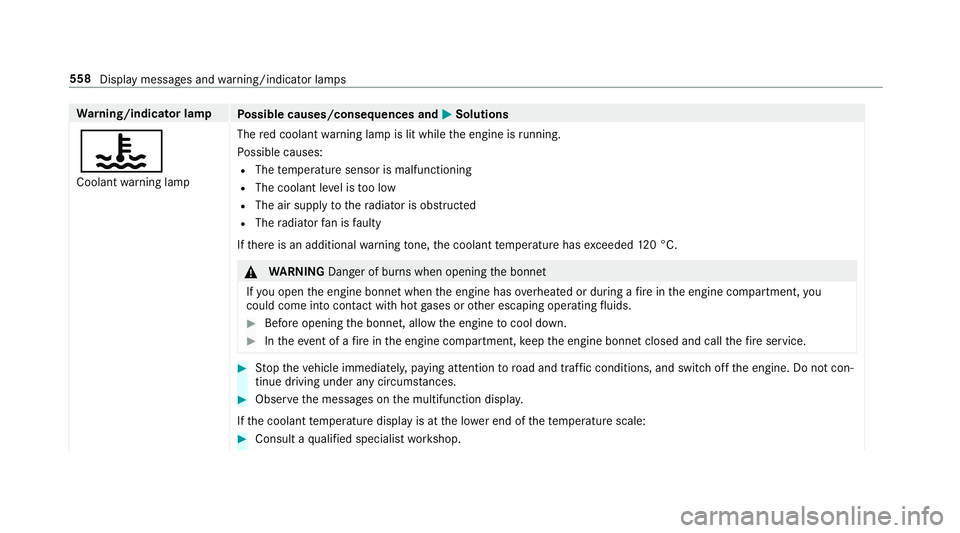
? Coolant warning lamp The
red coolant warning lamp is lit while the engine is running.
Po ssible causes:
R The temp erature sensor is malfunctioning
R The coolant le vel is too low
R The air supply tothera diator is obstructed
R The radiator fan is faulty
If th ere is an additional warning tone, the coolant temp erature has exceeded 120 °C. &
WARNING Danger of bu rns when opening the bonn et
If yo u open the engine bonn etwhen the engine has overheated or during a fire inthe engine compartment, you
could come into contact wi thhot gases or other escaping operating fluids. #
Before opening the bonn et, allow the engine tocool down. #
Intheeve nt of a fire inthe engine compartment, keep the engine bonn etclosed and call thefire service. #
Stop theve hicle immediately, paying attention toroad and traf fic conditions, and switch off the engine. Do not con‐
tinue driving under any circums tances. #
Obser vethe messages on the multifunction displa y.
If th e coolant temp erature display is at the lo wer end of thete mp erature scale: #
Consult a qualified specialist workshop. 558
Display messages and warning/indicator lamps
Page 562 of 609
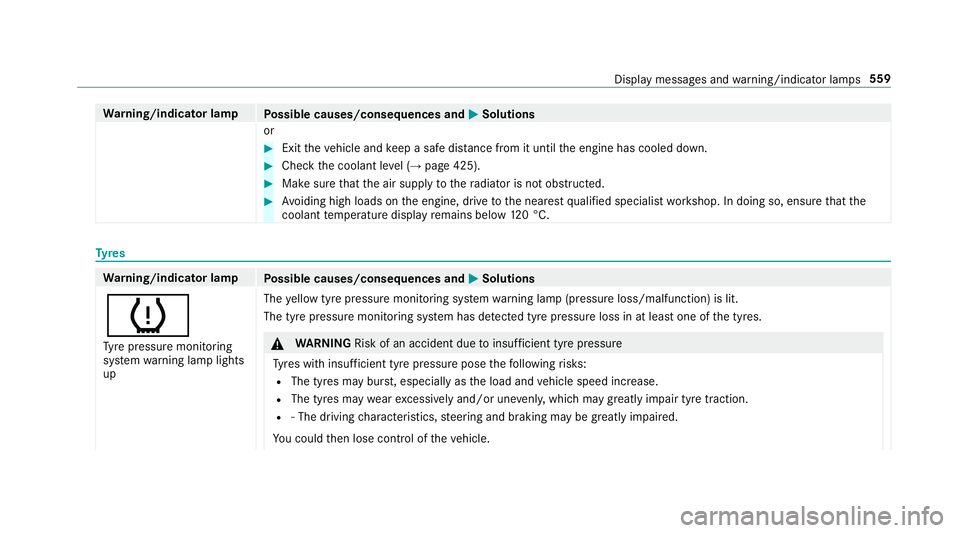
Wa
rning/indicator lamp
Possible causes/consequences and M
MSolutions
or #
Exit theve hicle and keep a safe dis tance from it until the engine has cooled down. #
Check the coolant le vel (→ page 425). #
Make sure that the air supply tothera diator is not obstructed. #
Avoiding high loads on the engine, drive tothe nearest qualified specialist workshop. In doing so, ensure that the
coolant temp erature display remains below 120 °C. Ty
res Wa
rning/indicator lamp
Possible causes/consequences and M
MSolutions
h Ty re pressure monitoring
sy stem warning lamp lights
up The
yellow tyre pressure monitoring sy stem warning lamp (pressure loss/malfunction) is lit.
The tyre pressure monitoring sy stem has de tected tyre pressure loss in at least one of the tyres. &
WARNING Risk of an accident due toinsuf ficient tyre pressure
Ty res with insuf ficient tyre pressure pose thefo llowing risks:
R The tyres may bur st, especially as the load and vehicle speed increase.
R The tyres may wearexc essively and/or une venly, which may greatly impair tyre traction.
R ‑ The driving characteristics, steering and braking may be greatly impaired.
Yo u could then lose control of theve hicle. Display messages and
warning/indicator lamps 559
Page 563 of 609
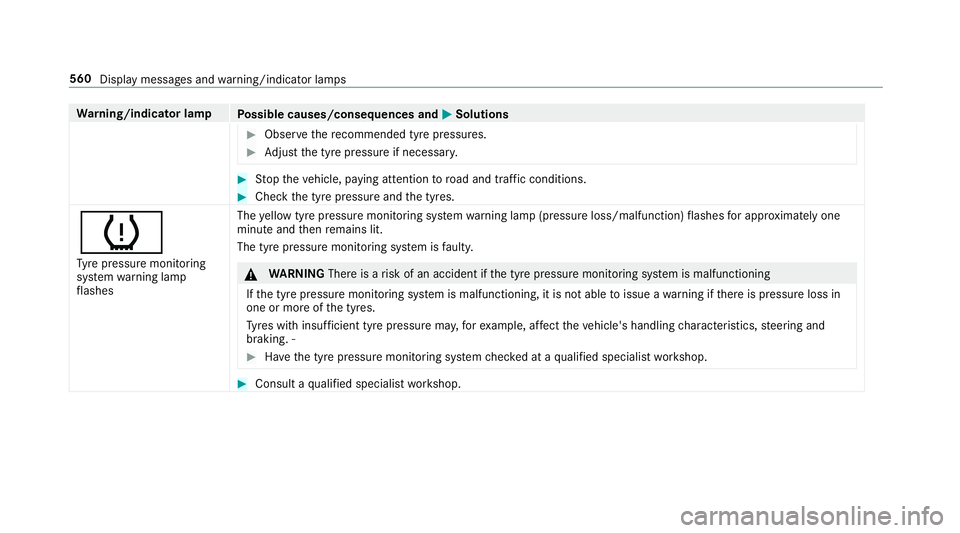
Wa
rning/indicator lamp
Possible causes/consequences and M
MSolutions #
Obser vethere commended tyre pressures. #
Adjust the tyre pressure if necessar y. #
Stop theve hicle, paying attention toroad and traf fic conditions. #
Check the tyre pressure and the tyres.
h Ty re pressure monitoring
sy stem warning lamp
fl ashes The
yellow tyre pressure monitoring sy stem warning lamp (pressure loss/malfunction) flashes for appro ximately one
minu teand then remains lit.
The tyre pressu remonitoring sy stem is faulty. &
WARNING Thereis a risk of an accident if the tyre pressure monitoring sy stem is malfunctioning
If th e tyre pressure monitoring sy stem is malfunctioning, it is not able toissue a warning if there is pressure loss in
one or more of the tyres.
Ty res with insuf ficient tyre pressure ma y,forex ample, af fect theve hicle's handling characteristics, steering and
braking. ‑ #
Have the tyre pressure monitoring sy stem checked at a qualified specialist workshop. #
Consult a qualified specialist workshop. 560
Display messages and warning/indicator lamps
Page 569 of 609
New/replaced brakepads/brake
discs .................................................... 15 6
Ru nning-in no tes ..................................1 56
Braking assi stance
see BAS (Brake Assi stSystem)
Breakdown Overview of the help functions .............. 16
To w- starting ........................................ 453
To wing away ........................................ 450
Tr ansporting theve hicle ......................4 52
Wheel change ...................................... 472
Breakdown see Flat tyre
Burmes ter®
sur round sound sy stem .....4 16
Ad justing the balance/fader ................4 17
Ad justing the sound focus .................... 417
Ad justing treble, mid-range and bass
settings ................................................ 416
Au tomatic volume adjustment ............ .416
Calling up the sound menu .................. 416
Information .......................................... 416
Selecting the sound profile .................. 417
Buttons Steering wheel .....................................2 49 C
Call list Deleting ............................................... 379
Making a call ....................................... 378
Overview ............................................. 378
Selecting options for suggestions ........ 378
Calling up the sound menu
Adva nced sound sy stem ......................4 17
Burmes ter®
sur round sound sy stem ....4 16
Calls .......................................................... 373
Ac cepting ............................................ 373
Ac tivating functions du ring a call ......... 374
Calls with se veral participants ............ .374
Declining ............................................. 373
Ending a call ....................................... .373
Incoming call during an existing call .... 374
Making ................................................ 373
Camera see 360° Camera
see Reversing camera
Car key
see Key Car
wash
see Care
Car wash (care) ....................................... 427
Car-to-X-Communication Displaying hazard warnings ................ .354
Overview ............................................. 353
Sending hazard warnings .................... 354
Care .......................................................... 434
Air-water duct ...................................... 427
Car wash ............................................. 427
Carpet .................................................4 34
Decorative foil .................................... .430
Displ ay................................................ 434
Exterior lighting ................................... 432
High-pressure cleaner ......................... 427
Matt finish ........................................... 429
Pa int wo rk ............................................ 429
Plastic trim .......................................... 434
Re alwo od/trim elements ...................4 34
Re versing camera/360° Camera ........ 432
Ro of lining ...........................................4 34
Seat belt .............................................. 434
Seat co ver ........................................... 434
Sensors ............................................... 432
Ta ilpipes .............................................. 432 566
Index
Page 581 of 609
Fu
se box in the load compartment ...... 457
No tes ................................................... 454 G
Garage door opener Cleari ngthe memory ........................... 17 9
Opening or closing the door ................1 79
Programming buttons .......................... 176
Ra dio equipment appr oval numbers .... 17 9
Re solving problems ............................. 178
Synchronising thero lling code ............ .177
Gearshift recommendation .............164,167
Genera l operating permit number
(EU) .......................................................... .483
Genuine parts ............................................ 21
Glide mode ............................................... 167
Global sear ch
Fu nction .............................................. 300
Overview ............................................. 300
Glo vebox
Locking/unlocking .............................. 102 H
Handbrake see Electric parking brake
Handling characteristics (unusual) ....... 458
Hazard warning lights ............................ .125
Head restra int .......................................... .92
Fr ont (adjusting mechanically) .............. 92
Re ar (adjusting) .................................... .93
Re ar (fitting/removing) ........................ .93
Head-up display ....................................... 259
Ad justing display elements (on-board
compu ter) ............................................ 259
Ad justing the brightness (on-board
computer) ............................................ 259
Fu nction .............................................. 260
Menu (on-board compu ter) .................. 259
Operating the memory function ..........1 00
Setting the position (on-board com‐
puter) .................................................. 259
Headla mpflasher ................................... .124
Heating see Climate control High beam
Adaptive Highbeam Assist .................. .127
Ad aptive Highbeam Assist Plus .......... .128
Switching on/off ................................. 124
High-pressure cleaner (care) .................. 427
Hill Start Assist ........................................ 212
HOLD function ......................................... 212
Fu nction/no tes .................................... 212
Switching on/off ................................. 212
Home screen (media display) Overview ............................................. 282
Hotspot Setting up (Wi-Fi) ................................. 315 I
i-Size child seat securing sy stem ............ 48
Fitting .................................................... 49
No tes ..................................................... 48
Seats suitable for attaching ................... 59
Identification plate Engine ................................................. 483
Vehicle ................................................ 483 578
Index
Page 582 of 609
Ignition
Swit ching on (S tart/S top button) ........ 151
Ignition key
see Key
Immobiliser ................................................ 85
Implied warranty
Ve hicle .................................................. 26
In Car Of fice .................................... .381, 382
Calling up ............................................ 381
Fe atures .............................................. 381
Managing e-mails ................................ 382
Marking a task as comple ted .............. 382
Selecting a calendar ent ry................... 381
Selecting the options forTa sks &
Calls ....................................................3 82
In Car Of fice functions
see In Car Of fice
Indicator lamps see Warning/indicator lamps
Individual drive prog ram
Con figuring .......................................... 161
Selecting .............................................. 161Instrument clus
ter
see Instrument display
Instrument display ..................................2 48
Ad justing the lighting .......................... 253
Fu nction/no tes ................................... 24 8
Instrument clus ter ................................... 8
Wa rning/indicator lamps .................... 548
Instrument lighting .................................253
Intelligent Light Sy stem .......................... 12 5
Ac tive headla mps ................................ 12 5
Ad aptive Highbeam Assist .................. .127
Ad aptive Highbeam Assist Plus .......... .128
City lighting ......................................... 12 6
Corne ring light ..................................... 12 6
Mo torw ay mode ................................... 12 6
Overview ............................................. 12 5
Switching on/off ................................. 12 6
Interior lighting ........................................ 13 0
Ambiance light ..................................... 13 0
Re ading light ........................................ 13 0
Setting ................................................. 13 0
Switch-off del aytime ........................... 131
Interior pr otection
Fu nction ................................................ 86 Priming/deactivating .............................
87
Intermediate destination Calculating a route with intermediate
destinations ........................................ 338
En tering ............................................... 338
Modifying ............................................ 338
St arting an automatic filling station
sear ch................................................. 340
St arting the automatic service sta‐
tion sear ch.......................................... 340
In tern et
Calling up a web page .........................3 99
Closing the br ows er ............................4 02
Deleting a bookma rk........................... 402
Deleting his tory ................................... 402
Managing bookmar ks.......................... 402
In tern etconnection
Cancelling permission (mobile
phone) ................................................ .398
Connection status .............................. .399
Displ aying the connection status ........ 399
Es tablishing .........................................3 98
Es tablishing automatically ...................3 98
Information .......................................... 396
Mobile phone de tails .......................... .398 Index
57 9
Page 583 of 609
Re
strictions ......................................... 396
Setting access da ta(Blue tooth ®
) .........3 97
Setting au tomatic disconnection ......... 398
Setting up (Blu etoo th®
) .......................3 97
Setting up (Wi-Fi) ................................. 397
Vi a communication module ................ .396
Internet radio
Calling up ............................................ 403
Calling up thest ation list (category
last selec ted) .......................................4 05
Deleting stations ................................ .405
Logging out ......................................... 405
Overview ............................................. 404
Re gis tering .......................................... 405
Saving stations .................................... 405
Selecting and connecting toast ation
............................................................ .405
Selecting stre am ................................ .405
Setting options ................................... .405
Te rm s of use ........................................4 05
iPhone ®
see Apple CarPlay™
see Mercedes-Benz Link ISOFIX
child seat securing sy stem .......... 48
Fitting .................................................... 49
No tes ..................................................... 48
Seats suitable for attaching ................... 57 J
Jack Declaration of conformity ......................23
Storage location ................................... 471
Jump-start connection ............................448
Gene ral no tes ...................................... 446
No tes .................................................. 446 K
Ke y.............................................................. 65
Ac oustic locking verification signal ....... 66
Battery ................................................... 67
Emergency key ...................................... 67
Energy consumption .............................. 66
Fe atures ................................................ 65
Ke yring attachment .............................. 67
Overview ............................................... 65
Pa nic alarm ........................................... 66
Problem ................................................. 68 Un
locking setting .................................. 66
Ke y functions
Deactivating .......................................... 66
KEYLESS-GO Locking theve hicle ................................ 71
Problem .................................................72
Un locking setting .................................. 66
Un locking theve hicle ............................71
Kickd own.................................................. 167
Using ................................................... 167
Knee airbag ................................................ 37 L
Lamp see In terior lighting
Lamps (instrument display) see Warning/indicator lamps
Lane de tection (au tomatic)
see Active Lane Keeping Assist
Lane Keeping Assist
see Active Lane Keeping Assist
Language .................................................. 316
No tes ................................................... 316580
Index