parking MERCEDES-BENZ A-CLASS HATCHBACK 2018 Owner's Guide
[x] Cancel search | Manufacturer: MERCEDES-BENZ, Model Year: 2018, Model line: A-CLASS HATCHBACK, Model: MERCEDES-BENZ A-CLASS HATCHBACK 2018Pages: 609, PDF Size: 10.73 MB
Page 190 of 609
ESP
®
can moni tor and impr ovedriving stability
and traction in thefo llowing situations, within
ph ysical limits:
R When pulling away on wet or slippe rycar ria‐
ge wa ys.
R When braking.
R Vehicles with trailer hitch: in trailer opera‐
tion from speeds of 65 km/h, if theve hicle/
trailer combination begins tosw ay from side
to side.
R Instro ng side winds when you are driving
fa ster than 80 km/h.
If th eve hicle deviates from the direction desired
by the driver, ESP ®
can stabilise theve hicle by
inter vening in thefo llowing ways:
R One or more wheels are braked.
R The engine output is adap ted according to
th e situation.
ESP ®
is deactivated if theå ESP®
OFF warn‐
ing lamp lights up continuously in the instrument
clus ter. Obser
vethefo llowing points when ESP ®
is deac‐
tivated:
R Driving stability will no lon ger be impr oved.
R Vehicles with trailer hitch: stabilisation of
th eve hicle/trailer combination is no longer
active.
R Crosswind Assist is no longer active.
R The drive wheels could spin.
R ETS/4ETS traction control is still active.
% When ESP ®
is deactivated, you are still assis‐
te dby ESP ®
when braking.
If th e÷ ESP®
wa rning lamp flashes in the
instrument clus ter,one or se veralve hicle wheels
has reached its grip limit:
R Adapt the driving style to suit the pr evailing
ro ad and weather conditions.
R Do not deactivate ESP ®
under any circum‐
st ances.
R Onlydepress the accelerator pedal as far as
is necessar y. It may be best
todeactivate ESP ®
in thefo llow‐
ing situations:
R When using snow chains.
R In deep sn ow.
R On sand or gr avel.
% Spinning the wheels results in a cutting
action, which enhances traction.
If th e÷ ESP®
wa rning lamp lights up continu‐
ousl y,ESP ®
is not available due toa malfunction.
Obse rveth efo llowing information:
R Warning and indicator lamps (→ page548)
R Displ aymessa ges (→ page 498)
ETS/4ETS (Electronic Traction Sy stem)
ETS/4E TStraction control is pa rtof ESP ®
and
makes it possible topull away and accelerate on
a slippe rycar riag ewa y.
ETS/4ETS can impr ovetheve hicle's traction by
inter vening in thefo llowing ways:
R The drive wheels are braked individually if
they spin. Driving and parking
187
Page 192 of 609
Ac
tivating/deactivating ESP ®
(Electronic Sta‐
bility Prog ram) Multimedia sy
stem:
, © .
Settings .
Quick access
% ESP®
can only be activated/deactivated
using quick access when at least one other
function is available in quick access. ESP ®
can otherwise be found in theAssistance
menu. #
Select ESP.
A prom ptappears. #
Select Onorå Off.
ESP ®
is deactivated if theå ESP®
OFF warn‐
ing lamp lights up continuously in the instrument
clus ter.
Obser vethe information on warning lamps and
display messages which may be shown in the
instrument clus ter. Fu
nction of ESP ®
Crosswind Assist ESP
®
Crosswind Assist de tects sudden gu sts of
side wind and helps the driver tokeep theve hi‐
cle in the lane:
R ESP ®
Crosswind Assist is active at vehicle
speeds between 80 km/h and 200 km/h
when driving stra ight ahead or cornering
slightly.
R The vehicle is stabilised bymeans of individ‐
ual brake application on one side. Fu
nction of ESP ®
trailer stabilisation &
WARNING Risk of accident in poor road
and weather conditions
In poor road and weather conditions, the
trailer stabilisation cannot pr event lu rching of
th eve hicle/trailer combination. Trailers with
a high centre of gr avity may tip over before
ESP ®
de tects this. #
Alw ays adapt your driving style to suit
th e cur rent road and weather condi‐
tions. When driving with a trailer, ESP
®
can stabilise
yo ur vehicle if the trailer begins toswer vefrom
side toside:
R ESP ®
trailer stabilisation is active abo ve
speeds of 65 km/h.
R Slight swerving is reduced bymeans of a tar‐
ge ted, individual brake application on one
side.
R Intheeve nt of se vere swerving, the engine
output is also reduced and all wheels are
braked.
ESP ®
trailer stabilisation may be impaired or
may not function if:
R The trailer is not connec ted cor rectly or is
not de tected prope rly by theve hicle. Driving and parking
18 9
Page 194 of 609
appears in
the multifunction display and then
automatically goes out af ter a short time.
If th e autonomous braking function or the situa‐
tion-dependent braking assis tance is trig gered,
additional pr eventive measu resfo r occupant
pr otection (PRE-SAFE ®
) may also be initiated. &
WARNING Risk of an accident caused by
limited de tection per form ance of Active
Brake Assi st
Ac tive Brake Assi stcannot al ways clear ly
identify objects and complex traf fic situa‐
tions.
In su chcases, Active Brake Assi stmight:
R Give a warning or brake without reason R
Not give a warning or not brake #
Alw ays pay careful attention tothe traf‐
fi c situation; do not rely on Active Brake
Assi stalone. Active Brake Assi stis only
an aid. The driver is responsible for
maintaining a suita ble distance tothe
ve hicle in front, vehicle speed and for
braking in good time. #
Be prepared tobrake or swer veif nec‐
essar y. Also obser
vethe sy stem limitations of Active
Brake Assi st.
The individual subfunctions are available in
th efo llowing speed ranges:
Distance warning function The dis
tance warning function issues a warning
at speeds:
R From appr oximately 30 km/h, if over se veral
seconds the dis tance maintained totheve hi‐
cle tr avelling in front is insuf ficient forthe
driven speed. The Ldistance warning
lamp then lights up in the instrument clus ter.
R From appr oximately 7 km/h, if your vehicle
is critically close toave hicle or pedestrian.
An intermittent warning tone sounds and the
L distance warning lamp lights up in the
instrument clus ter.
Brake immediately or take evasive action, pr ovi‐
ded it is safe todo so and the traf fic situation
allo wsthis. Driving and parking
191
Page 196 of 609
Au
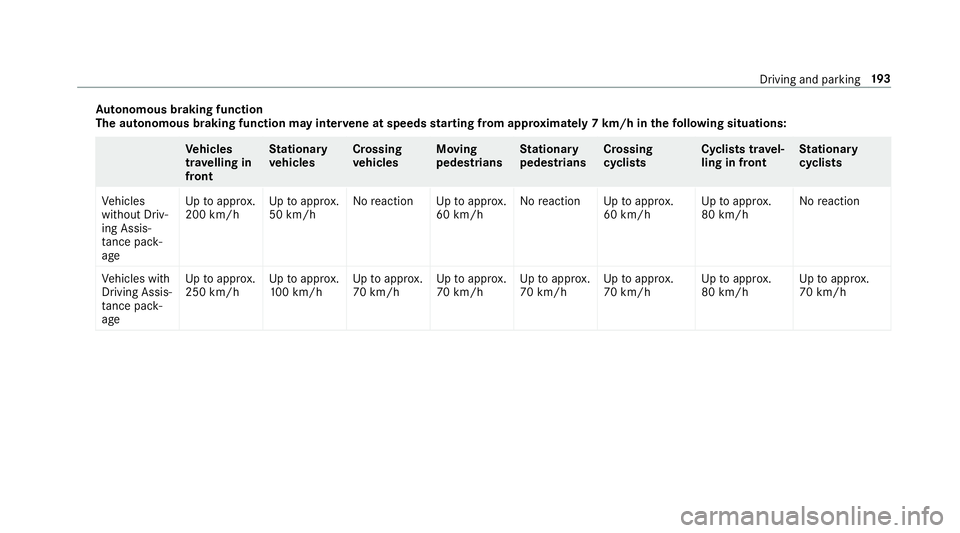
tonomous braking function
The autonomous braking function may inter vene at speeds starting from appr oxima tely 7 km/h in thefo llowing situations: Ve
hicles
tr av elling in
front St
ationary
ve hicles Crossing
ve
hicles Moving
pedestrians St
ationary
pedestrians Crossing
cycli
sts Cyclists tr
avel‐
ling in front St
ationary
cycli sts
Ve hicles
without Driv‐
ing Assis‐
ta nce pa ck‐
age Up
toappr ox.
200 km/h Up
toappr ox.
50 km/h No
reaction Uptoappr ox.
60 km/h No
reaction Uptoappr ox.
60 km/h Up
toappr ox.
80 km/h No
reaction
Ve hicles with
Driving Assis‐
ta nce pa ck‐
age Up
toappr ox.
250 km/h Up
toappr ox.
10 0 km/h Up
toappr ox.
70 km/h Up
toappr ox.
70 km/h Up
toappr ox.
70 km/h Up
toappr ox.
70 km/h Up
toappr ox.
80 km/h Up
toappr ox.
70 km/h Driving and parking
19 3
Page 198 of 609
R
Assi stance thro ugh po wer-assis tedsteering if
it de tects a swerving manoeuvre.
R Activation byan abrupt steering mo vement
during a swerving manoeuvre.
R Assis tance du ring swerving and stra ightening
of theve hicle.
R Reaction from a speed of appr oximately
20 km/h up toa speed of appr oximately
70 km/h.
Yo u can pr eventthe assis tance at any time by
actively steering. &
WARNING Risk of an accident despi te
Evasive Steering Assist
Evasive Steering Assist cann otalw ays clearly
identify objects and complex traf fic situa‐
tions.
In addition, thesteering support of Evasive
St eering Assist is general lynot su fficient to
avo id a collision. In such cases Evasive
Steering Assist can:
R give an unnecessary warning or pr ovide
assis tance
R not gi veawa rning or not pr ovide assis‐
ta nce #
Alw ays pay careful attention tothe traf‐
fi c situation; do not rely on Ev asive
St eering Assist alone. #
Beready tobrake and take evasive
action, if necessar y. #
Preve ntthe assis tance byactively steer‐
ing in non-critical driving situations. #
Drive at an appropriate speed if pedes‐
trians are close tothe path of your vehi‐
cle. Sy
stem limitations
Fu ll sy stem per form ance is not available for a
fe w seconds af ter switching on the ignition or
af te r driving off The sy
stem may be impaired or may not function
in thefo llowing situations:
R In sno w,rain, fog, heavy spr ay, if there is
gl are, in direct sunlight or in greatlyvarying
light conditions.
R Ifth e sensors are dirty, mis ted up, damaged
or co vered.
R Ifth e sensors are impaired due tointer fer‐
ence from other radar sources, e.g. strong
ra dar reflections in multi-s torey car par ks.
R If a loss of tyre pressure or a defective tyre
has been de tected and displ ayed.
R In complex traf fic situations whe reobjects
cannot always be clearly identified.
R For pede strians or vehicles if they mo ve
qu ickly into the sensor de tection range.
R For pede strians who are hidden by other
objects.
R Ifth e typical outline of a pedestrian cann ot
be distinguished from the bac kground
R If a pedestrian is not de tected as su ch, e.g.
due tospecial clo thing or other objects.
R On bends with a tight radius. Driving and parking
19 5
Page 202 of 609
#
Toselect cruise control: pressrocker
switch 1up. #
Toselect theva riable limi ter: press rocker
switch 1down.
% Vehicles with Active Dis tance Assi st
DISTRONIC: theva riable limiter is selec ted
by a dif fere nt button (→ page 202).
Ac tivating cruise control or the variable lim‐
iter #
Press rocker switch 2up (SET+) or down
(SET-).
The cur rent driven speed is stored and theve hi‐
cle maintains this speed (cruise control) or does
not exceed it (limiter).
Increasing/decreasing thesto red speed #
Press rocker switch 2up/down tothe pres‐
sure point.
The stored speed is increased or reduced by
1 km/h.
or #
Press and hold rocker switch 2up/down to
th e pressure point.
The stored speed is increased or reduced in
increments of 1 km/h.
or #
Press rocker switch 2beyond the pressure
point.
The stored speed is increased or reduced by
10 km/h.
or #
Press rocker switch 2beyond the pressure
point and hold.
The stored speed is increased or reduced in
increments of 10km/h.
or #
Accelerate theve hicle tothe desired speed. #
Press rocker switch 2up.
Ad opting the de tected speed
If cruise control/ variable limiter is activated and
Speed Limit Assist or Traf fic Sign Assi sthas
de tected a speed restriction sign wi tha maxi‐
mum permissible speed and this is displa yed in
th e instrument clus ter: #
Press rocker switch 3up.
The maximum permissible speed shown by
th e traf fic sign is stored and theve hicle
maintains or does not exceed this speed.
Deactivating cruise control or theva riable
limi ter #
Press rocker switch 3(CNCL) down.
When cruise control or theva riable limiter is
deactivated, rocker switch 2(SET+) or (SET-)
sa ve sth e cur rently driven speed and theve hicle
maintains this speed. When rocker switch 3
(RES) is pressed, the speed last stored is called
up and theve hicle maintains this speed.
% Ifyo u brake, deactivate ESP ®
or if ESP ®
inter venes, cruise control is deacti vated. The
va riable limiter is not deactivated.
When you swit choff theve hicle, the last
speed stored is cleared.
% When you activate cruise cont rol or Active
Dis tance Assi stDISTRONIC, the last speed
st ored forth eva riable limiter is cleared. Driving and parking
19 9
Page 203 of 609
Pe
rm anent limi ter
If th eve hicle should ne verexc eed a specific
speed (e.g. for driving in winter tyre mode), you
can set this speed with the permanent limiter.
Yo u do this by limiting the speed toava lue
between 160 km/h and 240 km/h in the multi‐
media sy stem (→ page 200).
Shortly before the set speed is reached, it
appears in the multifunction displa y.When you
confirm the message with %, display mes‐
sages no longer appear until you swit choff the
ve hicle. The speed will only be displa yed again
once theve hicle has been restar ted.
The permanent limiter does not switch topas‐
sive mode even du ring kickdown and the driven
speed remains below the set speed.
Setting the speed limitation for winter tyres
Multimedia sy stem:
, © .
Settings .
Fahrzeug (Vehi‐
cle) .
Winter tyres limit #
Select a speed or deactivate the function. Ac
tive Di stance Assist DISTRO NIC Fu
nction of Active Di stance Assist
DISTRO NIC Ac
tive Dis tance Assi stDISTRONIC maintains the
set speed on free-flowing roads. If vehicles
ahead are de tected, the set dis tance is main‐
ta ined, if necessar y,until theve hicle comes to a
halt. The vehicle accelerates or brakes depend‐
ing on the dis tance totheve hicle in front and
th e set speed. The speed and dis tance tothe
ve hicle in front are set and sa ved on thesteering
wheel on vehicles without the Driving Assis tance
Pa ckage, in thera nge between 20 km/h and
200 km/h and, on vehicles with the Driving Assis
tance Package, in thera nge between
20 km/h and 210 km/h.
Other features of Active Dis tance Assi st
DISTRONIC:
R Adjusts the driving style depending on the
selected drive program (fuel-saving, comfort‐
able or dynamic) (→ page160)
R Vehicles with Driving Assistance Pack‐
age: reacts tostationary vehicles de tected in
urban speed ranges (e xcept bicycles and
mo torcyc les).
R Initiates acceleration tothestored speed if
th e turn signal indicator is switched on to
ch ange totheove rtaking lane.
R Vehicles with Driving Assistance Pack‐
age: take s one-sided overtaking restrictions
into account on mo torw ays or on multi-lane
ro ads with separate car riag ewa ys.
Ve hicles with Active Park ing Assist and Driv‐
ing Assistance Package: ifth eve hicle has
been braked toast andstill on multi-lane, stru c‐
turally separate car riag ewa ysby Active Dis tance
Assi stDISTRONIC, it can au tomatical lyfollow 200
Driving and parking
Page 204 of 609
th
eve hicle in front driving off again within 30
seconds. If a critical situation is de tected when
driving off, a visual and acoustic warning is given
indicating that the driver must now take control
of theve hicle. The vehicle is not accelerated any
fur ther.
Ac tive Dis tance Assi stDISTRONIC is only an aid.
The driver is responsible forke eping a safe dis‐
ta nce totheve hicle in front, forve hicle speed
and for braking in good time.
Sy stem limitations
The sy stem may be impaired or may not function
in thefo llowing ins tances:
R In sno w,rain, fog, heavy spr ay, if there is
gl are, in direct sunlight or in great lyvarying
light conditions.
R The windsc reen in the area of the camera is
dirty, mis ted up, damaged or co vered.
R Ifth era dar sensors are dirty or co vered.
R On slippery roads, braking or accelerating
can cause one or se veral wheels tolose trac‐
tion and theve hicle could then skid. R
In multi-s torey car par ksor on roads with
st eep uphill or downhill gradients.
R Narrow vehicles, such as bicycles and mo tor‐
cycles, are not de tected.
Do not use Active Dis tance Assi stDISTRONIC in
th ese situations. &
WARNING Risk of accident from acceler‐
ation or braking byActive Dis tance
Assi stDISTRONIC
Ac tive Dis tance Assi stDISTRONIC may accel‐
erate or brake in thefo llowing cases, for
ex ample:
R Ifth eve hicle pulls away using Active Dis‐
ta nce Assi stDISTRONIC.
R Ifth estored speed is called up and is
considerably faster or slo werth an the
cur rently driven speed.
R IfAc tive Dis tance Assi stDISTRONIC no
longer de tects a vehicle in front or does
not react toreleva nt objects. #
Alw ays carefully obser vethe traf fic con‐
ditions and be ready tobrake at all
times. #
Take into account the tra ffic situation
before calling up thestored speed. &
WARNING Risk of accident due toinsuf‐
fi cient decele ration byActive Dis tance
Assi stDISTRONIC
Ac tive Dis tance Assi stDISTRONIC brakes
yo ur vehicle with up to50 % of the maximum
possible deceleration. If this decele ration is
not su fficient, Active Dis tance Assi st
DISTRONIC alerts you with a visual and
acoustic warning. #
Inthese cases, adjust your speed and
ke ep a suf ficient di stance. #
Brake theve hicle yourself and/or take
ev asive action. Driving and parking
201
Page 205 of 609
&
WARNING Risk of accident if de tection
function of Active Dis tance Assi st
DISTRONIC is impaired
Ac tive Dis tance Assi stDISTRONIC does not
re act or has a limited reaction:
R when driving on a dif fere nt lane or when
ch anging lanes
R topedestrians, animals, bicycles or sta‐
tionary vehicles, or unexpected obs tacles
R tocompl extraf fic conditions
R tooncoming vehicles and crossing traf fic
As a result, Active Dis tance Assi st
DISTRONIC may nei ther give warnings nor
inter vene in su chsituations. #
Alw ays obser vethe tra ffic conditions
carefully and react accordin gly. Operating
Active Di stance Assist DIST RONIC
Re quirements:
R The vehicle has been star ted.
R The elect ric pa rking brake is released. R
ESP ®
is activated and is not inter vening.
R The transmission is in position h.
R All doors and the bonn etare closed.
R Check of thera dar sensor sy stem has been
successfully comple ted.
R Parking Assist PARKTRONIC is not being
used topark theve hicle or toexit from a
parking space.
R The vehicle does not skid. Switching between
Active Di stance Assist
DIST RONIC and the limiter #
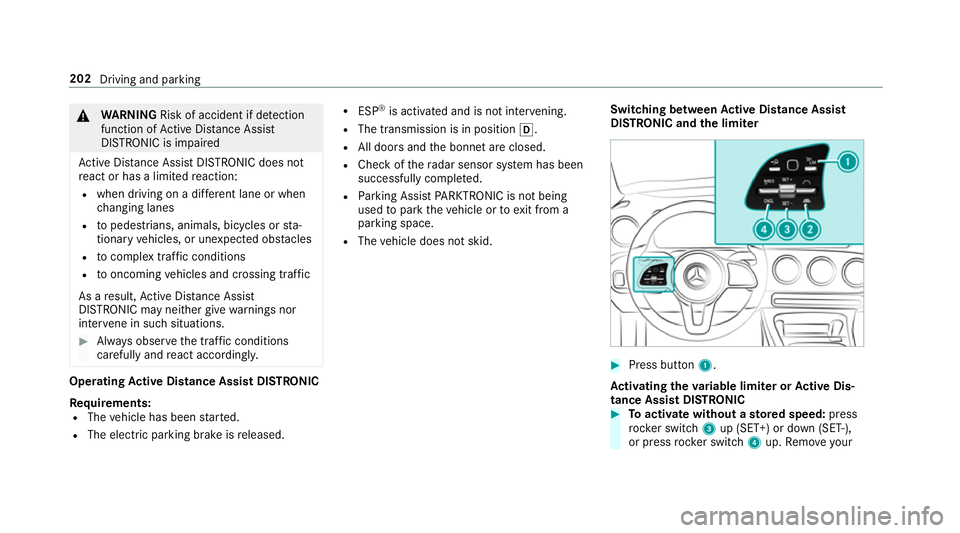
Press button 1.
Ac tivating the variable limi ter or Active Dis‐
tance Assi stDISTRONIC #
Toactivate with out astored speed: press
rock er switch 3up (SET+) or down (SET-),
or press rocker switch 4up. Remo veyour 202
Driving and parking
Page 207 of 609
#
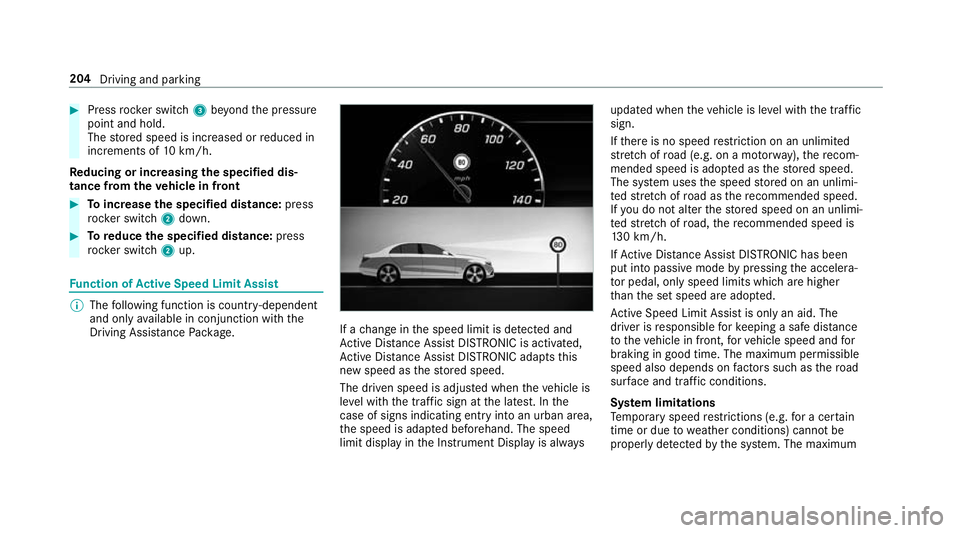
Press rocker switch 3beyond the pressure
point and hold.
The stored speed is increased or reduced in
increments of 10km/h.
Re ducing or inc reasing the specified dis‐
tance from theve hicle in front #
Toincrease the specified distance: press
rock er switch 2down. #
Toreduce the speci fied distance: press
rock er switch 2up. Fu
nction of Active Speed Limit Assi st%
The following function is countr y-dependent
and only available in conjunction with the
Driving Assi stance Package. If a
change in the speed limit is de tected and
Ac tive Dis tance Assi stDISTRONIC is acti vated,
Ac tive Dis tance Assi stDISTRONIC adapts this
new speed as thestored speed.
The driven speed is adjus ted when theve hicle is
le ve l with the traf fic sign at the latest. In the
case of signs indicating entry into an urban area,
th e speed is adap ted beforehand. The speed
limit display in the Instrument Display is alw aysupdated when
theve hicle is le vel with the tra ffic
sign.
If th ere is no speed restriction on an unlimi ted
st re tch of road (e.g. on a mo torw ay),th ere com‐
mended speed is adop ted as thestored speed.
The sy stem uses the speed stored on an unlimi‐
te dstre tch of road as there commended speed.
If yo u do not alter thestored speed on an unlimi‐
te dstre tch of road, there commended speed is
13 0 km/h.
If Ac tive Dis tance Assi stDISTRONIC has been
put into passi vemode bypressing the accelera‐
to r pedal, only speed limits which are higher
th an the set speed are adop ted.
Ac tive Speed Limit Assi stis only an aid. The
driver is responsible forke eping a safe dis tance
to theve hicle in front, forve hicle speed and for
braking in good time. The maximum permissible
speed also depends on factors su chasthero ad
sur face and traf fic conditions.
Sy stem limitations
Te mp orary speed restrictions (e.g. for a cer tain
time or due towe ather conditions) cannot be
proper ly detected bythe sy stem. The maximum 204
Driving and parking