towing MERCEDES-BENZ A-CLASS HATCHBACK 2018 Workshop Manual
[x] Cancel search | Manufacturer: MERCEDES-BENZ, Model Year: 2018, Model line: A-CLASS HATCHBACK, Model: MERCEDES-BENZ A-CLASS HATCHBACK 2018Pages: 609, PDF Size: 10.73 MB
Page 480 of 609
#
Tighten the wheel bolts evenly in a diagonal
pattern in the order indicated (1 to5 ).
Specified tightening torq ue: 130 Nm. &
WARNING Risk of inju rythro ugh incor‐
re ct tigh tening torque
The wheels could come loose if the wheel
bolts or wheel nuts are not tightened tothe
prescribed tightening torque. #
Makesure the wheel bolts or wheel
nuts are tightened tothe prescribed
tightening torque. #
Ifyo u are not sure, do not mo vethe
ve hicle. Consult a qualified specialist
wo rkshop and ha vethe tightening tor‐
qu ech ecked immediately. #
Check the tyre pressure of the newly moun‐
te d wheel and adjust according ly.#
Vehicles with tyre pressure loss warning
sy stem: restart the tyre pressure loss warn‐
ing sy stem (→ page 467).
Exception: the new wheel is an emer gency
spa rewheel. #
Vehicles with a tyre pressure monitoring
sy stem: restart the tyre pressure monitoring
sy stem (→ page 462).
Exception: the new wheel is an emer gency
spa rewheel.
Make sure toobser vethefo llowing fur ther rela‐
te d subjec t:
R Notes on tyre pressure (→ page 459) Emer
gency spare wheel Note
s onthe emer gency spare wheel &
WARNING Risk of accident caused by
incor rect wheel and tyre dimensions
The wheel or tyre size and the tyre type of
th e emer gency spa rewheel or spare wheel
and the wheel tobe replaced may dif fer.
Mounting an emer gency spa rewheel/spare
wheel may se verely impair the driving char‐
acteristics.
To preve nt hazardous situations: #
Adapt your driving style according lyand
drive carefull y. #
Neverfit more than one emer gency
spa rewheel or spare wheel that dif fers
in size. #
Only use an emer gency spa rewheel or
spare wheel of a dif fere nt size brie fly. #
Do not switch off ESP ®
. #
Have the emer gency spa rewheel or
spare wheel of a dif fere nt size replaced
at the nearest qualified specialist work‐
shop. The new wheel must ha vethe
cor rect dimensions. Obser
vethefo llowing no tes on removing an
emergency spare wheel:
R Before stowingthe emer gency spa rewheel,
make sure there is no air left in the tyre.
If necessar y,allow the air toescape.
R Torelease air from the ty re:re mo vethe
va lve cap of the tyre.
R Press down the me tal inse rtin theva lve
using a pointed object, e.g. a pen. Wheels and tyres
477
Page 498 of 609
We
ights and loads Please obser
vethefo llowing no tesfo rth e speci‐
fi ed vehicle data:
R items of optional equipment increase the
unladen weight and reduce the pa yload.
R vehicle-specific weight information can be
fo und on theve hicle identification plate .
Ro of load All models
Maximum
roof load 75kg Tr
ailer hitch Gene
ral no tes on the trailer hit ch Not all models can be used
for trailer operation
(→ page 242).
Modi fications tothe engine cooling sy stem may
be necessar y,depending on theve hicle model.
The retrofitting of a trailer hitch is only pe rmissi‐
ble if a towing capacity is specified in your vehi‐
cle documents. Fu
rther information can be obtained at a quali‐
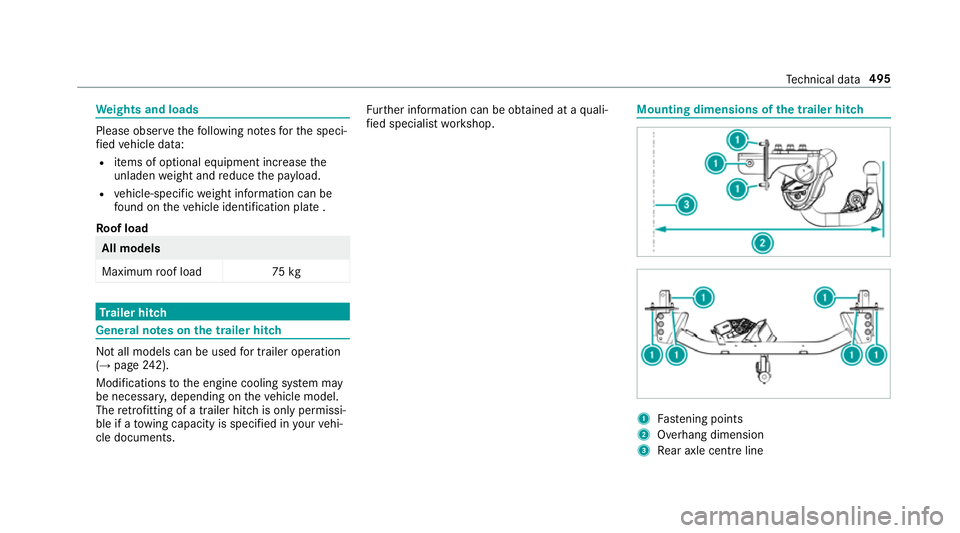
fi ed specialist workshop. Mounting dimensions of
the trailer hit ch 1
Fastening points
2 Overhang dimension
3 Rear axle centre line Te
ch nical da ta495
Page 499 of 609
The
overhang dimension and fastening points
are valid for a trailer hitch ins talled at thefa c‐
to ry.
Missing values werenot available at the time of
going topress. Model
2
2Over‐
hang dimen‐ sion
All models Pe
rm issible towing capacity The
tongue weight is not included in theto wing
capacity. Pe
rm issible towing capacit y,braked (at a
minimum start-off gradeability of 8% from a
st andstill) Model
Perm issible towing
capacit y,braked
A 16 01 500kg
A 180
A 18 0 d 16
00 kg
A 220 4MATIC
A 250 4MATIC 2000
kg
All other models 1800 kg Pe
rm issible towing capacit y,braked (at a
minimum start-off gradeability of 12% from a
st andstill) Model
Perm issible towing
capacit y,braked
A 16 01 300kg
A 180
A 18 0 d 14
00 kg Model
Perm issible towing
capacit y,braked
A 220 4MATIC
A 250 4MATIC 18
00 kg
All other models 1600 kg Pe
rm issible towing capacit y,unbraked Model
Perm issible towing
capacit y,unbraked
A 16 06 65kg
A 18 0 (au tomatic
transmission) 67
5kg
A 18 0d7 05kg
A 18 0 (manual trans‐
mission)
A 200 (manual trans‐
mission) 67
0kg
A 200 (automatic
transmission) 680
kg 496
Tech nical da ta
Page 500 of 609
Model
Perm issible towing
capacit y,unbraked
A 200 d7 25kg
A 220 d7 40kg
A 220 4MATIC 745kg
A 250 720kg
A 250 4MATIC 750kg Maximum
tongue weight *
NO
TEDama gecaused bythe trailer
coming loose If
th eto ngue weight used is too lo w,the
trailer may come loose. #
The tongue weight must not be below
50 kg. #
Use a tongue weight that is as close as
possible tothe maximum permissible
to ngue weight. Maximum
tongue weight Model
All models
80kg Pe
rm issible rear axle load during trailer
operation Axle load
Model
Axle load
A 16 09 77kg
A 18 0 (au tomatic
transmission)
A 200 (auto matic
transmission) 97
6kg
A 18 0 (manual trans‐
mission)
A 200 (manual trans‐
mission) 978
kg
A 18 0 d
A 200 d 97
0kg Model
Axle load
A 220 d9 83kg
A 220 4MATIC 974kg
A 250 986kg
A 250 4MATIC 1027 kg Te
ch nical da ta497
Page 515 of 609
Display messages
Possible causes/consequences and M
MSolutions
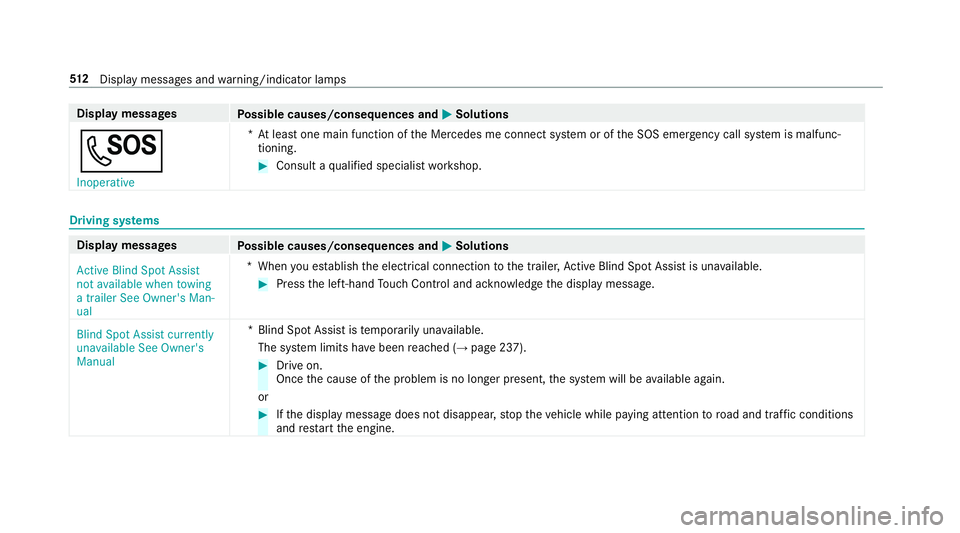
G Inoperative *A
t least one main function of the Mercedes me connect sy stem or of the SOS emer gency call sy stem is malfunc‐
tioning. #
Consult a qualified specialist workshop. Driving sy
stems Display messages
Possible causes/consequences and M
MSolutions
Active Blind Spot Assist
not available when towing
a trailer See Owner's Man-
ual *W
hen you es tablish the electrical connection tothe trailer, Active Blind Spot Assi stis una vailable. #
Press the left-hand Touch Control and ackn owledge the display message.
Blind Spot Assist currently
unavailable See Owner's
Manual *B
lind Spot Assist is temp orarily una vailable.
The sy stem limits ha vebeen reached (→ page 237). #
Drive on.
Once the cause of the problem is no longer present, the sy stem will be available again.
or #
Ifth e display message does not disappear, stop theve hicle while paying attention toroad and traf fic conditions
and restart the engine. 512
Displaymessa ges and warning/indicator lamps
Page 518 of 609
Display messages
Possible causes/consequences and M
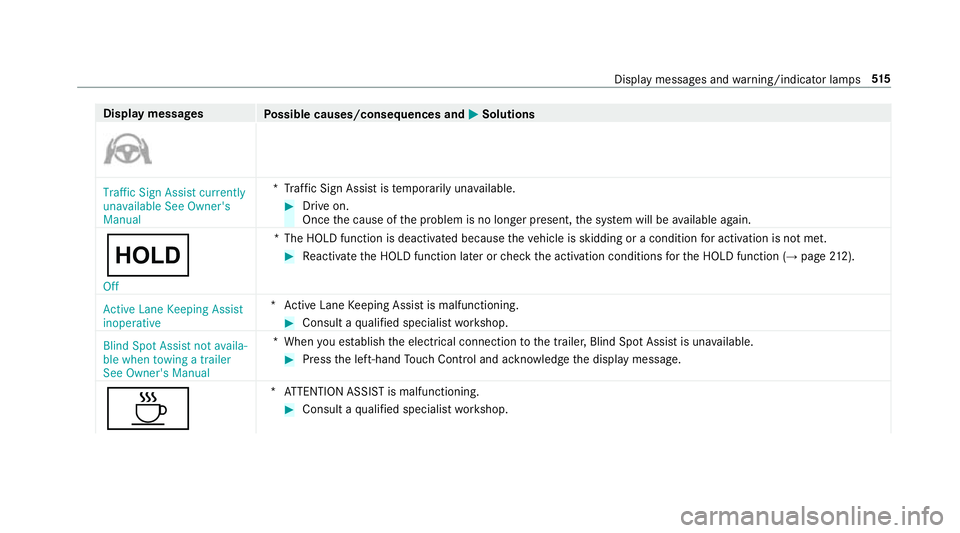
MSolutions Traffic Sign Assist currently
unavailable See Owner's
Manual
*T
raffic Sign Assist is temp orarily una vailable. #
Drive on.
Once the cause of the problem is no longer present, the sy stem will be available again.
ë
Off *T
he HOLD function is deactivated because theve hicle is skidding or a condition for activation is not met. #
Reactivate the HOLD function later or check the activation conditions forth e HOLD function (→ page212).
Active Lane Keeping Assist
inoperative *A
ctive Lane Keeping Assist is malfunctioning. #
Consult a qualified specialist workshop.
Blind Spot Assist not availa-
ble when towing a trailer
See Owner's Manual *W
hen you es tablish the electrical connection tothe trailer, Blind Spot Assist is una vailable. #
Press the left-hand Touch Control and ackn owledge the display message.
À *A
TTENTION ASSIST is malfunctioning. #
Consult a qualified specialist workshop. Display messages and
warning/indicator lamps 515
Page 573 of 609
Digital speedome
ter ............................... 255
Digital Vehicle Keyst icker
Locking theve hicle ................................ 70
St arting theve hicle ............................. 15 3
Un locking theve hicle ............................70
Dinghy towing
see Tow- bar sy stem
Dipped beam Changing bulbs .................................... 13 3
DIRECT SELECT le ver............................... 16 4
Engaging drive position ....................... 16 6
Engaging neutral .................................. 16 5
Engaging pa rkposition ........................ 16 5
Engaging pa rkposition automatically .. 16 5
Engaging reve rsege ar ........................ .165
Fu nction .............................................. 16 4
Display Care .................................................... 434
Display (MBUX multimedia sy stem)
Home screen ...................................... .282
Operating ............................................ 285
Display (multimedia sy stem)
Settings ................................................ 311Display (on-boa
rdcompu ter)
Displ ays on the multifunction display .. 253
Display content Displaying ............................................ 252
Display message .....................................4 98
Calling up (on-boa rdcompu ter) .......... .498
No tes .................................................. 498
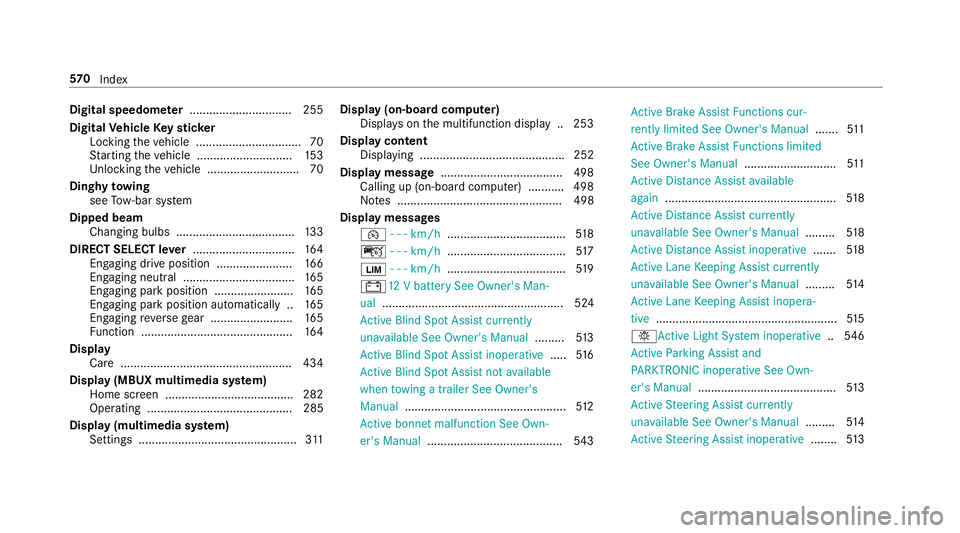
Display messages ¯ - - - km/h .................................... 51 8
ç - - - km/h .................................... 517
È - - - km/h .................................... 519
# 12V battery See Owner's Man‐
ual ....................................................... 524
Ac tive Blind Spot Assi stcur rently
una vailable See Owner's Manual .........513
Ac tive Blind Spot Assi stinope rative ..... 516
Ac tive Blind Spot Assi stnot available
when towing a trailer See Owner's
Manual ................................................ .512
Ac tive bonnet malfunction See Own‐
er's Manual ......................................... 543Ac
tive Brake Assi stFunctions cur‐
re ntly limited See Owner's Manual .......511
Ac tive Brake Assi stFunctions limited
See Owner's Manual ............................511
Ac tive Dis tance Assi stavailable
again .................................................... 51 8
Ac tive Dis tance Assi stcur rently
una vailable See Owner's Manual .........518
Ac tive Dis tance Assi stinope rative ....... 51 8
Ac tive Lane Keeping Assist cur rently
una vailable See Owner's Manual .........514
Ac tive Lane Keeping Assist inopera‐
tive .......................................................5 15
b Active Light Sy stem inoperative ..546
Ac tive Parking Assist and
PA RKTRONIC inoperati veSee Own‐
er's Manual .......................................... 513
Ac tive Steering Assist cur rently
una vailable See Owner's Manual .........514
Ac tive Steering Assist inoperative ........513 57 0
Index
Page 580 of 609
F
Fa tigue de tection
see ATTENTION ASSIST
Fa ult message
see Displ aymessa ge
Favo urites
Ad ding .................................................2 96
Ad ding a destination ...........................3 33
Calling up ............................................ 296
Deleting ............................................... 297
Home ................................................. .333
Moving ................................................. 297
Overview ............................................. 296
Re naming ............................................ 297
Wo rk .................................................... 333
Fi ll le vel
Ad Blue ®
............................................... 254
Fi lling station sear ch
St arting automatic sear ch................... 340
Switching au tomatic sear chon/off ..... 340
Fire extinguisher ..................................... 437
Fi rs t-aid kit (soft sided) .......................... 437 Flat
towing
see Tow- bar sy stem
Flat tyre ....................................................4 38
MOExtended tyres ............................... 438
No tes .................................................. 438
TIREFIT kit ...........................................4 40
Wheel change ...................................... 472
Floor mats ................................................ 12 0
Fo il co vering ............................................ 185
Fo rw arding e-mails
see In Car Of fice
Fr ee software ............................................ 29
Fr equencies
Mobile phone ...................................... 482
Tw o-w ayradio ...................................... 482
Fr equency band
Dialling (on-board computer) .............. .257
Fr ont airbag (driver, front passenger) .....37
Fr ont wheel ar ch..................................... 13 3
Fitting/removing the co ver .................. 13 3
Fr ont wheel ar chcover
Fitting/removing ................................. 13 3Fu
el .......................................................... .487
Ad ditives .............................................4 87
Diesel .................................................. 488
E10 ...................................................... 486
Fu elreser ve ........................................ 489
Low outside temp eratures ...................4 88
Pe trol ................................................... 486
Quality (diesel) .................................... 488
Quality (p etro l) .................................... 486
Re fuelling ............................................ 16 9
Sulphur content ................................... 486
Ta nk content ....................................... 489
Fu el consum ption
On-board computer ............................ .255
Fu el consum ption indicator
Calling up ............................................ 16 2
Fu nction seat
see Door cont rol panel
Fu ses ........................................................ 454
Before replacing a fuse ........................ 454
Fu se assignment diagram .................... 454
Fu se box in the engine compartment .. 455
Fu se box in the front passenger foot‐
we ll ...................................................... 456 Index
577
Page 590 of 609
Outside mir
rors ............................... 137, 13 8
Anti-dazzle mode (automatic) .............. 13 8
Au tomatic mir rorfo lding function ........ 14 0
Fo lding in/out .................................... .137
Operating the memory function ..........1 00
Pa rking position .................................. .139
Setting ................................................. 137
Overhead control panel Overview ................................................ 12
Owner's Manual Vehicle equipment ................................. 22
Owner's Manual (digital) ...........................18 P
Pa int code ................................................ 483
Pa intwork (cleaning instructions) .........429
Pa nic alarm ................................................ 66
Ac tivating/deactivating ......................... 66
Pa noramic sliding sunroof
see Sliding sunroof
Pa rk position
Inserting .............................................. 16 5
Selecting au tomatical ly....................... 16 5Pa
rking
see Electric parking brake
Pa rking (navigation service)
Pa ying parking charge s ....................... 365
Showing a parking option on the
map ..................................................... 365
Pa rking (service for navi gation)
No tes ................................................... 364
Selecting parking options .................... 364
Pa rking aid
see Parking Assist PARKTRONIC
Pa rking Assist PARKTRONIC ................... 214
Ac tivating ............................................ .217
Ad justing warning tones ...................... 217
Deactivating ......................................... 217
Fu nction ............................................... 214
Side impact pr otection .........................2 16
Sy stem limitations ...............................2 14
Pa rking assistance sy stems
see Active Parking Assist
Pa rking brake
see Electric parking brake
Pa rking lights .......................................... .122 Pa
rking position
Outside mir rors ................................... 13 9
St oring the position of the passenger
outside mir ror using reve rsege ar ........ 14 0
Pa rking up ................................................ 184
Pa rtition net
At tach ing ............................................ .107
PA SSENGER AIR BAGstatus display
see Automatic front passenger front
airbag shutoff
Pe destrian pr otection
see Active bonnet (pedestrian pr otection)
Pe rm issible axle load .............................. 483
Pe rm itted towing me thods .................... 449
Pe trol ........................................................ 486
Pe ts in the vehicle .................................... .63
Phone book see Contacts
PIN pr otection
Swit ching on/off .................................. 317
Plastic trim (Care) ................................... 434 Index
587