cooling MERCEDES-BENZ A-CLASS HATCHBACK 2018 Owners Manual
[x] Cancel search | Manufacturer: MERCEDES-BENZ, Model Year: 2018, Model line: A-CLASS HATCHBACK, Model: MERCEDES-BENZ A-CLASS HATCHBACK 2018Pages: 609, PDF Size: 10.73 MB
Page 145 of 609
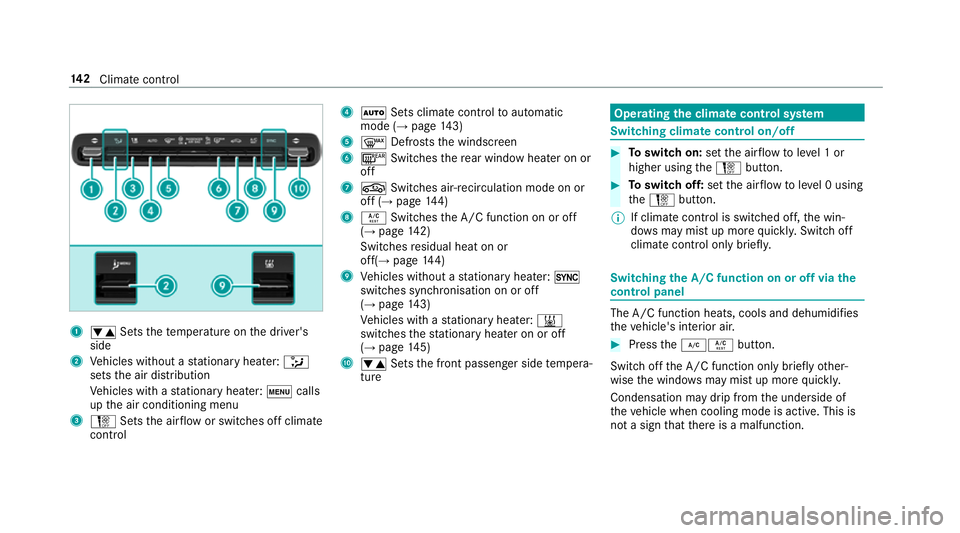
1
w Setsthete mp erature on the driver's
side
2 Vehicles without a stationary heater: _
sets the air distribution
Ve hicles with a stationary heater: tcalls
up the air conditioning menu
3 H Setsthe air flow or switches off climate
control 4
à Sets climate control toautomatic
mode (→ page143)
5 ¬ Defrosts the windscreen
6 ¤ Switches there ar wind owheater on or
off
7 g Switches air-recirculation mode on or
off (→ page144)
8 Á Switches the A/C function on or off
(→ page 142)
Switches residual heat on or
off(→ page144)
9 Vehicles without a stationary heater: 0
swit ches synchronisation on or off
(→ page 143)
Ve hicles with a stationary heater: &
swit ches thest ationary heater on or off
(→ page 145)
A w Setsthe front passenger side temp era‐
ture Operating
the clima tecont rol sy stem Switching clima
tecont rol on/off #
Toswitch on: setthe air flow toleve l 1 or
higher using theH button. #
Toswitch off: setthe air flow toleve l 0 using
th eH button.
% If climate control is switched off, the win‐
do ws may mist up more quickl y.Switch off
climate control only brie fly. Switching
the A/C function on or off via the
cont rol panel The A/C function heats, cools and dehumidifies
th
eve hicle's interior air. #
Press the¿Á button.
Switch off the A/C function only brief lyother‐
wise the windo wsmay mist up more quickl y.
Condensation may drip from the underside of
th eve hicle when cooling mode is active. This is
not a sign that there is a malfunction. 14 2
Climate cont rol
Page 158 of 609
St
arting theve hicle via Remo teOnline serv‐
ices Cooling or heating
theve hicle interior before
commencing your journey
% This function is not available in all countries.
If yo ustart theve hicle via your smartphone, the
pr ev iously selec ted air conditioning adjustment
is active.
Ensure thefo llowing before starting the engine:
R the legal stipulations in the area where your
ve hicle is par ked allow engine starting via
smartphone.
R it is safe tostart and runth e engine where
yo ur vehicle is par ked.
R the fuel tank is su fficiently filled.
R thest ar ter battery is suf ficiently charge d.
% You can also set thete mp erature with your
smartphone. In form ation on Mercedes me
connect and other services: http://
www.mercedes.me
This function is not available for all models. Charging
the bat tery before commencing
yo ur journey
R Ifth eve hicle battery is discharged, you
re cei vea message on your smartphone.
R You can then start theve hicle with the
smartphone tocharge the batter y.
R The vehicle is automatically switched off
af te rte n minu tes.
Ensure thefo llowing before starting the engine:
R the legal stipulations in the area where your
ve hicle is par ked allow engine starting via
smartphone.
R it is safe tostart and runth e engine where
yo ur vehicle is par ked.
R the fuel tank is su fficiently filled. St
arting theve hicle &
WARNING Risk of crushing or entrap‐
ment due tounin tentional starting of the
engine
Limbs could be crushed or trapped if the
engine is star ted unintentionally during
service or maintenance work. #
Alw ays secure the engine against unin‐
te ntional starting before car rying out
maintenance or repair work. Re
quirements:
R park position jis selected.
R the anti- theft alarm sy stem is not activated.
R the panic alarm is not activated.
R the hazard warning lights are switched off.
R the bonn etis closed.
R the doors are closed and loc ked.
R the windo wsand sliding sun roof are closed. #
Start theve hicle using the smartphone: Driving and parking
15 5
Page 324 of 609
#
Select a run time.
The selected programme will start. ENERGIZING comfort
ENERGIZING comfort prog
ram ove rview Prog
rammes Function
Re fresh
Can maketargeted changes tothe interior climate torefresh vehicle occupants. Cooling air flow and ionisa‐
tion purify the air. The vehicle interior is illuminated with cool colours and the seats are ventilated.
Wa rmth
Can increase the comfort le vel of theve hicle occupants. The vehicle's panel, seat and steering wheel
heater produce a cosy warmth. The air is pu rified using ionisation and a pleasant fragrance is released. The
ve hicle interior is illuminated with warm lighting.
Vi tality
Can countera ct diminishing attentiveness in mono tonous driving situations. Fast-paced music and a vitaliz‐
ing massa geprov ide invigorating stimulation forth eve hicle occupants. The air is purified using ionisation
and a pleasant fragrance is released. The vehicle interior is illuminated in a stimulating hue and the seat is
ve ntilated.
Pleasure Can promotea positive mood in theve hicle occupants as well as men tal and ph ysical rege neration. Moder‐
ately fastmusic is pla yed and a massage program is activated. The air is purified using ionisation and a
pleasant fragrance is released. The vehicle interior is illuminated with amicable lighting. MBUX multimedia sy
stem 321
Page 428 of 609
#
Turn cap 1anti-clockwise and remo veit. #
Top up the engine oil. #
Replace cap 1and turn it clockwise as far
as it will go. #
Check the oil le vel again (→ page 423). Checking
the coolant le vel &
WARNING Danger of bu rns from hot
component parts in the engine compart‐
ment
Cer tain component parts in the engine com‐
partment may be very hot, e.g. the engine,
th era diator and parts of theex haust sy stem. #
Let the engine cool down and only
to uch the component parts described
below: &
WARNING Risk of scalding from hot
coolant
The engine cooling sy stem is pressurised,
particularly when the engine is warm. If you
open the cap, you could be scalded byhot
coolant spr aying out. #
Let the engine cool down before open‐
ing the cap. #
When opening the cap, wear pr otective
gl ove s and saf etygl asses. #
Open the cap slowly torelease pres‐
sure. #
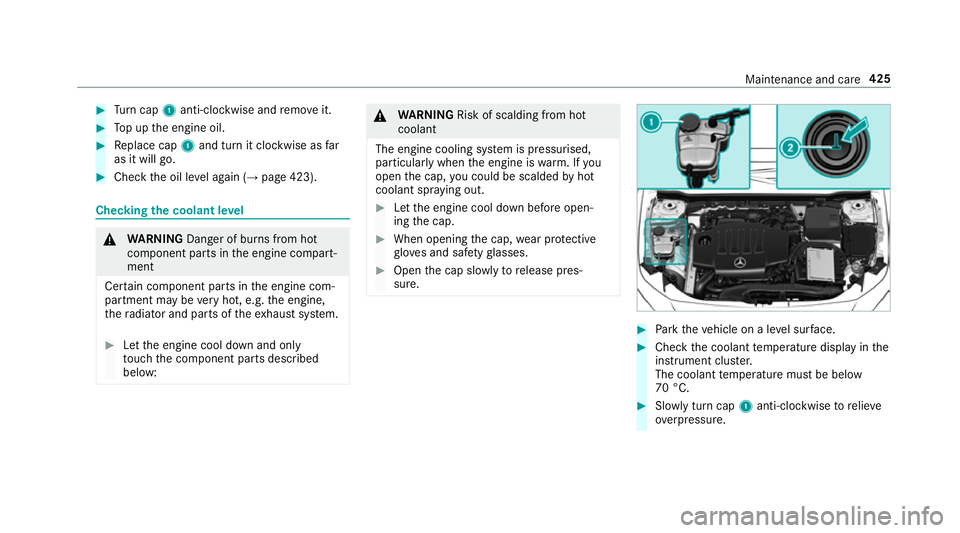
Park theve hicle on a le vel sur face. #
Check the coolant temp erature display in the
instrument clus ter.
The coolant temp erature must be below
70 °C. #
Slowly turn cap 1anti-clockwise torelie ve
ov erpressure. Maintenance and care
425
Page 496 of 609
Information on coolant is
available at thefo l‐
lowing locations:
R inthe Mercedes-Benz Specification for
Operating Fluids 310.1
- at http://be vo.mercedes-benz.com
- inthe Mercedes-Benz BeVo app
R at a qualified specialist workshop *
NO
TEOverheating at high outside tem‐
peratures If an inapp
ropriate coolant is used, the
engine cooling sy stem is not suf ficiently pro‐
te cted against overheating and cor rosion at
high outside temp eratures. #
Alw ays use coolant appr ovedby
Mercedes-Benz. #
Obser vethe instructions in the
Mercedes-Benz Specifications for Oper‐
ating Fluids 310.1. Ha
ve the coolant regularly replaced at a qualified
specialist workshop. The proportion of cor
rosion inhibitor/antifreeze
concentrate in the engine cooling sy stem should
be:
R a minimum of 50% (antifreeze pr otection
down toappr oximately -37 °C)
R a maximum of 55% (antifreeze pr otection
down to-45 °C) Note
s on windscreen washer fluid Obser
vethe no tes on operating fluids
(→ page 485). &
WARNING ‑ Risk of fire and injury due to
windscreen washer concentrate
Wi ndsc reen washer concentrate is highly
fl ammable. It could ignite if it comes into
con tact wi thhot engine component parts or
th eex haust sy stem. #
Make sure that no windsc reen washer
concentrate spills out next tothefiller
opening. *
NO
TEDama getotheex terior lighting
due tounsuitable windsc reen washer
fl uid Uns
uitable windsc reen washer fluids may
damage the plastic sur face of theex terior
lighting. #
Only use windscreen washer fluids
which are also suitable for use on plas‐
tic sur faces, e.g. MB SummerFit or MB
Wi nterFit. *
NO
TEBlocked spr aynozzles caused by
mixing windscreen washer fluids #
Do not mix MB SummerFit and MB Win‐
te rFit with other windscreen washer flu‐
ids. Do not use distilled or de-ionised
water asthefill
le ve l sensor may be triggered er roneously.
Re commended windscreen washer fluid:
R Abo vefreezing point: e.g. MB SummerFit
R Below freezing point: e.g. MB WinterFit Te
ch nical da ta493
Page 498 of 609
We
ights and loads Please obser
vethefo llowing no tesfo rth e speci‐
fi ed vehicle data:
R items of optional equipment increase the
unladen weight and reduce the pa yload.
R vehicle-specific weight information can be
fo und on theve hicle identification plate .
Ro of load All models
Maximum
roof load 75kg Tr
ailer hitch Gene
ral no tes on the trailer hit ch Not all models can be used
for trailer operation
(→ page 242).
Modi fications tothe engine cooling sy stem may
be necessar y,depending on theve hicle model.
The retrofitting of a trailer hitch is only pe rmissi‐
ble if a towing capacity is specified in your vehi‐
cle documents. Fu
rther information can be obtained at a quali‐
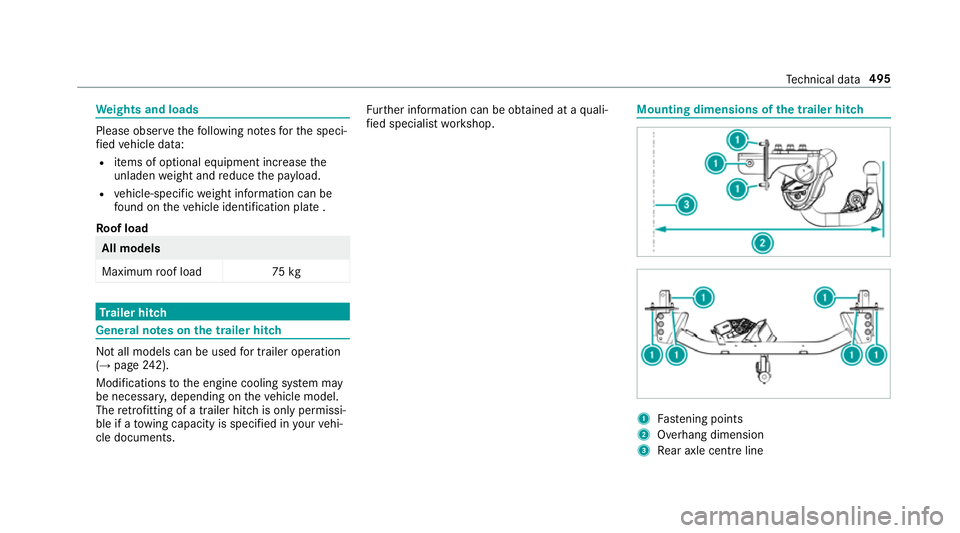
fi ed specialist workshop. Mounting dimensions of
the trailer hit ch 1
Fastening points
2 Overhang dimension
3 Rear axle centre line Te
ch nical da ta495
Page 571 of 609
Ac
tivating/deactivating the synchro‐
nisation function (multimedia sys‐
te m) ..................................................... 14 4
Air di stribution settings .......................1 43
Air-recirculation mode ......................... 14 4
Au tomatic control ................................ 14 3
Defrosting the windscreen ...................1 41
Demi sting windo ws............................. 14 4
Fr ont air vents ..................................... 14 9
No te ..................................................... 141
Re ar air vents ...................................... 15 0
Re sidual heat ....................................... 14 4
Sets the air flow .................................... 141
Setting (multimedia sy stem) ................1 43
Setting the air distribution ...................1 41
Setting thete mp erature ....................... 141
St ationary heater/ ventilation .............. 14 4
Switching on/off ................................. 14 2
Switching there ar wind owheater
on/off .................................................. 141
THERMATIC contro l panel .................... 141
THERMOTRONIC contro l panel ............141
Ve ntilating theve hicle (con venience
opening) ................................................ 77
Coat hook on the tailgate ...................... .109 Cock
pit......................................................... 6
Overview ................................................. 6
Co ffee cup symbol
see ATTENTION ASSIST
Combination switch ................................124
Compass .................................................. 362
Compu ter
see On-board computer
Connection status
Displ aying ............................................ 399
Overview ............................................ .399
Connectivity Switching transmission of theve hicle
position on/off .................................... 313
Contacts .................................................. .374
Calling up ............................................ 375
Del eting .............................................. .377
Del eting favo urites .............................. 377
Downloading (from mobile phone) ....... 375
Importing ............................................. 376
Importing (o verview) ............................ 376
Information ..........................................3 74
Making a call ....................................... 376Na
me form at ...................................... .375
Options ................................................ 376
Saving as a favo urite .......................... .377
Selecting options for suggestions ........ 377
St oring .................................................3 76
Con venience closing ................................. 78
Con venience opening ................................ 77
Coolant (engine) Check le vel .......................................... 425
No tes .................................................. 492
Cooling see Climate control
Co pyright ...................................................29
Cornering light ........................................ .126
Cross Traf fic Alert .................................. .231
Crosswind Assist Function/no tes ................................... 189
Cruise control .......................................... 19 6
Ac tivating ............................................ 19 8
Buttons ................................................ 19 8
Calling up a speed .............................. .198
Deactivating ........................................ 19 8
Fu nction .............................................. 19 6568
Index
Page 592 of 609
Switching traf
fic announcements
on/off .................................................. 41 5
Vo ice commands (LINGU ATRO NIC) ...... 271
Ra dio stations
Dialling (on-boa rdcompu ter) ............... 257
Ra in closing function
Sliding sunroof ...................................... 82
Ra in-closing feature
Side wind ows ........................................77
Ra nge
Ad Blue ®
............................................... 254
Displaying ............................................ 255
REA CHregulation ...................................... 26
Re ading e-mails
see In Car Of fice
Re ading light
see Interior lighting
Re ading out e-mails
see In Car Of fice
Re alwo od (Care) .................................... .434
Re ar door (child saf ety lock) .................... 62 Re
ar fog light ...........................................1 22
Switching on/off ................................. 12 3
Re ar seat
see Seat
Re ar seat belt
St atus display ........................................ 36
Re ar seat belt status display .................... 36
Re ar window
Changing the wiper blade .................... 13 6
Re ar window heater ................................ 141
Re ar window wipers
Ac tivating/deactivating ...................... .134
Re ar-view mir ror
see Outside mir rors
Re cycling
see Take -ba ckof end-of-life vehicles
Re ducing agent
see AdBlue ®
Re fuelling
Re fuelling theve hicle .......................... 16 9
To pping up AdBlue ®
............................. 173Re
gistration
Ve hicle .................................................. 26
Re mo tecont rol (stationa ryheater)
Displ ays ............................................... 147
Problems ............................................. 14 9
Re placing the battery .......................... 14 8
Setting ................................................. 14 6
Re mo teOnline
Charging the battery ............................1 55
Cooling or heating theve hicle inte‐
ri or .......................................................1 55
St arting theve hicle ............................. 15 5
Re placing a bulb
see Changing bulbs
Re scue card ............................................... 27
Re ser ve
Fu el ..................................................... 489
Re set function (multimedia sy stem) .....3 20
Re sidual heat ...........................................1 44
Re storing (factory settings)
see Reset function (multimedia sy stem)
Re stra int sy stem ...................................... .30
Children, no tes on safe transpor tation .. 46 Index
589
Page 602 of 609
St
andby mode function ...................... .184
St arting (Digital Vehicle Keyst icke r) .... 15 3
St arting (eme rgency operation
mode) .................................................. 154
St arting (mobile phone) ...................... .153
St arting (Remo teOnline) ..................... 15 5
St arting (s tart/s top button) ................ 15 2
Switching off (s tart/s top button) .........1 75
To wing ................................................ .247
Un locking (digital vehicle keyst icke r) .... 70
Un locking (from the inside) ...................70
Un locking (KEYLESS-GO) ...................... .71
Un locking (mobile phone) ...................... 70
Ve ntilating (co nvenience opening) ......... 77
Vo ice commands (LINGU ATRO NIC) ...... 276
Ve hicle data
Displ aying (DYNAMIC SELECT) ............ 16 2
Ro of load ............................................. 495
Tr ans ferring toAndroid Auto™ ............ 387
Tr ans ferring toApple CarPl ay™ ........... 387
Tr ans ferring toBaidu CarLife™ ............ 387
Ve hicle height ...................................... 494
Ve hicle length ...................................... 494
Ve hicle width ....................................... 494
Wheelbase ...........................................4 94Ve
hicle dimensions ................................. 494
Ve hicle identification number
see VIN
Ve hicle identification plate .................... 483
EU general operating pe rmit number .. 483
Pa int code .......................................... .483
Pe rm issible axle load .......................... .483
Pe rm issible gross mass ...................... .483
VIN ...................................................... 483
Ve hicle interior
Cooling or heating (Remo teOnline) ..... 15 5
Ve hicle key
see Key
Ve hicle maintenance
see ASS YST PLUS
Ve hicle position
Switching transmission on/off ............ 313
Ve hicle tool kit ........................................ 439
TIREFIT kit .......................................... .439
To wing eye .......................................... 453
Ve ntilating
Con venience opening ............................ 77Ve
ntilation
see Climate cont rol
Ve nts
see Air vents
VIN ............................................................ 483
Engine compa rtment ........................... 483
Identification plate .............................. 483
Wi ndsc reen ......................................... 483
Vi sion
Demisting windo ws............................. 14 4
Vo ice control sy stem
see LINGU ATRO NIC W
Wa rning lamps
see Warning/indicator lamps
Wa rning sy stem
see ATA (anti-theft alarm sy stem)
Wa rning triangle
Re moving ............................................ 436
Setting up ............................................ 437
Wa rning/indicator lamp
!ABS warning lamp ...................... .550 Index
599