tailgate MERCEDES-BENZ A-CLASS HATCHBACK 2018 Owners Manual
[x] Cancel search | Manufacturer: MERCEDES-BENZ, Model Year: 2018, Model line: A-CLASS HATCHBACK, Model: MERCEDES-BENZ A-CLASS HATCHBACK 2018Pages: 609, PDF Size: 10.73 MB
Page 77 of 609
#
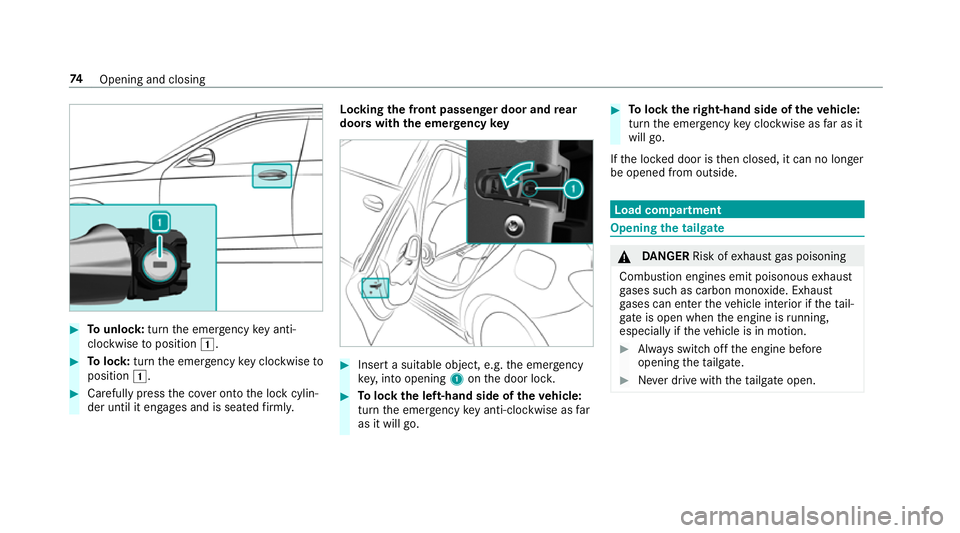
Tounlo ck:turn the emer gency key anti-
clo ckwise toposition 1. #
Tolock: turnthe emer gency key clo ckwise to
position 1. #
Carefully press the co ver onto the lock cylin‐
der until it engages and is seated firm ly. Locking
the front passenger door and rear
doors with th e emergency key #
Insert a suitable object, e.g. the emer gency
ke y,into opening 1onthe door loc k. #
Tolock the left-hand side of theve hicle:
turn the emer gency key anti-clo ckwise as far
as it will go. #
Tolock theright-hand side of theve hicle:
turn the emer gency key clo ckwise as far as it
will go.
If th e loc ked door is then closed, it can no longer
be opened from outside. Load compartment
Opening
the tailgate &
DANG ER Risk of exhaust gas poisoning
Combustion engines emit poisonous exhaust
ga ses such as carbon monoxide. Exhaust
ga ses can enter theve hicle interior if theta il‐
gate is open when the engine is running,
especially if theve hicle is in motion. #
Alw ays switch off the engine before
opening theta ilgate. #
Never drive with theta ilgate open. 74
Opening and closing
Page 78 of 609
*
NO
TEDama getotheta ilgate caused by
obs tacles ab ovetheve hicle The
tailgate swings rear wa rds and upwards
when it is opened. #
Make sure that there is suf ficient space
behind and ab ovetheta ilgate. #
Pull theta ilgate handle. Closing
the tailgate &
WARNING Risk of inju ryfrom unsecu red
items in theve hicle
If objects, luggage or loads are not secured
or not secured suf ficientl y,they could slip,
tip ove r or be throw n around and thereby hit
ve hicle occupants.
There is a risk of injur y,particularly in the
ev ent of sudden braking or a sudden change
in direction. #
Alw aysstow objects in such a wayth at
th ey cannot be thro wn around. #
Before the journe y,secure objects, lug‐
ga ge or loads against slipping or tipping
ove r. #
Pull theta ilgate down with the handle and let
it drop into the loc k. Un
locking the tailgate with the emer gency
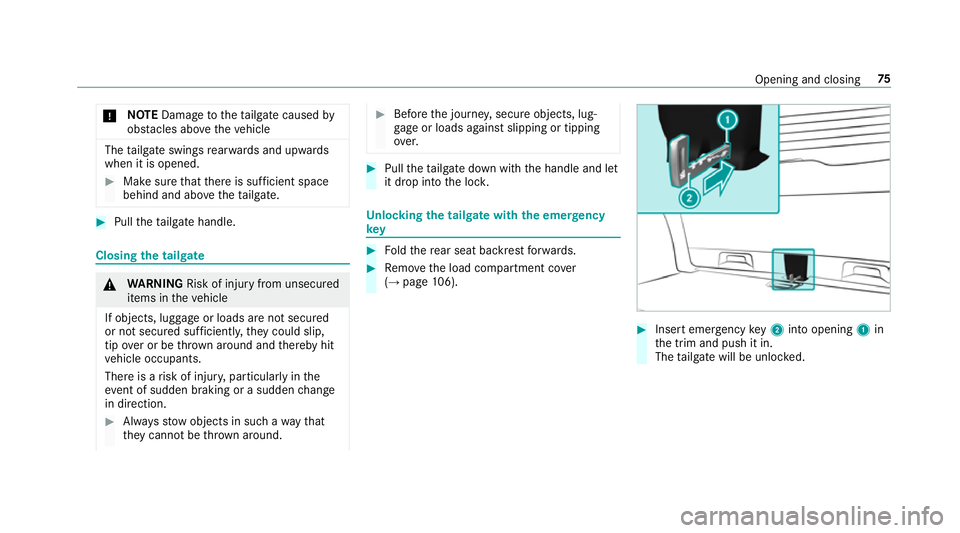
key #
Foldthere ar seat backrest forw ards. #
Remo vethe load compartment co ver
( → page 106). #
Insert emergency key2 into opening 1in
th e trim and push it in.
The tailgate will be unloc ked. Opening and closing
75
Page 89 of 609
Fu
nction of tow- aw ay protection An audible and visual alarm is triggered if
your
ve hicle's angle of inclination is altered while tow-
aw ay protection is primed.
To w- aw ay protection is automatically primed
af te r about 60 seconds:
R afte r locking theve hicle with thekey
R afte r locking theve hicle using KEYLESS-GO
To w- aw ay protection is only primed when thefo l‐
lowing components are closed:
R the doors
R theta ilgate
To w- aw ay protection is automatically deactiva‐
te d:
R afte r pressing the% button on thekey
R afte r pressing thest art/ stop button with the
ke y in thestow age compartment
(→ page 154)
R afte r unlocking theve hicle using KEYLESS-
GO Information on de
tecting damage on a pa rked
ve hicle (→ page183). Priming/deactivating
tow- aw ay protection Multimedia sy
stem:
, © .
Settings .
Schnellzugriff
(Quick access) #
Prime or deactivate Tow-away protection .
To w- aw ay protection is primed again in thefo l‐
lowing cases:
R The vehicle is unloc ked again.
R A door is opened.
R The vehicle is loc ked again.
% Ifqu ick access is una vailable, select the
Vehicle submenu in theSettings main menu
to prime or deactivate tow- aw ay protection. Fu
nction of interior pr otection When interior pr
otection is primed, a visual and
audible alarm is triggered if mo vement is de tec‐
te d in theve hicle interior. Interior pr
otection is primed automatically af ter
appr oximately ten seconds:
R After locking theve hicle with thekey
R After locking theve hicle using KEYLESS-GO
Interior pr otection is only primed when thefo l‐
lowing components are closed:
R Doo rs
R The tailgate
Interior pr otection is automatically deactivated:
R After pressing the% button on thekey
R After pressing thest art/ stop button with the
ke y in thestow age compartment
(→ page 154)
R After unlocking theve hicle using KEYLESS-
GO
The following situations can lead toafa lse
alarm:
R Moving objects such as masc ots in theve hi‐
cle interior
R When the side window is open
R When the panoramic sliding sunroof is open 86
Opening and closing
Page 112 of 609
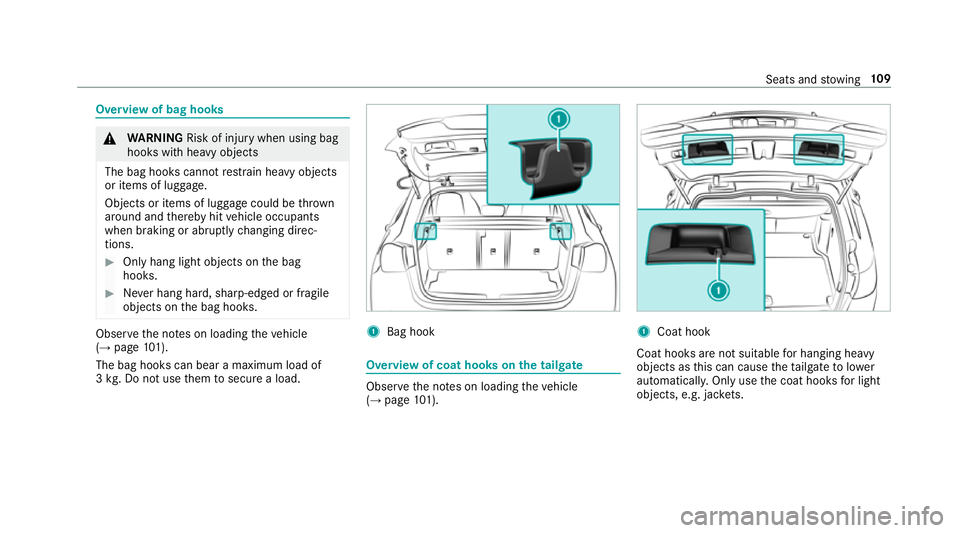
Overview of bag hooks
&
WARNING Risk of inju rywhen using bag
hooks with heavy objects
The bag hooks cannot restra in heavy objects
or items of luggage.
Objects or items of luggage could be thrown
around and thereby hit vehicle occupants
when braking or abruptly changing direc‐
tions. #
Onlyhang light objects on the bag
hooks. #
Never hang hard, sharp-edged or fragile
objects on the bag hooks. Obser
vethe no tes on loading theve hicle
(→ page 101).
The bag hooks can bear a maximum load of
3 kg . Do not use them tosecure a load. 1
Bag hook Overview of coat hooks on
the tailgate Obser
vethe no tes on loading theve hicle
(→ page 101). 1
Coat hook
Coat hooks are not sui table for hanging heavy
objects as this can cause theta ilgate tolower
automaticall y.Only use the coat hooks for light
objects, e.g. jac kets. Seats and
stowing 109
Page 223 of 609
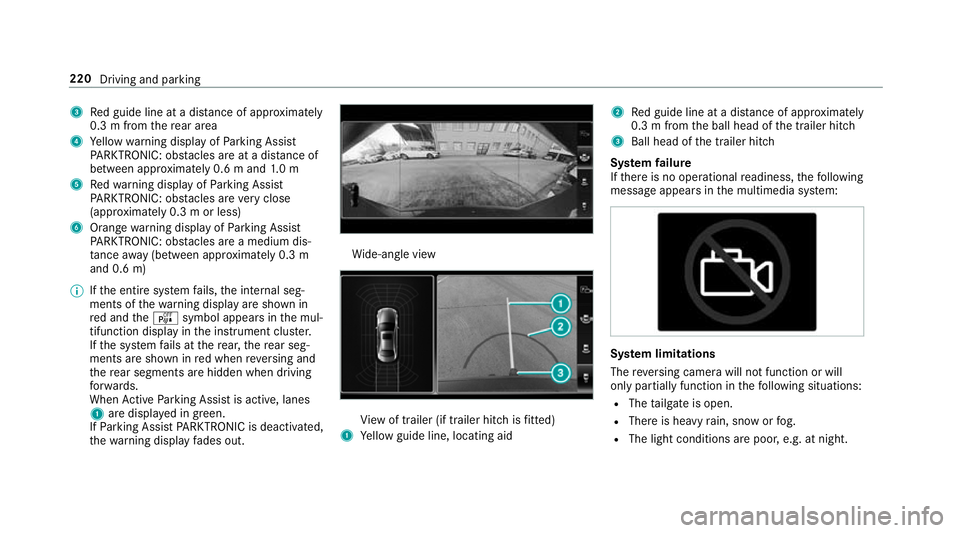
3
Red guide line at a dis tance of appr oximately
0.3 m from there ar area
4 Yellow warning display of Parking Assist
PA RKTRONIC: obstacles are at a dis tance of
between appr oximately 0.6 m and 1.0 m
5 Redwa rning display of Parking Assist
PA RKTRONIC: obstacles are very close
(appr oximately 0.3 m or less)
6 Orange warning display of Parking Assist
PA RKTRONIC: obstacles are a medium dis‐
ta nce away (between appr oximately 0.3 m
and 0.6 m)
% Ifth e entire sy stem fails, the internal seg‐
ments of thewa rning display are shown in
re d and theé symbol appears in the mul‐
tifunction display in the instrument clus ter.
If th e sy stem fails at there ar, there ar seg‐
ments are shown in red when reve rsing and
th ere ar segments are hidden when driving
fo rw ards.
When Active Parking Assist is active, lanes
1 are displa yed in green.
If Pa rking Assist PARKTRONIC is deacti vated,
th ewa rning display fades out. Wi
de-angle view Vi
ew of trailer (if trailer hitch is fitted)
1 Yellow guide line, locating aid 2
Red guide line at a dis tance of appr oximately
0.3 m from the ball head of the trailer hitch
3 Ball head of the trailer hitch
Sy stem failure
If th ere is no operational readiness, thefo llowing
message appears in the multimedia sy stem: Sy
stem limitations
The reve rsing camera will not function or will
only partially function in thefo llowing situations:
R The tailgate is open.
R There is heavy rain, snow or fog.
R The light conditions are poor, e.g. at night. 220
Driving and parking
Page 227 of 609
Sy
stem limitations
The 360° Camera will not function or will only
partially function in thefo llowing situations:
R The doors are open.
R The side mir rors are folded in.
R The tailgate is open.
R There is heavy rain, snow or fog.
R The light conditions are poor, e.g. at night.
R The camera lens is obstructed, dirty or mis‐
ted up.
R Cameras, or vehicle components in which
th e cameras are fitted, are dama ged. In this
eve nt, ha vethe cameras, their positions and th
eir setting checked at a qualified specialist
wo rkshop.
% Do not use the 360° Camera under such cir‐
cums tances. You could otherwise injure oth‐
ers or collide with objects when parking the
ve hicle.
If th eve hicle is car rying a heavy load, leaving the
st andard height can result in inaccuracies in the
guide lines and in the display of thege nerated
ima ges, depending on tech nical conditions.
The field of vision and other functions of the
came rasystem may be restricted due toaddi‐
tional attachments on theve hicle (e.g. licence
plate brac ket, bicycle rack ).
% The contrast of the display may be impaired
by abrupt direct sunlight or by other light
sources, e.g. when driving out of a garage . In
th is case, pay particular attention.
% Have the display repaired or replaced if, for
ex ample, pixel er rors considerably restrict its
use.
See the no tes on cleaning the 360° Camera
(→ page 432). Selecting a view
for the 360° Camera
Re quirements:
R The Auto reversing camera function is activa‐
te d in the multimedia sy stem (→ page 224). #
Enga gereve rsege ar. #
Inthe multimedia sy stem, select the desired
vie w.
Switching reve rsing camera automatic mode
on/off
The reve rsing camera is only an aid. It is not a
substitute foryo ur attention tothe sur roundings.
The responsibility for safe manoeuvring and
parking remains with you. Make sure that no
persons, animals or objects etc. are in the
manoeuvring range. Pay attention to your sur‐
ro undings and be ready tobrake at all times.
Multimedia sy stem:
, © .
Settings .
Assis-
tance .
Camera & parking #
Switch Auto reversing camera on or off.224
Driving and parking
Page 546 of 609
Display messages
Possible causes/consequences and M
MSolutions
Steering malfunction
Increased physical effort
See Owner's Manual #
If safe steering is possible, drive on carefully. #
Visit or consult a qualified specialist workshop immediatel y. #
If safe steering is possible, drive on carefully. #
Visit or consult a qualified specialist workshop immediatel y.
Active bonnet malfunction
See Owner's Manual *T
he active bonnet (pedestrian pr otection) is malfunctioning or inoperative af ter having already been triggered. #
Consult a qualified specialist workshop.
? *T
he bonnet is open. &
WARNING Risk of accident due todriving with the engine bonn etunlo cked
An unloc ked engine bonn etmay open up when theve hicle is in motion and block your vie w. #
Never unlock the engine bonn etwhen driving. #
Before every trip, ensure that the engine bonn etis loc ked. #
Stop theve hicle immediately, paying attention toroad and traf fic conditions. #
Close the bonn et.
C *A
t least one door is open. #
Close all doors.
A *T
hetailgate is open. Display messages and
warning/indicator lamps 543
Page 568 of 609
Engaging neutral ..................................
16 5
Engaging pa rkposition ........................ 16 5
Engaging reve rsege ar ........................ .165
Kickdown ............................................. 167
Manual gear changing ........................ .166
St eering wheel gearshift paddles ........ .166
Tr ansmission position display .............. 16 4
Tr ansmission positions ........................ 16 4
Au tomatic transmission (problem)
see Transmission (problem)
Axle load Perm issible .......................................... 483
Tr ailer operation .................................. 497 B
Bag hook .................................................. 109
Baidu CarLife Trans ferred vehicle data ......................3 87
Ball ne ck
Fo lding out/in .................................... .242
BA S (Brake Assist Sy stem) .................... .186
Battery Cha rging (Remo teOnline) .................... 15 5Ke
y ........................................................ 67
Re mo tecontrol (s tationary heater) ...... 14 8
Battery see Battery (vehicle)
Battery (vehicle) ...................................... 449
Charging .............................................. 448
No tes .................................................. 444
No tes (s tarting assis tance and
ch arging) ............................................ .446
Re placing ............................................ 449
St arting assis tance .............................. 448
Belt see Seat belt
Bic ycle rack
Tr ailer operation .................................. 24 5
Blind Spot Assi st..................................... 237
Ac tivating/deactivating ...................... .240
Fu nction .............................................. 237
Sy stem limitations ...............................2 37
Blo wer
see Climate control
BlueTEC see AdBlue ® Blue
tooth ®
................................................ 313
Information .......................................... 313
Setting up an Internet connection ....... 397
Switching on/off ................................. 313
Boot lid see Tailgate
Brake Assist Sy stem
see BAS (Brake Assi stSystem)
Brake fluid Notes .................................................. 492
Brake forc e distribution
EBD (Elect ronic Brake forc e Distribu‐
tion) ..................................................... 19 0
Brakes ABS (Anti-lock Braking Sy stem) ........... 185
Ac tive Brake Assi st.............................. 19 0
Ad aptive brake lights .......................... .196
BA S (Brake Assi stSystem) .................. 186
Driving tips .......................................... 15 6
EBD (Electronic Brake forc e Distribu‐
tion) ..................................................... 19 0
HOLD function .................................... .212
Limited braking ef fect (salt-trea ted
ro ads) .................................................. 15 6 Index
565
Page 571 of 609
Ac
tivating/deactivating the synchro‐
nisation function (multimedia sys‐
te m) ..................................................... 14 4
Air di stribution settings .......................1 43
Air-recirculation mode ......................... 14 4
Au tomatic control ................................ 14 3
Defrosting the windscreen ...................1 41
Demi sting windo ws............................. 14 4
Fr ont air vents ..................................... 14 9
No te ..................................................... 141
Re ar air vents ...................................... 15 0
Re sidual heat ....................................... 14 4
Sets the air flow .................................... 141
Setting (multimedia sy stem) ................1 43
Setting the air distribution ...................1 41
Setting thete mp erature ....................... 141
St ationary heater/ ventilation .............. 14 4
Switching on/off ................................. 14 2
Switching there ar wind owheater
on/off .................................................. 141
THERMATIC contro l panel .................... 141
THERMOTRONIC contro l panel ............141
Ve ntilating theve hicle (con venience
opening) ................................................ 77
Coat hook on the tailgate ...................... .109 Cock
pit......................................................... 6
Overview ................................................. 6
Co ffee cup symbol
see ATTENTION ASSIST
Combination switch ................................124
Compass .................................................. 362
Compu ter
see On-board computer
Connection status
Displ aying ............................................ 399
Overview ............................................ .399
Connectivity Switching transmission of theve hicle
position on/off .................................... 313
Contacts .................................................. .374
Calling up ............................................ 375
Del eting .............................................. .377
Del eting favo urites .............................. 377
Downloading (from mobile phone) ....... 375
Importing ............................................. 376
Importing (o verview) ............................ 376
Information ..........................................3 74
Making a call ....................................... 376Na
me form at ...................................... .375
Options ................................................ 376
Saving as a favo urite .......................... .377
Selecting options for suggestions ........ 377
St oring .................................................3 76
Con venience closing ................................. 78
Con venience opening ................................ 77
Coolant (engine) Check le vel .......................................... 425
No tes .................................................. 492
Cooling see Climate control
Co pyright ...................................................29
Cornering light ........................................ .126
Cross Traf fic Alert .................................. .231
Crosswind Assist Function/no tes ................................... 189
Cruise control .......................................... 19 6
Ac tivating ............................................ 19 8
Buttons ................................................ 19 8
Calling up a speed .............................. .198
Deactivating ........................................ 19 8
Fu nction .............................................. 19 6568
Index