ESP MERCEDES-BENZ A-CLASS SEDAN 2021 AMG User Guide
[x] Cancel search | Manufacturer: MERCEDES-BENZ, Model Year: 2021, Model line: A-CLASS SEDAN, Model: MERCEDES-BENZ A-CLASS SEDAN 2021Pages: 46, PDF Size: 4.77 MB
Page 21 of 46
The
currentl ysel ect edsuspe nsion setting is
sho wnasadi spl aymessa geinthemedia dis‐
pla y. Fu
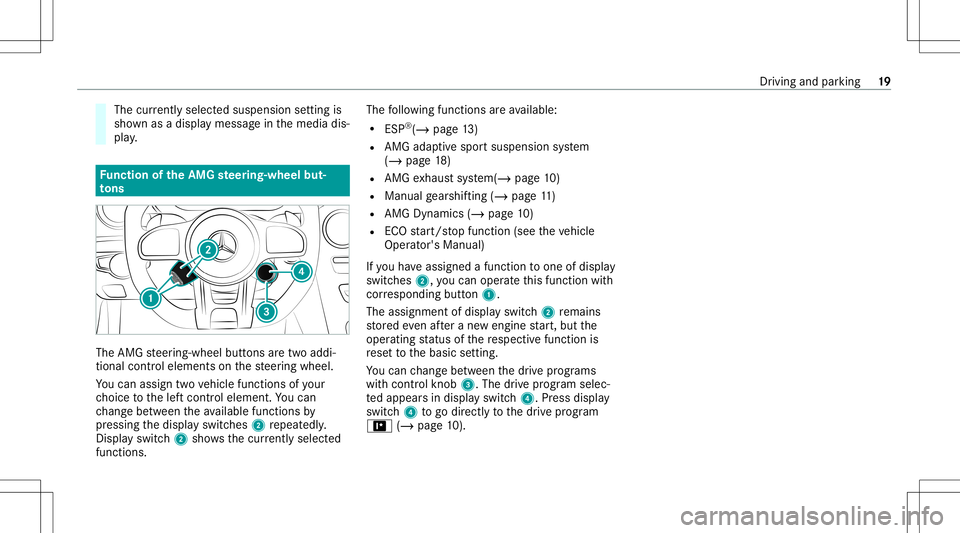
nction oftheAMG steer ing-wh eelbut‐
to ns The
AMG steer ing-wheel buttons aretw oaddi‐
tion alcon trol element son thesteer ing wheel.
Yo ucan assig ntw ove hicle functionsofyour
ch oice tothelef tcon trol element .Yo ucan
ch ang ebe tween theav ailable function sby
pr essing thedispla yswitc hes2repeat edly.
Dis play switc h2 showsthecur rentl ysel ect ed
func tions. The
follo wing functionsar eav ailable:
R ESP®
(/ page13 )
R AMG adaptivespo rtsuspension system
(/ page18 )
R AMG exhaus tsy stem (/ page10 )
R Manual gearshif ting(/ page11 )
R AMG Dynamics(/ page 10)
R ECO star t/ stop funct ion(see theve hicle
Oper ator's Manual)
If yo uha ve assig nedafun ction toone ofdispla y
switc hes2, youcan oper ateth is func tion with
cor responding button1.
The assignment ofdispla yswitc h2 remains
st or ed eve naf te ra ne wengine star t,but the
oper ating status ofthere spectiv efunction is
re se tto thebasic setting.
Yo ucan chang ebe tween thedr ive pr ogr ams
wit hcon trol kn ob 3. The drive pr ogr am selec‐
te dappear sin displa yswitc h4. Press displa y
switc h4 togo directl yto thedr ive pr og ram
= (/ pag e10 ). Dr
iving andparking 19
Page 22 of 46
No
teson theIns trum ent Displa yand on-
boar dcom puter
Ad dition alno tesre ga rding your Mer cedes-AM G
ve hicle:
R Ifyo uact ivat eman ualgearshif ting,
(/ page11 )th eupshif tbar will appear on
th emultifunc tionorHead-up Display.In addi ‐
tion, thetransmission position0063(manual)
and thecur rent gear will appear onthetra ns‐
mission position displayof themultifunc tion
displa y.
R Addition alno te rega rding theindicat orand
wa rning lam ps:theve hicle isalso equipped
wit hth eES P®
00E5, ESP®
OFF 00BB and
ES P®
SPOR TÆ indicat orand warning
lam ps(/ page37 ).
Yo ucan selectthefo llo wing displa ycon tent, for
ex am ple:
R Tach ome terwit hge ar displa y
R Dateand time
R Warm-up
R AMG TRAC KPA CE R
G-m eter
R Engine data
R SETUP
R Trip com puter
R Navig ation
R Medi a
R Telephon e
AMG TRACKPACE isdispl ayed on thelef t-hand
sect ionofthedispla y.The warm-up ,engi nedata,
SETUP andG-me termenus aredisp laye don the
ri ght- hand section ofthedispla y. Callin
gup displa yson thePe rfor ma nce
menu
On -bo ardcom puter:
4 Performance #
Toselect adispla y:swipe upwards ordown‐
wa rdson thelef t-hand Touc hCon trol.
Dis playson thePerform ancemenu:
R Warm-up
R Engi nedata R
SETUP
R G-me ter Wa
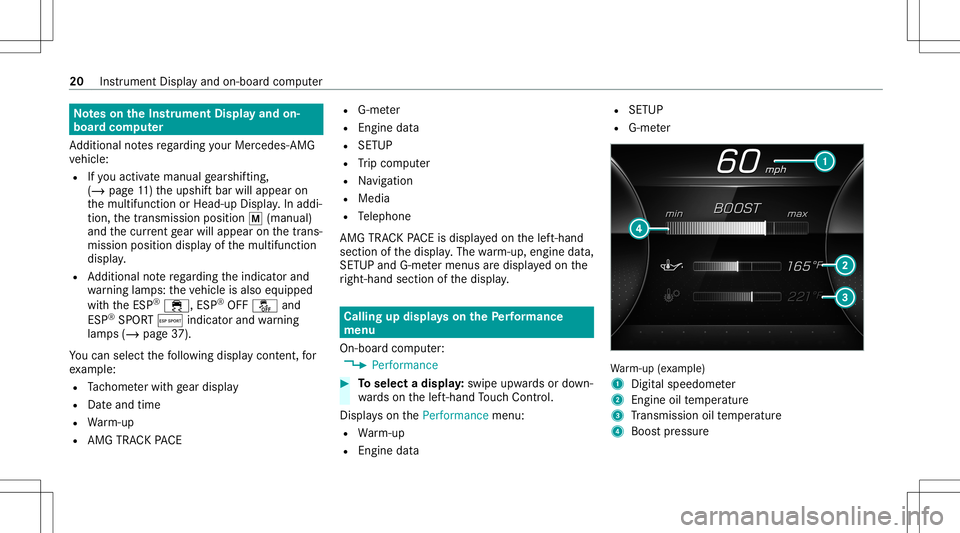
rm-up (exa mp le)
1 Digit alspeedom eter
2 Engine oiltemp eratur e
3 Trans miss ionoiltemp eratur e
4 Boos tpr essur e 20
Instrument Displayand on-boar dcom puter
Page 26 of 46
AMG
TRAC KPA CE Fu
nction ofAMG TRACKPACE Wi
th AMG TRAC KPA CE, thedr iving charact eris‐
tic son race trac ks can beana lyzed and opti‐
mize d.Youcan drive pr ev iousl yst or ed race
tr ac ks (e.g. Hockenhei mring ),or newtrac ks can
be recor ded andstor ed. The driven lap times are
st or ed forev erytra ck.The secan beana lyzed
and compar edtoother laptimes toachie vethe
bes tpossible race results. Addition ally,acc eler a‐
tio nand brakin gpr oce durescan bemeas ured
and stor ed.
Please note:use AMGTRA CKPACE onlyon
closed offro utes out side thepublic traffic area.
Ad aptyo ur drivin gst yle to your per son alper ‐
fo rm anc eand environ men talcon dition s.As the
dr iver ,yo uar esole lyresponsible fordr iving your
ve hicle. Park your vehicle safelybef oreoper ating
th eapplication. Se
tting Trac kRa ce Mult
imed iasystem:
4 TRACK PACE5
Track Race
Re cor dingane wtrac k #
Select ô NewTrack. #
Select 00D0 Start Reco rd.atthedesir ed
st ar tin gpoin t.
The trackre cor ding star ts at this point .
Dur ing trac kre cor ding, sect orscan besetto
divide upthetrac k. #
Select ö SetSector . #
Select 00DB StopRecord ingtoend trac k
re cor ding orcross thest ar tin gline again. #
Con firm thepr om ptwit h00FA. #
Sele ctthewe ather .
% The temp eratur eis de term ined automat i‐
call y. #
Afterending, select00FA tosave thetrac k. #
Enteranam e. #
Press 0076 toconf irm.
The trac kis save dunder thename entered.
Sear ching bytrac kname #
Select ª AllTra cks . #
Enterthetra ck nam e.
Tr ac ks wit hth esear ched name aredis‐
pla yed.
Measur ingtimeon asa ve dtrac k #
Select õ AllTra cks . #
Select thedesir edtrac k. #
Select u. #
Select Start Race ifyo uar ealr eady stood at
th est ar tin gline .
or #
Select Navi gateto forna vig ation tothest ar t‐
ing line.
Ti mek eepi ngbegi nsautomatical lywhen the
st ar tin gline hasbeen cross ed.
% When ¨isselec ted, thetra ck displa ycan
be switc hedtoAR. #
Select ð StopRace toend timek eeping. 24
MBUX multimedia system
Page 29 of 46
Edit
ingtrac ks and recor dings #
Select õ Tracks. #
Select thedesir edtrac k. #
Select options u forth edesir edtrack. #
Select Rename orDele te.
or #
Select atrac k. #
High light thedesir edrecor ding. #
Sele ctZ options . #
Sele ctExport to…orDele te. Se
tting Drag Race Mult
imed iasystem:
4 TRACK PACE5
Drag Race
Measur ingacceler ation #
Select ZDragOption s. #
Select Acceleration. #
Seta st ar tin gspee dor selec tAut omat ic.
Measur ementbegin sas soon asthespeci‐
fi ed star tin gspee dhas been reac hed. #
Seta ta rget speed.
Measur ementstops assoon asthespecif ied
ta rget speed hasbeen reac hed. #
Pull away and star tth emeasur ement.
Measur ementbegins whentheve hicle accel‐
er ates.
Measur ementcanbestopped earlyby stopping
th eve hicle.
Quar ter-mil era ce #
Select Z Drag Opt ions. #
Select Quar terMile. #
Seta ta rget dis tance.
Mea surement stops assoon asthespecif ied
ta rget dis tance hasbe en reac hed. #
Pull away and star tth emeasur ement.
Measur ementbegins whentheve hicle accel‐
er ates. Timing runs unti lth eta rget dis tance
or ama ximu mof one mileha sbe en trave led.
Measur ementcan bestopped earlyby stopping
th eve hicle. Measur
ingbraking #
Z DragOptions #
Select Braking. #
Seta st ar tin gspee dor selec tAut omat ic. #
Pull away and star tth emeasur ement. #
Brak eto ast ands till.
Measur ementis inc rement al,insteps of
5 mp h(1 0 km/h) toast ands till.If th ebr ak‐
ing procedur eis star tede.g. ataspeed of
58 mph(1 57 km/h) ,mea surement star ts as
soon as55 mph(1 50 km/h) hasbeen
re ac hed.
St oring and calling upmea surement values
If measur ementis com pletedor canc eled, a
pr om ptappear sask ing whe ther themeasur e‐
ment should besave d. #
Conf irm thepr om ptwit h00FA tosave .
Callin gup save dmeas ureme nts #
Select ± History. #
Select Accele ration,Qua rter Mileor Braki ng. MBUX
multime diasy stem 27
Page 30 of 46
#
Select amea surement.
The desiredmeasur ementisdispla yedin
de tail.
or #
Dele teameas uremen t. Calli
ngup thete leme try disp lay Multime
diasystem:
4 TRACK PACE5
Telemetr y
The teleme try displa ysho wscurrent vehicle data
as adigit alvalue and asadiag ram. Up tothre e
par ame ters can beselect edthat areto be
sho wninthedispla y.
Fo rex am ple:
R Engin espee d
R Whee lang le
R Spe ed
R Steer ing ang le #
Setth edesir edpar ame ters. #
Setth etime.
The setpar ame ters areeva luat edinthedia‐
gr am forth etime set. Conf
iguringAMG TRACKPACE Re
quirement s:
To connect amob iledevice totheTR AC K
PA CE app:
R The TRACKPACE app isins talled onthe
mobil eend device.
R The mobil eend device isconnect edtothe
multime diasystem viaWi-Fi.
Mu ltimed iasystem:
4 TRACK PACE5
Option s
Connecting amobile device viatheTR AC K
PA CE app
The TRACKPACE app makesitposs ibletorecord
vid eos and tosync hronize them withstor ed
tr ac ks. #
Select TRACK PACEApp. #
Select AUTHO RIZENEW DEVIC E.
Av ailable devic es aredispla yed. #
Startth eTRA CKPACE app onthede vice to
be con nectedand follo wtheins truction s. #
Conf irm theaut hor ization prom pt. #
Scan theQR code onthemedia display.
The device isaut hor ized.
De-aut horizing themobil ede vice #
Sele ctTRACK PACEApp. #
Sele ctDe- autho rizedevic e. #
Sele ctade vic e. #
Conf irm themessag epr om ptwit hYe s.
The device isde-aut horized.
Se tting theTR AC KPA CE displa yin theHead -
up Displa y #
Sele ctHUD Content. #
Activateor deacti vate thedesir edcon tents.
The cont ents intheHead-up Displayar e
adap ted.
% Forfur ther information ontheHead-up Dis‐
pla y,see (/page22). 28
MBUX multimedia system
Page 32 of 46
Cha
nging awheel #
Besureto also obse rveth eno teson chang ‐
ing awheel intheOper ator's Manual ofyour
ve hicle. Ins
talling /remo ving thehub cap
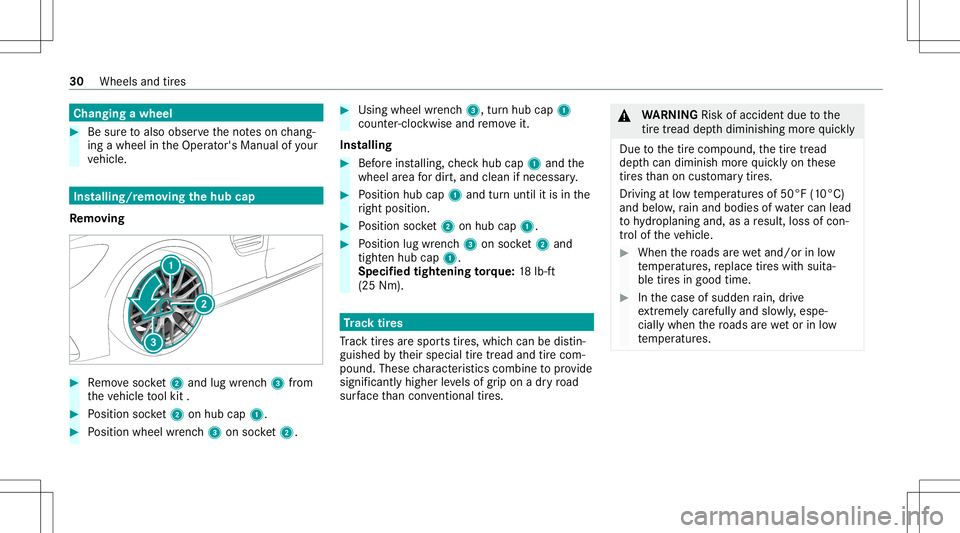
Re mo ving #
Remo vesoc ket2 and lug wr enc h3 from
th eve hicle tool kit . #
Position socket2 onhubcap 1. #
Position wheel wrenc h3 onsoc ket2. #
Usingwheelwr enc h3, turnhu bcap 1
cou nter-clo ckwise andremo veit.
Ins talling #
Beforeins talling, checkhub cap1and the
wheel area fordir t,and cleanif necessar y. #
Position hubcap1and turnuntil itis in the
ri ght position. #
Position socket2 onhubcap 1. #
Position lugwrenc h3 onsoc ket2 and
tig hten hubcap 1.
Spe cified tigh tening torq ue: 18lb-f t
(25 Nm). Tr
ac ktir es
Tr ac ktir es arespor tstires, whic hcan bedistin‐
guish edbytheir special tiretread and tirecom‐
pound. Thesecharact eristic scom bineto prov ide
sign ifican tly higher leve ls of grip on adr yro ad
sur face than con ventio naltires. &
WARNIN GRisk ofacci dent dueto the
tir etrea dde pthdiminishing morequ ickl y
Due tothetir ecom pound, thetir etread
dep thcan dimini shmor equ ickl yon these
tir es than on cus tomar ytir es.
Dr iving atlow temp eratur esof50°F (10°C)
and below,rain and bodies ofwa tercan lead
to hydroplaning and,asare sult, lossofcon‐
tr ol of theve hicle. #
When thero ads arewe tand /or inlow
te mp eratur es,replace tires wit hsuit a‐
ble tires ingood time. #
Inthecase ofsudden rain, drive
ex treme lycar efu llyand slowly ,esp e‐
cia llywhe nth ero ads arewe tor inlow
te mp eratur es. 30
Wheels andtires
Page 35 of 46
R
Con dition ofthesuspension
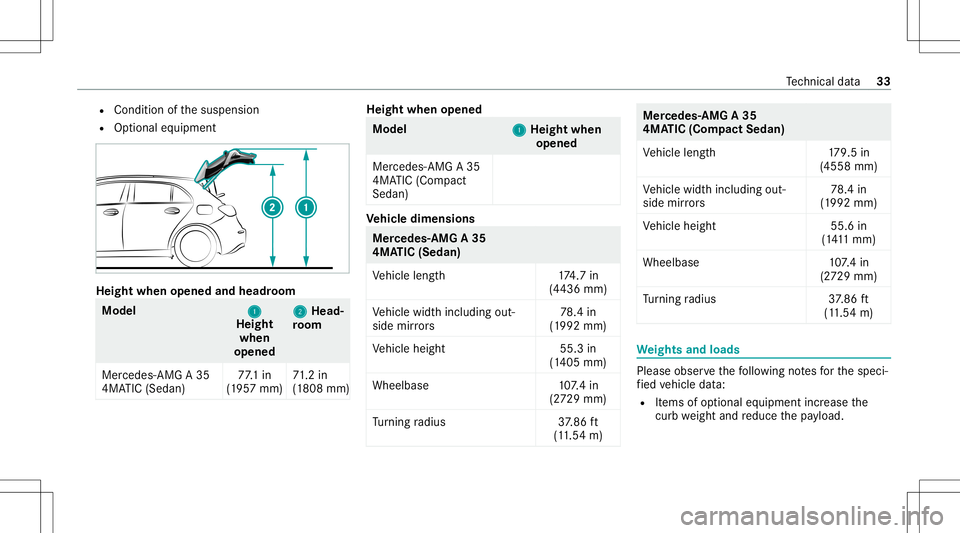
R Option aleq uipment Height
whenopened andheadr oom Model
1 1
Height
when
opened 2 2
Head‐
ro om
Mer cede s-AMG A35
4MA TIC(Sed an) 77
.1 in
(1 95 7mm) 71
.2 in
(1 808 mm) Hei
ght whe nope ned Mode
l
1 1
Hei ght whe n
ope ned
Mercedes -AMG A35
4MA TIC(Com pact
Sedan) Ve
hicl edimens ions Mer
cedes- AMG A35
4MA TIC(Sedan)
Ve hicle length1 74.7 in
(4 436 mm)
Ve hicle widthincluding out‐
side mirrors 78
.4 in
(1 992 mm)
Ve hicle height 55.3in
(1 405 mm)
Wheelbase 107.4 in
(2 72 9mm)
Tu rning radius 37.86 ft
(1 1. 54 m) Mer
cede s-AMG A35
4MA TIC(Compact Sedan)
Ve hicle length1 79.5in
(4558 mm)
Ve hicle widthincluding out‐
side mirrors 78
.4 in
(1 992 mm)
Ve hicle height 55.6in
(1 41 1mm)
Whee lbase 107.4 in
(2 72 9mm)
Tu rning radius 37.86 ft
(1 1. 54 m) We
ight sand loads Please
observethefo llo wing notesfo rth especi‐
fi ed vehicle data:
R Items ofoptional equipment increase the
curb weight andreduce thepa yload. Te
ch nica lda ta 33
Page 37 of 46
Disp
laymes sages Dr
ivin gsy stems Displa
ymess ages
Possible causes/conseq uencesand0050 0050
Solutions
RACE START NotPossible
See Operator' sManual *P
ossible causes:
R The condit ionsforactiv ation areno tme t(/ page15 ).
RACE STARTCanceled *P
ossible causes:
R Youre leased theacceler ator pedal during RACE STAR T.
R Youdepr essedthebr ak epedal during RACE STAR T.
Yo ucan try RA CE STAR Tag ain at thene xt star t.
DRI FTMOD ECurre ntly
Un availabl eSee Oper ator's
Man ual *P
ossible causes:
R The activ ation condit ionshave notbe en fulfilled (/page17 ).
ä Malfunc tionDriveat Max.
50 mph *A
MG adap tivespor tsuspension system ismalfunct ioning.Thevehicle's handling charact eristic sma ybe affect ed. #
Donotdr ive at spe eds grea terth an 50 mph(80 km/h). #
Consult aqu alif ied spec ialistwo rkshop. Displa
ymessag esand warning/ indic ator lam ps 35
Page 38 of 46
Disp
laymes sages
Possible causes/conseq uencesand0050 0050
Solutions
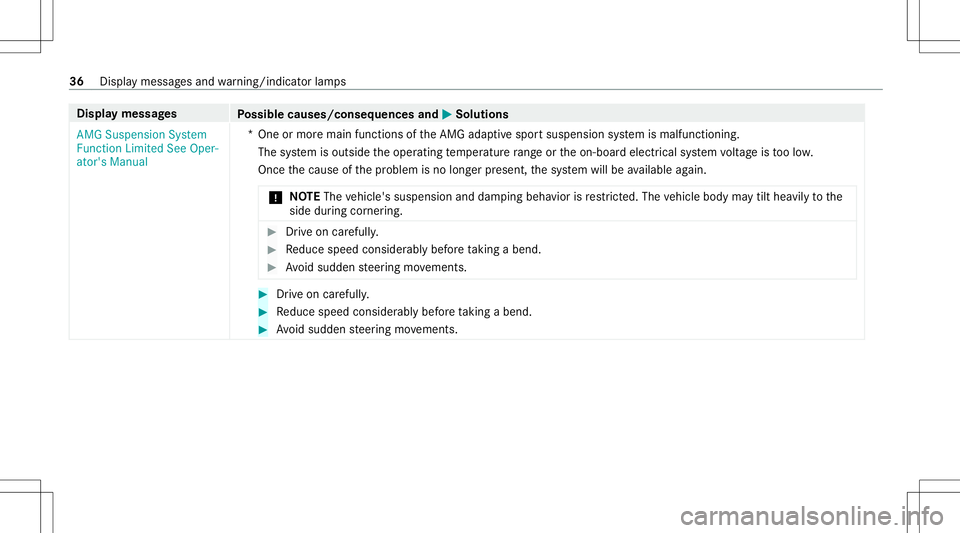
AMG Suspension System
Func tionLimited SeeOper-
ator's Manual *O
neormor emai nfunc tions oftheAMG adaptivespor tsuspension system ismalfunct ioning.
The system isoutside theoper ating temp eratur era ng eor theon- boar delectr icalsystem voltag eis toolow.
Once thecause ofthepr oblem isno long erpresent ,th esy stem will beavailable again.
* NO
TEThe vehicle's suspension anddam ping behaviorisrestrict ed. The vehicle body maytilt hea vilyto the
side during corner ing. #
Drive on car efully . #
Reduce speed consider ablybef oreta king abe nd. #
Avoid sudden steer ing movements. #
Drive on car eful ly. #
Reduce speed consider ablybef oreta king abe nd. #
Avoid sudden steer ing movements. 36
Displa ymessa gesand warning/ indic ator lam ps
Page 39 of 46
Wa
rning and indicat orlam ps Dr
iving systems Wa
rning/indicat orlam p
Possible causes/conseq uencesand0050 0050
Solutions
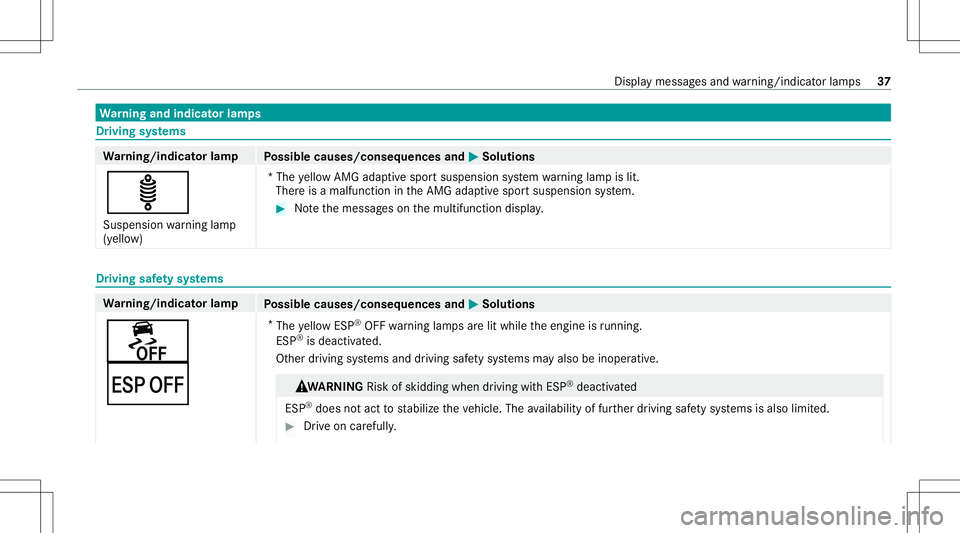
ä Suspension warning lam p
(y ello w) *T
he yello wAMG adaptivespor tsuspen sionsystem warning lam pis lit.
Ther eis amalfun ction intheAMG adaptivespor tsuspension system. #
Notethemessag eson themultifunc tiondispla y. Dr
ivin gsaf etysy stems Wa
rning/indicat orlam p
Possible causes/conseq uencesand0050 0050
Solutions
00BB
¤ *
The yello wES P®
OFF warning lam psarelit while theengine isrunning .
ESP ®
is de acti vated.
Ot her driving systems anddriving safetysy stems mayalso beinoper ative. &
WA RNIN GRisk ofskid ding whe ndr ivi ng with ESP ®
de acti vated
ESP ®
do es notact tostabiliz eth eve hicle. Theavailabilit yof fur ther driving safetysy stems isalso limited. #
Drive on car efull y. Dis
play messa gesand warning/ indic ator lam ps 37