USB MERCEDES-BENZ AMG GT 4-DOOR COUPE 2019 Owner's Manual
[x] Cancel search | Manufacturer: MERCEDES-BENZ, Model Year: 2019, Model line: AMG GT 4-DOOR COUPE, Model: MERCEDES-BENZ AMG GT 4-DOOR COUPE 2019Pages: 530, PDF Size: 45.15 MB
Page 30 of 530
Malfunction
memoriesintheve hicle canbe
re se tby aser viceout letas par tof repair or
maint enanc ewo rk.
Dep endingontheselect edequipment, youcan
im por tdat aint ove hicle convenie nce and info‐
ta inm ent func tionsyo urself .
This includes, forex am ple:
R mult imed iadata suchas music ,fi lms orpho‐
to sfo rpla yba ckinan integratedmultimedia
sy stem
R addr essbook datafo ruse inconnection with
an integr ated hands-fr eesystem oran inte‐
grat ednavig ation system
R entered navig ation destinat ions
R dataabout theuse ofInt erne tser vices
This datacan besave dlocally intheve hicle orit
is locat edon ade vice whichyo uha ve connect ed
to theve hicle (e.g.smar tphone, USBflash drive
or MP3 player). Ifth is dat ais stor ed intheve hi‐
cle, youcan deleteitat anytim e.This datais
sen tto third par ties onlyat your requ est,par tic‐
ular lywhen youuse onlineser vices inacc ord‐
anc ewit hth ese ttings that youha ve select ed. Yo
ucan stor eor chang econ venie nce settings /
ind ividu aliza tionin theve hicle atanytime.
Depending ontheeq uipment, this inc ludes, for
ex am ple:
R setting sfo rth eseat andsteer ing wheel posi‐
tion s
R suspension andclimat econ trol settings
R customizations suchas interior ligh ting
If yo ur vehicle isaccor dinglyeq uipped ,yo ucan
co nn ect your smar tphon eor ano ther mobile end
de vice totheve hicle. Youcan contro lth is by
means ofthecon trol element sint egr ated inthe
ve hicle. Imagesand audiofrom thesmar tphon e
can beoutput viathemultimedia system. Cer‐
ta in inf ormatio nis simult aneousl ytransf erredto
yo ur smar tphon e.
De pen dingon thetype ofintegr ation, this can
inc lude:
R gener alvehicle data
R position data
This allowsyouto use selected apps onyour
smar tphon e,suc has navig atio nor musi cpla y‐ bac
k.Ther eis no further interaction between the
smar tphone andtheve hicle; inpar ticular ,ve hi‐
cle datais no tdir ectl yaccessible. Whichtype of
fur ther dat apr ocessin goccur sis de term ined by
th epr ov ider ofthespecif icapp used. Whichse t‐
ting syo ucan make,ifan y,depends onthespe‐
cif icapp andtheoper ating system ofyour
smar tphon e. Onlin
eser vices Wi
reless netw orkconnection
If yo ur vehicle hasawir eless networkconn ec‐
tion, itenables datato be exc hang edbetween
yo ur vehicle andadditional systems. Thewire‐
less networkcon nect ionisenabled viatheve hi‐
cle's transmission andrecep tion unitor via con‐
nect edmob ile end device s(e.g .sma rtphones).
Onlin efunc tionscan beused viathewir eless
ne tworkcon nect ion.This includes onlineserv‐
ices andapplications/ appsprov ided bytheman‐
uf actur eror other prov ider s.
Manu factu rer's services
Re garding onlin eser vice sof themanuf acturer,
th eindividual functionsar edescr ibedbythe 28
Gener alno tes
Page 102 of 530
St
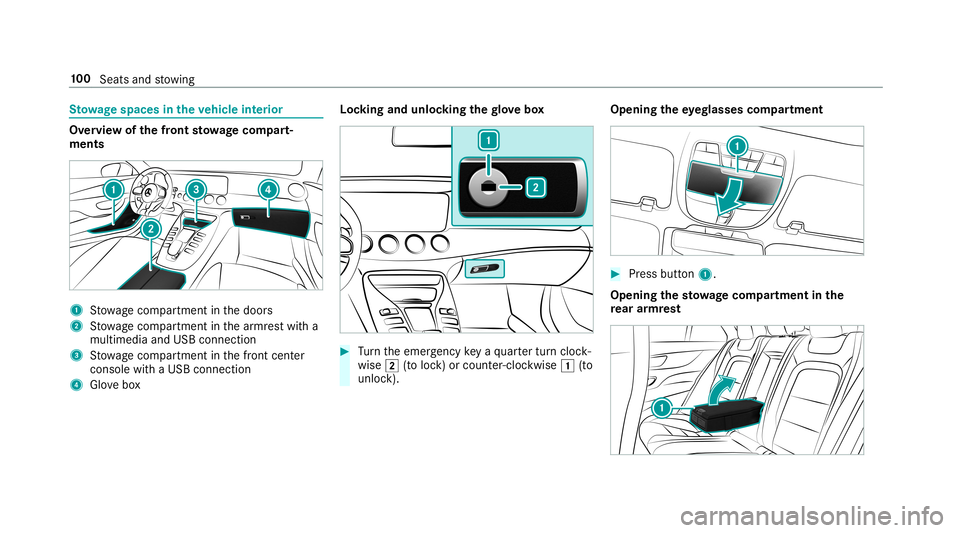
ow agespace sin theve hicl eint erior Ov
ervie wof thefront stowage com part‐
men ts 1
Stow agecom partment inthedoor s
2 Stow agecom partment inthear mr estwit ha
multimedia andUSB connect ion
3 Stow agecom partment inthefront cent er
con sole withaUSB connect ion
4 Glovebox Loc
king andunloc kingthegl ove box #
Turn theemer gency keya qu artertur ncloc k‐
wis e0048 (to loc k)or count er-cloc kwise 0047(to
unloc k). Openi
ngtheey eg lasses compartmen t #
Pres sbu tton 1.
Ope ning the stowage com partmen tin the
re ar armr est 10
0
Sea tsand stow ing
Page 113 of 530
USB
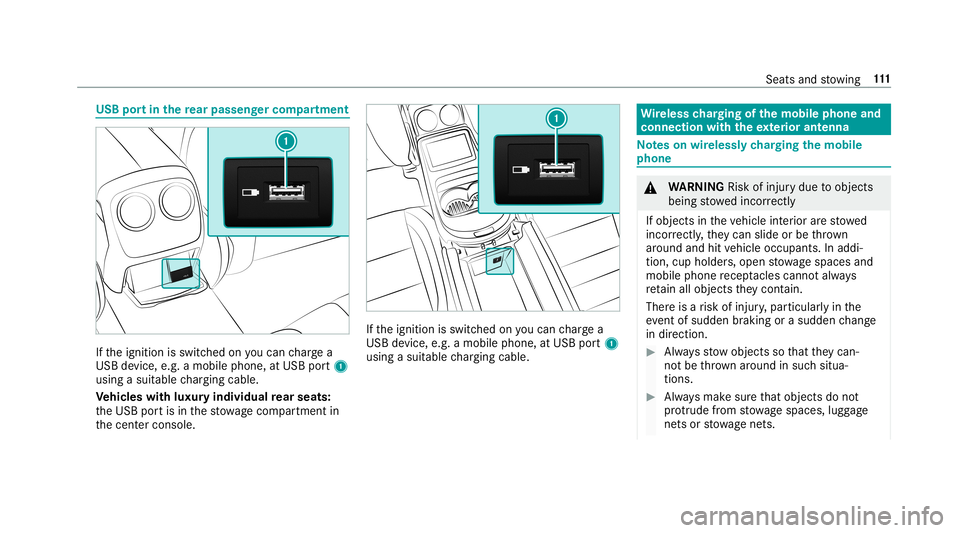
portin there ar passe nger comp artment If
th eignition isswitc hedonyoucan charge a
USB device, e.g.amobile phone, atUSB port1
using asuit able chargin gcable .
Ve hicl eswith luxur yindiv idual rear seats:
th eUSB portis in thestow agecom partment in
th ecent ercon sole. If
th eignition isswitc hedonyoucan charge a
USB device, e.g.amobile phone, atUSB port1
using asuit able chargin gcable . Wi
reless chargin gof themobil eph one and
connecti onwit hth eex terior ant enna No
teson wir elessl ych argin gth emobil e
ph one &
WARNIN GRisk ofinju rydue toobject s
being stowe dinco rrect ly
If objects intheve hicle interior arestowe d
inc orrectly ,th ey can slide orbe throw n
ar oun dand hitvehicle occupants. Inaddi‐
tion, cupholder s,open stow agespac esand
mobi lephon ere cep tacle scanno tal wa ys
re tain all obje ctsth ey cont ain.
The reisarisk ofinjur y,par ticular lyin the
ev ent ofsudden braking orasudden chang e
in dir ect ion. #
Alw aysst ow object sso that they can‐
no tbe throw nar ou nd insuch situa‐
tions. #
Alw aysmak esur eth at obj ect sdo not
pr otru de from stow agespac es,lugg age
ne ts or stow agene ts. Seat
sand stow ing 111
Page 172 of 530
12
5mp h(2 00 km/h) whendr iving stra ight
ahead orcor ner ing slight ly.
R The vehicle isstabiliz edbymeans ofindivi d‐
ua lbr ak eapp lication onone side. Fu
nction ofEBD (electr onicbrak efo rc edis‐
tr ibut ion) EB
Dis ch aract erize dby thefo llo wing:
R Mon itor ing and regulating thebr ak epr essur e
on there ar wheels .
R Improv ed driving stabilit ywhen brakin g,
espe ciallyon ben ds. Fu
nction ofSTEER CONT ROL ST
EER CONTR OLhelpsyo uby trans mitting a
no tice ablesteer ing forc eto thesteer ing wheel in
th edir ect ion requ ired forve hicle stabiliz ation.
This steer ing recomme ndation isgiv en particu‐
lar lyin thefo llo wing situat ions:
R Both right wheels orboth leftwheels areon
a we tor slip pe ry road sur face whe nyo u
br ak e R
The vehicle star ts to skid
Sy stem limita tions
ST EER CONTR OLmaybe impa ired orma yno t
fu nctio nin thefo llo wing situat ions:
R ESP®
is deact ivat ed
R ESP®
is malfun ctionin g
R The steer ing ismalfunct ioning
If ES P®
is malfunct ioning,youwill beassis ted
fur ther by theelectr icpo we rst eer ing. Fu
nction ofActiv eBr ak eAs sist Ac
tiveBr ak eAssi stconsi stsof thefo llo wing
func tions:
R Distance warning func tion
R Autonomo usbraki ng func tion
R Situ ation-d epend ent braki ng assist anc e
R Vehicl eswith Drivin gAss istanc ePa ck‐
ag e:Evasi ve Steer ing Assis t Ac
tiveBr ak eAssi stcan helpyo uto minimize the
ri sk ofacollision withve hicles orpedes trians or
to reduce theef fects ofsuch acol lision .
If Ac tiveBr ak eAssi sthas detected arisk ofcolli‐
sion, awa rning tone sou nds and theL dis‐
ta nce warning lam plight sup intheins trument
clus ter.
If yo udo notre act tothewa rning, autono mous
br akin gcan beinit iated incritic alsituat ions.
In espec iallycritic alsituat ions,Ac tiveBr ak e
Assi stcan initia te aut onomo usbrakin gdir ect ly.
In this case, thewa rning lam pand warning tone
occu rsi mu ltane ously with thebr aking applica‐
tion .
If yo uappl yth ebr ak eyo urself inacr itical situa‐
tio nor appl yth ebr ak edur ing autonomous brak‐
ing, situation -dependen tbr aking assistance
occu rs.The brak epr ess ureincr eases uptomax‐
imum full-sto pbr aking ifnec essar y. 17
0
Driving and parking
Page 243 of 530
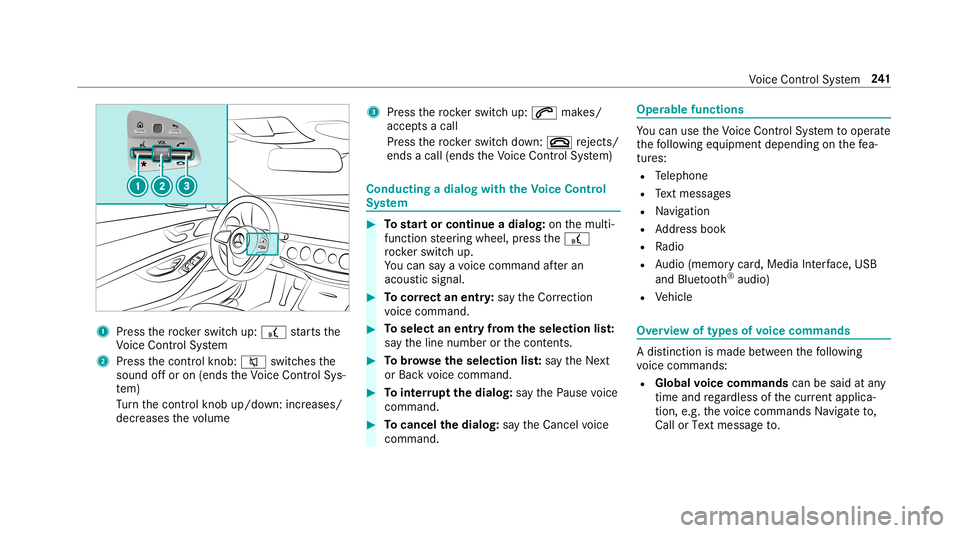
1
Press thero ck er switc hup: £ star ts the
Vo ice Cont rolSy stem
2 Press thecon trol kn ob: 0063 switchesthe
sound offor on (ends theVo ice Cont rolSy s‐
te m)
Tu rn thecon trol kn ob up/do wn:increases/
decr eases thevo lume 3
Press thero ck er switc hup: 0061 makes/
accep tsacall
Pr ess thero ck er switc hdo wn: 0076 rejects /
end sa cal l(e nds theVo ice Cont rolSy stem) Conducting
adialog withth eVo ice Contr ol
Sy stem #
Tostar tor continue adialo g:on themulti‐
func tion steer ing wheel, press the£
ro ck er switc hup.
Yo ucan saya vo ice com mand afte ran
acou stic sign al. #
Tocor rect an ent ry:sa yth eCorrect ion
vo ice com mand . #
Toselect anentr yfrom theselecti onlist:
sa yth eline number orthecon tents. #
Tobrows eth eselecti onlist:sa yth eNext
or Back voice com mand . #
Tointerru pt thedia log: sayth ePause voice
com mand . #
Tocancel thedia log: sayth eCancel voice
com mand . Oper
ablefunct ions Yo
ucan usetheVo ice Cont rolSy stem tooper ate
th efo llo wing equipmen tdepen dingonthefe a‐
tur es:
R Telephon e
R Text mes sage s
R Navig ation
R Address book
R Radio
R Audio (memor ycar d,Media Interface, USB
and Bluetoo th®
audio)
R Vehicle Ov
ervie wof types ofvoice comm ands A
dis tinction ismade between thefo llo wing
vo ice com mand s:
R Global voice comm andscan besaid atany
time andrega rdless ofthecur rent applica ‐
tio n,e.g .th evo ice com mand sNavigat eto,
Call orText mess ageto. Vo
ice Cont rolSy stem 24
1
Page 265 of 530
Se
tting thesy stem langu age
Multi media system:
, System .
Language #
Setth elanguag e. Se
tting thedis tance unit Multi
media system:
, System .
% Units #
Select kmormi. #
Inthemultifunc tiondispla yof theIns trument
Displa y,switc hth eAddition alSpeedomet er
displa yon 0073. Data
impor tand expor t Dat
aim por t/expor tfunc tion
The follo wing functionsar epossible :
R Trans ferring datafrom one system orvehicle
to ano ther system orvehicle.
R Creating abac kupcop yof your per son aldat a
and loadin git ag ain. R
Protect ing your per son aldat aag ains tun wa n‐
te dex por twit hPIN protect ion.
% Please note that theNTFS file system isno t
suppor ted. The FAT32 file system isrecom‐
mend ed.
Im por ting /expor tingdata
* NO
TELos sof data due toprematur e
re mo val #
Donotre mo vethedat ast or ag e
medium whendatais being expor ted.
Mer cedes- Benzis no tliable foran yloss of
dat a. Re
quirement s:
R The vehicle isstatio nary.
R The ignition isswitc hedonortheve hicle has
been star ted.
R The SDcardis inser ted(→ pag e326) orthe
USB device isconnec ted(→ pag e329 ). Multimedia
system:
, System .
System Backup #
Select Import DataorExport Data.
Im por ting #
Select adat ast or ag emedium.
A pr om ptappear sask ing whe ther youre all y
wish tooverwr ite th ecur rent data.If da ta
or iginat esfrom another vehicle, this isrecog‐
nized during data readin g.
The mult imed iasystem isrestar tedonc eth e
dat ahas been impor ted.
% Current vehicle settin gscan beedit edafte r
th eim por t.
Expor ting
If PIN protect ion isactiv ated, your PIN isrequ es‐
te d. #
Enterth efo ur -di git PIN. #
Select adat ast or ag emedium.
The datais ex por ted. The dataex por tma y
ta ke severalmin utes. Multim
ediasystem 263
Page 267 of 530
#
Select Autom aticSynch ronization. #
Activate0073 ordeacti vate 0053 thefunc tion.
% Formor einf ormation aboutimpor ting/
ex por tinguser profiles .
Cr eating auser profile
Multimedia system:
, System .
g Person alization .
Cre-
ate Profile #
Entera name. #
Select 0076.
The follo wing informatio nis save din theuser
pr ofile, forex am ple:
R System settings
R Settings intheTV tune r'schann ellist
R Navig ation andtraf fic inf ormati on
The settings differ depending ontheve hicle
eq uipment. Se
tting userprofile options
Multimedia system:
, System .
g Person alization #
Highlight apr ofile. #
Select 0080option s.
The follo wing option sar eav ailable:
R Renam e
R Delete
R Reset
% The gues tpr ofile can notbe dele tedor
re nam ed. So
ftwa reupdat e Inf
ormation onsof twareupdat es
The multimedi asy stem prov ides amess age
when anupdat eis available.
De pen dingon thesour ce,youcan perform vari‐
ous updat es: Sof
twareupd ate Sour
ceofthe
updat e Up
dat etype
Up dat esvia mobile
phone Na
vig ation map,sys‐
te m upd ates, Digit al
Oper ator's Manua l
Up dat esvia anexter‐
nal stor ag emedium,
e.g. aUSB flash drive Na
vig ation maps %
Updat esvia mobile phonerequ ire an act ive
Int erne tcon nection forth eve hicle. Thisis
no tav ailable inall coun tries. Forfur ther
inf ormation oncon nect ingtotheInt erne t,
see (→pag e31 9).
Ad vantag esofupd ating software
Thank sto thesof twareupdat e,your vehicle sta‐
tus isup-t o-dat e.
In order tocons tantl yimpr ovethequ alit yof our
ser vices youwill recei vefutur eupd ates foryo ur
mult imed iasystem, theMer cedes meconnect
ser vices andyour vehicle's communication mod‐
ule. These willconvenie ntly besent toyouvia Mult
imed iasystem 265
Page 271 of 530
R
Engi neoil/ti retemp eratur e
Based ontheanal ysis yo ucan checkand opti‐
mize driving charact eristic sfo ran yposi tion on
th etra ck.
Expor tingtrac ks orraces (USB ) #
Select Alltrack s.
An ove rview of all stor ed trac ks and races
ap pea rs. #
High light desired trac ks orraces. #
Sele ctÜ Options . #
Sele ctExport .
The select edtrac ks orraces can beexpor ted
to aUS Bstor ag ede vice conn ectedtothe
ve hicle.
Editing trac ks and recor dings #
Select Alltrack s. #
Highligh tth edesir edtrac k. #
Select Ü options . #
Select Rename orDele te.
or #
Select atrac k. #
High light thedesir edrecor ding. #
Sele ctÜ options . #
Sele ctWea ther orDele te. Se
tting Drag Race Mult
imed iasystem:
, Vehicle .
TRACK PACE.
Drag Race
Measur ingacceler ation #
Select Acceleration.
Measur ementbegins whentheve hicle accel‐
er ates. Measur ementisincr ement al,insteps
of 30 mph(50 km/h) uptoamax imum of
18 0mp h(300 km/h) orup tothese tto p
speed.
Measur ementcanbestopped earlyby
selecting Stoporby stopping theve hicle.
Quar ter-mil era ce #
Select Quar terMile.
Ti ming runs unti la mil eha sbe en trav eled or
to these tend distance. Mea
surement canbestopped earlyby
selecting Stoporby stopping theve hicle.
Manual star tfo rac ce lera tio nand quarter-
mil era ce #
Select Accel erat ionorQuar terMile . #
Select Man ualstart .
Thr eeredtraf fic lights appea rone afte rth e
ot her .The react ion timemeas uremen tst ar ts
when they chang eto green atthesame time.
The react ion timeis displa yedas soon asyou
dr ive of f.Ifyo udr ive of fto oear ly,th emes‐
sag eJump start.will appear andaccelera tion
or quartermile measu rement willbe can‐
celed .
Measur ingbraking #
Select Braking . #
Select StartRecord .
Meas urement isincr ement al,insteps of
30 mph(5 0km/h) toast ands till.If th ebr ak‐
ing procedur eis star tede.g. ataspeed of
99 mph(1 60 km/h) ,meas urement star ts as
soon as90 mph(1 50 km/h) hasbeen
re ac hed. Mult
imed iasystem 269
Page 308 of 530
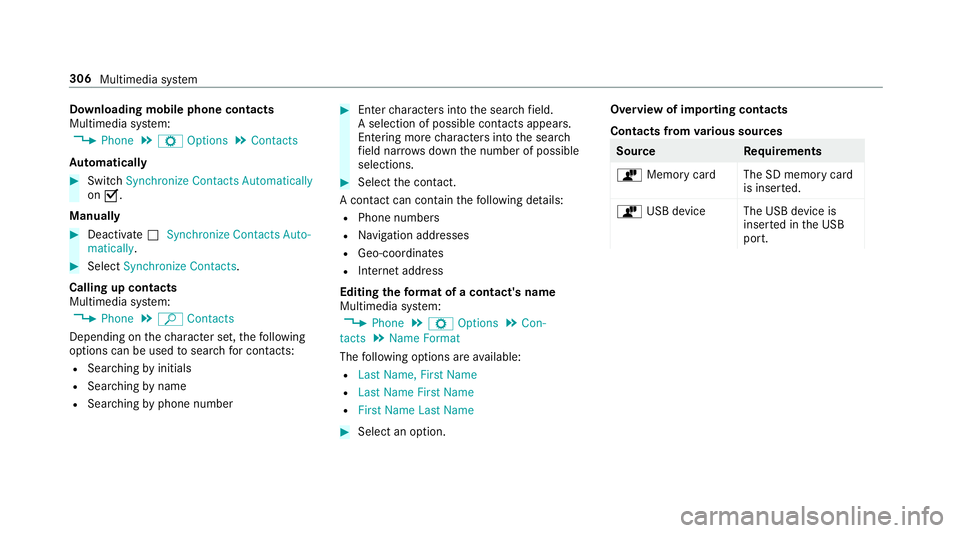
Do
wnloa dingmob ilephone conta cts
Mult imediasystem:
, Phone .
Z Option s.
Contac ts
Au tomatic ally #
Swi tchSyn chro nize Contacts Automatica lly
on 0073.
Man ually #
Dea ctivate0053 Synchro nize Contacts Auto-
ma tica lly. #
Select Synchro nize Contacts .
Ca llin gup contac ts
Mu ltimed iasystem:
, Phone .
ª Contac ts
Depen dingonthech aract erset,th efo llo wing
op tion scan beused tosear chforcont acts:
R Sear ching byinit ials
R Sear ching bynam e
R Sea rching byphone number #
Enterch aract ersint oth esear chfield.
A select ionofpossible contacts appea rs.
Ent ering mor ech aract ersint oth esear ch
fi eld narrows down thenumber ofpossible
select ions. #
Select thecon tact.
A cont actcan cont ain th efo llo wing details:
R Phon enumb ers
R Navig ation addresses
R Geo-coor dinates
R Interne taddr ess
Editing thefo rm atofaco ntact's name
Mul timedi asy stem:
, Phone .
Z Option s.
Con-
tact s.
Name Format
The follo wing option sar eav ailable:
R Last Name ,Fir stName
R Last Name FirstName
R FirstName LastName #
Select anoptio n. Ov
ervie wof impor tingcontact s
Contact sfrom various sour ces Sour
ce Requirement s
ò Memor ycar dT heSD memor ycar d
is inser ted.
ò USBdevice TheUSB device is
inser tedin theUSB
por t. 306
Multimedia system
Page 312 of 530
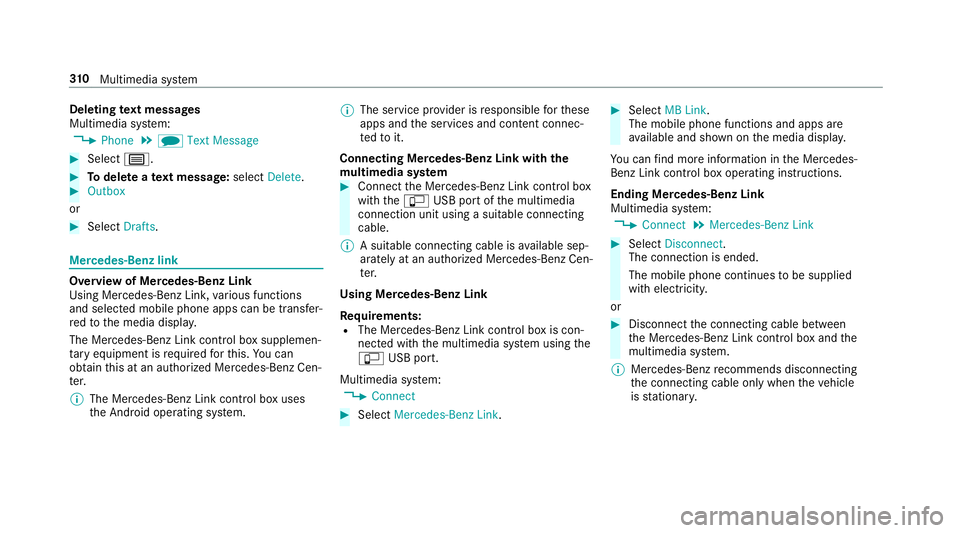
Dele
ting text messag es
Multimedia system:
, Phone .
i TextMessage #
Select p. #
Todel eteate xt messag e:select Delete. #
Outbox
or #
Select Drafts. Mer
cedes-Benz link Ov
ervie wof Mer cedes-Benz Link
Using Mercedes-Benz Link,va rious funct ions
and select edmobile phoneappscanbetransf er‐
re dto themedia display.
The Mercedes-B enzLink controlbo xsupplemen ‐
ta ry equipment isrequ ired forth is. Youcan
obt ain this at an aut hor ized Mercedes -Benz Cen‐
te r.
% The Mercedes-B enzLink controlbo xuses
th eAn droid oper ating system. %
The service prov ider isresponsible forth ese
apps andtheser vices andcontent conne c‐
te dto it.
Connecting Mercedes-B enzLink withth e
mu ltim edia system #
Conn ecttheMer cedes- BenzLinkcontrol bo x
wit hth e00C2 USBportof themultimedia
con nect ionunit using asuit able connect ing
cable.
% Asuit able connect ingcable isavailable sep‐
ar atelyat an aut hor izedMer cedes-Ben zCen‐
te r.
Using Mercedes-Benz Link
Re quirement s:
R The Mercedes- BenzLink control bo xis con ‐
nec tedwit hth emultimedia system using the
00C2 USBport.
Multimedi asy stem:
, Connec t #
Select Mercedes- BenzLink. #
Select MBLink.
The mobile phonefunctionsand apps are
av ailable andshownonthemedia display.
Yo ucan find mor einf orma tionin theMer cedes-
Benz Linkcontrol bo xoper ating instruction s.
Ending Mercedes-Benz Link
Multimedia system:
, Connec t.
Mercedes- BenzLink #
Select Disconnect.
The connect ionisended.
The mobile phonecontinues tobe supplied
wit helect ricity .
or #
Disco nnect thecon nect ingcable between
th eMer cedes- BenzLinkcontrol bo xand the
multime diasystem.
% Mer cedes- Benzrecomme ndsdisconnecti ng
th econ nect ingcable onlywhen theve hicle
is statio nary. 31
0
Multimedia system