instrument cluster MERCEDES-BENZ AMG GT 4-DOOR COUPE 2019 Owner's Manual
[x] Cancel search | Manufacturer: MERCEDES-BENZ, Model Year: 2019, Model line: AMG GT 4-DOOR COUPE, Model: MERCEDES-BENZ AMG GT 4-DOOR COUPE 2019Pages: 530, PDF Size: 45.15 MB
Page 22 of 530
Genuin
eMer cede s-Benz parts
+ ENVIR
ONMENT ALNOTEEnvironme ntal
da ma gecau sed bynotus ing recy cle d
re condi tionedcom pone nts Dai
mle rAG offers recy cle dre condi tioned
com pone ntsand parts wit hth esame qualit y
as newpar ts.The same entitlemen tfr om the
Limit edWarrant yis valid asforne wpar ts. #
Use recy cle dre condi tionedcom po‐
nents andparts from Daimler AG. *
NO
TEImpairment oftheoper ating effi‐
cie ncy ofthere stra int systems from
ins talling accessor ypar tsor from repair s
or we lding Air
bags andEmerge ncy Tensi oni ng Device s,
as wellas con trol unit sand sensorsfo rth e
re stra int systems, maybe installed inthefo l‐
lo wing areas ofyour vehicle:
R Door s
R Door pillars R
Doo rsi lls
R Sea ts
R Cockpit
R Instrument cluster
R Cen terconsole
R Lateral roof frame #
Donotins tallacc essor ypar tssuc has
audio systems inthese areas. #
Donotcar ryout repair sor we lding. #
Have afte rm arke tins tallation ofacc es‐
sor ies carried out ataqu alif ied spec ial‐
is two rkshop. Yo
uco uld jeopar dizeth eoper ating safetyof your
ve hicle ifyo uuse parts,tir es and wheel sas well
as acc essor iesreleva nt tosaf etywhic hha ve not
be en approve dby Mer cedes-Ben z.Saf ety-re le‐
va nt systems, e.g.thebr ak esy stem, maymal‐
func tion.Onl yuse Mercedes- BenzGenuine Parts
or par tsof equal qualit y.Onl yuse tires, wheels
and accessor iesthat have been specif ically
appr ovedfo ryo ur vehicle model. Mer
cedes-Ben zGenuine Parts ar esubject to
st rict qualit ycon trol. Eac hpar thas been spe‐
ciall yde veloped, manufactured orselec tedfo r
Mer cedes-Ben zve hicles andfine-tu nedforth em.
Ther efor e, onl yMer cedes- BenzGenuine Parts
should beused.
Mor eth an 300,0 00 differe nt Mer cedes-B enz
Ge nui ne Parts ar eav ailable forMer cedes-Benz
model s.
All author ized Mercedes-B enzCent ersmaint ain
a supply ofMer cedes-B enzGenuine Parts fo r
nece ssaryser vice andrepair work.In addition,
st ra tegically locatedpar tsdeliv erycent erspr o‐
vide forqu ick and reliable partsser vice .
Alw aysspecify theve hicle identif ication number
(VIN) (→pag e41 8) whe nor der ing Mer cedes -
Benz GenuineParts. Oper
ator's Manual
This Oper ator's Manual describesallmodels and
all standar dand optio nal equipme ntavailable for
yo ur vehicle atthetime ofthis Opera tor's Man‐
ua lgoing topress. Countr y-specif icdif fere nces
ar epo ssi ble. No tethat your vehicle mayno tbe 20
Gener alno tes
Page 194 of 530
&
WARNIN GRisk ofskid ding and having
an acci dent from whe elsspi nning
Whe nyo uuse DRIFTMOD E,ES P®
is no t
av ailable. Individ ualwheels couldspin and
yo uco uld lose contro lof theve hicle.
Ther eis an incr eased risk ofskidding and
ha ving anaccident. #
Donotuse DRIFT MODE onnor mal
ro ads. #
DRI FTMOD Ema yon lybe activ ated and
used onclosed race circui ts, noton
pu blic roads. #
Mak esur eth at no per son sor obs tacles
ar ein theclose vicinit yof your vehicle. When
DRIFT MODE isactiv e,theve hicle drive
occur sonl yat there ar and 4MA TIC+ isdeac tiva‐
te d.
Fr om aspeed ofappr oximat ely70 mph
(1 15 km/h) upto95 mph(1 50 km/h) 4MATIC+
is continuou slyreact ivat ed. From aspeed of
95 mph(1 50 km/h) 4MATIC+ isfully active
ag ain, ESP®
ho we ver,re mains deactivated. Belo
waspeed of95 mph(1 50 km/h) toappr ox‐
imat ely70 mph(115 km/h) 4MATIC+is conti nu‐
ou sly deacti vatedag ain.
% DRIF TMODE isonl yav ailable afte rth eve hi‐
cle has been brok en in(→ pag e13 8).
Ac tiv atin gand deac tivatin gDRI FTMOD E
Re quiremen ts:
R ESP®
is deact ivat ed (→ pag e16 9).
R drive pr og ram I(RA CE)issele cted
(→ pag e14 7).
R thedoor s,thehood andtheta ilg atear e
clos ed.
R theengine isrunning andthetransmission
and engine areat nor mal oper ating temp era‐
tur e.
R thetransmission isin position 005B. Ac
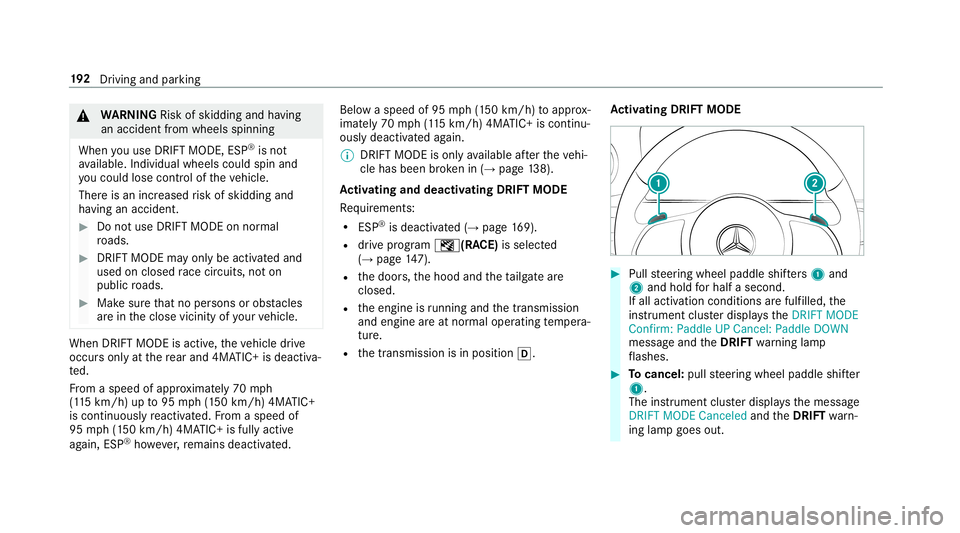
tiv atin gDRI FTMOD E #
Pullst eer ing wheel paddle shifters 1 and
2 and hold forhal fa second.
If all activ ation conditions arefulf illed, the
ins trumen tclus terdisp lays theDRIFT MODE
Confirm :Paddle UPCancel: PaddleDOWN
messag eand theDRIFT warning lam p
fl ashes . #
Tocancel :pull steer ing wheel paddle shifter
1 .
The instrument clusterdisp lays themessag e
DRIFT MODE Canceled andtheDRIFT warn‐
ing lam pgoes out. 19
2
Driving and parking
Page 195 of 530
#
Toconf irm: pull steer ing wheel paddle
shif ter2.
The instrument clustersho wstheDRIFT
MODE Active messag eand theDRIFT warn‐
ing lam pslight sup per mane ntly.
Deact ivat ing DRIFT MODE #
Pull steer ing wheel paddle shifters 1 and
2 and hold forhal fa second.
The DRIFT MODE Activemessageand the
DRIFT warning lam pgo out.
DRIF TMOD Eis aut omat icallydeact ivat ed inthe
fo llo wing situat ions:
R ESP®
is act ivat ed.
R thedr ive pr ogr am I (RACE) isswitc hed
of f.
R theve hicle isswitc hedoff.
R automatic switchof fis requ ired bytheve hi‐
cle. Fu
nction oftheAMG DRIVEUNIT Th
eAMG DRIVEUNIT isavailab leonl yfo r
the Mercedes‑ AMGGT63 S4MA TIC+ model or
forve hicl eswith AMG DYNA MIC PLUS
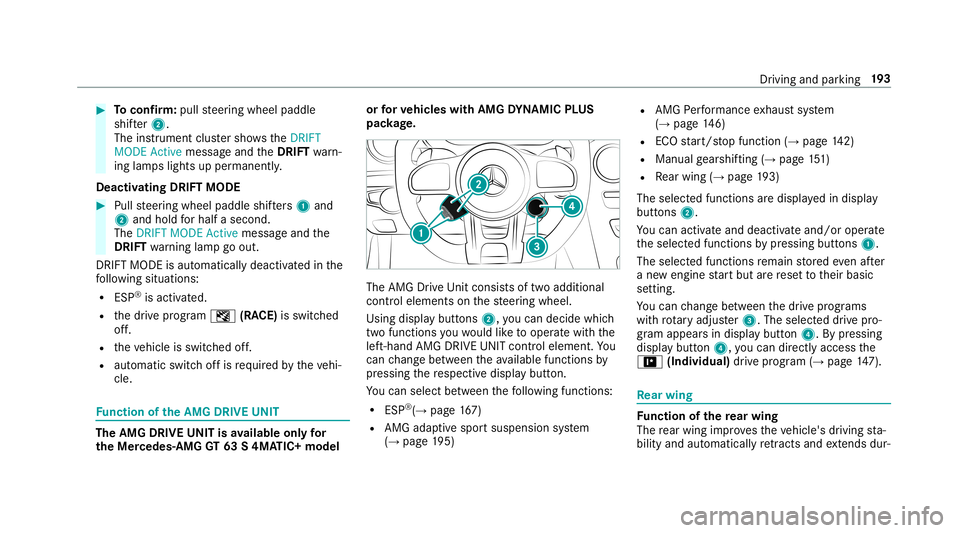
pac kage. The
AMG Drive Un itcon sistsof twoaddition al
con trol elemen tson thesteer ing wheel.
Using displaybutt ons 2,youcan decide whic h
tw ofun ction syo uwo uld liketo oper atewit hth e
lef t-hand AMGDRIVEUNIT control elemen t.Yo u
can chang ebe tween theav ailable function sby
pr essing there spectiv edispla ybutt on.
Yo ucan selectbetween thefo llo wing functions:
R ESP®
(→ pag e16 7)
R AMG adaptivespo rtsuspension system
(→ pag e19 5) R
AMG Perfor mance exhaus tsy stem
(→ pag e14 6)
R ECOstar t/ stop funct ion(→pag e14 2)
R Manua lge arshif ting(→ pag e15 1)
R Rear wing (→pag e19 3)
The selected functions aredis pla yedin displa y
butt ons 2.
Yo ucan activat eand deac tivateand /or operat e
th eselect edfunc tionsby pressing buttons 1.
The select edfunc tionsre main stor ed eve naf te r
a ne weng inestar tbut arere se tto their basic
se tting.
Yo ucan chang ebe tween thedr ive pr og rams
wit hro tary adjus ter3. The selected drive pr o‐
gr am app earsin disp lay butt on4. Bypressing
disp lay butt on4, youcan direct lyacc ess the
= (Indiv idual)drive pr og ram (→ pag e14 7). Re
ar wing Fu
nction ofthere ar wing
The rear wing improve sth eve hicle's driving sta‐
bilit yand automat icallyre tracts andextends dur‐ Dr
iving and parking 19
3
Page 498 of 530
COMAN
D
see Mult imedi asy stem
COMAND Touc h
Mana gingdevices ................................262
Comb inationswi tch ...... ...........................116
Com pass .................................................. 297
Com puter
see On-boar dcom puter
Conne ctionstatus
Displ aying ............................................ 321
Ov ervie w ........................................ .....3 20
Co nne ctivi ty
Switc hingtransmi ssionof theve hicle
position on/off.................................... 259
Cont acts ............... .................................... 305
Call ingup ....................................... ..... 306
Dele ting ............................................... 307
Do wnloading (from mobile phone) ...... 306
Im por ting ............ ........................... ...... 307
Im por ting (ove rview) ...........................3 06
Inf ormatio n....... ................................... 305
Maki ngacall ....................................... 307
Na me form at .......................................3 06 Op
tions .......................................... ...... 307
St or ing ............................................. ....3 07
Contr oller
Operating ............................................ 250
Con venience closing featur e....... ............. 79
Co nvenience opening................................ 79
Coolant (engine)
Chec kleve l.......................................... 355
Fillin gcapac ity.................................... 425
No tes ................................................... 424
Cool ing
see Clima tecontr ol
Co pyright
Licen ses................................................ 30
Tr ademar ks<0011001100110011001100110011001100110011001100110011001100110011
0011001100110011001100110011001100110011001100110011001100110011
001100110011001100110011001100110011001100110011> 30
Co rnering light function .......................... 118
Cr oss Traf fic Aler t.................................... 214
Cr osswind Assist
Fu nctio n/no tes ................................... 169
Cr uise contr ol.......................................... 175
Butt ons <0011001100110011001100110011001100110011001100110011001100110011
0011001100110011> <0011001100110011001100110011001100110011001100110011001100110011
0011001100110011>........176
Callin gup aspee d...............................1 76 Fu
nctio n<0011001100110011001100110011001100110011001100110011001100110011
001100110011001100110011001100110011> <0011001100110011001100110011001100110011001100110011001100110011
001100110011001100110011>175
Re quiremen ts:.....................................1 76
Sel ecting <0011001100110011001100110011001100110011001100110011001100110011
0011001100110011001100110011001100110011001100110011001100110011
00110011001100110011001100110011001100110011001100110011> 176
Se tting aspe ed <0011001100110011001100110011001100110011001100110011001100110011
0011001100110011001100110011001100110011001100110011001100110011
0011001100110011> 176
St or ing aspeed .................................... 176
Swi tching off<0011001100110011001100110011001100110011001100110011001100110011
0011001100110011001100110011001100110011001100110011001100110011
00110011001100110011001100110011> 176
Swi tching on<0011001100110011001100110011001100110011001100110011001100110011
0011001100110011001100110011001100110011001100110011001100110011
00110011001100110011001100110011> 176
Sy stem limit ations ...............................1 75
Cup holder
Re ar passe nger com partment .............1 06
Switc hingthecooling/ heatingfunc‐
tion on/off.......................................... 106
Cup holderinthecent erconsole
In stallin g/remo ving(aut omat ic
transm ission).......................................1 05
Cus tomer Assist ance Center (CAC ).........2 6
Cus tomer Relat ions Depar tment .............2 6 D
Dash board
see Cockpit
Dashboar dlighting
see Instrument clusterlig hting 496
Index
Page 508 of 530
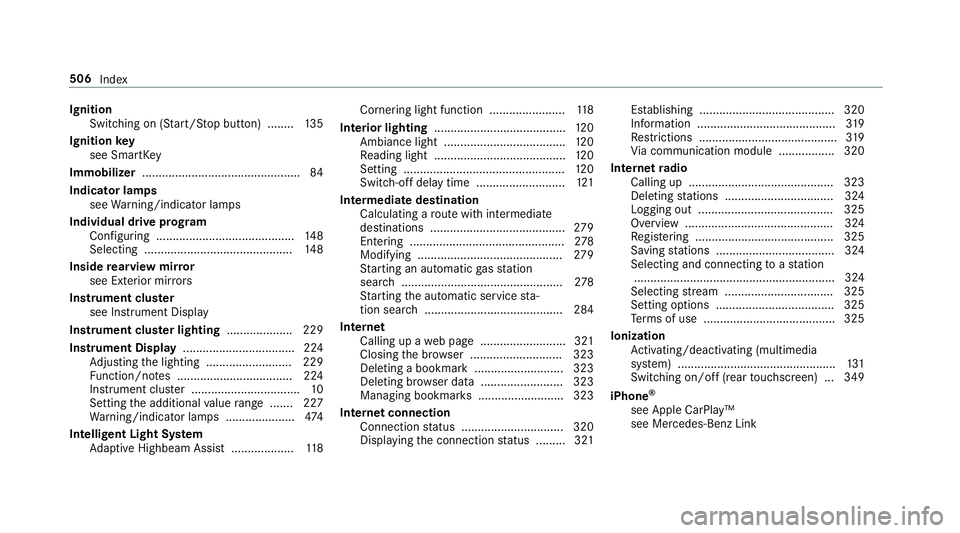
Ignit
ion
Swit ching on(Start/S topbutt on) ........ 135
Ignit ionkey
see Smar tKey
Imm obiliz er................................................ 84
Indi catorlam ps
see Warning/ indic ator lam ps
Individ ualdrive pr og ram
Con figur ing ............ .............................. 148
Sel ecting <0011001100110011001100110011001100110011001100110011001100110011
0011001100110011001100110011001100110011001100110011001100110011
0011001100110011001100110011001100110011001100110011> 148
Insid ere ar vie wmir ror
see Exterior mir rors
Ins trum ent clus ter
see Instrument Display
Ins trument clusterlighti ng............ ........229
In stru men tDi spl ay <0011001100110011001100110011001100110011001100110011001100110011
0011001100110011001100110011001100110011001100110011001100110011
00110011> 224
Ad jus ting thelighting ..................... ..... 229
Fu nctio n/no tes ................................... 224
Ins trument cluster ...... ........................... 10
Se tting theadditional value rang e ....... 227
Wa rning/ indic ator lam ps.....................4 74
Int ellig entLight System
Ad aptiveHig hbeam Assis t.............. .....1 18 Cor
nering light func tion<0011001100110011001100110011001100110011001100110011001100110011
0011001100110011001100110011> 118
Int erior ligh ting........................................ 120
Ambi ance light <0011001100110011001100110011001100110011001100110011001100110011
0011001100110011> <0011001100110011001100110011001100110011001100110011001100110011
0011>120
Re adin glight .................................. ...... 120
Se tting <0011001100110011001100110011001100110011001100110011001100110011
0011001100110011001100110011001100110011001100110011001100110011
0011001100110011001100110011001100110011001100110011001100110011
0011> 120
Swi tch-of fdel aytim e........... ................121
Int ermed iatedes tination
Calculat ingaro utewit hint ermed iate
des tinatio ns.........................................2 79
Ent ering ....... ........................................ 278
Modifying ............................................ 279
St artin gan aut omat icga sst atio n
sear ch<0011001100110011001100110011001100110011001100110011001100110011
0011001100110011001100110011001100110011001100110011001100110011
0011001100110011001100110011001100110011001100110011001100110011
0011> 278
St artin gth eaut omatic service sta‐
tio nsear ch<0011001100110011001100110011001100110011001100110011001100110011
0011001100110011001100110011001100110011001100110011001100110011
0011001100110011001100110011001100110011> 284
In te rn et
Callin gup awe bpag e.......................... 321
Closing thebr ows er........................ ....3 23
Dele tingabookma rk<0011001100110011001100110011001100110011001100110011001100110011
00110011001100110011001100110011001100110011> 323
Dele tingbrows erdat a..................... ....3 23
Mana gingbookma rks ..................... ..... 323
Int erne tconne ction
Connection status .......................... .....3 20
Displ aying thecon nect ionstatus .... .....3 21 Es
tablishing .........................................3 20
Inf ormatio n....... ................................... 319
Re strictions <0011001100110011001100110011001100110011001100110011001100110011
001100110011001100110011001100110011001100110011> ..............319
Vi acom mun ication modul e.................3 20
Int erne tra dio
Ca lling up <0011001100110011001100110011001100110011001100110011001100110011
0011001100110011001100110011001100110011001100110011001100110011
0011> ...........323
Dele tingstatio ns.................................3 24
Logging out......................................... 325
Ov ervie w ..... ........................................ 324
Re gis tering <0011001100110011001100110011001100110011001100110011001100110011
001100110011001100110011001100110011> <0011001100110011001100110011001100110011001100110011001100110011
0011>325
Sa ving statio ns.................................... 324
Sel ect ing and connectingto ast atio n
.. ...........................................................3 24
Sel ecting stre am .................................3 25
Se tting options ....................................325
Te rm sof use ........................................3 25
Io nizatio n
Ac tivati ng/d eactiv ating (mu ltimed ia
sy stem) ................................................ 131
Swi tching on/of f(r ea rto uc hsc reen) ...349
iPhone ®
see Apple CarPla y™
see Mercedes- BenzLink 506
Index