change wheel MERCEDES-BENZ AMG GT COUPE 2018 User Guide
[x] Cancel search | Manufacturer: MERCEDES-BENZ, Model Year: 2018, Model line: AMG GT COUPE, Model: MERCEDES-BENZ AMG GT COUPE 2018Pages: 294, PDF Size: 4.76 MB
Page 121 of 294
ommended gear is shown in the multifunction
display.
XWhen the corresponding gearshift recom-
mendation:appears in the multifunction
display of the instrument cluster, shift to rec-
ommended gear ;.
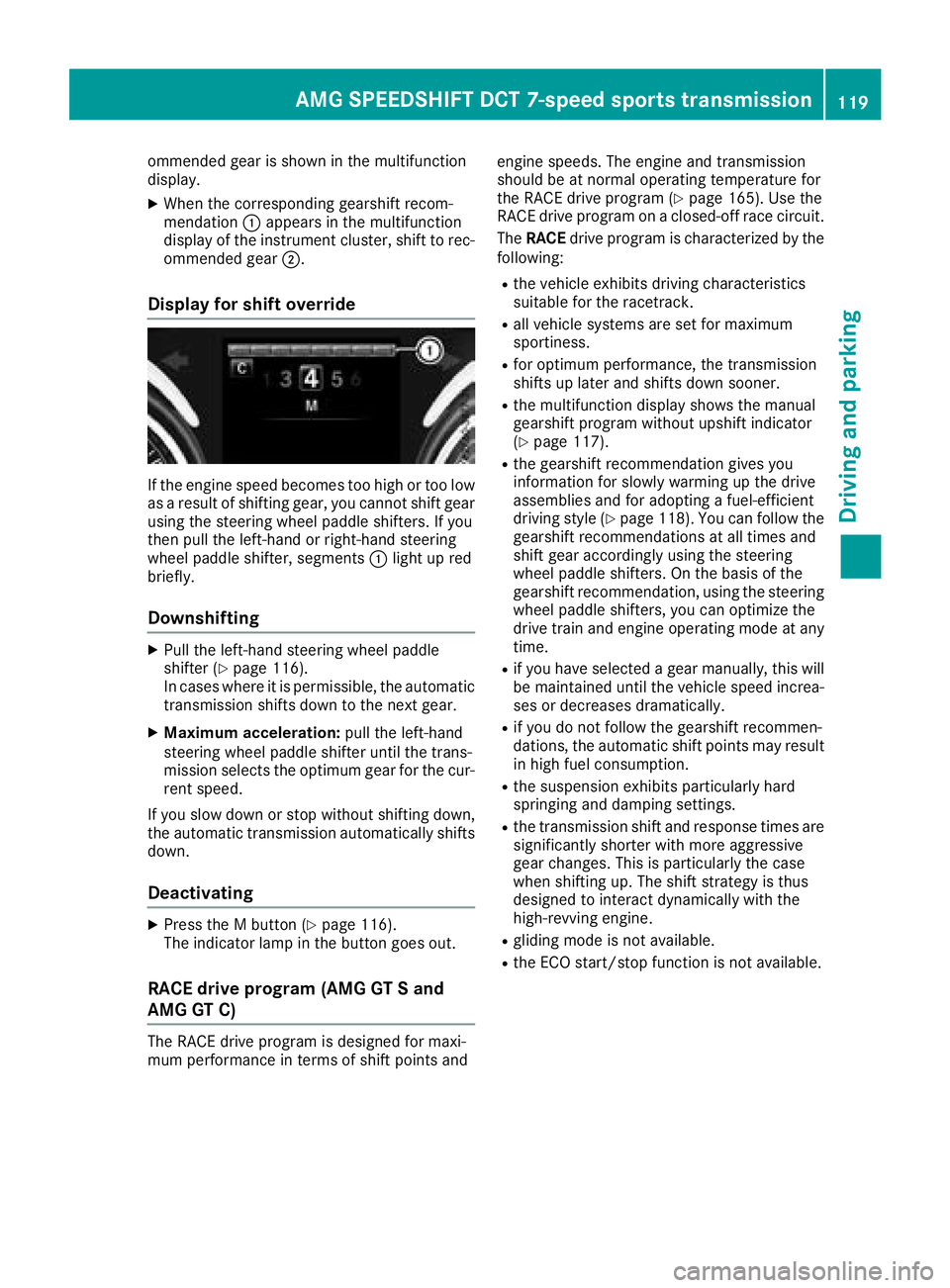
Display for shift override
If the engine speed becomes too high or too low
as a result of shifting gear, you cannot shift gear
using the steering wheel paddle shifters. If you
then pull the left-hand or right-hand steering
wheel paddle shifter, segments :light up red
briefly.
Downshifting
XPull the left-hand steering wheel paddle
shifter (Ypage 116).
In cases where it is permissible, the automatic transmission shifts down to the next gear.
XMaximum acceleration: pull the left-hand
steering wheel paddle shifter until the trans-
mission selects the optimum gear for the cur-
rent speed.
If you slow down or stop without shifting down,
the automatic transmission automatically shifts down.
Deactivating
XPress the M button (Ypage 116).
The indicator lamp in the button goes out.
RACE drive program (AMG GT S and
AMG GT C)
The RACE drive program is designed for maxi-
mum performance in terms of shift points and engine speeds. The engine and transmission
should be at normal operating temperature for
the RACE drive program (
Ypage 165). Use the
RACE drive program on a closed-off race circuit.
The RACE drive program is characterized by the
following:
Rthe vehicle exhibits driving characteristics
suitable for the racetrack.
Rall vehicle systems are set for maximum
sportiness.
Rfor optimum performance, the transmission
shifts up later and shifts down sooner.
Rthe multifunction display shows the manual
gearshift program without upshift indicator
(
Ypage 117).
Rthe gearshift recommendation gives you
information for slowly warming up the drive
assemblies and for adopting a fuel-efficient
driving style (
Ypage 118). You can follow the
gearshift recommendations at all times and
shift gear accordingly using the steering
wheel paddle shifters. On the basis of the
gearshift recommendation, using the steering
wheel paddle shifters, you can optimize the
drive train and engine operating mode at any
time.
Rif you have selected a gear manually, this will be maintained until the vehicle speed increa-
ses or decreases dramatically.
Rif you do not follow the gearshift recommen-
dations, the automatic shift points may resultin high fuel consumption.
Rthe suspension exhibits particularly hard
springing and damping settings.
Rthe transmission shift and response times are
significantly shorter with more aggressive
gear changes. This is particularly the case
when shifting up. The shift strategy is thus
designed to interact dynamically with the
high-revving engine.
Rgliding mode is not available.
Rthe ECO start/stop function is not available.
AMG SPEEDSHIFT DCT 7-speed sports transmission119
Driving and parking
Z
Page 129 of 294
Certain engine systems are designed to keep
the level of poisonous componentsinexhaust
fumes within legal limits.
These systems only work at peak efficiency if
they are serviced exact ly inaccordance with the
manufacturer's specific ations.Always have
work on the engine carried out at a qualified
specialist workshop. Mercedes-Benz recom-
men dsthat you use an authorized Mercedes-
Benz Center for th ispurpose. Inparticular, work
relevant to safety or on safety-related systems
must becarried out at a qualified specialist
workshop.
The engine settings must not bechanged under
any circumstances. Furthermore, all specific
service work must becarried out at regular
intervals and inaccordance with the Mercedes-
Benz service requirements.
You can obtain current information concerning
the servicing of your veh icleat any time from a
qualif ied specialist workshop.This couldbean
overview of the maintenance work or any addi-
tional maintenance work, for example.
Brakes
Important safety notes
GWAR NING
If you shift downon aslippery road surface in
an attempt to increase the engine's braking
effect, the drive wheels could lose their grip.
There isan increased danger of skiddin g and
acc iden ts.
Do not shift downforaddit ional engine brak-
ing on a slippery road surface.
Downhill gradients
!On long and steep gradients, you must
reduce the load on the brakes byshifting to a
lower gear ingood time. This allowsyou to
take advantage of the engine's braking effect.
This helps you to avoid overheating the
brakes and wearing them out excessively.
When you take advantage of engine braking, a
driv e wheel may not turn for some time, e.g.
on a slippery road surface. This could cause
damage to the drive train. This type of damage
is not covered bythe Mercedes-Benz war-
ranty.
Heavy and light loads
GWARNING
If you rest your foot on the brake pedal while
driving, the braking system can overheat. This increases the stopping distance and can even
cause the braking system to fail. There is a
risk of an accident.
Never use the brake pedal as a footrest. Never
depress the brake pedal and the accelerator
pedal at the same time.
!Depressing the brake pedal constantly
results inexcessive and premature wear to
the brake pads.
If the brakes have been subjected to a heavy
load, do not stop the vehicle immediately. Drive
on for a short while. This allowsthe airflow to
cool the brakes more quickly.
Wet roads
If you have driven for a long time inheavy rain
wit hout braking, there may be a delayed reac-
tion from the brakes when braking for the first
time. This may also occur after the vehicle has
been washed or driven through deep water.
You have to depress the brake pedal more
firmly. Maintain a greater distance from the
vehicle infront.
After driving on a wet road or having the vehicle
washed, brake firmly while paying attention to
the traffic conditions. This willwarm up the
brake discs, thereby drying them more quickly
and protecting them against corrosion.
Limited braking performance on salt-
treated roads
If you drive on salted roads, a layer of salt resi-
due may form on the brake discs and brake
pads. This can result in a significantly longer
braking distance.
Driving tips127
Driving and parking
Z
Page 130 of 294
Observe the following rules when driving on salt-
treated roads:
RIn order to prevent any salt build-up, apply the
brakes occasionally while paying attention to
the traffic conditions.
RCarefully depress the brake pedal and the
beginning and end of a journey.
RMaintain a greater distance to the vehicle
ahead.
Servicing the brakes
!The brake fluid level may be too low, if:
Rif the red brake warning lamp lights up in
the instrument cluster and
Ryou hear a warning tone while the engine is
running
Observe additional warning messages in the
multifunction display.
The brake fluid level may be too low due to
brake pad wear or leaking brake lines.
Have the brake system checked immediately. Consult a qualified specialist workshop to
arrange this.
All checks and maintenance work on the brake
system must be carried out at a qualified spe-
cialist workshop.
Have brake pads installed and brake fluid
replaced at a qualified specialist workshop.
If the brake system has only been subject to
moderate loads, you should test the functional-
ity of your brakes at regular intervals.
Information on BAS (Brake Assist) (
Ypage 58).
For safety reasons, Mercedes-Benz recom-
mends only installing the following brake disks
and brake pads/linings:
Rbrake disks that have been approved by
Mercedes-Benz
Rbrake pads/linings that have been approved
by Mercedes-Benz or that are of an equivalent
standard of quality
Other brake disks or brake pads/linings can
compromise the safety of your vehicle.
Always replace all brake disks and brake pads/
linings on an axle at the same time. Always
install new brake pads/linings when replacing
brake disks.
The vehicle is equipped with lightweight brake
disks to which the wheel assembly with rim and
threaded connection is matched. The use of brake disks other than those
approved by Mercedes-Benz can change the
track width and is subject to approval, if appli-
cable.
Shock-type loads when handling the brake
discs, such as when changing wheels, can lead
to a reduction in comfort when driving with light-
weight brake discs. Avoid shock-type loads on
the lightweight brake disks, particularly on the
brake plate.
Mercedes-Benz recommends that you only use
brake fluid that has been specially approved for
your vehicle by Mercedes-Benz, or which corre-
sponds to an equivalent quality standard. Brake
fluid which has not been approved for
Mercedes-Benz vehicles or which is not of an
equivalent quality could affect your vehicle's
operating safety.
AMG high-performance and ceramic
brakes
The AMG brake systems are designed for heavy
loads. This may lead to noise when braking. This
will depend on:
RSpeed
RBraking force
REnvironmental conditions, such as tempera-
ture and humidity
The wear of individual components of the brake
system, such as the brake pads/linings or brake
discs, depends on the individual driving style
and operating conditions.
For this reason, it is impossible to state a mile-
age that will be valid under all circumstances. An aggressive driving style will lead to high wear.
You can obtain more information on this from a
qualified specialist workshop.
New and replaced brake pads and discs only
reach their optimum braking effect after several
hundred kilometers of driving. Compensate for
this by applying greater force to the brake pedal.
Keep this in mind, and adapt your driving and
braking accordingly during this break-in period.
Excessive heavy braking results in correspond-
ingly high brake wear. Observe the brake wear
warning lamp in the instrument cluster and note
any brake status messages in the multifunction
display. Especially for high performance driving,
it is important to maintain and have the brake
system checked regularly.
128Driving tips
Driving and parking
Page 131 of 294
Drivingon wet road s
Hydroplaning
If water has accumulated to acertain dept hon
th eroad surface, there is adanger of hydro-
planin goccurring, eve nif:
Ryou drive at low speeds
Rth etires hav eadequat etread dept h
Fo rthis reason ,in th eevent of heav yrain or in
condition sin whic hhydroplaning may occur ,
you mus tdrive in th efollowin gmanner:
Rlowe ryour speed
Ravoid rut s
Ravoid sudden steerin gmovements
Rbrake carefully
Drivin gon flooded road s
!Do notdrive through floode dareas. Chec k
th edept hof any water befor edrivin gthrough
it .Drive slowly through standin gwater. Oth-
erwise ,water may ente rth evehicle interio ror
th eengin ecompartment. Thi scan damage
th eelectronic component sin th eengin eor
th eautomatic transmission. Water can also
be drawn in by th eengine's air suction nozzles
and this can cause engin edamage.
Winte rdrivin g
GWARNING
If you shift down on aslipper yroad surfac ein
an attempt to increase th eengine's braking
effect ,th edrive wheels could los etheir grip.
There is an increase ddanger of skidding and
accidents .
Do no tshift down fo radditional engin ebrak-
in g on aslipper yroad surface.
GDANGER
If th eexhaus tpipe is blocke dor adequat e
ventilation is no tpossible, poisonous gases
suc has carbon monoxide (CO) may ente rth e
vehicle. Thi sis th ecase, e.g. if th evehicle
becomes trappe din snow. There is aris kof
fatal injury.
If you leav eth eengin eor th eauxiliar yheatin g
running ,mak esur eth eexhaus tpipe and are a
around th evehicle are clear of snow. To
ensur ean adequat esupply of fresh air, ope n a
window on th esid eof th evehicle that is no t
facin ginto th ewind.
Hav eyour vehicle winter-proofed at aqualified
specialis tworkshop at th eonset of winter.
Drive particularly carefully on slipper yroad sur -
faces. Avoid sudden acceleration ,steerin gand
braking maneuvers .Do no tuse cruise control.
If th evehicle threatens to skid or canno tbe
stopped when movin gat low speed:
XShift th etransmissio nto position i.
The outsid etemperature indicator is no t
designed to serve as an ice-warnin gdevic eand
is therefore unsuitable fo rthat purpose.
Changes in th eoutsid etemperature are dis -
playe dafter ashort delay.
Indicated temperature sjust abov eth efreezin g
poin tdo no tguarantee that th eroad surfac eis
free of ice. The road may still be icy, especially in
wooded areas or on bridges. The vehicle could
skid if you fail to adapt your drivin gstyle. Always
adapt your drivin gstyle and drive at aspeed to
suit th eprevailin gweather co ndi
tions.
You should pay special attention to road condi-
tion swhen temperature sare around freezin g
point.
Further information on drivin gwit hsnow chain s
(
Ypage 260).
Further information on drivin gwit hsummer
tires (
Ypage 260).
Observ eth enote sin th e"Winte roperation "sec -
tion (
Ypage 260).
Drivin gsystems
Cruis econtro l
General notes
Cruise contro lmaintain s aconstant road speed
fo ryou. It brake sautomatically in order to avoid
exceedin gth eset speed. Change into alowe r
gear in goo dtime on lon gand steep downhill
gradients. Thi sis especially important if th e
vehicle is laden. By doin gso, you will mak euse
of th ebraking effect of th eengine. Thi srelieves
th eload on th ebrake system and prevents th e
Driving systems129
Driving an d parking
Z
Page 135 of 294
Do not use Distance Pilot DISTRONIC:
Rin road and traffic conditions which do not
allow you to maintain a constant speed, for
example in heavy traffic or on winding roads
Ron slippery road surfaces. Braking or accel-
erating could cause the drive wheels to lose
traction and the vehicle could then skid
Rwhen there is poor visibility, e.g. due to fog,
heavy rain or snow
Distance Pilot DISTRONIC may not detect nar-
row vehicles driving in front, e.g. motorcycles, or
vehicles driving on a different line.
In particular, the detection of obstacles can be
impaired if:
Rthere is dirt on the sensors or anything else
covering the sensors
Rthere is snow or heavy rain
Rthere is interference by other radar sources
Rthere are strong radar reflections, for exam-
ple, in parking garages
If Distance Pilot DISTRONIC no longer detects a
vehicle in front, it may unexpectedly accelerate
to the speed stored.
This speed may:
Rbe too high if you are driving in a turning lane
or an exit lane
Rbe so high in the right lane that you pass vehi-
cles driving on the left (in countries where
they drive on the right)
Rbe so high in the left lane that you pass vehi-
cles driving on the right (right-hand drive
countries)
If there is a change of drivers, advise the new
driver of the speed stored.
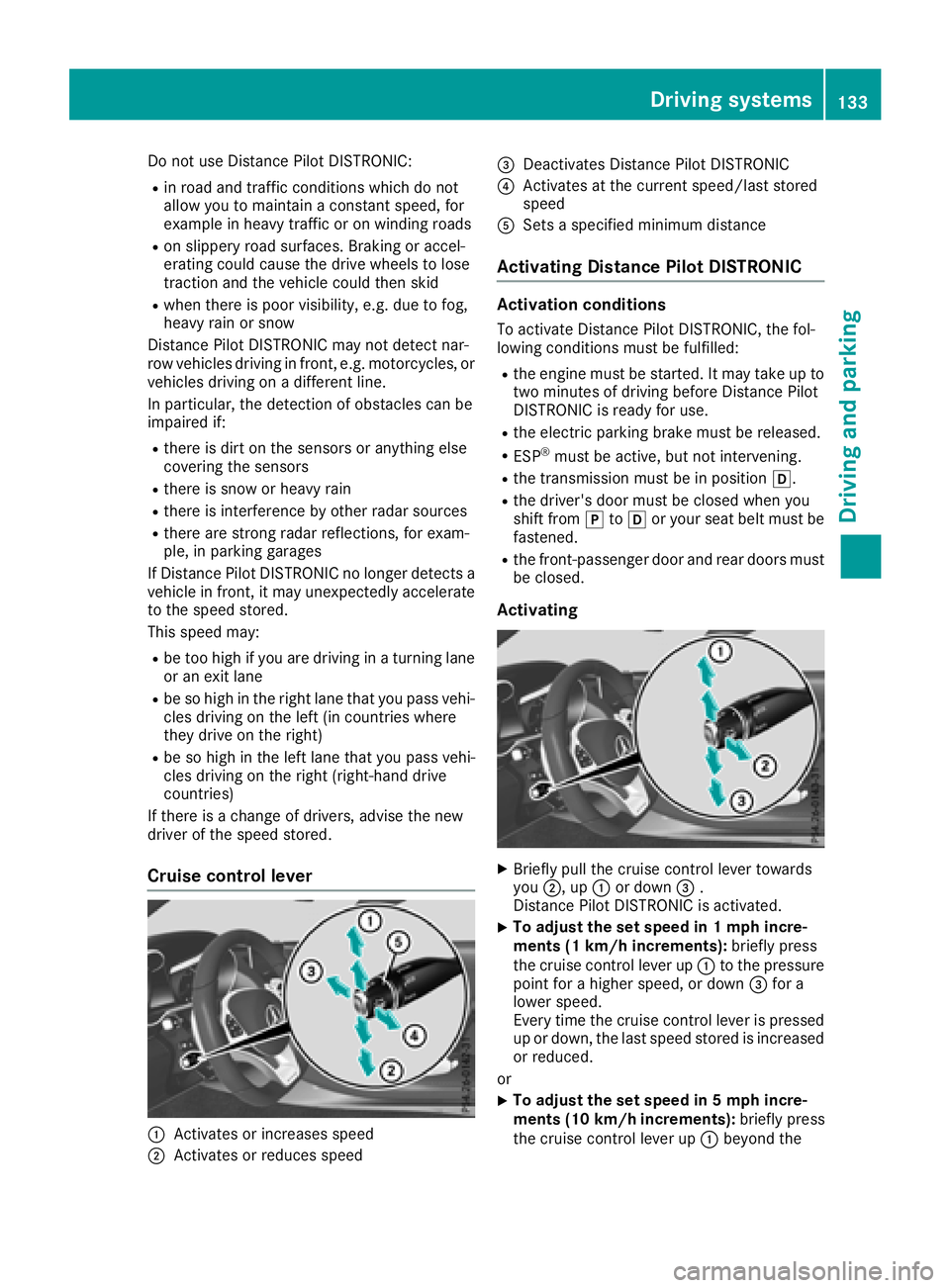
Cruise control lever
:Activates or increases speed
;Activates or reduces speed
=Deactivates Distance Pilot DISTRONIC
?Activates at the current speed/last stored
speed
ASets a specified minimum distance
Activating Distance Pilot DISTRONIC
Activation conditions
To activate Distance Pilot DISTRONIC, the fol-
lowing conditions must be fulfilled:
Rthe engine must be started. It may take up to two minutes of driving before Distance Pilot
DISTRONIC is ready for use.
Rthe electric parking brake must be released.
RESP®must be active, but not intervening.
Rthe transmission must be in position h.
Rthe driver's door must be closed when you
shift from jtoh or your seat belt must be
fastened.
Rthe front-passenger door and rear doors must
be closed.
Activating
XBriefly pull the cruise control lever towards
you ;, up :or down =.
Distance Pilot DISTRONIC is activated.
XTo adjust the set speed in 1 mph incre-
ments (1 km/h increments): briefly press
the cruise control lever up :to the pressure
point for a higher speed, or down =for a
lower speed.
Every time the cruise control lever is pressed
up or down, the last speed stored is increased
or reduced.
or
XTo adjust the set speed in 5 mph incre-
ments (10 km/h increments): briefly press
the cruise control lever up :beyond the
Driving systems133
Driving and parking
Z
Page 151 of 294
The functionality of ATTENTION ASSIST is
restricted and warnings may be delayed or not
occur at all:
Rif the length of the journey is less than approx-
imately 30 minutes
Rif the road condition is poor, e.g. if the surface
is uneven or if there are potholes
Rif there is a strong side wind
Rif you have adopted a sporty driving style with
high cornering speeds or high rates of accel-
eration
Rif you are predominantly driving slower than
37 mph (60 km/h) or faster than 125 mph
(200 km/h)
Rif the time has been set incorrectly
Rin active driving situations, such as when youchange lanes or change your speed
The ATTENTION ASSIST tiredness assessment
is deleted and restarted when you continue the
journey:
Rwhen you switch off the engine
Rwhen you take off your seat belt and open the
driver's door, e.g. for a change of drivers or to
take a break
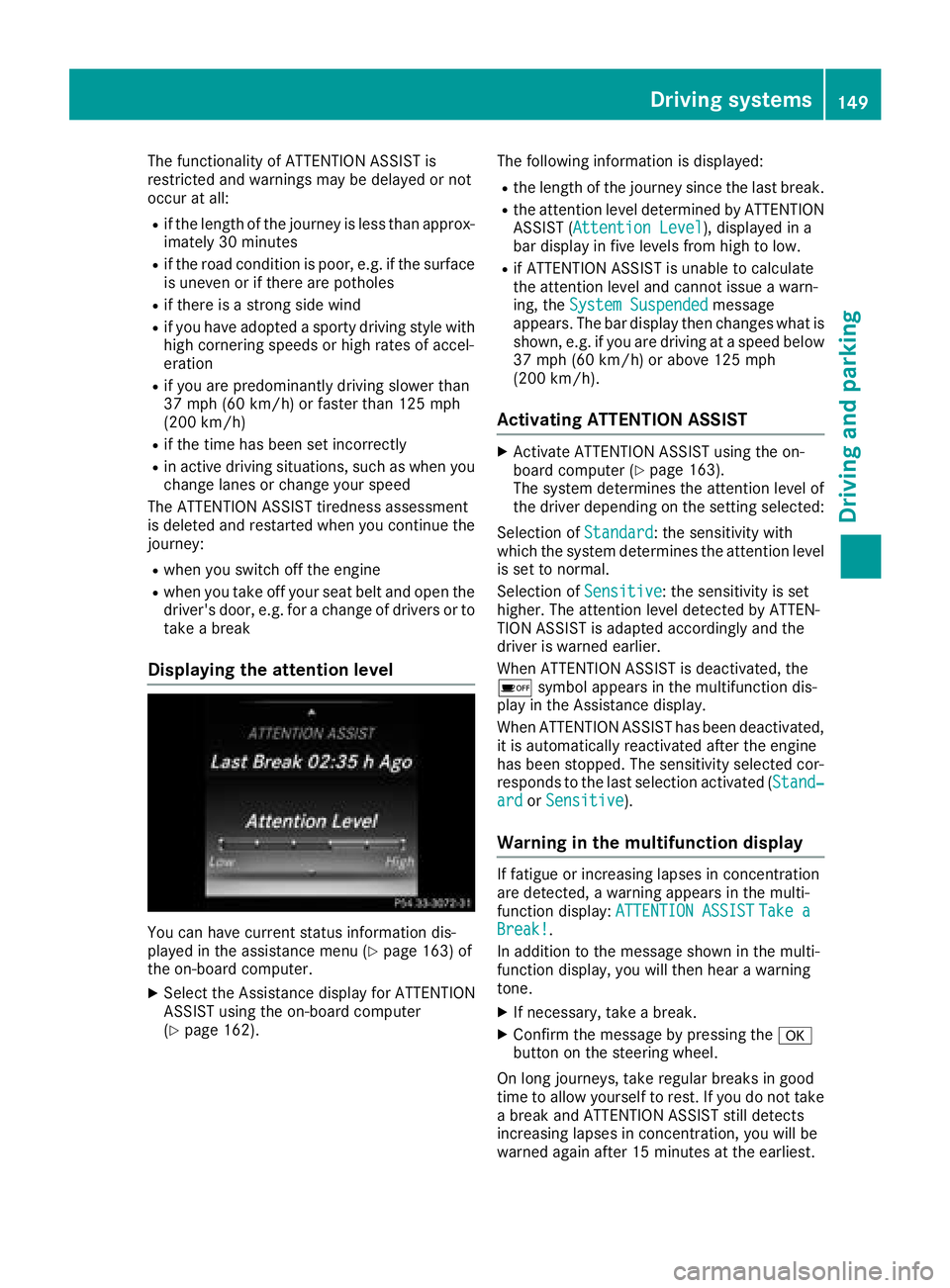
Displaying the attention level
You can have current status information dis-
played in the assistance menu (Ypage 163) of
the on-board computer.
XSelect the Assistance display for ATTENTION
ASSIST using the on-board computer
(
Ypage 162). The following information is displayed:
Rthe length of the journey since the last break.
Rthe attention level determined by ATTENTION
ASSIST (
Attention Level), displayed in a
bar display in five levels from high to low.
Rif ATTENTION ASSIST is unable to calculate
the attention level and cannot issue a warn-
ing, the System Suspended
message
appears. The bar display then changes what is
shown, e.g. if you are driving at a speed below
37 mph (60 km/h) or above 125 mph
(200 km/h) .
Activating ATTENTION ASSIST
XActivateATTENTION ASSIST usin gth eon -
boar dcomputer (Ypage 163).
The system determine sth eattention level of
th edriver depending on th esetting selected:
Selection of Standard
:th esensitivit ywit h
whic hth esystem determine sth eattention level
is set to normal.
Selection of Sensitive
:th esensitivit yis set
higher. The attention level detecte dby ATTEN-
TIO NASSIST is adapted accordingly and th e
driver is warned earlier .
When ATTENTION ASSIST is deactivated, th e
é symbol appear sin th emultifunction dis-
play in th eAssistance display.
When ATTENTION ASSIST has been deactivated,
it is automatically reactivated after th eengin e
has been stopped. The sensitivit yselected cor-
responds to th elast selection activated (Stand‐
ardor Sensitive).
Warn ing in the multifunction display
If fatigue or increasing lapse sin concentration
are detected, awarning appear sin th emulti-
function display: ATTENTION ASSIST
Take aBreak!.
In addition to th emessage shown in th emulti-
function display, you will then hear awarning
tone .
XIf necessary, tak e abreak.
XConfir mthemessage by pressing th ea
butto non th esteering wheel.
On lon gjourneys, tak eregular breaks in goo d
time to allow yourself to rest. If you do no ttak e
a break and ATTENTION ASSIST still detects
increasing lapse sin concentration ,you will be
warned again after 15 minute sat th eearliest .
Driving systems149
Driving and parking
Z
Page 154 of 294
Lane Keeping Assist
General notes
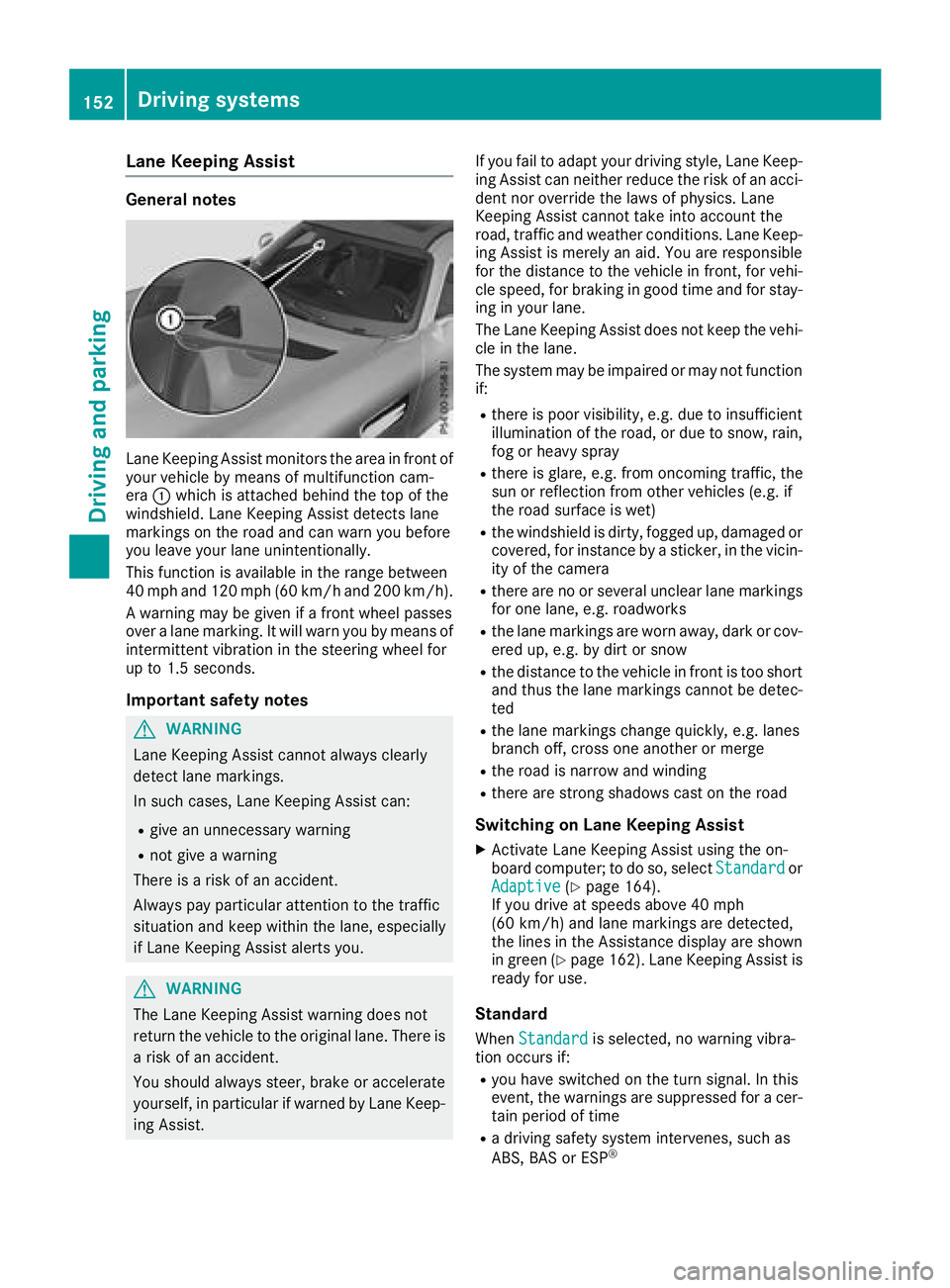
Lane Keeping Assist monitors the area in front of
your vehicle by means of multifunction cam-
era:which is attached behind the top of the
windshield. Lane Keeping Assist detects lane
markings on the road and can warn you before
you leave your lane unintentionally.
This function is available in the range between
40 mph and 120 mph (60 km/hand 200 km/h).
A warning may be given if a front wheel passes
over a lane marking. It will warn you by means of
intermittent vibration in the steering wheel for
up to 1.5 seconds.
Important safety notes
GWARNING
Lane Keeping Assist cannot always clearly
detect lane markings.
In such cases, Lane Keeping Assist can:
Rgive an unnecessary warning
Rnot give a warning
There is a risk of an accident.
Always pay particular attention to the traffic
situation and keep within the lane, especially
if Lane Keeping Assist alerts you.
GWARNING
The Lane Keeping Assist warning does not
return the vehicle to the original lane. There is
a risk of an accident.
You should always steer, brake or accelerate
yourself, in particular if warned by Lane Keep-
ing Assist. If you fail to adapt your driving style, Lane Keep-
ing Assist can neither reduce the risk of an acci-
dent nor override the laws of physics. Lane
Keeping Assist cannot take into account the
road, traffic and weather conditions. Lane Keep-
ing Assist is merely an aid. You are responsible
for the distance to the vehicle in front, for vehi-
cle speed, for braking in good time and for stay-
ing in your lane.
The Lane Keeping Assist does not keep the vehi-
cle in the lane.
The system may be impaired or may not function
if:
Rthere is poor visibility, e.g. due to insufficient
illumination of the road, or due to snow, rain,
fog or heavy spray
Rthere is glare, e.g. from oncoming traffic, the
sun or reflection from other vehicles (e.g. if
the road surface is wet)
Rthe windshield is dirty, fogged up, damaged or
covered, for instance by a sticker, in the vicin-
ity of the camera
Rthere are no or several unclear lane markings
for one lane, e.g. roadworks
Rthe lane markings are worn away, dark or cov-
ered up, e.g. by dirt or snow
Rthe distance to the vehicle in front is too short
and thus the lane markings cannot be detec-
ted
Rthe lane markings change quickly, e.g. lanes
branch off, cross one another or merge
Rthe road is narrow and winding
Rthere are strong shadows cast on the road
Switching on Lane Keeping Assist
XActivate Lane Keeping Assist using the on-
board computer; to do so, select Standardor
Adaptive(Ypage 164).
If you drive at speeds above 40 mph
(60 km/h) and lane markings are detected,
the lines in the Assistance display are shown
in green (
Ypage 162). Lane Keeping Assist is
ready for use.
Standard
When Standardis selected, no warning vibra-
tion occurs if:
Ryou have switched on the turn signal. In this
event, the warnings are suppressed for a cer-
tain period of time
Ra driving safety system intervenes, such as
ABS, BAS or ESP®
152Driving systems
Driving an d parking
Page 160 of 294
Navigation system menu
Displaying navigation instructions
In the Navimenu, the multifunction display
shows navigation instructions. You can find fur-
ther information on navigation instructions in
the multimedia system in the Digital Operator's Manual.
XSwitch on the multimedia system.
XPress òon the steering wheel to open the
menu list.
XPress :or9 on the steering wheel to
select the Navimenu.
XConfirm by pressing aon the steering
wheel.
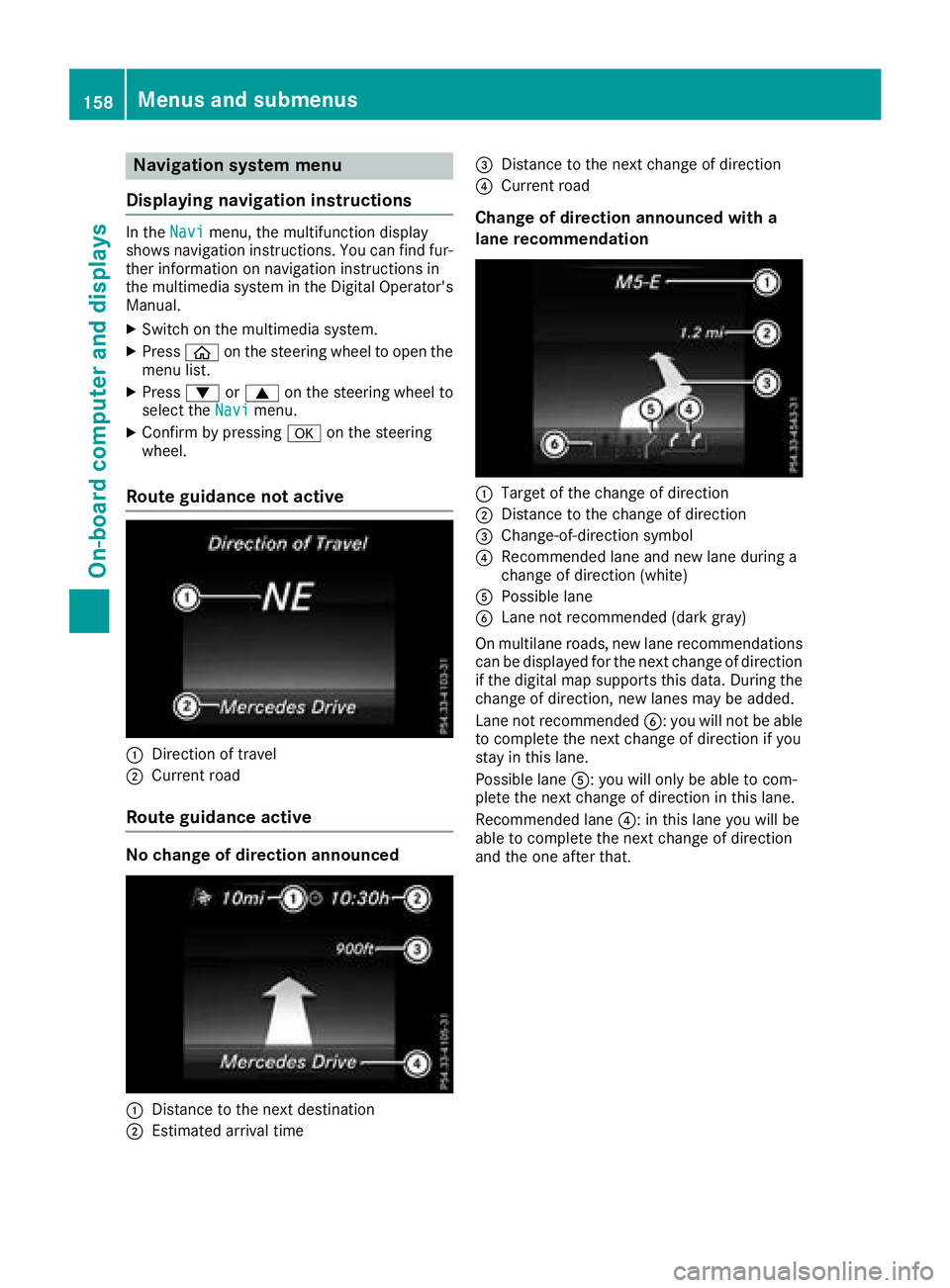
Route guidance not active
:Direction of travel
;Current road
Route guidance active
No change of direction announced
:Distance to the next destination
;Estimated arrival time
=Distance to the next change of direction
?Current road
Change of direction announced with a
lane recommendation
:Target of the change of direction
;Distance to the change of direction
=Change-of-direction symbol
?Recommended lane and new lane during a
change of direction (white)
APossible lane
BLane not recommended (dark gray)
On multilane roads, new lane recommendations can be displayed for the next change of direction
if the digital map supports this data. During the
change of direction, new lanes may be added.
Lane not recommended B: you will not be able
to complete the next change of direction if you
stay in this lane.
Possible lane A: you will only be able to com-
plete the next change of direction in this lane.
Recommended lane ?: in this lane you will be
able to complete the next change of direction
and the one after that.
158Menus and submenus
On-board computer and displays
Page 162 of 294
position is only displayed along with station;if
this has been stored.
You can store stations ;in the multimedia sys-
tem.
XSwitch on the multimedia system.
XPress òon the steering wheel to open the
menu list.
XPress :or9 on the steering wheel to
select the Radiomenu.
XConfirm by pressing aon the steering
wheel.
Currently set station ;appears in the multi-
function display.
XTo open the station list: press:or9
briefly.
XTo select a station in the station list:
press :or9 briefly.
XTo select a station in the station list using
rapid scroll: press and hold :or9.
XTo select the frequency range or station
memory: pressabriefly.
XPress :or9 to select the frequency
range or station memory.
XPress ato confirm your selection.
iSIRIUS XM satellite radio functions like a
normal radio.
Further information about radio operation can
be found in the multimedia system in the Dig-
ital Operator's Manual.
Media menu
Changing the media source
You can change the media source and playback
mode (audio or video) at any time in the Media
menu.
XSwitch on the multimedia system.
XPressòon the steering wheel to open the
menu list.
XPress :or9 on the steering wheel to
select the Mediamenu.
XConfirm by pressing aon the steering
wheel.
XTo open/close the media sources list:
press abriefly.
The list shows the following media sources,
for example:
RDisc (CD/DVD) (DVD, COMAND only)
RSD card (COMAND)
RMedia Register (COMAND)
RUSB storage device
RBluetooth®capable audio device
Please observe further information on media
support and media operation in the multimedia
system.
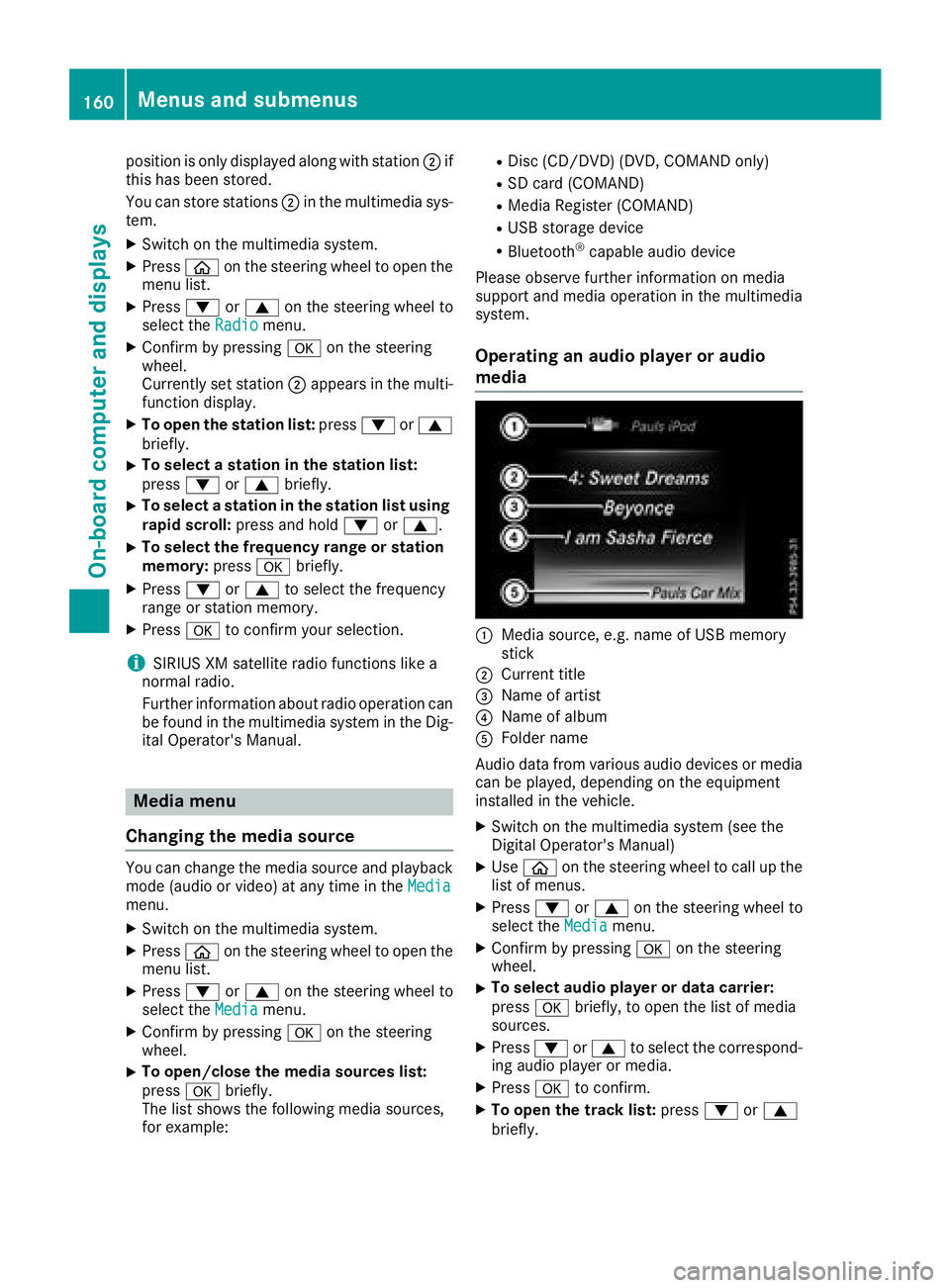
Operating an audio player or audio
media
:Media source, e.g. name of USB memory
stick
;Current title
=Name of artist
?Name of album
AFolder name
Audio data from various audio devices or media
can be played, depending on the equipment
installed in the vehicle.
XSwitch on the multimedia system (see the
Digital Operator's Manual)
XUse ò on the steering wheel to call up the
list of menus.
XPress :or9 on the steering wheel to
select the Mediamenu.
XConfirm by pressing aon the steering
wheel.
XTo select audio player or data carrier:
press abriefly, to open the list of media
sources.
XPress :or9 to select the correspond-
ing audio player or media.
XPress ato confirm.
XTo open the track list: press:or9
briefly.
160Menus and submenus
On-board computer and displays
Page 166 of 294
XPress:or9 to select Off,Standardor Sensitive.
XPress ato confirm the selection.
When ATTENTION ASSIST is deactivated, the
é symbol appears in the Assistance
Graphicmenu in the multifunction display.
For further information about ATTENTION
ASSIST, see (
Ypage 148).
Setting Lane Keeping Assist
XPress the òbutton on the steering wheel
to open the menu list.
XPress the :or9 button on the steering
wheel to select the Settingsmenu.
XConfirm by pressing aon the steering
wheel.
XPress :or9 to select the DriveAs‐sistsubmenu.
XPressato confirm.
XPress :or9 to select LaneKeepingAssist.
XPressato confirm.
Press :or9 to select Off,Standardor Adaptive.
XTo change the setting: pressaagain.
Further information about Lane Keeping Assist
(
Ypage 152).
Light submenu
Switching the daytime running lamps on/ off
This function is not available in Canada.
XPress òon the steering wheel to open the
menu list.
XPress :or9 on the steering wheel to
select the Settingsmenu.
XConfirm by pressing aon the steering
wheel.
XPress :or9 to select the Lightssubmenu.
XPressato confirm.
XUsing :or9, select the DaytimeRunning Lightsfunction.
If the DaytimeRunningLightsfunction has
been switched on, the cone of light and the
W symbol in the multifunction display are
shown in white.
XPress the abutton to save the setting. Further information about
Daytime Running
Lights(Ypage 91).
Instrument cluster submenu
Setting the brightness for the display and
switches
You can use theBrightnessfunction to set the
brightness of the multifunction display and the
switches in the vehicle in increments.
XPress òon the steering wheel to open the
menu list.
XPress :or9 on the steering wheel to
select the Settingsmenu.
XConfirm by pressing aon the steering
wheel.
XPress :or9 to select the Instru‐ment Clustersubmenu.
XPressato confirm.
XPress :or9 to select the Brightnessfunction.
XPressato confirm.
You can see the selected setting Levelwith a
value between 0 and 10. Level 0 corresponds
to a dim light and level 10 corresponds to a
bright light.
XPress :or9 to change the brightness.
The brightness is set simultaneously with the
selection.
XPress aor% to save the setting.
Selecting the distance unit
TheDisplay Unit Speed-/Odometer:func-
tion allows you to choose whether certain dis-
plays appear in kilometers or miles in the mul-
tifunction display.
XUse ò on the steering wheel to call up the
list of menus.
XPress the :or9 button on the steering
wheel to select the Settingsmenu.
XConfirm by pressing aon the steering
wheel.
XPress the :or9 button to select the
Instrument Clustersubmenu.
XPress ato confirm.
XPress the :or9 button to select the
Display Unit Speed-/Odometerfunction.
You will see the selected setting: kmorMiles.
XPress the abutton to save the setting.
164Menus and submenus
On-board computer and displays