fuel MERCEDES-BENZ AMG GT COUPE 2018 User Guide
[x] Cancel search | Manufacturer: MERCEDES-BENZ, Model Year: 2018, Model line: AMG GT COUPE, Model: MERCEDES-BENZ AMG GT COUPE 2018Pages: 294, PDF Size: 4.76 MB
Page 31 of 294
The following text is published as required of
manufacturers under Title 49, Code of U.S. Fed-
eral Regulations, Part 575 pursuant to the
"National Traffic and Motor Vehicle Safety Act of
1966".
If you believe that your vehicle has a defect
which could cause a crash or could cause injury
or death, you should immediately inform the
National Highway Traffic Safety Administration
(NHTSA) in addition to notifying Mercedes-Benz USA, LLC.
If NHTSA receives similar complaints, it may
open an investigation, and if it finds that a safety
defect exists in a group of vehicles, it may order
a recall and remedy campaign. However, NHTSA
cannot become involved in individual problems
between you, your dealer, or Mercedes-Benz
USA, LLC.
To contact NHTSA, you may call the Vehicle
Safety Hotline toll-free at 1-888-327-4236
(TTY: 1-800-424-9153); go tohttp://
www.safercar.gov; or write to: Administrator,
NHTSA, 400 Seventh Street, SW., Washington,
DC 20590.
You can also obtain other information about
motor vehicle safety at:
http://www.safercar.gov
Limited Warranty
!
Observe the notes in this Operator's Manual
regarding the correct operation of your vehi-
cle and possible damage to the vehicle. Dam-
age to the vehicle which is caused by violation
of these notes is not covered by the
Mercedes-Benz implied warranty or the new
or used-vehicle warranty.
QR code for rescue card
The QR codes are secured in the fuel filler flap
and on the opposite side on the B-pillar. In the
event of an accident, rescue services can use
the QR code to quickly find the appropriate res- cue card for your vehicle. The current rescue
card contains the most important information
about your vehicle in a compact form, e.g. the
routing of the electric cables.
You can find more information under
www.mercedes-benz.de/qr-code.
Data stored in the vehicle
Information from electronic control
units
There are electronic control units installed in
your vehicle. Some of these are necessary for
your vehicle to operate safely, while some offer
support during driving (driver assistance sys-
tems). In addition, your vehicle offers comfort
and entertainment functions that are also made
possible by electronic control units.
Electronic control units contain data storage
systems that can temporarily or permanently
save technical information concerning the vehi-
cle's condition, component stress and mainte-
nance requirements as well as technical events
and malfunctions.
This information generally documents the con-
dition of a component, a module, a system or the
surroundings, for example:
Roperating states of system components (e.g.
fill levels, battery status, tire pressure)
Rstatus messages concerning the vehicle or its
individual components (e.g. wheel rpm/
speed, deceleration, lateral acceleration, indi-
cation of whether seat belts are fastened)
Rmalfunctions and defects in important system
components (e.g. lights, brakes)
Rinformation about events leading to vehicle
damage
Rsystem responses in special driving situations
(e.g. air bag deployment, intervention of sta-
bility control systems)
Rambient conditions (e.g. temperature, rain
sensor)
In addition to performing the actual control unit function, these data are used by manufacturers
to detect and rectify malfunctions and to opti-
mize vehicle functions. Most of these data are
volatile and processed only in the vehicle itself.
Only a small part of the data is stored in event or malfunction memories.
When you use services, the technical data from
the vehicle can be read out by service network
employees or third parties. Services can include
repair services, maintenance processes, war-
ranty cases and quality assurance measures.
The data is read out via the legally prescribed
diagnostics connection in the vehicle. The rele-
vant offices in the service network or third par-
ties collect, process and use the data. These
data document the vehicle's technical states,
Data stored in the vehicle29
Introduction
Z
Page 36 of 294
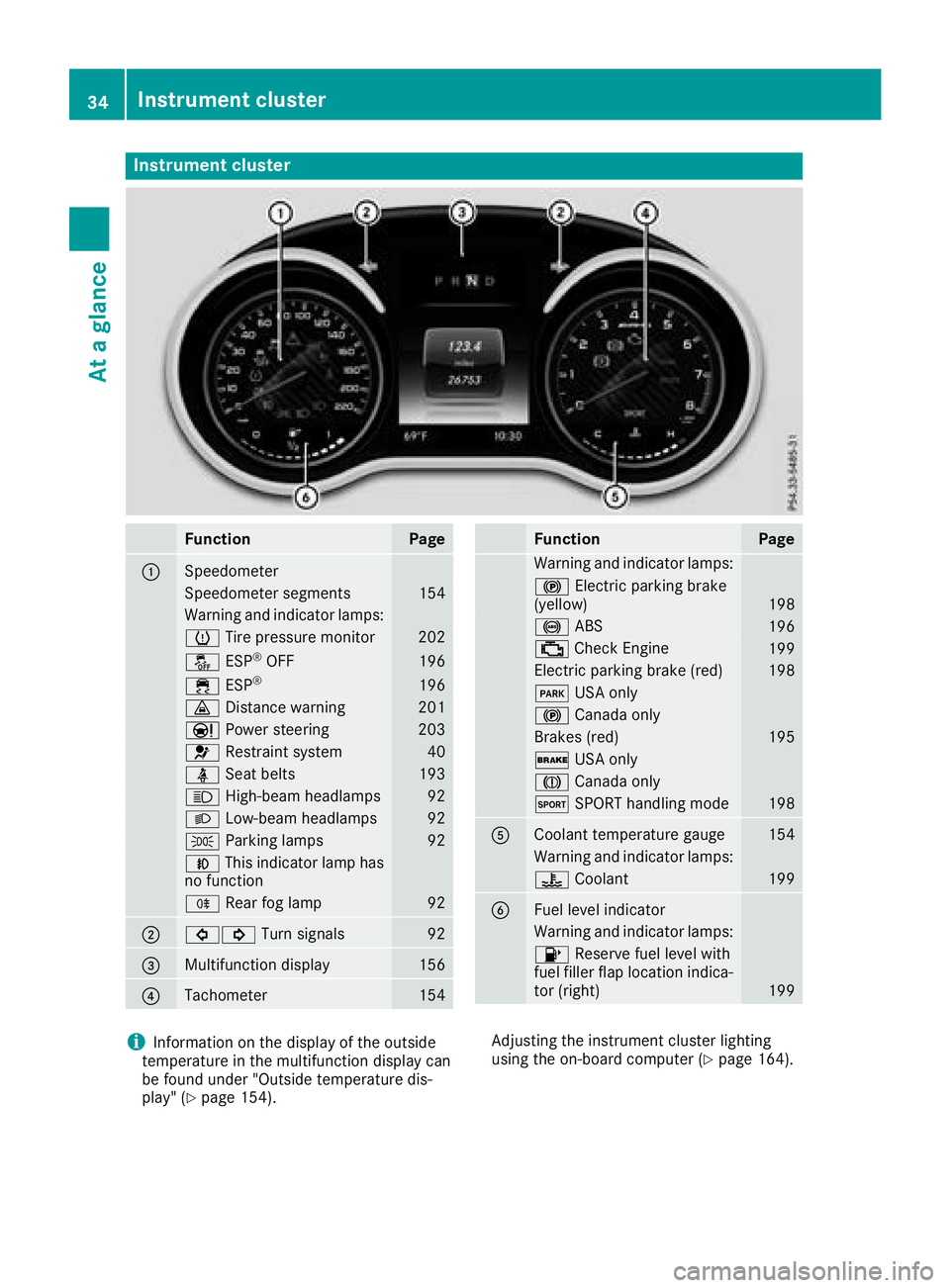
Instrument cluster
FunctionPage
:Speedometer
Speedometer segments154
Warning and indicator lamps:
h Tirepressur emonitor20 2
å ESP®OF F196
÷ ESP®19 6
· Distanc ewarning20 1
Ð Powersteering20 3
6 Restrain tsystem40
ü Seat belt s193
K High-beam headlamps92
LLow-beam headlamps92
TParking lamp s92
NThis indicator lamp has
no function
R Rear fog lamp92
;#! Turn signals92
=Multifunction display156
?Tachometer154
FunctionPag e
Warning and indicator lamps:
! Electric parking brak e
(yellow)19 8
! ABS196
; CheckEngin e199
Electric parking brak e(red)19 8
F USAonly
! Canad aonly
Brake s(red)19 5
$ USAonly
J Canad aonly
M SPORT handlin gmod e198
ACoolan ttemperature gauge15 4
Warning and indicator lamps:
? Coolan t199
BFue llevel indicator
Warning and indicator lamps:
8 Reserve fuel level wit h
fuel filler flap location indica-
to r(right )
199
iInformation on th edisplay of th eoutside
temperature in th emultifunction display can
be foun dunder "Outside temperature dis-
play" (
Ypage 154). Adjusting th
einstrumen tcluste rlighting
usin gth eon-board computer (
Ypage 164).
34Instrument cluster
At a glance
Page 56 of 294
If the seat belt pre-tensioning is not reduced:
XMove the seat backrest or seat back slightly
when the vehicle is stationary.
The seat belt pre-tensioning is reduced and
the locking mechanism is released.
The seat-belt adjustment is an integral part of
the PRE-SAFE
®convenience function. Informa-
tion about the convenience function can be
found under "Belt adjustment" (
Ypage 43).
Automatic measures after an acci-
dent
Immediately after an accident, the following
measures are implemented, depending on the
type and severity of the impact:
Rthe hazard warning lamps are switched on
Rthe emergency lighting is activated
Rthe vehicle doors are unlocked
Rthe front side windows are lowered
Rvehicles with a memory function: the electri-
cally adjustable steering wheel is raised when
the driver's door is opened
Rthe engine is switched off and the fuel supply
is switched off
Rvehicles with mbrace: automatic emergency
call
Children in the vehicle
Important safety notes
If a child younger than twelve years old and
under 5 ft (1.50 m) in height is traveling in the
vehicle:
Ralways secure the child in a child restraint
system suitable for Mercedes-Benz vehicles.
The child restraint system must be appropri-
ate to the age, weight and size of the child
Rbe sure to observe the instructions and safety
notes in this section in addition to the child
restraint system manufacturer's installation
instructions
Rbe sure to observe the instructions and safety notes on the "Occupant classification system
(OCS)" (
Ypage 46)
GWARNING
If you leave children unsupervised in the vehi-
cle, they could set it in motion, for example by:
Rreleasing the parking brake
Rshifting the transmission to the neutral
position
Rstarting the engine
In addition, they may operate vehicle equip-
ment and become trapped. There is a risk of
an accident and injury.
When leaving the vehicle, always take the
SmartKey with you and lock the vehicle. Never
leave children unsupervised in the vehicle.
GWARNING
If persons, particularly children are subjected to prolonged exposure to extreme heat or
cold, there is a risk of injury, possibly even
fatal. Never leave children unattended in the
vehicle.
GWARNING
If the child restraint system is subjected to
direct sunlight, parts may get very hot. Chil-
dren may burn themselves on these parts,
particularly on the metal parts of the child
restraint system. There is a risk of injury.
If you leave the vehicle, taking the child with
you, always ensure that the child restraint
system is not exposed to direct sunlight. Pro- tect it with a blanket, for example. If the child
restraint system has been exposed to direct
sunlight, let it cool down before securing the
child in it. Never leave children unattended in
the vehicle.
Always ensure that all vehicle occupants have
their seat belts fastened correctly and are sitting
properly. Particular attention must be paid to
children.
Observe the safety notes on the seat belt
(
Ypage 41) and the notes on correct use of seat
belts (Ypage 42).
A booster seat may be necessary to achieve
proper seat belt positioning for children over
40 lbs (18 kg) until they reach a height where a
54Children in the vehicle
Safety
Page 67 of 294
SmartKey
Important safety notes
GWARNING
If children are left unsupervised in the vehicle,
they could:
Ropen the doors, thus endangering other
people or road users.
Rget out and disrupt traffic.
Roperate the vehicle's equipment.
Additionally, children could set the vehicle in
motion if, for example, they:
Rrelease the parking brake.
Rshifting the automatic transmission out of
park position P
RStart the engine.
There is a risk of an accident and injury.
When leaving the vehicle, always take the
SmartKey with you and lock the vehicle. Never
leave children or animals unattended in the
vehicle. Always keep the SmartKey out of
reach of children.
GWARNING
If you attach heavy or large objects to the
SmartKey, the SmartKey could be uninten-
tionally turned in the ignition lock. This could
cause the engine to be switched off. There is a risk of an accident.
Do not attach any heavy or large objects to the
SmartKey. Remove any bulky key rings before
inserting the SmartKey into the ignition lock.
!Keep the SmartKey away from strong mag-
netic fields. Otherwise, the remote control
function could be affected.
Strong magnetic fields can occur in the vicin-
ity of powerful electrical installations.
Do not keep the SmartKey:
Rwith electronic devices, e.g. a mobile phone
or another SmartKey
Rwith metallic objects, e.g. coins or metal foil
Rinside metallic objects, e.g. a metal case
This can affect the functionality of the Smart-
Key. Vehicles with KEYLESS-GO start function:
do
not keep the SmartKey on the cargo compart-
ment cover or in the cargo compartment. Oth-
erwise, the SmartKey may not be detected, e.g.
when starting the engine using the Start/Stop
button.
A brief radio connection between the vehicle
and the SmartKey determines whether a valid
SmartKey is in, or in the direct vicinity of, the
vehicle. This occurs, for example:
Rwhen starting the engine
Rwhile driving
Rwhen using the tailgate unlocking sensor
Rwhen the external door handles are touched
Rduring convenience closing
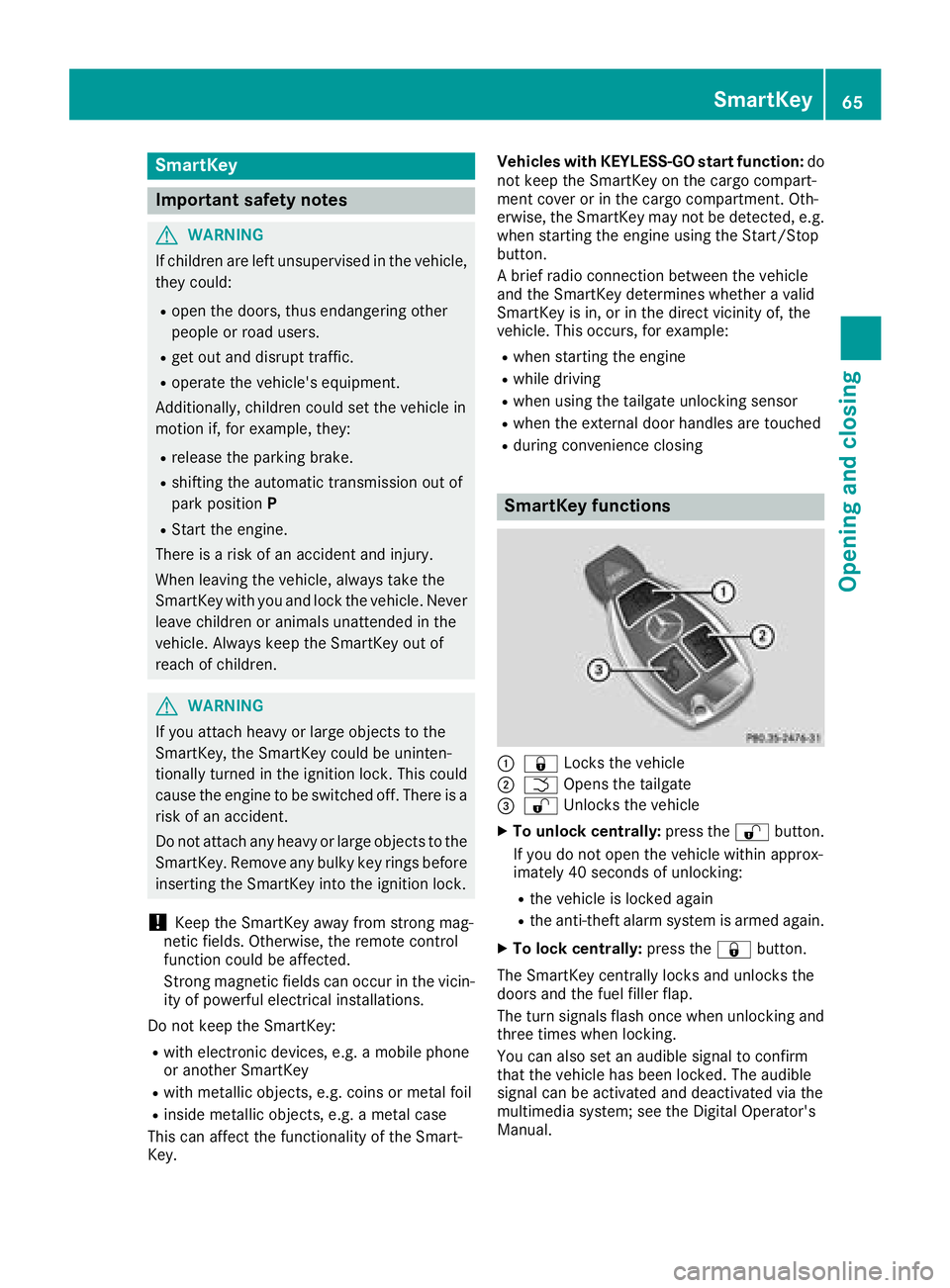
SmartKey functions
:& Locks the vehicle
;FOpens the tailgate
=%Unlocks the vehicle
XTo unlock centrally: press the%button.
If you do not open the vehicle within approx-
imately 40 seconds of unlocking:
Rthe vehicle is locked again
Rthe anti-theft alarm system is armed again.
XTo lock centrally: press the&button.
The SmartKey centrally locks and unlocks the
doors and the fuel filler flap.
The turn signals flash once when unlocking and
three times when locking.
You can also set an audible signal to confirm
that the vehicle has been locked. The audible
signal can be activated and deactivated via the
multimedia system; see the Digital Operator's
Manual.
SmartKey65
Opening and closing
Z
Page 69 of 294
Changing the settings of the locking
system
You can change the settings of the locking sys-
tem. This means that only the driver's door and
the fuel filler flap are unlocked when the vehicle
is unlocked. This is useful if you frequently travel
on your own.
XTo change the setting:press and hold down
the % and& buttons simultaneously
for about six seconds until the battery indica-
tor lamp flashes twice (
Ypage 68).
If the setting of the locking system is changed
within the signal range of the vehicle, pressing
the & or% button:
Rlocks or
Runlocks the vehicle
The SmartKey now functions as follows:
XTo unlock: press the%button once.
XTo unlock centrally: press the%button
twice.
XTo lock: press the &button.
The KEYLESS-GO functions can be changed as
follows:
XTo unlock the driver's door: touch the inner
surface of the door handle on the driver's
door.
XTo unlock centrally: touch the inner surface
of the front-passenger door handle.
XTo lock centrally: touch the outer sensor
surface on one of the door handles.
Restoring factory settings:
XPress the %and& buttons simultane-
ously for approximately six seconds until the
battery check lamp flashes twice
(
Ypage 68).
Mechanical key
General notes
If the vehicle can no longer be locked or
unlocked with the SmartKey or KEYLESS-GO,
use the mechanical key.
If you use the mechanical key to unlock and
open the driver's door, the anti-theft alarm sys-
tem will be triggered. Switch off the alarm
(
Ypage 63). If you unlock the vehicle using the mechanical
key, the fuel filler flap will not be unlocked auto-
matically.
XTo unlock the fuel filler flap:
insert the
SmartKey into the ignition lock.
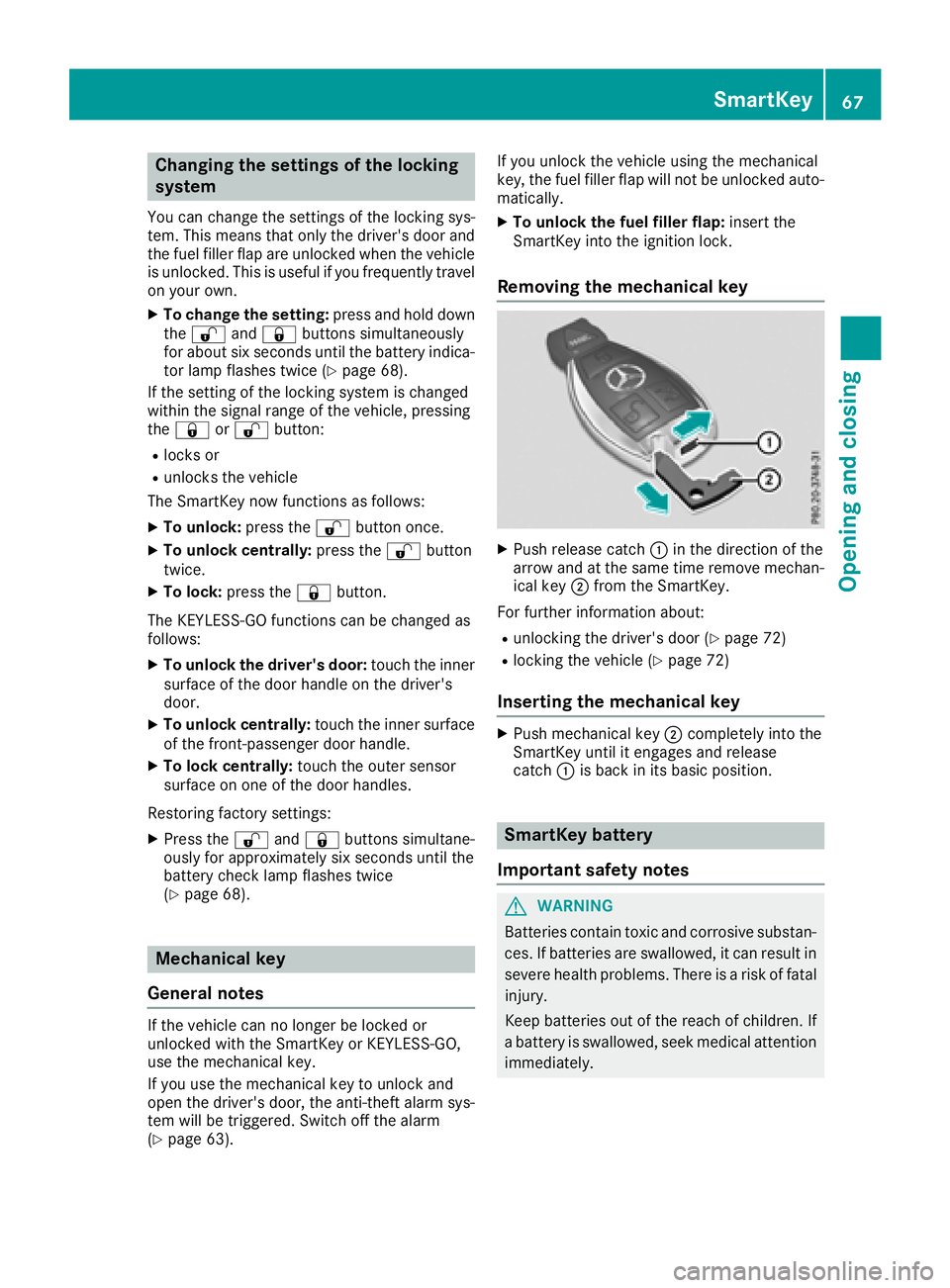
Removing the mechanical key
XPush release catch :in the direction of the
arrow and at the same time remove mechan- ical key ;from the SmartKey.
For further information about:
Runlocking the driver's door (Ypage 72)
Rlocking the vehicle (Ypage 72)
Inserting the mechanical key
XPush mechanical key ;completely into the
SmartKey until it engages and release
catch :is back in its basic position.
SmartKey battery
Important safety notes
GWARNING
Batteries contain toxic and corrosive substan- ces. If batteries are swallowed, it can result in
severe health problems. There is a risk of fatalinjury.
Keep batteries out of the reach of children. If
a battery is swallowed, seek medical attention
immediately.
SmartKey67
Opening and closing
Z
Page 110 of 294
GWARNING
After a short time, hill start assist will no lon-
ger brake your vehicle and it could roll away.
There is a risk of an accident and injury.
Therefore, quickly move your foot from the
brake pedal to the accelerator pedal. Never
leave the vehicle when it is held by hill start
assist.
Hill start assist is not active if:
Ryou are pulling away on a level road or on a
downhill gradient
Rthe transmission is in position i
Rthe electric parking brake is applied
RESP®is malfunctioning
Rear axle steering
General notes
Depending on the speed, rear axle steering
adapts the track of the rear axle to the position
of the front wheels. Together with the steering
angle of the front wheels, this results in greater
mobility and stability than on vehicles without
rear axle steering.
Rear axle steering has the following character-
istics:
Rreduced steering effort and turning circle,
resulting in reduced parking effort.
Rimproved driving stability, e.g. on curves.
Rthe vehicle has more direct steering. Control
of the vehicle is thereby increased.
ECO start/stop function
Introduction
The ECO start/stop function switches the
engine off automatically if the vehicle is stopped
under certain conditions.
The engine starts automatically when the driver
wants to pull away again. The ECO start/stop
function thereby helps you to reduce the fuel
consumption and emissions of your vehicle.
Important safety notes
GWARNING
If the engine is switched off automatically and
you exit the vehicle, the engine is restarted
automatically. The vehicle may begin moving.
There is a risk of accident and injury.
If you wish to exit the vehicle, always turn off
the ignition and secure the vehicle against
rolling away.
General notes
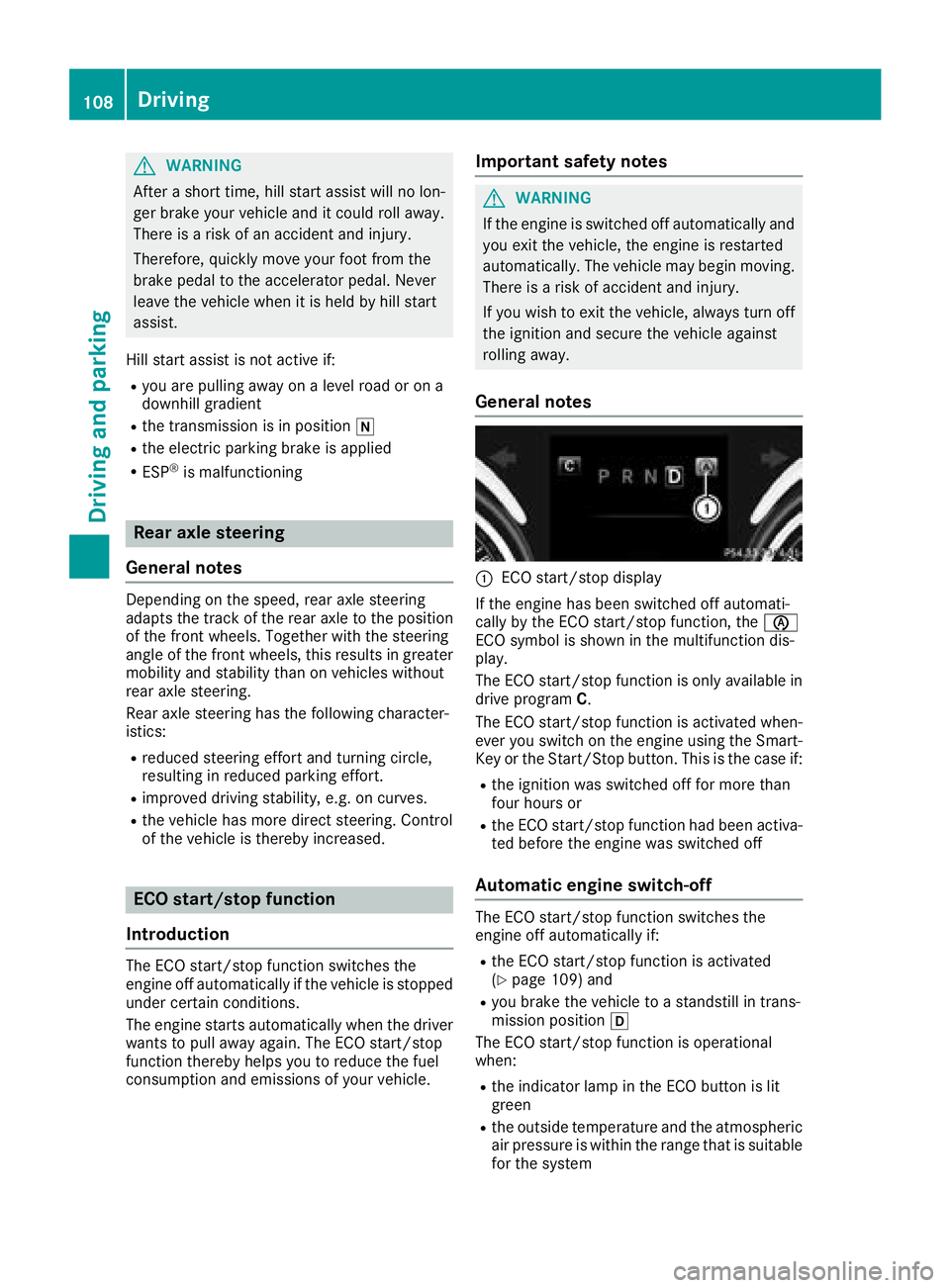
:ECO start/stop display
If the engine has been switched off automati-
cally by the ECO start/stop function, the è
ECO symbol is shown in the multifunction dis-
play.
The ECO start/stop function is only available in drive program C.
The ECO start/stop function is activated when-
ever you switch on the engine using the Smart-
Key or the Start/Stop button. This is the case if:
Rthe ignition was switched off for more than
four hours or
Rthe ECO start/stop function had been activa-
ted before the engine was switched off
Automatic engine switch-off
The ECO start/stop function switches the
engine off automatically if:
Rthe ECO start/stop function is activated
(Ypage 109) and
Ryou brake the vehicle to a standstill in trans-
mission position h
The ECO start/stop function is operational
when:
Rthe indicator lamp in the ECO button is lit
green
Rthe outside temperature and the atmospheric
air pressure is within the range that is suitable
for the system
108Driving
Driving and parking
Page 112 of 294
Setting the volume:
XPress button:.
If you select the loudest setting, indicator
lamp ;lights up. You can also adjust the position of the exhaust
flap using the:RDYNAMIC SELECT controller (Ypage 111)
RMultimedia system
Problems with the engine
ProblemPossible causes/consequences and
MSolutions
The engine does not
start.The HOLD function or Distance Pilot DISTRONIC is activated.
XDeactivate the HOLD function (Ypage 140) or Distance Pilot
DISTRONIC (Ypage 136).
XTry to start the engine again (Ypage 106).
The engine does not
start. The starter motor
can be heard.RThere is a malfunction in the engine electronics.
RThere is a malfunction in the fuel supply.
Before attempting to start the engine again:
XPress the Start/Stop button repeatedly until all indicator lamps in
the instrument cluster go out.
or
XTurn the SmartKey back to SmartKey position uin the ignition
lock.
XTry to start the engine again (Ypage 106). Avoid excessively long
and frequent attempts to start the engine as these will drain the
battery.
If the engine does not start after several attempts:
XConsult a qualified specialist workshop.
The engine does not
start. You cannot hear
the starter motor.The on-board voltage is too low because the battery is too weak or
discharged.
XJump-start the vehicle (Ypage 251).
If the engine does not start despite attempts to jump-start it:
XConsult a qualified specialist workshop.
The starter motor was exposed to a thermal load that was too high.
XTry to start the engine again (Ypage 106).
If the engine still does not start:
XConsult a qualified specialist workshop.
110Driving
Driving and parking
Page 113 of 294
ProblemPossible causes/consequences andMSolutions
The engine is not running
smoothly and is misfir-
ing.There is a malfunction in the engine electronics or in a mechanical
component of the engine management system.
XOnly depress the accelerator pedal slightly.
Otherwise, non-combusted fuel may get into the catalytic converter
and damage it.
XHave the cause rectified immediately at a qualified specialist work-
shop.
The coolant temperature
display shows a value
above 248 ‡ (120 †).The coolant level is too low. The coolant is too hot and the engine is no
longer being cooled sufficiently.
XStop as soon as possible and allow the engine and the coolant to
cool down.
XCheck the coolant level (Ypage 236). Observe the warning notes
as you do so and add coolant if necessary.
DYNAMIC SELECT controller
General information
Select the drive program using the DYNAMIC
SELECT controller.
Available drive programs:
C ComfortComfort-oriented, optimum-
economy engine and trans-
mission settings
SSportSporty engine and transmis-
sion settings
S+ Sport PlusEspecially sporty engine and
transmission settings
RACE
(AMG GT S and
AMG GT C)Maximum sportiness and
engine and transmission
settings suitable for the
racetrack
IIndividualIndividual settings
In urban traffic and stop-start traffic, drive pro-
gram Cis recommended.
Depending on the drive program selected the
following vehicle characteristics will change:
Rthe drive (engine management)
Rthe transmission management
RESP®(Ypage 61)
Rthe suspension (Ypage 142)
Rthe position of the exhaust flap
(Ypage 109)
Rthe availability of the ECO start/stop function (Ypage 108)
Rthe availability of gliding mode
(Ypage 115)
Further information for automatic drive program
characteristics (
Ypage 117).
Additionally, in drive program Iyou can config-
ure the respective vehicle characteristics using
the multimedia system. You can find informa-
tion about this in the Digital Operator's Manual.
Each time you start the engine with the Smart-
Key or the Start/Stop button, drive program Cis
activated. Further information about starting
the engine (
Ypage 106).
Selecting the drive program
XTurn DYNAMIC SELECT controller :until the
desired drive program is selected.
The selected drive program appears in the
multifunction display. After five seconds the
DYNAMIC SELECT controller111
Driving and parking
Z
Page 119 of 294
Automa tic drive program
Drive program C (Comfort)
Drive program Cis characterized by th efollow-
ing :
Rthevehicl edelivers comfortable, economical
handlin gcharacteristics .
Rthevehicl epulls away mor egentl yin forward
and revers egears, unless th eaccelerato r
pedal is depressed fully.
Rth evehicl ehas improved drivin gstability, for
exampl eon slipper yroad surfaces.
Roptimal fuel consumption resulting from th e
automatic transmission shifting up sooner.
The vehicl eis driven in th elow engin espee d
range and th ewheels are less likely to spin .
Rgliding modeis available.
Rth eECO start/sto pfunction is available.
Drive program S (Sport )
Drive programSis characterized by th efollow-
ing :
Rthevehicl eexhibits sport ydrivin gcharacter-
istics .
Rtheautomatic transmission shifts up later.
The fuel consumption possibl ybein ghigher
as aresult of th elater automatic transmission
shif tpoints .
Rthesuspension exhibits stiff springing and
damping settings.
Rgliding mod eis no tavailable.
Rth eECO start/sto pfunction is no tavailable.
Rif aperiod of dynamic drivin gis followed by an
extended phas ewit h a constan taccelerato r
pedal position ,th evehicl eshifts up to a
higher gear .This optimizes fuel consumption .
Drive program S+ (SportPlus)
Drive programS+is characterized by th efol -
lowing:
Rth evehicl eexhibits particularly sport ydrivin g
characteristics .
Rtheautomatic transmission shifts up later.
The fuel consumption possibl ybein ghigher
as aresult of th elater automatic transmission
shif tpoints .
Rthesuspension exhibits particularly har d
springing and damping settings.
Rgliding mod eis no tavailable.
Rth eECO start/sto pfunction is no tavailable.
Rif aperiod of dynamic drivin gis followed by an
extended phas ewit h a constan taccelerato r
pedal position ,th evehicl eshifts up to a
higher gear .This optimizes fuel consumption .
Drive program I (Individual)
In drive programIth efollowin gproperties of th e
drive program can be selected:
Rth edrive (engin emanagement)
Rth etransmission managemen t
RESP®(Ypage 61 )
Rthesuspension (Ypage 142)
Rtheposition of th eexhaust flap
(Ypage 109)
Information about configuring drive program I
wit hth emultimedia system can be foun din th e
Digital Operator' sManual.
Temporary manual drive program
Genera lnotes
In this drive program ,you can briefl ychang e
gear yourself by usin gth esteering whee lpaddl e
shifters. The transmission mus tbe in position
h to do this.
You can activat eth etemporar ymanual drive
program in th eautomatic drive program .The
switching times correspond to th epreviously
active automatic drive program .
In addition to temporar ymanual drive program
you can also activat emanual mod eM
(
Ypage 118).
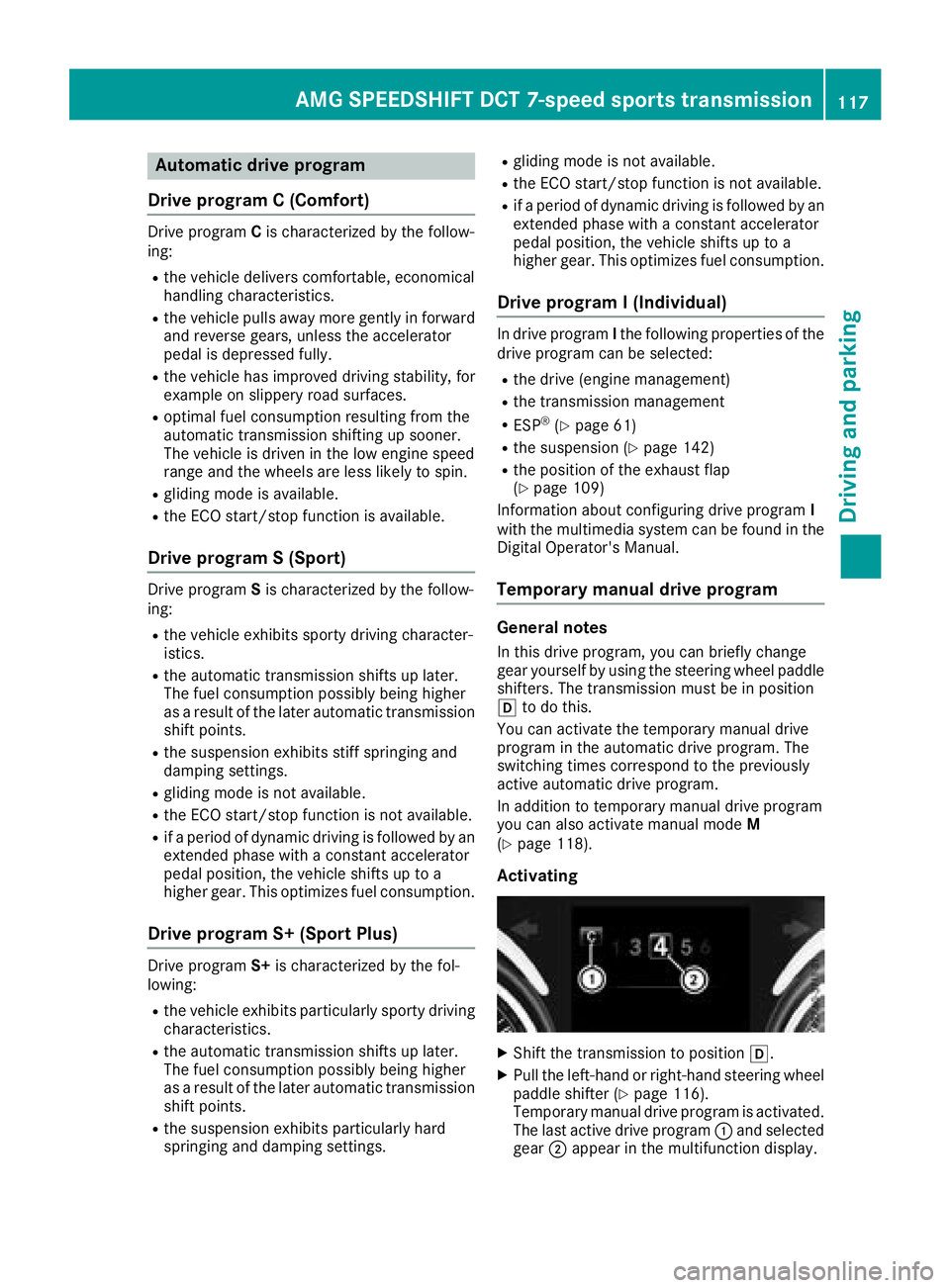
Activating
XShift th etransmission to position h.
XPull theleft-han dor right-hand steering whee l
paddl eshifte r (Ypage 116).
Temporary manual drive program is activated.
The last active drive program :and selected
gear ;appear in th emultifunction display.
AMG SPEEDSHIFT DCT 7-speed sports transmission11 7
Driving an d parking
Z
Page 121 of 294
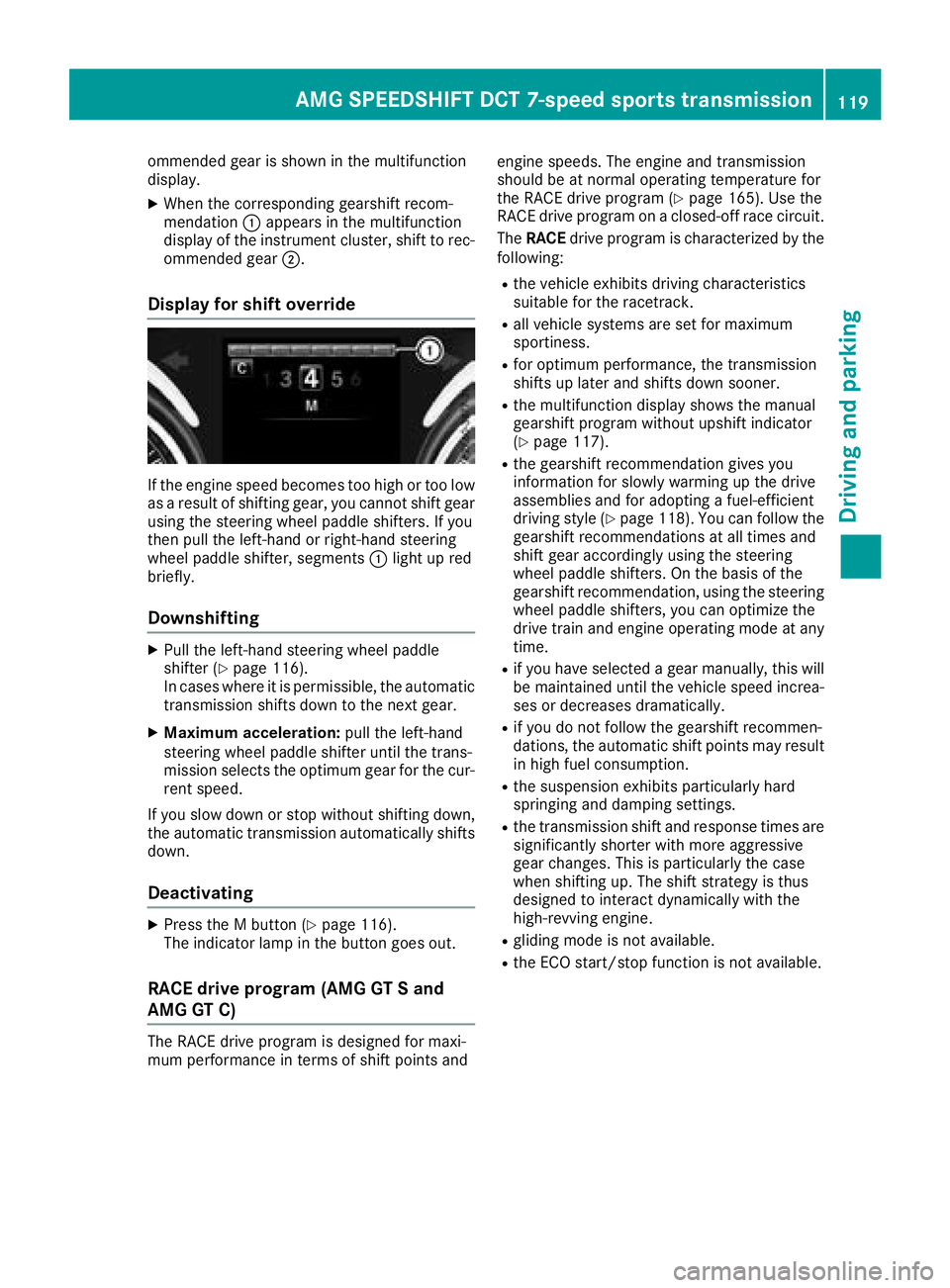
ommended gear is shown in the multifunction
display.
XWhen the corresponding gearshift recom-
mendation:appears in the multifunction
display of the instrument cluster, shift to rec-
ommended gear ;.
Display for shift override
If the engine speed becomes too high or too low
as a result of shifting gear, you cannot shift gear
using the steering wheel paddle shifters. If you
then pull the left-hand or right-hand steering
wheel paddle shifter, segments :light up red
briefly.
Downshifting
XPull the left-hand steering wheel paddle
shifter (Ypage 116).
In cases where it is permissible, the automatic transmission shifts down to the next gear.
XMaximum acceleration: pull the left-hand
steering wheel paddle shifter until the trans-
mission selects the optimum gear for the cur-
rent speed.
If you slow down or stop without shifting down,
the automatic transmission automatically shifts down.
Deactivating
XPress the M button (Ypage 116).
The indicator lamp in the button goes out.
RACE drive program (AMG GT S and
AMG GT C)
The RACE drive program is designed for maxi-
mum performance in terms of shift points and engine speeds. The engine and transmission
should be at normal operating temperature for
the RACE drive program (
Ypage 165). Use the
RACE drive program on a closed-off race circuit.
The RACE drive program is characterized by the
following:
Rthe vehicle exhibits driving characteristics
suitable for the racetrack.
Rall vehicle systems are set for maximum
sportiness.
Rfor optimum performance, the transmission
shifts up later and shifts down sooner.
Rthe multifunction display shows the manual
gearshift program without upshift indicator
(
Ypage 117).
Rthe gearshift recommendation gives you
information for slowly warming up the drive
assemblies and for adopting a fuel-efficient
driving style (
Ypage 118). You can follow the
gearshift recommendations at all times and
shift gear accordingly using the steering
wheel paddle shifters. On the basis of the
gearshift recommendation, using the steering
wheel paddle shifters, you can optimize the
drive train and engine operating mode at any
time.
Rif you have selected a gear manually, this will be maintained until the vehicle speed increa-
ses or decreases dramatically.
Rif you do not follow the gearshift recommen-
dations, the automatic shift points may resultin high fuel consumption.
Rthe suspension exhibits particularly hard
springing and damping settings.
Rthe transmission shift and response times are
significantly shorter with more aggressive
gear changes. This is particularly the case
when shifting up. The shift strategy is thus
designed to interact dynamically with the
high-revving engine.
Rgliding mode is not available.
Rthe ECO start/stop function is not available.
AMG SPEEDSHIFT DCT 7-speed sports transmission119
Driving and parking
Z