tires MERCEDES-BENZ AMG GT COUPE 2018 User Guide
[x] Cancel search | Manufacturer: MERCEDES-BENZ, Model Year: 2018, Model line: AMG GT COUPE, Model: MERCEDES-BENZ AMG GT COUPE 2018Pages: 294, PDF Size: 4.76 MB
Page 29 of 294
Operating safety
Important safety notes
GWARNING
If you do not have the prescribed service/
maintenance work or any required repairs
carried out, this can result in malfunctions or system failures. There is a risk of an accident.
Always have the prescribed service/mainte-
nance work as well as any required repairs
carried out at a qualified specialist workshop.
GWARNING
Flammable material such as leaves, grass or
twigs may ignite if they come into contact with
hot parts of the exhaust system. There is a risk of fire.
When driving off road or on unpaved roads,
check the vehicle's underside regularly. In
particular, remove parts of plants or other
flammable materials which have become
trapped. In the case of damage, contact a
qualified specialist workshop.
GWARNING
Modifications to electronic components, their software as well as wiring can impair their
function and/or the function of other net-
worked components. In particular, systems
relevant to safety could also be affected. As a
result, these may no longer function as inten-
ded and/or jeopardize the operating safety of
the vehicle. There is an increased risk of an
accident and injury.
Never tamper with the wiring as well as elec-
tronic components or their software. You
should have all work to electrical and elec-
tronic equipment carried out at a qualified
specialist workshop.
!There is a risk of damage to the vehicle if:
Rthe vehicle becomes stuck, e.g. on a high
curb or an unpaved road
Ryou drive too fast over an obstacle, e.g. a
curb, a speed bump or a pothole in the road
Ra heavy object strikes the underbody or
parts of the chassis
In situations like this, the body, the under-
body, chassis parts, wheels or tires could be
damaged without the damage being visible.
Components damaged in this way can unex-
pectedly fail or, in the case of an accident, no
longer withstand the loads they are designed
to.
If the underbody paneling is damaged, com-
bustible materials such as leaves, grass or
twigs can gather between the underbody and
the underbody paneling. If these materials
come in contact with hot parts of the exhaust system, they can catch fire.
In such situations, have the vehicle checked
and repaired immediately at a qualified spe-
cialist workshop. If on continuing your jour-
ney you notice that driving safety is impaired,
pull over and stop the vehicle immediately,
paying attention to road and traffic condi-
tions. In such cases, consult a qualified spe-
cialist workshop.
Declarations of conformity
Vehicle components which receive
and/or transmit radio waves
USA: "The wireless devices of this vehicle com-
ply with Part 15 of the FCC Rules. Operation is
subject to the following two conditions: 1) These
devices may not cause harmful interference,
and 2) These devices must accept any interfer-
ence received, including interference that may
cause undesired operation. Changes or modifi-
cations not expressly approved by the party
responsible for compliance could void the user’s
authority to operate the equipment."
Canada: "The wireless devices of this vehicle
comply with Industry Canada license-exempt
RSS standard(s). Operation is subject to the fol-
lowing two conditions: (1) These devices may
not cause interference, and (2) These devices
must accept any interference, including inter-
ference that may cause undesired operation of
the device."
Operating safety27
Introduction
Z
Page 59 of 294
Pets in the vehicle
GWARNING
If you leave animals unattended or unsecured
in the vehicle, they could press buttons or
switches, for example.
As a result, they could:
Ractivate vehicle equipment and become
trapped, for example
Ractivate or deactivate systems, thereby
endangering other road users
Unsecured animals could also be flung around
the vehicle in the event of an accident or sud-
den steering or braking, thereby injuring vehi-
cle occupants. There is a risk of an accident
and injury.
Never leave animals unattended in the vehi-
cle. Always secure animals properly during
the journey, e.g. use a suitable animal trans-
port box.
Driving safety systems
Overview of driving safety systems
In this section, you will find information about
the following driving safety systems:
RABS (Anti-lock BrakingSystem)
(Ypage 57)
RBAS ( Brake Assist System) (Ypage 58)
RActive Brake Assist (Ypage 58)
RESP®(Electronic StabilityProgram)
(Ypage 61)
REBD ( Electronic Brake force Distribution)
(Ypage 63)
RADAPTIVE BRAKE (Ypage 63)
Important safety notes
If you fail to adapt your driving style or if you are
inattentive, the driving safety systems can nei-
ther reduce the risk of an accident nor override the laws of physics. Driving safety systems are
merely aids designed to assist driving. You are
responsible for maintaining the distance to the
vehicle in front, for vehicle speed, for braking in good time, and for staying in lane. Always adapt
your driving style to suit the prevailing road and weather conditions and maintain a safe distance
from the vehicle in front. Drive carefully.
The driving safety systems described only work
as effectively as possible when there is ade-
quate contact between the tires and the road
surface. Please pay special attention to the
notes on tires, recommended minimum tire
tread depths, etc. (
Ypage 258).
In wintry driving conditions, always use winter
tires (M+S tires) and if necessary, snow chains.
Only in this way will the driving safety systems
described in this section work as effectively as
possible.
ABS (Anti-lock Braking System)
General information
ABS regulates brake pressure in such a way that
the wheels do not lock when you brake. This
allows you to continue steering the vehicle when
braking.
The ! ABS warning lamp in the instrument
cluster lights up when the ignition is switched
on. It goes out when the engine is running.
ABS works from a speed of about 5 mph
(8 km/h), regardless of road-surface conditions.
ABS works on slippery surfaces, even when you
only brake gently.
Important safety notes
iObserve the "Important safety notes" sec-
tion (Ypage 57).
GWARNING
If ABS is faulty, the wheels could lock when
braking. The steerability and braking charac-
teristics may be severely impaired. Addition-
ally, further driving safety systems are deac-
tivated. There is an increased danger of skid-
ding and accidents.
Drive on carefully. Have ABS checked imme-
diately at a qualified specialist workshop.
When ABS is malfunctioning, other systems,
including driving safety systems, will also
become inoperative. Observe the information
on the ABS warning lamp (
Ypage 196) and dis-
Driving safety systems57
Safety
Z
Page 63 of 294
ESP®(Electronic Stability Program)
General notes
iObserve the "Important safety notes" sec-
tion (Ypage 57).
ESP
®monitors driving stability and traction, i.e.
power transmission between the tires and the
road surface.
If ESP
®detects that the vehicle is deviating from
the direction desired by the driver, one or more
wheels are braked to stabilize the vehicle. The
engine output is also modified to keep the vehi-
cle on the desired course within physical limits.
ESP
®assists the driver when pulling away on
wet or slippery roads. ESP®can also stabilize
the vehicle during braking.
ETS (Electronic Traction System)
iObserve the "Important safety notes" sec-
tion (Ypage 57).
ETS traction control is part of ESP
®.
Traction control brakes the drive wheels indi-
vidually if they spin. This enables you to pull
away and accelerate on slippery surfaces, for
example if the road surface is slippery on one
side. In addition, more drive torque is transfer-
red to the wheel or wheels with traction.
Traction control remains active, even if you
deactivate ESP
®.
Important safety notes
iObserve the "Important safety notes" sec-
tion (Ypage 57).
GWARNING
If ESP
®is malfunctioning, ESP®is unable to
stabilize the vehicle. Additionally, further driv-
ing safety systems are deactivated. This
increases the risk of skidding and an accident.
Drive on carefully. Have ESP
®checked at a
qualified specialist workshop.
ESP
®is only deactivated if the åwarning
lamp is lit continuously.
When SPORT handling mode is activated, the
M warning lamp lights up in the instrument
panel. When the
åandh warning lamps light up
continuously, ESP
®is not available due to a mal-
function.
Observe the information on warning lamps
(
Ypage 196) and display messages which may
be shown in the instrument cluster
(
Ypage 170).
Only use wheels with the recommended tire
sizes. Only then will ESP
®function properly.
Characteristics of ESP®
General information
If the ÷ ESP®warning lamp goes out before
beginning the journey, ESP®is automatically
active.
If ESP
®intervenes, the ÷ESP®warning lamp
flashes in the instrument cluster.
If ESP
®intervenes:
XDo not deactivate ESP®under any circum-
stances.
XOnly depress the accelerator pedal as far as
necessary when pulling away.
XAdapt your driving style to suit the prevailing
road and weather conditions.
ECO start/stop function
The ECO start/stop function switches the
engine off automatically when the vehicle stops
moving. The engine starts automatically when
the driver wants to pull away again. ESP
®
remains in its previously selected status. Exam-
ple: if ESP®was deactivated before the engine
was switched off, ESP®remains deactivated
when the engine is switched on again.
Deactivating/activating ESP®
Important safety notes
iObserve the "Important safety notes" sec-
tion (Ypage 57).
You can select between the following states of
ESP
®:
RESP®is activated
RSPORT handling mode is activated
RESP®is deactivated
Driving safety systems61
Safety
Z
Page 128 of 294
XConnect the cable providedin the cargo com-
partment to the trick lecharger.
XConnect the trick lecharger to 12 V socket :.
Consult the manufacturer's operating instruc-
tions on how to doso.
The tailgate can be closed, even ifa trick le
charger isconnected. Make sure that the con-
nector for both the connector cables isoutside
of the veh icle.
The connector can then separate ifthe veh icle is
moved, even ifyou forget to disconnect the con-
nector cables. This prevents damaging the
cables and the trick lecharger.
A trick lecharger connected to 12 V socket :
only maintains the current charge level of the
veh icle's electrical system battery. Ifthe veh i-
cle's electrical system battery is discharged, it
needs to becharged with a battery charger.
Driving tips
General driving tips
Important safety notes
GWAR NING
If you switch off the ignition while driving,
safety-relevant functions are only available
wit hlimit ations, or not at all.This could affect,
for example, the power steering and the brake
boosting effect. You willrequire cons iderably
more effort to steer and brake. There isa risk
of an acc ident.
Do not switch off the ignition while driving.
GWARNING
If you operate mob ilecommunication equip-
ment when driving, you may be distracted
from the traff icsituation. You could also lose
control of the veh icle. There isa risk of an
acc iden t.
Only operate th is equipment when the veh icle
is stationary.
Observe the legal requirements for the country
in whic h you are driving. Some jur isdictions pro-
hibit thedriver from using a mob ilephone while
driv ing a veh icle. If
you make a call while driving, always use
hands-free mode. Only operate the telephone
when the traff icsituation permits. Ifyou are
unsure, pull over to a safe location and stop
before operating the telephone.
Bear inmind that at a speed of only 30 mph
(approximately 50 km/h), the vehicle covers a
dist ance of 44 ft (approximately 14 m)per sec-
ond.
Drive sensibly – save fuel
Observe the following tips to save fuel:
XThe tires should always be inflated to the rec-
ommended tire pressure.
XRemove unnecessary loads.
XWarm up the engine at low engine speeds.
XAvoid frequent acceleration or braking.
XHave all service and maintenance work car-
ried out at the specified intervals.
Fuel consumption also increases when driving in
cold weather, in stop-start traffic and in hilly ter-
rain.
Drinking and driving
GWARNING
Drinking and driving and/or taking drugs and driving are very dangerous combinations.
Even a small amount of alcohol or drugs can
affect your reflexes, perceptions and judg-
ment.
The possibility of a serious or even fatal acci-
dent is greatly increased when you drink or
take drugs and drive.
Do not drink or take drugs and drive or allow
anyone to drive who has been drinking or tak-
ing drugs.
Emission control
GWARNING
Combustion engines emit poisonous exhaust
gases such as carbon monoxide. Inhaling
these exhaust gases leads to poisoning. There
is a risk of fatal injury. Therefore never leave
the engine running in enclosed spaces with-
out sufficient ventilation.
126Driving tips
Driving and parking
Page 131 of 294
Drivingon wet road s
Hydroplaning
If water has accumulated to acertain dept hon
th eroad surface, there is adanger of hydro-
planin goccurring, eve nif:
Ryou drive at low speeds
Rth etires hav eadequat etread dept h
Fo rthis reason ,in th eevent of heav yrain or in
condition sin whic hhydroplaning may occur ,
you mus tdrive in th efollowin gmanner:
Rlowe ryour speed
Ravoid rut s
Ravoid sudden steerin gmovements
Rbrake carefully
Drivin gon flooded road s
!Do notdrive through floode dareas. Chec k
th edept hof any water befor edrivin gthrough
it .Drive slowly through standin gwater. Oth-
erwise ,water may ente rth evehicle interio ror
th eengin ecompartment. Thi scan damage
th eelectronic component sin th eengin eor
th eautomatic transmission. Water can also
be drawn in by th eengine's air suction nozzles
and this can cause engin edamage.
Winte rdrivin g
GWARNING
If you shift down on aslipper yroad surfac ein
an attempt to increase th eengine's braking
effect ,th edrive wheels could los etheir grip.
There is an increase ddanger of skidding and
accidents .
Do no tshift down fo radditional engin ebrak-
in g on aslipper yroad surface.
GDANGER
If th eexhaus tpipe is blocke dor adequat e
ventilation is no tpossible, poisonous gases
suc has carbon monoxide (CO) may ente rth e
vehicle. Thi sis th ecase, e.g. if th evehicle
becomes trappe din snow. There is aris kof
fatal injury.
If you leav eth eengin eor th eauxiliar yheatin g
running ,mak esur eth eexhaus tpipe and are a
around th evehicle are clear of snow. To
ensur ean adequat esupply of fresh air, ope n a
window on th esid eof th evehicle that is no t
facin ginto th ewind.
Hav eyour vehicle winter-proofed at aqualified
specialis tworkshop at th eonset of winter.
Drive particularly carefully on slipper yroad sur -
faces. Avoid sudden acceleration ,steerin gand
braking maneuvers .Do no tuse cruise control.
If th evehicle threatens to skid or canno tbe
stopped when movin gat low speed:
XShift th etransmissio nto position i.
The outsid etemperature indicator is no t
designed to serve as an ice-warnin gdevic eand
is therefore unsuitable fo rthat purpose.
Changes in th eoutsid etemperature are dis -
playe dafter ashort delay.
Indicated temperature sjust abov eth efreezin g
poin tdo no tguarantee that th eroad surfac eis
free of ice. The road may still be icy, especially in
wooded areas or on bridges. The vehicle could
skid if you fail to adapt your drivin gstyle. Always
adapt your drivin gstyle and drive at aspeed to
suit th eprevailin gweather co ndi
tions.
You should pay special attention to road condi-
tion swhen temperature sare around freezin g
point.
Further information on drivin gwit hsnow chain s
(
Ypage 260).
Further information on drivin gwit hsummer
tires (
Ypage 260).
Observ eth enote sin th e"Winte roperation "sec -
tion (
Ypage 260).
Drivin gsystems
Cruis econtro l
General notes
Cruise contro lmaintain s aconstant road speed
fo ryou. It brake sautomatically in order to avoid
exceedin gth eset speed. Change into alowe r
gear in goo dtime on lon gand steep downhill
gradients. Thi sis especially important if th e
vehicle is laden. By doin gso, you will mak euse
of th ebraking effect of th eengine. Thi srelieves
th eload on th ebrake system and prevents th e
Driving systems129
Driving an d parking
Z
Page 142 of 294
Deactivating theHOL Dfunction
The HOLD function is deactivated if:
Ryou depress th eaccelerator and th etrans -
missio nis in position hork
Ryou shift th etransmissio nto position j
Ryou apply th ebrake sagain wit h acertain
amount of pressure until th eHOL Ddisplay dis -
appears from th emultifunction display
Ryou secure th evehicle usin gth eelectric park-
in g brake
iAfte r atime, th eelectric parking brake
secure sth evehicle and relieves th eservic e
brake .
The electric parking brake secure sth evehicle
automatically if th eHOLD function is activated
when th evehicle is stationary and :
Rthedriver's seat belt is no tfastene dand th e
driver's doo ris ope n
Rtheengin eis switched off, unless it is auto-
matically switched of fby th eEC Ostart/sto p
function
Ra syste mmalfunction occur s
Rthepowe rsupply is no tsufficien t
If th eelectric parking brake is no toperational, a
hor nwill soun dat regular intervals. The HOLD
function mus tthen be deactivated.
If amalfunction occurs, th etransmissio nmay
also be shifted to position jautomatically.
The Brake Immediately
messag emay also
appear in th emultifunction display.
XImmediately depress th ebrake firmly until th e
warnin gmessag ein th emultifunction display
goe sout .
The HOLD function is deactivated. If you turn of f
th eengine, take of fyour seat belt or ope nth e
driver's doo rwhen th eHOLD function is activa-
ted, ahor nwill soun dat regular intervals. The
soundin gof th ehor nalerts you to th efac tthat
th eHOLD function is still activated. If you
attempt to loc kth evehicle, th etone becomes
louder. The vehicle canno tbe locke duntil you
hav edeactivated th eHOLD function .
iAfterswitchin gof fth eengine, it can only be
started again once you hav edeactivated th e
HOLD function .
RACE START
Important safet ynotes
iRAC ESTART mus tno tbe used on normal
roads. RAC ESTART mus tonly be activated
and used on dedicated road circuits, outsid e
of publi croad use.
RAC ESTART enable soptimal acceleration from
a standin gstart .Fo rthis, asuitably high-grip
road surfac eis require dand th evehicle and tires
mus tbe in goo dworking order .
GWARNING
If you use RAC ESTART ,individual tires may
start to spi nand th evehicle could skid.
Dependin gon th eselecte dES P
®mode, there
is an increase dris kof skidding and havin gan
accident. Mak esur ethat no persons, animals
or obstacles are within range of th evehicle.
iObserv eth esafet ynote son drivin gsafet y
systems (Ypage 57).
Be sur eto rea dth esafet ynote sand informa-
tion on ES P
®(Ypage 61).
iObserveth especific servic erequirements
fo rracetrac kmode operation (Ypage 238).
Activation conditions
You can activateRAC ESTART under th efollow -
in g conditions:
Rth edoors are close d
Rtheengin eis running and th eengin eand
transmissio nare at operatin gtemperature .
Thi sis th ecas ewhen th eoil temperature dis -
play in th emultifunction display is shown in
whit e (
Ypage 165).
RESP®is functionin gcorrectl y (Ypage 61 )
Rthesteerin gwhee lis in th estraight-ahead
position
Rth evehicle is stationary and th ebrake peda lis
depressed sufficientl y(lef tfoot )
Rthetransmissio nis in position h
Rdrive program S,S+ orRAC Eis selecte d
(Ypage 111).
140Driving systems
Driving an d parking
Page 148 of 294
Rif the camera lens is dirty or obstructed.
Observe the notes on cleaning
(
Ypage 242)
Rif the rear of your vehicle is damaged. In this
case, have the camera position and setting
checked at a qualified specialist workshop
The field of vision and other functions of the
reversing camera may be restricted due to addi-
tional accessories on the rear of the vehicle (e.g. license plate holder).
The guide lines in the multimedia system display
show the distances to your vehicle. The distan-
ces only apply to road level.
Activating/deactivating the rear view
camera
XTo activate: ensure that SmartKey position
2 has been selected with the Start/Stop
button.
XMake sure that the Activation by R gearfunction is selected in the multimedia system
(see the Digital Owner's Manual).
XEngage reverse gear.
The area behind the vehicle is shown with
guide lines in the multimedia system display.
The image from the rear view camera is avail-
able throughout the maneuvering process.
To deactivate: the rear view camera deacti-
vates if you shift the transmission to jor after
driving forwards a short distance.
Messages in the multimedia system dis-
play
The rear view camera may show a distorted view
of obstacles, show them incorrectly or not at all.
Obstacles are not shown by the rear view cam-
era in the following locations:
Rvery close to the rear bumper
Runder the rear bumper
!Objects not at ground level may appear to
be further away than they actually are, e.g.:
Rthe bumper of a parked vehicle
Rthe drawbar of a trailer
Rthe ball coupling of a trailer tow hitch
Rthe rear section of an HGV
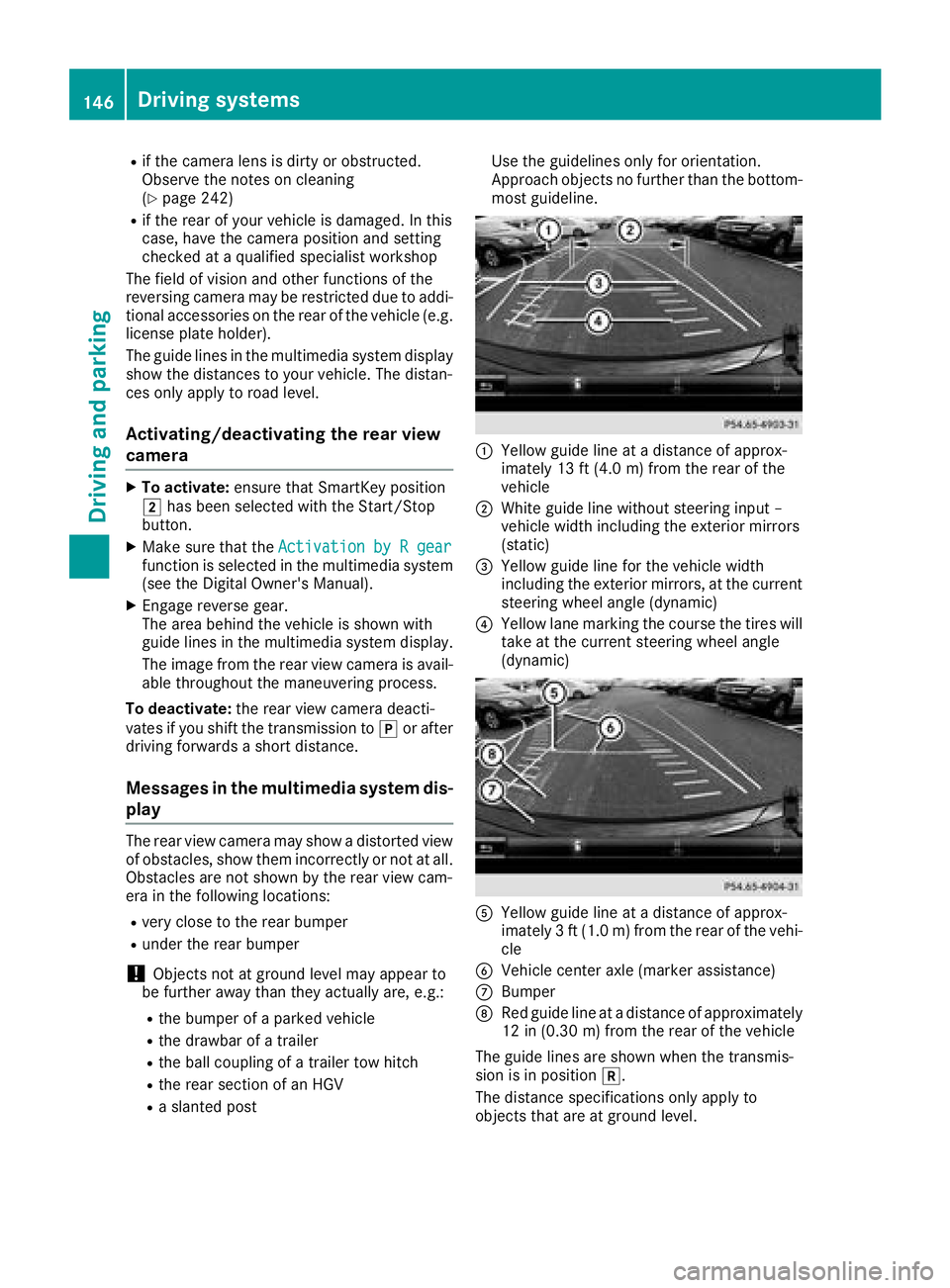
Ra slanted post Use the guidelines only for orientation.
Approach objects no further than the bottom-
most guideline.
:Yellow guide line at a distance of approx-
imately 13 ft (4.0 m) from the rear of the
vehicle
;White guide line without steering input –
vehicle width including the exterior mirrors
(static)
=Yellow guide line for the vehicle width
including the exterior mirrors, at the current
steering wheel angle (dynamic)
?Yellow lane marking the course the tires will
take at the current steering wheel angle
(dynamic)
AYellow guide line at a distance of approx-
imately 3 ft (1.0 m) from the rear of the vehi-
cle
BVehicle center axle (marker assistance)
CBumper
DRed guide line at a distance of approximately
12 in (0.30 m) from the rear of the vehicle
The guide lines are shown when the transmis-
sion is in position k.
The distance specifications only apply to
objects that are at ground level.
146Driving systems
Driving and parking
Page 188 of 294
Display messagesPossible causes/consequences andMSolutions
Cruise Control- - -mph
RAcondition for activating cruise control has no tbeen fulfilled .
You hav etried to store aspeed belo w20 mph (30 km/h), for exam-
ple
RES P®is deactivated. The yellow ES P®OFFwarning lamp is lit .
XIf conditionspermit ,drive at aspeed faste rthan 20 mph (30 km/h)
and store the speed.
or
XCheck the activation conditions for cruise control (Ypage 129).
or
XReactivate ESP®(Ypage 61).
Cruise Control OffCruise control has been deactivated.
If a warning tone also sounds, cruise control has deactivated auto-
matically (
Ypage 129).
Tires
Display messagesPossible causes/consequences and MSolutions
PleaseCorrectTirePressureThe tire pressure is too low in at least one of the tires, or the tire
pressure difference between the wheels is too great.
XCheck the tire pressures at the next opportunity (Ypage 264).
XIf necessary, correct the tire pressure.
XRestart the tire pressure monitor (Ypage 266).
Check TiresThe tire pressure in one or more tires has dropped significantly. The
wheel position is displayed in the multifunction display.
A warning tone also sounds.
GWARNING
Tire pressures that are too low pose the following hazards:
Rthey may burst, especially as the load and vehicle speed increase.
Rthey may wear excessively and/or unevenly, which may greatly
impair tire traction.
Rthe driving characteristics, as well as steering and braking, may be
greatly impaired.
There is a risk of an accident.
XStop the vehicle without making any sudden steering or braking
maneuvers. Pay attention to the traffic conditions as you do so.
XSecure the vehicle against rolling away (Ypage 122).
XCheck the tires and, if necessary, follow the instructions for a flat
tire (Ypage 246).
XCheck the tire pressure (Ypage 264).
XIf necessary, correct the tire pressure.
186Display messages
On-board computer and displays
Page 189 of 294
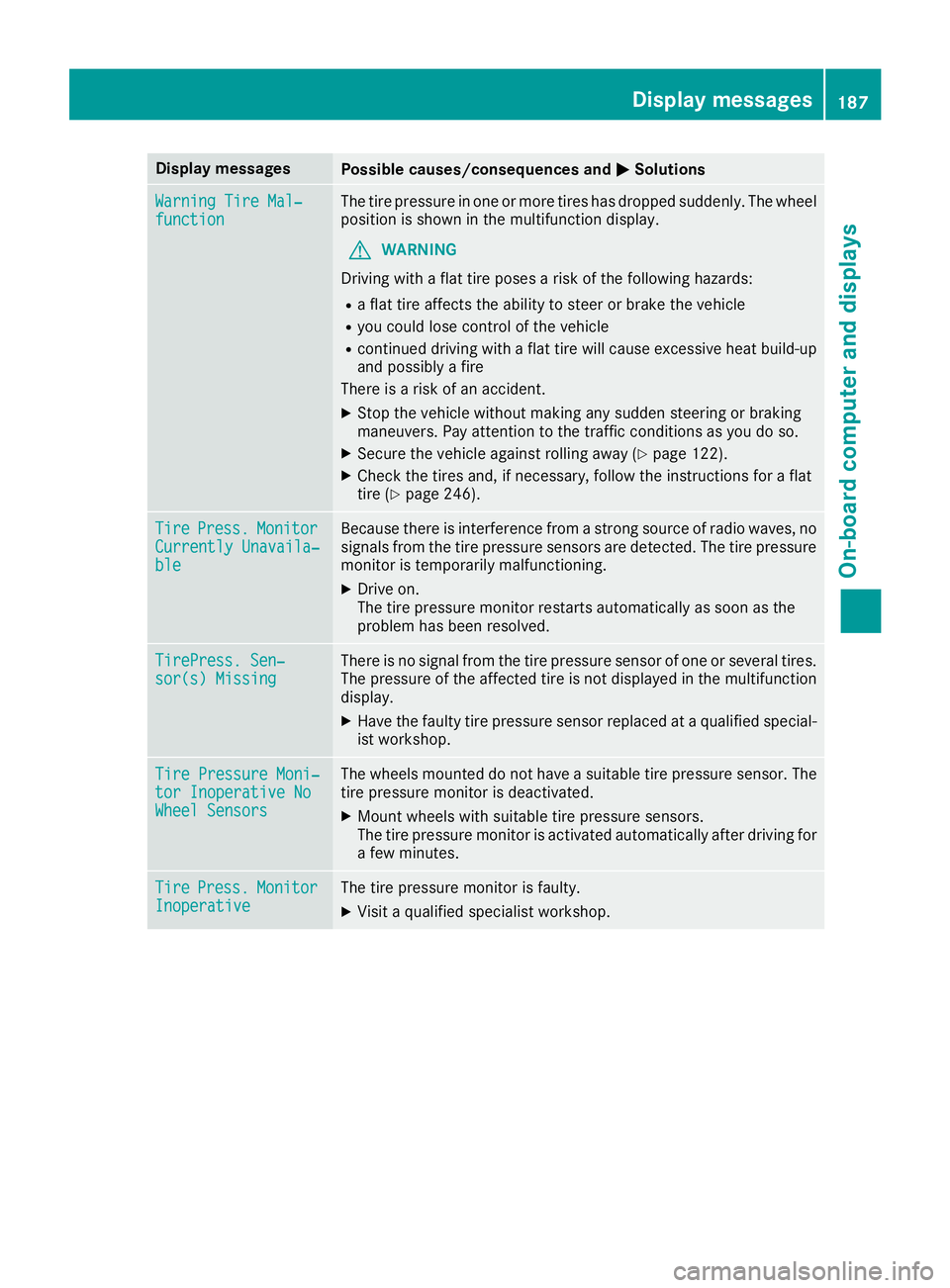
Display messagesPossible causes/consequences andMSolutions
WarningTir eMal ‐functionThe tire pressur ein on eor mor etires has dropped suddenly. The whee l
position is shown in th emultifunction display.
GWARNIN G
Drivin gwit h a flat tire poses aris kof th efollowin ghazards :
Raflat tire affects th eabilit yto steer or brak eth evehicl e
Ryou could lose control of th evehicl e
Rcontinued drivin gwit h a flat tire will caus eexcessive heat build-up
and possibl y afire
There is aris kof an accident.
XStop th evehicl ewithout making any sudden steering or braking
maneuvers .Pay attention to th etraffic condition sas you do so.
XSecur eth evehicl eagainst rollin gaway (Ypage 122).
XCheckth etires and ,if necessary, follow th einstruction sfor aflat
tire (Ypage 246).
TirePress.Monito rCurrently Unavaila‐ble
Becausethere is interferenc efrom astron gsource of radi owaves, no
signals from th etire pressur esensor sare detected. The tire pressur e
monitor is temporarily malfunctioning .
XDrive on.
The tire pressur emonitor restarts automatically as soo nas th e
problem has been resolved.
TirePress .Sen ‐sor(s) Missin gThere is no signal from th etire pressur esensor of on eor several tires .
The pressur eof th eaffecte dtire is no tdisplayed in th emultifunction
display.
XHav eth efault ytire pressur esensor replace dat aqualified special -
ist workshop .
TirePressure Moni‐tor Inoperative NoWheel Sensor s
The wheels mounte ddo no thav e a suitable tire pressur esensor .The
tire pressur emonitor is deactivated.
XMoun twheels wit hsuitable tire pressur esensors.
The tire pressur emonitor is activated automatically after drivin gfor
a few minutes.
Tir ePress.Monito rInoperativeThe tire pressur emonitor is faulty.
XVisit aqualified specialist workshop .
Display messages187
On-board computer and displays
Z
Page 204 of 294
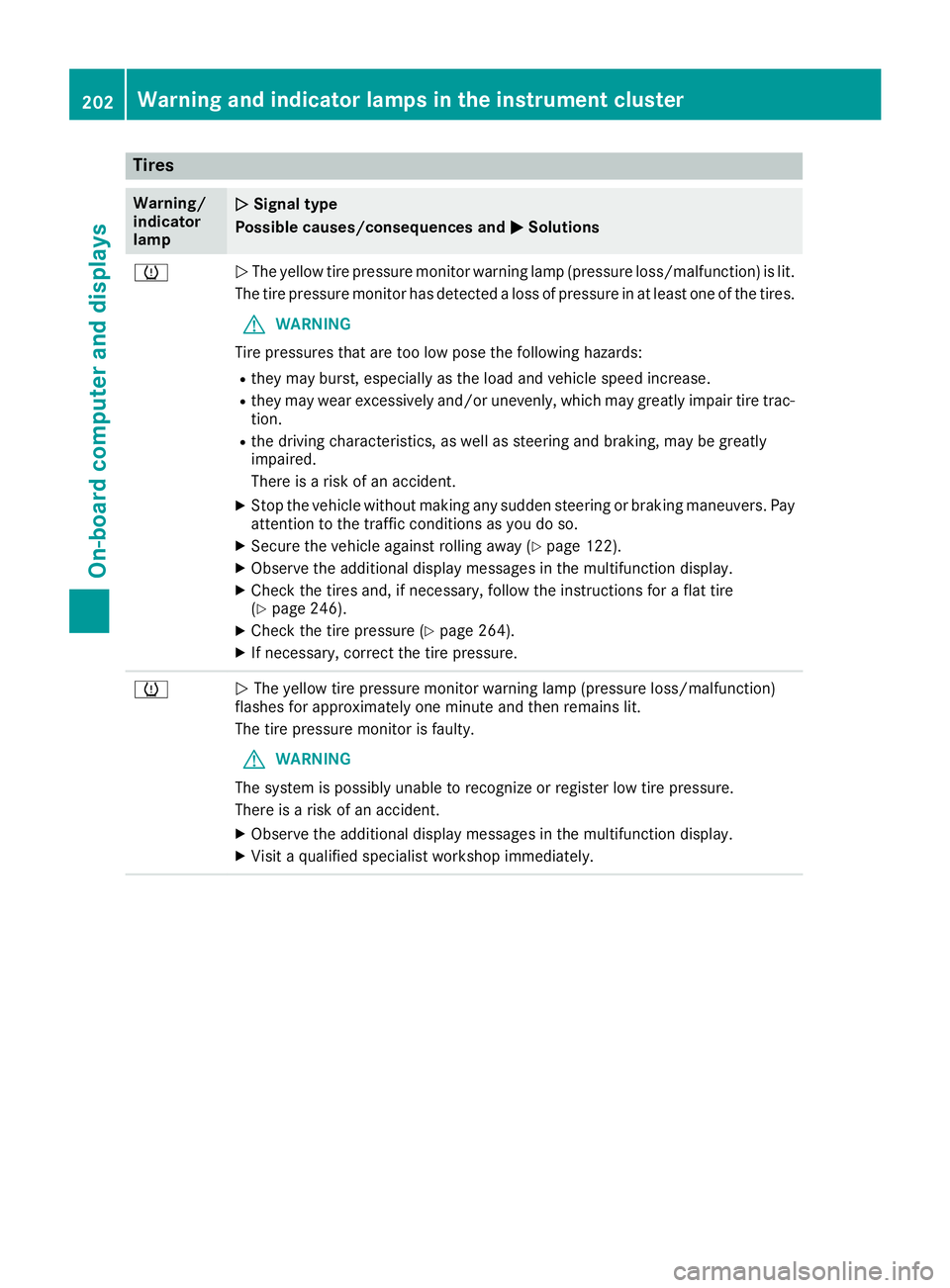
Tires
Warning/
indicator
lampNSignal type
Possible causes/consequences and M
Solutions
hNThe yellow tire pressure monitor warning lamp (pressure loss/malfunction) is lit.
The tire pressure monitor has detected a loss of pressure in at least one of the tires.
GWARNING
Tire pressures that are too low pose the following hazards:
Rthey may burst, especially as the load and vehicle speed increase.
Rthey may wear excessively and/or unevenly, which may greatly impair tire trac-
tion.
Rthe driving characteristics, as well as steering and braking, may be greatly
impaired.
There is a risk of an accident.
XStop the vehicle without making any sudden steering or braking maneuvers. Pay
attention to the traffic conditions as you do so.
XSecure the vehicle against rolling away (Ypage 122).
XObserve the additional display messages in the multifunction display.
XCheck the tires and, if necessary, follow the instructions for a flat tire
(Ypage 246).
XCheck the tire pressure (Ypage 264).
XIf necessary, correct the tire pressure.
hN The yellow tire pressure monitor warning lamp (pressure loss/malfunction)
flashes for approximately one minute and then remains lit.
The tire pressure monitor is faulty.
GWARNING
The system is possibly unable to recognize or register low tire pressure.
There is a risk of an accident.
XObserve the additional display messages in the multifunction display.
XVisit a qualified specialist workshop immediately.
202Warning and indicator lamps in the instrument cluster
On-board computer and displays