cruise control MERCEDES-BENZ AMG GT COUPE 2018 Owner's Manual
[x] Cancel search | Manufacturer: MERCEDES-BENZ, Model Year: 2018, Model line: AMG GT COUPE, Model: MERCEDES-BENZ AMG GT COUPE 2018Pages: 294, PDF Size: 4.76 MB
Page 9 of 294
Charge-air pressure (on-board
computer).......................................... 165
Child
Restraint system .............................. 55
Child seat
Forward-facing restraint system ...... 56
On the front-passenger seat ............ 56
Rearward-facing restraint system .... 56
Children
Special seat belt retractor .............. .55
Children in the vehicle
Important safety notes .................... 54
Cigarette lighter ................................ 218
Cleaning
Mirror turn signal .......................... .242
Climate control
Air-recirculation mode ................... 102
Automatic climate control (dual-
zone) ................................................ 98
Controlling automatically ...............1 00
Cooling with air dehumidification ..... 99
Cooling with air dehumidification
(multimedia system) ......................2 08
Defrosting the windows ................. 101
Defrosting the windshield .............. 101
ECO start/stop function (3-zone
automatic climate control) ...............9 9
General notes .................................. 98
Indicator lamp ................................ 100
Information about using auto-
matic climate control ...................... .99
Overview ........................................2 08
Overview of systems ........................ 98
Problem with the rear wi ndow
defroster ........................................ 102
Probl
ems with cooling with air
dehumidification ............................ 100
Refrigerant ..................................... 288
Refrigerant filling capacity ............. 288
Setting the air distribution ............. 100
Setting the air vents ......................1 02
Setting the airflow ......................... 101
Setting the climate mode (multi-
media system) ............................... 208
Setting the temperature ................ 100
Switching air-recirculation mode
on/off ............................................ 102
Switching on/off .............................. 99 Switching the rear window
defroster on/off ............................ 101
Switching the synchronization
function on and off ........................ 101
Synchronization function (multi-
media system) ............................... 209
Climate control settings
Multimedia system ........................ 208
Climate control system
Climate control (3-zone automatic
climate control) ................................ 99
Cockpit
Overview .......................................... 33
Code for Apps
see QR code
COMAND display
Cleaning ......................................... 243
Combination switch ............................ 92
Connecting a USB device
see also Digital Operator's Man-
ual ..................................................2 04
Consumption statistics (on-board
computer) .......................................... 157
Controller ...........................................2 05
Convenience closing feature .............. 77
Convenience opening
With the SmartKey ........................... 76
Coolant (engine)
Checking the level ......................... 236
Display message ............................ 181
Filling capacity ............................... 287
Important safety notes .................. 287
Temperature display in the instru-
ment cluster .................................. 154
Warning lamp ..................... ............ 199
C
ooling
see Climate control
Copyright ............................................. 32
Cornering light function
Display message ............................ 180
Cruise control
Cruise control lever ....................... 130
Deactivating ................................... 131
Display message ............................ 185
General notes ................................ 129
Setting a speed .............................. 131
Index7
Page 10 of 294
Storing and maintaining current
speed ............................................. 130
Storing, maintaining and calling
up a speed ..................................... 130
Cup holder
Center console .............................. 216
Important safety notes .................. 216
Customer Assistance Center
(CAC) ..................................................... 28
Customer Relations Department ....... 28
D
Dashboard
see Cockpit
Dashboard lighting
see Instrument cluster lighting
Data
see Technical data
Data carrier
Selecting ........................................ 160
Daytime running lamp mode
see Daytime running lamps
Daytime running lamps
Display message ............................ 180
Function/notes ................................ 91
Switching on/off (on-board com-
puter) ............................................. 164
Declarations of conformity ................. 27
Diagnostics connection ...................... 28
Digital Operator's Manual
Help ................................................. 23
Introduction ..................................... 23
Digital speedometer ......................... 157
Display
see Display messages
see Warning and indicator lamps
Display messages
ASSYST PLUS ................................ 237
Calling up (on-board computer) ..... 169
Driving systems ............................. 183
Engine ............................................ 181
General notes ................................ 168
Hiding (on-board computer) ........... 169
Introduction ................................... 168
Lights ............................................. 180
Safety systems .............................. 170
SmartKey ....................................... 192 Tires ............................................... 186
Vehicle ........................................... 188
Distance Pilot DISTRONIC
Activating ....................................... 133
Activation conditions ..................... 133
Cruise control lever ....................... 133
Display Message ............................ 185
Displays in the instrument cluster .. 137
Driving tips .................................... 137
Driving with Distance Pilot
DISTRONIC .................................... 134
Function/notes ............................. 131
Important safety notes .................. 132
Setting a speed .............................. 135
Setting the specified minimum
distance ......................................... 136
Stopping ........................................ 135
Switching off .................................. 136
Distance recorder ............................. 156
Distance warning (warning lamp) .... 201
Distance warning function
Function/notes ................................ 59
Door control panel
Overview .......................................... 38
Doors
Automatic locking (switch) ............... 72
Central locking/unlocking
(SmartKey) ....................................... 65
Displa y me
ssage ............................ 190
Emergency locking ........................... 72
Emergency unlocking ....................... 72
Important safety notes .................... 71
Opening (from inside) ...................... 71
Drinking and driving ......................... 126
Drive program
Automatic ...................................... 117
Display ........................................... 114
Manual ........................................... 117
Selecting ........................................ 111
SETUP (on-board computer,
Mercedes-AMG vehicles) ............... 166
Driver's door
see Doors
Driver's seat
see Seat
Driving
Important safety notes .................. 104
8Index
Page 11 of 294
Driving abroadMercedes-Ben zService ................ .238
Driving on flooded roads .................. 129
Driving safety system
Active Brake Assist .......................... 58
Braking assistance appropriate to
the situation ..................................... 60
Driving safety systems
ABS (Anti-lock Braking System) ....... 57
ADAPTIVE BRAKE .............................6 3
BAS (Brake Assist System) .............. 58
Distance warning function ............... 59
EBD (electronic brake force distri-
bution) ............................................. 63
ESP
®(Electronic Stability Pro-
gram) ............................................... 61
Important safety information ........... 57
Overview .......................................... 57
Driving system
Distance Pilot DISTRONIC ............. 131
Parking assist PARKTRONIC .......... 142
Driving systems
AMG adaptive sport suspension
system ........................................... 142
ATTENTION ASSIST ........................ 148
Blind Spot Assist ............................ 150
Cruise control ................................ 129
Display message ............................ 183
HOLD function ............................... 139
Lane Keeping Assist ...................... 152
Lane Tracking package .................. 150
RACE START .................................. 140
Rear view camera .......................... 145
Driving tips
AMG high-performance and
ceramic brakes .............................. 128
Automatic transmission ................. 115
Brakes ........................................... 127
Break-in period .............................. 104
Distance Pilot DISTRONIC ............. 137
Downhill gradient ........................... 127
Drinking and driving ....................... 126
Driving in winter ............................. 129
Driving on flooded roads ................ 129
Driving on wet roads ...................... 129
Exhaust check ............................... 126
Fuel ................................................ 126
General .......................................... 126 Hydroplaning ................................. 129
Icy road surfaces ........................... 129
Important safety notes .................. 104
Limited braking efficiency on sal-
ted roads ....................................... 127
Snow chains .................................. 260
Sub
jecting b
rakes to a load ........... 127
The first 1000 miles (1500 km) ..... 104
Wet road surface ........................... 127
DVD video
Operating (on-board computer) ..... 161
see also Digital Operator's Man-
ual .................................................. 204
DYNAMIC SELECT controller ............ 111
E
E-SELECT lever................................... 112
EASY-ENTRY feature
Function/notes ................................ 85
EASY-EXIT feature
Function/notes ................................ 85
EBD (electronic brake force distri-
bution)
Display message ............................ 172
Function/notes ................................ 63
ECO start/stop function
Automatic engine switch-off .......... 108
Deactivating/activating ................. 109
General information ....................... 108
Important safety notes .................. 108
Introduction ................................... 108
Electronic brake force distribution
see EBD (electronic brake force
distribution)
Electronic Stability Program
see ESP
®(Electronic Stability Program)
Electronic Traction System
see ETS (Electronic Traction System)
Emergency
Automatic measures after an acci-
dent ................................................. 54
Emergency braking
see BAS (Brake Assist System)
Emergency release
Driver's door .................................... 72
Vehicle ............................................. 72
Index9
Page 20 of 294
Special seat belt retractor.................. 55
Specialist workshop ............................28
Speed, controlling
see Cruise control
Speedometer
Activating/deactivating the addi-
tional speedometer ........................ 165
Digital ............................................ 157
Segments ...................................... 154
Selecting the display unit ............... 164
SPORT handling mode
Activating/deactivating ...................6 1
Warning lamp ................................. 198
Sports exhaust system
see AMG sports exhaust system
Standing lamps
Display message ............................1 80
Switching on/off .............................. 92
Start/Stop button
General notes ................................ 105
Key positions ................................. 105
Starting the engine ........................ 107
Start/stop function
see ECO start/stop function
Starting (engine) ................................ 106
Starting the engine
see Starting (engine)
Steering
Display message ............................ 191
Warning lamps ............................... 203
Steering wheel
Adjusting (electrically) ..................... 85
Button overview ............................... 35
Buttons (on-board computer) ......... 155
Calling up a stored setting (mem-
ory function) ....................................9 0
Cleaning ........................................ .243
EASY ENTRY/EXIT feature ...............8 5
Important safety notes .................... 85
Paddle shifters ............................... 116
Storing settings (memory func-
tion) .................................................8 9
Steering wheel paddle shifters ........ 116
Stopwatch (RACETIMER) ...................167
Stowage areas ................................... 213
Stowage compartments
Armrest (front) ............................... 214 Armrest (under) .............................2
14
Cup hol
ders ................................... 216
Glove box ....................................... 214
Important safety information ......... 213
Stowage net ................................... 215
see Stowage areas
Stowage net ....................................... 215
Summer opening
see Side windows
Summer tires
In winter ........................................ 260
Sun visor ............................................ 217
Suspension setting
AMG adaptive sport suspension
system ...........................................1 42
Suspension tuning
SETUP (on-board computer,
Mercedes-AMG vehicles) ...............1 66
Switching air-recirculation mode
on/off ................................................. 102
Switching on media mode
Via the device list .......................... 211
T
Tachometer ........................................ 154
Tail lamps
Display message ............................ 180
see Lights
Tailgate
Display message ............................ 190
Emergency unlocking ....................... 75
Important safety notes .................... 73
Opening (automatically from
inside) .............................................. 74
Opening dimensions ...................... 288
Opening with an extended rear
spoiler .............................................. 73
Opening/closing (from outside) ....... 73
Unlocking with KEYLESS-GO ............ 73
Tank
see Fuel tank
Tank content
Fuel gauge ....................................... 34
Technical data
Capacities ...................................... 283
Information .................................... 282
Tires/wheels ................................. 280
18Index
Page 35 of 294
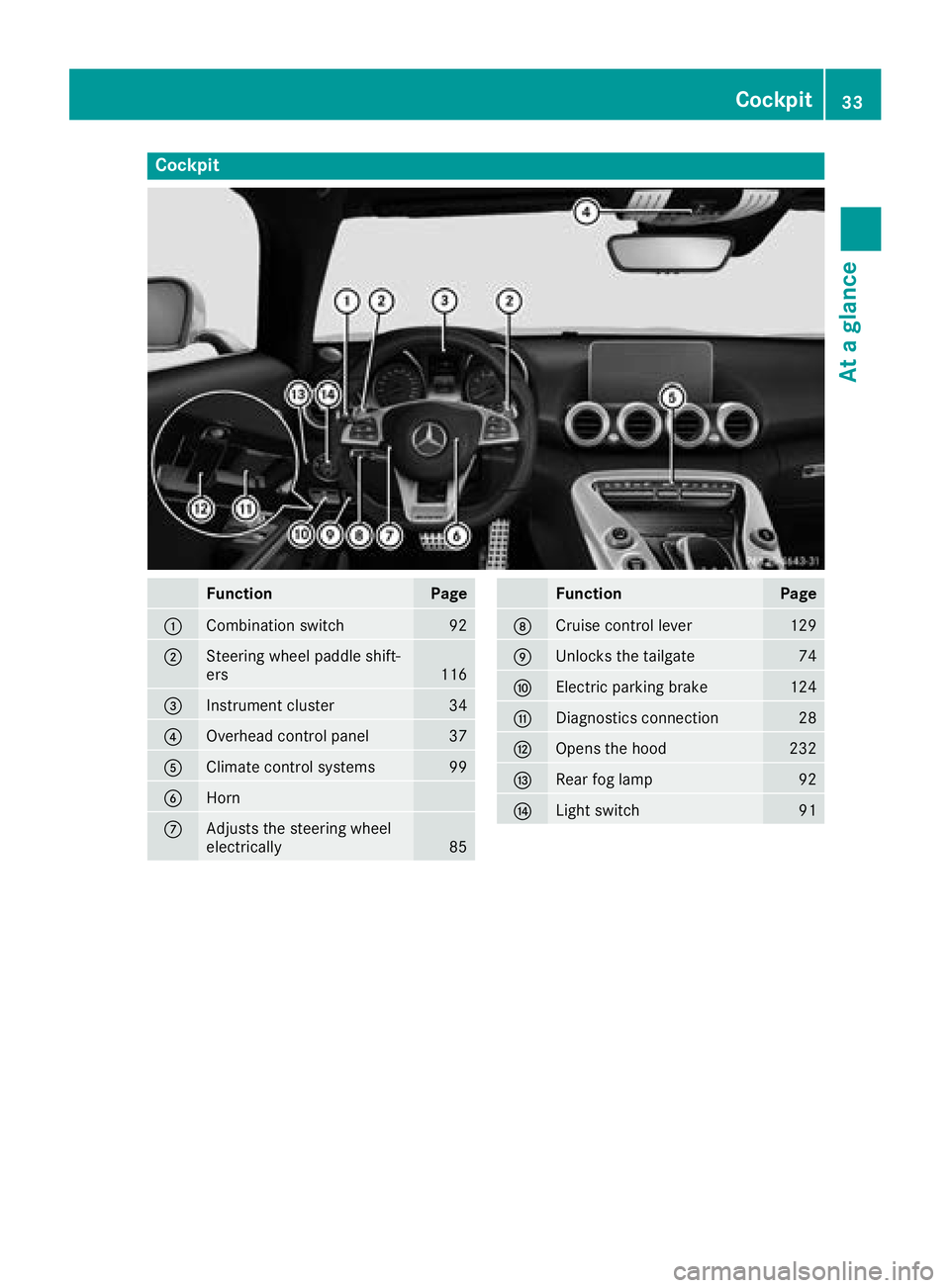
Cockpit
FunctionPage
:Combination switch92
;Steering wheel paddle shift-
ers116
=Instrument cluster34
?Overhead control panel37
AClimate control systems99
BHorn
CAdjusts the steering wheel
electrically85
FunctionPage
DCruise control lever129
EUnlocks the tailgate74
FElectric parking brake124
GDiagnostics connection28
HOpens the hood232
IRear fog lamp92
JLight switch91
Cockpit33
At a glance
Page 131 of 294
Drivingon wet road s
Hydroplaning
If water has accumulated to acertain dept hon
th eroad surface, there is adanger of hydro-
planin goccurring, eve nif:
Ryou drive at low speeds
Rth etires hav eadequat etread dept h
Fo rthis reason ,in th eevent of heav yrain or in
condition sin whic hhydroplaning may occur ,
you mus tdrive in th efollowin gmanner:
Rlowe ryour speed
Ravoid rut s
Ravoid sudden steerin gmovements
Rbrake carefully
Drivin gon flooded road s
!Do notdrive through floode dareas. Chec k
th edept hof any water befor edrivin gthrough
it .Drive slowly through standin gwater. Oth-
erwise ,water may ente rth evehicle interio ror
th eengin ecompartment. Thi scan damage
th eelectronic component sin th eengin eor
th eautomatic transmission. Water can also
be drawn in by th eengine's air suction nozzles
and this can cause engin edamage.
Winte rdrivin g
GWARNING
If you shift down on aslipper yroad surfac ein
an attempt to increase th eengine's braking
effect ,th edrive wheels could los etheir grip.
There is an increase ddanger of skidding and
accidents .
Do no tshift down fo radditional engin ebrak-
in g on aslipper yroad surface.
GDANGER
If th eexhaus tpipe is blocke dor adequat e
ventilation is no tpossible, poisonous gases
suc has carbon monoxide (CO) may ente rth e
vehicle. Thi sis th ecase, e.g. if th evehicle
becomes trappe din snow. There is aris kof
fatal injury.
If you leav eth eengin eor th eauxiliar yheatin g
running ,mak esur eth eexhaus tpipe and are a
around th evehicle are clear of snow. To
ensur ean adequat esupply of fresh air, ope n a
window on th esid eof th evehicle that is no t
facin ginto th ewind.
Hav eyour vehicle winter-proofed at aqualified
specialis tworkshop at th eonset of winter.
Drive particularly carefully on slipper yroad sur -
faces. Avoid sudden acceleration ,steerin gand
braking maneuvers .Do no tuse cruise control.
If th evehicle threatens to skid or canno tbe
stopped when movin gat low speed:
XShift th etransmissio nto position i.
The outsid etemperature indicator is no t
designed to serve as an ice-warnin gdevic eand
is therefore unsuitable fo rthat purpose.
Changes in th eoutsid etemperature are dis -
playe dafter ashort delay.
Indicated temperature sjust abov eth efreezin g
poin tdo no tguarantee that th eroad surfac eis
free of ice. The road may still be icy, especially in
wooded areas or on bridges. The vehicle could
skid if you fail to adapt your drivin gstyle. Always
adapt your drivin gstyle and drive at aspeed to
suit th eprevailin gweather co ndi
tions.
You should pay special attention to road condi-
tion swhen temperature sare around freezin g
point.
Further information on drivin gwit hsnow chain s
(
Ypage 260).
Further information on drivin gwit hsummer
tires (
Ypage 260).
Observ eth enote sin th e"Winte roperation "sec -
tion (
Ypage 260).
Drivin gsystems
Cruis econtro l
General notes
Cruise contro lmaintain s aconstant road speed
fo ryou. It brake sautomatically in order to avoid
exceedin gth eset speed. Change into alowe r
gear in goo dtime on lon gand steep downhill
gradients. Thi sis especially important if th e
vehicle is laden. By doin gso, you will mak euse
of th ebraking effect of th eengine. Thi srelieves
th eload on th ebrake system and prevents th e
Driving systems129
Driving an d parking
Z
Page 132 of 294
brakes from overheating and wearing too
quickly.
Use cruise control only if road and traffic con-
ditions make it appropriate to maintain a steady
speed for a prolonged period. You can store any
road speed above 20 mph (30 km/h).
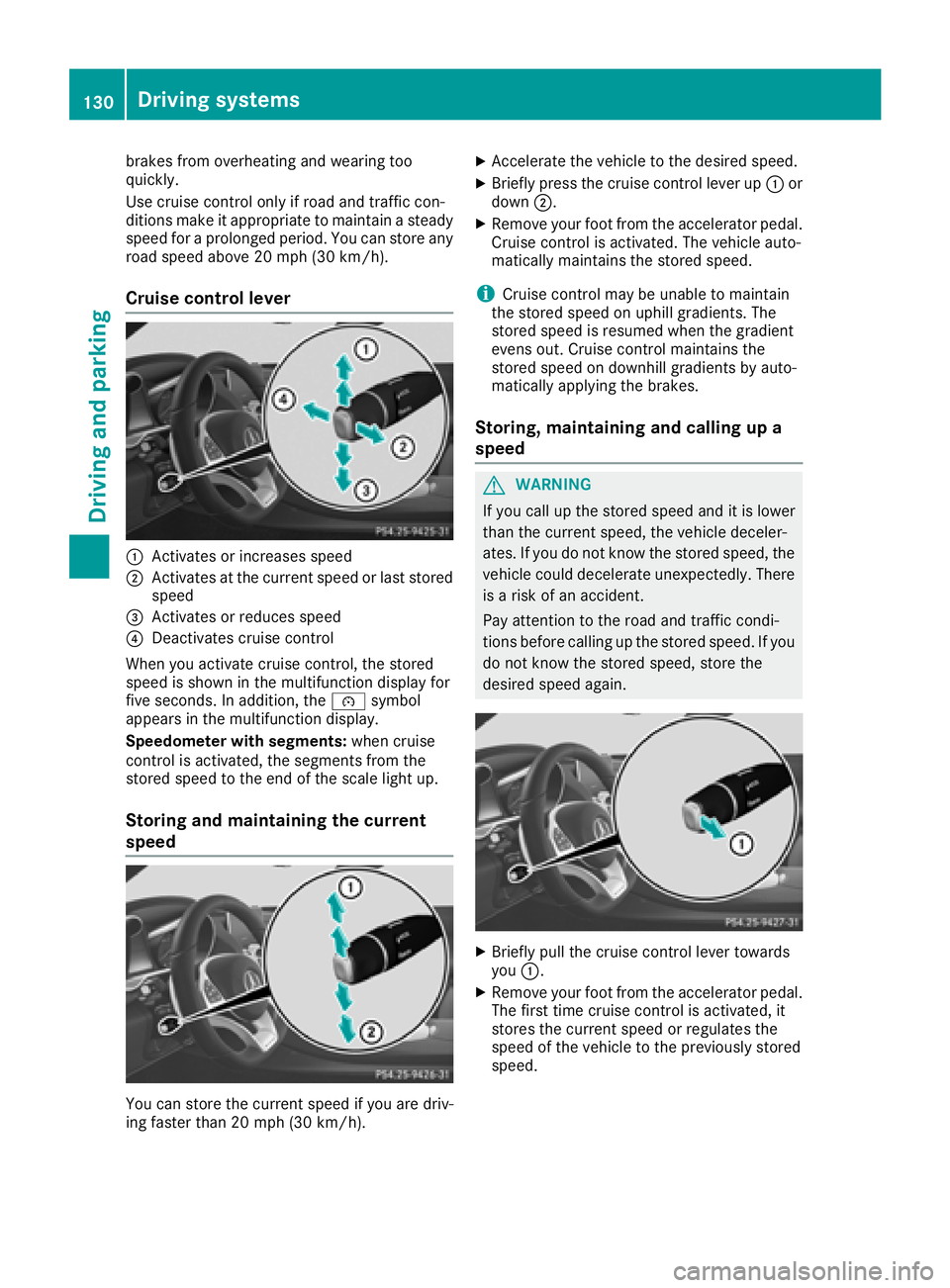
Cruise control lever
:Activates or increases speed
;Activates at the current speed or last stored
speed
=Activates or reduces speed
?Deactivates cruise control
When you activate cruise control, the stored
speed is shown in the multifunction display for
five seconds. In addition, the ésymbol
appears in the multifunction display.
Speedometer with segments: when cruise
control is activated, the segments from the
stored speed to the end of the scale light up.
Storing and maintaining the current
speed
You can store the current speed if you are driv-
ing faster than 20 mph (30 km/ h).
XAccelerate the vehicle to the desired speed.
XBriefly press the cruise control lever up :or
down ;.
XRemove your foot from the accelerator pedal.
Cruise control is activated. The vehicle auto-
matically maintains the stored speed.
iCruise control may be unable to maintain
the stored speed on uphill gradients. The
stored speed is resumed when the gradient
evens out. Cruise control maintains the
stored speed on downhill gradients by auto-
matically applying the brakes.
Storing, maintaining and calling up a
speed
GWARNING
If you call up the stored speed and it is lower
than the current speed, the vehicle deceler-
ates. If you do not know the stored speed, the vehicle could decelerate unexpectedly. There
is a risk of an accident.
Pay attention to the road and traffic condi-
tions before calling up the stored speed. If you
do not know the stored speed, store the
desired speed again.
XBriefly pull the cruise control lever towards
you :.
XRemove your foot from the accelerator pedal.
The first time cruise control is activated, it
stores the current speed or regulates the
speed of the vehicle to the previously stored
speed.
130Driving systems
Driving an d parking
Page 133 of 294
Setting a speed
Keep in mind that it may take a brief moment
until the vehicle has accelerated or braked to
the speed set.
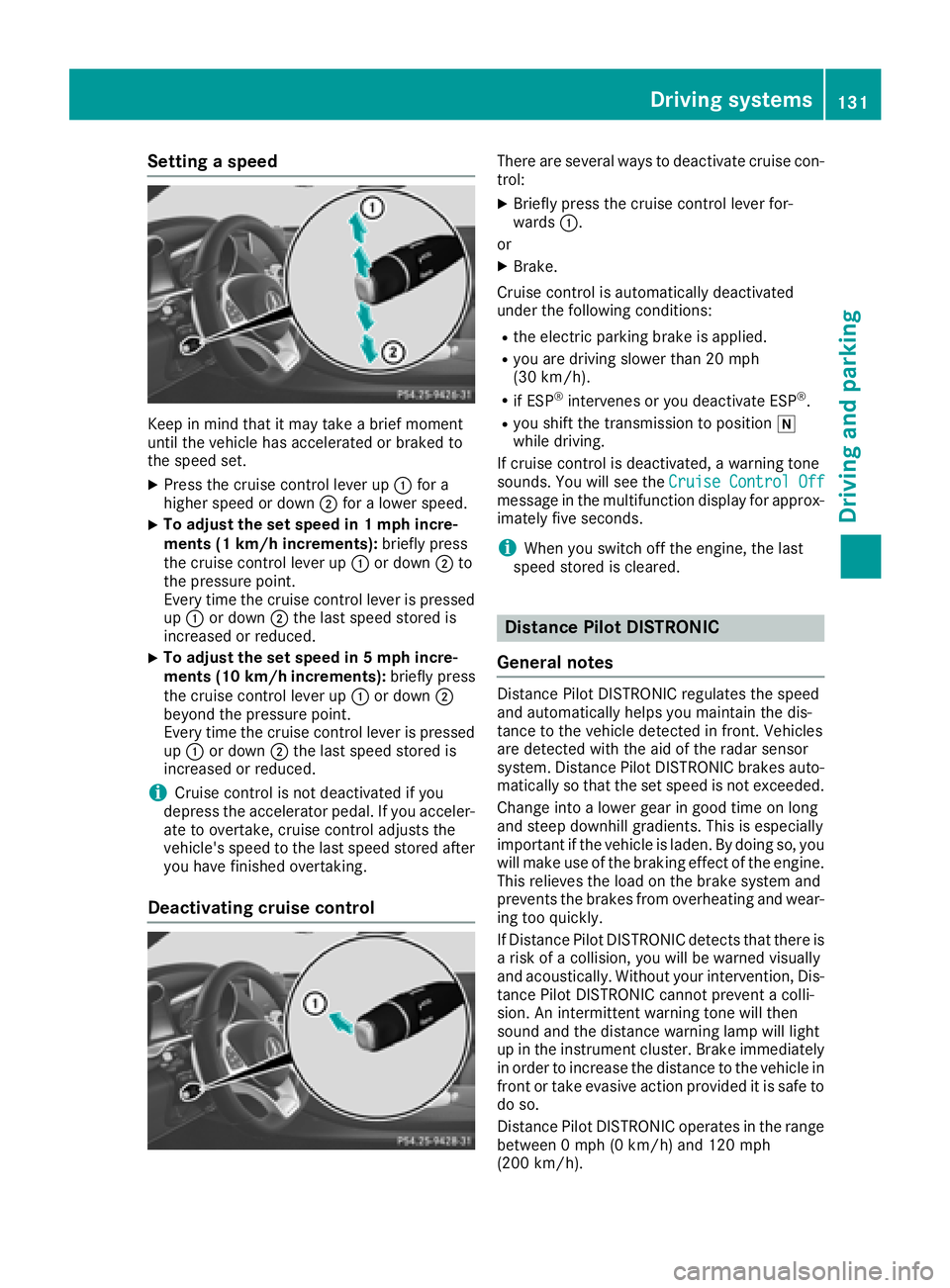
XPress the cruise control lever up:for a
higher speed or down ;for a lower speed.
XTo adjust the set speed in 1 mph incre-
ments (1 km/h increments): briefly press
the cruise control lever up :or down ;to
the pressure point.
Every time the cruise control lever is pressed
up : or down ;the last speed stored is
increased or reduced.
XTo adjust the set speed in 5 mph incre-
ments (10 km/h increments): briefly press
the cruise control lever up :or down ;
beyond the pressure point.
Every time the cruise control lever is pressed
up : or down ;the last speed stored is
increased or reduced.
iCruise control is not deactivated if you
depress the accelerator pedal. If you acceler-
ate to overtake, cruise control adjusts the
vehicle's speed to the last speed stored after
you have finished overtaking.
Deactivating cruise control
There are several ways to deactivate cruise con-
trol:
XBriefly press the cruise control lever for-
wards :.
or
XBrake.
Cruise control is automatically deactivated
under the following conditions:
Rthe electric parking brake is applied.
Ryou are driving slower than 20 mph
(30 km/h).
Rif ESP®intervenes or you deactivate ESP®.
Ryou shift the transmission to position i
while driving.
If cruise control is deactivated, a warning tone
sounds. You will see the Cruise Control Off
message in the multifunction display for approx-
imately five seconds.
iWhen you switch off the engine, the last
speed stored is cleared.
Distance Pilot DISTRONIC
General notes
Distance Pilot DISTRONIC regulates the speed
and automatically helps you maintain the dis-
tance to the vehicle detected in front. Vehicles
are detected with the aid of the radar sensor
system. Distance Pilot DISTRONIC brakes auto-
matically so that the set speed is not exceeded.
Change into a lower gear in good time on long
and steep downhill gradients. This is especially
important if the vehicle is laden. By doing so, you
will make use of the braking effect of the engine.
This relieves the load on the brake system and
prevents the brakes from overheating and wear-
ing too quickly.
If Distance Pilot DISTRONIC detects that there is a risk of a collision, you will be warned visually
and acoustically. Without your intervention, Dis-
tance Pilot DISTRONIC cannot prevent a colli-
sion. An intermittent warning tone will then
sound and the distance warning lamp will light
up in the instrument cluster. Brake immediately in order to increase the distance to the vehicle in
front or take evasive action provided it is safe to
do so.
Distance Pilot DISTRONIC operates in the range
between 0 mph (0 km/h) and 120 mph
(200 km/ h).
Driving system s131
Driving an d parking
Z
Page 135 of 294
Do not use Distance Pilot DISTRONIC:
Rin road and traffic conditions which do not
allow you to maintain a constant speed, for
example in heavy traffic or on winding roads
Ron slippery road surfaces. Braking or accel-
erating could cause the drive wheels to lose
traction and the vehicle could then skid
Rwhen there is poor visibility, e.g. due to fog,
heavy rain or snow
Distance Pilot DISTRONIC may not detect nar-
row vehicles driving in front, e.g. motorcycles, or
vehicles driving on a different line.
In particular, the detection of obstacles can be
impaired if:
Rthere is dirt on the sensors or anything else
covering the sensors
Rthere is snow or heavy rain
Rthere is interference by other radar sources
Rthere are strong radar reflections, for exam-
ple, in parking garages
If Distance Pilot DISTRONIC no longer detects a
vehicle in front, it may unexpectedly accelerate
to the speed stored.
This speed may:
Rbe too high if you are driving in a turning lane
or an exit lane
Rbe so high in the right lane that you pass vehi-
cles driving on the left (in countries where
they drive on the right)
Rbe so high in the left lane that you pass vehi-
cles driving on the right (right-hand drive
countries)
If there is a change of drivers, advise the new
driver of the speed stored.
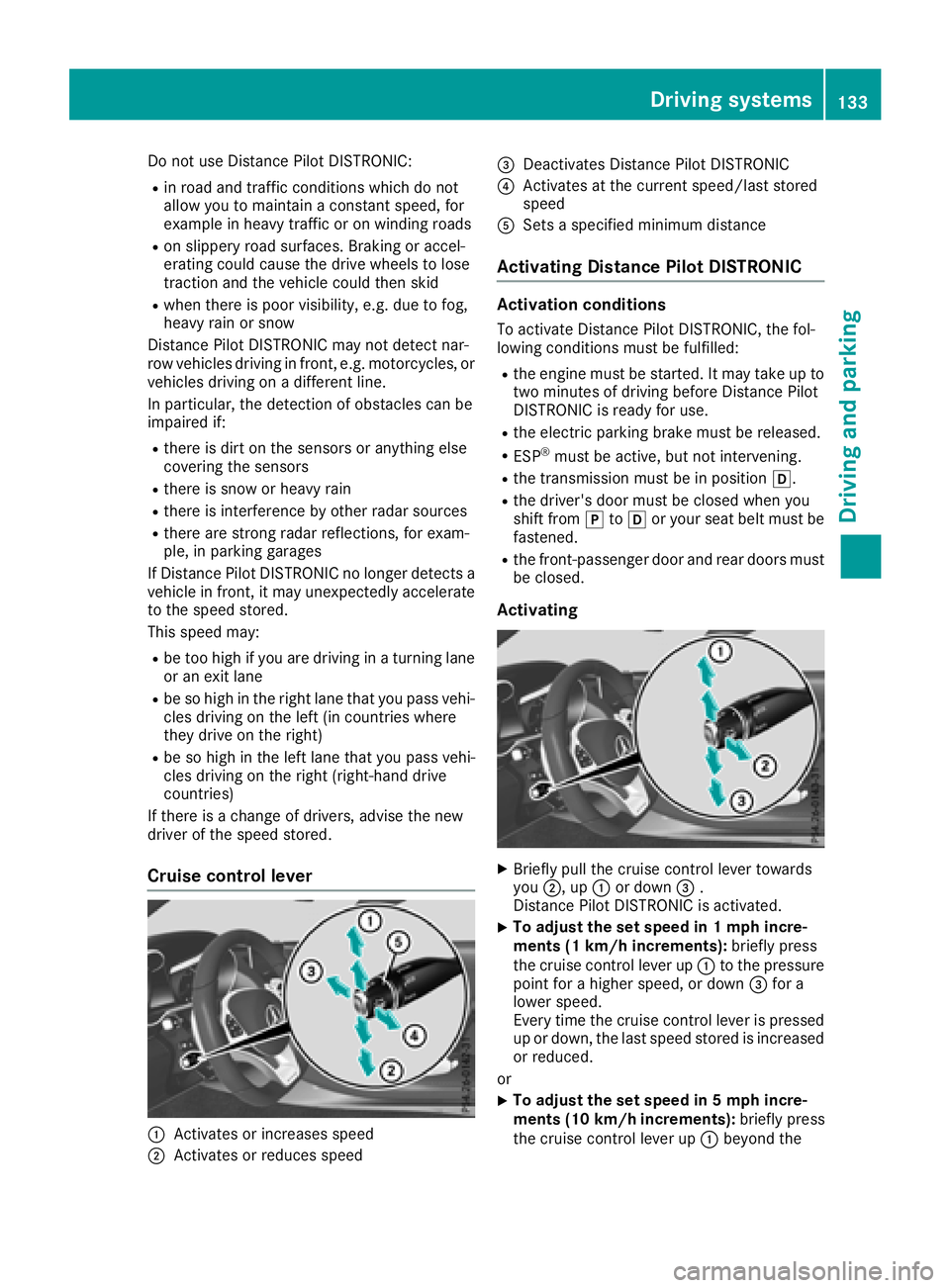
Cruise control lever
:Activates or increases speed
;Activates or reduces speed
=Deactivates Distance Pilot DISTRONIC
?Activates at the current speed/last stored
speed
ASets a specified minimum distance
Activating Distance Pilot DISTRONIC
Activation conditions
To activate Distance Pilot DISTRONIC, the fol-
lowing conditions must be fulfilled:
Rthe engine must be started. It may take up to two minutes of driving before Distance Pilot
DISTRONIC is ready for use.
Rthe electric parking brake must be released.
RESP®must be active, but not intervening.
Rthe transmission must be in position h.
Rthe driver's door must be closed when you
shift from jtoh or your seat belt must be
fastened.
Rthe front-passenger door and rear doors must
be closed.
Activating
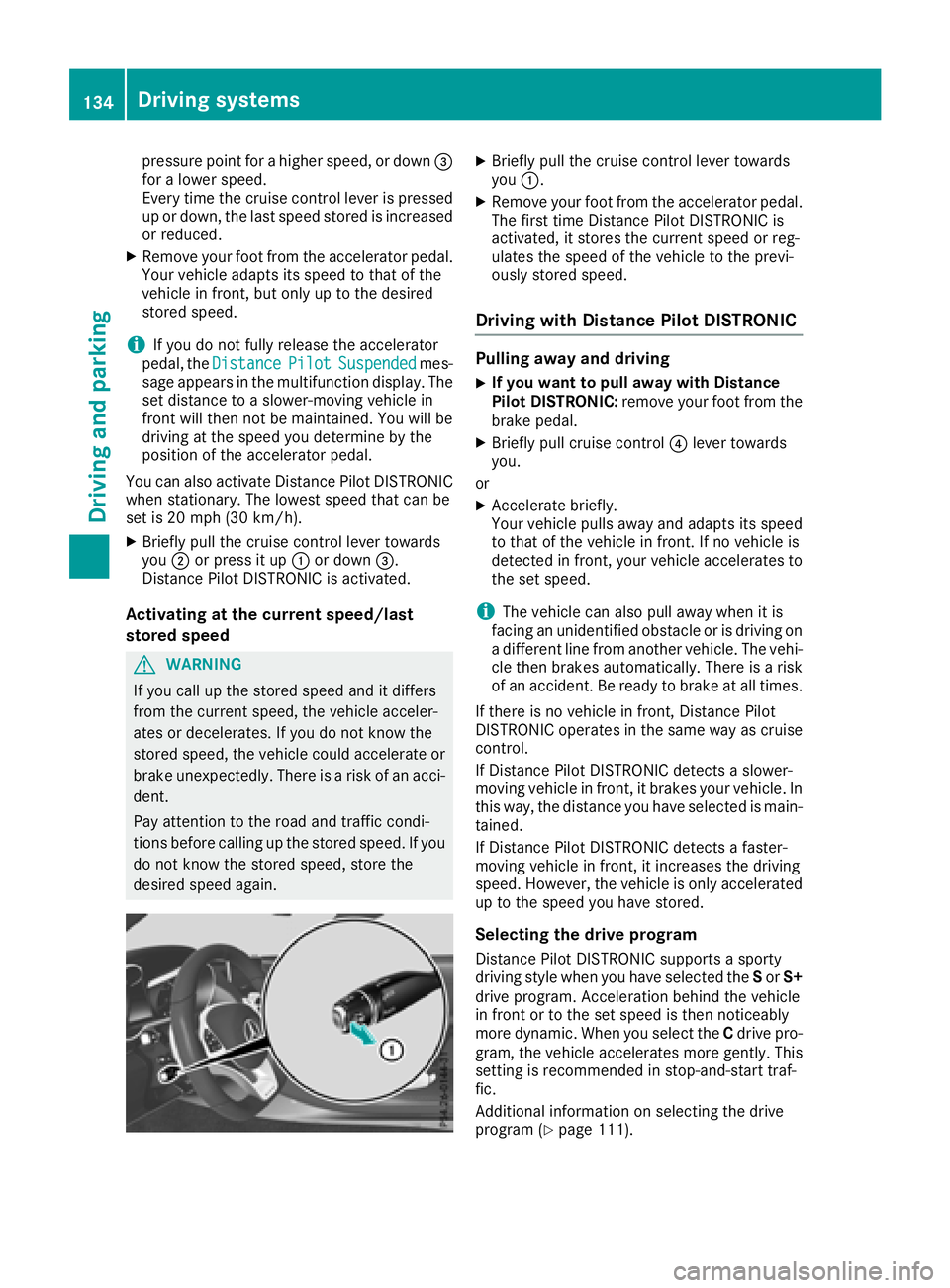
XBriefly pull the cruise control lever towards
you ;, up :or down =.
Distance Pilot DISTRONIC is activated.
XTo adjust the set speed in 1 mph incre-
ments (1 km/h increments): briefly press
the cruise control lever up :to the pressure
point for a higher speed, or down =for a
lower speed.
Every time the cruise control lever is pressed
up or down, the last speed stored is increased
or reduced.
or
XTo adjust the set speed in 5 mph incre-
ments (10 km/h increments): briefly press
the cruise control lever up :beyond the
Driving systems133
Driving and parking
Z
Page 136 of 294
pressure point for a higher speed, or down=
for a lower speed.
Every time the cruise control lever is pressed
up or down, the last speed stored is increased
or reduced.
XRemove your foot from the accelerator pedal.
Your vehicle adapts its speed to that of the
vehicle in front, but only up to the desired
stored speed.
iIf you do not fully release the accelerator
pedal, the DistancePilotSuspendedmes-
sage appears in the multifunction display. The set distance to a slower-moving vehicle in
front will then not be maintained. You will be
driving at the speed you determine by the
position of the accelerator pedal.
You can also activate Distance Pilot DISTRONIC
when stationary. The lowest speed that can be
set is 20 mph (30 km/ h).
XBriefly pull the cruise control lever towards
you ;or press it up :or down =.
Distance Pilot DISTRONIC is activated.
Activating at the current speed/last
stored speed
GWARNING
If you call up the stored speed and it differs
from the current speed, the vehicle acceler-
ates or decelerates. If you do not know the
stored speed, the vehicle could accelerate or brake unexpectedly. There is a risk of an acci-
dent.
Pay attention to the road and traffic condi-
tions before calling up the stored speed. If you
do not know the stored speed, store the
desired speed again.
XBriefly pull the cruise control lever towards
you :.
XRemove your foot from the accelerator pedal.
The first time Distance Pilot DISTRONIC is
activated, it stores the current speed or reg-
ulates the speed of the vehicle to the previ-
ously stored speed.
Driving with Distance Pilot DISTRONIC
Pulling away and driving
XIf you want to pull away with Distance
Pilot DISTRONIC: remove your foot from the
brake pedal.
XBriefly pull cruise control ?lever towards
you.
or
XAccelerate briefly.
Your vehicle pulls away and adapts its speed
to that of the vehicle in front. If no vehicle is
detected in front, your vehicle accelerates to the set speed.
iThe vehicle can also pull away when it is
facing an unidentified obstacle or is driving on
a different line from another vehicle. The vehi-
cle then brakes automatically. There is a risk
of an accident. Be ready to brake at all times.
If there is no vehicle in front, Distance Pilot
DISTRONIC operates in the same way as cruise
control.
If Distance Pilot DISTRONIC detects a slower-
moving vehicle in front, it brakes your vehicle. In
this way, the distance you have selected is main-
tained.
If Distance Pilot DISTRONIC detects a faster-
moving vehicle in front, it increases the driving
speed. However, the vehicle is only accelerated
up to the speed you have stored.
Selecting the drive program
Distance Pilot DISTRONIC supports a sporty
driving style when you have selected the Sor S+
drive program. Acceleration behind the vehicle
in front or to the set speed is then noticeably
more dynamic. When you select the Cdrive pro-
gram, the vehicle accelerates more gently. This
setting is recommended in stop-and-start traf-
fic.
Additional information on se
lecting the drive
program (Ypage 111).
134Driving systems
Driving and parking