tailgate MERCEDES-BENZ AMG GT COUPE 2018 Owner's Manual
[x] Cancel search | Manufacturer: MERCEDES-BENZ, Model Year: 2018, Model line: AMG GT COUPE, Model: MERCEDES-BENZ AMG GT COUPE 2018Pages: 294, PDF Size: 4.76 MB
Page 12 of 294
Emergency Tensioning DevicesActivation ........................................ .51
Emergency unlocking
Tailgate ............................................ 75
Emissions control
Service and warranty information .... 25
Engine
Check Engine warning lamp .......... .199
Display message ............................ 181
ECO start/stop function ................ 108
Engine number ............................... 283
Irregular running ............................ 110
Jump-starting ................................. 251
Starting problems .......................... 110
Starting the engine with the
SmartKey ....................................... 107
Starting with the Start/Stop but-
ton ................................................. 107
Switching off .................................. 123
Tow-starting (vehicle) ..................... 256
Engine electronics
Notes ............................................. 282
Problem (malfunction) ................... 110
Engine oil
Adding ...........................................2 35
Additives ........................................ 286
Checking the oil level ..................... 233
Checking the oil level using the
dipstick .......................................... 233
Checking the oil level using the
on-board computer ........................ 234
Display message ............................ 182
Filling capacity ............................... 286
Notes about oil grades ................... 286
Notes on oil level/consumption .... 233
Temperature (on-board com-
puter) ............................................. 165
Engine oil additives
see Additives (engine oil)
Entering an address
see also Digital Operator's Man-
ual ..................................................2 04
ESC (Electronic Stability Control)
see ESP
®(Electronic Stability Program)
ESP®(Electronic Stability Pro-
gram)
AMG menu (on-board computer) ... 166
Characteristics ....... .......................... 61 Dea
ctivating/activating ................... 61
Deactivating/activating (button
in AMG vehicles) .............................. 62
Display message ............................ 170
Function/notes ................................ 61
General notes .................................. 61
Important safety information ........... 61
Warning lamp ................................. 196
ETS (Electronic Traction System) ....... 61
Exhaust check ................................... 126
Exhaust pipe (cleaning instruc-
tions) ..................................................2 42
Exterior lighting
Cleaning ......................................... 242
see Lights
Exterior mirror
Calling up a stored setting (mem-
ory function) ....................................9 0
Exterior mirrors
Adjusting ........................................ .87
Dipping (automatic) .........................8 8
Folding in/out (automatically) ......... 87
Folding in/out (electrically) ............. 87
Out of position (troubleshooting) ..... 88
Setting ............................................. 87
Storing settings (memory func-
tion) ................................................. 89
Storing the parking position ............. 88
F
Favorites
Overview ........................................ 207
Features ............................................. 216
Filler cap
see Refueling
Flat tire
Changing a wheel/mounting the
spare wheel ................................... 276
Preparing the vehicle ..................... 246
TIREFIT kit ...................................... 247
Floormats ........................................... 231
Frequencies
Mobile phone ................................. 282
Two-way radio ................................ 282
Front-passenger seat
see Seat
10Index
Page 20 of 294
Special seat belt retractor.................. 55
Specialist workshop ............................28
Speed, controlling
see Cruise control
Speedometer
Activating/deactivating the addi-
tional speedometer ........................ 165
Digital ............................................ 157
Segments ...................................... 154
Selecting the display unit ............... 164
SPORT handling mode
Activating/deactivating ...................6 1
Warning lamp ................................. 198
Sports exhaust system
see AMG sports exhaust system
Standing lamps
Display message ............................1 80
Switching on/off .............................. 92
Start/Stop button
General notes ................................ 105
Key positions ................................. 105
Starting the engine ........................ 107
Start/stop function
see ECO start/stop function
Starting (engine) ................................ 106
Starting the engine
see Starting (engine)
Steering
Display message ............................ 191
Warning lamps ............................... 203
Steering wheel
Adjusting (electrically) ..................... 85
Button overview ............................... 35
Buttons (on-board computer) ......... 155
Calling up a stored setting (mem-
ory function) ....................................9 0
Cleaning ........................................ .243
EASY ENTRY/EXIT feature ...............8 5
Important safety notes .................... 85
Paddle shifters ............................... 116
Storing settings (memory func-
tion) .................................................8 9
Steering wheel paddle shifters ........ 116
Stopwatch (RACETIMER) ...................167
Stowage areas ................................... 213
Stowage compartments
Armrest (front) ............................... 214 Armrest (under) .............................2
14
Cup hol
ders ................................... 216
Glove box ....................................... 214
Important safety information ......... 213
Stowage net ................................... 215
see Stowage areas
Stowage net ....................................... 215
Summer opening
see Side windows
Summer tires
In winter ........................................ 260
Sun visor ............................................ 217
Suspension setting
AMG adaptive sport suspension
system ...........................................1 42
Suspension tuning
SETUP (on-board computer,
Mercedes-AMG vehicles) ...............1 66
Switching air-recirculation mode
on/off ................................................. 102
Switching on media mode
Via the device list .......................... 211
T
Tachometer ........................................ 154
Tail lamps
Display message ............................ 180
see Lights
Tailgate
Display message ............................ 190
Emergency unlocking ....................... 75
Important safety notes .................... 73
Opening (automatically from
inside) .............................................. 74
Opening dimensions ...................... 288
Opening with an extended rear
spoiler .............................................. 73
Opening/closing (from outside) ....... 73
Unlocking with KEYLESS-GO ............ 73
Tank
see Fuel tank
Tank content
Fuel gauge ....................................... 34
Technical data
Capacities ...................................... 283
Information .................................... 282
Tires/wheels ................................. 280
18Index
Page 35 of 294
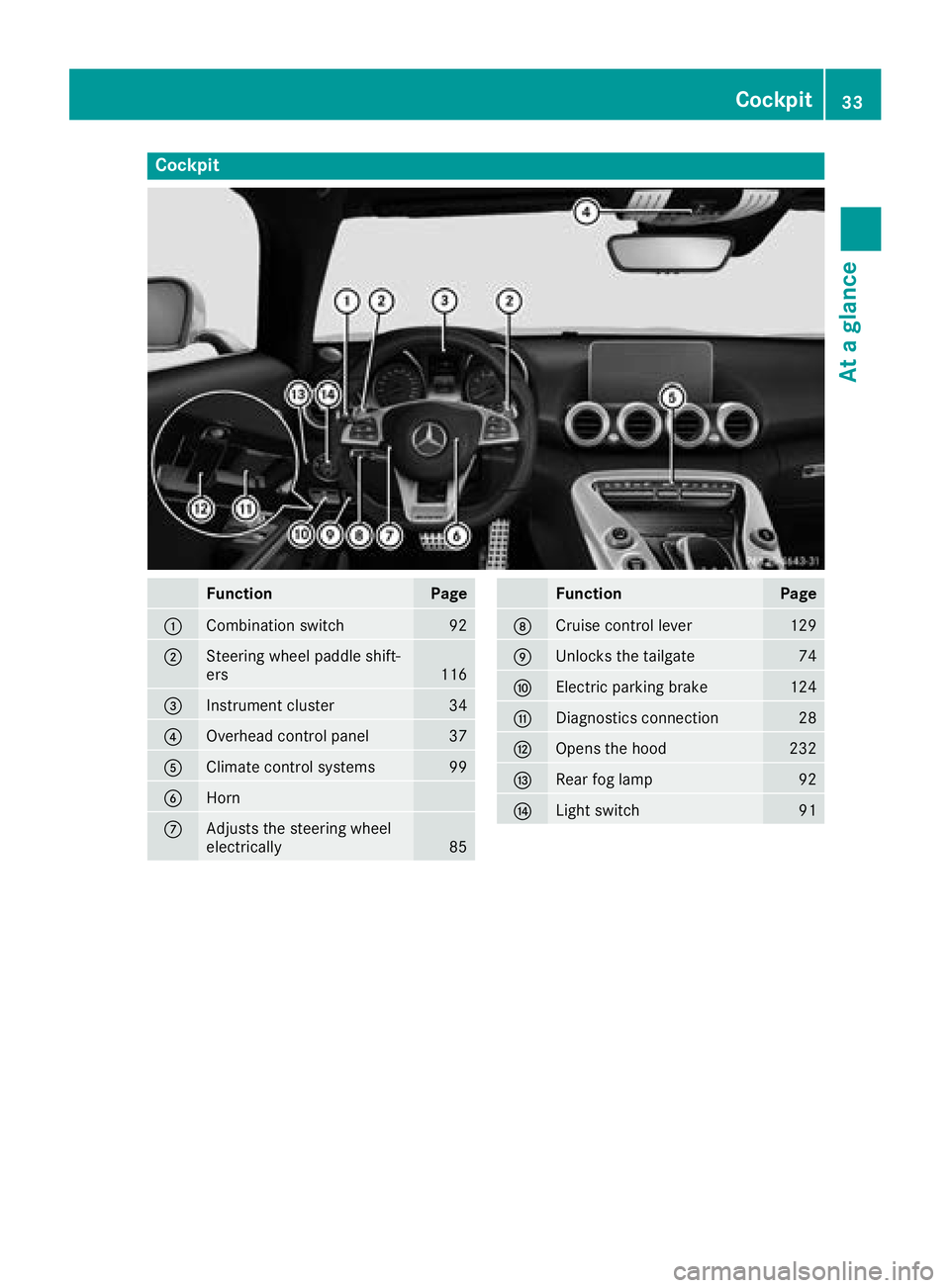
Cockpit
FunctionPage
:Combination switch92
;Steering wheel paddle shift-
ers116
=Instrument cluster34
?Overhead control panel37
AClimate control systems99
BHorn
CAdjusts the steering wheel
electrically85
FunctionPage
DCruise control lever129
EUnlocks the tailgate74
FElectric parking brake124
GDiagnostics connection28
HOpens the hood232
IRear fog lamp92
JLight switch91
Cockpit33
At a glance
Page 66 of 294
or
XInsert the SmartKey into the ignition lock.
A visual and audible alarm is triggered if the
alarm system is armed and you open:
Ra door
Rthe vehicle with the mechanical key
Rthe tailgate
Rthe hood
XTo turn the alarm off with the SmartKey:
press the %or& button on the Smart-
Key.
The alarm is stopped.
or
XInsert the SmartKey into the ignition lock.
The alarm is stopped.
XTo stop the alarm using KEYLESS-GO:
grasp the outside door handle. The SmartKey
must be outside the vehicle.
The alarm is stopped.
or
XPress the Start/Stop button. The SmartKey
must be inside the vehicle.
The alarm is stopped.
The alarm is not switched off, even if you close
the open door that triggered it, for example.
iIf the alarm continues for more than
30 seconds, the mbrace emergency call sys-
tem automatically notifies the Customer
Assistance Center. This is done either by text message or data connection.
The emergency call system sends a message
or establishes a data connection provided
that:
Ryou have subscribed to the mbrace service.
Rthe mbrace service has been activated
properly.
Rthe necessary mobile phone network is
available.
64Protection against theft
Safety
Page 67 of 294
SmartKey
Important safety notes
GWARNING
If children are left unsupervised in the vehicle,
they could:
Ropen the doors, thus endangering other
people or road users.
Rget out and disrupt traffic.
Roperate the vehicle's equipment.
Additionally, children could set the vehicle in
motion if, for example, they:
Rrelease the parking brake.
Rshifting the automatic transmission out of
park position P
RStart the engine.
There is a risk of an accident and injury.
When leaving the vehicle, always take the
SmartKey with you and lock the vehicle. Never
leave children or animals unattended in the
vehicle. Always keep the SmartKey out of
reach of children.
GWARNING
If you attach heavy or large objects to the
SmartKey, the SmartKey could be uninten-
tionally turned in the ignition lock. This could
cause the engine to be switched off. There is a risk of an accident.
Do not attach any heavy or large objects to the
SmartKey. Remove any bulky key rings before
inserting the SmartKey into the ignition lock.
!Keep the SmartKey away from strong mag-
netic fields. Otherwise, the remote control
function could be affected.
Strong magnetic fields can occur in the vicin-
ity of powerful electrical installations.
Do not keep the SmartKey:
Rwith electronic devices, e.g. a mobile phone
or another SmartKey
Rwith metallic objects, e.g. coins or metal foil
Rinside metallic objects, e.g. a metal case
This can affect the functionality of the Smart-
Key. Vehicles with KEYLESS-GO start function:
do
not keep the SmartKey on the cargo compart-
ment cover or in the cargo compartment. Oth-
erwise, the SmartKey may not be detected, e.g.
when starting the engine using the Start/Stop
button.
A brief radio connection between the vehicle
and the SmartKey determines whether a valid
SmartKey is in, or in the direct vicinity of, the
vehicle. This occurs, for example:
Rwhen starting the engine
Rwhile driving
Rwhen using the tailgate unlocking sensor
Rwhen the external door handles are touched
Rduring convenience closing
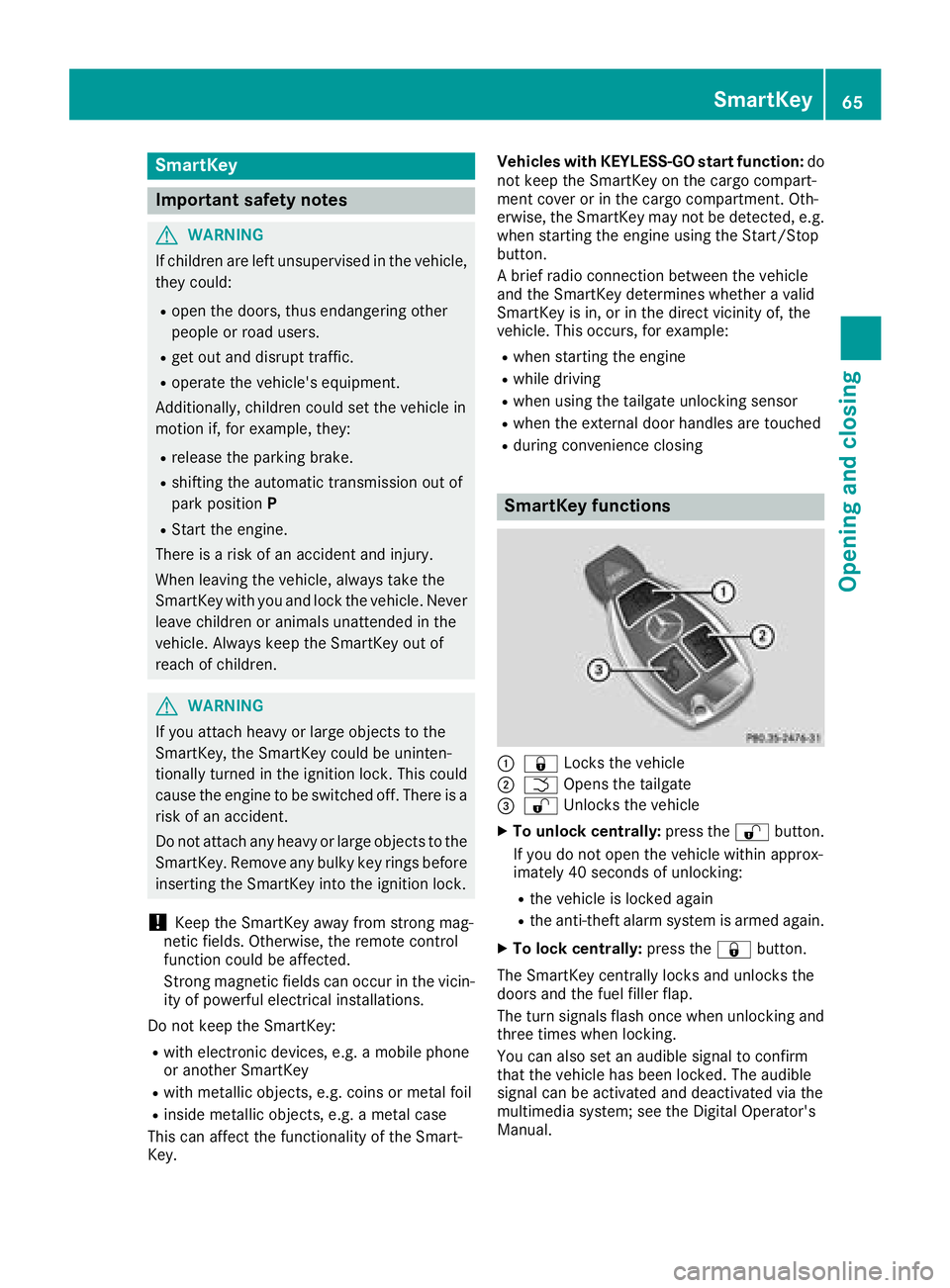
SmartKey functions
:& Locks the vehicle
;FOpens the tailgate
=%Unlocks the vehicle
XTo unlock centrally: press the%button.
If you do not open the vehicle within approx-
imately 40 seconds of unlocking:
Rthe vehicle is locked again
Rthe anti-theft alarm system is armed again.
XTo lock centrally: press the&button.
The SmartKey centrally locks and unlocks the
doors and the fuel filler flap.
The turn signals flash once when unlocking and
three times when locking.
You can also set an audible signal to confirm
that the vehicle has been locked. The audible
signal can be activated and deactivated via the
multimedia system; see the Digital Operator's
Manual.
SmartKey65
Opening and closing
Z
Page 68 of 294
When the locator lighting is activated via the
multimedia system, it lights up when it is dark
after the vehicle is unlocked with the SmartKey.
Information on activating and deactivating the
locator lighting can be found in the Digital Oper-
ator's Manual.
XTo open the tailgate:press and hold the
F button until the tailgate opens.
KEYLESS-GO
General notes
Bear in mind that the engine can be started by
any of the vehicle occupants if there is a Smart-
Key in the vehicle (
Ypage 107).
Locking/unlocking centrally
You can start, lock or unlock the vehicle using
KEYLESS-GO. To do this, you only need carry the
SmartKey with you. You can combine the func-
tions of KEYLESS-GO with those of a conven-
tional SmartKey. Unlock the vehicle by using
KEYLESS-GO, for instance, and lock it using the
& button on the SmartKey.
The driver's door and the door at which the han-
dle is used, must both be closed. The SmartKey
must be outside the vehicle. When locking or
unlocking with KEYLESS-GO, the distance
between the SmartKey and the corresponding
door handle must not be greater than 3 ft (1 m).
A check which periodically establishes a radio
connection between the vehicle and the Smart-
Key determines whether a valid SmartKey is in
the vehicle. This occurs, for example:
Rwhen starting the engine
Rwhile driving
Rwhen using the tailgate unlocking sensor
Rwhen the external door handles are touched
Rduring convenience closing
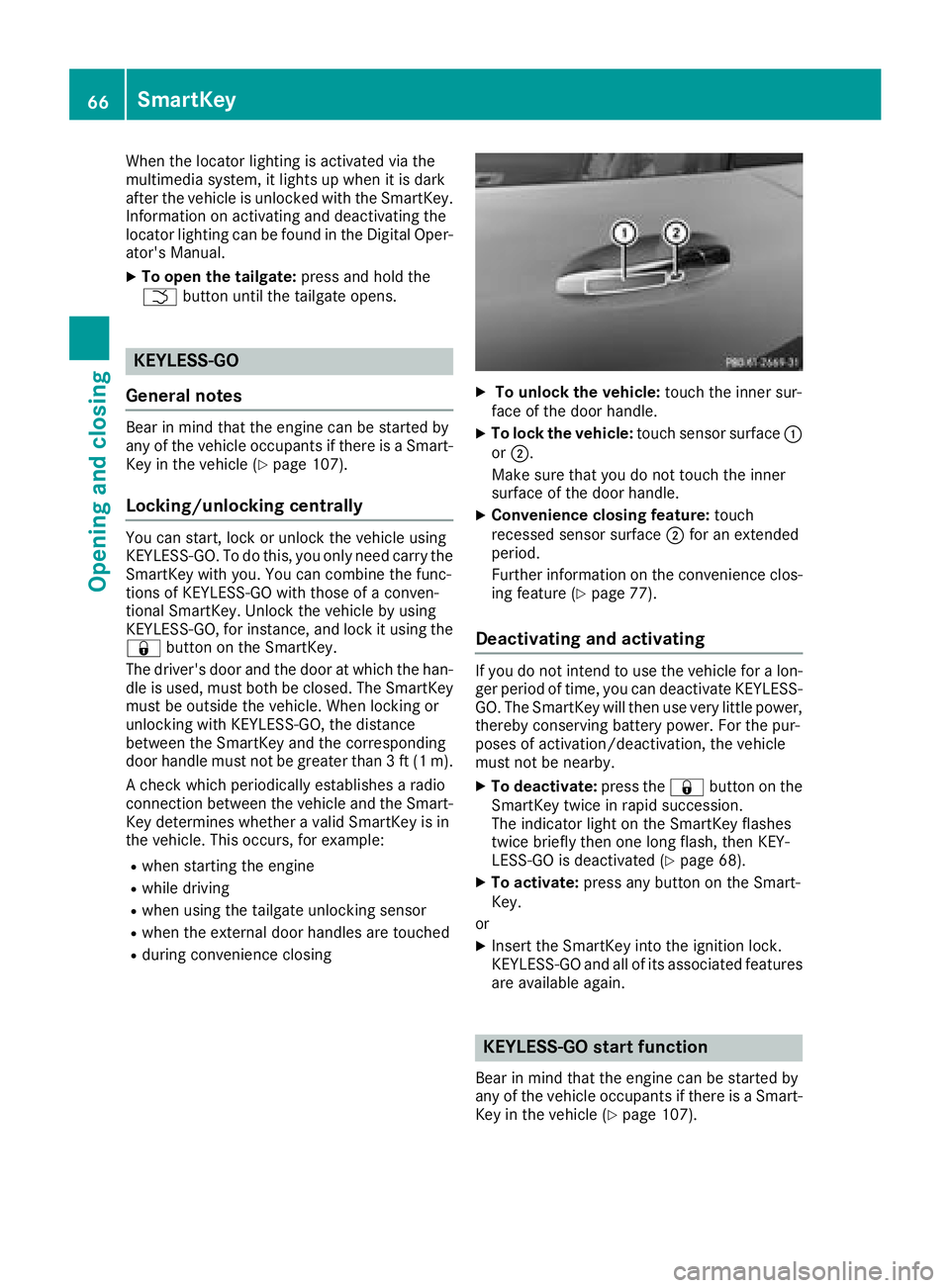
XTo unlock the vehicle: touch the inner sur-
face of the door handle.
XTo lock the vehicle: touch sensor surface :
or ;.
Make sure that you do not touch the inner
surface of the door handle.
XConvenience closing feature: touch
recessed sensor surface ;for an extended
period.
Further information on the convenience clos-
ing feature (
Ypage 77).
Deactivating and activating
If you do not intend to use the vehicle for a lon-
ger period of time, you can deactivate KEYLESS-
GO. The SmartKey will then use very little power,
thereby conserving battery power. For the pur-
poses of activation/deactivation, the vehicle
must not be nearby.
XTo deactivate: press the&button on the
SmartKey twice in rapid succession.
The indicator light on the SmartKey flashes
twice briefly then one long flash, then KEY-
LESS-GO is deactivated (
Ypage 68).
XTo activate: press any button on the Smart-
Key.
or
XInsert the SmartKey into the ignition lock.
KEYLESS-GO and all of its associated features
are available again.
KEYLESS-GO start function
Bear in mind that the engine can be started by
any of the vehicle occupants if there is a Smart-
Key in the vehicle (
Ypage 107).
66SmartKey
Opening and closing
Page 75 of 294
tem will be triggered. Switch off the alarm
(Ypage 63).
Cargo compartment
Important safety notes
GWARNING
Combustion engines emit poisonous exhaust
gases such as carbon monoxide. If the tailgate is open when the engine is running, particu-
larly if the vehicle is moving, exhaust fumes
could enter the passenger compartment.
There is a risk of poisoning.
Turn off the engine before opening the tail-
gate. Never drive with the tailgate open.
GWARNING
If objects, luggage or loads are not secured or
not secured sufficiently, they could slip, tip
over or be flung around and thereby hit vehicle
occupants. There is a risk of injury, particu-
larly in the event of sudden braking or a sud-
den change in direction.
Always store objects so that they cannot be
flung around. Secure objects, luggage or
loads against slipping or tipping before the
journey.
!The tailgate swings upwards and out when
opening. Therefore, make sure that there is
sufficient space above the tailgate.
The opening dimensions of the tailgate can be
found in the "Vehicle data" section
(
Ypage 288).
If the rear spoiler has been extended manually
the height when opened is higher by this
amount. If in doubt, retract the rear spoiler again
manually before opening the tailgate
(
Ypage 226).
You can switch the cargo compartment lamp on
and off manually on the overhead control panel
(
Ypage 94).
Do not leave the SmartKey in the cargo com-
partment. You could otherwise lock yourself
out.
You should preferably place luggage or loads in
the cargo compartment. Observe the loa
ding
guidelines (Ypage 213).
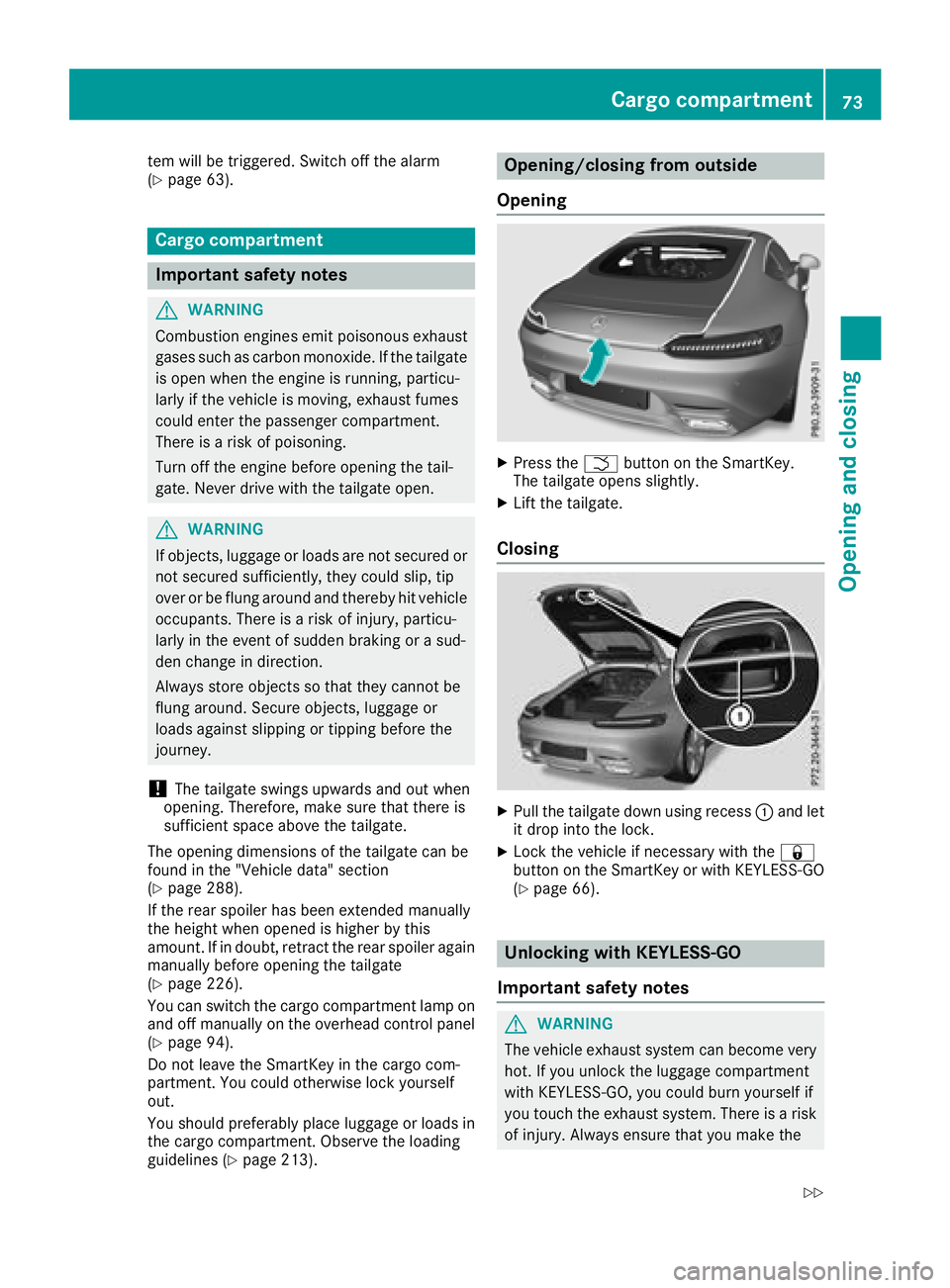
Opening/closing from outside
Opening
XPress the Fbutton on the SmartKey.
The tailgate opens slightly.
XLift the tailgate.
Closing
XPull the tailgate down using recess :and let
it drop into the lock.
XLock the vehicle if necessary with the &
button on the SmartKey or with KEYLESS-GO
(
Ypage 66).
Unlocking with KEYLESS-GO
Important safety notes
GWARNING
The vehicle exhaust system can become very
hot. If you unlock the luggage compartment
with KEYLESS-GO, you could burn yourself if
you touch the exhaust system. There is a risk of injury. Always ensure that you make the
Cargo compartment73
Opening and closing
Z
Page 76 of 294
kicking movement only within the detection
range of the sensors.
!If the SmartKey is within the rear detection
range of KEYLESS-GO, the following situa-
tions, for example, could lead to the uninten-
tional opening of the tailgate:
Rwhen using an automatic car wash
Rwhen using a power washer
Make sure that the SmartKey is at least 10 ft
(3 m) away from the vehicle.
General notes
Vehicles with KEYLESS-GO without carbon
package: you can unlock the tailgate without
using your hands. This is useful if you have your
hands full. To do this, make a kicking movement
under the rear bumper with your foot.
Observe the following points:
RCarry your KEYLESS-GO key about your per-
son. The SmartKey must be at the rear of the
vehicle in the detection range of KEYLESS-
GO.
RWhen making the kicking movement, make
sure that you are standing firmly on the
ground and that there is sufficient clearance
to the rear of the vehicle. You could otherwise
lose your balance, for example on ice.
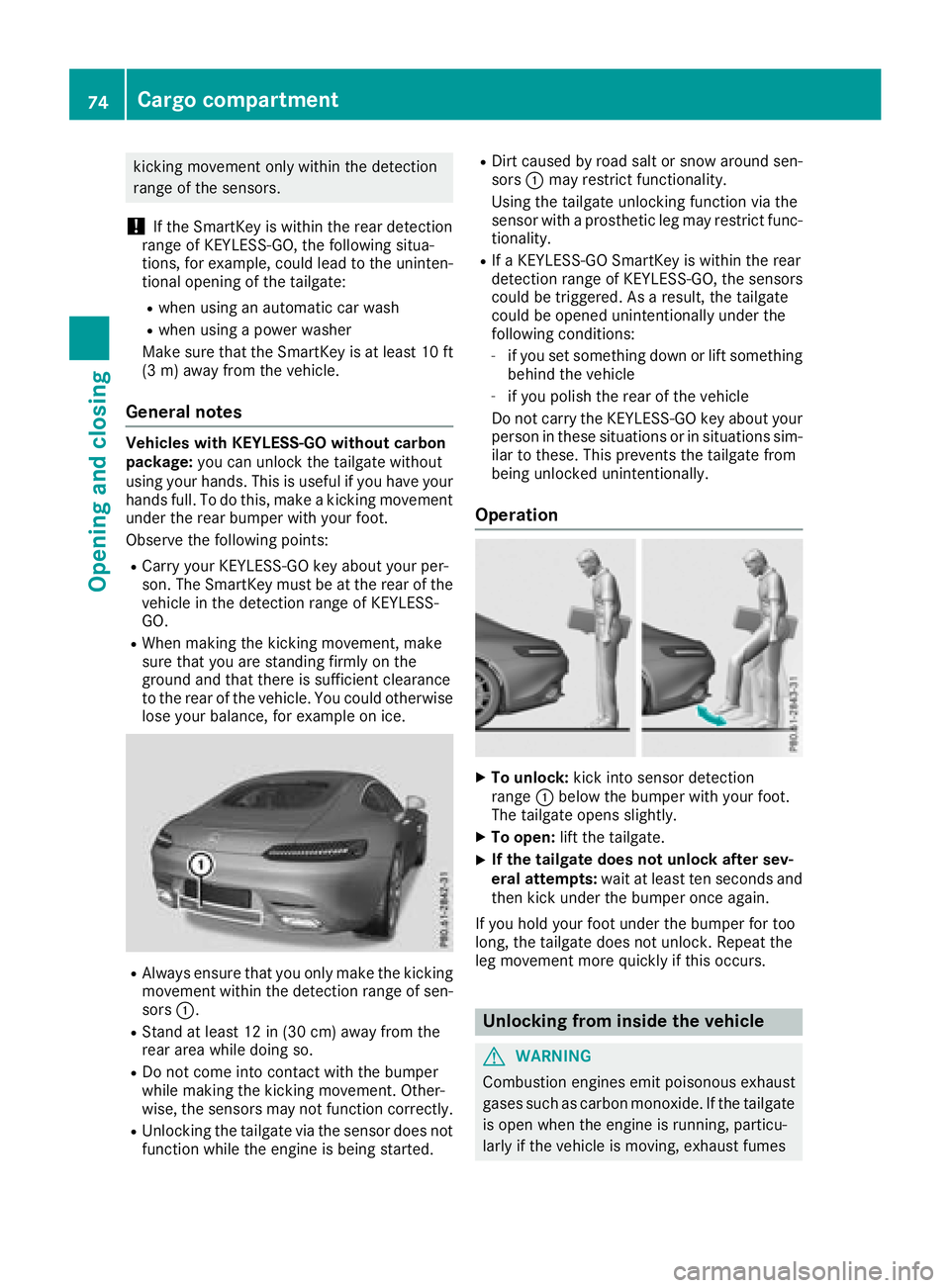
RAlways ensure that you only make the kicking
movement within the detection range of sen-
sors :.
RStand at least 12 in (30 cm) away from the
rear area while doing so.
RDo not come into contact with the bumper
while making the kicking movement. Other-
wise, the sensors may not function correctly.
RUnlocking the tailgate via the sensor does not
function while the engine is being started.
RDirt caused by road salt or snow around sen-
sors :may restrict functionality.
Using the tailgate unlocking function via the
sensor with a prosthetic leg may restrict func- tionality.
RIf a KEYLESS-GO SmartKey is within the rear
detection range of KEYLESS-GO, the sensors
could be triggered. As a result, the tailgate
could be opened unintentionally under the
following conditions:
-if you set something down or lift something
behind the vehicle
-if you polish the rear of the vehicle
Do not carry the KEYLESS-GO key about your
person in these situations or in situations sim-
ilar to these. This prevents the tailgate from
being unlocked unintentionally.
Operation
XTo unlock: kick into sensor detection
range :below the bumper with your foot.
The tailgate opens slightly.
XTo open: lift the tailgate.
XIf the tailgate does not unlock after sev-
eral attempts: wait at least ten seconds and
then kick under the bumper once again.
If you hold your foot under the bumper for too
long, the tailgate does not unlock. Repeat the
leg movement more quickly if this occurs.
Unlocking from inside the vehicle
GWARNING
Combustion engines emit poisonous exhaust
gases such as carbon monoxide. If the tailgate is open when the engine is running, particu-
larly if the vehicle is moving, exhaust fumes
74Cargo compartment
Opening and closing
Page 77 of 294
could enter the passenger compartment.
There is a risk of poisoning.
Turn off the engine before opening the tail-
gate. Never drive with the tailgate open.
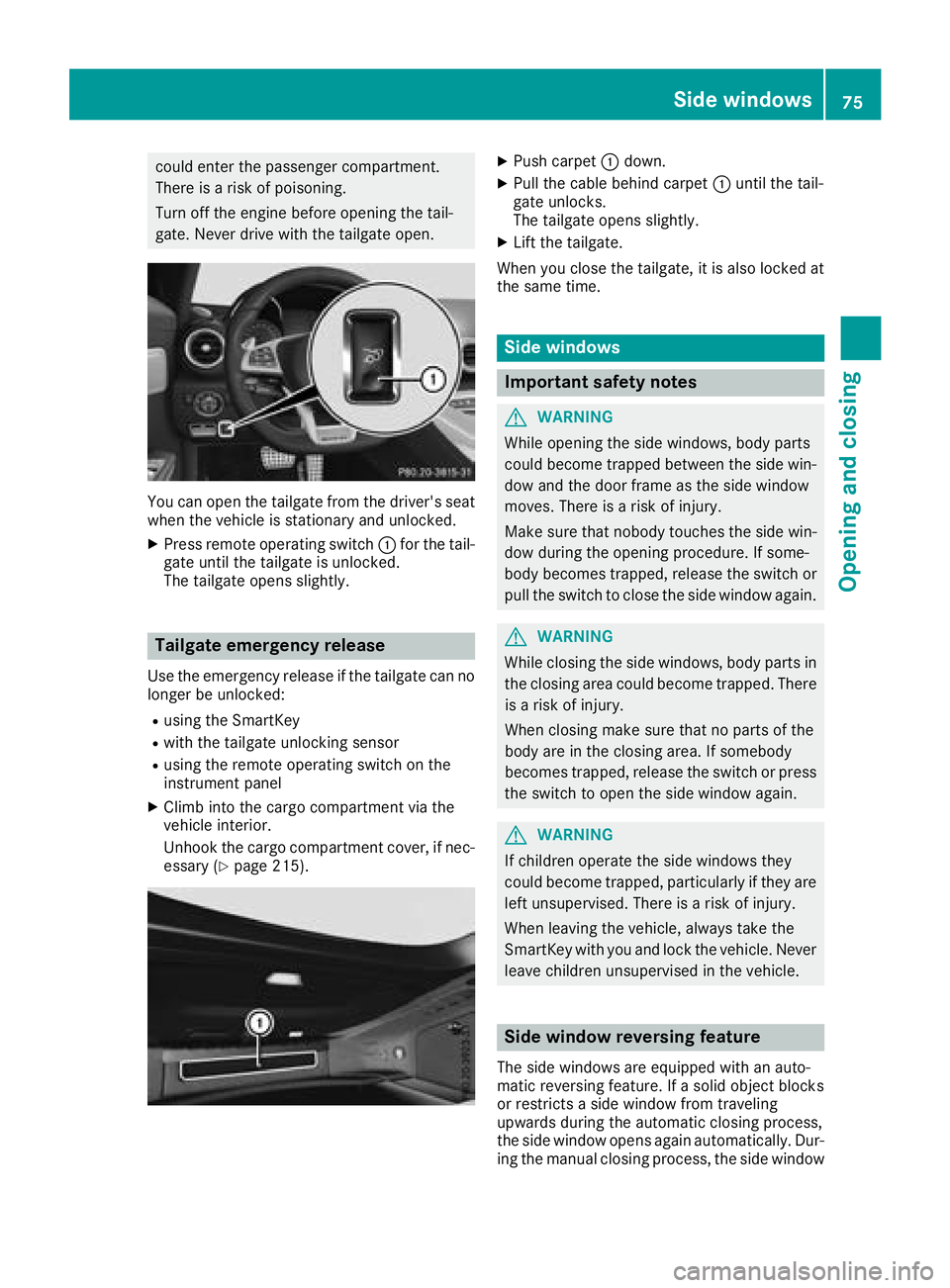
You can open the tailgate from the driver's seat
when the vehicle is stationary and unlocked.
XPress remote operating switch:for the tail-
gate until the tailgate is unlocked.
The tailgate opens slightly.
Tailgate emergency release
Use the emergency release if the tailgate can no
longer be unlocked:
Rusing the SmartKey
Rwith the tailgate unlocking sensor
Rusing the remote operating switch on the
instrument panel
XClimb into the cargo compartment via the
vehicle interior.
Unhook the cargo compartment cover, if nec-
essary (
Ypage 215).
XPush carpet :down.
XPull the cable behind carpet :until the tail-
gate unlocks.
The tailgate opens slightly.
XLift the tailgate.
When you close the tailgate, it is also locked at
the same time.
Side windows
Important safety notes
GWARNING
While opening the side windows, body parts
could become trapped between the side win-
dow and the door frame as the side window
moves. There is a risk of injury.
Make sure that nobody touches the side win-
dow during the opening procedure. If some-
body becomes trapped, release the switch or
pull the switch to close the side window again.
GWARNING
While closing the side windows, body parts in
the closing area could become trapped. There is a risk of injury.
When closing make sure that no parts of the
body are in the closing area. If somebody
becomes trapped, release the switch or press
the switch to open the side window again.
GWARNING
If children operate the side windows they
could become trapped, particularly if they are left unsupervised. There is a risk of injury.
When leaving the vehicle, always take the
SmartKey with you and lock the vehicle. Never
leave children unsupervised in the vehicle.
Side window reversing feature
The side windows are equipped with an auto-
matic reversing feature. If a solid object blocks
or restricts a side window from traveling
upwards during the automatic closing process,
the side window opens again automatically. Dur-
ing the manual closing process, the side window
Side windows75
Opening and closing
Z
Page 127 of 294
In addition, at least one of the following condi-
tions must be fulfilled:
Rthere is a system malfunction
Rthe power supply is insufficient
Rthe vehicle is stationary for a lengthy period
The red F(USA only) or !(Canada only)
indicator lamp in the instrument cluster lights
up.
The electric parking brake is not automatically
engaged if the engine is switched off by the ECO
start/stop function.
Releasing automatically
The electric parking brake is released when the
following conditions are fulfilled:
Rthe engine is running
Rthe seat belt tongue is engaged in the belt
buckle
Rthe transmission is in position hork and
you depress the accelerator pedal or shift
from position jtoh ork
Rif the transmission is in position k, the tail-
gate must be closed
If the seat belt tongue is not engaged in the seat
belt buckle, the following conditions must be
fulfilled:
Rthe driver's door and front-passenger door
are closed
Ryou move the transmission out of position j
or you have previously driven at a speed
above 2 mph (3 km/h)
Rif the transmission is in position k, the tail-
gate must be closed
When the electric parking brake is released, the red F (USA only) or !(Canada only) indi-
cator lamp goes out in the instrument cluster.
Emergency braking
The vehicle can also be braked during an emer-
gency by using the electric parking brake.
XWhile driving, push handle :of the electric
parking brake (Ypage 124).
The vehicle is braked as long as you keep
handle :of the electric parking brake
pressed. The longer electric parking brake
handle :is depressed, the greater the brak-
ing force. During braking:
Ra warning tone sounds
Rthe
Please Release Parking Brakemes-
sage appears
Rthe red F(USA only) or !(Canada
only) indicator lamp in the instrument cluster
flashes
When the vehicle has been braked to a stand-
still, the electric parking brake is engaged.
Parking the vehicle for a long period
General notes
If you leave the vehicle parked for longer than
four weeks, the battery may be damaged by
exhaustive discharging.
If you leave the vehicle parked for longer than six
weeks, the vehicle may suffer damage as a
result of lack of use.
XVisit a qualified specialist workshop and seek
advice.
Trickle charging the on-board electrical
system battery
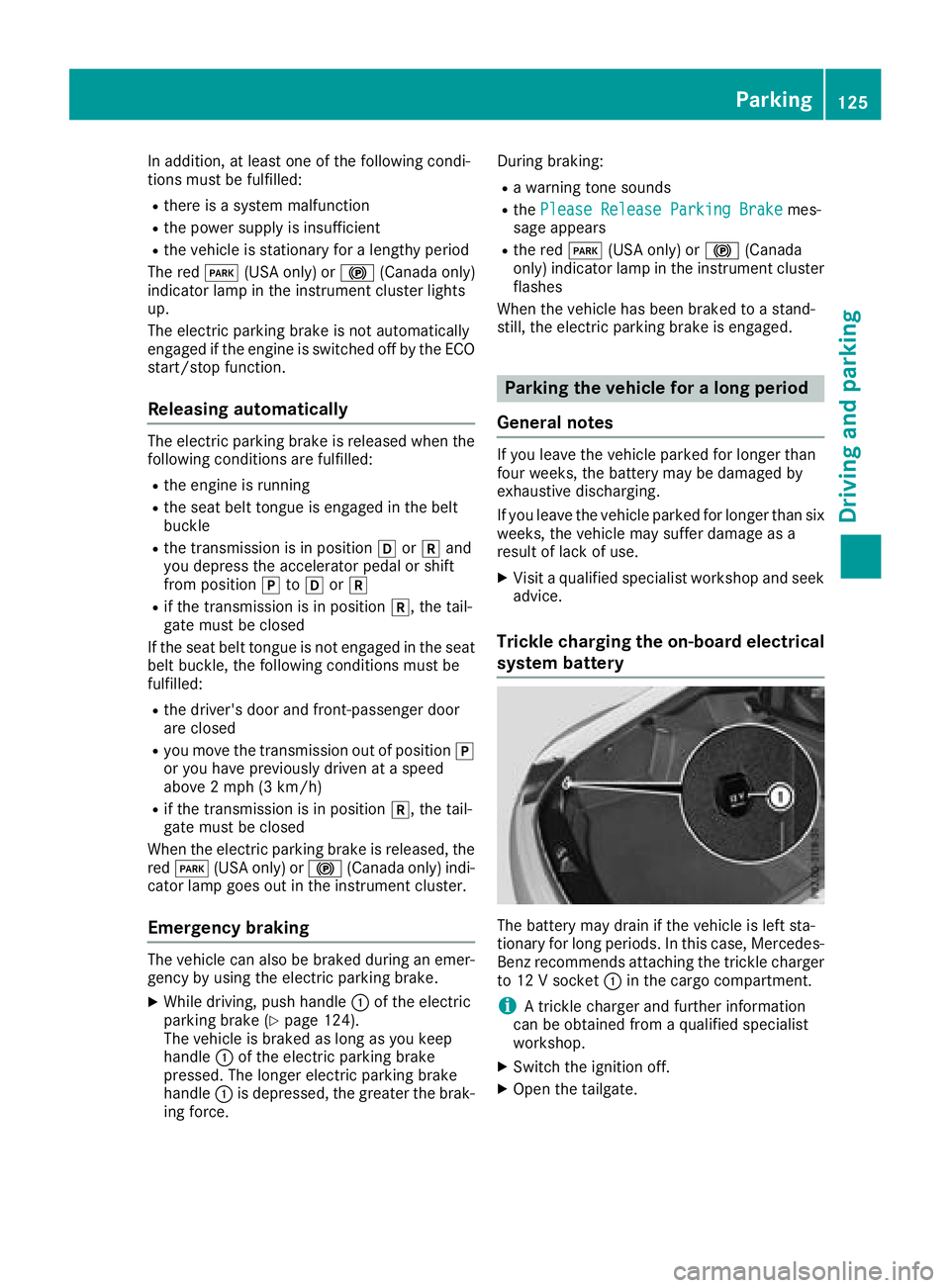
The battery may drain if the vehicle is left sta-
tionary for long periods. In this case, Mercedes-
Benz recommends attaching the trickle charger
to 12 V socket :in the cargo compartment.
iA trickle charger and further information
can be obtained from a qualified specialist
workshop.
XSwitch the ignition off.
XOpen the tailgate.
Parking125
Driving and parking
Z