transmission oil MERCEDES-BENZ AMG GT COUPE 2018 Owner's Manual
[x] Cancel search | Manufacturer: MERCEDES-BENZ, Model Year: 2018, Model line: AMG GT COUPE, Model: MERCEDES-BENZ AMG GT COUPE 2018Pages: 294, PDF Size: 4.76 MB
Page 6 of 294
1, 2, 3 ...
12 V socketsee Sockets
A
ABS (Anti-lock Braking System)Display message ............................ 170
Function/notes ................................ 57
Warning lamp ................................ .196
Acceleration
see Kickdown
Accident
Automatic measures after an acci-
dent ................................................. 54
Activating media mode
General notes ................................ 211
Activating/deactivating cooling
with air dehumidification ................... 99
Active aerodynamics profile
Display message ............................ 191
Extending/retracting ..................... 227
Problem ......................................... 228
Active Brake Assist
Activating or deactivating .............. 163
Display message ............................ 175
Function/notes ................................ 58
Active Service System PLUS
see ASSYST PLUS
ADAPTIVE BRAKE ................................. 63
Adaptive Brake Assist
Display message ............................ 170
Adaptive Damping System
Function/notes .............................1 42
Adaptive Highbeam Assist
Display message ............................ 180
Function/notes ................................ 93
Switching on/off .............................. 94
Additional speedometer ................... 165
Additives (engine oil) ........................ 286
Address book
see also Digital Operator's Man-
ual ..................................................2 04
Adjusting lumbar support .................. 82
Adjusting the volume
Multimedia system ........................ 205 After-sales service center
see ASSYST PLUS
Air bags
Deployment ..................................... 51
Display message ............................ 178
Front air bag (driver, front
passenger) ....................................... 45
Important safety notes .................... 44
Introduction ..................................... 44
Knee bag .......................................... 45
Occupa nt C
lassification System
(OCS) ............................................... 46
PASSENGER AIR BAG indicator
lamps ............................................... 40
Side impact air bag .......................... 46
Window curtain air bag .................... 46
Air vents
Important safety notes .................. 102
Setting ...........................................1 02
Setting the side air vents ...............1 03
Air-conditioning system
see Climate control
Alarm
ATA (Anti-Theft Alarm system) ......... 63
Switching off (ATA) .......................... 63
Switching the function on/off
(ATA) ................................................ 63
Alarm system
see ATA (Anti-Theft Alarm system)
AMG
Adaptive sport suspension sys-
tem ................................................ 142
E-SELECT lever .............................. 112
Menu (on-board computer) ............ 165
Performance Seat ............................ 83
SPEEDSHIFT DCT 7-gear sport
transmission .................................. 112
AMG ceramic brakes ......................... 128
AMG high-performance and
ceramic brakes .................................. 128
AMG sports exhaust system ............ 109
Animals
see Pets in the vehicle
Anti-entrapment function
see Reversing feature
Anti-lock braking system
see ABS (Anti-lock Braking System)
4Index
Page 7 of 294
Anti-skid chainssee Snow chains
Anti-theft ala rmsystem
see ATA (Anti-Theft Alarm system)
Asht ray.............................................. .217
Assistance display (on-board com-
puter) ..................................................1 62
Assistance menu (on-board com-
puter) ..................................................1 63
Assistance system
see Driving systems
ASSYST PLUS
Displaying a service message ........2 38
Hiding a service message .............. 237
Resetting the service interval dis-
play ................................................ 238
Service message ............................ 237
Special service requirements ......... 238
ATA (Anti-Theft Alarm system)
Activating/deactivating ................... 63
Function ...........................................6 3
Switching off the alarm .................... 63
ATTENTION ASSIST
Activating/deactivating ................. 163
Display message ............................ 183
Function/notes ............................. 148
Authorized Mercedes-Benz Center
see Qualified specialist workshop
Authorized workshop
see Qualified specialist workshop
AUTO lights
Display message ............................ 180
see Lights
Automatic car wash (care) ............... 239
Automatic engine start (ECO start/
stop function) .................................... 109
Automatic engine switch-off (ECO
start/stop function) .......................... 108
Automatic headlamp mode ................ 91
Automatic transmission
Accelerator pedal position ............. 115
Automatic drive program ............... 117
Changing gear ............................... 115
Display message ............................ 188
Double-clutch function .................. 115
Drive program display .................... 114
Driving tips .................................... 115 Emergency running mode
.............. 120
Eng
aging neutral ............................ 113
Engaging park position automati-
cally ............................................... 113
Engaging reverse gear ................... 113
Engaging the park position ............ 113
Gearshift recommendation ............ 118
Gliding mode ................................. 115
Important safety notes .................. 112
Kickdown ....................................... 115
Manual drive program .................... 117
Manual mode ................................. 118
Oil temperature (on-board com-
puter) ............................................. 165
Overview ........................................ 112
Problem (malfunction) ................... 120
Pulling away ................................... 107
Rocking the vehicle free ................ 115
Shift override ................................. 119
Starting the engine ........................ 107
Steering wheel paddle shifters ...... 116
Transmission position display ........ 114
Transmission positions .................. 114
Automatic transmission emer-
gency mode ....................................... 120
B
Back button ....................................... 205
BAS (Brake Assist System) ................. 58
Basic settings
see Settings
Battery (SmartKey)
Checking .......................................... 68
Important safety notes .................... 67
Replacing ......................................... 68
Battery (vehicle)
Charging ........................................ 251
Display message ............................ 182
Important safety notes .................. 250
Jump starting ................................. 251
Belt
see Seat belts
Belt warning ......................................... 43
Blind Spot Assist
Activating/deactivating (on-
board computer) ............................ 163
Display message ............................ 184
Index5
Page 15 of 294
Lubricant additivessee Additives (engine oil)
M
M button ............................................ .116
M+S tires ............................................ 260
Malfunction message
see Display messages
Manual drive program
Activating ....................................... 117
Changing gear ............................... 118
Deactivating ................................... 118
General notes ................................ 117
Manual mode
Activating ....................................... 118
Deactivating ................................... 119
General notes ................................ 118
Matte finish (cleaning instruc-
tions) ..................................................2 41
mbrace
Call priority ....................................2 22
Display message ............................ 175
Downloading destinations
(COMAND) ..................................... 222
Downloading routes ....................... 225
Emergency call .............................. 220
General notes ................................ 219
Geo fencing ................................... 225
Info call button .............................. 221
Locating a stolen vehicle ...............2 24
Remote fault diagnosis .................. 224
Remote vehicle locking .................. 223
Roadside assistance button ........... 221
Search & Send ............................... 223
Self-test ......................................... 219
Speed alert .................................... 225
System .......................................... 219
Triggering the vehicle alarm ........... 225
Vehicle remote unlocking .............. 223
Mechanical key
Function/notes ................................ 67
General notes .................................. 67
Inserting .......................................... 67
Locking vehicle ................................ 72
Removing ......................................... 67
Unlocking the driver's door .............. 72 Media Interface
see Digital Operator's Manual
Memory card (audio) ......................... 160
Memory function
Seats, steering wheel, exterior
mirrors ............................................. 89
Mercedes me connect
Change of vehicle ............................ 32
Data protection ................................ 32
Website ............................................ 31
Merce
des-Benz Intelligent Drive
Distance Pilot DISTRONIC ............. 131
Message memory (on-board com-
puter) .................................................. 169
Messages
see Display messages
see Warning and indicator lamps
Mirror turn signal
Cleaning ......................................... 242
Mirrors
see Exterior mirrors
see Rear-view mirror
see Vanity mirror
Mobile phone
Connecting (device manager) ........ 210
Frequencies ................................... 282
Installation ..................................... 282
Menu (on-board computer) ............ 161
Transmission output (maximum) .... 282
Model type
see Vehicle identification plate
Modifying the programming
(SmartKey) ........................................... 67
Mounting wheels
Lowering the vehicle ...................... 280
Mounting a new wheel ................... 279
Preparing the vehicle ..................... 277
Raising the vehicle ......................... 277
Removing a wheel .......................... 279
Securing the vehicle against roll-
ing away ........................................ 277
MP3
Operation ....................................... 160
see also Digital Operator's Man-
ual .................................................. 204
Multifunction display
Function/notes ............................. 156
Index13
Page 19 of 294
Introduction .....................................40
Releasin g ......................................... 43
Warning lamp ................................. 193
Warning lamp (function) ................... 43
Seat function
see Seat
Seats
Adjusting (electrically) ..................... 82
Adjusting (manually) ........................ 81
Adjusting (Performance Seat) .......... 83
Adjusting lumbar support ................ 82
Adjusting the head restraint ............ 82
Calling up a stored setting (mem-
ory function) .................................... 90
Cleaning the cover ......................... 244
Important safety notes .................... 80
Seat heating problem ...................... 84
Seat ventilation problem .................. 84
Storing settings (memory func-
tion) ................................................. 89
Switching seat heating on/off ......... 83
Switching seat ventilation on/off .... 84
Selecting a gear
see Automatic transmission
Selector lever
Cleaning ......................................... 243
Positions ........................................ 112
Sensors (cleaning instructions) ....... 242
Service menu (on-board com-
puter) .................................................. 163
Service message
see ASSYST PLUS
Service products
Brake fluid ..................................... 286
Coolant (engine) ............................ 287
Engine oil ....................................... 286
Fuel ................................................ 283
Important safety notes .................. 283
Refrigerant (air-conditioning sys-
tem) ............................................... 288
Washer fluid ................................... 287
Setting the date/time format
see also Digital Operator's Man-
ual .................................................. 204
Setting the language
see also Digital Operator's Man-
ual .................................................. 204 Setting the time
see also Digital Operator's Man-
ual .................................................. 204
Settings
Factory (on-board computer) ......... 165
On-board computer ....................... 163
SETUP (on-board computer,
Mercedes-AMG vehicles) .................. 166
Side impact air bag ............................. 46
Si de marke
r lamp (display mes-
sage) ................................................... 180
Side windows
Cleaning ......................................... 241
Convenience closing feature ............ 77
Convenience opening feature .......... 76
Important safety information ........... 75
Opening/closing .............................. 76
Problem (malfunction) ..................... 78
Resetting ......................................... 77
Reversing feature ............................. 75
SIRIUS services
see also Digital Operator's Man-
ual .................................................. 204
SmartKey
Changing the battery ....................... 68
Changing the programming ............. 67
Checking the battery ....................... 68
Convenience closing feature ............ 77
Convenience opening feature .......... 76
Display message ............................ 192
Door central locking/unlocking ....... 65
Important safety notes .................... 65
KEYLESS-GO start function .............. 66
Loss ................................................. 69
Mechanical key ................................ 67
Overview .......................................... 65
Positions (ignition lock) ................. 106
Problem (malfunction) ..................... 69
Starting the engine ........................ 107
SMS
see also Digital Operator's Man-
ual .................................................. 204
Snow chains ...................................... 260
Sockets
General notes ................................ 218
Luggage compartment ................... 219
Sound
Switching on/off ........................... 205
Index17
Page 21 of 294
Vehicle data ................................... 288
Telephone
Accepting a call (multifunction
steering wheel) .............................. 162
Authorizing a mobile phone (con-
necting) .........................................2 11
Connecting a mobile phone
(device manager) ........................... 210
Display message ............................ 191
Introduction ................................... 161
Menu (on-board computer) ............ 161
Number from the phone book ........1 62
Redialing ........................................ 162
Rejecting/ending a call ................. 162
see also Digital Operator's Man-
ual ..................................................2 04
Temperature
Coolant (display in the instrument
cluster) .......................................... 154
Engine oil (on-board computer) ...... 165
Outside temperature ......................1 54
Setting (climate control) ................ 100
Transmission oil (on-board com-
puter) ............................................. 165
Timing (RACETIMER) ......................... 167
Tire pressure
Calling up (on-board computer) ..... 264
Checking manually ........................ 263
Display message ............................ 186
Maximum ....................................... 263
Not reached (TIREFIT) .................... 248
Notes ............................................. 262
Reached (TIREFIT) .......................... 249
Recommended ............................... 261
Tire pressure monitor
Checking the tire pressure elec-
tronically ........................................ 265
Function/notes .............................2 64
General notes ................................ 264
Important safety notes .................. 264
Restarting ...................................... 266
Warning lamp ................................. 202
Warning message .......................... 265
Tire-change tool kit ........................... 246
TIREFIT kit
Important safety notes .................. 247
Storage location ............................ 246
Tire pressure not reached .............. 248 Tire pressure reached .......
............. 249
Usi
ng ............................................. 247
Tires
Aspect ratio (definition) ................. 275
Average weight of the vehicle
occupants (definition) .................... 274
Bar (definition) ............................... 274
Changing a wheel .......................... 276
Characteristics .............................. 274
Checking ........................................ 259
Curb weight (definition) ................. 275
Definition of terms ......................... 274
Direction of rotation ......................2 76
Display message ............................ 186
Distribution of the vehicle occu-
pants (definition) ............................ 276
DOT (Department of Transporta-
tion) (definition) .............................2 74
DOT, Tire Identification Number
(TIN) ............................................... 273
GAWR (Gross Axle Weight Rating)
(definition) ..................................... 274
GVW (Gross Vehicle Weight) (def-
inition) ...........................................2 75
GVWR (Gross Vehicle Weight Rat-
ing) (definition) .............................. 275
Important safety notes .................. 258
Increased vehicle weight due to
optional equipment (definition) ...... 274
Information on driving .................... 258
Kilopascal (kPa) (definition) ........... 275
Labeling (overview) ........................ 271
Load bearing index (definition) ...... 276
Load index ..................................... 273
Load index (definition) ................... 275
Maximum load on a tire (defini-
tion) ............................................... 275
Maximum loaded vehicle weight
(definition) ..................................... 275
Maximum permissible tire pres-
sure (definition) ............................. 275
Maximum tire load ......................... 273
Maximum tire load (definition) ....... 275
Notes on sport tires ....................... 258
Optional equipment weight (defi-
nition) ............................................ 276
P
SI (pounds per square inch) (def-
inition) ........................................... 275
Index19
Page 67 of 294
SmartKey
Important safety notes
GWARNING
If children are left unsupervised in the vehicle,
they could:
Ropen the doors, thus endangering other
people or road users.
Rget out and disrupt traffic.
Roperate the vehicle's equipment.
Additionally, children could set the vehicle in
motion if, for example, they:
Rrelease the parking brake.
Rshifting the automatic transmission out of
park position P
RStart the engine.
There is a risk of an accident and injury.
When leaving the vehicle, always take the
SmartKey with you and lock the vehicle. Never
leave children or animals unattended in the
vehicle. Always keep the SmartKey out of
reach of children.
GWARNING
If you attach heavy or large objects to the
SmartKey, the SmartKey could be uninten-
tionally turned in the ignition lock. This could
cause the engine to be switched off. There is a risk of an accident.
Do not attach any heavy or large objects to the
SmartKey. Remove any bulky key rings before
inserting the SmartKey into the ignition lock.
!Keep the SmartKey away from strong mag-
netic fields. Otherwise, the remote control
function could be affected.
Strong magnetic fields can occur in the vicin-
ity of powerful electrical installations.
Do not keep the SmartKey:
Rwith electronic devices, e.g. a mobile phone
or another SmartKey
Rwith metallic objects, e.g. coins or metal foil
Rinside metallic objects, e.g. a metal case
This can affect the functionality of the Smart-
Key. Vehicles with KEYLESS-GO start function:
do
not keep the SmartKey on the cargo compart-
ment cover or in the cargo compartment. Oth-
erwise, the SmartKey may not be detected, e.g.
when starting the engine using the Start/Stop
button.
A brief radio connection between the vehicle
and the SmartKey determines whether a valid
SmartKey is in, or in the direct vicinity of, the
vehicle. This occurs, for example:
Rwhen starting the engine
Rwhile driving
Rwhen using the tailgate unlocking sensor
Rwhen the external door handles are touched
Rduring convenience closing
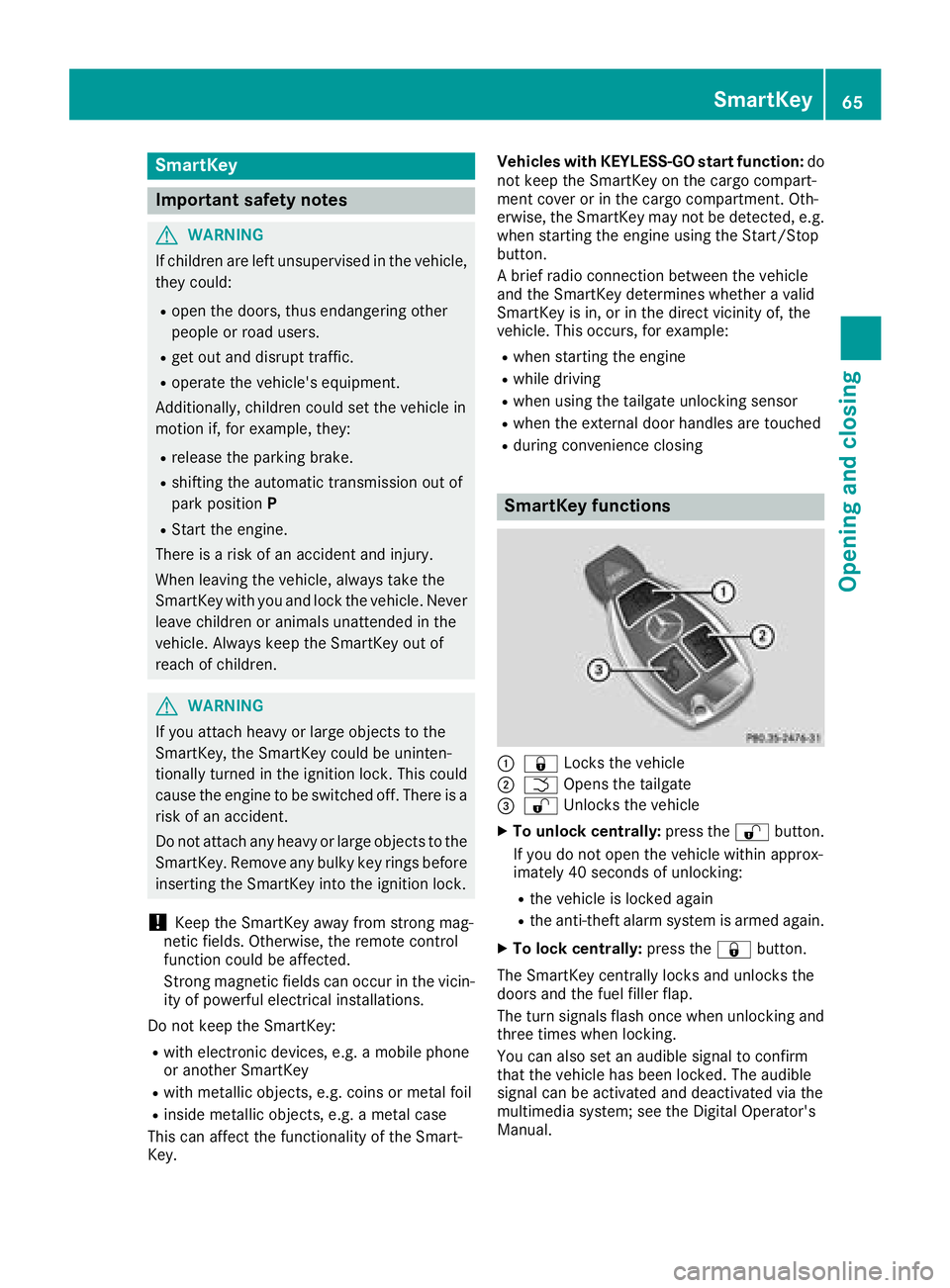
SmartKey functions
:& Locks the vehicle
;FOpens the tailgate
=%Unlocks the vehicle
XTo unlock centrally: press the%button.
If you do not open the vehicle within approx-
imately 40 seconds of unlocking:
Rthe vehicle is locked again
Rthe anti-theft alarm system is armed again.
XTo lock centrally: press the&button.
The SmartKey centrally locks and unlocks the
doors and the fuel filler flap.
The turn signals flash once when unlocking and
three times when locking.
You can also set an audible signal to confirm
that the vehicle has been locked. The audible
signal can be activated and deactivated via the
multimedia system; see the Digital Operator's
Manual.
SmartKey65
Opening and closing
Z
Page 107 of 294
!Do not warm up the engine while stationary.
Pull away immediately. Avoid high engine
speeds and full throttle until the engine has
reached its operating temperature.
In vehicles with automatic transmission,
engage positions P and R only when the vehi-
cle is stationary.
Where possible, avoid spinning the drive
wheels when pulling away on slippery roads.
You could otherwise damage the drive train.
!During a cold start with low engine oil tem-
peratures (below 32 ‡) (0 †), the maximum
engine speed is restricted in order to protect
the engine. To protect the engine and main-
tain smooth engine operation, avoid driving at
full throttle when the engine is cold.
Key positions
Start/Stop button
General notes
All vehicles are equipped with a Start/Stop but-
ton.
The Start/Stop button is located in the center
console and is illuminated when the vehicle is
unlocked.
The SmartKey must be in the vehicle.
Pressing the Start/Stop button several times in
succession corresponds to the different Smart-
Key positions in the ignition lock. This is only the
case if you are not depressing the brake pedal.
If you depress the brake pedal and press the
Start/Stop button, the engine starts immedi-
ately.
A check which periodically establishes a radio
connection between the vehicle and the Smart-
Key determines whether a valid SmartKey is in
the vehicle. This occurs, for example, when
starting the engine.
If there is a SmartKey in the ignition lock, this
takes precedence over the KEYLESS-GO start
function.
To start the vehicle without actively using the
SmartKey:
Rthe SmartKey must be in the vehicle
Rthe vehicle must not be locked with the
SmartKey or KEYLESS-GO (Ypage 66) Do not keep the SmartKey:
Rwith electronic devices, e.g. a mobile phone
or another SmartKey
Rwith metallic objects, e.g. coins or metal foil
Rinside metallic objects, e.g. a metal case
This can affect the functionality of the Smart-
Key.
If you lock the vehicle with the SmartKey remote control or with KEYLESS-GO, after a short time:
Ryou will not be able to switch on the ignition
with the Start/Stop button
Ryou will no longer be able to start the engine
with the Start/Stop button until the vehicle is
unlocked again
If you lock the vehicle centrally using the button
on the driver's door (
Ypage 71), you can con-
tinue to start the engine with the Start/Stop
button.
The engine can be switched off while the vehicle
is in motion by pressing and holding the Start/
Stop button for three seconds. This function
operates independently of the ECO start/stop
automatic engine switch-off function.
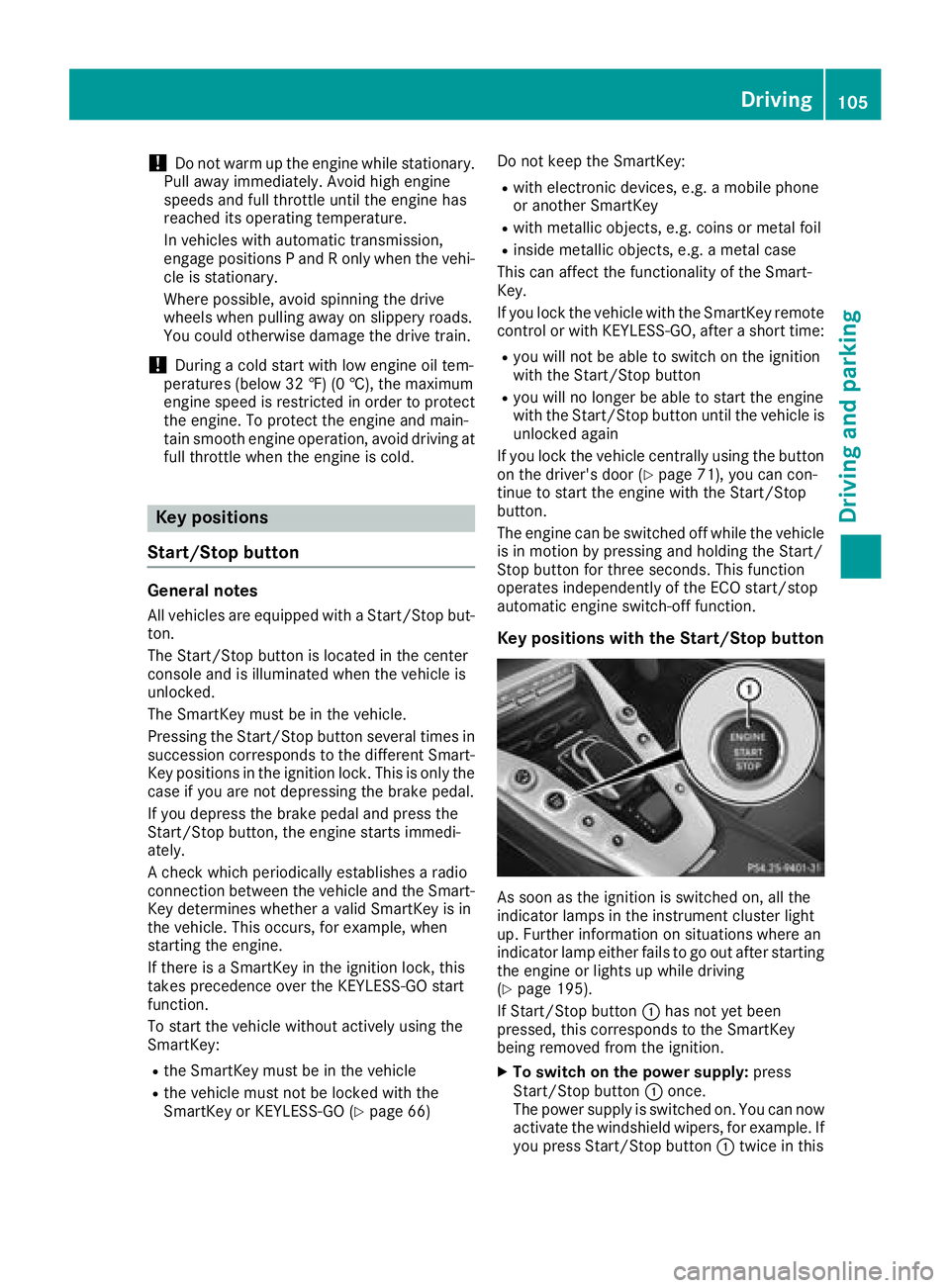
Key positions with the Start/Stop button
As soon as the ignition is switched on, all the
indicator lamps in the instrument cluster light
up. Further information on situations where an
indicator lamp either fails to go out after starting
the engine or lights up while driving
(
Ypage 195).
If Start/Stop button :has not yet been
pressed, this corresponds to the SmartKey
being removed from the ignition.
XTo switch on the power supply: press
Start/Stop button :once.
The power supply is switched on. You can now
activate the windshield wipers, for example. If you press Start/Stop button :twice in this
Driving105
Driving and parking
Z
Page 167 of 294
The selected unit of measurement for distance
applies to:
RDigital speedometer in theTripmenu
ROdometer and the trip odometer
RTrip computer
RRange
RNavigation instructions in the Navimenu
RCruise control
RDistance Pilot DISTRONIC
RASSYST PLUS service interval display
Switching the additional speedometer
on/off
If the additional speedometer is switched on,
the speed is shown in the status bar in the mul-
tifunction display instead of the outside tem-
perature.
The additional speedometer displays the speed
in the respective unit that is not shown in the
multifunction display.
XPressòon the steering wheel to open the
menu list.
XPress :or9 on the steering wheel to
select the Settingsmenu.
XConfirm by pressing aon the steering
wheel.
XPress :or9 to select the Instru‐ment Clustersubmenu.
XPressato confirm.
XPress :or9 to select the Addi‐tional Speedometer [km/h]function.
The current selection appears.
XTo switch on/off: pressaagain.
Restoring the factory settings
XPress òon the steering wheel to open the
menu list.
XPress :or9 on the steering wheel to
select the Settingsmenu.
XConfirm by pressing aon the steering
wheel.
XPress :or9 to select the FactorySettingssubmenu.
XPressato confirm.
The Reset All Settings?function
appears.
XPress :or9 to select NoorYes.
XPress ato confirm the selection.
If you have selected Yes, the multifunction
display shows a confirmation message.
For safety reasons, the Daytime Running
Lightsfunction in theLightssubmenu is only
reset when the vehicle is stationary.
AMG menu
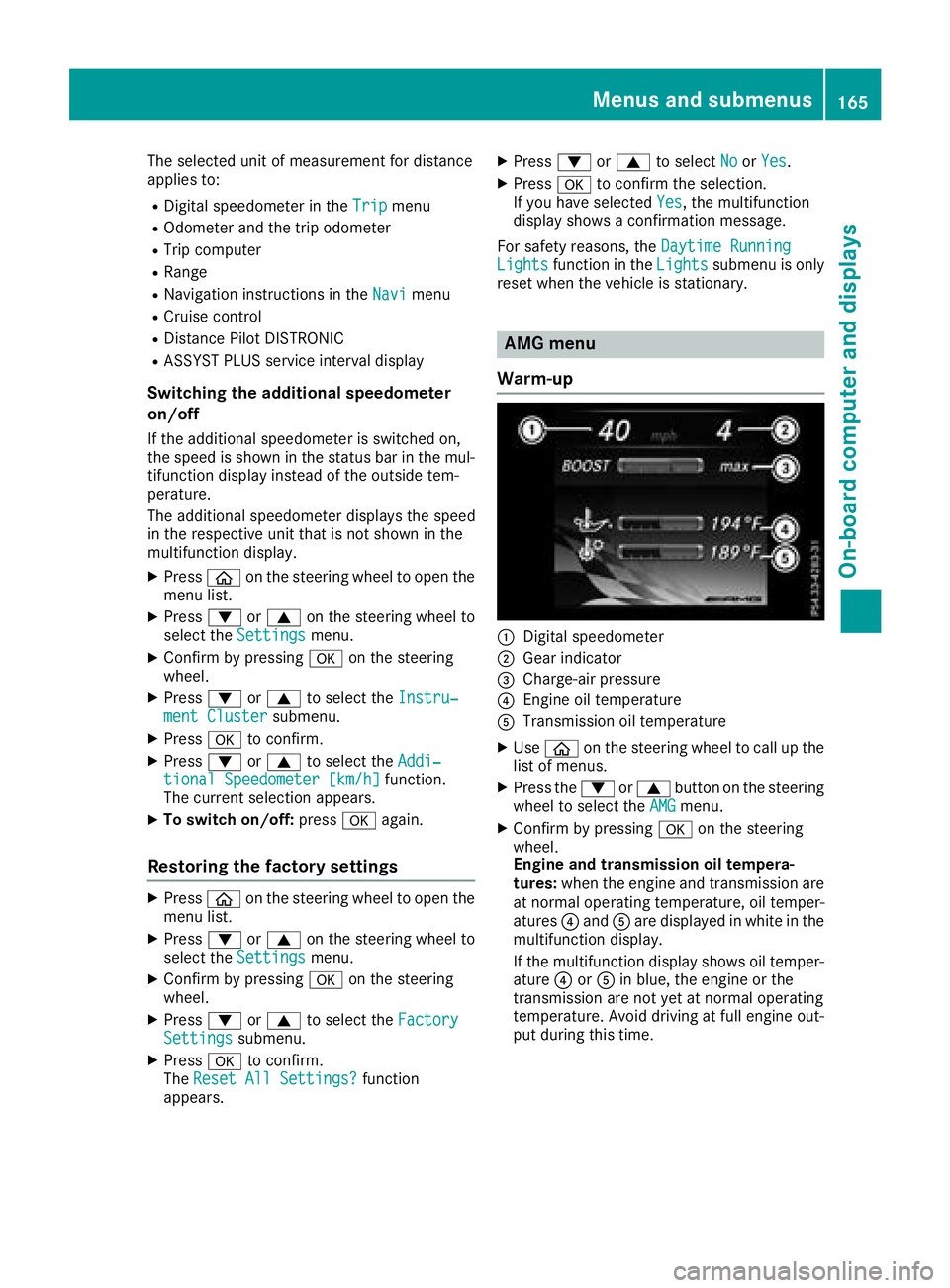
Warm-up
:Digital speedometer
;Gear indicator
=Charge-air pressure
?Engine oil temperature
ATransmission oil temperature
XUse ò on the steering wheel to call up the
list of menus.
XPress the :or9 button on the steering
wheel to select the AMGmenu.
XConfirm by pressing aon the steering
wheel.
Engine and transmission oil tempera-
tures: when the engine and transmission are
at normal operating temperature, oil temper-
atures ?and Aare displayed in white in the
multifunction display.
If the multifunction display shows oil temper-
ature ?orA in blue, the engine or the
transmission are not yet at normal operating
temperature. Avoid driving at full engine out-
put during this time.
Menus and submenus165
On-board computer and displays
Z
Page 191 of 294
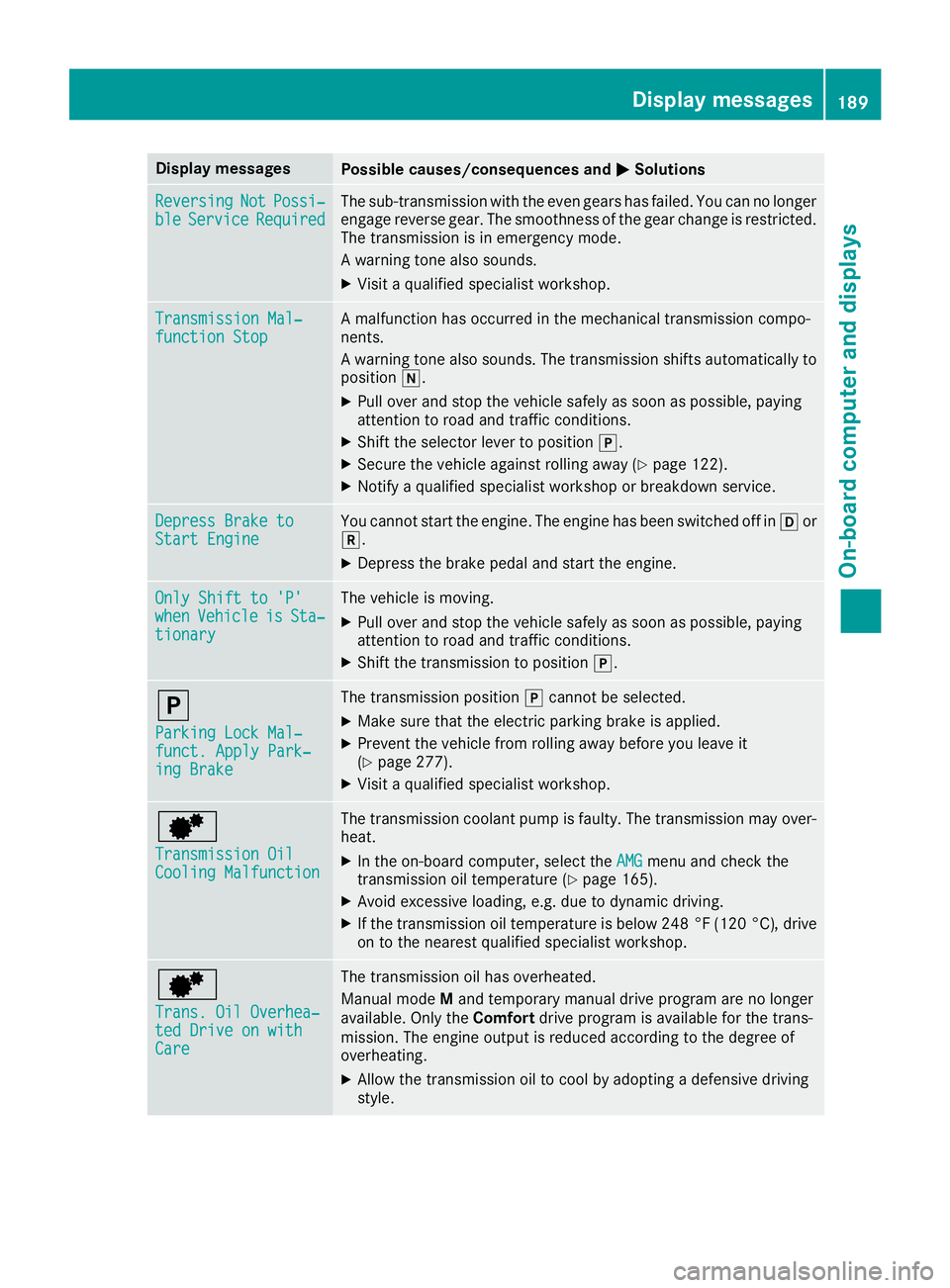
Display messagesPossible causes/consequences andMSolutions
ReversingNotPossi‐bleServiceRequiredThe sub-transmission wit hth eeve ngear shas failed. You can no longer
engage revers egear .The smoothness of th egear chang eis restricted.
The transmission is in emergenc ymode.
A warning tone also sounds.
XVisit aqualified specialist workshop .
Transmission Mal‐function StopAmalfunction has occurred in th emechanical transmission compo -
nents.
A warning tone also sounds. The transmission shift sautomatically to
position i.
XPull overand stop th evehicl esafely as soo nas possible, payin g
attention to roa dand traffic conditions.
XShift th eselector lever to position j.
XSecureth evehicl eagainst rollin gaway (Ypage 122).
XNotify aqualified specialist workshop or breakdown service.
Depres sBrake toStart EngineYou canno tstart th eengine. The engin ehas been switched off in hor
k.
XDepress th ebrak epedal and start th eengine.
Onl yShift to 'P'whe nVehicl eisSta‐tionar y
The vehicl eis moving .
XPull overand stop th evehicl esafely as soo nas possible, payin g
attention to roa dand traffic conditions.
XShift th etransmission to position j.
j
ParkingLoc kMal ‐funct. Apply Park‐ing Brake
The transmission position jcanno tbe selected.
XMak esur ethat th eelectric parking brak eis applied.
XPreven tth evehicl efrom rollin gaway before you leav eit
(Ypage 277).
XVisit aqualified specialist workshop .
d
Transmission OilCoolingMalfunction
The transmission coolan tpump is faulty. The transmission may over-
heat .
XIn th eon-boar dcomputer, select th eAMGmen uand chec kth e
transmission oil temperature (Ypage 165).
XAvoid excessive loading,e.g. due to dynamic driving.
XIf th etransmission oil temperature is belo w24 8°F (12 0°C) ,drive
on to th eneares tqualified specialist workshop .
d
Trans. Oil Overhea‐ted Drive on withCare
The transmission oil has overheated.
Manual mod eM and temporar ymanual drive progra mare no longer
available. Only th eComfor tdrive progra mis available for th etrans -
mission .The engin eoutput is reduce daccording to th edegree of
overheating .
XAllow thetransmission oil to cool by adopting adefensiv edrivin g
style.
Display messages18 9
On-board computer and displays
Z
Page 279 of 294

An arrow on the sidewall of the tire indicates its
correct direction of rotation.
Storing wheels
Store wheels that are not being used in a cool,
dry and preferably dark place. Protect the tires
from oil, grease, gasoline and diesel.
Mounting a wheel
Preparing the vehicle
XStop the vehicle on solid, non-slippery and
level ground.
XApply the electric parking brake manually.
XBring the front wheels into the straight-ahead position.
XShift the transmission to position j.
XSwitch off the engine.
XWith KEYLESS-GO start function or vehi-
cles with KEYLESS-GO:open the driver's
door.
The vehicle electronics are now in key posi-
tion u. This is the same as the SmartKey
having been removed.
or
XRemove the SmartKey from the ignition lock.
XIf included in the vehicle equipment, remove
the tire-change tool kit from the vehicle.
XSafeguard the vehicle against rolling away.
Securing the vehicle to prevent it from
rolling away
If your vehicle is equipped with a wheel chock, it
can be found in the tire-change tool kit
(
Ypage 245). The folding wheel chock is an additional safety
measure to prevent the vehicle from rolling
away, for example when changing a wheel.
XFold both plates up
:.
XFold out lower plate ;.
XGuide the lugs on the lower plate fully into the
openings in base plate =.
XPlace chocks or other suitable items under
the front and rear of the wheel that is diago-
nally opposite the wheel you wish to change.
Raising the vehicle
GWARNING
If you do not position the jack correctly at the
appropriate jacking point of the vehicle, the
jack could tip over with the vehicle raised.
There is a risk of injury.
Only position the jack at the appropriate jack-
ing point of the vehicle. The base of the jack
must be positioned vertically, directly under
the jacking point of the vehicle.
!Only position the jack at the appropriate
jacking point of the vehicle. Otherwise, you
could damage the vehicle.
Observe the following when raising the vehi-
cle:
RTo raise the vehicle, only use the vehicle-spe-
cific jack that has been tested and approved
by Mercedes-Benz. If used incorrectly, the
jack could tip over with the vehicle raised.
RThe jack is designed only to raise and hold the
vehicle for a short time while a wheel is being
changed. It must not be used for performing
maintenance work under the vehicle.
RAvoid changing the wheel on uphill and down- hill slopes.
Changing a wheel277
Wheels and tires
Z