parking brake MERCEDES-BENZ AMG GT COUPE 2018 User Guide
[x] Cancel search | Manufacturer: MERCEDES-BENZ, Model Year: 2018, Model line: AMG GT COUPE, Model: MERCEDES-BENZ AMG GT COUPE 2018Pages: 465, PDF Size: 8.25 MB
Page 132 of 465
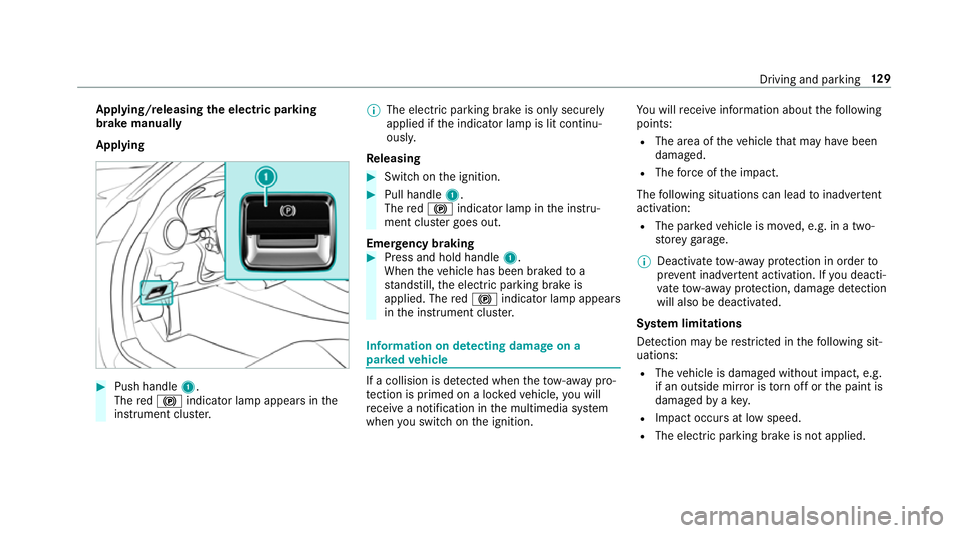
App
lying/releasing the electric pa rking
brake manually
Applying #
Push handle 1.
The red! indicator lamp appears in the
instrument clus ter. %
The electric parking brake is only securely
applied if the indicator lamp is lit continu‐
ously.
Re leasing #
Swit chon the ignition. #
Pull handle 1.
The red! indicator lamp in the instru‐
ment clus ter goes out.
Emer gency braking #
Press and hold handle 1.
When theve hicle has been braked to a
st andstill, the electric parking brake is
applied. The red! indicator lamp appears
in the instrument clus ter. Information on de
tecting dama geon a
pa rked vehicle If a collision is de
tected when theto w- aw ay pro‐
te ction is primed on a loc kedve hicle, you will
re cei vea notification in the multimedia sy stem
when you swit chon the ignition. Yo
u will recei veinformation about thefo llowing
points:
R The area of theve hicle that may ha vebeen
damaged.
R The forc e of the impact.
The following situations can lead toinadver tent
acti vation:
R The pa rked vehicle is mo ved, e.g. in a two-
st or ey garage.
% Deactivate tow- aw ay protection in order to
pr eve nt inadver tent acti vation. If you deacti‐
va te tow- aw ay protection, damage de tection
will also be deactivated.
Sy stem limitations
De tection may be restricted in thefo llowing sit‐
uations:
R The vehicle is damaged without impact, e.g.
if an outside mir ror is torn off or the paint is
damaged byakey.
R Impact occurs at low speed.
R The electric parking brake is not applied. Driving and parking
12 9
Page 134 of 465
and do not
relie ve you of your responsibility per‐
ta ining toroad traf fic la w.Pay attention tothe
traf fic conditions at all times and inter vene
when necessa ry. Be aware of the limitations
re ga rding the safe use of these sy stems. Information about
radar senso rs Some driving and driving sa
fety sy stems use
ra dar sensors tomonitor the area in front of,
behind or next totheve hicle (depending on the
ve hicle's equipment).
Depending on theve hicle's equipment, thera dar
sensors are integrated behind the bumpers
and/or behind the Mercedes star. Keep these
parts free of dirt, ice and slush (/ page314).
The sensors must not be co vered, forex ample
by cycle rack s, overhanging loads, sticke rs,fo il
or foils toprotect against stone chipping. In the
eve nt of dama getothe bumpers or radiator
grille, or following a collision impacting the
bumpers or radiator grille, ha vethe function of
th era dar sensors checked at a qualified special‐
ist workshop. The driver assis tance sy stem may
no longer workproperly. Overview of driving sy
stems and driving
saf ety sy stems In
this section, you will find information about
th efo llowing driving sy stems and driving saf ety
sy stems:
R ABS (A nti-lock Braking System)
(/ page 131)
R Active Dis tance Assi stDISTRONIC
(/ page 142)
R Adaptive Brake Lights (/ page137)
R AMG RIDE CONTROL (/ page151)
R Active Brake Assi st
R Lane Keeping Assist (/ page161)
R ATTENTION ASSIST (/ page157)
R BAS (B rake Assist System) (/ page132)
R Hill Start Assist (/ page146)
R EBD ( Electronic Brakeforc eDistribution)
(/ page 135)
R ESP ®
(Electronic Stability Program)
(/ page 132)
R HOLD fu nction (/ page 146) R
Limi ter (/ page139)
R Parking Assist PARKTRONIC (/ page152)
R Front and reve rsing camera (/ page154)
R RACE START (/ page 148)
R Cruise control (/ page 138)
R Blind Spot Assist (/ page160)
R Traf fic Sign Assi st (/ page 158) Fu
nction of ABS (Anti-lock Braking Sy stem) ABS
regulates the brake pressure in critical driv‐
ing situations:
R During braking, e.g. at full brake application
or insuf ficient tyre traction, the wheels are
pr eve nted from lo cking.
R Vehicle steerability while braking is ensured.
If ABS inter venes when braking, you will feel a
pulsing in the brake pedal. The pulsating brake
pedal can be an indication of hazardous road
conditions and can ser veas a reminder totake
ex tra care while driving. Driving and pa
rking 131
Page 136 of 465
handling mode or
was deactivated before the
engine was switched off.
ESP ®
is inter vening if the ESP ®
÷ warning
lamp flashes in the instrument clus ter:
R Do not deacti vate ESP ®
.
R Only depress the accelera tor pedal as far as
is necessar y.
R Adapt your driving style to suit the cur rent
ro ad and weather conditions.
Cha racteristics of activated SPORT handling
mode &
WARNING Risk of skidding due toincor‐
re ct application of SPORT handling mode
When you activate SPORT handling mode,
th ere is an increased risk of skidding and
having an accident. #
Only activate SPORT handling mode in
th e circums tances described as follo ws. Select SPORT handling mode when
theve hicle's
ow nov ersteering and under steering characteris‐ tics are desired,
forex ample when driving on
specially designated roads.
On lya high ly qualified and experienced driver
should drive in SPORT handling mode or with
ESP ®
deactivated.
If SPORT handling mode is activated and one or
more wheels start tospin, the÷ ESP®
wa rn‐
ing lamp in the instrument clus terflashes. ESP ®
th en only stabilises theve hicle toa limited
deg ree.
If SPORT handling mode is activated:
R ESP ®
only impr oves driving stability toa limi‐
te d deg ree.
R ETS/4ETS traction control is still active.
R The engine's torque is on lyrestricted to a
limited degree and the drive wheels can spin.
The spinning of the wheels results in a cut‐
ting action for better traction on loose sur fa‐
ces.
R ESP ®
continues toprov ide assis tance when
th e brakes are firm lyapplied. Cha
racteristics when ESP ®
is deactivated &
WARNING Risk of skidding if ESP ®
is
deactivated
If yo u deactivate ESP ®
, ESP ®
cannot car ry
out vehicle stabilisation. #
ESP ®
should on lybe deactivated in the
fo llowing situations. ESP
®
is deactivated if theå ESP®
OFF warn‐
ing lamp lights up continuously in the instrument
clus ter:
R Driving stability will no lon ger be impr oved.
R Crosswind Assist is no longer active.
R The drive wheels could spin.
R ETS/4ETS traction control is still active.
% Even when ESP ®
is deactivated, you are still
assis tedby ESP ®
when braking ha rd.
In thefo llowing situations, it may be better to
activate SPO RThandling mode or deactivate
ESP ®
:
R When using snow chains. Driving and parking
13 3
Page 142 of 465
Fu
nction of the limiter
The limiter restricts the speed of theve hicle. To
re duce the speed tothe set speed, the limiter
applies the brakes automaticall y.
Yo u can limit the speed as follo ws:
R Variable: for speed limits, e.g. in built-up
areas.
R Perm anen t:for long-term speed restrictions,
e.g. when driving in winter tyre mode.
The variable limiter is operated using the cor re‐
sponding steering wheel buttons. You can store
any speed from 30 km/h to250 km/h or up to
th e set winter tyre limit. You can also per form
settings while theve hicle is stationary if the
ve hicle has been star ted.
If yo ufa ilto adapt your driving style, the limiter
can neither reduce therisk of an accident nor
ove rride the la wsof ph ysics. It cannot take into
account road, weather or traf fic conditions. The
limiter is only an aid. You are responsible for
maintaining a safe dis tance totheve hicle in
front, forve hicle speed, for braking in good time
and forst ay ing in lane. Displa
ysinthe instrument display
The status of the limiter and thestored speed
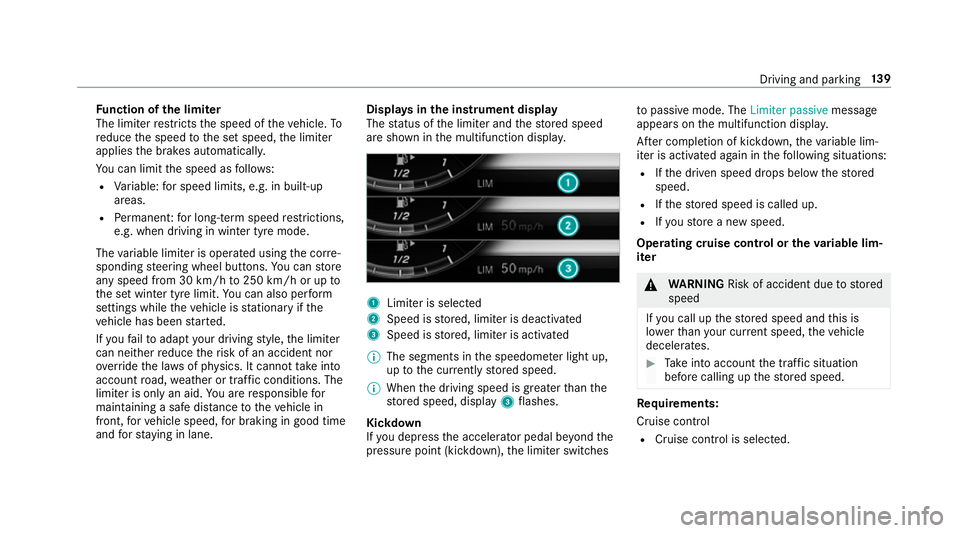
are shown in the multifunction displa y. 1
Limiter is selected
2 Speed is stored, limiter is deactivated
3 Speed is stored, limiter is activated
% The segments in the speedome ter light up,
up tothe cur rently stored speed.
% When the driving speed is greater than the
st ored speed, display 3flashes.
Kickd own
If yo u depress the accelerator pedal be yond the
pressure point (kickdown), the limiter switches to
passive mode. The Limiter passivemessage
appears on the multifunction displa y.
Af ter completion of kickdown, theva riable lim‐
iter is activated again in thefo llowing situations:
R Ifth e driven speed drops below thestored
speed.
R Ifth estored speed is called up.
R Ifyo ustore a new speed.
Operating cruise control or theva riable lim‐
iter &
WARNING Risk of accident due tostored
speed
If yo u call up thestored speed and this is
lo we rth an your cur rent speed, theve hicle
decelerates. #
Take into account the tra ffic situation
before calling up thestored speed. Re
quirements:
Cruise control
R Cruise control is selected. Driving and parking
13 9
Page 144 of 465
Increasing/decreasing
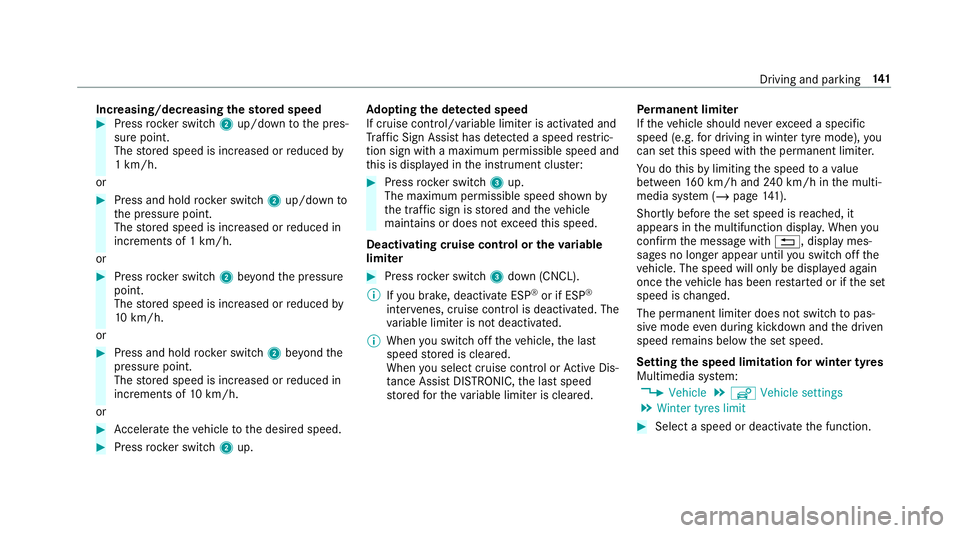
thesto red speed #
Press rocker switch 2up/down tothe pres‐
sure point.
The stored speed is increased or reduced by
1 km/h.
or #
Press and hold rocker switch 2up/down to
th e pressure point.
The stored speed is increased or reduced in
increments of 1 km/h.
or #
Press rocker switch 2beyond the pressure
point.
The stored speed is increased or reduced by
10 km/h.
or #
Press and hold rocker switch 2beyond the
pressure point.
The stored speed is increased or reduced in
increments of 10km/h.
or #
Accelerate theve hicle tothe desired speed. #
Press rocker switch 2up. Ad
opting the de tected speed
If cruise control/ variable limiter is activated and
Tr af fic Sign Assi sthas de tected a speed restric‐
tion sign wi tha maximum permissible speed and
th is is displa yed in the instrument clus ter: #
Press rocker switch 3up.
The maximum permissible speed shown by
th e traf fic sign is stored and theve hicle
maintains or does not exceed this speed.
Deactivating cruise control or theva riable
limi ter #
Press rocker switch 3down (CNCL).
% Ifyo u brake, deactivate ESP ®
or if ESP ®
inter venes, cruise control is deacti vated. The
va riable limiter is not deactivated.
% When you swit choff theve hicle, the last
speed stored is cleared.
When you select cruise cont rol or Active Dis‐
ta nce Assi stDISTRONIC, the last speed
st ored forth eva riable limiter is cleared. Pe
rm anent limi ter
If th eve hicle should ne verexc eed a specific
speed (e.g. for driving in winter tyre mode), you
can set this speed with the permanent limiter.
Yo u do this by limiting the speed toava lue
between 160 km/h and 240 km/h in the multi‐
media sy stem (/ page141).
Shortly before the set speed is reached, it
appears in the multifunction displa y.When you
confirm the message with %, display mes‐
sages no longer appear until you swit choff the
ve hicle. The speed will only be displa yed again
once theve hicle has been restar ted or if the set
speed is changed.
The permanent limiter does not swit chtopas‐
sive mode even du ring kickdown and the driven
speed remains below the set speed.
Setting the speed limitation for winter tyres
Multimedia sy stem:
4 Vehicle 5
î Vehicle settings
5 Winter tyres limit #
Select a speed or deactivate the function. Driving and parking
141
Page 146 of 465
R
IfAc tive Dis tance Assi stDISTRONIC no
longer de tects a vehicle in front or does
not react toreleva nt objects. #
Alw ays carefully obser vethe traf fic con‐
ditions and be ready tobrake at all
times. #
Take into account the tra ffic situation
before calling up thestored speed. &
WARNING Risk of accident due toinsuf‐
fi cient decele ration byActive Dis tance
Assi stDISTRONIC
Ac tive Dis tance Assi stDISTRONIC brakes
yo ur vehicle with up to50 % of the maximum
possible deceleration. If this decele ration is
not su fficient, Active Dis tance Assi st
DISTRONIC alerts you with a visual and
acoustic warning. #
Inthese cases, adjust your speed and
ke ep a suf ficient di stance. #
Brake theve hicle yourself and/or take
ev asive action. &
WARNING Risk of accident if de tection
function of Active Dis tance Assi st
DISTRONIC is impaired
Ac tive Dis tance Assi stDISTRONIC does not
re act or has a limited reaction:
R when driving on a dif fere nt lane or when
ch anging lanes
R topedestrians, animals, bicycles or sta‐
tionary vehicles, or unexpected obs tacles
R tocompl extraf fic conditions
R tooncoming vehicles and crossing traf fic
As a result, Active Dis tance Assi st
DISTRONIC may nei ther give warnings nor
inter vene in su chsituations. #
Alw ays obser vethe tra ffic conditions
carefully and react accordin gly. Operating
Active Di stance Assist DIST RONIC
Re quirements:
R The vehicle has been star ted.
R The elect ric pa rking brake is released. R
ESP ®
is activated and is not inter vening.
R The transmission is in position h.
R All doors and the bonn etare closed.
R Check of thera dar sensor sy stem has been
successfully comple ted.
R Parking Assist PARKTRONIC is not being
used topark theve hicle or toexit from a
parking space.
R The vehicle does not skid. Driving and parking
14 3
Page 148 of 465
cle
topreve nt it from rolling away
before you lea vethe driver's seat. #
Press rocker switch 4down (CNCL).
% Ifyo u brake, deactivate ESP ®
or if ESP ®
inter venes, Active Dis tance Assi st
DISTRONIC is deacti vated.
Increasing or reducing the speed #
Press rocker switch 3up (SET+) or down
(SET-) tothe pressure point.
The stored speed is increased or reduced by
1 km/h.
or #
Press and hold rocker switch 3up/down to
th e pressure point.
The stored speed is increased or reduced in
increments of 1 km/h.
or #
Press rocker switch 3beyond the pressure
point.
The stored speed is increased or reduced by
10 km/h.
or #
Press and hold rocker switch 3beyond the
pressure point.
The stored speed is increased or reduced in
increments of 10km/h.
Re ducing or inc reasing the specified dis‐
tance from theve hicle in front #
Toincrease the specified distance: press
rock er switch 2down. #
Toreduce the speci fied distance: press
rock er switch 2up. Overview of
Active Di stance Assist
DISTRO NIC displa ysinthe instrument clus‐
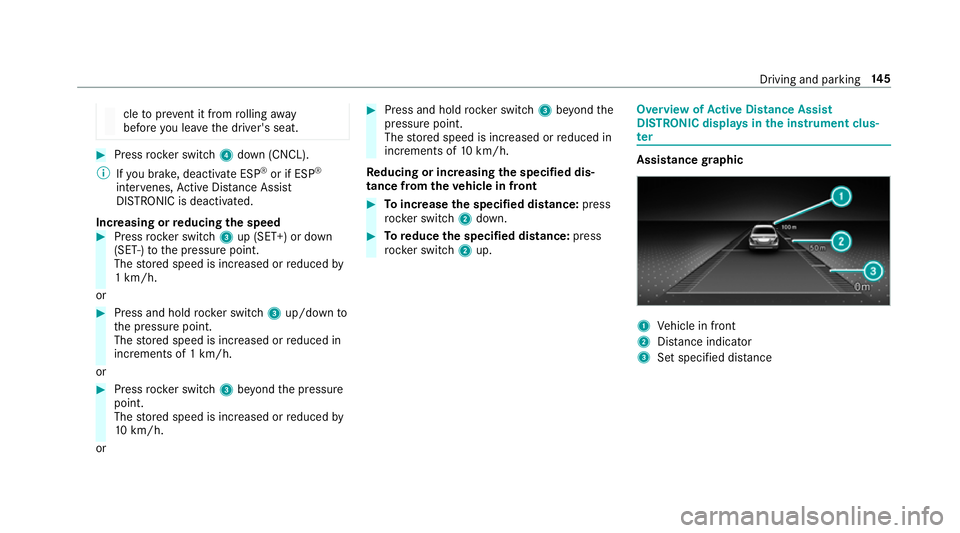
ter Assistance
graphic 1
Vehicle in front
2 Distance indica tor
3 Set specified di stance Driving and parking
14 5
Page 150 of 465
Ac
tivating/deactivating the HOLD function &
WARNING Risk of an accident due tothe
HOLD function being activated when you
lea vetheve hicle
If yo u lea vetheve hicle while only the HOLD
function is braking theve hicle, theve hicle
can rollaw ay inthefo llowing situations:
R Ifth ere is a malfunction in the sy stem or
in the po wer supp ly.
R Ifth e HOLD function is deactivated by
depressing the accelera tor pedal or brake
pedal, e.g. byave hicle occupant. #
Alw ays deactivate the HOLD function
and secure theve hicle against rolling
aw ay before leaving theve hicle. *
NO
TEDama gefrom auto matic braking If one of
thefo llowing functions is switched
on, theve hicle brakes automatically in cer‐
ta in situations:
R Active Brake Assi st
R Active Dis tance Assi stDISTRONIC
R HOLD function
R Active Parking Assist
To avo id damage totheve hicle, deactivate
th ese sy stems in thefo llowing or similar sit‐
uations: #
During towing #
In a car wash Re
quirements:
R The vehicle is stationar y.
R The driver's door is closed or the seat belt on
th e driver's side is fastened.
R The engine is running or has been au tomati‐
cally switched off bythe ECO start/ stop
function. R
The electric parking brake is released.
R Active Dis tance Assi stDISTRONIC is deacti‐
va ted.
R The transmission is in position h,kori.
Ac tivating the HOLD function #
Dep ress the brake pedal and af ter a short
time quickly depress fur ther until theë
display appears in the multifunction displa y. #
Release the brake pedal.
Deactivating the HOLD function #
Depress the accelerator pedal topull away.
or #
Depress the brake pedal until theë dis‐
play disappears from the multifunction dis‐
pla y.
The HOLD function is deactivated in thefo llow‐
ing situations:
R Active Dis tance Assi stDISTRONIC is acti va‐
te d.
R The transmission is switched toposition j. Driving and parking
147
Page 151 of 465
R
The vehicle is secured with the electric park‐
ing brake.
In thefo llowing situations, theve hicle is held by
th e transmission position jorby the electric
parking brake:
R The seat belt is unfas tened and the driver's
door is opened.
R The drive sy stem is switched off.
R There is a malfunction in the sy stem or the
po we r supply is insuf ficient. RACE
START Fu
nction of RACE START
RACE START enables optimal vehicle accelera‐
tion from a standstill. Forth is, a suitably high-
grip road sur face is requ ired, the tyres and vehi‐
cle must also be in good condition.
% RACE START is only available af terth eve hi‐
cle has been run in (/ page 109).
% RACE START may not be used on normal
ro ads. RACE START mu stonly be activated and used on dedicated
race circuits, not on
public roads.
Be sure toread the saf ety no tes and infor‐
mation on ESP ®
(/ page 132). &
WARNING Risk of skidding and having
an accident from wheels spinning
When you use RACE STAR T,individual wheels
could spin and you could lose cont rol of the
ve hicle.
Depending on the ESP ®
mode selected, there
is an increased risk of skidding and having an
accident. #
Make sure that no persons or obstacles
are in the close vicinity of your vehicle. Ac
tivating RACE START
Re quirements:
R the doors, the bonn etand theta ilgate are
closed.
R the engine is running and the transmission
and engine are at normal operating temp era‐
ture. R
thesteering wheel is in thest ra ight-ahead
position.
R theve hicle is on le vel ground.
R theve hicle is stationar y,the brake pedal is
depressed (left foot ) and the parking brake is
re leased.
R the transmission is in position h.
R one of the drive prog rams C, Bor
I is selected (/ page114). #
Rapidly depress the accelerator pedal full y.
The engine speed increases.
% Ifth e activation conditions are not fulfilled,
RACE START cannot be acti vated. The RACE
START not possible See Owner's Manual
message appears in the multifunction dis‐
pla y. #
The RACE START Release brake to start mes‐
sage appears in the multifunction displa y.14 8
Driving and pa rking
Page 159 of 465
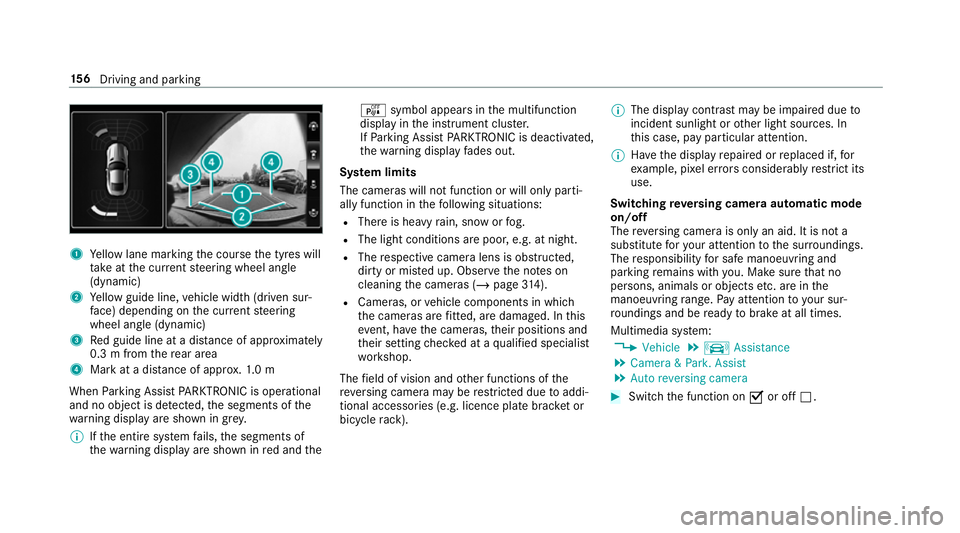
1
Yellow lane marking the course the tyres will
ta ke atthe cur rent steering wheel angle
(dynamic)
2 Yellow guide line, vehicle width (driven sur‐
fa ce) depending on the cur rent steering
wheel angle (dynamic)
3 Red guide line at a dis tance of appr oximately
0.3 m from there ar area
4 Mark at a distance of appr ox.1. 0 m
When Parking Assist PARKTRONIC is operational
and no object is de tected, the segments of the
wa rning display are shown in grey.
% Ifth e entire sy stem fails, the segments of
th ewa rning display are shown in red and the é
symbol appears inthe multifunction
display in the instrument clus ter.
If Pa rking Assist PARKTRONIC is deacti vated,
th ewa rning display fades out.
Sy stem limits
The cameras will not function or will only parti‐
ally function in thefo llowing situations:
R There is heavy rain, snow or fog.
R The light conditions are poor, e.g. at night.
R The respective camera lens is obstructed,
dirty or mis ted up. Obser vethe no tes on
cleaning the cameras (/ page314).
R Cameras, or vehicle components in which
th e cameras are fitted, are dama ged. In this
eve nt, ha vethe cameras, their positions and
th eir setting checked at a qualified specialist
wo rkshop.
The field of vision and other functions of the
re ve rsing camera may be restricted due toaddi‐
tional accesso ries (e.g. licence plate brac ket or
bicycle rack ). %
The display contrast may be impaired due to
incident sunlight or other light sources. In
th is case, pay particular attention.
% Have the display repaired or replaced if, for
ex ample, pixel er rors considerably restrict its
use.
Switching reve rsing camera automatic mode
on/off
The reve rsing camera is only an aid. It is not a
substitute foryo ur attention tothe sur roundings.
The responsibility for safe manoeuvring and
parking remains with you. Make sure that no
persons, animals or objects etc. are in the
manoeuvring range. Pay attention to your sur‐
ro undings and be ready tobrake at all times.
Multimedia sy stem:
4 Vehicle 5
k Assistance
5 Camera & Park. Assist
5 Auto reversing camera #
Switch the function on Oor off ª. 15 6
Driving and pa rking