sensor MERCEDES-BENZ AMG GT COUPE 2018 User Guide
[x] Cancel search | Manufacturer: MERCEDES-BENZ, Model Year: 2018, Model line: AMG GT COUPE, Model: MERCEDES-BENZ AMG GT COUPE 2018Pages: 465, PDF Size: 8.25 MB
Page 112 of 465
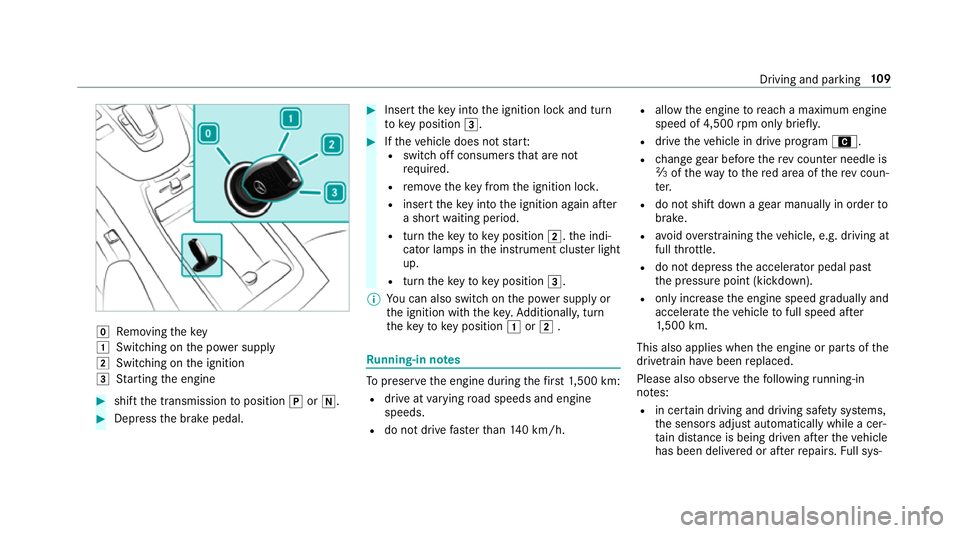
g
Removing thekey
1 Switching on the po wer supp ly
2 Switching on the ignition
3 Starting the engine #
shift the transmission toposition jori. #
Depress the brake pedal. #
Insert theke y in tothe ignition lock and turn
to key position 3. #
Ifth eve hicle does not star t:
R switch off consumers that are not
requ ired.
R remo vetheke y from the ignition loc k.
R inse rttheke y in tothe ignition again af ter
a short waiting period.
R turn theke yto key position 2.the indi‐
cator lamps in the instrument clus ter light
up.
R turn theke yto key position 3.
% You can also swit chon the po wer supp lyor
th e ignition with thekey. Additionall y,turn
th eke yto key position 1or2 . Ru
nning-in no tes To
preser vethe engine during thefirs t1, 500 km:
R drive at varying road speeds and engine
speeds.
R do not drive fasterthan 140 km/h. R
allow the engine toreach a maximum engine
speed of 4,500 rpm on ly brie fly.
R drive theve hicle in drive program A.
R change gear before there v counter needle is
Ô ofthewa yto there d area of there v coun‐
te r.
R do not shift down a gear manually in order to
brake.
R avoidove rstraining theve hicle, e.g. driving at
full thro ttle.
R do not depress the accelera tor pedal past
th e pressure point (kickdown).
R only increase the engine speed gradually and
accelera tetheve hicle tofull speed af ter
1, 500 km.
This also applies when the engine or parts of the
driv etra in ha vebeen replaced.
Please also obser vethefo llowing running-in
no tes:
R in cer tain driving and driving saf ety sy stems,
th e sensors adjust automatically while a cer‐
ta in dis tance is being driven af terth eve hicle
has been delivered or af terre pairs. Full sys‐ Driving and parking
109
Page 134 of 465
and do not
relie ve you of your responsibility per‐
ta ining toroad traf fic la w.Pay attention tothe
traf fic conditions at all times and inter vene
when necessa ry. Be aware of the limitations
re ga rding the safe use of these sy stems. Information about
radar senso rs Some driving and driving sa
fety sy stems use
ra dar sensors tomonitor the area in front of,
behind or next totheve hicle (depending on the
ve hicle's equipment).
Depending on theve hicle's equipment, thera dar
sensors are integrated behind the bumpers
and/or behind the Mercedes star. Keep these
parts free of dirt, ice and slush (/ page314).
The sensors must not be co vered, forex ample
by cycle rack s, overhanging loads, sticke rs,fo il
or foils toprotect against stone chipping. In the
eve nt of dama getothe bumpers or radiator
grille, or following a collision impacting the
bumpers or radiator grille, ha vethe function of
th era dar sensors checked at a qualified special‐
ist workshop. The driver assis tance sy stem may
no longer workproperly. Overview of driving sy
stems and driving
saf ety sy stems In
this section, you will find information about
th efo llowing driving sy stems and driving saf ety
sy stems:
R ABS (A nti-lock Braking System)
(/ page 131)
R Active Dis tance Assi stDISTRONIC
(/ page 142)
R Adaptive Brake Lights (/ page137)
R AMG RIDE CONTROL (/ page151)
R Active Brake Assi st
R Lane Keeping Assist (/ page161)
R ATTENTION ASSIST (/ page157)
R BAS (B rake Assist System) (/ page132)
R Hill Start Assist (/ page146)
R EBD ( Electronic Brakeforc eDistribution)
(/ page 135)
R ESP ®
(Electronic Stability Program)
(/ page 132)
R HOLD fu nction (/ page 146) R
Limi ter (/ page139)
R Parking Assist PARKTRONIC (/ page152)
R Front and reve rsing camera (/ page154)
R RACE START (/ page 148)
R Cruise control (/ page 138)
R Blind Spot Assist (/ page160)
R Traf fic Sign Assi st (/ page 158) Fu
nction of ABS (Anti-lock Braking Sy stem) ABS
regulates the brake pressure in critical driv‐
ing situations:
R During braking, e.g. at full brake application
or insuf ficient tyre traction, the wheels are
pr eve nted from lo cking.
R Vehicle steerability while braking is ensured.
If ABS inter venes when braking, you will feel a
pulsing in the brake pedal. The pulsating brake
pedal can be an indication of hazardous road
conditions and can ser veas a reminder totake
ex tra care while driving. Driving and pa
rking 131
Page 140 of 465
Situation-dependent braking assistance
Situation-dependent braking assistance may
inter vene at speeds abo veappr oxima tely
7 km/h in thefo llowing situations:
Ve hicles tr avelling in
front Up
toappr ox.
250 km/h
St ationary vehicles Uptoappr ox.
70 km/h Cancelling a brake application of
Active
Brake Assi st
Yo u can cancel a brake application byActive
Brake Assi stat any time by:
R Fully depressing the accelerator pedal or
with kickdown.
R Releasing the brake pedal.
Ac tive Brake Assi stmay cancel the brake appli‐
cation when one of thefo llowing conditions is
fulfilled:
R You manoeuv retoavoid the obs tacle.
R The reis no longer a risk of collision. R
An obs tacle is no longer de tected in front of
yo ur vehicle.
Sy stem limitations
The sy stem may be impaired or may not function
in thefo llowing situations:
R In sno w,rain, fog, heavy spr ay, if there is
gl are, in direct sunlight or in great lyvarying
light conditions.
R Ifth e sensors are dirty, mis ted up, damaged
or co vered.
R Ifth e sensors are impaired due tointer fer‐
ence from other radar sources, e.g. strong
ra dar reflections in multi-s torey car par ks.
R If a loss of tyre pressure or a defective tyre
has been de tected and displ ayed.
R Full sy stem per form ance is not available for a
fe w seconds af ter switching on the ignition
or af ter driving off.
R In complex traf fic situations whe reobjects
cannot always be clearly identified.
R Forve hicles if they mo vequickly into the
sensor de tection range. R
On bends wi tha tight radius. Setting
Active Brake Assi st Multimedia sy
stem:
4 Vehicle 5
k Assistance
5 Active Brake Assist #
Activate or deacti vate the function.
% It is recommended that you alw ays lea ve
Ac tive Brake Assi stactivated.
% IfAc tive Brake Assi stis deactivated, the
æ symbol appears inthest atus bar of the
multifunction displa y. Fu
nction of Adaptive Brake Lights Ad
aptive Brake Lights warnfollowing traf fic in an
emergency braking situation wi th thefo llowing
actions:
R Byflashing the brake lamps
R By activating the hazard warning lights
If th eve hicle is braked sharply from speeds
abo ve50 km/h, the brake lamps flash rapidl y. Driving and pa
rking 137
Page 145 of 465
Ac
tive Di stance Assist DISTRO NICFu
nction of Active Di stance Assist
DISTRO NIC Ac
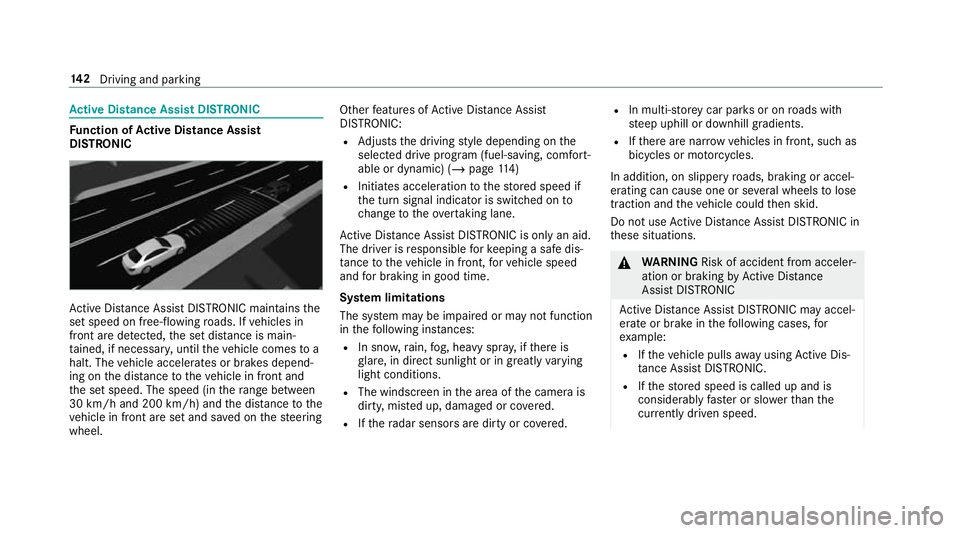
tive Dis tance Assi stDISTRONIC maintains the
set speed on free-flowing roads. If vehicles in
front are de tected, the set dis tance is main‐
ta ined, if necessar y,until theve hicle comes to a
halt. The vehicle accelerates or brakes depend‐
ing on the dis tance totheve hicle in front and
th e set speed. The speed (in thera nge between
30 km/h and 200 km/h) and the dis tance tothe
ve hicle in front are set and sa ved on thesteering
wheel. Other
features of Active Dis tance Assi st
DISTRONIC:
R Adjusts the driving style depending on the
selected drive program (fuel-saving, comfort‐
able or dynamic) (/ page114)
R Initiates ac celerationtothestored speed if
th e turn signal indicator is switched on to
ch ange totheov ertak ing lane.
Ac tive Dis tance Assi stDISTRONIC is only an aid.
The driver is responsible forke eping a safe dis‐
ta nce totheve hicle in front, forve hicle speed
and for braking in good time.
Sy stem limitations
The sy stem may be impaired or may not function
in thefo llowing ins tances:
R In sno w,rain, fog, heavy spr ay, if there is
gl are, in direct sunlight or in great lyvarying
light conditions.
R The windsc reen in the area of the camera is
dirty, mis ted up, damaged or co vered.
R Ifth era dar sensors are dirty or co vered. R
In multi- stor ey car pa rks or on roads with
st eep uphill or downhill gradients.
R Ifth ere are nar rowvehicles in front, such as
bicycles or mo torcyc les.
In addition, on slippery roads, braking or accel‐
erating can cause one or se veral wheels tolose
traction and theve hicle could then skid.
Do not use Active Dis tance Assi stDISTRONIC in
th ese situations. &
WARNING Risk of accident from acceler‐
ation or braking byActive Dis tance
Assi stDISTRONIC
Ac tive Dis tance Assi stDISTRONIC may accel‐
erate or brake in thefo llowing cases, for
ex ample:
R Ifth eve hicle pulls away using Active Dis‐
ta nce Assi stDISTRONIC.
R Ifth estored speed is called up and is
considerably faster or slo werth an the
cur rently driven speed. 14 2
Driving and pa rking
Page 146 of 465
R
IfAc tive Dis tance Assi stDISTRONIC no
longer de tects a vehicle in front or does
not react toreleva nt objects. #
Alw ays carefully obser vethe traf fic con‐
ditions and be ready tobrake at all
times. #
Take into account the tra ffic situation
before calling up thestored speed. &
WARNING Risk of accident due toinsuf‐
fi cient decele ration byActive Dis tance
Assi stDISTRONIC
Ac tive Dis tance Assi stDISTRONIC brakes
yo ur vehicle with up to50 % of the maximum
possible deceleration. If this decele ration is
not su fficient, Active Dis tance Assi st
DISTRONIC alerts you with a visual and
acoustic warning. #
Inthese cases, adjust your speed and
ke ep a suf ficient di stance. #
Brake theve hicle yourself and/or take
ev asive action. &
WARNING Risk of accident if de tection
function of Active Dis tance Assi st
DISTRONIC is impaired
Ac tive Dis tance Assi stDISTRONIC does not
re act or has a limited reaction:
R when driving on a dif fere nt lane or when
ch anging lanes
R topedestrians, animals, bicycles or sta‐
tionary vehicles, or unexpected obs tacles
R tocompl extraf fic conditions
R tooncoming vehicles and crossing traf fic
As a result, Active Dis tance Assi st
DISTRONIC may nei ther give warnings nor
inter vene in su chsituations. #
Alw ays obser vethe tra ffic conditions
carefully and react accordin gly. Operating
Active Di stance Assist DIST RONIC
Re quirements:
R The vehicle has been star ted.
R The elect ric pa rking brake is released. R
ESP ®
is activated and is not inter vening.
R The transmission is in position h.
R All doors and the bonn etare closed.
R Check of thera dar sensor sy stem has been
successfully comple ted.
R Parking Assist PARKTRONIC is not being
used topark theve hicle or toexit from a
parking space.
R The vehicle does not skid. Driving and parking
14 3
Page 155 of 465
ing a sporty driving
style, e.g. on winding
count ryroads.
R SPORT PLUS ensures avery firm suspension
tuning. #
Press display button 1.
The display button sho wscurrently selected
suspension setting 2:
R à C(blue): COMFORT R
à S(yellow): SPORT
R à S+(red): SPORT PLUS
The selected suspension setting is shown in
th e multifunction display as a message:
R AMG Ride Control COMFORT
R AMG Ride Control SPORT
R AMG Ride Control SPORT + Pa
rking Assist PARKTRONIC Fu
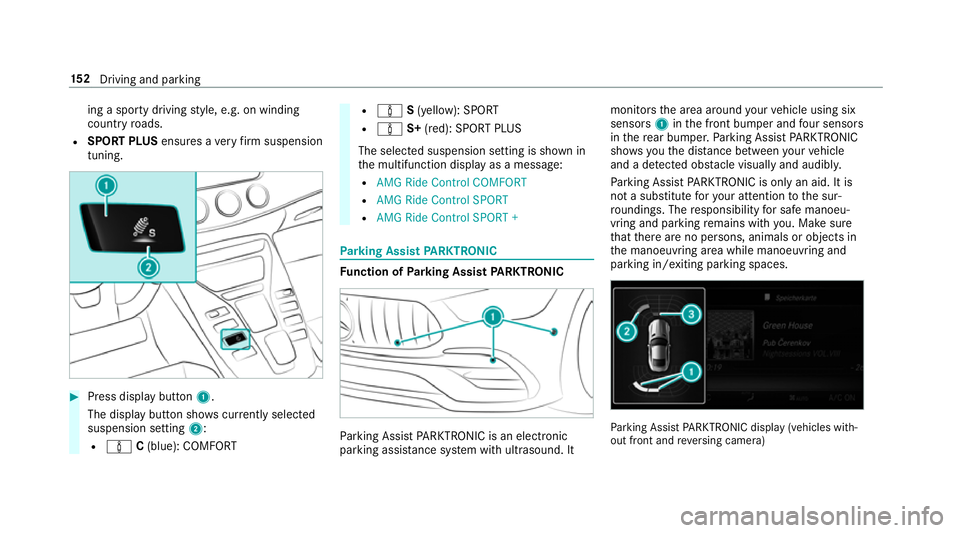
nction of Parking Assist PARKTRONIC Pa
rking Assist PARKTRONIC is an electronic
parking assi stance sy stem with ultrasound. It monitors
the area around your vehicle using six
sensors 1inthe front bumper and four sensors
in there ar bumper. Parking Assist PARKTRONIC
sho wsyouth e dis tance between your vehicle
and a de tected obs tacle visually and audibly.
Pa rking Assist PARKTRONIC is on lyan aid. It is
not a substitute foryo ur attention tothe sur‐
ro undings. The responsibility for safe manoeu‐
vring and parking remains with you. Make sure
th at there are no persons, animals or objects in
th e manoeuvring area while manoeuvring and
parking in/exiting parking spaces. Pa
rking Assist PARKTRONIC display (vehicles with‐
out front and reve rsing camera) 15 2
Driving and pa rking
Page 156 of 465
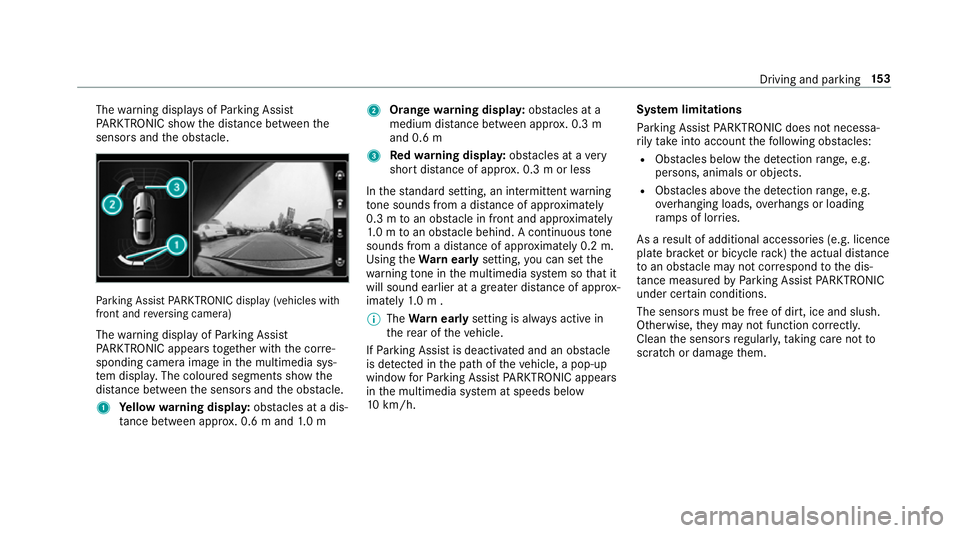
The
warning displa ysofParking Assist
PA RKTRONIC show the dis tance between the
sensors and the obs tacle. Pa
rking Assist PARKTRONIC display (vehicles with
front and reve rsing camera)
The warning display of Parking Assist
PA RKTRONIC appears toge ther with the cor re‐
sponding camera image in the multimedia sys‐
te m displa y.The coloured segments show the
dis tance between the sensors and the obs tacle.
1 Yellow warning displa y:obs tacles at a dis‐
ta nce between appr ox. 0.6 m and 1.0 m 2
Orange warning displa y:obs tacles at a
medium di stance between appr ox. 0.3 m
and 0.6 m
3 Redwa rning displa y:obs tacles at a very
short dis tance of appr ox. 0.3 m or less
In thest andard setting, an intermit tent wa rning
to ne sounds from a di stance of appr oximately
0.3 m toan obs tacle in front and appr oximately
1. 0 m toan obs tacle behind. A continuous tone
sounds from a di stance of appr oximately 0.2 m.
Using theWa rnear lysetting, you can set the
wa rning tone in the multimedia sy stem so that it
will sound earlier at a greater dis tance of appr ox‐
imately 1.0 m .
% The Warnear lysetting is alw ays active in
th ere ar of theve hicle.
If Pa rking Assist is deactivated and an obs tacle
is de tected in the path of theve hicle, a pop-up
window forPa rking Assist PARKTRONIC appears
in the multimedia sy stem at speeds below
10 km/h. Sy
stem limitations
Pa rking Assist PARKTRONIC does not necessa‐
ri ly take into account thefo llowing obs tacles:
R Obs tacles bel ow the detection range, e.g.
pe rsons, animals or objects.
R Obs tacles ab oveth e de tection range, e.g.
ove rhanging loads, overhangs or loading
ra mp s of lor ries.
As a result of additional accessories (e.g. licence
plate brac ket or bicycle rack )th e actual dis tance
to an obs tacle may not cor respond tothe dis‐
ta nce measu redby Parking Assist PARKTRONIC
under ce rtain conditions.
The sensors must be free of dirt, ice and slush.
Otherwise, they may not function cor rectly.
Clean the sensors regularly, taking care not to
scratch or damage them. Driving and parking
15 3
Page 157 of 465
Deactivating/acti
vating Parking Assist
PA RKTRONIC
* NO
TERisk of an accident from objects
at close range Pa
rking Assist PARKTRONIC may not de tect
cer tain objects at close range. #
When pa rking or manoeuvring theve hi‐
cle, pay particular attention toany
objects which are abo veor below the
sensors, e.g. flowe rpots or dr awbars.
The vehicle or other objects could oth‐
erwise be damaged. If indicator lamp
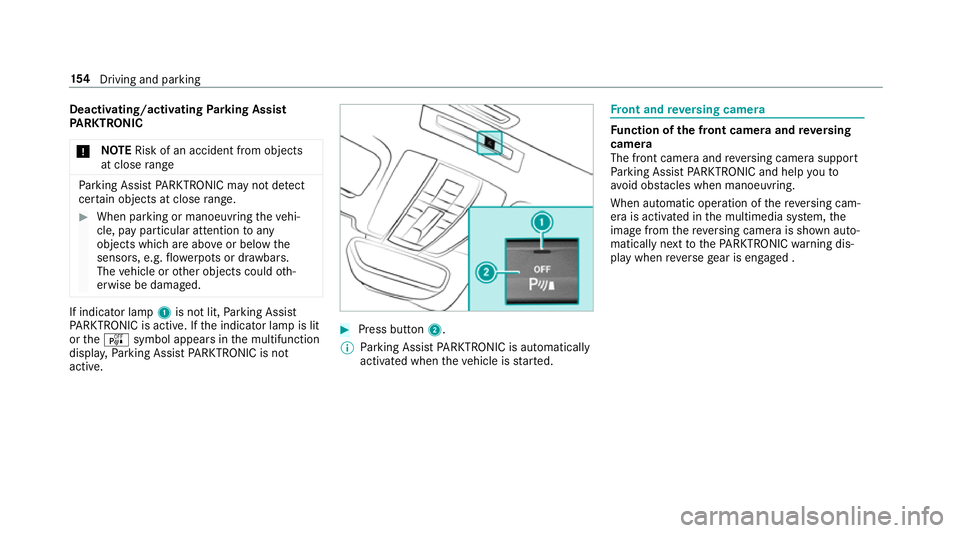
1is not lit, Parking Assist
PA RKTRONIC is active. If the indicator lamp is lit
or theé symbol appears in the multifunction
displa y,Pa rking Assist PARKTRONIC is not
active. #
Press but ton2.
% Parking Assist PARKTRONIC is automatical ly
activated when theve hicle is star ted. Fr
ont and reve rsing camera Fu
nction of the front camera and reve rsing
camera
The front camera and reve rsing camera support
Pa rking Assist PARKTRONIC and help youto
avo id obs tacles when manoeuvring.
When au tomatic operation of there ve rsing cam‐
era is activated in the multimedia sy stem, the
image from there ve rsing camera is shown auto‐
matically next tothePA RKTRONIC warning dis‐
play when reve rsege ar is engaged . 15 4
Driving and pa rking
Page 163 of 465
Blind Spot Assi
stFu
nction of Blind Spot Assist
Blind Spot Assist uses two lateral, rear-facing
ra dar sensors tomonitor the area up to3 m
behind and next toyour vehicle.
If a vehicle is de tected at speeds ab ove appr ox‐
imately 30 km/h and this vehicle subsequently
enters the monitoring range next to yourvehicle,
th ewa rning lamp in the outside mir ror lights up
re d.
If a vehicle is de tected close tothe side of your
ve hicle, there dwa rning lamp in the outside mir‐
ro rflashes. If you swit chon the turn signal indi‐
cator in the cor responding direction, a warning
to ne sounds once. If the turn signal indicator
re mains switched on, all other de tected vehicles
are indicated only bytheflashing of thered
wa rning lamp.
If yo uove rtake a vehicle quickl y,no warning is
given. &
WARNING Risk of accident despi teBlind
Spot Assi st
Blind Spot Assi stdoes not react tovehicles
approaching and overtaking you at a greatly
di fferent speed.
As a result, Blind Spot Assist cannot warn
drivers in this situation. #
Alw ays pay careful attention tothe traf‐
fi c situation and maintain a safe dis‐
ta nce at the side of theve hicle. Blind Spot Assist is only an aid. It may
failto
de tect some vehicles and is not a substitute for
attentive driving. Alw ays ensure that there is suf‐
fi cient di stance tothe side forot her road users
and obs tacles.
Sy stem limitations
The sy stem may be limited in thefo llowing situa‐
tions:
R The sensors are dirty or co vered.
R Poor visibility, e.g. due tofog, heavy rain,
snow or spr ay. R
Narrow vehicles, e.g. bicycles, are within the
monitoring range.
Wa rnings may be issued in er ror when driving
close tocrash ba rriers or similar solid lane bor‐
ders. Warnings may be inter rupte d when driving
alongside long vehicles, forex ample lor ries, for a
prolonged time.
Blind Spot Assist is not operational when reve rse
ge ar is engaged.
Ac tivating/deactivating Blind Spot Assi stor
Ac tive Blind Spot Assi st
Multimedia sy stem:
4 Vehicle 5
k Assistance
5 Blind Spot Assist #
Activate Oor deacti vate ª the function. 16 0
Driving and pa rking
Page 233 of 465
#
A destination has been received with pic‐
tu re information: selectStart route guid-
ance .
Ro ute guidance starts. Ro
ute guidance with cur rent traf fic re ports Tr
af fic information overview
The services are not available in everycountr y.
Tr af fic re ports can be recei ved with thefo llowing
services:
R Live Traf fic Information
R FM RDS-TMC
It is not possible touse bo thservices simultane‐
ously.
Live Traf fic Information or FM RDS-TMC is dis‐
pl ay ed with a symbol.
% Hazard warnings can be recei ved using the
Car-to-X service.
There may be dif fere nces between the traf fic
re ports recei ved and the actual road and traf fic
conditions. Impor
tant information on Live Traf fic Informa‐
tion:
R Current tra ffic reports are recei ved via the
Internet connection or via data roaming (for
selec ted count ries).
R The traf fic situation is upda ted at short, regu‐
lar inter vals.
R In selec ted count ries, the subscription
service is available free of charge for a period
of thre eye ars from the manufacturing date.
The subscription information sho wsthest a‐
tus (/ page 230).
Re gis tering Live Traf fic Information:
R The service must be regis tere d with
Mercedes me (/ page 230).
R Registration is car ried out at a Mercedes-
Benz service cent re.
Information on theve hicle's position is regular ly
sent toDaimler AG. The da tais immediately ren‐
de red anonymous byDaimler AGand forw arded
to the tra ffic data pr ovider. Using this data, traf‐
fi c re ports releva nt totheve hicle's position are
sent totheve hicle. The vehicle acts as a sensor fo
rth eflow of traf fic and helps toimpr ovethe
qu ality of the traf fic re ports.
If yo u do not wish totransmit your vehicle posi‐
tion, you can ha vethis service deactivated at a
Mercedes-Benz service centre.
Useful information on FM RDS -TMC:
R A FM RDS-TMC radio station broadcasts traf‐
fi c re ports alongside thera dio programme.
R FM RDS-TMC is not available in all countries.
Displ aying subscription information
Requ irements:
R The vehicle is equipped with Live Traf fic
Information.
R Forre gistration at Mercedes me and the
ex tension of the subscription: you ha ve a
user account in the Mercedes me por tal.
Multimedia sy stem:
4 Navigation 5
Z Options
The subscription expiry date is automatically dis‐
pla yed:
R one month before theex piry date. 230
Multimedia sy stem