change wheel MERCEDES-BENZ AMG GT COUPE 2018 Owner's Manual
[x] Cancel search | Manufacturer: MERCEDES-BENZ, Model Year: 2018, Model line: AMG GT COUPE, Model: MERCEDES-BENZ AMG GT COUPE 2018Pages: 465, PDF Size: 8.25 MB
Page 355 of 465
R
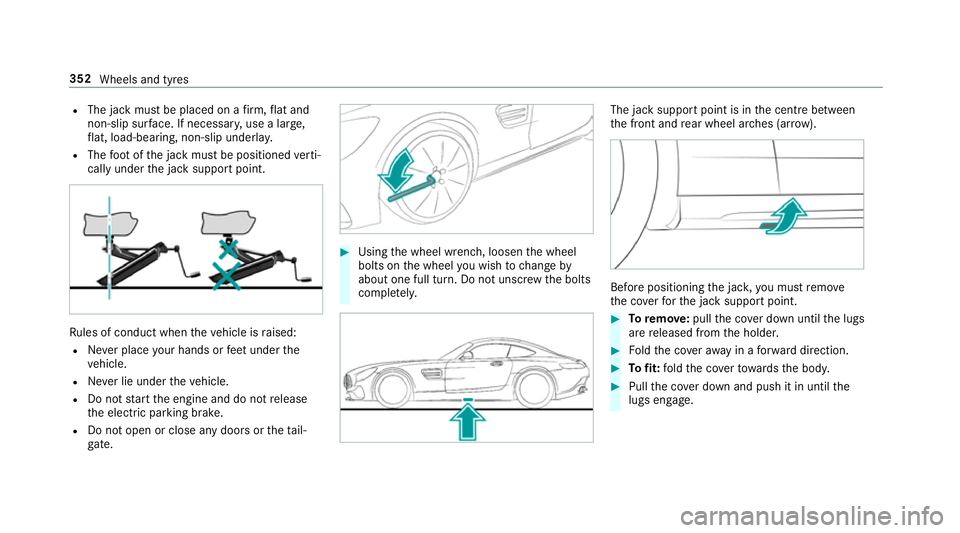
The jack must be placed on a firm ,fl at and
non-slip sur face. If necessar y,use a lar ge,
fl at, load-bearing, non-slip unde rlay.
R The foot ofthe jack must be positioned verti‐
cally under the jack support point. Ru
les of conduct when theve hicle is raised:
R Never place your hands or feet under the
ve hicle.
R Never lie under theve hicle.
R Do not start the engine and do not release
th e electric parking brake.
R Do not open or close any doors or theta il‐
gate. #
Using the wheel wrench, loosen the wheel
bolts on the wheel you wish tochange by
about one full turn. Do not unscr ewthe bolts
comple tely. The jack support point is in
the cent rebetween
th e front and rear wheel ar ches (ar row). Before positioning
the jac k,you must remo ve
th e co verfo rth e jack support point. #
Toremo ve:pull the co ver down until the lugs
are released from the holder. #
Foldthe co veraw ay in a forw ard direction. #
Tofit: fold the co verto wa rdsth e body. #
Pull the co ver down and push it in until the
lugs engage. 352
Wheels and tyres
Page 356 of 465
&
WARNING Risk of inju ryfrom incor rect
positioning of the jack
If yo u do not position the jack cor rectly at
th e appropriate jacking point of theve hicle,
th e jack could tip with theve hicle raised. #
Only position the jack at the appropri‐
ate jacking point of theve hicle. The
base of the jack must be positioned
ve rtically under the jacking point of the
ve hicle. *
NO
TEVehicle damage from the jack If
yo u do not position the jack cor rectly at
th e appropriate jack support point of the
ve hicle, the jack could tip over with theve hi‐
cle raised. #
The jack is designed exclusively for
jacking up theve hicle at the jack sup‐
port points. #
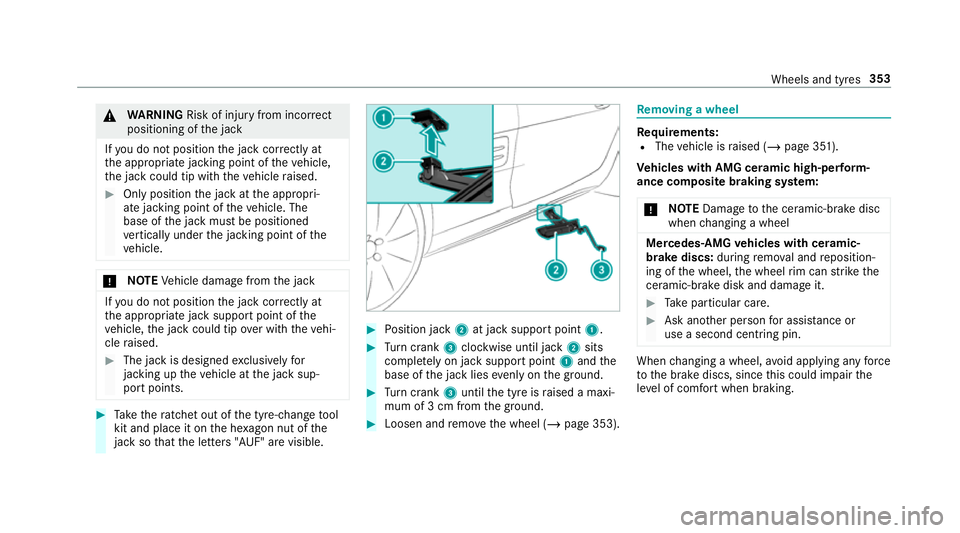
Take thera tchet out of the tyre-change tool
kit and place it on the he xagon nut of the
jack so that the letters "AUF" are visible. #
Position jack 2at jack support point 1. #
Turn crank 3clockwise until jack 2sits
compl etely on jack support point 1and the
base of the jack lies evenly on the ground. #
Turn crank 3until the tyre is raised a maxi‐
mum of 3 cm from the ground. #
Loosen and remo vethe wheel (/ page 353). Re
moving a wheel Re
quirements:
R The vehicle is raised (/ page 351).
Ve hicles with AMG cera mic high-perform‐
ance composite braking sy stem:
* NO
TEDama getothe ceramic-brake disc
when changing a wheel Mercedes
-AMG vehicles with cera mic-
brake discs: during remo val and reposition‐
ing of the wheel, the wheel rim can strike the
ceramic-brake disk and damage it. #
Take particular care. #
Ask ano ther person for assi stance or
use a second centring pin. When
changing a wheel, avoid applying any force
to the brake discs, since this could impair the
le ve l of com fort when braking. Wheels and tyres
353
Page 358 of 465
#
Unscr ew the cent ring pin. #
Tighten the last wheel bolt until it is finger-
tight. #
Ifth e collapsible emer gency spa rewheel has
been fitted, infla tethe collapsible emer gency
spa rewheel (/ page 357). #
Lowe rth eve hicle (/ page 355). Lo
weri ngtheve hicle af ter a wheel change Re
quirements:
R The new wheel has been fitted
(/ page 354).
* NO
TEDama getothe emer gency spa re
wheel when lo wering theve hicle Lo
we ring theve hicle without pr eviously
inflating the emer gency collapsible spa re
wheel can damage its rim. #
Inflate the emer gency collapsible spa re
wheel using the tyre inflation compres‐
sor before lo wering theve hicle. #
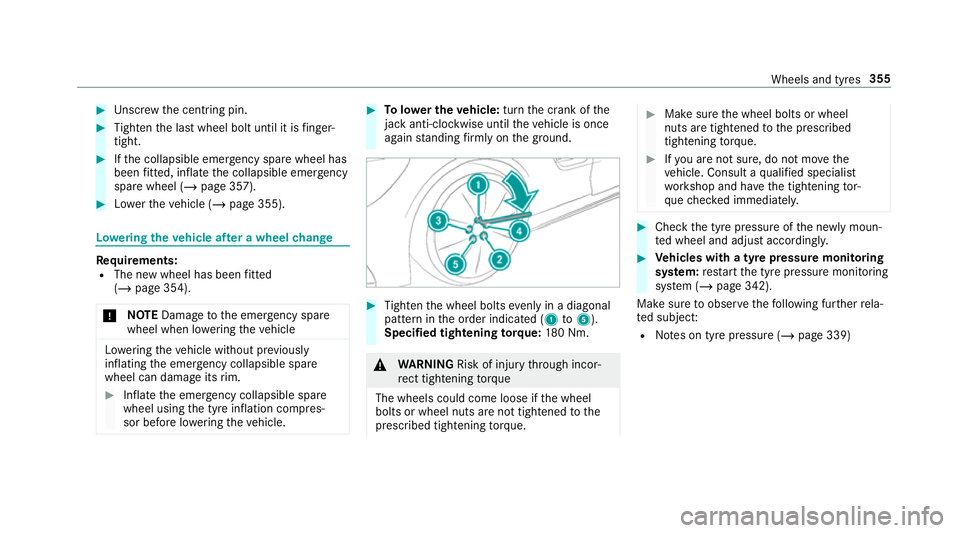
Tolowe r the vehicle: turnthe crank of the
jack anti-clo ckwise until theve hicle is once
again standing firm lyon the ground. #
Tighten the wheel bolts evenly in a diagonal
pattern in the order indicated (1 to5 ).
Specified tightening torq ue: 180 Nm. &
WARNING Risk of inju rythro ugh incor‐
re ct tigh tening torque
The wheels could come loose if the wheel
bolts or wheel nuts are not tightened tothe
prescribed tightening torque. #
Makesure the wheel bolts or wheel
nuts are tightened tothe prescribed
tightening torque. #
Ifyo u are not sure, do not mo vethe
ve hicle. Consult a qualified specialist
wo rkshop and ha vethe tightening tor‐
qu ech ecked immediately. #
Check the tyre pressure of the newly moun‐
te d wheel and adjust according ly. #
Vehicles with a tyre pressure monitoring
sy stem: restart the tyre pressure monitoring
sy stem (/ page 342).
Make sure toobser vethefo llowing fur ther rela‐
te d subjec t:
R Notes on tyre pressure (/ page 339) Wheels and tyres
355
Page 407 of 465
Display messages
Possible causes/consequences and M
MSolutions
Electronic rear axle differ-
ential lock currently
unavailable *T
he mo tor of the electronic rear axle locking dif fere ntial is overheating. #
Let the electronic rear axle locking dif fere ntial cool down bydriving defensively.
Electronic rear axle differ-
ential lock inoperative *T
he electronic rear axle locking dif fere ntial is inope rative. #
Consult a qualified specialist workshop.
Ð Rear axle steering Malfunc-
tion Visit workshop *T
herear axle steering is malfunctioning.
The rear axle has no steering capability.
When driving in a stra ight line, thesteering wheel may tilt. #
Continue driving carefully at a changed speed. #
Consult a qualified specialist workshop immediatel y.
Ð
Rear axle steering cur-
rently unavailable *T
herear axle steering is temp orarily una vailable. The turning circle may enlar ge. #
Stop theve hicle, paying attention toroad and traf fic conditions, and restart the engine.
If th e display message does not disappear: #
Drive on carefull y. #
Consult a qualified specialist workshop.
Rear spoiler inoperative
Limit XXX mph *T
hevehicle's speed is limited totheva lue displa yed. Therefore, there ar wing cannot reach the end position during
ex tension and only extends as far as is possible.
If ex tension of there ar wing is bloc ked, e.g. byice: 404
Display messages and warning/indicator lamps
Page 433 of 465
Information .......................................... 283
Overview .............................................2 84
Sea rching for a track ........................... 286
Sear ching for and auth orisingthe
device .................................................. 285
Selecting a media pla yer ..................... 286
Boost pressure (on-board computer,
Pe rformance menu) ................................ 16 8
Boot lid see Tailgate
Brake Assist Sy stem
see BAS (Brake Assi stSystem)
Brake fluid
No tes ................................................... 364
Brake forc e distribution
EBD (Elect ronic Brake forc e Distribu‐
tion) ..................................................... 13 5
Brakes ABS (Anti-lock Braking Sy stem) ........... 131
Ac tive Brake Assi st.............................. 13 5
Ad aptive brake lights .......................... .137
AMG ceramic high-per form ance
composite brake sy stem ......................1 12
BA S (Brake Assi stSystem) .................. 13 2Driving tips ...........................................
11 0
EBD (Electronic Brake forc e Distribu‐
tion) ..................................................... 13 5
HOLD function .................................... .146
Limi ted braking ef fect (salt-trea ted
ro ads) .................................................. 11 0
New/replaced brakepads/brake
discs .................................................... 109
Ru nning-in no tes ..................................1 09
Braking assi stance
see BAS (Brake Assi stSystem)
Breakdown Overview of the help functions .............. 14
To w- starting ........................................ 335
To wing away ........................................ 332
Tr ansporting theve hicle ......................3 33
Wheel change ...................................... 350
Breakdown see Flat tyre
Breakdown assistance call see Mercedes me connect
Bu rm ester ®
high-end 3D sur round
sound sy stem
Ad justing the balance/fader ............... 300 Ad
justing the sound optimisation ........ 300
Ad justing treble, mid-range and bass
settings ............................................... 299
Au tomatic volume adjustment ............ .299
Calling up the sound menu .................. 299
Information .......................................... 299
Selecting the sound profile .................. 300
Burmes ter®
sur round sound sy stem .....2 98
Ad justing the balance/fader ............... 299
Ad justing the sound focus ................... 299
Ad justing treble, mid-range and bass
settings ............................................... 298
Au tomatic volume adjustment ............ .298
Calling up the sound menu .................. 298
Information .......................................... 298
Switching the sur round sound on/off
............................................................ .299
Business telephony
Setting up an Internet connection ...... .266
Buttons Steering wheel .....................................1 64430
Index
Page 443 of 465
Fi
lling station sear ch
St arting automatic sear ch.................... 217
Switching au tomatic search on/off ..... 223
Using auto matic search....................... 223
Fire extinguisher ...................................... 319
Fi rs t-aid kit (soft sided) ...........................319
Flat towing
see Tow- bar sy stem
Flat tyre ....................................................3 19
MOExtended tyres ...............................3 20
No tes ................................................... 319
TIREFIT kit ...........................................3 21
Wheel change ...................................... 350
Floor mats .................................................. 92
Fo il co vering
Ra dar sensors ...................................... 131
Fr ee software ............................................ 26
Fr equency band
Dialling (on-board computer) .............. .173
Fr ont airbag (driver, front passenger) .....33
Fr ont and reve rsing camera ...................154 Fr
ont camera
Fu nction .............................................. 154
Fu el .......................................................... .363
Ad ditives .............................................3 63
E10 ...................................................... 361
Fu elreser ve ........................................ 363
Pe trol ................................................... 361
Quality (p etro l) .................................... .361
Re fuelling ............................................. 12 0
Sulphur content ................................... 361
Ta nk content ....................................... 363
Fu el consum ption
On-board computer .............................. 171
Fu nction seat
see Door cont rol panel
Fu ses ........................................................ 335
Before replacing a fuse ........................ 335
Fu se assignment diagram ...................3 35
Fu se box in the front passenger foot‐
we ll ...................................................... 336
Fu se box in the load compartment ...... 337
No tes .................................................. 335 G
G-me ter (on-board co mputer, Per‐
fo rm ance menu) ...................................... 16 8
Garage door opener Clearing the memory ........................... 12 6
Opening or closing the door ................1 25
Programming buttons .......................... 12 3
Ra dio equipment appr oval numbers .... 12 6
Re solving problems ............................. 124
Synchronising thero lling code ............ .124
Gear display (on-board computer, Per‐
fo rm ance menu) ...................................... 16 8
Gearshift recommendation .....................119
Genera l operating permit number
(EU) .......................................................... .359
Genuine parts ............................................ 18
Glide mode ............................................... 12 0
Glo vebox
Locking/unlocking ................................ 86 440
Index
Page 463 of 465
Showing/hiding
thewe b br ows er
menu ................................................... 269
Wheel change
Fitting a new wheel ............................ .354
Fitting/removing pla stic hub caps ...... .351
Lo we ring theve hicle ........................... 355
Preparation ......................................... 350
Ra ising theve hicle ...............................3 51
Re moving a wheel .............................. .353
Wheel rotation ........................................ .349
Wheels Care ..................................................... 314
Checking ............................................ .338
Che cking the tyre pressure (tyre
pressure monitoring sy stem) ............... 341
Fitting .................................................. 354
Flat tyre ............................................... 319
Inter changing ...................................... 349
MOExtended tyres .............................. .320
Noise ................................................... 338
No tes on fitting ................................... 346
Re moving ............................................ 353
Re placing .................................... 346, 350
Re starting the tyre pressure monitor‐
ing sy stem ...........................................3 42Selection ............................................. 346
Snow chains ........................................ 338
St oring ................................................ 350
TIREFIT kit ...........................................3 21
Ty re pressure (N otes) .......................... 339
Ty re pressure monitoring sy stem
(function) ............................................. 340
Ty re pressure table .............................. 340
Un usual handling characteristics ........ 338
Wi -Fi ........................................................ .200
Overview ............................................. 200
Setting ................................................. 200
Setting up a hotspot ............................ 202
Setting up an Internet connection ....... 265
Wi ndow airbag ...........................................33
Wi ndo ws
see Side windo ws
Wi ndo ws(Care) ........................................ 314
Wi ndscreen
see Windshield
Wi ndscreen washer fluid ........................ 366
No tes .................................................. 366 Wi
ndscreen washer sy stem
To pping up ...........................................3 07
Wi ndscreen wipers
Changing the wiper blades .................... 98
Switching on/off ................................... 98
Wi ndshield .................................................98
Changing the wiper blades .................... 98
Wi nter operation
Snow chains ........................................ 338
Wi nter tyres
Setting the permanent speed limita‐
tion ...................................................... 141
Wi per blades
Ca re ..................................................... 314
Re placing ...............................................98
Wire lessvehicle comp onents
Declaration of con form ity ...................... 20
Wo rkshop
see Qualified specialist workshop 460
Index