lights MERCEDES-BENZ AMG GT COUPE 2018 Owner's Manual
[x] Cancel search | Manufacturer: MERCEDES-BENZ, Model Year: 2018, Model line: AMG GT COUPE, Model: MERCEDES-BENZ AMG GT COUPE 2018Pages: 465, PDF Size: 8.25 MB
Page 138 of 465
Fu
nction of ESP ®
Crosswind Assist ESP
®
Crosswind Assist de tects sudden gu sts of
side wind and helps the driver tokeep theve hi‐
cle in the lane:
R ESP ®
Crosswind Assist is active at vehicle
speeds between 80 km/h and 200 km/h
when driving stra ight ahead or cornering
slightly.
R The vehicle is stabilised bymeans of individ‐
ual brake application on one side. Fu
nction of EBD (Electronic Brake forc e Dis‐
tribution) EBD is
characterised bythefo llowing:
R Monitoring and regulating the brake pressure
on there ar wheels.
R Impr oved driving stability when braking,
especially on bends. Fu
nction of Active Brake Assi st Ac
tive Brake Assi stconsi sts of:
R Distance warning function
R Autonomous braking function
R Situation-dependent braking assi stance
Ac tive Brake Assi stcan help youto minimise the
ri sk of a collision with vehicles or toreduce the
ef fects of su cha collision.
If Ac tive Brake Assi sthas de tected a risk of colli‐
sion, a warning tone sounds and theL dis‐
ta nce warning lamp lights up in the instrument
clus ter.
If yo u do not react tothe visual or acoustic warn‐
ing, autonomous braking can be initiated in criti‐
cal situations.
In especially critical situations, Active Brake
Assi stcan initia teautonomous braking direct ly.
In this case, thewa rning lamp and warning tone
occur simultaneously wi th the braking applica‐
tion.
If yo u apply the brake yourself in a situation
de tected as critical byActive Brake Assi st, or apply
the brake during autonomous braking, sit‐
uation-dependent braking assis tance occu rs.
The brake pressure increases up tomaximum
full-s top braking if necessar y.
If th e autonomous braking function or the situa‐
tion-dependent braking assis tance is trig gered,
additional pr eventive measures for occupant
pr otection (PRE-SAFE ®
) may also be initiated, if
th eve hicle is equipped with these. &
WARNING Risk of an accident caused by
limited de tection per form ance of Active
Brake Assi st
Ac tive Brake Assi stcannot al ways clearly
identify objects and compl extraf fic situa‐
tions.
In su chcases, Active Brake Assi stmight:
R Give a warning or brake without reason
R Not give a warning or not brake #
Alw ays pay careful attention tothe traf‐
fi c situation; do not rely on Active Brake
Assi stalone. Active Brake Assi stis only
an aid. The driver is responsible for Driving and pa
rking 13 5
Page 139 of 465
maintaining a suita
ble distance tothe
ve hicle in front, vehicle speed and for
braking in good time. #
Be prepared tobrake or swer veif nec‐
essar y. Obser
vethe sy stem limitations of Active Brake
Assi st.
The individual subfunctions are available in
th efo llowing speed ranges:
Distance warning function
The dis tance warning function issues a warning
at speeds:
R From appr oximately 30 km/h, if over se veral
seconds the dis tance maintained totheve hi‐
cle tr avelling in front is insuf ficient forthe
driven speed. The Ldistance warning
lamp then lights up in the instrument clus ter.
R From appr oximately 7 km/h, if your vehicle
is critically close toave hicle or pedestrian.
An intermittent warning tone sounds and the
L distance warning lamp lights up in the
instrument clus ter. Brake immediately or
take evasive action, pr ovi‐
ded it is safe todo so and the traf fic situation
allo wsthis.
The distance warning function can aid you in
th efo llowing situations with an intermit tent
wa rning tone and a warning lamp:
Ve hicles tr avelling in
front Up
toappr ox.
250 km/h
St ationary vehicles Uptoappr ox.
70 km/h Au
tonomous braking function
If th eve hicle is tr avelling at speeds abo ve
appr oxima tely 7 km/h, the autonomous
braking function may inter vene in thefo llow‐
ing situations:
Vehicles without
Ac tive Dis tance
Assi st
DISTRONIC Ve
hicles with
Ac tive Dis tance
Assi st
DISTRONIC
Ve hi‐
cles
tr ave l‐
ling in
front Up
toappr ox.
10 5 km/h Up
toappr ox.
200 km/h
St a‐
tio‐
nary
ve hi‐
cles Up
toappr ox.
50 km/h Up
toappr ox.
50 km/h 13 6
Driving and pa rking
Page 140 of 465
Situation-dependent braking assistance
Situation-dependent braking assistance may
inter vene at speeds abo veappr oxima tely
7 km/h in thefo llowing situations:
Ve hicles tr avelling in
front Up
toappr ox.
250 km/h
St ationary vehicles Uptoappr ox.
70 km/h Cancelling a brake application of
Active
Brake Assi st
Yo u can cancel a brake application byActive
Brake Assi stat any time by:
R Fully depressing the accelerator pedal or
with kickdown.
R Releasing the brake pedal.
Ac tive Brake Assi stmay cancel the brake appli‐
cation when one of thefo llowing conditions is
fulfilled:
R You manoeuv retoavoid the obs tacle.
R The reis no longer a risk of collision. R
An obs tacle is no longer de tected in front of
yo ur vehicle.
Sy stem limitations
The sy stem may be impaired or may not function
in thefo llowing situations:
R In sno w,rain, fog, heavy spr ay, if there is
gl are, in direct sunlight or in great lyvarying
light conditions.
R Ifth e sensors are dirty, mis ted up, damaged
or co vered.
R Ifth e sensors are impaired due tointer fer‐
ence from other radar sources, e.g. strong
ra dar reflections in multi-s torey car par ks.
R If a loss of tyre pressure or a defective tyre
has been de tected and displ ayed.
R Full sy stem per form ance is not available for a
fe w seconds af ter switching on the ignition
or af ter driving off.
R In complex traf fic situations whe reobjects
cannot always be clearly identified.
R Forve hicles if they mo vequickly into the
sensor de tection range. R
On bends wi tha tight radius. Setting
Active Brake Assi st Multimedia sy
stem:
4 Vehicle 5
k Assistance
5 Active Brake Assist #
Activate or deacti vate the function.
% It is recommended that you alw ays lea ve
Ac tive Brake Assi stactivated.
% IfAc tive Brake Assi stis deactivated, the
æ symbol appears inthest atus bar of the
multifunction displa y. Fu
nction of Adaptive Brake Lights Ad
aptive Brake Lights warnfollowing traf fic in an
emergency braking situation wi th thefo llowing
actions:
R Byflashing the brake lamps
R By activating the hazard warning lights
If th eve hicle is braked sharply from speeds
abo ve50 km/h, the brake lamps flash rapidl y. Driving and pa
rking 137
Page 141 of 465
This pr
ovides traf fic tr ave lling behind you with an
eve n more noticeable warning.
If th eve hicle is tr avelling at speeds of more than
70 km/h at the beginning of the brake applica‐
tion, the hazard warning lights switch on once
th eve hicle is stationar y.When you pull away
again, the hazard warning lights will switch off
automatically at appr oximately 10km/h. Yo u
can also switch off the hazard warning lights
using the hazard warning button. Cruise control and limiter
Fu
nction of cruise control
Cruise cont rolre gulates the speed totheva lue
selec tedby the driver.
If yo u accelerate toove rtake, forex ample, the
st ored speed is not dele ted. If youre mo veyour
fo ot from the accelerator pedal af terove rtaking,
cruise control will resume speed regulation back
to thestored speed.
Cruise contro l is operated using the cor respond‐
ing steering wheel buttons. You can store any
speed abo ve30 km/h up tothe maximum speed
or up tothe set winter tyre limit. If
yo ufa ilto adapt your driving style, cruise con‐
trol can neither reduce therisk of an accident
nor override the la wsof ph ysics. It cannot take
into account road, weather or traf fic conditions.
Cruise control is only an aid. You are responsible
fo r maintaining a safe dis tance totheve hicle in
front, forve hicle speed, for braking in good time
and forst ay ing in lane.
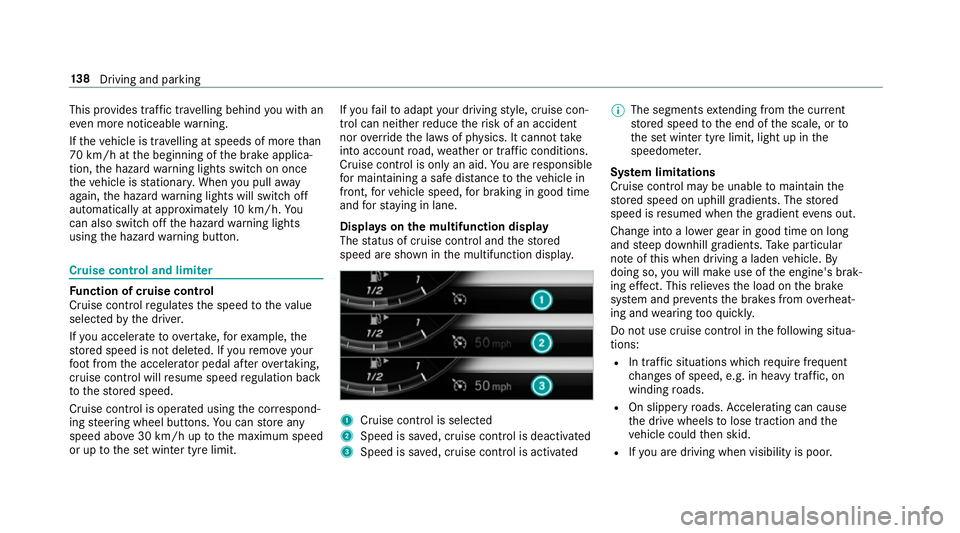
Displa yson the multifunction display
The status of cruise control and thestored
speed are shown in the multifunction displa y. 1
Cruise cont rol is selec ted
2 Speed is sa ved, cruise control is deactivated
3 Speed is sa ved, cruise control is activated %
The segments extending from the cur rent
st ored speed tothe end of the scale, or to
th e set winter tyre limit, light up in the
speedome ter.
Sy stem limitations
Cruise control may be unable tomaintain the
st ored speed on uphill gradients. The stored
speed is resumed when the gradient evens out.
Change into a lo werge ar in good time on long
and steep downhill gradients. Take particular
no te ofthis when driving a laden vehicle. By
doing so, you will make use of the engine's brak‐
ing ef fect. This relie vesth e load on the brake
sy stem and pr events the brakes from overheat‐
ing and wearing tooqu ickl y.
Do not use cruise control in thefo llowing situa‐
tions:
R In traf fic situations whi chrequ ire frequent
ch anges of speed, e.g. in heavy traf fic, on
winding roads.
R On slippe ryroads. Accelerating can cause
th e drive wheels tolose traction and the
ve hicle could then skid.
R Ifyo u are driving when visibility is poor. 13 8
Driving and pa rking
Page 163 of 465
Blind Spot Assi
stFu
nction of Blind Spot Assist
Blind Spot Assist uses two lateral, rear-facing
ra dar sensors tomonitor the area up to3 m
behind and next toyour vehicle.
If a vehicle is de tected at speeds ab ove appr ox‐
imately 30 km/h and this vehicle subsequently
enters the monitoring range next to yourvehicle,
th ewa rning lamp in the outside mir ror lights up
re d.
If a vehicle is de tected close tothe side of your
ve hicle, there dwa rning lamp in the outside mir‐
ro rflashes. If you swit chon the turn signal indi‐
cator in the cor responding direction, a warning
to ne sounds once. If the turn signal indicator
re mains switched on, all other de tected vehicles
are indicated only bytheflashing of thered
wa rning lamp.
If yo uove rtake a vehicle quickl y,no warning is
given. &
WARNING Risk of accident despi teBlind
Spot Assi st
Blind Spot Assi stdoes not react tovehicles
approaching and overtaking you at a greatly
di fferent speed.
As a result, Blind Spot Assist cannot warn
drivers in this situation. #
Alw ays pay careful attention tothe traf‐
fi c situation and maintain a safe dis‐
ta nce at the side of theve hicle. Blind Spot Assist is only an aid. It may
failto
de tect some vehicles and is not a substitute for
attentive driving. Alw ays ensure that there is suf‐
fi cient di stance tothe side forot her road users
and obs tacles.
Sy stem limitations
The sy stem may be limited in thefo llowing situa‐
tions:
R The sensors are dirty or co vered.
R Poor visibility, e.g. due tofog, heavy rain,
snow or spr ay. R
Narrow vehicles, e.g. bicycles, are within the
monitoring range.
Wa rnings may be issued in er ror when driving
close tocrash ba rriers or similar solid lane bor‐
ders. Warnings may be inter rupte d when driving
alongside long vehicles, forex ample lor ries, for a
prolonged time.
Blind Spot Assist is not operational when reve rse
ge ar is engaged.
Ac tivating/deactivating Blind Spot Assi stor
Ac tive Blind Spot Assi st
Multimedia sy stem:
4 Vehicle 5
k Assistance
5 Blind Spot Assist #
Activate Oor deacti vate ª the function. 16 0
Driving and pa rking
Page 213 of 465
R
steering angle
R engine speed
R engine oil/tyre temp erature
Based on the analysis you can check and opti‐
mise driving characteristics for any position on
th e trac k.
Exporting trac ksorraces (USB) #
Select All tracks.
An ove rview of all stored trac ksand races
appea rs. #
Highlight desired trac ksorraces. #
Select ÜOptions. #
Select Export.
The selected trac ksorraces can be expor ted
to a USB storage device connected tothe
ve hicle.
Editing trac ksand recordings #
Select All tracks. #
Highlight the desired trac k.#
Select Üoptions. #
Select Rename orDelete. or #
Select a trac k. #
Highlight the desired recording. #
Select Üoptions. #
Select Weather orDelete. Setting Drag
Race Multimedia sy
stem:
4 Vehicle 5
TRACK PACE 5
Drag Race
Measuring acceleration #
Select Acceleration.
Measurement begins when theve hicle accel‐
erates. Measurement is incremental, in steps
of 50 km/h up toa maximum of 300 km/h
or up tothe set maximum speed.
Measurement can be stopped early by
selecting Stoporby stopping theve hicle.
Quar ter-mile race #
Select Quarter Mile.
The time measurement runs until a mile has
been tr avelled or a pr eviously set dis tance (e.g. 1/4 mile, 1/3 mile or 1/2 mile) has
been
reached.
% The possible values for setting the end dis‐
ta nce are de term ined bythe sy stem and
cann otbe freely chosen.
Measurement can be stopped early byselecting
Stop orby stopping theve hicle.
Manual start for accele ration and quarter-
mile race #
Select Acceleration orQuarter Mile . #
Select Manual start .
Three red traf fic lights appear one af terthe
ot her. The reaction time measurement starts
when they change togreen at the same time.
The reaction time is displa yed as soon as you
drive off. If you drive off too ear ly,th e mes‐
sage Jump start. will appear and acceleration
or quarter mile measu rement will be cancel‐
led.
Measuring braking #
Select Braking . 210
Multimedia sy stem
Page 385 of 465
Display messages
Possible causes/consequences and M
MSolutions
De tection of a restra int sy stem fault:
R The restra int sy stem warning lamp 6does not light up when the ignition is switched on.
R The restra int sy stem warning lamp 6lights up continuously or repeatedly during a journe y. #
Consult a qualified specialist workshop immediatel y.
Active Brake Assist Func-
tions currently limited See
Owner's Manual *
Ve hicles with the Driving Assistance Package: Active Brake Assi stwith cross-traf fic function, Evasi veSteering
Assist or PRE‑SAFE ®
PLUS are temp orarily una vailable or only partially available.
Ve hicles without the Driving Assistance pa ckage: Active Brake Assi stistemp orarily una vailable.
The ambient conditions are outside the sy stem limits . #
Drive on.
As soon as the ambient conditions are within the sy stem limits, the sy stem will become available again. #
Ifth e display message does not disappear, stop theve hicle while paying attention toroad and traf fic conditions
and restart the engine.
6
Restraint sys. malfunction
Consult workshop *T
herestra int sy stem is faulty (/ page 28). &
WARNING Risk of inju rydue tomalfunctions in there stra int sy stem
If th ere stra int sy stem is malfunctioning, restra int sy stem components may be triggered unintentionally or may
not deploy as intended during an accident. This may af fect the seat belt tensioner or airbag, forex ample. #
Have there stra int sy stem checked and repaired immediately at a qualified specialist workshop. 382
Display messages and warning/indicator lamps
Page 386 of 465
Display messages
Possible causes/consequences and M
MSolutions
De tection of a restra int sy stem fault:
R The restra int sy stem warning lamp 6does not light up when the ignition is switched on.
R The restra int sy stem warning lamp 6lights up continuously or repeatedly during a journe y. #
Consult a qualified specialist workshop immediatel y.
Check brake pads See
Owner's Manual *T
he brake pads ha vereached thewe ar limit. &
WARNING Risk of accident due torestricted braking po wer
When the brake pads ha vereached their wear limit, the braking po wer may be restricted. #
Drive on carefully. #
Have the brake sy stem checked immediately at a qualified specialist workshop. #
Consult a qualified specialist workshop. Driving sy
stems Display messages
Possible causes/consequences and M MSolutions
Blind Spot Assist inopera-
tive *B
lind Spot Assist is malfunctioning. #
Consult a qualified specialist workshop. Display messages and
warning/indicator lamps 383
Page 412 of 465
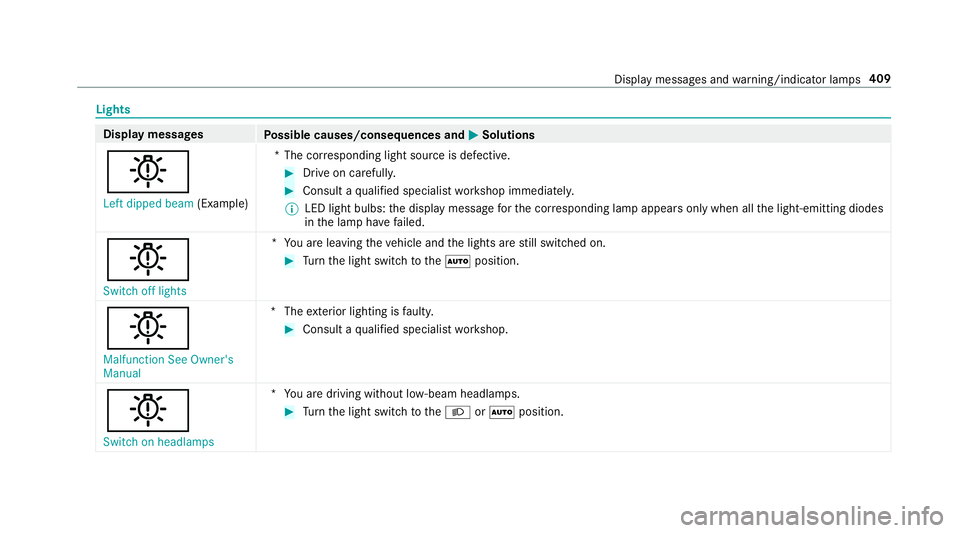
Lights
Display messages
Possible causes/consequences and M
MSolutions
b Left dipped beam (Example)*T
he cor responding light source is defective. #
Drive on carefully. #
Consult a qualified specialist workshop immediatel y.
% LED light bulbs: the display message forth e cor responding lamp appears only when allthe light-emitting diodes
in the lamp ha vefailed.
b Switch off lights *Y
ou are leaving theve hicle and the lights are still switched on. #
Turn the light switch totheà position.
b Malfunction See Owner's
Manual *T
heexterior lighting is faulty. #
Consult a qualified specialist workshop.
b Switch on headlamps *Y
ou are driving without lo w-beam headlamps. #
Turn the light switch totheL orà position. Display messages and
warning/indicator lamps 409
Page 413 of 465
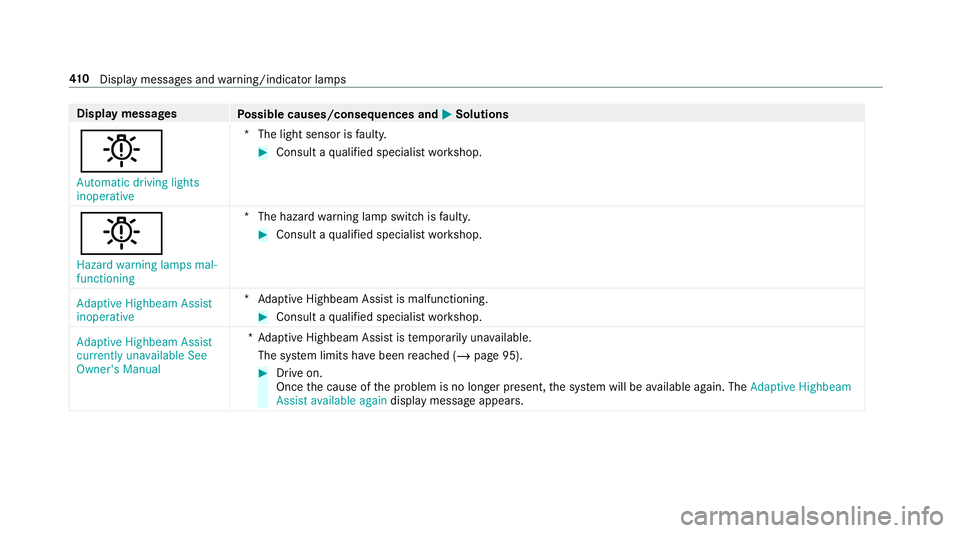
Display messages
Possible causes/consequences and M
MSolutions
b Automatic driving lights
inoperative *T
he light sensor is faulty. #
Consult a qualified specialist workshop.
b Hazard warning lamps mal-
functioning *T
he hazard warning lamp switch is faulty. #
Consult a qualified specialist workshop.
Adaptive Highbeam Assist
inoperative *A
daptive Highbeam Assist is malfunctioning. #
Consult a qualified specialist workshop.
Adaptive Highbeam Assist
currently unavailable See
Owner's Manual *A
daptive Highbeam Assist is temp orarily una vailable.
The sy stem limits ha vebeen reached (/ page 95). #
Drive on.
Once the cause of the problem is no longer present, the sy stem will be available again. The Adaptive Highbeam
Assist available again display message appears.41 0
Displaymessa ges and warning/indicator lamps