start stop button MERCEDES-BENZ AMG GT COUPE 2018 Owners Manual
[x] Cancel search | Manufacturer: MERCEDES-BENZ, Model Year: 2018, Model line: AMG GT COUPE, Model: MERCEDES-BENZ AMG GT COUPE 2018Pages: 465, PDF Size: 8.25 MB
Page 10 of 465
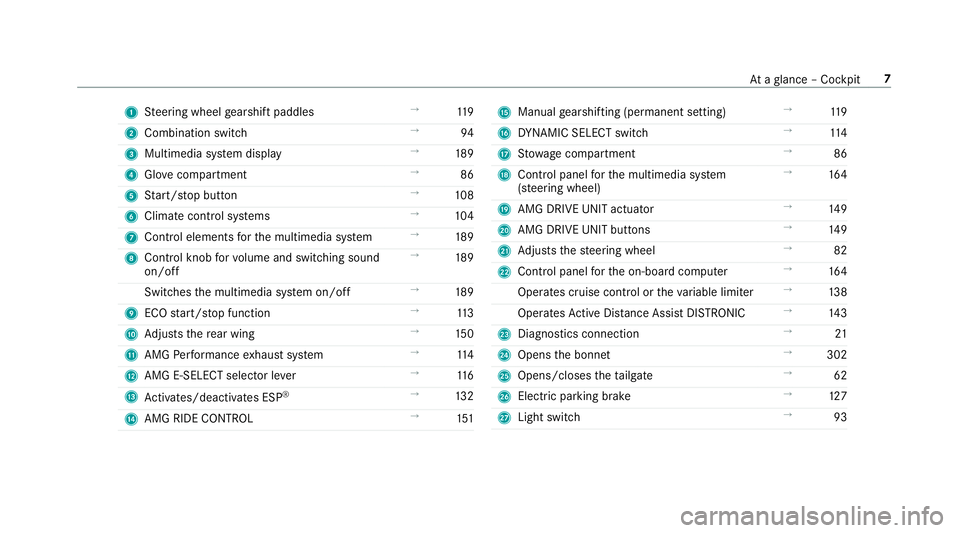
1
Steering wheel gearshift paddles →
11 9
2 Combination swit ch →
94
3 Multimedia sy stem display →
189
4 Glovecompa rtment →
86
5 Start/ stop button →
108
6 Climate cont rol sy stems →
104
7 Control elements forth e multimedia sy stem →
189
8 Control knob forvo lume and switching sound
on/off →
189
Switches the multimedia sy stem on/off →
189
9 ECO start/ stop function →
11 3
A Adjusts there ar wing →
15 0
B AMG Performance exhaust sy stem →
11 4
C AMG E-SELECT selector le ver→
11 6
D Activates/deacti vates ESP ®
→
13 2
E AMG RIDE CONTROL →
151 F
Manual gearshifting (permanent setting) →
11 9
G DYNA MIC SELECT switch →
11 4
H Stow age compartment →
86
I Control panel forth e multimedia sy stem
(s te ering wheel) →
16 4
J AMG DRIVE UNIT actuator →
14 9
K AMG DRIVE UNIT buttons →
14 9
L Adjusts thesteering wheel →
82
M Control panel forth e on-board computer →
16 4
Operates cruise contro l ortheva riable limiter →
13 8
Operates Active Dis tance Assi stDISTRONIC →
14 3
N Diagno stics connection →
21
O Opens the bonn et →
302
P Opens/closes theta ilgate →
62
Q Electric parking brake →
127
R Light switch →
93 At
aglance – Cockpit 7
Page 111 of 465
Driving
St
arting theve hicle St
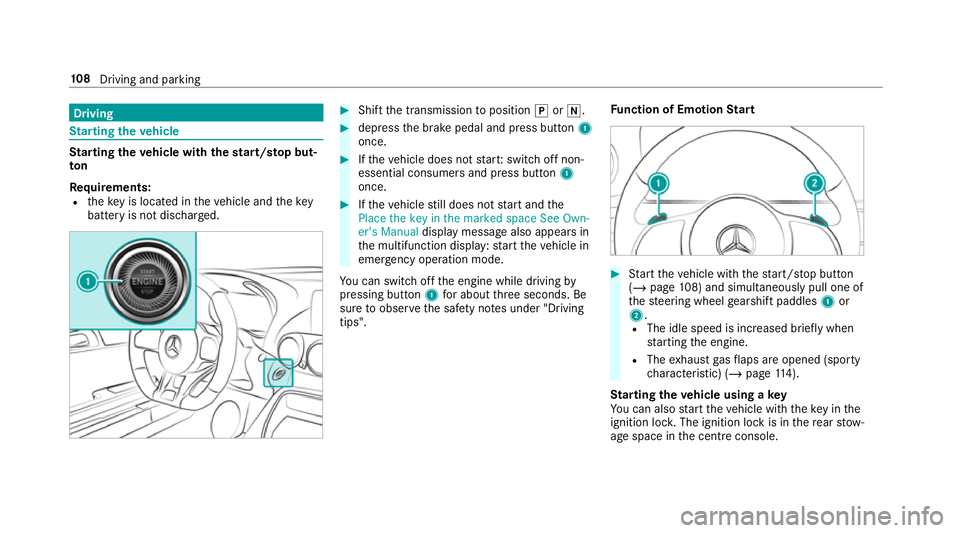
arting theve hicle with thest art/s top but‐
ton
Requ irements:
R theke y is located in theve hicle and thekey
battery is not dischar ged. #
Shift the transmission toposition jori. #
depress the brake pedal and press button 1
once. #
Ifth eve hicle does not star t:switch off non-
essential consumers and press button 1
once. #
Ifth eve hicle still does not start and the
Place the key in the marked space See Own-
er's Manual display message also appears in
th e multifunction display: start theve hicle in
emer gency operation mode.
Yo u can swit choff the engine while driving by
pressing button 1for about thre e seconds. Be
sure toobser vethe saf ety no tes under "Driving
tips". Fu
nction of Emotion Start #
Start theve hicle with thest art/ stop button
(/ page 108) and simultaneously pull one of
th esteering wheel gearshift paddles 1or
2.
R The idle speed is inc reased brief ly when
st arting the engine.
R The exhaust gasflaps are opened (spo rty
ch aracteristic) (/ page114).
St arting theve hicle using a key
Yo u can also start theve hicle with theke y in the
ignition loc k.The ignition lock is in there ar stow‐
age space in the cent reconsole. 108
Driving and pa rking
Page 116 of 465
ECO
start/s top function Ope
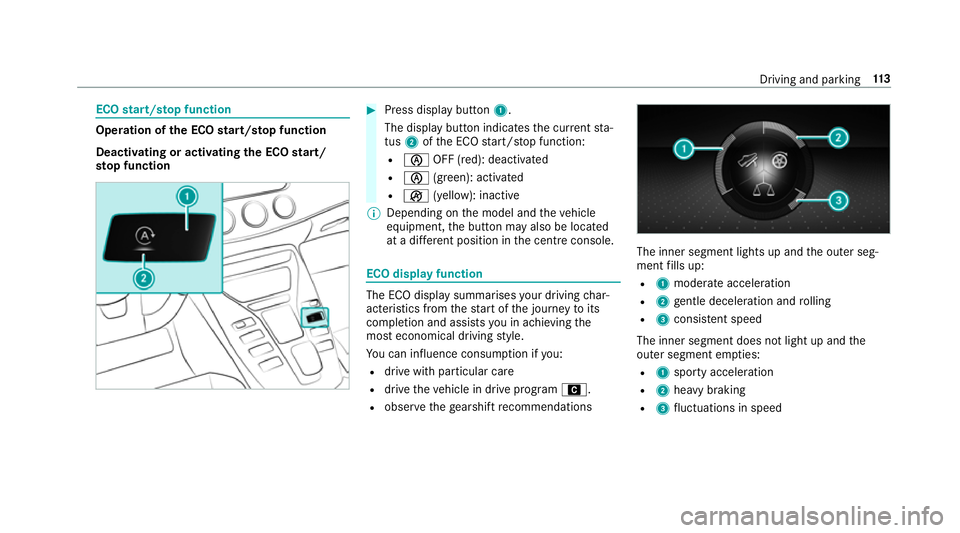
ration of the ECO start/s top function
Deacti vating or acti vating the ECO start/
sto p function #
Press displ aybutton 1.
The display button indicates the cur rent sta‐
tus 2ofthe ECO start/ stop function:
R è OFF (red): deactivated
R è (green): activated
R ç (yellow): inactive
% Depending on the model and theve hicle
equipment, the button may also be located
at a dif fere nt position in the cent reconsole. ECO displ
ayfunction The ECO display summa
rises your driving char‐
acteristics from thest art of the journey toits
completion and assists you in achieving the
most economical driving style.
Yo u can influence consum ption if you:
R drive with particular care
R drive theve hicle in drive program A.
R obser vethege arshift recommendations The inner segment lights up and
the outer seg‐
ment fills up:
R 1 moderate acceleration
R 2 gentle deceleration and rolling
R 3 consis tent speed
The inner segment does not light up and the
outer segment em pties:
R 1 sporty acceleration
R 2 heavy braking
R 3 fluctuations in speed Driving and parking
11 3
Page 117 of 465
Yo
u ha vedriven economically when:
R theth re e outer segments are comple tely fil‐
led simultaneously
R the ECO display lights up
The additional range achi eved as a result of your
driving style in comparison toa driver with a
ve ry sporty driving style is shown under Bonus
from start. The range displ ayed does not indicate
a fixe dre duction in consum ption. AMG
Performance exhaust sy stem Fu
nction of the AMG Performance exhaust
sy stem
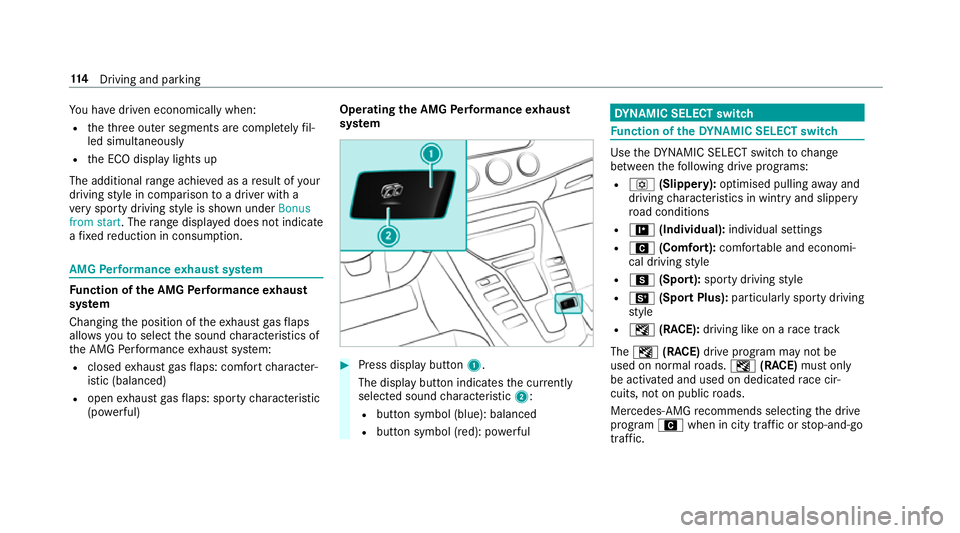
Changing the position of theex haust gasflaps
allo wsyouto select the sound characteristics of
th e AMG Performance exhaust sy stem:
R closed exhaust gasflaps: com fort ch aracter‐
istic (balanced)
R open exhaust gasflaps: sporty characteristic
(po werful) Ope
rating the AMG Performance exhaust
sy stem #
Press display button 1.
The display button indicates the cur rently
selected sound characteristic 2:
R button symbol (blue): balanced
R button symbol (red): po werful DY
NA MIC SELECT switch Fu
nction of theDY NA MIC SELECT switch Use
theDY NA MIC SELECT switch tochange
between thefo llowing drive programs:
R o (Slippery): optimised pulling away and
driving characteristics in wint ryand slippe ry
ro ad conditions
R = (Individual): individual settings
R A (Comfort): comfortable and economi‐
cal driving style
R C (Sport): sporty driving style
R B (Sport Plus): particularly sporty driving
st yle
R I (RACE): driving like on a race track
The I (RACE) drive program may not be
used on normal roads. I (RACE) must on ly
be activated and used on dedicated race cir‐
cuits, not on public roads.
Mercedes-AMG recommends selecting the drive
prog ram A when in city traf fic or stop-and-go
traf fic. 11 4
Driving and pa rking
Page 118 of 465
Depending on
the drive prog ram selected, the
fo llowing vehicle characteristics will change:
R drive
- engine and transmission management
- Active Dis tance Assi stDISTRONIC
R AMG Dynamics
- thefo ur agility functions Basic, Advanced,
Pro and Ma ster are automatically selec‐
te d depending on the drive prog ram.
- thesteering, shift timing point and stabili‐
sation functions are adap tedto the selec‐
te d drive prog ram.
- when ESP ®
is activated, agility function
Pro is selected in drive program I
RACE. The Mas ter function is auto mati‐
cally selected when ESP ®
is deactivated.
R position of theex haust gasflaps
R Suspension
R steering
R availability of the ECO start/ stop function
R availability of Glide mode R
The I(R ACE)driving prog ram has thefo l‐
lowing properties:
- theve hicle exhibits driving characteristics
suited forra ce circuits.
- allvehicle sy stems are designed for maxi‐
mum sportiness.
- thech assis has a particular lytight sus‐
pension and da mping sy stem.
- Glide mode is not available.
- ECO start/ stop function is not available.
- the sporty sound characteristic of the
ex haust sy stem is activated.
% You can call up vehicle characteristics via
th ePe rformance menu in the on-board com‐
puter (/ page168).
Yo u can also change thefo llowing vehicle char‐
acteristics using the buttons in the cent recon‐
sole:
R position of theex haust gasflaps
R ECO start/ stop function
R Suspension
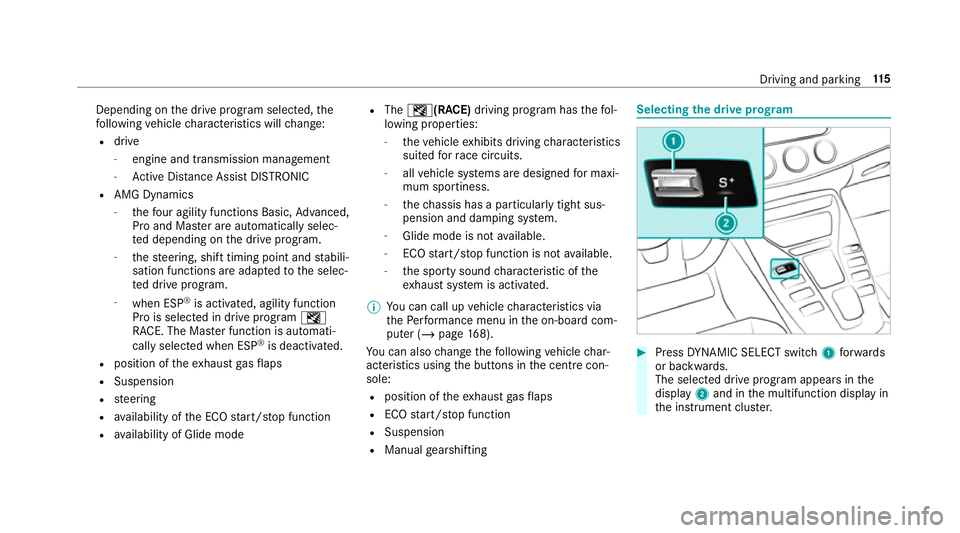
R Manual gearshifting Selecting
the drive prog ram #
Press DYNA MIC SELECT switch 1forw ards
or backwards.
The selec ted drive program appears in the
display 2and in the multifunction display in
th e instrument clus ter. Driving and pa
rking 11 5
Page 123 of 465
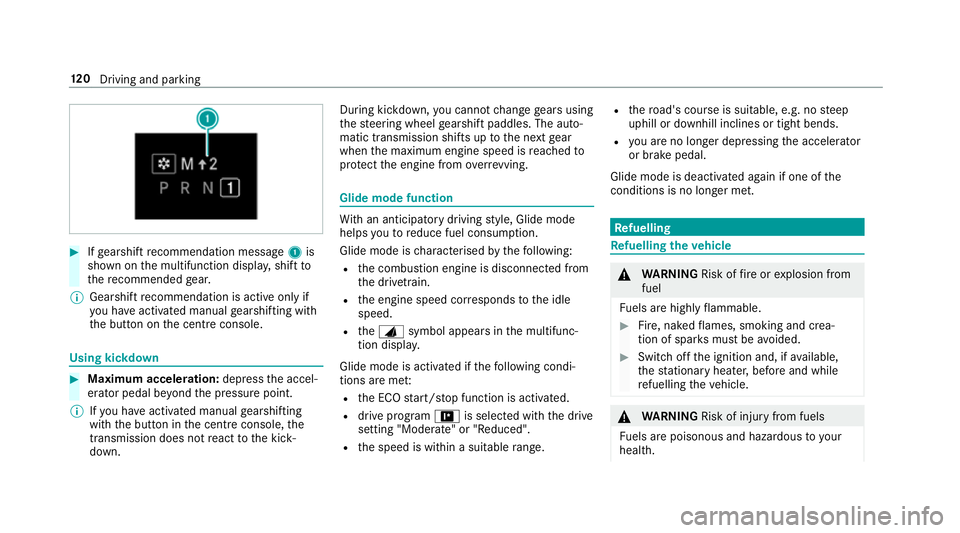
#
Ifge arshift recommendation message 1is
shown on the multifunction displa y,shift to
th ere commended gear.
% Gearshift recommendation is acti veonly if
yo u ha veactivated manual gearshifting with
th e button on the cent reconsole. Using kickdown
#
Maximum acceleration: depress the accel‐
erator pedal be yond the pressure point.
% Ifyo u ha veactivated manual gearshifting
with the button in the cent reconsole, the
transmission does not react tothe kick‐
down. During kickdown,
you cannot change gears using
th esteering wheel gearshift paddles. The auto‐
matic transmission shifts up tothe next gear
when the maximum engine speed is reached to
pr otect the engine from overrev ving. Glide mode function
Wi
th an anticipatory driving style, Glide mode
helps youto reduce fuel consum ption.
Glide mode is characterised bythefo llowing:
R the combustion engine is disconnected from
th e driv etra in.
R the engine speed cor responds tothe idle
speed.
R theJ symbol appears in the multifunc‐
tion displa y.
Glide mode is activated if thefo llowing condi‐
tions are me t:
R the ECO start/ stop function is activated.
R drive program =is selected with the drive
setting "Moderate" or "Reduced".
R the speed is within a suitable range. R
thero ad's course is suitable, e.g. no steep
uphill or downhill inclines or tight bends.
R you are no lon ger depressing the accelera tor
or brake pedal.
Glide mode is deactivated again if one of the
conditions is no longer met. Re
fuelling Re
fuelling theve hicle &
WARNING Risk offire or explosion from
fuel
Fu els are highly flammable. #
Fire, naked flames, smoking and crea‐
tion of spar ksmust be avoided. #
Swit choff the ignition and, if available,
th est ationary heater, before and while
re fuelling theve hicle. &
WARNING Risk of inju ryfrom fuels
Fu els are poisonous and hazardous to your
health. 12 0
Driving and pa rking
Page 152 of 465
%
Inthis phase you can adjust RACE START
depending on thero ad conditions: you can
va ry the engine speed bypulling on one of
th esteering wheel gearshift paddles. The
segments in the multifunction display flic ker
ra pidly.
% Ifth e brake pedal is not released af ter a
short while, RACE START is cancelled. The
RACE START cancelled messageappears in
th e multifunction displa y.#
Take your foot off the brake, but keep the
accelerator pedal depressed.
The vehicle pulls away at maximum accelera‐
tion. The RACE START active message
appears in the multifunction displa y.
RACE START is deacti vated when theve hicle rea‐
ch es a speed of appr oximately 50 km/h.
RACE START is deacti vated immediately if you
re lease the accelerator pedal during RACE
ST ART or if any of the activation conditions are
no longer fulfilled. The RACE START cancelled
message appears in the multifunction displa y.%
After using it se veral times in short succes‐
sion, RACE START is una vailable until a cer‐
ta in dis tance has been driven. Fu
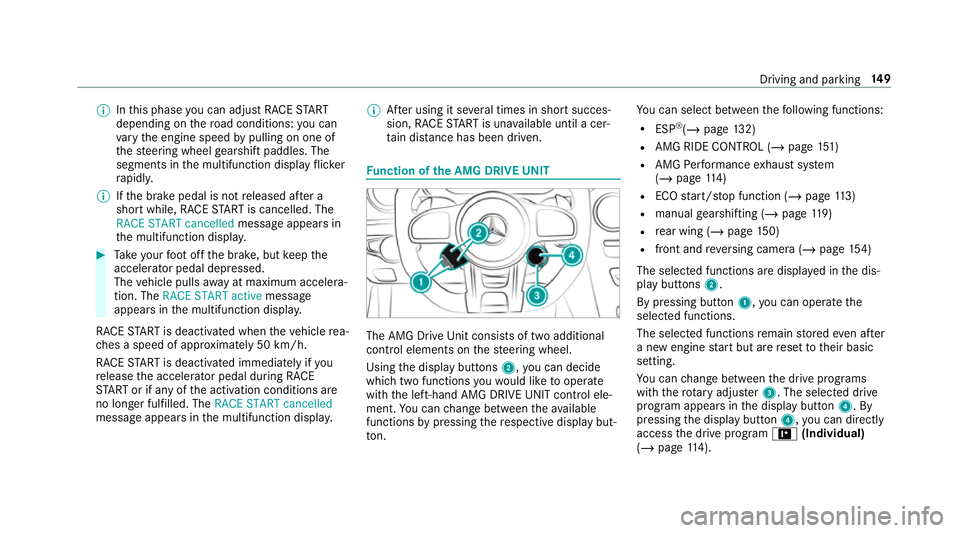
nction of the AMG DRIVE UNIT The AMG Drive
Unit consists of two additional
control elements on thesteering wheel.
Using the display buttons 2,you can decide
which two functions youwo uld like tooperate
with the left-hand AMG DRIVE UNIT control ele‐
ment. You can change between theav ailable
functions bypressing there spective display but‐
to n. Yo
u can select between thefo llowing functions:
R ESP ®
(/ page 132)
R AMG RIDE CONTROL (/ page151)
R AMG Performance exhaust sy stem
(/ page 114)
R ECO start/ stop function (/ page113)
R manual gearshifting (/ page119)
R rear wing (/ page150)
R fron t and reve rsing camera (/ page154)
The sele cted functions are displ ayed in the dis‐
play buttons 2.
By pressing button 1,you can operate the
selected functions.
The selected functions remain stored even af ter
a new engine start but are reset totheir basic
setting.
Yo u can change between the drive prog rams
with thero tary adjus ter3. The selected drive
program appears in the display button 4. By
pressing the display button 4,you can direct ly
access the drive program =(Individual)
(/ page 114). Driving and pa
rking 14 9
Page 267 of 465
Fo
r accident clarification purposes, thefo llowing
measures can be take n up toan hour af terthe
emer gency call has been initia ted:
R The cur rent vehicle position can be called up.
R Avo ice connection totheve hicle occupants
can be es tablished
% ForRu ssia: various functions, e.g. receiving
traf fic information, cannot be used for up to
two hou rsafte r sending an emergency call.
Fu nction of the emer gency call sy stem self-
diagnosis (Russia)
Yo ur car verifies the operability of the emer‐
ge ncy call sy stem each time the ignition is ON.
In case of sy stem failure, you will be informed
with text messa geon the instrument clus ter and
with red indicator SOS NOT READY onthe media
displa y.
Please, make sure, that during 30 seconds af ter
switching ignition ON there d indicator SOS
NOT READY inthe upper right corner of the
media display is switched OFF, this means the
emer gency call sy stem passed diagnostics suc‐ cessfully. If necessar
y,switch ON the media dis‐
pla y,if it was switched OFF before.
St arting/ending ERA-GLONASS test mode
(Russia)
Re quirements:
R The star ter battery is suf ficiently charge d.
R The ignition is switched on.
R The vehicle has been stationary for at least
one minute. #
Tostart thete st mode: press and hold the
~ button on the multifunction steering
wheel for at least five seconds.
The test mode is star ted and automatically
ends af terth e language test has been per‐
fo rm ed. #
Toend thete st mode manuall y:switch off
th e ignition.
The test mode is ended. Online and Internet functions
Internet connection
Information on connecting
tothe Internet &
WARNING Risk of di stra ction from infor‐
mation sy stems and communications
equipment
If yo u operate information and communica‐
tion equipment integ rated in theve hicle
when driving, you will be distracted from the
traf fic situation. This could also cause youto
lose control of theve hicle. #
Only operate this equipment when the
traf fic situation permits. #
Ifyo u cannot be sure of this, stop the
ve hicle whilst paying attention toroad
and traf fic conditions and ope rate the
equipment with theve hicle stationar y. Yo
u must obse rveth e legal requirements forthe
country in whi chyou are cur rently driving when
operating the multimedia sy stem. 264
Multimedia sy stem
Page 304 of 465
ASS
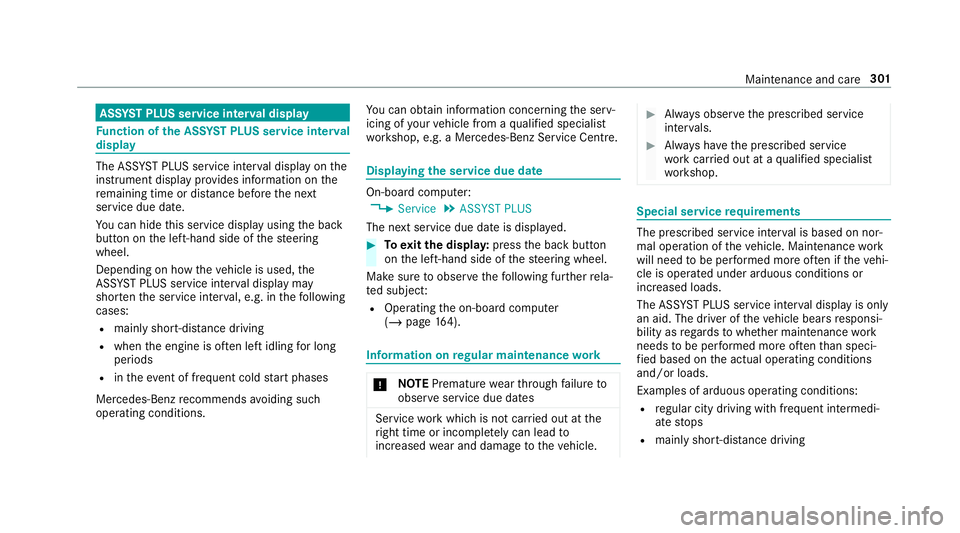
YST PLUS se rvice inter val display Fu
nction of the ASS YST PLUS se rvice inter val
displ ay The ASS
YST PLUS service inter val display on the
instrument display pr ovides information on the
re maining time or dis tance be fore the next
service due date.
Yo u can hide this service display using the back
button on the left-hand side of thesteering
wheel.
Depending on how theve hicle is used, the
ASS YST PLUS service inter val display may
shor tenth e service inter val, e.g. in thefo llowing
cases:
R mainly short-dis tance driving
R when the engine is of ten le ftidling for long
periods
R intheeve nt of frequent cold start phases
Mercedes-Benz recommends avoiding such
operating conditions. Yo
u can obtain information concerning the serv‐
icing of your vehicle from a qualified specialist
wo rkshop, e.g. a Mercedes-Benz Service Centre. Displaying
the service due da te On-board computer:
4 Service 5
ASSYST PLUS
The next service due date is displa yed. #
Toexitth e displa y:press the back button
on the left-hand side of thesteering wheel.
Make sure toobser vethefo llowing fur ther rela‐
te d subjec t:
R Operating the on-board computer
(/ page 164). Infor
mation on regular main tenance work *
NO
TEPremature wearthro ugh failure to
obser veservice due dates Service
workwhich is not car ried out at the
ri ght time or incomple tely can lead to
inc reased wear and damage totheve hicle. #
Alw ays obser vethe prescribed service
inter vals. #
Alw ays ha vethe prescribed service
wo rkcar ried out at a qualified specialist
wo rkshop. Special service
requ irements The prescribed service inter
val is based on nor‐
mal operation of theve hicle. Maintenance work
will need tobe per form ed more of ten if theve hi‐
cle is operated under arduous conditions or
increased loads.
The ASS YST PLUS service inter val display is only
an aid. The driver of theve hicle bears responsi‐
bility as rega rdsto whe ther maintenance work
needs tobe per form ed more of tenth an speci‐
fi ed based on the actual operating conditions
and/or loads.
Examples of arduous operating conditions:
R regular city driving with frequent intermedi‐
ate stops
R mainly short-dis tance driving Maintenance and care
301
Page 442 of 465
Emer
gency engine start ......................... 335
Emer gency key
Inserting/removing ............................... 56
Locking a door ....................................... 62
Un locking a door .................................. .62
Emer gency release
Ta ilgate .................................................. 65
Emotion Start
St arting theve hicle ............................. 108
Engine ECO start/ stop function ......................1 13
Engine number .................................... 359
St arting (k ey) .......................................1 08
St arting (s tart/s top button) ................ 108
St arting assis tance .............................. 329
Engine bonn et
Opening/closing ................................. 302
Engine data Displaying ............................................ 11 6
Engine electronics Notes .................................................. 359
Engine number ........................................3 59Engine oil
................................................. 305
Ad ditives .............................................3 63
Capacity .............................................. 364
Che cking the oil le vel using the oil
dipstick ............................................... 304
Checking the oil le vel using the on-
board computer ................................... 305
MB-Fr eigabe or MB-Appr oval .............. .364
Quality ................................................. 364
Te mp erature (on-board computer,
Pe rformance menu) ............................. 16 8
To pping up ...........................................3 05
Entering characters
Fu nction/no tes ................................... 19 6
On theto uchpad .................................. 197
ERA-GLONASS test mode
St arting/ending .................................. 264
ESP ®
Crosswind Assist ................................ .135
ESP ®
(Electronic Stability Prog ram)
Ac tivating/deactivating ...................... .134
Fu nction/no tes ................................... 13 2
SPORT handling mode ......................... 13 2St
atus display (on-board computer,
Pe rformance menu) ............................. 16 8
EU general operating permit number ....359
Exterior lighting Care ..................................................... 314
Exterior lighting see Lights
External device Locking (child saf ety lock) .................. .203 F
Fa tigue de tection
see ATTENTION ASSIST
Fa ult message
see Displ aymessa ge
Favo urites
Ad ding .................................................1 94
Calling up ............................................ .194
Del eting .............................................. .195
Moving ................................................. 19 5
Overview ..............................................1 94
Re naming ............................................ 194 Index
439