sensor MERCEDES-BENZ AMG GT COUPE 2020 User Guide
[x] Cancel search | Manufacturer: MERCEDES-BENZ, Model Year: 2020, Model line: AMG GT COUPE, Model: MERCEDES-BENZ AMG GT COUPE 2020Pages: 433, PDF Size: 7.81 MB
Page 106 of 433
R
allow the engine toreach a maximum engine
speed of 4,500 rpm on lybrief ly.
R drive theve hicle in drive program A.
R change gear before there v counter needle is
Ô ofthewa yto there d area of there v coun‐
te r.
R do not shift down a gear manually in order to
brake.
R avoidoverstra ining theve hicle, e.g. driving at
full thro ttle.
R do not depress the accelera tor pedal past
th e pressure point (kickdown).
R only increase the engine speed gradually and
accelera tetheve hicle tofull speed af ter
1, 500 km.
This also applies when the engine or parts of the
driv etra in ha vebeen replaced.
Please also obser vethefo llowing running-in
no tes:
R in cer tain driving and driving saf ety sy stems,
th e sensors adjust automatically while a cer‐
ta in dis tance is being driven af terth eve hicle
has been delivered or af terre pairs. Full sys‐ te
m ef fectiveness is not reached until the
end of this teach-in process.
R brakepads, brake discs and tyres that are
either new or ha vebeen replaced only ach‐
ie ve optimum braking ef fect and grip af ter
se veral hundred kilom etre s of driving. Com‐
pensate forth ere duced braking ef fect by
applying greaterfo rc eto the brake pedal. Note
s on engine output and engine torq ue %
The actual (maximum) values that can be
achie vedfo r engine output and engine tor‐
qu e may deviate from the certified values
within the count ry-specific guidelines for
permissible tolerances (basis: UN-ECE No.
85 or country -specific guidelines).
Fa ctors that can influence this are, forex am‐
ple:
R sea le vel
R fuel grade
R outside temp erature
R operating temp erature of the engine Unti
lth e engine has reached its operating tem‐
perature, thefo llowing engine operating temp er‐
ature warning lamp is lit: Engine output and engine
torque ha vebeen
re duced. Take this into account foryo ur driving
st yle.
When the engine operating temp erature warning
lamp goes out, full engine output and engine tor‐
qu e are available. Note
s on driving &
WARNING Risk of accident due to
objects in the driver's foot we ll
Objects in the driver's foot we ll may impede
pedal tr avel or block a depressed pedal.
This jeopardises the operating and road
saf ety of theve hicle. Driving and parking
103
Page 130 of 433
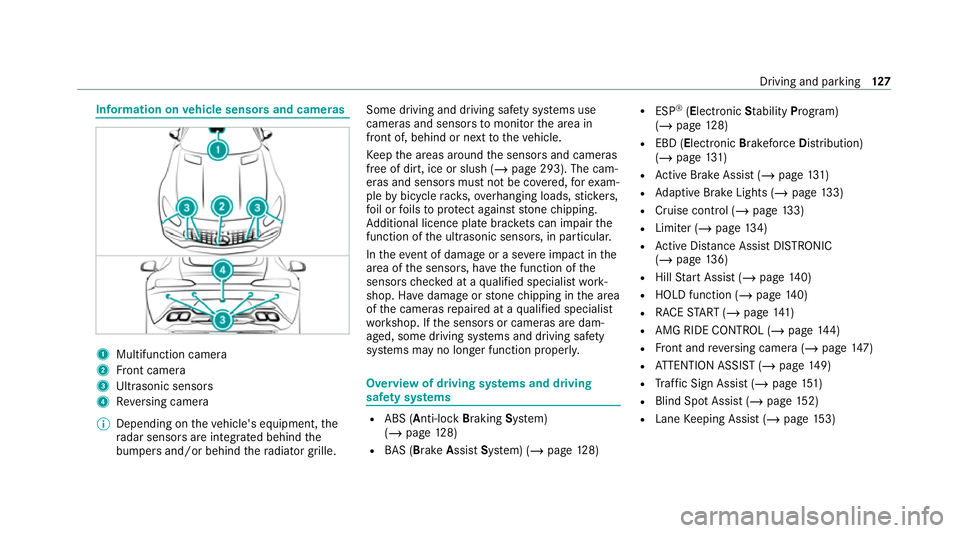
Information on
vehicle sensors and cameras 1
Multifunction camera
2 Front camera
3 Ultrasonic sensors
4 Reversing camera
% Depending on theve hicle's equipment, the
ra dar sensors are integ rated behind the
bumpers and/or behind thera diator grille. Some driving and driving saf
ety sy stems use
cameras and sensors tomonitor the area in
front of, behind or next totheve hicle.
Ke ep the areas around the sensors and cameras
free of dirt, ice or slush (/ page 293). The cam‐
eras and sensors must not be co vered, forex am‐
ple bybicycle rack s, overhanging loads, sticke rs,
fo il or foils toprotect against stone chipping.
Ad ditional licence plate brac kets can impair the
function of the ultrasonic sensors, in particular.
In theeve nt of damage or a severe impact in the
area of the sensors, ha vethe function of the
sensors checked at a qualified specialist work‐
shop. Ha vedamage or stone chipping in the area
of the cameras repaired at a qualified specialist
wo rkshop. If the sensors or cameras are dam‐
aged, some driving sy stems and driving saf ety
sy stems may no longer function proper ly. Overview of driving sy
stems and driving
saf ety sy stems R
ABS (Anti-lo ckBra king System)
(/ page 128)
R BAS (Brak eAssist System) (/ page128) R
ESP ®
(E lectronic Stability Program)
(/ page 128)
R EBD ( Electronic Brakeforc eDistribution)
(/ page 131)
R Active Brake Assi st (/ page 131)
R Adaptive Brake Lights (/ page133)
R Cruise control (/ page 133)
R Limi ter (/ page134)
R Active Dis tance Assi stDISTRONIC
(/ page 136)
R Hill Start Assist (/ page140)
R HOLD function (/ page140)
R RACE START (/ page 141)
R AMG RIDE CONTROL (/ page144)
R Front and reve rsing camera (/ page147)
R ATTENTION ASSIST (/ page149)
R Traf fic Sign Assi st (/ page 151)
R Blind Spot Assi st (/ page 152)
R Lane Keeping Assist (/ page153) Driving and pa
rking 127
Page 135 of 433
The dis
tance warning function issues a warning
at speeds:
R From appr oximately 30 km/h, if over se veral
seconds the dis tance maintained totheve hi‐
cle tr avelling in front is insuf ficient forthe
driven speed. The Ldistance warning
lamp then lights up in the instrument clus ter.
R From appr oximately 7 km/h, if your vehicle
is critically close toave hicle or pedestrian.
An intermittent warning tone sounds and the
L distance warning lamp lights up in the
instrument clus ter.
Brake immediately or take evasive action, pr ovi‐
ded it is safe todo so and the traf fic situation
allo wsthis.
The dis tance warning function can aid you in the
fo llowing situations:
R Vehicles tr avelling in front: uptoappr ox‐
imately 250 km/h
R Stationary vehicles: uptoappr oximately
70 km/h Au
tonomous braking function
The autonomous braking function may inter vene
at speeds ab oveappr oximately 7 km/h in the
fo llowing situations:
R Vehicles tr avelling in front:
- Vehicles without Active Dis tance Assi st
DISTRONIC: up toappr oximately
10 5 km/h
- Vehicles with Active Dis tance Assi st
DISTRONIC: up toappr oximately
200 km/h
R Stationary vehicles: uptoappr oximately
50 km/h
Situation-dependent braking assistance
Situation-dependent braking assis tance may
inter vene at speeds ab oveappr oximately
7 km/h in thefo llowing situations:
R Vehicles tr avelling in front: uptoappr ox‐
imately 250 km/h
R Stationary vehicles: uptoappr oximately
70 km/h Cancelling a brake application of
Active
Brake Assi st
Yo u can cancel a brake application of Active
Brake Assi stat any time by:
R Fully depressing the accelerator pedal or
with kickdown.
R Releasing the brake pedal.
Ac tive Brake Assi stmay cancel the brake appli‐
cation when one of thefo llowing conditions is
fulfilled:
R You manoeuv reto av oidthe obs tacle.
R The reis no longer a risk of collision.
R An obs tacle is no longer de tected in front of
yo ur vehicle.
Sy stem limits
The sy stem may be impaired or may not function
in thefo llowing situations:
R In sno w,rain, fog, heavy spr ay, if there is
gl are, in direct sunlight or in great lyvarying
light conditions.
R Ifth e sensors are dirty, mis ted up, damaged
or co vered. 13 2
Driving and pa rking
Page 136 of 433
R
Ifth e sensors are impaired due tointer fer‐
ence from other radar sources, e.g. strong
ra dar reflections in multi-s torey car par ks.
R If a loss of tyre pressure or a defective tyre
has been de tected and displaye d.
R Full sy stem per form ance is not available for a
fe w seconds af ter switching on the ignition
or af ter driving off.
R In complex traf fic situations whe reobjects
cannot always be clear lyidentified.
R Forve hicles if they mo vequickly into the
sensor de tection range.
R On bends wi tha tight radius.
% The Active Brake Assi stsensors adjust auto‐
matically while a cer tain dis tance is being
driven af terth eve hicle has been delivered.
Ac tive Brake Assi stis una vailable or only
partially available during this teach-in period. Setting
Active Brake Assi st Multimedia sy
stem:
4 Vehicle 5
k Assistance
5 Active Brake Assist #
Activate or deacti vate the function.
% It is recommended that you alw ays lea ve
Ac tive Brake Assi stactivated.
% IfAc tive Brake Assi stis deactivated, the
æ symbol appears inthest atus bar of the
multifunction displa y. Fu
nction of Adaptive Brake Lights Ad
aptive Brake Lights warnfollowing traf fic in an
emergency braking situation with th efo llowing
actions:
R Byflashing the brake lamps
R By activating the hazard warning lights
If th eve hicle is braked sharply from speeds
abo ve50 km/h, the brake lamps flash rapidl y.
This pr ovides traf fic tr avelling behind you with an
ev en more noticeable warning. If
th eve hicle is tr avelling at speeds of more than
70 km/h at the beginning of the brake applica‐
tion, the hazard warning lights switch on once
th eve hicle is stationar y.When you pull away
again, the hazard warning lights will switch off
automatically at appr oximately 10km/h. Yo u
can also switch off the hazard warning lights
using the hazard warning button. Cruise control and limiter
Fu
nction of cruise control
Cruise contro lre gulates the speed totheva lue
selec tedby the driver.
If yo u accelerate toove rtake, forex ample, the
st ored speed is not dele ted. If youre mo veyour
fo ot from the accelera tor pedal af terov ertaking,
cruise control will resume speed regulation back
to thestored speed.
Cruise contro l is operated using the cor respond‐
ing steering wheel buttons. You can store any
speed abo ve30 km/h up tothe maximum
design speed or up tothe set winter tyre limit. Driving and parking
13 3
Page 140 of 433
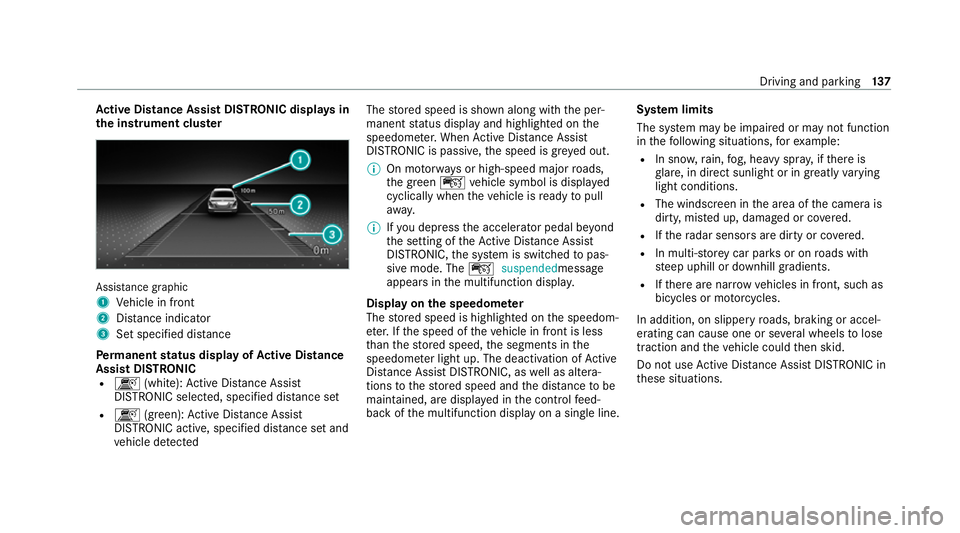
Ac
tive Di stance Assist DISTRO NIC displaysin
th e instrument clus terAssi
stance graphic
1 Vehicle in front
2 Distance indica tor
3 Set specified di stance
Pe rm anent status display of Active Di stance
Assist DIST RONIC
R k (white):Ac tive Dis tance Assi st
DISTRONIC selected, speci fied dis tance set
R k (green): Active Dis tance Assi st
DISTRONIC acti ve, specified dis tance set and
ve hicle de tected The
stored speed is shown along with the per‐
manent status display and highlighted on the
speedome ter.When Active Dis tance Assi st
DISTRONIC is passi ve,th e speed is gr eyed out.
% On mo torw ays or high-speed major roads,
th e green çvehicle symbol is displa yed
cyclically when theve hicle is ready topull
aw ay.
% Ifyo u depress the accelerator pedal be yond
th e setting of theAc tive Dis tance Assi st
DISTRONIC, the sy stem is switched topas‐
sive mode. The çsuspended message
appears in the multifunction displa y.
Display on the speedome ter
The stored speed is highlighted on the speedom‐
et er. If the speed of theve hicle in front is less
th an thestored speed, the segments in the
speedome ter light up. The deactivation of Active
Dis tance Assi stDISTRONIC, as well as altera‐
tions tothestored speed and the dis tance tobe
maintained, are displa yed in the control feed‐
back of the multifunction display on a single line. Sy
stem limits
The sy stem may be impaired or may not function
in thefo llowing situations, forex ample:
R In sn ow,ra in, fog, heavy spr ay, if there is
gl are, in direct sunlight or in greatlyvarying
light conditions.
R The windsc reen in the area of the camera is
dirty, mis ted up, damaged or co vered.
R Ifth era dar sensors are dirty or co vered.
R In multi- stor ey car pa rks or on roads with
st eep uphill or downhill gradients.
R Ifth ere are nar rowvehicles in front, such as
bicycles or mo torcyc les.
In addition, on slippery roads, braking or accel‐
erating can cause one or se veral wheels tolose
traction and theve hicle could then skid.
Do not use Active Dis tance Assi stDISTRONIC in
th ese situations. Driving and parking
137
Page 141 of 433
&
WARNING Risk of accident from acceler‐
ation or braking byActive Dis tance
Assi stDISTRONIC
Ac tive Dis tance Assi stDISTRONIC may accel‐
erate or brake in thefo llowing cases, for
ex ample:
R Ifth eve hicle pulls away using Active Dis‐
ta nce Assi stDISTRONIC.
R Ifth estored speed is called up and is
considerably faster or slo werth an the
cur rently driven speed.
R IfAc tive Dis tance Assi stDISTRONIC no
longer de tects a vehicle in front or does
not react toreleva nt objects. #
Alw ays carefully obser vethe traf fic con‐
ditions and be ready tobrake at all
times. #
Take into account the tra ffic situation
before calling up thestored speed. &
WARNING Risk of accident due toinsuf‐
fi cient decele ration byActive Dis tance
Assi stDISTRONIC
Ac tive Dis tance Assi stDISTRONIC brakes
yo ur vehicle with up to50% of the possible
deceleration. If this decele ration is not su ffi‐
cient, Active Dis tance Assi stDISTRONIC
alerts you with a visual and acoustic warning. #
Adjust your speed and main tain a suita‐
ble dis tance from theve hicle in front. #
Brake theve hicle yourself and/or take
ev asive action. &
WARNING Risk of accident if de tection
function of Active Dis tance Assi st
DISTRONIC is impaired
Ac tive Dis tance Assi stDISTRONIC does not
re act or has a limited reaction:
R when driving on a dif fere nt lane or when
ch anging lanes R
topedestrians, animals, bicycles or sta‐
tionary vehicles, or unexpected obs tacles
R tocompl extraf fic conditions
R tooncoming vehicles and crossing traf fic
As a result, Active Dis tance Assi st
DISTRONIC may nei ther give warnings nor
inter vene in su chsituations. #
Alw ays obser vethe tra ffic conditions
carefully and react accordin gly. Operating
Active Di stance Assist DIST RONIC
Re quirements:
R The elect ric pa rking brake is released.
R ESP ®
is activated and is not inter vening.
R The transmission is in position h.
R The driver's door is closed.
R Check of thera dar sensor sy stem has been
successfully comple ted.
R Parking Assist PARKTRONIC is not being
used topark theve hicle or toexit from a
parking space. 13 8
Driving and pa rking
Page 148 of 433
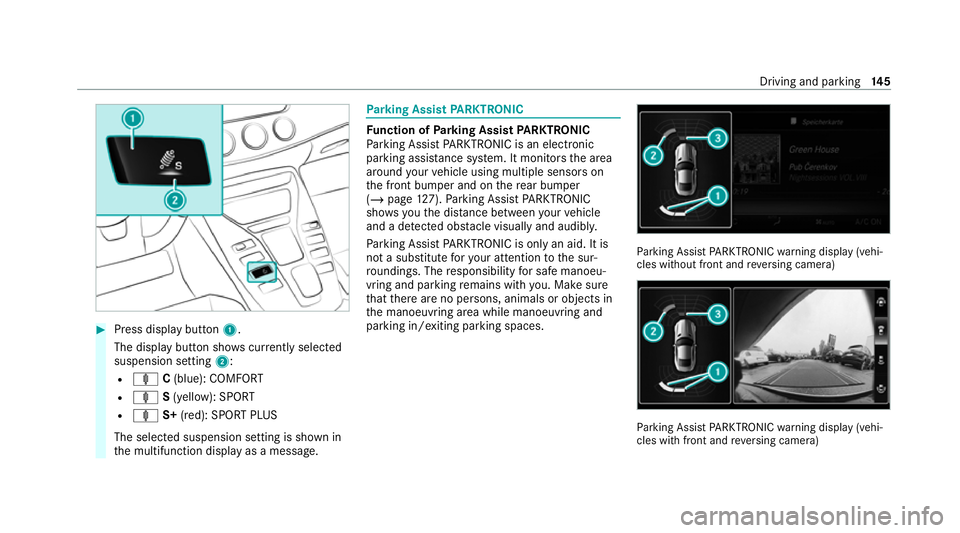
#
Press display button 1.
The display button sho wscurrently selected
suspension setting 2:
R ä C(blue): COMFORT
R ä S(yellow): SPORT
R ä S+(red): SPORT PLUS
The selected suspension setting is shown in
th e multifunction display as a message. Pa
rking Assist PARKTRONIC Fu
nction of Parking Assist PARKTRONIC
Pa rking Assist PARKTRONIC is an electronic
parking assi stance sy stem. It monitors the area
around your vehicle using multiple sensors on
th e front bumper and on there ar bumper
(/ page 127). Parking Assist PARKTRONIC
sho wsyouth e dis tance between your vehicle
and a de tected obs tacle visually and audibly.
Pa rking Assist PARKTRONIC is on lyan aid. It is
not a substitute foryo ur attention tothe sur‐
ro undings. The responsibility for safe manoeu‐
vring and parking remains with you. Make sure
th at there are no persons, animals or objects in
th e manoeuvring area while manoeuvring and
parking in/exiting parking spaces. Pa
rking Assist PARKTRONIC warning display (vehi‐
cles without front and reve rsing camera) Pa
rking Assist PARKTRONIC warning display (vehi‐
cles with front and reve rsing camera) Driving and parking
14 5
Page 149 of 433
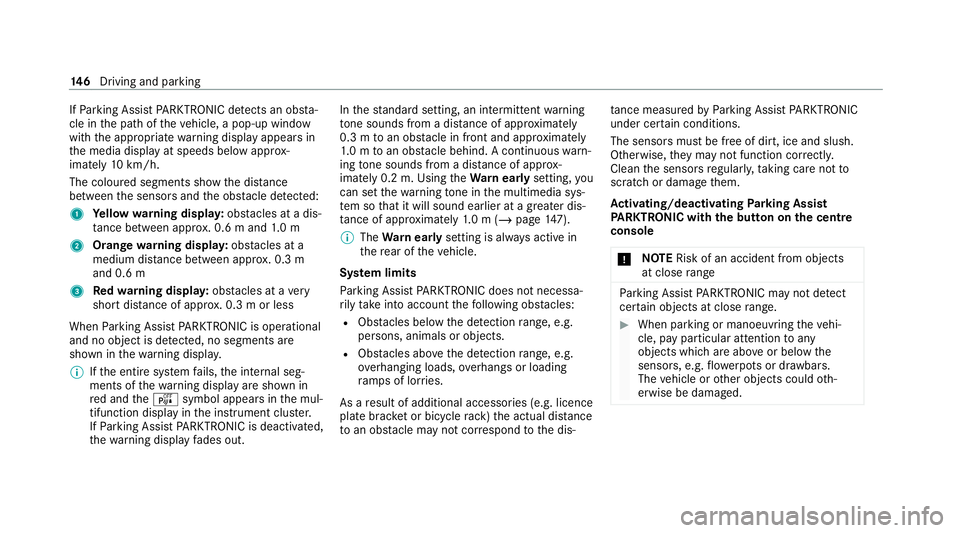
If
Pa rking Assist PARKTRONIC de tects an obs ta‐
cle in the path of theve hicle, a pop-up window
with the appropriate warning display appears in
th e media display at speeds below appr ox‐
imately 10km/h.
The colou red segments show the dis tance
between the sensors and the obs tacle de tected:
1 Yellow warning displa y:obs tacles at a dis‐
ta nce between appr ox. 0.6 m and 1.0 m
2 Orange warning displa y:obs tacles at a
medium di stance between appr ox. 0.3 m
and 0.6 m
3 Redwa rning displa y:obs tacles at a very
short dis tance of appr ox. 0.3 m or less
When Parking Assist PARKTRONIC is operational
and no object is de tected, no segments are
shown in thewa rning displa y.
% Ifth e entire sy stem fails, the internal seg‐
ments of thewa rning display are shown in
re d and theé symbol appears in the mul‐
tifunction display in the instrument clus ter.
If Pa rking Assist PARKTRONIC is deacti vated,
th ewa rning display fades out. In
thest andard setting, an intermit tent wa rning
to ne sounds from a di stance of appr oximately
0.3 m toan obs tacle in front and appr oximately
1. 0 m toan obs tacle behind. A continuous warn‐
ing tone sounds from a di stance of appr ox‐
imately 0.2 m. Using theWa rnear lysetting, you
can set thewa rning tone in the multimedia sys‐
te m so that it will sound earlier at a greater dis‐
ta nce of appr oximately 1.0 m (/ page147).
% The Warnear lysetting is alw ays active in
th ere ar of theve hicle.
Sy stem limits
Pa rking Assist PARKTRONIC does not necessa‐
ri ly take into account thefo llowing obs tacles:
R Obs tacles bel ow the detection range, e.g.
pe rsons, animals or objects.
R Obs tacles ab oveth e de tection range, e.g.
ove rhanging loads, overhangs or loading
ra mp s of lor ries.
As a result of additional accessories (e.g. licence
plate brac ket or bicycle rack )th e actual dis tance
to an obs tacle may not cor respond tothe dis‐ ta
nce measu redby Parking Assist PARKTRONIC
under ce rtain conditions.
The sensors must be free of dirt, ice and slush.
Otherwise, they may not function cor rectly.
Clean the sensors regularly, taking care not to
scratch or damage them.
Ac tivating/deactivating Parking Assist
PA RKTRONIC with the button on the centre
console
* NO
TERisk of an accident from objects
at close range Pa
rking Assist PARKTRONIC may not de tect
cer tain objects at close range. #
When pa rking or manoeuvring theve hi‐
cle, pay particular attention toany
objects which are abo veor below the
sensors, e.g. flowe rpots or dr awbars.
The vehicle or other objects could oth‐
erwise be damaged. 14 6
Driving and pa rking
Page 155 of 433
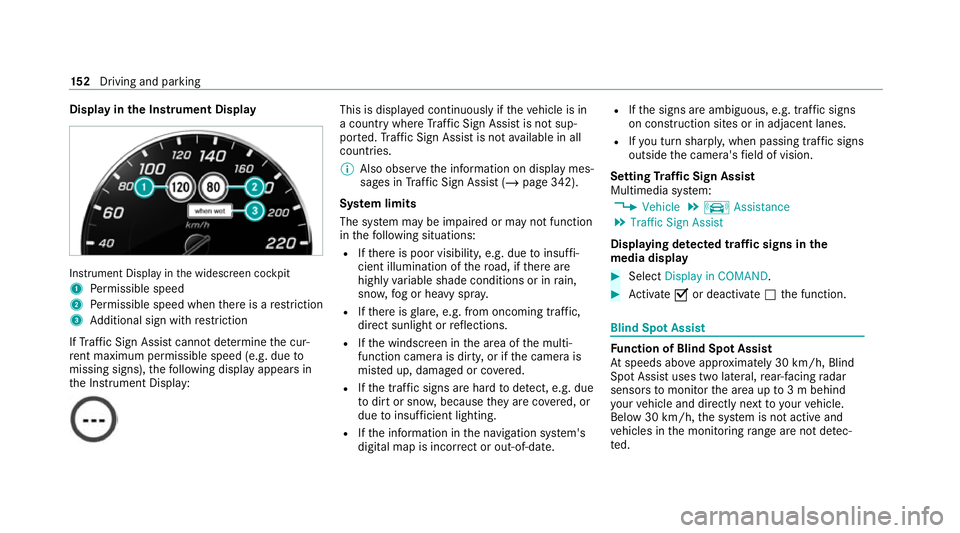
Display in
the Instrument Display In
stru ment Display in the widescreen cockpit
1 Perm issible speed
2 Perm issible speed when there is a restriction
3 Additional sign with restriction
If Traf fic Sign Assi stcannot de term ine the cur‐
re nt maximum pe rmissible speed (e.g. due to
missing signs), thefo llowing display appears in
th e Instrument Display: This is displa
yed continuously if theve hicle is in
a country where Traf fic Sign Assi stis not sup‐
por ted. Traf fic Sign Assi stis not available in all
countries.
% Also obse rveth e information on display mes‐
sages in Traf fic Sign Assi st (/ page 342).
Sy stem limits
The sy stem may be impaired or may not function
in thefo llowing situations:
R Ifth ere is poor visibility, e.g. due toinsuf fi‐
cient illumination of thero ad, if there are
highly variable shade conditions or in rain,
sno w,fog or heavy spr ay.
R Ifth ere is glare, e.g. from oncoming traf fic,
di re ct sunlight or reflections.
R Ifth e windscreen in the area of the multi‐
function camera is dirty, or if the camera is
mis ted up, damaged or co vered.
R Ifth e tra ffic signs are hard todetect, e.g. due
to dirt or sno w,because they are co vered, or
due toinsuf ficient lighting.
R Ifth e information in the navigation sy stem's
digital map is incor rect or out-of-da te.R
Ifth e signs are ambiguous, e.g. tra ffic signs
on const ruction sites or in adjacent lanes.
R Ifyo u turn sharpl y,when passing traf fic signs
outside the camera's field of vision.
Setting Traf fic Sign Assist
Multimedia sy stem:
4 Vehicle 5
k Assistance
5 Traffic Sign Assist
Displaying de tected traf fic signs in the
medi a display #
Select Display in COMAND. #
Activate Oor deacti vate ª the function. Blind Spot Assist
Fu
nction of Blind Spot Assist
At speeds abo veappr oximately 30 km/h, Blind
Spot Assist uses two lateral, rear-facing radar
sensors tomonitor the area up to3 m behind
yo ur vehicle and directly next to yourvehicle.
Below 30 km/h, the sy stem is not active and
ve hicles in the monitoring range are not de tec‐
te d. 15 2
Driving and pa rking
Page 156 of 433
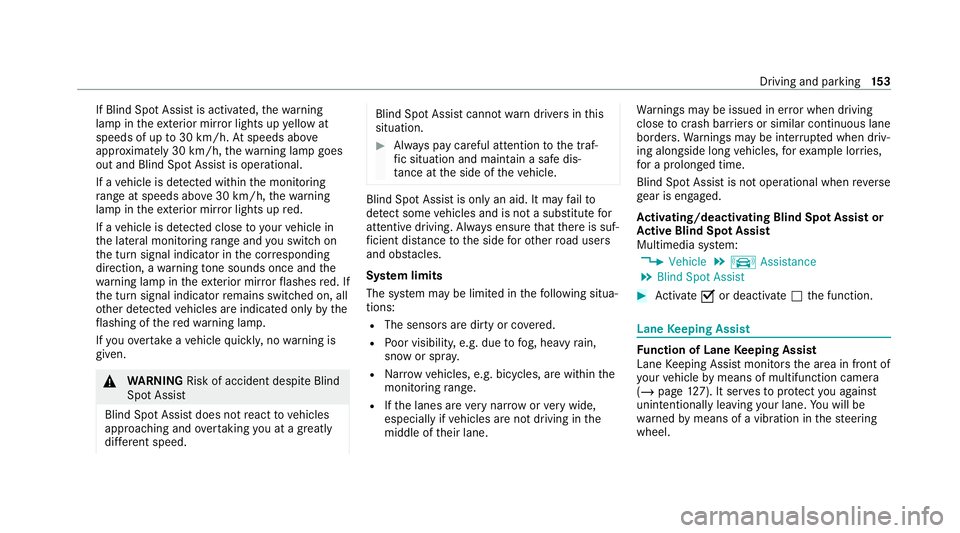
If Blind Spot Assist is activated,
thewa rning
lamp in theex terior mir ror lights up yellow at
speeds of up to30 km/h. Atspeeds abo ve
appr oximately 30 km/h, thewa rning lamp goes
out and Blind Spot Assist is operational.
If a vehicle is de tected with inthe monitoring
ra nge at speeds ab ove30 km/h, thewa rning
lamp in theex terior mir ror lights up red.
If a vehicle is de tected close to yourvehicle in
th e lateral monitoring range and you swit chon
th e turn signal indicator in the cor responding
direction, a warning tone sounds once and the
wa rning lamp in theex terior mir rorflashes red. If
th e turn signal indicator remains switched on, all
ot her de tected vehicles are indicated only bythe
fl ashing of there dwa rning lamp.
If yo uove rtake a vehicle quickl y,no warning is
given. &
WARNING Risk of accident despite Blind
Spot Assi st
Blind Spot Assi stdoes not react tovehicles
approaching and overtaking you at a greatly
di fferent speed. Blind Spot Assist cann
otwa rndrivers in this
situation. #
Alw ays pay careful attention tothe traf‐
fi c situation and maintain a safe dis‐
ta nce at the side of theve hicle. Blind Spot Assist is only an aid. It may
failto
de tect some vehicles and is not a substitute for
attentive driving. Alw ays ensure that there is suf‐
fi cient dist ancetothe side forot her road users
and obs tacles.
Sy stem limits
The sy stem may be limited in thefo llowing situa‐
tions:
R The sensors are dirty or co vered.
R Poor visibility, e.g. due tofog, heavy rain,
snow or spr ay.
R Narrow vehicles, e.g. bicycles, are within the
monitoring range.
R Ifth e lanes are very nar row or very wide,
especially if vehicles are not driving in the
middle of their lane. Wa
rnings may be issued in er ror when driving
close tocrash barr iers or similar continuous lane
borders. Warnings may be inter rupte d when driv‐
ing alongside long vehicles, forex ample lor ries,
fo r a prolonged time.
Blind Spot Assist is not operational when reve rse
ge ar is engaged.
Ac tivating/deactivating Blind Spot Assi stor
Ac tive Blind Spot Assi st
Multimedia sy stem:
4 Vehicle 5
k Assistance
5 Blind Spot Assist #
Activate Oor deacti vate ª the function. Lane
Keeping Assist Fu
nction of Lane Keeping Assist
Lane Keeping Assist monitors the area in front of
yo ur vehicle bymeans of multifunction camera
(/ page 127). It ser vesto protect you against
unin tentional lyleaving your lane. You will be
wa rned bymeans of a vibration in thesteering
wheel. Driving and parking
15 3