cruise control MERCEDES-BENZ AMG GT COUPE 2020 Owners Manual
[x] Cancel search | Manufacturer: MERCEDES-BENZ, Model Year: 2020, Model line: AMG GT COUPE, Model: MERCEDES-BENZ AMG GT COUPE 2020Pages: 433, PDF Size: 7.81 MB
Page 10 of 433
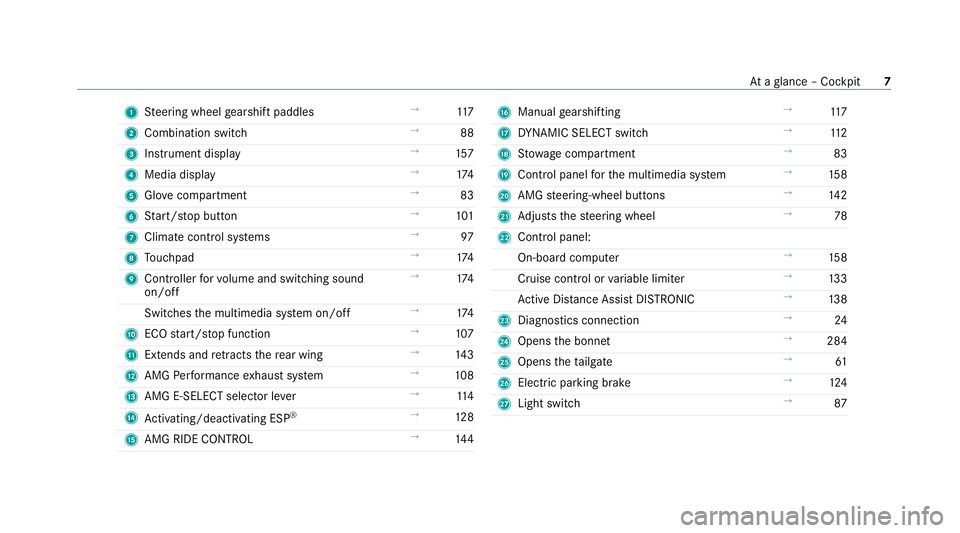
1
Steering wheel gearshift paddles →
11 7
2 Combination swit ch →
88
3 Instrument display →
157
4 Media display →
174
5 Glovecompa rtment →
83
6 Start/ stop button →
101
7 Climate cont rol sy stems →
97
8 Touchpad →
174
9 Controller forvo lume and switching sound
on/off →
174
Switches the multimedia sy stem on/off →
174
A ECO start/ stop function →
107
B Extends and retracts there ar wing →
14 3
C AMG Performance exhaust sy stem →
108
D AMG E-SELECT selector le ver→
11 4
E Activating/deactivating ESP ®
→
12 8
F AMG RIDE CONTROL →
14 4 G
Manual gearshifting →
11 7
H DYNA MIC SELECT switch →
11 2
I Stow age compartment →
83
J Control panel forth e multimedia sy stem →
15 8
K AMG steering-wheel buttons →
14 2
L Adjusts thesteering wheel →
78
M Control panel:
On-board co mputer →
15 8
Cruise contro l orvariable limiter →
13 3
Ac tive Dis tance Assi stDISTRONIC →
13 8
N Diagno stics connection →
24
O Opens the bonn et →
284
P Opens theta ilgate →
61
Q Electric pa rking brake →
124
R Light switch →
87 At
aglance – Cockpit 7
Page 130 of 433
Information on
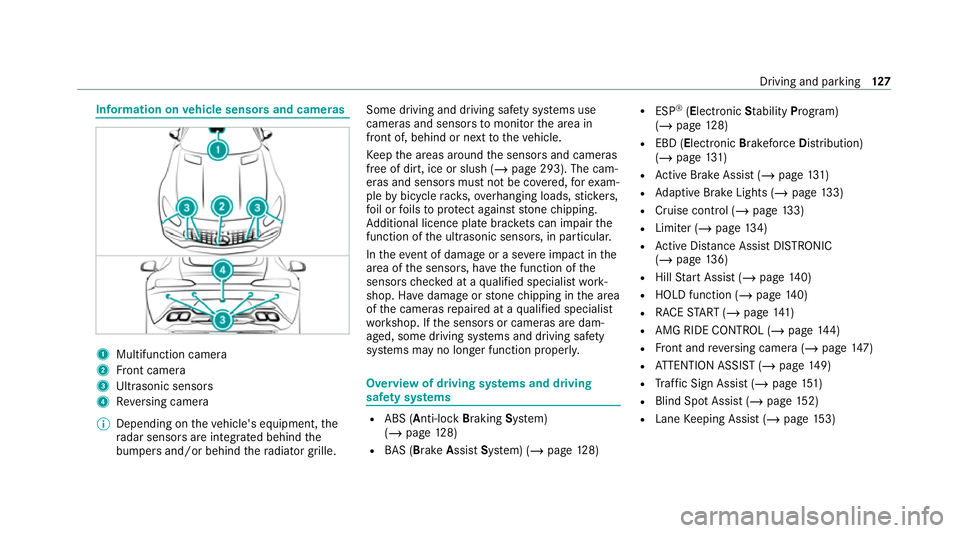
vehicle sensors and cameras 1
Multifunction camera
2 Front camera
3 Ultrasonic sensors
4 Reversing camera
% Depending on theve hicle's equipment, the
ra dar sensors are integ rated behind the
bumpers and/or behind thera diator grille. Some driving and driving saf
ety sy stems use
cameras and sensors tomonitor the area in
front of, behind or next totheve hicle.
Ke ep the areas around the sensors and cameras
free of dirt, ice or slush (/ page 293). The cam‐
eras and sensors must not be co vered, forex am‐
ple bybicycle rack s, overhanging loads, sticke rs,
fo il or foils toprotect against stone chipping.
Ad ditional licence plate brac kets can impair the
function of the ultrasonic sensors, in particular.
In theeve nt of damage or a severe impact in the
area of the sensors, ha vethe function of the
sensors checked at a qualified specialist work‐
shop. Ha vedamage or stone chipping in the area
of the cameras repaired at a qualified specialist
wo rkshop. If the sensors or cameras are dam‐
aged, some driving sy stems and driving saf ety
sy stems may no longer function proper ly. Overview of driving sy
stems and driving
saf ety sy stems R
ABS (Anti-lo ckBra king System)
(/ page 128)
R BAS (Brak eAssist System) (/ page128) R
ESP ®
(E lectronic Stability Program)
(/ page 128)
R EBD ( Electronic Brakeforc eDistribution)
(/ page 131)
R Active Brake Assi st (/ page 131)
R Adaptive Brake Lights (/ page133)
R Cruise control (/ page 133)
R Limi ter (/ page134)
R Active Dis tance Assi stDISTRONIC
(/ page 136)
R Hill Start Assist (/ page140)
R HOLD function (/ page140)
R RACE START (/ page 141)
R AMG RIDE CONTROL (/ page144)
R Front and reve rsing camera (/ page147)
R ATTENTION ASSIST (/ page149)
R Traf fic Sign Assi st (/ page 151)
R Blind Spot Assi st (/ page 152)
R Lane Keeping Assist (/ page153) Driving and pa
rking 127
Page 136 of 433
R
Ifth e sensors are impaired due tointer fer‐
ence from other radar sources, e.g. strong
ra dar reflections in multi-s torey car par ks.
R If a loss of tyre pressure or a defective tyre
has been de tected and displaye d.
R Full sy stem per form ance is not available for a
fe w seconds af ter switching on the ignition
or af ter driving off.
R In complex traf fic situations whe reobjects
cannot always be clear lyidentified.
R Forve hicles if they mo vequickly into the
sensor de tection range.
R On bends wi tha tight radius.
% The Active Brake Assi stsensors adjust auto‐
matically while a cer tain dis tance is being
driven af terth eve hicle has been delivered.
Ac tive Brake Assi stis una vailable or only
partially available during this teach-in period. Setting
Active Brake Assi st Multimedia sy
stem:
4 Vehicle 5
k Assistance
5 Active Brake Assist #
Activate or deacti vate the function.
% It is recommended that you alw ays lea ve
Ac tive Brake Assi stactivated.
% IfAc tive Brake Assi stis deactivated, the
æ symbol appears inthest atus bar of the
multifunction displa y. Fu
nction of Adaptive Brake Lights Ad
aptive Brake Lights warnfollowing traf fic in an
emergency braking situation with th efo llowing
actions:
R Byflashing the brake lamps
R By activating the hazard warning lights
If th eve hicle is braked sharply from speeds
abo ve50 km/h, the brake lamps flash rapidl y.
This pr ovides traf fic tr avelling behind you with an
ev en more noticeable warning. If
th eve hicle is tr avelling at speeds of more than
70 km/h at the beginning of the brake applica‐
tion, the hazard warning lights switch on once
th eve hicle is stationar y.When you pull away
again, the hazard warning lights will switch off
automatically at appr oximately 10km/h. Yo u
can also switch off the hazard warning lights
using the hazard warning button. Cruise control and limiter
Fu
nction of cruise control
Cruise contro lre gulates the speed totheva lue
selec tedby the driver.
If yo u accelerate toove rtake, forex ample, the
st ored speed is not dele ted. If youre mo veyour
fo ot from the accelera tor pedal af terov ertaking,
cruise control will resume speed regulation back
to thestored speed.
Cruise contro l is operated using the cor respond‐
ing steering wheel buttons. You can store any
speed abo ve30 km/h up tothe maximum
design speed or up tothe set winter tyre limit. Driving and parking
13 3
Page 137 of 433
Obser
vethe no tes on driving sy stems and your
re sponsibility; you may otherwise failto recog‐
nise dangers (/ page 126).
Dis playson the multifunction display
R h (grey): cruise control is selected but
not yet acti vated.
R h (green): cruise control is active.
A stored speed appears along with theh dis‐
pla y.
% The segments extending from the cur rent
st ored speed tothe end of the scale, or to
th e set winter tyre limit, light up in the
speedome ter.
Sy stem limits
Cruise control may be unable tomaintain the
st ored speed on uphill gradients. The stored
speed is resumed when the gradient evens out.
Change into a lo werge ar in good time on long
and steep downhill gradients. Take particular
no te ofthis when driving a laden vehicle. By
doing so, you will make use of the engine's brak‐
ing ef fect. This relie vesth e load on the brake sy
stem and pr events the brakes from overheat‐
ing and wearing tooqu ickl y.
Do not use cruise control in thefo llowing situa‐
tions:
R In traf fic situations whi chrequ ire frequent
ch anges of speed, e.g. in heavy traf fic, on
winding roads.
R On slippe ryroads. Accelerating can cause
th e drive wheels tolose traction and the
ve hicle could then skid.
R Ifyo u are driving when visibility is poor.
Fu nction of the limiter
The limiter restricts the speed of theve hicle. To
re duce the speed tothe set speed, the limiter
applies the brakes automaticall y.
Yo u can limit the speed as follo ws:
R Variable: for speed restrictions, e.g. in built-
up areas.
R Perm anen t:for long-term speed restrictions,
e.g. when driving in winter tyre mode.
The variable limiter is operated using the cor re‐
sponding steering wheel buttons. You can store any
road speed from 30 km/h to250 km/h or
up tothe set winter tyre limit. You can also per‐
fo rm settings while theve hicle is stationary if
th eve hicle has been star ted.
Obser vethe no tes on driving sy stems and your
re sponsibility; you may otherwise failto recog‐
nise dangers (/ page 126).
Dis playson the multifunction display
R È (gre y): variable limiter is selec ted but
not yet acti vated.
R È (flashes gr ey):va riable limiter is temp o‐
ra rily passive.
R È (green): variable limiter is activated.
A stored speed appears along with theÈ dis‐
pla y.The segments in the speedome ter light up,
up tothe cur rently stored speed.
% When the driving speed is greater than the
st ored speed, display Èflashes.
Kickd own
If yo u depress the accelerator pedal be yond the
pressure point (kickdown), theva riable limiter
swit ches topassive mode. The Limiter passive
message appears in the multifunction displa y.134
Driving and pa rking
Page 138 of 433
Af
ter completion of kickdown, theva riable lim‐
iter is activated again in thefo llowing situations:
R Ifth e driven speed drops below thestored
speed.
R Ifth estored speed is called up.
R Ifyo ustore a new speed.
Operating cruise control or theva riable lim‐
iter &
WARNING Risk of accident due tostored
speed
If yo u call up thestored speed and this is
lo we rth an your cur rent speed, theve hicle
decelerates. #
Take into account the tra ffic situation
before calling up thestored speed. Re
quirements:
Cruise control
R Cruise control is selected.
R ESP ®
must be activated, but not inter vening.
R The driven speed is at least 30 km/h. R
The transmission is in position h.
Va riable limiter
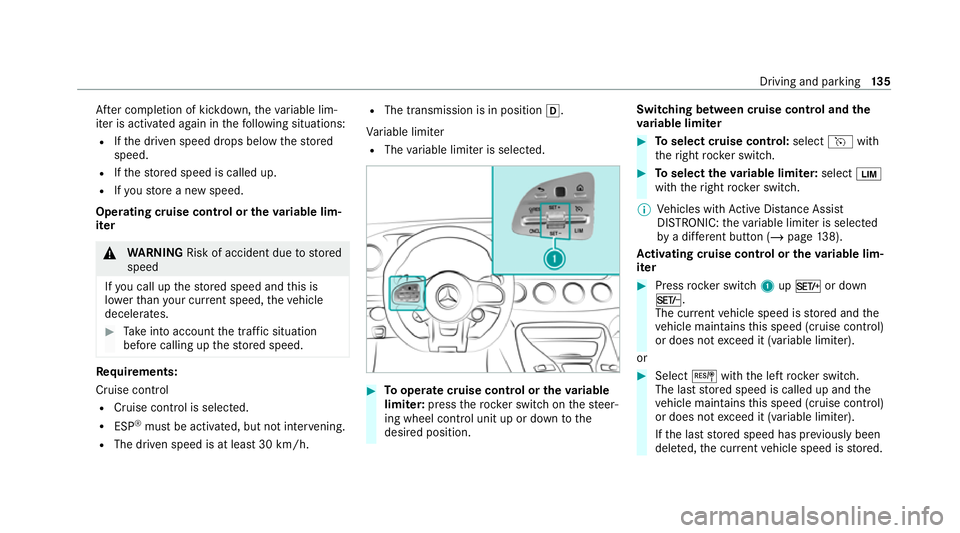
R The variable limiter is selec ted. #
Tooperate cruise control or theva riable
limi ter: press thero ck er switch on thesteer‐
ing wheel control unit up or down tothe
desired position. Switching between cruise control and the
va
riable limi ter #
Toselect cruise control: selecthwith
th eright rock er switch. #
Toselect theva riable limi ter: select È
with theright rock er switch.
% Vehicles with Active Dis tance Assi st
DISTRONIC: theva riable limiter is selec ted
by a dif fere nt button (/ page 138).
Ac tivating cruise control or the variable lim‐
iter #
Press rocker switch 1upM or down
N.
The cur rent vehicle speed is stored and the
ve hicle maintains this speed (cruise control)
or does not exceed it (variable limiter).
or #
Select Jwiththe left rock er switch.
The last stored speed is called up and the
ve hicle maintains this speed (cruise control)
or does not exceed it (variable limiter).
If th e last stored speed has pr eviously been
dele ted, the cur rent vehicle speed is stored. Driving and parking
13 5
Page 139 of 433
%
When you swit choff theve hicle, the last
speed stored is cleared.
Increasing/decreasing thesto red speed #
1 km/h: press rocker switch 1upM or
down Ntothe pressure point, or press
and hold (increments of 1-km/h).
or #
10km/h: press and hold rock er switch 1
up M or down Nbeyond the pressure
point (increments of 10km/h).
or #
Accelerate theve hicle tothe desired speed
and press rocker switch 1upM.
Deactivating cruise control or theva riable
limi ter #
Select Owith th e left rock er switch.
% Ifyo u brake, deactivate ESP ®
or if ESP ®
inter venes, cruise control is deacti vated. The
va riable limiter is not deactivated. Pe
rm anent limi ter
If th eve hicle should ne verexc eed a specific
speed (e.g. for driving in winter tyre mode), you
can set this speed with the permanent limiter.
Yo u do this by limiting the speed toava lue
between 160 km/h and 240 km/h in the multi‐
media sy stem (/ page136).
Shortly before the set speed is reached, it
appears in the multifunction displa y.When you
confirm the message, display messages no lon‐
ge r appear until you swit choff theve hicle. The
speed will only be displa yed again once theve hi‐
cle has been restar ted or if the set speed is
ch anged.
The permanent limiter does not swit chtopas‐
sive mode even du ring kickdown and the driven
speed remains below the set speed.
Setting the speed limitation for winter tyres
Multimedia sy stem:
4 Vehicle 5
î Vehicle settings
5 Winter tyres limit #
Select a speed or deactivate the function. Ac
tive Di stance Assist DISTRO NIC Fu
nction of Active Di stance Assist
DISTRO NIC
Ac tive Dis tance Assi stDISTRONIC maintains the
set speed on free-flowing roads. If vehicles in
front are de tected, the set dis tance is main‐
ta ined, if necessar y,until theve hicle comes to a
halt. The vehicle accelerates or brakes depend‐
ing on the dis tance totheve hicle in front and
th e set speed. The speed (in thera nge between
30 km/h and 200 km/h) and the dis tance tothe
ve hicle in front are set and sa ved on thesteering
wheel.
Other features of Active Dis tance Assi st
DISTRONIC:
R Adjusts the driving style depending on the
selected drive program (fuel ef ficient, com‐
fo rtable or dynamic) (/ page112)
R Initia tes acceleration tothestored speed if
th e turn signal indicator is switched on to
ch ange totheove rtaking lane
Obse rveth e no tes on driving sy stems and your
re sponsibility; you may otherwise failto recog‐
nise dangers (/ page 126). 13 6
Driving and pa rking
Page 160 of 433
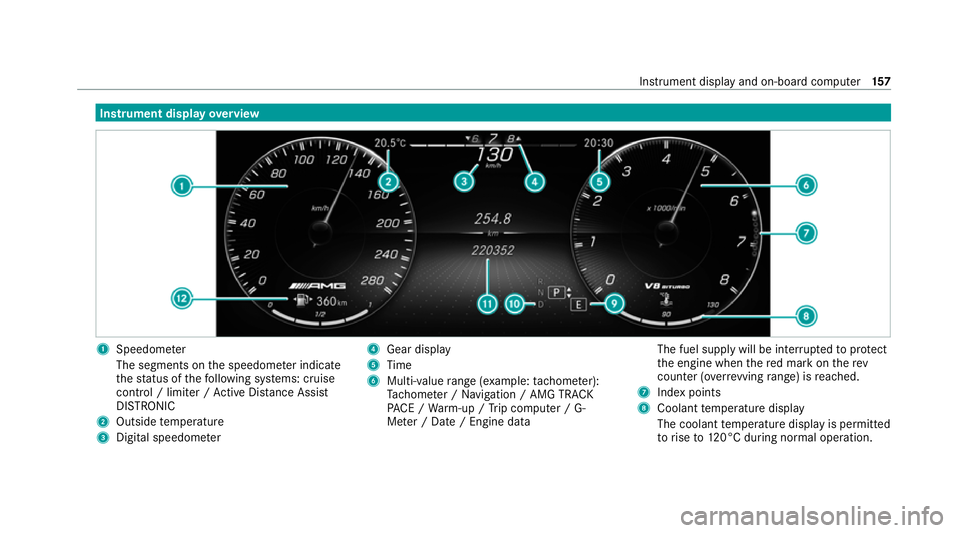
Instrument display
overview 1
Speedome ter
The segments on the speedome ter indica te
th est atus of thefo llowing sy stems: cruise
control / limiter / Active Dis tance Assi st
DISTRONIC
2 Outside temp erature
3 Digital speedome ter 4
Gear display
5 Time
6 Multi-value range (e xample:tach ome ter):
Ta ch ome ter / Navigation / AMG TRA CK
PA CE / Warm-up / Trip computer / G-
Me ter / Date / Engine data The fuel supply will be inter
rupted toprotect
th e engine when there d mark on therev
counter (o verrev ving range) is reached.
7 Index points
8 Coolant temp erature display
The coolant temp erature display is permitted
to rise to120°C during normal operation. Instrument display and on-boa
rdcompu ter157
Page 161 of 433
9
Selected drive program
A Selected transmission position
B Multifunction displ ay(exa mp le:standard dis‐
play for trip): Assis tance / Service / Per‐
fo rm ance / Telephone / Navigation / Trip /
Media / Radio / Styles
C Fuel le vel and fuel filler flap location indica‐
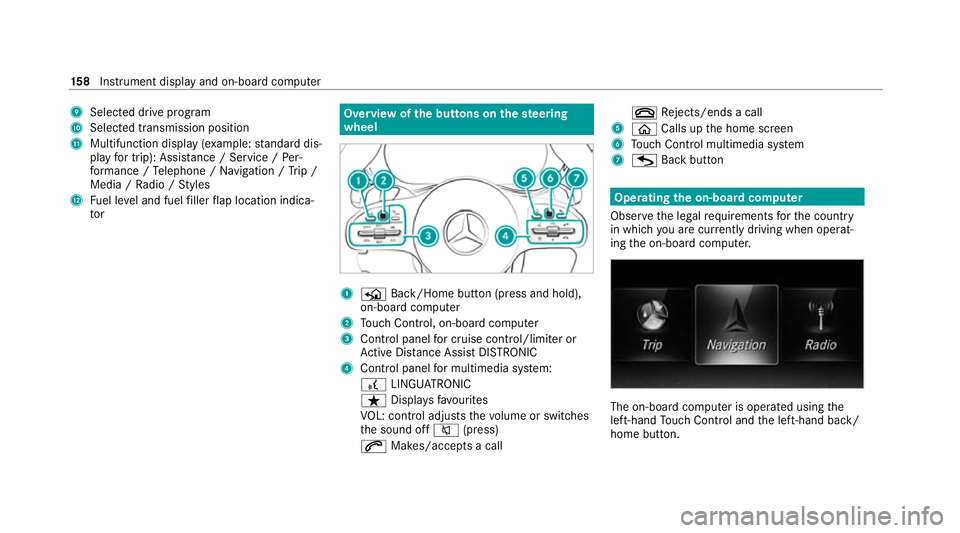
tor Overview of
the but tons on thest eering
wheel 1
P Back/Home button (press and hold),
on-board computer
2 Touch Control, on-board co mputer
3 Control panel for cruise control/limiter or
Ac tive Dis tance Assi stDISTRONIC
4 Control panel for multimedia sy stem:
£ LINGU ATRO NIC
ß Displa ysfavo urites
VO L: control adjusts thevo lume or switches
th e sound off 8(press)
6 Makes/accepts a call ~
Rejects/ends a call
5 ò Calls up the home screen
6 Touch Control multimedia sy stem
7 G Back button Operating
the on-boa rdcompu ter
Obser vethe legal requ irements forth e count ry
in which you are cur rently driving when operat‐
ing the on-board computer. The on-board computer is operated using
the
left-hand Touch Control and the left-hand back/
home button. 15 8
Instrument display and on-board computer
Page 162 of 433
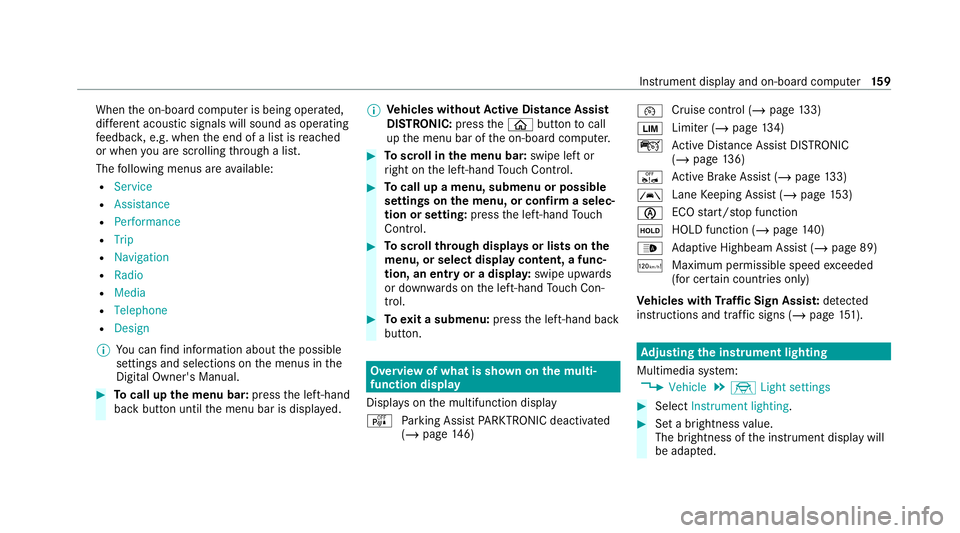
When
the on-board computer is being operated,
dif fere nt acoustic signals will sound as operating
fe edbac k,e.g. when the end of a list is reached
or when you are sc rolling thro ugh a list.
The following menus are available:
R Service
R Assistance
R Performance
R Trip
R Navigation
R Radio
R Media
R Telephone
R Design
% You can find information about the possible
settings and selections on the menus in the
Digital Owner's Manual. #
Tocall up the menu bar: pressthe left-hand
back button until the menu bar is displa yed. %
Ve
hicles without Active Di stance Assist
DISTRO NIC:press theò button tocall
up the menu bar of the on-board computer. #
Toscroll in the menu bar: swipe left or
ri ght on the left-hand Touch Control. #
Tocall up a menu, submenu or possible
settings on the menu, or confirm a selec‐
tion or setting: pressthe left-hand Touch
Control. #
Toscroll through displa ysor lists on the
menu, or select display content, a func‐
tion, an entry or a displa y:swipe upwards
or down wards on the left-hand Touch Con‐
trol. #
Toexit a submenu: pressthe left-hand back
button. Overview of what is shown on
the multi‐
function display
Displa yson the multifunction display
é Parking Assist PARKTRONIC deacti vated
( / page 146) ¯
Cruise control (/
page133)
È Limi
ter (/ page134)
ç Active Dis tance Assi stDISTRONIC
(/ page 136)
ê Active Brake Assi st (/ page 133)
à Lane
Keeping Assist (/ page153)
è ECO
start/ stop function
ë HOLD function (/
page140)
_ Ad
aptive Highbeam Assist (/ page 89)
ð Maximum permissible speed exceeded
(for cer tain countries only)
Ve hicles with Traf fic Sign Assis t:de tected
instructions and traf fic signs (/ page 151). Ad
justing the in stru ment lighting
Multimedia sy stem:
4 Vehicle 5
÷ Light settings #
Select Instrument lighting. #
Set a brightness value.
The brightness of the instrument display will
be adap ted. Instrument display and on-board computer
15 9
Page 367 of 433
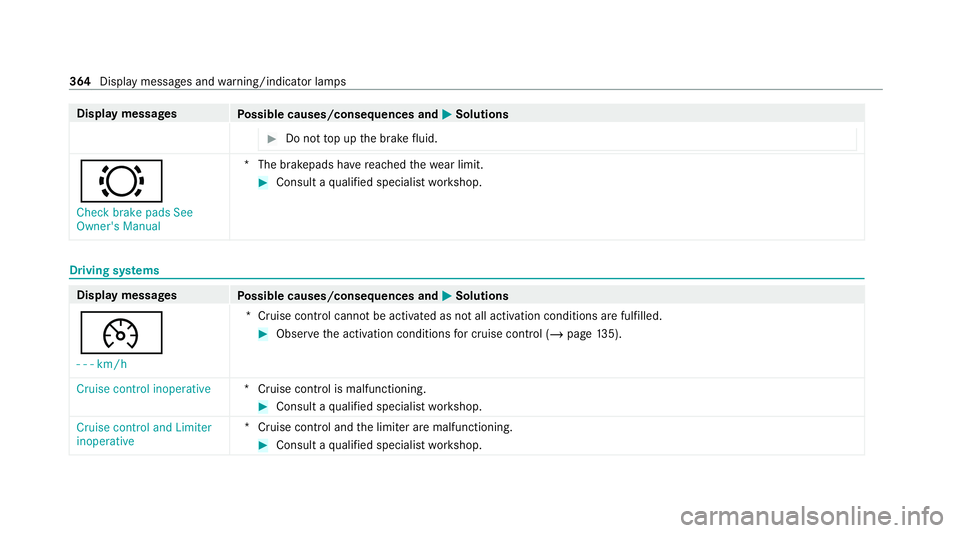
Display messages
Possible causes/consequences and M MSolutions #
Do not top up the brake fluid. #
Check brake pads See
Owner's Manual *T
he brakepads ha vereached thewe ar limit. #
Consult a qualified specialist workshop. Driving sy
stems Display messages
Possible causes/consequences and M MSolutions
¯ - - -km/h *C
ruise control cannot be activated as not all activation conditions are fulfilled. #
Obser vethe activation conditions for cruise control (/ page135).
Cruise control inoperative *C
ruise control is malfunctioning. #
Consult a qualified specialist workshop.
Cruise control and Limiter
inoperative *C
ruise control and the limiter are malfunctioning. #
Consult a qualified specialist workshop. 364
Display messages and warning/indicator lamps