wheel MERCEDES-BENZ AMG GT ROADSTER 2016 User Guide
[x] Cancel search | Manufacturer: MERCEDES-BENZ, Model Year: 2016, Model line: AMG GT ROADSTER, Model: MERCEDES-BENZ AMG GT ROADSTER 2016Pages: 289, PDF Size: 5.97 MB
Page 22 of 289
Trim pieces (cleaning instruc-
tions)
.................................................. 243
Trip computer (on-board com-
puter) .................................................. 158
Trip meter
Calling up ....................................... 157
Resetting (on-board computer) ...... 158
Turn signals
Switching on/off .............................. 89
Two-way radio
Frequencies ................................... 275
Installation ..................................... 275
Transmission output (maximum) .... 275
Type identification plate
see Vehicle identification plate
Tyre changing tool kit ....................... 246
Tyre inflation compressor
see TIREFIT kit
Tyre pressure
Calling up (on-board computer) ..... 265
Display message ............................ 189
Not reached (TIREFIT) .................... 249
Reached (TIREFIT) .......................... 249
Recommended ............................... 264
Tyre pressure monitor
Checking the tyre pressure elec-
tronically ........................................ 266
Function/note s............................. 265
General notes ................................ 265
Important safety notes .................. 266
Restarting ...................................... 267
Warning lamp ................................. 203
Warning message .......................... 267
Tyres
Changing a whee l.......................... 267
Checking ........................................ 262
Direction of rotation ...................... 268
Display message ............................ 189
Important safety notes .................. 261
Information on driving .................... 261
Replacing ....................................... 267
Service life ..................................... 262
Storing ........................................... 268
Summer tyres in winter ................. 263
Tyre size (data ).............................. 272
Tyre tread ...................................... 262
Wheel and tyre combinations ........ 272
see Flat tyre U
Unlocking Emergency unlocking ....................... 70
From inside the vehicle (central
unlocking button) ............................. 70
USB devices
Connecting to the Media Inter-
face ............................................... 216 V
Vanity mirror (in sun visor) .............. 221
Vehicle
Correct use ...................................... 25
Data acquisition ............................... 26
Display message ............................ 190
Electronics ..................................... 275
Equipment ....................................... 23
Implied warranty .............................. 25
Individual settings .......................... 164
Leaving parked up ......................... 122
Locking (in an emergency) ............... 70
Locking (key) ................................... 64
Lowering ........................................ 272
Operating safety .............................. 23
Parking .......................................... 119
Pulling away ................................... 104
Raising ........................................... 269
Registration ..................................... 25
Securing from rolling away ............ 268
Towing away .................................. 256
Transporting .................................. 258
Unlocking (in an emergency) ........... 70
Unlocking (key) ................................ 64
Vehicle data ................................... 281
Vehicle data
Boot load (maximum) ..................... 281
Vehicle dimensions ........................... 281
Vehicle emergency locking ................ 70
Vehicle identification number
see VIN
Vehicle identification plate .............. 276
Vehicle tool kit .................................. 246
Video
Operating the DVD ......................... 162
See also Digital Owner's Manua l... 205 Index
19
Page 23 of 289
VIN
Seat ............................................... 277
Type plate ...................................... 276 W
Warning and indicator lamps ABS ................................................ 197
Brakes ........................................... 196
Distance warning signal ................. 202
ESP ®
.............................................. 197
ESP ®
OFF ....................................... 198
Fuel tank ........................................ 200
LIM (cruise control) ........................ 126
LIM (DISTRONIC PLUS) .................. 131
LIM (variable SPEEDTRONIC) ......... 128
Overview .......................................... 29
Parking brake ................................ 199
PASSENGER AIR BAG ...................... 35
Reserve fue l................................... 200
Seat belt ........................................ 195
Steering ......................................... 204
Tyre pressure monitor ................... 203
Warning triangle ................................ 245
Washer fluid
Display message ............................ 193
Weather display (COMAND Online)
See also Digital Owner's Manua l... 205
Wheel and tyre combinations
Tyres .............................................. 272
Wheel bolt tightening torque ........... 272
Wheel chock ...................................... 268
Wheels
Changing a whee l.......................... 267
Changing/replacing ....................... 267
Checking ........................................ 262
Cleaning ......................................... 240
Emergency spare whee l................. 273
Fitting a new wheel ........................ 271
Fitting a wheel ............................... 268
Important safety notes .................. 261
Information on driving .................... 261
Removing a whee l.......................... 270
Storing ........................................... 268
Tightening torque ........................... 272
Wheel size/tyre size ...................... 272
Windowbag
Display message ............................ 179 Operation ......................................... 41
Windows
Cleaning ......................................... 240
see Side windows
Windscreen
Demisting ........................................ 98
Windscreen washer fluid
see Windscreen washer system
Windscreen washer system
Important safety notes .................. 280
Topping up ..................................... 236
Windscreen wipers
Problem (malfunction) ..................... 93
Replacing the wiper blades .............. 92
Switching on/of f.............................. 92
Winter operation
Important safety notes .................. 263
Slippery road surfaces ................... 125
Snow chains .................................. 263
Summer tyres ................................ 263
Winter tyres
Limiting the speed (on-board com-
puter) ............................................. 166
M+S tyres ...................................... 263
Wiper blades
Cleaning ......................................... 241
Important safety notes .................... 92
Replacing ......................................... 92
Replacing (windscreen) .................... 93
Wooden trim (cleaning instruc-
tions) .................................................. 243
Workshop
see Qualified specialist workshop 20
Index
Page 26 of 289
Have accessories retrofitted at a qualified
specialist workshop.
You could jeopardise the operating safety of
your vehicle if you use parts, tyres and wheels as
well as accessories relevant to safety that have not been approved by Mercedes-Benz. This
could lead to malfunctions in safety-relevant
systems, e.g. the brake system. Use only genu-
ine Mercedes-Benz parts or parts of equal qual- ity. Use only tyres, wheels and accessories that
have been specifically approved for your vehi-
cle.
Mercedes-Benz tests genuine parts and conver-
sion parts and accessories that have been spe-
cifically approved for your vehicle for their reli-
ability, safety and suitability. Despite ongoing
market research, Mercedes-Benz is unable to
assess other parts. Mercedes-Benz therefore
accepts no responsibility for the use of such
parts in Mercedes-Benz vehicles, even if they
have been officially approved or independently
approved by a testing centre.
In Germany, certain parts are officially approved for installation or modification only if they com-
ply with legal requirements. This also applies to some other countries. All genuine Mercedes-
Benz parts meet the approval requirements. The
use of non-approved parts may invalidate the
vehicle's general operating permit.
This is the case:
R if they cause a change of the vehicle type from
that for which the vehicle's general operating permit was granted
R if other road users could be endangered
R if the emission or noise levels are adversely
affected
Always specify the vehicle identification number (VIN) (Y page 276) when ordering genuine
Mercedes-Benz parts. Owner's Manual
Vehicle equipment
i This Owner's Manual describes all models
and all standard and optional equipment
available for your vehicle at the time of pub-
lication of the Owner's Manual. Country-spe-
cific differences are possible. Note that your
vehicle may not be fitted with all features
described. This is also the case for systems
and functions relevant to safety. Therefore, the equipment on your vehicle may differ from
that in the descriptions and illustrations.
The original purchase contract documentation
for your vehicle contains a list of all the systems in your vehicle.
Should you have any questions concerning
equipment and operation, please consult a
Mercedes-Benz Service Centre.
The Owner's Manual and Service Booklet are
important documents and should be kept in the
vehicle. Operating safety
Important safety notes
G
WARNING
If you do not have the prescribed service/
maintenance work or necessary repairs car-
ried out, this could result in malfunctions or
system failures. There is a risk of an accident. Always have the prescribed service/mainte-
nance work as well as necessary repairs car-
ried out at a qualified specialist workshop. G
WARNING
Flammable material such as leaves, grass or
twigs may ignite if they come into contact with hot parts of the exhaust system. There is a risk of fire.
When driving off road or on unpaved roads,
check the vehicle's underside regularly. In
particular, remove parts of plants or other
flammable materials which have become
trapped. In the case of damage, contact a
qualified specialist workshop. G
WARNING
Modifications to electronic components, their software as well as wiring could affect their
function and/or the operation of other net-
worked components. This could in particular
also be the case for systems relevant to
safety. They might not function properly any-
more and/or jeopardise the operational
safety of the vehicle. There is an increased
risk of an accident and injury. Operating safety
23Introduction
Z
Page 27 of 289
Do not attempt to modify the wiring as well as
electronic components or their software.
Always have work on electrical and electronic
components carried out at a qualified special- ist workshop.
If you make any changes to the vehicle elec-
tronics, the general operating permit is ren-
dered invalid.
! There is a risk of damage to the vehicle if:
R the vehicle becomes stuck, e.g. on a high
kerb or an unpaved road
R you drive too quickly over an obstacle, e.g.
a kerb, slowing thresholds or a pothole in
the road
R a heavy object strikes the underbody or
parts of the chassis
In situations like this, the body, underbody,
chassis parts, wheels or tyres could be dam-
aged without the damage being visible. Com- ponents damaged in this way can unexpect-
edly fail or, in the case of an accident, no lon-
ger withstand the strain they are designed to withstand.
If the underbody panelling is damaged, com-
bustible materials such as leaves, grass or
twigs can gather between the underbody and
the underbody panelling. If these materials
come into contact with hot parts of the
exhaust system, they can catch fire.
In such situations, have the vehicle checked
and repaired immediately at a qualified spe-
cialist workshop. If, on continuing your jour-
ney, you notice that driving safety is impaired,
stop the vehicle immediately, paying atten-
tion to road and traffic conditions. In such
cases, consult a qualified specialist work-
shop. Declarations of conformity
Wireless vehicle components The following information applies to all compo-
nents of the vehicle and the information sys-
tems and communication devices integrated in
the vehicle that receive and/or transmit radio
waves.
The components of this vehicle that receive
and/or transmit radio waves are compliant with
the basic requirements and all other relevant conditions of Directive 1999/5/EC. You can
obtain further information from any Mercedes-
Benz Service Centre.
Electromagnetic compatibility The electromagnetic compatibility of the vehicle
components has been checked and certified
according to the currently valid version of Reg-
ulation ECE-R 10.
Jack Copy and translation of the original declaration
of conformity:
CE Declaration of Conformity
Bosal Hungary KFT hereby declares that
Jack: Daimler jack products
Serial no.:
A 205 580 00 00
A 212 580 00 18
A 212 580 04 18
A 231 580 00 18
comply with the following directives: 2006/42/
EC
We observed the following directive during
development: EN ISO 12100
This publication provides authorisation to
inspect (equipment), prepare technical docu-
mentation and provide authentication.
The jack may not be used before all the details
have been defined and confirmed, as described in the Owner's Manual for the jack. If this is not
the case, the jack may not be used. [signature] [signature]
R&D Manager BHUK Project Engineer
BOSAL Automotive Carrier and
Protection System GmbH
Steinbeisstraße 6
71706 Markgröningen
+49 7145 9350:-0
+49 7145 9350:-239
Email: [email protected]
www.bosal.com 24
Operating safetyIntroduction
Page 29 of 289
about possible vehicle damage. Damage to
your vehicle that arises from culpable contra-
ventions against these instructions are not
covered either by Mercedes-Benz implied
warranty or by the New or Used-Vehicle War-
ranty. QR code for rescue card
The QR code is secured in the fuel filler flap and
on the opposite side on the B-pillar. In the event of an accident, rescue services can use the QR
code to quickly find the appropriate rescue card
for your vehicle. The current rescue card con-
tains, in a compact form, the most important
information about your vehicle, e.g. the routing
of the electric cables.
You can find more information under
www.mercedes-benz.de/qr-code. Data stored in the vehicle
Many of the electronic components in your vehi- cle can store data.
These data memories temporarily or perma-
nently store technical information about:
R the vehicle's operating state
R events
R faults
In general, this technical information docu-
ments the state of a component, a module, a
system or the surroundings.
This includes, for example:
R operating conditions of system components –
for example, fluid levels
R status messages concerning the vehicle and
its individual components – for example, num- ber of wheel revolutions/speed, decelerationin movement, lateral acceleration, accelera-
tor pedal position
R malfunctions and defects in important system
components – for example, lights, brakes
R vehicle reactions and operating conditions in
special driving situations – for example, air-
bag deployment, intervention of stability con-
trol systems
R ambient conditions – for example, outside
temperature These data are of an exclusively technical nature
and can be used to:
R assist in detecting and rectifying faults and
defects
R analyse vehicle functions, e.g. after an acci-
dent
R optimise vehicle functions
The data cannot be used to trace the vehicle's
movements.
When your vehicle is serviced, technical infor-
mation can be read from the event data memory
and fault data memory.
Services include, for example:
R repair services
R service processes
R warranty events
R quality assurance
The information is read out by employees of the
service network (including the manufacturer)
using special diagnostic testers. You can obtain more information there, if required.
After a fault has been rectified, the information
is deleted from the fault memory or is continu-
ally overwritten.
During vehicle operation, certain situations may
arise in which these technical data – in conjunc-
tion with other information and, if applicable,
after consultation with an approved assessor –
may be linked to an individual person.
Examples include:
R accident reports
R damage to the vehicle
R witness statements
Further additional functions that have been con-
tractually agreed upon with the customer allow
certain vehicle data to be conveyed by the vehi-
cle as well. The additional functions include, for example, vehicle location in the event of an
emergency. Copyright information
General information
Information on licences for free and open-
source software used in your vehicle can be
found on the data carrier in your vehicle docu-
ment wallet and with updates on the following
website:
http://www.mercedes-benz.com/opensource 26
Copyright informationIntroduction
Page 30 of 289

Cockpit
Function Page
:
Combination switch 89
;
Steering wheel gearshift pad-
dles 113
=
Instrument cluster 29
?
Overhead control panel 32
A
Climate control systems 96
B
Horn
C
Adjusts the steering wheel
electrically 83 Function Page
D
Cruise control lever 126
E
Unlocks the tailgate 73
F
Electric parking brake 121
G
Diagnostics connection 25
H
Opens the bonnet 232
I
Rear fog lamp 89
J
Light switch 88Cockpit
27At a glance
Page 31 of 289

Function Page
:
Overhead control panel 32
;
Combination switch 89
=
Steering wheel gearshift pad-
dles 113
?
Instrument cluster 29
A
Rear fog lamp 89
B
Light switch 88
C
Opens the bonnet 232 Function Page
D
Diagnostics connection 25
E
Electric parking brake 121
F
Unlocks the tailgate 73
G
Horn
H
Adjusts the steering wheel
electrically
83
I
Cruise control lever 126
J
Climate control systems 9628
CockpitAt a glance
Page 33 of 289
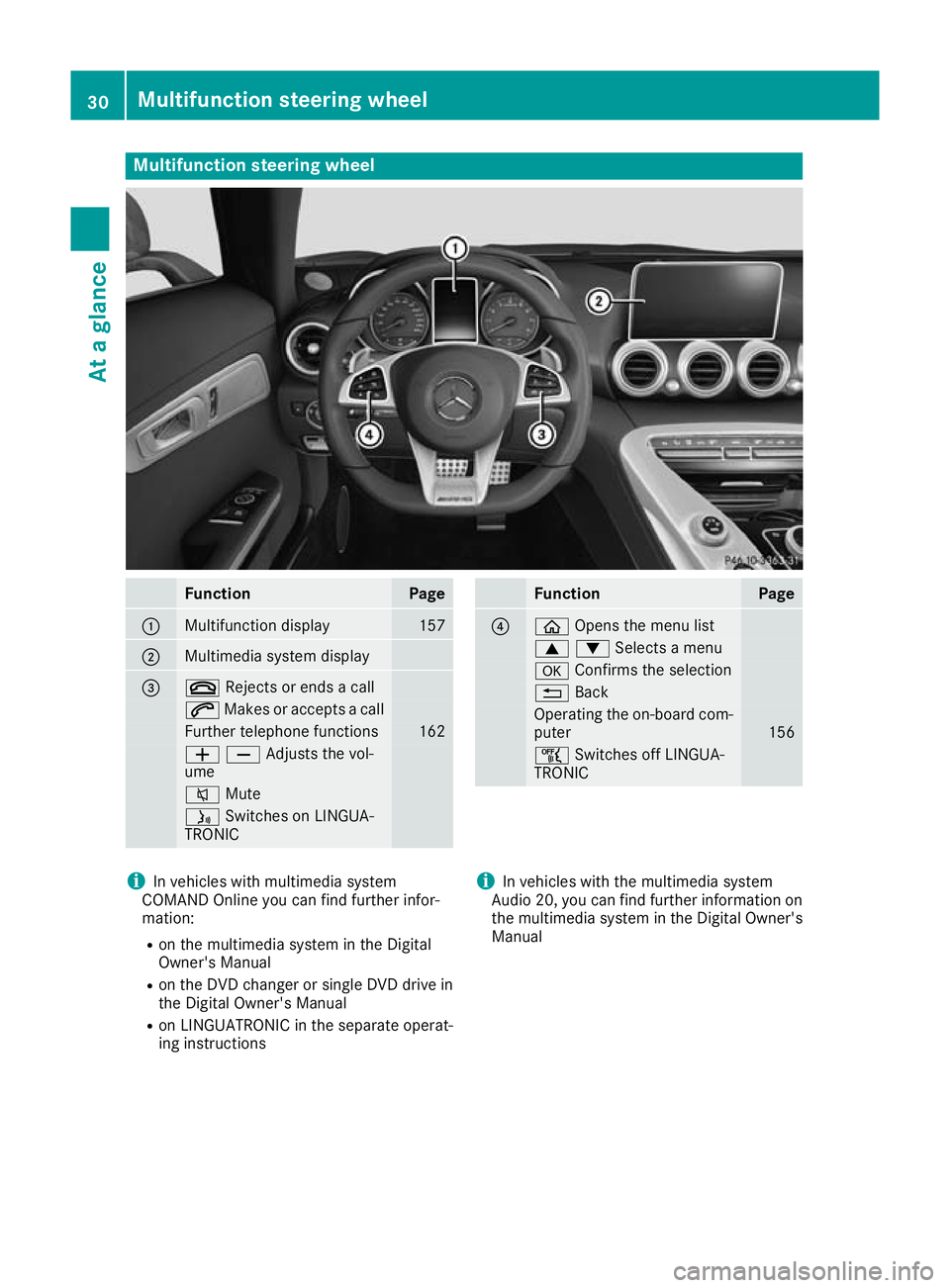
Multifunction steering wheel
Function Page
:
Multifunction display 157
;
Multimedia system display
=
~
Rejects or ends a call 6
Makes or accepts a call Further telephone functions 162
WXAdjusts the vol-
ume
8
Mute ó
Switches on LINGUA-
TRONIC Function Page
?
ò
Opens the menu list 9:Selects a menu
a
Confirms the selection %
Back Operating the on-board com-
puter 156
ñ
Switches off LINGUA-
TRONIC i
In vehicles with multimedia system
COMAND Online you can find further infor-
mation:
R on the multimedia system in the Digital
Owner's Manual
R on the DVD changer or single DVD drive in
the Digital Owner's Manual
R on LINGUATRONIC in the separate operat-
ing instructions i
In vehicles with the multimedia system
Audio 20, you can find further information on
the multimedia system in the Digital Owner's
Manual 30
Multifunction steering wheelAt a glance
Page 37 of 289
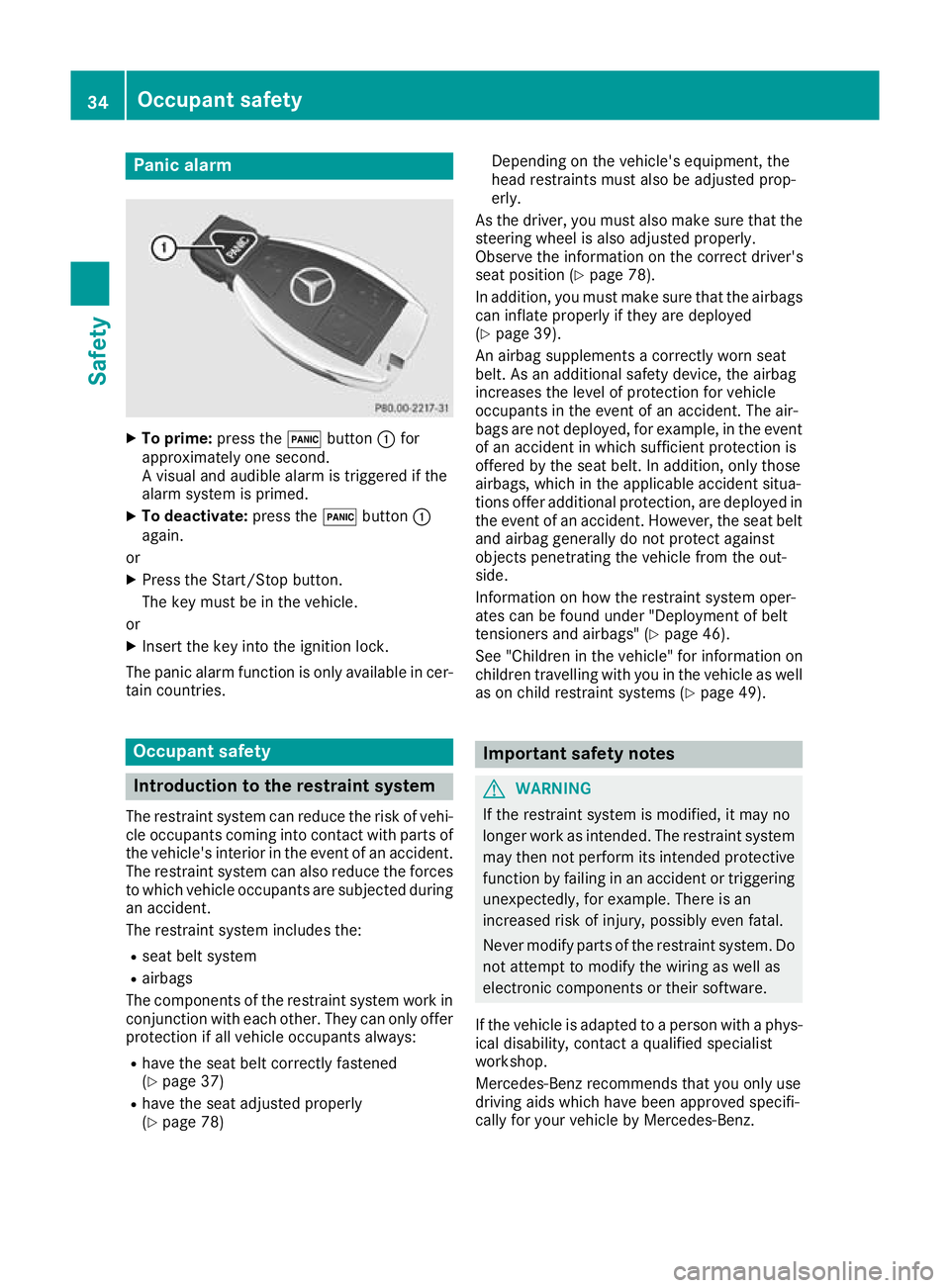
Panic alarm
X
To prime: press the!button :for
approximately one second.
A visual and audible alarm is triggered if the
alarm system is primed.
X To deactivate: press the!button :
again.
or
X Press the Start/Stop button.
The key must be in the vehicle.
or X Insert the key into the ignition lock.
The panic alarm function is only available in cer- tain countries. Occupant safety
Introduction to the restraint system
The restraint system can reduce the risk of vehi-
cle occupants coming into contact with parts of
the vehicle's interior in the event of an accident. The restraint system can also reduce the forces
to which vehicle occupants are subjected during an accident.
The restraint system includes the:
R seat belt system
R airbags
The components of the restraint system work in conjunction with each other. They can only offer
protection if all vehicle occupants always:
R have the seat belt correctly fastened
(Y page 37)
R have the seat adjusted properly
(Y page 78) Depending on the vehicle's equipment, the
head restraints must also be adjusted prop-
erly.
As the driver, you must also make sure that the
steering wheel is also adjusted properly.
Observe the information on the correct driver's
seat position (Y page 78).
In addition, you must make sure that the airbags can inflate properly if they are deployed
(Y page 39).
An airbag supplements a correctly worn seat
belt. As an additional safety device, the airbag
increases the level of protection for vehicle
occupants in the event of an accident. The air-
bags are not deployed, for example, in the event
of an accident in which sufficient protection is
offered by the seat belt. In addition, only those
airbags, which in the applicable accident situa-
tions offer additional protection, are deployed in the event of an accident. However, the seat beltand airbag generally do not protect against
objects penetrating the vehicle from the out-
side.
Information on how the restraint system oper-
ates can be found under "Deployment of belt
tensioners and airbags" (Y page 46).
See "Children in the vehicle" for information on
children travelling with you in the vehicle as well
as on child restraint systems (Y page 49). Important safety notes
G
WARNING
If the restraint system is modified, it may no
longer work as intended. The restraint system
may then not perform its intended protective function by failing in an accident or triggering
unexpectedly, for example. There is an
increased risk of injury, possibly even fatal.
Never modify parts of the restraint system. Do not attempt to modify the wiring as well as
electronic components or their software.
If the vehicle is adapted to a person with a phys-
ical disability, contact a qualified specialist
workshop.
Mercedes-Benz recommends that you only use
driving aids which have been approved specifi-
cally for your vehicle by Mercedes-Benz. 34
Occupant safetySafety
Page 42 of 289
Important safety notes
G
WARNING
If you deviate from the correct seat position,
the airbag cannot perform its intended pro-
tective function and can even cause addi-
tional injuries when deployed. There is an
increased risk of serious or even fatal injuries.
In order to avoid such risks, always ensure
that all vehicle occupants:
R fasten their seatbelts correctly, including
pregnant women
R are seated correctly and maintain the fur-
thest possible distance from the airbags
R observe the following notes
Always ensure that there are no objects loca-
ted between the airbag and the vehicle occu-
pant.
R Adjust the seats properly before beginning
your journey. Always make sure that the seat is in an almost upright position. The centre of
the head restraint must support the head at
about eye level.
The setting options are different depending
on the seat model.
R Move the driver's and front-passenger seats
as far back as possible. The driver's seat posi-
tion must allow the vehicle to be driven safely.
R Hold the steering wheel only by the rim. This
allows the airbag to be fully deployed.
R Always lean against the backrest while driv-
ing. Do not lean forwards or lean against the
door or side window. You may otherwise be in the deployment area of the airbags.
R Always keep your feet in the footwell in front
of the seat. Do not put your feet on the dash- board, for example. Your feet may otherwise
be in the deployment area of the airbag.
R Always secure persons less than 1.50 mtall in
suitable restraint systems. Up to this height,
the seat belt cannot be worn correctly.
If a child is travelling in your vehicle, also
observe the following notes:
R Always secure children under twelve years of
age and less than 1.50 mtall in suitable child
restraint systems.
R Secure a child to the front-passenger seat
only when the front-passenger front airbag is disabled, and then only in a rearward-facing
child restraint system. If the PASSENGER AIR
BAG OFF indicator lamp is permanently lit, the
front-passenger front airbag is disabled
(Y page 35).
R Be sure to observe the instructions and safety
notes on the "Automatic front-passenger
front airbag deactivation system"
(Y page 41) and on "Children in the vehicle"
(Y page 49) in addition to the manufactur-
er's operating and installation instructions for the child restraint system.
Objects in the vehicle interior may prevent
the airbag from functioning correctly. Before
starting your journey and to avoid risks resulting from the speed of the airbag as it deploys, make
sure that:
R there are no people, animals or objects
between the vehicle occupants and an airbag
R there are no objects between the seat, door
and B-pillar
R no accessories, such as cup holders, are
attached to the vehicle within the deployment
area of an airbag, e.g. to doors or side win-
dows
R no heavy, sharp-edged or fragile objects are in
the pockets of your clothing. Store such
objects in a suitable place. G
WARNING
If you modify an airbag cover or affix objects
such as stickers to it, the airbag can no longer function correctly. There is an increased risk
of injury.
Never modify an airbag cover or affix objects
to it. G
WARNING
Sensors to control the airbags are located in
the doors. Modifications or work not per-
formed correctly to the doors or door panel-
ling, as well as damaged doors, can lead to the function of the sensors being impaired. The
airbags might therefore not function properly any more. Consequently, the airbags cannot
protect vehicle occupants as they are
designed to do. This poses an increased risk
of injury.
Never modify the doors or parts of the doors.
Always have work on the doors or door pan- Occupant safety
39Safety
Z