check oil MERCEDES-BENZ AMG GT ROADSTER 2016 Owners Manual
[x] Cancel search | Manufacturer: MERCEDES-BENZ, Model Year: 2016, Model line: AMG GT ROADSTER, Model: MERCEDES-BENZ AMG GT ROADSTER 2016Pages: 289, PDF Size: 5.97 MB
Page 8 of 289
Hiding a service message .............. 237
Resetting the service interval dis-
play ................................................ 237
Service message ............................ 236
Special service requirements ......... 237
ATA (Anti-Theft Alarm system)
Activating/deactivating ................... 60
Function ........................................... 60
Switching off the alarm .................... 60
ATTENTION ASSIST
Activating/deactivating ................. 165
Display messag e............................ 185
Function/note s............................. 147
Authorised workshop
see Qualified specialist workshop
AUTO lights
Display message ............................ 182
see Lights
Automatic engine start (ECO start/
stop function) .................................... 106
Automatic engine switch-off (ECO
start/stop function) .......................... 105
Automatic front-passenger front
airbag deactivation system
Operation ......................................... 42
Problems ......................................... 45
System self-test ............................... 44
Automatic headlamp mode ................ 88
Automatic transmission
Accelerator pedal position ............. 112
Automatic drive program ............... 114
Changing gear ............................... 112
Display message ............................ 190
Double-clutch function .................. 112
Drive program display .................... 111
Driving tips .................................... 112
Emergency running mode .............. 117
Gliding mod e................................. 112
Kickdown ....................................... 112
Manual drive progra m.................... 114
Manual mod e................................. 115
Oil temperature (on-board com-
puter) ............................................. 167
Overview ........................................ 109
Problem (fault) ............................... 117
Pulling away ................................... 104
Rocking the vehicle free ................ 112
Starting the engine ........................ 104 Steering wheel gearshift paddle
s... 113
Transmission position display ........ 111
Transmission positions .................. 111
Automatic transmission emer-
gency running mode ......................... 117 B
Back button ....................................... 206
BAS (Brake Assist System) ................. 54
Battery (key)
Checking .......................................... 66
Important safety notes .................... 66
Replacing ......................................... 66
Battery (vehicle)
Charging ........................................ 252
Display message ............................ 184
Important safety notes .................. 250
Jump starting ................................. 253
Belt
see Seat belts
Belt tensioner
Activation ......................................... 46
Blind Spot Assist
Activating/deactivating (on-
board computer) ............................ 165
Display message ............................ 186
Notes/function .............................. 151
Bluetooth ®
Connecting a different mobile
phone ............................................ 212
Searching for a mobile phone ........ 211
See also Digital Owner's Manua l... 205
Telephony ...................................... 211
Bonnet
Closing ........................................... 233
Display message ............................ 192
Important safety notes .................. 232
Opening ......................................... 232
Boot load (maximum) ........................ 281
Boot separator ................................... 218
Brake
EBD .................................................. 60
Brake Assist
see BAS (Brake Assist System)
Brake fluid
Display message ............................ 176
Notes ............................................. 279 Index
5
Page 12 of 289
Driving tips
AMG high-performance and
ceramic brakes .............................. 124
Aquaplanin g .................................. .125
Automatic transmission ................. 112
Brakes .......................................... .123
DISTRONIC PLUS ........................... 136
Downhill gradient ........................... 123
Driving abroad ................................. 88
Driving in winter ............................ .125
Driving on flooded roads ................ 125
Driving on wet roads ..................... .125
Fuel ................................................ 123
General .......................................... 123
Icy road surfaces ........................... 125
Limited braking efficiency on sal-
ted roads ....................................... 124
New brake disks ............................ 124
New brake pads/linings ................ 124
Running-in tips ............................... 101
Snow chains .................................. 263
Subjecting brakes to a load ........... 123
Symmetrical dipped bea m............... 88
The first 1500 km .......................... 101
Wet road surface ........................... 124
DVD video
Operating (on-board computer) ..... 162
See also Digital Owner's Manua l... 205
DYNAMIC SELECT controller ............ 108E
E-SELECT lever ................................... 109
EASY-ENTRY feature
Function/note s................................ 83
EASY-EXIT feature
Function/note s................................ 83
EBD (electronic brake force distri-
bution)
Display message ............................ 174
Function/note s................................ 60
ECO start/stop function
Automatic engine switch-off .......... 105
Climate control
(THERMOTRONIC )............................ 96
Deactivating/activating ................. 106
General information ....................... 105
Important safety notes .................. 105 Introduction ................................... 105
Electromagnetic compatibility
Declaration of conformity ................ 24
Electronic Stability Program
see ESP ®
(Electronic Stability Program)
Emergency
Automatic measures after an acci-
dent ................................................. 48
Emergency key
Unlocking the driver's door .............. 70
Emergency key element
Function/note s................................ 65
General notes .................................. 65
Inserting .......................................... 66
Locking vehicle ................................ 70
Removing ......................................... 65
Emergency release
Driver's door .................................... 70
Emergency spare wheel
General notes ................................ 273
Important safety notes .................. 273
Inflating the collapsible spare
wheel ............................................. 274
Removing ....................................... 273
Technical data ............................... 273
Emergency unlocking
Tailgate ............................................ 73
Vehicle ............................................. 70
Engine
Display message ............................ 183
ECO start/stop function ................ 105
Engine number ............................... 277
Jump-starting ................................. 253
Running irregularly ......................... 107
Starting problems .......................... 107
Starting the engine with the key .... 104
Starting with the Start/Stop but-
ton ................................................. 104
Stopping ........................................ 120
Tow-starting (vehicle) ..................... 259
Warning lamp (engine diagnos-
tics) ............................................... 200
Engine electronics
Notes ............................................. 275
Problem (fault) ............................... 107
Engine oil
Additives ........................................ 279
Checking the oil level ..................... 233 Index
9
Page 13 of 289
Checking the oil level using the
dipstick .......................................... 233
Checking the oil level using the
on-board computer ........................ 234
Display message ............................ 184
Filling capacity .............................. .279
Notes about oil grades ................... 279
Notes on oil level/consumption .... 233
Temperature (on-board com-
puter) ............................................. 167
Topping up ..................................... 234
Entering an address
See also Digital Owner's Manual ... 205
Environmental protection
Returning an end-of-life vehicle ....... 22
ESP ®
(Electronic Stability Pro-
gram)
AMG menu (on-board computer) ... 168
Characteristics ................................. 58
Deactivating/activating ................... 58
Display message ............................ 172
Function/notes ................................ 57
General notes .................................. 57
Important safety guidelines ............. 58
Warning lamp ................................. 197
ETS/4ETS (Electronic Traction Sys-
tem) ...................................................... 58
Exhaust pipe (cleaning instruc-
tions) ................................................. .242
Exterior lighting
Cleaning ......................................... 241
see Lights
Exterior mirrors
Adjusting ......................................... 84
Anti-dazzle mode (automatic) .......... 85
Folding in/out (automatically) ......... 85
Folding in/out (electrically) ............. 85
Out of position (troubleshooting) ..... 85
Parking position ............................... 86
Resetting ......................................... 85
Storing settings (memory func-
tion) ................................................. 87 F
Fault message see Display messages Favourites
Overview ........................................ 208
Features ............................................. 220
Filler cap
see Fuel filler flap
Fire extinguisher ............................... 245
First-aid kit ......................................... 245
Fitting a wheel
Fitting a wheel ............................... 271
Lowering the vehicle ...................... 272
Preparing the vehicle ..................... 268
Raising the vehicle ......................... 269
Removing a whee l.......................... 270
Securing the vehicle against roll-
ing away ........................................ 268
Flat tyre
Changing a wheel/fitting the
spare whee l................................... 267
Preparing the vehicle ..................... 247
TIREFIT kit ...................................... 247
see Emergency spare wheel
Floormat ............................................. 230
Frequencies
Garage door opener ....................... 228
Mobile phone ................................. 275
Two-way radio ................................ 275
Front-passenger front airbag deac-
tivation system
Operation ......................................... 42
Problems ......................................... 45
System self-test ............................... 44
Fuel
Additives ........................................ 279
Consumption statistics .................. 158
Displaying the current consump-
tion ................................................ 158
Displaying the range ...................... 158
Driving tip s.................................... 123
E10 ................................................ 278
Fuel gauge ....................................... 29
Grade (petrol) ................................ 278
Important safety notes .................. 277
Problem (malfunction) ................... 119
Refuelling ....................................... 117
Tank content/reserve fue l............. 278
Fuel filler flap
Closing ........................................... 118
General information ....................... 118 10
Index
Page 66 of 289
Key
Important safety notes
United Kingdom only: G
WARNING
When the double locks are activated, the
doors can no longer be opened from the
inside. People in the vehicle can no longer get out, e.g. in hazardous situations. There is a
risk of injury.
Therefore, do not leave any people unsuper-
vised in the vehicle, particularly children, eld-
erly people or people in need of special assis-
tance. Do not activate the double lock when
people are in the vehicle.
If the vehicle has been locked from the outside, the double lock function is activated as stand-
ard. It is then not possible to open the doors
from inside the vehicle. You can deactivate the
double lock function by deactivating the interior
motion sensor (Y page 62). The doors can then
be opened from the inside after the vehicle has
been locked from the outside. The anti-theft
alarm system is triggered if the door is opened
from the inside. Switch off the alarm
(Y page 60).
All countries: G
WARNING
If children are left unsupervised in the vehicle, they can:
R open doors and endanger other persons or
road users
R climb out and be injured by the traffic
R operate vehicle equipment and, for exam-
ple, trap themselves.
Children could also set the vehicle in motion, for example by:
R releasing the parking brake
R shifting the automatic transmission out of
park position P
R starting the engine.
There is a risk of an accident and injury.
When leaving the vehicle, always take the key
with you and lock the vehicle. Never leave children unattended in the vehicle. Always
keep the key out of reach of children.
G
WARNING
If you attach heavy or large objects to the key, the key could be unintentionally turned in the
ignition lock. This could cause the engine to
be switched off. There is a risk of an accident.
Do not attach any heavy or large objects to the
key. Remove any bulky keyrings before insert-
ing the key into the ignition lock.
! Keep the key away from strong magnetic
fields. Otherwise, the remote control function could be affected.
Strong magnetic fields can occur in the vicin-
ity of powerful electrical installations.
Do not keep the key: R with electronic devices, e.g. a mobile phone
or another key
R with metallic objects, e.g. coins or metal foil
R inside metallic objects, e.g. a metal case
This can impair the key's function.
Vehicles with KEYLESS-GO start function: do
not keep the key on the luggage compartment
cover or in the luggage compartment. Other-
wise, the key may not be detected, e.g. when
starting the engine using the Start/Stop button.
A check that periodically establishes a radio
connection between the vehicle and the key
determines whether a valid key is in or in the
direct vicinity of the vehicle. This occurs, for
example:
R during engine start
R during driving
R when using HANDS-FREE ACCESS
R when the external door handles are touched
R during convenience closing Key
63Opening and closing Z
Page 105 of 289
!
Do not warm up the engine when the vehicle
is stationary. Drive off immediately. Avoid
high engine speeds and driving at full throttle
until the engine has reached its operating
temperature.
Only shift the automatic transmission to the
desired drive position when the vehicle is sta- tionary.
Where possible, avoid spinning the drive
wheels when pulling away on slippery roads.
You could otherwise damage the drive train.
! During a cold start with low engine oil tem-
peratures (below 0 †), the maximum engine
speed is restricted in order to protect the
engine. To protect the engine and maintain
smooth engine operation, avoid driving at full throttle when the engine is cold. Key positions
Start/Stop button General notes
All vehicles are equipped with a Start/Stop but-
ton.
The Start/Stop button is located on the centre
console and is illuminated when the vehicle is
unlocked.
The key must be in the vehicle.
Pressing the Start/Stop button several times in
succession corresponds to the different key
positions in the ignition lock. This is only the
case if you are not depressing the brake pedal.
If you depress the brake pedal and press the
Start/Stop button, the engine starts immedi-
ately.
A check which periodically establishes a radio
connection between the vehicle and the key
determines whether a valid key is in the vehicle. This occurs, for example, when starting the
engine.
If there is a key in the ignition lock, this takes
precedence over the KEYLESS-GO start func-
tion.
To start the vehicle without actively using the
key:
R the key must be in the vehicle
R the vehicle must not be locked with the key or
KEYLESS-GO (Y page 64) Do not keep the key:
R
with electronic devices, e.g. a mobile phone
or another key
R with metallic objects, e.g. coins or metal film
R inside metallic objects, e.g. a metal case
This can affect the key's functionality.
If you lock the vehicle with the key's remote
control or with KEYLESS-GO, after a short time:
R you will not be able to switch on the ignition
with the Start/Stop button
R you will not be able to start the engine with the
Start/Stop button until the vehicle is
unlocked again
If you lock the vehicle centrally using the button
on the driver's door (Y page 70), you can con-
tinue to start the engine with the Start/Stop
button.
The engine can be switched off while the vehicle is in motion by pressing and holding the Start/
Stop button for three seconds. This function
operates independently of the ECO start/stop
automatic engine switch-off function.
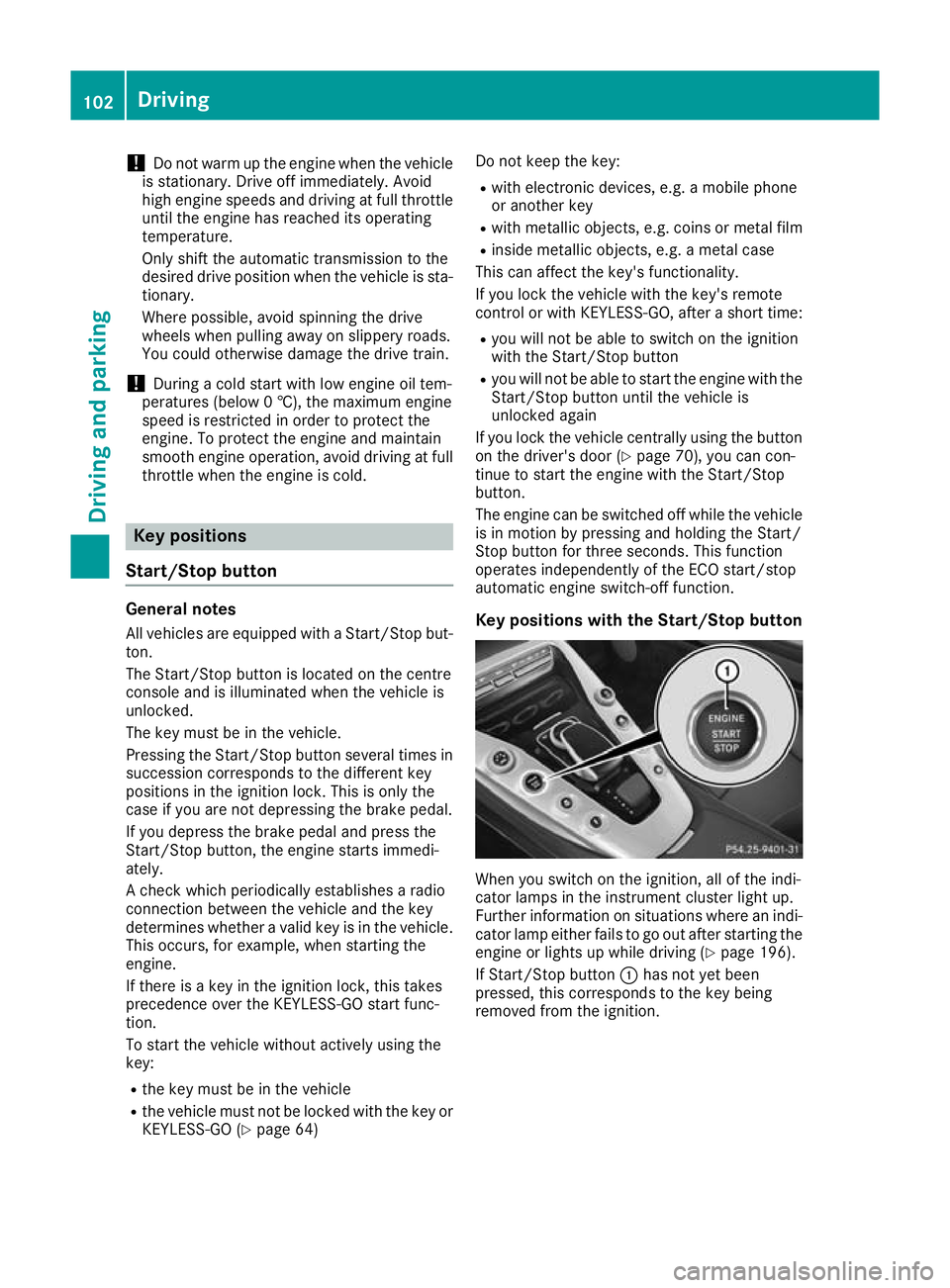
Key positions with the Start/Stop button When you switch on the ignition, all of the indi-
cator lamps in the instrument cluster light up.
Further information on situations where an indi-
cator lamp either fails to go out after starting the engine or lights up while driving (Y page 196).
If Start/Stop button :has not yet been
pressed, this corresponds to the key being
removed from the ignition. 102
DrivingDriving and parking
Page 167 of 289
X
Confirm by pressing aon the steering
wheel.
The multifunction display shows the
DISTRONIC PLUS distance display in the
assistance graphic.
The assistance graphic shows you the status
of and/or information from the following driv-
ing systems or driving safety systems:
R DISTRONIC PLUS (Y page 130)
R Traffic Sign Assist (Y page 148)
R Distance warning function of COLLISION
PREVENTION ASSIST PLUS (Y page 55)
R Blind Spot Assist (Y page 151)
R ATTENTION ASSIST (Y page 147)
R Lane Keeping Assist (Y page 153)
X Press :to display the ATTENTION ASSIST
assessment. Service menu
Depending on the equipment fitted in the vehi-
cle, you have the following options in the Ser‐ Ser‐
vice
vice menu:
R Calling up display messages in the message
memory (Y page 171)
R Checking the tyre pressure electronically
(Y page 266)
R Calling up the service due date
(Y page 237)
R Checking the engine oil level using the on-
board computer (Y page 234)Settings menu
Introduction Depending on the equipment fitted in the vehi-
cle, you have the following options in the Set‐ Set‐
tings
tings menu:
R Changing assistance settings (Y page 164)
R Changing the instrument cluster settings
(Y page 165)
R Changing the vehicle settings (Y page 166)
R Restoring the factory settings (Y page 166)Assistance submenu Traffic Sign Assist
You can activate or deactivate the warning func-
tion of Traffic Sign Assist in the Traffic TrafficSign Sign
Assist
Assist menu. When the message function is
activated, detected traffic signs and information appear in the multifunction display for five sec-
onds.
X Press òon the steering wheel to open the
menu list.
X Press :or9 on the steering wheel to
select the Settings
Settings menu.
X Confirm by pressing aon the steering
wheel.
X Press :or9 to select the Assistance Assistance
submenu.
X Press ato confirm.
X Select Traffic Sign Assist
Traffic Sign Assist with: or
9.
X Press ato confirm.
The current selection appears.
X Activate or deactivate the warning func-
tion:
press aagain.
For further information about Traffic Sign Assist, see (Y page 148).
Activating/deactivating COLLISION PRE-
VENTION ASSIST PLUS
X Press òon the steering wheel to open the
menu list.
X Press :or9 on the steering wheel to
select the Settings
Settings menu.
X Confirm by pressing aon the steering
wheel.
X Press :or9 to select the Assistance Assistance
submenu.
X Press ato confirm.
X Press 9or:to select Collision
Collision
Prevention
Prevention.
X Press ato confirm.
The current selection appears.
X To activate/deactivate: pressaagain.
When COLLISION PREVENTION ASSIST PLUS
is deactivated, the æsymbol appears on
the multifunction display in the Assistance
Assistance
graphic
graphic menu.
Further information about COLLISION PREVEN- TION ASSIST PLUS (Y page 55).164
Menus and submenusOn-board computer and displays
Page 187 of 289
Display messages
Possible causes/consequences and
M
MSolutions #
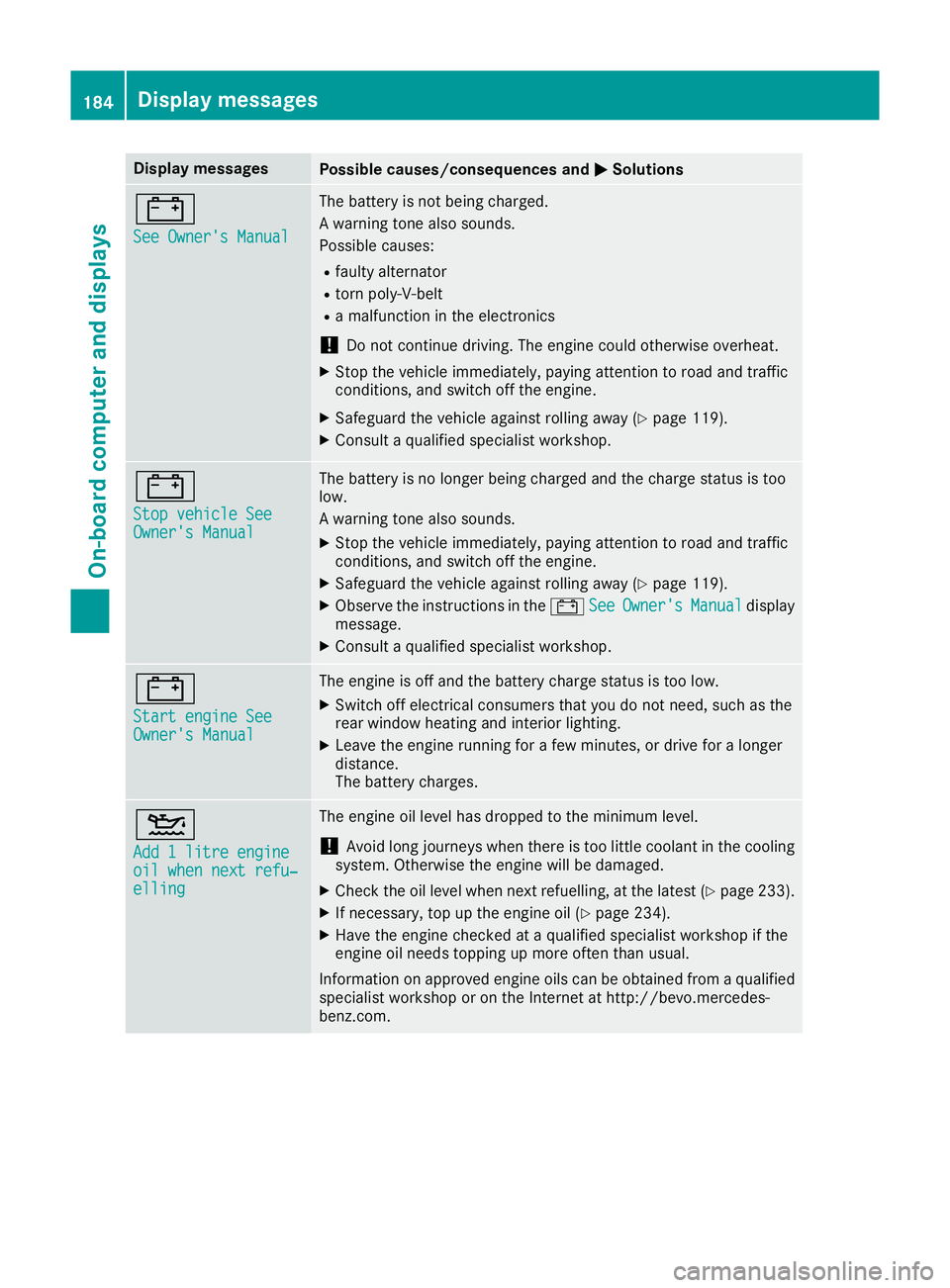
See Owner's Manual See Owner's Manual The battery is not being charged.
A warning tone also sounds.
Possible causes:
R faulty alternator
R torn poly-V-belt
R a malfunction in the electronics
! Do not continue driving. The engine could otherwise overheat.
X Stop the vehicle immediately, paying attention to road and traffic
conditions, and switch off the engine.
X Safeguard the vehicle against rolling away (Y page 119).
X Consult a qualified specialist workshop. #
Stop vehicle See Stop vehicle See
Owner's Manual Owner's Manual The battery is no longer being charged and the charge status is too
low.
A warning tone also sounds.
X Stop the vehicle immediately, paying attention to road and traffic
conditions, and switch off the engine.
X Safeguard the vehicle against rolling away (Y page 119).
X Observe the instructions in the #See SeeOwner's
Owner's Manual
Manualdisplay
message.
X Consult a qualified specialist workshop. #
Start engine See Start engine See
Owner's Manual Owner's Manual The engine is off and the battery charge status is too low.
X Switch off electrical consumers that you do not need, such as the
rear window heating and interior lighting.
X Leave the engine running for a few minutes, or drive for a longer
distance.
The battery charges. 4
Add 1 litre engine Add 1 litre engine
oil when next refu‐ oil when next refu‐
elling elling The engine oil level has dropped to the minimum level.
! Avoid long journeys when there is too little coolant in the cooling
system. Otherwise the engine will be damaged.
X Check the oil level when next refuelling, at the latest (Y page 233).
X If necessary, top up the engine oil (Y page 234).
X Have the engine checked at a qualified specialist workshop if the
engine oil needs topping up more often than usual.
Information on approved engine oils can be obtained from a qualified
specialist workshop or on the Internet at http://bevo.mercedes-
benz.co m. 184
Display messagesOn-board computer and displays
Page 188 of 289
Display messages
Possible causes/consequences and
M
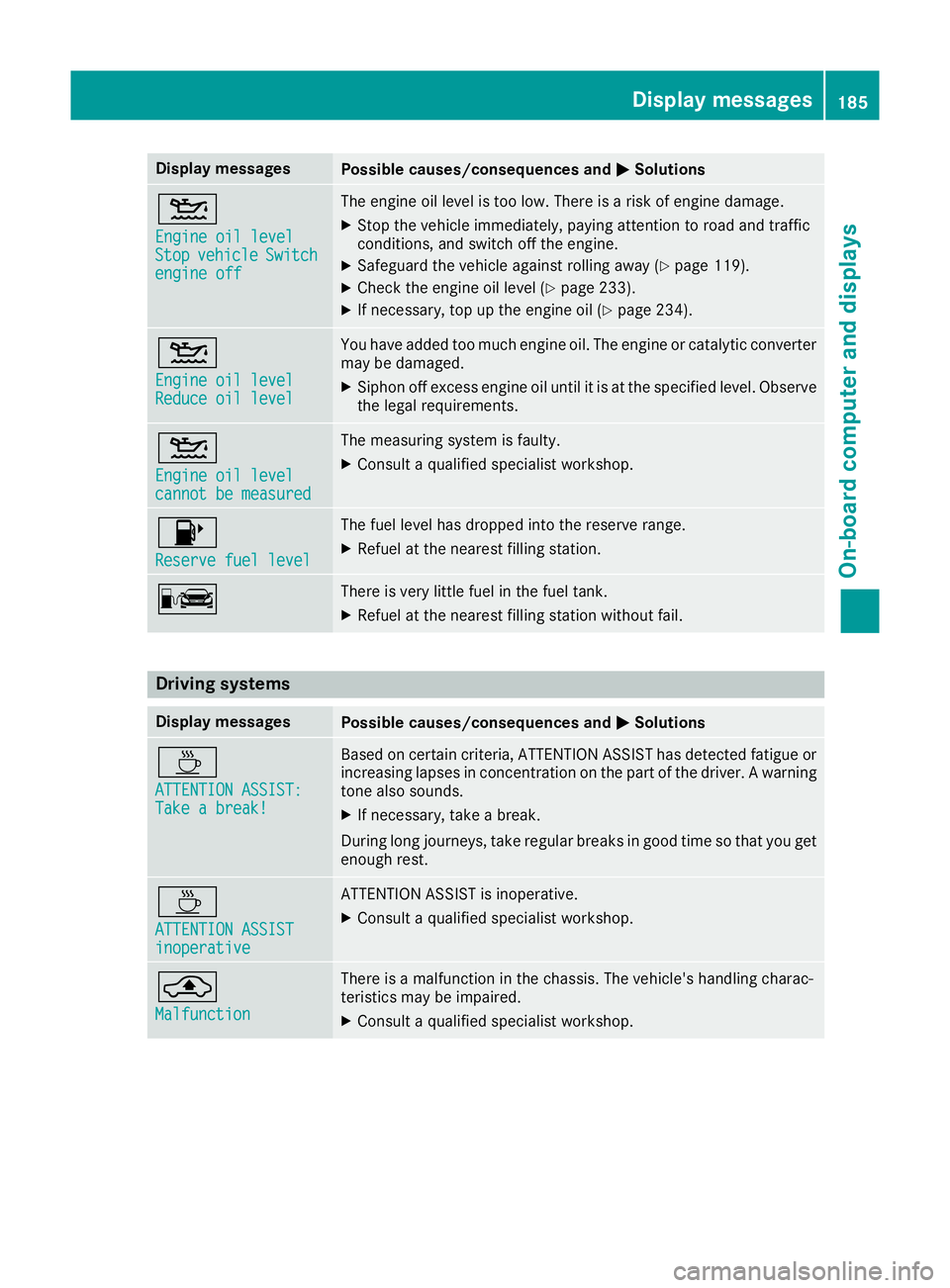
MSolutions 4
Engine oil level Engine oil level
Stop Stop
vehicle
vehicle Switch
Switch
engine off
engine off The engine oil level is too low. There is a risk of engine damage.
X Stop the vehicle immediately, paying attention to road and traffic
conditions, and switch off the engine.
X Safeguard the vehicle against rolling away (Y page 119).
X Check the engine oil level (Y page 233).
X If necessary, top up the engine oil (Y page 234).4
Engine oil level Engine oil level
Reduce oil level Reduce oil level You have added too much engine oil. The engine or catalytic converter
may be damaged.
X Siphon off excess engine oil until it is at the specified level. Observe
the legal requirements. 4
Engine oil level Engine oil level
cannot be measured cannot be measured The measuring system is faulty.
X
Consult a qualified specialist workshop. 8
Reserve fuel level Reserve fuel level The fuel level has dropped into the reserve range.
X Refuel at the nearest filling station. C There is very little fuel in the fuel tank.
X Refuel at the nearest filling station without fail. Driving systems
Display messages
Possible causes/consequences and
M
MSolutions À
ATTENTION ASSIST: ATTENTION ASSIST:
Take a break! Take a break! Based on certain criteria, ATTENTION ASSIST has detected fatigue or
increasing lapses in concentration on the part of the driver. A warning tone also sounds.
X If necessary, take a break.
During long journeys, take regular breaks in good time so that you get enough rest. À
ATTENTION ASSIST ATTENTION ASSIST
inoperative inoperative ATTENTION ASSIST is inoperative.
X Consult a qualified specialist workshop. ¨
Malfunction Malfunction There is a malfunction in the chassis. The vehicle's handling charac-
teristics may be impaired.
X Consult a qualified specialist workshop. Display
messages
185On-board computer and displays Z
Page 195 of 289
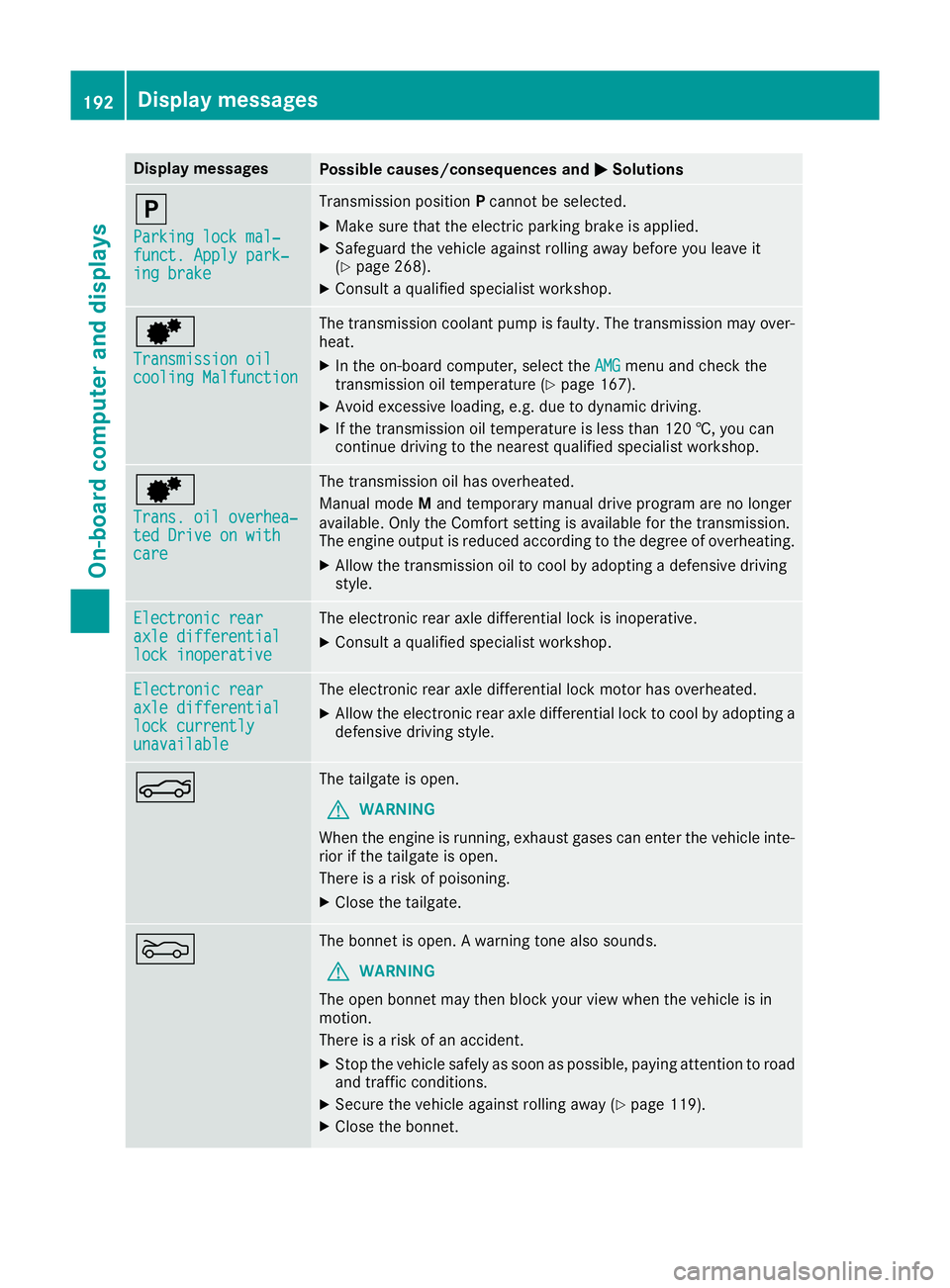
Display messages
Possible causes/consequences and
M
MSolutions j
Parking lock mal‐ Parking lock mal‐
funct. Apply park‐ funct. Apply park‐
ing brake ing brake Transmission position
Pcannot be selected.
X Make sure that the electric parking brake is applied.
X Safeguard the vehicle against rolling away before you leave it
(Y page 268).
X Consult a qualified specialist workshop. d
Transmission oil Transmission oil
cooling Malfunction cooling Malfunction The transmission coolant pump is faulty. The transmission may over-
heat.
X In the on-board computer, select the AMG
AMG menu and check the
transmission oil temperature (Y page 167).
X Avoid excessive loading, e.g. due to dynamic driving.
X If the transmission oil temperature is less than 120 †, you can
continue driving to the nearest qualified specialist workshop. d
Trans. oil overhea‐ Trans. oil overhea‐
ted Drive on with ted Drive on with
care care The transmission oil has overheated.
Manual mode
Mand temporary manual drive program are no longer
available. Only the Comfort setting is available for the transmission.
The engine output is reduced according to the degree of overheating.
X Allow the transmission oil to cool by adopting a defensive driving
style. Electronic rear Electronic rear
axle differential axle differential
lock inoperative lock inoperative The electronic rear axle differential lock is inoperative.
X Consult a qualified specialist workshop. Electronic rear
Electronic rear
axle differential axle differential
lock currently lock currently
unavailable unavailable The electronic rear axle differential lock motor has overheated.
X Allow the electronic rear axle differential lock to cool by adopting a
defensive driving style. N The tailgate is open.
G WARNING
When the engine is running, exhaust gases can enter the vehicle inte- rior if the tailgate is open.
There is a risk of poisoning.
X Close the tailgate. M The bonnet is open. A warning tone also sounds.
G WARNING
The open bonnet may then block your view when the vehicle is in
motion.
There is a risk of an accident.
X Stop the vehicle safely as soon as possible, paying attention to road
and traffic conditions.
X Secure the vehicle against rolling away (Y page 119).
X Close the bonnet. 192
Display
messagesOn-board computer and displays
Page 196 of 289
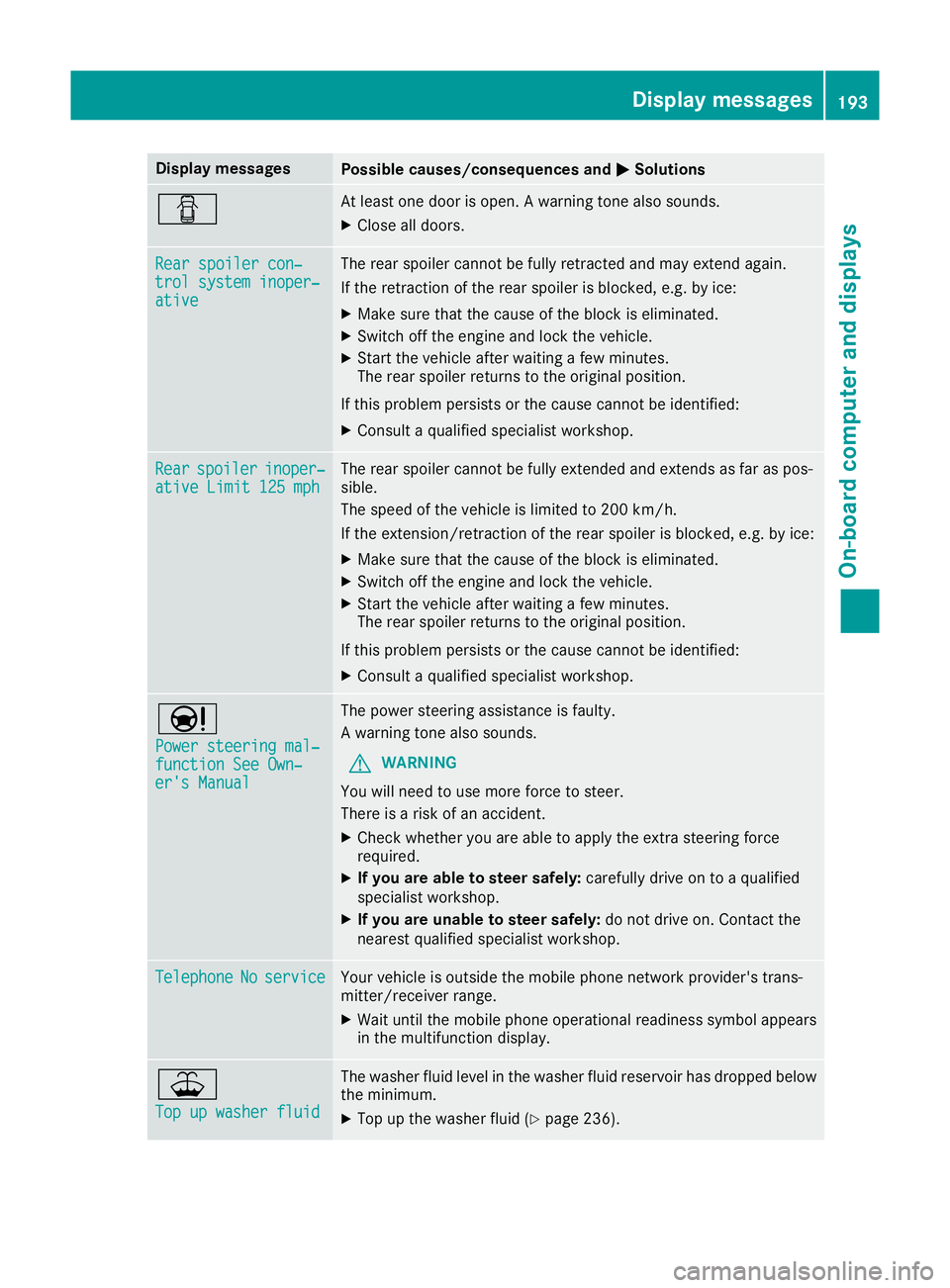
Display messages
Possible causes/consequences and
M
MSolutions C At least one door is open. A warning tone also sounds.
X Close all doors. Rear spoiler con‐
Rear spoiler con‐
trol system inoper‐ trol system inoper‐
ative ative The rear spoiler cannot be fully retracted and may extend again.
If the retraction of the rear spoiler is blocked, e.g. by ice:
X Make sure that the cause of the block is eliminated.
X Switch off the engine and lock the vehicle.
X Start the vehicle after waiting a few minutes.
The rear spoiler returns to the original position.
If this problem persists or the cause cannot be identified:
X Consult a qualified specialist workshop. Rear Rear
spoiler
spoiler inoper‐
inoper‐
ative Limit 125 mph
ative Limit 125 mph The rear spoiler cannot be fully extended and extends as far as pos-
sible.
The speed of the vehicle is limited to 200 km/h.
If the extension/retraction of the rear spoiler is blocked, e.g. by ice:
X Make sure that the cause of the block is eliminated.
X Switch off the engine and lock the vehicle.
X Start the vehicle after waiting a few minutes.
The rear spoiler returns to the original position.
If this problem persists or the cause cannot be identified: X Consult a qualified specialist workshop. Ð
Power steering mal‐ Power steering mal‐
function See Own‐ function See Own‐
er's Manual er's Manual The power steering assistance is faulty.
A warning tone also sounds.
G WARNING
You will need to use more force to steer.
There is a risk of an accident.
X Check whether you are able to apply the extra steering force
required.
X If you are able to steer safely: carefully drive on to a qualified
specialist workshop.
X If you are unable to steer safely: do not drive on. Contact the
nearest qualified specialist workshop. Telephone Telephone
No
Noservice
service Your vehicle is outside the mobile phone network provider's trans-
mitter/receiver range.
X Wait until the mobile phone operational readiness symbol appears
in the multifunction display. ¥
Top up washer fluid Top up washer fluid The washer fluid level in the washer fluid reservoir has dropped below
the minimum.
X Top up the washer fluid (Y page 236). Display
messages
193On-board computer and displays Z