oil pressure MERCEDES-BENZ AMG GT ROADSTER 2019 Owner's Manual
[x] Cancel search | Manufacturer: MERCEDES-BENZ, Model Year: 2019, Model line: AMG GT ROADSTER, Model: MERCEDES-BENZ AMG GT ROADSTER 2019Pages: 298, PDF Size: 7.9 MB
Page 21 of 298
Information .................................... 287
Tires/wheels .................................2
85
Vehicle data ................................... 293
Telephone
Accepting a call (multifunction
steering wheel) .............................. 167
Authorizing a mobile phone (con-
necting) ......................................... 216
Connecting a mobile phone
(device manager) ........................... 215
Display message ............................ 197
Introduction ................................... 166
Menu (on-board computer) ............ 166
Number from the phone book ....... .167
Redialing ........................................ 167
Rejecting/ending a call ................. 167
see also Digital Operator's Man-
ual ................................................. .209
Temperature
Coolant (display in the instrumentcluster) .......................................... 159
Engine oil (on-board computer) ...... 170
Outside temperature ..................... .159
Setting (climate control) ................ 105
Transmission oil (on-board com-
puter) ............................................. 170
Timing (RACETIMER) ......................... 172
Tire pressure
Calling up (on-board computer) ..... 269
Checking manually ........................ 268
Display message ............................ 192
Maximum ....................................... 268
Not reached (TIREFIT) .................... 253
Notes ............................................. 267
Reached (TIREFIT) .......................... 253
Recommended ............................... 266
Tire pressure monitor
Checking the tire pressure elec-
tronically ........................................ 270
Function/notes ............................ .269
General notes ................................ 269
Important safety notes .................. 269
Restarting ...................................... 271
Warning lamp ................................. 207
Warning message .......................... 270
Tire-change tool kit ........................... 250
TIREFIT kit
Important safety notes .................. 251 Storage location ............................ 250
Tire pressure not reached .............. 253
Tire pressure reached .................... 253
Using ............................................. 251
Tires
Aspect ratio (definition) ................. 280
Average weight of the vehicle
occupants (definition) .................... 279
Bar (definition) ............................... 279
Changing a wheel .......................... 281
Characteristics .............................. 279
Checking ........................................ 264
Curb weight (definition) ................. 280
Definition of terms ......................... 279
Direction of rotation ..................... .281
Display message ............................ 192
Distribution of the vehicle occu-
pants (definition) ............................ 281
DOT (Department of Transporta-
tion) (definition) ............................ .279
DOT, Tire Identification Number
(TIN) ............................................... 278
GAWR (Gross Axle Weight Rating)
(definition) ..................................... 279
GVW (Gross Vehicle Weight) (def-
inition) .......................................... .280
GVWR (Gross Vehicle Weight Rat-
ing) (definition) .............................. 280
Important safety notes .................. 263
Increased vehicle weight due to
optional equipment (definition) ...... 279
Information on driving .................... 263
Kilopascal (kPa) (definition) ........... 280
Labeling (overview )........................ 276
Load bearing index (definition) ...... 281
Load index ..................................... 278
Load index (definition) ................... 280
Maximum load on a tire (defini-
tion) ............................................... 280
Maximum loaded vehicle weight
(definition) ..................................... 280
Maximum permissible tire pres-
sure (definition) ............................. 280
Maximum tire load ......................... 278
Maximum tire load (definition) ....... 280
Notes on sport tire s....................... 263
Optional equipment weight (defi-
nition) ............................................ 281 Index
19
Page 170 of 298
R
Active Distance Assist DISTRONIC
(Y page 136)
R Distance warning function of Active Brake
Assist (Y page 59)
R Blind Spot Assist (Y page 155)
R ATTENTION ASSIST (Y page 154)
R Lane Keeping Assist (Y page 157)
X Press 0064to display the ATTENTION ASSIST
assessment. Service menu
Depending on the equipment installed in the
vehicle, you have the following options in the
Service
Service menu:
R calling up display messages in message mem-
ory (Y page 174)
R checking the tire pressure electronically
(Y page 270).
R calling up the service due date (Y page 241).
R checking the engine oil level using the on-
board computer (Y page 237).Settings menu
Introduction Depending on the equipment installed in the
vehicle, you have the following options in the
Settings Settings menu:
R changing assistance settings (Y page 168).
R changing the light settings (Y page 169).
R changing the instrument cluster settings
(Y page 169).
R restoring the factory settings (Y page 170).
Assistance submenu Activating/deactivating Active Brake
Assist
X Press 00E2on the steering wheel to open the
menu list.
X Press 0064or0063 on the steering wheel to
select the Settings
Settings menu.
X Confirm by pressing 0076on the steering
wheel.
X Press 0064or0063 to select the DriveAs‐ DriveAs‐
sist
sist submenu. X
Press 0076to confirm.
X Press 0063or0064 to select Brake BrakeAssist Assist.
X Press 0076to confirm.
The current selection appears.
X To activate/deactivate: press the0076but-
ton again.
When Active Brake Assist is deactivated, the
00D4 symbol appears in the Assistance Assistance
Graphic
Graphic menu of the multifunction display.
Further information on Active Brake Assist
(Y page 59).
Activating/deactivating Blind Spot Assist
X Press 00E2on the steering wheel to open the
menu list.
X Press 0064or0063 on the steering wheel to
select the Settings
Settings menu.
X Confirm by pressing 0076on the steering
wheel.
X Press 0064or0063 to select the DriveAs‐
DriveAs‐
sist
sist submenu.
X Press 0076to confirm.
X Press 0064or0063 to select Blind Spot
Blind Spot
Assist
Assist .
X Press 0076to confirm.
The current selection appears.
X To activate/deactivate: press the0076but-
ton again.
When Blind Spot Assist is activated, gray
radar waves propagating backwards appear
next to the vehicle in the Assistance
Assistance
Graphic Graphic menu in the multifunction display.
For further information about Blind Spot Assist,
see (Y page 155).
Setting ATTENTION ASSIST X Press 00E2on the steering wheel to open the
menu list.
X Press 0064or0063 on the steering wheel to
select the Settings
Settings menu.
X Confirm by pressing 0076on the steering
wheel.
X Press 0064or0063 to select the DriveAs‐
DriveAs‐
sist
sist submenu.
X Press 0076to confirm.
X Select Attention Assist
Attention Assist with0064 or
0063.
X Press 0076to confirm. 168
Menus and submenusOn-board computer and displays
Page 172 of 298
The selected unit of measurement for distance
applies to:
R Digital speedometer in the Trip
Trip menu
R Odometer and the trip odometer
R Trip computer
R Range
R Navigation instructions in the Navi
Navi menu
R Cruise control
R Active Distance Assist DISTRONIC
R ASSYST PLUS service interval display
Switching the additional speedometer
on/off
If the additional speedometer is switched on,
the speed is shown in the status bar in the mul- tifunction display instead of the outside tem-
perature.
The additional speedometer displays the speed
in the respective unit that is not shown in the
multifunction display.
X Press 00E2on the steering wheel to open the
main menu.
X Press 0064or0063 on the steering wheel to
select the Settings Settings menu.
X Confirm by pressing 0076on the steering
wheel.
X Press 0064or0063 to select the Instru‐
Instru‐
ment Cluster
ment Cluster submenu.
X Press 0076to confirm.
X Press 0064or0063 to select the Addi‐
Addi‐
tional Speedometer [km/h]
tional Speedometer [km/h] function.
The current selection appears.
X To switch on/off: press0076again.
Restoring the factory settings X
Press 00E2on the steering wheel to open the
menu list.
X Press 0064or0063 on the steering wheel to
select the Settings
Settings menu.
X Confirm by pressing 0076on the steering
wheel.
X Press 0064or0063 to select the Factory
Factory
Settings
Settings submenu.
X Press 0076to confirm.
The Reset All Settings?
Reset All Settings? function
appears. X
Press 0064or0063 to select No
No orYes
Yes.
X Press 0076to confirm the selection.
If you have selected Yes
Yes, the multifunction
display shows a confirmation message.
For safety reasons, the Daytime Running
Daytime Running
Lights
Lights function in the Lights
Lightssubmenu is only
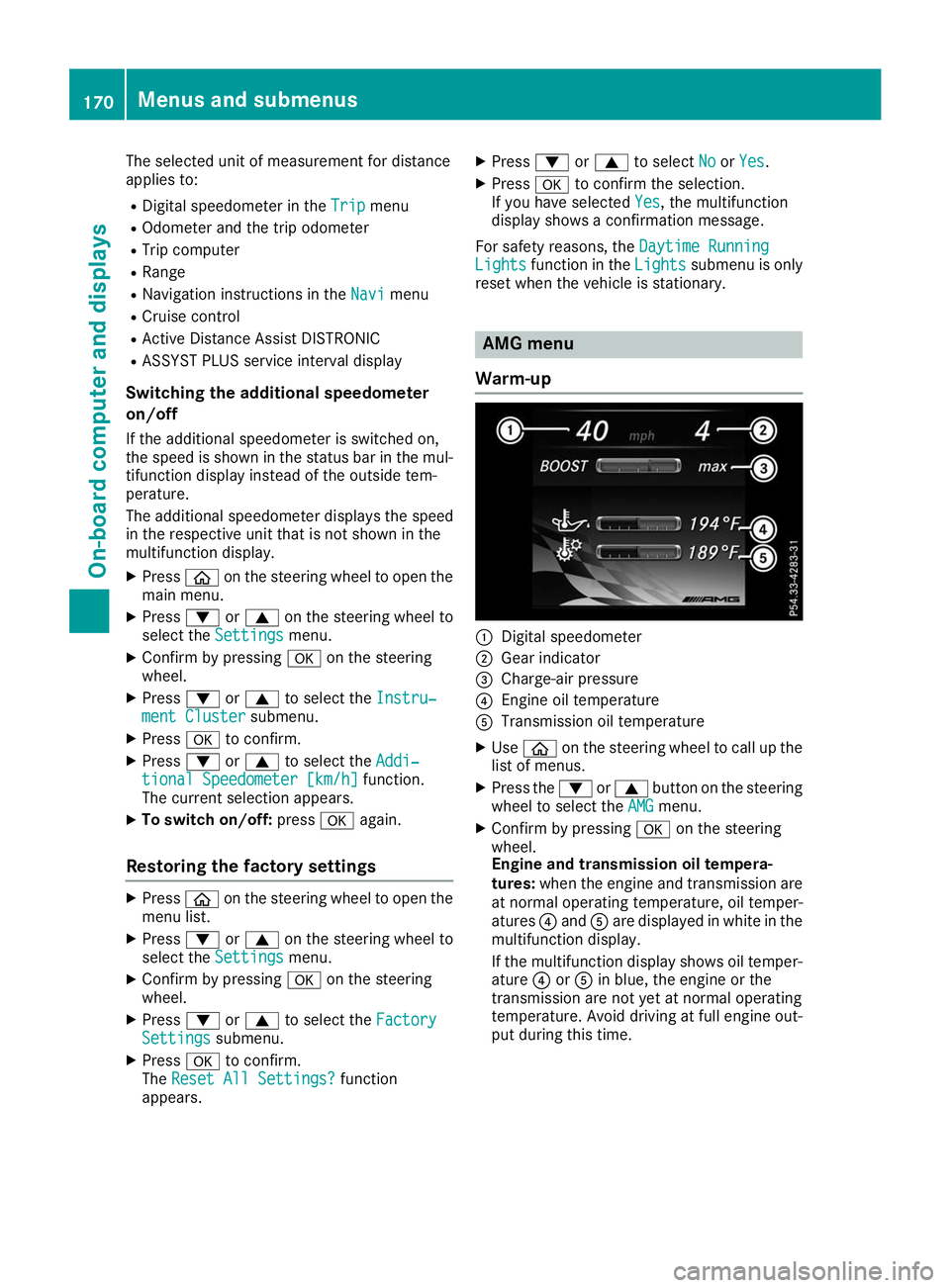
reset when the vehicle is stationary. AMG menu
Warm-up 0043
Digital speedometer
0044 Gear indicator
0087 Charge-air pressure
0085 Engine oil temperature
0083 Transmission oil temperature
X Use 00E2 on the steering wheel to call up the
list of menus.
X Press the 0064or0063 button on the steering
wheel to select the AMG AMGmenu.
X Confirm by pressing 0076on the steering
wheel.
Engine and transmission oil tempera-
tures: when the engine and transmission are
at normal operating temperature, oil temper-
atures 0085and 0083are displayed in white in the
multifunction display.
If the multifunction display shows oil temper- ature 0085or0083 in blue, the engine or the
transmission are not yet at normal operating
temperature. Avoid driving at full engine out-
put during this time. 170
Menus and submenusOn-board computer and displays
Page 245 of 298
Washing by hand
In some countries, washing by hand is only
allowed at specially equipped washing bays.
Observe the legal requirements in each country.
X Do not use hot water and do not wash the
vehicle in direct sunlight.
X Use a soft sponge to clean.
X Use a mild cleaning agent, such as a car
shampoo approved by Mercedes-Benz.
X Thoroughly hose down the vehicle with a gen-
tle jet of water.
X Do not point the water jet directly towards the
air inlet.
X Use plenty of water and rinse out the sponge
frequently.
X Rinse the vehicle with clean water and dry
thoroughly with a chamois.
X Do not let the cleaning agent dry on the paint-
work.
Carefully remove all deposits of road salt as
soon as possible when driving in winter.
Power washers G
WARNING
The water jet from a circular jet nozzle (dirt
blasters) can cause invisible exterior damage to the tires or chassis components. Compo-
nents damaged in this way may fail unexpect- edly. There is a risk of an accident.
Do not use power washers with circular jet
nozzles to clean the vehicle. Have damaged
tires or chassis components replaced imme-
diately.
! Always maintain a distance of at least
11.8 in (30 cm) between the vehicle and the
high-pressure cleaner nozzle. Information
about the correct distance is available from
the equipment manufacturer.
Move the power washer nozzle around when
cleaning your vehicle.
Do not aim directly at any of the following:
R tires
R door gaps, joints etc.
R soft top
R wind deflector net
R electrical components R
battery
R plug-type couplings
R lights
R seals
R trim
R ventilation slots
Damaged seals or electrical components can
lead to leaks or failures.
! Vehicles with decorative film: parts of your
vehicle are covered with decorative film.
Maintain a distance of at least 27.5 in (70 cm) between the film-covered parts of the vehicle
and the nozzle of the power washer.
Information about the correct distance is
available from the equipment manufacturer.
Move the power washer nozzle around when
cleaning your vehicle.
The water temperature of the power washer
must not exceed 140 ‡ (60 †).
! If the SmartKey is within the rear detection
range of KEYLESS-GO, the following situa-
tions, for example, could lead to the uninten-
tional opening of the trunk lid:
R when using an automatic car wash
R when using a power washer
Make sure that the SmartKey is at least 10 ft (3 m) away from the vehicle.
Cleaning the paintwork !
Do not affix:
R stickers
R films
R magnetic plates or similar items
to painted surfaces. You could otherwise
damage the paintwork.
Scratches, corrosive deposits, areas affected by corrosion and damage caused by inadequate
care cannot always be completely repaired. In
such cases, visit a qualified specialist workshop.
X Remove dirt immediately, where possible,
while avoiding rubbing too hard.
X Soak insect remains with insect remover and
rinse off the treated areas afterwards.
X Soak bird droppings with water and rinse off
the treated areas afterwards.
X Remove tree resin, oils, fuels and greases by
rubbing gently with a cloth soaked in petro-
leum ether or lighter fluid. Care
243Maintenance and care Z
Page 249 of 298
Cleaning the exhaust pipe
G
WARNING
The exhaust tail pipe and tail pipe trim can
become very hot. If you come into contact
with these parts of the vehicle, you could burn
yourself. There is a risk of injury.
Always be particularly careful around the
exhaust tail pipe and the tail pipe trim. Allow
these components to cool down before touch-
ing them.
! Do not clean the exhaust pipe with acid-
based cleaning agents, such as bathroom
cleaner or wheel cleaner.
! Vehicles with black exhaust pipes: black
chromed screens should not be polished with
a chrome polish. They will otherwise lose their black shine. For optimal care, the screens
should be rubbed with a lightly oiled cloth
after every car wash. Commercially available
engine and care oils are suitable for this.
For heavier soiling, you can apply a fine paint- work polish with a microfiber cloth. Remove
the excess polish residue after polishing.
X Clean the exhaust pipe with a chrome care
product tested and approved by Mercedes-
Benz.
Impurities combined with the effects of road grit
and corrosive environmental factors may cause flash rust to form on the surface. You can
restore the original shine of the exhaust pipe by
cleaning it regularly, especially in winter and
after washing. Interior care
Cleaning the display !
For cleaning, do not use any of the following:
R alcohol-based thinner or gasoline
R abrasive cleaning agents
R commercially-available household cleaning
agents
These may damage the display surface. Do
not put pressure on the display surface when
cleaning. This could lead to irreparable dam-
age to the display. X
Before cleaning the display, make sure that it
is switched off and has cooled down.
X Clean the display surface using a commer-
cially available microfiber cloth and TFT/LCD
display cleaner.
X Dry the display surface using a dry microfiber
cloth.
Cleaning the plastic trim G
WARNING
Care products and cleaning agents containing solvents cause surfaces in the cockpit to
become porous. As a result, plastic parts may
come loose in the event of air bag deploy-
ment. There is a risk of injury.
Do not use any care products and cleaning
agents to clean the cockpit.
! Never attach the following to plastic surfa-
ces:
R stickers
R films
R perfume oil container or similar
You could otherwise damage the plastic.
! Do not allow cosmetics, insect repellent or
sunscreen to come into contact with the plas-
tic trim. This maintains the high-quality look of the surfaces.
X Wipe the plastic trim with a damp, lint-free
cloth, e.g. a microfiber cloth.
X Heavy soiling: use care and cleaning prod-
ucts recommended and approved by
Mercedes-Benz.
The surface may change color temporarily.
Wait until the surface is dry again.
Cleaning the steering wheel and gear or selector lever X
Thoroughly wipe with a damp cloth or use
leather care agents that have been recom-
mended and approved by Mercedes-Benz.
Cleaning the trim elements !
Do not use solvent-based cleaning agents
such as tar remover, wheel cleaners, polishes
or waxes. There is otherwise a risk of damag- ing the surface. Care
247Maintenance and care Z
Page 254 of 298
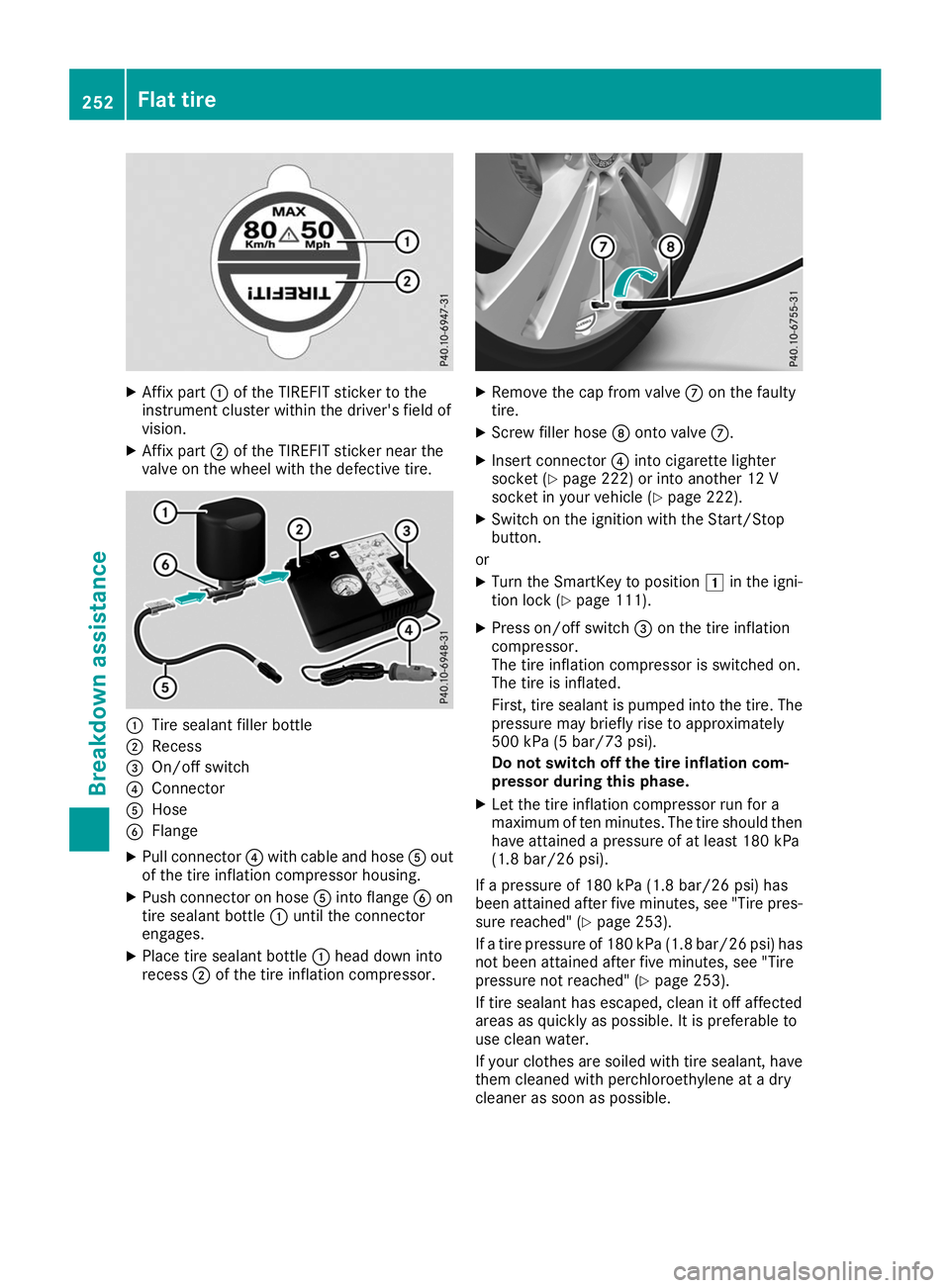
X
Affix part 0043of the TIREFIT sticker to the
instrument cluster within the driver's field of
vision.
X Affix part 0044of the TIREFIT sticker near the
valve on the wheel with the defective tire. 0043
Tire sealant filler bottle
0044 Recess
0087 On/off switch
0085 Connector
0083 Hose
0084 Flange
X Pull connector 0085with cable and hose 0083out
of the tire inflation compressor housing.
X Push connector on hose 0083into flange 0084on
tire sealant bottle 0043until the connector
engages.
X Place tire sealant bottle 0043head down into
recess 0044of the tire inflation compressor. X
Remove the cap from valve 006Bon the faulty
tire.
X Screw filler hose 006Conto valve 006B.
X Insert connector 0085into cigarette lighter
socket (Y page 222) or into another 12 V
socket in your vehicle (Y page 222).
X Switch on the ignition with the Start/Stop
button.
or X Turn the SmartKey to position 0047in the igni-
tion lock (Y page 111).
X Press on/off switch 0087on the tire inflation
compressor.
The tire inflation compressor is switched on.
The tire is inflated.
First, tire sealant is pumped into the tire. The
pressure may briefly rise to approximately
500 kPa (5 bar/73 psi).
Do not switch off the tire inflation com-
pressor during this phase.
X Let the tire inflation compressor run for a
maximum of ten minutes. The tire should then have attained a pressure of at least 180 kPa
(1.8 bar/26 psi).
If a pressure of 180 kPa (1.8 ba r/26 psi) has
been at tained after five minutes, see "Tire pres-
sure reached" (Y page 253).
If a tire pressure of 180 kPa (1.8 bar/26 psi) has not been attained after five minutes, see "Tire
pressure not reached" (Y page 253).
If tire sealant has escaped, clean it off affected
areas as quickly as possible. It is preferable to
use clean water.
If your clothes are soiled with tire sealant, have them cleaned with perchloroethylene at a dry
cleaner as soon as possible. 252
Flat tireBreakdown assistance
Page 282 of 298
Speed rating
The speed rating is part of the tire identification. It specifies the speed range for which the tire is
approved.
GVW (Gross Vehicle Weight)
The gross vehicle weight includes the weight of the vehicle with fuel, tools, the spare wheel,
accessories installed, vehicle occupants, lug-
gage and the drawbar noseweight if applicable.
The gross vehicle weight must not exceed the
gross vehicle weight rating GVWR as specified
on the vehicle identification plate on the B-pillar
on the driver's side.
GVWR (Gross Vehicle Weight Rating)
The GVWR is the maximum permitted gross
weight of the fully laden vehicle (weight of the
vehicle including all accessories, vehicle occu-
pants, fuel, luggage and the drawbar nose-
weight if applicable). The gross vehicle weight
rating is specified on the vehicle identification
plate on the B-pillar on the driver's side.
Maximum loaded vehicle weight
The maximum weight is the sum of:
R the curb weight of the vehicle
R the weight of the accessories
R the load limit
R the weight of the factory installed optional
equipment
Kilopascal (kPa) Metric unit for tire pressure. 6.9 kPa corre-
sponds to 1 psi. Another unit for tire pressure is
bar. 100 kilopascals (kPa) are the equivalent of
1 bar.
Load index
In addition to the load-bearing index, the load
index may also be imprinted on the sidewall of
the tire. This specifies the load-bearing capacityof the tire more precisely.
Curb weight The weight of a vehicle with standard equipment
including the maximum capacity of fuel, oil and
coolant. It also includes the air-conditioning sys- tem and optional equipment if these are instal-
led in the vehicle, but does not include passen-
gers or luggage. Maximum load rating
The maximum tire load is the maximum permis- sible weight in kilograms or lbs for which a tire is
approved.
Maximum permissible tire pressure Maximum permissible tire pressure for one tire.
Maximum load on one tire Maximum load on one tire. This is calculated by
dividing the maximum axle load of one axle by
two.
PSI (pounds per square inch)
A standard unit of measure for tire pressure.
Aspect ratioRelationship between tire height and tire width
in percent.
Tire pressure
This is pressure inside the tire applying an out-
ward force to each square inch of the tire's sur-
face. The tire pressure is specified in pounds per
square inch (psi), in kilopascal (kPa) or in bar.
The tire pressure should only be corrected when
the tires are cold.
Cold tire pressure
The tires are cold:
R if the vehicle has been parked with the tires
out of direct sunlight for at least three hours
and
R if the vehicle has not been driven further than
1 mile (1.6 km)
Tread The part of the tire that comes into contact with
the road.
Bead
The tire bead ensures that the tire sits securely
on the wheel. There are several steel wires in the bead to prevent the tire from coming loose from
the wheel rim.
Sidewall
The part of the tire between the tread and the
bead. 280
All about wheels and tiresWheels and tires
Page 292 of 298
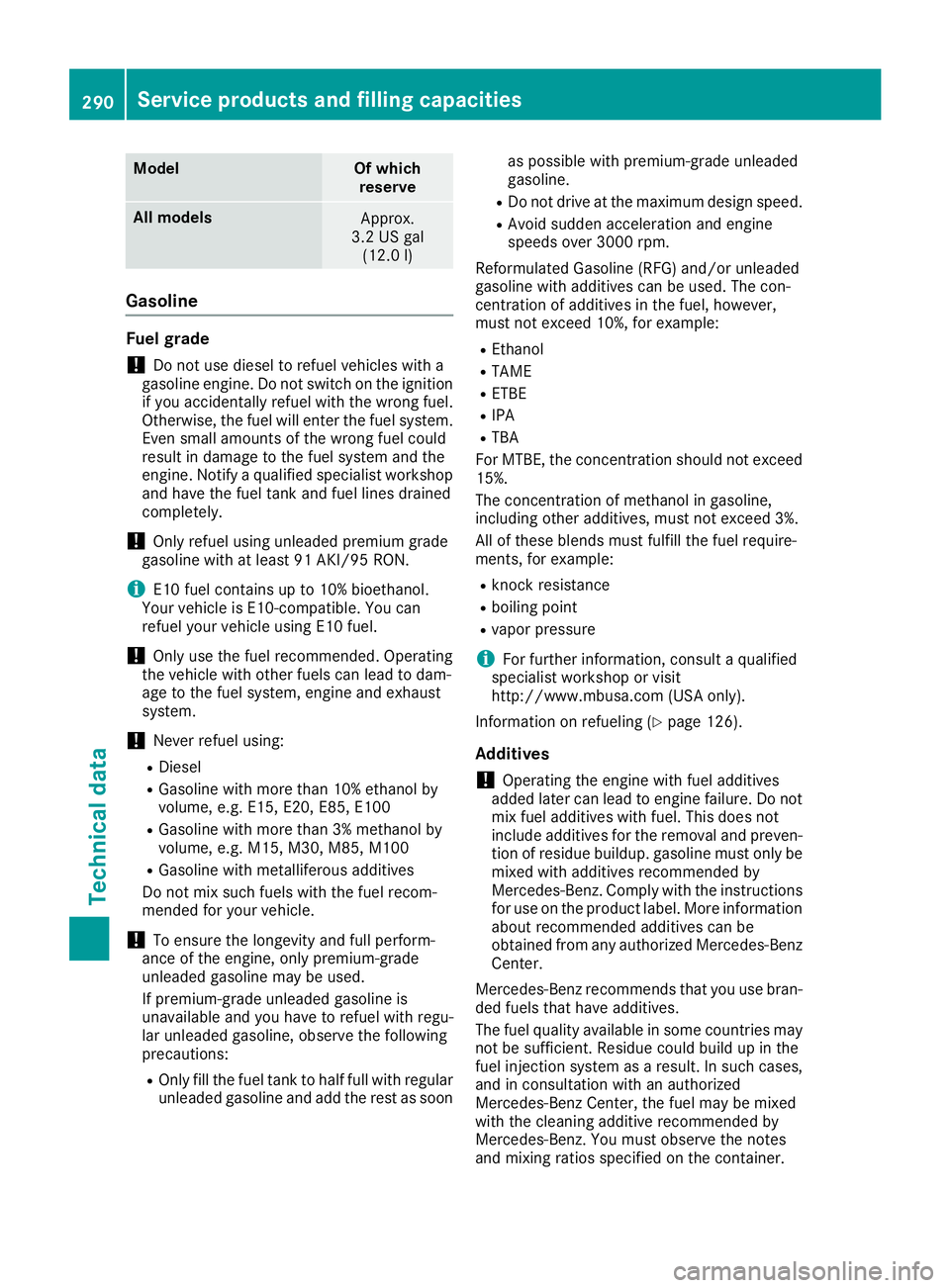
Model Of which
reserve All models
Approx.
3.2 US gal (12.0 l) Gasoline
Fuel grade
!
Do not use diesel to refuel vehicles with a
gasoline engine. Do not switch on the ignition if you accidentally refuel with the wrong fuel.
Otherwise, the fuel will enter the fuel system.
Even small amounts of the wrong fuel could
result in damage to the fuel system and the
engine. Notify a qualified specialist workshop
and have the fuel tank and fuel lines drained
completely.
! Only refuel using unleaded premium grade
gasoline with at least 91 AKI/95 RON.
i E10 fuel contains up to 10% bioethanol.
Your vehicle is E10-compatible. You can
refuel your vehicle using E10 fuel.
! Only use the fuel recommended. Operating
the vehicle with other fuels can lead to dam-
age to the fuel system, engine and exhaust
system.
! Never refuel using:
R Diesel
R Gasoline with more than 10% ethanol by
volume, e.g. E15, E20, E85, E100
R Gasoline with more than 3% methanol by
volume, e.g. M15, M30, M85, M100
R Gasoline with metalliferous additives
Do not mix such fuels with the fuel recom-
mended for your vehicle.
! To ensure the longevity and full perform-
ance of the engine, only premium-grade
unleaded gasoline may be used.
If premium-grade unleaded gasoline is
unavailable and you have to refuel with regu-
lar unleaded gasoline, observe the following
precautions:
R Only fill the fuel tank to half full with regular
unleaded gasoline and add the rest as soon as possible with premium-grade unleaded
gasoline.
R Do not drive at the maximum design speed.
R Avoid sudden acceleration and engine
speeds over 3000 rpm.
Reformulated Gasoline (RFG) and/or unleaded
gasoline with additives can be used. The con-
centration of additives in the fuel, however,
must not exceed 10%, for example: R Ethanol
R TAME
R ETBE
R IPA
R TBA
For MTBE, the concentration should not exceed
15%.
The concentration of methanol in gasoline,
including other additives, must not exceed 3%.
All of these blends must fulfill the fuel require-
ments, for example:
R knock resistance
R boiling point
R vapor pressure
i For further information, consult a qualified
specialist workshop or visit
http://www.mbusa.com (USA only).
Information on refueling (Y page 126).
Additives ! Operating the engine with fuel additives
added later can lead to engine failure. Do not
mix fuel additives with fuel. This does not
include additives for the removal and preven- tion of residue buildup. gasoline must only be
mixed with additives recommended by
Mercedes-Benz. Comply with the instructions for use on the product label. More information
about recommended additives can be
obtained from any authorized Mercedes-Benz
Center.
Mercedes-Benz recommends that you use bran-
ded fuels that have additives.
The fuel quality available in some countries may not be sufficient. Residue could build up in the
fuel injection system as a result. In such cases,and in consultation with an authorized
Mercedes-Benz Center, the fuel may be mixed
with the cleaning additive recommended by
Mercedes-Benz. You must observe the notes
and mixing ratios specified on the container. 290
Service products and filling capacitiesTechnical data