cruise control MERCEDES-BENZ B-CLASS 2012 User Guide
[x] Cancel search | Manufacturer: MERCEDES-BENZ, Model Year: 2012, Model line: B-CLASS, Model: MERCEDES-BENZ B-CLASS 2012Pages: 340, PDF Size: 3.09 MB
Page 166 of 340
vehicle occupant or from outside the
vehicle.
R the electrical system in the engine
compartment, the battery
or the fuses have
been tampered with.
R the battery is disconnected.
R the accelerator pedal has been depressed,
e.g. by a vehicle occupant.
There is a risk of an accident.
If you wish to exit the vehicle, always turn off
DISTRONIC PLUS and secure the vehicle
against rolling away.
Deactivating DISTRONIC PLUS
(Y page 165).
If DISTRONIC PLUS detects that the vehicle
in front is stopping, it brakes your vehicle until
it is stationary.
Once your vehicle is stationary, it remains
stationary and you do not need to depress the
brake.
i After a time, the electric parking brake
secures the vehicle and relieves the service
brake.
i Depending on the specified minimum
distance, your vehicle will come to a
standstill at a sufficient distance behind the
vehicle in front. The specified minimum
distance is set using the control on the
cruise control lever.
The electric parking brake automatically
secures the vehicle if DISTRONIC PLUS is
activated and:
R the driver's door is open and the driver's
seat belt is unfastened.
R the engine is switched off, unless it is
automatically switched off by the ECO
start/stop function.
R a system malfunction occurs.
R the power supply is not sufficient.
If a malfunction occurs, then the transmission
may be shifted into position P automatically.Storing the current speed or calling up the
last stored speed G
WARNING
If you call up the stored speed and it differs
from the current speed, the vehicle
accelerates or decelerates.
If you do not know
the stored speed, the vehicle could accelerate
or brake unexpectedly. There is a risk of an
accident.
Pay attention to the road and traffic
conditions before calling up the stored speed.
If you do not know the stored speed, store the
desired speed again.
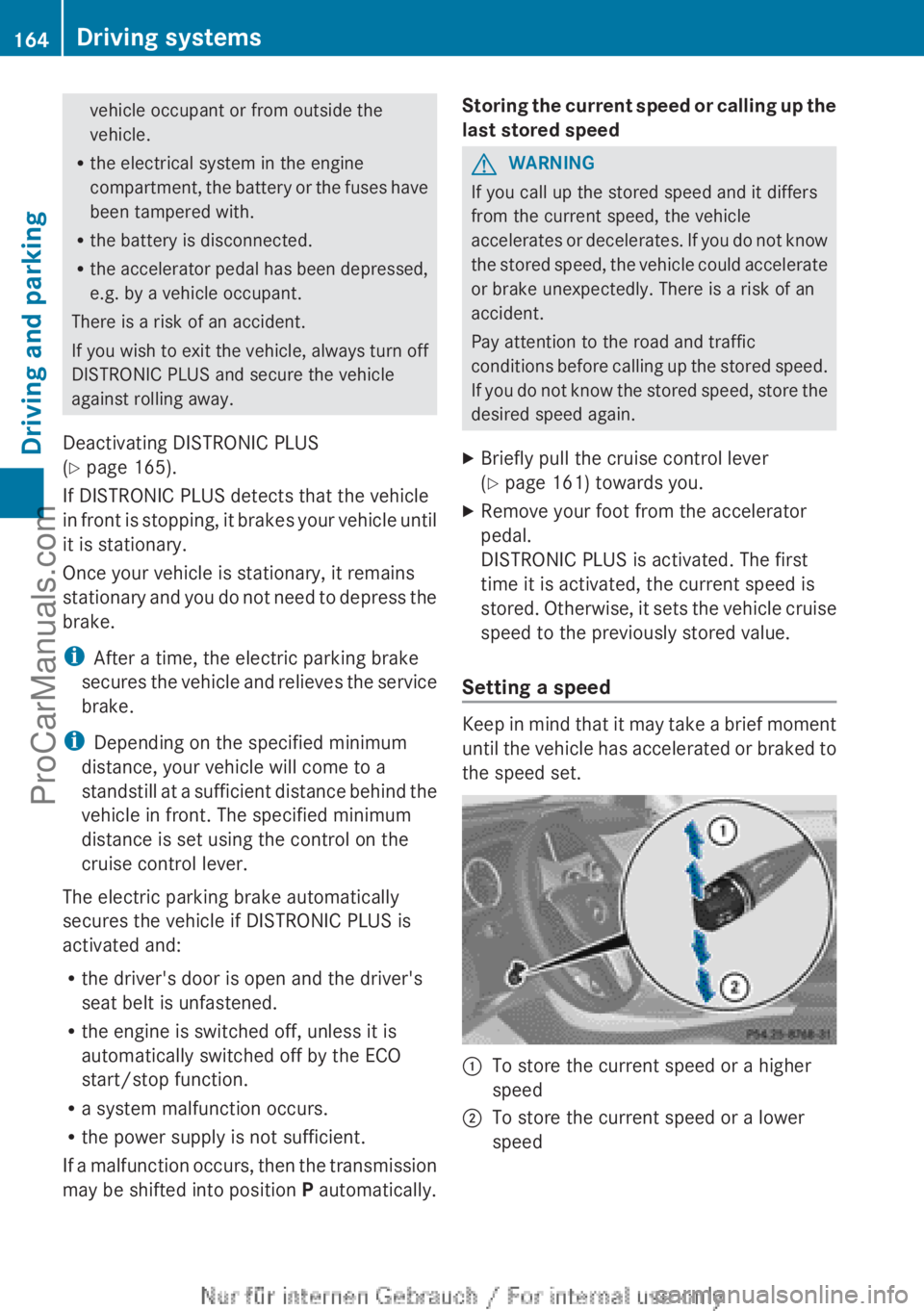
X Briefly pull the cruise control lever
(Y page 161) towards you.
X Remove your foot from the accelerator
pedal.
DISTRONIC PLUS is activated. The first
time it is activated, the current speed is
stored. Otherwise, it
sets the vehicle cruise
speed to the previously stored value.
Setting a speed Keep in mind that it may take a brief moment
until the
vehicle
has accelerated or braked to
the speed set. :
To store the current speed or a higher
speed
; To store the current speed or a lower
speed164
Driving systems
Driving and parking
ProCarManuals.com
Page 167 of 340
X
Press the cruise control lever up : for a
higher speed or
down ; for a lower speed.
X To adjust the set speed in 1 mph
increments (1
km/h
increments): briefly
press the cruise control lever up : or
down ; to the pressure point.
Every time the cruise control lever is
pressed up : or down ; the last speed
stored is increased or reduced.
X To adjust the set speed in 5 mph
increments (10 km/h increments):
briefly press the cruise control lever
up : or down ; to the pressure point.
Every time the cruise control lever is
pressed up : or down ;, the last speed
stored is increased or reduced.
i DISTRONIC PLUS
is
not deactivated if you
depress the accelerator pedal. If you
accelerate to overtake, DISTRONIC PLUS
adjusts the vehicle's speed to the last
speed stored after you have finished
overtaking.
Setting the specified minimum distance You can set the specified minimum distance
for
DISTRONIC
PLUS
by varying the time span
between one and two seconds. With this
function, you can set the minimum distance
that DISTRONIC PLUS keeps to the vehicle in
front, dependent on vehicle speed. You can
see this distance in the multifunction display
(Y page 163).
i Make sure that you maintain the
minimum distance to the vehicle in front as
required by law. Adjust the distance to the
vehicle in front if necessary. X
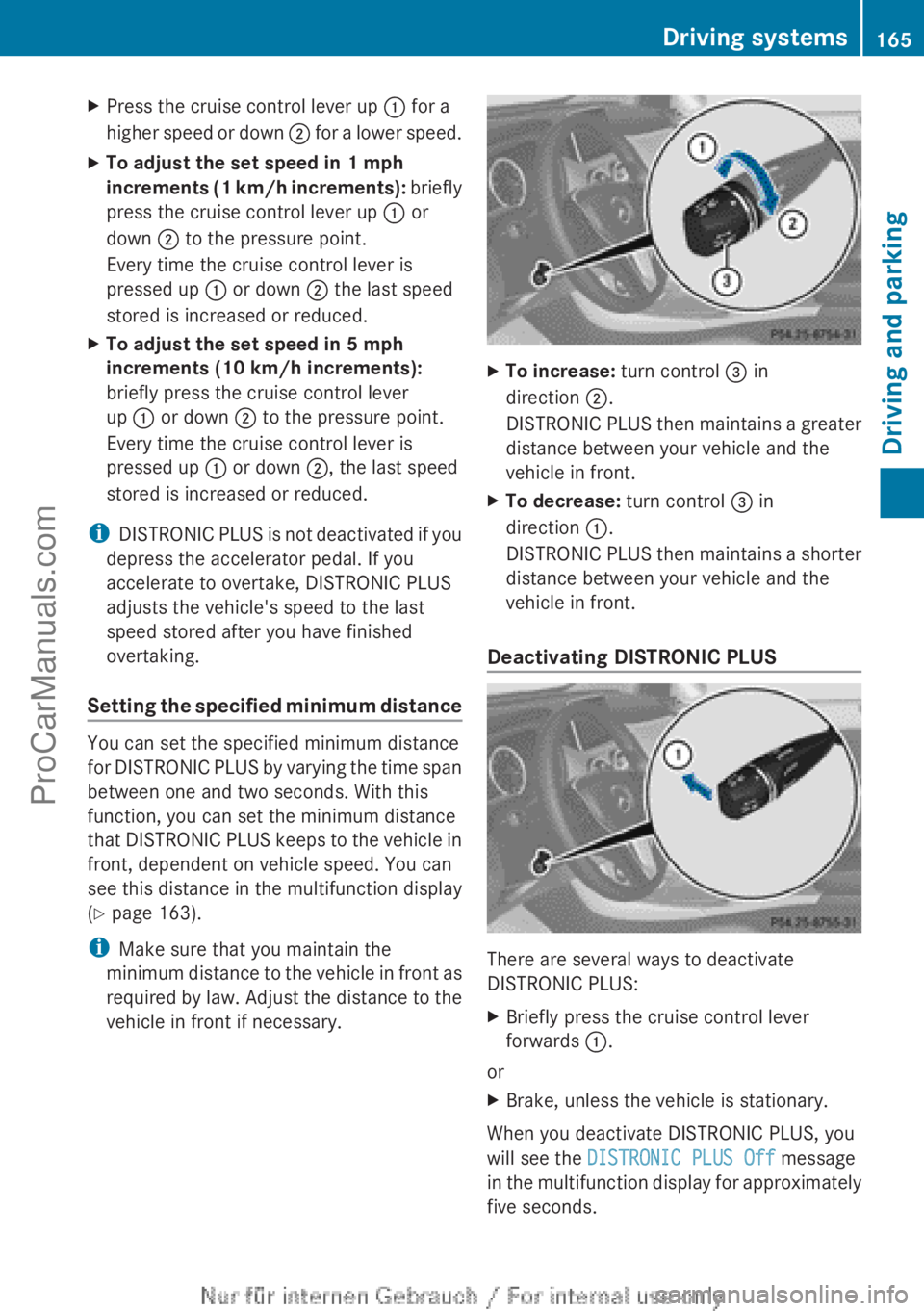
To increase: turn control = in
direction ;.
DISTRONIC PLUS
then
maintains a greater
distance between your vehicle and the
vehicle in front.
X To decrease: turn control = in
direction :.
DISTRONIC PLUS
then
maintains a shorter
distance between your vehicle and the
vehicle in front.
Deactivating DISTRONIC PLUS There are several ways to deactivate
DISTRONIC PLUS:
X
Briefly press the cruise control lever
forwards :.
or
X Brake, unless the vehicle is stationary.
When you deactivate DISTRONIC PLUS, you
will see the DISTRONIC PLUS Off message
in the multifunction
display for approximately
five seconds. Driving systems
165
Driving and parking Z
ProCarManuals.com
Page 168 of 340
i
The last speed
stored remains stored until
you switch off the engine.
DISTRONIC PLUS is automatically
deactivated if:
R you engage the electric parking brake or if
the vehicle is automatically secured with
the electric parking brake
R you are driving slower than 7 mph
(10km/h) and there is no vehicle in front,
or if the vehicle in front is no longer
detected
R ESP ®
intervenes or you deactivate ESP ®
R the transmission is in the P, R or N position
R you pull the cruise control lever towards
you in order to pull away and the front-
passenger door or one of the rear doors is
open
R the vehicle has skidded
If DISTRONIC PLUS is deactivated, you will
hear a warning tone. You will see the
DISTRONIC PLUS Off message in the
multifunction display for approximately five
seconds.
In the Assistance menu (Y page 194) of the
on-board computer, you can select the
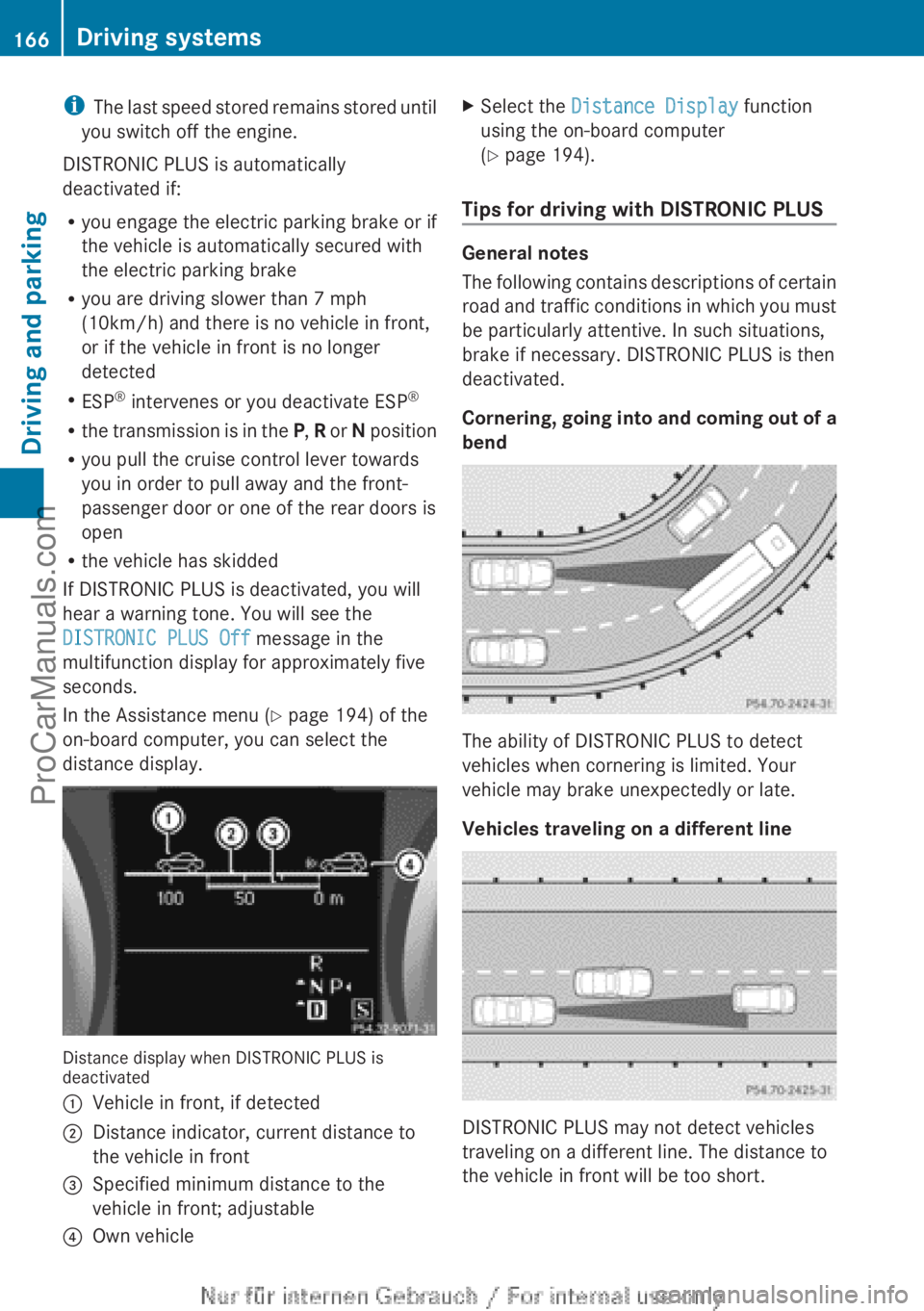
distance display. Distance display when DISTRONIC PLUS is
deactivated
:
Vehicle in front, if detected
; Distance indicator, current distance to
the vehicle in front
= Specified minimum distance to the
vehicle in front; adjustable
? Own vehicle X
Select the Distance Display function
using the on-board computer
(Y page 194).
Tips for driving with DISTRONIC PLUS General notes
The following
contains
descriptions of certain
road and traffic conditions in which you must
be particularly attentive. In such situations,
brake if necessary. DISTRONIC PLUS is then
deactivated.
Cornering, going into and coming out of a
bend The ability of DISTRONIC PLUS to detect
vehicles when cornering is limited. Your
vehicle may brake unexpectedly or late.
Vehicles traveling on a different line
DISTRONIC PLUS may not detect vehicles
traveling on a different line. The distance to
the vehicle in front will be too short.166
Driving systems
Driving and parking
ProCarManuals.com
Page 189 of 340
!
A display message
is shown if the coolant
temperature is too high.
If the coolant temperature is over
248 ‡(120 †), do not continue driving. The
engine will otherwise be damaged.
The coolant temperature gage is in the
instrument cluster on the right-hand side.
Under normal operating conditions and with
the specified coolant level, the coolant
temperature may rise to 248 ‡ (120 †). Tachometer
! Do not drive in the overrevving range, as
this could damage the engine.
The red band
in the tachometer indicates the
engine's overrevving range.
The fuel supply is interrupted to protect the
engine when the red band is reached. Outside temperature display
You should pay special attention to road
conditions when temperatures are around
freezing point.
The outside temperature display is in the
multifunction display.
Changes in the outside temperature are
displayed after a short delay. Speedometer with segments
The segments in the speedometer indicate
which speed range is available.
R Cruise control activated ( Y page 157):
The segments light up from the stored
speed to the maximum speed.
R DISTRONIC PLUS activated (Y page 159):
One or two segments in the set speed
range light up.
R DISTRONIC PLUS detects
a vehicle in front:The segments between the speed of the
vehicle in front and the stored speed light
up. Operating the on-board computer
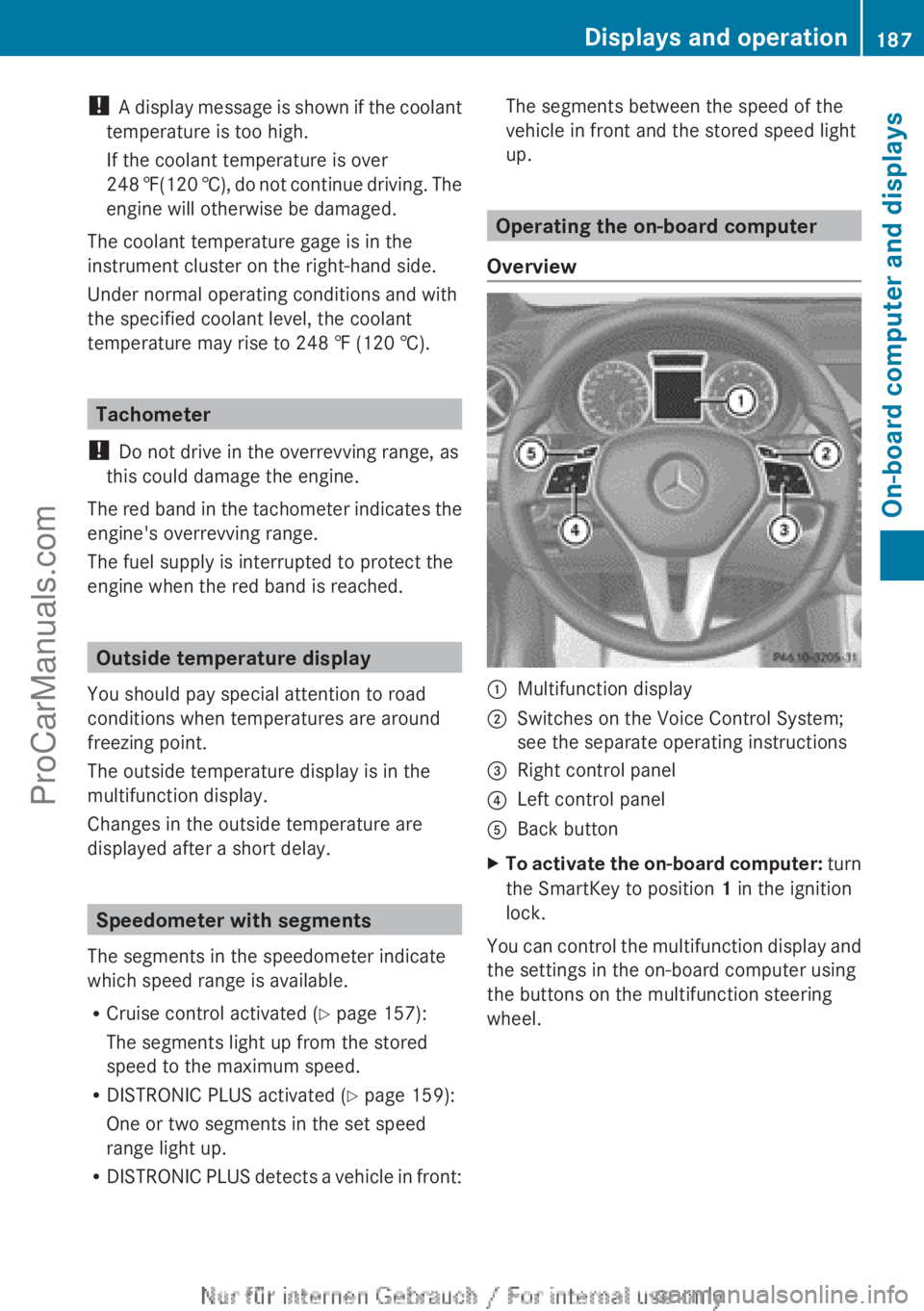
Overview :
Multifunction display
; Switches on the Voice Control System;
see the separate operating instructions
= Right control panel
? Left control panel
A Back button
X To activate the on-board computer: turn
the SmartKey to position 1 in the ignition
lock.
You
can control the multifunction display and
the settings in the on-board computer using
the buttons on the multifunction steering
wheel. Displays and operation
187
On-board computer and displays Z
ProCarManuals.com
Page 191 of 340
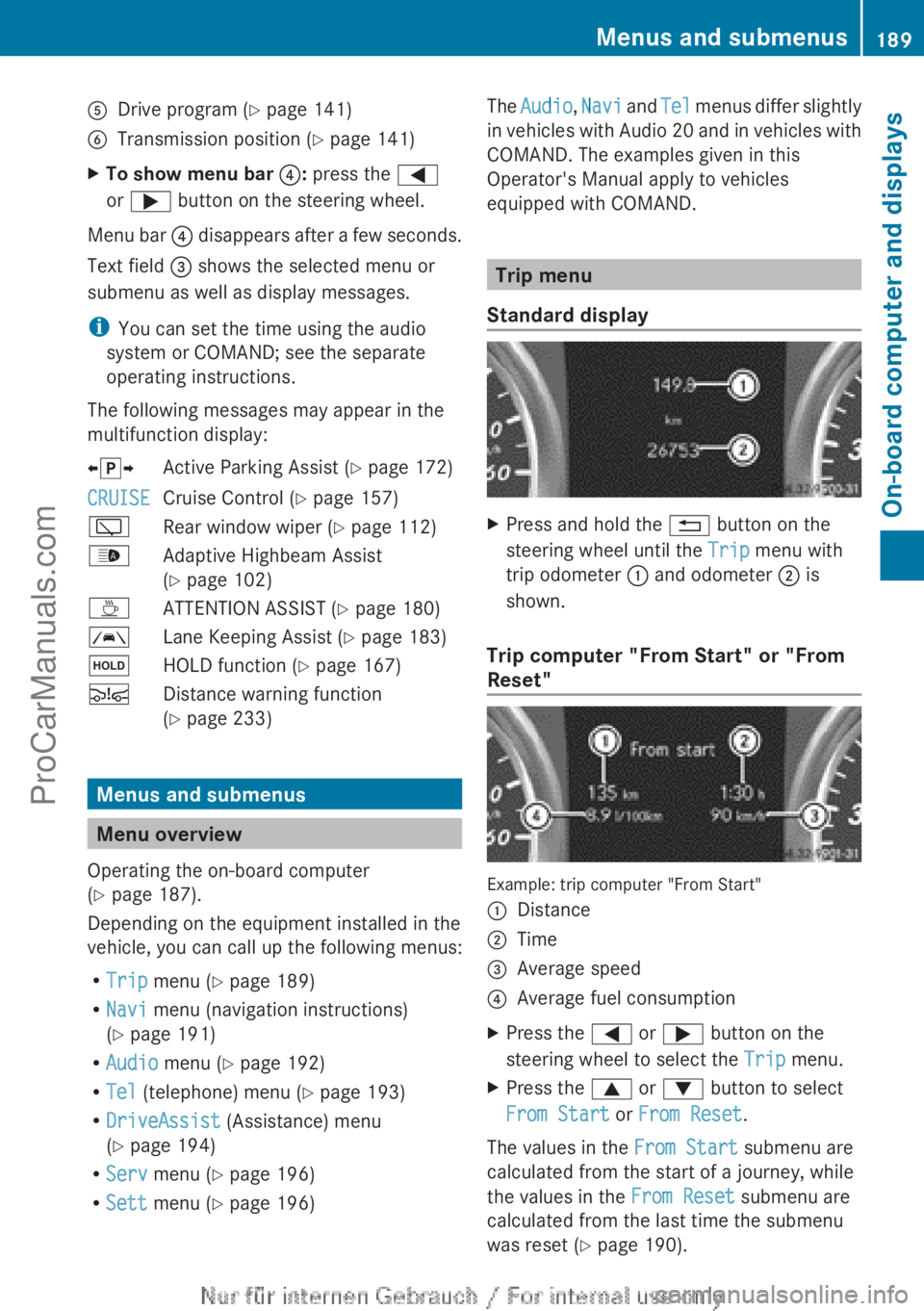
A
Drive program (Y page 141)
B Transmission position ( Y page 141)
X To show menu bar ?: press the =
or ; button on the steering wheel.
Menu bar ? disappears after a few seconds.
Text field = shows the selected menu or
submenu as well as display messages.
i You can set the time using the audio
system or COMAND; see the separate
operating instructions.
The following messages may appear in the
multifunction display:
XjY Active Parking Assist (Y page 172)
CRUISE Cruise Control (Y page 157)
è Rear window wiper ( Y page 112)
_ Adaptive Highbeam Assist
(Y page 102)
À ATTENTION ASSIST (Y page 180)
à Lane Keeping Assist (Y page 183)
ë HOLD function ( Y page 167)
Ä Distance warning function
(Y page 233) Menus and submenus
Menu overview
Operating the on-board computer
(Y page 187).
Depending on the equipment installed in the
vehicle, you can call up the following menus:
R Trip menu (Y page 189)
R Navi menu (navigation instructions)
(Y page 191)
R Audio menu (Y page 192)
R Tel (telephone) menu ( Y page 193)
R DriveAssist (Assistance) menu
(Y page 194)
R Serv menu (Y page 196)
R Sett menu (Y page 196) The
Audio, Navi and
Tel
menus differ slightly
in vehicles with Audio 20 and in vehicles with
COMAND. The examples given in this
Operator's Manual apply to vehicles
equipped with COMAND. Trip menu
Standard display X
Press and hold the % button on the
steering wheel until the Trip menu with
trip odometer : and odometer ; is
shown.
Trip computer "From Start" or "From
Reset" Example: trip computer "From Start"
:
Distance
; Time
= Average speed
? Average fuel consumption
X Press the = or ; button on the
steering wheel to select the Trip menu.
X Press the 9 or : button to select
From Start or From Reset.
The values in the From Start submenu are
calculated from the start of a journey, while
the values in the From Reset submenu are
calculated from the last time the submenu
was reset ( Y page 190). Menus and submenus
189
On-board computer and displays Z
ProCarManuals.com
Page 198 of 340
X
Press the a button.
The current selection is displayed.
X Press a to confirm.
X Press the : or 9 button to set Off,
Standard or Adaptive.
X Press the a button to save the setting.
If Lane Keeping Assist is activated
(Y page 183) and
the ignition is switched on,
the à symbol appears in the multifunction
display. Maintenance menu
In the
Serv menu, you have the following
options:
R Calling up display messages in message
memory ( Y page 200)
R Restarting the tire pressure loss warning
system (Y page 305)
R Calling up the service due date
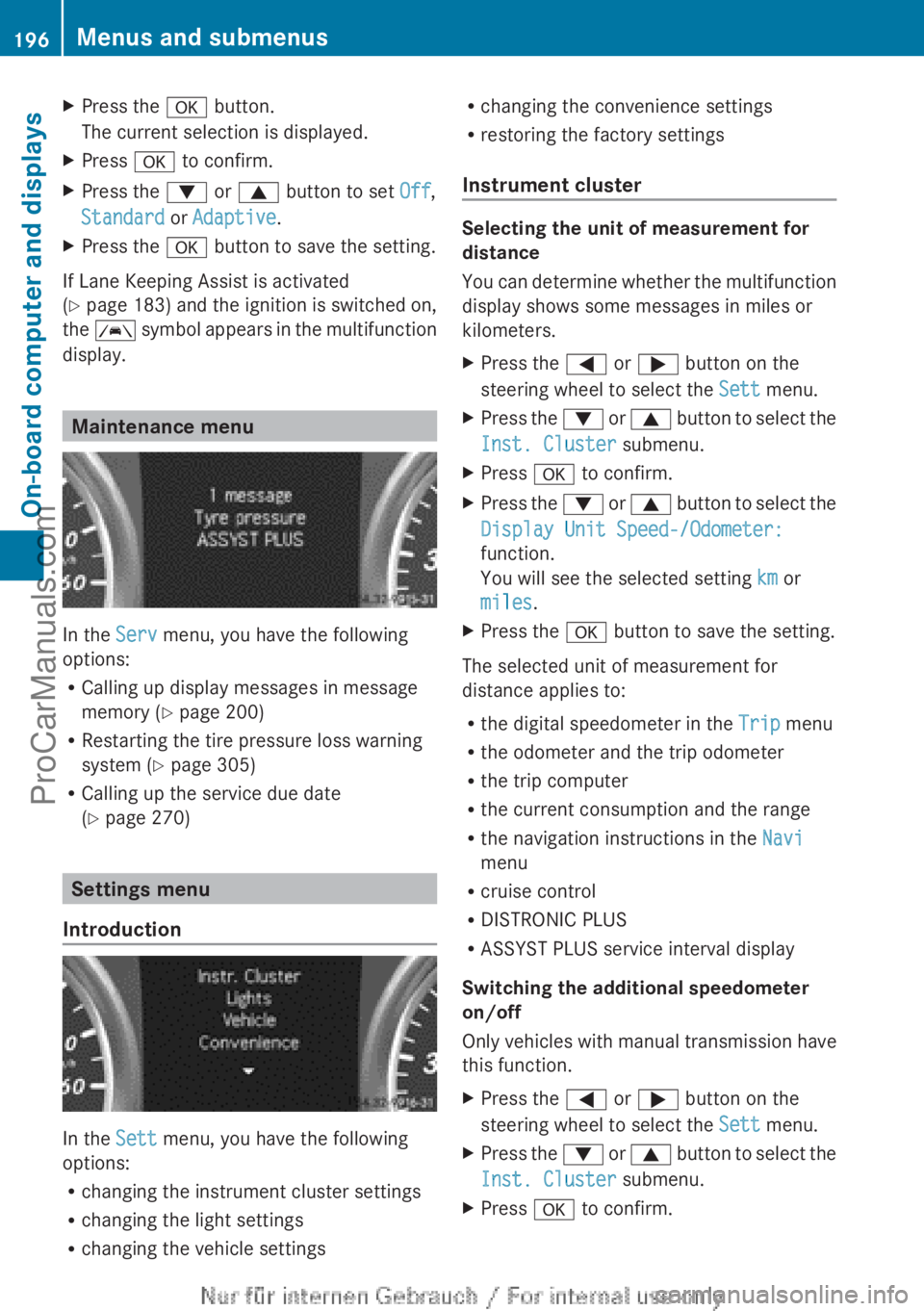
(Y page 270) Settings menu
Introduction In the
Sett menu, you have the following
options:
R changing the instrument cluster settings
R changing the light settings
R changing the vehicle settings R
changing the convenience settings
R restoring the factory settings
Instrument cluster Selecting the unit of measurement for
distance
You can
determine
whether the multifunction
display shows some messages in miles or
kilometers.
X Press the = or ; button on the
steering wheel to select the Sett menu.
X Press the : or 9
button to select the
Inst. Cluster submenu.
X Press a to confirm.
X Press the :
or 9
button to select the
Display Unit Speed-/Odometer:
function.
You will see the selected setting km or
miles.
X Press the a button to save the setting.
The selected unit of measurement for
distance applies to:
R the digital speedometer in the Trip menu
R the odometer and the trip odometer
R the trip computer
R the current consumption and the range
R the navigation instructions in the Navi
menu
R cruise control
R DISTRONIC PLUS
R ASSYST PLUS service interval display
Switching the additional speedometer
on/off
Only vehicles
with
manual transmission have
this function.
X Press the = or ; button on the
steering wheel to select the Sett menu.
X Press the : or 9
button to select the
Inst. Cluster submenu.
X Press a to confirm.196
Menus and submenus
On-board computer and displays
ProCarManuals.com
Page 220 of 340
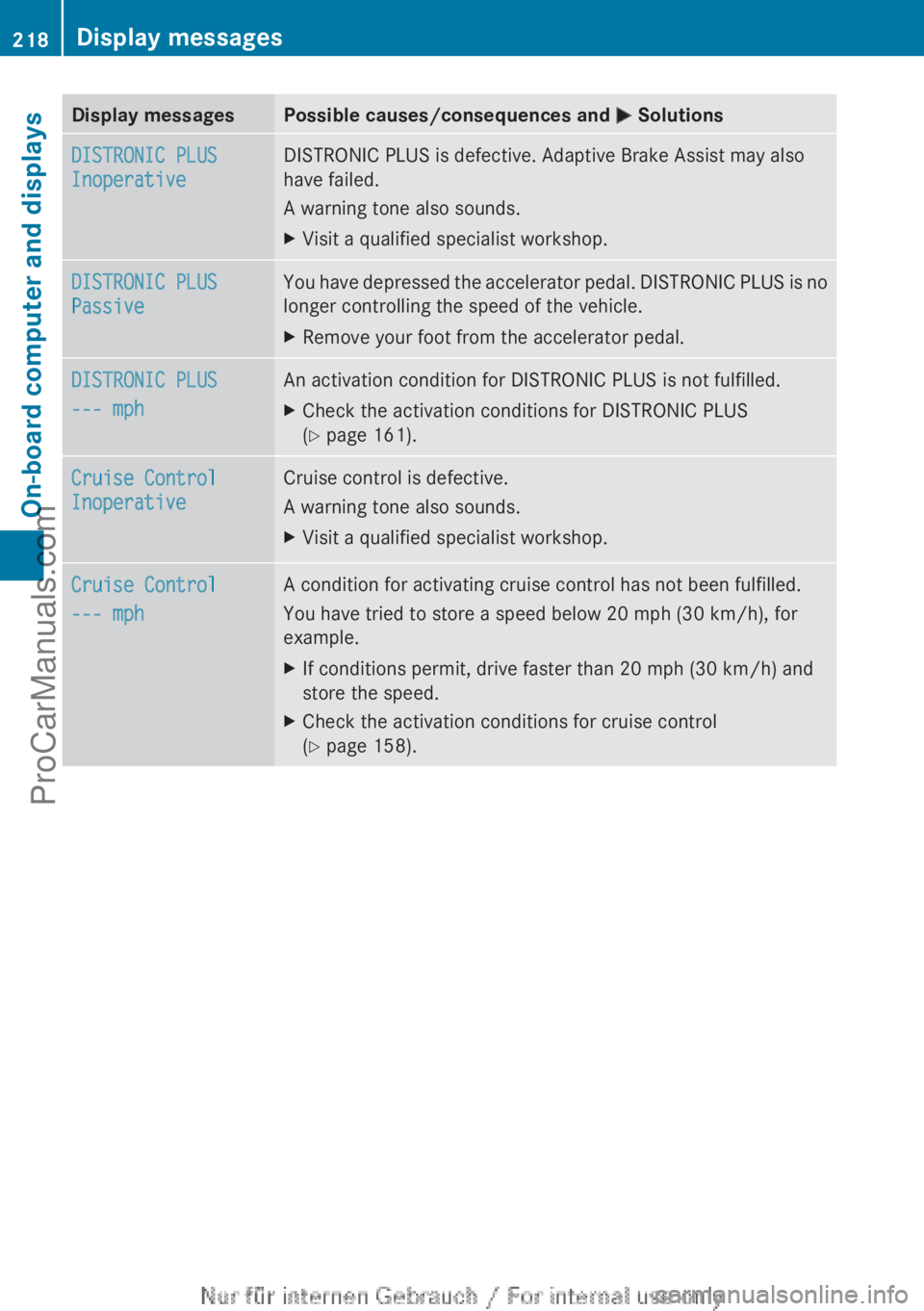
Display messages Possible causes/consequences and
M SolutionsDISTRONIC PLUS
Inoperative DISTRONIC PLUS is defective. Adaptive Brake Assist may also
have failed.
A warning tone also sounds.
X
Visit a qualified specialist workshop. DISTRONIC PLUS
Passive You have depressed the accelerator pedal. DISTRONIC PLUS is no
longer controlling the speed of the vehicle.
X
Remove your foot from the accelerator pedal. DISTRONIC PLUS
--- mph An activation condition for DISTRONIC PLUS is not fulfilled.
X
Check the activation conditions for DISTRONIC PLUS
(Y page 161). Cruise Control
Inoperative Cruise control is defective.
A warning tone also sounds.
X
Visit a qualified specialist workshop. Cruise Control
--- mph A condition for activating cruise control has not been fulfilled.
You have tried to store a speed below
20 mph (30 km/h), for
example.
X If conditions permit, drive faster than
20 mph (30 km/h) and
store the speed.
X Check the activation conditions for cruise control
(Y page 158).218
Display messages
On-board computer and displays
ProCarManuals.com
Page 230 of 340
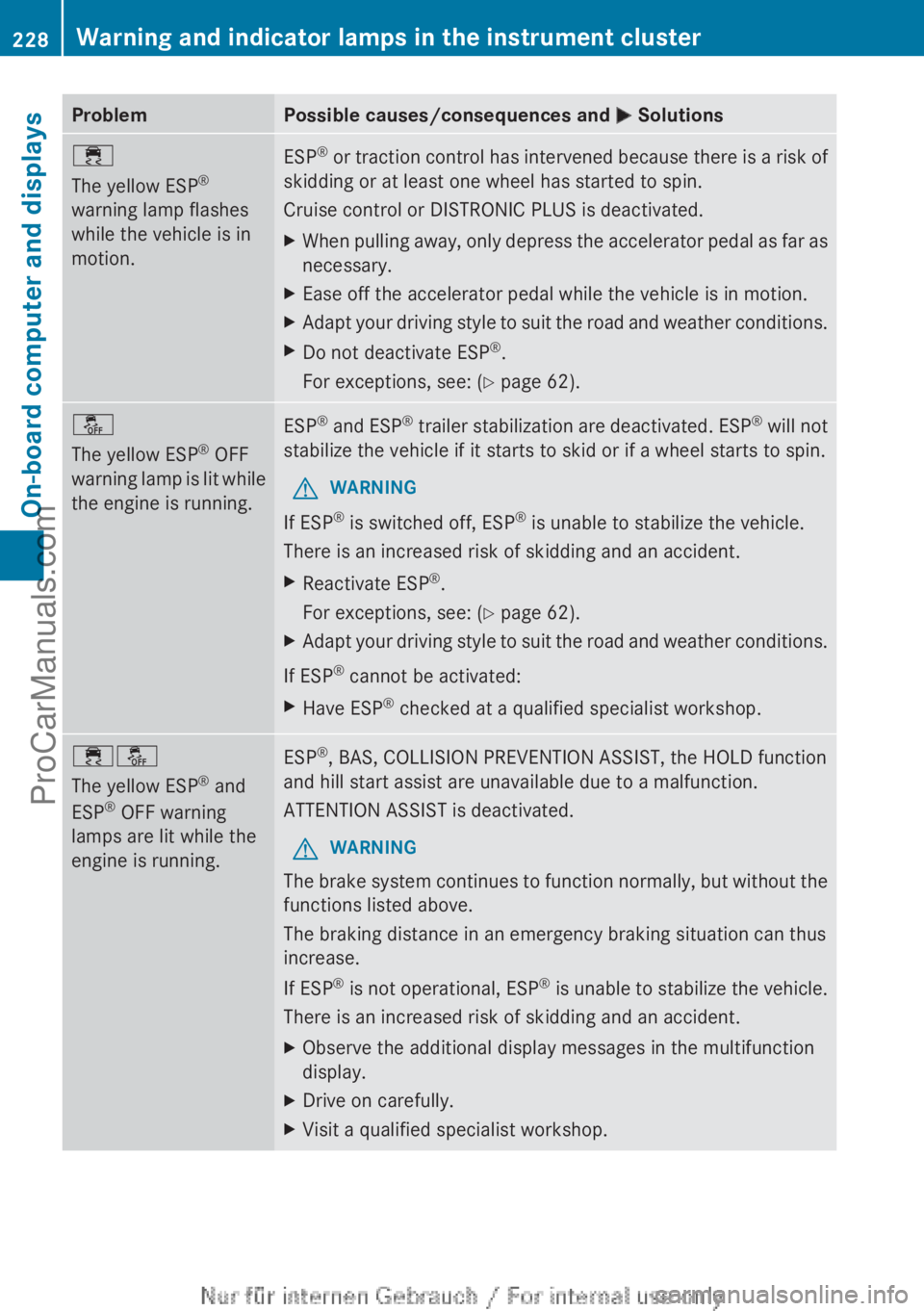
Problem Possible causes/consequences and
M Solutions÷
The yellow ESP
®
warning lamp flashes
while the vehicle is in
motion. ESP
®
or traction control has intervened because there is a risk of
skidding or at least one wheel has started to spin.
Cruise control or DISTRONIC PLUS is deactivated.
X When pulling
away, only depress the accelerator pedal as far as
necessary.
X Ease off the accelerator pedal while the vehicle is in motion.
X Adapt your driving style to suit the road and weather conditions.
X Do not deactivate ESP ®
.
For exceptions, see: ( Y page 62).å
The yellow ESP
®
OFF
warning lamp is
lit while
the engine is running. ESP
®
and ESP ®
trailer stabilization are deactivated. ESP ®
will not
stabilize the vehicle if it starts to skid or if a wheel starts to spin.
G WARNING
If ESP ®
is switched off, ESP ®
is unable to stabilize the vehicle.
There is an increased risk of skidding and an accident.
X Reactivate ESP ®
.
For exceptions, see: ( Y page 62).
X Adapt your driving style to suit the road and weather conditions.
If ESP ®
cannot be activated:
X Have ESP ®
checked at a qualified specialist workshop. ֌
The yellow ESP
®
and
ESP ®
OFF warning
lamps are lit while the
engine is running. ESP
®
, BAS, COLLISION PREVENTION ASSIST, the HOLD function
and hill start assist are unavailable due to a malfunction.
ATTENTION ASSIST is deactivated.
G WARNING
The brake system continues to function normally, but without the
functions listed above.
The braking distance in an emergency braking situation can thus
increase.
If ESP ®
is not
operational, ESP ®
is unable to stabilize the vehicle.
There is an increased risk of skidding and an accident.
X Observe the additional display messages in the multifunction
display.
X Drive on carefully.
X Visit a qualified specialist workshop.228
Warning and indicator lamps in the instrument cluster
On-board computer and displays
ProCarManuals.com