fog light MERCEDES-BENZ B-CLASS 2012 User Guide
[x] Cancel search | Manufacturer: MERCEDES-BENZ, Model Year: 2012, Model line: B-CLASS, Model: MERCEDES-BENZ B-CLASS 2012Pages: 340, PDF Size: 3.09 MB
Page 113 of 340
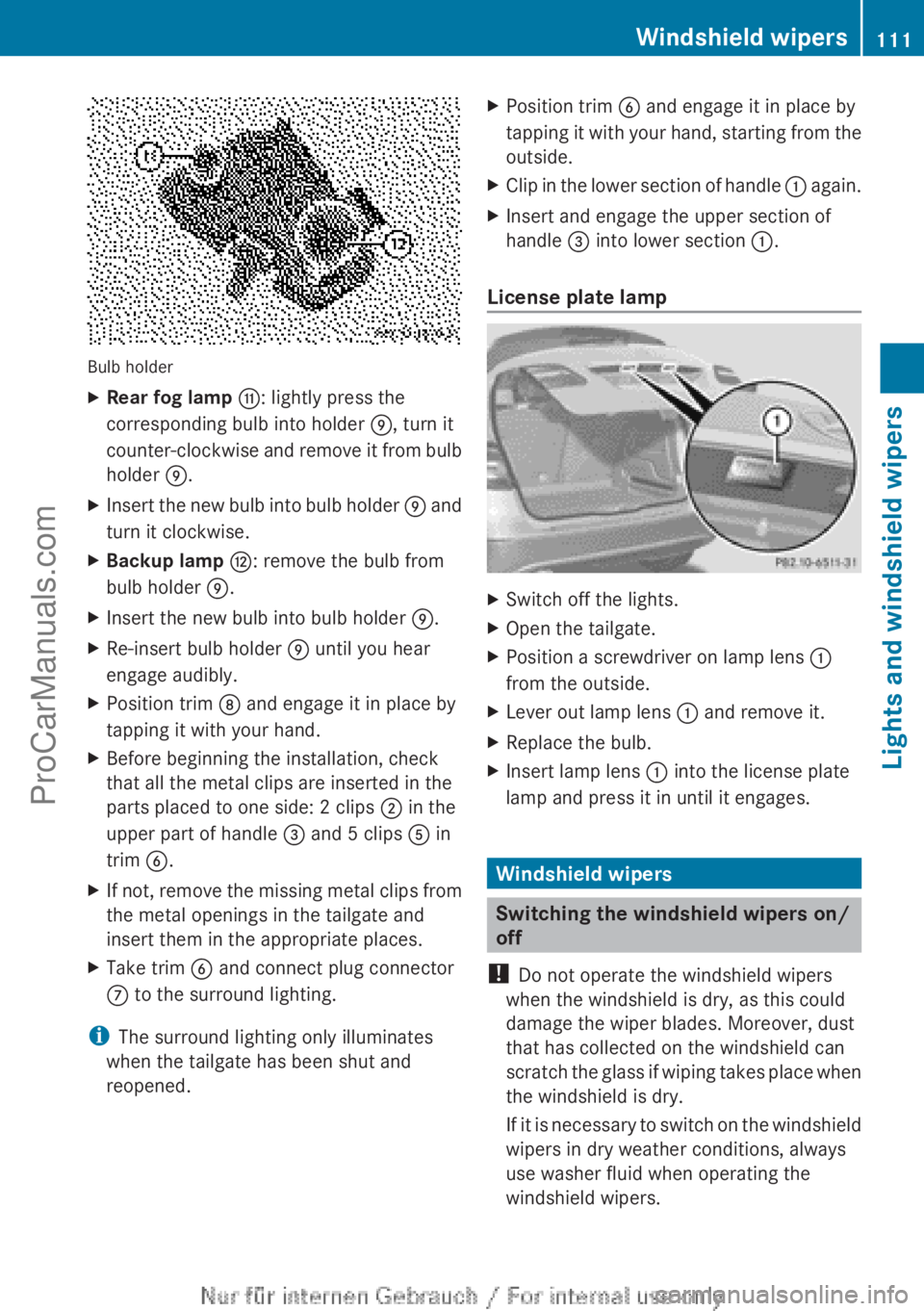
Bulb holder
X
Rear fog lamp G: lightly press the
corresponding bulb into holder E, turn it
counter-clockwise and
remove
it from bulb
holder E.
X Insert the new bulb into bulb holder E and
turn it clockwise.
X Backup lamp H: remove the bulb from
bulb holder E
.
X Insert the new bulb into bulb holder E.
X Re-insert bulb holder E until you hear
engage audibly.
X Position trim D and engage it in place by
tapping it with your hand.
X Before beginning the installation, check
that all the metal clips are inserted in the
parts placed to one side: 2 clips ; in the
upper part of handle = and 5 clips A in
trim B.
X If not, remove the missing metal clips from
the metal openings in the tailgate and
insert them in the appropriate places.
X Take trim B and connect plug connector
C to the surround lighting.
i The surround lighting only illuminates
when the tailgate has been shut and
reopened. X
Position trim B and engage it in place by
tapping it
with
your hand, starting from the
outside.
X Clip in the lower section of handle : again.
X Insert and engage the upper section of
handle = into lower section
:.
License plate lamp X
Switch off the lights.
X Open the tailgate.
X Position a screwdriver on lamp lens :
from the outside.
X Lever out lamp lens : and remove it.
X Replace the bulb.
X Insert lamp lens : into the license plate
lamp and press it in until it engages. Windshield wipers
Switching the windshield wipers on/
off
! Do not operate the windshield wipers
when the windshield is dry, as this could
damage the wiper blades. Moreover, dust
that has collected on the windshield can
scratch the glass
if wiping takes place when
the windshield is dry.
If it is necessary to switch on the windshield
wipers in dry weather conditions, always
use washer fluid when operating the
windshield wipers. Windshield wipers
111
Lights and windshield wipers Z
ProCarManuals.com
Page 124 of 340
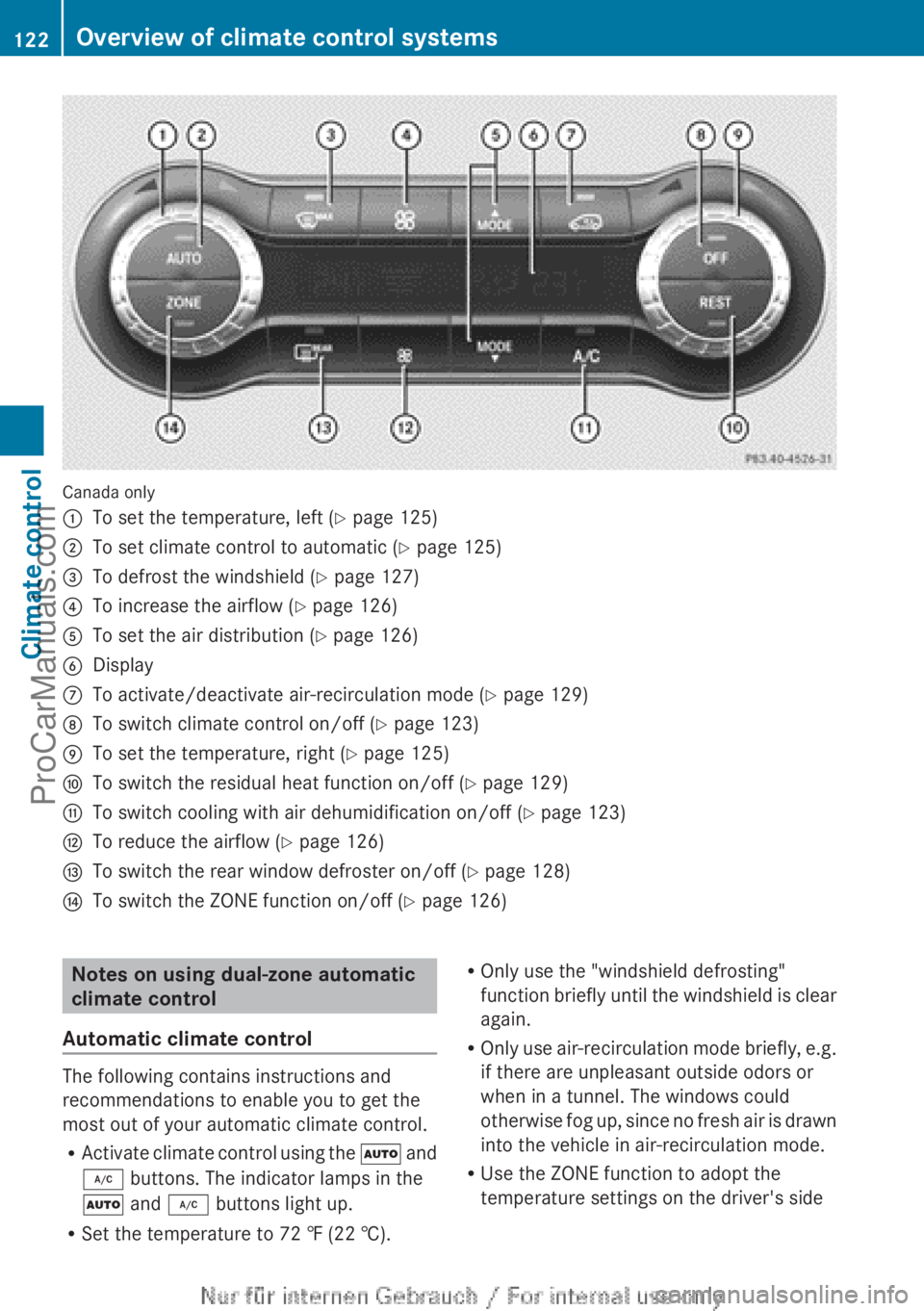
Canada only
:
To set the temperature, left (Y page 125)
; To set climate control to automatic ( Y page 125)
= To defrost the windshield (Y page 127)
? To increase the airflow ( Y page 126)
A To set the air distribution ( Y page 126)
B Display
C To activate/deactivate air-recirculation mode ( Y page 129)
D To switch climate control on/off (Y page 123)
E To set the temperature, right (Y page 125)
F To switch the residual heat function on/off (Y page 129)
G To switch cooling with air dehumidification on/off ( Y page 123)
H To reduce the airflow ( Y page 126)
I To switch the rear window defroster on/off (Y page 128)
J To switch the ZONE function on/off (Y page 126) Notes on using dual-zone automatic
climate control
Automatic climate control The following contains instructions and
recommendations to enable you to get the
most out of your automatic climate control.
R
Activate climate control
using the à and
¿ buttons. The indicator lamps in the
à and ¿ buttons light up.
R Set the temperature to 72 ‡ (22 †). R
Only use the "windshield defrosting"
function briefly
until
the windshield is clear
again.
R Only use air-recirculation mode briefly, e.g.
if there are unpleasant outside odors or
when in a tunnel. The windows could
otherwise fog up, since no fresh air is drawn
into the vehicle in air-recirculation mode.
R Use the ZONE function to adopt the
temperature settings on the driver's side122
Overview of climate control systems
Climate control
ProCarManuals.com
Page 125 of 340
for the front-passenger side as well. The
indicator lamp
in
the á button goes out.
R Use the residual heat function if you want
to heat or ventilate the vehicle interior
when the ignition is switched off. The
residual heat function can only be activated
or deactivated with the ignition switched
off.
ECO start/stop function During automatic engine switch-off, the ECO
start/stop function only operates at a
reduced capacity. If you require the full
climate control
output,
you can switch off the
ECO start/stop function by pressing the ECO
button ( Y page 138). Operating the climate control
systems
Switching climate control on/off
Points to observe before use When the climate control is switched off, the
air supply and air circulation are also
switched off. The windows could fog up.
Therefore, switch off climate control only
briefly
Activating/deactivating
Automatic climate control
X
Turn the SmartKey to position 2 in the
ignition lock (Y page 135).
X To switch on: turn control A
clockwise to
the desired position (except position 0)
(Y page 119).
X To switch off: turn control A counter-
clockwise to position 0(Y page 119). Dual-zone automatic climate control
X
Turn the SmartKey to position 2 in the
ignition lock (Y page 135).
X To activate: press the à button.
The indicator
lamp
in the à button lights
up. Airflow and air distribution are set to
automatic mode.
or
X Press the ^ button.
The indicator lamp
in the ^ button goes
out. The previously selected settings are
restored.
X To deactivate: press the ^ button.
The indicator lamp
in the ^ button lights
up.
i Dual-zone automatic climate control:
switch on climate control primarily using
the à button. Activating/deactivating cooling with
air dehumidification
Points to observe before use If you deactivate the "Cooling with air-
dehumidification" function, the air inside the
vehicle will not be cooled. The air inside the
vehicle will also not be dehumidified. The
windows can
fog
up more quickly. Therefore,
only deactivate the "Cooling with air-
dehumidification" function briefly.
The cooling with air dehumidification function
is only available when the engine is running.
The air inside the vehicle is cooled and
dehumidified according to the temperature
selected.
Condensation may drip from the underside of
the vehicle when it is in cooling mode. This is
normal and not a sign that there is a
malfunction. Operating the climate control systems
123
Climate control
ProCarManuals.com
Page 127 of 340
Problems with the "Cooling with air dehumidification" function
Problem Possible causes/consequences and
M SolutionsThe indicator lamp in
the ¿ button
flashes three times or
remains off. The
"Cooling with air
dehumidification"
function cannot be
switched on. Cooling with air dehumidification has been deactivated due to a
malfunction.
X
Visit a qualified specialist workshop. Setting the climate control to
automatic
The automatic function is only available in
conjunction with dual-zone
automatic climate
control.
In automatic mode, the set temperature is
maintained automatically at a constant level.
The system automatically regulates the
temperature of the dispensed air, the airflow
and the air distribution.
The automatic mode functions optimally
when the "Cooling with air dehumidification"
function is activated. If necessary, cooling
with air dehumidification can be deactivated.
If you deactivate the "Cooling with air-
dehumidification" function, the air inside the
vehicle will not be cooled. The air inside the
vehicle will also not be dehumidified. The
windows can fog up more quickly. Therefore,
only deactivate the "Cooling with air-
dehumidification" function briefly.
X Turn the SmartKey to position 2 in the
ignition lock (Y page 135).
X Set the desired temperature.
X To activate: press the à button.
The indicator lamp
in the à button lights
up. Automatic air distribution and airflow
are activated. X
To switch to manual mode: press the
É or Ë button.
or
X Press the K or I button.
The indicator lamp
in the à button goes
out. Automatic air distribution and airflow
are deactivated. Setting the temperature
Automatic climate control You can set the temperature for the entire
vehicle.
X
Turn the SmartKey to position 2 in the
ignition lock (Y page 135).
X To increase/reduce: turn control :
clockwise or counter-clockwise
(Y page 119).
Only change the temperature
setting in small increments. Start at 72 ‡
(22 †).
Dual-zone automatic climate control Different temperatures can be set for the
driver's and front-passenger sides.
X
Turn the SmartKey to position 2 in the
ignition lock (Y page 135).
X To increase/reduce: turn control : or
E clockwise or counter-clockwise
(Y page
121).
Only change the temperature Operating the climate control systems
125
Climate control
ProCarManuals.com
Page 129 of 340
Defrosting the windshield
You can use this function to defrost the
windshield or to defrost the inside of the
windshield and the side windows.
i You should only select the "windshield
defrosting" function until the windshield is
clear again.
X Turn the SmartKey to position 2 in the
ignition lock (Y page 135).
X To activate: press the ¬ button.
The indicator lamp
in the ¬ button lights
up.
The climate control system switches to the
following functions:
R high airflow
R high temperature
R air distribution to the windshield and
front side windows
R air-recirculation mode off
i The "windshield defrosting" function
automatically sets the
blower output to the
optimum defrosting effect. As a result, the
airflow may increase or decrease
automatically after the button is pressed.
i You can adjust the blower output
manually while the "Windshield defrosting"
function is in operation:
R Automatic climate control: turn airflow
control A clockwise or counter-
clockwise (Y page 119).
R Dual-zone automatic climate control:
press the ó or ô button.
X To deactivate: press the ¬ button.
The indicator lamp
in the ¬ button goes
out. The previously selected settings are
restored. Air-recirculation mode remains
deactivated.
or X
Press the à button. 5
The indicator
lamp
in the ¬ button goes
out. Airflow and air distribution are set to
automatic mode.
or
X Automatic climate control: turn
temperature control : clockwise or
counter-clockwise ( Y page 119).
Dual-zone automatic climate control:
turn temperature controls : or E
clockwise or counter-clockwise
(Y page 121). MAX COOL maximum cooling
The MAX COOL function is only available in
vehicles for the USA.
MAX COOL is only operational when the
engine is running.
X To activate: press the Ù button.
The indicator lamp in the button lights up.
X To deactivate: press the Ù button
again.
The indicator lamp
goes out. The previously
selected settings are restored.
When you activate MAX COOL, climate
control switches to the following functions:
R maximum cooling
R maximum airflow
R air-recirculation mode on Defrosting the windows
Windows fogged up on the inside Automatic climate control
X
Activate the ¿ "Cooling with air
dehumidification" function.
X If the windows continue to fog up, activate
the "windshield defrosting" function
(Y page 127).
5 3-zone automatic climate control only. Operating the climate control systems
127Climate control
ProCarManuals.com
Page 130 of 340
i
You should only select this setting until
the windshield is clear again.
Dual-zone automatic climate control
X Activate the ¿ "Cooling with air
dehumidification" function.
X Activate automatic mode Ã.
X If the windows continue to fog up, activate
the "windshield defrosting" function
(Y page 127).
i You should only select this setting until
the windshield is clear again.
Windows fogged up on the outside X
Activate the windshield wipers.
X Set the air distribution to P or O.
i You should only select this setting until
the windshield is clear again. Rear window defroster
Activating/deactivating The rear window defroster has a high current
draw. You should therefore switch it off as
soon as the rear window is clear. Otherwise,
the rear window defroster switches off
automatically after several minutes.
If the battery voltage is too low, the rear
window defroster may switch off.
X
Turn the SmartKey to position 2 in the
ignition lock (Y page 135).
X Press the ¤ button.
The indicator lamp
in the ¤ button lights
up or goes out. 128
Operating the climate control systems
Climate control
ProCarManuals.com
Page 131 of 340
Problems with the rear window defroster
Problem Possible causes/consequences and
M SolutionsThe rear window
defroster has
deactivated
prematurely or cannot
be activated. The battery has not been sufficiently charged.
X
Switch off any consumers that are not required, e.g. reading
lamps, interior lighting or the seat heating.
When the battery is sufficiently charged, the rear window
defroster can be activated again. Activating/deactivating air-
recirculation mode
If you switch on air-recirculation mode, the
windows can fog up more quickly, in
particular at low temperatures. Only use air-
recirculation mode briefly to prevent the
windows from fogging up.
You can deactivate the flow of fresh air if
unpleasant odors are entering the vehicle
from outside. The air already inside the
vehicle will then be recirculated.
The operation of
air-recirculation mode is the
same for all control panels.
X Turn the SmartKey to position 2 in the
ignition lock (Y page 135).
X To activate: press the e button.
The indicator lamp
in the e button lights
up.
i Air-recirculation mode is activated
automatically at high outside
temperatures. When air-recirculation
mode
is activated automatically, the indicator
lamp in the e button is not lit.
Outside air is added after about
30 minutes.
X To deactivate: press the e button.
The indicator lamp
in the e button goes
out. i
Air-recirculation mode deactivates
automatically:
R after approximately five minutes at
outside temperatures below
approximately 41 ‡ (5 †)
R after approximately five minutes if the
"Cooling with air dehumidification"
function is deactivated
R after approximately 30 minutes at
outside temperatures above
approximately
41 ‡(5 †) if the "Cooling
with air dehumidification" function is
activated Activating/deactivating the residual
heat function
The residual heat
function is only available in
vehicles for Canada with dual-zone automatic
climate control.
It is possible to make use of the residual heat
of the engine to continue heating the vehicle
for approximately 30 minutes after the engine
has been switched off. The heating time
depends on the temperature that has been
set.
i The blower will run at a low speed
regardless of the airflow setting.
i If you activate the residual heat function
at high temperatures, only the ventilation
will be activated. The blower runs at
medium speed. Operating the climate control systems
129
Climate control
ProCarManuals.com
Page 178 of 340
If you back up after activation, the steering
wheel is moved to the straight-ahead
position.
X Drive forwards or back up the vehicle, being
ready to brake at all times.
X Stop as soon as PARKTRONIC sounds the
continuous warning tone, if not before.
X Drive forwards and reverse as prompted by
the PARKTRONIC warning
displays, several
times if necessary.
Once you have exited the parking space
completely, the steering wheel is moved to
the straight-ahead position. You hear a tone
and the Park Assist Finished message
appears in the
multifunction display. You will
then have to steer and merge into traffic on
your own. PARKTRONIC is still available.
Canceling Active Parking Assist You can cancel Active Parking Assist at any
time.
X
Stop the movement of the multifunction
steering wheel or steer yourself.
Active Parking Assist will be canceled at
once. The Park Assist Canceled
message appears in the multifunction
display.
or
X Press the PARKTRONIC button on the
center console (
Y
page 171).
PARKTRONIC is switched off and Active
Parking Assist is immediately canceled.
The Park Assist Canceled message
appears in the multifunction display.
Active Parking Assist is canceled
automatically if:
R you engage the electric parking brake.
R parking using Active Parking Assist is no
longer possible.
R you are driving faster than 6 mph
(10 km/h).
R a wheel
spins, ESP®
intervenes or fails. The
÷ warning lamp lights up in the
instrument cluster. A warning tone sounds. The parking space
symbol disappears and the multifunction
display shows the
Park Assist Canceled
message.
If Active
Parking
Assist is canceled, you must
steer again yourself.
If a system malfunction occurs, the vehicle is
braked to a standstill. To drive on, depress the
accelerator again. Rear view camera
Important safety notes The rear view camera is only an aid. It is not
a replacement for your attention to your
immediate surroundings. You are always
responsible for safe maneuvering and
parking.
When
maneuvering
or parking, make
sure that there are no persons, animals or
objects in the area in which you are
maneuvering.
Under the following circumstances, the rear
view camera will not function, or will function
in a limited manner:
R the tailgate is open
R in heavy rain, snow or fog
R at night or in very dark places
R if the camera is exposed to very bright light
R if the area is lit by fluorescent light or LED
lighting (the display may flicker)
R if there is a sudden change in temperature,
e.g. when driving into a heated garage in
winter
R if the camera lens is dirty or obstructed
R if the rear of your vehicle is damaged. In
this event, have the camera position and
setting checked at a qualified specialist
workshop.176
Driving systemsDriving and parking
ProCarManuals.com
Page 184 of 340
monitored area. If you then switch on the
corresponding turn signal to change lanes,
you will also receive a visual and audible
collision warning.
For
this purpose, Blind Spot
Assist uses sensors in the rear bumper.
For Blind Spot Assist to assist you when
driving, the radar sensor system must be:
R activated(Y page 199)
R operational
Monitoring range of the sensors
In particular, the detection of obstacles can
be impaired if:
R dirt on the sensors or anything else
covering the sensors
R there is poor visibility, e.g. due to fog, heavy
rain or snow
R a narrow vehicle traveling in front, e.g. a
motorbike or bicycle
R the road has very wide lanes
R the road has narrow lanes
R you are not driving in the middle of the lane
R there are barriers or similar lane borders
Vehicles in the monitoring range are then not
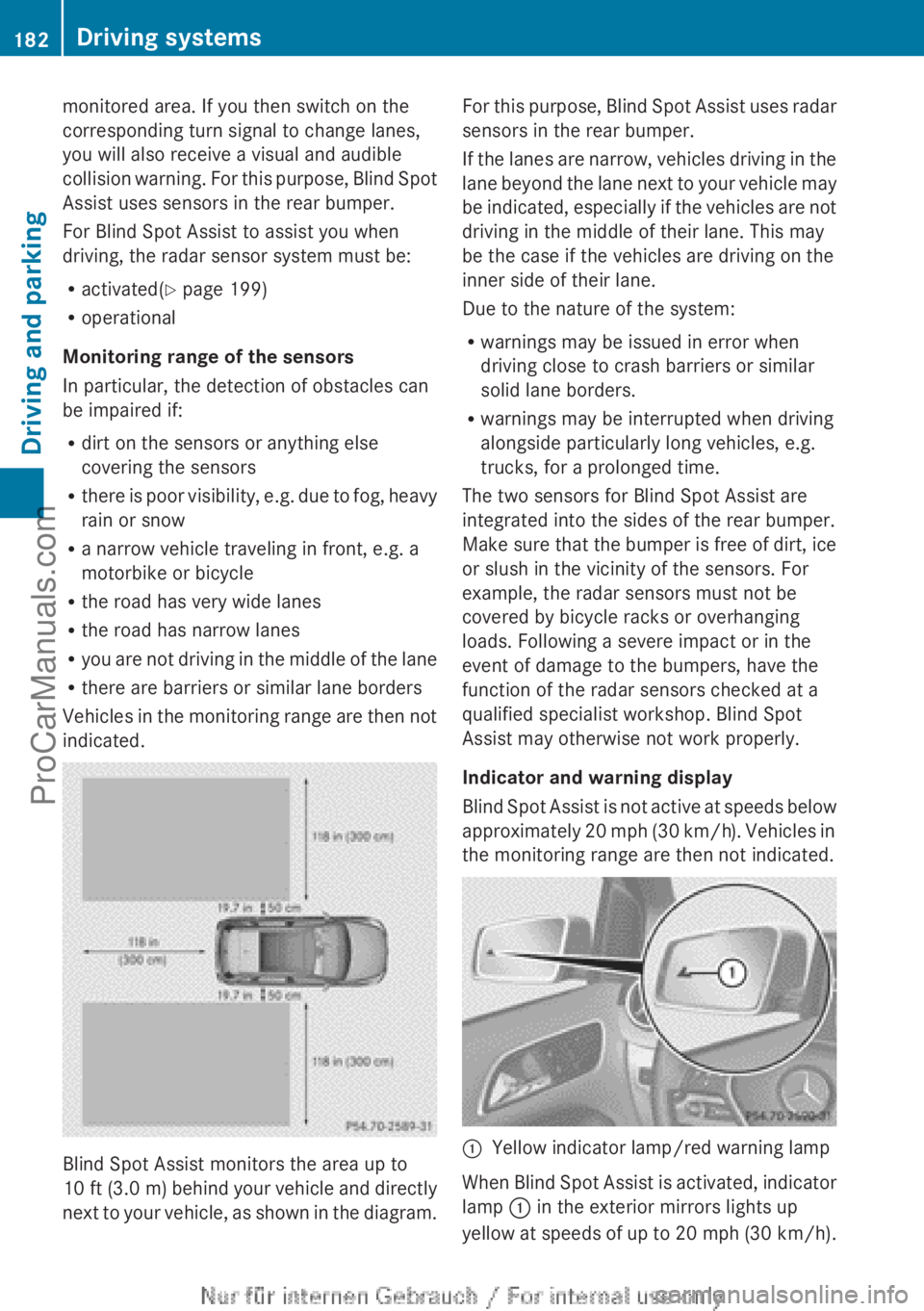
indicated. Blind Spot Assist monitors the area up to
10 ft (
3.0 m
) behind your vehicle and directly
next to your vehicle, as shown in the diagram. For this purpose, Blind Spot Assist uses radar
sensors in the rear bumper.
If the
lanes
are narrow, vehicles driving in the
lane beyond the lane next to your vehicle may
be indicated, especially if the vehicles are not
driving in the middle of their lane. This may
be the case if the vehicles are driving on the
inner side of their lane.
Due to the nature of the system:
R warnings may be issued in error when
driving close to crash barriers or similar
solid lane borders.
R warnings may be interrupted when driving
alongside particularly long vehicles, e.g.
trucks, for a prolonged time.
The two sensors for Blind Spot Assist are
integrated into the sides of the rear bumper.
Make sure that the bumper is free of dirt, ice
or slush in the vicinity of the sensors. For
example, the radar sensors must not be
covered by bicycle racks or overhanging
loads. Following a severe impact or in the
event of damage to the bumpers, have the
function of the radar sensors checked at a
qualified specialist workshop. Blind Spot
Assist may otherwise not work properly.
Indicator and warning display
Blind Spot Assist is not active at speeds below
approximately 20 mph (30 km/h). Vehicles in
the monitoring range are then not indicated. :
Yellow indicator lamp/red warning lamp
When Blind Spot Assist is activated, indicator
lamp : in the exterior mirrors lights up
yellow at speeds
of up to 20 mph (30 km/h).182
Driving systems
Driving and parking
ProCarManuals.com
Page 186 of 340
Keeping Assist is merely an aid. You are
responsible for the distance to the vehicle in
front, for vehicle speed, for braking in good
time and for staying in your lane.
The Lane Keeping Assist does not keep the
vehicle in the lane.
The system may be impaired or may not
function if:
R
there is poor visibility, e.g. due to
insufficient illumination of
the road, or due
to snow, rain, fog or spray
R there is glare, e.g. from oncoming traffic,
the sun or reflections (e.g. when the road
surface is wet)
R the windshield is dirty, fogged up, damaged
or covered, for instance by a sticker, in the
vicinity of the camera
R there are no, several or unclear lane
markings for a lane, e.g. in areas with road
construction work
R the lane markings are worn away, dark or
covered up, e.g. by dirt or snow
R the distance to the vehicle in front is too
small and the lane markings thus cannot be
detected
R the lane markings change quickly, e.g.
lanes branch off, cross one another or
merge
R the road is narrow and winding
R there are strong shadows cast on the lane
A warning may be given if a front wheel
passes over a lane marking. It will warn you
by means of intermittent vibration in the
steering wheel for up to 1.5 seconds.
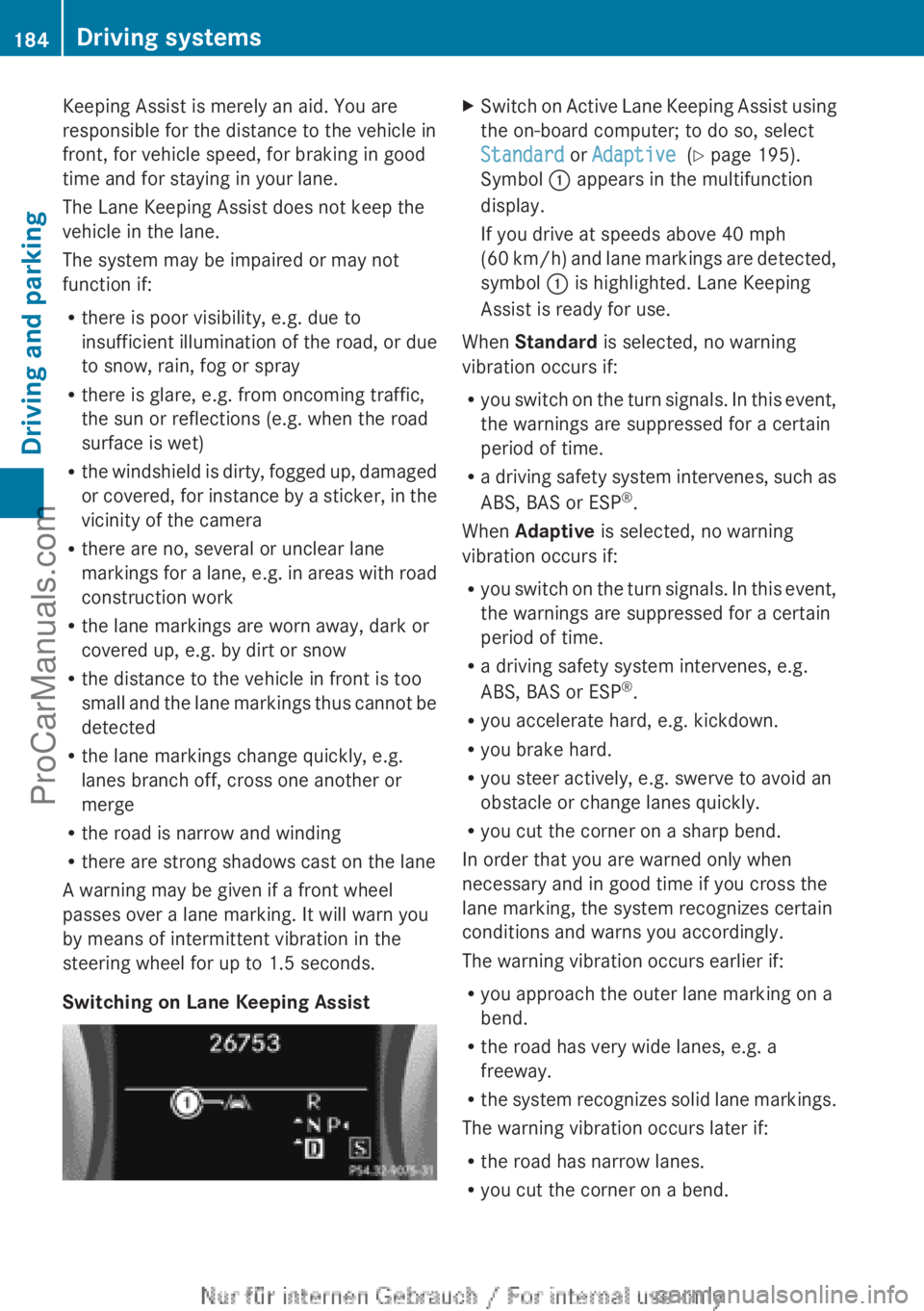
Switching on Lane Keeping Assist X
Switch on Active Lane Keeping Assist using
the on-board computer; to do so, select
Standard or Adaptive (Y page 195).
Symbol : appears in the multifunction
display.
If you drive at speeds above 40 mph
(60 km/h
) and lane markings are detected,
symbol : is highlighted. Lane Keeping
Assist is ready for use.
When Standard is selected, no warning
vibration occurs if:
R you switch on
the turn signals. In this event,
the warnings are suppressed for a certain
period of time.
R a driving safety system intervenes, such as
ABS, BAS or ESP ®
.
When Adaptive is selected, no warning
vibration occurs if:
R you switch on the turn signals. In this event,
the warnings are suppressed for a certain
period of time.
R a driving safety system intervenes, e.g.
ABS, BAS or ESP ®
.
R you accelerate hard, e.g. kickdown.
R you brake hard.
R you steer actively, e.g. swerve to avoid an
obstacle or change lanes quickly.
R you cut the corner on a sharp bend.
In order that you are warned only when
necessary and in good time if you cross the
lane marking, the system recognizes certain
conditions and warns you accordingly.
The warning vibration occurs earlier if:
R you approach the outer lane marking on a
bend.
R the road has very wide lanes, e.g. a
freeway.
R the system recognizes solid lane markings.
The warning vibration occurs later if:
R the road has narrow lanes.
R you cut the corner on a bend.184
Driving systems
Driving and parking
ProCarManuals.com