low beam MERCEDES-BENZ B-CLASS 2012 User Guide
[x] Cancel search | Manufacturer: MERCEDES-BENZ, Model Year: 2012, Model line: B-CLASS, Model: MERCEDES-BENZ B-CLASS 2012Pages: 340, PDF Size: 3.09 MB
Page 105 of 340
X
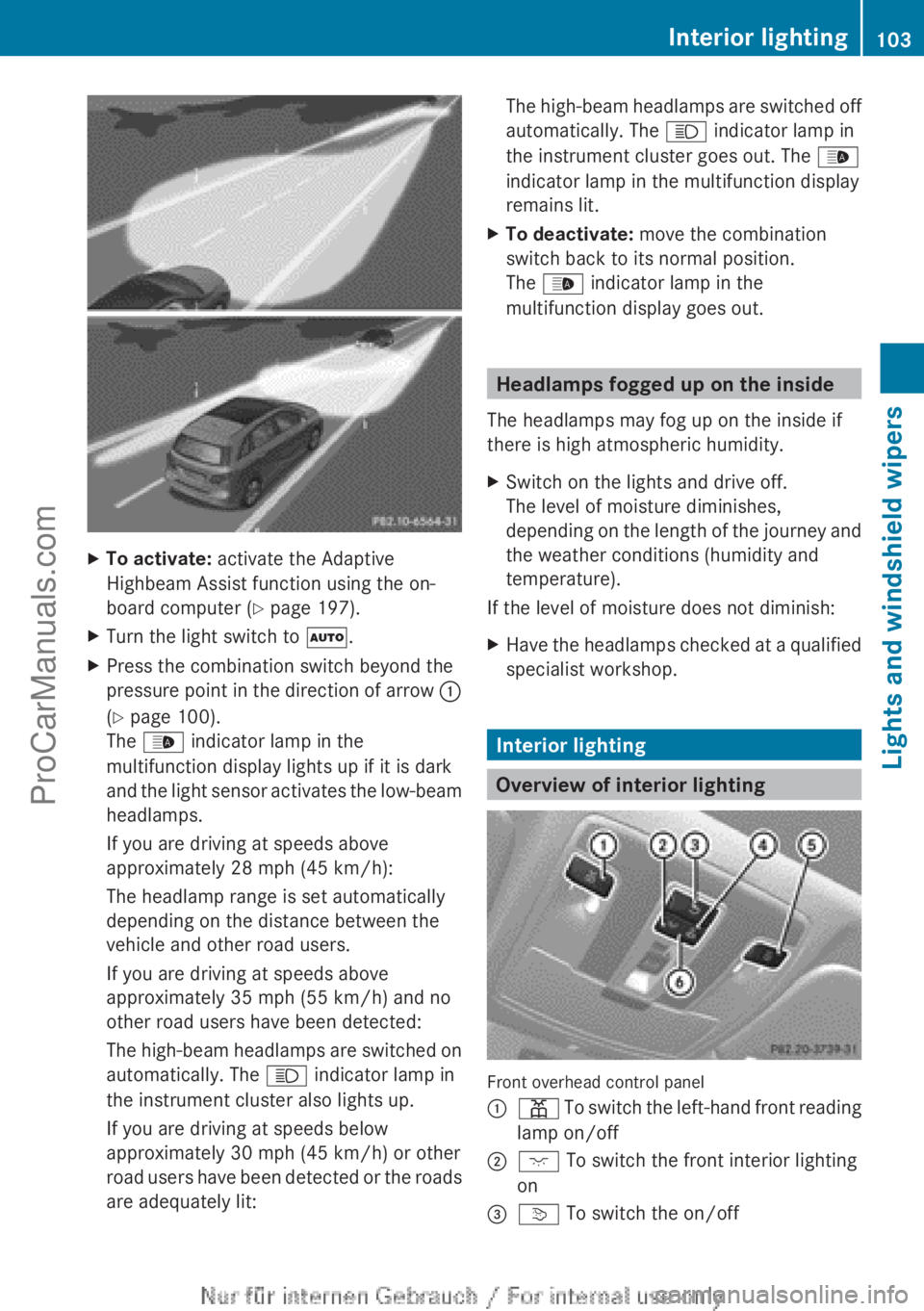
To activate: activate the Adaptive
Highbeam Assist function using the on-
board computer ( Y page 197).
X Turn the light switch to Ã.
X Press the combination switch beyond the
pressure point in
the direction of arrow :
(Y page 100).
The _ indicator lamp in the
multifunction display lights up if it is dark
and the light sensor activates the low-beam
headlamps.
If you are driving at speeds above
approximately 28 mph (45 km/h):
The headlamp range is set automatically
depending on the distance between the
vehicle and other road users.
If you are driving at speeds above
approximately 35 mph (55 km/h) and no
other road users have been detected:
The high-beam headlamps are switched on
automatically. The K indicator lamp in
the instrument cluster also lights up.
If you are driving at speeds below
approximately 30 mph (45 km/h) or other
road users have been detected or the roads
are adequately lit: The high-beam headlamps are switched off
automatically. The
K indicator lamp in
the instrument cluster goes out. The _
indicator lamp in the multifunction display
remains lit.
X To deactivate: move the combination
switch back to its normal position.
The _ indicator lamp in the
multifunction display goes out. Headlamps fogged up on the inside
The headlamps may fog up on the inside if
there is high atmospheric humidity.
X Switch on the lights and drive off.
The level of moisture diminishes,
depending on the
length of the journey and
the weather conditions (humidity and
temperature).
If the level of moisture does not diminish:
X Have the headlamps checked at a qualified
specialist workshop. Interior lighting
Overview of interior lighting
Front overhead control panel
:
p To switch the left-hand front reading
lamp on/off
; c To switch the front interior lighting
on
= v
To switch the on/off Interior lighting
103
Lights and windshield wipers Z
ProCarManuals.com
Page 107 of 340
If your vehicle is equipped with Xenon bulbs,
you can recognize this by the following: the
cone of light from the Xenon bulbs moves
from the top to the bottom and back again
when you start the engine. For this to be
observed, the lights must be switched on
before starting the engine.
Bulbs and lamps are an important aspect of
vehicle safety.
You
must therefore make sure
that these function correctly at all times.
Have the headlamp setting checked regularly.
Other bulbs G
WARNING
Bulbs, lamps and connectors can get very hot
when operating. If you change a bulb, you
could burn yourself on these components.
There is a risk of injury.
Allow these components
to cool down before
changing a bulb.
There are bulbs other than the Xenon bulbs
that you cannot replace. Replace only the
bulbs listed (Y page 105). Have the bulbs that
you cannot replace yourself changed at a
qualified specialist workshop.
If you require assistance changing bulbs,
consult a qualified specialist workshop.
Do not touch the glass tube of new bulbs with
your bare hands. Even minor contamination
can burn into the glass surface and reduce
the service life of the bulbs. Always use a lint-
free cloth or only touch the base of the bulb
when installing.
Only use bulbs of the correct type.
If the new bulb still does not light up, consult
a qualified specialist workshop.
Bulbs and lamps are an important aspect of
vehicle safety. You must therefore make sure
that these function correctly at all times.
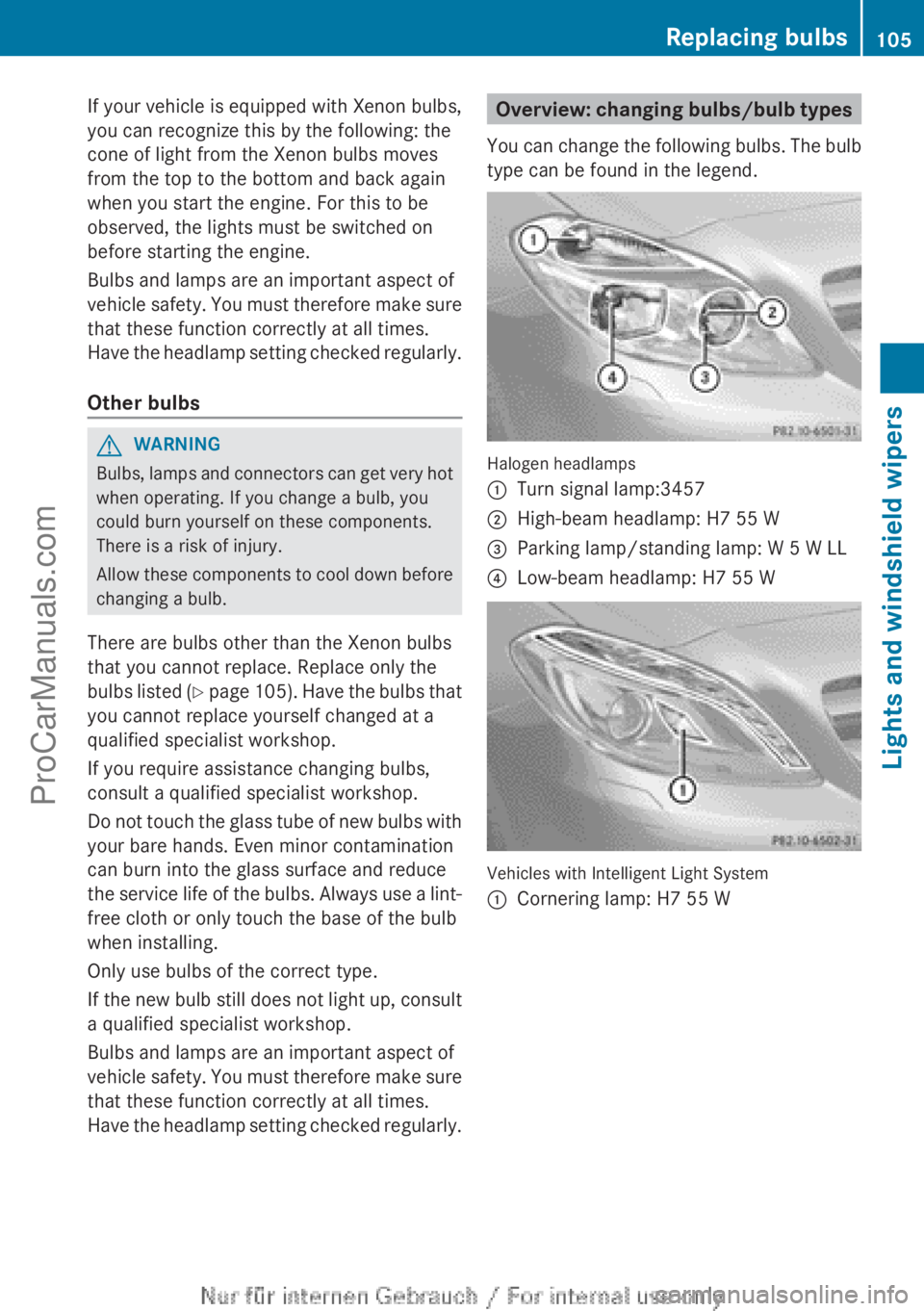
Have the headlamp setting checked regularly. Overview: changing bulbs/bulb types
You can change
the following bulbs. The bulb
type can be found in the legend. Halogen headlamps
:
Turn signal lamp:3457
; High-beam headlamp: H7 55 W
= Parking lamp/standing lamp: W 5 W LL
? Low-beam headlamp: H7 55 W Vehicles with Intelligent Light System
:
Cornering lamp: H7 55 W Replacing bulbs
105
Lights and windshield wipers Z
ProCarManuals.com
Page 109 of 340
Low-beam headlamps (halogen
headlamps)
G
WARNING
These bulbs are pressurized.
They can explode when being changed if:
R they are still hot
R they hit an object when being removed
R they are dropped
There is a risk of injury.
You should wear eye protection and clean
gloves when you are changing a bulb. If
necessary, have bulbs changed at a qualified
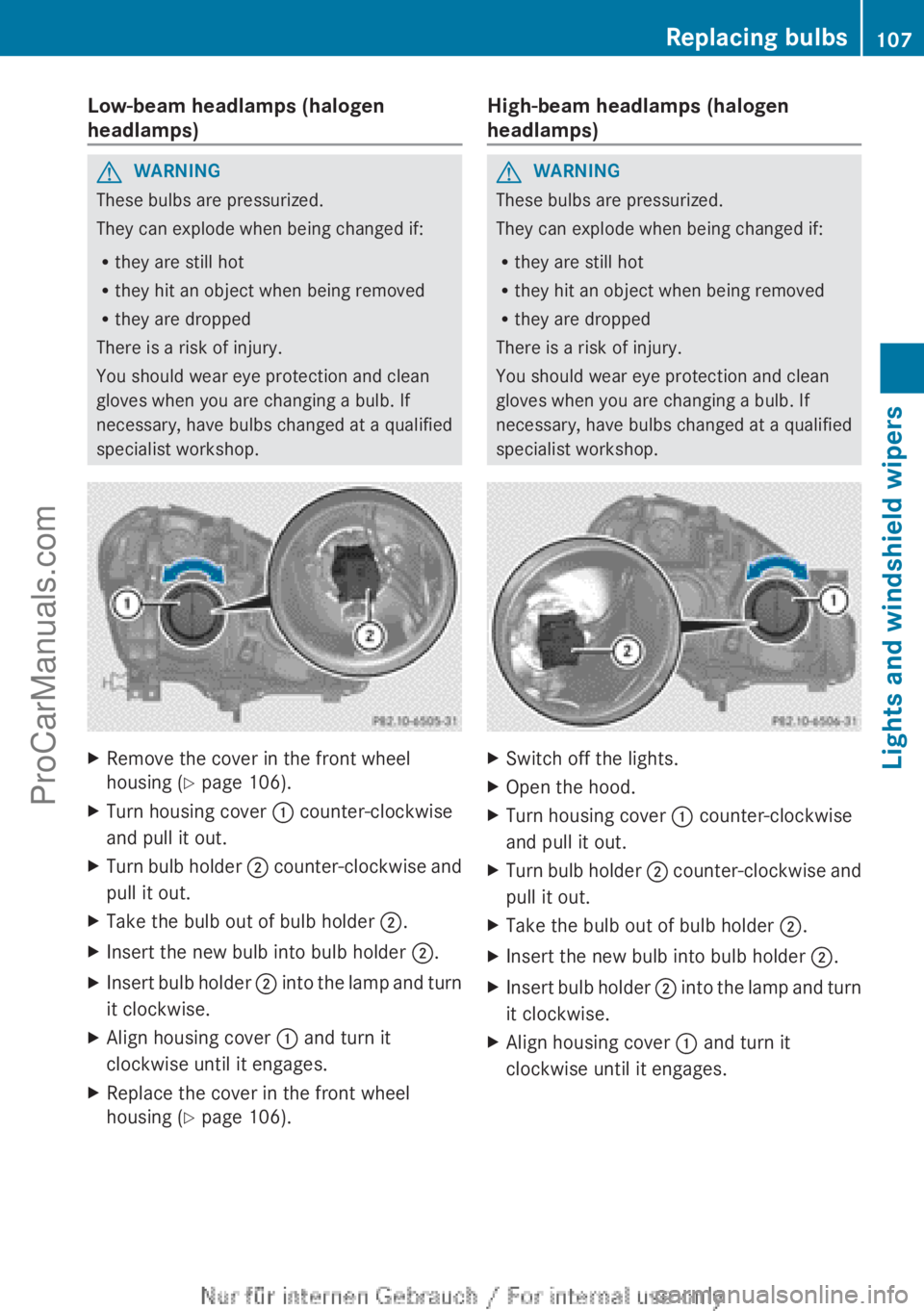
specialist workshop. X
Remove the cover in the front wheel
housing ( Y page 106).
X Turn housing cover : counter-clockwise
and pull it out.
X Turn bulb holder ; counter-clockwise
and
pull it out.
X Take the bulb out of bulb holder ;
.
X Insert the new bulb into bulb holder ;.
X Insert bulb holder ;
into the
lamp and turn
it clockwise.
X Align housing cover : and turn it
clockwise until it engages.
X Replace the cover in the front wheel
housing ( Y page 106). High-beam headlamps (halogen
headlamps) G
WARNING
These bulbs are pressurized.
They can explode when being changed if:
R they are still hot
R they hit an object when being removed
R they are dropped
There is a risk of injury.
You should wear eye protection and clean
gloves when you are changing a bulb. If
necessary, have bulbs changed at a qualified
specialist workshop. X
Switch off the lights.
X Open the hood.
X Turn housing cover : counter-clockwise
and pull it out.
X Turn bulb holder ; counter-clockwise
and
pull it out.
X Take the bulb out of bulb holder ;
.
X Insert the new bulb into bulb holder ;.
X Insert bulb holder ;
into the
lamp and turn
it clockwise.
X Align housing cover : and turn it
clockwise until it engages. Replacing bulbs
107
Lights and windshield wipers Z
ProCarManuals.com
Page 191 of 340
A
Drive program (Y page 141)
B Transmission position ( Y page 141)
X To show menu bar ?: press the =
or ; button on the steering wheel.
Menu bar ? disappears after a few seconds.
Text field = shows the selected menu or
submenu as well as display messages.
i You can set the time using the audio
system or COMAND; see the separate
operating instructions.
The following messages may appear in the
multifunction display:
XjY Active Parking Assist (Y page 172)
CRUISE Cruise Control (Y page 157)
è Rear window wiper ( Y page 112)
_ Adaptive Highbeam Assist
(Y page 102)
À ATTENTION ASSIST (Y page 180)
à Lane Keeping Assist (Y page 183)
ë HOLD function ( Y page 167)
Ä Distance warning function
(Y page 233) Menus and submenus
Menu overview
Operating the on-board computer
(Y page 187).
Depending on the equipment installed in the
vehicle, you can call up the following menus:
R Trip menu (Y page 189)
R Navi menu (navigation instructions)
(Y page 191)
R Audio menu (Y page 192)
R Tel (telephone) menu ( Y page 193)
R DriveAssist (Assistance) menu
(Y page 194)
R Serv menu (Y page 196)
R Sett menu (Y page 196) The
Audio, Navi and
Tel
menus differ slightly
in vehicles with Audio 20 and in vehicles with
COMAND. The examples given in this
Operator's Manual apply to vehicles
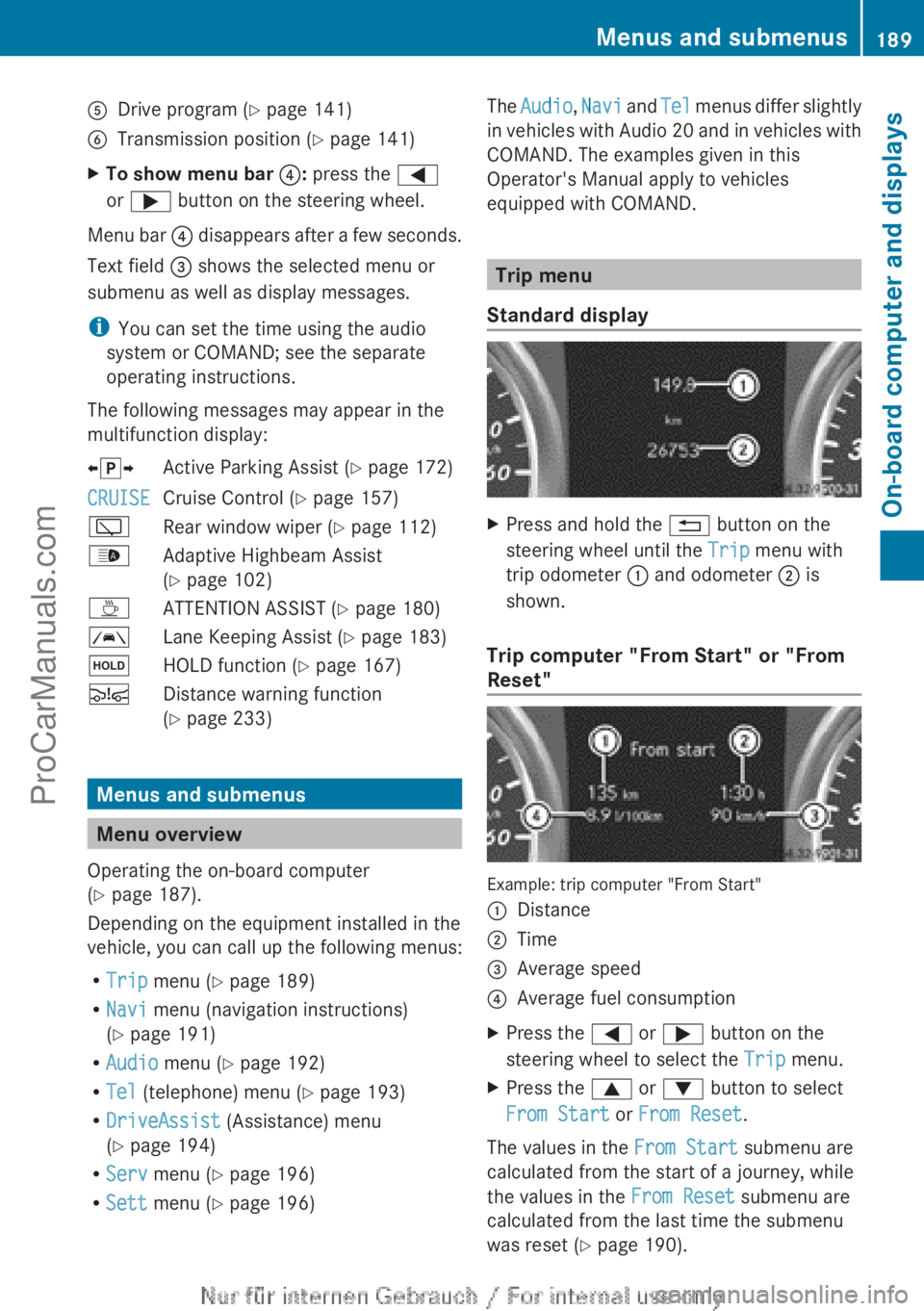
equipped with COMAND. Trip menu
Standard display X
Press and hold the % button on the
steering wheel until the Trip menu with
trip odometer : and odometer ; is
shown.
Trip computer "From Start" or "From
Reset" Example: trip computer "From Start"
:
Distance
; Time
= Average speed
? Average fuel consumption
X Press the = or ; button on the
steering wheel to select the Trip menu.
X Press the 9 or : button to select
From Start or From Reset.
The values in the From Start submenu are
calculated from the start of a journey, while
the values in the From Reset submenu are
calculated from the last time the submenu
was reset ( Y page 190). Menus and submenus
189
On-board computer and displays Z
ProCarManuals.com
Page 199 of 340
![MERCEDES-BENZ B-CLASS 2012 User Guide X
Press : or 9 to select the
Speedometer [mph]: function.
You will see the selected setting: On or
Off.
X Press the a button to save the setting.
i Speed is displayed in mph.
The Speedometer [mph]](/img/4/58078/w960_58078-198.png "MERCEDES-BENZ B-CLASS 2012 User Guide X
Press : or 9 to select the
Speedometer [mph]: function.
You will see the selected setting: On or
Off.
X Press the a button to save the setting.
i Speed is displayed in mph.
The Speedometer [mph]")
X
Press : or 9 to select the
Speedometer [mph]: function.
You will see the selected setting: On or
Off.
X Press the a button to save the setting.
i Speed is displayed in mph.
The Speedometer [mph] function
allows you
to choose whether the status area in the
multifunction display always shows the speed
in mph instead of the outside temperature.
Selecting the permanent display function
You can determine whether the multifunction
display permanently shows your speed or the
outside temperature.
X Press the = or ; button on the
steering wheel to select the Sett menu.
X Press the : or
9
button to select the
Inst. Cluster submenu.
X Press a to confirm.
X Press the :
or 9
button to select the
Permanent Display: function.
You will see the selected setting Outside
Temperature or Speedometer [km/h]
(USA)/ Speedometer [mph] (Canada).
X Press the a button to save the setting.
i The speed is shown in km/h (USA)/
mph
(Canada).
Lights Switching the daytime running lamps on/
off
Daytime running lamps are required by law
(Canada only). You cannot set the "daytime
running lamps" function via the on-board
computer.
X
Press the = or ; button on the
steering wheel to select the Sett menu.
X Press the : or 9
button to select the
Lights submenu.
X Press a to confirm. X
Press the : or 9
button to select the
Daytime Running Lights function.
You will see the selected setting: Enabled
or Disabled.
X Press the a button to save the setting.
Further information on daytime running
lamps ( Y page 99).
Switching Adaptive Highbeam Assist on/
off
X Press the = or ; button on the
steering wheel to select the Sett menu.
X Press the : or 9
button to select the
Lights submenu.
X Press a to confirm.
X Press the :
or 9
button to select the
Adaptive Highbeam Assist function.
You will see the selected setting: Enabled
or Disabled.
X Press the a button to save the setting.
For further information about Adaptive
Highbeam Assist, see ( Y page 102).
Setting the brightness of the ambient
lighting
X Press the = or ; button on the
steering wheel to select the Sett menu.
X Press the : or 9
button to select the
Lights submenu.
X Press a to confirm.
X Press the :
or 9
button to select the
Amb. Light +/-function.
You will see the selected setting.
X Press a to confirm.
X Press the :
or 9
button to adjust the
brightness to any level from Off to Level
5 (bright).
X Press the a or % button to
save the
setting. Menus and submenus
197
On-board computer and displays Z
ProCarManuals.com
Page 200 of 340
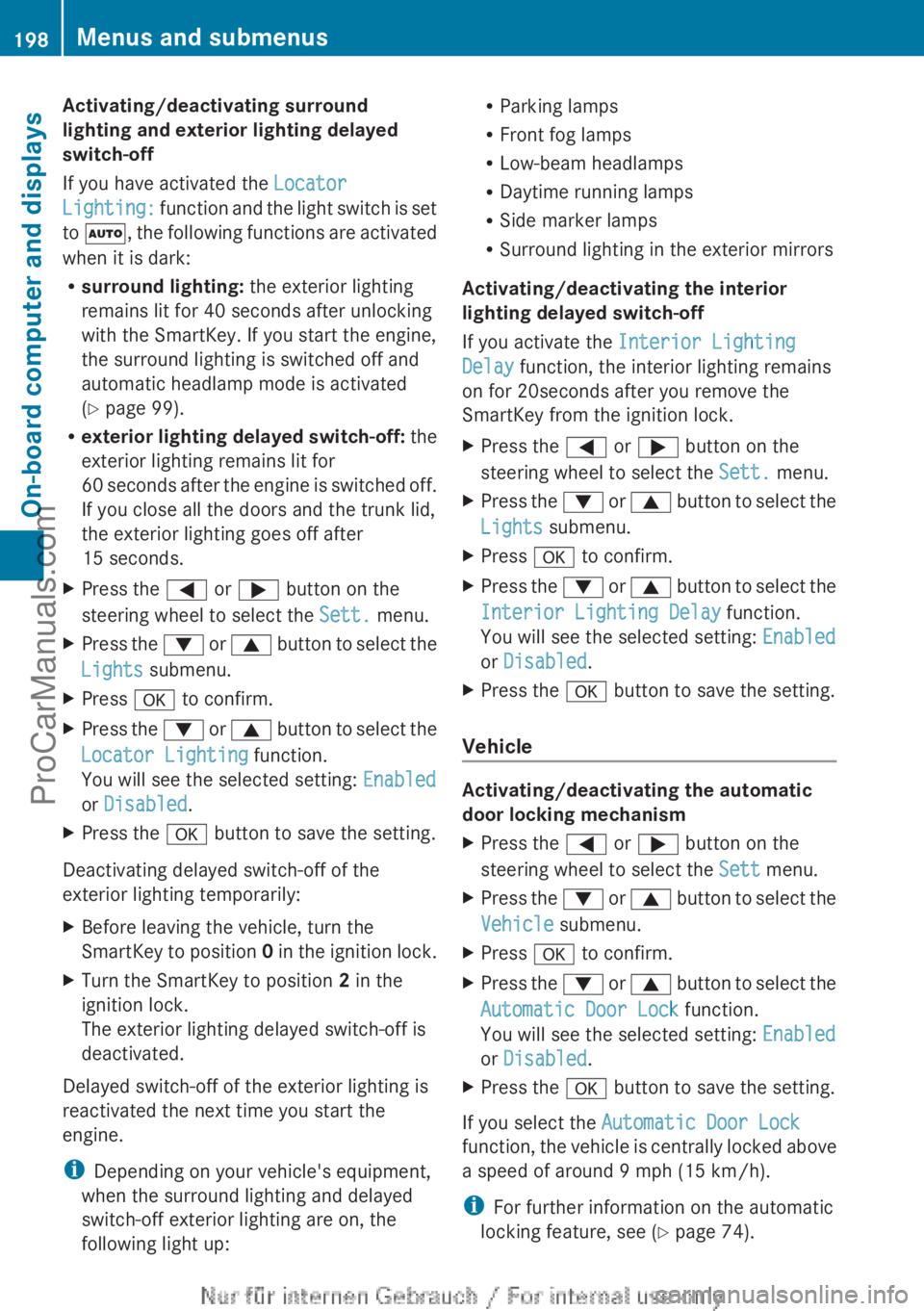
Activating/deactivating surround
lighting and exterior lighting delayed
switch-off
If you have activated the
Locator
Lighting: function
and
the light switch is set
to Ã, the following functions are activated
when it is dark:
R surround lighting: the exterior lighting
remains lit for 40 seconds after unlocking
with the SmartKey. If you start the engine,
the surround lighting is switched off and
automatic headlamp mode is activated
(Y page 99).
R exterior lighting delayed switch-off: the
exterior lighting remains lit for
60 seconds after the engine is switched off.
If you close all the doors and the trunk lid,
the exterior lighting goes off after
15 seconds.
X Press the = or ; button on the
steering wheel to select the Sett. menu.
X Press the :
or 9
button to select the
Lights submenu.
X Press a to confirm.
X Press the : or 9
button to select the
Locator Lighting function.
You will see the selected setting: Enabled
or Disabled.
X Press the a button to save the setting.
Deactivating delayed switch-off of the
exterior lighting temporarily:
X Before leaving the vehicle, turn the
SmartKey to position 0
in the ignition lock.
X Turn the SmartKey to position 2 in the
ignition lock.
The exterior lighting delayed switch-off is
deactivated.
Delayed switch-off of the exterior lighting is
reactivated the next time you start the
engine.
i Depending on your vehicle's equipment,
when the surround lighting and delayed
switch-off exterior lighting are on, the
following light up: R
Parking lamps
R Front fog lamps
R Low-beam headlamps
R Daytime running lamps
R Side marker lamps
R Surround lighting in the exterior mirrors
Activating/deactivating the interior
lighting delayed switch-off
If you activate the Interior Lighting
Delay function, the interior lighting remains
on for 20seconds after you remove the
SmartKey from the ignition lock.
X Press the = or ; button on the
steering wheel to select the Sett. menu.
X Press the : or 9
button to select the
Lights submenu.
X Press a to confirm.
X Press the :
or 9
button to select the
Interior Lighting Delay function.
You will see the selected setting: Enabled
or Disabled.
X Press the a button to save the setting.
Vehicle Activating/deactivating the automatic
door locking mechanism
X
Press the = or ; button on the
steering wheel to select the Sett menu.
X Press the :
or 9
button to select the
Vehicle submenu.
X Press a to confirm.
X Press the :
or 9
button to select the
Automatic Door Lock function.
You will see the selected setting: Enabled
or Disabled.
X Press the a button to save the setting.
If you select the Automatic Door Lock
function, the
vehicle
is centrally locked above
a speed of around 9 mph (15 km/h).
i For further information on the automatic
locking feature, see ( Y page 74).198
Menus and submenus
On-board computer and displays
ProCarManuals.com
Page 211 of 340
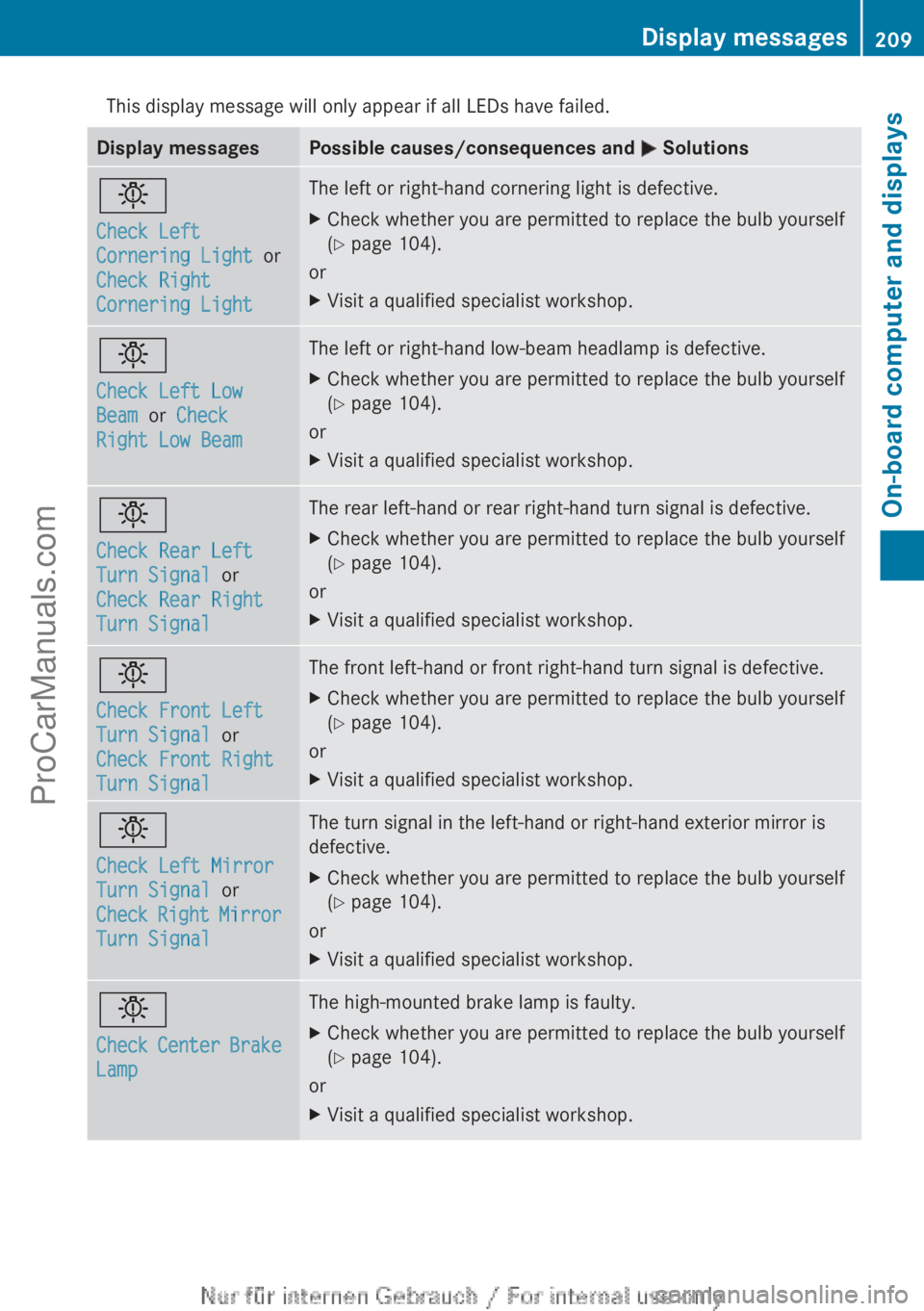
This display message will only appear if all LEDs have failed.
Display messages Possible causes/consequences and
M Solutionsb
Check Left
Cornering Light
or
Check Right
Cornering Light The left or right-hand cornering light is defective.
X
Check whether you are permitted to replace the bulb yourself
(Y page 104).
or
X Visit a qualified specialist workshop. b
Check Left Low
Beam or Check
Right Low Beam The left or right-hand low-beam headlamp is defective.
X
Check whether you are permitted to replace the bulb yourself
(Y page 104).
or
X Visit a qualified specialist workshop. b
Check Rear Left
Turn Signal or
Check Rear Right
Turn Signal The rear left-hand or rear right-hand turn signal is defective.
X
Check whether you are permitted to replace the bulb yourself
(Y page 104).
or
X Visit a qualified specialist workshop. b
Check Front Left
Turn Signal or
Check Front Right
Turn Signal The front left-hand or front right-hand turn signal is defective.
X
Check whether you are permitted to replace the bulb yourself
(Y page 104).
or
X Visit a qualified specialist workshop. b
Check Left Mirror
Turn Signal or
Check
Right
Mirror
Turn Signal The turn signal in the left-hand or right-hand exterior mirror is
defective.
X
Check whether you are permitted to replace the bulb yourself
(Y page 104).
or
X Visit a qualified specialist workshop. b
Check Center
Brake
Lamp The high-mounted brake lamp is faulty.
X
Check whether you are permitted to replace the bulb yourself
(Y page 104).
or
X Visit a qualified specialist workshop. Display messages
209On-board computer and displays Z
ProCarManuals.com
Page 214 of 340
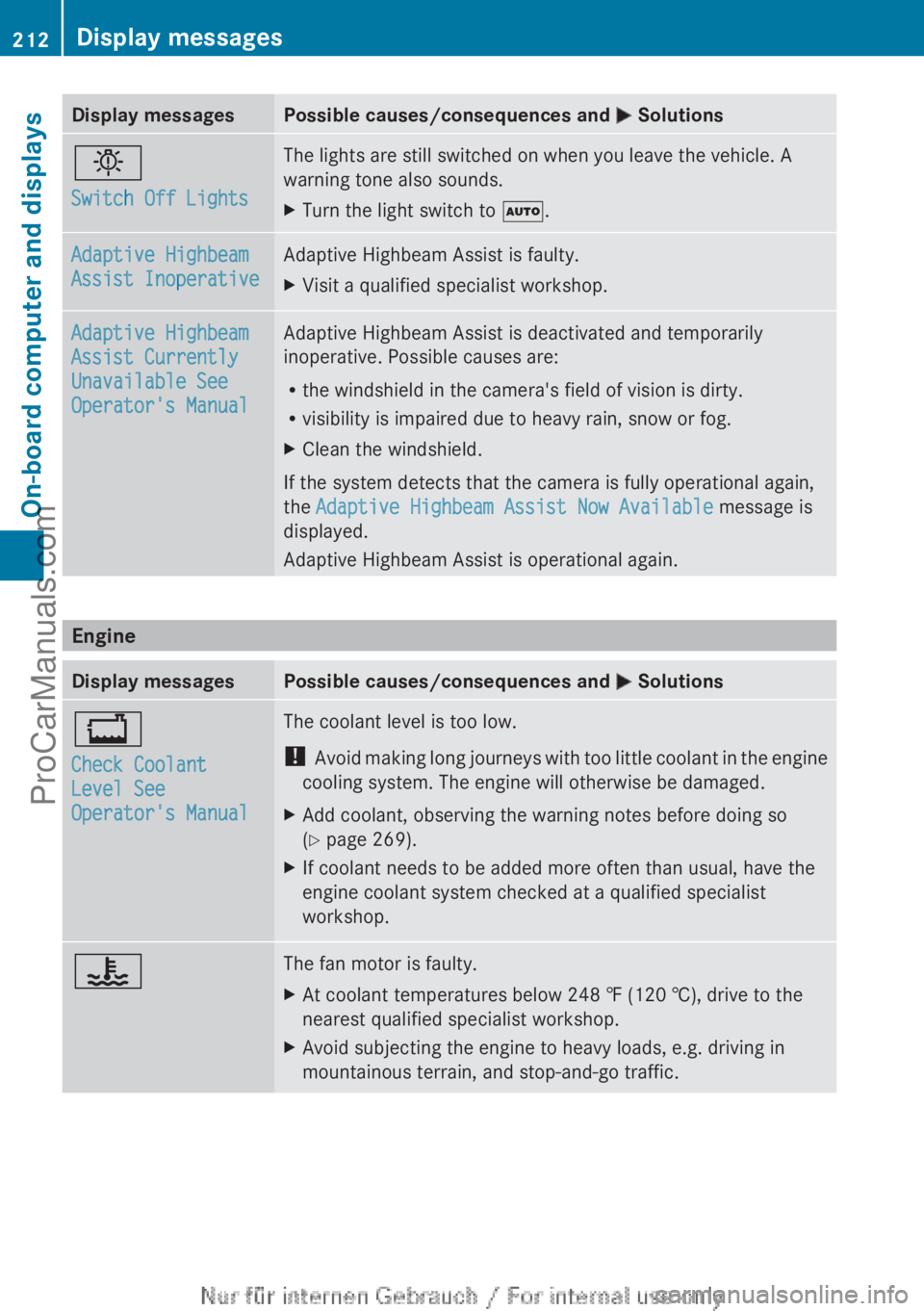
Display messages Possible causes/consequences and
M Solutionsb
Switch Off Lights The lights are still switched on when you leave the vehicle. A
warning tone also sounds.
X
Turn the light switch to Ã. Adaptive Highbeam
Assist Inoperative Adaptive Highbeam Assist is faulty.
X
Visit a qualified specialist workshop. Adaptive Highbeam
Assist Currently
Unavailable See
Operator's Manual Adaptive Highbeam Assist is deactivated and temporarily
inoperative. Possible causes are:
R
the windshield in the camera's field of vision is dirty.
R visibility is impaired due to heavy rain, snow or fog.
X Clean the windshield.
If the system detects that the camera is fully operational again,
the Adaptive Highbeam Assist Now Available message is
displayed.
Adaptive Highbeam Assist is operational again. Engine
Display messages Possible causes/consequences and
M Solutions+
Check Coolant
Level See
Operator's Manual The coolant level is too low.
!
Avoid making long
journeys with too little coolant in the engine
cooling system. The engine will otherwise be damaged.
X Add coolant, observing the warning notes before doing so
(Y page 269).
X If coolant needs to be added more often than usual, have the
engine coolant system checked at a qualified specialist
workshop. ? The fan motor is faulty.
X
At coolant temperatures below 248 ‡ (120 †), drive to the
nearest qualified specialist workshop.
X Avoid subjecting the engine to heavy loads, e.g. driving in
mountainous terrain, and stop-and-go traffic.212
Display messages
On-board computer and displays
ProCarManuals.com