open hood MERCEDES-BENZ B-CLASS 2012 Owners Manual
[x] Cancel search | Manufacturer: MERCEDES-BENZ, Model Year: 2012, Model line: B-CLASS, Model: MERCEDES-BENZ B-CLASS 2012Pages: 340, PDF Size: 3.09 MB
Page 12 of 340
Preparing the vehicle
.....................281
TIREFIT kit ...................................... 282
see Emergency spare wheel
Floormats ........................................... 264
Fog lamps Extended range .............................. 102
Switching on/off .............................. 99
Folding table ...................................... 239
Front fog lamps Display message ............................ 210
Switching on/off .............................. 99
Front-passenger seat
Folding the backrest forward/back 239
Fuel
Additives ........................................ 331
Consumption statistics ..................189
Displaying the current
consumption .................................. 190
Displaying the range ...................... 190
Driving tips .................................... 152
Fuel gauge ....................................... 29
Grade (gasoline) ............................ 330
Important safety notes .................. 330
Premium-grade unleaded gasoline . 330
Problem (malfunction) ...................149
Refueling ........................................ 147
Tank content/reserve fuel .............330
Fuel filler flap
Opening/closing ............................ 148
Fuel level
Calling up the range (on-board
computer) ...................................... 190
Fuel tank
Capacity ........................................ 330
Problem (malfunction) ...................149
Fuses
Allocation chart ............................. 295
Before changing ............................. 294
Fuse box in the engine
compartment ................................. 294
Fuse box in the front-passenger
footwell .......................................... 295
Important safety notes .................. 294 G
Garage door opener Clearing the memory ..................... 263
Important safety notes
..................260
Opening/closing the garage door ..262
Programming (button in the rear-
view mirror) ................................... 260
Gear or selector lever (cleaning
guidelines) ......................................... 276
Genuine parts ...................................... 20
Glove box ........................................... 237 H
Handbrake see Parking brake
Hazard warning lamps ......................101
Display message ............................ 223
Headlamps
Adding fluid to cleaning system .....269
Cleaning system (function) ............ 101
Cleaning system (notes) ................334
Fogging up ..................................... 103
see Automatic headlamp mode
Head restraints
Adjusting ......................................... 89
Adjusting (electrically) .....................89
Adjusting (manually) ........................ 89
Adjusting (rear) ................................ 90
Installing/removing (rear) ................ 90
Heating
see Climate control
High-beam headlamps
Changing bulbs .............................. 107
Display message ............................ 210
Switching Adaptive Highbeam
Assist on/off ................................. 102
Switching on/off ........................... 100
Hill start assist .................................. 136
HOLD function Deactivating ................................... 168
Display message ............................ 215
Function/notes ............................. 168
Hood
Closing ........................................... 267
Display message ............................ 22210
Index
ProCarManuals.com
Page 30 of 340
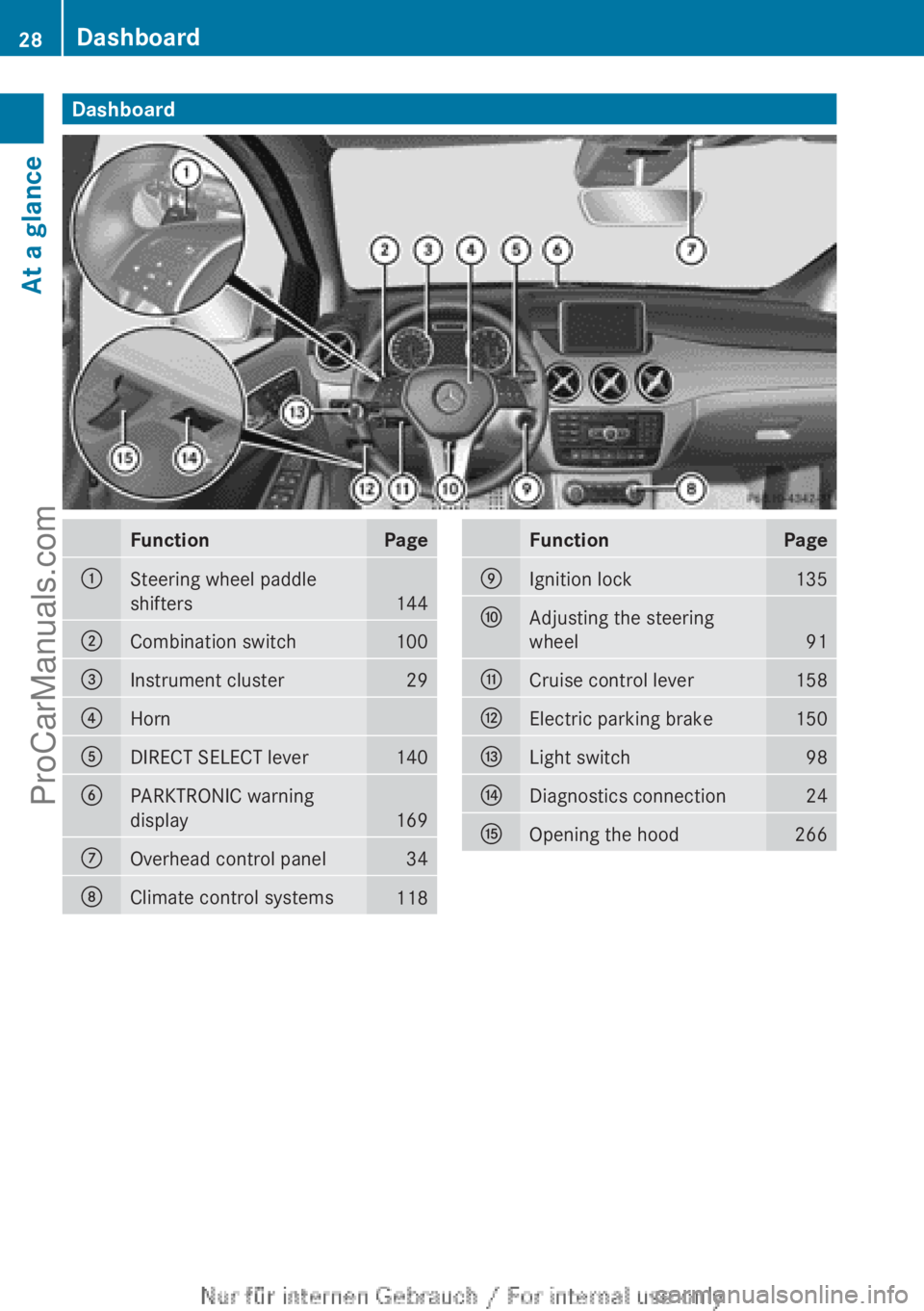
Dashboard
Function Page
:
Steering wheel paddle
shifters
144
;
Combination switch 100
=
Instrument cluster 29
?
Horn
A
DIRECT SELECT lever 140
B
PARKTRONIC warning
display
169
C
Overhead control panel 34
D
Climate control systems
118 Function Page
E
Ignition lock 135
F
Adjusting the steering
wheel
91
G
Cruise control lever 158
H
Electric parking brake 150
I
Light switch 98
J
Diagnostics connection 24
K
Opening the hood 26628
DashboardAt a glance
ProCarManuals.com
Page 67 of 340
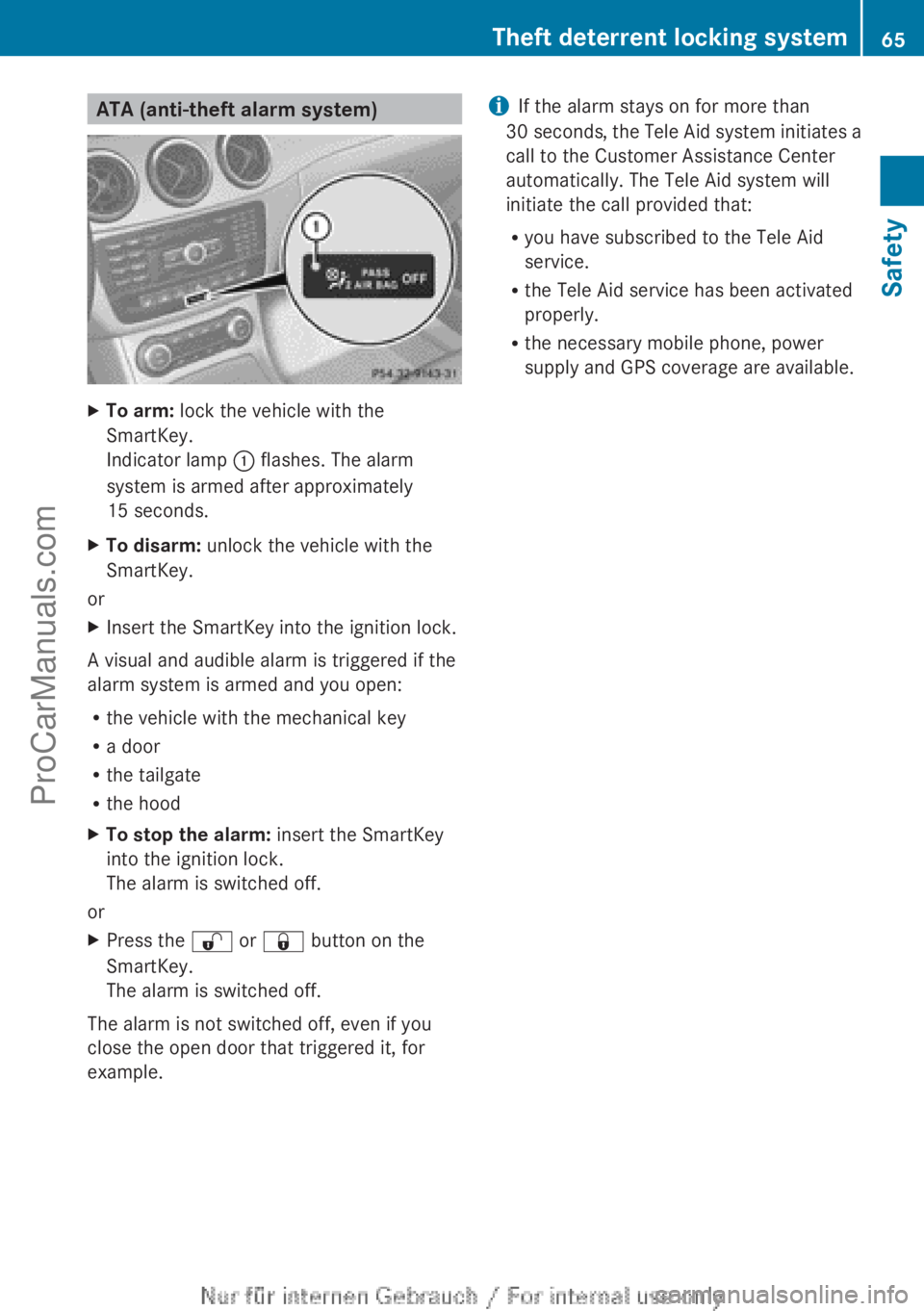
ATA (anti-theft alarm system)
X
To arm: lock the vehicle with the
SmartKey.
Indicator lamp : flashes. The alarm
system is armed after approximately
15 seconds.
X To disarm: unlock the vehicle with the
SmartKey.
or
X Insert the SmartKey into the ignition lock.
A visual and audible alarm is triggered if the
alarm system is armed and you open:
R the vehicle with the mechanical key
R a door
R the tailgate
R the hood
X To stop the alarm: insert the SmartKey
into the ignition lock.
The alarm is switched off.
or
X Press the % or & button on the
SmartKey.
The alarm is switched off.
The alarm is not switched off, even if you
close the open door that triggered it, for
example. i
If the alarm stays on for more than
30 seconds, the Tele
Aid system initiates a
call to the Customer Assistance Center
automatically. The Tele Aid system will
initiate the call provided that:
R you have subscribed to the Tele Aid
service.
R the Tele Aid service has been activated
properly.
R the necessary mobile phone, power
supply and GPS coverage are available. Theft deterrent locking system
65
Safety Z
ProCarManuals.com
Page 109 of 340
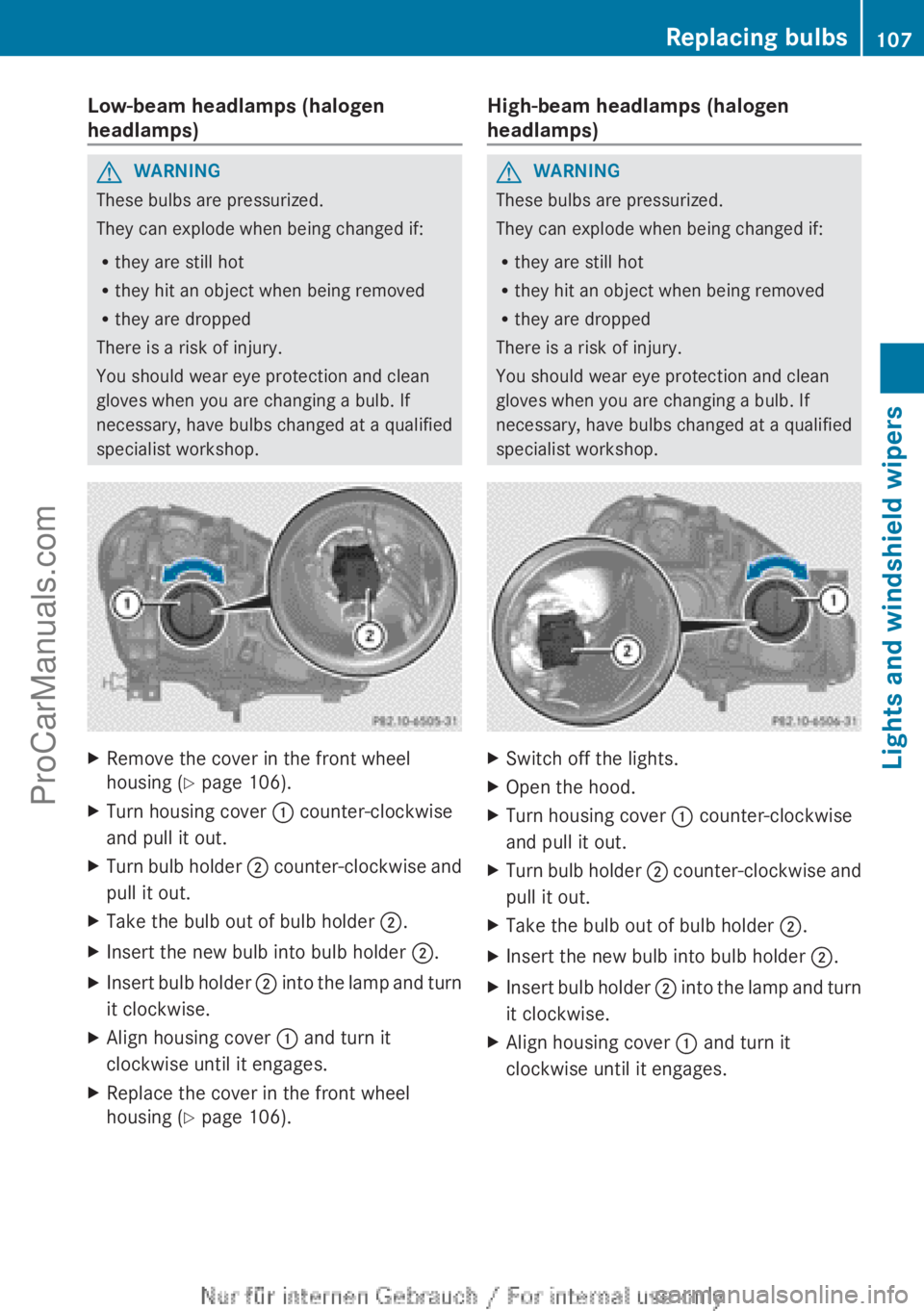
Low-beam headlamps (halogen
headlamps)
G
WARNING
These bulbs are pressurized.
They can explode when being changed if:
R they are still hot
R they hit an object when being removed
R they are dropped
There is a risk of injury.
You should wear eye protection and clean
gloves when you are changing a bulb. If
necessary, have bulbs changed at a qualified
specialist workshop. X
Remove the cover in the front wheel
housing ( Y page 106).
X Turn housing cover : counter-clockwise
and pull it out.
X Turn bulb holder ; counter-clockwise
and
pull it out.
X Take the bulb out of bulb holder ;
.
X Insert the new bulb into bulb holder ;.
X Insert bulb holder ;
into the
lamp and turn
it clockwise.
X Align housing cover : and turn it
clockwise until it engages.
X Replace the cover in the front wheel
housing ( Y page 106). High-beam headlamps (halogen
headlamps) G
WARNING
These bulbs are pressurized.
They can explode when being changed if:
R they are still hot
R they hit an object when being removed
R they are dropped
There is a risk of injury.
You should wear eye protection and clean
gloves when you are changing a bulb. If
necessary, have bulbs changed at a qualified
specialist workshop. X
Switch off the lights.
X Open the hood.
X Turn housing cover : counter-clockwise
and pull it out.
X Turn bulb holder ; counter-clockwise
and
pull it out.
X Take the bulb out of bulb holder ;
.
X Insert the new bulb into bulb holder ;.
X Insert bulb holder ;
into the
lamp and turn
it clockwise.
X Align housing cover : and turn it
clockwise until it engages. Replacing bulbs
107
Lights and windshield wipers Z
ProCarManuals.com
Page 110 of 340
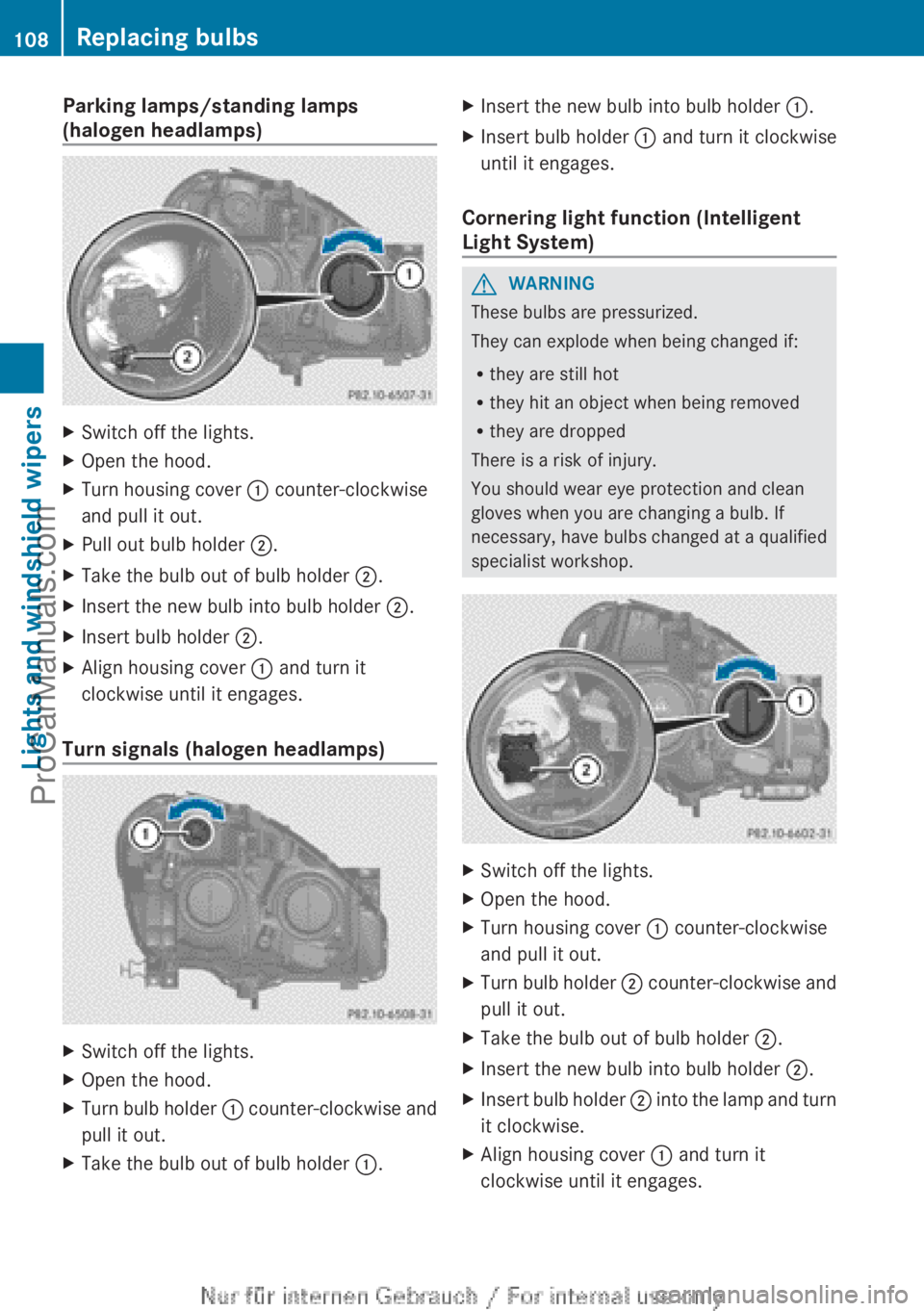
Parking lamps/standing lamps
(halogen headlamps)
X
Switch off the lights.
X Open the hood.
X Turn housing cover : counter-clockwise
and pull it out.
X Pull out bulb holder ;.
X Take the bulb out of bulb holder ;.
X Insert the new bulb into bulb holder ;.
X Insert bulb holder ;.
X Align housing cover : and turn it
clockwise until it engages.
Turn signals (halogen headlamps) X
Switch off the lights.
X Open the hood.
X Turn bulb holder : counter-clockwise and
pull it out.
X Take the bulb out of bulb holder :
.X
Insert the new bulb into bulb holder :.
X Insert bulb holder : and turn it clockwise
until it engages.
Cornering light function (Intelligent
Light System) G
WARNING
These bulbs are pressurized.
They can explode when being changed if:
R they are still hot
R they hit an object when being removed
R they are dropped
There is a risk of injury.
You should wear eye protection and clean
gloves when you are changing a bulb. If
necessary, have bulbs changed at a qualified
specialist workshop. X
Switch off the lights.
X Open the hood.
X Turn housing cover : counter-clockwise
and pull it out.
X Turn bulb holder ; counter-clockwise and
pull it out.
X Take the bulb out of bulb holder ;
.
X Insert the new bulb into bulb holder ;.
X Insert bulb holder ;
into the
lamp and turn
it clockwise.
X Align housing cover : and turn it
clockwise until it engages.108
Replacing bulbs
Lights and windshield wipers
ProCarManuals.com
Page 115 of 340
Always switch off the windshield wipers and
ignition before changing the wiper blades.
! To avoid damaging the wiper blades,
make sure that you touch only the wiper
arm of the wiper.
! Never open the hood/tailgate if a wiper
arm has been folded away from the
windshield/rear window.
Never fold a windshield wiper arm without
a wiper blade back onto the windshield/
rear window.
Hold the windshield
wiper arm firmly when
you change the wiper blade. If you release
the wiper arm without a wiper blade and it
falls onto the windshield/rear window, the
windshield/rear window may be damaged
by the force of the impact.
Mercedes-Benz recommends that you have
the wiper blades changed at a qualified
specialist workshop.
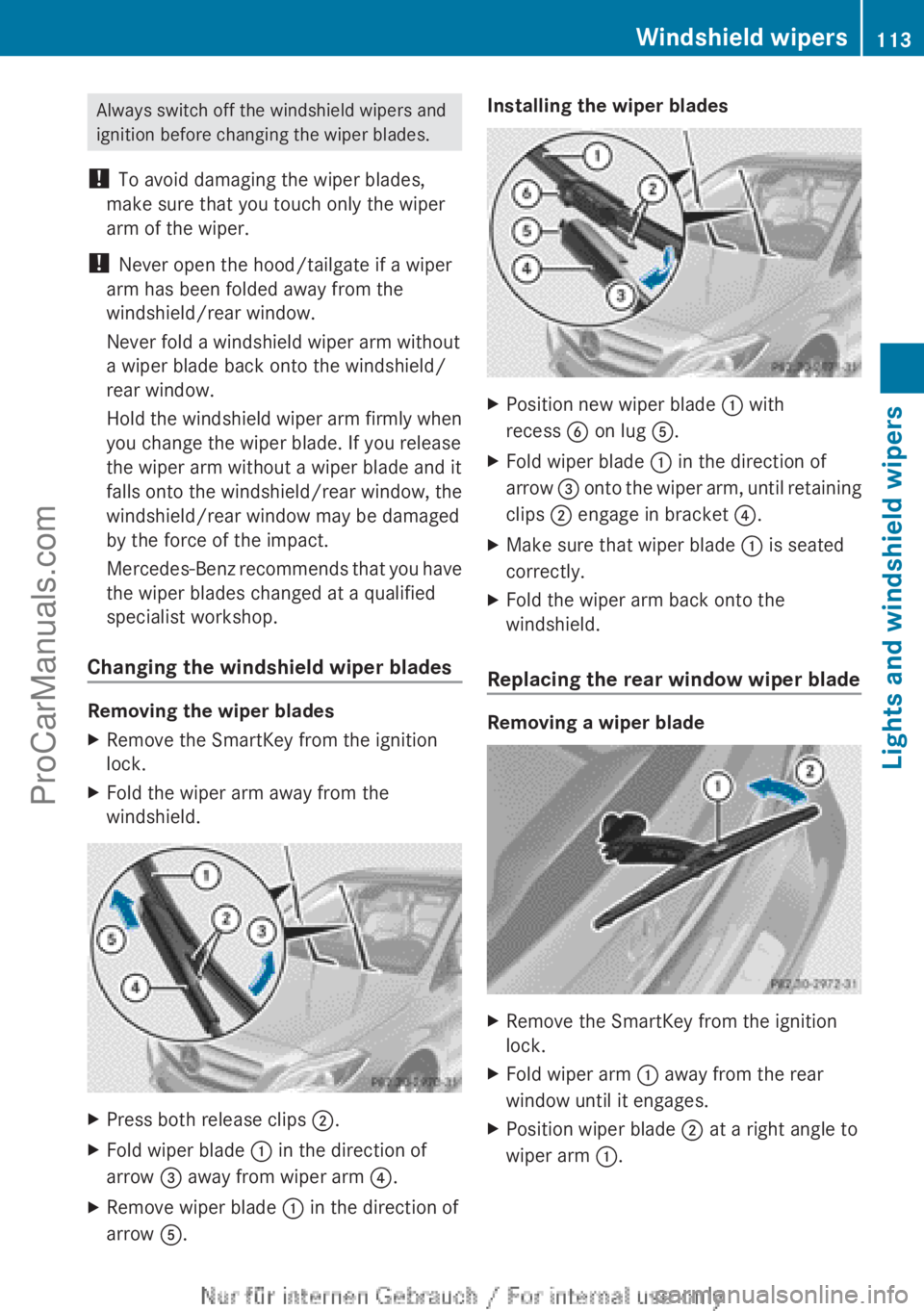
Changing the windshield wiper blades Removing the wiper blades
X
Remove the SmartKey from the ignition
lock.
X Fold the wiper arm away from the
windshield. X
Press both release clips ;.
X Fold wiper blade : in the direction of
arrow = away from wiper arm ?.
X Remove wiper blade : in the direction of
arrow A. Installing the wiper blades
X
Position new wiper blade : with
recess B on lug A.
X Fold wiper blade : in the direction of
arrow = onto
the
wiper arm, until retaining
clips ; engage in bracket ?.
X Make sure that wiper blade : is seated
correctly.
X Fold the wiper arm back onto the
windshield.
Replacing the rear window wiper blade Removing a wiper blade
X
Remove the SmartKey from the ignition
lock.
X Fold wiper arm : away from the rear
window until it engages.
X Position wiper blade ; at a right angle to
wiper arm :. Windshield wipers
113
Lights and windshield wipers Z
ProCarManuals.com
Page 132 of 340
X
Turn the SmartKey to position 0 in the
ignition lock or remove it ( Y page 135).
X To activate: press the Ì button.
The indicator lamp
in the Ì button lights
up.
X To deactivate: press the Ì button.
The indicator lamp
in the Ì button goes
out.
i Residual heat is deactivated
automatically:
R after approximately 30 minutes
R when the ignition is switched on
R if the battery voltage drops
R when the auxiliary heating is activated Setting the air vents
Important safety notes
G
WARNING
Very hot or very cold air can flow from the air
vents. This could
result in burns or frostbite in
the immediate vicinity of the air vents. There
is a risk of injury.
Make sure that all vehicle occupants always
maintain a sufficient distance to the air
outlets. If necessary, redirect the airflow to
another area of the vehicle interior.
In order to ensure the direct flow of fresh air
through the air vents into the vehicle interior,
please observe the following notes:
R keep the air inlet between the windshield
and the hood free of blockages, such as ice,
snow or leaves.
R never cover the air vents or air intake grilles
in the vehicle interior.
i You can move the adjusters for the air
vents vertically or horizontally to set the
direction of the airflow.
i For optimal climate control in the vehicle,
open the air vents completely and set the
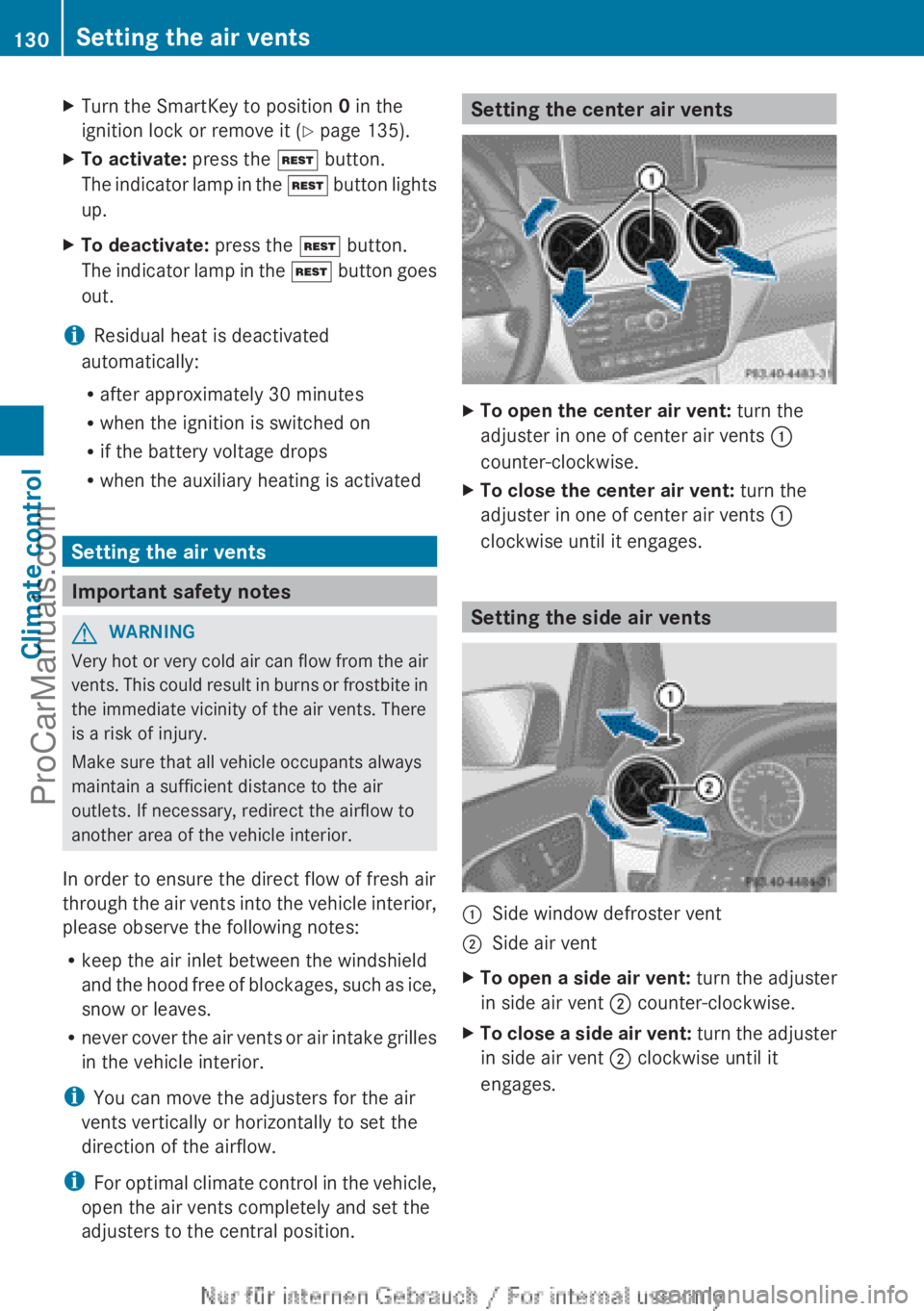
adjusters to the central position. Setting the center air vents
X
To open the center air vent: turn the
adjuster in one of center air vents :
counter-clockwise.
X To close the center air vent: turn the
adjuster in one of center air vents :
clockwise until it engages. Setting the side air vents
:
Side window defroster vent
; Side air vent
X To open a side air vent: turn the adjuster
in side air vent ; counter-clockwise.
X To close a side air vent: turn the
adjuster
in side air vent ; clockwise until it
engages. 130
Setting the air vents
Climate control
ProCarManuals.com
Page 139 of 340
The stop/start function is automatically
activated each
time
you start the engine with
the SmartKey.
If the ECO start/stop function has been
manually deactivated ( Y page 138) or a
malfunction has caused the system to be
deactivated, the ¤ symbol is not
displayed.
Automatic engine switch-off General notes
The ECO start/stop function is operational
and the ¤ symbol is displayed in the
multifunction display, if:
R
the indicator lamp in the ECO button is lit
green.
R the outside temperature is within the
comfort range.
R the engine is at normal operating
temperature.
R the set temperature
for the vehicle interior
has been reached.
R the battery is sufficiently charged.
R the system detects that the windshield is
not fogged up when the air-conditioning
system is switched on.
R the hood is closed.
R the driver's door is closed and the driver's
seat belt is fastened.
If conditions for automatic engine switch-off
have not been fulfilled, the ¤ symbol will
not be shown.
i All of the vehicle's systems remain active
when the engine has been stopped
automatically.
i The engine can be switched off
automatically a maximum of four times
(first stop and three subsequent stops) in
succession. Automatic engine switch-off is
possible again once the ECO symbol
appears in the multifunction display. Vehicles with automatic transmission
If the vehicle is braked to a standstill in
D or
N, the ECO start/stop function switches off
the engine automatically.
i The HOLD function
can be activated if the
engine has been switched off
automatically. It is then not necessary to
continue applying the brakes during the
automatic stop phase. When you depress
the accelerator pedal, the engine starts
automatically and the braking effect of the
HOLD function is deactivated.
Automatic engine start General notes
The engine starts automatically if:
R
you switch off
the ECO start/stop function
by pressing the ECO button.
R you engage reverse gear R.
R the vehicle starts to roll.
R the brake system requires this.
R the temperature in the vehicle interior
deviates from the set range.
R the system detects moisture on the
windshield when the air-conditioning
system is switched on.
R the condition of charge of the battery is too
low.
R the driver's seat belt is removed or the
driver's door is opened.
Vehicles with automatic transmission
The engine is started automatically if you:
R release the brake pedal when HOLD is not
activated and the transmission is in
position D or N.
R depress the accelerator pedal.
R move the transmission out of position P.
i Shifting the transmission to position P
does not start the engine.
i If you shift the transmission from R to D,
the ECO start/stop function is available Driving
137
Driving and parking Z
ProCarManuals.com
Page 188 of 340
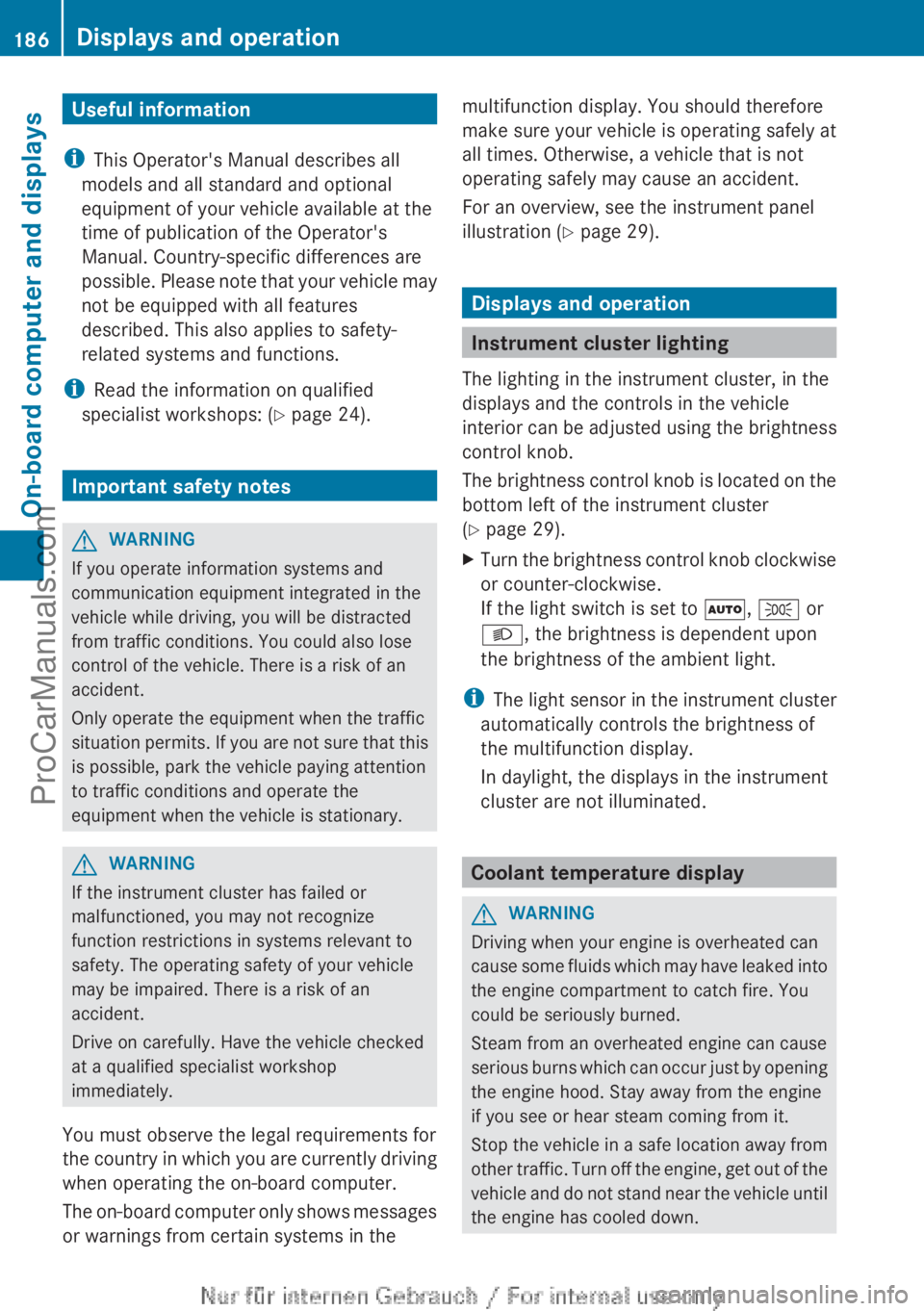
Useful information
i This Operator's Manual describes all
models and all standard and optional
equipment of your vehicle available at the
time of publication of the Operator's
Manual. Country-specific differences are
possible. Please note
that your vehicle may
not be equipped with all features
described. This also applies to safety-
related systems and functions.
i Read the information on qualified
specialist workshops: ( Y page 24).Important safety notes
G
WARNING
If you operate information systems and
communication equipment integrated in the
vehicle while driving, you will be distracted
from traffic conditions. You could also lose
control of the vehicle. There is a risk of an
accident.
Only operate the equipment when the traffic
situation permits. If
you are not sure that this
is possible, park the vehicle paying attention
to traffic conditions and operate the
equipment when the vehicle is stationary. G
WARNING
If the instrument cluster has failed or
malfunctioned, you may not recognize
function restrictions in systems relevant to
safety. The operating safety of your vehicle
may be impaired. There is a risk of an
accident.
Drive on carefully. Have the vehicle checked
at a qualified specialist workshop
immediately.
You must observe the legal requirements for
the country in
which you are currently driving
when operating the on-board computer.
The on-board computer only shows messages
or warnings from certain systems in the multifunction display. You should therefore
make sure your vehicle is operating safely at
all times. Otherwise, a vehicle that is not
operating safely may cause an accident.
For an overview, see the instrument panel
illustration (
Y page 29). Displays and operation
Instrument cluster lighting
The lighting in the instrument cluster, in the
displays and the controls in the vehicle
interior can be
adjusted using the brightness
control knob.
The brightness control knob is located on the
bottom left of the instrument cluster
(Y page 29).
X Turn the brightness control knob clockwise
or counter-clockwise.
If the light switch is set to Ã, T or
L, the brightness is dependent upon
the brightness of the ambient light.
i The light sensor
in the instrument cluster
automatically controls the brightness of
the multifunction display.
In daylight, the displays in the instrument
cluster are not illuminated. Coolant temperature display
G
WARNING
Driving when your engine is overheated can
cause some fluids
which may have leaked into
the engine compartment to catch fire. You
could be seriously burned.
Steam from an overheated engine can cause
serious burns which can occur just by opening
the engine hood. Stay away from the engine
if you see or hear steam coming from it.
Stop the vehicle in a safe location away from
other traffic. Turn off the engine, get out of the
vehicle and do not stand near the vehicle until
the engine has cooled down. 186
Displays and operation
On-board computer and displays
ProCarManuals.com
Page 215 of 340
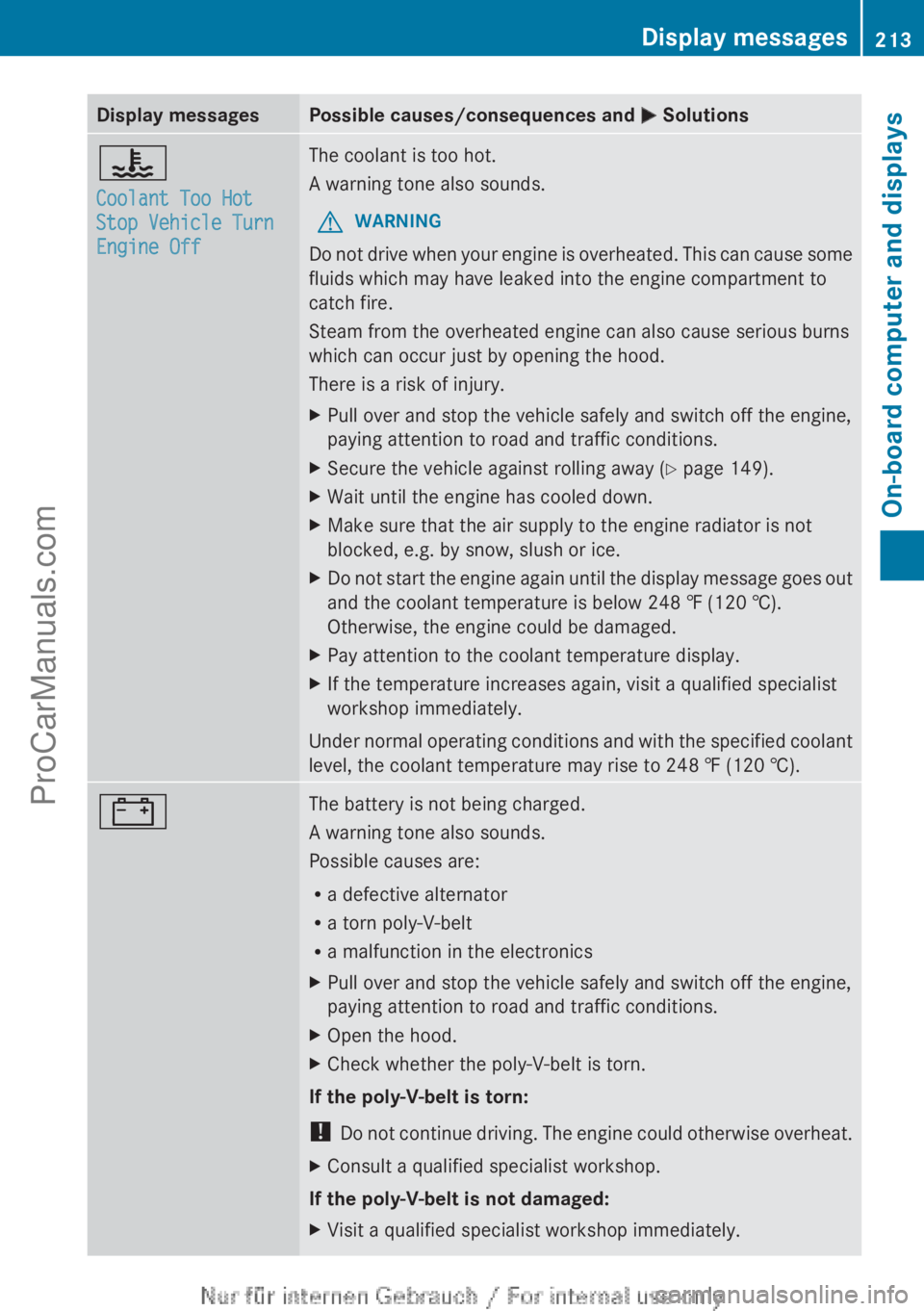
Display messages Possible causes/consequences and
M Solutions?
Coolant Too Hot
Stop Vehicle Turn
Engine Off The coolant is too hot.
A warning tone also sounds.
G WARNING
Do not drive when your engine is overheated. This can cause some
fluids which may have leaked into the engine compartment to
catch fire.
Steam from the overheated engine can also cause serious burns
which can occur just by opening the hood.
There is a risk of injury.
X Pull over and stop the vehicle safely and switch off the engine,
paying attention to road and traffic conditions.
X Secure the vehicle against rolling away ( Y page 149).
X Wait until the engine has cooled down.
X Make sure that the air supply to the engine radiator is not
blocked, e.g. by snow, slush or ice.
X Do not start the engine again until the display message goes out
and the coolant temperature is below 248 ‡ (120 †).
Otherwise, the engine could be damaged.
X Pay attention to the coolant temperature display.
X If the temperature increases again, visit a qualified specialist
workshop immediately.
Under
normal operating conditions and with the specified coolant
level, the coolant temperature may rise to 248 ‡ (120 †). # The battery is not being charged.
A warning tone also sounds.
Possible causes are:
R
a defective alternator
R a torn poly-V-belt
R a malfunction in the electronics
X Pull over and stop the vehicle safely and switch off the engine,
paying attention to road and traffic conditions.
X Open the hood.
X Check whether the poly-V-belt is torn.
If the poly-V-belt is torn:
! Do not continue
driving. The engine could otherwise overheat.
X Consult a qualified specialist workshop.
If the poly-V-belt is not damaged:
X Visit a qualified specialist workshop immediately. Display messages
213
On-board computer and displays Z
ProCarManuals.com