tire MERCEDES-BENZ B-Class 2015 W246 Comand Manual
[x] Cancel search | Manufacturer: MERCEDES-BENZ, Model Year: 2015, Model line: B-Class, Model: MERCEDES-BENZ B-Class 2015 W246Pages: 270, PDF Size: 5.82 MB
Page 29 of 270
The COMAND controller can be:
R pressed briefly or pressed and held 0098
R turned clockwise or counter-clockwise
00790052007A
R slid left or right 009500520096
R slid forwards or backwards 009700520064
R slid diagonally 009100520078
Example of operation In the instructions, operating sequences are
described as follows:
X Press the 002Abutton.
Radio mode is activated.
X Select Radio
Radio by sliding 00520064and turning
00790052007A the COMAND controller and press 0098
to confirm.
X Confirm Station List
Station List by pressing0098.
The station list appears. Buttons on the COMAND controller
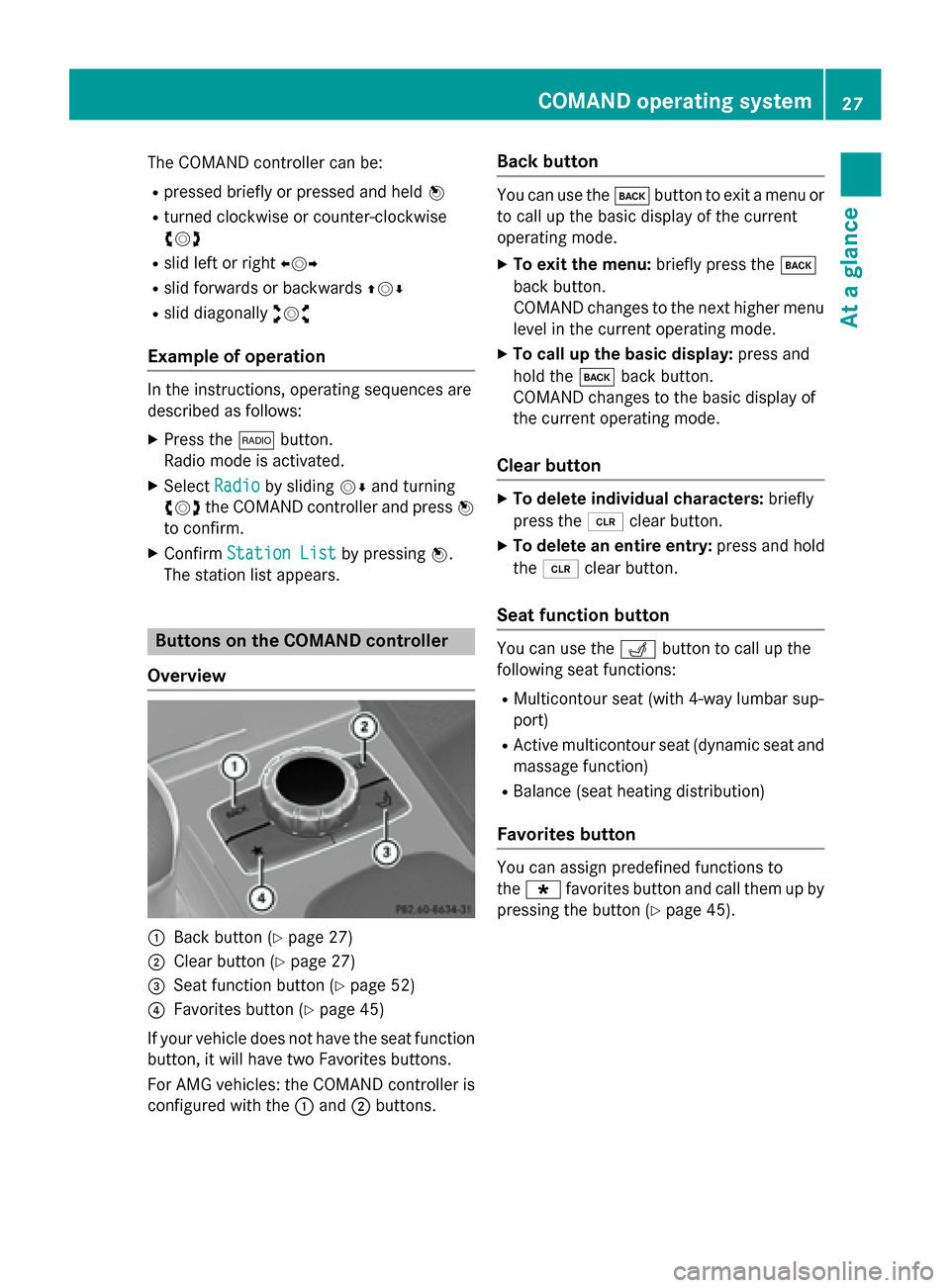
Overview 0043
Back button (Y page 27)
0044 Clear button (Y page 27)
0087 Seat function button (Y page 52)
0085 Favorites button (Y page 45)
If your vehicle does not have the seat function button, it will have two Favorites buttons.
For AMG vehicles: the COMAND controller is
configured with the 0043and 0044buttons. Back button You can use the
003Dbutton to exit a menu or
to call up the basic display of the current
operating mode.
X To exit the menu: briefly press the003D
back button.
COMAND changes to the next higher menu
level in the current operating mode.
X To call up the basic display: press and
hold the 003Dback button.
COMAND changes to the basic display of
the current operating mode.
Clear button X
To delete individual characters: briefly
press the 0084clear button.
X To delete an entire entry: press and hold
the 0084 clear button.
Seat function button You can use the
0050button to call up the
following seat functions:
R Multicontour seat (with 4-way lumbar sup-
port)
R Active multicontour seat (dynamic seat and
massage function)
R Balance (seat heating distribution)
Favorites button You can assign predefined functions to
the 0080 favorites button and call them up by
pressing the button (Y page 45). COMAND operating system
27At a glance
Page 37 of 270
Changing the character set
While making an entry in the input menu
(Y
page 139):
X Select the 0042symbol and press 0098to
confirm.
R ABC ABC (upper/lower case)
R 123
123 (digits)
R Other
Other (special characters such as @, €,
etc.)
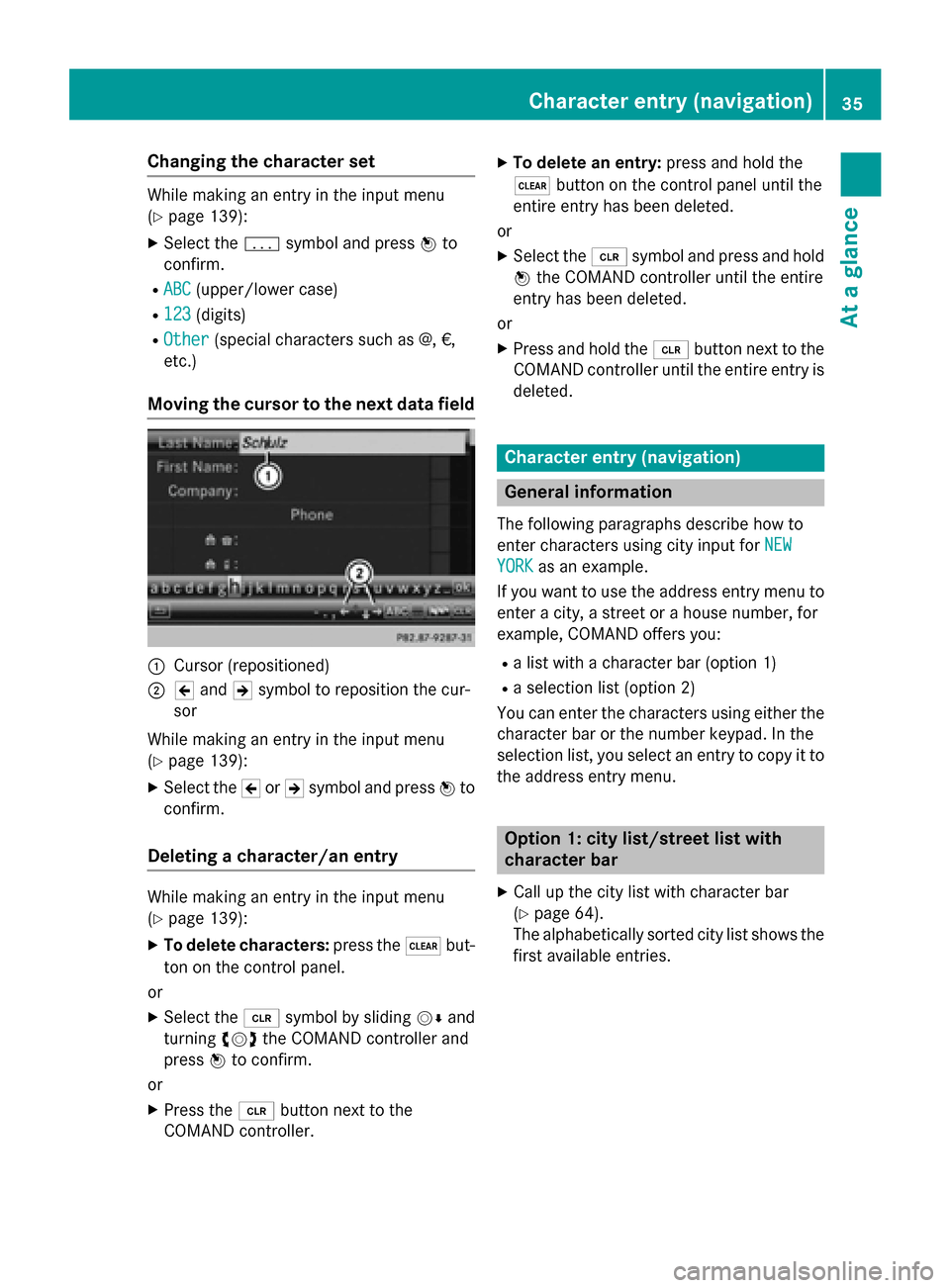
Moving the cursor to the next data field 0043
Cursor (repositioned)
0044 005D and 005Esymbol to reposition the cur-
sor
While making an entry in the input menu
(Y page 139):
X Select the 005Dor005E symbol and press 0098to
confirm.
Deleting a character/an entry While making an entry in the input menu
(Y page 139):
X To delete characters: press the0037but-
ton on the control panel.
or
X Select the 0084symbol by sliding 00520064and
turning 00790052007Athe COMAND controller and
press 0098to confirm.
or
X Press the 0084button next to the
COMAND controller. X
To delete an entry: press and hold the
0037 button on the control panel until the
entire entry has been deleted.
or X Select the 0084symbol and press and hold
0098 the COMAND controller until the entire
entry has been deleted.
or
X Press and hold the 0084button next to the
COMAND controller until the entire entry is
deleted. Character entry (navigation)
General information
The following paragraphs describe how to
enter characters using city input for NEW NEW
YORK
YORK as an example.
If you want to use the address entry menu to enter a city, a street or a house number, for
example, COMAND offers you:
R a list with a character bar (option 1)
R a selection list (option 2)
You can enter the characters using either the
character bar or the number keypad. In the
selection list, you select an entry to copy it to the address entry menu. Option 1: city list/street list with
character bar
X Call up the city list with character bar
(Y page 64).
The alphabetically sorted city list shows the first available entries. Character entry (navigation)
35At a glance
Page 39 of 270
or
X Select the 0084symbol in the character bar
by sliding 00520064and turning 00790052007Athe
COMAND controller and press 0098to con-
firm.
X To delete an entry: press and hold the
0037 button on the control panel.
or
X Press and hold the 0084button next to the
COMAND controller until the entire entry is
deleted.
or X Select the 0084symbol in the character bar
and press and hold 0098the COMAND con-
troller until the entire entry is deleted.
X To cancel an entry: select the0039symbol
in the bottom left of the character bar and
press 0098to confirm.
or
X Press the 003Dback button.
The address entry menu appears.
X To accept the first list entry: press and
hold 0098the COMAND controller until the
address entry menu appears.
The accepted list entry is shown there. Calling up the list as a selection list
You can switch from the list of cities with the
character bar to the list of cities as a selection list at any point during character entry.
X Slide 00970052the COMAND controller repeat-
edly until the city list appears as a selection
list.
Select the desired city from the selection
list.
or
X Select0054in the character bar by turning
00790052007A the COMAND controller and press 0098
to confirm. If there are several entries for a city or if sev-
eral cities of the same name are stored, then 0054 is highlighted in the character bar.
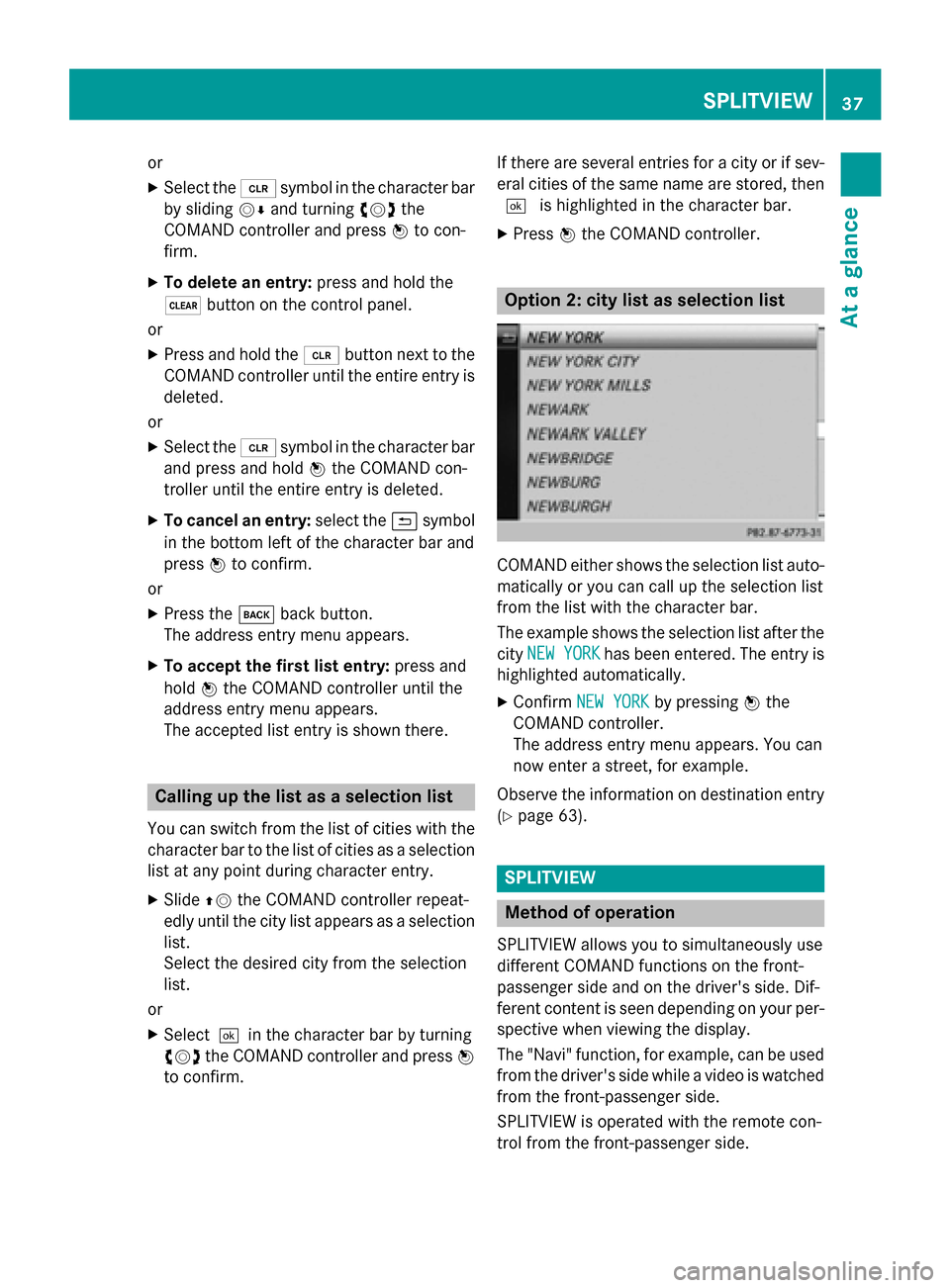
X Press 0098the COMAND controller. Option 2: city list as selection list
COMAND either shows the selection list auto-
matically or you can call up the selection list
from the list with the character bar.
The example shows the selection list after the
city NEW YORK NEW YORK has been entered. The entry is
highlighted automatically.
X Confirm NEW YORK
NEW YORK by pressing 0098the
COMAND controller.
The address entry menu appears. You can
now enter a street, for example.
Observe the information on destination entry (Y page 63). SPLITVIEW
Method of operation
SPLITVIEW allows you to simultaneously use
different COMAND functions on the front-
passenger side and on the driver's side. Dif-
ferent content is seen depending on your per- spective when viewing the display.
The "Navi" function, for example, can be used from the driver's side while a video is watchedfrom the front-passenger side.
SPLITVIEW is operated with the remote con-
trol from the front-passenger side. SPLITVIEW
37At a glance
Page 98 of 270
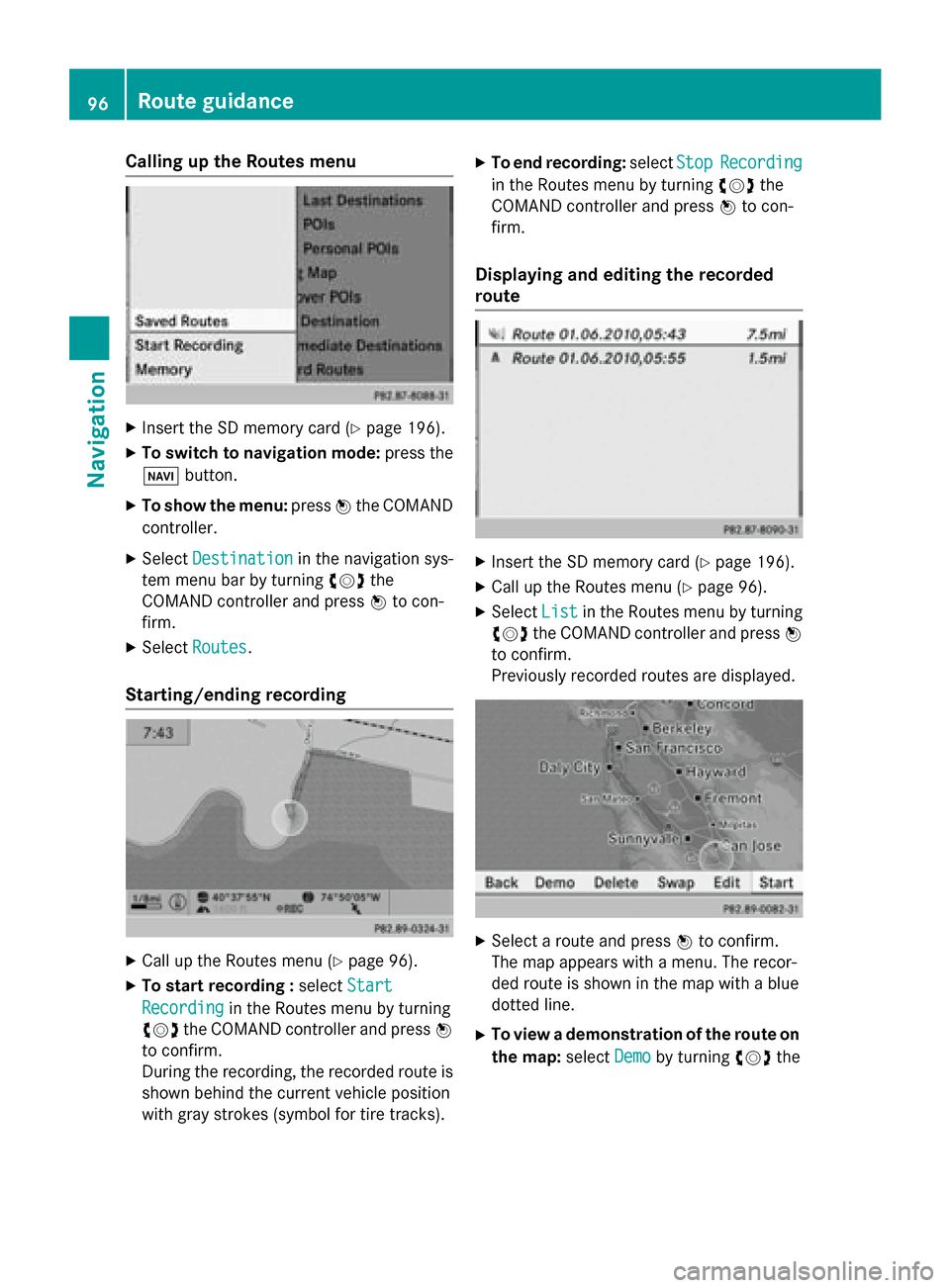
Calling up the Routes menu
X
Insert the SD memory card (Y page 196).
X To switch to navigation mode: press the
00BE button.
X To show the menu: press0098the COMAND
controller.
X Select Destination
Destination in the navigation sys-
tem menu bar by turning 00790052007Athe
COMAND controller and press 0098to con-
firm.
X Select Routes
Routes .
Starting/ending recording X
Call up the Routes menu (Y page 96).
X To start recording : selectStart
Start
Recording
Recording in the Routes menu by turning
00790052007A the COMAND controller and press 0098
to confirm.
During the recording, the recorded route is
shown behind the current vehicle position
with gray strokes (symbol for tire tracks). X
To end recording: selectStop StopRecording Recording
in the Routes menu by turning 00790052007Athe
COMAND controller and press 0098to con-
firm.
Displaying and editing the recorded
route X
Insert the SD memory card (Y page 196).
X Call up the Routes menu (Y page 96).
X Select List Listin the Routes menu by turning
00790052007A the COMAND controller and press 0098
to confirm.
Previously recorded routes are displayed. X
Select a route and press 0098to confirm.
The map appears with a menu. The recor-
ded route is shown in the map with a blue
dotted line.
X To view a demonstration of the route on
the map: selectDemo
Demo by turning 00790052007Athe 96
Route guidanceNavigation
Page 99 of 270
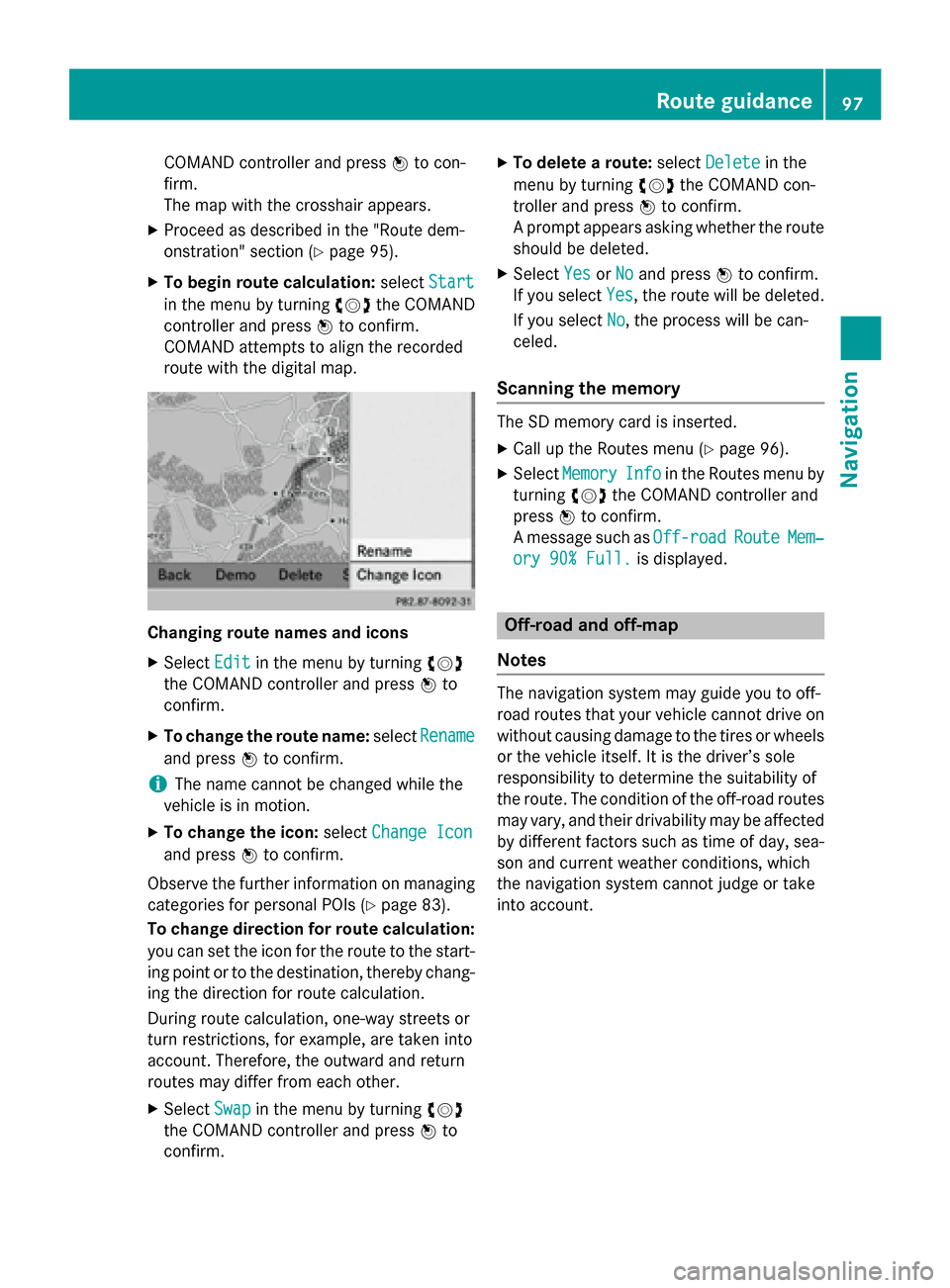
COMAND controller and press
0098to con-
firm.
The map with the crosshair appears.
X Proceed as described in the "Route dem-
onstration" section (Y page 95).
X To begin route calculation: selectStart
Start
in the menu by turning 00790052007Athe COMAND
controller and press 0098to confirm.
COMAND attempts to align the recorded
route with the digital map. Changing route names and icons
X
Select Edit Editin the menu by turning 00790052007A
the COMAND controller and press 0098to
confirm.
X To change the route name: selectRename
Rename
and press 0098to confirm.
i The name cannot be changed while the
vehicle is in motion.
X To change the icon: selectChange Icon
Change Icon
and press 0098to confirm.
Observe the further information on managing categories for personal POIs (Y page 83).
To change direction for route calculation: you can set the icon for the route to the start-
ing point or to the destination, thereby chang- ing the direction for route calculation.
During route calculation, one-way streets or
turn restrictions, for example, are taken into
account. Therefore, the outward and return
routes may differ from each other.
X Select Swap
Swap in the menu by turning 00790052007A
the COMAND controller and press 0098to
confirm. X
To delete a route: selectDelete Delete in the
menu by turning 00790052007Athe COMAND con-
troller and press 0098to confirm.
A prompt appears asking whether the route should be deleted.
X Select Yes YesorNo
No and press 0098to confirm.
If you select Yes
Yes, the route will be deleted.
If you select No
No, the process will be can-
celed.
Scanning the memory The SD memory card is inserted.
X Call up the Routes menu (Y page 96).
X Select Memory
Memory Info
Infoin the Routes menu by
turning 00790052007Athe COMAND controller and
press 0098to confirm.
A message such as Off-road Off-roadRoute RouteMem‐
Mem‐
ory 90% Full.
ory 90% Full. is displayed. Off-road and off-map
Notes The navigation system may guide you to off-
road routes that your vehicle cannot drive on
without causing damage to the tires or wheelsor the vehicle itself. It is the driver’s sole
responsibility to determine the suitability of
the route. The condition of the off-road routes
may vary, and their drivability may be affected by different factors such as time of day, sea-
son and current weather conditions, which
the navigation system cannot judge or take
into account. Route guidance
97Navigation Z
Page 109 of 270
X
Select Yes
YesorNo
No and press 0098to confirm.
If you select Yes
Yes, COMAND deletes the
destination. You will see a message to this effect.
If you select No No, the process will be can-
celed.
i If the navigable address data for the des-
tination being deleted is also assigned to an
address book entry, COMAND will also
delete this data from there. If the corre-
sponding address book entry does not con-
tain any further data, such as telephone
numbers, COMAND deletes the entire
address book entry. Previous destinations
Introduction
COMAND automatically stores the previous
destinations for which route calculation has
been started. If the memory is full, COMAND deletes the oldest destination. You can also
save a destination from the list of previous
destinations in the destination memory. It will
be stored there permanently. Storing a destination permanently in
the destination memory
X Proceed as described in the "From the list
of previous destinations" section
(Y page 70). Storing the vehicle position in the list
of previous destinations
X To switch on navigation mode: press the
00BE function button.
X To show the menu: press0098the COMAND
controller. X
Select Position
Position in the navigation system
menu bar by turning 00790052007Athe COMAND
controller and press 0098to confirm.
X Select Save SaveVehicle
Vehicle Position
Position and press
0098 to confirm.
COMAND stores the current vehicle posi-
tion as a destination in the list of previous
destinations. Storing the crosshair position in the
list of previous destinations
A crosshair appears on the map if you have
moved the map manually (Y page 108). You
can store the crosshair position as a destina-
tion in the list of previous destinations.
X To show the menu: press0098the COMAND
controller.
X Select Position Position in the navigation system
menu bar by turning 00790052007Athe COMAND
controller and press 0098to confirm.
X Select Save Crosshair Position
Save Crosshair Position and
press 0098to confirm. Deleting one of the previous destina-
tions
X To switch on navigation mode: press the
00BE function button.
X To show the menu: press0098the COMAND
controller.
X Select Destination
Destination in the navigation sys-
tem menu bar by turning 00790052007Athe
COMAND controller and press 0098to con-
firm.
X Select From Last Destinations From Last Destinations and
press 0098to confirm.
The list of last destinations appears.
X Select the desired destination and press 0098
to confirm.
The destination address appears. Previous destinations
107Navigation Z
Page 181 of 270
Menu functions
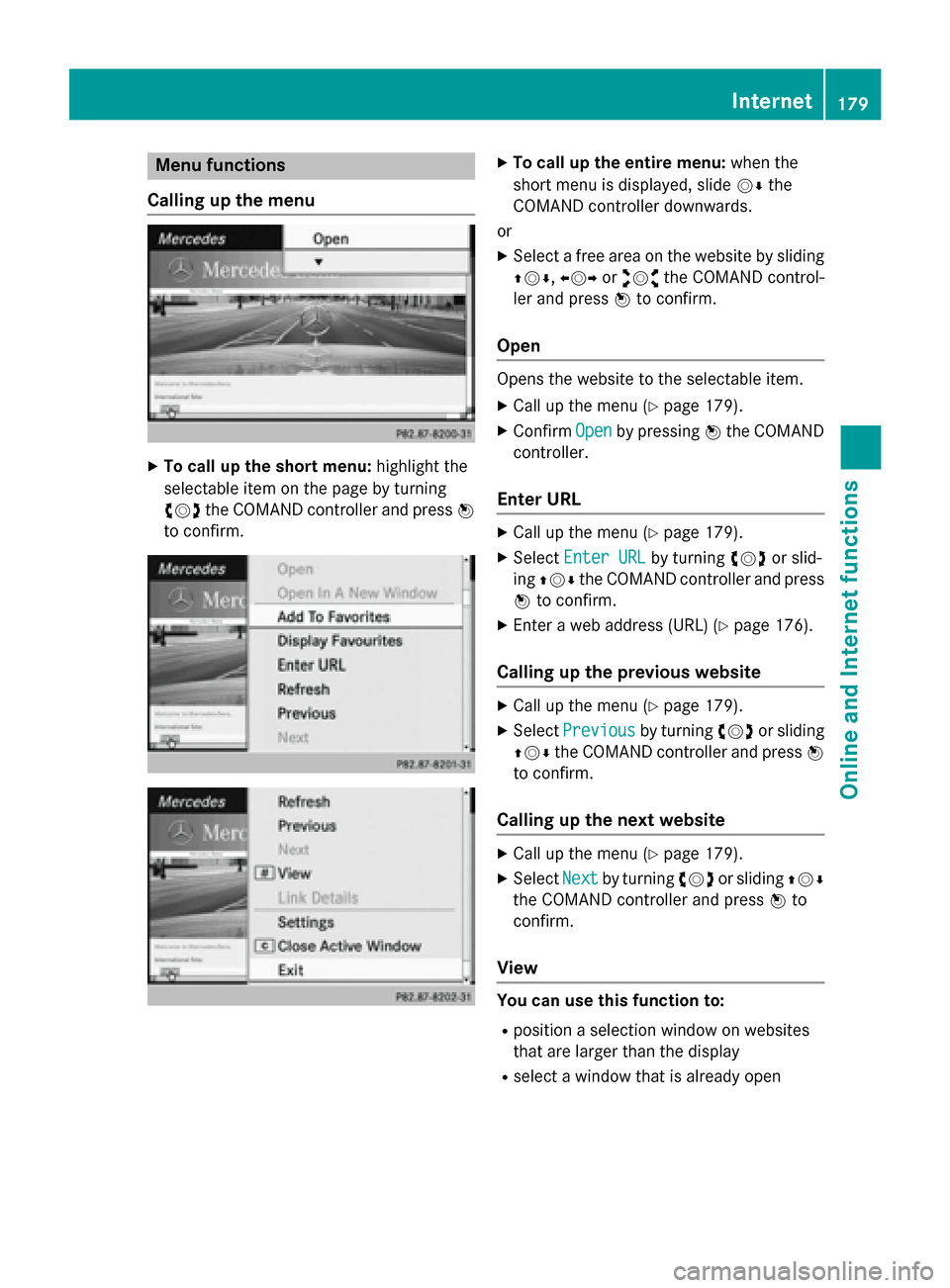
Calling up the menu X
To call up the short menu: highlight the
selectable item on the page by turning
00790052007A the COMAND controller and press 0098
to confirm. X
To call up the entire menu: when the
short menu is displayed, slide 00520064the
COMAND controller downwards.
or X Select a free area on the website by sliding
009700520064, 009500520096or009100520078 the COMAND control-
ler and press 0098to confirm.
Open Opens the website to the selectable item.
X Call up the menu (Y page 179).
X Confirm Open Openby pressing 0098the COMAND
controller.
Enter URL X
Call up the menu (Y page 179).
X Select Enter URL
Enter URL by turning00790052007Aor slid-
ing 009700520064 the COMAND controller and press
0098 to confirm.
X Enter a web address (URL) (Y page 176).
Calling up the previous website X
Call up the menu (Y page 179).
X Select Previous
Previous by turning00790052007Aor sliding
009700520064 the COMAND controller and press 0098
to confirm.
Calling up the next website X
Call up the menu (Y page 179).
X Select Next
Nextby turning 00790052007Aor sliding 009700520064
the COMAND controller and press 0098to
confirm.
View You can use this function to:
R position a selection window on websites
that are larger than the display
R select a window that is already open Internet
179Online and Internet functions Z
Page 222 of 270
Selecting by skipping to a track
X
To skip forwards or back to a track: turn
00790052007A the COMAND controller when the dis-
play/selection window is active.
or
X Press the 0048or0049 button.
The skip forward function skips to the next track. The skip back function skips to the
beginning of the current track if the track
has been playing for more than eight sec-
onds. If the track has been playing for less
than eight seconds, it skips to the start of
the previous track. If you have selected a
playback option other than Normal
NormalTrack
Track
Sequence
Sequence, the track sequence is random.
Selecting using the number keypad X
To make an entry: press the003Ebutton.
An input menu appears. The number of
characters available for input depends on
the number of stored tracks.
X To enter a track number: press a number
key, e.g. 0087.
The digit is entered in the first position in
the input line.
i COMAND will ignore and not display an
invalid digit.
X Enter more numbers if desired.
The track plays after the last possible num-
ber is entered.
i Pressing and holding a number key for
more than two seconds completes the
entry, and the corresponding track is
played.
Fast forwarding/rewinding X
While the display/selection window is
active, slide 009500520096and hold the COMAND
controller until the desired position has
been reached.
or
X Press and hold the 0048or0049 button
until the desired position is reached. i
On an iPod ®
or iPhone ®
, fast rewind only
functions within the current track. Selecting a category/playlist/folder
Overview For an iPod
®
, iPhone ®
or certain MP3 players,
you can select tracks using categories or fold- ers.
Depending on the device connected, the fol-
lowing categories may be available, for exam- ple:
R Current Tracklist Current Tracklist
R Select By Cover
Select By Cover
R Keyword Search
Keyword Search
R Playlists
Playlists (e.g.All
All)
R Artists
Artists
R Albums
Albums
R Tracks
Tracks
R Podcasts
Podcasts
R Genres
Genres
R Composers
Composers
R Audiobooks
Audiobooks
R Videos
Videos (except for Hong Kong)
i Some playback categories contain the
entry All
All. If this entry has been selected,
the entire content of the category selected
will be played.
The Videos Videos category is available for iPods ®
and iPhones ®
(except for Hong Kong).
i The functions are available as soon as the
entire media content has been read and
analyzed. For certain functions, such as
keyword search and selection by cover, this can take several minutes, depending on the
scope of media and the connected device.
If the same device is reconnected with
unchanged media content, these functions
are available much more quickly.
However, if you change the media content, it has to be read and analyzed again. 220
Operation with the Media InterfaceAudio
Page 224 of 270
not available for albums or playlists, for exam-
ple.
X Select a category, e.g. Artists
Artists, by turning
00790052007A the COMAND controller and press 0098
to confirm.
The available artists are displayed.
X Press the corresponding number key once
or repeatedly to select the initial letter of
the desired artist. For example, to select an
artist whose name begins with C, press the 0082 number key three times.
The available letters are listed at the lower
edge of the display.
After a message, the first entry in the list
which matches the letter entered is high-
lighted.
i If no corresponding entry exists, the last
entry corresponding to a previous letter is
highlighted instead.
i iPods and MP3 players: the quality of the
search results is highly dependent on the
version and language variant of the soft-
ware used to populate the device. A well-
known example of such software is
iTunes ®
.
If different sorting rules are defined (e.g. in iTunes ®
), the search is canceled without
any result.
Additional selection functions R
Select By Cover Select By Cover
Albums can be chosen by cover using the
menu item.
The first time the Select By Cover Select By Cover func-
tion is used, additional data must be loaded
from the iPod ®
/iPhone ®
. The current
music playback is interrupted to allow
access to this data. The process may take a
few minutes and should not be canceled.
Otherwise it will start again from the begin-
ning the next time Select By Cover
Select By Cover is
selected. Covers are initially searched for in the Gracenote Media Database and are
then added to during playback from the
connected device (Y page 200). The avail- ability depends on the use and the tracks
already selected.
R Keyword Search
Keyword Search
Selecting keyword search allows you to
search through all categories on the con-
nected device for keywords.
i More information on
Select By Cover Select By Cover
and Keyword Search
Keyword Search can be found under
"Music search, selecting category"
(Y page 220).
i For an iPod ®
/iPhone ®
, the available cov-
ers are added most efficiently if the entire
media content is in the current playlist. This is the case if you have selected the play-
back option Tracks TracksorRandom Medium
Random Medium
(Y page 222).
Special feature in iPod ®
/iPhone ®
mode i
If the connected iPod ®
/iPhone ®
is not
functioning or paused, you can search for
tracks but cannot select them. After con-
firming a new track, the Function Function
Unavailable
Unavailable message appears. Playback options
X To select a playback option: select
Media Interface
Media Interface in the basic display by
sliding 00520064and turning 00790052007Athe COMAND
controller and press 0098to confirm.
The options list appears. The 003Bdot indi-
cates the option selected.
X Select an option and press 0098to confirm.
The following options are available: R Normal Track Sequence
Normal Track Sequence
Normal track sequence: you hear the
tracks in their normal order (e.g. numerical
or alphabetical).
R Random Medium Random Medium
All the tracks on the medium are played in
random order.
R Random Track List Random Track List 222
Operation with the Media InterfaceAudio
Page 244 of 270
i
The headphones' volume setting does not
affect the main loudspeakers. Selecting sound settings
You can select the sound settings in the CD/
MP3, video DVD and AUX modes.
X Switch on an operating mode (e.g. audio
CD mode) (Y page 244).
X Select Treble
Treble orBass
Bass using
the 006400590065 buttons on the remote
control and press the 008Bbutton to confirm.
An adjustment scale appears.
X Select a setting using the 00630064but-
tons and press the 008Bbutton to confirm. Multiple users
Simultaneous use of the rear-compart-
ment disc drive The two rear-compartment screens can be
operated almost entirely independently from
one another. However, there can be a conflict
in some menus if the two screens are used
simultaneously.
If the rear-compartment disc drive is being
used for both screens simultaneously, select- ing certain menus or settings on one of the
screens also affects the other screen.
The following functions affect both screens:
R changing playback options
R selecting a track (from a track list or folder)
R using the play, pause and stop functions
R fast forwarding/rewinding or scrolling
R calling up the DVD menu and navigating
within it
R setting the language, subtitles and camera
angle
R calling up interactive DVD content The following functions affect only one
screen:
R audio and video functions as well as picture
settings
R switching between full screen and the
menu
Switching between operating modes When you exit an operating mode (e.g. audio
CD mode), the current setting is saved. If youcall up this operating mode again later, there
are two possibilities:
R the operating mode has been changed on
the other screen.
R the operating mode has not been changed.
In the first case, the operating mode appears as it is on the other screen.
In the second case, the setting appears on the
screen as it was when you last exited the
operating mode. Picture settings
Overview You can select picture settings in video DVD
and AUX mode (Y
page 254).
Adjusting the brightness, contrast and
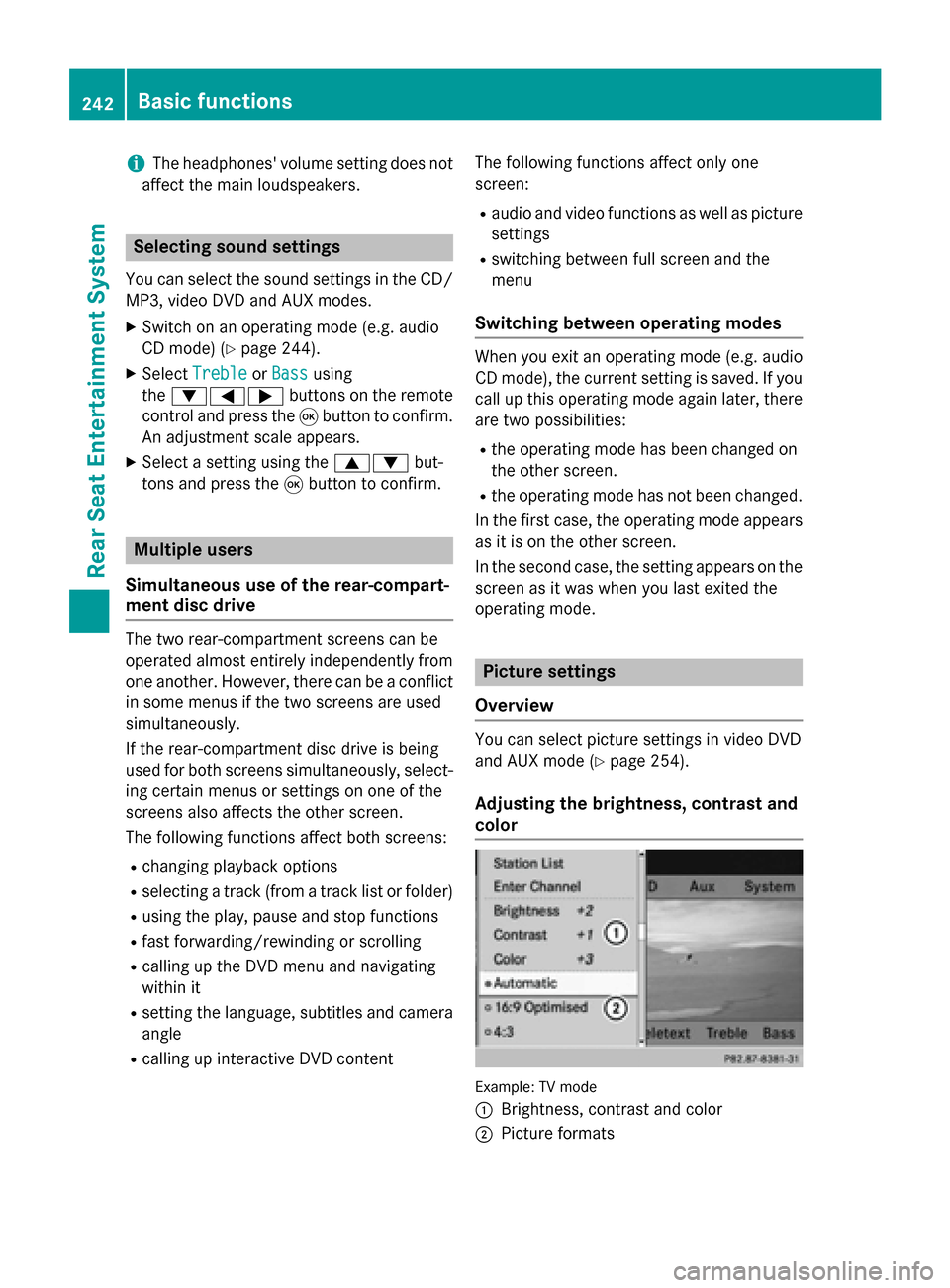
color Example: TV mode
0043
Brightness, contrast and color
0044 Picture formats 242
Basic functionsRear Seat Entertainment System