wheel MERCEDES-BENZ B-Class 2016 W246 Comand Manual
[x] Cancel search | Manufacturer: MERCEDES-BENZ, Model Year: 2016, Model line: B-Class, Model: MERCEDES-BENZ B-Class 2016 W246Pages: 246, PDF Size: 6.73 MB
Page 229 of 246
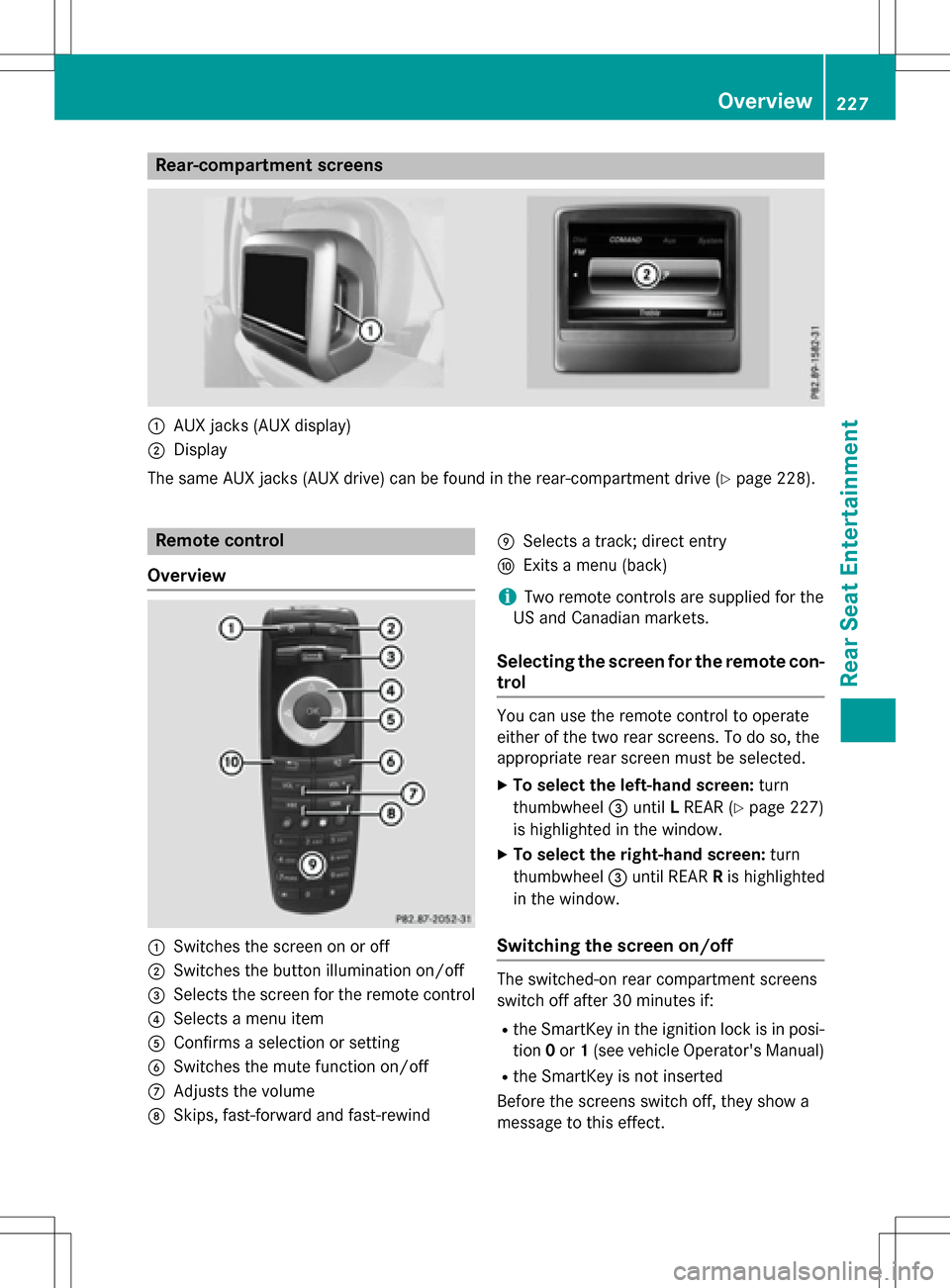
Rear-compartment screens
:AUX jacks (AUX display)
;Display
The same AUX jacks (AUX drive) can be found in the rear-compartment drive (
Ypage 228).
Remote control
Overview
:Switches the screen on or off
;Switches the button illumination on/off
=Selects the screen for the remote control
?Selects a menu item
AConfirms a selection or setting
BSwitches the mute function on/off
CAdjusts the volume
DSkips, fast-forward and fast-rewind
ESelects a track; direct entry
FExits a menu (back)
iTwo remote controls are supplied for the
US and Canadian markets.
Selecting the screen for the remote con-
trol
You can use the remote control to operate
either of the two rear screens. To do so, the
appropriate rear screen must be selected.
XTo select the left-hand screen: turn
thumbwheel =until LREAR (
Ypage 227)
is highlighted in the window.
XTo select the right-hand screen: turn
thumbwheel =until REAR Ris highlighted
in the window.
Switching the screen on/off
The switched-on rear compartment screens
switch off after 30 minutes if:
Rthe SmartKey in the ignition lock is in posi-
tion 0or 1(see vehicle Operator's Manual)
Rthe SmartKey is not inserted
Before the screens switch off, they show a
message to this effect.
Overview227
Rear Seat Entertainment
Z
Page 245 of 246
XTo select a folder:press the:button
on the remote control.
XHighlight one of the two folder symbols
with the =or; button and press 9
to confirm.
Depending on your selection, the previous
or next folder is selected and the first track
is played.
Additional setting option:
XAdjust the sound settings (Ypage 232).
DVD video mode functions
XTo hide a menu: confirmMenuwith the 9
button.
The video image is played in full screen
mode.
Additional setting options:
XAdjust the brightness, contrast and color
(
Ypage 232).
XChange the picture format (Ypage 233).
XAdjust the sound settings (Ypage 232).
AUX mode
Introduction
You can connect external video sources with
a sound and video signal to the Rear Seat
Entertainment System:
Rone external video source to each of the
rear screens (AUX display)
Rone external video source to the rear-com- partment disc drive (AUX drive)
Operating the external video source; see the
manufacturer's operating instructions.
For further details about external video sour-
ces, please consult an authorized Mercedes-
Benz Center.
Connecting AUX equipment
AUX drive jacks
The AUX drive jacks are located on the rear-
compartment drive to the right of the þ
(
Ypage 228) button.
AUX display jacks
The AUX display jacks are on the side of the
two rear screens (
Ypage 227).
Connecting audio and video cables
XInsert the audio plugs for the left and right
signals into the corresponding Land R
jacks.
XInsert the video plug into the Vjack.
Activating AUX mode
AUX drive
Requirements: the external video source is
connected to the rear-compartment drive and
playback is selected.
XSelect Auxin the menu using the
9=; buttons on the remote
control and press the 9button to confirm.
The AUX menu appears.
XSelect Sourcefrom the AUX menu and
press the 9button to confirm.
XSelect Disc Drive Auxand press the 9
button to confirm.
Playback starts. If an external video source
does not provide a video picture, an audio
menu appears.
Displaying AUX
Requirements: the external video source is
connected to the rear-compartment screen
and playback is selected.
XSelect a screen using the thumbwheel on
the remote control (
Ypage 227) until " L
AUX mode243
Rear Seat Entertainment
Z