brake MERCEDES-BENZ B-Class 2017 W246 User Guide
[x] Cancel search | Manufacturer: MERCEDES-BENZ, Model Year: 2017, Model line: B-Class, Model: MERCEDES-BENZ B-Class 2017 W246Pages: 290, PDF Size: 19.81 MB
Page 30 of 290
You can also obtain other information about
motor vehicle safety from
http://www.safercar.gov Limited Warranty
! Follow the instructions in this manual about
the proper operation of your vehicle as well as about possible vehicle damage. Damage to
your vehicle that arises from culpable contra- ventions against these instructions is not cov-
ered either by the Mercedes-Benz Limited
Warranty or by the New or Used-Vehicle War- ranty. QR codes for the rescue card
The QR codes are secured in the fuel filler flap
and on the opposite side on the B-pillar. In the
event of an accident, rescue services can use
the QR code to quickly find the appropriate res-
cue card for your vehicle. The current rescue
card contains the most important information
about your vehicle in a compact form, e.g. the
routing of the electric cables.
You can find more information under
www.mercedes-benz.de/qr-code. Data stored in the vehicle
Data storage
A wide range of electronic components in your
vehicle contain data memories.
These data memories temporarily or perma-
nently store technical information about:
R the vehicle's operating state
R incidents
R malfunctions
In general, this technical information docu-
ments the state of a component, a module, a
system or the surroundings.
These include, for example:
R operating conditions of system components,
e.g. fluid levels
R the vehicle's status messages and those of its
individual components, e.g. number of wheelrevolutions/speed, deceleration in move- ment, lateral acceleration, accelerator pedal
position
R malfunctions and defects in important system
components, e.g. lights, brakes
R vehicle reactions and operating conditions in
special driving situations, e.g. air bag deploy- ment, intervention of stability control sys-
tems
R ambient conditions, e.g. outside temperature
This data is of an exclusively technical nature
and can be used to:
R assist in recognizing and rectifying malfunc-
tions and defects
R analyze vehicle functions, e.g. after an acci-
dent
R optimize vehicle functions
The data cannot be used to trace the vehicle's
movements.
When your vehicle is serviced, technical infor-
mation can be read from the event data memory
and malfunction data memory.
Services include, for example:
R repair services
R service processes
R warranties
R quality assurance
The vehicle is read out by employees of the ser-
vice network (including the manufacturer) using special diagnostic testers. More detailed infor-
mation is obtained from it, if required.
After a malfunction has been rectified, the infor-
mation is deleted from the malfunction memory or is continually overwritten.
When operating the vehicle, situations are con-
ceivable in which this technical data, in connec-
tion with other information (if necessary, under
consultation with an authorized expert), could
be traced to a person.
Examples include:
R accident reports
R damage to the vehicle
R witness statements
Further additional functions that have been con- tractually agreed upon with the customer allow
certain vehicle data to be conveyed by the vehi-
cle as well. The additional functions include, for example, vehicle location in case of an emer-
gency. 28
Data stored in the vehicleIntroduction
Page 31 of 290
COMAND/mbrace
If the vehicle is equipped with COMAND or
mbrace, additional data about the vehicle's
operation, the use of the vehicle in certain sit-
uations, and the location of the vehicle may be
compiled through COMAND or the mbrace sys-
tem.
For additional information please refer to the
COMAND User Manual or the Digital Operator's
Manual and/or the mbrace Terms and Condi-
tions. Event data recorders
This vehicle is equipped with an event data
recorder (EDR). This vehicle is equipped with an
event data recorder (EDR). The main purpose of an EDR is to record, in certain crash or near
crash-like situations, such as an air bag deploy-
ment or hitting a road obstacle, data that will
assist in understanding how a vehicle's systems performed. The EDR is designed to record data
related to vehicle dynamics and safety systems for a short period of time, typically 30 seconds
or less.
The EDR in this vehicle is designed to record
such data as:
R How various systems in your vehicle were
operating
R Whether or not the driver and passenger
safety belts were buckled/fastened
R How far (if at all) the driver was depressing the
accelerator and/or brake pedal and
R How fast the vehicle was traveling.
These data can help provide a better under-
standing of the circumstances in which crashes and injuries occur. NOTE: EDR data are recordedby your vehicle only if a non-trivial crash situa-
tion occurs; no data are recorded by the EDR
under normal driving conditions and no personal
data (e.g. name, gender, age and crash location)
are recorded. However, other parties, such as
law enforcement could combine the EDR data
with the type of personally identifying data rou- tinely acquired during a crash investigation.
Access to the vehicle and/or the EDR is needed to read data that is recorded by an EDR, and
special equipment is required. In addition to the
vehicle manufacturer, other parties that have
the special equipment, such as law enforce-
ment, can read the information by accessing the
vehicle or the EDR. EDR data may be used in civil and criminal mat-
ters as a tool in accident reconstruction, acci-
dent claims and vehicle safety. Since the Crash
Data Retrieval CDR tool that is used to extract
data from the EDR is commercially available,
Mercedes-Benz USA, LLC ("MBUSA") expressly
disclaims any and all liability arising from the
extraction of this information by unauthorized
Mercedes-Benz personnel.
MBUSA will not share EDR data with others
without the consent of the vehicle owners or, if
the vehicle is leased, without the consent of the
lessee. Exceptions to this representation
include responses to subpoenas by law enforce- ment; by federal, state or local government; in
connection with or arising out of litigation involv-
ing MBUSA or its subsidiaries and affiliates; or,
as required by law.
Warning: The EDR is a component of the
Restraint System Module. Tampering with, alter-
ing, modifying or removing the EDR component may result in a malfunction of the Restraint Sys-
tem Module and other systems.
State laws or regulations regarding EDRs that
conflict with federal regulation are pre-empted. This means that in the event of such conflict, the
federal regulation governs. As of February 2013, 13 states have enacted laws relating to EDRs. Information on copyright
General information
Information on license for free and open-source
software used in your vehicle and its electronic
components is available on the following web-
site:
http://www.mercedes-benz.com/opensource Registered trademarks
R Bluetooth ®
is a registered trademark of Blue-
tooth SIG Inc.
R DTS™ is a registered trademark of DTS, Inc.
R Dolby ®
and MLP™ are registered trademarks
of DOLBY Laboratories.
R BabySmart™, ESP ®
and PRE-SAFE ®
are reg-
istered trademarks of Daimler AG.
R HomeLink ®
is a registered trademark of John-
son Controls. Information on copyright
29Introduction Z
Page 33 of 290
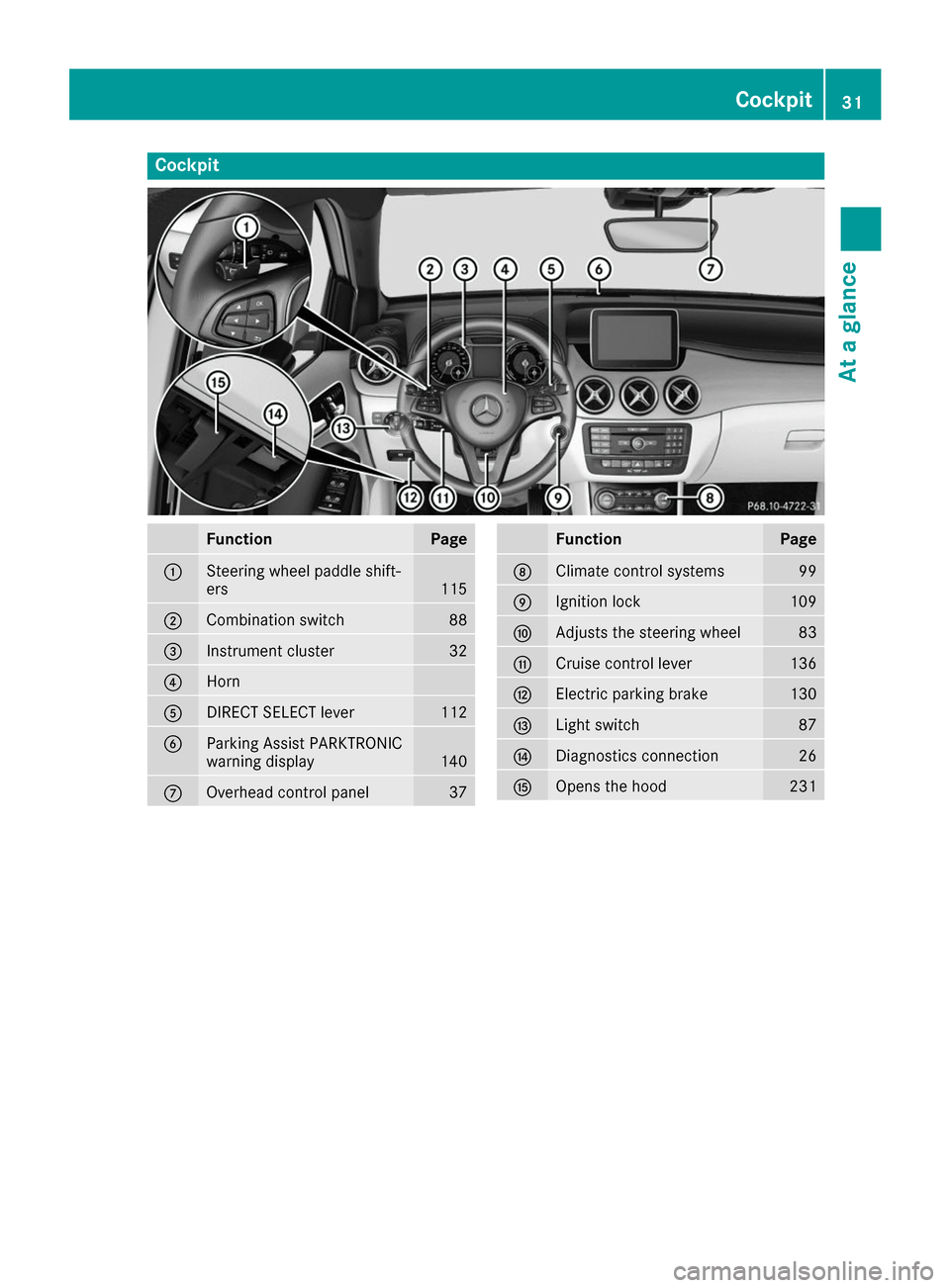
Cockpit
Function Page
0043
Steering wheel paddle shift-
ers
115
0044
Combination switch 88
0087
Instrument cluster 32
0085
Horn
0083
DIRECT SELECT lever 112
0084
Parking Assist PARKTRONIC
warning display
140
006B
Overhead control panel 37 Function Page
006C
Climate control systems 99
006D
Ignition lock 109
006E
Adjusts the steering wheel 83
006F
Cruise control lever 136
0070
Electric parking brake 130
0071
Light switch 87
0072
Diagnostics connection 26
0073
Opens the hood 231Cockpit
31At a glance
Page 34 of 290
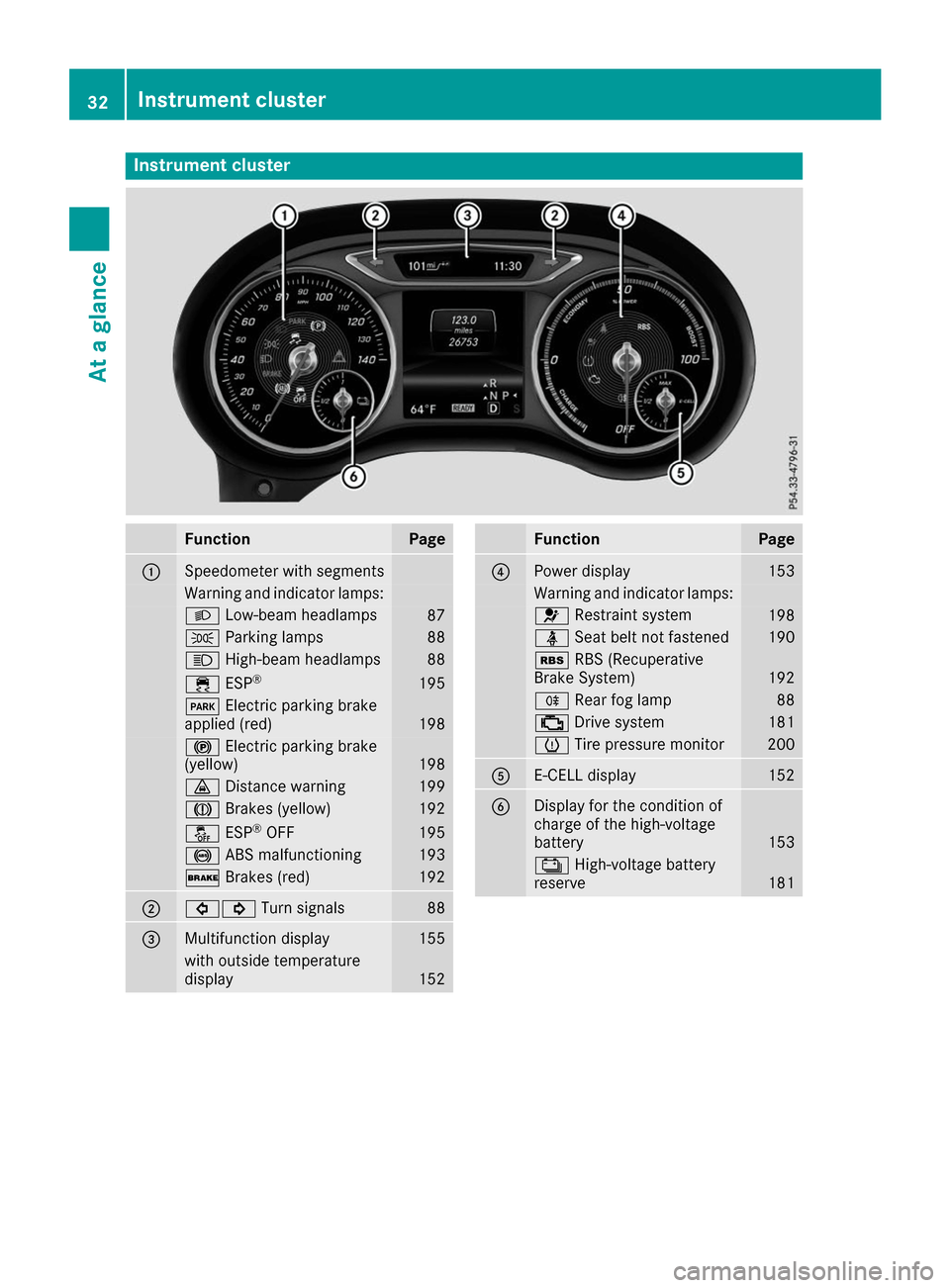
Instrument cluster
Function Page
0043
Speedometer with segments
Warning and indicator lamps:
0058
Low-beam headlamps 87
0060
Parking lamps 88
0057
High-beam headlamps 88
00E5
ESP® 195
0049
Electric parking brake
applied (red) 198
0024
Electric parking brake
(yellow) 198
00BA
Distance warning 199
004D
Brakes (yellow) 192
00BB
ESP®
OFF 195
0025
ABS malfunctioning 193
0027
Brakes (red) 192
0044
003E003D
Turn signals 88
0087
Multifunction display 155
with outside temperature
display
152 Function Page
0085
Power display 153
Warning and indicator lamps:
0075
Restraint system 198
00E9
Seat belt not fastened 190
00C6
RBS (Recuperative
Brake System) 192
005E
Rear fog lamp 88
00B9
Drive system 181
0077
Tire pressure monitor 200
0083
E-CELL display 152
0084
Display for the condition of
charge of the high-voltage
battery
153
00D9
High-voltage battery
reserve 18132
Instrument clusterAt a glance
Page 55 of 290
Additionally, children could set the vehicle in
motion if, for example, they:
R release the parking brake.
R shift the transmission out of park position P
R start the vehicle's drive system.
There is a risk of an accident and injury.
When leaving the vehicle, always take the
SmartKey with you and lock the vehicle. Never leave children or animals unattended in the
vehicle. Always keep the SmartKey out of
reach of children. G
WARNING
If persons, particularly children are subjected to prolonged exposure to extreme heat or
cold, there is a risk of injury, possibly even
fatal. Never leave children unattended in the
vehicle. G
WARNING
If the child restraint system is subjected to
direct sunlight, parts may get very hot. Chil-
dren may burn themselves on these parts,
particularly on the metal parts of the child
restraint system. There is a risk of injury.
If you leave the vehicle, taking the child with
you, always ensure that the child restraint
system is not exposed to direct sunlight. Pro- tect it with a blanket, for example. If the childrestraint system has been exposed to direct
sunlight, let it cool down before securing the
child in it. Never leave children unattended in the vehicle.
Always ensure that all vehicle occupants have
their seat belts fastened correctly and are sitting properly. Particular attention must be paid to
children.
Observe the safety notes on the seat belt
(Y page 40) and the notes on correct use of seat
belts (Y page 41).
A booster seat may be necessary to achieve
proper seat belt positioning for children over
41 lb s(18 kg) until they reach a height where a
three-point seat belt can be properly fastened
without a booster seat. Special seat belt retractor
G
WARNING
If the seat belt is released while driving, the
child restraint system will no longer be
secured properly. The special seat belt retrac- tor is disabled and the inertia real draws in a
portion of the seat belt. The seat belt cannot
be immediately refastened. There is an
increased risk of injury, possibly even fatal.
Stop the vehicle immediately, paying atten-
tion to road and traffic conditions. Reactivate
the special seat belt retractor and secure the
child restraint system properly.
All seat belts except the driver's seat belt are
equipped with a special seat belt retractor.
When activated, the special seat belt retractor
ensures that the seat belt will not slacken once
the child restraint system has been secured.
Installing a child restraint system:
X Always comply with the child restraint system
manufacturer's installation instructions.
X Pull the seat belt smoothly from the belt out-
let.
X Engage the seat belt tongue in the belt buckle.
Activating the special seat belt retractor: X Pull the seat belt out fully and let the inertia
reel retract it again.
While the seat belt is retracting, you should
hear a ratcheting sound. The special seat belt
retractor is activated.
X Push the child seat restraint system down so
that the seat belt is tight and does not loosen.
Removing a child restraint system and deacti-
vating the special seat belt retractor:
X Always comply with the child restraint system
manufacturer's installation instructions.
X Press the release button of the belt buckle,
hold the belt tongue firmly and guide it back
towards the belt outlet.
The special seat belt retractor is deactivated. Children in the vehicle
53Safety Z
Page 59 of 290
Forward-facing child restraint system
If it is absolutely necessary to install a forward-
facing child restraint system on the front-
passenger seat, always move the front-
passenger seat as far back as possible. Fully
retract the seat cushion length. The entire base of the child restraint system must always rest on
the seat cushion of the front-passenger seat.
The backrest of the child restraint system must lie as flat as possible against the backrest of the
front-passenger seat. The child restraint system must not touch the roof or be subjected to a loadby the head restraint. Adjust the angle of the
seat backrest and the head restraint position
accordingly. Always make sure that the shoul-
der belt strap is correctly routed from the vehi-
cle belt outlet to the shoulder belt guide on the
child restraint system. The shoulder belt strap
must be routed forwards and downwards from
the vehicle belt outlet. If necessary, adjust the
vehicle belt outlet and the front-passenger seat
accordingly.
Always observe the child restraint system man- ufacturer's installation and operating instruc-
tions. Child-proof locks
Important safety notes G
WARNING
If children are traveling in the vehicle, they
could:
R open doors, thus endangering other people
or road users
R exit the vehicle and be caught by oncoming
traffic
R operate vehicle equipment and become
trapped
There is a risk of an accident and injury.
Always activate the child-proof locks and
override feature if children are traveling in the vehicle. When leaving the vehicle, always take
the key with you and lock the vehicle. Never
leave children unattended in the vehicle.
Override feature for:
R the rear doors (Y page 58)
R the rear side windows (Y page 58) G
WARNING
If you leave children unsupervised in the vehi- cle, they could set it in motion by, for example:
R release the parking brake.
R shift the transmission out of park position
P.
R start the vehicle's drive system.
They could also operate the vehicle's equip-
ment. There is a risk of an accident and injury.
When leaving the vehicle, always take the
SmartKey with you and lock the vehicle. Never leave children unsupervised in the vehicle. G
WARNING
If persons, particularly children are subjected to prolonged exposure to extreme heat or
cold, there is a risk of injury, possibly even
fatal. Never leave children unattended in the
vehicle. G
WARNING
If the child restraint system is subjected to
direct sunlight, parts may get very hot. Chil-
dren may burn themselves on these parts,
particularly on the metal parts of the child
restraint system. There is a risk of injury.
If you leave the vehicle, taking the child with
you, always ensure that the child restraint
system is not exposed to direct sunlight. Pro- tect it with a blanket, for example. If the child
restraint system has been exposed to direct
sunlight, let it cool down before securing the
child in it. Never leave children unattended in the vehicle. Children in the vehicle
57Safety Z
Page 60 of 290
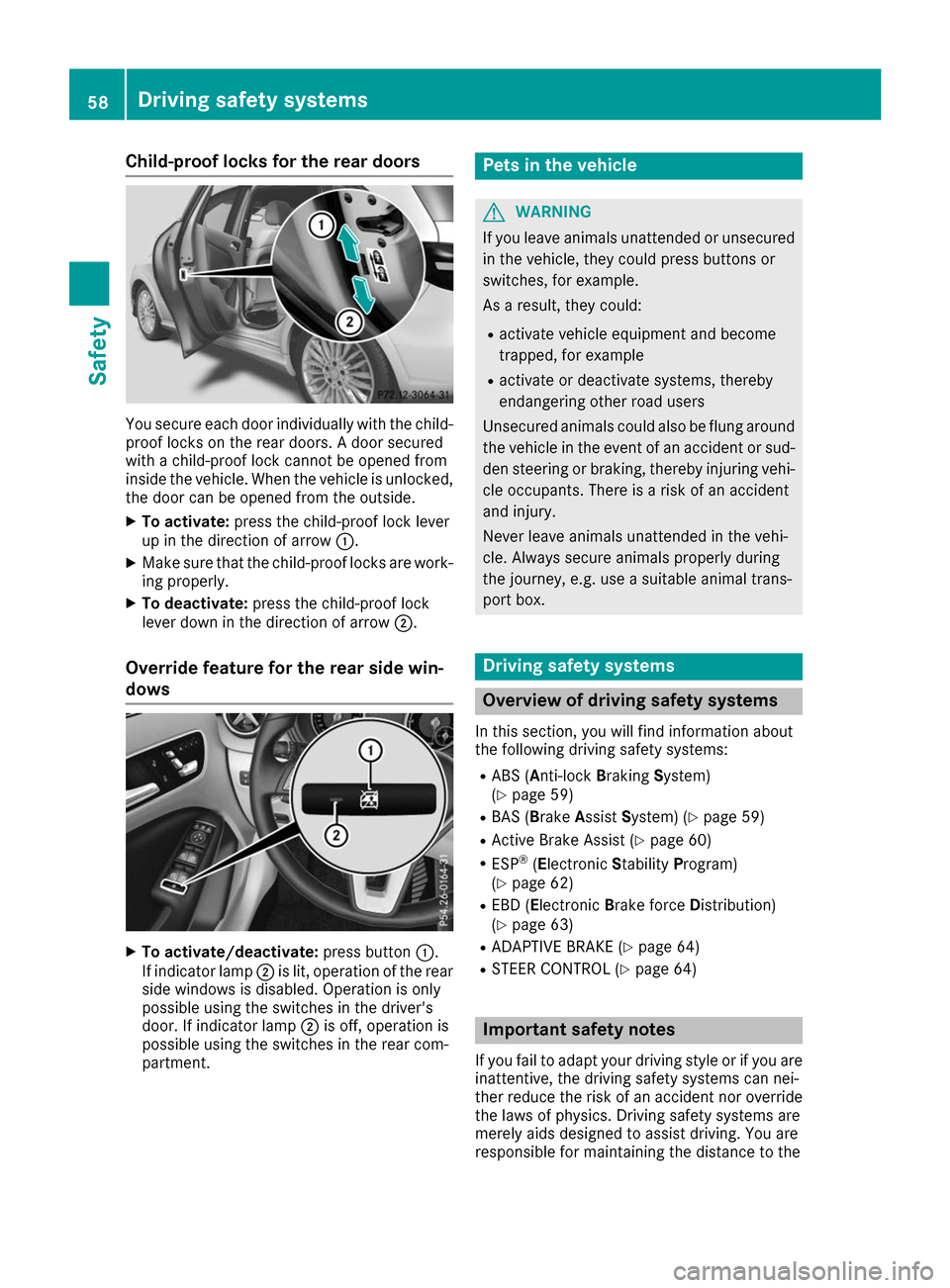
Child-proof locks for the rear doors
You secure each door individually with the child-
proof locks on the rear doors. A door secured
with a child-proof lock cannot be opened from
inside the vehicle. When the vehicle is unlocked,
the door can be opened from the outside.
X To activate: press the child-proof lock lever
up in the direction of arrow 0043.
X Make sure that the child-proof locks are work-
ing properly.
X To deactivate: press the child-proof lock
lever down in the direction of arrow 0044.
Override feature for the rear side win-
dows X
To activate/deactivate: press button0043.
If indicator lamp 0044is lit, operation of the rear
side windows is disabled. Operation is only
possible using the switches in the driver's
door. If indicator lamp 0044is off, operation is
possible using the switches in the rear com-
partment. Pets in the vehicle
G
WARNING
If you leave animals unattended or unsecured in the vehicle, they could press buttons or
switches, for example.
As a result, they could:
R activate vehicle equipment and become
trapped, for example
R activate or deactivate systems, thereby
endangering other road users
Unsecured animals could also be flung around
the vehicle in the event of an accident or sud- den steering or braking, thereby injuring vehi-
cle occupants. There is a risk of an accident
and injury.
Never leave animals unattended in the vehi-
cle. Always secure animals properly during
the journey, e.g. use a suitable animal trans-
port box. Driving safety systems
Overview of driving safety systems
In this section, you will find information about
the following driving safety systems:
R ABS (Anti-lock BrakingSystem)
(Y page 59)
R BAS (Brake AssistSystem) (Y page 59)
R Active Brake Assist (Y page 60)
R ESP ®
(E lectronic StabilityProgram)
(Y page 62)
R EBD (Electronic Brake forceDistribution)
(Y page 63)
R ADAPTIVE BRAKE (Y page 64)
R STEER CONTROL (Y page 64) Important safety notes
If you fail to adapt your driving style or if you are inattentive, the driving safety systems can nei-
ther reduce the risk of an accident nor override
the laws of physics. Driving safety systems are
merely aids designed to assist driving. You are
responsible for maintaining the distance to the 58
Driving safety systemsSafety
Page 61 of 290
vehicle in front, for vehicle speed, for braking in
good time, and for staying in lane. Always adapt your driving style to suit the prevailing road and
weather conditions and maintain a safe distance from the vehicle in front. Drive carefully.
The driving safety systems described only work
as effectively as possible when there is ade-
quate contact between the tires and the road
surface. Please pay special attention to the
notes on tires, recommended minimum tire
tread depths, etc. (Y page 257).
In wintry driving conditions, always use winter
tires (M+S tires) and if necessary, snow chains.
Only in this way will the driving safety systems
described in this section work as effectively as
possible. ABS (Anti-lock Braking System)
General information ABS regulates brake pressure in such a way that
the wheels do not lock when you brake. This
allows you to continue steering the vehicle when braking.
The 0025 ABS warning lamp in the instrument
cluster lights up when the ignition is switched
on. It goes out when the engine is running.
ABS works from a speed of about 5 mph
(8 km/h), regardless of road-surface conditions. ABS works on slippery surfaces, even when you
only brake gently.
Important safety notes i
Observe the "Important safety notes" sec-
tion (Y page 58). G
WARNING
If ABS is faulty, the wheels could lock when
braking. The steerability and braking charac-
teristics may be severely impaired. Addition-
ally, further driving safety systems are deac-
tivated. There is an increased danger of skid- ding and accidents.
Drive on carefully. Have ABS checked imme-
diately at a qualified specialist workshop.
When ABS is malfunctioning, other systems,
including driving safety systems, will also
become inoperative. Observe the information
on the ABS warning lamp (Y page 193) and dis-play messages which may be shown in the
instrument cluster (Y
page 168).
Braking X
If ABS intervenes: continue to depress the
brake pedal vigorously until the braking sit-
uation is over.
X To make a full brake application: depress
the brake pedal with full force.
If ABS intervenes when braking, you will feel a
pulsing in the brake pedal.
The pulsating brake pedal can be an indication
of hazardous road conditions, and functions as a reminder to take extra care while driving. BAS (Brake Assist System)
General information BAS operates in emergency braking situations.
If you depress the brake pedal quickly, BAS
automatically boosts the braking force, thus
shortening the stopping distance.
Important safety notes i
Observe the "Important safety notes" sec-
tion (Y page 58). G
WARNING
If BAS is malfunctioning, the braking distance
in an emergency braking situation is
increased. There is a risk of an accident.
In an emergency braking situation, depress
the brake pedal with full force. ABS prevents
the wheels from locking.
Braking X
Keep the brake pedal firmly depressed until
the emergency braking situation is over.
ABS prevents the wheels from locking.
The brakes will function as usual once you
release the brake pedal. BAS is deactivated. Driving safety systems
59Safety Z
Page 62 of 290
Active Brake Assist
General information i
Observe the "Important safety notes" sec-
tion (Y page 58).
Active Brake Assist consists of a distance warn-
ing function with an autonomous braking func-
tion and braking assistance appropriate to the
situation.
Active Brake Assist can help you to minimize the risk of a collision with the vehicle traveling in
front or reduce the effects of such a collision.
If Active Brake Assist detects that there is a risk
of collision, you will be warned visually and
acoustically. If you do not react to the visual and audible collision warning, autonomous braking
can be initiated in critical situations. If you apply
the brake yourself in a critical situation, Adap-
tive Brake Assist supports you with braking
assistance appropriate to the situation.
Important safety notes Detection of hazardous situations can be par-
ticularly impaired by:
R there is dirt on the sensors or anything else
covering the sensors
R there is snow or heavy rain
R there is interference by other radar sources
R there are strong radar reflections, for exam-
ple in parking garages
R a narrow vehicle is traveling in front, e.g. a
motorbike
R a vehicle is traveling in front on a different line
R new vehicles or after servicing is carried out
on the Active Brake Assist system
Observe the important safety notes in the
"Breaking-in notes" section (Y page 108).
Following damage to the front end of the vehicle, have the configuration and operation of the
radar sensor checked at a qualified specialist
workshop. This also applies to collisions at low
speeds where no visible damage to the front of
the vehicle is apparent.
Activating/deactivating Active Brake Assist is active after every ignition
cycle.
You can activate or deactivate Active Brake
Assist (Y page 162) in the on-board computer. When deactivated, the distance warning func-
tion and the autonomous braking function are
also deactivated.
If Active Brake Assist is deactivated, the 00D4
symbol appears in the assistance graphic dis-
play.
Distance warning function General information
The distance warning function can help you to
minimize the risk of a front-end collision with a
vehicle ahead or reduce the effects of such a
collision. If the distance warning function
detects that there is a risk of a collision, you will
be warned visually and acoustically.
Important safety notesi Observe the "Important safety notes" sec-
tion for driving safety systems (Y page 58). G
WARNING
The distance warning function does not react:
R to people or animals
R to oncoming vehicles
R to crossing traffic
R when cornering
Thus, the distance warning function cannot
provide a warning in all critical situations.
There is a risk of an accident.
Always pay careful attention to the traffic sit-
uation and be ready to brake. G
WARNING
The distance warning function cannot always
clearly identify objects and complex traffic
situations.
In such cases, the distance warning function
may:
R give an unnecessary warning
R not give a warning
There is a risk of an accident.
Always pay careful attention to the traffic sit-
uation and do not rely solely on the distance
warning function. 60
Driving safety systemsSafety
Page 63 of 290
Function
Starting at a speed of approximately 4 mph
(7 km/h), the distance warning function warns
you if you rapidly approach a vehicle in front. An
intermittent warning tone will then sound, and
the 00BA distance warning lamp will light up in
the instrument cluster.
X Brake immediately in order to increase the
distance from the vehicle in front.
or X Take evasive action, provided it is safe to do
so.
Due to the nature of the system, particularly
complicated but non-critical driving conditions
may also cause the system to display a warning.
With the help of the radar sensor system, the
distance warning function can detect obstacles
that are in the path of your vehicle for an exten-
ded period of time.
Up to a speed of approximately 44 mph
(70 km/ h), the distance warning function can
also react to stationary obstacles, such as stop-
ped or parked vehicles.
Autonomous braking function If the driver does not react to the distance warn-
ing signal in a critical situation, Active Brake
Assist can assist the driver with the autonomous braking function.
The autonomous braking function:
R gives the driver more time to react to critical
driving situations
R can help the driver to avoid an accident or
R reduces the effects of an accident
The autonomous braking function is available in
the following speed ranges:
R 4 - 65 mph (7 - 105 km/ h)for moving objects
R 4 - 31 mph (7 - 50 km/h) for stationary
objects
Due to the nature of the system, particularly
complicated but non-critical driving conditions
may also cause the Autonomous Braking Func-
tion to intervene. Braking assistance appropriate to the
situation General information
i Observe the "Important safety notes" sec-
tion (Y page 58).
With the help of the radar sensor system, Adap- tive Brake Assist can detect obstacles that are in
the path of your vehicle for an extended period
of time.
If Adaptive Brake Assist detects a risk of colli-
sion with the vehicle in front, it calculates the
brake pressure necessary to avoid a collision. If
you apply the brakes forcefully, the braking
assistance adapts to the situation and automat-
ically increases the brake pressure to a degree
appropriate to the traffic situation.
Braking assistance appropriate to the situation
provides braking assistance in hazardous situa- tions at speeds above 4 mph (7 km/h). It uses
radar sensor technology to assess the traffic
situation.
Situation-dependent braking assistance is capa-
ble of reacting to moving objects that have
already been recognized as such at least once
over the period of observation, up to vehicle
speeds of around 155 mph (250 km/h).
Braking assistance appropriate to the situation
can also detect stationary objects, up to vehicle speeds of around 44 mph 70 km/h.
X Keep the brake pedal depressed until the
emergency braking situation is over.
ABS prevents the wheels from locking.
The brakes will work normally again if: R you release the brake pedal.
R there is no longer any danger of a collision.
R no obstacle is detected in front of your vehi-
cle.
Braking assistance appropriate to the situation
is then deactivated.
Important safety notes i Observe the "Important safety notes" sec-
tion for driving safety systems (Y page 58). G
WARNING
Adaptive Brake Assist does not react:
R to people or animals
R to oncoming vehicles Driving safety systems
61Safety
Z