head MERCEDES-BENZ B-Class 2017 W246 Owner's Guide
[x] Cancel search | Manufacturer: MERCEDES-BENZ, Model Year: 2017, Model line: B-Class, Model: MERCEDES-BENZ B-Class 2017 W246Pages: 290, PDF Size: 19.81 MB
Page 94 of 290
Replacing front bulbs
Removing and installing the cover in the
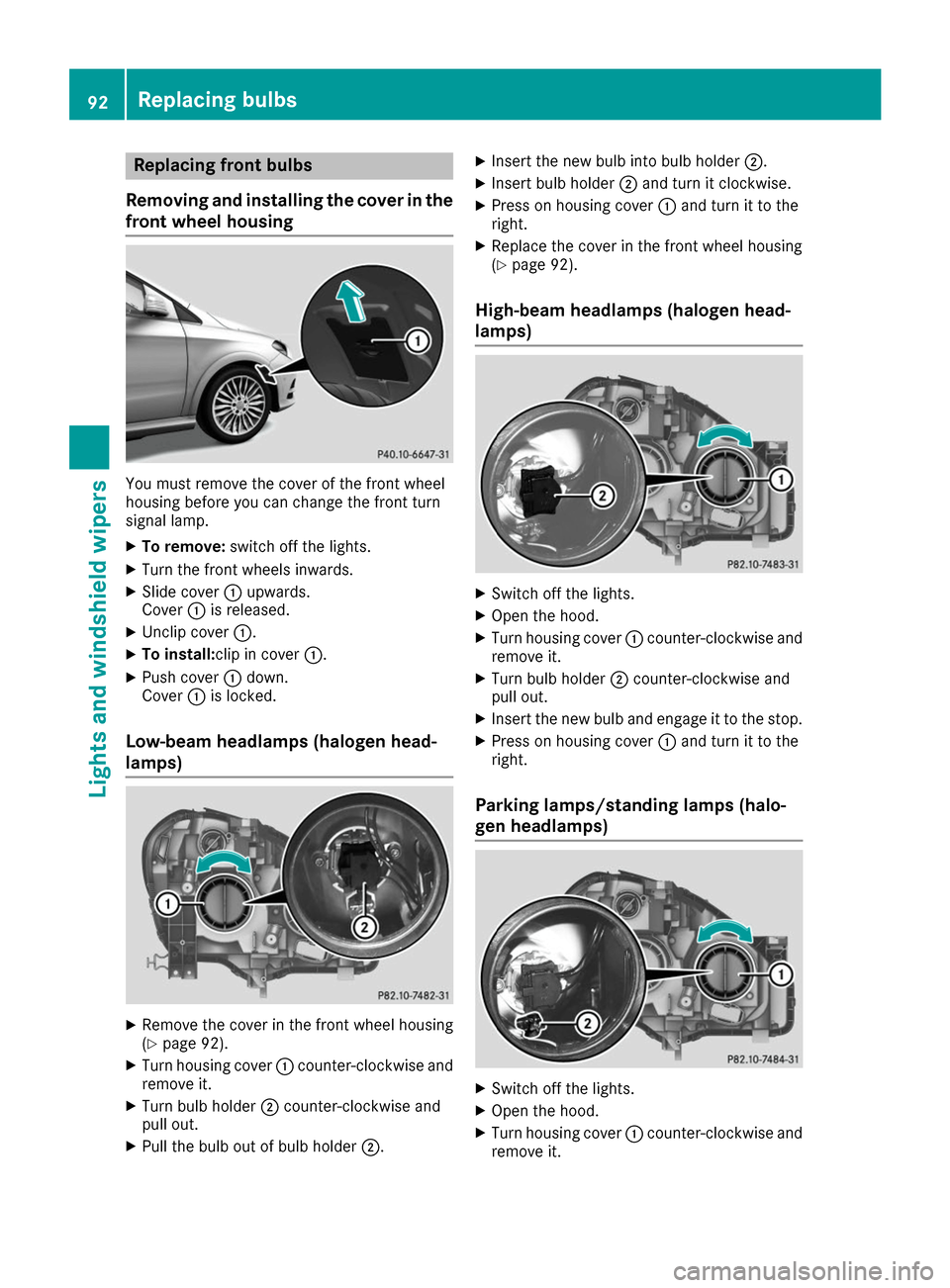
front wheel housing You must remove the cover of the front wheel
housing before you can change the front turn
signal lamp.
X To remove: switch off the lights.
X Turn the front wheels inwards.
X Slide cover 0043upwards.
Cover 0043is released.
X Unclip cover 0043.
X To install:clip in cover 0043.
X Push cover 0043down.
Cover 0043is locked.
Low-beam headlamps (halogen head-
lamps) X
Remove the cover in the front wheel housing
(Y page 92).
X Turn housing cover 0043counter-clockwise and
remove it.
X Turn bulb holder 0044counter-clockwise and
pull out.
X Pull the bulb out of bulb holder 0044.X
Insert the new bulb into bulb holder 0044.
X Insert bulb holder 0044and turn it clockwise.
X Press on housing cover 0043and turn it to the
right.
X Replace the cover in the front wheel housing
(Y page 92).
High-beam headlamps (halogen head-
lamps) X
Switch off the lights.
X Open the hood.
X Turn housing cover 0043counter-clockwise and
remove it.
X Turn bulb holder 0044counter-clockwise and
pull out.
X Insert the new bulb and engage it to the stop.
X Press on housing cover 0043and turn it to the
right.
Parking lamps/standing lamps (halo-
gen headlamps) X
Switch off the lights.
X Open the hood.
X Turn housing cover 0043counter-clockwise and
remove it. 92
Replacing bulbsLights and windshield wipers
Page 95 of 290
X
Pull out bulb holder 0044.
X Pull the bulb out of bulb holder 0044.
X Insert the new bulb into bulb holder 0044.
X Insert bulb holder 0044.
X Press on housing cover 0043and turn it to the
right.
Turn signals (halogen headlamps) X
Switch off the lights.
X Open the hood.
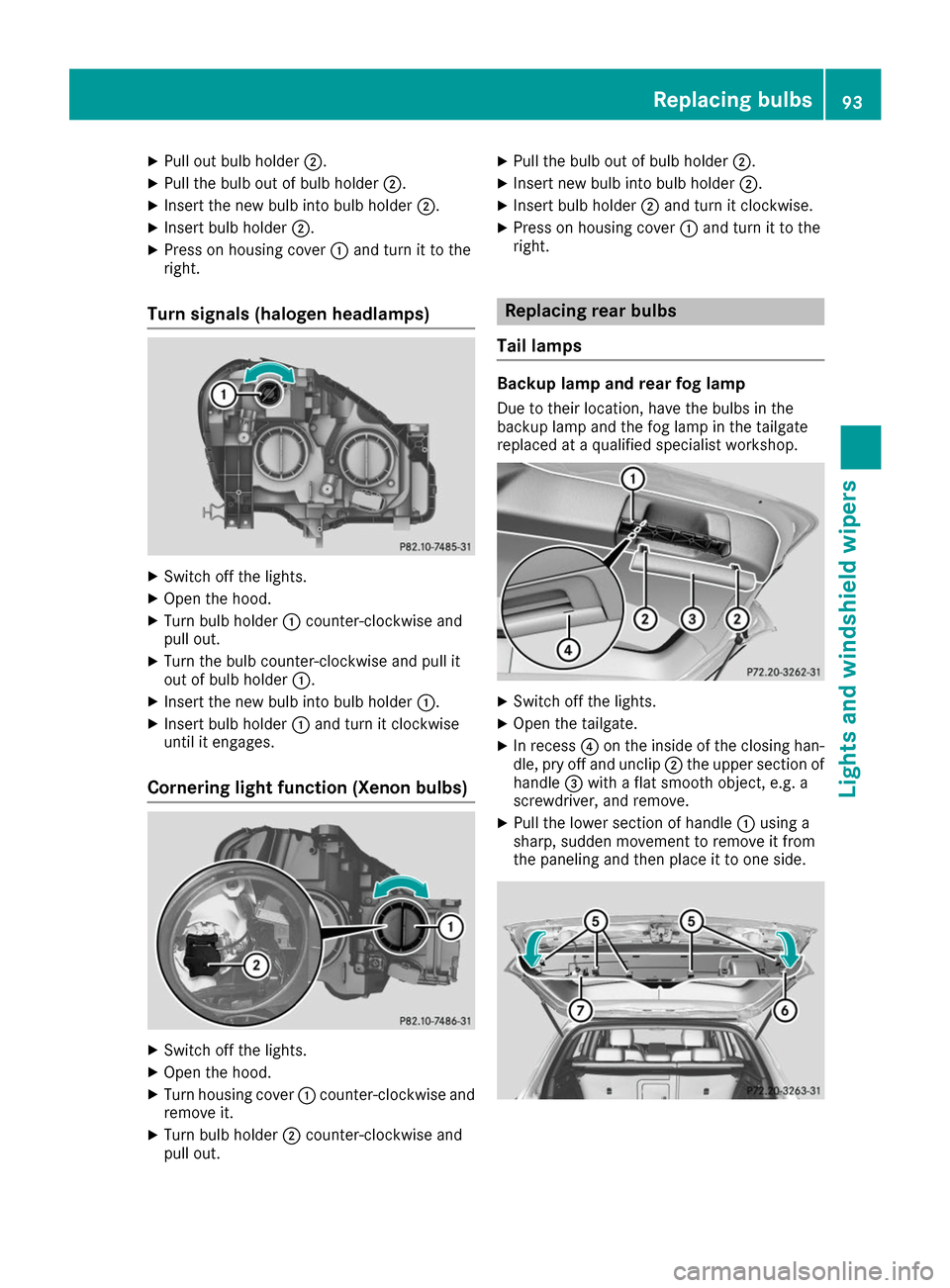
X Turn bulb holder 0043counter-clockwise and
pull out.
X Turn the bulb counter-clockwise and pull it
out of bulb holder 0043.
X Insert the new bulb into bulb holder 0043.
X Insert bulb holder 0043and turn it clockwise
until it engages.
Cornering light function (Xenon bulbs) X
Switch off the lights.
X Open the hood.
X Turn housing cover 0043counter-clockwise and
remove it.
X Turn bulb holder 0044counter-clockwise and
pull out. X
Pull the bulb out of bulb holder 0044.
X Insert new bulb into bulb holder 0044.
X Insert bulb holder 0044and turn it clockwise.
X Press on housing cover 0043and turn it to the
right. Replacing rear bulbs
Tail lamps Backup lamp and rear fog lamp
Due to their location, have the bulbs in the
backup lamp and the fog lamp in the tailgate
replaced at a qualified specialist workshop. X
Switch off the lights.
X Open the tailgate.
X In recess 0085on the inside of the closing han-
dle, pry off and unclip 0044the upper section of
handle 0087with a flat smooth object, e.g. a
screwdriver, and remove.
X Pull the lower section of handle 0043using a
sharp, sudden movement to remove it from
the paneling and then place it to one side. Replacing bulbs
93Lights and windshield wipers Z
Page 118 of 290
The braking performance of the electric motor
using recuperative braking is, in some operating modes, either reduced or not effective:
R when the condition of charge of the high-volt-
age battery increases
R if the high-voltage battery is not yet at a nor-
mal operating temperature
R when driving close to the vehicle's maximum
design speed
R when the vehicle is almost stationary
R in transmission position N
R during and after ESP stability control
If you do not make an additional effort to apply
the brake yourself, the braking effect may not be sufficient. If necessary, counteract the reduced
regenerative braking effect by applying the
brake yourself.
Radar-based recuperation The vehicle uses the Active Brake Assist sensors
during radar-based recuperation ( DAUTO
). The
sensors detect the distance to the vehicle ahead
and its speed. The intensity of recuperation is
then automatically adjusted to the current traf-
fic situation.
The range can then be increased by storing
energy efficiently. Adjustment is infinitely vari-
able from overrun mode (no recuperation) to
maximum recuperation.
Maintain sufficient distance to the vehicle in
front. Mercedes-Benz recommends that you
activate Active Brake Assist as a visual and
acoustic aid.
Examples of radar-based recuperation:
R Approaching a slower vehicle, a decelerating
vehicle or when following a vehicle downhill.
Your vehicle decelerates slightly and increa-
ses recuperation.
R Driving when no vehicle is detected in front or
when a vehicle is detected in the far distance or an accelerating vehicle is detected. Your
vehicle switches to overrun mode at higher
speeds.
R Driving on a steep downhill slope. Accelera-
tion downhill is reduced and recuperation is
increased. This is comparable with shifting
down when driving downhill. X
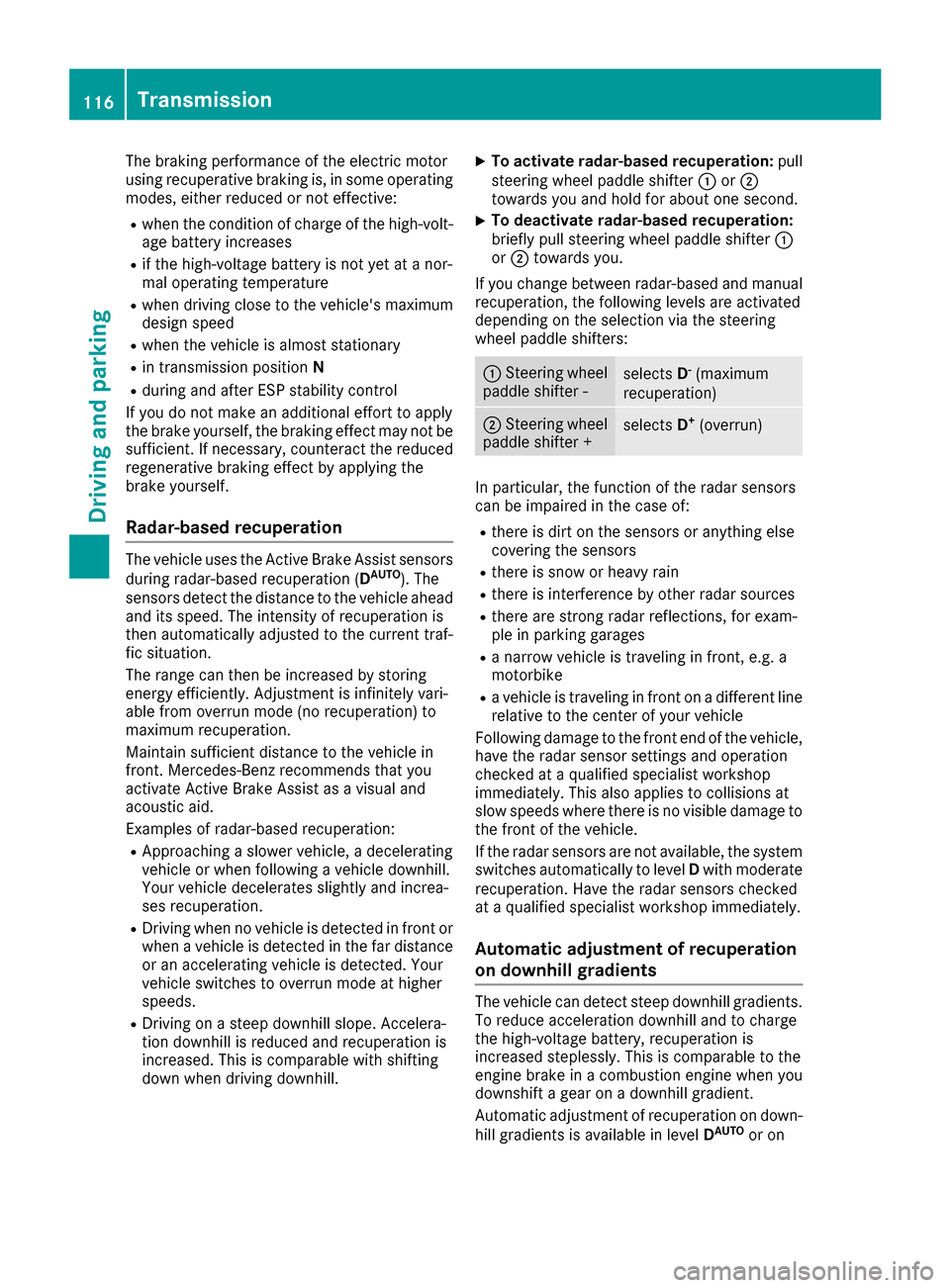
To activate radar-based recuperation: pull
steering wheel paddle shifter 0043or0044
towards you and hold for about one second.
X To deactivate radar-based recuperation:
briefly pull steering wheel paddle shifter 0043
or 0044 towards you.
If you change between radar-based and manual
recuperation, the following levels are activated
depending on the selection via the steering
wheel paddle shifters: 0043
Steering wheel
paddle shifter - selects
D-
(maximum
recuperation) 0044
Steering wheel
paddle shifter + selects
D+
(overrun) In particular, the function of the radar sensors
can be impaired in the case of:
R there is dirt on the sensors or anything else
covering the sensors
R there is snow or heavy rain
R there is interference by other radar sources
R there are strong radar reflections, for exam-
ple in parking garages
R a narrow vehicle is traveling in front, e.g. a
motorbike
R a vehicle is traveling in front on a different line
relative to the center of your vehicle
Following damage to the front end of the vehicle,
have the radar sensor settings and operation
checked at a qualified specialist workshop
immediately. This also applies to collisions at
slow speeds where there is no visible damage to the front of the vehicle.
If the radar sensors are not available, the system switches automatically to level Dwith moderate
recuperation. Have the radar sensors checked
at a qualified specialist workshop immediately.
Automatic adjustment of recuperation
on downhill gradients The vehicle can detect steep downhill gradients.
To reduce acceleration downhill and to charge
the high-voltage battery, recuperation is
increased steplessly. This is comparable to the
engine brake in a combustion engine when you
downshift a gear on a downhill gradient.
Automatic adjustment of recuperation on down-
hill gradients is available in level DAUTO
or on 116
TransmissionDriving and parking
Page 136 of 290
Wet roads
If you have driven for a long time in heavy rain
without braking, there may be a delayed reac-
tion from the brakes when braking for the first
time. This may also occur after the vehicle has
been washed or driven through deep water.
You have to depress the brake pedal more
firmly. Maintain a greater distance from the
vehicle in front.
After driving on a wet road or having the vehicle
washed, brake firmly while paying attention to
the traffic conditions. This will warm up the
brake discs, thereby drying them more quickly
and protecting them against corrosion.
Limited braking performance on salt-
treated roads If you drive on salted roads, a layer of salt resi-
due may form on the brake discs and brake
pads. This can result in a significantly longer
braking distance.
R In order to prevent any salt build-up, apply the
brakes occasionally while paying attention to
the traffic conditions.
R Carefully depress the brake pedal and the
beginning and end of a journey.
R Maintain a greater distance to the vehicle
ahead.
Servicing the brakes !
The brake fluid level may be too low, if:
R if the red brake warning lamp lights up in
the instrument cluster and
R you hear a warning tone while the engine is
running
Observe additional warning messages in the
multifunction display.
The brake fluid level may be too low due to
brake pad wear or leaking brake lines.
Have the brake system checked immediately.
Consult a qualified specialist workshop to
arrange this.
! A function or performance test should only
be carried out on a 2-axle dynamometer. If
you wish to operate the vehicle on such a
dynamometer, please consult a qualified spe- cialist workshop in advance. You could oth-
erwise damage the drive train or the brake
system. !
As the ESP ®
system operates automatically,
the engine and the ignition must be switched
off (the SmartKey must be in position 0or 1in
the ignition lock) if:
R the electric parking brake is tested on a
brake dynamometer (for a maximum of
ten seconds)
R the vehicle is towed with the front axle
raised.
Braking triggered automatically by ESP ®
may
seriously damage the brake system.
All checks and maintenance work on the brake
system must be carried out at a qualified spe-
cialist workshop.
Have brake pads installed and brake fluid
replaced at a qualified specialist workshop.
If the brake system has only been subject to
moderate loads, you should test the functional- ity of your brakes at regular intervals.
You can find a description of Brake Assist (BAS)
on (Y page 59).
Mercedes-Benz recommends that you only have brake pads/linings installed on your vehicle
which have been approved for Mercedes-Benz
vehicles or which correspond to an equivalent
quality standard. Brake pads/linings which havenot been approved for Mercedes-Benz vehicles
or which are not of an equivalent quality could
affect your vehicle's operating safety.
Mercedes-Benz recommends that you only use
brake fluid that has been specially approved for
your vehicle by Mercedes-Benz, or which corre- sponds to an equivalent quality standard. Brakefluid which has not been approved for
Mercedes-Benz vehicles or which is not of an
equivalent quality could affect your vehicle's
operating safety.
Checking brake lining thickness You can measure the break pad/lining thick-
ness using a test gage. Color-coding (green or
red) on the test gage allows you to determine
whether the brake pad/lining thickness is still
sufficient. The test gage is in the vehicle docu-
ment wallet in the glove box. 134
Driving tipsDriving and parking
Page 142 of 290
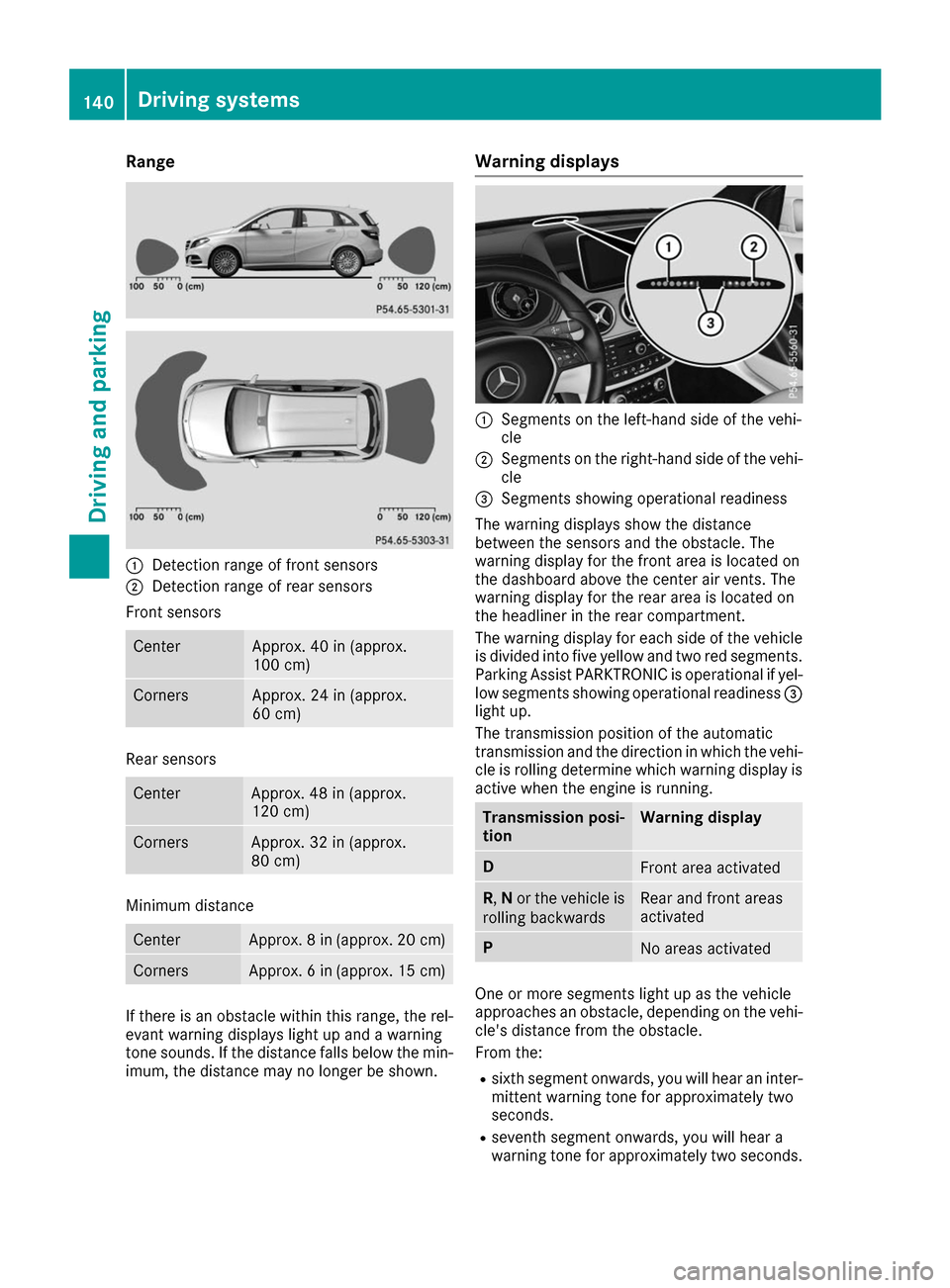
Range
0043
Detection range of front sensors
0044 Detection range of rear sensors
Front sensors Center Approx. 40 in (approx.
100 cm) Corners Approx. 24 in (approx.
60 cm) Rear sensors
Center Approx. 48 in (approx.
120 cm)
Corners Approx. 32 in (approx.
80 cm)
Minimum distance
Center Approx. 8 in (approx. 20 cm)
Corners Approx. 6 in (approx. 15 cm)
If there is an obstacle within this range, the rel-
evant warning displays light up and a warning
tone sounds. If the distance falls below the min- imum, the distance may no longer be shown. Warning displays
0043
Segments on the left-hand side of the vehi-
cle
0044 Segments on the right-hand side of the vehi-
cle
0087 Segments showing operational readiness
The warning displays show the distance
between the sensors and the obstacle. The
warning display for the front area is located on
the dashboard above the center air vents. The
warning display for the rear area is located on
the headliner in the rear compartment.
The warning display for each side of the vehicle
is divided into five yellow and two red segments.
Parking Assist PARKTRONIC is operational if yel-
low segments showing operational readiness 0087
light up.
The transmission position of the automatic
transmission and the direction in which the vehi-
cle is rolling determine which warning display is active when the engine is running. Transmission posi-
tion Warning display
D
Front area activated
R,
Nor the vehicle is
rolling backwards Rear and front areas
activated
P
No areas activated
One or more segments light up as the vehicle
approaches an obstacle, depending on the vehi-
cle's distance from the obstacle.
From the:
R sixth segment onwards, you will hear an inter-
mittent warning tone for approximately two
seconds.
R seventh segment onwards, you will hear a
warning tone for approximately two seconds. 140
Driving systemsDriving and parking
Page 146 of 290
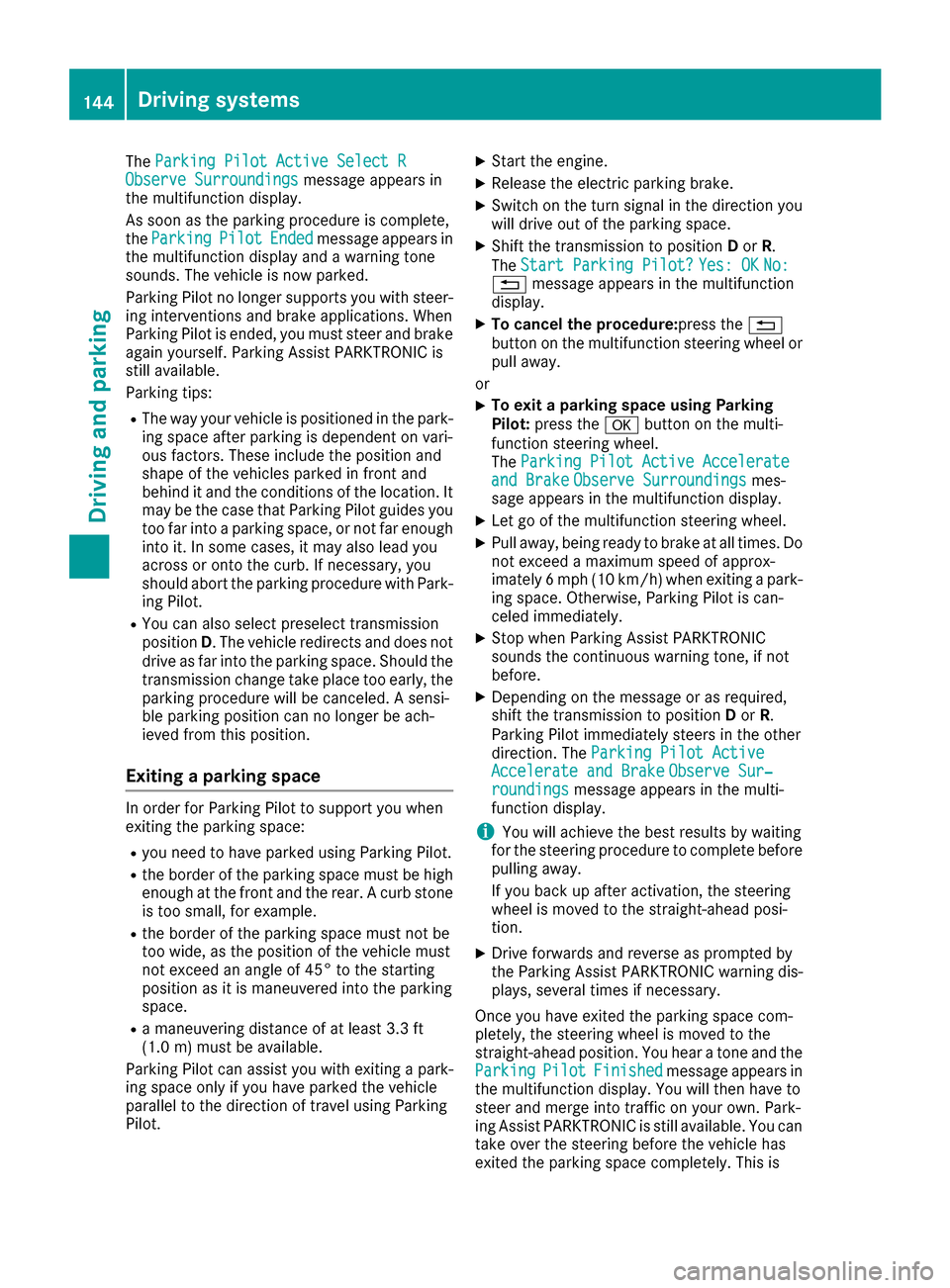
The
Parking Pilot Active Select R
Parking Pilot Active Select R
Observe Surroundings
Observe Surroundings message appears in
the multifunction display.
As soon as the parking procedure is complete,
the Parking Parking Pilot
PilotEnded
Endedmessage appears in
the multifunction display and a warning tone
sounds. The vehicle is now parked.
Parking Pilot no longer supports you with steer-
ing interventions and brake applications. When
Parking Pilot is ended, you must steer and brake again yourself. Parking Assist PARKTRONIC is
still available.
Parking tips:
R The way your vehicle is positioned in the park-
ing space after parking is dependent on vari-
ous factors. These include the position and
shape of the vehicles parked in front and
behind it and the conditions of the location. It
may be the case that Parking Pilot guides you
too far into a parking space, or not far enough
into it. In some cases, it may also lead you
across or onto the curb. If necessary, you
should abort the parking procedure with Park- ing Pilot.
R You can also select preselect transmission
position D. The vehicle redirects and does not
drive as far into the parking space. Should the transmission change take place too early, the
parking procedure will be canceled. A sensi-
ble parking position can no longer be ach-
ieved from this position.
Exiting a parking space In order for Parking Pilot to support you when
exiting the parking space:
R
you need to have parked using Parking Pilot.
R the border of the parking space must be high
enough at the front and the rear. A curb stone
is too small, for example.
R the border of the parking space must not be
too wide, as the position of the vehicle must
not exceed an angle of 45° to the starting
position as it is maneuvered into the parking
space.
R a maneuvering distance of at least 3.3 ft
(1.0 m) must be available.
Parking Pilot can assist you with exiting a park-
ing space only if you have parked the vehicle
parallel to the direction of travel using Parking
Pilot. X
Start the engine.
X Release the electric parking brake.
X Switch on the turn signal in the direction you
will drive out of the parking space.
X Shift the transmission to position Dor R.
The Start Parking Pilot?
Start Parking Pilot? Yes: OK Yes: OKNo:
No:
0038 message appears in the multifunction
display.
X To cancel the procedure: press the0038
button on the multifunction steering wheel or
pull away.
or X To exit a parking space using Parking
Pilot:
press the 0076button on the multi-
function steering wheel.
The Parking Pilot Active Accelerate
Parking Pilot Active Accelerate
and Brake and Brake Observe Surroundings
Observe Surroundings mes-
sage appears in the multifunction display.
X Let go of the multifunction steering wheel.
X Pull away, being ready to brake at all times. Do
not exceed a maximum speed of approx-
imately 6 mph (10 km/h) when exiting a park-
ing space. Otherwise, Parking Pilot is can-
celed immediately.
X Stop when Parking Assist PARKTRONIC
sounds the continuous warning tone, if not
before.
X Depending on the message or as required,
shift the transmission to position Dor R.
Parking Pilot immediately steers in the other
direction. The Parking Pilot Active
Parking Pilot Active
Accelerate and Brake Accelerate and Brake Observe Sur‐
Observe Sur‐
roundings
roundings message appears in the multi-
function display.
i You will achieve the best results by waiting
for the steering procedure to complete before
pulling away.
If you back up after activation, the steering
wheel is moved to the straight-ahead posi-
tion.
X Drive forwards and reverse as prompted by
the Parking Assist PARKTRONIC warning dis-
plays, several times if necessary.
Once you have exited the parking space com-
pletely, the steering wheel is moved to the
straight-ahead position. You hear a tone and the
Parking Parking Pilot
PilotFinished
Finished message appears in
the multifunction display. You will then have to
steer and merge into traffic on your own. Park-
ing Assist PARKTRONIC is still available. You can take over the steering before the vehicle has
exited the parking space completely. This is 144
Driving systemsDriving and parking
Page 180 of 290
Display messages
Possible causes/consequences and
0050
0050Solutions X
Visit a qualified specialist workshop immediately.
For further information about the Occupant Classification System, see (Y page 46). Lights
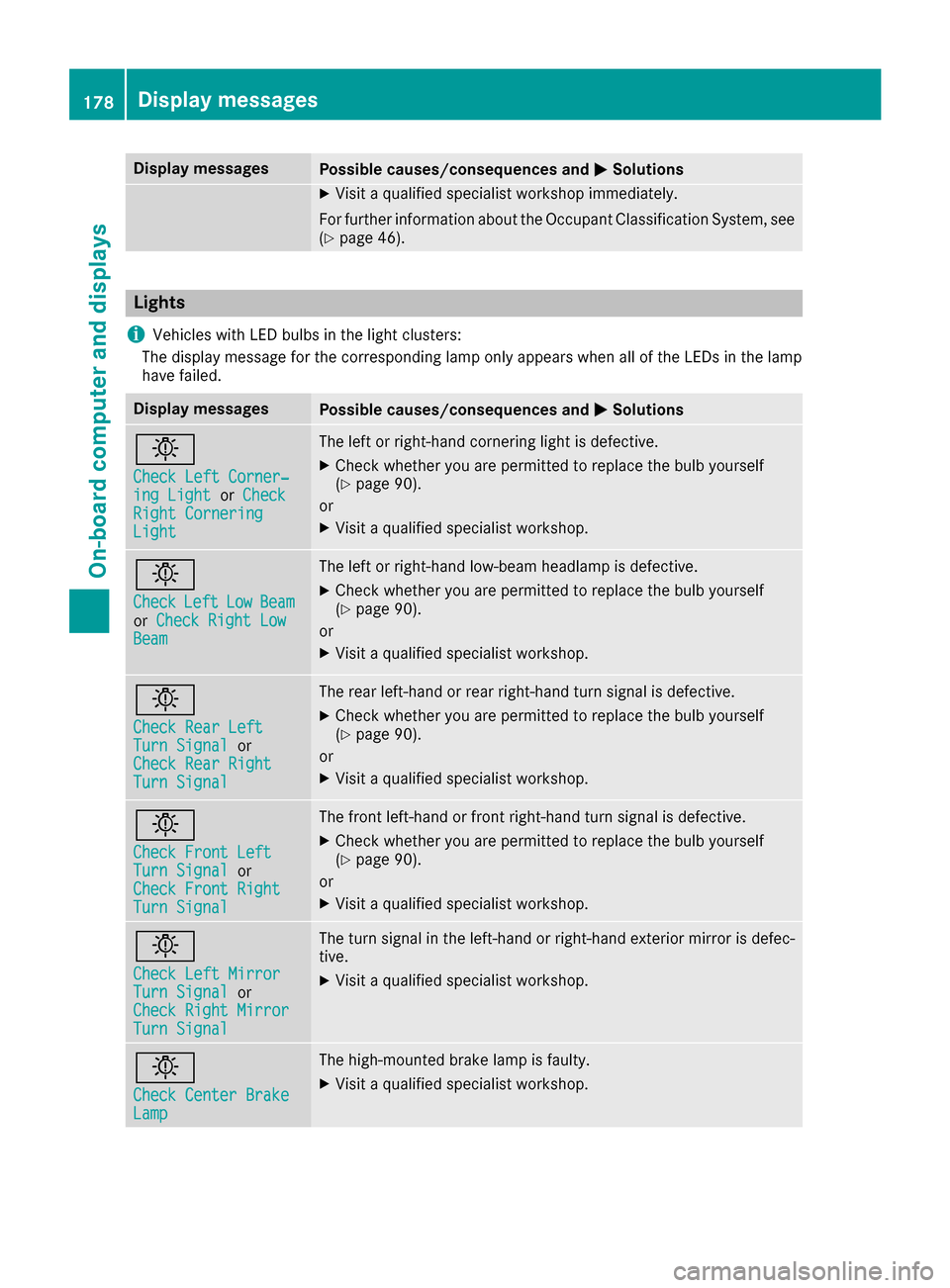
i Vehicles with LED bulbs in the light clusters:
The display message for the corresponding lamp only appears when all of the LEDs in the lamp
have failed. Display messages
Possible causes/consequences and
0050 0050Solutions 0049
Check Left Corner‐ Check Left Corner‐
ing Light ing Light
orCheck
Check
Right Cornering
Right Cornering
Light Light The left or right-hand cornering light is defective.
X Check whether you are permitted to replace the bulb yourself
(Y page 90).
or X Visit a qualified specialist workshop. 0049
Check Check
Left
Left Low
LowBeam
Beam
or Check Right Low
Check Right Low
Beam
Beam The left or right-hand low-beam headlamp is defective.
X Check whether you are permitted to replace the bulb yourself
(Y page 90).
or X Visit a qualified specialist workshop. 0049
Check Rear Left Check Rear Left
Turn Signal Turn Signal
or
Check Rear Right
Check Rear Right
Turn Signal Turn Signal The rear left-hand or rear right-hand turn signal is defective.
X
Check whether you are permitted to replace the bulb yourself
(Y page 90).
or
X Visit a qualified specialist workshop. 0049
Check Front Left Check Front Left
Turn Signal Turn Signal
or
Check Front Right
Check Front Right
Turn Signal Turn Signal The front left-hand or front right-hand turn signal is defective.
X
Check whether you are permitted to replace the bulb yourself
(Y page 90).
or
X Visit a qualified specialist workshop. 0049
Check Left Mirror Check Left Mirror
Turn Signal Turn Signal
or
Check Right Mirror
Check Right Mirror
Turn Signal Turn Signal The turn signal in the left-hand or right-hand exterior mirror is defec-
tive.
X Visit a qualified specialist workshop. 0049
Check Center Brake Check Center Brake
Lamp Lamp The high-mounted brake lamp is faulty.
X
Visit a qualified specialist workshop. 178
Display
messagesOn-board computer and displays
Page 182 of 290
Display messages
Possible causes/consequences and
0050
0050Solutions 0049
Check Rear Left Check Rear Left
Sidemarker Lamp Sidemarker Lamp
or
Check Rear Right
Check Rear Right
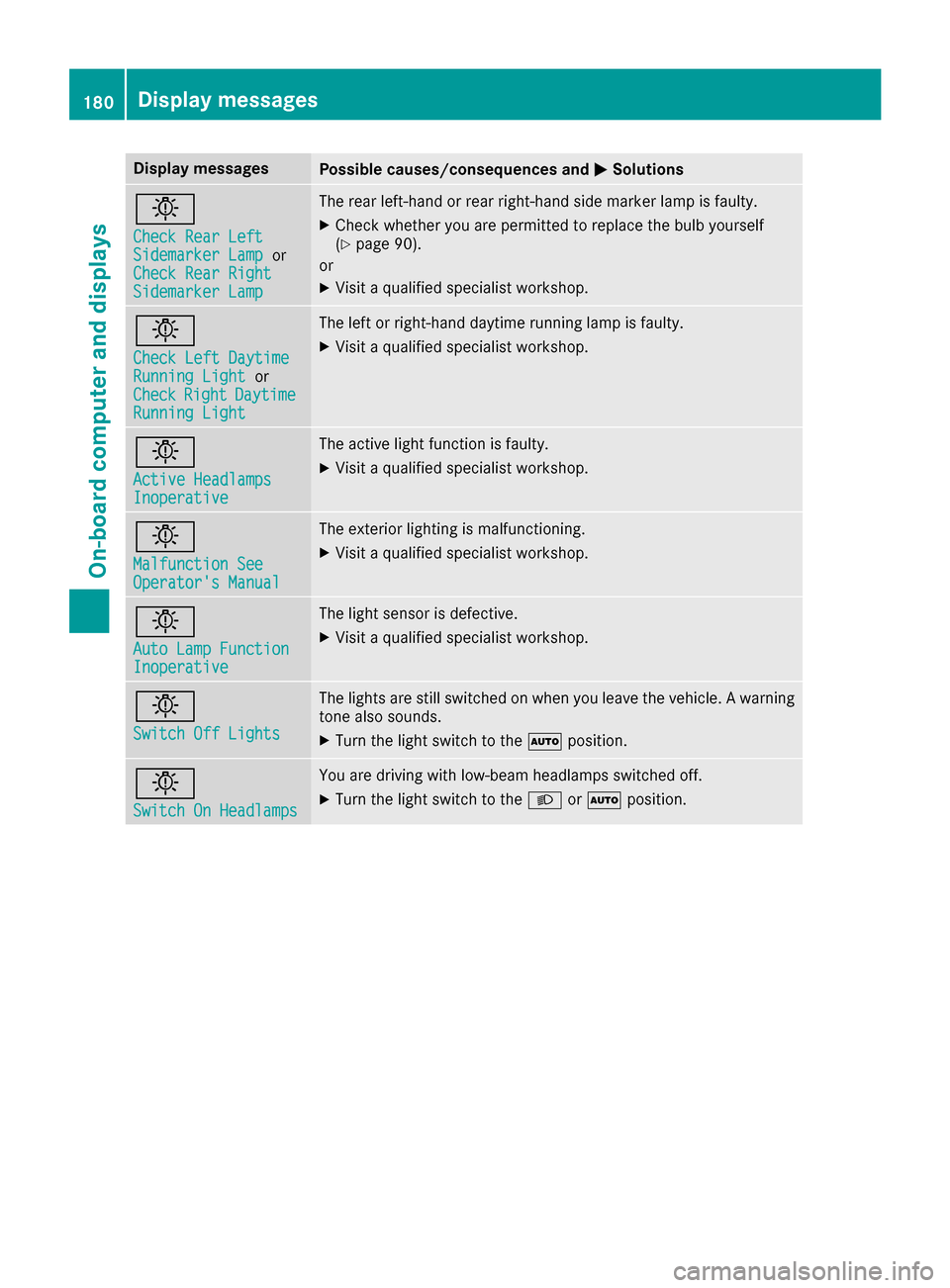
Sidemarker Lamp Sidemarker Lamp The rear left-hand or rear right-hand side marker lamp is faulty.
X Check whether you are permitted to replace the bulb yourself
(Y page 90).
or
X Visit a qualified specialist workshop. 0049
Check Left Daytime Check Left Daytime
Running Light Running Light
or
Check
Check Right
RightDaytime
Daytime
Running Light
Running Light The left or right-hand daytime running lamp is faulty.
X Visit a qualified specialist workshop. 0049
Active Headlamps Active Headlamps
Inoperative Inoperative The active light function is faulty.
X Visit a qualified specialist workshop. 0049
Malfunction See Malfunction See
Operator's Manual Operator's Manual The exterior lighting is malfunctioning.
X Visit a qualified specialist workshop. 0049
Auto Lamp Function Auto Lamp Function
Inoperative Inoperative The light sensor is defective.
X Visit a qualified specialist workshop. 0049
Switch Off Lights Switch Off Lights The lights are still switched on when you leave the vehicle. A warning
tone also sounds.
X Turn the light switch to the 0058position. 0049
Switch On Headlamps Switch On Headlamps You are driving with low-beam headlamps switched off.
X Turn the light switch to the 0058or0058 position. 180
Display
messagesOn-board computer and displays
Page 212 of 290
X
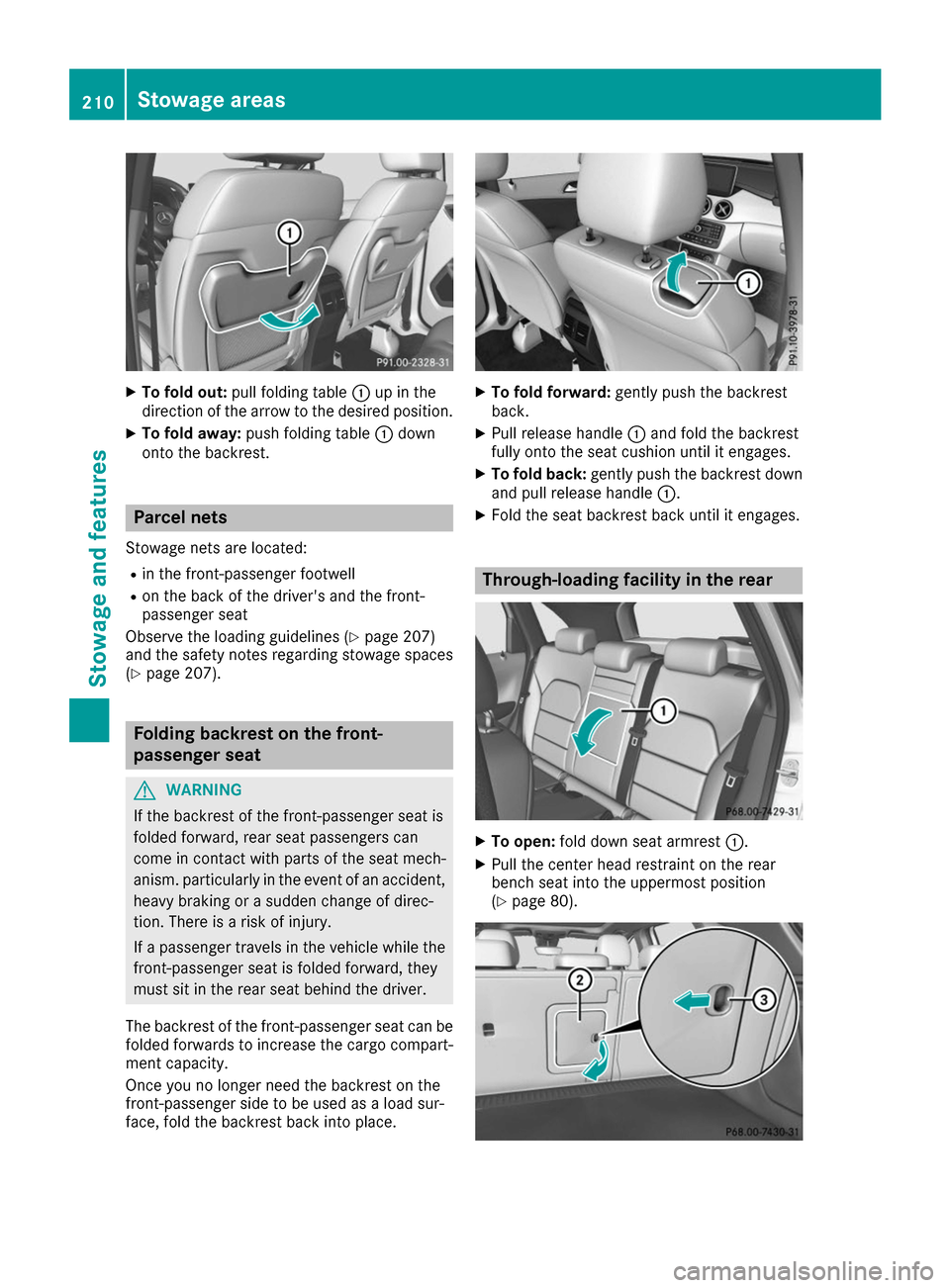
To fold out: pull folding table 0043up in the
direction of the arrow to the desired position.
X To fold away: push folding table 0043down
onto the backrest. Parcel nets
Stowage nets are located: R in the front-passenger footwell
R on the back of the driver's and the front-
passenger seat
Observe the loading guidelines (Y page 207)
and the safety notes regarding stowage spaces
(Y page 207). Folding backrest on the front-
passenger seat
G
WARNING
If the backrest of the front-passenger seat is
folded forward, rear seat passengers can
come in contact with parts of the seat mech-
anism. particularly in the event of an accident, heavy braking or a sudden change of direc-
tion. There is a risk of injury.
If a passenger travels in the vehicle while the
front-passenger seat is folded forward, they
must sit in the rear seat behind the driver.
The backrest of the front-passenger seat can be
folded forwards to increase the cargo compart-
ment capacity.
Once you no longer need the backrest on the
front-passenger side to be used as a load sur-
face, fold the backrest back into place. X
To fold forward: gently push the backrest
back.
X Pull release handle 0043and fold the backrest
fully onto the seat cushion until it engages.
X To fold back: gently push the backrest down
and pull release handle 0043.
X Fold the seat backrest back until it engages. Through-loading facility in the rear
X
To open: fold down seat armrest 0043.
X Pull the center head restraint on the rear
bench seat into the uppermost position
(Y page 80). 210
Stowage areasSto
wage an d features
Page 213 of 290
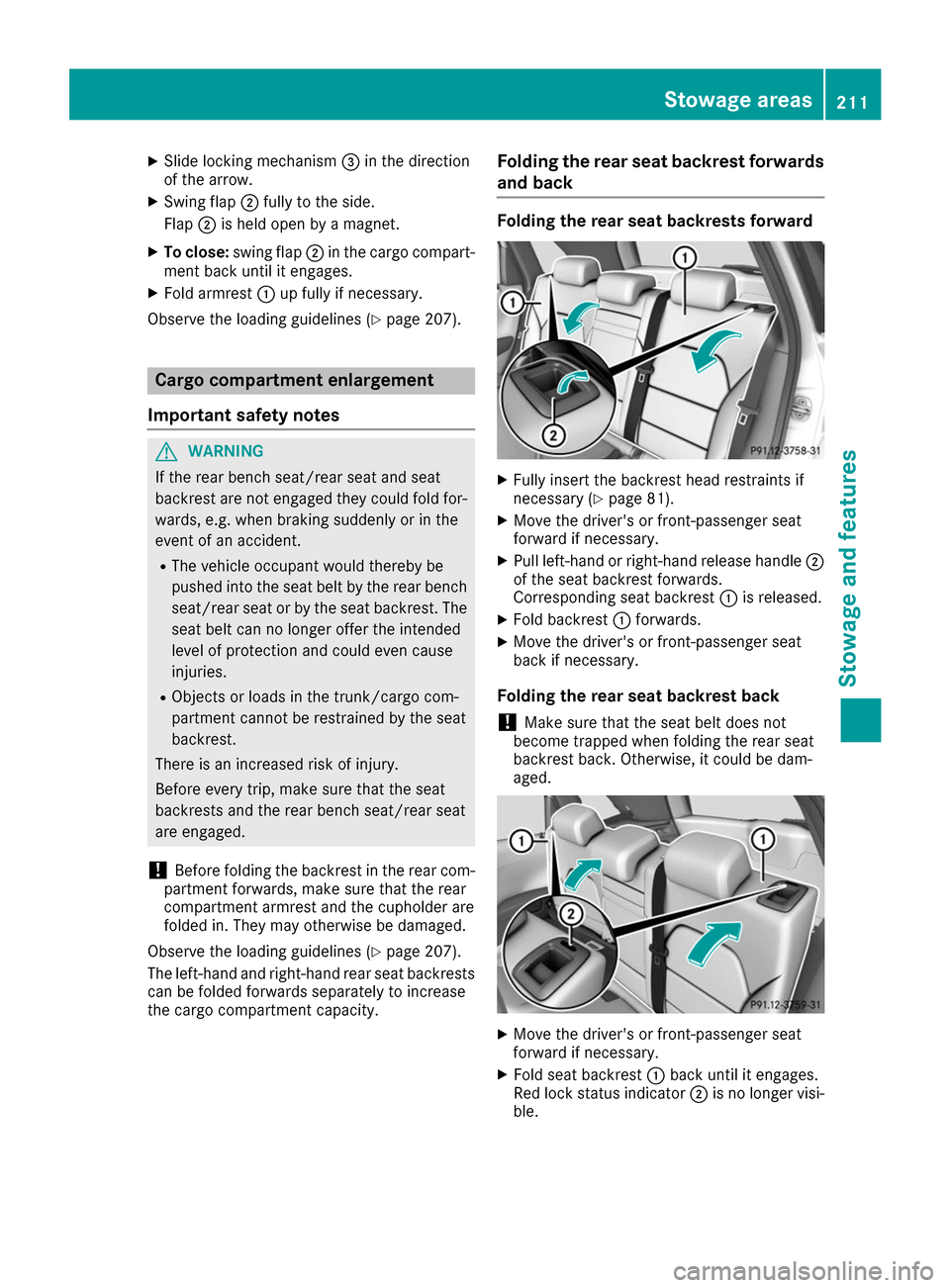
X
Slide locking mechanism 0087in the direction
of the arrow.
X Swing flap 0044fully to the side.
Flap 0044is held open by a magnet.
X To close: swing flap 0044in the cargo compart-
ment back until it engages.
X Fold armrest 0043up fully if necessary.
Observe the loading guidelines (Y page 207).Cargo compartment enlargement
Important safety notes G
WARNING
If the rear bench seat/rear seat and seat
backrest are not engaged they could fold for- wards, e.g. when braking suddenly or in the
event of an accident.
R The vehicle occupant would thereby be
pushed into the seat belt by the rear bench
seat/rear seat or by the seat backrest. The
seat belt can no longer offer the intended
level of protection and could even cause
injuries.
R Objects or loads in the trunk/cargo com-
partment cannot be restrained by the seat
backrest.
There is an increased risk of injury.
Before every trip, make sure that the seat
backrests and the rear bench seat/rear seat
are engaged.
! Before folding the backrest in the rear com-
partment forwards, make sure that the rear
compartment armrest and the cupholder are
folded in. They may otherwise be damaged.
Observe the loading guidelines (Y page 207).
The left-hand and right-hand rear seat backrests can be folded forwards separately to increase
the cargo compartment capacity. Folding the rear seat backrest forwards
and back Folding the rear seat backrests forward
X
Fully insert the backrest head restraints if
necessary (Y page 81).
X Move the driver's or front-passenger seat
forward if necessary.
X Pull left-hand or right-hand release handle 0044
of the seat backrest forwards.
Corresponding seat backrest 0043is released.
X Fold backrest 0043forwards.
X Move the driver's or front-passenger seat
back if necessary.
Folding the rear seat backrest back
! Make sure that the seat belt does not
become trapped when folding the rear seat
backrest back. Otherwise, it could be dam-
aged. X
Move the driver's or front-passenger seat
forward if necessary.
X Fold seat backrest 0043back until it engages.
Red lock status indicator 0044is no longer visi-
ble. Stowage areas
211Stowage and features Z