warning light MERCEDES-BENZ B-Class 2017 W246 Owner's Guide
[x] Cancel search | Manufacturer: MERCEDES-BENZ, Model Year: 2017, Model line: B-Class, Model: MERCEDES-BENZ B-Class 2017 W246Pages: 290, PDF Size: 19.81 MB
Page 86 of 290
Exterior mirrors
Adjusting the exterior mirrors G
WARNING
You could lose control of your vehicle if you do the following while driving:
R adjust the driver's seat, head restraint,
steering wheel or mirrors
R fasten the seat belt
There is a risk of an accident.
Adjust the driver's seat, head restraint, steer-
ing wheel and mirror and fasten your seat belt before starting the vehicle's drive system. G
WARNING
The exterior mirror on the front-passenger
side reduces the size of the image. Visible
objects are actually closer than they appear.
This means that you could misjudge the dis-
tance from road users traveling behind, e.g.
when changing lane. There is a risk of an acci-
dent.
For this reason, always make sure of the
actual distance from the road users traveling
behind by glancing over your shoulder. X
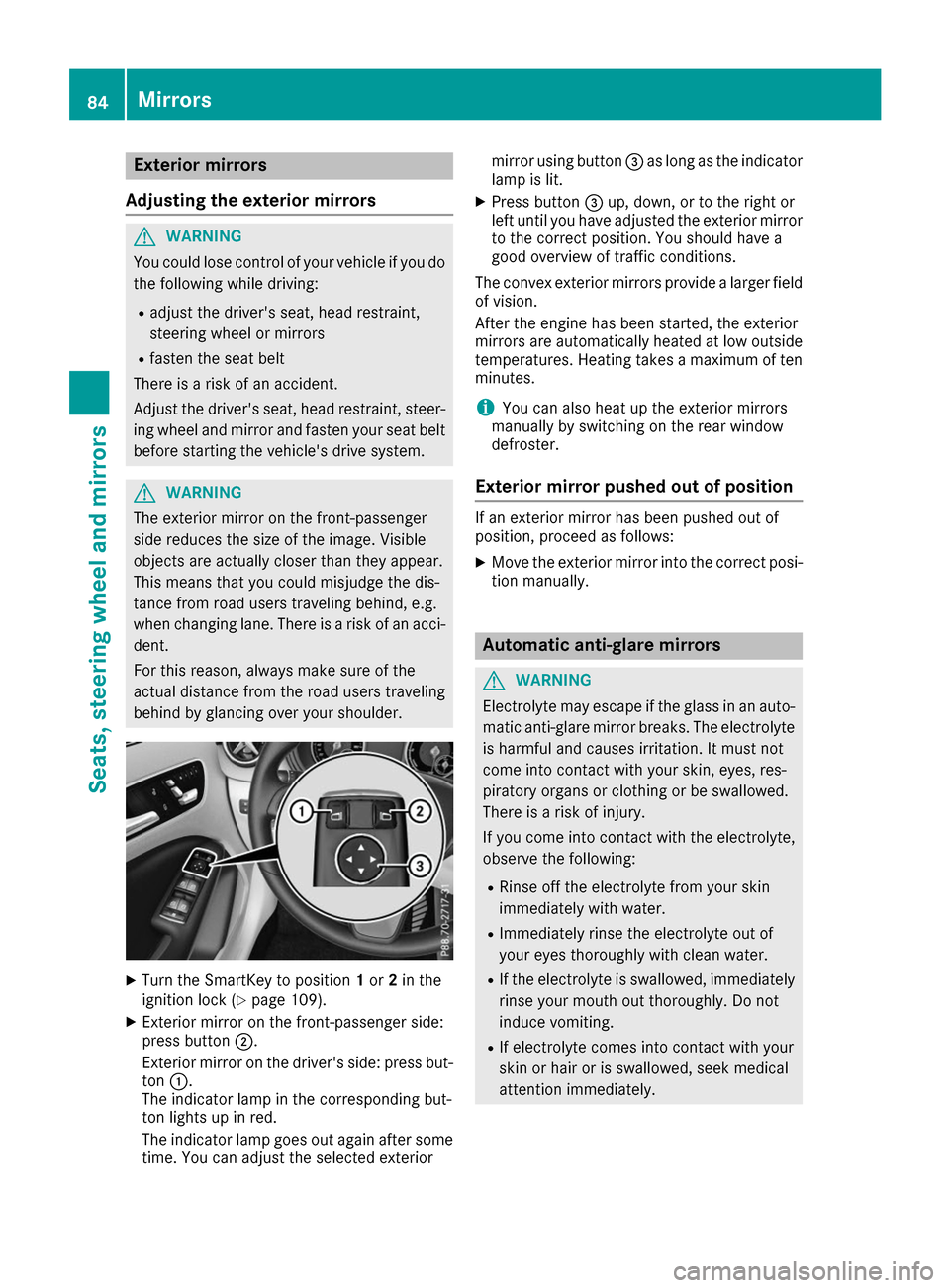
Turn the SmartKey to position 1or 2in the
ignition lock (Y page 109).
X Exterior mirror on the front-passenger side:
press button 0044.
Exterior mirror on the driver's side: press but- ton 0043.
The indicator lamp in the corresponding but-
ton lights up in red.
The indicator lamp goes out again after some
time. You can adjust the selected exterior mirror using button
0087as long as the indicator
lamp is lit.
X Press button 0087up, down, or to the right or
left until you have adjusted the exterior mirror
to the correct position. You should have a
good overview of traffic conditions.
The convex exterior mirrors provide a larger field
of vision.
After the engine has been started, the exterior
mirrors are automatically heated at low outside temperatures. Heating takes a maximum of ten
minutes.
i You can also heat up the exterior mirrors
manually by switching on the rear window
defroster.
Exterior mirror pushed out of position If an exterior mirror has been pushed out of
position, proceed as follows:
X Move the exterior mirror into the correct posi-
tion manually. Automatic anti-glare mirrors
G
WARNING
Electrolyte may escape if the glass in an auto- matic anti-glare mirror breaks. The electrolyte
is harmful and causes irritation. It must not
come into contact with your skin, eyes, res-
piratory organs or clothing or be swallowed.
There is a risk of injury.
If you come into contact with the electrolyte,
observe the following:
R Rinse off the electrolyte from your skin
immediately with water.
R Immediately rinse the electrolyte out of
your eyes thoroughly with clean water.
R If the electrolyte is swallowed, immediately
rinse your mouth out thoroughly. Do not
induce vomiting.
R If electrolyte comes into contact with your
skin or hair or is swallowed, seek medical
attention immediately. 84
MirrorsSeats, steering wheel and mirrors
Page 87 of 290
R
Immediately change out of clothing which
has come into contact with electrolyte.
R If an allergic reaction occurs, seek medical
attention immediately.
The "Automatic anti-glare mirrors" function is
only available if the vehicle is equipped with the
"Mirrors package".
The rear-view mirror and the exterior mirror on
the driver's side automatically go into anti-glare mode if:
R the ignition is switched on and
R incident light from headlamps strikes the sen-
sor in the rear-view mirror
The mirrors do not go into anti-glare mode if
reverse gear is engaged or if the interior lighting
is switched on. Parking position for the exterior mir-
ror on the front-passenger side
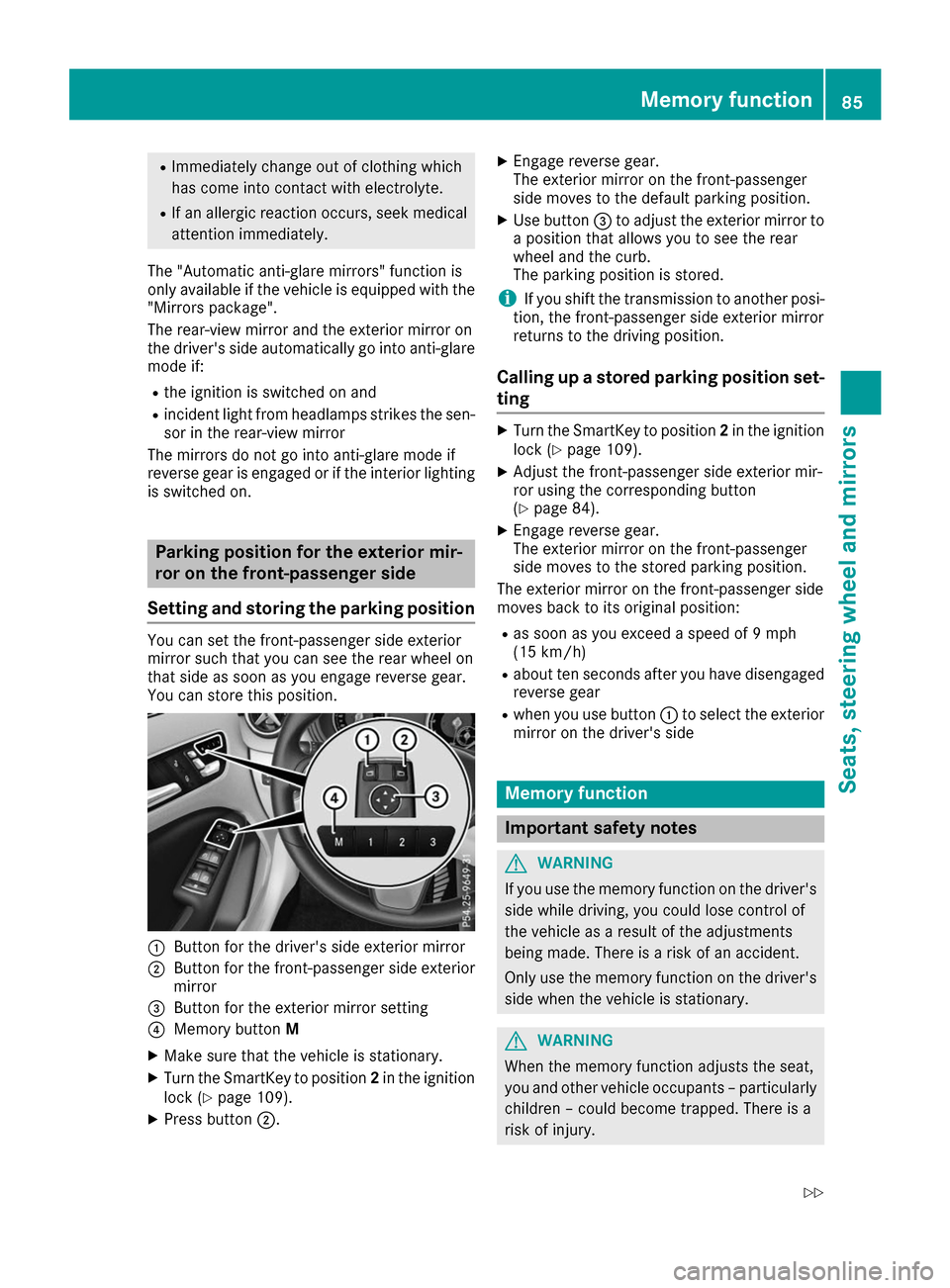
Setting and storing the parking position You can set the front-passenger side exterior
mirror such that you can see the rear wheel on
that side as soon as you engage reverse gear.
You can store this position.
0043
Button for the driver's side exterior mirror
0044 Button for the front-passenger side exterior
mirror
0087 Button for the exterior mirror setting
0085 Memory button M
X Make sure that the vehicle is stationary.
X Turn the SmartKey to position 2in the ignition
lock (Y page 109).
X Press button 0044. X
Engage reverse gear.
The exterior mirror on the front-passenger
side moves to the default parking position.
X Use button 0087to adjust the exterior mirror to
a position that allows you to see the rear
wheel and the curb.
The parking position is stored.
i If you shift the transmission to another posi-
tion, the front-passenger side exterior mirror
returns to the driving position.
Calling up a stored parking position set- ting X
Turn the SmartKey to position 2in the ignition
lock (Y page 109).
X Adjust the front-passenger side exterior mir-
ror using the corresponding button
(Y page 84).
X Engage reverse gear.
The exterior mirror on the front-passenger
side moves to the stored parking position.
The exterior mirror on the front-passenger side
moves back to its original position:
R as soon as you exceed a speed of 9 mph
(15 km/h)
R about ten seconds after you have disengaged
reverse gear
R when you use button 0043to select the exterior
mirror on the driver's side Memory function
Important safety notes
G
WARNING
If you use the memory function on the driver's side while driving, you could lose control of
the vehicle as a result of the adjustments
being made. There is a risk of an accident.
Only use the memory function on the driver's
side when the vehicle is stationary. G
WARNING
When the memory function adjusts the seat,
you and other vehicle occupants – particularly children – could become trapped. There is a
risk of injury. Memory function
85Seats, steering wheel and mirrors
Z
Page 89 of 290
Exterior lighting
General notes
For reasons of safety, Mercedes-Benz recom-
mends that you drive with the lights switched on even during the daytime. In some countries,
operation of the headlamps varies due to legal
requirements and self-imposed obligations. Setting the exterior lighting
Setting options Exterior lighting can be set using the:
R light switch
R combination switch (Y page 88)
R on-board computer (Y page 166)
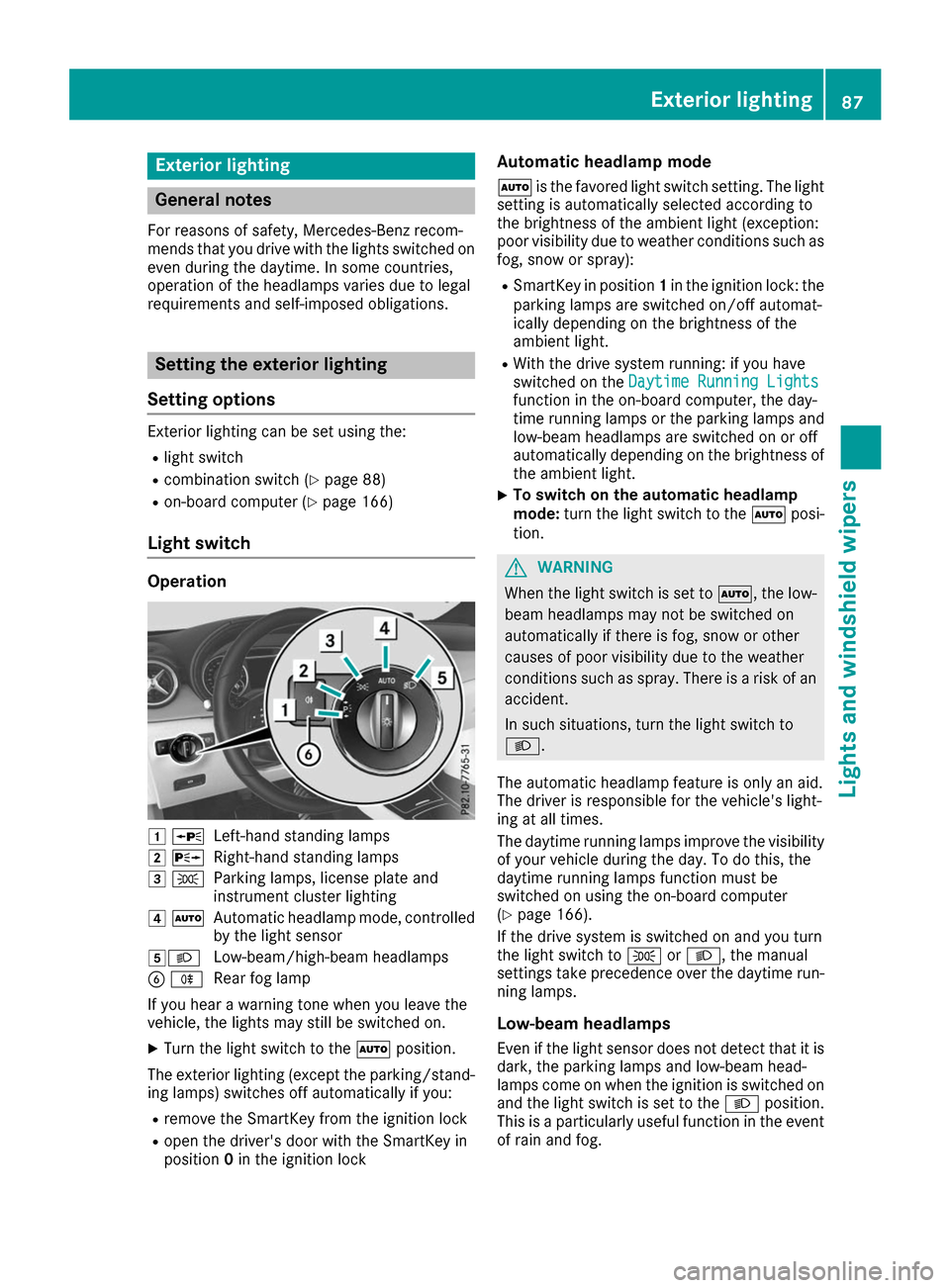
Light switch Operation
0047
0063
Left-hand standing lamps
0048 0064
Right-hand standing lamps
0049 0060
Parking lamps, license plate and
instrument cluster lighting
004A 0058
Automatic headlamp mode, controlled
by the light sensor
004B0058 Low-beam/high-beam headlamps
0084 005E
Rear fog lamp
If you hear a warning tone when you leave the
vehicle, the lights may still be switched on.
X Turn the light switch to the 0058position.
The exterior lighting (except the parking/stand- ing lamps) switches off automatically if you:
R remove the SmartKey from the ignition lock
R open the driver's door with the SmartKey in
position 0in the ignition lock Automatic headlamp mode
0058 is the favored light switch setting. The light
setting is automatically selected according to
the brightness of the ambient light (exception:
poor visibility due to weather conditions such as fog, snow or spray):
R SmartKey in position 1in the ignition lock: the
parking lamps are switched on/off automat-
ically depending on the brightness of the
ambient light.
R With the drive system running: if you have
switched on the Daytime Running Lights
Daytime Running Lights
function in the on-board computer, the day-
time running lamps or the parking lamps and
low-beam headlamps are switched on or off
automatically depending on the brightness of
the ambient light.
X To switch on the automatic headlamp
mode:
turn the light switch to the 0058posi-
tion. G
WARNING
When the light switch is set to 0058, the low-
beam headlamps may not be switched on
automatically if there is fog, snow or other
causes of poor visibility due to the weather
conditions such as spray. There is a risk of an
accident.
In such situations, turn the light switch to
0058.
The automatic headlamp feature is only an aid.
The driver is responsible for the vehicle's light-
ing at all times.
The daytime running lamps improve the visibility
of your vehicle during the day. To do this, the
daytime running lamps function must be
switched on using the on-board computer
(Y page 166).
If the drive system is switched on and you turn
the light switch to 0060or0058, the manual
settings take precedence over the daytime run- ning lamps.
Low-beam headlamps Even if the light sensor does not detect that it isdark, the parking lamps and low-beam head-
lamps come on when the ignition is switched on
and the light switch is set to the 0058position.
This is a particularly useful function in the event of rain and fog. Exterior lighting
87Lights and windshield wipers Z
Page 91 of 290
Hazard warning lamps
X
To switch on the hazard warning lamps:
press button
0043.
All turn signals flash. If you now switch on a
turn signal using the combination switch, only the turn signal lamp on the corresponding
side of the vehicle will flash.
X To switch off the hazard warning lamps:
press button
0043.
The hazard warning lamps automatically switch
on if:
R an air bag is deployed or
R the vehicle decelerates rapidly from a speed
of above 45 mph (70 km/h) and comes to a
standstill
The hazard warning lamps switch off automati-
cally if the vehicle reaches a speed of above
6 mph (10 km/h) again after a full brake appli-
cation.
The hazard warning lamps still operate if the
ignition is switched off. Cornering light function
The cornering light function improves the illu-
mination of the road over a wide angle in the direction you are turning, enabling better visi-
bility in tight bends, for example. It can only be
activated when the low-beam headlamps are
switched on.
Active:
R if you are driving at speeds below 25 mph
(40 km/h) and switch on the turn signal or
turn the steering wheel
R if you are driving at speeds between 25 mph
(40 km/h) and 45 mph (70 km/h) and turn
the steering wheel
The cornering lamp may remain lit for a short
time, but is automatically switched off after no
more than three minutes. Headlamps fogged up on the inside
Certain climatic and physical conditions may
cause moisture to form in the headlamp. This
moisture does not affect the functionality of the headlamp. Interior lighting
Overview of interior lighting
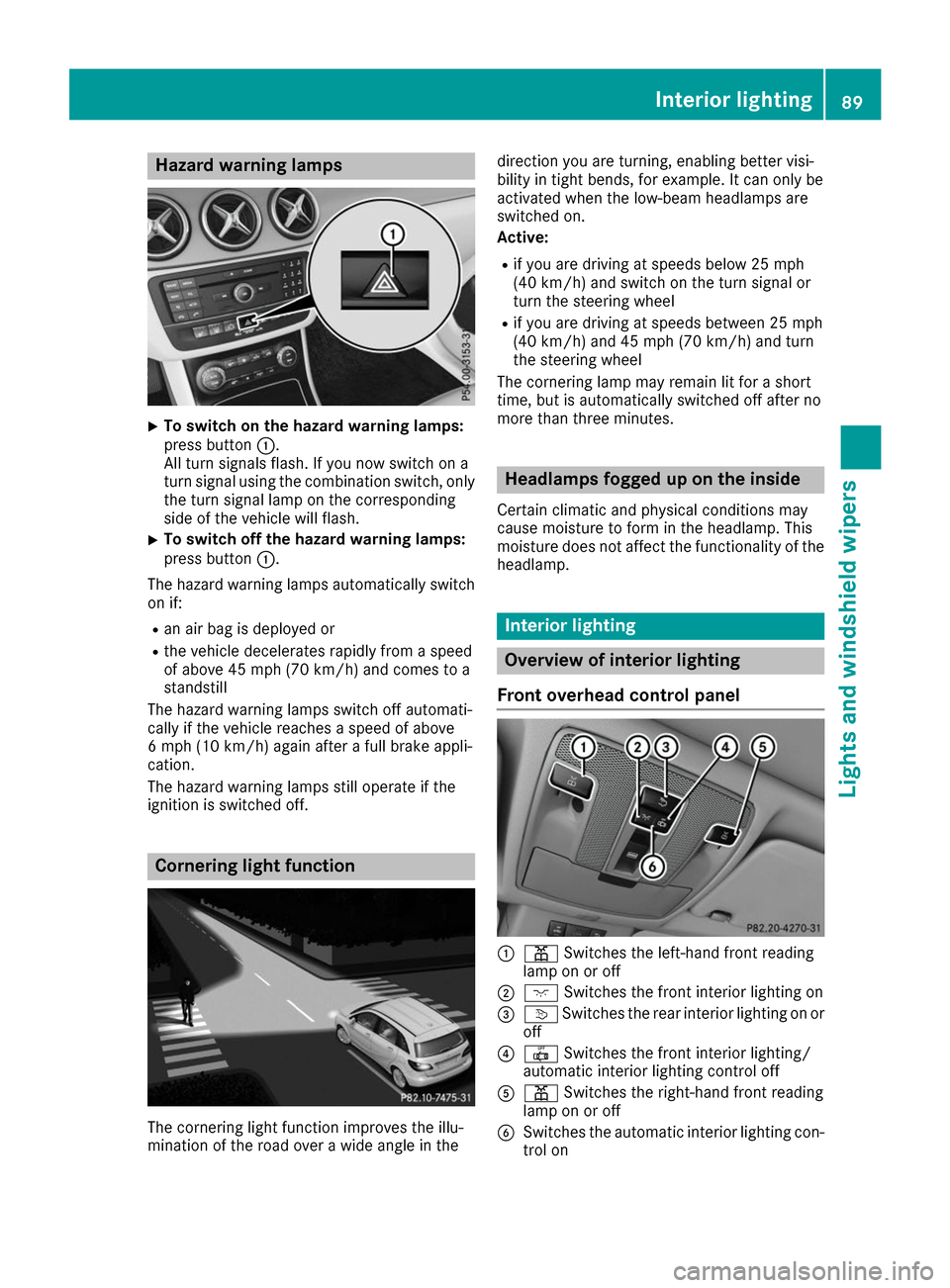
Front overhead control panel 0043
003D Switches the left-hand front reading
lamp on or off
0044 004A Switches the front interior lighting on
0087 0043 Switches the rear interior lighting on or
off
0085 0033 Switches the front interior lighting/
automatic interior lighting control off
0083 003D Switches the right-hand front reading
lamp on or off
0084 Switches the automatic interior lighting con-
trol on Interior lighting
89Lights and windshield wipers Z
Page 92 of 290
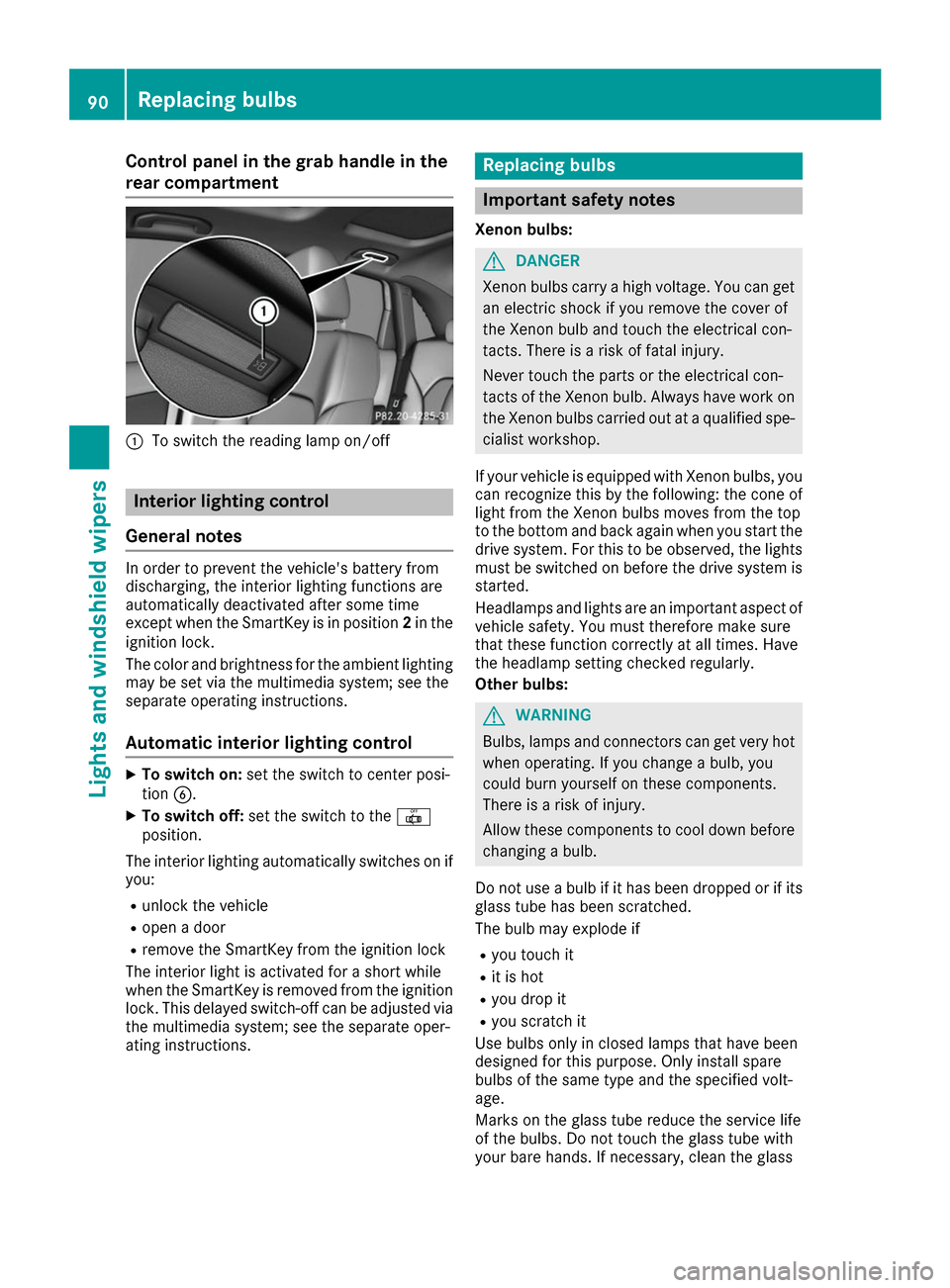
Control panel in the grab handle in the
rear compartment 0043
To switch the reading lamp on/off Interior lighting control
General notes In order to prevent the vehicle's battery from
discharging, the interior lighting functions are
automatically deactivated after some time
except when the SmartKey is in position 2in the
ignition lock.
The color and brightness for the ambient lighting
may be set via the multimedia system; see the
separate operating instructions.
Automatic interior lighting control X
To switch on: set the switch to center posi-
tion 0084.
X To switch off: set the switch to the 0033
position.
The interior lighting automatically switches on if you:
R unlock the vehicle
R open a door
R remove the SmartKey from the ignition lock
The interior light is activated for a short while
when the SmartKey is removed from the ignition
lock. This delayed switch-off can be adjusted via
the multimedia system; see the separate oper-
ating instructions. Replacing bulbs
Important safety notes
Xenon bulbs: G
DANGER
Xenon bulbs carry a high voltage. You can get an electric shock if you remove the cover of
the Xenon bulb and touch the electrical con-
tacts. There is a risk of fatal injury.
Never touch the parts or the electrical con-
tacts of the Xenon bulb. Always have work on
the Xenon bulbs carried out at a qualified spe-
cialist workshop.
If your vehicle is equipped with Xenon bulbs, you
can recognize this by the following: the cone of light from the Xenon bulbs moves from the top
to the bottom and back again when you start the
drive system. For this to be observed, the lights must be switched on before the drive system is
started.
Headlamps and lights are an important aspect of
vehicle safety. You must therefore make sure
that these function correctly at all times. Have
the headlamp setting checked regularly.
Other bulbs: G
WARNING
Bulbs, lamps and connectors can get very hot when operating. If you change a bulb, you
could burn yourself on these components.
There is a risk of injury.
Allow these components to cool down before changing a bulb.
Do not use a bulb if it has been dropped or if its glass tube has been scratched.
The bulb may explode if
R you touch it
R it is hot
R you drop it
R you scratch it
Use bulbs only in closed lamps that have been
designed for this purpose. Only install spare
bulbs of the same type and the specified volt-
age.
Marks on the glass tube reduce the service life
of the bulbs. Do not touch the glass tube with
your bare hands. If necessary, clean the glass 90
Replacing bulbsLights and windshield wipers
Page 98 of 290
Replacing the wiper blades
Important safety notes G
WARNING
If the windshield wipers begin to move while
you are changing the wiper blades, you could be trapped by the wiper arm. There is a risk of
injury.
Always switch off the windshield wipers and
ignition before changing the wiper blades.
! To avoid damaging the wiper blades, make
sure that you touch only the wiper arm of the
wiper.
! Never open the hood/tailgate if a wiper arm
has been folded away from the windshield/
rear window.
Never fold a windshield wiper arm without a
wiper blade back onto the windshield/rear
window.
Hold the windshield wiper arm firmly when
you change the wiper blade. If you release the
wiper arm without a wiper blade and it falls
onto the windshield/rear window, the wind-
shield/rear window may be damaged by the
force of the impact.
Mercedes-Benz recommends that you have
the wiper blades changed at a qualified spe-
cialist workshop.
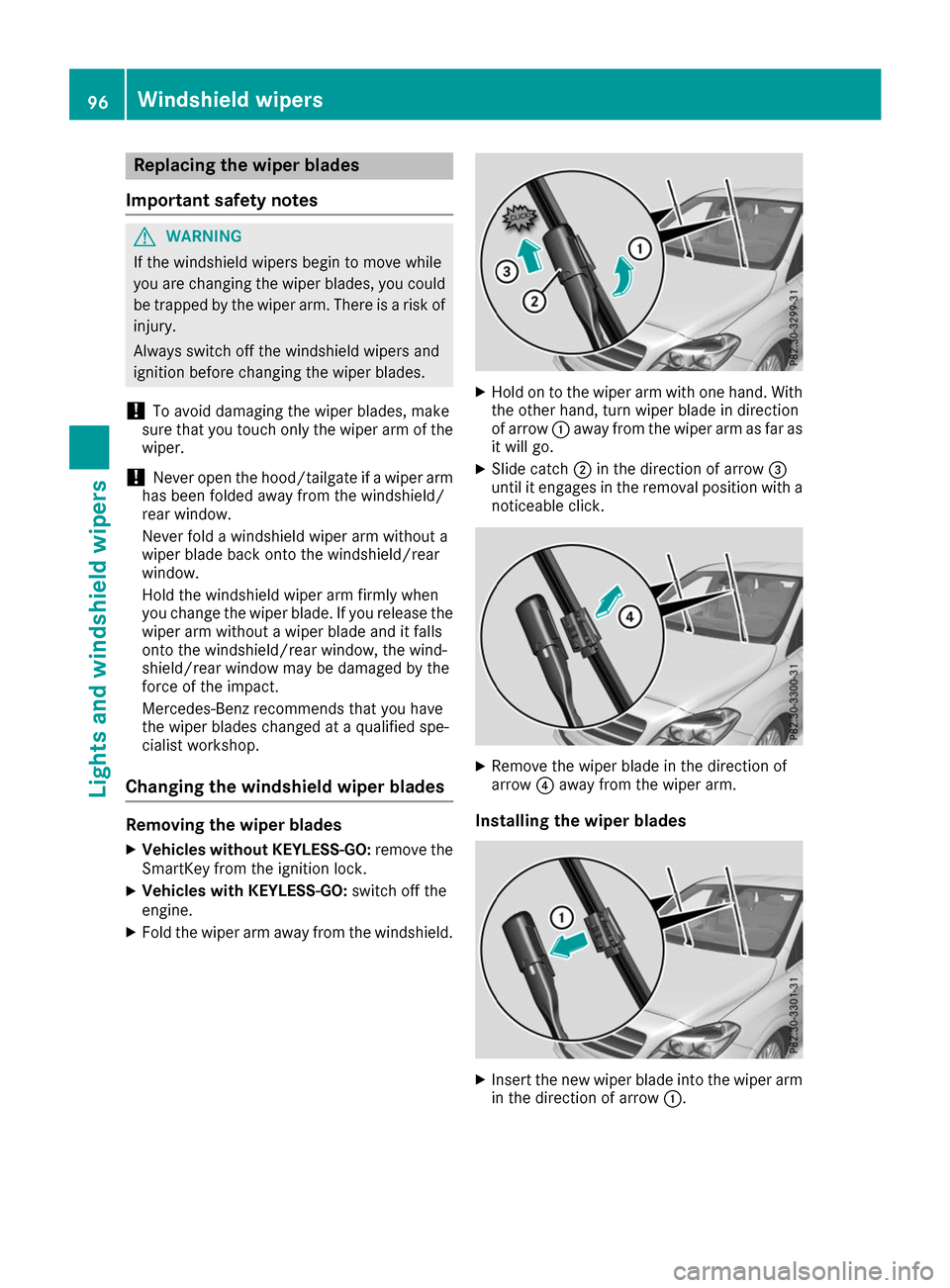
Changing the windshield wiper blades Removing the wiper blades
X Vehicles without KEYLESS-GO: remove the
SmartKey from the ignition lock.
X Vehicles with KEYLESS-GO: switch off the
engine.
X Fold the wiper arm away from the windshield. X
Hold on to the wiper arm with one hand. With
the other hand, turn wiper blade in direction
of arrow 0043away from the wiper arm as far as
it will go.
X Slide catch 0044in the direction of arrow 0087
until it engages in the removal position with a noticeable click. X
Remove the wiper blade in the direction of
arrow 0085away from the wiper arm.
Installing the wiper blades X
Insert the new wiper blade into the wiper arm
in the direction of arrow 0043.96
Windshield wipersLights and windshield wipers
Page 106 of 290
Switching air-recirculation mode
on/off
General notes You can deactivate the flow of fresh air if
unpleasant odors are entering the vehicle from
outside. The air already inside the vehicle will
then be recirculated.
If you switch on air-recirculation mode, the win-
dows can fog up more quickly, in particular at
low temperatures. Only use air-recirculation
mode briefly to prevent the windows from fog-
ging up.
Activating/deactivating X
Turn the SmartKey to position 2in the ignition
lock (Y page 109).
X To activate: press the008Abutton.
The indicator lamp in the 008Abutton lights
up.
Air-recirculation mode switches on automati-
cally:
R at high outside temperatures
R at high levels of pollution
When air-recirculation mode is activated auto-
matically, the indicator lamp in the 008Abutton
is not lit. Outside air is added after about
30 minutes.
X To deactivate: press the008Abutton.
The indicator lamp in the 008Abutton goes
out.
i Air-recirculation mode deactivates auto-
matically:
R after approximately five minutes at outside
temperatures below approximately 45 ‡
(7 †)
R after approximately five minutes if the
"Cooling with air dehumidification" func-
tion is deactivated
R after approximately 30 minutes at outside
temperatures above approximately 45 ‡
(7 †) if the cooling with air dehumidifica-
tion function is activated Convenience opening or closing using
the air-recirculation button G
WARNING
When using the convenience closing feature,
parts of the body could be trapped in the clos- ing area when a side window is being closed. There is a risk of injury.
Observe the complete closing procedure
when the convenience closing feature is oper-
ating. Make sure that no body parts are in
close proximity during the closing procedure. G
WARNING
During convenience opening parts of the body could be drawn in or become trapped
between the side window and window frame.
There is a risk of injury.
Make sure that nobody touches the side win-
dow during the opening procedure. If some-
one becomes trapped, immediately press
the 0062 switch in the door to stop the move-
ment of the side windows. To continue closing the side window, pull on the 0062switch.
X Convenience closing feature: press and
hold the 008Abutton until the side windows
start to close automatically.
The indicator lamp in the 008Abutton lights
up. Air-recirculation mode is activated.
If parts of the body are in the closing area during convenience closing, proceed as follows:
X Press the 0062button to stop the side win-
dows.
The side window stops.
X To then open the side window, press the 0062
button again.
or X Press and hold the 008Abutton again for at
least two seconds.
The side windows move in the opposite direc- tion.
X Convenience opening feature: press and
hold the 008Abutton until the side windows
start to open automatically.
The indicator lamp in the 008Abutton goes
out. Air-recirculation mode is deactivated. 104
Operating the climate control systemsClimate control
Page 108 of 290
R
Seat heating
R Windshield heating
R Rear window defroster
"Immediate pre-entry climate control" is auto-
matically switched off when operational readi-
ness mode is requested.
Setting the departure time You can set a departure time for the "Pre-entry
climate control at departure time". Your vehicle
will then be cooled or heated until the desired
temperature is reached in time for the set depar-
ture time. "Pre-entry climate control at depar-
ture time" will be activated a maximum of
35 minutes before departure. If the departure is delayed, the vehicle will be heated or cooled fora further five minutes.
You can set the desired departure time in the E-
E-
CELL
CELL submenu on the on-board computer
(Y page 163).
Activating immediate pre-entry climate
control You can activate "Immediate pre-entry climate
control" even if the vehicle interior is already at
the desired temperature. This means that the
vehicle interior continues to be cooled or
heated, e.g. if the journey is interrupted for up to
50 minutes, and the interior temperature is kept constant. You can only set the desired temper-
ature using the climate control unit. If you do not
pre-select a temperature, the last temperature
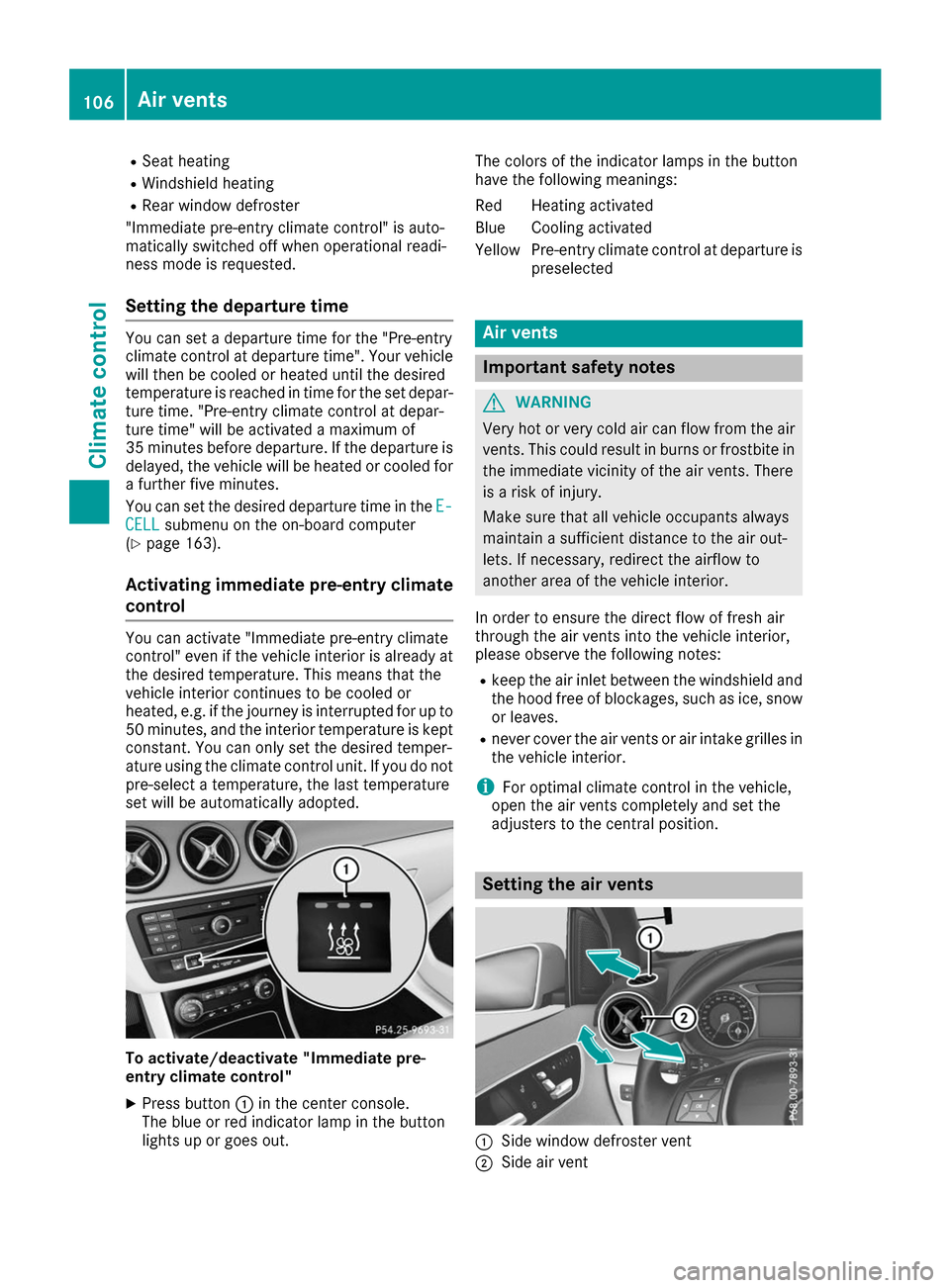
set will be automatically adopted. To activate/deactivate "Immediate pre-
entry climate control"
X Press button 0043in the center console.
The blue or red indicator lamp in the button
lights up or goes out. The colors of the indicator lamps in the button
have the following meanings:
Re
dH eating activated
Blue Cooling activated
Yellow Pre-entry climate control at departure is preselected Air vents
Important safety notes
G
WARNING
Very hot or very cold air can flow from the air vents. This could result in burns or frostbite in the immediate vicinity of the air vents. There
is a risk of injury.
Make sure that all vehicle occupants always
maintain a sufficient distance to the air out-
lets. If necessary, redirect the airflow to
another area of the vehicle interior.
In order to ensure the direct flow of fresh air
through the air vents into the vehicle interior,
please observe the following notes:
R keep the air inlet between the windshield and
the hood free of blockages, such as ice, snow or leaves.
R never cover the air vents or air intake grilles in
the vehicle interior.
i For optimal climate control in the vehicle,
open the air vents completely and set the
adjusters to the central position. Setting the air vents
0043
Side window defroster vent
0044 Side air vent 106
Air ventsClimate control
Page 125 of 290
Controls on the charging cable
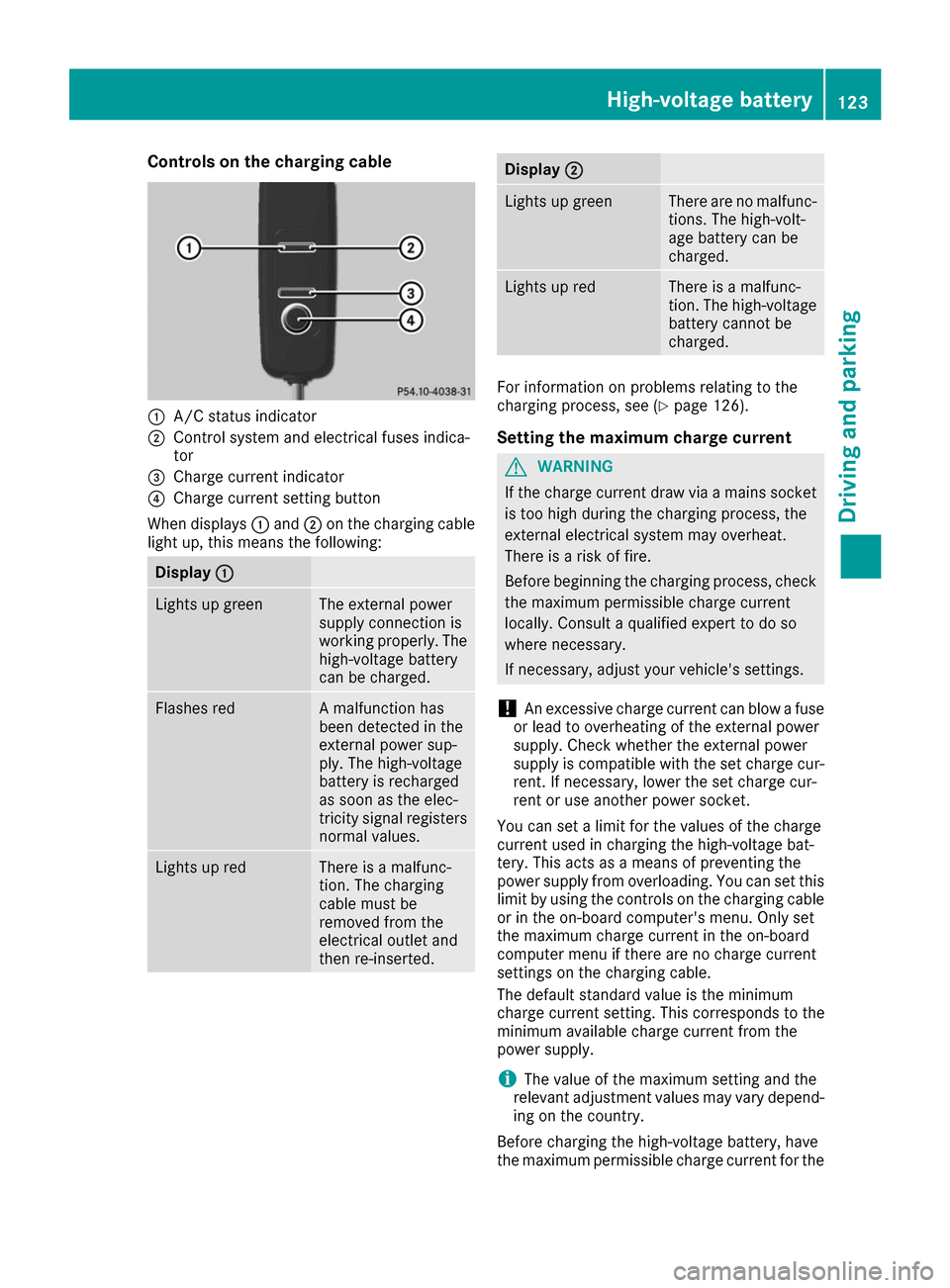
0043
A/C status indicator
0044 Control system and electrical fuses indica-
tor
0087 Charge current indicator
0085 Charge current setting button
When displays 0043and 0044on the charging cable
light up, this means the following: Display
0043 0043 Lights up green The external power
supply connection is
working properly. The
high-voltage battery
can be charged. Flashes red A malfunction has
been detected in the
external power sup-
ply. The high-voltage
battery is recharged
as soon as the elec-
tricity signal registers
normal values. Lights up red There is a malfunc-
tion. The charging
cable must be
removed from the
electrical outlet and
then re-inserted. Display
0044
0044 Lights up green There are no malfunc-
tions. The high-volt-
age battery can be
charged. Lights up red There is a malfunc-
tion. The high-voltage
battery cannot be
charged. For information on problems relating to the
charging process, see (Y
page 126).
Setting the maximum charge current G
WARNING
If the charge current draw via a mains socket is too high during the charging process, the
external electrical system may overheat.
There is a risk of fire.
Before beginning the charging process, check the maximum permissible charge current
locally. Consult a qualified expert to do so
where necessary.
If necessary, adjust your vehicle's settings.
! An excessive charge current can blow a fuse
or lead to overheating of the external power
supply. Check whether the external power
supply is compatible with the set charge cur-
rent. If necessary, lower the set charge cur-
rent or use another power socket.
You can set a limit for the values of the charge
current used in charging the high-voltage bat-
tery. This acts as a means of preventing the
power supply from overloading. You can set this limit by using the controls on the charging cable
or in the on-board computer's menu. Only set
the maximum charge current in the on-board
computer menu if there are no charge current
settings on the charging cable.
The default standard value is the minimum
charge current setting. This corresponds to the
minimum available charge current from the
power supply.
i The value of the maximum setting and the
relevant adjustment values may vary depend-
ing on the country.
Before charging the high-voltage battery, have
the maximum permissible charge current for the High-voltage battery
123Driving and parking Z
Page 132 of 290
Electric parking brake
General notes G
WARNING
If you leave children unsupervised in the vehi- cle, they could set it in motion by, for example:
R release the parking brake.
R shift the transmission out of park position
P.
R start the vehicle's drive system.
They could also operate the vehicle's equip-
ment. There is a risk of an accident and injury.
When leaving the vehicle, always take the
SmartKey with you and lock the vehicle. Never leave children unsupervised in the vehicle.
The function of the electric parking brake and
the parking lock is dependent on the on-board
voltage. If the on-board voltage is low or if there is a malfunction in the system:
R it may not be possible to apply the released
parking brake
R it may no longer be possible to shift the trans-
mission to position P
X If this is the case, only park the vehicle on
level ground and secure it to prevent it rolling away.
X Shift the transmission to position P.
It may not be possible to release an applied
parking brake if the on-board voltage is low or
there is a malfunction in the system. Contact a
qualified specialist workshop.
The electric parking brake carries out a function check at regular intervals when the drive system
is switched off. The sounds that can be heard
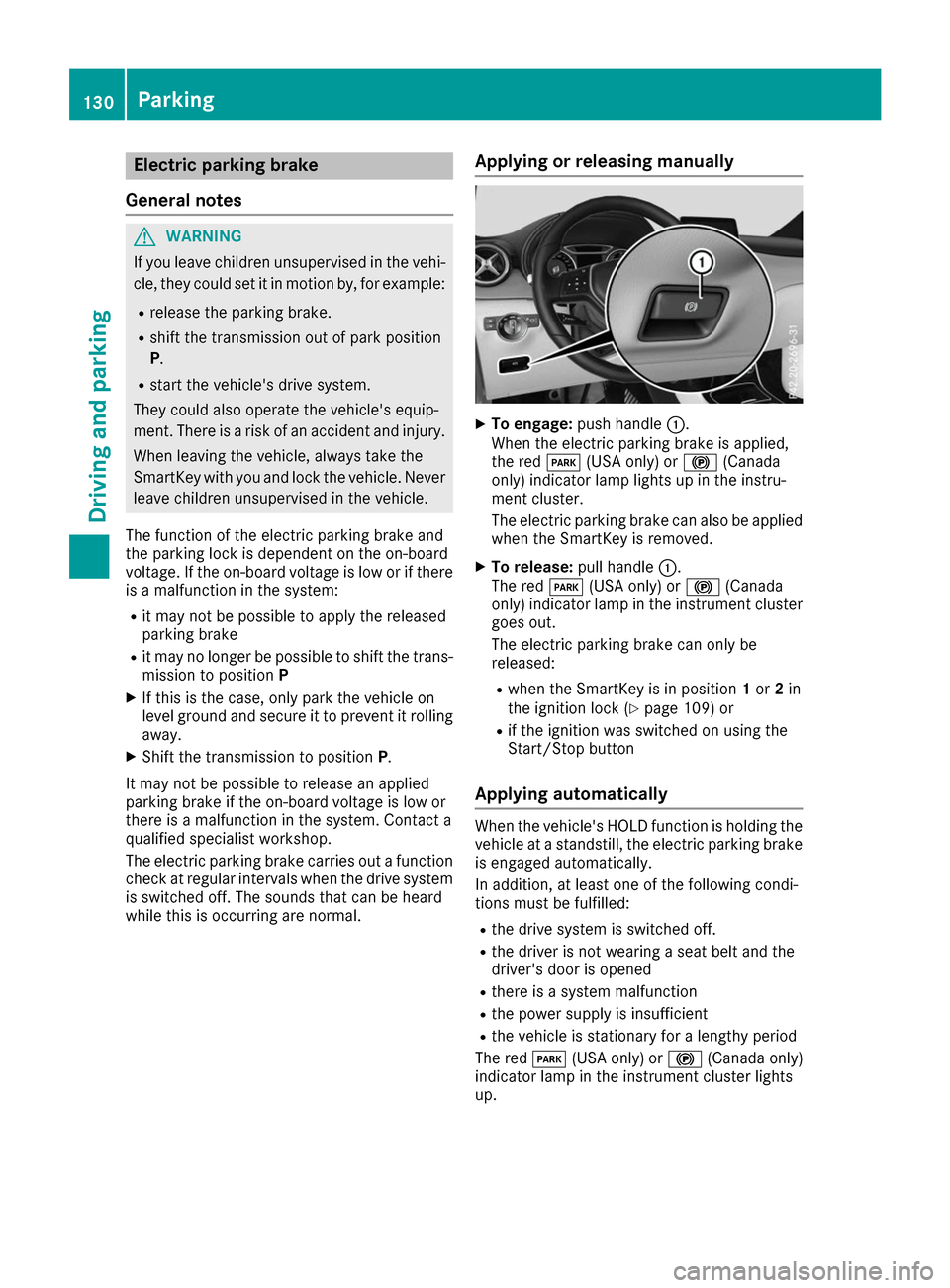
while this is occurring are normal. Applying or releasing manually X
To engage: push handle 0043.
When the electric parking brake is applied,
the red 0049(USA only) or 0024(Canada
only) indicator lamp lights up in the instru-
ment cluster.
The electric parking brake can also be applied when the SmartKey is removed.
X To release: pull handle0043.
The red 0049(USA only) or 0024(Canada
only) indicator lamp in the instrument cluster
goes out.
The electric parking brake can only be
released:
R when the SmartKey is in position 1or 2in
the ignition lock (Y page 109) or
R if the ignition was switched on using the
Start/Stop button
Applying automatically When the vehicle's HOLD function is holding the
vehicle at a standstill, the electric parking brake is engaged automatically.
In addition, at least one of the following condi-
tions must be fulfilled:
R the drive system is switched off.
R the driver is not wearing a seat belt and the
driver's door is opened
R there is a system malfunction
R the power supply is insufficient
R the vehicle is stationary for a lengthy period
The red 0049(USA only) or 0024(Canada only)
indicator lamp in the instrument cluster lights
up. 130
ParkingDriving and parking