ECU MERCEDES-BENZ B-Class 2017 W246 Repair Manual
[x] Cancel search | Manufacturer: MERCEDES-BENZ, Model Year: 2017, Model line: B-Class, Model: MERCEDES-BENZ B-Class 2017 W246Pages: 290, PDF Size: 19.81 MB
Page 199 of 290
Warning/
indicator
lamp
0051 0051
Signal type
Possible causes/consequences and 0050
0050Solutions 00E500BB
00C6004D
0051
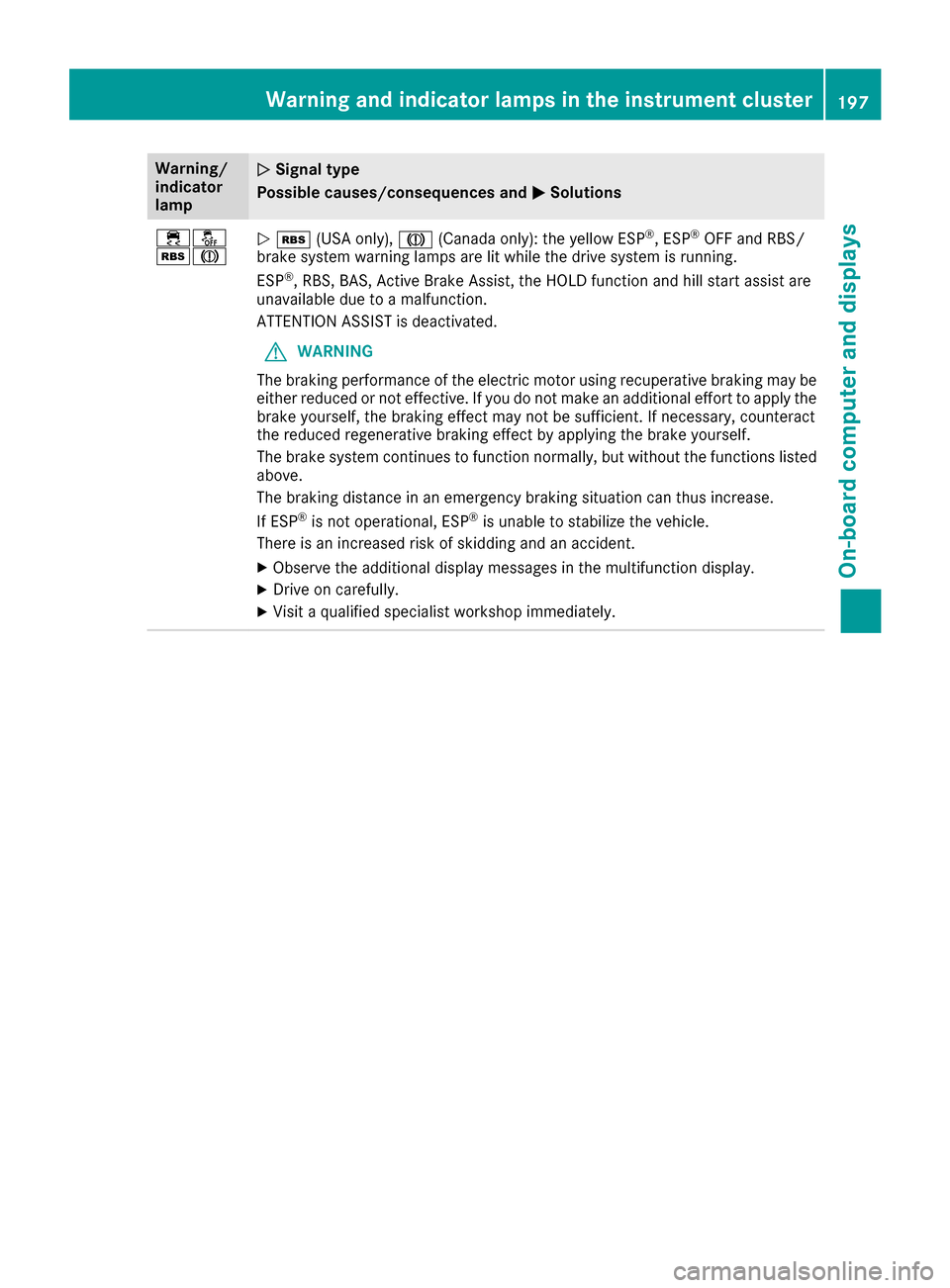
00C6 (USA only), 004D(Canada only): the yellow ESP ®
, ESP ®
OFF and RBS/
brake system warning lamps are lit while the drive system is running.
ESP ®
, RBS, BAS, Active Brake Assist, the HOLD function and hill start assist are
unavailable due to a malfunction.
ATTENTION ASSIST is deactivated.
G WARNING
The braking performance of the electric motor using recuperative braking may be
either reduced or not effective. If you do not make an additional effort to apply the brake yourself, the braking effect may not be sufficient. If necessary, counteract
the reduced regenerative braking effect by applying the brake yourself.
The brake system continues to function normally, but without the functions listed
above.
The braking distance in an emergency braking situation can thus increase.
If ESP ®
is not operational, ESP ®
is unable to stabilize the vehicle.
There is an increased risk of skidding and an accident.
X Observe the additional display messages in the multifunction display.
X Drive on carefully.
X Visit a qualified specialist workshop immediately. Warning and indicator lamps in the instrument cluster
197On-board computer and displays Z
Page 200 of 290
Warning/
indicator
lamp
0051
0051 Signal type
Possible causes/consequences and 0050 0050Solutions 00E500BB
00C6004D
0051
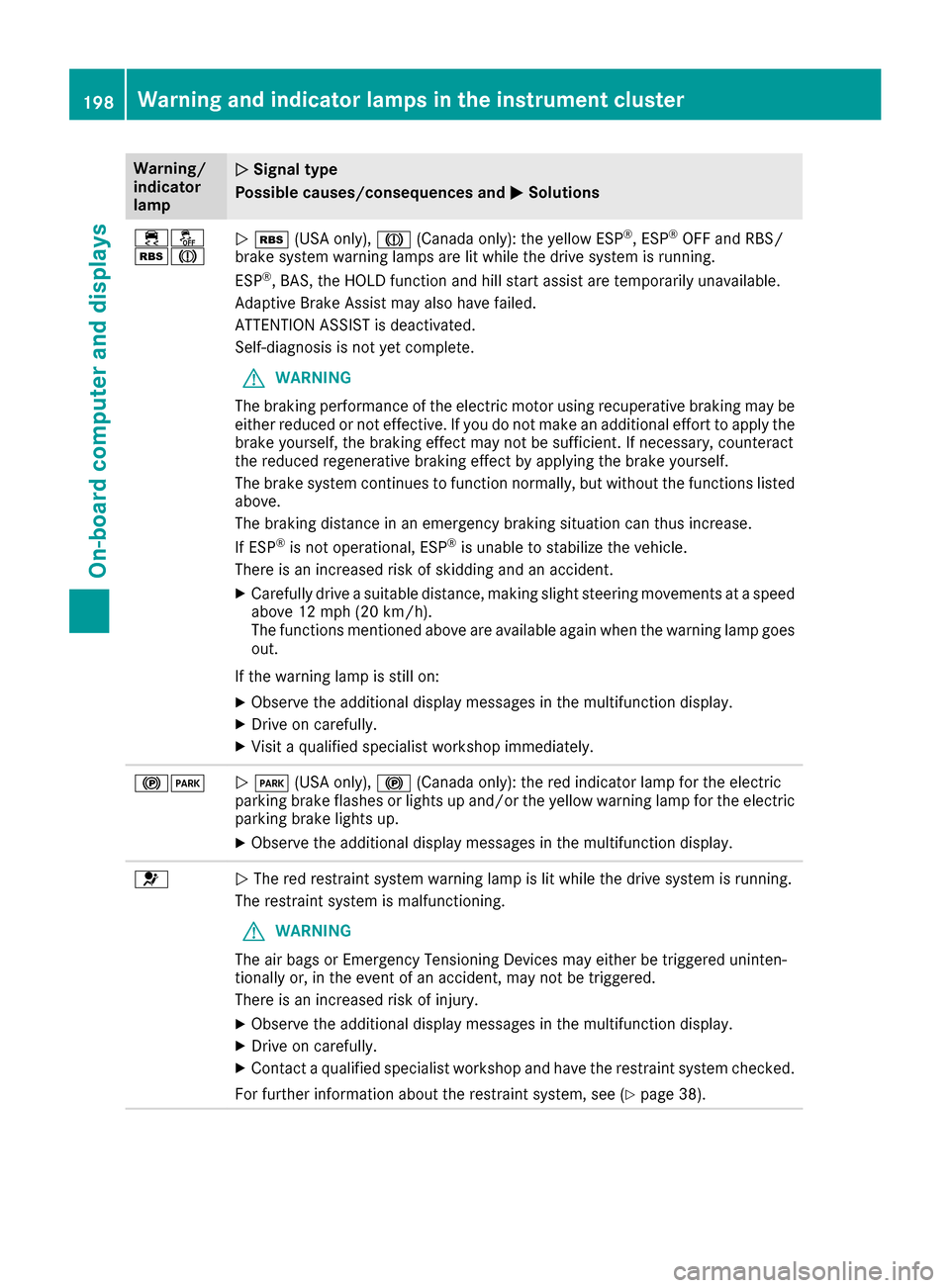
00C6 (USA only), 004D(Canada only): the yellow ESP ®
, ESP ®
OFF and RBS/
brake system warning lamps are lit while the drive system is running.
ESP ®
, BAS, the HOLD function and hill start assist are temporarily unavailable.
Adaptive Brake Assist may also have failed.
ATTENTION ASSIST is deactivated.
Self-diagnosis is not yet complete.
G WARNING
The braking performance of the electric motor using recuperative braking may be
either reduced or not effective. If you do not make an additional effort to apply the brake yourself, the braking effect may not be sufficient. If necessary, counteract
the reduced regenerative braking effect by applying the brake yourself.
The brake system continues to function normally, but without the functions listed
above.
The braking distance in an emergency braking situation can thus increase.
If ESP ®
is not operational, ESP ®
is unable to stabilize the vehicle.
There is an increased risk of skidding and an accident.
X Carefully drive a suitable distance, making slight steering movements at a speed
above 12 mph (20 km/h).
The functions mentioned above are available again when the warning lamp goes
out.
If the warning lamp is still on: X Observe the additional display messages in the multifunction display.
X Drive on carefully.
X Visit a qualified specialist workshop immediately. 00240049
0051
0049 (USA only), 0024(Canada only): the red indicator lamp for the electric
parking brake flashes or lights up and/or the yellow warning lamp for the electric
parking brake lights up.
X Observe the additional display messages in the multifunction display. 0075
0051
The red restraint system warning lamp is lit while the drive system is running.
The restraint system is malfunctioning.
G WARNING
The air bags or Emergency Tensioning Devices may either be triggered uninten-
tionally or, in the event of an accident, may not be triggered.
There is an increased risk of injury.
X Observe the additional display messages in the multifunction display.
X Drive on carefully.
X Contact a qualified specialist workshop and have the restraint system checked.
For further information about the restraint system, see (Y page 38).198
Warning and indicator lamps in the instrument clusterOn-board computer and displays
Page 202 of 290
Tires
Warning/
indicator
lamp
0051 0051
Signal type
Possible causes/consequences and 0050
0050Solutions 0077
0051
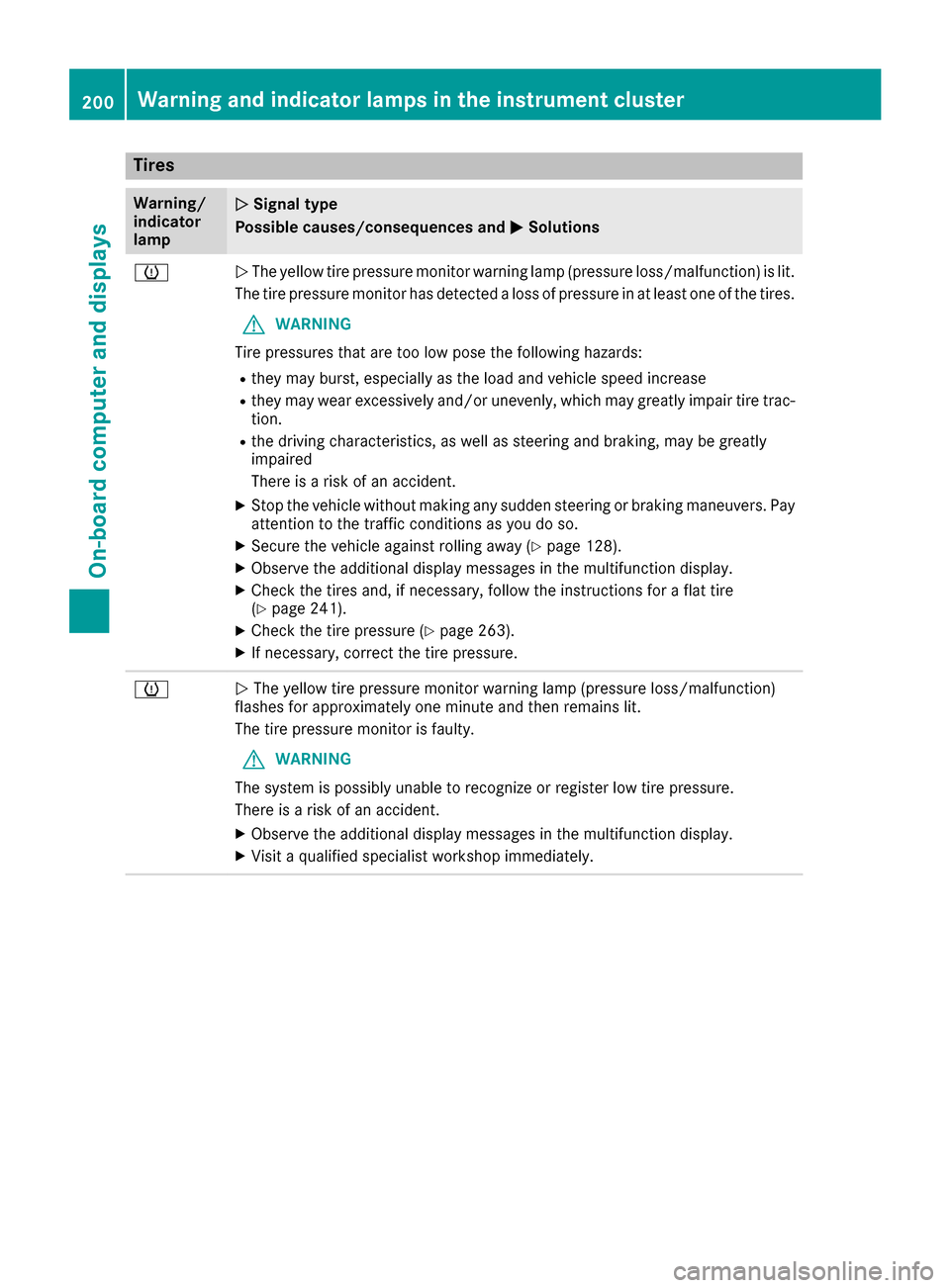
The yellow tire pressure monitor warning lamp (pressure loss/malfunction) is lit.
The tire pressure monitor has detected a loss of pressure in at least one of the tires.
G WARNING
Tire pressures that are too low pose the following hazards: R they may burst, especially as the load and vehicle speed increase
R they may wear excessively and/or unevenly, which may greatly impair tire trac-
tion.
R the driving characteristics, as well as steering and braking, may be greatly
impaired
There is a risk of an accident.
X Stop the vehicle without making any sudden steering or braking maneuvers. Pay
attention to the traffic conditions as you do so.
X Secure the vehicle against rolling away (Y page 128).
X Observe the additional display messages in the multifunction display.
X Check the tires and, if necessary, follow the instructions for a flat tire
(Y page 241).
X Check the tire pressure (Y page 263).
X If necessary, correct the tire pressure. 0077
0051
The yellow tire pressure monitor warning lamp (pressure loss/malfunction)
flashes for approximately one minute and then remains lit.
The tire pressure monitor is faulty.
G WARNING
The system is possibly unable to recognize or register low tire pressure.
There is a risk of an accident.
X Observe the additional display messages in the multifunction display.
X Visit a qualified specialist workshop immediately. 200
Warning and indicator lamps in the instrument clusterOn-board computer and displays
Page 207 of 290
Multimedia system:
X Select Vehicle
Vehicle007BSystem Set‐ System Set‐
tings
tings007BActivate Bluetooth Activate Bluetooth.
X Activate Bluetooth ®
0073.
Mobile phone:
X Activate Bluetooth ®
and, if necessary, Blue-
tooth ®
visibility for other devices (see the
manufacturer's operating instructions).
The Bluetooth ®
device names for all of one man-
ufacturer's products might be identical. To
make it possible to clearly identify your mobile
phone, change the device name (see the man-
ufacturer's operating instructions).
If the mobile phone supports the PBAP (Phone
Book Access Profile) and MAP (Message
Access Profile) Bluetooth ®
profiles, the follow-
ing information will be transmitted after you
connect:
R Phone book
R Call lists
R Text messages and e-mail
i Further information on suitable mobile
phones can be found at: http://
www.mercedes-benz.com/connect
i In the USA, you can get in touch with the
Mercedes-Benz Customer Assistance Center
on 1-800-FOR-MERCedes (1-800-367-6372).
In Canada, you can get in touch with the Cus-
tomer Relations Center on 1-800-387-0100.
Searching for and authorizing (connect-
ing) a mobile phone Before using your mobile phone with the multi-
media system for the first time, you will need to
search for the phone and then authorize (con-
nect) it. Depending on the mobile phone, author- ization either takes place by means of Secure
Simple Pairing or by entering a passkey. The
multimedia system automatically makes the
procedure that is relevant for your mobile phone
available. The mobile phone is always connec-
ted automatically after authorization. Further
information on using a mobile phone with the
multimedia system (see the Digital Operator's
Manual).
If the multimedia system does not detect your
mobile phone, this may be due to particular
security settings on your mobile phone (see the manufacturer's operating instructions). Only one mobile phone can be connected to the
multimedia system at any one time.
Searching for a mobile phone
Multimedia system:
X Select Tel/ Tel/00A7007BConnect Connect
Device
Device007BSearch for Phones Search for Phones007BStart Start
Search
Search.
The available mobile phones are displayed.
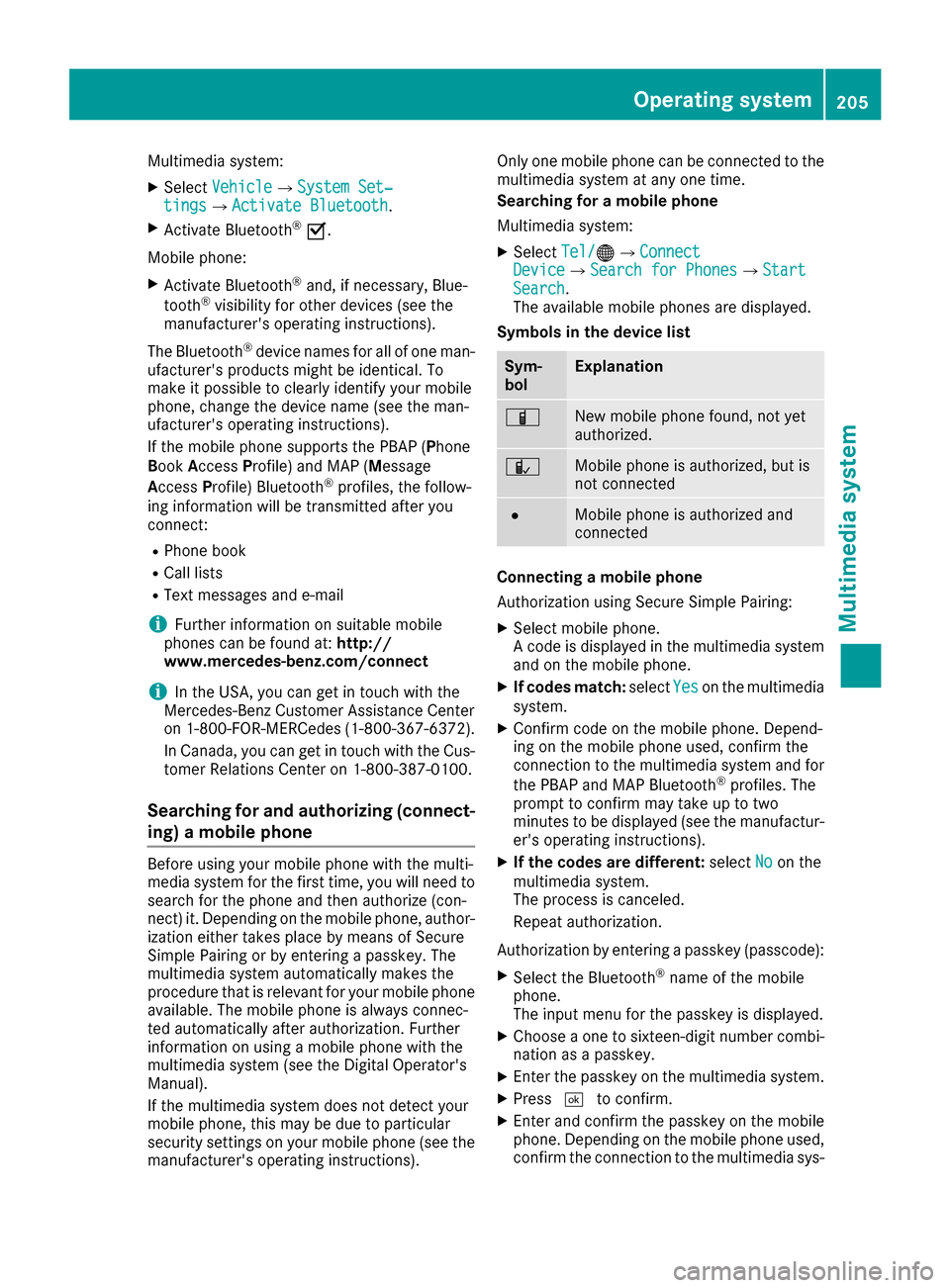
Symbols in the device list Sym-
bol Explanation
00D3
New mobile phone found, not yet
authorized.
00DC
Mobile phone is authorized, but is
not connected
0036
Mobile phone is authorized and
connected
Connecting a mobile phone
Authorization using Secure Simple Pairing:
X Select mobile phone.
A code is displayed in the multimedia system
and on the mobile phone.
X If codes match: selectYes Yeson the multimedia
system.
X Confirm code on the mobile phone. Depend-
ing on the mobile phone used, confirm the
connection to the multimedia system and for
the PBAP and MAP Bluetooth ®
profiles. The
prompt to confirm may take up to two
minutes to be displayed (see the manufactur-
er's operating instructions).
X If the codes are different: selectNo Noon the
multimedia system.
The process is canceled.
Repeat authorization.
Authorization by entering a passkey (passcode):
X Select the Bluetooth ®
name of the mobile
phone.
The input menu for the passkey is displayed.
X Choose a one to sixteen-digit number combi-
nation as a passkey.
X Enter the passkey on the multimedia system.
X Press 0054to confirm.
X Enter and confirm the passkey on the mobile
phone. Depending on the mobile phone used,
confirm the connection to the multimedia sys- Operating system
205Multimedia system Z
Page 209 of 290
Loading guidelines
G
WARNING
If objects, luggage or loads are not secured or not secured sufficiently, they could slip, tip
over or be flung around and thereby hit vehicle
occupants. There is a risk of injury, particu-
larly in the event of sudden braking or a sud-
den change in direction.
Always store objects so that they cannot be
flung around. Secure objects, luggage or
loads against slipping or tipping before the
journey.
The handling characteristics of a laden vehicle
are dependent on the distribution of the load
within the vehicle.
Observe the following notes on loading and
transporting a load:
R Never exceed the maximum permissible
gross vehicle mass or the gross axle weight
rating for the vehicle (including occupants).
The values are specified on the vehicle iden-
tification plate on the B-pillar of the driver's
door.
R The cargo compartment is the preferred place
to carry objects.
R Position heavy loads as far forwards as pos-
sible and as low down in the cargo compart-
ment as possible.
R The load must not protrude above the upper
edge of the seat backrests.
R Always place the load against the rear or front
seat backrests. Make sure that the seat
backrests are securely locked into place.
R Always place the load behind unoccupied
seats if possible.
R Use the cargo tie-down rings and the parcel
nets to transport loads and luggage.
R Use cargo tie-down rings and fastening mate-
rials appropriate for the weight and size of the load.
R Hook in the cargo net when loading.
R The maximum load capacity of the stowage
well under the cargo compartment floor is
55 lbs (25 kg).
R Secure the lo ad with sufficiently strong and
wear-resistant tie-downs. Pad sharp edges for protection. !
Do not position the load on one part of the
folding cargo compartment floor only. The
maximum load capacity of the folding cargo
compartment floor is 220 lbs (100 kg). Dis-
tribute the weight evenly to avoid damaging
the cargo compartment floor. Place a solid
board under the load if necessary. Please
note that the load on the cargo compartment floor will be increased when the load is lashed
down. Stowage areas
Stowage spaces
Important safety notes G
WARNING
If you transport objects in the vehicle interior and these are not adequately secured, they
could slip or be flung around and thereby
strike vehicle occupants. In addition, cup
holders, open stowage spaces and mobile
phone brackets may not always be able to
hold the objects placed in them in the event of an accident. There is a risk of injury, particu-
larly in the event of sharp braking or sudden
changes of direction.
R Always stow objects in such a way that they
cannot be tossed about in these or similar
situations.
R Always make sure that objects do not pro-
trude out of the stowage spaces, luggage
nets or stowage nets.
R Ensure that closable stowage spaces are
shut before beginning your journey.
R Always stow and secure heavy, hard, poin-
ted, sharp-edged, fragile or large objects in
the cargo compartment.
Observe the loading guidelines (Y page 207). Stowage areas
207Stowage and features Z
Page 211 of 290
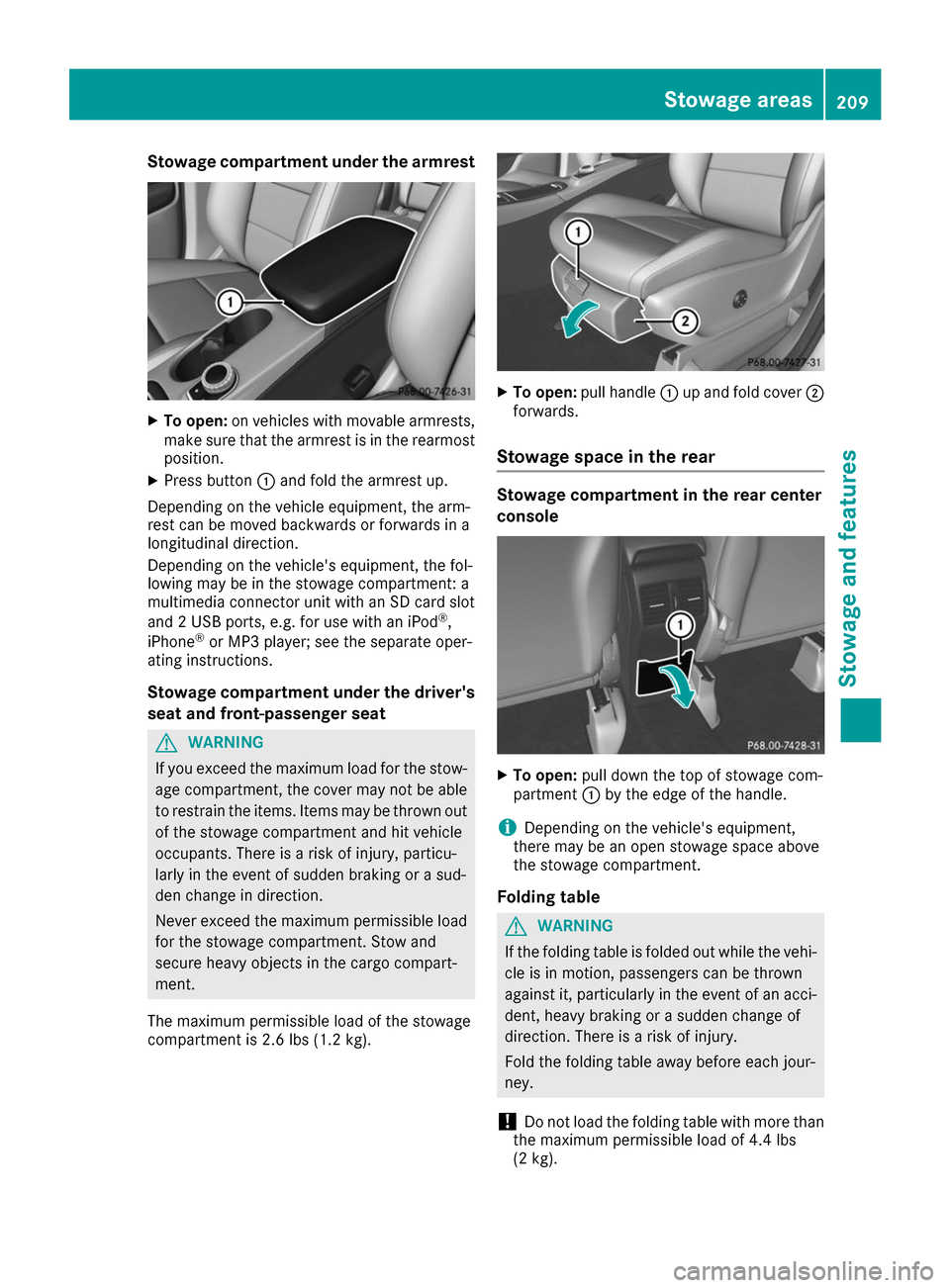
Stowage compartment under the armrest
X
To open: on vehicles with movable armrests,
make sure that the armrest is in the rearmost
position.
X Press button 0043and fold the armrest up.
Depending on the vehicle equipment, the arm-
rest can be moved backwards or forwards in a
longitudinal direction.
Depending on the vehicle's equipment, the fol-
lowing may be in the stowage compartment: a
multimedia connector unit with an SD card slot
and 2 USB ports, e.g. for use with an iPod ®
,
iPhone ®
or MP3 player; see the separate oper-
ating instructions.
Stowage compartment under the driver's seat and front-passenger seat G
WARNING
If you exceed the maximum load for the stow- age compartment, the cover may not be ableto restrain the items. Items may be thrown out
of the stowage compartment and hit vehicle
occupants. There is a risk of injury, particu-
larly in the event of sudden braking or a sud-
den change in direction.
Never exceed the maximum permissible load
for the stowage compartment. Stow and
secure heavy objects in the cargo compart-
ment.
The maximum permissible load of the stowage
compartment is 2.6 lbs (1.2 kg). X
To open: pull handle 0043up and fold cover 0044
forwards.
Stowage space in the rear Stowage compartment in the rear center
console
X
To open: pull down the top of stowage com-
partment 0043by the edge of the handle.
i Depending on the vehicle's equipment,
there may be an open stowage space above
the stowage compartment.
Folding table G
WARNING
If the folding table is folded out while the vehi- cle is in motion, passengers can be thrown
against it, particularly in the event of an acci- dent, heavy braking or a sudden change of
direction. There is a risk of injury.
Fold the folding table away before each jour-
ney.
! Do not load the folding table with more than
the maximum permissible load of 4.4 lbs
(2 kg). Stowage areas
209Stowage and features Z
Page 214 of 290
X
Adjust the head restraints if necessary
(Y page 81).
X Move the driver's or front-passenger seat
back if necessary. Securing loads
Cargo tie-down rings General notes
Observe the following notes on securing loads:
R Observe the loading guidelines (Y page 207).
R Secure the load using the cargo tie-down
rings.
R Distribute the load on the cargo tie-down
rings evenly.
R Do not use elastic straps or nets to secure a
load, as these are only intended as an anti-slip protection for light loads.
R Do not route tie-downs across sharp edges or
corners.
R Pad sharp edges for protection.
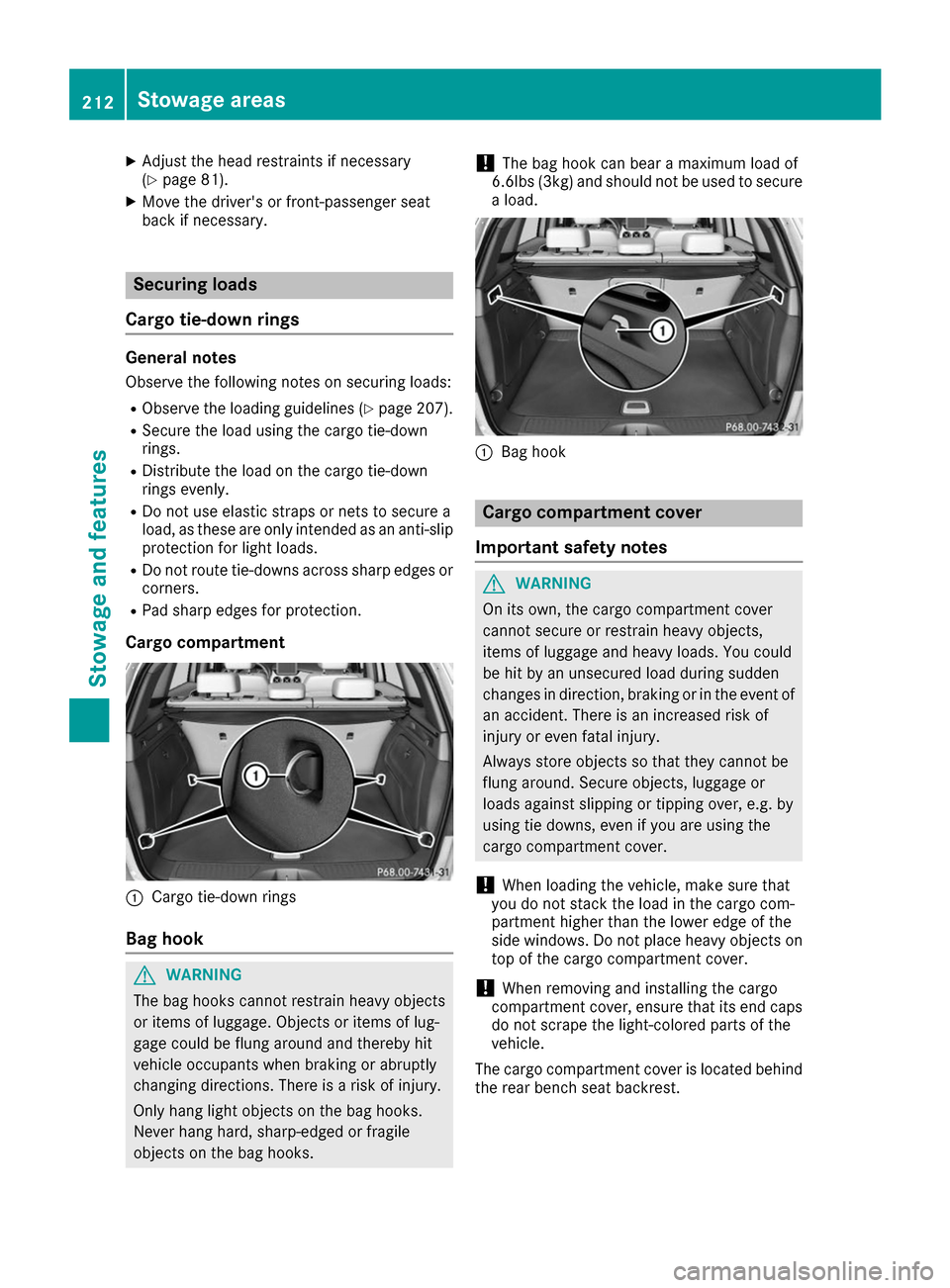
Cargo compartment 0043
Cargo tie-down rings
Bag hook G
WARNING
The bag hooks cannot restrain heavy objects
or items of luggage. Objects or items of lug-
gage could be flung around and thereby hit
vehicle occupants when braking or abruptly
changing directions. There is a risk of injury.
Only hang light objects on the bag hooks.
Never hang hard, sharp-edged or fragile
objects on the bag hooks. !
The bag hook can bear a maximum load of
6.6lbs (3kg) and should not be used to secure
a load. 0043
Bag hook Cargo compartment cover
Important safety notes G
WARNING
On its own, the cargo compartment cover
cannot secure or restrain heavy objects,
items of luggage and heavy loads. You could
be hit by an unsecured load during sudden
changes in direction, braking or in the event of an accident. There is an increased risk of
injury or even fatal injury.
Always store objects so that they cannot be
flung around. Secure objects, luggage or
loads against slipping or tipping over, e.g. by
using tie downs, even if you are using the
cargo compartment cover.
! When loading the vehicle, make sure that
you do not stack the load in the cargo com-
partment higher than the lower edge of the
side windows. Do not place heavy objects on top of the cargo compartment cover.
! When removing and installing the cargo
compartment cover, ensure that its end caps do not scrape the light-colored parts of the
vehicle.
The cargo compartment cover is located behind the rear bench seat backrest. 212
Stowage areasSto
wage an d features
Page 215 of 290
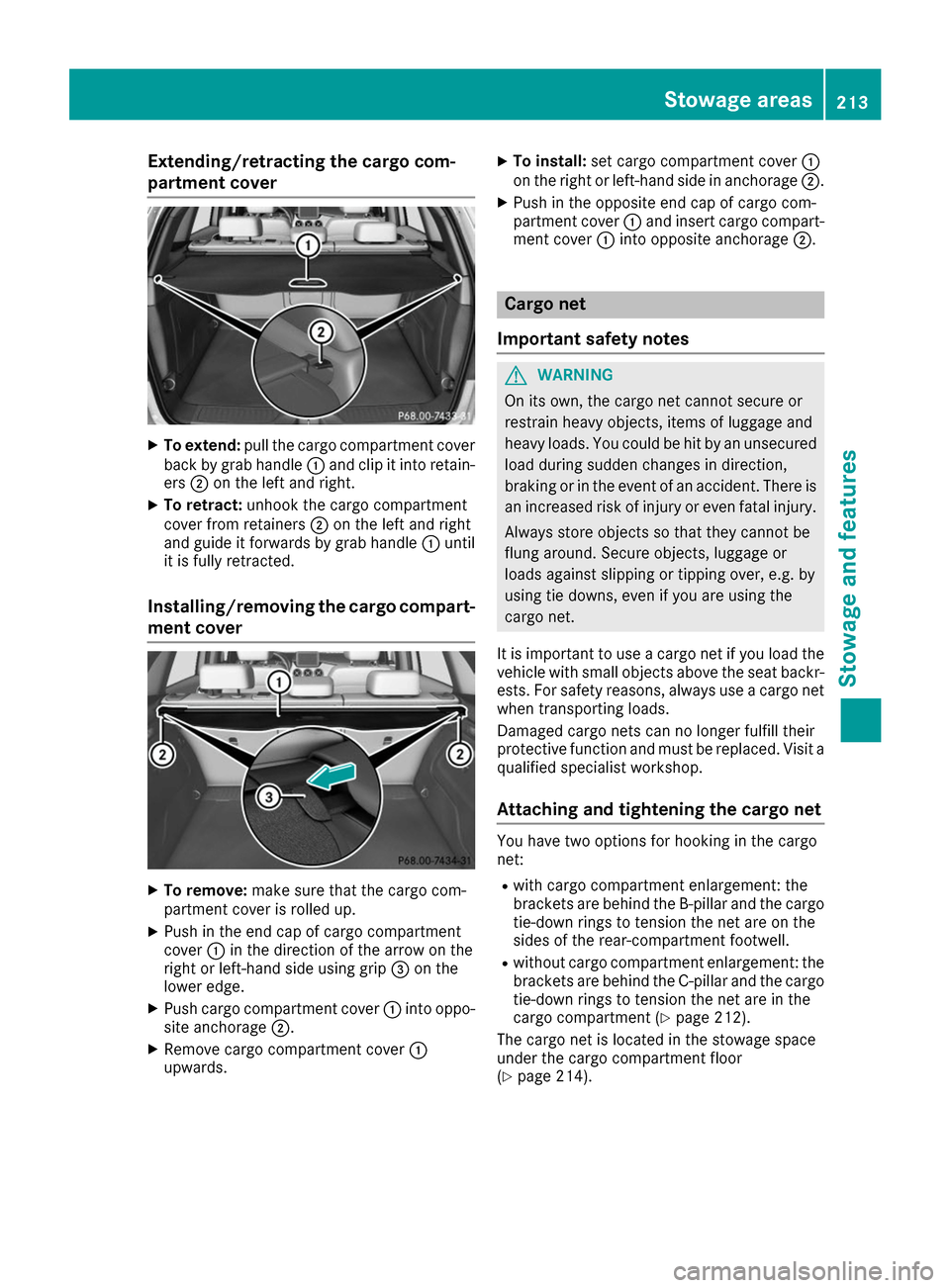
Extending/retracting the cargo com-
partment cover X
To extend: pull the cargo compartment cover
back by grab handle 0043and clip it into retain-
ers 0044on the left and right.
X To retract: unhook the cargo compartment
cover from retainers 0044on the left and right
and guide it forwards by grab handle 0043until
it is fully retracted.
Installing/removing the cargo compart- ment cover X
To remove: make sure that the cargo com-
partment cover is rolled up.
X Push in the end cap of cargo compartment
cover 0043in the direction of the arrow on the
right or left-hand side using grip 0087on the
lower edge.
X Push cargo compartment cover 0043into oppo-
site anchorage 0044.
X Remove cargo compartment cover 0043
upwards. X
To install: set cargo compartment cover 0043
on the right or left-hand side in anchorage 0044.
X Push in the opposite end cap of cargo com-
partment cover 0043and insert cargo compart-
ment cover 0043into opposite anchorage 0044. Cargo net
Important safety notes G
WARNING
On its own, the cargo net cannot secure or
restrain heavy objects, items of luggage and
heavy loads. You could be hit by an unsecured load during sudden changes in direction,
braking or in the event of an accident. There isan increased risk of injury or even fatal injury.
Always store objects so that they cannot be
flung around. Secure objects, luggage or
loads against slipping or tipping over, e.g. by
using tie downs, even if you are using the
cargo net.
It is important to use a cargo net if you load the
vehicle with small objects above the seat backr- ests. For safety reasons, always use a cargo net
when transporting loads.
Damaged cargo nets can no longer fulfill their
protective function and must be replaced. Visit a qualified specialist workshop.
Attaching and tightening the cargo net You have two options for hooking in the cargo
net:
R with cargo compartment enlargement: the
brackets are behind the B‑pillar and the cargo
tie-down rings to tension the net are on the
sides of the rear-compartment footwell.
R without cargo compartment enlargement: the
brackets are behind the C-pillar and the cargo tie-down rings to tension the net are in the
cargo compartment (Y page 212).
The cargo net is located in the stowage space
under the cargo compartment floor
(Y page 214). Stowage areas
213Stowage and features Z
Page 217 of 290
X
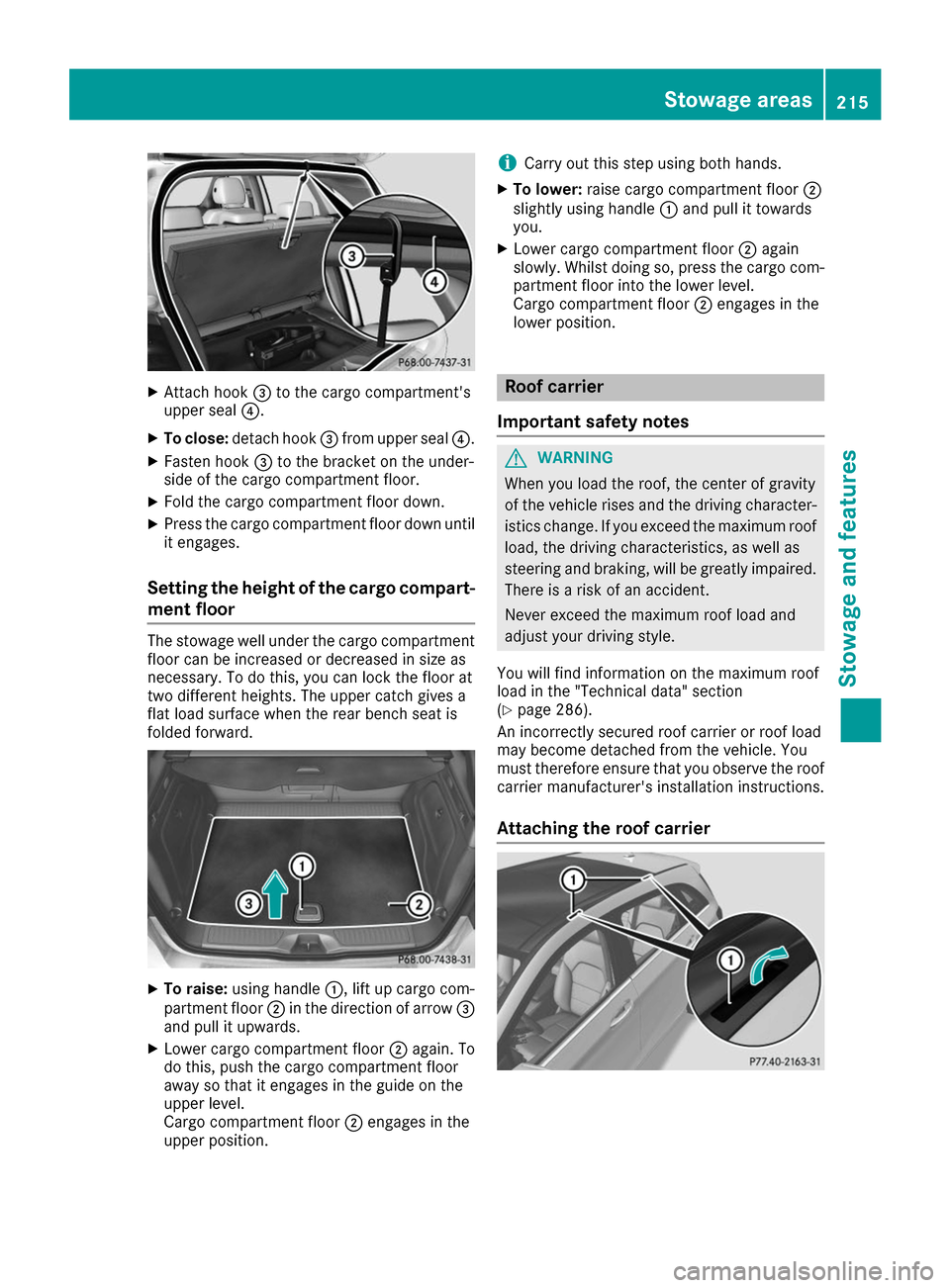
Attach hook 0087to the cargo compartment's
upper seal 0085.
X To close: detach hook 0087from upper seal 0085.
X Fasten hook 0087to the bracket on the under-
side of the cargo compartment floor.
X Fold the cargo compartment floor down.
X Press the cargo compartment floor down until
it engages.
Setting the height of the cargo compart- ment floor The stowage well under the cargo compartment
floor can be increased or decreased in size as
necessary. To do this, you can lock the floor at
two different heights. The upper catch gives a
flat load surface when the rear bench seat is
folded forward. X
To raise: using handle 0043, lift up cargo com-
partment floor 0044in the direction of arrow 0087
and pull it upwards.
X Lower cargo compartment floor 0044again. To
do this, push the cargo compartment floor
away so that it engages in the guide on the
upper level.
Cargo compartment floor 0044engages in the
upper position. i
Carry out this step using both hands.
X To lower: raise cargo compartment floor 0044
slightly using handle 0043and pull it towards
you.
X Lower cargo compartment floor 0044again
slowly. Whilst doing so, press the cargo com-
partment floor into the lower level.
Cargo compartment floor 0044engages in the
lower position. Roof carrier
Important safety notes G
WARNING
When you load the roof, the center of gravity
of the vehicle rises and the driving character- istics change. If you exceed the maximum roof
load, the driving characteristics, as well as
steering and braking, will be greatly impaired.There is a risk of an accident.
Never exceed the maximum roof load and
adjust your driving style.
You will find information on the maximum roof
load in the "Technical data" section
(Y page 286).
An incorrectly secured roof carrier or roof load
may become detached from the vehicle. You
must therefore ensure that you observe the roof
carrier manufacturer's installation instructions.
Attaching the roof carrier Stowage areas
215Stowage an d features Z
Page 218 of 290
X
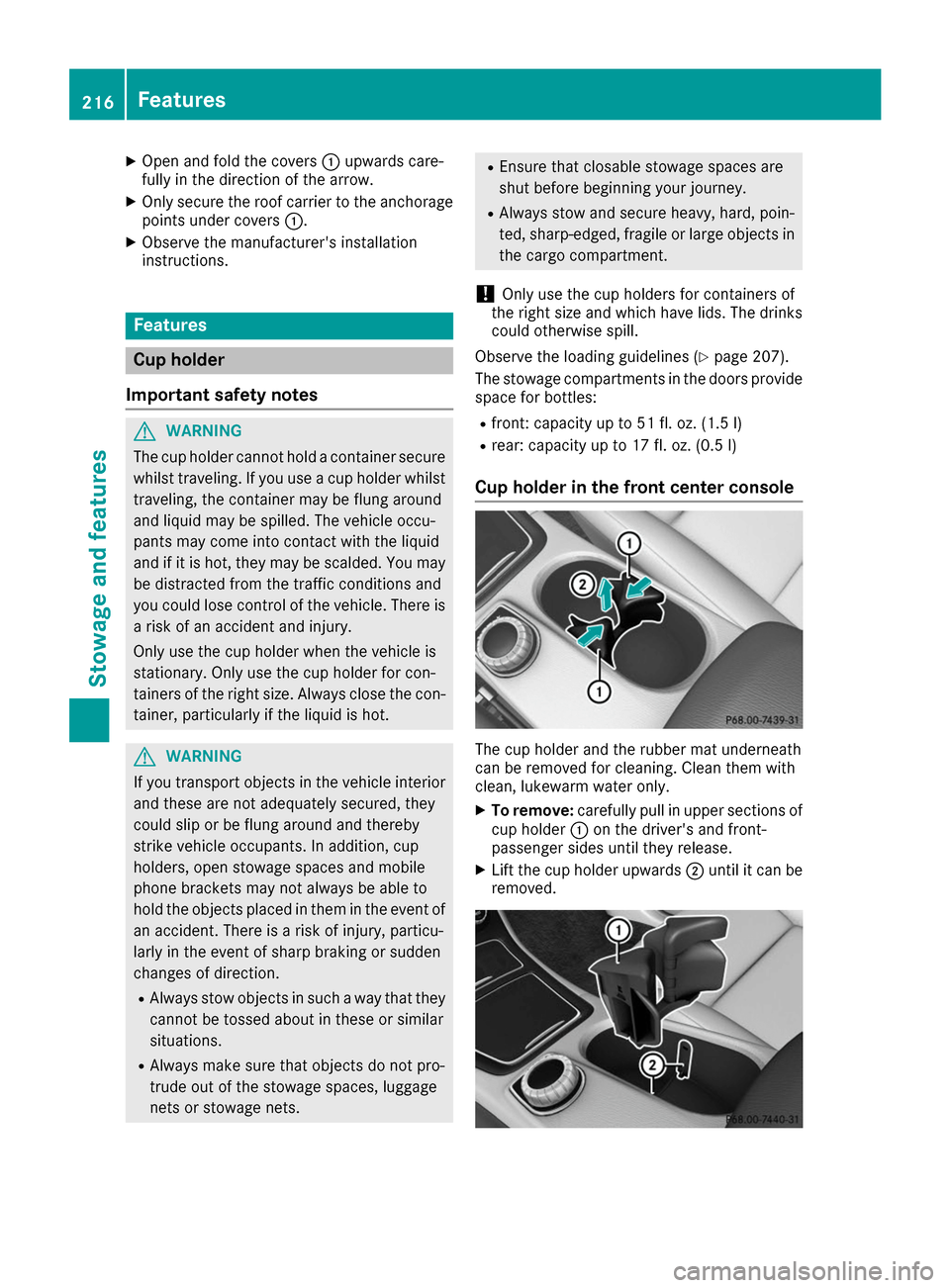
Open and fold the covers 0043upwards care-
fully in the direction of the arrow.
X Only secure the roof carrier to the anchorage
points under covers 0043.
X Observe the manufacturer's installation
instructions. Features
Cup holder
Important safety notes G
WARNING
The cup holder cannot hold a container secure whilst traveling. If you use a cup holder whilsttraveling, the container may be flung around
and liquid may be spilled. The vehicle occu-
pants may come into contact with the liquid
and if it is hot, they may be scalded. You may
be distracted from the traffic conditions and
you could lose control of the vehicle. There is a risk of an accident and injury.
Only use the cup holder when the vehicle is
stationary. Only use the cup holder for con-
tainers of the right size. Always close the con-
tainer, particularly if the liquid is hot. G
WARNING
If you transport objects in the vehicle interior and these are not adequately secured, they
could slip or be flung around and thereby
strike vehicle occupants. In addition, cup
holders, open stowage spaces and mobile
phone brackets may not always be able to
hold the objects placed in them in the event of an accident. There is a risk of injury, particu-
larly in the event of sharp braking or sudden
changes of direction.
R Always stow objects in such a way that they
cannot be tossed about in these or similar
situations.
R Always make sure that objects do not pro-
trude out of the stowage spaces, luggage
nets or stowage nets. R
Ensure that closable stowage spaces are
shut before beginning your journey.
R Always stow and secure heavy, hard, poin-
ted, sharp-edged, fragile or large objects in
the cargo compartment.
! Only use the cup holders for containers of
the right size and which have lids. The drinks could otherwise spill.
Observe the loading guidelines (Y page 207).
The stowage compartments in the doors provide
space for bottles:
R front: capacity up to 51 fl. oz. (1.5 l)
R rear: capacity up to 17 fl. oz. (0.5 l)
Cup holder in the front center console The cup holder and the rubber mat underneath
can be removed for cleaning. Clean them with
clean, lukewarm water only.
X To remove: carefully pull in upper sections of
cup holder 0043on the driver's and front-
passenger sides until they release.
X Lift the cup holder upwards 0044until it can be
removed. 216
FeaturesStowage and features